 MetaTrader 5
 Uzmanlar
 Göstergeler
 Komut dosyaları
 Kütüphaneler
 Depo
Alım-satım robotlarını ücretsiz olarak nasıl indirebileceğinizi izleyin
Bizi Twitter üzerinde bulun!
Fan sayfamıza katılın
Kodu beğendiniz mi? MetaTrader 5 terminalinde deneyin

EzoO Session Boxes - Asian, London and New York high-low boxes with auto GMT offset - MetaTrader 5 için gösterge
Vinay Saini

MQL5 / MQL4 developer specialising in XAUUSD (Gold) and forex Expert Advisors.
What I build:
- Expert Advisors: grid, hedge, breakout, session and Fibonacci-based strategies
- Custom indicators with alerts, arrows and dashboards
- TradingView Pine Script to MQL5 / MQL4 conversion
- Görüntülemeler:
- 97
- Derecelendirme:
- Yayınlandı:
-
 Alım-satım fırsatlarını kaçırıyorsunuz:
- Ücretsiz alım-satım uygulamaları
- İşlem kopyalama için 8.000'den fazla sinyal
- Finansal piyasaları keşfetmek için ekonomik haberler
Kayıt Giriş yapWeb sitesi politikasını ve kullanım şartlarını kabul edersiniz
Hesabınız yoksa, lütfen kaydolun -
 Bu koda dayalı bir robota veya göstergeye mi ihtiyacınız var? Freelance üzerinden sipariş edin
Freelance'e git

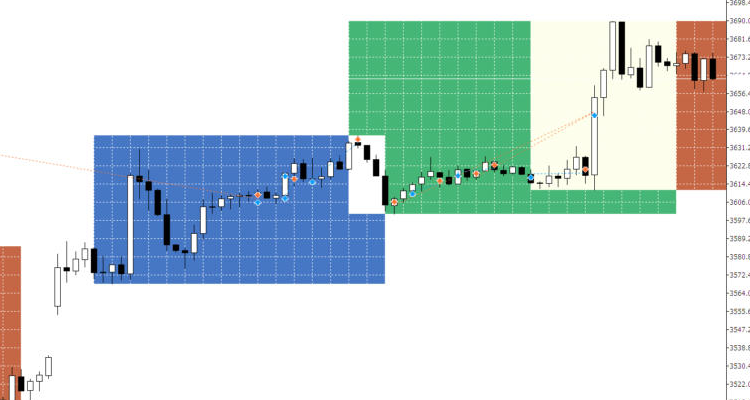 EzoO Session Boxes marks the three main trading sessions on the chart: Asian, London and New York. For every day it draws one box per session from the session start to its end, from the highest high to the lowest low inside the session, with a small label that shows the session name and its range in points. The current session box grows live until the session ends.
Session hours are entered in GMT, so you can use the same settings with any broker. On live charts the broker's GMT offset is calculated automatically (server time minus GMT, including summer time changes). In the Strategy Tester, or if you switch the auto mode off, the manual offset input is used.
Typical uses: Asian range breakouts, London session liquidity sweeps of the Asian high/low, New York reversals, and comparing session volatility day by day.
Inputs:
- Days to draw: how many past days get boxes.
- Detect broker GMT offset automatically / Broker GMT offset: offset handling.
- Fill the boxes, Show session name and range.
- For each session: show on/off, start hour and end hour (GMT), colour.
Use it on any timeframe below D1. The indicator only draws objects; it does not trade.
EzoO Smart Fibo - two-click Fibonacci with candle snap and coloured levels
Two-click Fibonacci tool: press F or the FIBO button, click the swing start and end. Points snap to the candle high/low, every level has its own colour and price label.
LERM - Liquidity and Efficiency Regime Matrix
Classifies each bar into trend, exhaustion, compression or noise regimes using Fractal Efficiency, ATR compression and a time-of-day adjusted volume Z-Score.
 EzoO Trade Manager - break-even and trailing stop for open positions (manual or any EA)
Moves the stop loss of already open positions (manual or from any EA) to break-even and then trails it by points or ATR. Never opens or closes trades, only moves the SL in your favour.
Indicator Doctor: Find Out Why Your MT5 Indicator Shows Nothing on the Chart
finds out why an indicator shows nothing on the chart. It reads the buffers of every other indicator on the chart and gives each one a verdict: not calculated, all values empty, values only in the newest bars, all values zero, no values in the visible bars, or values outside the visible scale. A panel lists the problems first, gives one line of advice and prints a report line that can be pasted into a comment.