 MetaTrader 5
 Uzmanlar
 Göstergeler
 Komut dosyaları
 Kütüphaneler
 Depo
Alım-satım robotlarını ücretsiz olarak nasıl indirebileceğinizi izleyin
Bizi Telegram üzerinde bulun!
Fan sayfamıza katılın
Fan sayfamıza katılın
Kodu beğendiniz mi? MetaTrader 5 terminalinde deneyin


- Görüntülemeler:
- 139
- Yayınlandı:
-
 Alım-satım fırsatlarını kaçırıyorsunuz:
- Ücretsiz alım-satım uygulamaları
- İşlem kopyalama için 8.000'den fazla sinyal
- Finansal piyasaları keşfetmek için ekonomik haberler
Kayıt Giriş yapWeb sitesi politikasını ve kullanım şartlarını kabul edersiniz
Hesabınız yoksa, lütfen kaydolun -
 Bu koda dayalı bir robota veya göstergeye mi ihtiyacınız var? Freelance üzerinden sipariş edin
Freelance'e git


Trade Pad puts the orders you place by hand on one panel: buy, sell, the lot, and four ways to manage what is open. Every button answers the mouse with light and movement, and every action is confirmed in plain words on the panel and in the journal.
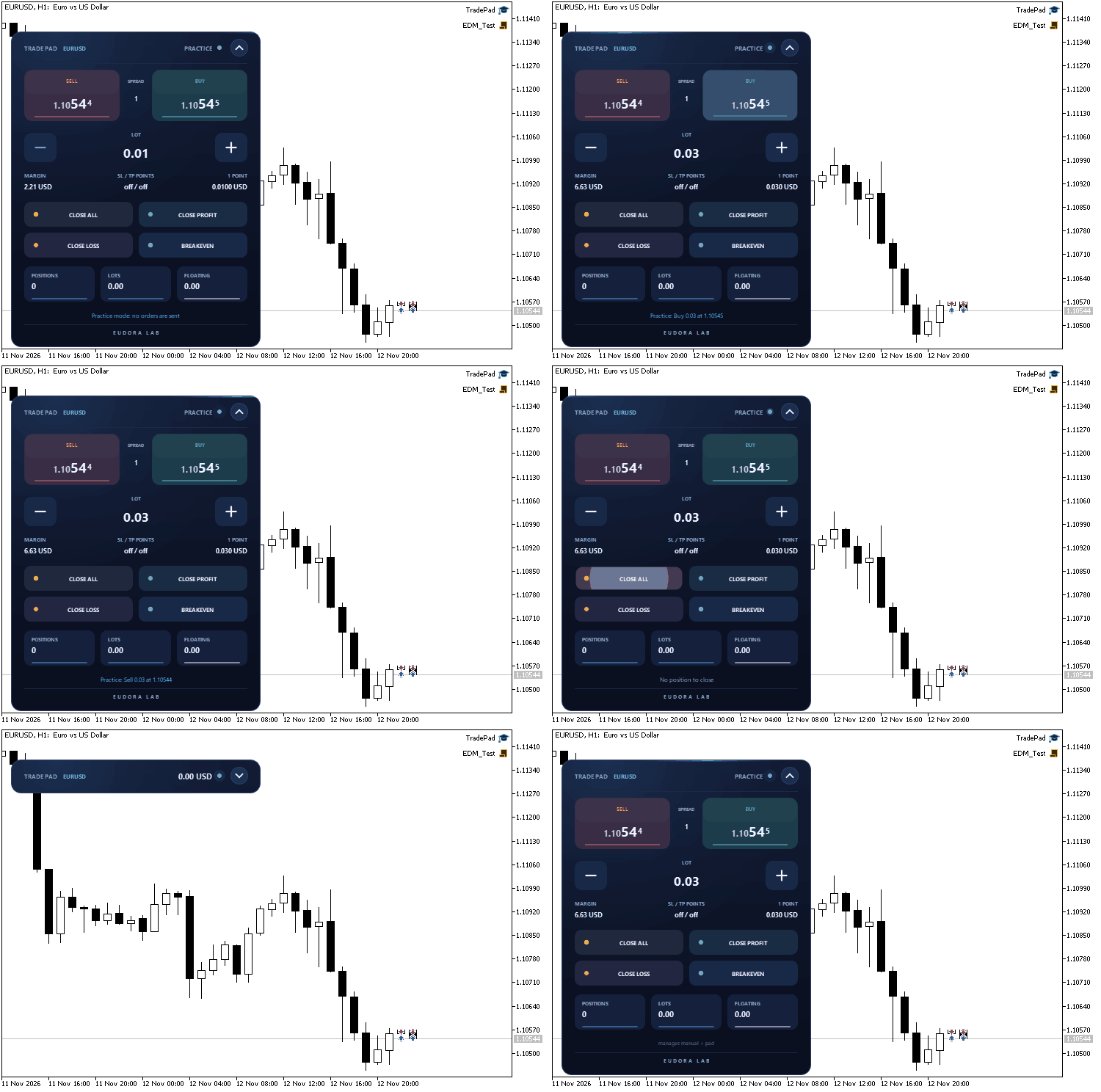
Trade Pad in practice mode on EURUSD: lot, buy, sell, breakeven, close all with confirmation, collapse and expand
The panel is drawn on a canvas with antialiased shapes and smooth transitions. It works on the symbol of the chart, on hedging and netting accounts. A button in the header folds it into a slim bar that keeps the floating result in view, and it can be dragged anywhere on the chart by its header. The code is a single file and uses only the standard Trade and Canvas libraries.
The buttons
- BUY / SELL: a market order at the lot shown, with the live ask and bid on the buttons and the spread between them.
- Lot: minus and plus move the lot by one step of the symbol, inside its minimum and maximum. Under it, the margin required and the value of one point for that lot.
- CLOSE ALL: closes the positions the pad manages. It asks for a second click: the button turns into CONFIRM for three seconds.
- CLOSE PROFIT: closes only the positions in profit.
- CLOSE LOSS: closes only the positions at a loss, with the same second click.
- BREAKEVEN: moves the stop loss to the open price on the positions in profit.
Built to be safe
- An order is sent only by a real click on the visible panel. A double click places one order, and a double click on CLOSE ALL only arms the confirmation.
- A button covered by an object of another program, or lying outside the chart window, is switched off and says so.
- By default the pad manages manual trades and the trades it opened. The positions of other Expert Advisors on the same symbol are left alone unless you choose otherwise.
- A stop loss or take profit closer than the broker allows is refused with a message that names the minimum.
- The header shows DEMO or REAL, and the buttons take a disabled look when trading is switched off in the terminal.
- Practice mode: every button moves and answers, and the status line says what would have been sent. A good way to get to know the panel.
Inputs
- Distance from the left edge / top edge: starting position of the panel, in pixels. After that the panel remembers where it was dragged, chart by chart.
- Panel size, percent and Accent color.
- Starting lot: 0 starts from the minimum lot of the symbol. The pad then remembers the last lot used.
- Stop loss, points and Take profit, points: 0 means none.
- Maximum slippage, points and Magic number.
- Positions the pad manages: manual trades and trades opened by this pad (default), only trades opened by this pad, or every position on the symbol.
- Practice mode (no orders are sent).
- Allow other programs to press the buttons: off by default. When on, a signed custom chart event can press a button; the format is documented at the top of the source file.
Attach it to a chart like any Expert Advisor and allow algorithmic trading. Try it first on a demo account or in practice mode.
 Equity Drawdown Monitor
An animated chart panel that shows the equity drawdown of the account in real time, the closed result of the day, week and month, and one line for every Expert Advisor running on the account.
Correlation Matrix Dashboard
Live rolling-correlation heatmap across your watchlist — spot hidden overlapping exposure before you stack three “different” trades that are secretly one trade.
Session Clock
An animated 24-hour dial of the Sydney, Tokyo, London and New York sessions with automatic daylight saving time, a countdown to the close of the current candle, and live spread and day range. The panel collapses into a bar and can be dragged on the chart.
MACD Signals
Indicator edition for new platform.