 MetaTrader 5
 Uzmanlar
 Göstergeler
 Komut dosyaları
 Kütüphaneler
 Depo
Depo
Fan sayfamıza katılın

AccountGuard - lock your EA to licensed accounts (single include) - MetaTrader 5 için kütüphane

- Görüntülemeler:
- 66
- Derecelendirme:
- Yayınlandı:
-
 Alım-satım fırsatlarını kaçırıyorsunuz:
- Ücretsiz alım-satım uygulamaları
- İşlem kopyalama için 8.000'den fazla sinyal
- Finansal piyasaları keşfetmek için ekonomik haberler
Kayıt Giriş yapWeb sitesi politikasını ve kullanım şartlarını kabul edersiniz
Hesabınız yoksa, lütfen kaydolun -
 Bu koda dayalı bir robota veya göstergeye mi ihtiyacınız var? Freelance üzerinden sipariş edin
Freelance'e git
Bu koda dayalı bir robota veya göstergeye mi ihtiyacınız var? Freelance üzerinden sipariş edin
Freelance'e git

AccountGuard is a small single-header account lock for MT5 Expert Advisors. Restrict your EA to specific account numbers, with an optional demo allowance, an expiry date and a Strategy Tester bypass so you can still backtest.
The licence is compiled into the .ex5 with #define lines, so the end user cannot unlock it from the Inputs tab.
How to use
#define AG_ALLOWED_LOGINS "12345678, Broker-Real8:5012345678"
#define AG_ALLOW_DEMO     true                  // any demo account can try it
#define AG_EXPIRY         D'2026.12.31 23:59'   // 0 = never
#include "AccountGuard.mqh"

int  OnInit() { AG_Init(); ... }
void OnTick()
  {
   ManageOpenPositions();        // exits keep working
   if(!AG_Allowed()) return;     // no NEW trades when locked
   ...
  }
Settings (#define, before the #include)
- AG_ALLOWED_LOGINS: licensed accounts. Each entry is a login (any server) or "server:login" (that server only). Commas, semicolons, spaces or new lines all work as separators.
- AG_ALLOW_DEMO: true = any demo account may use the EA (for trials).
- AG_EXPIRY: licence end date and time, or 0 = never. Example: a 30-day rental or a 7-day trial.
- AG_ALLOW_TESTER: true (default) = always allowed in the Strategy Tester, so buyers can backtest.
Functions
- AG_Init(): call once in OnInit.
- AG_Allowed(): call before every NEW order. Returns false when locked. Exits and trailing stops placed before the gate keep working.
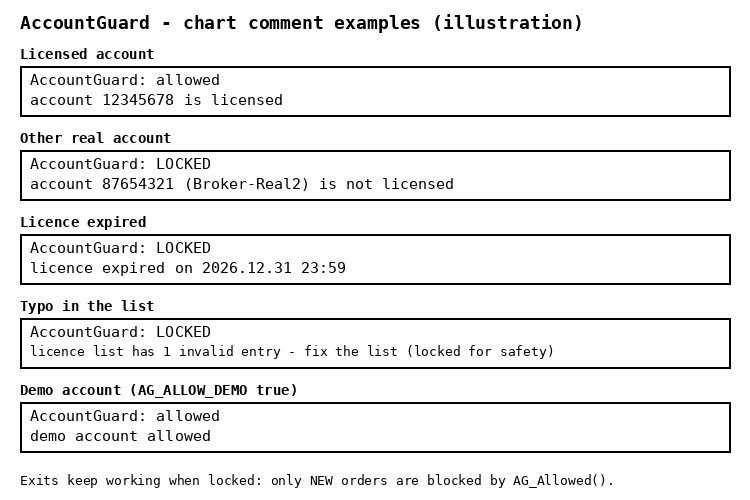
- AG_Reason(): the reason text for your panel, e.g. "account 87654321 (Broker-Real2) is not licensed".
Inputs
- InpAGMessage: text shown in the alert when the EA is locked.
- InpAGSelfTest: run the built-in self-test (32 checks, including cases that must stay locked).
Safety
- Safe by default: an empty list, a typo in the list, an expired licence, or account details that are not loaded yet (VPS start / reconnect) all mean LOCKED. It re-checks automatically.
- Expiry uses the later of the server tick time and the trade-server time, so setting the PC clock back does not extend it.
- The lock reason is printed once, not on every tick.
- No DLL, no WebRequest, no files: works in the Strategy Tester and on any VPS.
- The library never sends orders.
Example EA
AccountGuard_Demo.mq5 shows "AccountGuard: allowed" or "AccountGuard: LOCKED" with the reason on the chart. On a live or demo chart it never trades. In the Strategy Tester only (InpTesterDemo), it opens one minimum-lot example trade per day through the AG_Allowed() gate.
Honest limits
- This raises the bar against casual copying of a compiled .ex5. It is not unbreakable DRM.
- To change the licence (new account, new expiry) you recompile and send a new .ex5.
 PropGuard Lite - daily and max loss guard for prop firm accounts
Risk tool for prop firm accounts: closes all positions and blocks new trades when the daily loss or max loss limit is reached. Never opens trades on a live chart.
 Line Master – Fast and Slow Trend Lines with Trend Change Signals
Line Master is a trend-following indicator for MetaTrader 5 that displays fast and slow dynamic price lines to help traders identify market direction and potential trend changes. Blue represents a bullish trend, while red represents a bearish trend. Visual markers highlight changes in the indicator's trend state. The indicator includes adjustable Fast Length and Slow Length parameters, allowing traders to customize its sensitivity. It can be used on forex, gold (XAUUSD), indices, and other MT5-supported markets. For better results, combine its signals with price action, support and resistance levels, and proper risk management. Signals are not guaranteed and should be confirmed before entering a trade.
Live Test Bench: automated checks of an EA on a demo account
Automated checks of an Expert Advisor on a live demo chart (restart, second copy, server history, chart button) with a PASS/FAIL report.
TesterReport: read a saved Strategy Tester report into deals and trades
Reads a Strategy Tester report saved as HTML into its deals, closed trades, net profit and balance drawdowns, for comparing, combining or exporting backtests.