 MetaTrader 5
 Uzmanlar
 Göstergeler
 Komut dosyaları
 Kütüphaneler
 Depo
Depo
Fan sayfamıza katılın

Session High Low - Asian, London and New York Range Boxes - MetaTrader 5 için gösterge

What I do:
- Görüntülemeler:
- 135
- Derecelendirme:
- Yayınlandı:
-
 Alım-satım fırsatlarını kaçırıyorsunuz:
- Ücretsiz alım-satım uygulamaları
- İşlem kopyalama için 8.000'den fazla sinyal
- Finansal piyasaları keşfetmek için ekonomik haberler
Kayıt Giriş yapWeb sitesi politikasını ve kullanım şartlarını kabul edersiniz
Hesabınız yoksa, lütfen kaydolun -
 Bu koda dayalı bir robota veya göstergeye mi ihtiyacınız var? Freelance üzerinden sipariş edin
Freelance'e git
Bu koda dayalı bir robota veya göstergeye mi ihtiyacınız var? Freelance üzerinden sipariş edin
Freelance'e git

Session High Low draws the three main trading sessions on the chart: Asia, London and New York. Each session is shown as a colored box from its start to its end, covering the session's high and low. After a session closes, dotted lines extend its high and low for a few hours, so you can see at a glance where a breakout or a retest happens.
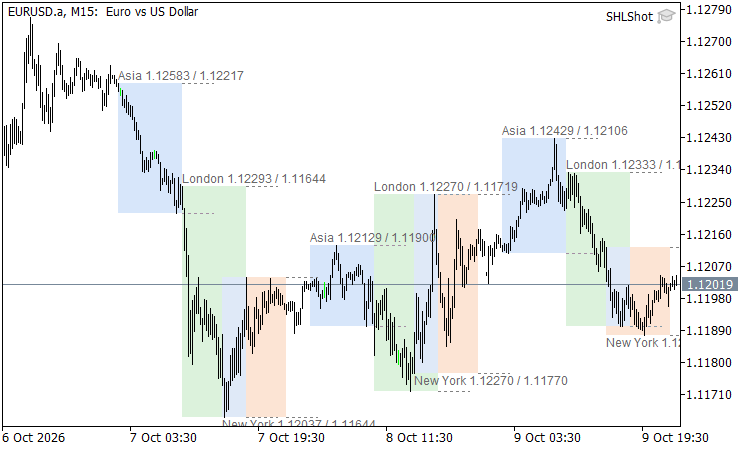
Figure 1. Asian, London and New York session boxes with high/low labels
Why it is useful
- The Asian range is the classic reference for London breakout strategies.
- The London high and low are often retested or broken during the New York session.
- The size of each range (in points, shown in the tooltip) tells you how quiet or volatile a session was.
Features
- Three sessions, each with its own on/off switch, start and end time and box color.
- Sessions that cross midnight are handled automatically (for example 22:00 - 07:00).
- The high and low are taken from M5 data, so the ranges are identical on M1, M5, M15, M30 and H1 charts.
- Labels with the session name, high and low. The New York label is placed under its box so it does not overlap London.
- Hover over a box to see the session high, low and range in points.
- The current session box keeps growing live as new highs or lows are made.
- Weekends and holidays are skipped automatically.
- Hidden on timeframes above the chosen maximum to keep higher timeframe charts clean.
Input parameters
- InpDays - number of days to draw (default 10).
- InpMaxTF - hide the indicator on timeframes above this one (default H1).
- InpShowLabels - show session names and prices.
- InpExtendHours - how long to extend the high and low lines after a session ends, in hours (0 turns them off).
- InpAsiaOn, InpAsiaStart, InpAsiaEnd, InpAsiaColor - Asian session settings.
- InpLondonOn, InpLondonStart, InpLondonEnd, InpLondonColor - London session settings.
- InpNYOn, InpNYStart, InpNYEnd, InpNYColor - New York session settings.
Important: session times are in broker server time (the time shown in Market Watch). The defaults (Asia 02:00 - 10:00, London 10:00 - 18:00, New York 15:00 - 23:00) suit brokers whose server runs at GMT+3 in summer. If your broker uses a different server time, shift all times by the difference.
 Prop Firm Equity Guard - Daily Loss Limit and Max Drawdown Protection
Closes all trades and blocks new ones when the daily loss limit, maximum loss or profit target is reached. Built for prop firm challenges. Works with manual trading and any other EA.
BotGuard - Terminal Health Heartbeat for VPS Monitoring
A lightweight, non-trading Expert Advisor that writes a JSON health heartbeat (connection, AutoTrading state, equity, daily P/L) and an equity log, so a VPS watchdog can detect frozen or disconnected terminals and alert you.
Daily PnL Percentage Overlay - prop firm daily loss limit
Displays today's floating PnL as % of balance plus how much of the daily-loss budget is consumed — the number that actually matters for prop firm rules (FTMO, Apex, TopStep). Color code: green under 50% of limit, orange under 80%, red above. Configurable reset hour. Free to use. Inputs: InpLimitPct (daily loss limit %), InpResetHour (day reset, server time), colors, font size. Attach to any chart — reads account equity live.
MACD Signals
Indicator edition for new platform.