 MetaTrader 5
 Uzmanlar
 Göstergeler
 Komut dosyaları
 Kütüphaneler
 Depo
Depo
Fan sayfamıza katılın
- Yayınlayan:
-
Ali Akbar
 Hi, I'm Ali. 24 years old, trading for around 5 years, and developing MQL5/MQL4 tools. I mainly work on automating manual strategies, fixing broken EA logic, and building clean indicators. I care more about clean architecture and proper risk management than over-complicated code. Always down to talk
 - Görüntülemeler:
- 685
- Derecelendirme:
- Yayınlandı:
- Güncellendi:
-
 Alım-satım fırsatlarını kaçırıyorsunuz:
- Ücretsiz alım-satım uygulamaları
- İşlem kopyalama için 8.000'den fazla sinyal
- Finansal piyasaları keşfetmek için ekonomik haberler
Kayıt Giriş yapWeb sitesi politikasını ve kullanım şartlarını kabul edersiniz
Hesabınız yoksa, lütfen kaydolun -
 Bu koda dayalı bir robota veya göstergeye mi ihtiyacınız var? Freelance üzerinden sipariş edin
Freelance'e git
Bu koda dayalı bir robota veya göstergeye mi ihtiyacınız var? Freelance üzerinden sipariş edin
Freelance'e git

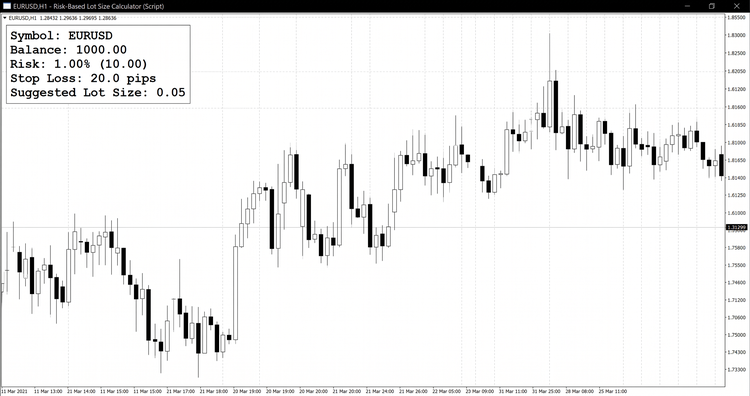 The Risk-Based Lot Size Calculator is a lightweight MQL5 script that removes the guesswork from position sizing. Instead of manually working out how many lots to trade, you enter a risk percentage and a stop loss distance, and the script instantly reports the correct lot size for the current symbol and account balance.
 Correlation-Aware Lot Size Calculator
Sizes your next trade based on the correlated risk you already have open across other positions — not just the trade in isolation.
Prop Firm Rule Checker
Checks your trade history against common prop-firm challenge rules — profit target, max daily loss, max drawdown, consistency rule, and minimum trading days — with a clear PASS/FAIL report.
Server Time Offset: the three clocks in MQL5 and how timestamps shift on export
A datetime in MQL5 is seconds since 1970 - but server time (TimeCurrent, bar times, deal times) is the broker's wall clock stored AS IF it were UTC. Export it to CSV, read it in Python or a spreadsheet with a "seconds since 1970 UTC" parser, and every timestamp shifts by the server's UTC offset. On a UTC-3 broker that is three hours: the daily bar dated 00:00 reads as 21:00 of the previous day, and "yesterday's session" silently becomes "today's, half formed". That happened to a morning report of mine before this script existed. The script prints TimeTradeServer, TimeCurrent, TimeGMT and TimeLocal, the three offsets between them, the tick lag, and this chart's last bar time in server time and in real UTC - then states the rule: export server timestamps as wall-clock text, or export the epoch together with the offset, and never let the consumer apply its own timezone.
 Exposure Cap: one position limit per symbol across all your EAs
Four EAs on the same symbol, each one honest on its own: each checks "do I have a position?" with its own magic number, sees none, and enters. On a demo account this reached 22 contracts on a symbol meant to carry 1, and a watchdog had to close 16 positions in one morning. The cap belongs at the door, not after the fact. ExposureCap::Allowed(symbol, lots, cap) sums the volume of every open position on the symbol - all magic numbers, manual trades included - and refuses the order BEFORE it is sent when it would breach the cap. One log line with the three numbers (held, requested, cap) says why. Deliberately simple: gross exposure, no netting of longs against shorts, no per-EA quota. It is a check, not a lock: two EAs deciding on the same tick can both pass; in practice EAs on different charts decide on different ticks. The demo script prints held / cap / room for the current symbol and shows the refusal line. Nothing is traded.