Alım-satım robotlarını ücretsiz olarak nasıl indirebileceğinizi izleyin
Bizi Telegram üzerinde bulun!
Fan sayfamıza katılın
Kodu ilginç mi buldunuz?
Öyleyse bir link gönderin -
başkalarının da faydalanmasını sağlayın
Kodu beğendiniz mi? MetaTrader 5 terminalinde deneyin
Göstergeler

Quantora Trading Journal Panel MT5 - Professional Daily Trading Performance Analyzer - MetaTrader 5 için gösterge

Görüntülemeler:
54
Yayınlandı:
MQL5 Freelance Bu koda dayalı bir robota veya göstergeye mi ihtiyacınız var? Freelance üzerinden sipariş edin Freelance'e git
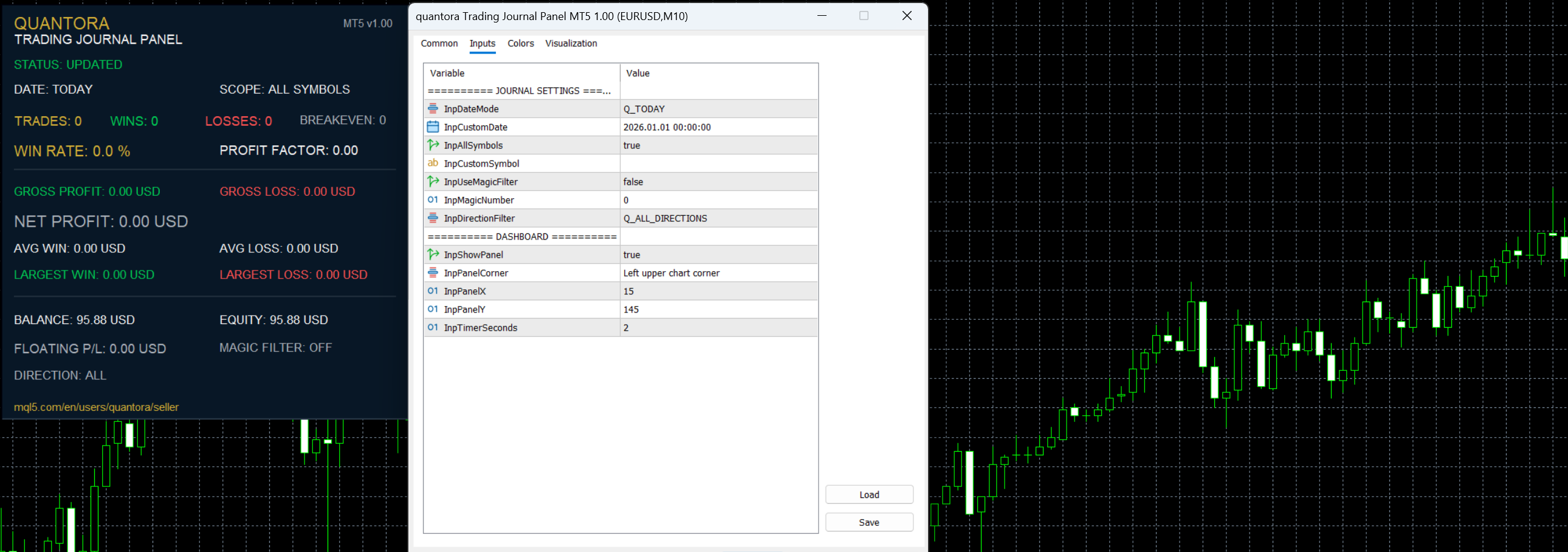

Quantora Trading Journal Panel MT5 is a professional trading performance analysis utility designed for MetaTrader 5.

The indicator analyzes closed trading deals from the selected date and transforms account history into an easy-to-read performance dashboard.

Instead of manually reviewing individual trades in the MetaTrader 5 history tab, traders can quickly monitor important statistics including total trades, winning trades, losing trades, win rate, gross profit, gross loss, net profit, average win, average loss, largest win, largest loss and profit factor.

The dashboard also displays current account information including Balance, Equity and Floating Profit/Loss.

Main Features

  • Daily trading performance analysis
  • Today Mode
  • Custom Date Mode
  • All Symbols analysis
  • Custom Symbol filtering
  • Optional Magic Number filtering
  • BUY only filtering
  • SELL only filtering
  • All Directions mode
  • Total Closed Deals
  • Winning Deals
  • Losing Deals
  • Breakeven Deals
  • Win Rate %
  • Gross Profit
  • Gross Loss
  • Net Profit
  • Average Win
  • Average Loss
  • Largest Win
  • Largest Loss
  • Profit Factor
  • Current Account Balance
  • Current Account Equity
  • Floating Profit/Loss
  • Automatic real-time updates
  • Professional Quantora dashboard
  • Low CPU usage
  • Works on all chart timeframes
  • Free and open-source MQ5 code

Daily Performance Analysis

By default, the indicator operates in TODAY mode.

It automatically analyzes closed deals from the beginning of the current broker day until the latest available account history.

The dashboard provides a quick summary such as:

                                                    TOTAL TRADES       18
WINNING TRADES     11
LOSING TRADES       7
BREAKEVEN           0

WIN RATE         61.1%

This makes it easier to evaluate the current day's trading performance without manually calculating statistics.

Custom Date Mode

Users can switch from Today to Custom Date mode.

When enabled, the indicator analyzes trading activity for the selected calendar date.

This can be useful when reviewing previous trading sessions or comparing individual trading days.

Profit Summary

The indicator automatically calculates important profit statistics from closed deals.

Gross Profit

Total positive results generated by winning closed deals.

Gross Loss

Total negative results generated by losing closed deals.

Net Profit

The combined result of the analyzed closed deals, including available profit, swap, commission and fee information.

Example:

                                                    GROSS PROFIT      842.50 USD
GROSS LOSS       -421.20 USD
NET PROFIT        421.30 USD

Average Results

Quantora Trading Journal Panel calculates:

Average Win

Average monetary result of profitable closed deals.

Average Loss

Average monetary result of losing closed deals.

These statistics can help traders understand the relationship between their typical profitable and losing outcomes.

Extreme Results

The dashboard also identifies:

Largest Win

The largest positive closed-deal result during the analyzed period.

Largest Loss

The largest negative closed-deal result during the analyzed period.

These values provide additional insight into the distribution of trading results.

Profit Factor

Profit Factor is calculated using:

Gross Profit / Absolute Gross Loss

For example:

                                                    Gross Profit = $842.50
Gross Loss   = $421.20

Profit Factor ≈ 2.00

A higher value indicates that the gross profits during the analyzed period were larger relative to gross losses.

Profit Factor should not be considered independently when evaluating a trading strategy.

Symbol Filter

The indicator supports two analysis modes:

ALL SYMBOLS

Analyzes qualifying closed deals across the account.

CUSTOM SYMBOL

Restricts the analysis to the selected trading symbol.

If no custom symbol is entered while symbol filtering is active, the indicator uses the current chart symbol.

Magic Number Filter

The optional Magic Number filter allows traders to isolate results associated with a specific Expert Advisor.

This can be particularly useful when several Expert Advisors or strategies operate on the same MetaTrader 5 account.

Disable the filter to analyze qualifying deals regardless of Magic Number.

Direction Filter

Closed deals can also be filtered according to direction:

ALL

BUY

SELL

This provides additional flexibility when analyzing trading history.

Account Overview

In addition to historical performance, the dashboard displays current account information:

Balance

Current account balance.

Equity

Current account equity.

Floating P/L

Current unrealized profit or loss from open positions.

Floating P/L is displayed separately from the historical closed-deal statistics.

Automatic Updates

The dashboard automatically refreshes according to the configured timer interval.

There is no need to manually refresh the chart after a trade is closed.

The default update interval is designed to provide current information while maintaining low CPU usage.

Installation

Place:

Quantora_Trading_Journal_Panel_MT5.mq5

inside:

MQL5 → Indicators

Compile the source code using MetaEditor.

Then attach Quantora Trading Journal Panel MT5 to any MetaTrader 5 chart.

Configure the desired:

Date Mode
Symbol Filter
Magic Number Filter
Direction Filter

The dashboard will automatically analyze the corresponding closed deals.

Important Note

Statistics are calculated from qualifying closed deals in MetaTrader 5 account history.

A single trading position can contain multiple deals. Therefore, partial position closures or other execution structures may be represented as separate closed deals in the statistics.

Results may also be affected by the account type, broker execution model, commissions, swaps, fees and available historical data.

The indicator is designed as an informational trading-analysis utility. It does not open, modify or close trading positions and does not provide financial advice.

Product Information

Version: 1.00
Platform: MetaTrader 5
Program Type: Indicator
Category: Trading Utilities / Account Analysis
License: Free / Open Source

Developed by QUANTORA

Professional MetaTrader 5 Trading Tools, Indicators and Expert Advisors.

More Professional Quantora Trading Products

Explore Quantora's professional MetaTrader 5 Expert Advisors, premium indicators and trading tools on the official MQL5 Market:

View All Quantora Products on MQL5 Market →

Quantora Trading Clock MT5 - Professional Global Market Time Dashboard Quantora Trading Clock MT5 - Professional Global Market Time Dashboard

Professional open-source Trading Clock for MetaTrader 5. Displays broker server time, local time, UTC and Sydney, Tokyo, London and New York market times with live session status and overlap information.

Quantora Market Status Dashboard MT5 - Professional Real-Time Market Analysis Pan Quantora Market Status Dashboard MT5 - Professional Real-Time Market Analysis Pan

Professional open-source Market Status Dashboard for MetaTrader 5. Monitor spread, ATR volatility, volume activity, daily range, ADR usage, trading sessions and overall market conditions in real time.

Quantora Drawdown Monitor MT5 - Professional Account Risk and Equity Drawdown Monitor Quantora Drawdown Monitor MT5 - Professional Account Risk and Equity Drawdown Monitor

Professional open-source Drawdown Monitor for MetaTrader 5. Monitors balance, equity, floating P/L, current drawdown, daily performance, peak equity and maximum drawdown with configurable risk levels.

Quantora Daily Profit Loss Monitor MT5 - Professional Daily Trading Performance Monitor Quantora Daily Profit Loss Monitor MT5 - Professional Daily Trading Performance Monitor

Professional open-source Daily Profit and Loss Monitor for MetaTrader 5. Tracks daily closed profit, losses, floating P/L, win rate, daily return and configurable profit targets and loss limits.