 MetaTrader 5
 Uzmanlar
 Göstergeler
 Komut dosyaları
 Kütüphaneler
 Depo
Alım-satım robotlarını ücretsiz olarak nasıl indirebileceğinizi izleyin
Bizi Facebook üzerinde bulun!
Fan sayfamıza katılın
Fan sayfamıza katılın
Kodu beğendiniz mi? MetaTrader 5 terminalinde deneyin

Trade signal based on PullBack and Candle (for MQL5 Wizard) - MetaTrader 5 için kütüphane

- Görüntülemeler:
- 12582
- Derecelendirme:
- Yayınlandı:
- Güncellendi:
-
 Alım-satım fırsatlarını kaçırıyorsunuz:
- Ücretsiz alım-satım uygulamaları
- İşlem kopyalama için 8.000'den fazla sinyal
- Finansal piyasaları keşfetmek için ekonomik haberler
Kayıt Giriş yapWeb sitesi politikasını ve kullanım şartlarını kabul edersiniz
Hesabınız yoksa, lütfen kaydolun -
 Bu koda dayalı bir robota veya göstergeye mi ihtiyacınız var? Freelance üzerinden sipariş edin
Freelance'e git
This EA will make a trade based on "Pull Back and Candle Action".
Candle action part used "acandlepatterns.mqh" provided by MetaQuotes.
This program was very useful for improving the entry accuracy. Thank you.
I added the mq5 file that was automatically generated just in case, but you do not have to use it by force.
Because you can create mq5 file automatically customized as you like using MQL 5 wizard.
1. Open Position
[Open Long]
Open the Long position when all of the following conditions are satisfied.
- Price is greater than MA
- RSI is less than set value
- Candle action is on the bear side
[Open Short]
Open the Short position when all of the following conditions are satisfied.
- Price is lower than MA
- RSI is larger than set value
- Candle action is bull side
[Common condition]
- Do not open the position if the spread is less than the set value. (If you set it to zero, this condition will be ignored.)
2. Close Position
The condition to close the position is simple.
[Close Long]
- Close the position when RSI falls below the set value.
[Close Short]
- Close the position when RSI exceeds the set value.
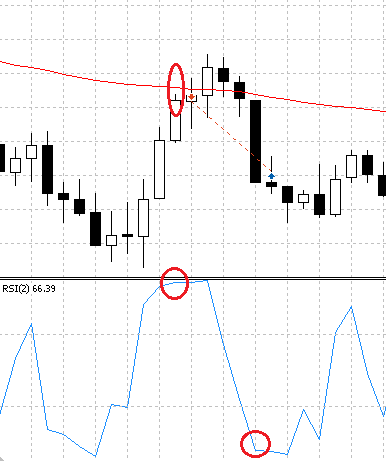
3. Image diagram of open / close
Long open and close.
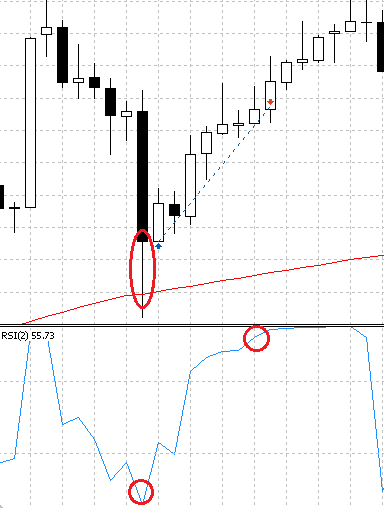
Short open and close.
4. Create an expert advisor using the MQL 5 wizard
Once you compile SignalPullBackCandle.mqh you will be able to use it with the MQL5 wizard.
To generate a transaction robot based on this logic, select Signals of indicator 'PullBack And Candle' in the signal property of the MQL 5 wizard.
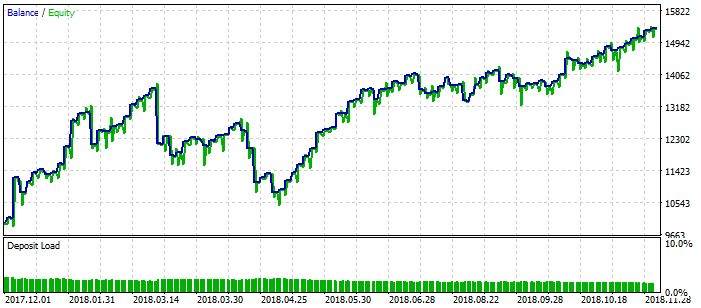
5. Test result
Let's backtest of EA.
The setting value is below.
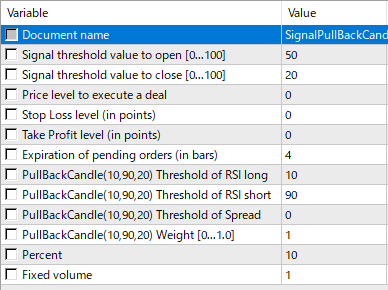
Test period: 01.12.2017 - 11.12.2018
Timeframe: M15 (even for others)
USDJPY(M15)
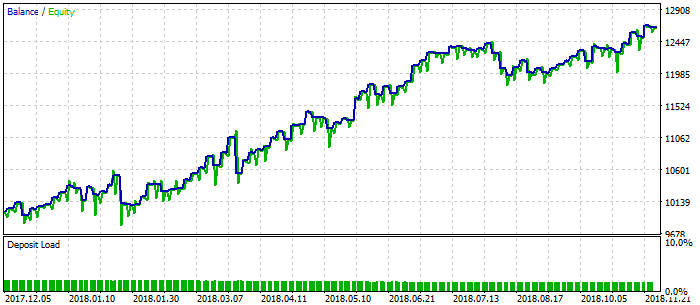
GBPJPY(M15)
Attachment: The "SignalPullBackCandle.mqh and acandlepatterns.mqh" must be placed in terminal_data_folder \ MQL5 \ Include \ Expert \ Signal \ MySignal.
The ExpertsBands.mq5 file contains the expert advisor code that was created using the MQL 5 wizard.
 Trend detection index
Trend continuation factor (of average)
Trend continuation factor - averages pre-smoothed (filtered)