 MetaTrader 5
 Uzmanlar
 Göstergeler
 Komut dosyaları
 Kütüphaneler
 Depo
Alım-satım robotlarını ücretsiz olarak nasıl indirebileceğinizi izleyin
Bizi Twitter üzerinde bulun!
Fan sayfamıza katılın
Fan sayfamıza katılın
Kodu beğendiniz mi? MetaTrader 5 terminalinde deneyin

Trade signal based on simple Bollinger bands - MetaTrader 5 için kütüphane

- Görüntülemeler:
- 10613
- Derecelendirme:
- Yayınlandı:
- Güncellendi:
-
 Alım-satım fırsatlarını kaçırıyorsunuz:
- Ücretsiz alım-satım uygulamaları
- İşlem kopyalama için 8.000'den fazla sinyal
- Finansal piyasaları keşfetmek için ekonomik haberler
Kayıt Giriş yapWeb sitesi politikasını ve kullanım şartlarını kabul edersiniz
Hesabınız yoksa, lütfen kaydolun -
 Bu koda dayalı bir robota veya göstergeye mi ihtiyacınız var? Freelance üzerinden sipariş edin
Freelance'e git
I created it because there is no Bollinger bands in the MQL 5 wizard for some reason.
It is not the purpose to make profit on this program alone.
It is a purpose to incorporate it into the MQL 5 Wizard.
The trade signal is very simple.
For basic usage of the MQL 5 wizard, see " Create your own trading robot in 6 steps ".
1. Trade signal
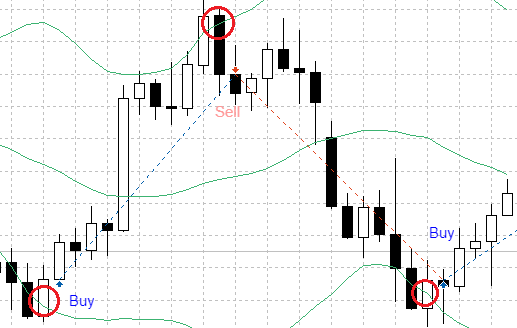
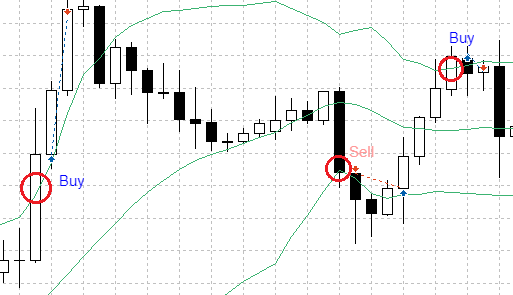
The trade signal consists of two patterns.
pattern 1
- Buy signal: If the closing price before two is lower than the low bands two before and the close price before one is higher than the low bands one before ago
- Selling signal: the closing price before two is higher than the upper bands in two front and the closing price in the previous one is lower than the closing price upper bands in the previous one
Pattern 2
- Buy signal: If the closing price before two is lower than the upper bands in front two and the closing price in the previous one is higher than the one in front one
- Selling signal: When the closing price before two is higher than the low bands two before and the closing price before two is lower than the low bands one before
2. Create an expert advisor using the MQL 5 wizard
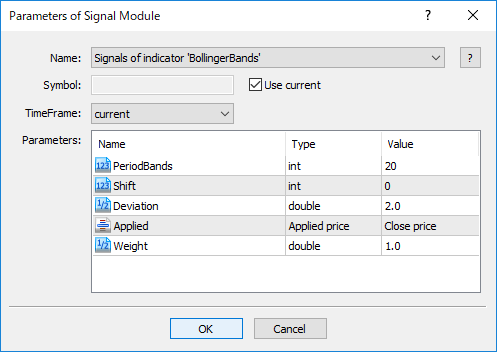
Once you compile SignalBands.mqh you will be able to use it with the MQL5 wizard.
To generate a transaction robot based on this logic, select Signals of indicator 'Bollinger Bands' in the signal property of the MQL 5 wizard.
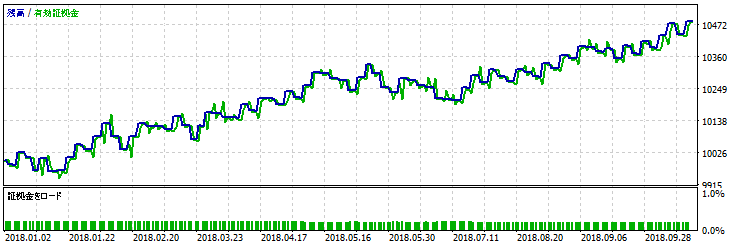
3. Test result
Let's examine back test of expert advisor's history data (USDJPY H4, test period: 01.01.2018 - 01.11.2018, PeriodBands = 120, Shift = 0, Deviation = 1.6, Applied = closing price, Weight = 1.0) .
Attachment: The SignalBands.mqh of the SignalBands class must be placed in terminal_data_folder \ MQL5 \ Include \ Expert \ Signal \ MySignal.
The ExpertsBands.mq5 file contains the expert advisor code that was created using the MQL 5 wizard.
 Momentum ratio oscillator
Highest high & lowest low support resistance
Highest high & lowest low support resistance