 MetaTrader 5
 Uzmanlar
 Göstergeler
 Komut dosyaları
 Kütüphaneler
 Depo
Depo
Fan sayfamıza katılın

Martingale Bone Crusher - MetaTrader 4 için uzman

- Görüntülemeler:
- 31750
- Derecelendirme:
- Yayınlandı:
- Güncellendi:
-
 Alım-satım fırsatlarını kaçırıyorsunuz:
- Ücretsiz alım-satım uygulamaları
- İşlem kopyalama için 8.000'den fazla sinyal
- Finansal piyasaları keşfetmek için ekonomik haberler
Kayıt Giriş yapWeb sitesi politikasını ve kullanım şartlarını kabul edersiniz
Hesabınız yoksa, lütfen kaydolun -
 Bu koda dayalı bir robota veya göstergeye mi ihtiyacınız var? Freelance üzerinden sipariş edin
Freelance'e git
Bu koda dayalı bir robota veya göstergeye mi ihtiyacınız var? Freelance üzerinden sipariş edin
Freelance'e git
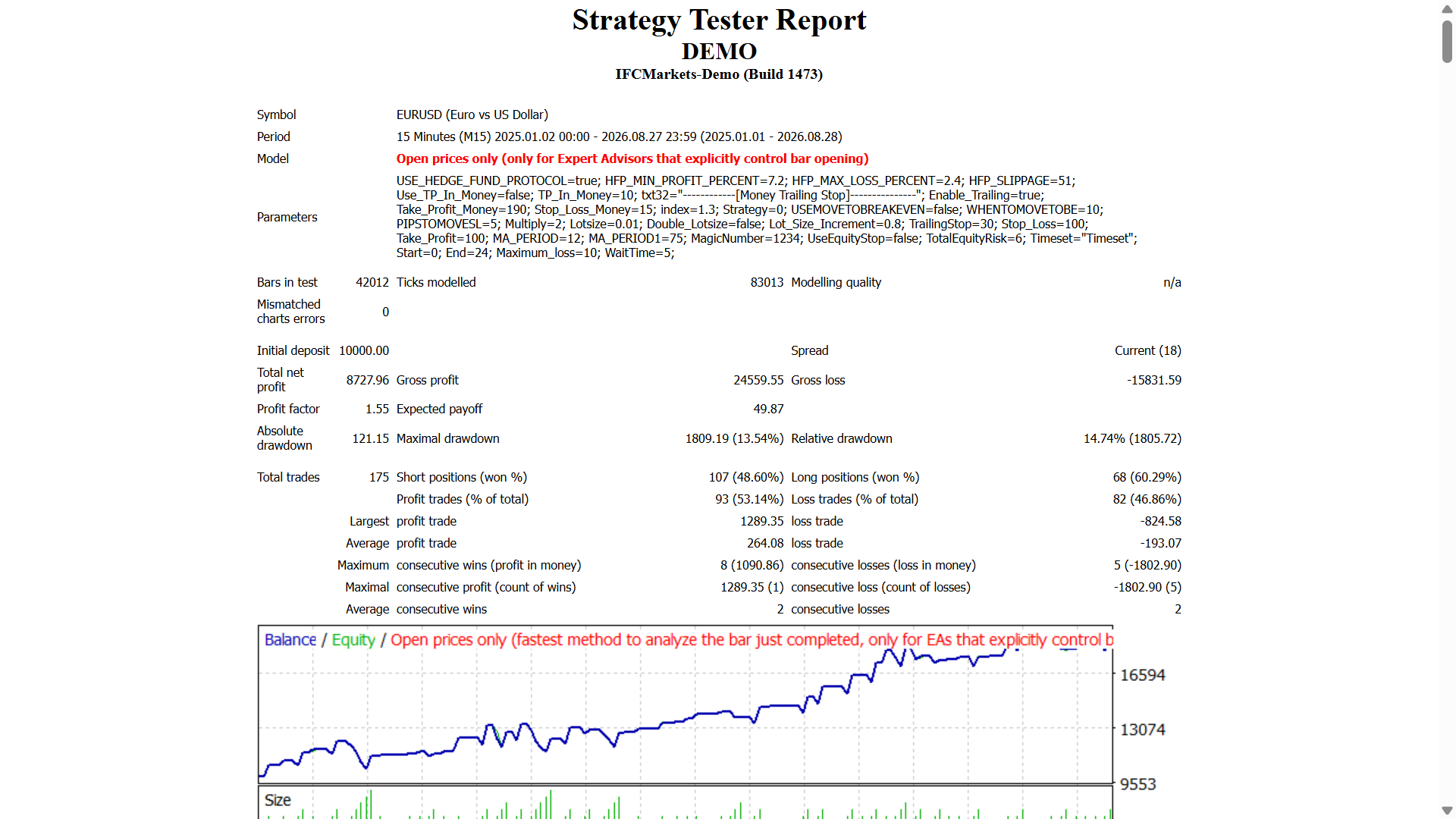
The EA uses two modes of martingale strategy:
Strategy 1The EA enters trades according to the price that is above or below Moving Average. If we lose a trade then the EA will take a new trade in the opposite direction with a multiplied lot size.
Strategy 2The EA enters trades according to the price that is above or below Moving Average. If we lose a trade then the EA will take a new trade with a multiplied lot size, according to the price that is above or below Moving Average regardless if the previous trade was buy or sell.
- Best timeframe is 15M.
- Start with 0.01 lot.
- Try it on demo first.
- This EA trades only with the price of open candle!
- If you do not want to trade with increasing lot size when you lose a trade set:"IncreaseFactor=0"
- It is possible to activate a hedge fund protocol for low drawdown
Inputs
- ==================HEDGE FUND PROTOCOL==========================
- HEDGE FUND PROTOCOL -Enabale Draw dwon control (values:true/false).
- Close basket at +0.10% MIN_PROFIT_PERCENT (values:0.1-0.6).
- Close basket at -0.50% MAX_LOSS_PERCENT (values: 0.5-0.8).
- HEDGE FUND PROTOCOL_SLIPPAGE (values: 10-50).
- =================================================================
- Use_TP_In_Money- Use Take Profit In Money (values:true/false).
- TP_In_Money- Take Profit In Money (values: 10-100).
- ------------[Money Trailing Stop For Multiple Trades]----------------------
- Enable_Trailing-Enable_Trailing with money (values:true/false).
- Take Profit In Money (in current currency) (values: 25-200).
- Stop Loss In Money(in current currency) (values: 1-20).
- Loss Index (values: 1.1-2).
- --------------------------------------------------------------------------------------
- Strategy - strategy 1,strategy 2
- USEMOVETOBREAKEVEN - Enable "no loss" break even system (values: 0-1).
- WHENTOMOVETOBE - When to move break even (values: 10-100).
- PIPSTOMOVESL - How much pips to move stop loss (values: 10-100).
- Multiply - Multiply for Martingale (values: 2-4).
- Lotsize - Lot size (values: 0.01-10).
- TrailingStop-set a value from 10 to 100 to activate trailing stop loss & take profit, "0" will not activate trailing stop loss.
- Stop_Loss - Stop Loss pips distance (values: 10-100).
- Take_Profit - Take Profit pips distance (values: 10-100).
- MA_period - Moving Average period (values: 10-200).
- MagicNumber - Magic number (values: 1-100000).
- Start - Start hour(values: 0-24).
- End - End hour(values: 0-24).
- Maximum_loss - Maximum loss(values: 0-10)
- WaitTime - Wait time for loss in minutes (values: 0-999999)
-You can use it as hedging grid EA or a single trade EA.
-How to perform back test:https://bit.ly/2CD7XWD
 Hourly Pivot Points with Color Filling
Calculate Pivot Points based on H1 bar, according to normal formula and Fibonacci, with color filling.
RSISignal
This indicator is based on original RSI, but more features are added to general signals and watch the strength of the price movement. The main purpose is to general buy/sell signals using smoothed RSI and its MA.
Record IsConnected, Spread, Stop, FreezeLevel
EA is run say once every minute and writes the status of IsConnected, spread, stop and freeze level to a file.
 Average Volume per Hour
Calculate the average volume per hour in a 1 hour chart.