PropGuard Trade Manager
- Утилиты
- Версия: 1.10
- Активации: 10

PropGuard Trade Manager is a utility for traders working under evaluation or funded-account rules. It does two jobs:
- Fast, risk-based execution. You set the risk and the stop. PropGuard works out the lot size for the symbol you are trading and sends the order.
- Rule enforcement. It checks the account against the limits you configure, on every tick and every second. If equity reaches your safety buffer, it closes positions, deletes pending orders and locks trading.
PropGuard only places an order when you click a button or press a hotkey. It does not generate trading signals.
Ready in three clicks
On first start, a short setup asks for your account type, account size and daily reset time, then configures everything. Each preset is explained in plain words.
Know exactly where you stand
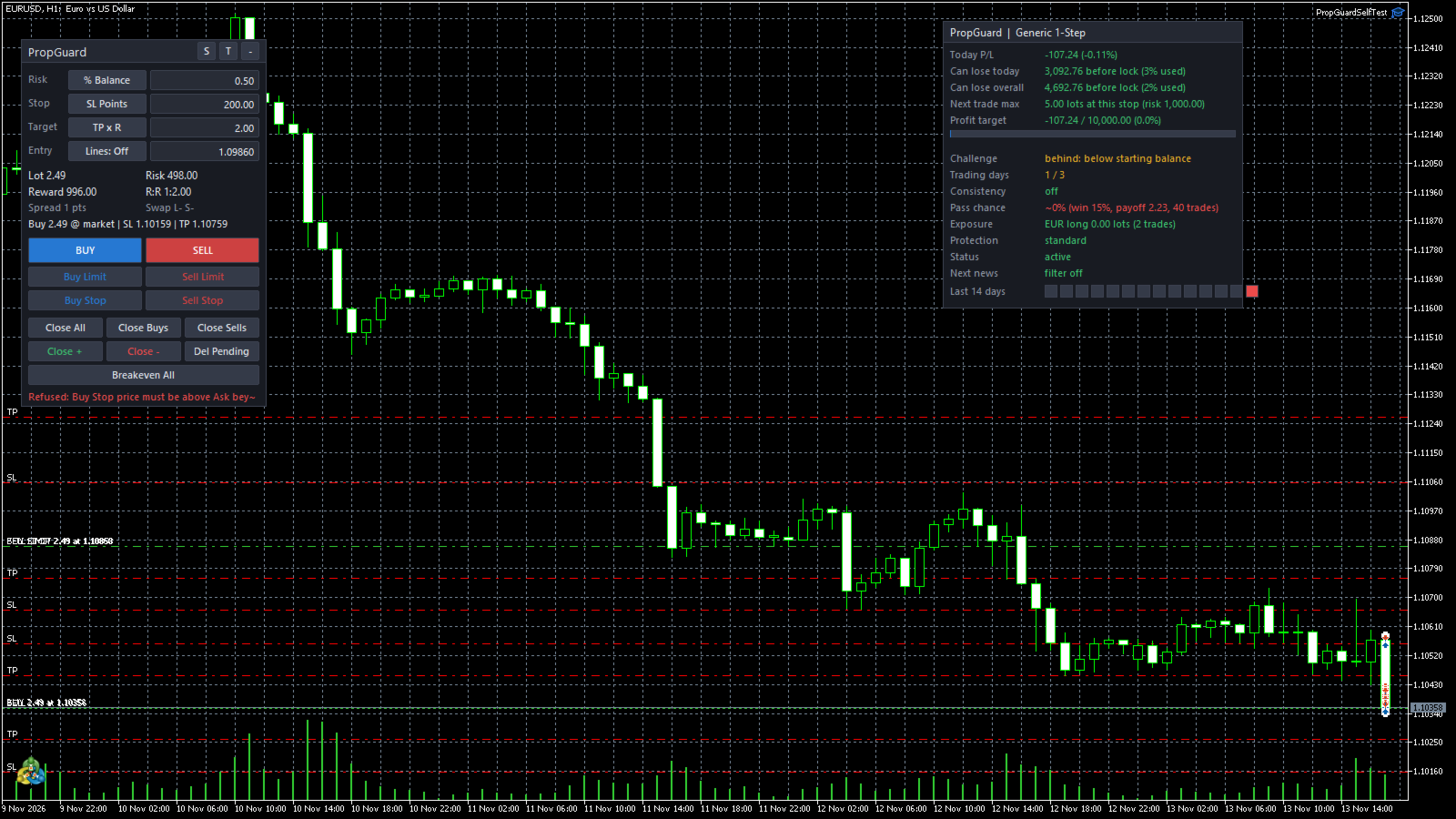
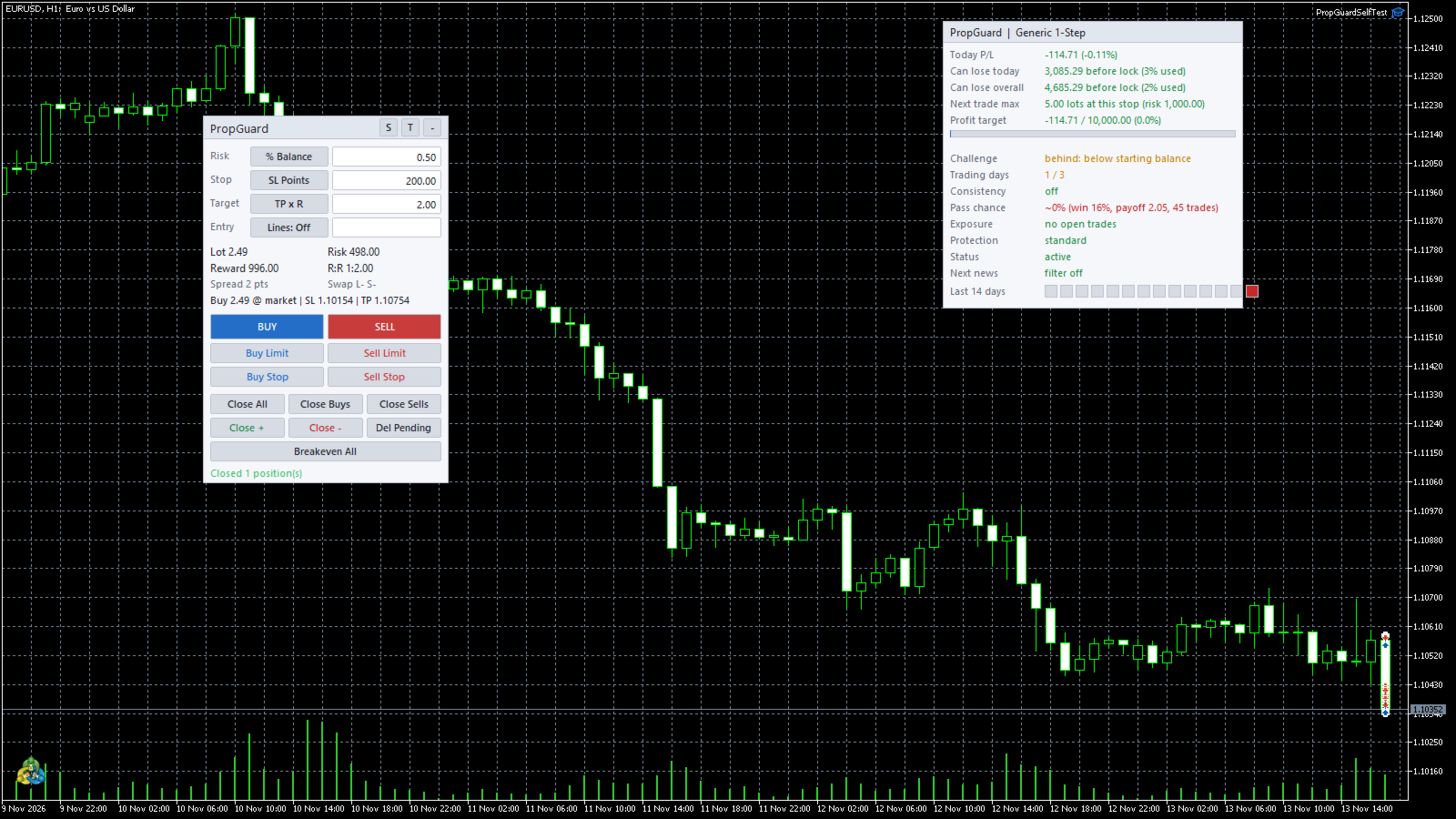
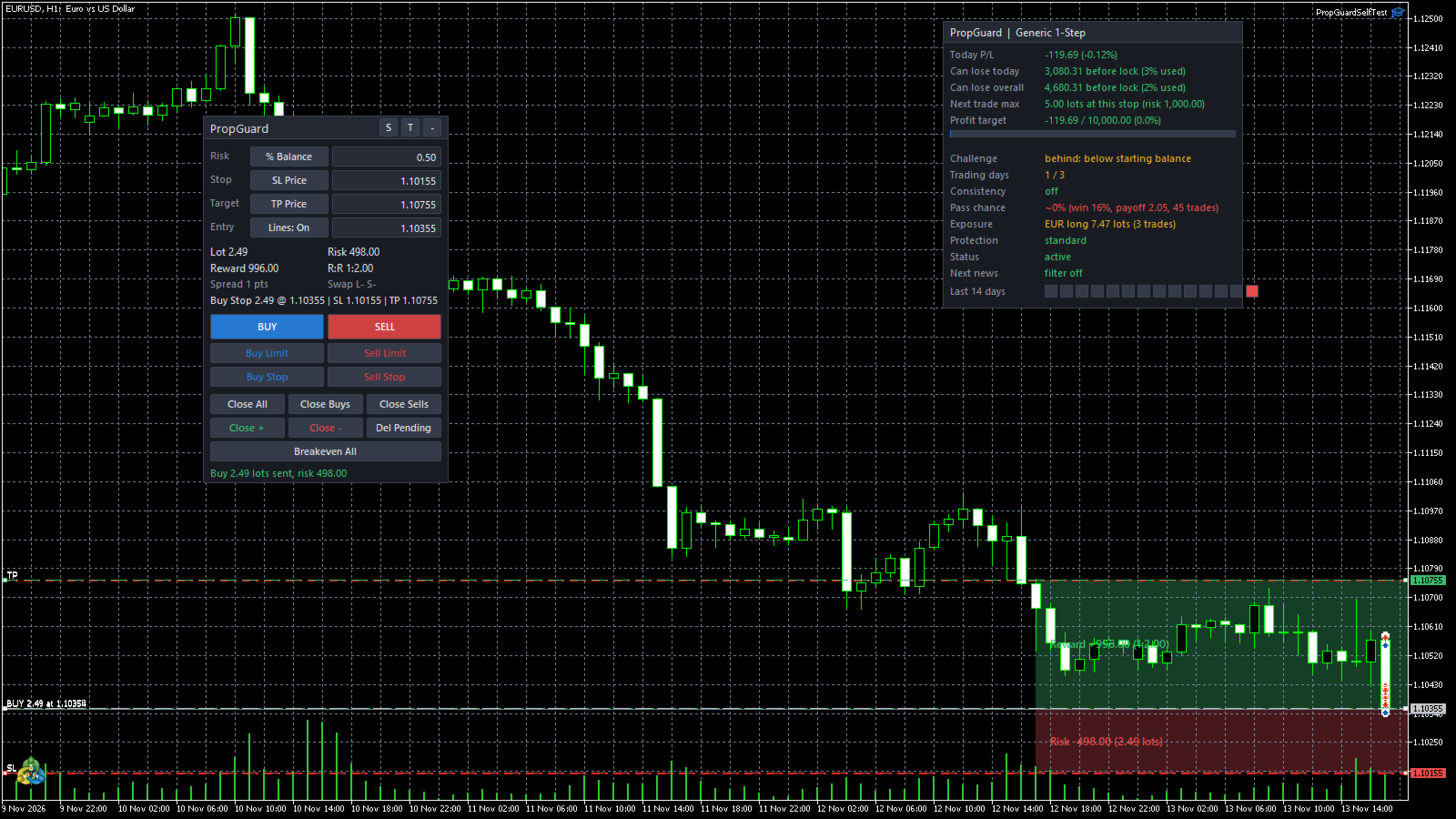
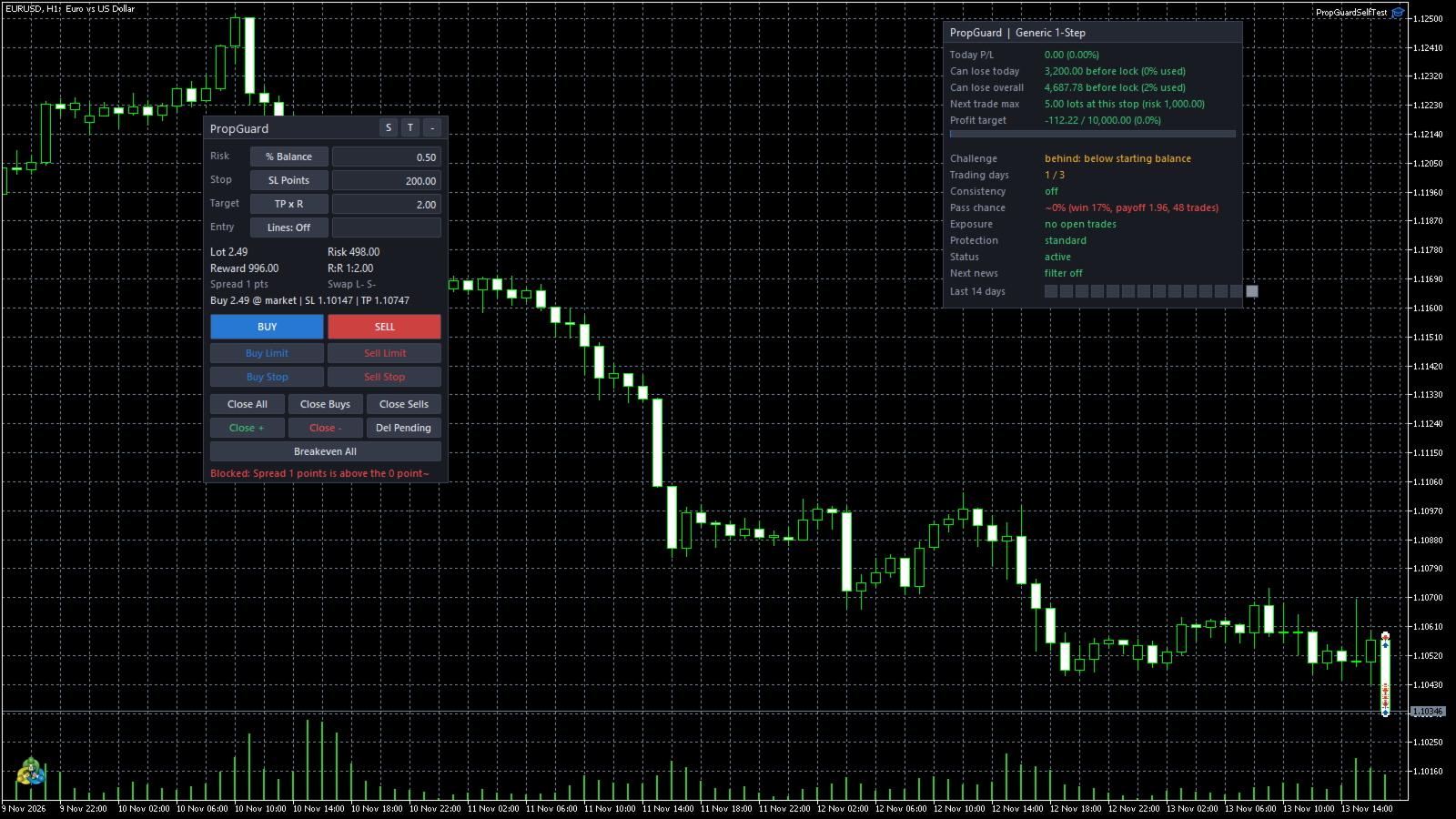
The dashboard answers the questions that matter in plain language:
- "Can lose today: 3,080 before lock"
- "Next trade max: 5.00 lots at this stop"
- "Challenge: target met, 1 more trading day"
It also shows a 14-day calendar of green and red days, your currency exposure, and an estimated pass chance based on your own trade history.
Extra protection
- Daily profit lock: stop for the day once you are up X%.
- Equity peak protection: stop if you give back too much from today's high.
- Cooldown after losing streaks: pause trading after N losses in a row.
- Spread guard: refuse entries while the spread is abnormally wide.
Order panel
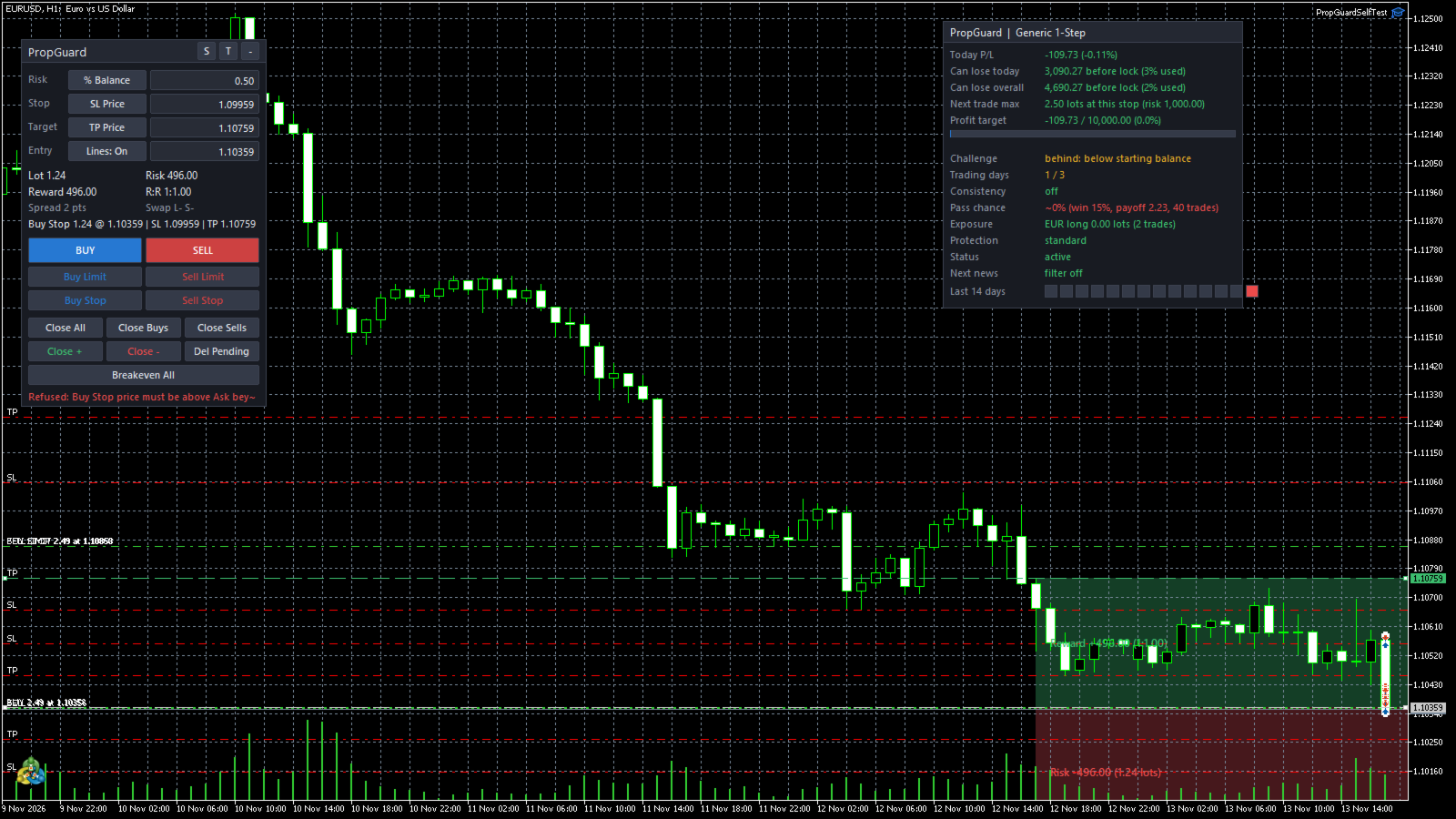
- Risk as % of balance, % of equity or a fixed money amount.
- Stop loss in points, pips, price or an ATR multiple. Take profit in points, price or an R multiple.
- Buy, Sell, Buy Limit, Sell Limit, Buy Stop and Sell Stop buttons.
- Close All, Close Buys, Close Sells, Close Profitable, Close Losing, Delete Pendings and Breakeven All buttons.
- Draggable entry, stop-loss and take-profit lines, with risk and reward zones drawn on the chart. The lot size updates as you drag them.
- Live readout of lot size, money at risk, reward, R:R, spread and swap direction.
- Draggable and minimisable panel. Light and dark themes. Scales with screen DPI.
- Optional Shift+key hotkeys for buy, sell, close all and breakeven.
Lot sizing
- Uses tick value, tick size and contract size, with currency conversion to the account currency. Works on forex, metals, indices and crypto CFDs.
- Rounds down to the volume step and clamps to the broker's minimum and maximum, and to your max-lot rule.
- Refuses the order, with a message, if even the minimum lot would risk more than you allowed.
Trade management
- Automatic breakeven at an R multiple or a points distance, with an optional lock-in offset.
- Up to three partial closes at R multiples.
- Trailing stop: fixed points, ATR, previous candle high/low or step trailing.
- Choose what it manages: this EA's trades only, this EA's plus manual trades, or every trade on the account.
- Every modification respects the broker's stops level and freeze level.
Prop rule engine
Each rule can be turned on or off:
- Daily loss limit in money or %, measured from balance, equity or the higher of the two at the daily reset. You set the reset time and time offset.
- Max drawdown: static from initial balance, trailing from highest balance, or trailing from highest equity. The trailing floor can stop at the initial balance.
- Profit target progress, with an optional close-and-lock when it is reached.
- Size limits: max lots per trade, max total open lots and max open positions.
- Max risk per trade. Optionally refuse any order without a stop loss.
- Pre-trade buffer check: refuses an order if a full stop-out would push you past the daily or drawdown buffer.
- Consistency rule: shows whether your best day is within X% of total profit.
- Minimum trading days counter.
- News filter: uses the built-in MetaTrader 5 economic calendar to block new trades around high-impact events, and can close positions before the event.
- Friday close at a time you set, and a trading-hours window.
Enforcement
- A safety buffer acts before the real limit. The default is 80% of the limit.
- Every panel order is checked against all active rules before it is sent. If an order is refused, the panel shows the reason.
- At the buffer, PropGuard closes positions, deletes pending orders and locks trading. The order buttons grey out and a countdown shows when trading unlocks. A daily lock lasts until the next daily reset; a drawdown lock stays until you clear it.
- State is saved in terminal global variables per account, so it survives a terminal restart. No files are written.
Presets
Generic 1-Step, Generic 2-Step Phase 1, Generic 2-Step Phase 2, Funded and Custom. All money limits come from the account size you enter. The presets are generic starting points: check every value against your own program's rules.
Alerts
A pop-up and sound only when trading is locked, so you are not interrupted. Warnings and a daily summary go to the Experts log and, if enabled, to push notifications on your phone.
Important
PropGuard is a risk-management tool and does not predict the market. Slippage, gaps, weekend price jumps, a lost connection or the terminal being closed can all cause a loss beyond a configured limit. It can only act while the terminal is running and connected. Always confirm your program's exact rules and configure the inputs to match.
Free Lite version
A free Lite version includes the order panel, lot sizing, the setup wizard, the plain-language dashboard and the daily loss lock.