Risk Controlled Trades
- Утилиты
- Версия: 9.10
- Активации: 5

Professional on-chart risk management and automatic lot size calculator for MetaTrader.
Stop calculating lot sizes manually on external calculators while the market moves away from your entry price. Risk Controlled Volume integrates dynamic position sizing, visual interactive stop-loss lines, and one-click order execution directly onto your chart screen.
Execute orders with mathematical certainty that your defined risk tolerance will never be breached.
==================================================
THE PROBLEM WITH MANUAL TRADING RISK
==================================================
A trader intending to risk 1.5% or 2% on an execution often encounters major obstacles:
- Miscalculating lot size due to fast price shifts or different instrument tick values.
- Entering an order first and placing a Stop Loss later, leaving capital exposed to sudden volatility spikes.
- Brokers rejecting orders because Stop Loss or Take Profit levels are placed inside the freeze/stop level corridor.
- Accounts where the minimum allowable contract size (e.g. 0.01) would inherently risk MORE money than the defined risk percentage.
Risk Controlled Volume solves all of these issues instantly and interactively before your trade hits the order book.
==================================================
KEY FEATURES & CAPABILITIES
==================================================
1. Strict Capital Protection (Risk % Mode):
Calculates the exact position volume based on a fixed percentage of your account balance and the distance to your Stop Loss. The lot size dynamically recalculates in real-time as market prices oscillate.
2. Interactive On-Chart Visual Setup:
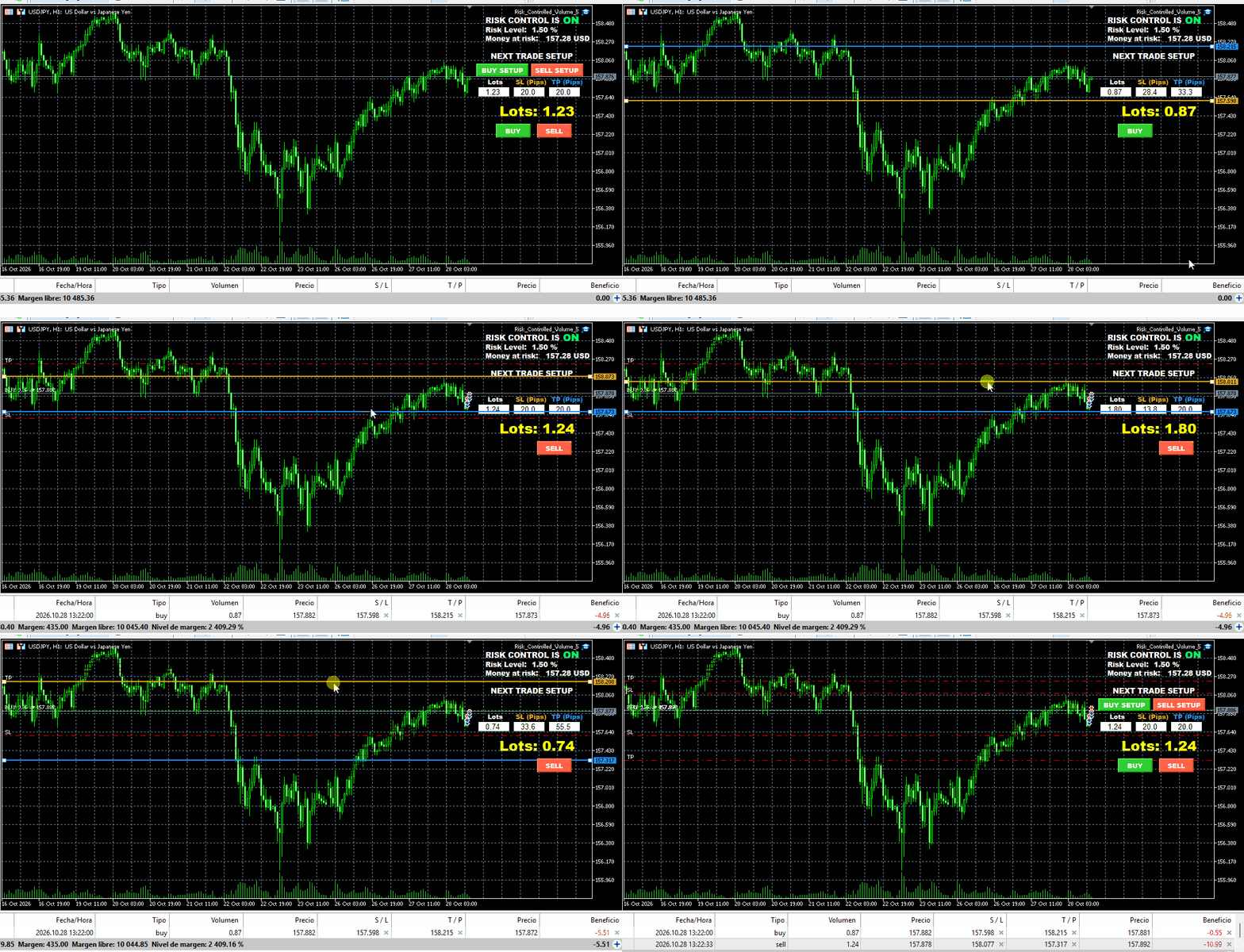
- Click "BUY SETUP" or "SELL SETUP" to project interactive Stop Loss (goldenrod) and Take Profit (blue) lines directly onto your chart.
- Drag lines across the chart with your mouse. The panel updates your lot size, monetary risk, and pip distances in real time as you drag.
- Anti-collision panel detection: when your cursor is over the control panel, lines automatically lock selection to prevent accidental repositioning.
3. "MIN LOT > RISK" Over-Risk Protection:
If the broker's minimum contract size (e.g., 0.01 lot) would incur a loss greater than your defined risk budget at your chosen Stop Loss distance, the utility warns you and blocks order submission to preserve your capital.
4. Native Compliance with Broker Distance Rules:
The utility automatically interrogates your broker's MODE_STOPLEVEL and MODE_FREEZELEVEL. Stops are prevented from being set inside restricted zones, eliminating rejected order errors.
5. Two-Step Execution Safeguard:
Supports instant direct execution or "Stops After Open" mode for market execution brokers that prohibit attaching initial SL/TP values on the first market ticket. The utility immediately applies and confirms the stops once the position is filled.
6. Netting & Hedging Compatibility (MT5):
In MT5 netting environments, the utility alerts you before adding to an existing directional exposure to ensure you never unintentionally increase or reverse a position without conscious awareness.
7. Manual Volume Mode:
Prefer fixed lot sizes? Turn risk calculation off and trade with precision volume while preserving the drag-and-drop stop line placement.
==================================================
INPUT PARAMETERS
==================================================
- Use_Risk_Percent: Set to true to calculate lot size based on account balance percentage. Set to false for manual fixed lot trading.
- Risk_Percent: Account balance percentage to risk per execution (e.g., 1.5%).
- Manual_Lots: Default lot size used when Use_Risk_Percent is disabled.
- SL_Pips: Initial default Stop Loss distance in pips when loading a setup.
- TP_Pips: Initial default Take Profit distance in pips when loading a setup.
- Max_Slippage_Pips: Maximum acceptable slippage tolerance in pips.
- Magic_Number: Unique numerical identifier for orders placed by this utility.
- Confirm_Orders: When true, prompts an order confirmation window displaying volume, exact SL/TP, and money at risk before sending.
- Stops_After_Open: Enables compatibility mode for ECN/Market Execution accounts requiring stops to be set immediately after ticket creation.
==================================================
HOW TO USE
==================================================
1. Attach Risk Controlled Volume to any chart (Forex, Metals, Commodities, Indices).
2. Configure your target risk percentage in the settings window.
3. Click "BUY SETUP" or "SELL SETUP".
4. Drag the Stop Loss line to your technical invalidation level and the Take Profit line to your target.
5. The panel shows your calculated lot size and monetary risk.
6. Click "BUY" or "SELL" to dispatch the order to the market.
7. Click anywhere on the empty chart background to cancel the setup if market conditions change.
Fast. Intuitive. Mathematically disciplined.
Stop calculating lot sizes manually on external calculators while the market moves away from your entry price. Risk Controlled Volume integrates dynamic position sizing, visual interactive stop-loss lines, and one-click order execution directly onto your chart screen.
Execute orders with mathematical certainty that your defined risk tolerance will never be breached.
==================================================
THE PROBLEM WITH MANUAL TRADING RISK
==================================================
A trader intending to risk 1.5% or 2% on an execution often encounters major obstacles:
- Miscalculating lot size due to fast price shifts or different instrument tick values.
- Entering an order first and placing a Stop Loss later, leaving capital exposed to sudden volatility spikes.
- Brokers rejecting orders because Stop Loss or Take Profit levels are placed inside the freeze/stop level corridor.
- Accounts where the minimum allowable contract size (e.g. 0.01) would inherently risk MORE money than the defined risk percentage.
Risk Controlled Volume solves all of these issues instantly and interactively before your trade hits the order book.
==================================================
KEY FEATURES & CAPABILITIES
==================================================
1. Strict Capital Protection (Risk % Mode):
Calculates the exact position volume based on a fixed percentage of your account balance and the distance to your Stop Loss. The lot size dynamically recalculates in real-time as market prices oscillate.
2. Interactive On-Chart Visual Setup:
- Click "BUY SETUP" or "SELL SETUP" to project interactive Stop Loss (goldenrod) and Take Profit (blue) lines directly onto your chart.
- Drag lines across the chart with your mouse. The panel updates your lot size, monetary risk, and pip distances in real time as you drag.
- Anti-collision panel detection: when your cursor is over the control panel, lines automatically lock selection to prevent accidental repositioning.
3. "MIN LOT > RISK" Over-Risk Protection:
If the broker's minimum contract size (e.g., 0.01 lot) would incur a loss greater than your defined risk budget at your chosen Stop Loss distance, the utility warns you and blocks order submission to preserve your capital.
4. Native Compliance with Broker Distance Rules:
The utility automatically interrogates your broker's MODE_STOPLEVEL and MODE_FREEZELEVEL. Stops are prevented from being set inside restricted zones, eliminating rejected order errors.
5. Two-Step Execution Safeguard:
Supports instant direct execution or "Stops After Open" mode for market execution brokers that prohibit attaching initial SL/TP values on the first market ticket. The utility immediately applies and confirms the stops once the position is filled.
6. Netting & Hedging Compatibility (MT5):
In MT5 netting environments, the utility alerts you before adding to an existing directional exposure to ensure you never unintentionally increase or reverse a position without conscious awareness.
7. Manual Volume Mode:
Prefer fixed lot sizes? Turn risk calculation off and trade with precision volume while preserving the drag-and-drop stop line placement.
==================================================
INPUT PARAMETERS
==================================================
- Use_Risk_Percent: Set to true to calculate lot size based on account balance percentage. Set to false for manual fixed lot trading.
- Risk_Percent: Account balance percentage to risk per execution (e.g., 1.5%).
- Manual_Lots: Default lot size used when Use_Risk_Percent is disabled.
- SL_Pips: Initial default Stop Loss distance in pips when loading a setup.
- TP_Pips: Initial default Take Profit distance in pips when loading a setup.
- Max_Slippage_Pips: Maximum acceptable slippage tolerance in pips.
- Magic_Number: Unique numerical identifier for orders placed by this utility.
- Confirm_Orders: When true, prompts an order confirmation window displaying volume, exact SL/TP, and money at risk before sending.
- Stops_After_Open: Enables compatibility mode for ECN/Market Execution accounts requiring stops to be set immediately after ticket creation.
==================================================
HOW TO USE
==================================================
1. Attach Risk Controlled Volume to any chart (Forex, Metals, Commodities, Indices).
2. Configure your target risk percentage in the settings window.
3. Click "BUY SETUP" or "SELL SETUP".
4. Drag the Stop Loss line to your technical invalidation level and the Take Profit line to your target.
5. The panel shows your calculated lot size and monetary risk.
6. Click "BUY" or "SELL" to dispatch the order to the market.
7. Click anywhere on the empty chart background to cancel the setup if market conditions change.
Fast. Intuitive. Mathematically disciplined.