UT Bot Alerts Arrow
- Индикаторы
- Версия: 2.2
- Обновлено: 28 августа 2026

An ATR trailing-stop trend indicator that alerts you when the trend flips, and grades how trustworthy each signal is.
MT4: https://www.mql5.com/en/market/product/187140?source=Site
MT5: https://www.mql5.com/en/market/product/193099?source=Site
What it does
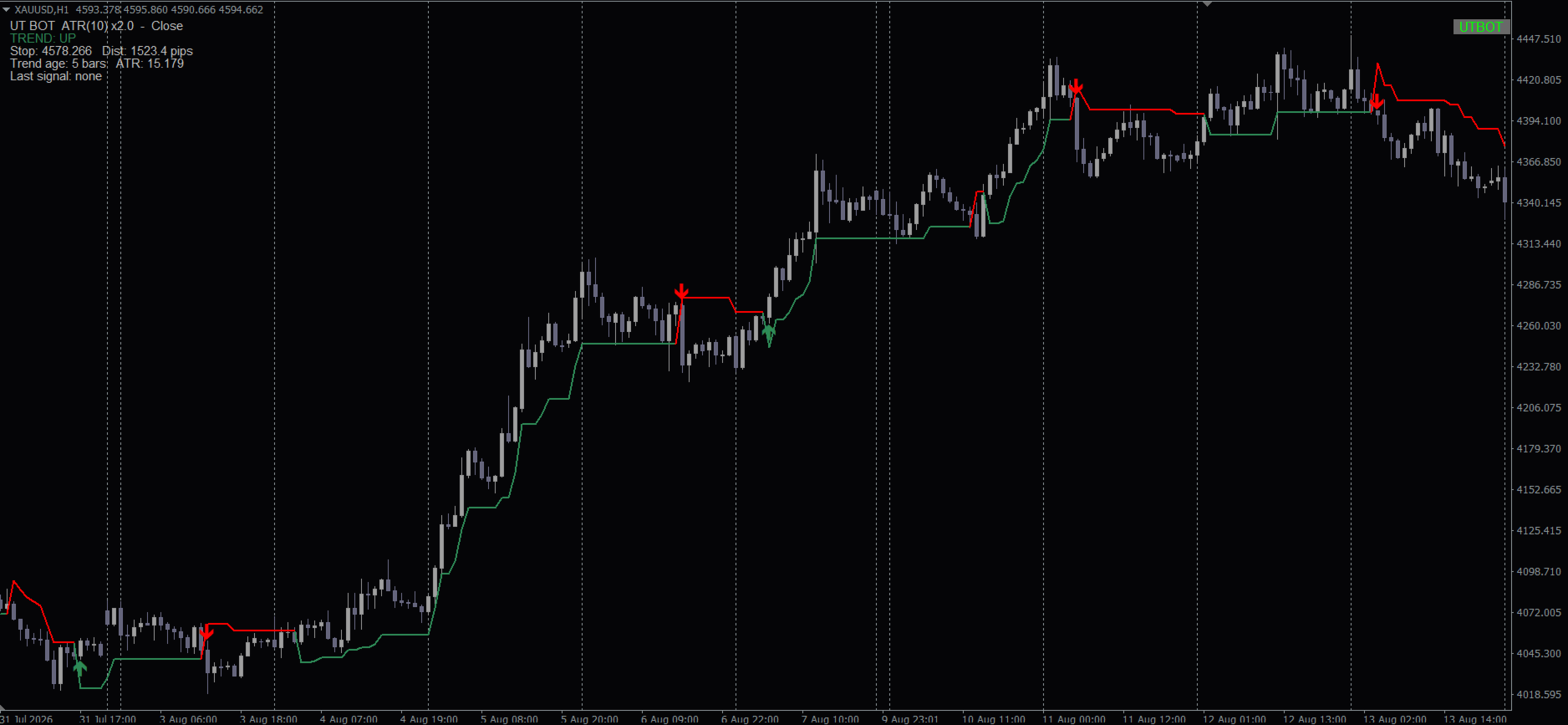
UT Bot Alerts draws a trailing line that follows price and flips sides whenever the trend changes, marking each flip with a BUY or SELL arrow. It works on any symbol and timeframe. On top of the classic trailing-stop logic, this version adds alerts, optional signal-quality filters, a higher-timeframe check, and pullback re-entry signals, so you can tell a trustworthy arrow from a weak one instead of just reacting to every flip.
Key features
- Popup, sound, push notification, and email alerts, one per signal.
- Optional filters that hide or downgrade signals during weak or quiet market conditions.
- Higher-timeframe trend confirmation, with an optional trend line overlay.
- Pullback re-entry signals, so you are not limited to only the first arrow of a trend.
- Choice of ordinary close price or Heiken Ashi (Classic or Smoothed) as the signal source.
- On-chart info panel showing the current trend, stop distance, and last signal.
How it works
Each signal is based on a fully closed candle only, so an arrow never repaints or moves once it appears. A BUY prints when price closes above the trailing line; a SELL prints when it closes below. When the optional filters are turned on, a signal is also given a quality score from 0 to 3, and you can choose whether weak signals are hidden or simply marked as lower-quality.
Recommended setup
- Symbol: any (commonly used on XAUUSD)
- Timeframe: any (commonly used on H1)
- Account: works on any account type; no special leverage or balance requirement
- VPS: recommended if you want push/email alerts delivered around the clock
Input parameters
Parameters are grouped the same way they appear in the MetaTrader Inputs tab.
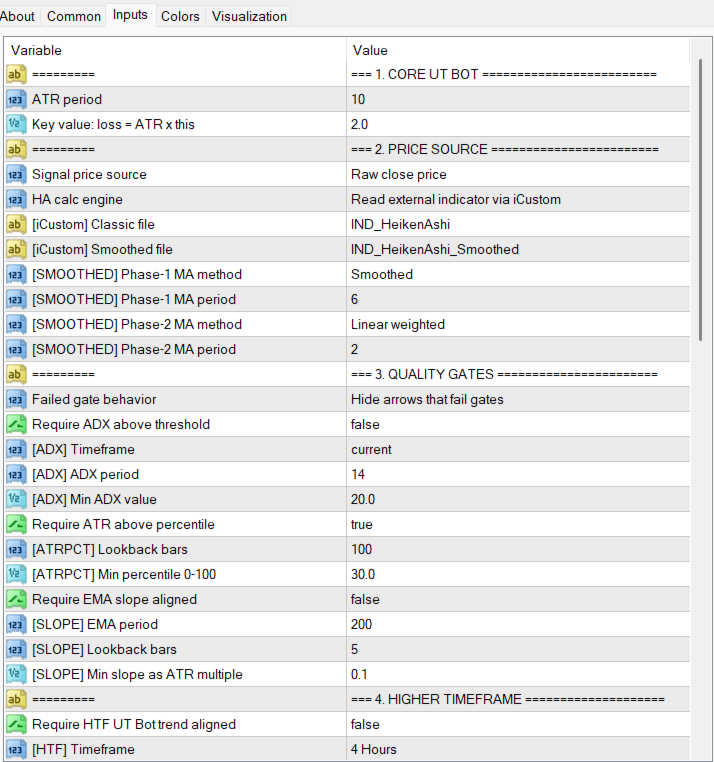
Core UT Bot
| Parameter | Default | What it does |
|---|---|---|
| "ATR period" | 10 | How many bars the volatility measurement looks back over. Higher = a smoother, slower-moving trend line. |
| "Key value: loss = ATR x this" | 1.5 | How far the trend line sits from price, as a multiple of that volatility measurement. Higher = wider line, fewer but later signals. Lower = tighter line, more signals, more false flips in choppy conditions. |
Price Source
| Parameter | Default | What it does |
|---|---|---|
| "Signal price source" | CLOSE | Which price the indicator watches. CLOSE is the ordinary candle close. HA_CLASSIC is a Heiken Ashi close, which is smoother and filters out some noise. HA_SMOOTHED is an extra-smoothed Heiken Ashi close, with even fewer false flips but signals that arrive a bit later. |
| "HA calc engine" | NATIVE | How the Heiken Ashi price gets calculated (only matters if Signal price source above is set to HA_CLASSIC or HA_SMOOTHED). Leave on NATIVE — it works immediately, including in backtests, and needs nothing else installed. Only pick ICUSTOM if you already have a separate Heiken Ashi indicator on your terminal and specifically want values to come from that file. |
| "[iCustom] Classic file" | "IND_HeikenAshi" | Only used when HA calc engine above is ICUSTOM: the exact file name of the Heiken Ashi indicator to read from. |
| "[iCustom] Smoothed file" | "IND_HeikenAshi_Smoothed" | Only used when HA calc engine above is ICUSTOM and Signal price source is HA_SMOOTHED: the exact file name of the Heiken Ashi Smoothed indicator to read from. |
| "[SMOOTHED] Phase-1 MA method" | SMMA | Only affects the HA_SMOOTHED price source: the averaging method used in the first smoothing pass. Leave at default unless you know you want to change it. |
| "[SMOOTHED] Phase-1 MA period" | 6 | Only affects the HA_SMOOTHED price source: how many bars the first smoothing pass covers. |
| "[SMOOTHED] Phase-2 MA method" | LWMA | Only affects the HA_SMOOTHED price source: the averaging method used in the second smoothing pass. |
| "[SMOOTHED] Phase-2 MA period" | 2 | Only affects the HA_SMOOTHED price source: how many bars the second smoothing pass covers. |
Quality Gates
| Parameter | Default | What it does |
|---|---|---|
| "Failed gate behavior" | SUPPRESS | What happens to a signal that fails one of the filters below (only relevant if at least one filter is turned on). SUPPRESS hides that arrow completely. GRADE_ONLY still shows the arrow but marks it with a lower quality score. |
| "Require ADX above threshold" | off | Turn on to only accept signals when the market is showing a strong trend. |
| "[ADX] Timeframe" | CURRENT | Which timeframe to measure that trend strength on. Leave on CURRENT to use the same timeframe as your chart. |
| "[ADX] ADX period" | 14 | How many bars the trend-strength measurement looks back over. |
| "[ADX] Min ADX value" | 20.0 | The minimum trend-strength reading required for a signal to pass this filter. |
| "Require ATR above percentile" | off | Turn on to block signals when volatility is unusually low compared to recent history — i.e. a quiet, dead market. |
| "[ATRPCT] Lookback bars" | 100 | How many recent bars to compare current volatility against. |
| "[ATRPCT] Min percentile 0-100" | 30.0 | The minimum volatility ranking required to pass. Higher means you only trade when volatility is relatively high for that symbol right now. |
| "Require EMA slope aligned" | off | Turn on to only accept signals that agree with the direction of a long-term moving average. |
| "[SLOPE] EMA period" | 200 | How many bars that long-term moving average covers. |
| "[SLOPE] Lookback bars" | 5 | How many bars back to look when checking whether that average is sloping up or down. |
| "[SLOPE] Min slope as ATR multiple" | 0.10 | How steep that slope needs to be to count, expressed relative to current volatility. |
Higher Timeframe
| Parameter | Default | What it does |
|---|---|---|
| "Require HTF UT Bot trend aligned" | off | Turn on to only accept signals that agree with the trend on a higher timeframe — for example, only take H1 signals when H4 is also trending the same way. |
| "[HTF] Timeframe" | H4 | Which higher timeframe to check the trend on. |
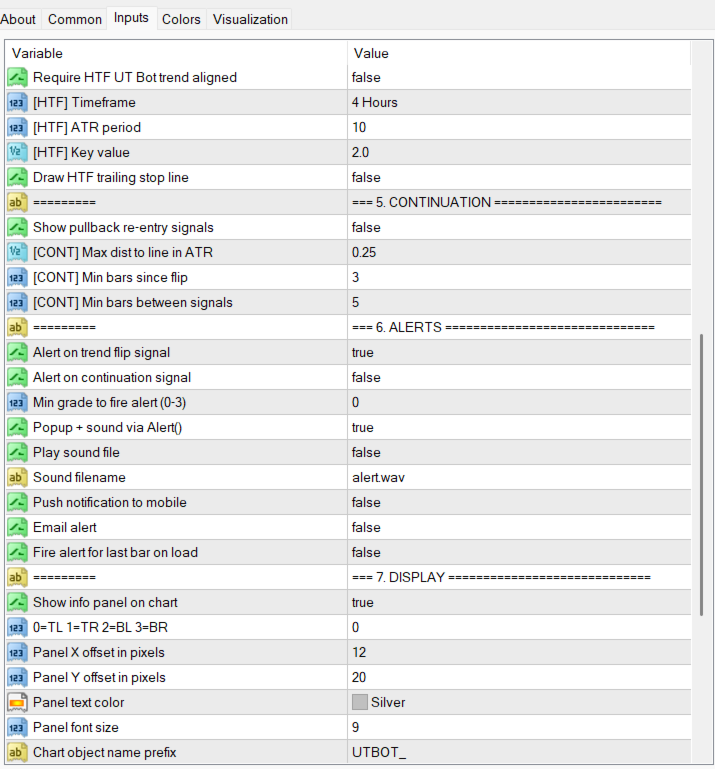
| "[HTF] ATR period" | 10 | The volatility look-back used for that higher-timeframe trend line — same idea as ATR period above, just applied to the higher timeframe. |
| "[HTF] Key value" | 1.5 | How far that higher-timeframe trend line sits from price — same idea as the main sensitivity setting, just applied to the higher timeframe. |
| "Draw HTF trailing stop line" | off | Turn on to draw that higher-timeframe trend line directly on your chart as a dotted line. |
Continuation
| Parameter | Default | What it does |
|---|---|---|
| "Show pullback re-entry signals" | off | Turn on to also show smaller pullback arrows, instead of only the first arrow when a trend begins. |
| "[CONT] Max dist to line in ATR" | 0.25 | How close price needs to come to the trend line to count as a pullback, relative to current volatility. Smaller values mean price must come closer. |
| "[CONT] Min bars since flip" | 3 | How many bars the trend must have already lasted before a pullback signal is allowed — avoids pullback signals right after a fresh flip. |
| "[CONT] Min bars between signals" | 5 | The minimum number of bars between two pullback signals, so they don't cluster together. |
Alerts
| Parameter | Default | What it does |
|---|---|---|
| "Alert on trend flip signal" | on | Get alerted when the main trend-change arrow appears. |
| "Alert on continuation signal" | off | Get alerted when a pullback arrow appears (only relevant if pullback arrows are turned on above). |
| "Min grade to fire alert (0-3)" | 0 | Only send an alert for signals with at least this quality score. Leave at 0 to be alerted for every signal regardless of the filters above. |
| "Popup + sound via Alert()" | on | Show a pop-up window on your screen when a signal fires. |
| "Play sound file" | off | Play a sound when a signal fires. |
| "Sound filename" | "alert.wav" | Which sound file to play (must already exist in your terminal's Sounds folder). |
| "Push notification to mobile" | off | Send a push notification to the MetaTrader app on your phone. You need to add your phone's ID in MT4's notification settings first. |
| "Email alert" | off | Send an email when a signal fires. You need to set up your email account in MT4's settings first. |
| "Fire alert for last bar on load" | off | If turned on, you'll get an alert right away for whatever signal is already sitting on the chart when you first attach the indicator. Leave off if you only want alerts for new signals from now on. |
Display
| Parameter | Default | What it does |
|---|---|---|
| "Show info panel on chart" | on | Show a small info box on your chart with the current trend, stop distance, and other stats. |
| "0=TL 1=TR 2=BL 3=BR" | 0 | Which corner of the chart to place the info box in. |
| "Panel X offset in pixels" / "Panel Y offset in pixels" | 12 / 20 | How far from the edge of the chart to place the info box. |
| "Panel text color" | Silver | Text color of the info box. |
| "Panel font size" | 9 | Text size of the info box. |
| "Chart object name prefix" | "UTBOT_" | An internal name prefix used for everything this indicator draws on your chart. Only change this if it clashes with another indicator using the same prefix. |
| "Show on-chart show/hide button" | on | Adds a small button to your chart. Click it to instantly hide or show the trailing line, arrows, and info panel together — handy for a cleaner chart. |
| "Button label text" | "UTBOT" | The text shown on the button. |
| "Button corner anchor" | Top-right | Which corner of the chart the button is anchored to. |
| "Button X distance (px)" / "Button Y distance (px)" | 70 / 20 | How far from that corner to place the button. |
| "Button width (px)" / "Button height (px)" | 70 / 20 | Size of the button. |
| "Button text color when shown" / "when hidden" | Lime / Red | Button label color, so you can tell at a glance whether the indicator is currently visible. |
Debug
| Parameter | Default | What it does |
|---|---|---|
| "Print diagnostics to Experts log" | off | Turn on only if you're troubleshooting a problem — it prints extra diagnostic messages to your terminal's Experts/Journal log. |
Requirements
- Platform: MetaTrader 4
- Works immediately with the default settings — no other files needed.
- Only if you change "HA calc engine" to ICUSTOM: the companion Heiken Ashi indicators (IND_HeikenAshi, and IND_HeikenAshi_Smoothed if you also use the smoothed price source) must already be compiled and present in your Indicators folder.
- Link download IND_HeikenAshi/IND_HeikenAshi_Smoothed indicator: https://www.mql5.com/en/blogs/post/774457
Advanced: reading signals via iCustom (for EA developers)
Skip this section if you only use the indicator on a chart. It is only relevant if you are writing your own EA or indicator that needs to read this indicator's output programmatically through iCustom. Buffers 0-6 match the very first version of this indicator and are guaranteed to stay unchanged; buffers 7-13 were added later.
| # | Buffer | Meaning |
|---|---|---|
| 0 | SellArrowBuffer | Sell arrow price (bar's high) |
| 1 | BuyArrowBuffer | Buy arrow price (bar's low) |
| 2 | TrailUpBuffer | Trend line, uptrend segment |
| 3 | TrailDownBuffer | Trend line, downtrend segment |
| 4 | TrailBuffer | Continuous trend-line value |
| 5 | TrendStateBuffer | +1 up / -1 down / 0 seed bar |
| 6 | SourceBuffer | The source price actually used that bar |
| 7 | HTFTrailBuffer | Higher-timeframe trend line |
| 8 | HTFStateBuffer | Higher-timeframe trend state, +1/-1 |
| 9 | SignalBuffer | 1=BUY, 0=SELL, -1=none (always explicit) |
| 10 | GradeBuffer | Signal quality score, 0-3 |
| 11 | SuggestedSLBuffer | Trend-line price at the moment the signal fired |
| 12 | ATRValueBuffer | Volatility (ATR) value at that bar |
| 13 | BarsSinceFlipBuffer | Bars since the last trend flip |
Version 2.02 · Updated 2026-08-28 · Support via the product comments section on MQL5.
Note: If you have ideas to improve this indicator, please leave a comment on MQL5. I’ll review your suggestions and consider future updates