Auto Risk Manager MT4

AutoRiskManage v2.3 — Documentation
Expert Advisor — MetaTrader 4 & 5
AutoRiskManage v2.3

Automated risk management EA with interactive graphical panel. Applies SL/TP, Break Even, Trailing Stop, and lot size calculation by risk percentage — for any instrument, any broker.

MT4 / MT5 v2.3.0 MQL4 · MQL5 C2C + B2C Time Space Technology

📋 Overview

AutoRiskManage is an Expert Advisor that acts as a risk management layer on top of any manually opened position. It does not generate trading signals — instead it protects and manages positions that are already open, applying the rules you configure through its graphical panel.

SL / TP Assignment
Automatically assigns Stop Loss and Take Profit to any new position that is opened without them.
Break Even
Moves the SL to breakeven (+ protection points) when the position reaches a configurable profit distance.
Trailing Stop
Follows the price dynamically, keeping the SL at a fixed distance once a profit threshold is reached.
Risk-Based Lot Calc
Calculates the exact lot size to risk a given % of the account balance, based on the SL distance and instrument tick value.
Graphical Panel
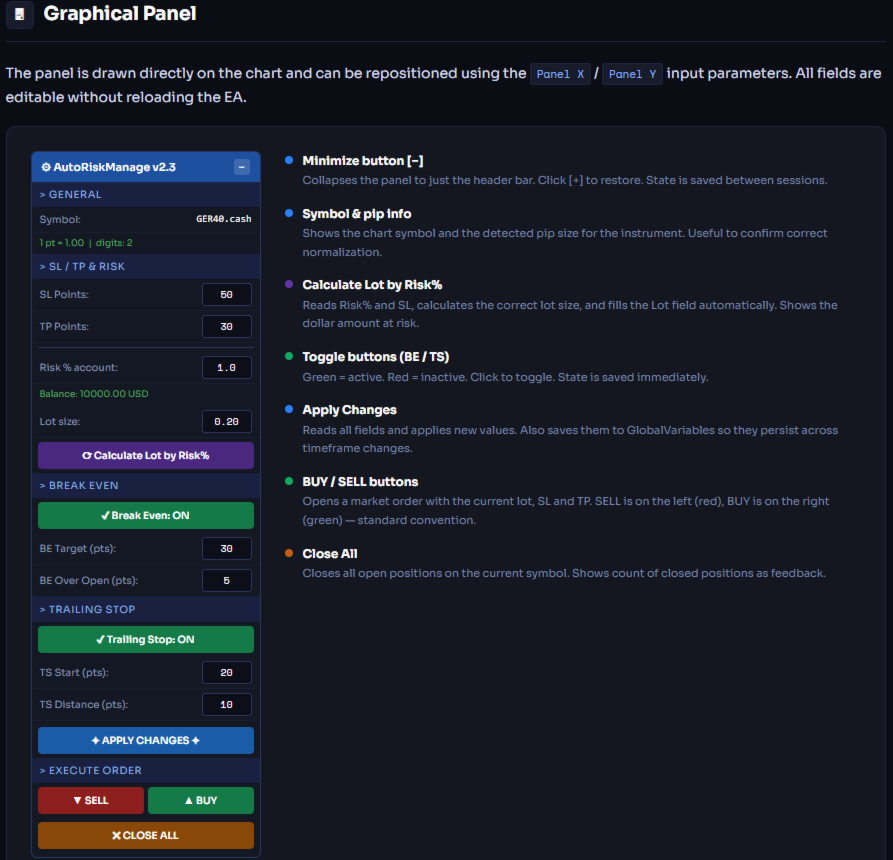
All parameters are editable directly on the chart — no need to reload the EA to change values.
Persistent Settings
Parameters survive timeframe changes, chart reloads, and MT4/MT5 restarts via GlobalVariables.
The EA only manages positions with Magic Number = 0 (manual trades). Positions opened by other EAs are automatically ignored.

Installation

MetaTrader 5

  1. Copy AutoRiskManage_v2.mq5 to MQL5/Experts/
  2. Open MetaEditor → compile the file (F7)
  3. In MT5, drag the EA from the Navigator onto any chart
  4. Set initial parameters in the Inputs tab → click OK
  5. Ensure AutoTrading is enabled in the toolbar

MetaTrader 4

  1. Copy AutoRiskManage_v2.mq4 to MQL4/Experts/
  2. Open MetaEditor → compile the file (F7)
  3. In MT4, drag the EA from the Navigator onto any chart
  4. Set initial parameters → click OK
  5. Ensure AutoTrading and Allow live trading are enabled
The EA automatically detects the symbol from the chart it is attached to — no need to configure the symbol manually.
To use BUY / SELL buttons on a live account, the broker must allow automated trading through EAs. Always test on a demo account first.

Input Parameters

These are the initial values set when attaching the EA. After the first load, all parameters can be changed from the panel without reloading.

General

Parameter Default Description
InpMagicNumber 1 Magic number used as a filter. The EA only manages positions with Magic Number = 0 (manual trades). This value identifies the EA's own orders (BUY/SELL from panel).
InpPrintLog false Enables verbose logging to the MT4/MT5 Journal. Useful for debugging. Keep disabled in production to avoid noise.

SL / TP

Parameter Default Description
InpLotSize 1.0 Fixed lot size used when Risk% = 0. Ignored when Risk% > 0.
InpRiskPct 0 Percentage of account balance to risk per trade. Set to 0 to use fixed lot size instead. Example: 1.0 = risk 1% of balance.
InpSLPoints 50 Stop Loss distance in real trader points. Enter intuitive values: 50 = 50 DAX points, 50 = 50 pips on Forex. The EA normalizes automatically per instrument.
InpTPPoints 30 Take Profit distance in real trader points. Same normalization as SL.

Break Even

Parameter Default Description
InpUseBreakEven true Enables the Break Even feature.
InpBEPoints 30 Price distance in points that must be reached to trigger Break Even. Measured from entry price.
InpBEPlusPoints 5 Points of protection added above (BUY) or below (SELL) the entry price when moving to breakeven. Ensures a small guaranteed profit.

Trailing Stop

Parameter Default Description
InpUseTrailing true Enables the Trailing Stop feature.
InpTSStartPoints 20 Minimum profit distance (in points) required to activate the trailing stop.
InpTSStepPoints 10 Distance (in points) the trailing SL maintains from the current price.

Panel

Parameter Default Description
InpPanelX 10 Horizontal position of the panel in pixels from the left edge of the chart.
InpPanelY 30 Vertical position of the panel in pixels from the top edge of the chart.

💰 Risk-Based Lot Calculation

When Risk% > 0, the EA calculates the exact lot size to risk a fixed percentage of the account balance on each trade, using the broker's tick value for the instrument.

The result is normalized to the broker's minimum lot step and clamped between the minimum and maximum allowed lot size.

Example

GER40.cash (DAX) — 1% risk
Account Balance $10,000
Risk % 1.0%
Risk Money $100
SL Points 50 pts
SL Price Distance 50 × 1.0 = 50.0
Tick Value (1 lot) ~$10.00
SL Ticks 50 / 0.01 = 5000
Lot Size $100 / (5000 × $10) = 0.20
After clicking Calculate Lot by Risk%, the button shows the calculated lot and the dollar amount at risk (e.g. Lot: 0.20 ($100.00)) for a few seconds before resetting.

📊 Instrument Compatibility

The EA uses GetPipSize() to normalize point values automatically. You always enter intuitive real-price points regardless of broker or instrument. The function detects the instrument type by its decimal digits:

Digits Instrument type Examples 1 pt = "50 pts" in price
5 Forex (standard) EURUSD, GBPUSD 0.00010 0.00500
3 Forex JPY USDJPY, EURJPY 0.010 0.500
4 Forex (legacy 4-digit) Some brokers 0.0001 0.0050
2 Indices & Metals DAX, Gold, SP500 1.00 50.00
1 Some indices NAS100 (some brokers) 1.0 50.0
0 Crypto / integers BTCUSD 1 50
The panel shows "1 pt = X.XX | digits: N" after clicking Apply — use this to confirm the EA has detected your instrument correctly.
AutoRiskManage v2.3  ·  Copyright 2025–2026 Time Space Technology  ·  MetaTrader 4 & 5
Рекомендуем также
Scalping Day Trading Support Utility Scalping One MT4 free One position is displayed with one button. View P & L, Lot, and Point in real time. It is possible to switch the display of positions of only chart currencies and all currency pairs.  (The free version has only 3 positions) Supports automatic identification in Japanese and English   Account currency notation corresponds to dollar, euro, pound, yen (automatic identification) The timeline drawing function can be linked with the clock disp
FREE
OTRX Fimathe Backtest is a tool for the Trader or Enthusiast who uses the Fimathe technique created by Trader Marcelo Ferreira to carry out his training and validate if he can obtain profitability. In this tool you will be able to: 1. Define whether you are looking for a buy or sell entry. (Trend). 2. Define by clicking twice on the horizontal lines where your Reference Zone and your Neutral Zone will be. 3. Monitor the entry, subcycle and exit of the trade. 4. Trading Summary, Daily, Week
FREE
Простенький скрипт, в котором очень часто нуждаются трейдеры. Он калькулирует лот в процентах от депозита. Для соблюдения риск-менеджмента очень даже нужная вещь. В настройках присутствует только одна опция: MaxRisk - риск в процентах для вычисления лота. Даный помощник работает как стандартный скрипт, то есть запускается только один раз на соответствующем графике, после чего можно приступать к торговле с вычисленым лотом. Все гениальное просто! Успешной торговли!
FREE
This is a DEMO version of the Smarter Trade Manager Smarter Trade Manager  is an advanced trade management tool that can monitor and manage your manual and EA trades according to the settings you choose. It works as an Expert Advisor (EA), it does not open any trades but it closes trades as per the auto closing settings or when manually pressing any of the close buttons. FEATURES: Three-dimensional  interactive  view of your trades Trade Summary, P/L, Alerts, Closure by  Currency Trade Summary,
FREE
ManageEquity
Hadj Ahmed Slimani
ManageEquity - A Powerful Trading Utility for Risk Management ManageEquity is a simple yet powerful trading utility designed to enhance risk management strategies. By attaching this utility to a single chart and specifying the maximum dollar amount for both profit and loss, traders can effectively manage their open orders. With ManageEquity, traders can easily set their desired profit target and maximum acceptable loss for all open trades. Once the profit target is reached or the maximum loss th
FREE
DG Equity Monitor is a useful tool that keeps track of the daily transactions made on the account. The EA automatically and instantly closes all the trades running based on two conditions: 1. If the daily profit target is hit. 2. If the maximum drawdown is reached. An alert is sent immediately one of the above conditions are met. Parameters: Show Account Info -Choose whether or not to display the Account Info on the chart. Show Pop Up Alert -Show alert on chart when either condition 1 or 2 are
FREE
Grid Assistant Pro
Alessandro De Cristofaro
Grid Assistant Pro – Utility for Managing Grid Strategies on MetaTrader 4 Grid Assistant Pro is a professional utility that helps traders manage and monitor unidirectional grid strategies directly from the MT4 chart. It provides a visual dashboard , clear controls, and automated risk protection features for precise and efficient grid operation. Key Features Visual Dashboard Real-time metrics: Balance, Equity, Floating P/L, Drawdown %, Free Margin Grid status: active and pending or
FREE
PZ Trade Pad EA
PZ TRADING SLU
4.29 (31)
Clos Утилита PZ Trade Pad EA позволяет торговать с помощью панели прямо на ценовом графике. Продукт имеет встроенное управление риском и может работать с уже открытыми сделками. Возможность совершать сделки прямо на ценовом графике Управление капиталом Возможность установки стоп-уровней Закрытие всех открытых сделок в один клик Удаление всех отложенных ордеров в один клик Частичное закрытие прибыльных сделок в один клик Без входных параметров. Применение Утилита проста в использовании. Выберите
FREE
VR Color Levels MT4
Vladimir Pastushak
5 (1)
VR Color Levels — удобный инструмент для тех, кто применяет технический анализ с использованием таких элементов, как трендовая линия, прямоугольник и текст. Есть возможность добавлять текст непосредственно на график и делать скриншоты. Настройки, set файлы, демо версии, инструкции, решение проблем, можно получить в [блоге] Прочитать или написать отзывы можно по [ссылке] Версия для [MetaTrader 5] Работа с индикатором осуществляется в один клик . Для этого нужно нажать на кнопку с линией, после
FREE
Account Info EA It is a tool that presents on the graph all the positions of the account, and specific information concerning the positions, but also the account. It enables the user to have an image of his account at a glance. Use like any expert advisor. You can't attach it in the same chart with other expert advisor. It does not have the ability to open or manage positions. You can attach it on any chart and any timeframe.
FREE
Trading panel for manual trading. Has a fairly wide functionality. Allows you to automatically calculate the order size, open both market and pending orders. It has a wide range of options for closing orders, it is possible to partially close orders, close orders after reaching a certain profit or loss, separately close profitable and unprofitable, buy and sell, as well as pending orders. The panel also contains a simple implementation of a grid of pending orders, reverse and lock functions, tr
FREE
MQLTA Auto Close Demo
MQL4 Trading Automation
Программа Auto Close помогает применять правила мани-менеджмента и управления риском. Утилита отслеживает баланс, средства на счете, свободные средства, общую прибыль и общий убыток, а также отправляет уведомления при достижении указанного порогового значения. В данной демо-версии отключены функции уведомления и закрытия, полная версия доступна по ссылке: https://www.mql5.com/ru/market/product/29141 Как он работает? Запустите программу Auto Close EA на графике и укажите параметры, которые нужно
FREE
SL and TP Setter
Giacomo Barone
4 (1)
You can manually open a trade (one click), and this EA will take care of setting the SL and TP. SL and TP are set based on the number of pips you specify in the input screen. You can also choose monetary SL and TP. SL and TP are determined based on the weighted average price (WAP), so if you open a new trade, SL and TP will be updated according to the new WAP. The WAP is not unique but differentiated between buy and sell trades (this is useful only if you open opposite trades on the same chart)
FREE
Activation initiates the sequence from the initial symbol in the Market Watch roster, forming a perpetual loop that continues until deactivation. The system employs global terminal variables to sustain operational continuity amid symbol-induced reinitializations, thereby ensuring uninterrupted performance. This EA should not be checked off as 'Allowed live Trading' and is functional with that checkmark box, when uploading the EA. Principal advantages encompass augmented productivity in overseein
FREE
Trading Panel - Smart Stop Management A free professional trading panel for MT4, built to make manual execution faster, cleaner, and smarter. Trading Panel - Smart Stop Management helps you place Market, Limit, and Stop orders directly from the chart, manage position size, calculate TP/SL from volatility, and protect your execution from temporary spread widening during news, rollovers, or thin market conditions. The panel uses local smart stop logic based on the middle price, helping reduce
FREE
Levels and risk calculator for the Antimartingale (or Antimartingala) technique Totally visual, setup everything from control panel Decide your risk and margin, it will calculate and show trading lavels on the chart Free version of the orginal Antimartingale EA:  https://www.mql5.com/en/market/product/53653 Public Signals using the Antimartingale's technique: https://www.mql5.com/en/signals/1016250 https://www.mql5.com/en/signals/1018964 This EA does not open trades, it only shows the trading le
FREE
Simply clock. Local time as default. There are possible to Select: Local Time /Server Time /GMT Time as input. Please take into account that the local time is the most accurate. However ,this clock always uses local time seconds, even If GMT / Server Time Is selected.  I solved it this way to get more accuracy. Delays can occur when changing minutes or hours, if local time is not selected.
FREE
NAS100 Auto Sl And TP
Moustapha Boulouz
5 (2)
Представляем NAS100 Auto SL и TP Maker для MT4: Никогда больше не пропустите установку StopLoss и TakeProfit с нашим NAS100 Auto SL и TP Maker, незаменимым помощником для трейдеров, работающих на рынке Nasdaq 100 в MetaTrader 4. Этот инструмент предназначен для тех, кто ищет беспроблемное решение для автоматизации управления уровнями StopLoss и TakeProfit. Ключевые особенности: Эффективная автоматизация: Автоматически отслеживает сделки Nasdaq 100 без StopLoss и/или TakeProfit. Динамически регу
FREE
Symbol Switch Demo
ISO Financial Services
При помощи Symbol Switch вы сможете легко изменять символ всех открытых графиков без потери вашего анализа или шаблона. С легкостью следите за многими символами на одном экране. Автоматическое сохранение\загрузка анализа отдельно для каждого символа (включая весь графический анализ и прикрепленные индикаторы). Индикатор отображает символы, показываемые в окне "Обзор рынка" MetaTrader 4. Для добавления\удаления символа просто добавьте\удалите его из окна "Обзор рынка" MetaTrader 4. Отслеживайте п
FREE
Tipu Trader
Kaleem Haider
3 (2)
Tipu Trader - это часть экосистемы Tipu Panel , которая была разработана из-за необходимости быстрой и простой торговли. Tipu Trader - это простая торговая панель для наиболее часто используемых торговых функций. Создавайте свои собственные сигналы с Tipu Panel и торгуйте при помощи Tipu Trader, простой и удобной торговой панели. Особенности Простая торговая панель для наиболее часто используемых торговых функций. Создавайте свои собственные сигналы с Tipu Panel и торгуйте при помощи Tipu Trade
FREE
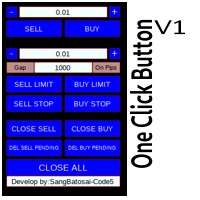
Simple button panel of trade on your chart with OneClick V1 Trial version. This trade panel will make it easier for you. Equipped with several functions that make it very easy for you. More tools on OneClick VZ version, see here. This version includes: Open Order Buy Open Order Sell Open Pending Order [Buy Limit - Buy Stop - Sell Limit-Sell Stop] Close ALL orders Close Order Buy Close Order Sell Delete Pending Order [Buy Limit - Buy Stop - Sell Limit-Sell Stop] ENJOY IT!!! ONE CLICK V1 [TRIAL
FREE
LT Round Numbers
Thiago Duarte
4.75 (4)
Round numbers (or key levels) is an amazing strategy. These numbers are strong support and resistance levels. So what this indicator does is draw horizontal lines on the chart to help you find these levels. Configurations: 1St level: Color - lines color. Style - lines style. Width -  lines width. 2Nd level: Second level lines? -  turn off second level lines. Color -  lines color. Style -  lines style. Width -  lines width. Space between lines in points -  I don't need explain :) Display at backg
FREE
Neonplox Trade Manager
Mr Roberto Carlos Ferreira Silva
n3oNpLoX Trade Manager Market Order. Stop Order. Limit Order. To help you Place trades based on the amount of Money in Dollars you want to risk. As it will show in the screenshots you can calculate the right Lot size for the money you want to risk. Calculates Lot Size based on the distance between Stop Loss and Entry Point. 5 Options for TP - (1RR,2RR,3RR,4RR,5RR) It will help you manage your risk and Place trades with the correct Lot Size. So you will not over expose yourself and your money
FREE
Утилита позволяет вручную тестировать ваши стратегии в тестере стратегий. Торговля в один клик на графике визуализации. Последняя версия утилиты предлагает трейдерам расширенные функции для ручного тестирования своих торговых стратегий. С помощью тестера стратегий вы теперь можете оценить эффективность своих торговых стратегий в смоделированной среде. Эта функция позволяет вам анализировать эффективность ваших торговых методов и совершенствовать их, чтобы улучшить свои торговые навыки. Более тог
FREE
Symbol Cycler is a lightweight on-chart utility that lets you quickly switch between symbols in your Market Watch list using two simple arrow buttons (). With a single click, you can scroll forward or backward through your predefined symbols without leaving the chart. Key Features: One-click symbol switching from the chart Works with your Market Watch list order Buttons can be placed in any chart corner or even the center Timeframe remains locked while switching symbols Clean, responsive UI
FREE
Самый быстрый способ поменять период. Подходит для трейдеров, использующих несколько графиков и таймфреймов. Размер форма и цвет настраиваются. Входные параметры Corner — выберите "Right lower chart corner" ("Нижний правый угол графика") в качестве угла размещения Color — цвет фона кнопки ColorText — цвет текста кнопки ColorOn — цвет фона кнопки для текущего периода ColorOnText — цвет текста кнопки для текущего периода Font — шрифт Arial, Verdana... FontSize — размер шрифта в пикселях DistanceX
FREE
Signalator Lot Size Evaluator MT4 is a free local MetaTrader 4 utility for manual traders. It helps calculate an estimated lot size before opening a trade manually. The calculation is based on account size, trade direction, entry price, stop loss, risk percentage or fixed money risk, and broker symbol settings. The main purpose is simple: Enter your setup → define your risk → get the suggested lot size. The panel also shows useful pre-trade information such as spread, risk amount, SL/TP distance
FREE
Profitstat - бесплатный индикатор, сканирующий историю и отображающий ее на графике. Бесплатная версия показывает количество сделок и полученную прибыль за текущий и предыдущий день. Информация обновляется при каждом закрытии сделки. Просто набросьте индикатор на график, и вы увидите информацию о торговом счете независимо от инструмента и периода графика.
FREE
InnovaDash Smart Sync — это официальный коннектор данных, предназначенный для прямого соединения вашего терминала MetaTrader с аналитической панелью InnovaDash Analytics. Созданная для профессиональных трейдеров, эта легкая утилита работает в фоновом режиме, автоматически отправляя обновления вашего текущего капитала (equity), открытые позиции и исторические торговые данные в InnovaDash. Почему InnovaDash? InnovaDash — это премиальный облачный пакет количественной аналитики, который превраща
FREE
Good morning, The following indicator is very useful when managing multiple trades on the same instrument. It allows you to see the average entry price for BUY and SELL trades. If there is an imbalance (as shown in the example photo), the indicator will display the averages of the SELL/BUY trades and a GOLD line that marks the breakeven price (excluding swap and commissions).
FREE
С этим продуктом покупают
Local Trade Copier EA MT4
Juvenille Emperor Limited
4.96 (110)
Опыт экстремально быстрого копирования сделок с помощью Local Trade Copier EA MT4 . Благодаря простой установке в течение 1 минуты этот копировщик сделок позволяет вам копировать сделки между несколькими терминалами MetaTrader на одном компьютере с Windows или на Windows VPS с крайне быстрыми скоростями копирования менее 0.5 секунды. Независимо от того, новичок вы или профессиональный трейдер, Local Trade Copier EA MT4 предлагает широкий спектр опций, чтобы настроить его под ваши конкретные пот
Добро пожаловать в Trade Manager EA — лучший инструмент для управления рисками, предназначенный для упрощения, точности и эффективности торговли. Это не просто инструмент для размещения ордеров; это комплексное решение для удобного планирования торгов, управления позициями и усиленного контроля над рисками. Независимо от того, начинающий вы трейдер, опытный специалист или скальпер, нуждающийся в быстром исполнении, Trade Manager EA адаптируется к вашим потребностям и работает с любыми активами:
Trade Assistant MT4
Evgeniy Kravchenko
4.43 (197)
Помогает рассчитать риск на сделку, простая установка нового ордера с помощью линий, управление ордерами с функциями частичного закрытия, 7 типов трейлинг-стопа и другие полезные функции. Дополнительные материалы и инструкции Инструкция по установке   -   Инструкция к приложению   -   Пробная версия приложения для демо счета Функция Линии   - отображает на графике линию открытия, стоп-лосс, тейк-профит. С помощью этой функции легко установить новый ордер и увидеть его дополнительные характери
Exp COPYLOT CLIENT for MT4
Vladislav Andruschenko
4.69 (65)
Профессиональный копировщик сделок для MetaTrader 4 Быстрый, профессиональный и надежный копировщик сделок для MetaTrader 4 . COPYLOT позволяет копировать сделки Forex между терминалами MetaTrader 4 и MetaTrader 5 , обеспечивая гибкую синхронизацию для разных типов счетов и сценариев торговли. Версия COPYLOT MT4 поддерживает: MetaTrader 4 → MetaTrader 4 MetaTrader 5 Hedge → MetaTrader 4 MetaTrader 5 Netting → MetaTrader 4   Версия MT5 Полное описание + DEMO + PDF Как купить Как установить Как по
TradePanel MT4
Alfiya Fazylova
4.84 (95)
Trade Panel — это многофункциональный торговый помощник. Приложение содержит более 50 торговых функций для ручной торговли и позволяет автоматизировать большинство торговых операций. Перед покупкой вы можете протестировать демоверсию на демо-счете. Скачать пробную версию приложения для демонстрационного аккаунта: https://www.mql5.com/ru/blogs/post/750864 . Полная инструкция здесь . Торговля. Позволяет совершать торговые операции в один клик: Открыть отложенные ордера и позиции с автоматическим р
PZ Trade Pad Pro MT4
PZ TRADING SLU
3.67 (3)
Это визуальная торговая панель, которая помогает вам легко размещать сделки и управлять ими, избегая человеческих ошибок и повышая вашу торговую активность. Он сочетает в себе простой в использовании визуальный интерфейс с надежным подходом к управлению рисками и положением [ Руководство по установке | Руководство по обновлению | Устранение неполадок | FAQ | Все продукты ] Удивительно простой в использовании Торгуйте легко с графика Торгуйте с точным управлением рисками, без проблем Сохранение
Telegram to MT4 Coppy
Sergey Batudayev
4 (10)
Telegram to MT4: Идеальное решение для копирования сигналов Упростите свою торговлю с Telegram to MT4 — современным инструментом, который копирует торговые сигналы прямо из каналов и чатов Telegram на вашу платформу MetaTrader 4, без необходимости использования DLL. Это мощное решение обеспечивает точное исполнение сигналов, широкие возможности настройки, экономит время и повышает вашу эффективность. [ Instructions and DEMO ] [ FAQ ] [ How atach logs properly ] [ Settings descrition ] Ключевые
Trade Manager MT4 DaneTrades
Levi Dane Benjamin
4.09 (11)
Trade Manager, который поможет вам быстро входить и выходить из сделок, автоматически рассчитывая риск. Включает функции, которые помогут предотвратить чрезмерную торговлю, торговлю из мести и эмоциональную торговлю. Сделками можно управлять автоматически, а показатели эффективности счета можно визуализировать в виде графика. Эти функции делают эту панель идеальной для всех трейдеров, занимающихся ручной торговлей, и помогают улучшить платформу MetaTrader 4. Многоязычная поддержка. Версия MT5  |
Coppy Master MT4
Sergey Batudayev
4 (3)
Coppy Master MT4  — инструмент для копирования сделок между терминалами MetaTrader 4 и MetaTrader 5. Поддерживает копирование в обоих направлениях: от MT4 к MT5, от MT5 к MT4, а также между счетами одного типа. Для корректной работы все терминалы должны быть запущены на одном компьютере или VPS. [ Инструкция и Демо ]  Для копирования на MetaTrader 4 требуется отдельная версия продукта —   Coppy Master MT5 . Основные функции: Тип подключения Режимы Master и Receiver. Возможность гибкой настройки
Working Demo Download Copy Cat More Trade Copier MT4 is not just a simple local trade copier; it is a complete risk management and execution framework designed for today’s trading challenges. From prop firm challenges to personal portfolio management, it adapts to every situation with its blend of robust execution, capital protection, flexible configuration, and advanced trade handling. The copier works in both   Master (sender) and Slave (receiver)   modes, with real-time synchronization of
News Filter EA: Advanced Algo Trading Assistant News Filter EA is an advanced algo trading assistant designed to enhance your trading experience. By using the   News Filter EA , you can integrate a Forex economic news filter into your existing expert advisor, even if you do not have access to its source code. In addition to the news filter, you can also specify   trading days   and   hours   for your expert. The News Filter EA also includes   risk management   and   equity protection   features
CloseIfProfitorLoss with Trailing
Vladislav Andruschenko
4.87 (31)
Close If Profit or Loss with Trailing для MetaTrader 4 — автоматическое закрытие по общей прибыли или убытку Надёжная торговая утилита для MetaTrader 4, которая автоматически закрывает позиции, когда общая прибыль или общий убыток достигает заданного уровня. Советник контролирует открытые сделки, считает плавающий результат, может использовать трейлинг прибыли и помогает закрывать позиции быстрее, чем ручная реакция трейдера. MetaTrader 4 до сих пор активно используют ручные трейдеры, скальперы
DrawDown Limiter MT4
Haidar Lionel Haj Ali
5 (8)
Drawdown Limiter EA You are in the right place if you were searching for Drawdown control, Drawdown limiter, Balance protection, Equity Protection or Daily Drawdown Limit related to Prop Firm, FTMO, or Funded account trading, or if you want to protect your trading account. Have you suffered from controlling your drawdown when trading funded accounts? This EA is meant for you. Prop firms usually set a rule called “Trader Daily Drawdown”, and if it is not respected, you are disqualified.  I am an
Trade Dashboard MT4
Fatemeh Ameri
4.96 (53)
Trade Dashboard simplifies how you open, manage, and control your trades, with built-in lot size calculation. It allows you to execute trades, manage risk, and control positions directly on the chart, with tools such as partial close, breakeven, and trailing stop. Designed to reduce manual work and help you stay focused on your trading decisions. A demo version is available for testing. Detailed explanations of features are provided within the MQL5 platform. Installation instructions are include
Close by percentage MT4
Konstantin Kulikov
5 (1)
Привет, друзья. Эту утилиту я написал специально для использования в своем профиле с большим количеством экспертов и сетов ("Joint_profiles_from_grid_sets" https://www.mql5.com/en/blogs/post/747929 ).  Теперь, чтобы ограничить убытки на счёте, нет необходимости менять параметр "Close_positions_at_percentage_of_loss" на каждом чарте. Просто откройте один дополнительный чарт, прикрепите данную утилиту и настройте желаемый процент по закрытию всех сделок на счёте. Утилита имеет следующий функциона
MT4 к Telegram Signal Provider - это простой в использовании и полностью настраиваемый инструмент, который позволяет отправлять сигналы в Telegram, превращая ваш аккаунт в поставщика сигналов. Формат сообщений полностью настраиваем! Однако для простого использования вы также можете выбрать предопределенный шаблон и включать или отключать определенные части сообщения. [ Демо ]  [ Руководство ] [ Версия для MT5 ] [ Версия для Discord ] [ Телеграм-канал ]  New: [ Telegram To MT5 ] Настройка Шаг за
Trade copier MT4
Alfiya Fazylova
4.56 (32)
Trade Copier — это профессиональная утилита, предназначенная для копирования и синхронизации сделок между торговыми счетами. Копирование происходит от счета/терминала поставщика к счету/терминалу получателя, которые установлены на одном компьютере или vps. АКЦИЯ - Если вы уже приобрели "Trade copier MT5", вы можете получить "Trade copier MT4" бесплатно (для копирования MT4 > MT5 и MT4 < MT5). Для получения более подробной информации об условиях, пожалуйста, свяжитесь с нами через личные сообщени
Candlestick Pattern Scanner is a multi-timeframe and multi-symbol dashboard and alert system that checks all timeframes and currency pairs for different candlestick patterns that are formed in them. Scanner is integrated with support and resistance zones so you can check the candlestick patterns in the most important areas of the chart to find breakout and reversal patterns in the price chart. Download demo version   (works on M30,D1,W1 timeframes and 20 symbols of Market Watch window) Read the
The product will copy all telegram signal to MT4   ( which you are member  ) , also it can work as remote copier.  Easy to set up, copy order instant, can work with almost signal formats, image signal, s upport to translate other language to English Work with all type of channel or group, even channel have "Restrict Saving Content", work with  multi channel, multi MT5 Work as remote copier: with signal have ticket number, it will copy exactly via ticket number. Support to backtest signal. How to
VirtualTradePad PRO SE MT4 — расширенная торговая панель и рабочее пространство на графике для MetaTrader 4 VirtualTradePad PRO SE — это профессиональная торговая панель и рабочая среда управления сделками для MetaTrader 4 . Она помогает трейдерам быстрее открывать, сопровождать, защищать, закрывать и анализировать сделки из одного интерфейса на графике. Продукт создан для активных ручных трейдеров, которым нужно больше, чем простой набор кнопок. PRO SE объединяет исполнение в один клик, отложен
Hey, it’s finally here: the One-Way Hedge Object Copier! Seamlessly copy your drawing objects across multiple charts and timeframes. Available now on the market! Simply drop it onto your charts, draw and adjust your objects, and they will be copied 1:1 into all other charts. This lets you focus on what really matters and have fun. :) Happy trading, everyone!
MT4 to Discord Signal Provider — это удобный, полностью настраиваемый инструмент, предназначенный для отправки торговых сигналов напрямую в Discord. Этот инструмент превращает ваш торговый счет в эффективного поставщика сигналов. Настройте формат сообщений под свой стиль! Для удобства выберите из предварительно разработанных шаблонов и решите, какие элементы сообщения включить или исключить. [ Демо ] [ Руководство ] [ Версия MT5 ] [ Версия Telegram ]  New: [ Telegram To MT5 ] Настройка Следуйте
ManHedger MT4
Peter Mueller
5 (2)
THIS EA IS A SEMI-AUTO EA, IT NEEDS USER INPUT. Manual & Test Version Please TEST this product before   BUYING  and watch my video about it. Contact me for user support or bug reports, or if you want the MT5 version! MT5 Version I do not guarantee any profits or financial success using this EA. With this Expert Advisor, you can: Implement your own   Zone Recovery   strategy to capitalize on trending markets. Create   Grid   trading strategies, to profit from ranging markets. Place orders easil
RS Trade Copier - сверхбыстрый локальный копировщик сделок с полноценным графическим интерфейсом. Хватит вбивать номера счетов вручную. Никаких 200+ непонятных параметров в настройках. Надёжный и гибкий инструмент для копирования торговых операций между несколькими терминалами MT4 и MT5. Подходит как опытным трейдерам и сигнал-сервисам, так и частным инвесторам. Позволяет синхронизировать торговлю от одного или нескольких источников к одному или нескольким приёмникам с высокой точностью и минима
ИЩЕТЕ ВЕРСИЮ ДЛЯ MT5? Если вы используете MetaTrader 5, нажмите здесь, чтобы получить нативную версию: https://www.mql5.com/ru/market/product/155546 Multi-Currency Strength Dashboard PRO — Профессиональный индикатор силы валют (MT4) Multi-Currency Strength Dashboard PRO — это продвинутый индикатор для MetaTrader 4, который измеряет относительную силу основных валют рынка Форекс в реальном времени. Он анализирует до 28 основных пар, рассчитывает нормализованную силу 8 главных валют и отобр
Exp4 Duplicator
Vladislav Andruschenko
4.5 (22)
Duplicator для MetaTrader 4 — профессиональный дубликатор позиций и ордеров внутри одного терминала Мощный советник для трейдеров, которым нужно автоматически дублировать уже открытые сделки, усиливать объём, применять собственные параметры лота и сопровождать дубликаты по заданной логике. Это удобный рабочий инструмент для ручной торговли, алгоритмических систем и гибкого управления уже существующими позициями. Duplicator не открывает сделки по своей торговой стратегии. Его задача — отслеживат
Seconds Chart - уникальный инструмент для создания секундных графиков в MetaTrader 4 . С помощью Seconds Chart вы можете построить график с таймфреймом, заданным в секундах, получая идеальную гибкость и точность анализа, недоступную на стандартных минутных или часовых графиках. Например, таймфрейм S15 обозначает график со свечами продолжительностью 15 секунд. Вы можете использовать любые индикаторы, советники и скрипты. Работать с ними так же удобно, как и на стандартных графиках. В отличие от с
DYJ со мной является EA, который отслеживает виртуальную транзакцию любого индикатора dyj для фактического открытия и размещения позиций. Он может отображать имя и состояние индикатора отдельного источника сигнала; В настоящее время доступны только индикаторы DYJ T3ModeMa, и в будущем мы будем расширять их. Он может получать направление тренда индикатора в реальном времени. Он может получать самое позднее разрешенное время индикатора. Он может получать последние входные цены показателей. Кн
Telegram to MT4 Multi-Channel Copier автоматически копирует торговые сигналы из ваших каналов Telegram напрямую в MetaTrader 4. Никаких ботов, никаких расширений браузера, никакого ручного копирования. Вы получаете сигнал в Telegram, и советник открывает сделку на вашем терминале за несколько секунд. Продукт включает два компонента: Windows-приложение, которое слушает ваши каналы Telegram, и этот эксперт (EA), который исполняет сигналы на вашем терминале MT4. Также доступна версия для MT5. Руков
Exp SafetyLock PRO
Vladislav Andruschenko
4.57 (28)
SAFETYLOCK for MetaTrader 4 — это премиальная утилита защиты сделок, созданная для защиты открытых позиций от резких разворотов рынка с помощью автоматического размещения противоположного защитного ордера. Как только трейдер или советник (EA) открывает позицию, SAFETYLOCK for MT4 создает соответствующий отложенный ордер (Buy Stop или Sell Stop) в противоположном направлении. Если рынок движется против исходной сделки, отложенный ордер активируется и формирует защитный лок, помогая трейдеру контр
Другие продукты этого автора
Auto Risk Manager Mt5
Mildry Yocasta Feliz Rodriguez
AutoRiskManage v2.3 — Documentation Expert Advisor — MetaTrader 4 & 5 AutoRisk Manage v2.3 Automated risk management EA with interactive graphical panel. Applies SL/TP, Break Even, Trailing Stop, and lot size calculation by risk percentage — for any instrument, any broker. MT4 / MT5 v2.3.0 MQL4 · MQL5 C2C + B2C Time Space Technology Overview AutoRiskManage is an Expert Advisor that acts as a risk management layer on top of any manually opened position. It does not generate trading signals — i

FREE
Asistente Manual MT4
Mildry Yocasta Feliz Rodriguez
Documentación 1. Objetivo General El EA fue diseñado como un asistente manual avanzado para MetaTrader 4. Su objetivo es permitir la apertura y gestión de operaciones manuales mediante un panel visual integrado en el gráfico, utilizando control porcentual de riesgo, SL/TP monetario y un sistema de protección global de pérdida flotante. 2. Características Principales - Panel gráfico interactivo. - Apertura manual BUY/SELL. - Cálculo automático de lotaje. - SL basado en porcentaje de cuenta. - TP
Фильтр:
Нет отзывов
Ответ на отзыв