Draw My Levels

5

Get This: The Ultimate Power Tool for Traders—Draw My Levels!

Believe me, folks, this is BIG. This isn’t just some regular, everyday tool—this is *the* essential tool for your trading arsenal. “Draw My Levels” is a simple, elegant, and powerful script that’ll take your trading game to a whole new level. You want precision? You want control? You want to see where the real action is happening on the chart? Then this script is for you.

Why Do You Need This Script?

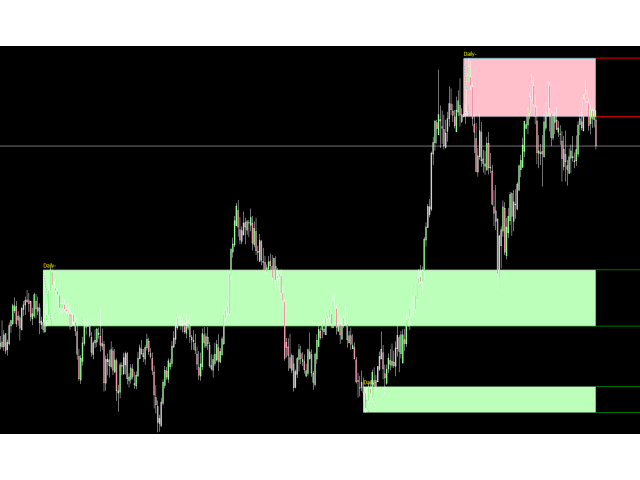
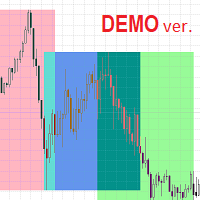
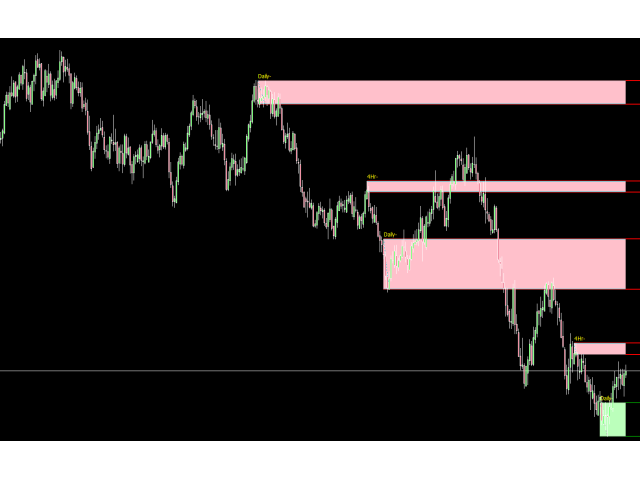
Let me tell you, if you’re a trader who’s serious about making the right moves at the right time, you NEED a way to mark your levels with accuracy. No guessing games here, no “well, maybe it’s around here.” Drop “Draw My Levels” on your chart, and BOOM—it adds two lines marking the top and bottom of your level, fills it in with color, and even shows you the timeframe so you know exactly when and where you’ve marked.

Here’s the Secret Sauce:

1. Drag-and-Drop Simplicity: Place it on the chart—effortless. It takes the candle you’re working on and the last three before it, analyses the data, and draws your level with "surgical precision".

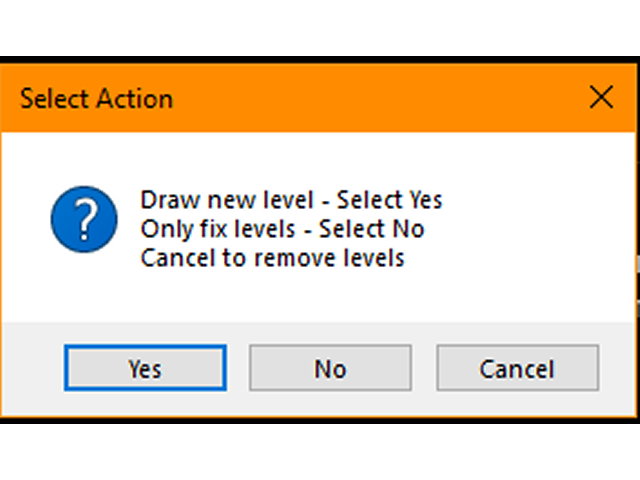
2. Three Simple Options: When you drop it, a pop-up box appears with three easy choices:

   - YES - Draws a new level instantly.

   - NO - Redoes your levels for perfection.

   - CANCEL - Wipes only this level from your chart, leaving everything else intact. Easy, right?

3. Know Your Zones, Know Your Chart: It automatically recognizes whether you’re drawing a demand (buy) or supply (sell) zone and fills the level with colour—green for demand, red for supply. Spot opportunities with a glance, stay focused, and act fast!

4. Seamless Multi-Timeframe Compatibility: Whether you’re analyzing on the daily or down to 5-minute charts, this script works. If you want to tighten up your level’s width? Drop down to a lower timeframe and get that crystal-clear zone. It’s flexible—it’s 'exactly' what a real trader needs.

Pro Tips Straight From the Pros

You want more? Here it is. You can adjust the levels any way you want, thanks to the smart integration with the Fibonacci tool. Plus, it’s customizable. Favourite it. Hotkey it. It’s at your fingertips whenever you need it.

A Real Trader’s Tool for Serious Profits

Listen, if you want to understand the true buying and selling pressure in the market, you need a Multi-Anchored VWAP. And guess what? You can find it here on my profile (link included). Pair it with Draw My Levels, and you’re 'unstoppable'.

Stop Settling. Start Succeeding.

Thousands of traders are looking for that edge—don’t let them get it before you. “Draw My Levels” has been battle-tested and designed for people who want to move fast, stay in control, and get clear signals. Make the smart move. Grab this today, put it in your favourites, and start dominating your charts.
Comentários 1
paddock
386
paddock 2023.05.20 02:32 
 

Great script. Very handy for supply and demand zones. Only issue I find is if I want to remove or adjust 1 level it removes all of them. But maybe I'm doing something wrong. Thanks to the developer.

Produtos recomendados
Market Profile 3
Hussien Abdeltwab Hussien Ryad
3 (2)
Market Profile 3 MetaTrader 4 indicator  — is a classic Market Profile implementation that can show the price density over time, outlining the most important price levels, value area, and control value of a given trading session. This indicator can be attached to timeframes between M1 and D1 and will show the Market Profile for daily, weekly, monthly, or even intraday sessions. Lower timeframes offer higher precision. Higher timeframes are recommended for better visibility. It is also possible t
FREE
Enhanced Volume Profile: The Ultimate Order Flow & Liquidity Analysis Tool Overview Enhanced Volume Profile   is an indicator for MetaTrader 5 that displays the traded volume at specific price levels over a defined period. It separates the total volume into buy and sell components, presenting them as a side-by-side histogram on the chart. This allows users to observe the volume distribution and the proportion of buy and sell volumes at each price level. Graphics Rendering The indicator uses t
FREE
This panel is a part of the SupDem-Pro trading system and is used to search for the best opportunities for any available instruments. Which can be selected manually in the Market Watch (open it with CTRL + M). Using this trading panel in combination with ShvedSupDem-Pro_Zone allows to analyze multiple currency pairs with a single click. The panel allows to load any instruments from the Market Watch, from 6 major currency pairs up to all instruments (480). The indicator parameters Button Width -

FREE
Real-time spread tracking and monitoring software Displays spread values in form of histograms on current timeframe of chart Convenient for analyzing spread changes, as well as for comparing trading conditions of different brokers By placing on desired chart, the spread changes at different trading times are displayed Additionally Fully customizable Works on any instrument Works with any broker
FREE
This indicator help to mark the high and low of the session Asian,London,Newyork , with custom hour setting This indicator is set to count from minute candle so it will move with the current market and stop at the designated hour and create a accurate line for the day. below is the customization that you can adjust : Input Descriptions EnableAsian Enables or disables the display of Asian session high and low levels. EnableLondon Enables or disables the display of London session high and
FREE
Automated Timeframe cycling with Symbols centered.  Force every timeframe onto one clock window, so the story you see on Daily is the same story you are slicing on H4, H1, and M1.  Traders usually flip timeframes and lose the span. A Daily chart shows a few weeks, then M15 shows a few hours, and the eye treats them as different markets. TASSERACT locks the window to N bars of the highest enabled timeframe — default 10 Daily — and maps every lower timeframe to that same stretch. You stay inside o
FREE
Cumulative Delta MT4
Evgeny Shevtsov
4.86 (29)
The indicator analyzes the volume scale and splits it into two components - seller volumes and buyer volumes, and also calculates the delta and cumulative delta. The indicator does not flicker or redraw, its calculation and plotting are performed fairly quickly, while using the data from the smaller (relative to the current) periods. The indicator operation modes can be switched using the Mode input variable: Buy - display only the buyer volumes. Sell - display only the seller volumes. BuySell -
FREE
Auto TP SL Manul Open Panding Orders Overview: AUto TP SL Manul Open Panding Orders is an innovative trading platform designed to enhance trading efficiency and effectiveness in managing financial investments. Key Features: Automated Management : Seamlessly manage take-profit (TP) and stop-loss (SL) orders with our advanced automation tools. Manual Adjustments : Maintain control with manual options, allowing traders to adjust orders according to market conditions.
FREE
SX Supply Demand Zones accurately identifies and draws high-probability Supply and Demand zones using a sophisticated algorithm. Unlike traditional indicators that clutter your chart, this indicator is designed with a focus on performance and a clean user experience. New Unique Feature: Interactive Legend System What truly sets this indicator apart from everything else is the Interactive Control Legend. You have a professional dashboard directly on your chart that allows you to: Show/Hide: Ins
FREE
Please note: This demo will work only on EURUSD live chart. It will not run in the strategy tester. ChartTrader is a professional trading tool that every trader needs in their toolbox. It has been developed to work with the MetaTrader 4 platform. ChartTrader offers a number of options to make placing orders in the Forex market quick and easy. The GUI sits on the chart window, so there is no need to navigate to separate windows when placing orders. The program allows you to set pending and insta
FREE
Signalator Lot Size Evaluator MT4 is a free local MetaTrader 4 utility for manual traders. It helps calculate an estimated lot size before opening a trade manually. The calculation is based on account size, trade direction, entry price, stop loss, risk percentage or fixed money risk, and broker symbol settings. The main purpose is simple: Enter your setup → define your risk → get the suggested lot size. The panel also shows useful pre-trade information such as spread, risk amount, SL/TP distance
FREE
This MQL4 code is a custom indicator that draws multiple colored rectangles on a chart, spaced apart by a defined pip distance, and projected into the future. Here's a brief breakdown: Purpose: Draws several horizontal rectangles (zones) starting from a specified price. Rectangles are spaced apart vertically by a pip distance. Colors alternate between FirstColor and SecondColor . Rectangles can be drawn behind candles and optionally filled. Each rectangle extends into the future for a specified
FREE
======================================================== GOLD WAVE LEVELS (ELLIOTT-ALIGNED) - MQL5/MT4 MARKET DESCRIPTION (formatting: **bold** = Bold button; lines with • = bullet list; UPPERCASE = heading) ======================================================== OVERVIEW ------------------------------------------------------- **Gold Wave Levels** draws a tested wave backbone for gold and validates signals against **Elliott theory hard-rules**, with higher-timeframe context and per-timeframe
FREE
Um stop móvel que não devolve um único ponto, e a barra exata em que ele vira. O UT Bot MTF desenha o stop por ATR no seu gráfico, marca cada virada BUY e SELL e faz então o que quase nenhuma versão faz: informa quantos sinais os filtros descartaram e qual filtro os descartou, e avisa pela cor enquanto a seta da barra atual ainda pode desaparecer. Gratuito, sem período de teste e sem funções bloqueadas. O motor é deliberadamente simples. O stop segue o preço a um múltiplo escolhido do ATR, apert
FREE
PZ Penta O MT4
PZ TRADING SLU
2.33 (3)
The Penta-O is a 6-point retracement harmonacci pattern which usually precedes big market movements. Penta-O patterns can expand and repaint quite a bit. To make things easier this indicator implements a twist: it waits for a donchian breakout in the right direction before signaling the trade. The end result is an otherwise repainting indicator with a very reliable trading signal. The donchian breakout period is entered as an input. [ Installation Guide | Update Guide | Troubleshooting | FAQ | A
FREE
High Low Open Close MT4
Alexandre Borela
4.81 (21)
Se você gosta deste projeto, deixe uma revisão de 5 estrelas. Este indicador desenha os preços abertos, altos, baixos e finais para o especificado período e pode ser ajustado para um fuso horário específico. Estes são níveis importantes olhados por muitos institucional e profissional comerciantes e pode ser útil para você saber os lugares onde eles podem ser mais activa. Os períodos disponíveis são: Dia anterior. Semana anterior. Mês anterior. Quarto anterior. Ano anterior. Ou: Dia atual. Seman
FREE
Follow The Line
Oliver Gideon Amofa Appiah
3.94 (16)
FOLLOW THE LINE GET THE FULL VERSION HERE: https://www.mql5.com/en/market/product/36024 This indicator obeys the popular maxim that: "THE TREND IS YOUR FRIEND" It paints a GREEN line for BUY and also paints a RED line for SELL.  It gives alarms and alerts of all kinds. IT DOES NOT REPAINT and can be used for all currency pairs and timeframes. Yes, as easy and simple as that. Even a newbie can use it to make great and reliable trades. NB: For best results, get my other premium indicators for more
FREE
Position Selective Close MT4
Francisco Manuel Vicente Berardo
The Position Selective Close is a multi-symbol multi-timeframe script used to close simultaneously various positions.  General Description   The Position Selective Close   possesses   three operation modes (Intersection,   Union   and All) that control the way   as   four position features (symbol, magic number,   type   and profit) are used. The modes, available through the Selection Mode input parameter, relate to the features, available through the “Select by Feature” and “Feature” input pa
FREE
BoxInside MT4
Evgeny Shevtsov
4.83 (6)
This indicator calculates the volume profile and places labels that correspond to the VAH, VAL and POC levels, for each candle individually. Indicator operation features The indicator works on the timeframes from M5 to MN, but it uses the history data of smaller periods: M1 - for periods from M5 to H1, M5 - for the H4 period, M30 - for the D1 period, H4 - for the W1 period, D1 - for the MN period. The color and location of the VAL, VAH and POC labels on the current candle are considered to be c
FREE
Forex Market Profile and Vwap
Lorentzos Roussos
4.86 (7)
Perfil do mercado Forex (FMP para breve) O que isso não é: O FMP não é a exibição TPO clássica codificada por letras, não exibe o cálculo geral do perfil de dados do gráfico e não segmenta o gráfico em períodos e os calcula. O que faz : Mais importante ainda, o indicador FMP processará dados que residem entre a borda esquerda do espectro definido pelo usuário e a borda direita do espectro definido pelo usuário. O usuário pode definir o espectro apenas puxando cada extremidade do indicador co
FREE
Simple QM Pattern
Suvashish Halder
3.33 (3)
Simple QM Pattern is a powerful and intuitive trading indicator designed to simplify the identification of the Quasimodo (QM) trading pattern. The QM pattern is widely recognized among traders for effectively signaling potential reversals by highlighting key market structures and price action formations. This indicator helps traders easily visualize the QM pattern directly on their charts, making it straightforward even for those who are new to pattern trading. Simple QM Pattern includes dynamic
FREE
Market Viewer
Matimu Romeo Ngoveni
Market Viewer This utility seeks to assist the trader in identifying potential areas of interest on the price chart. Different components integral to decision making have been automated, allowing the user to engage with perfectly calculated levels. Some components include the weeks initial balance, session Min and Max areas and a round number indicator altogether forming templates providing confidence to the trader. Have a look at the screenshots for a sneak peak into the components. The utility
FREE
Highlights trading sessions on the chart The demo version only works on the AUDNZD chart!!! The full version of the product is available at: (*** to be added ***) Trading Session Indicator displays the starts and ends of four trading sessions: Pacific, Asian, European and American. the ability to customize the start/end of sessions; the ability to display only selected sessions; works on M1-H2 timeframes; The following parameters can be configured in the indicator: TIME_CORRECTION = Correct
FREE
Lógica de trabalho O utilitário Stop Out é um indicador simples, mas muito conveniente, que mostra quantos pontos faltam para o nível Stop Out / Seu benefício está no fato de que muitos traders superestimam deliberadamente o risco na negociação em busca de lucro, usam a margem disponível no máximo e, neste caso, é muito importante saber onde o corretor pode fechar suas posições à força. Basta colocar o indicador no gráfico e, dependendo da posição aberta em Compra ou Venda, você verá a marca
FREE
The Candle Countdown Timer for MetaTrader 4 (also available for MT5) is a vital indicator designed to help you manage your trading time effectively. It keeps you updated about market open and close times by displaying the remaining time before the current candle closes and a new one forms. This powerful tool enables you to make well-informed trading decisions. Key Features: Asia Range: Comes with an option to extend the range. Broker Time, New York, London Time: Displays the current broker time
FREE
Smart Trade Monitor — Real-Time Position Tracking, P&L Analysis & Alert System   Real-Time Monitoring : Auto-tracks open/closed positions, displays yesterday’s & previous day’s P&L—no manual calculations!   Smart Alerts (Premium Only) : Instant push notifications + sound alerts for position changes—never miss a trading opportunity!   User-Friendly : One-click setup, key data displayed directly on charts for faster decisions.   Cross-Platform : Supports both MT4 & MT5, compatible with
FREE
Zig Zag 123
Stephen Reynolds
Zig Zag 123 tells us when a reversal or continuation is more likely by looking at the shift in supply and demand. When this happens a signature pattern appears known as 123 (also known ABC) will often break out in direction of higher low or lower high. Stop loss and take profit levels have been added. There is a panel that shows the overall performance of your trades for if you was to use these stop loss and take profit levels.  We get alerted if a pattern 123 appears and also if the price re
FREE
Free automatic Fibonacci is an indicator that automatically plots a Fibonacci retracement based on the number of bars you select on the BarsToScan setting in the indicator. The Fibonacci is automatically updated in real time as new highest and lowest values appears amongst the selected bars. You can select which level values to be displayed in the indicator settings. You can also select the color of the levels thus enabling the trader to be able to attach the indicator several times with differe
FREE
The utility TradeKeeper Lite can show your profits for different periods and bip a sound when you reach a profit target value. Click the tachometer to quickly switch to the next profit period. There are 5 of them: This Day, This Week, This Month, Last 90 Days and All I Made. With the utility TradeKeeper Pro , available at this link , you can also open trades with a magic number and volume of your choice, trail any orders with a simple trail or iSAR-based trail, as well as close any open trades a
FREE
Buffer Finder Tool
Afsal Meerankutty
4.75 (4)
CyberZingFx Buffer Finder Tool Developed for Finding Buffers of Indicator to use in Universal Indicator EA . This is Not an Indicator or EA CyberZingFx Buffer Finder Tool is utility tool designed specifically for MetaTrader 4 (MT4) users. It is a standalone application that helps you easily find the buffers of any MT4 indicator, allowing you to use them in your Universal Indicator EA. With the Buffer Finder Tool, you no longer have to search through the data window to find the buffers you need.
FREE
Os compradores deste produto também adquirem
Local Trade Copier EA MT4
Juvenille Emperor Limited
4.96 (111)
Local Trade Copier EA MT4 é um copiador de operações rápido e flexível para copiar e gerenciar operações entre várias contas MetaTrader 4 no mesmo computador Windows ou Windows VPS. Ele combina a sincronização local de operações com controles no lado do Receiver para tamanho de lote, gerenciamento de risco, filtragem de operações, mapeamento de símbolos, gerenciamento de operações e proteção da conta. Configure seus terminais Transmitter e Receiver em aproximadamente 1 minuto e copie operações
Bem-vindo ao Trade Manager EA—uma ferramenta de gestão de risco criada para tornar o trading mais intuitivo, preciso e eficiente. Não é apenas uma ferramenta para executar ordens, mas uma solução abrangente para planejamento de operações, gerenciamento de posições e controle de risco. Seja você um iniciante, trader avançado ou scalper que precisa de execução rápida, o Trade Manager EA adapta-se às suas necessidades, oferecendo flexibilidade em todos os mercados, desde forex e índices até commodi
Trade Assistant MT4
Evgeniy Kravchenko
4.43 (197)
Ajuda a calcular o risco por comércio, a fácil instalação de uma nova encomenda, gestão de encomendas com funções de fecho parcial, trailing stop de 7 tipos e outras funções úteis. Materiais e instruções adicionais Instruções de instalação - Instruções para a aplicação - Versão de teste da aplicação para uma conta de demonstração Função de linha Mostra no gráfico a linha de Abertura, Stop Loss, Take Profit. Com esta função é fácil definir uma nova ordem e ver as suas características adicionais
Trade Indicator Assistant is a powerful MT4 utility designed to turn indicators into automated trading systems. Its main feature is the ability to automatically detect an indicator’s   BUY and SELL signal buffers , without requiring you to know the buffer numbers, search through indicator settings, or modify the indicator source code. Bonus Indicator: After purchasing Trade Indicator Assistant, contact me to receive Trade Signal Pro completely free as a bonus indicator. [Download Demo Version]
Exp COPYLOT CLIENT for MT4
Vladislav Andruschenko
4.69 (65)
Copiador profissional de operações para MetaTrader 4 Copiador de operações rápido, profissional e confiável para MetaTrader 4 . COPYLOT permite copiar operações de Forex entre os terminais MetaTrader 4 e MetaTrader 5 , com sincronização flexível para diferentes tipos de conta e cenários de negociação. A versão COPYLOT MT4 oferece suporte para: MetaTrader 4 → MetaTrader 4 MetaTrader 5 Hedge → MetaTrader 4 MetaTrader 5 Netting → MetaTrader 4   Versão MT5 Descrição completa + DEMO + PDF Como compra
Trade copier MT4
Alfiya Fazylova
4.61 (36)
Trade Copier é um utilitário profissional projetado para copiar e sincronizar negociações entre contas de negociação. A cópia ocorre da conta / terminal do fornecedor para a conta / terminal do destinatário, instalada no mesmo computador ou vps. Antes de comprar, você pode testar a versão demo em uma conta demo. Versão de demonstração aqui . Instruções completas aqui . Principais funcionalidades e benefícios: Suporta a cópia de MT4> MT4, MT4> MT5, MT5> MT4, incluindo contas "MT5 netting". Os mod
TradePanel MT4
Alfiya Fazylova
4.84 (95)
Trade Panel é um assistente de negociação multifuncional. O aplicativo contém mais de 50 funções de negociação para trading manual e permite automatizar a maioria das tarefas de negociação. Instruções para o aplicativo: https://www.mql5.com/pt/blogs/post/762435 Versão de teste do aplicativo para conta demo: https://www.mql5.com/pt/blogs/post/762547 Como instalar o aplicativo: https://www.mql5.com/pt/blogs/post/762548 Como testar o aplicativo no modo visual: https://www.mql5.com/pt/blogs/post/770
Take a Break
Eric Emmrich
5 (31)
Take a Break pauses your Expert Advisors when trading is a bad idea: before news, after a daily loss, outside your trading hours, or when a rule you wrote yourself says so. When the pause is over, your EAs simply continue. Account protection for all your EAs in one tool: news filter, drawdown and equity protection, time filter and custom rules. One EA on one chart protects the whole account, the free indicator gives every chart its own rules on top. Free demo | What is new in 26.09 | Support Ass
Trade Manager MT4 DaneTrades
Levi Dane Benjamin
4.09 (11)
Trade Manager para ajudá-lo a entrar e sair rapidamente de negociações enquanto calcula automaticamente seu risco. Incluindo recursos para ajudar a evitar negociações excessivas, negociações de vingança e negociações emocionais. As negociações podem ser gerenciadas automaticamente e as métricas de desempenho da conta podem ser visualizadas em um gráfico. Esses recursos tornam este painel ideal para todos os traders manuais e ajudam a aprimorar a plataforma MetaTrader 4. Suporte multilíngue. Vers
O Telegram to MT4 Multi-Channel Copier copia automaticamente os sinais de trading dos seus canais de Telegram diretamente para o MetaTrader 4. Sem bots, sem extensões de navegador, sem copiar à mão. O sinal chega ao Telegram e o EA abre a operação no seu terminal em poucos segundos. E antes de copiar um canal, o backtester integrado mostra o que esse canal teria feito na sua conta. O produto inclui dois componentes: um aplicativo de Windows que escuta os seus canais de Telegram, e este Expert Ad
FCK CurrencyStrength Pro
Patel Hitendrakumar Mahendrabhai
Hi Friends, " FCK Currency Strength Pro " is a auto & semi auto trading expert with direction of pair. Buy-Sell separate or multi currency in one click. The strategy of  FCK Currency Strength Pro  is a combination of custom indicator, Trendlines, Support & Resistance levels ( Price Action ) and most important secretive trading algorithm mentioned above. Download News Ex4 and csv file You need the following SDSnews.ex4 in MQL4/Libraries and the daylightsavings.csv in MQL4/Files. Only 4 of 5 copi
The product will copy all telegram signal to MT4   ( which you are member  ) , also it can work as remote copier.  Easy to set up, copy order instant, can work with almost signal formats, image signal, s upport to translate other language to English Work with all type of channel or group, even channel have "Restrict Saving Content", work with  multi channel, multi MT5 Work as remote copier: with signal have ticket number, it will copy exactly via ticket number. Support to backtest signal. How to
KT Equity Protector MT4
KEENBASE SOFTWARE SOLUTIONS
3.75 (4)
O único EA que todo trader de MetaTrader deveria estar usando, mas muitos ainda não usam. A maioria das contas não quebra porque a estratégia estava errada. Elas quebram porque, em um momento ruim, o trader deixou uma perda correr, aumentou a exposição, manteve operações abertas no fim de semana, devolveu uma semana lucrativa ao mercado ou esqueceu o limite diário da prop firm por causa de um único clique errado. KT Equity Protector é o guardião automático que não deixa isso acontecer. Instale e
Um copiador de negociações local entre terminais MetaTrader num PC ou VPS. A cópia funciona em qualquer direção entre MT5 e MT4. O volume de uma cópia é calculado em percentagem do património, na moeda da conta ou espelhando a participação no risco da conta principal; as negociações são selecionadas por filtros de símbolo, número mágico, comentário e tamanho. O painel gere o tempo de vida de uma cópia aberta: Stop Loss/Take Profit virtuais, ponto de equilíbrio, trailing stop, fecho do cesto e f
RS Trade Copier - o local trade copier ultrarrápido com uma interface gráfica verdadeira . Pare de digitar números de conta manualmente. Chega daquela lista enorme de 200+ parâmetros de entrada incompreensíveis. Uma ferramenta confiável e flexível para cópia de operações comerciais entre múltiplos terminais MT4 e MT5. Atende tanto traders experientes e serviços de sinais quanto investidores individuais. Permite sincronizar negociações de um ou múltiplos Provedores para um ou múltiplos Clientes c
O MT4 para Telegram Signal Provider é uma ferramenta fácil de usar e totalmente personalizável que permite o envio de sinais para o Telegram, transformando sua conta em um provedor de sinais. O formato das mensagens é totalmente personalizável! No entanto, para uso simples, você também pode optar por um modelo predefinido e habilitar ou desabilitar partes específicas da mensagem. [ Demonstração ]   [ Manual ] [ Versão MT5 ] [ Versão Discord ] [ Canal do Telegram ]  New: [ Telegram To MT5 ] Conf
Telegram to MT4 Coppy
Sergey Batudayev
4.09 (11)
Telegram para MT4:   A solução definitiva para cópia de sinais Otimize suas negociações com   o Telegram para MT4   , o utilitário de última geração desenvolvido para copiar sinais de negociação diretamente de canais e chats do Telegram para sua plataforma MetaTrader 4 — sem a necessidade de DLLs. Esta solução robusta garante a execução perfeita de sinais com precisão incomparável e opções de personalização, economizando seu tempo e aumentando sua eficiência. [ Instructions and DEMO ] Principais
Trade Copier Global
Laszlo Tormasi
5 (15)
Trade Copier Global: The name speaks for itself. This copier allows you to copy orders between MT4 terminals even if they are not installed on the same computer. Features Copying trades between MT4 terminals around the world with a short delay. Automatically recognizes symbol prefixes. Can connect many Slaves to the same Master. Supports pending and market orders. Supports partial order close (with limitations, see below) Can send messages and notifications to the Slaves from the Master Several
Universal copier of deals from MetaTrader 4 to MetaTrader 4 ( MT5<->MT5 version is available ; with both versions, you can copy MetaTrader 5<->MetaTrader 4, MetaTrader 4<->MetaTrader 5, MetaTrader 5<->MetaTrader 5, MetaTrader 4<->MetaTrader 4). Spread filter. Select the best price (start copying positions with a profit or loss). Configure the lot size, fixed or ratio-based (provider signals can be copied with an increased lot). Configure order copying (include pending orders or copy only open po
Partial Closure EA MT4
Juvenille Emperor Limited
5 (3)
O Partial Closure EA MT4 permite fechar parcialmente qualquer operação na sua conta, manualmente por uma porcentagem escolhida do tamanho do lote e/ou por número de ticket, ou automaticamente em porcentagens específicas dos níveis de TP/SL, fechando uma porcentagem do lote inicial em até 10 níveis de take profit e 10 de stop loss. Ele pode gerenciar todas ou algumas das operações na sua conta, especificando ou excluindo determinados números mágicos, comentários ou símbolos. Sugerencia: descarg
VirtualTradePad mt4 Extra
Vladislav Andruschenko
4.85 (61)
Painel de negociação para negociação em 1 clique.  Trabalhando com posições e pedidos!  Negociar a partir do gráfico ou do teclado. Usando nosso painel de negociação, você pode negociar com um clique no gráfico e realizar operações de negociação 30 vezes mais rápido do que o controle MetaTrader padrão. Cálculos automáticos de parâmetros e funções que tornam a vida mais fácil para um trader e ajudam-no a conduzir suas atividades de trading com muito mais rapidez e conveniência. Dicas gráficas e i
Baixar versão de teste funcional Copy Cat More (Gato Copião) — Copiador de Trades (Trade Copier) MT4 não é apenas um simples copiador local de trades; é um completo framework de gerenciamento de risco e execução (risk management and execution framework) projetado para os desafios de trading de hoje. De desafios de prop firm ao gerenciamento de portfólio pessoal, ele se adapta a cada situação com sua combinação de execução robusta, proteção de capital, configuração flexível e manuseio avançado
King Trade Copier MT4
Mohammed Maher Al-sayed Mohammed Ahmed Saleh
5 (1)
O King Trade Copier conecta terminais MetaTrader que funcionam no mesmo computador ou VPS. As operações abertas numa conta aparecem nas outras. O arquivo traz as duas funções, de modo que o mesmo download se torna o emissor ou um receptor, dependendo do valor que você definir em Mode. Em cada gráfico, o painel informa se este terminal está enviando ou recebendo, indica o nome da conta do outro lado, conta os receptores que responderam e mostra a idade do último sinal. Uma ordem que não foi copi
Indicador de força das moedas para MetaTrader 4 Este indicador de força das moedas analisa até 28 pares principais e produz um valor por moeda, para as 8 principais: USD, EUR, GBP, JPY, CHF, CAD, AUD e NZD. Em vez de abrir gráfico após gráfico para saber quem lidera, você lê um único painel no seu gráfico MetaTrader 4 e sabe qual moeda está a ser comprada e qual está a ser vendida. O que o painel mostra Uma barra de força ordenada para cada uma das 8 moedas, com a sua percentagem Uma matriz mult
CloseIfProfitorLoss with Trailing
Vladislav Andruschenko
4.88 (32)
Close If Profit or Loss with Trailing para MetaTrader 4 — fechamento automático por lucro ou perda total Uma utilidade prática para MetaTrader 4 que fecha posições automaticamente quando o lucro total ou a perda total atinge o nível definido por você. O Expert Advisor monitora as operações abertas, calcula o resultado flutuante, pode aplicar Trailing Profit e ajuda a fechar posições mais rápido do que uma reação manual. O MetaTrader 4 ainda é muito usado por traders manuais, scalpers, usuários
Trade Dashboard MT4
Fatemeh Ameri
4.96 (55)
Trade Dashboard simplifies how you open, manage, and control your trades, with built-in lot size calculation. It allows you to execute trades, manage risk, and control positions directly on the chart, with tools such as partial close, breakeven, and trailing stop. Designed to reduce manual work and help you stay focused on your trading decisions. A demo version is available for testing. Detailed explanations of features are provided within the MQL5 platform. Installation instructions are include
Second and Custom Timeframe Charts See the market between standard timeframes. Second and Custom Timeframe Charts is a professional chart utility for MetaTrader 4 that creates synthetic candles for non-standard timeframes directly from market data. It is designed for traders who need more flexibility than the default MT4 timeframe set can provide. Standard charts show only fixed periods. But the market does not always move in standard blocks. Sometimes the most important structure is visible on
Shepherd Safety EA
AW Trading Software Limited
4.92 (13)
AW Shepherd Safety EA é um Expert Advisor para gerenciar posições abertas. A primeira ordem é aberta pelo trader no painel, e a partir daí o EA conduz a cesta sozinho: adiciona ordens de recuperação com filtro de tendência, fecha o lado por TakeProfit, trailing ou stop e mostra os níveis de fechamento no gráfico. Compras e vendas são geridas separadamente, e os dois lados podem ficar abertos ao mesmo tempo. A ordem de recuperação não é aberta apenas pelo passo de preço, mas depois de uma reversã
Smart Copy Local MT4
Kyra Nickaline Watson-gordon
5 (7)
Smart Copy is an Easy-to-Use EA that supports Multi Copying Metatrader4 and Metatrader5 and Local/Remote Copying. (Remote Version is coming soon) Free version is available on Smart Copy Local Free MT4 Specifications :     Real Time, Multi Terminal - Multi Account - MT4/MT5 trade copying     Copy from netting to hedge and hedge to netting is supported.     Fast and instant copy     All settings are input visually.     Easy modifying symbol names, prefix, suffix     Enable/Disable copying s
Want automatically to put the pending order, take profit and stop loss? This EA will do it on your behalf! The Fibo Heart EA strategy will place limit order after the ‘check point’ breakout. The position will be triggered when the price make a successful retest. If not, the pending order will automatically deleted after price hit certain level. You also have option to enable market order (instant execution) and custom take profit in the inputs setting. This EA must be attached with Fibo Heart In
Mais do autor
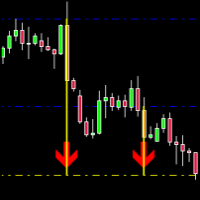
What does this do? It shows you on the chart which stop belongs to which entry.  Have you ever had multiple positions or trades open on a single pair and were confused which stop loss goes with what entry? Even worse, the stop loss orders for buy and sells are the same color on the chart. Well, your problem has been solved! This indicator will show you which stop belongs to which entry.  It will place a vertical line and an arrow on the chart for each open trade. A yellow line connects the entry
FREE
Trade Assistant MT4 Introducing Tipster Trendlines 2: The Future of Manual Trading is Here! This is a  Trade Assistant for MT4.  Are you ready to elevate your trading game? Tipster Trendlines 2 isn’t just another tool; it’s your ultimate trading companion —designed to empower you, save time, and help you trade smarter. For 9 years, this tool has been a game-changer for traders who value control, precision, and results. Now it’s your turn to experience its magic. What Makes Tipster Trendlines 2 S
FREE
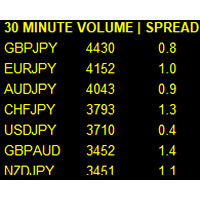
If you like this product, please leave a 5 start review! Monitors symbols and shows you which one are the most active for the 3 different time frames you select. Shows volume and spread as well. Good for scalpers or short term traders. Forex is 24 hours, so knowing which pair is active is key to entering with good spreads and catching moves in an active market. This utility attached to a chart and shows you which pair is active, the list is auto sorted, active pairs move to the top of the list.
FREE
Multi Anchored VWAP
Brian Derich
4.6 (5)
Anchored Volume Weighted Average Price (AVWAP, or Anchored VWAP). Tells you who is in control, the buyers or the sellers. Better than all other moving averages because it adds weight to the traded volume. This technique was made popular by Brian Shannon of Alphatrends. It is calculated by multiplying typical price by volume, and the dividing by total volume. It is very simple to use. 1. Press a number from 1 to 9 on the keyboard, then click the chart where you want to anchor the VWAP. 3. Hold C
Filtro:
paddock
386
paddock 2023.05.20 02:32 
 

Great script. Very handy for supply and demand zones. Only issue I find is if I want to remove or adjust 1 level it removes all of them. But maybe I'm doing something wrong. Thanks to the developer.

Brian Derich
1625
Resposta do desenvolvedor Brian Derich 2023.06.27 03:33
Thank you!
Responder ao comentário