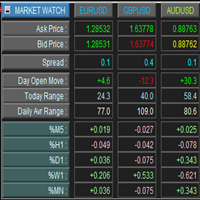
Market Watch Panel MT4

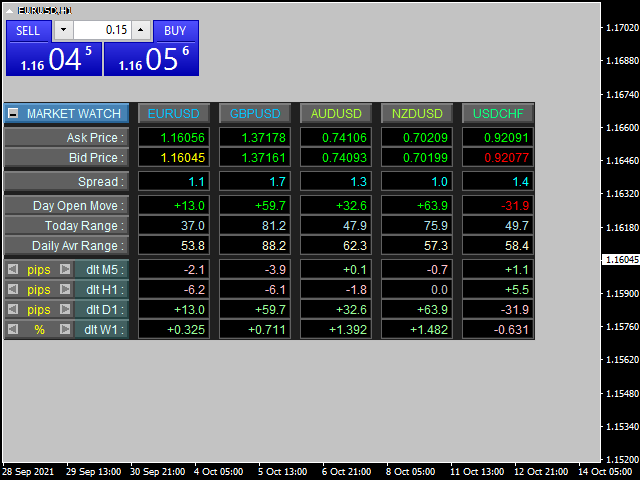
This is a panel for market review and evaluation of multicurrency price movements. It shows main parameters for a user defined group of symbols in the form of a table. The following values are displayed:

  • Symbol name;
  • Ask price value;
  • Bid price value;
  • Spread size in pips;
  • Stop level in pips - may be hidden by a user;
  • Change of price in pips comparing to the day start;
  • Current daily range (High - Low) in pips;
  • Average daily range in pips for user defined number of days;
  • Price change percentage during the specified time periods (timeframes).

Parameters

  • Common Title - text displayed next to the panel minimization button. Its only purpose is to specify its name.
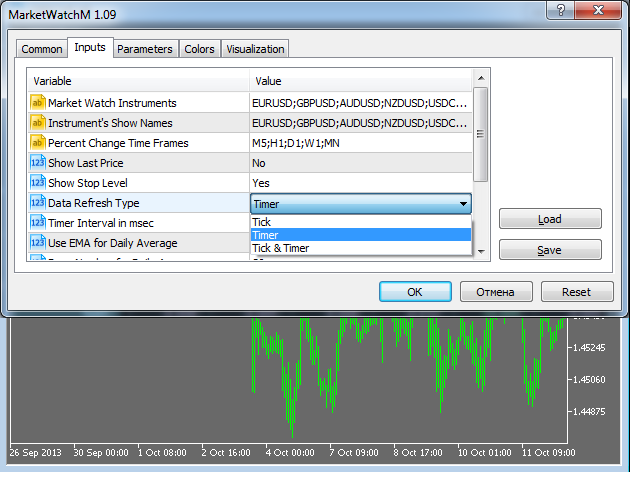
  • Market Watch Instruments - the list of work instrument names. The names of the instrument must be separated with a comma. For example, EURUSD;GBPUSD.
  • Instrument's Show Names - the list of the instrument names that should be displayed in the screen. You can use a custom name for an instrument as its original name can be too long and contain unnecessary information. The names of the instruments must be separated with a comma, and their position must match the position of the corresponding work instruments.
  • Percent Change Time Frames - the list of periods (timeframes) the price change percentage is displayed for. It must be separated with a semicolon. For example, M5;H1;D1;W1 will display the percentage change for four timeframes (5 minute, hourly, daily and monthly). Price change is calculated as 100 * (Close - Open) / Open.
  • Show Stop Level - show/hide the stops level. The notion of a stop level is not common for exchange symbols. Also, some modern dealing centers do not use this notion any more.
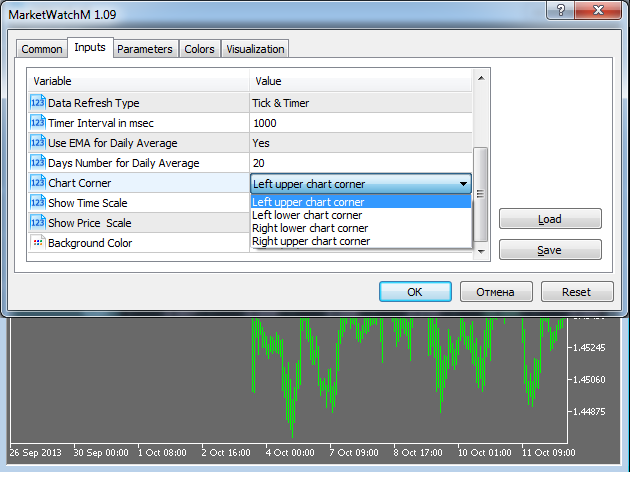
  • Data Refresh Type - mode of updating the information on the screen. The following modes are available - Tick / Timer / Tick & Timer. In Tick & Timer mode, the information is updated at every tick of the instrument and according to a set time interval.
  • Timer Interval in msec - the time interval for updating the information according to the timer (if selected in the previous parameter).
  • Use EMA for Daily Average - use EMA average when calculating the average daily range. If set to No, the simple averaging will be used.
  • Days Number for Daily Average - number of days for calculating the average daily range. Usually, it is set to 20 days, which approximately corresponds to one work month.
  • Chart Corner - chart corner the panel will be located at (binding to the selected corner).
  • Show Time Scale - show/hide the time scale on the current chart.
  • Show Price Scale - show/hide price scale on the current chart.
  • Background Color - background color for the panel.

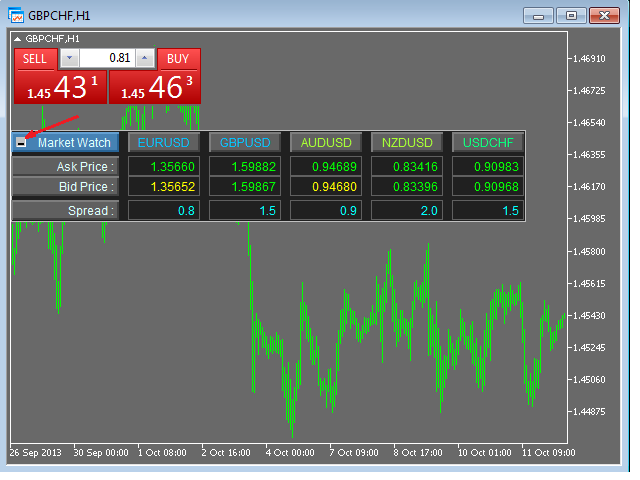
There is a button that minimizes the information displayed. Once it is pressed, the panel will display only Ask/Bid price and current spread.

Left-click the symbol name to highlight the symbol's column background. Click again to deselect the column. Left-click the timeframe name to highlight the timeframe's line background. Click again to deselect the line. This allows you to quickly find the appropriate symbol (timeframe), especially when you have many symbols set for display.

Below is the offer for active users and all of you who has read to this line. :)

If you have any interesting ideas for improving this or any other product I offer, then you'll get a big discount for my products if the idea is realized.

Please write all your suggestions in the Comments tab, so we can have a documentary proof of the ideas and see who the first author is.
Produtos recomendados
Este é um painel comum que coloca uma rede de ordens de compra e venda. Fecha esta ordem Expert Advisor de acordo com o lucro definido nas Configurações. Em seguida, há um parâmetro chamado Ladder que inclui que a distância entre as ordens começam a aumentar nos pontos especificados pelo parâmetro ladder (aqui, nas configurações básicas é de 10 Pontos) significa uma segunda ordem de 10 pontos, uma terceira ordem de 20 pontos, uma quarta ordem de 40 pontos, etc. Então, o que você precisa saber
MARKET MAKER EXPERT is an customizable advanced, fully automated Grid Trading Expert Advisor developed to trade on MULTIPAIR MODE ( EURUSD,USDJPY,USDCHF,USDCAD,EURCHF ), by spreading out risks. Expanding Grid is its speciality. It focuses on opening a large number of orders. The currency pairs have been chosen carefully to run this system. Once it analyze the market, it does a hedge order immediately, (so margin levels are not affected on the initial trade) Starts grid when the price move aga
Virtual OCO Pending
Kenneth Parling
5 (1)
Introdução 'Virtual OCO Pending' - uma ferramenta de utilitário de gerenciamento de pedidos semiautomática (consultor especializado) com avaliação de risco que permite que você coloque paradas ou limites pendentes com um clique de botão no preço atual com take profit e stop loss virtuais usando a regra pendente OCO (One Cancel De outros). Níveis visuais desenhados no gráfico para fácil confirmação visual. Você pode usar este utilitário a partir de um único gráfico para enviar pedidos em qualquer
如果产品有任何问题或者您需要在此产品上添加功能,请联系我 Contact/message me if you encounter any issue using the product or need extra feature to add on the base version. There is Demo version of this panel Dashboard Symphonie Trader System Demo in my product list, please try it out to get familiar with all functionalities free, LINK . This system basically utilizes Symphonie Indicator Set (Extreme, Emotion, Trend, and Sentiment) as the core indicators to generate trading signal mainly on time-frame M15. The signal will b
Universal TP SL Pips
Genesis Hafalla
5 (1)
This EA utility does not trade on its own, but it only modifies the   open  trades    to add   take profit   and   stop loss   that was  opened manually or by any other expert advisors.  The distance is based on Pips . How Does It Work? If   Symbol to modify   is set to   "All Symbol"   simply attach it to one chart, and all   open trades   in the entire terminal will set the   take profit   and   stop loss   .  If  Symbol to modify   is set to   "Local Symbol"   , it will only set the   ta
SFG Grid Manager MT4 – Sistema Inteligente de Grade e Espelho SFG Grid Manager MT4 é um gestor de grade automático e profissional que acompanha uma posição existente (manual ou aberta por outro EA) e abre uma nova operação de média a cada passo definido (GridPips). Quando a posição principal é encerrada ou desaparece, todas as operações abertas pelo gestor são fechadas automaticamente. Funciona com qualquer corretora que utilize contas Netting ou Hedging e é totalmente compatível com o tradin
如果产品有任何问题或者您需要在此产品上添加功能,请联系我 Contact/message me if you encounter any issue using the product or need extra feature to add on the base version. There is Demo version of this panel Dashboard Super Three MA Demo in my product list, please try it out to get familiar with all functionalities free, LINK . This system basically utilizes PA and three adjustable Moving Average as the main indicator set to generate trading signal. With the feature that all MA_timeframe, MA_period, MA_applied_price are ad
News Hedging Pro  is a unique robot that allows you to trade during the most critical news announcement periods by your predefined strategy. You can preset the strategy to trade, and then it will trade that news automatically when the news comes. News release gives opportunity to have pips since the price usually has big move at that time. Now with this tool, trading news become easier, more flexible and more exciting than ever. No waiting, no confusing anymore. Product Links Fully  Description
Make grid trading safe again | Built by a grid trader >> for grid traders.    Walkthrough Video  <== Get Grid Rescue up and running in 5 minutes  This is MT4 version, click  here  for  BlueSwift GridRescue MT5  (settings and logics are same in both versions) BlueSwift Grid Rescue MT4  is a risk management utility  EA  (used together with other grid trading experts) that can help you trade aggressive grid systems with manageable drawdown, therefore reduce substanstially margin call risk as we
This utility is the improved version of Trailing stop for advisors. It manages other EAs' orders as well as the ones opened manually. It is capable of trailing the price (trailing stop function), set a stop loss and take profit if they have not been set before. The Pro version features the ability to set trailing stop based on fractals and points of Parabolic SAR. When configuring the utility for an EA having no trailing stop function, place it to the new window with the same currency pair speci
BreakEven Grid Utility for MT4 BreakEven Grid is a powerful utility for manual trade management on the MetaTrader 4 platform. It provides a convenient on-screen panel with buttons to help you manage your open positions with a single click.  Features: Set BE+Profit: Automatically sets Take Profit to breakeven + desired profit in pips or money. Close BUY/SELL: Instantly close all Buy or Sell orders for the current symbol. Close +$/-$/Old/New: Close only profitable, losing, oldest or newest tra
This EA utility does not trade on its own, but it only modifies the open  trades  to add take profit and stop loss that was  opened manually or by any other expert advisors.  The distance is based on Average True Range Indicator(ATR). How Does It Work? If Symbol to modify is set to "All Symbol" simply attach it to one chart, and all open trades in the entire terminal will set the take profit and stop loss with the distance of Average True Range value of their corresponding symbol.  If  Symbol
News Scalping Executor is an utility which helps to trade high impact and huge volatility   news . This utility helps to create two opposite orders with risk management and profit protection. It moves automatically stop loss level to avoid losses as much as possible by using many different algorithms. It helps to avoid trading the news if spread suddenly becomes very huge. It can lock profit by moving stop loss or partially closing of orders. To be profitable with this type of trading you shou
Um utilitário para definir automaticamente os níveis de equilíbrio, transfere as negociações para o equilíbrio ao passar uma determinada distância. Permite que você minimize os riscos. Criado por um trader profissional para traders. O utilitário funciona com quaisquer ordens de mercado abertas por um trader manualmente ou usando consultores. Pode filtrar negociações por número mágico. O utilitário pode trabalhar com qualquer número de pedidos ao mesmo tempo. Versão MT5 https://www.mql5.com/ru/
Utilitário para fechamento automático de negócios por níveis de trailing stop. Permite que você aproveite ao máximo seu lucro. Criado por um trader profissional para traders. O utilitário funciona com quaisquer ordens de mercado abertas por um trader manualmente ou usando consultores. Pode filtrar negociações por número mágico. O utilitário pode trabalhar com qualquer número de pedidos ao mesmo tempo. Versão MT5 https://www.mql5.com/ru/market/product/56488 O QUE O UTILITÁRIO PODE FAZER: defi
Hedge Martin
Andrey Kornishkin
Hedge Martin Expert Advisor restores loss-making positions making them profitable by opening an opposite position with an increased lot. Trading strategy The EA works on a trend market selecting the appropriate curency pairs. The robot trades depending on the previous candle direction. The first order is set according to the following rules: If the previous candle is bullish, the EA opens a buy order; If the previous candle is bearish, the EA opens a sell order; If the price goes in unfavorable
Dublicator
Vladimir Tkach
Simple and fast trade duplicator that copies trades on the same account with the reverse function. The reverse can be used for locking. You can choose to duplicate transactions for the current or all instruments.  Parameters Duplicate in reverse - the direction of duplication; Duplicate symbol - duplicate the selected tool; Manual lot size - hand size of the volume; Do not duplicate if spread > - do not duplicate a trade if the current spread is larger; List of magic to be duplicated - filte
This EA utility opens trade when price touches trend line on your chart. How to use in 2 steps? Attached this utility on your chart with your desired parameters  and risk management settings set. Draw a line using " Horizontal line tool " or  " Trend line tool " on your chart. Rules: You can draw a minimum of 1 line and a maximum of 2 lines  in the chart. It will only trade once on a symbol when it touches the line. You need to have a  fundamental knowledge about trend line trading. Parameters:
Prop Firm Toolbox contains the important tools for maximising your funded account prop firm accounts. It contains function: - Lot Size Consistency Advisor  (This is the number one reason of prop firm not paying if you soft bleach this rule) - Biggest Profit Size Warning  (This is the number two reason of prop firm not paying if you soft bleach this rule) - Spread Meter
VirtualStops
Viktor Shpakovskiy
A utility for managing open positions using virtual (invisible to the broker) stops. Virtual stop loss and virtual take profit can be freely moved around the chart. If the price touches the virtual stop line (TP, SL, TS), the EA will close all orders of the same direction on the current chart. Closing orders by virtual take profit is possible only if there is a profit. With the help of the built-in trading simulator, you can, in the strategy tester, see how the adviser works. Parameters Block
O indicador Crypto_Forex "Auto FIBO Pro" é uma ótima ferramenta auxiliar na negociação! - O indicador calcula e coloca automaticamente no gráfico os níveis de Fibonacci e as linhas de tendência locais (cor vermelha). - Os níveis de Fibonacci indicam áreas-chave onde o preço pode reverter. - Os níveis mais importantes são 23,6%, 38,2%, 50% e 61,8%. - Pode utilizá-lo para scalping de reversão ou para negociação de grelha de zona. - Existem muitas oportunidades para melhorar o seu sistema atual u
Lot by Risk
Sergey Vasilev
4.83 (23)
O painel de negociação Lot by Risk é projetado para negociação manual. Este é um meio alternativo para enviar ordens. A primeira característica do painel é a colocação conveniente de ordens usando linhas de controle. A segunda característica é o cálculo do volume da transação de acordo com um determinado risco, se houver uma linha stop loss. As linhas de controle são definidas usando as teclas de atalho: take profit-tecla T padrão; price-tecla padrão P; stop loss - tecla padrão S; Você mesmo
FREE
Spd EA
David Binka Kumatse
THE PRODUCT This Spd Expert is an EA to be used on multiple chosen pairs simultaneously. Every order has a TP and an SL, so there is nothing to fear. You just have to be patient as EA trades to grow your account. After purchasing the EA, you can also message me for my optimized settings.    Recommended TimeFrame is 1H TRADE PLAN Consider a recommended minimum starting capital of $100 and an initial lotsize of 0.01 yielding a minimum profit of $20 over 12 months of trading on a single pair. Then
Smartility
Syed Oarasul Islam
This utility is designed to help you with your Manual Trading. It allows different ways of closing trades. It can display total number of BUY and SELL orders individually and also their individual profits. It can enter trades without stopl loss and take profits. However upon selecting UseStopLossTakeProfit from the settings it can use best possible stop loss and take profits based on the market conditions. Upon selecting the CloseOppositeTrades  from the settings it can close opposite trades. Fo
Grid Builder
Oleg Remizov
5 (4)
The   Grid Builder MT4   utility is designed for placing a grid of pending orders of any complexity and will be an excellent tool in the hands of a trader who trades grid trading strategies. The tool has numerous settings that allow you to quickly and easily build a grid of orders with the specified parameters. All types of pending orders are supported: Buy Stop; Buy Limit; Sell Stop; Sell Limit. The script also allows you to delete a previously placed grid of orders in one click. If the "Delete
The Arrow Scalper
Fawwaz Abdulmantaser Salim Albaker
1 (2)
Dear Friend..  I share with you this simple Expert Adviser .. it is full automatic  this Expert Adviser following the trend of the pair you install on or any stocks or indices , it is works like that: - when the trend on H4 chart show a start of up trend the expert will wait till the 15M & 1H charts show an up trend the EA will open a buy order directly , and do the same for down trend and open a sell order the buy or sell  order lot size and take profit and stop loss will measured manually  by
FREE
Trendline EA
Carlos Oliveira
4.5 (10)
Trendline EA MT4 Trendline EA MT4 é um Expert Advisor (EA) semiautomático para MetaTrader 4 concebido para executar ações de trading ou gerar alertas com base em linhas de tendência desenhadas pelo utilizador. O MetaTrader 4 não oferece nativamente a possibilidade de abrir ou gerir ordens diretamente a partir de linhas de tendência. Este Expert Advisor estende o comportamento padrão da plataforma ao monitorizar linhas de tendência definidas pelo utilizador e executar ações predefinidas quando o
Set TP & SL by Price – Auto Order Modifier for MT4 Define automaticamente níveis exactos de TP e SL em qualquer ordem ️ Funciona com todos os pares e EAs, com filtro por símbolo ou magic number Este Expert Advisor permite-te definir níveis exactos de Take Profit (TP) e Stop Loss (SL) usando valores de preço directos (ex: 1.12345 no EURUSD). Sem pips ou pontos — apenas gestão precisa de ordens com opção de aplicar a todas ou filtrar por gráfico ou número mágico. Funcionalidades principai
Beta version of a semi-automatic utility for trading grid strategy. When using, please give feedback on the shortcomings / suggestions. Good luck to us! Parameters: Lot exponent - multiplication of the lot on the next order. Grid pips   - grid size. Take profit pip - distance of the take profit line. Magic number - the magic number of the adviser's work. Trading menu - presence/absence of a trading menu. Menu size - the size of the menu (choose the value for your resolution). Menu font size -
Exp Swing
Vladislav Andruschenko
4.51 (59)
Ele usa o modelo de uma estratégia famosa chamada Swinger (Pendulum, Cheburashka) - colocação alternada de pedidos pendentes com lote aumentado. A estratégia consiste em colocar duas ordens pendentes opostas. Quando o preço se move em uma determinada direção, uma ordem pendente é acionada, enquanto o tamanho do lote da outra ordem é aumentado. O EA oferece três tipos de abertura de pedidos pendentes (TypeofTrade) Abertura automática após a colocação (AutoTrade de abertura instantânea) Abertura
FREE
Os compradores deste produto também adquirem
Local Trade Copier EA MT4
Juvenille Emperor Limited
4.96 (108)
Experimente uma cópia de negociação excepcionalmente rápida com o Local Trade Copier EA MT4 . Com sua fácil configuração de 1 minuto, este copiador de negociações permite que você copie negociações entre vários terminais MetaTrader no mesmo computador Windows ou em um Windows VPS com velocidades de cópia ultra rápidas de menos de 0.5 segundos. Seja você um trader iniciante ou profissional, o Local Trade Copier EA MT4 oferece uma ampla gama de opções para personalizá-lo de acordo com suas necess
Trade Assistant MT4
Evgeniy Kravchenko
4.42 (193)
Ajuda a calcular o risco por comércio, a fácil instalação de uma nova encomenda, gestão de encomendas com funções de fecho parcial, trailing stop de 7 tipos e outras funções úteis. Materiais e instruções adicionais Instruções de instalação - Instruções para a aplicação - Versão de teste da aplicação para uma conta de demonstração Função de linha Mostra no gráfico a linha de Abertura, Stop Loss, Take Profit. Com esta função é fácil definir uma nova ordem e ver as suas características adicionais

Bem-vindo ao Trade Manager EA—uma ferramenta de gestão de risco criada para tornar o trading mais intuitivo, preciso e eficiente. Não é apenas uma ferramenta para executar ordens, mas uma solução abrangente para planejamento de operações, gerenciamento de posições e controle de risco. Seja você um iniciante, trader avançado ou scalper que precisa de execução rápida, o Trade Manager EA adapta-se às suas necessidades, oferecendo flexibilidade em todos os mercados, desde forex e índices até commodi
Exp COPYLOT CLIENT for MT4
Vladislav Andruschenko
4.65 (66)
Copiadora comercial para MetaTrader 4. Ele copia negociações, posições e pedidos em forex de qualquer conta. É uma das melhores copiadoras comerciais  MT4 - MT4, MT5 - MT4 para a versão COPYLOT MT4  (ou MT4 - MT5 MT5 - MT5 para a versão COPYLOT MT5 ). Versão MT5 Descrição completa +DEMO +PDF Como comprar Como instalar    Como obter arquivos de log    Como testar e otimizar    Todos os produtos da Expforex Versão da copiadora para o terminal MetaTrader 5 ( МТ5 - МТ5, МТ4 - МТ5 ) -  Copylot Cli
Copy Cat More Trade Copier MT4 (Cópia Gato MT4) não é apenas um simples copiador local de operações; é uma estrutura completa de gestão de risco e execução, projetada para os desafios atuais do trading. Desde desafios de prop firms até a gestão de contas pessoais, adapta-se a cada situação com uma combinação de execução robusta, proteção de capital, configuração flexível e tratamento avançado das operações. O copiador funciona tanto no modo Master (emissor) quanto no modo Slave (receptor), sincr
Trade copier MT4
Alfiya Fazylova
4.58 (33)
Trade Copier é um utilitário profissional projetado para copiar e sincronizar negociações entre contas de negociação. A cópia ocorre da conta / terminal do fornecedor para a conta / terminal do destinatário, instalada no mesmo computador ou vps. Antes de comprar, você pode testar a versão demo em uma conta demo. Versão de demonstração aqui . Instruções completas aqui . Principais funcionalidades e benefícios: Suporta a cópia de MT4> MT4, MT4> MT5, MT5> MT4, incluindo contas "MT5 netting". Os mod

Trade Dashboard MT4
Fatemeh Ameri
4.96 (53)
Tired of complex order placement and manual calculations? Trade Dashboard is your solution. With its user-friendly interface, placing orders becomes effortless, by a single click, you can open trades, set stop loss and take profit levels, manage trade lot size, and calculate risk to reward ratios, allowing you to only focus on your strategy. Say goodbye to manual calculations and streamline your trading experience with Trade Dashboard. Download  Demo Version  right now. You can find  Details of
The product will copy all telegram signal to MT4   ( which you are member  ) , also it can work as remote copier.  Easy to set up, copy order instant, can work with almost signal formats, image signal, s upport to translate other language to English Work with all type of channel or group, even channel have "Restrict Saving Content", work with  multi channel, multi MT5 Work as remote copier: with signal have ticket number, it will copy exactly via ticket number. Support to backtest signal. How to
News Filter EA: Advanced Algo Trading Assistant News Filter EA is an advanced algo trading assistant designed to enhance your trading experience. By using the   News Filter EA , you can integrate a Forex economic news filter into your existing expert advisor, even if you do not have access to its source code. In addition to the news filter, you can also specify   trading days   and   hours   for your expert. The News Filter EA also includes   risk management   and   equity protection   features
VirtualTradePad mt4 Extra
Vladislav Andruschenko
4.86 (59)
Painel de negociação para negociação em 1 clique.  Trabalhando com posições e pedidos!  Negociar a partir do gráfico ou do teclado. Usando nosso painel de negociação, você pode negociar com um clique no gráfico e realizar operações de negociação 30 vezes mais rápido do que o controle MetaTrader padrão. Cálculos automáticos de parâmetros e funções que tornam a vida mais fácil para um trader e ajudam-no a conduzir suas atividades de trading com muito mais rapidez e conveniência. Dicas gráficas e i
Copiadora->Interação de interface conveniente e rápida, os usuários podem usá-la imediatamente       ->>>> Recomendado para uso em computadores Windows ou VPS Windows Características: Configurações de negociação de cópias diversificadas e personalizadas: 1. Diferentes modos de lote podem ser definidos para diferentes fontes de sinal 2. Diferentes fontes de sinal podem ser definidas para negociação de cópias direta e reversa 3. Os sinais podem ser definidos com comentários 4. Se deve calibrar o
Veja instantaneamente o seu histórico de negociações fechadas por dia e semana, as suas negociações abertas atuais e a exposição forex num gráfico! Utilize o mapa de calor para identificar operações lucrativas e onde está o seu drawdown atual dentro do seu portfólio de negociação. Botões de fecho rápido Utilize os botões de fecho rápido para fechar todas as operações num único símbolo, fechar operações individuais por completo ou obter lucros ou perdas parciais com o clique de um botão. Chega
Comprehensive on chart trade panel with the unique ability to be controllable from mobile as well. Plus has a library of downloadable configuration, e.g. exit rules, extra panel buttons, pending order setup and more. Please see our product video. Works with all symbols not just currency pairs. Features On chart panel plus controllable from free app for Windows, iPhone and Android Built-in script engine with library of downloadable configuration, e.g. add 'Close All Trades in Profit' button, exit
Take a Break
Eric Emmrich
5 (31)
One tool to protect all your EAs — news filter, equity protection, time filter and more — free demo available Take a Break has evolved from a basic news filter into a comprehensive account protection solution. It pauses your other Expert Advisors during news events or based on custom filters. When trading resumes, it automatically restores your entire chart setup , including all EA settings. Typical use cases: One news filter for all your EAs. Pause trading during news or high volatility — and c
O MT4 para Telegram Signal Provider é uma ferramenta fácil de usar e totalmente personalizável que permite o envio de sinais para o Telegram, transformando sua conta em um provedor de sinais. O formato das mensagens é totalmente personalizável! No entanto, para uso simples, você também pode optar por um modelo predefinido e habilitar ou desabilitar partes específicas da mensagem. [ Demonstração ]   [ Manual ] [ Versão MT5 ] [ Versão Discord ] [ Canal do Telegram ]  New: [ Telegram To MT5 ] Conf
Ultimate MT4 to Telegram (UMT) sends controlled trades (via symbol, magic, comment) to your telegram channel. It sends open and closed trades, including pending orders and TP/SL modifications, along with chart screenshots, to any telegram channel. Additionally, you can send trade reports of open trades and summary profit/pip reports for day, week, or month. You can customize the design of the trade actions or reports with variables and emoticons.  A beautiful panel allows you to visualize all t
O Risk/Reward Tool é um Expert Advisor de nível profissional projetado para revolucionar a forma como você planeja, visualiza e executa operações no MetaTrader 4. Seja você um trader discricionário que valoriza a gestão precisa de risco ou um desenvolvedor de estratégias que precisa testar configurações de trading visualmente, esta ferramenta fornece tudo o que você precisa em uma interface elegante e intuitiva. Diferente das calculadoras de posição básicas, o Risk/Reward Tool combina planejamen
CloseIfProfitorLoss with Trailing
Vladislav Andruschenko
4.87 (31)
Fechar posições no MetaTrader 4 ao atingir o lucro/perda total com a função de trailing de lucro. Você pode habilitar as paradas virtuais (ordem separada) , Calcular e fechar as posições de COMPRA e VENDA separadamente (COMPRA e VENDA separadas) , Fechar e calcular todos os símbolos ou apenas o símbolo atual (todos os símbolos) , Ativar trailing de lucro (Trailing Profit) , Fechar ao atingir um total de lucros ou perdas em moeda de depósito, pontos ou % do saldo. O aplicativo foi projetado para
Telegram Signal pro
Sara Sabaghi
4.86 (7)
What is it? Think about it, you can send all the orders/positions info to your telegram channel or group to create your community or VIP signals on telegram. Position info means this EA forward all of your new positions open details (Open price, Open time, Position Type, position Symbol and volume), positions changes ( SL or TP modifying or pending price changes) and position close (Close price, profit or loss, position duration time) and also EA Send NEWS alert (Economic calendar event) on you
TradePanel MT4
Alfiya Fazylova
4.85 (92)
O Trade Panel é um assistente comercial multifuncional. A aplicação contém mais de 50 funções de negociação para negociação manual e permite automatizar a maioria das operações de negociação. Atenção, a aplicação não funciona no testador de estratégia. Antes de comprar, pode testar a versão de demonstração numa conta de demonstração. Versão de demonstração aqui . Instruções completas aqui . Comércio. Permite realizar operações de negociação com um clique: Abra as ordens e posições pendentes com
Exp4 Duplicator
Vladislav Andruschenko
4.5 (22)
O Expert Advisor   repete   negociações e posições um número predefinido de vezes em sua conta   MetaTrader 4   . Ele copia todas as negociações abertas manualmente ou por outro Expert Advisor. Copia sinais e aumenta muito a partir de sinais   ! Aumenta o lote de outros EAs. As seguintes funções são suportadas: lote personalizado para negociações copiadas, Stop Loss de cópia, Take Profit, uso de stop móvel. Versão MT5 Descrição completa +DEMO +PDF Como comprar Como instalar     Como obter ar
Eezeorder 2
Tawanda Tinarwo
5 (2)
NEW VERSION!  NB: IF YOU ARE USING A VERY HIGH RESOLUTION MACHINE AND THE EA DISPLAY LOOKS TOO SMALL, CONTACT ME SO I CAN HELP YOU. Open Multiple Trades on MT4 in 1 click at one price. Enter the Lot size Specify the number of trades you want to open Choose whether you want TP SL or Trailing Stop Once you are done, click Buy or Sell Open Multiple Pending Orders on MT4 in 1 click at one price. Enter the Lot size Specify the gap from the current price, where you want to place the pending order Spe
--------------Welcome to use [MQL5 Signal Analyze Master]------------------  Function: Draw order tracks of MQL5 MT4 and MT5 signal on MT4 chart. [Using guide] 1.Use it as Experts. 2.Download history record from MQL5 signal(MT4 signal or MT5 signal).  3.Paste history record file below "MQL4/Files/" 4.Load [Signal Analyze Master] on the symbol chart what you want to analyze. 5.Paste the history record file name to parameter 'FileName' 6.Select  SignalType  match the history you download on MT4
Local Trade Copier   is an advanced tool designed for efficiently copying trades between accounts in the   local   mode. It allows for lightning-fast order replication from a master account to a slave account. In local mode, trades are copied instantly, while in remote mode, the copying process takes less than 1 second. MT5 Version MT5 Full Version (Local & Remote) MT4 Full Version (Local & Remote) Local mode refers to both MetaTrader platforms being installed on the same system. It fully suppo
O MT4 to Discord Signal Provider é uma ferramenta fácil de usar e totalmente personalizável, projetada para enviar sinais de negociação diretamente para o Discord. Esta ferramenta transforma sua conta de negociação em um provedor de sinais eficiente. Personalize os formatos de mensagens para se adequar ao seu estilo! Para facilitar o uso, selecione entre modelos pré-desenhados e escolha quais elementos da mensagem incluir ou excluir. [ Demo ] [ Manual ] [ Versão MT5 ] [ Versão Telegram ]  New: [
Automatic Trailing Stop Based on Take Profit Percentage with Profit Lock EA MT4   Lock in your profits and "let your winners run" past your 100% take profit target with this EA.  This Expert Advisor automatically adjusts your Stop Loss based on up to 4 user-defined Take Profit Target Percentages, locking in your profit.  If price pushes past your 100% take profit target, the EA will automatically trail the price by user-defined pips, so you won't miss that runaway train again.   EA Features The
Oferta Especial para Traders – 40% de desconto Advanced Trade Manager – A solução completa para um trading manual mais rápido, inteligente e seguro. Transforme o seu trading manual com o NextGen Trade Manager AI – o painel profissional no gráfico que combina a execução instantânea, o planeamento visual das operações e a gestão robusta de riscos numa ferramenta intuitiva. Execute ordens, gerencie riscos e proteja os lucros mais rapidamente do que nunca, tudo sem sair do seu gráfico. Perfeito p
Riskless Pyramid
Snapdragon Systems Ltd
5 (1)
Introduction This powerful MT4 trade mangement EA offers a way potentially to aggressively multiply trade profits in a riskfree manner. Once a trade has been entered with a defined stoploss and take profit target then the EA will add three pyramid add-on trades in order to increase the overall level of profit. The user sets the total combined profit target to be gained if everything works out. This can be specified either as a multiple of the original trade profit or as a total dollar amount. Fo
Seconds Chart — uma ferramenta exclusiva para criar gráficos de segundos no MetaTrader 4 . Com o Seconds Chart , você pode criar gráficos com períodos definidos em segundos, proporcionando flexibilidade e precisão ideais para análise, indisponíveis em gráficos padrão de minutos ou horas. Por exemplo, o período S15 indica um gráfico com velas de 15 segundos. Você pode usar quaisquer indicadores, Expert Advisors e scripts com a mesma facilidade dos gráficos padrão. Diferente das ferramentas padrão
Trading History MT4
Siarhei Vashchylka
5 (9)
Trading History - A program for trading and money management on the history of quotes in stratagy tester. It can work with pending and immediate orders, and is equipped with trailing stop, breakeven and take profit functions. Very good for training and testing different strategies. Manual (Be sure to read before purchasing) Advantages 1. Allows you to test any trading strategy in the shortest possible time 2. An excellent simulator for trading training. You can gain months of trading experience
Mais do autor
This is a utility for storing the data on open interest (OI), ratio of buyer/seller orders' number and the ratio of buyer/seller orders' volumes on the Russian FORTS futures market. This is the first product of the series. Now, you can trace history of the specified data in real time in МТ5 terminal. This allows you to develop brand new trading strategies or considerably improve the existing ones. The data received from FORTS market is stored as a database (text CSV or binary one at user's discr
FREE
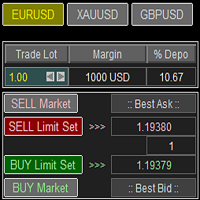
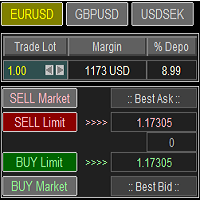
Trade Panel with Loss Breaking for MT4 Multi-instrumental trading panel with the function of transferring the stop loss of positions to loss breaking. Has the following distinctive properties: All trading parameters and panel operation are set in the settings. The traded position volume (lot size) is quickly changed. The required margin and the percentage of the required margin of the current deposit for the specified lot size are displayed. Shows profit when take profit is triggered and losses
Introducing a compact and handy panel that shows the main parameter of the current price on a chart. The following information is displayed: The price value itself, a user can choose Bid, Ask or Last; Instrument name ; Type of the price displayed; Spread size in pips; Stops level in pips; Change of price in pips comparing to the day start; Current daily range ( High - Low ) in pips; Average daily range in pips for the last 20 days. External parameters: Instrument Name - name of the instrument to
Introducing a compact and handy panel for watching the market and estimating multicurrency price movements. It shows main parameters for a user defined group of symbols in the form of a table. Its functionality is checked on Forex and FORTS. The following information is displayed: Financial instrument name . Last price value - can be turned off for off-exchange markets. Ask price value . Bid price value . Spread size in pips. Stop level in pips - can be turned off for off-exchange markets. Chang
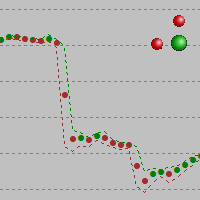
The alternative representation of a price chart (a time series) on the screen. Strictly speaking, this is not an indicator but an alternative way of visual interpretation of prices along with conventional ones - bars, candlesticks and lines. Currently, I use only this representation of prices on charts in my analysis and trading activity. In this visual mode, we can clearly see the weighted average price value (time interval's "gravity center") and up/down dispersion range. A point stands for (O
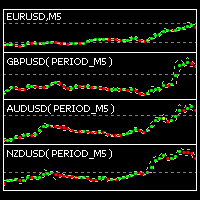
This indicator is intended for visual multicurrency analysis. It allows synchronous scrolling and analysis of a few charts simultaneously and can also be used for pairs trading. The indicator works both on Forex and on Russian FORTS market. The product has a very important property - if there are skipped bars at the symbols, the synchronism of charts on the time axis is fully preserved. Each chart point is strictly synchronous with the others on the time axis at any time frame. This is especiall
The indicator is designed for visual multicurrency analysis. It allows synchronous scrolling and analysis of a few charts simultaneously. The product can also be used for pairs trading. The indicator works both on Forex and Russian FORTS market. The product has a very important property - if there are skipped bars at the symbols, the synchronism of charts on the time axis is fully preserved . Each chart point is strictly synchronous with the others on the time axis at any time frame. This is esp
The indicator draws lines that can serve as support/resistance levels. They work both on Forex and FORTS. The main and additional levels are displayed as lines, with the color and style defined by the user. Additional levels are only displayed for currency pairs without JPY. Please see the AUDUSD chart below. Yellow ovals indicate some characteristic points where price reaches one of the levels. The second screenshot shows a FORTS instrument chart with the characteristic points. Simply watch the
This is an open interest indicator for the Russian FORTS futures market. Now, you can receive data on the open interest in real time in МТ5 terminal. This allows you to develop brand new trading strategies or considerably improve the existing ones. The data on the open interest is received from the database (text CSV or binary one at user's discretion). Thus, upon completion of a trading session and disabling the terminal (or PC), the data is saved and uploaded to the chart when the terminal is
This indicator shows the ratio of the number of buyers'/sellers' orders for the Russian FORTS futures market. Now, you can receive this information in real time in your МetaТrader 5 terminal. This allows you to develop brand new trading strategies or improve the existing ones. The data on the ratio of the orders number is received from the database (text CSV or binary one at user's discretion). Thus, upon completion of a trading session and disabling the terminal (or PC), the data is saved and u
This indicator shows the ratio of the volume of buyers'/sellers' orders for the Russian FORTS futures market. Now, you can receive this information in real time in your МetaТrader 5 terminal. This allows you to develop brand new trading strategies or improve the existing ones. The data on the ratio of the volumes of orders is received from the database (text CSV or binary one at user's discretion). Thus, upon completion of a trading session and disabling the terminal (or PC), the data is saved a
Trade Panel with Loss Breaking for MT5 Multi-instrumental trading panel with the function of transferring the stop loss of positions to loss breaking. Has the following distinctive properties: All trading parameters and panel operation are set in the settings. The traded position volume (lot size) is quickly changed. The required margin and the percentage of the required margin of the current deposit for the specified lot size are displayed. Shows profit when take profit is triggered and losses
Filtro:
Sem comentários
Responder ao comentário