Market Watch Panel MT4

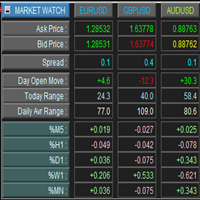
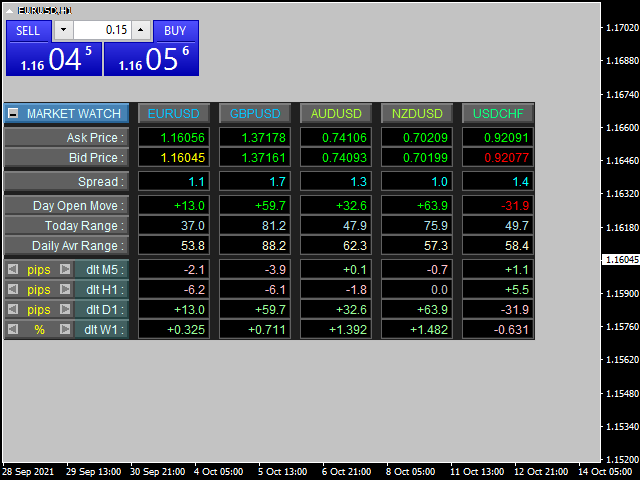
This is a panel for market review and evaluation of multicurrency price movements. It shows main parameters for a user defined group of symbols in the form of a table. The following values are displayed:

  • Symbol name;
  • Ask price value;
  • Bid price value;
  • Spread size in pips;
  • Stop level in pips - may be hidden by a user;
  • Change of price in pips comparing to the day start;
  • Current daily range (High - Low) in pips;
  • Average daily range in pips for user defined number of days;
  • Price change percentage during the specified time periods (timeframes).

Parameters

  • Common Title - text displayed next to the panel minimization button. Its only purpose is to specify its name.
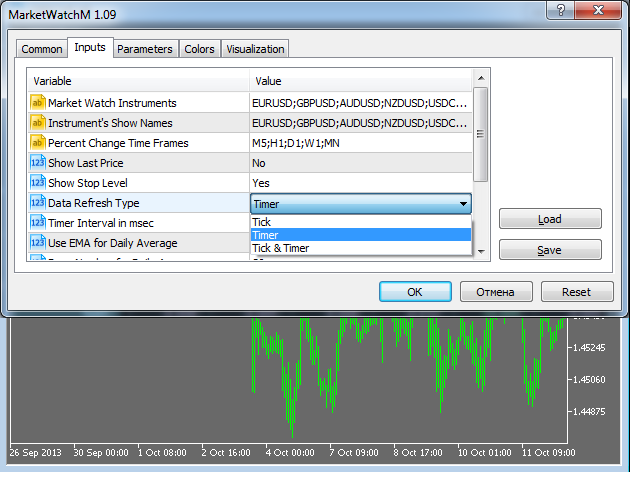
  • Market Watch Instruments - the list of work instrument names. The names of the instrument must be separated with a comma. For example, EURUSD;GBPUSD.
  • Instrument's Show Names - the list of the instrument names that should be displayed in the screen. You can use a custom name for an instrument as its original name can be too long and contain unnecessary information. The names of the instruments must be separated with a comma, and their position must match the position of the corresponding work instruments.
  • Percent Change Time Frames - the list of periods (timeframes) the price change percentage is displayed for. It must be separated with a semicolon. For example, M5;H1;D1;W1 will display the percentage change for four timeframes (5 minute, hourly, daily and monthly). Price change is calculated as 100 * (Close - Open) / Open.
  • Show Stop Level - show/hide the stops level. The notion of a stop level is not common for exchange symbols. Also, some modern dealing centers do not use this notion any more.
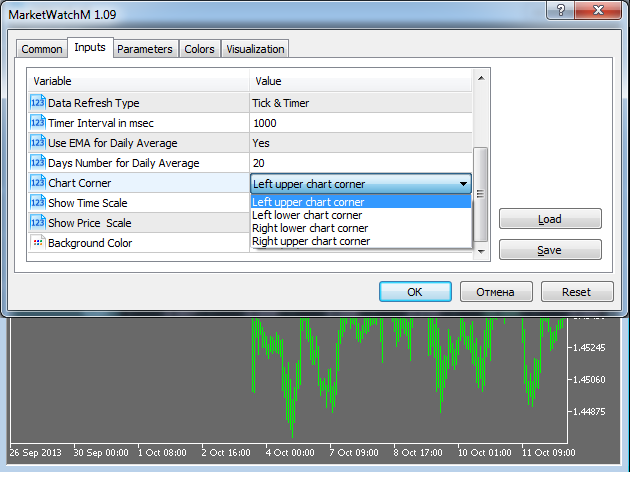
  • Data Refresh Type - mode of updating the information on the screen. The following modes are available - Tick / Timer / Tick & Timer. In Tick & Timer mode, the information is updated at every tick of the instrument and according to a set time interval.
  • Timer Interval in msec - the time interval for updating the information according to the timer (if selected in the previous parameter).
  • Use EMA for Daily Average - use EMA average when calculating the average daily range. If set to No, the simple averaging will be used.
  • Days Number for Daily Average - number of days for calculating the average daily range. Usually, it is set to 20 days, which approximately corresponds to one work month.
  • Chart Corner - chart corner the panel will be located at (binding to the selected corner).
  • Show Time Scale - show/hide the time scale on the current chart.
  • Show Price Scale - show/hide price scale on the current chart.
  • Background Color - background color for the panel.

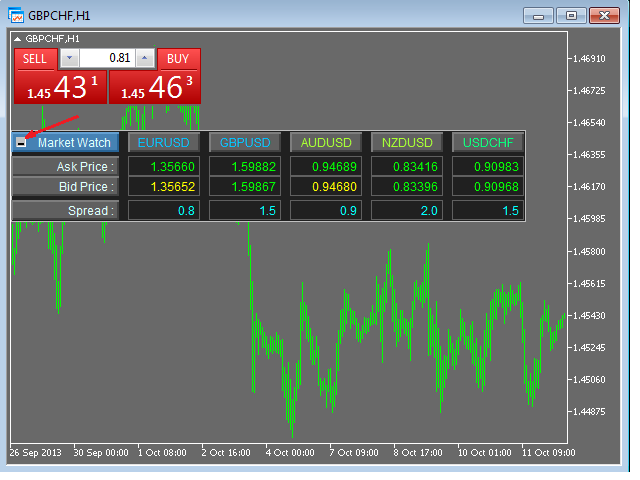
There is a button that minimizes the information displayed. Once it is pressed, the panel will display only Ask/Bid price and current spread.

Left-click the symbol name to highlight the symbol's column background. Click again to deselect the column. Left-click the timeframe name to highlight the timeframe's line background. Click again to deselect the line. This allows you to quickly find the appropriate symbol (timeframe), especially when you have many symbols set for display.

Below is the offer for active users and all of you who has read to this line. :)

If you have any interesting ideas for improving this or any other product I offer, then you'll get a big discount for my products if the idea is realized.

Please write all your suggestions in the Comments tab, so we can have a documentary proof of the ideas and see who the first author is.
추천 제품
이것은 구매 및 판매 주문 네트워크를 배치하는 일반 패널입니다. 이 전문가 고문은 설정에 정의 된 이익 순서를 닫습니다. 그런 다음 사다리라는 매개 변수가 있습니다.이 매개 변수에는 사다리 매개 변수에 의해 표시된 점(여기서 주요 설정에서는 10 점)으로 주문 사이의 거리가 증가하기 시작하므로 두 번째 순서는 10 점,세 번째 순서는 20 점,네 번째 순서는 40 점 등이 포함됩니다. 그런 다음 설정에 있지 않기 때문에 이 고문에 무엇이 있는지 알아야 하지만 이 고문이 제안한 전략의 논리에 영향을 미칩니다.. 의이 고문이 다섯 개 주문을 엽니 다 여기 설정에서 가정 해 봅시다... 또는 구매... 또는 판매... 좋아.. 그러나,주문을 열 때,그것은 이전에 열린 주문의 절반으로 다음 오픈 주문의 로트를 증가시킬 것입니다. 즉,설정에서 0.1 로트를 설정하면 계획에 따라 5 개의 주문이 열리고 현재 가격에 가까운 첫 번째 주문은 0.1 로트의 가격으로 열립니다. 두 번째는 주어진
MARKET MAKER EXPERT is an customizable advanced, fully automated Grid Trading Expert Advisor developed to trade on MULTIPAIR MODE ( EURUSD,USDJPY,USDCHF,USDCAD,EURCHF ), by spreading out risks. Expanding Grid is its speciality. It focuses on opening a large number of orders. The currency pairs have been chosen carefully to run this system. Once it analyze the market, it does a hedge order immediately, (so margin levels are not affected on the initial trade) Starts grid when the price move aga
Virtual OCO Pending
Kenneth Parling
5 (1)
소개 '가상 OCO 보류' - 위험 평가 기능이 있는 반자동 주문 관리 유틸리티 도구(전문가 고문)로 OCO 보류 규칙(One Cancel 다른). 시각적으로 쉽게 확인할 수 있도록 차트에 시각적 수준을 표시합니다. 하나의 차트에서 이 유틸리티를 사용하여 원하는 다른 기호에 대해 주문을 보낼 수 있습니다. 메뉴 설정에서 주문할 기호를 지정할 때 해당 차트(선택 사항)에 첨부할 필요가 없습니다. 시각적 가상 레벨 이는 연결된 현재 공개 차트 유틸리티에만 그려지며 '거래 기호' 설정과 일치해야 합니다. 즉, 'EURUSD'를 설정하고 유틸리티를 차트 EURUSD에 첨부하면 이 수준은 시각적이지 않습니다. 전략 테스터 전략 테스터에서 이 유틸리티를 실행하면 목적을 보여주기 위해 무작위로 주문을 엽니다. 유틸리티 이점 동적 위험 평가 또는 고정 로트 동적(ATR) 또는 고정 이익 및 손절매 수준 가상 주문 관리 끄기 가능성 - 경고, 이 모드는 가상 손절매를 설정하거나 모니터링하거나
如果产品有任何问题或者您需要在此产品上添加功能,请联系我 Contact/message me if you encounter any issue using the product or need extra feature to add on the base version. There is Demo version of this panel Dashboard Symphonie Trader System Demo in my product list, please try it out to get familiar with all functionalities free, LINK . This system basically utilizes Symphonie Indicator Set (Extreme, Emotion, Trend, and Sentiment) as the core indicators to generate trading signal mainly on time-frame M15. The signal will b
Universal TP SL Pips
Genesis Hafalla
5 (1)
This EA utility does not trade on its own, but it only modifies the   open  trades    to add   take profit   and   stop loss   that was  opened manually or by any other expert advisors.  The distance is based on Pips . How Does It Work? If   Symbol to modify   is set to   "All Symbol"   simply attach it to one chart, and all   open trades   in the entire terminal will set the   take profit   and   stop loss   .  If  Symbol to modify   is set to   "Local Symbol"   , it will only set the   ta
This panel brings convenient functionality -   Virtual Stop Loss and Take Profit levels . Peculiarities This panel allows to   hide   the   Stop Loss and Take Profi t levels of your trades.  The panel stores these levels   in memory .  When the market price reached one of the levels, a   trade is closed   and terminal generates a   message   indicating that a virtual level was triggered. there are   4 options   for setting Stop Loss: Fixed Stop Loss   - fixed Stop Loss Trailing Stop Loss   - c
如果产品有任何问题或者您需要在此产品上添加功能,请联系我 Contact/message me if you encounter any issue using the product or need extra feature to add on the base version. There is Demo version of this panel Dashboard Super Three MA Demo in my product list, please try it out to get familiar with all functionalities free, LINK . This system basically utilizes PA and three adjustable Moving Average as the main indicator set to generate trading signal. With the feature that all MA_timeframe, MA_period, MA_applied_price are ad
News Hedging Pro  is a unique robot that allows you to trade during the most critical news announcement periods by your predefined strategy. You can preset the strategy to trade, and then it will trade that news automatically when the news comes. News release gives opportunity to have pips since the price usually has big move at that time. Now with this tool, trading news become easier, more flexible and more exciting than ever. No waiting, no confusing anymore. Product Links Fully  Description
Make grid trading safe again | Built by a grid trader >> for grid traders.    Walkthrough Video  <== Get Grid Rescue up and running in 5 minutes  This is MT4 version, click  here  for  BlueSwift GridRescue MT5  (settings and logics are same in both versions) BlueSwift Grid Rescue MT4  is a risk management utility  EA  (used together with other grid trading experts) that can help you trade aggressive grid systems with manageable drawdown, therefore reduce substanstially margin call risk as we
This utility is the improved version of Trailing stop for advisors. It manages other EAs' orders as well as the ones opened manually. It is capable of trailing the price (trailing stop function), set a stop loss and take profit if they have not been set before. The Pro version features the ability to set trailing stop based on fractals and points of Parabolic SAR. When configuring the utility for an EA having no trailing stop function, place it to the new window with the same currency pair speci
BreakEven Grid Utility for MT4 BreakEven Grid is a powerful utility for manual trade management on the MetaTrader 4 platform. It provides a convenient on-screen panel with buttons to help you manage your open positions with a single click.  Features: Set BE+Profit: Automatically sets Take Profit to breakeven + desired profit in pips or money. Close BUY/SELL: Instantly close all Buy or Sell orders for the current symbol. Close +$/-$/Old/New: Close only profitable, losing, oldest or newest tra
This EA utility does not trade on its own, but it only modifies the open  trades  to add take profit and stop loss that was  opened manually or by any other expert advisors.  The distance is based on Average True Range Indicator(ATR). How Does It Work? If Symbol to modify is set to "All Symbol" simply attach it to one chart, and all open trades in the entire terminal will set the take profit and stop loss with the distance of Average True Range value of their corresponding symbol.  If  Symbol
News Scalping Executor is an utility which helps to trade high impact and huge volatility   news . This utility helps to create two opposite orders with risk management and profit protection. It moves automatically stop loss level to avoid losses as much as possible by using many different algorithms. It helps to avoid trading the news if spread suddenly becomes very huge. It can lock profit by moving stop loss or partially closing of orders. To be profitable with this type of trading you shou
손익분기점을 자동으로 설정하는 유틸리티로, 주어진 거리를 지나갈 때 거래를 손익분기점으로 전환합니다. 위험을 최소화할 수 있습니다. 상인을 위해 전문 상인이 만들었습니다. 유틸리티는 거래자가 수동으로 또는 고문을 사용하여 개설한 모든 시장 주문과 함께 작동합니다. 매직 넘버로 거래를 필터링할 수 있습니다. 유틸리티는 동시에 원하는 수의 주문을 처리할 수 있습니다. MT5 버전 https://www.mql5.com/ru/market/product/57077 유틸리티가 할 수 있는 일: 1핍에서 가상 손익분기점 설정 실제 수준의 손익분기점 설정 각 주문에 대해 개별적으로 작업(손익분기 수준은 각 주문에 대해 별도로 설정됨) 단방향 주문 바구니로 작업(손익분기 수준은 모든 주문에 대해 공통으로 설정되고 별도로 구매 및 판매) 양방향 주문 바스켓으로 작업(손익분기 수준은 모든 주문에 대해 공통으로 설정되며, 함께 구매 및 판매) 테스트 및 작업을 위해 차트의 버튼을 사용할 수 있습니
후행 정지 수준으로 거래를 자동으로 마감하는 유틸리티입니다. 수익을 최대한 활용할 수 있습니다. 상인을 위해 전문 상인이 만들었습니다. 유틸리티는 거래자가 수동으로 또는 고문을 사용하여 개설한 모든 시장 주문과 함께 작동합니다. 매직 넘버로 거래를 필터링할 수 있습니다. 유틸리티는 동시에 원하는 수의 주문을 처리할 수 있습니다. MT5 버전 https://www.mql5.com/ru/market/product/56488 유틸리티가 할 수 있는 일: 1핍에서 가상 후행 정지 수준 설정 실제 후행 정지 수준 설정 각 주문에 대해 개별적으로 작업(후행 정지 수준은 각 주문에 별도로 배치됨) 단방향 주문 바스켓으로 작업(후행 정지 수준은 모든 주문에 대해 공통으로 설정되며 별도로 구매 및 판매) 양방향 주문 바스켓으로 작업(추적 정지 수준은 모든 주문에 대해 공통으로 설정되며 BUY 및 SELL을 함께 사용) 테스트 및 작업을 위해 차트의 버튼을 사용할 수 있습니다. 옵션: TR
Hedge Martin
Andrey Kornishkin
Hedge Martin Expert Advisor restores loss-making positions making them profitable by opening an opposite position with an increased lot. Trading strategy The EA works on a trend market selecting the appropriate curency pairs. The robot trades depending on the previous candle direction. The first order is set according to the following rules: If the previous candle is bullish, the EA opens a buy order; If the previous candle is bearish, the EA opens a sell order; If the price goes in unfavorable
Dublicator
Vladimir Tkach
Simple and fast trade duplicator that copies trades on the same account with the reverse function. The reverse can be used for locking. You can choose to duplicate transactions for the current or all instruments.  Parameters Duplicate in reverse - the direction of duplication; Duplicate symbol - duplicate the selected tool; Manual lot size - hand size of the volume; Do not duplicate if spread > - do not duplicate a trade if the current spread is larger; List of magic to be duplicated - filte
Three 3TP Easy Trade Pad Expert for MT4 – Download The 3TP Easy Trade Pad Expert is an advanced tool designed for capital management, risk control, and streamlined trading within the MetaTrader 4 (MT4) platform. With its functional and specialized interface, this expert advisor allows traders to effortlessly set and manage Stop Loss (SL) and Take Profit (TP) levels. In addition to simplifying trade execution, the tool provides features for defining acceptable risk, expected profit (R/R), and adv
This EA utility opens trade when price touches trend line on your chart. How to use in 2 steps? Attached this utility on your chart with your desired parameters  and risk management settings set. Draw a line using " Horizontal line tool " or  " Trend line tool " on your chart. Rules: You can draw a minimum of 1 line and a maximum of 2 lines  in the chart. It will only trade once on a symbol when it touches the line. You need to have a  fundamental knowledge about trend line trading. Parameters:
Prop Firm Toolbox contains the important tools for maximising your funded account prop firm accounts. It contains function: - Lot Size Consistency Advisor  (This is the number one reason of prop firm not paying if you soft bleach this rule) - Biggest Profit Size Warning  (This is the number two reason of prop firm not paying if you soft bleach this rule) - Spread Meter
Now, you have your very own   PROP FIRM AUTO-CLOSER   program! Once your account target or drawdown hits, all open orders will close automatically. ========================================== INPUTS: Account target (exact amount):   Put the exact account target. Once the equity hits your specied account balance target, all open orders will close. Make sure to add some buffer to consider slippage. Use fixed value or dynamic value:   Choose whether you will need a fixed value or dynamic value for
VirtualStops
Viktor Shpakovskiy
A utility for managing open positions using virtual (invisible to the broker) stops. Virtual stop loss and virtual take profit can be freely moved around the chart. If the price touches the virtual stop line (TP, SL, TS), the EA will close all orders of the same direction on the current chart. Closing orders by virtual take profit is possible only if there is a profit. With the help of the built-in trading simulator, you can, in the strategy tester, see how the adviser works. Parameters Block
Auto Fibo Pro m
DMITRII GRIDASOV
"Auto FIBO Pro" Crypto_Forex 지표 - 거래에 유용한 보조 도구입니다! - 지표는 자동으로 Fibo 수준과 로컬 추세선(빨간색)을 계산하여 차트에 배치합니다. - Fibonacci 수준은 가격이 반전될 수 있는 주요 영역을 나타냅니다. - 가장 중요한 수준은 23.6%, 38.2%, 50%, 61.8%입니다. - 역전 스캘핑이나 존 그리드 거래에 사용할 수 있습니다. - Auto FIBO Pro 지표를 사용하여 현재 시스템을 개선할 수 있는 기회도 많습니다. - Info Spread Swap Display가 있습니다. 현재 Spread와 Swap이 부착된 외환 쌍을 표시합니다. - 디스플레이에는 계정 잔액, 자본 및 마진도 표시됩니다. - 차트의 어느 모서리에서나 Info Spread Swap Display를 찾을 수 있습니다. 0 - 왼쪽 상단 모서리, 1 - 오른쪽 상단, 2 - 왼쪽 하단, 3 - 오른쪽 하단. 여기를 클릭하여 고품질 트레이딩 로봇과
Lot by Risk
Sergey Vasilev
4.83 (23)
위험 거래 패널에 의해 많은 수동 거래를 위해 설계되었습니다. 이 명령을 보낼 수있는 다른 수단이다. 패널의 첫 번째 특징은 제어 라인을 사용하여 편리하게 주문할 수 있다는 것입니다. 두번째 특징은 정지 손실 선의 면전에서 주어진 위험을 위한 거래 양의 계산입니다. 제어 라인은 단축키를 사용하여 설정됩니다: 이익을-기본적으로 티 키; 가격-기본적으로 피 키; 정지 손실-기본적으로 키; 당신은 거래 패널의 설정에서 키를 직접 구성 할 수 있습니다. 작동 알고리즘: 1)-우리는(이 모든 레벨을 배치 할 필요가 없습니다)원하는 장소에 레벨을 배치; 2)–위험 지정(선택 사항); 3)-녹색 주문 보내기 버튼을 클릭하십시오.; 4)–우리는 배치 될 순서를 기다리고 있습니다,또는 오류 메시지와 경고가 나타납니다; 5)-우리는 전문가 고문에 마법에 의해 연결된 현재 기호에 대한 모든 주문을 닫으려면,다음 닫기 주문 버튼을 클릭합니다. 주문 보내기 버튼을 여러 번 눌러서는 안
FREE
Spd EA
David Binka Kumatse
THE PRODUCT This Spd Expert is an EA to be used on multiple chosen pairs simultaneously. Every order has a TP and an SL, so there is nothing to fear. You just have to be patient as EA trades to grow your account. After purchasing the EA, you can also message me for my optimized settings.    Recommended TimeFrame is 1H TRADE PLAN Consider a recommended minimum starting capital of $100 and an initial lotsize of 0.01 yielding a minimum profit of $20 over 12 months of trading on a single pair. Then
Price Action PB EA 는 가격 움직임 분석을 기반으로 한 훌륭한 자동 거래 시스템입니다! 이 EA는 "설정 후 잊어버리는" 방식의 전문가 어드바이저로, 모든 거래 작업을 자동으로 처리합니다! 7개의 세트 파일이 제공되며, D1 timeframe ! 거래 아이디어는 유명하고 강력한 가격 움직임 패턴인 핀바(PinBar)를 기반으로 합니다! 프라이스 액션 PB EA는 매우 좋은 투자입니다. 모든 세트 파일은 긍정적인 수학적 기대값을 가지고 있어 수년간 안정적인 수익을 보장합니다! 테스트 및 거래를 위해 EA 세트 파일을 다운로드하세요: AUDNZD Set_file EURCAD Set_file NZDJPY Set_file CADJPY Set_file AUDUSD Set_file GBPJPY Set_file GBPAUD Set_file EA 특징: - 7개 통화쌍에서 동시에 실행 가능 - 많은 스캘퍼처럼 높은 수수료로 돈을 낭비하지 않습니다. - 타이트한 스프레드 요
Smartility
Syed Oarasul Islam
This utility is designed to help you with your Manual Trading. It allows different ways of closing trades. It can display total number of BUY and SELL orders individually and also their individual profits. It can enter trades without stopl loss and take profits. However upon selecting UseStopLossTakeProfit from the settings it can use best possible stop loss and take profits based on the market conditions. Upon selecting the CloseOppositeTrades  from the settings it can close opposite trades. Fo
SFG Grid Manager MT4 – Intelligentes Grid- und Spiegel-System Der SFG Grid Manager MT4 ist ein professioneller, automatischer Grid-Manager, der eine bestehende Position (manuell oder durch einen anderen EA eröffnet) verfolgt und bei jedem definierten Schritt ( GridPips ) eine Durchschnittsorder eröffnet. Sobald die Hauptposition geschlossen oder entfernt wird, schließt der Manager automatisch alle von ihm eröffneten Grid-Trades. Er funktioniert mit allen Brokern, die Netting- oder Hedging-Kon
Grid Builder
Oleg Remizov
5 (4)
The   Grid Builder MT4   utility is designed for placing a grid of pending orders of any complexity and will be an excellent tool in the hands of a trader who trades grid trading strategies. The tool has numerous settings that allow you to quickly and easily build a grid of orders with the specified parameters. All types of pending orders are supported: Buy Stop; Buy Limit; Sell Stop; Sell Limit. The script also allows you to delete a previously placed grid of orders in one click. If the "Delete
The Arrow Scalper
Fawwaz Abdulmantaser Salim Albaker
1 (2)
Dear Friend..  I share with you this simple Expert Adviser .. it is full automatic  this Expert Adviser following the trend of the pair you install on or any stocks or indices , it is works like that: - when the trend on H4 chart show a start of up trend the expert will wait till the 15M & 1H charts show an up trend the EA will open a buy order directly , and do the same for down trend and open a sell order the buy or sell  order lot size and take profit and stop loss will measured manually  by
FREE
이 제품의 구매자들이 또한 구매함
Local Trade Copier EA MT4
Juvenille Emperor Limited
4.96 (105)
Local Trade Copier EA MT4 를 사용하여 매우 빠른 거래 복사 경험을 해보세요. 1분 안에 간편하게 설정할 수 있으며, 이 거래 복사기를 사용하면 Windows 컴퓨터 또는 Windows VPS에서 여러 개의 MetaTrader 터미널 간에 거래를 0.5초 미만의 초고속 복사 속도로 복사할 수 있습니다. 초보자든 전문가든 Local Trade Copier EA MT4 는 다양한 옵션을 제공하여 사용자의 특정 요구에 맞게 맞춤 설정할 수 있습니다. 이는 수익 잠재력을 높이려는 모든 사람을 위한 최고의 솔루션입니다. 지금 사용해보시고 이것이 왜 시장에서 가장 빠르고 쉬운 무역용 복사기인지 알아보세요! 팁: 여기 에서 데모 계정에서 Local Trade Copier EA MT4 데모 버전을 다운로드하여 사용해 볼 수 있습니다. 다운로드한 무료 데모 파일을 MT4 >> File >> Open Data Folder >> MQL4 >> Experts 폴더에 붙여넣고 터미널
Trade Assistant MT4
Evgeniy Kravchenko
4.42 (192)
거래당 위험 계산, 라인을 사용한 손쉬운 신규 주문, 부분 청산 기능을 통한 주문 관리, 7가지 유형의 트레일링 스탑 및 기타 유용한 기능을 제공합니다. 추가 자료 및 지침 설치 지침 - 애플리케이션 지침 - 데모 계정용 애플리케이션 평가판 라인 기능       - 차트에 개시선, 손절매, 차익실현을 표시합니다. 이 기능을 사용하면 새로운 주문을 쉽게 하고 개봉 전에 추가 특성을 볼 수 있습니다. 위기 관리       -       위험 계산 기능은 설정된 위험과 손절매 주문의 크기를 고려하여 새 주문의 볼륨을 계산합니다. 이를 통해 손절매 크기를 설정하고 동시에 설정된 위험을 존중할 수 있습니다. 로트 계산 버튼 - 위험 계산을 활성화/비활성화합니다. 필요한 위험 값은 위험 필드에 0에서 100 사이의 백분율 또는 예금 통화로 설정됩니다. 설정 탭에서 위험 계산 옵션을 선택합니다. $ 통화, % 잔액, % 지분, % 자유 마진, % 사용자 정의, % AB 이전 일, % AB
Trade Manager EA에 오신 것을 환영합니다. 이 도구는 거래를 보다 직관적이고 정확하며 효율적으로 만들기 위해 설계된 궁극적인 리스크 관리 도구 입니다. 단순한 주문 실행 도구가 아닌, 원활한 거래 계획, 포지션 관리 및 리스크 제어를 위한 종합 솔루션입니다. 초보자부터 고급 트레이더, 빠른 실행이 필요한 스캘퍼에 이르기까지 Trade Manager EA는 외환, 지수, 상품, 암호화폐 등 다양한 시장에서 유연성을 제공합니다. Trade Manager EA를 사용하면 복잡한 계산은 이제 과거의 일이 됩니다. 시장을 분석하고 진입, 손절 및 익절 수준을 차트의 수평선으로 표시한 후 리스크를 설정하면, Trade Manager가 이상적인 포지션 크기를 즉시 계산하고 SL 및 TP 값을 실시간으로 표시합니다. 모든 거래가 간편하게 관리됩니다. 주요 기능: 포지션 크기 계산기 : 정의된 리스크에 따라 거래 크기를 즉시 결정합니다. 간단한 거래 계획 : 진입, 손절, 익절을 위한
Exp COPYLOT CLIENT for MT4
Vladislav Andruschenko
4.69 (65)
MetaTrader 4용 트레이드 복사기.       모든 계정의 외환 거래, 포지션, 주문을 복사합니다. 그것은 최고의 무역 복사기 중 하나입니다       MT4 - MT4, MT5 - MT4       위해       카피롯 MT4       버전(또는       MT4 -  MT5   MT5 - MT5       위해       카피롯 MT5       버전). MT5 버전 전체 설명   +DEMO +PDF 구입 방법 설치하는 방법     로그 파일을 얻는 방법     테스트 및 최적화 방법     Expforex의 모든 제품 복사기   버전         MetaTrader 5   터미널 (   МТ5 - МТ5, МТ4 - МТ5   ) -   Copylot Client MT5 고유한 복사 알고리즘은 마스터 계정에서 고객 계정으로 모든 거래를 정확하게 복사합니다. 이 제품은 또한 높은 작동 속도에서 높은 오류 처리로 유명합니다. 강력한 기능 세트. 프로그램은 여러 터
TradePanel MT4
Alfiya Fazylova
4.84 (89)
Trade Panel은 다기능 거래 보조원입니다. 이 애플리케이션에는 수동 거래를 위한 50개 이상의 거래 기능이 포함되어 있으며 대부분의 거래 작업을 자동화할 수 있습니다. 전략 테스터에서는 애플리케이션이 작동하지 않습니다. 구매하기 전에 데모 계정에서 데모 버전을 테스트할 수 있습니다. 데모 버전 여기 . 전체 지침 여기 . 거래. 한 번의 클릭으로 거래 작업을 수행할 수 있습니다: 자동 위험 계산을 통해 지정가 주문 및 포지션을 엽니다. 한 번의 클릭으로 여러 주문과 포지션을 열 수 있습니다. 주문 그리드를 엽니다. 그룹별 대기 주문 및 포지션을 마감합니다. 포지션 반전(매수 청산 후 매도 개시 또는 매도 청산 후 매수 개시). 포지션 고정(매수 포지션과 매도 포지션의 양을 동일하게 하는 추가 포지션 개설). 한 번의 클릭으로 모든 포지션을 부분 청산합니다. 모든 포지션의 이익실현과 손절매를 동일한 가격 수준으로 설정합니다. 모든 포지션에 대한 손절매를 해당 포지션의 손익 분기
MT4 to Telegram Signal Provider 는 사용하기 쉽고 완전히 사용자 정의가 가능한 도구로, 텔레그램으로 신호를 보내어 계정을 신호 제공자로 변환할 수 있습니다. 메시지 형식은 완전히 사용자 정의가 가능합니다! 그러나 간단한 사용을 위해 미리 정의된 템플릿을 선택하고 메시지의 특정 부분을 활성화하거나 비활성화할 수도 있습니다. [ 데모 ]  [ 매뉴얼 ] [ MT5 버전 ] [ 디스코드 버전 ] [ 텔레그램 채널 ]  New: [ Telegram To MT5 ] 설정 단계별 사용자 가이드 가 제공됩니다. 텔레그램 API에 대한 지식이 필요 없으며, 개발자가 필요한 모든 것을 제공합니다. 주요 기능 구독자에게 보낸 주문 세부 정보를 사용자 정의할 수 있는 기능 예를 들어 브론즈, 실버, 골드와 같은 계층 구독 모델을 만들 수 있습니다. 골드 구독은 모든 신호 등을 받게 됩니다. ID, 심볼 또는 코멘트별 주문 필터링 주문이 실행된 차트의 스크린샷을 포함 보낸
The product will copy all telegram signal to MT4   ( which you are member  ) , also it can work as remote copier.  Easy to set up, copy order instant, can work with almost signal formats, image signal, s upport to translate other language to English Work with all type of channel or group, even channel have "Restrict Saving Content", work with  multi channel, multi MT5 Work as remote copier: with signal have ticket number, it will copy exactly via ticket number. Support to backtest signal. How to
Discord To MT4 Receiver
Levi Dane Benjamin
5 (1)
회원으로서 어떤 채널에서도 신호를 복사하세요 (   Bot 토큰이나 관리자 권한이 필요하지 않음  바로 MT4로. 사용자를 고려하여 설계되었으며 관리 및 모니터링에 필요한 많은 기능을 제공합니다. 이 제품은 직관적이고 시각적으로 매력적인 그래픽 인터페이스로 제공됩니다. 설정을 사용자 정의하고 제품을 몇 분 안에 사용을 시작하세요! 사용자 가이드 + 데모  | MT5 버전 | 텔레그램 버전 데모를 시도하려면 사용자 가이드로 이동하세요. 디스코드를 MT4로 보내는 것은 전략 테스터에서 작동하지 않습니다. 디스코드   MT4 기능 회원으로서 어떤 채널에서도 복사하세요. Bot 토큰이나 채팅 ID가 필요하지 않음 위험 % 또는 고정된 로트로 거래하세요 특정 기호 제외 모든 신호를 복사할 것인지 또는 복사할 신호를 사용자 정의하세요 모든 신호를 인식하기 위해 단어 및 구문을 구성하세요 (기본 설정은 신호 제공자의 99%에 대해 작동해야 함) 원하는 경우 시간 및 날짜 설정을 구성하여 신
Copy Cat More Trade Copier MT4 (복사 고양이 MT4) 는 단순한 로컬 트레이드 카피어가 아니라, 오늘날의 거래 환경을 위해 설계된 완전한 리스크 관리 및 실행 프레임워크입니다. Prop Firm 챌린지부터 개인 계좌 관리까지, 강력한 실행력, 자본 보호, 유연한 설정, 고급 거래 처리 기능을 통해 모든 상황에 적응합니다. 이 카피어는 Master(송신자) 와 Slave(수신자) 모드 모두에서 작동하며, 실시간으로 시장가/지정가 주문, 거래 수정, 부분 청산, Close By 작업을 동기화합니다. 데모 및 실계좌 모두 호환되며, 거래용 비밀번호 또는 투자자 비밀번호로도 사용할 수 있습니다. Persistent Trade Memory 기술을 통해 EA, 터미널, VPS가 재시작되더라도 거래가 복원됩니다. 여러 Master와 Slave를 동시에 관리할 수 있으며, 브로커 간 차이는 접두사/접미사 자동 감지 또는 심볼 매핑으로 처리됩니다. 매뉴얼/설정: Copy C
Effortlessly calculate lot sizes and manage trades to save time and avoid costly errors The Trade Pad Pro EA is a tool for the Metatrader Platform that aims to help traders manage their trades more efficiently and effectively. It has a user-friendly visual interface that allows users to easily place and manage an unlimited number of trades, helping to avoid human errors and enhance their trading activity. One of the key features of the Trade Pad Pro EA is its focus on risk and position manageme
The News Filter
Leolouiski Gan
5 (25)
이 제품은 뉴스 시간 동안 모든 전문가 어드바이저 및 수동 차트를 필터링하여 수동 거래 설정이나 다른 전문가 어드바이저가 입력한 거래가 파괴될 수 있는 급격한 가격 상승으로부터 걱정하지 않아도 됩니다. 이 제품은 또한 뉴스 발표 전에 열린 포지션과 대기 주문을 처리할 수 있는 완전한 주문 관리 시스템이 함께 제공됩니다. The News Filter  를 구매하면 더 이상 내장 뉴스 필터에 의존할 필요가 없으며 이제부터 모든 전문가 어드바이저를 여기서 필터링할 수 있습니다. 뉴스 선택 뉴스 소스는 Forex Factory의 경제 캘린더에서 얻어집니다. USD, EUR, GBP, JPY, AUD, CAD, CHF, NZD 및 CNY와 같은 어떤 통화 기준으로 선택할 수 있습니다. Non-Farm (NFP), FOMC, CPI 등과 같은 키워드 식별을 기준으로 선택할 수도 있습니다. 저, 중, 고 영향을 가지는 뉴스를 필터링할 수 있도록 선택할 수 있습니다. 차트와 관련된 뉴스만 선택하
Custom Alerts: 여러 시장을 동시에 모니터링하고 중요한 기회를 놓치지 마세요 개요 Custom Alerts 는 여러 종목에 걸쳐 잠재적 트레이딩 기회를 한눈에 파악하고자 하는 트레이더를 위한 동적인 솔루션입니다. FX Power, FX Volume, FX Dynamic, FX Levels, IX Power와 같은 Stein Investments의 주요 도구들과 통합되어, 여러 차트를 오가거나 기회를 놓치는 일 없이 중요한 시장 변화를 자동으로 알림으로 제공합니다. 이제 브로커가 제공하는 모든 자산군을 지원하며, 기호를 입력할 필요 없이 자산 유형만 선택하면 설정이 완료됩니다. 1. Custom Alerts가 트레이더에게 매우 유용한 이유 올인원 시장 모니터링 • Custom Alerts 는 외환, 금속, 암호화폐, 지수, 주식(브로커가 지원하는 경우)까지 다양한 자산군의 신호를 수집하고 통합합니다. • 여러 차트를 전환할 필요 없이 하나의 창에서 명확한 알림을 받아보
CloseIfProfitorLoss with Trailing
Vladislav Andruschenko
4.87 (31)
이익 추적 기능으로 총 이익/손실에 도달하면 MetaTrader 4에서 포지션을 청산합니다. 가상 정지 (별도 주문) 을 활성화할 수 있습니다. BUY 및 SELL 포지션을 별도로 계산하고 마감합니다 (BUY SELL 별도). 모든 심볼 또는 현재 심볼 만 닫고 계산합니다 (모든 심볼). 이익을 위해 후행 추적 을 활성화합니다 (후행 이익). 예금 통화, 포인트, 잔액의 %에 대한 총 손익을 마감합니다. 이 애플리케이션은 다른 EA와 함께 또는 수동 거래와 함께 모든 계정에서 사용하도록 설계되었습니다. MT5 버전 전체 설명 + DEMO + PDF 구입 방법 설치하는 방법 로그 파일을 얻는 방법 테스트 및 최적화 방법 Expforex의 모든 제품 일부 쌍 또는 모든 쌍의 총 거래 잔액이 설정에서 지정된 값보다 크거나 같으면 모든 포지션이 닫히고 주문이 삭제됩니다. 이 버전은 지정된 이익 수준에서 포지션을 마감할 수 있을 뿐만 아니라 더 나은 결과를 위해 이익을 추적할 수도 있습니다
Trade Manager MT4 DaneTrades
Levi Dane Benjamin
4.09 (11)
거래 관리자는 위험을 자동으로 계산하는 동시에 거래를 빠르게 시작하고 종료하는 데 도움을 줍니다. 과잉 거래, 복수 거래 및 감정 거래를 방지하는 데 도움이 되는 기능이 포함되어 있습니다. 거래를 자동으로 관리할 수 있으며 계정 성과 지표를 그래프로 시각화할 수 있습니다. 이러한 기능은 이 패널을 모든 수동 거래자에게 이상적으로 만들고 MetaTrader 4 플랫폼을 향상시키는 데 도움이 됩니다. 다중 언어 지원. MT5 버전  |  사용자 가이드 + 데모 트레이드 매니저는 전략 테스터에서 작동하지 않습니다. 데모를 보려면 사용자 가이드로 이동하세요. 위기 관리 % 또는 $를 기준으로 위험 자동 조정 고정 로트 크기 또는 거래량과 핍을 기반으로 한 자동 로트 크기 계산을 사용하는 옵션 RR, Pips 또는 Price를 사용한 손익분기점 손실 설정 추적 중지 손실 설정 목표 달성 시 모든 거래를 자동으로 마감하는 최대 일일 손실률(%)입니다. 과도한 손실로부터 계정을 보호하고 과도한
Ultimate Trailing Stop EA
BLAKE STEVEN RODGER
4.33 (15)
This EA Utility allows you to manage (with advanced filtering) unlimited open orders (manual or EA) with 16 trailing stop methods: fixed, percent, ATR Exit, Chandelier Exit, Moving Average, Candle High Low Exit, Bollinger Bands, Parabolic, Envelope, Fractal, Ichimoku Kijun-Sen, Alligator, Exit After X Minutes or Bars, RSI and Stochastic. The trailing stop can be either real or virtual, and you can exit fully or with a partial close percent on touch or bar close.  Moreover, you can add (overrid
Risk/Reward Tool은 MetaTrader 4에서 거래를 계획, 시각화 및 실행하는 방식을 혁신하도록 설계된 전문가급 Expert Advisor입니다. 정밀한 리스크 관리를 중시하는 재량 트레이더이든, 거래 설정을 시각적으로 테스트해야 하는 전략 개발자이든, 이 도구는 우아하고 직관적인 인터페이스에서 필요한 모든 것을 제공합니다. 기본적인 포지션 계산기와 달리, Risk/Reward Tool은 시각적 거래 계획을 즉각적인 실행 기능, 실시간 손익 모니터링 및 포괄적인 거래 관리 기능과 결합합니다. 이 도구는 MT4 전략 테스터와 완전히 호환되어 실제 자본을 위험에 빠뜨리지 않고 거래 전략을 연습하고 접근 방식을 개선할 수 있습니다. 도구의 전체 매뉴얼은 여기에서 확인할 수 있습니다: https://www.mql5.com/en/blogs/post/766244 MT5 version:  https://www.mql5.com/en/market/product/158601 주요 기능
RedFox Copier Pro
Rui Manh Tien
4.7 (10)
Time saving and fast execution Whether you’re traveling or sleeping, always know that Telegram To Mt4 performs the trades for you. In other words, Our   Telegram MT4 Signal Trader  will analyze the trading signals you receive on your selected Telegram channels and execute them to your Telegram to MT4 account. Reduce The Risk Telegram To Mt4   defines the whole experience of copying signals from   Telegram signal copier to mt4 platforms. Users not only can follow all instructions from the signa
Exp SafetyLock PRO
Vladislav Andruschenko
4.57 (28)
SAFETYLOCK을 사용하면 거래자는 이미 열린 포지션에 대해 반대 주문을 설정하여 강한 시장 반전을 피할 수 있습니다. 거래자 또는 EA가 포지션을 열면, SAFETYLOCK은 자동으로 반대 방향의 보류 주문을 설정합니다. 포지션이 손실 상태로 전환되면, 이 보류 주문이 활성화되어 잠금(락)을 생성하여 손실을 최소화합니다. EA는 초기 포지션을 닫거나, 후행 정지를 사용하여 수익을 최적화하거나, 로트를 증가시켜 거래 전략을 강화하는 다양한 옵션을 제공합니다. 또한, 포지션 가격에 맞추어 미결 주문의 오픈 가격을 조정하여 시장 움직임에 유연하게 대응할 수 있습니다. 전체 설명 +DEMO +PDF 구입 방법 설치하는 방법     로그 파일을 얻는 방법     테스트 및 최적화 방법     Expforex의 모든 제품 매개변수 기본(블로그의 매개변수에 대한 전체 설명) MilliSecondsTimerForMonitoring – 알고리즘 실행 시간을 밀리초 단위로 설정합니다(기본
수동 거래를 개선하세요: 빠르고 정확한 자동화된 위험 관리를 위한 Trade Manager Assistant 제공된 무료 데모 버전을 사용하여 전체 설정 지침을 받고 Trade Manager Assistant의 기능을 살펴보세요. 자세한 내용은   https://www.mql5.com/blogs/post/758625를   참조하세요.       . 수동 거래에는 신중한 분석과 빠른 결정이 필요하지만, 거래 매개변수와 관련된 실행 오류, 불일치 및 혼란의 위험으로 인해 수익이 감소하고 불필요한 스트레스가 발생할 수 있습니다. 트레이딩 관리자 어시스턴트를 소개합니다. 이 필수 어시스턴트는 수동 트레이딩 프로세스를 간소화하고 차트에 정밀성, 통제력, 자동화된 효율성을 제공합니다. 느린 실행이나 잘못된 계산으로 인한 거래 손실과 작별하세요. 귀하의 보조 사업 관리자는 전문적인 속도와 정확성으로 귀하의 업무를 완료할 수 있도록 도와드리므로, 중요한 행정 업무를 우리가 처리하는 동안 귀하는
Telegram Signal pro
Sara Sabaghi
4.86 (7)
What is it? Think about it, you can send all the orders/positions info to your telegram channel or group to create your community or VIP signals on telegram. Position info means this EA forward all of your new positions open details (Open price, Open time, Position Type, position Symbol and volume), positions changes ( SL or TP modifying or pending price changes) and position close (Close price, profit or loss, position duration time) and also EA Send NEWS alert (Economic calendar event) on you
Grid Manual MT4
Alfiya Fazylova
4.71 (17)
"Grid Manual"은 주문 그리드 작업을 위한 거래 패널입니다. 이 유틸리티는 보편적이며 유연한 설정과 직관적인 인터페이스를 제공합니다. 그것은 손실을 평균화하는 방향뿐만 아니라 이익을 증가시키는 방향으로 주문 그리드와 함께 작동합니다. 거래자는 주문 그리드를 만들고 유지할 필요가 없으며 유틸리티에서 수행합니다. 거래자가 주문을 시작하는 것으로 충분하며 "Grid Manual"는 자동으로 그를 위한 주문 그리드를 생성하고 거래가 마감될 때까지 그와 동행할 것입니다. 전체 설명 및 데모 버전 여기 . 유틸리티의 주요 기능: 모바일 터미널을 포함하여 어떤 방식으로든 열린 주문과 함께 작동합니다. "제한" 및 "중지"의 두 가지 유형의 그리드와 함께 작동합니다. 고정 및 동적(ATR 표시기 기반)의 두 가지 유형의 그리드 간격 계산과 함께 작동합니다. 오픈 오더 그리드의 설정을 변경할 수 있습니다. 차트에서 각 주문 그리드의 손익분기점 수준을 표시합니다. 각 주문 그리드에 대한 이익
Averaging Helper
Sergey Batudayev
5 (2)
평균화 도우미 - 이러한 종류의 거래 도우미 도구는 두 가지 기술을 사용하여 이전에는 수익성이 없었던 포지션의 평균을 맞추는 데 도움이 됩니다. 표준 평균화 추세에 따라 포지션을 이후 오픈하여 헤지 이 유틸리티는 매수 및 매도 포지션 모두 여러 방향의 여러 미결제 포지션을 한 번에 정리할 수 있습니다   . 예를 들어, 하나는 매도 포지션이고 다른 하나는 매수 포지션인데, 두 포지션 모두 수익이 없거나, 하나는 수익이 없고 하나는 수익이지만 수익이 충분하지 않은 경우, 두 포지션의 평균을 계산하여 더 높은 수익률로 거래를 마감하려는 경우, 이 유틸리티는 평균화 도우미(Averaging Helper)를 사용하는 데 도움이 될 것입니다. 평균화 도우미 유틸리티를 사용하면 다음 포지션의 크기, 주문 가격, 포지션을 평균화하고 지정한 이익 실현 크기에 맞춰 포지션을 마감하는 방향을 자동으로 계산할 수 있습니다. 이 유틸리티는 매수 및 매도 버튼을 사용하여 포지션을 오픈할 수 있도록 지원합니
News Filter EA: Advanced Algo Trading Assistant News Filter EA is an advanced algo trading assistant designed to enhance your trading experience. By using the   News Filter EA , you can integrate a Forex economic news filter into your existing expert advisor, even if you do not have access to its source code. In addition to the news filter, you can also specify   trading days   and   hours   for your expert. The News Filter EA also includes   risk management   and   equity protection   features
Ultimate Extractor - Professional Trading Analytics for MT4 Ultimate Extractor transforms your MetaTrader 4 trading history into actionable insights with comprehensive analytics, interactive charts, and real-time performance tracking. Ability to combine multiple accounts and MT4 and MT5 into a single dashboard. What It Does Automatically analyzes your MT4 trading history across all Expert Advisors and generates detailed HTML reports with interactive visualizations. Tracks live performance metric
Trade Dashboard MT4
Fatemeh Ameri
4.96 (53)
Tired of complex order placement and manual calculations? Trade Dashboard is your solution. With its user-friendly interface, placing orders becomes effortless, by a single click, you can open trades, set stop loss and take profit levels, manage trade lot size, and calculate risk to reward ratios, allowing you to only focus on your strategy. Say goodbye to manual calculations and streamline your trading experience with Trade Dashboard. Download  Demo Version  right now. You can find  Details of
복사기->편리하고 빠른 인터페이스 상호작용으로 사용자가 바로 사용 가능       ->>>> Windows 컴퓨터 또는 VPS Windows에서 사용하는 것이 좋습니다. 특징: 다양하고 개인화된 복사 거래 설정: 1. 다양한 신호 소스에 대해 다양한 로트 모드를 설정할 수 있습니다. 2. 다양한 신호 소스를 포워드 및 리버스 복사 거래에 대해 설정할 수 있습니다. 3. 신호는 주석으로 설정할 수 있습니다. 4. 계약 로트에 따라 로트를 교정할지 여부 다양하고 개인화된 복사 주문 설정 2: 1. 다양한 품종에 대해 다양한 로트 모드를 설정할 수 있습니다. 2. 정방향 및 역방향 복사 주문에 대해 다양한 품종을 설정할 수 있습니다. 3. 주석으로 신호를 설정할 수 있습니다. 4. 계약 로트에 따라 로트를 교정할지 여부 댓글 필터링, MAGIC 필터링, 시그널 로트 필터링, 로컬 제품 필터링 근무시간 설정 역동기화 SLAVE 닫힘 주문 바인딩 기능: 모든 주문은 설정된 신호 소스 주문
Custom Alerts AIO: 다중 시장을 동시에 모니터링 – 설정 없이 즉시 사용 가능 개요 Custom Alerts AIO 는 복잡한 설정 없이 즉시 사용할 수 있는 통합 시장 모니터링 도구입니다. FX Power, FX Volume, FX Dynamic, FX Levels, IX Power 등 필요한 모든 지표가 내장되어 있어 별도의 설치나 구성 없이 알림 기능을 바로 사용할 수 있습니다. 차트 그래픽 없이 작동하며, Forex, 금속, 지수, 암호화폐 등 주요 자산군을 모두 지원합니다. 주식(Symbols)은 별도로 입력하여 추가할 수 있으나, MetaTrader에서는 일반적으로 제한적으로만 사용됩니다. 1. 왜 Custom Alerts AIO를 선택해야 하나요? 추가 라이선스가 필요 없습니다 • 모든 Stein Investments 지표가 내장되어 있어 별도 구매가 필요 없습니다. • 즉시 알림 기능을 시작할 수 있어 빠르고 간편합니다. 모든 시장을 하나의 도구로
일별 및 주별 마감 거래 내역, 현재 진행 중인 거래, 외환 노출을 한 차트에서 즉시 확인하세요! 히트맵을 사용하여 수익성 있는 거래와 거래 포트폴리오 내에서 현재 하락이 있는 위치를 파악하세요. 빠른 마감 버튼 빠른 마감 버튼을 사용하여 단일 심볼에 대한 모든 거래를 마감하거나, 개별 거래를 전체적으로 마감하거나, 버튼을 클릭하여 일부 수익 또는 손실을 실현하세요. 더 이상 목록에서 거래를 찾아 거래의 일부를 마감하는 방법을 알아낼 필요가 없습니다. 대시보드는 외환 쌍을 거래하는 동안 각 통화 심볼에 대한 현재 노출도 표시하므로 주요 뉴스 이벤트에 앞서 과도하게 노출될 수 있는 영역을 파악하는 데 도움이 됩니다. 버튼을 사용하여 뉴스가 나오기 전에 노출을 즉시 빠르게 줄이거나, 이미 뉴스가 발생하여 수익을 창출한 경우 클릭 한 번으로 빠르게 수익을 확보할 수 있습니다! 진행 중인 거래 히트맵 거래 히트맵은 달러 비용 평균화를 사용하여 거래의 확장 및 축소를 수행하는 포지션 거
️ Hedge Trade — Smart Fixed-Offset Hedging EA Turn adverse moves into controlled recovery cycles. Hedge Trade is a professional-grade MetaTrader 4 Expert Advisor that protects any open trade by automatically placing and managing one intelligent hedge order. It’s built for traders who prefer to open their own base position but want an automated, disciplined hedging system to manage drawdown and capture counter-moves — safely, transparently, and without martingale. Key Features Automatic Hedg
Telegram To MT4 Receiver
Levi Dane Benjamin
3.67 (6)
당신이 멤버인 어떤 채널에서든(비공개 및 제한된 채널 포함) 신호를 직접 MT4로 복사하세요.  이 도구는 사용자를 고려하여 설계되었으며 거래를 관리하고 모니터하는 데 필요한 많은 기능을 제공합니다. 이 제품은 사용하기 쉽고 시각적으로 매력적인 그래픽 인터페이스로 제공됩니다. 설정을 사용자 정의하고 제품을 몇 분 안에 사용하십시오! 사용자 가이드 + 데모  | MT5 버전 | Discord 버전 데모를 시도하려면 사용자 가이드로 이동하십시오. Telegram To MT5 수신기는 전략 테스터에서 작동하지 않습니다! Telegram To MT4 특징 한 번에 여러 채널에서 신호를 복사합니다. 비공개 및 제한된 채널에서 신호를 복사합니다. Bot 토큰이나 채팅 ID가 필요하지 않습니다(필요한 경우 계속 사용할 수 있음). 위험 % 또는 고정된 로트를 사용하여 거래합니다. 특정 심볼을 제외합니다. 모든 신호를 복사할지 복사할 신호를 사용자 정의할지 선택합니다. 모든 신호를 인식하기
제작자의 제품 더 보기
This is a utility for storing the data on open interest (OI), ratio of buyer/seller orders' number and the ratio of buyer/seller orders' volumes on the Russian FORTS futures market. This is the first product of the series. Now, you can trace history of the specified data in real time in МТ5 terminal. This allows you to develop brand new trading strategies or considerably improve the existing ones. The data received from FORTS market is stored as a database (text CSV or binary one at user's discr
FREE
Trade Panel with Loss Breaking for MT4 Multi-instrumental trading panel with the function of transferring the stop loss of positions to loss breaking. Has the following distinctive properties: All trading parameters and panel operation are set in the settings. The traded position volume (lot size) is quickly changed. The required margin and the percentage of the required margin of the current deposit for the specified lot size are displayed. Shows profit when take profit is triggered and losses
Introducing a compact and handy panel that shows the main parameter of the current price on a chart. The following information is displayed: The price value itself, a user can choose Bid, Ask or Last; Instrument name ; Type of the price displayed; Spread size in pips; Stops level in pips; Change of price in pips comparing to the day start; Current daily range ( High - Low ) in pips; Average daily range in pips for the last 20 days. External parameters: Instrument Name - name of the instrument to
Introducing a compact and handy panel for watching the market and estimating multicurrency price movements. It shows main parameters for a user defined group of symbols in the form of a table. Its functionality is checked on Forex and FORTS. The following information is displayed: Financial instrument name . Last price value - can be turned off for off-exchange markets. Ask price value . Bid price value . Spread size in pips. Stop level in pips - can be turned off for off-exchange markets. Chang
The alternative representation of a price chart (a time series) on the screen. Strictly speaking, this is not an indicator but an alternative way of visual interpretation of prices along with conventional ones - bars, candlesticks and lines. Currently, I use only this representation of prices on charts in my analysis and trading activity. In this visual mode, we can clearly see the weighted average price value (time interval's "gravity center") and up/down dispersion range. A point stands for (O
This indicator is intended for visual multicurrency analysis. It allows synchronous scrolling and analysis of a few charts simultaneously and can also be used for pairs trading. The indicator works both on Forex and on Russian FORTS market. The product has a very important property - if there are skipped bars at the symbols, the synchronism of charts on the time axis is fully preserved. Each chart point is strictly synchronous with the others on the time axis at any time frame. This is especiall

The indicator is designed for visual multicurrency analysis. It allows synchronous scrolling and analysis of a few charts simultaneously. The product can also be used for pairs trading. The indicator works both on Forex and Russian FORTS market. The product has a very important property - if there are skipped bars at the symbols, the synchronism of charts on the time axis is fully preserved . Each chart point is strictly synchronous with the others on the time axis at any time frame. This is esp
The indicator draws lines that can serve as support/resistance levels. They work both on Forex and FORTS. The main and additional levels are displayed as lines, with the color and style defined by the user. Additional levels are only displayed for currency pairs without JPY. Please see the AUDUSD chart below. Yellow ovals indicate some characteristic points where price reaches one of the levels. The second screenshot shows a FORTS instrument chart with the characteristic points. Simply watch the
This is an open interest indicator for the Russian FORTS futures market. Now, you can receive data on the open interest in real time in МТ5 terminal. This allows you to develop brand new trading strategies or considerably improve the existing ones. The data on the open interest is received from the database (text CSV or binary one at user's discretion). Thus, upon completion of a trading session and disabling the terminal (or PC), the data is saved and uploaded to the chart when the terminal is
This indicator shows the ratio of the number of buyers'/sellers' orders for the Russian FORTS futures market. Now, you can receive this information in real time in your МetaТrader 5 terminal. This allows you to develop brand new trading strategies or improve the existing ones. The data on the ratio of the orders number is received from the database (text CSV or binary one at user's discretion). Thus, upon completion of a trading session and disabling the terminal (or PC), the data is saved and u
This indicator shows the ratio of the volume of buyers'/sellers' orders for the Russian FORTS futures market. Now, you can receive this information in real time in your МetaТrader 5 terminal. This allows you to develop brand new trading strategies or improve the existing ones. The data on the ratio of the volumes of orders is received from the database (text CSV or binary one at user's discretion). Thus, upon completion of a trading session and disabling the terminal (or PC), the data is saved a
Trade Panel with Loss Breaking for MT5 Multi-instrumental trading panel with the function of transferring the stop loss of positions to loss breaking. Has the following distinctive properties: All trading parameters and panel operation are set in the settings. The traded position volume (lot size) is quickly changed. The required margin and the percentage of the required margin of the current deposit for the specified lot size are displayed. Shows profit when take profit is triggered and losses
필터:
리뷰 없음
리뷰 답변