Ultimate Trailing Stop EA

4.33
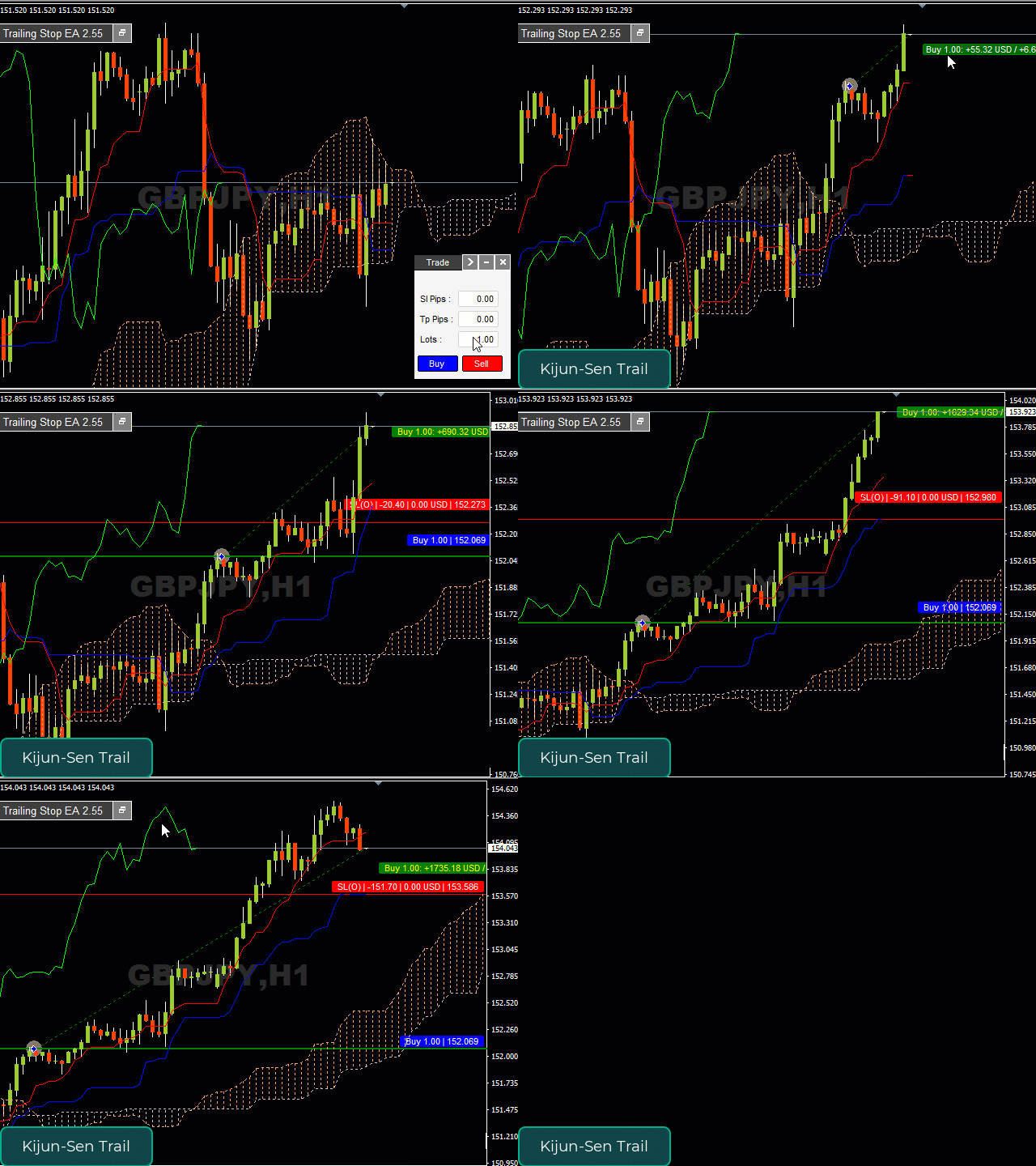
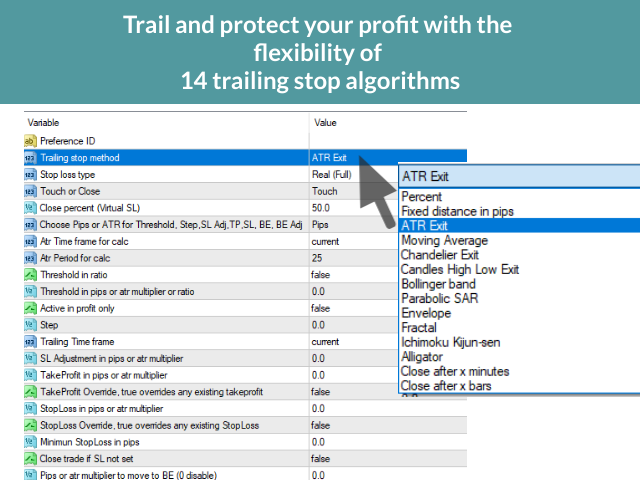
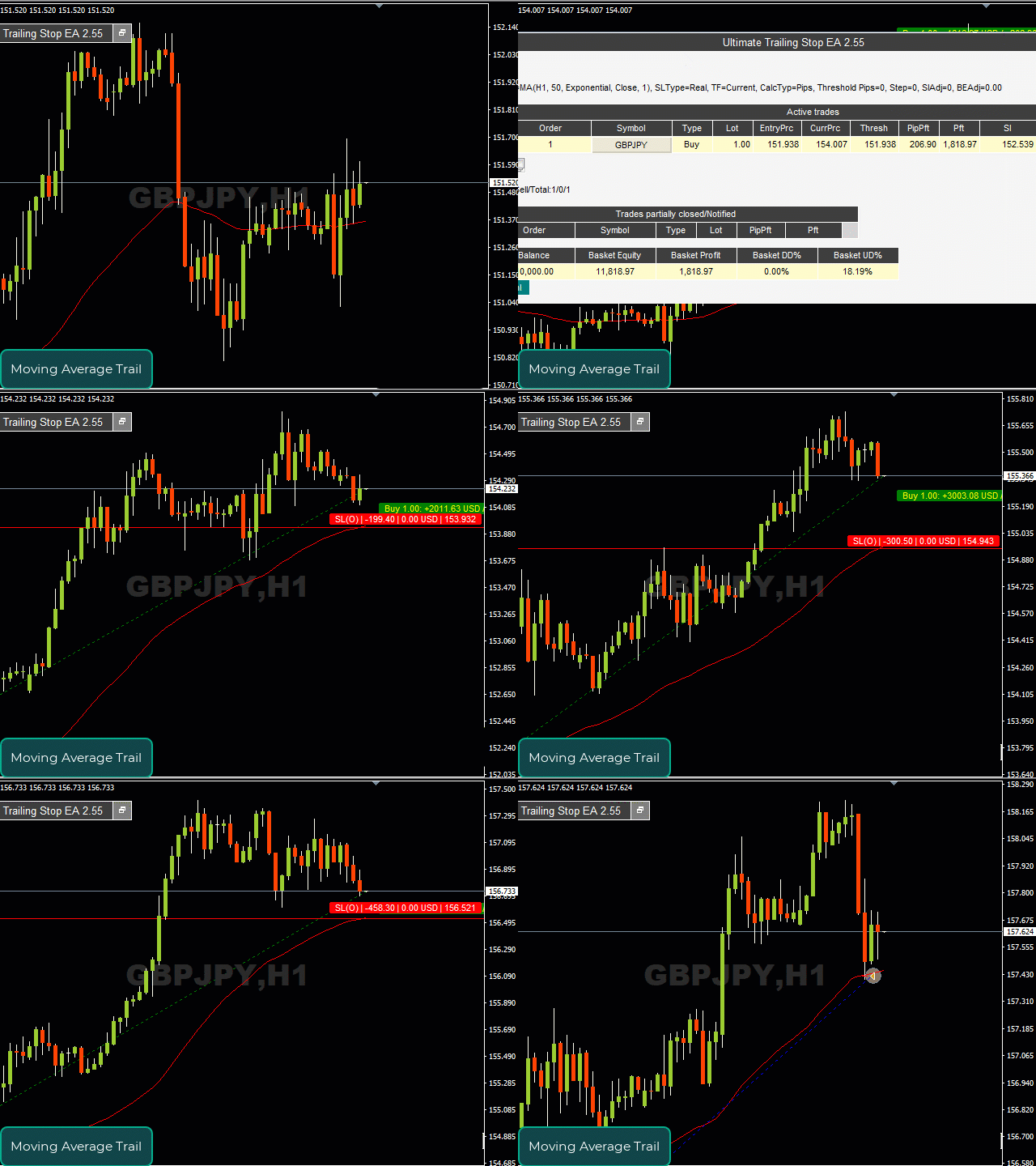
This EA Utility allows you to manage (with advanced filtering) unlimited open orders (manual or EA) with 16 trailing stop methods: fixed, percent, ATR Exit, Chandelier Exit, Moving Average, Candle High Low Exit, Bollinger Bands, Parabolic, Envelope, Fractal, Ichimoku Kijun-Sen, Alligator, Exit After X Minutes or Bars, RSI and Stochastic. The trailing stop can be either real or virtual, and you can exit fully or with a partial close percent on touch or bar close. 

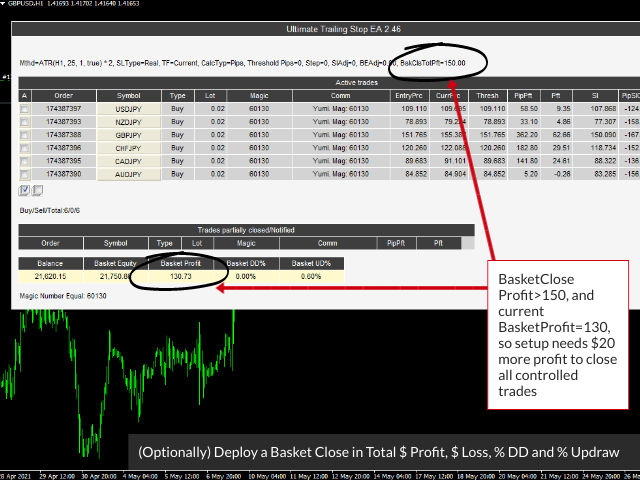
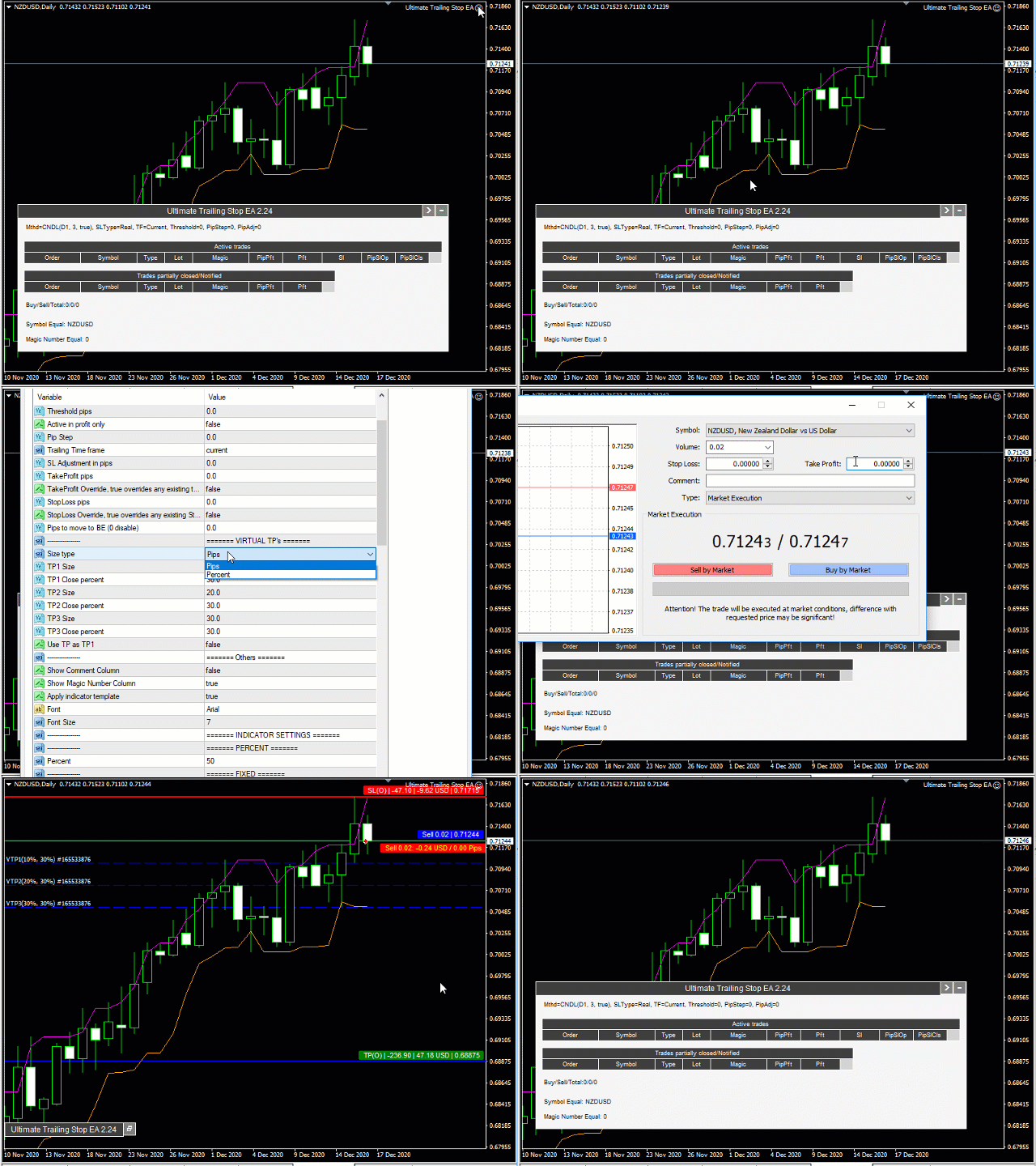
Moreover, you can add (override) stop loss, take profit and breakeven, add three partial take profit levels, and manage basket close in total dollar profit or loss, and/or percent drawdown or up draw.

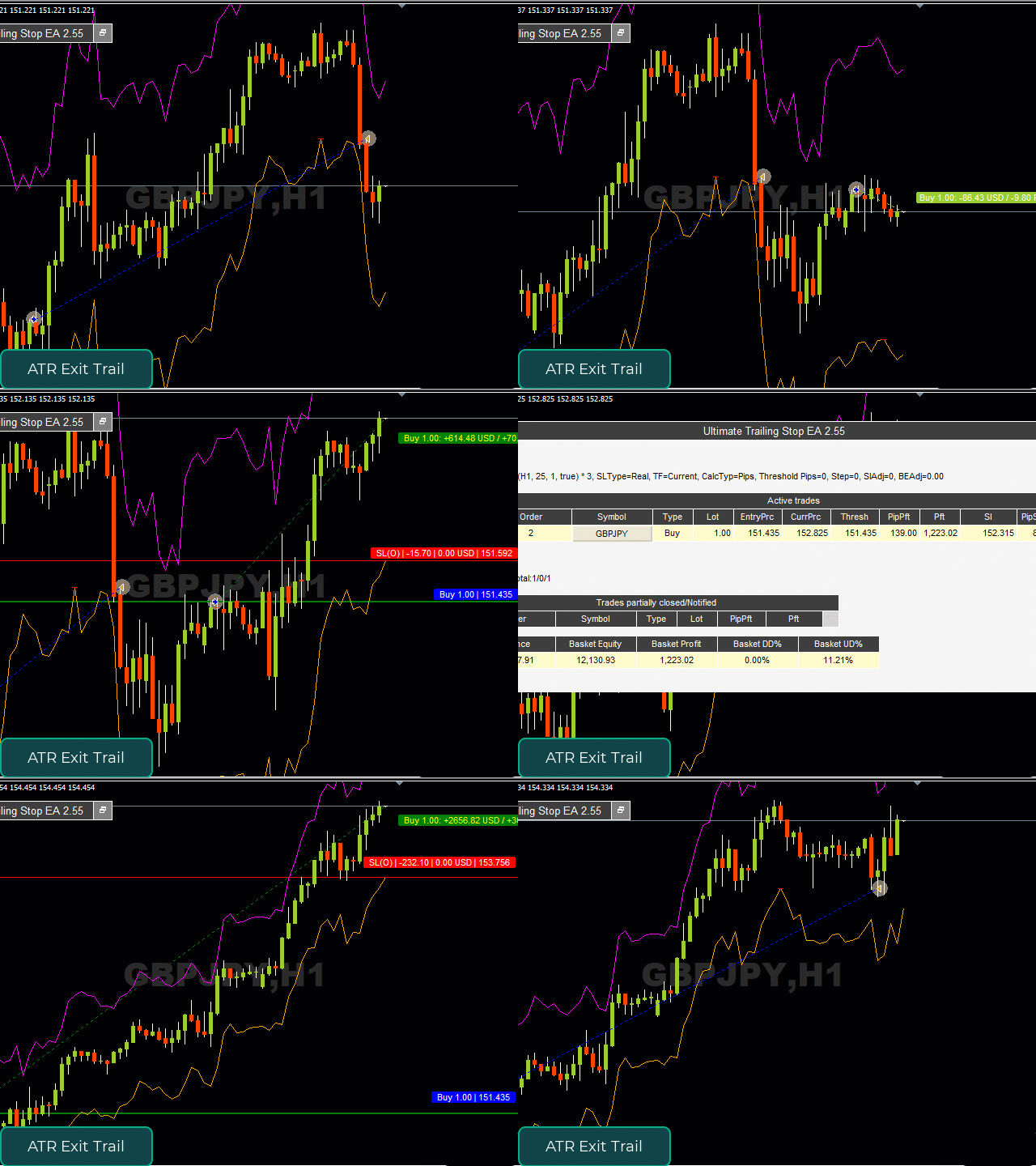
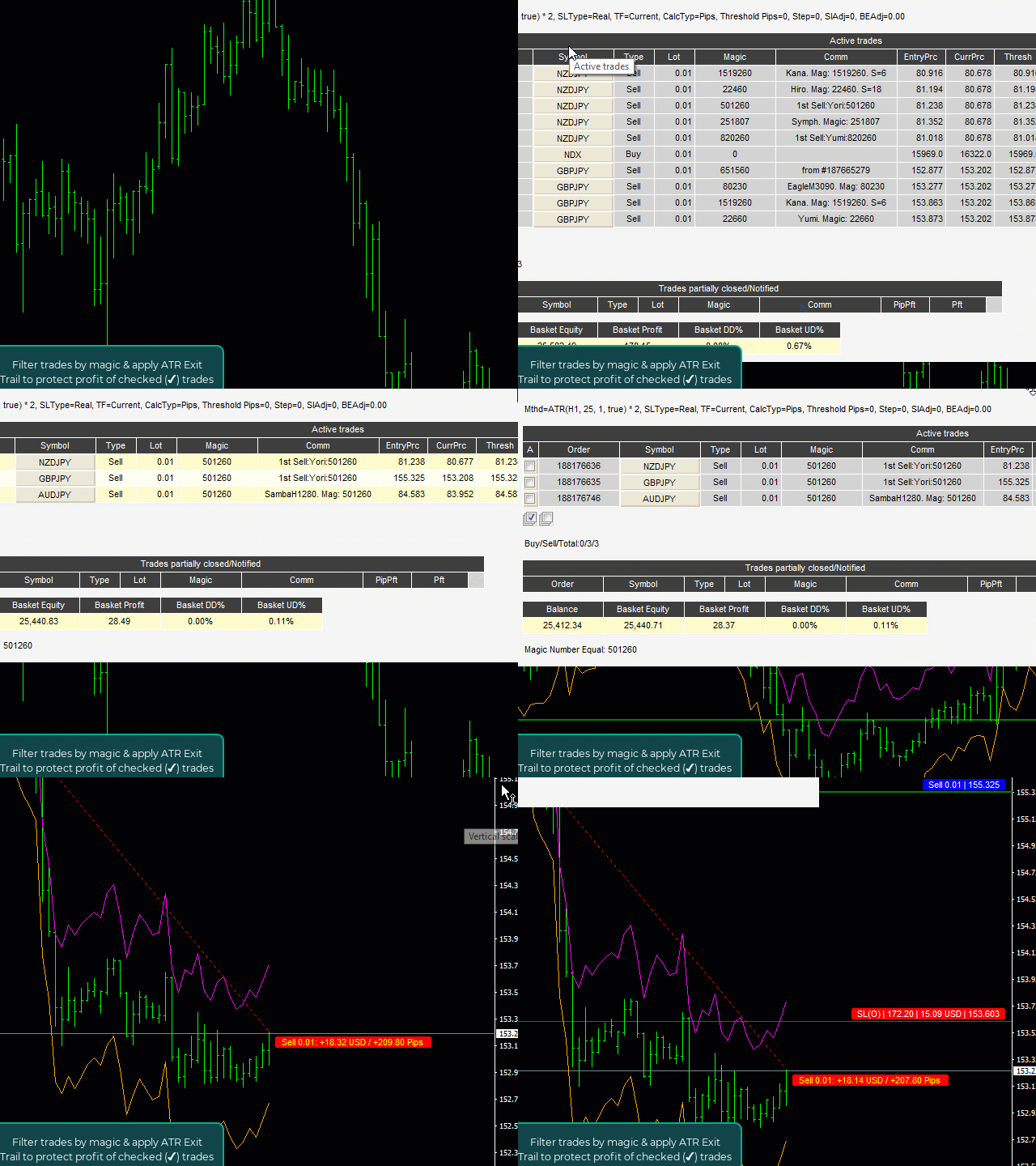
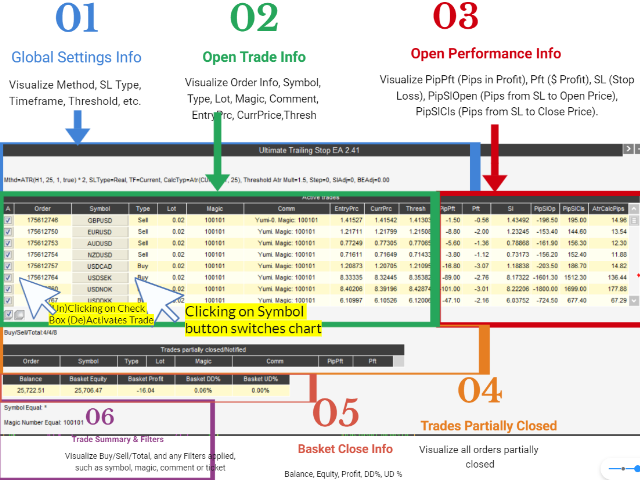
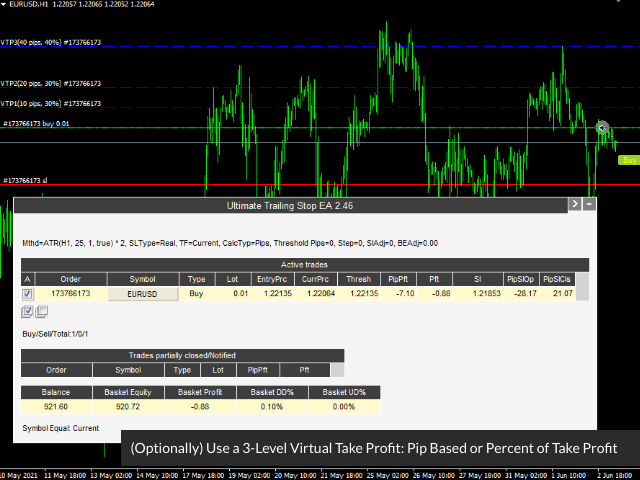
Visualize all orders and their trailing stop levels in a beautiful trade control panel. Visualize trailing SL (and open price & TP) on chart, and deploy mini trade panel for fast partial closing and order info.

How the Ultimate Trailing Stop EA is unique?

Most trailing stops classify as simple trailing stop systems that protect a fixed pip or percentage of the open trade profit, and some follow a single indicator. But this can: 
  1. Automatically trail your open positions using one of 16 trailing algorithms.  
     
  2. Choose between a real or virtual trailing stop, and get out fully or partial percent, on bar touch or bar close.

  3. Manage unlimited open orders (manual or EA) of different symbols on one chart. 

  4. Filter open orders based on symbol, magic number, comment, or ticket.

  5. Display all controlled orders in an advanced display showing each trade's open trade info and trailing stop levels, along with dynamically updating pips to level, pips & dollar profit. 

  6. Visualize indicators on chart, along with open order arrows, pip & profit visual tracking. 

  7. Basket Close in Total $ Profit | Total $ Loss | % Drawdown | % Updraw

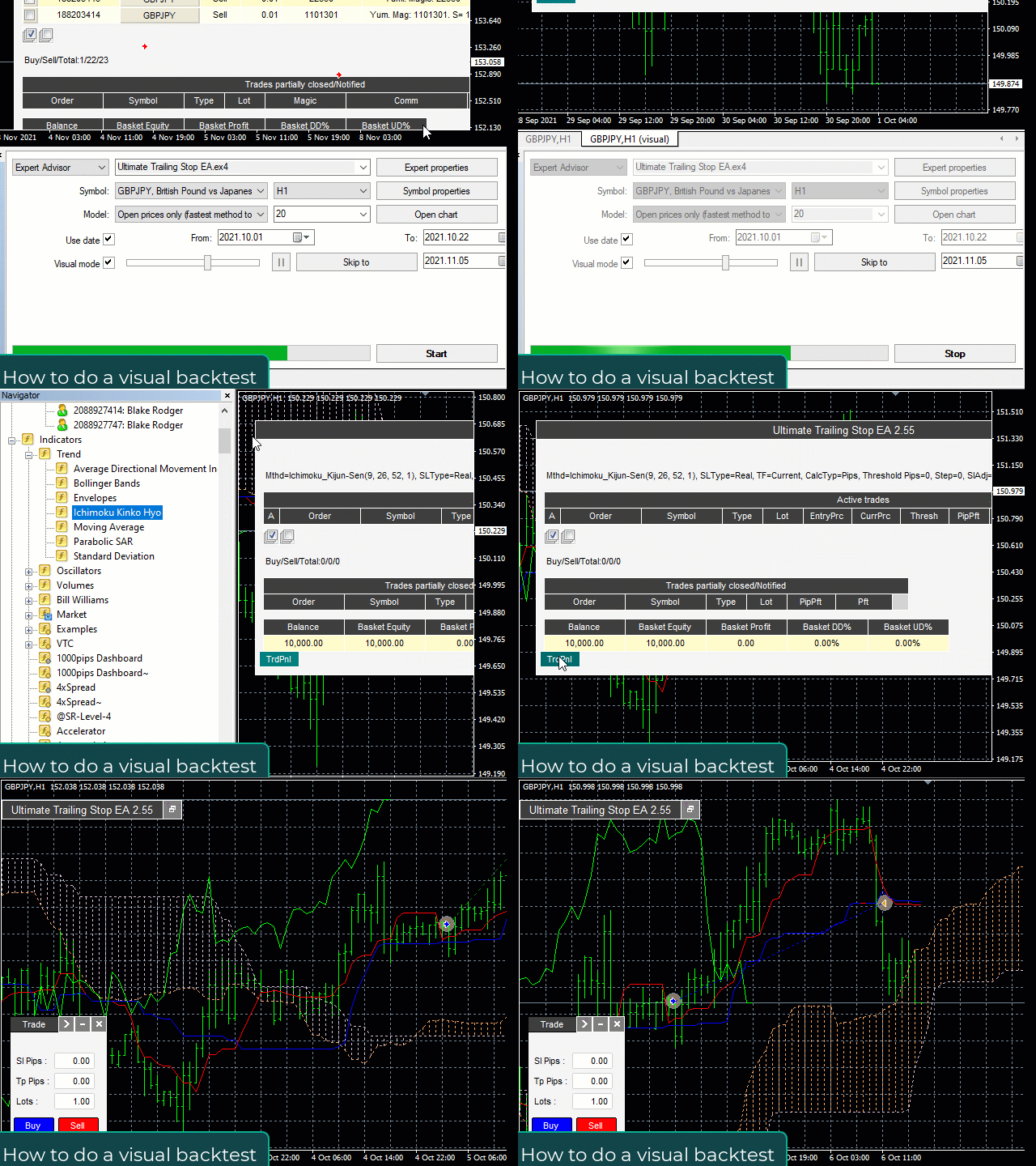
  8. [NEW] Backtest / optimize CSV file of trade signal history to discover optimimal settings

How this expert advisor works

The working process looks like this:

  1. You open any number of orders, manual or EA.

  2. UTS monitors these orders and moves the SL value in favor of selected algorithm.

  3. UTS closes all or part of the position at SL value.


Inputs:

DETAILED MANUAL
  • Trailing Stop Method — Choose from 16 different trailing stops. 

  • Stop Loss Type —  Choose between Real or Virtual Stop.   

  • Touch or Close  —  Close on touch (default), or when Bar closes over(under) virtual stop. Close method works only when virtual stop is enabled.

  • Close Percent  — Works with virtual to partially close your position at a desired percent. 

  • Threshold in Pips or ATR — Start trailing stop when your trade reaches X pips in profit. 

  • StopLoss in Pips or ATR- Set the SL in pips or atr multiplier

  • TakeProfit Pips or ATR - Set the TP in pips or atr multiplier

  • Breakeven in Pips or ATR - Set the BE in pips or atr multiplier

  • Indicator Settings  : 

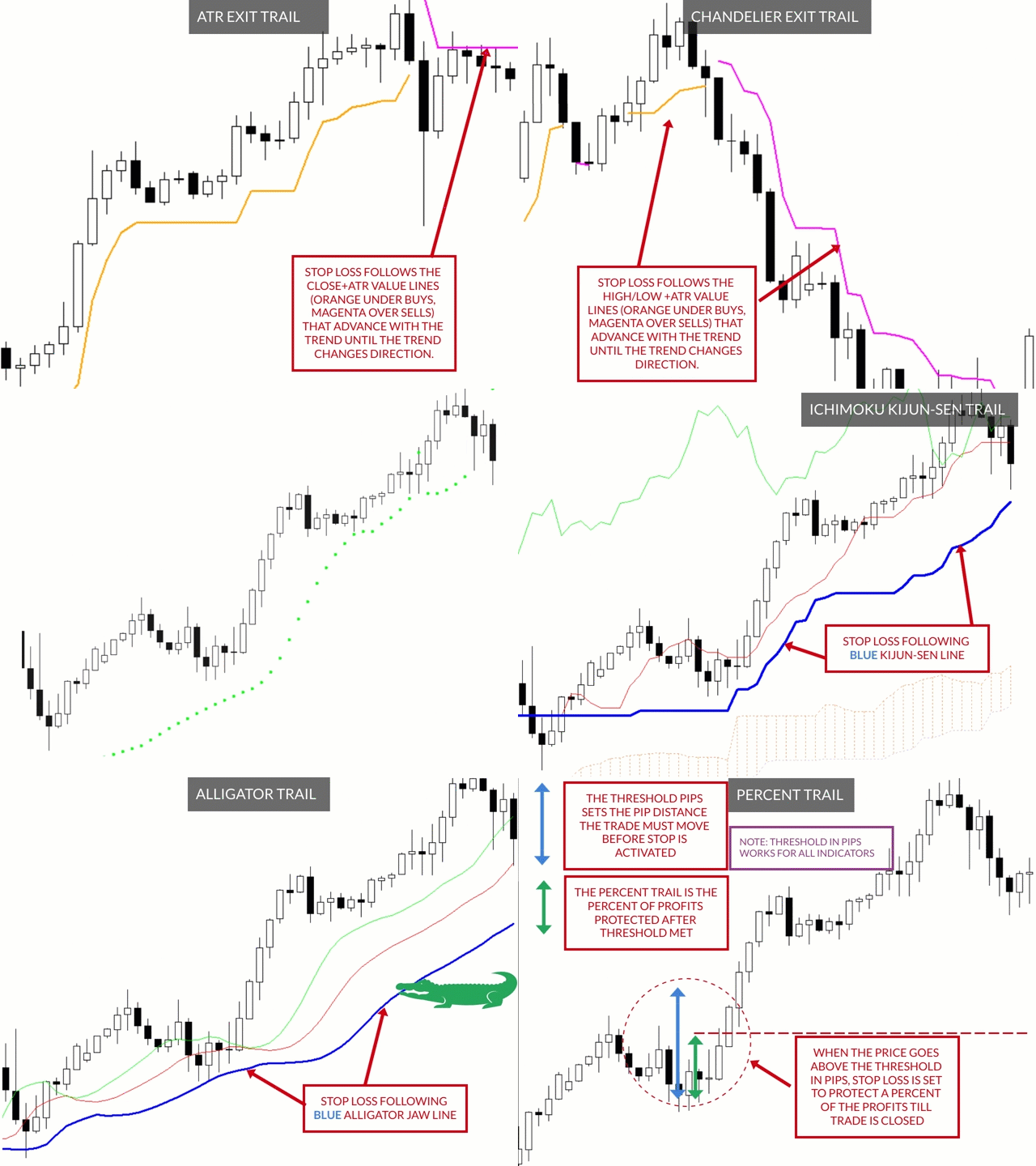
    • Percent — trails at percent profit
    • Fixed — trails at a fixed pip profit
    • ATR Exit — trails at close +/- multiple of atr
    • Moving Average — trails at moving average line
    • Chandelier Exit  — trails at highest high / lowest low +/- multiple of atr
    • Candle High Low Exit — trails at the highest / lowest candle range
    • Bollinger Bands—  trails at Bollinger Bands
    • Parabolic SAR—  trails at Parabolic SAR levels 
    • Envelope —  trails at Envelope Bands 
    • Ichimoku Kijun-Sen — trails at the the Ichimoku Kijun-Sen (Blue) line
    • Alligator —  trails at the jaw, teeth or lips of the Alligator indicator
    • Exit After X Minutes  — exits after custom minutes
    • Exit After X Bars  —  exits after custom bars
    • RSI - trail RSI level
    • Stochastic - trail Stochastic level
    • Filter (Symbol, Magic Number, Comment, Ticket) — With dropdown menu: None, Equal, Not Equal, Contain, Not Contain. These filters allow you to include (exclude) specific symbols, magic numbers, comments, tickets or parts of them. For example, if Symbol contains USD, you will trade all USD based symbols. If Magic Number equals 80260, 40260, you will manage only these magic numbers.
    Comentários 17
    gairey99
    257
    gairey99 2022.11.23 01:20 
     

    I have just purchased both the Ultimate Trailing Stop EA (UTS) and the Visual Order Tracker EA (VOT) and can honestly say they are a fantastic addition to my trading 'toolkit!' The two EA's complement each other perfectly in that one manages open trades and offers multiple automatic exit solutions and the other displays the order history on the chart. They have also helped 'unshackle' me from the screens, taken the psychology out of my trading decisions and ultimately made me a far more profitable trader, so thanks Blake! Both are great products that I would definitely recommend to anyone that wants to automate trailing stops from their trading plan and fine tune their craft as a trader via visualising where historical trades have opened and closed.

    Adelfo Tuazon
    47
    Adelfo Tuazon 2022.11.16 10:46 
     

    Superb trailing EA, take profit management and supportive creator. I had a dilemma creating my set file, then I contacted Blake to help me and he setup a specific set file for my request. Thank you!

    newsun0251
    643
    newsun0251 2021.11.15 07:47 
     

    The professional, rigorous and kind Mr. Blake Steven Rodger has developed excellent and very useful tools. Customers can always give timely support in case of difficulties. Thank you, Mr. Blake Steven Rodger!

    Produtos recomendados
    It is so very disappointing when the price does not have enough points to achieve Take Profit and makes a reversal. This EA sets virtual levels near the TakeProfit levels. This EA sets virtual levels next to TakeProfit orders. If these levels are reached by price, breakeven or trailing stop is applied for an order. Features This EA does not set new orders. The aim of this EA is to manage stop losses of existing orders that are set by another EA or manually (magic number equals 0). For correct w

    AnyChart MT4
    Irek Gilmutdinov
    AnyChart is a multifunctional tool allowing you to work with non-standard charts in MetaTrader 4. It includes collector of ticks and generator of charts for trading (hst files) and testing (fxt files). Supported chart types are second, tick and renko ones. Settings Starting Date - start date for chart plotting. Ending Date - end date for chart plotting. Chart Type - chart type: Time - time chart, each bar contains a certain time interval; Tick - volume chart, each bar contains a certain number


    This panel is a part of the SupDem-Pro trading system and is used to search for the best opportunities for any available instruments. Which can be selected manually in the Market Watch (open it with CTRL + M). Using this trading panel in combination with ShvedSupDem-Pro_Zone allows to analyze multiple currency pairs with a single click. The panel allows to load any instruments from the Market Watch, from 6 major currency pairs up to all instruments (480). The indicator parameters Button Width -
    Utility, which draws buy or sell trendlines, which can also become support or resistances able to close any position on the screen Algorithm that calculates the gain of the position, at the touch closure of the line.   The benefits you get: Works on forex and CFD, timeframe from M1 to Weekly. Easy to use screen control panel. Audible warning messages at the touch of the line. Easy to use.
    Grid Maestro
    Ruslan Brezovskiy
    Grid Maestro – uma ferramenta que constrói automaticamente uma grade de ordens com base em parâmetros específicos: passo da grade, número de ordens e multiplicador de volume. A abertura da primeira operação ocorre ao pressionar um botão na tela. Também está prevista uma função de ajuste automático dos parâmetros, calculada com base na análise do drawdown máximo do instrumento. Características:   Funciona apenas com ordens abertas por meio da pressão de botões na tela. Ao usar o modo automático,
    The Best One Scalping Trade Panel functional manual trade panel with risk reward, auto SL by candle ( original solution), lot size calculation, one-click trading, scale in and out of trades (partial close),  Works with all symbols not just currency pairs, perfect works on DAX, NASDAQ, GOLD, ...... I earn every day during live stream on ZakopiecFX - join Me Risk by lot Risk by percent SL by points SL by Candle, Renko, RangeBar ( original solution) TP by point TP by Risk/Reward Auto Trailing by P
    Now, you have your very own   PROP FIRM AUTO-CLOSER   program! Once your account target or drawdown hits, all open orders will close automatically. ========================================== INPUTS: Account target (exact amount):   Put the exact account target. Once the equity hits your specied account balance target, all open orders will close. Make sure to add some buffer to consider slippage. Use fixed value or dynamic value:   Choose whether you will need a fixed value or dynamic value for
    Three 3TP Easy Trade Pad Expert for MT4 – Download The 3TP Easy Trade Pad Expert is an advanced tool designed for capital management, risk control, and streamlined trading within the MetaTrader 4 (MT4) platform. With its functional and specialized interface, this expert advisor allows traders to effortlessly set and manage Stop Loss (SL) and Take Profit (TP) levels. In addition to simplifying trade execution, the tool provides features for defining acceptable risk, expected profit (R/R), and adv
    Instruções de uso: https://www.mql5.com/zh/blogs/post/754946 Versão MT4: https://www.mql5.com/zh/market/product/88205 Versão MT5: https://www.mql5.com/zh/market/product/88204 -------------------------------------------------- 1. Copiar pedidos, de 12 contas master para 100 contas slave. O número de contas slave pode ser personalizado, de 12 a 100. 2. Suporte MT4 a MT4, MT4 a MT5, MT5 a MT4, MT5 a MT5. 3. Identifique os sufixos de variedades de negociação em diferentes plataformas, como EURUSD,
    Angry bull Option Binary
    Fabio Oliveira Magalhaes
    1 (1)
    Angry Bull Option Binary     Este é um robô Binary Options, que contém 7 estratégias, você podetestá-lo para verificar quais são as melhores estratégias Configurações Valor inicial do lote Investimento Dinâmico = Se ativado, utilizará um lote automático de acordo com seu capital Saldo ($) c/ backtest - Saldo inicial para backtest PorcRiscoInvestment = Será o valor de % para o lote automático se for ativado Expiração (em minutos) = Será o tempo de vencimento das ordens em Opções Binárias Magi
    Gold Titan King Scalper
    Dodong Christian Arnon
    Indicator Description GOLD TITAN KING SIGNAL INDICATOR High-Precision Gold Scalping Buy/Sell Signals – Manual Trading Assistant Overview The Gold Titan King Signal Indicator is a manual trading assistant tool designed for high-frequency scalping on Gold (XAUUSD) and other major pairs. It generates clear BUY/SELL signals with precise entry levels, along with adjustable Stop Loss and Take Profit levels displayed directly on the chart. ️ This tool is NOT an EA. It does not execute trades
    Trading panel for manual trading. Has a fairly wide functionality. Allows you to automatically calculate the order size, open both market and pending orders. It has a wide range of options for closing orders, it is possible to partially close orders, close orders after reaching a certain profit or loss, separately close profitable and unprofitable, buy and sell, as well as pending orders. The panel also contains a simple implementation of a grid of pending orders, reverse and lock functions, tr
    Uma das sequências numéricas é chamada de "Forest Fire Sequence". Foi reconhecida como uma das mais belas novas sequências. Sua principal característica é que essa sequência evita tendências lineares, mesmo as mais curtas. É esta propriedade que formou a base deste indicador. Ao analisar uma série temporal financeira, este indicador tenta rejeitar todas as opções de tendência possíveis. E somente se ele falhar, ele reconhece a presença de uma tendência e dá o sinal apropriado. Esta abordagem pe
    O indicador SMC Venom Model BPR é uma ferramenta profissional para os traders que trabalham com o conceito Smart Money (SMC). Identifica automaticamente dois padrões principais no gráfico de preços: FVG   (Fair Value Gap) é uma combinação de três velas, em que existe um gap entre a primeira e a terceira velas. Forma uma zona entre níveis onde não há suporte de volume, o que geralmente leva a uma correção de preço. BPR   (Balanced Price Range) é uma combinação de dois padrões FVG que formam uma “
    Like you when I first started trading, It was overwhelming...learning about indicators, about lotsize, leverage and many more things. Its been almost 3 years. I am more knowledgeable in trading. My trading continues to improve as I work on my strategy, technical analysis, trading psychology and trade management. One thing I am not worried about though is being able to close my trades quicky if a trade goes against me or if the trade has reached my take profit level with the help of my Close Tra
    Smartility
    Syed Oarasul Islam
    This utility is designed to help you with your Manual Trading. It allows different ways of closing trades. It can display total number of BUY and SELL orders individually and also their individual profits. It can enter trades without stopl loss and take profits. However upon selecting UseStopLossTakeProfit from the settings it can use best possible stop loss and take profits based on the market conditions. Upon selecting the CloseOppositeTrades  from the settings it can close opposite trades. Fo
    VN Trade Panel II
    Vyacheslav Nekipelov
    4 (1)
    The new version of the trading panel, which now has the ability to separately close Buy and Sell orders, display targets for all orders on the chart, as well as the ability to use the panel to trade with brokers working on the FIFO rule. Also, the new version adds option buttons for separate management of open orders. It has a convenient visualized interface and intuitive control without a lot of additional tabs to which traders have to be distracted and switch their attention. Thanks to this,
    Risk Commander
    Adisorn Soodkanueng
    Product Name: Risk Commander: Trade Assistant & Strategy Simulator Risk Commander is more than just a trade panel—it is a complete Manual Trading Ecosystem . It serves two powerful purposes: Live Assistant: Helps you execute trades with speed, precision, and perfect risk management in real-time markets. Training Simulator: Fully compatible with the Strategy Tester (Visual Mode) , allowing you to practice manual trading on historical data without risking a cent. NEW! Built-in Simulator Mode S
    Noize Absorption Index MT4
    Ekaterina Saltykova
    5 (1)
    Noize Absorption Index - is the manual trading system that measures the difference of pressure between bears forces and bulls forces. Green line - is a noize free index that showing curent situation. Zero value of index shows totally choppy/flat market.Values above zero level shows how powerfull bullish wave is and values below zero measures bearish forces.Up arrow appears on bearish market when it's ready to reverse, dn arrow appears on weak bullish market, as a result of reverse expectation. S
    Este é um painel comum que coloca uma rede de ordens de compra e venda. Fecha esta ordem Expert Advisor de acordo com o lucro definido nas Configurações. Em seguida, há um parâmetro chamado Ladder que inclui que a distância entre as ordens começam a aumentar nos pontos especificados pelo parâmetro ladder (aqui, nas configurações básicas é de 10 Pontos) significa uma segunda ordem de 10 pontos, uma terceira ordem de 20 pontos, uma quarta ordem de 40 pontos, etc. Então, o que você precisa saber
    This tool allows you to place pending orders that cannot be triggered by wicks . You set your desired entry price and order type, and the EA watches the level. A trade will only be opened if a full candle body closes beyond your price , ensuring the move is real and confirmed — not just a spike or spread touch. This gives you cleaner entries, eliminates premature triggers, and keeps your strategy disciplined and intentional.
    Virtual Collider Manual   is a trading assistant with a built-in panel for manual trading. It automatically moves a position opened by a trader in profit using innovative adaptive grid algorithm of averaging and adaptive pyramiding Know-how of the grid algorithm of averaging and pyramiding of the   Virtual Collider Manual   trading robot is based on fully automatic adaptation of all characteristics of dynamically build order grid and pyramid with actual price movement with no need for adjusting
    Expert Advisor for MT4 Useful utility MUST have for all traders.  With 1 click button, you're able to close all your open positions. Its come with a warning pop up notification when you click to close all your trades, to avoid an accident press the button. Just press 'Yes' to confirm or 'No' to cancel it. The expert will close all your open positions no matter what pairs you currently open or directions. Just attach the expert on 1 of your chart, and you're good to go.
    Short Description: FTMO Protector PRO MT4 is an EA designed to protect your funded account by managing risk and ensuring compliance with the Prop Firm's trading rules. This EA automatically monitors equity levels, closes trades when profit targets or drawdown limits are reached, and provides a visual display of key account metrics. EA w orks with all different Prop Firm service providers. Overview: FTMO Protector PRO MT4 is an Drawdown Safeguard Expert Advisor meticulously crafted for traders
    Margin Call Shield – Defend Your Margin on Your Terms Margin Call Shield   is a tool for MetaTrader 4 traders who want to decide for themselves which open positions are closed during margin call situations before the platform does so automatically based on its internal rules. By default, the broker or platform decides which positions to close, often using undisclosed algorithms. Margin Call Shield lets you set this order according to your own strategy. Why Was Margin Call Shield Created? In a  
    Extra Time Bar
    Mostafa Saad Saeed Shawara
    Barra de tempo extra / Extra Time Scale Bar é uma ferramenta projetada para aprimorar suas negociações, permitindo que você adicione uma barra de tempo personalizada aos seus gráficos. Com esta ferramenta, você não está mais limitado apenas ao horário do servidor – você pode configurar o gráfico para exibir qualquer fuso horário de sua escolha, como sua hora local, horário de Greenwich ou qualquer outro. Recursos da Barra de Tempo Extra: MT5 version 1. Personalização de fuso horário: Escolha
    Smart Money Concepts Expert MT4 The Smart Money Concepts Expert MT4 is designed to automatically display key Smart Money elements directly on your chart. This expert tool includes a floating control panel that allows traders to manage the visibility of various analytical components. Each section of the panel corresponds to an essential market structure feature, enabling users to toggle automated drawings on or off as needed.    Smart Money Concepts Expert — Specifications Overview Specification
    SmartTrader Pro — Advanced Order Management Panel Type: Order Management Platform: MetaTrader 4 Version: 1.0 Created by: HANI MABAD * 2025  --- Overview SmartTrader Pro is a professional multi-order launcher and manager designed for traders who want precise USD-based control over profits and losses. It enables you to open, manage, and close trades with a single click — across market and pending orders — while keeping full visibility through an integrated smart panel. Whether you tra
    Details of each condition Type 1. Set no use Hedging Martingale, to open the order by yourself only through the push button. TP and SL follow setting. Set Setting_Hedging =false;     Use_Signal =false;  Type 2. Semi Auto Recovery Zone You have to open the order by yourself only through the push button. If in the wrong direction and Set true on Hedging Martingale, EA will fix the order with the zone system by use Hedging Martingale Set Setting_Hedging =true;     Use_Signal =false;  Type 3. Use
    Account Protector Metatrader 4
    Emmanuel Lovski Ijeawele Maduagwuna
    Account Protector Meta Trader 4 This utility prevents risk of ruin per trading cycle.  Retail forex trading accounts are designed with   stop out levels   that make it impossible to quickly restore lost trading capital   (to initial levels)   in the event of a human or algorithm trader  " blowing"   an account. This hampers the efforts of a trader who after growing an account investment to a multiple of its initial value, suddenly suffers irreparable loss because of several trade entry mishaps.
    Os compradores deste produto também adquirem
    Ultimate Extractor - Professional Trading Analytics for MT4 Ultimate Extractor transforms your MetaTrader 4 trading history into actionable insights with comprehensive analytics, interactive charts, and real-time performance tracking. Ability to combine multiple accounts and MT4 and MT5 into a single dashboard. What It Does Automatically analyzes your MT4 trading history across all Expert Advisors and generates detailed HTML reports with interactive visualizations. Tracks live performance metric
    Discord To MT4 Receiver
    Levi Dane Benjamin
    5 (1)
    Copie sinais de qualquer canal do qual você seja membro (   sem a necessidade de um Token de Bot ou Permissões de Administrador  diretamente para o seu MT4. Foi projetado com o usuário em mente, oferecendo muitos recursos que você precisa Este produto é apresentado em uma interface gráfica fácil de usar e visualmente atraente. Personalize suas configurações e comece a usar o produto em minutos! Guia do Usuário + Demo  | Versão MT5 | Versão Telegram Se quiser experimentar uma demonstração, vá p
    The product will copy all telegram signal to MT4   ( which you are member  ) , also it can work as remote copier.  Easy to set up, copy order instant, can work with almost signal formats, image signal, s upport to translate other language to English Work with all type of channel or group, even channel have "Restrict Saving Content", work with  multi channel, multi MT5 Work as remote copier: with signal have ticket number, it will copy exactly via ticket number. Support to backtest signal. How to
    RedFox Copier Pro
    Rui Manh Tien
    4.7 (10)
    Time saving and fast execution Whether you’re traveling or sleeping, always know that Telegram To Mt4 performs the trades for you. In other words, Our   Telegram MT4 Signal Trader  will analyze the trading signals you receive on your selected Telegram channels and execute them to your Telegram to MT4 account. Reduce The Risk Telegram To Mt4   defines the whole experience of copying signals from   Telegram signal copier to mt4 platforms. Users not only can follow all instructions from the signa
    Custom Alerts AIO: Monitoramento inteligente de múltiplos mercados – pronto para uso, sem configuração Visão geral Custom Alerts AIO é uma ferramenta avançada de varredura de mercado que funciona imediatamente após a instalação — sem necessidade de configurar indicadores adicionais. Inclui internamente todos os principais indicadores da Stein Investments (FX Power, FX Volume, FX Dynamic, FX Levels e IX Power), permitindo que você monitore facilmente todas as principais classes de ativos: Forex
    Trade Copier Pro
    Vu Trung Kien
    4.57 (14)
    Trade Copier Pro é uma ferramenta poderosa para copiar remotamente comércio entre multi-contas em diferentes locais mais internet. Esta é uma solução ideal para provedor de sinais, que querem compartilhar seu comércio com os outros no mundo todo em suas próprias regras. Um provedor pode copiar comércios de multi-receptores e um receptor pode obter comércio de multi-fornecedores também. Provedor e receptor pode gerenciar sua lista de parceiros com potência sistema de gestão de banco de dados buil
    Telegram To MT4 Receiver
    Levi Dane Benjamin
    3.67 (6)
    Copie sinais de qualquer canal do qual seja membro (incluindo privados e restritos) diretamente para o seu MT4.  Esta ferramenta foi projetada com o usuário em mente, oferecendo muitos recursos que você precisa para gerenciar e monitorar as negociações. Este produto é apresentado em uma interface gráfica fácil de usar e visualmente atraente. Personalize suas configurações e comece a usar o produto em minutos! Guia do Usuário + Demonstração  | Versão MT5 | Versão Discord Se você quiser experime
    EasyInsight AIO MT4
    Alain Verleyen
    4 (2)
    EASY Insight AIO – A solução tudo-em-um para trading inteligente e sem esforço Visão geral Imagine analisar todo o mercado — Forex, Ouro, Cripto, Índices e até Ações — em segundos, sem precisar examinar gráficos manualmente, instalar indicadores ou lidar com configurações complicadas. EASY Insight AIO é sua ferramenta definitiva de exportação para trading com IA, pronta para usar. Ela oferece um panorama completo do mercado em um único arquivo CSV limpo — pronto para análise imediata no ChatGP
    The product will copy all  Discord  signal   to MT4   ( which you are member  ) , also it can work as remote copier.  Easy to set up. Work with almost signal formats, support to translate other language to English Work with multi channel, multi MT4. Work with Image signal. Copy order instant, auto detect symbol. Work as remote copier: with signal have ticket number, it will copy exactly via ticket number. How to setup and guide: Let read all details about setup and download Discord To MetaTrader
    Crystal Trade Manager PRO – Sistema Avançado de Gestão de Risco e Controle de Operações para MT4 Versão Gratuita: https://www.mql5.com/en/market/product/150632 Visão Geral Crystal Trade Manager PRO (CTM) é uma ferramenta profissional de execução de ordens e gestão de risco desenvolvida para MetaTrader 4. Foi projetada para traders que necessitam de disciplina, forte proteção de capital e automação inteligente dentro do MT4. O sistema controla o risco, protege o patrimônio da conta, aplica limite
    Remote Trade Copier   is an advanced tool designed for efficiently copying trades between accounts in both   local   and   remote   modes. It allows for lightning-fast order replication from a master account to a slave account. In local mode, trades are copied instantly, while in remote mode, the copying process takes a second.  In new version, in remote mode , the copy operation can be performed with a delay of milliseconds or zero . After purchase, ask how to activate it MT4 Version (Only Loc
    Averaging Helper
    Sergey Batudayev
    5 (2)
    Auxiliar de Média - Este tipo de instrumento auxiliar de negociação ajudará você a calcular a média de suas posições anteriormente não lucrativas usando duas técnicas: média padrão hedge com posterior abertura de posições conforme a tendência O utilitário tem a capacidade   de classificar várias posições abertas em diferentes direções ao mesmo tempo, tanto para compra quanto para venda. Por exemplo, você abriu uma posição para venda e a segunda para compra, e ambas não são lucrativas, ou uma est
    With this Expert Advisor, you can seamlessly integrate various channel, arrow, and reversal indicators. It offers the flexibility to use all popular channel trading strategies, while also providing powerful tools to customize your trading conditions and risk management system.   The Expert Advisor opens orders when the price crosses the channel boundaries. Multiple crossing conditions are available for customization: Price touches boundary on re-entry into the channel Price touches boundary on
    Unlimited Trade Copier Pro is a tool to copy trade remotely to multiple MT4, MT5 and cTrader accounts at different computers/locations over internet. This is an ideal solution for you if you are a signal provider and want to copy your trades to other receivers globally on your own rules. One provider can copy trades to multiple receivers and one receiver can get trade from multiple providers as well. The provider can even set the subscription expiry for each receiver, so that receiver will not b
    ManHedger MT4
    Peter Mueller
    5 (1)
    THIS EA IS A SEMI-AUTO EA, IT NEEDS USER INPUT. Manual & Test Version Please   DON'T BUY   this product before   TESTING  and watching my video about it. Contact me for user support or bug reports, or if you want the MT5 version! MT5 Version I do not guarantee any profits or financial success using this EA. With this Expert Advisor, you can: Implement your own   Zone Recovery   strategy to capitalize on trending markets. Create   Grid   trading strategies, to profit from ranging markets. Place
    News Trapper EA
    Noha Mohamed Fathy Younes Badr
    4.85 (13)
    Hi, all.  News trapper EA It is an expert for trading news very safe expert  Automated Trading on the news of the economic calendar. It shows stable trading during last 10  years. EA doesn't use dangerous technologies like martingale, grid. The Expert is very simple to use.      sale will end after 48 h how to install it     and set files     read the blog         after purchase contact me to add you to   VIP   channel  The program contains flexible settings for trading on the news of the econo
    FiboPlusMultiTF
    Sergey Malysh
    5 (1)
    A ready-made multitimeframe trading system based on automatic plotting and tracking of Fibonacci levels for buying and selling any symbol. Advantages Determines the trend direction based on a complex of 14 indicators ( Cx ), extremums of ZigZag ( Z ), RSI ( R ), Impulse ( I ) Displaying the values of 14 indicators comprising the trend direction ( Cx ) Plotting horizontal levels, support and resistance lines, channels View the plotting option of Fibonacci levels on any timeframe, with the abilit
    LIMITED OFFER - JUST FOR 2 DAYS | 50% BLACK FRIDAY DISCOUNT $640 -> $320 Your Smart Trading Assistant for the Forex Market Introducing a powerful MetaTrader tool designed to revolutionize the way you trade. This intelligent assistant goes beyond traditional indicators to provide a comprehensive, AI-driven market analysis — so you can trade with clarity and confidence. What It Does This advanced tool continuously monitors and analyzes a wide range of market data to deliver high-quality trading
    Online Accounts Manager MT4
    Kyra Nickaline Watson-gordon
    5 (1)
    OneClick Online Account Manager is a powerful utility that helps you to manage all your accounts from a centralized panel. It is suitable for all single account traders and specially for multiple accounts traders. The utility help you to : Monitor status of all accounts on a private web page. Some information such as account connection status, account profit, DD, Balance, Equity, Margin Level, Number of positions and orders, Daily and Weekly profit/loss and also overall summation of all these p
    This is an Expert Adviser use for manual trading as a background EA or combine with external EA to open orders. Loss Recovery Trading is one of your options to handle the lose positions instead of using stop loss by setting a zone recovery area and target to exit the turn rounds sequence. How It Work? If the market goes against your first positions direction at the specific of losing points, the EA will open an opposite direction position with calculated larger lot size and also keep the first
    The advantage of using this EA This EA directly updates takeprofit and stop losses that are still empty in a manual order Parameters Multiplier: Multiplier value of the previous transaction Distance: Distance hedging from the previous order Takeprofit: take profit taken from the last price + the value of this column We recommend that you do not add more than one manual transaction in the same pair martingale hedging | manual hedging | hedging manual | hedging lot | best robot | best ea
    This means now you can trade on multiple MetaTrader 4 accounts simultaneously, mirror the trades of any trading bot to your friends and family accounts (even if it is locked to your MT4 account number), create investment portfolios of many MT4 accounts, remove risk of unregulated Forex brokers, turn losing trading strategy into a winner and become an independent account manager immediately without the need to sign any contracts or opening expensive PAMM accounts with the broker. Reverse Trading
    50% off. Original price: $375 Reward Multiplier is a semi-automatic trade manager based on pyramid trading that opens additional orders with the running profit of your trades to maximize return exponentially without increasing the risk. Unlike other similar EAs, this tool shows potential profit/loss and reward to risk ratio before even entering the first trade! Download Demo here  (starting lot is fixed at 0.01) Guide + tips here MT5 version   here You only open the first order. When your tr
    O painel FFx Hidden Manager vai ajudar facilitando o gerenciamento de suas ordens diretamente no gráfico. Abaixo a descrição de todos os recursos: TP, SL e Trailing Stop ficam ocultos Cada ordem tem a sua própria linha no gráfico Arrasta e solta (Drag & Drop) qualquer linha para alterar o TP/SL, conforme sua necessidade Opção para mover automaticamente a linha SL no empate (breakeven) quando TP # 1 for atingido Opção para escolher o tipo de TP/SL (por pips ou preço) Opção para escolher o tipo de
    FFx Risk Calculator panel will help you to calculate very easily your trades size, SL or the risk directly on the chart. All features are described below: Option to select which parameter to calculate: Risk, Stop Loss or Lot Size The panel will show if the lot size is allowed according to the current account free margin Button to maximize/minimize the panel Drag and Drop the panel anywhere on the chart How to use it? Select the parameter you want to be calculated. It will be based on the 2 other
    News Trader Pro
    Vu Trung Kien
    4.38 (16)
    News Trader Pro é um robô único que permite a negociação com notícias pela sua estratégia pré-definida. Ele carrega pedaços de notícias de vários sites populares de Forex. Você pode escolher qualquer notícia e programar a estratégia para negociar, então o News Trader Pro vai operar com essa notícia através de uma estratégia selecionada automaticamente quando a notícia for publicada. As notícias dão a oportunidade de ter pips desde que o preço tenha um grande movimento com a publicação. Agora, co
    FFx Watcher PRO
    Eric Venturi-Bloxs
    The FFx Watcher PRO is a dashboard displaying on a single chart the current direction of up to 15 standard indicators and up to 9 timeframes. It has 2 different modes: 1. Watcher mode: Multi Indicators User is able to select up to 15 indicators to be displayed User is able to select up to 9 timeframes to be displayed 2. Watcher mode: Multi Pairs User is able to select any number of pairs/symbols User is able to select up to 9 timeframes to be displayed This mode uses one of the standard indicat
    Transaction Repeater Full
    Alexandr Bryzgalov
    5 (4)
    Baixe uma copiadora de negócios fácil de usar e personalizar. Nada supérfluo, tudo é apenas o mais necessário. Pode fazer cópias para frente e para trás (reversa). Com a cópia direta, ele assume o controle de Stop Loss e Take Profit de cada pedido. Repete as modificações do mercado e limita os pedidos colocados na conta principal. É possível copiar nos modos "um para muitos" e "muitos para um". Atenção: O produto destina-se a copiar transações apenas dentro de um PC ou VPS com acesso ao desktop.
    The product combines a manual trade panel with the ability to perform actions automatically in a highly configurable way. Actions include capturing indicator values and then based on those values raising alerts, open/close or partially close trades, scale-in, setting up pending orders, adjusting stop loss, take profit and more. On-chart controls can be configured, such as tick boxes and buttons, so can be fully interactive. The EA also handles money management, news events, hidden stop loss, tak
    Binary Options Copier Remote is an EA that allows to copy binary options trades between MT4 accounts at different computers. This is an ideal solution for signal provider, who want to share his trade with the others globally on his own rules. Provider can give free bonus license to 10 receivers. That means those 10 receivers can copy from provider by using Binary Options Receiver Free (no cost). From 11th one, receiver have to buy Binary Options Receiver Pro (paid version) in order to copy from
    Mais do autor
    Ultimate Trailing Stop EA MT5
    BLAKE STEVEN RODGER
    4.13 (8)
    This EA Utility allows you to manage (with advanced filtering) unlimited open orders (manual or EA) with 16 trailing stop methods: fixed, percent, ATR Exit, Chandelier Exit, Moving Average, Candle High Low Exit, Bollinger Bands, Parabolic, Envelope, Fractal, Ichimoku Kijun-Sen, Alligator, Exit After X Minutes or Bars, RSI and Stochastic. The trailing stop can be either real or virtual, and you can exit fully or with a partial close percent on touch or bar close.  Moreover, you can add (override
    Chandelier Exit MT5
    BLAKE STEVEN RODGER
    5 (1)
    Developed by Chuck LeBeau, the Chandelier Exit indicator uses the highest high / lowest low -/+ a multiple of the ATR value to draw trailing stop lines (orange under buys, magenta over sells) that advance with the trend until the trend changes direction.The value of this trailing stop is that it rapidly moves upward in response to the market action. LeBeau chose the chandelier name because "just as a chandelier hangs down from the ceiling of a room, the chandelier exit hangs down from the high
    FREE
    ATR Exit MT5
    BLAKE STEVEN RODGER
    4.75 (4)
    The ATR Exit indicator uses the candle close + ATR value to draw trailing stop lines (orange under buys, magenta over sells) that advance with the trend until the trend changes direction. It uses a multiple of the Average True Range (ATR), subtracting it’s value from the close on buy, adding its value to the close on sell. Moreover, the trailing stop lines are generated to support the order’s trend direction (long or short):  In an upward trend, the long trailing stop line (orange line under bu
    FREE
    Ultimate Trade Copier MT5
    BLAKE STEVEN RODGER
    5 (2)
    This trade copy utility allows you to instantly and seamlessly replicate and synchronize unlimited orders from multiple master accounts to multiple slave accounts on your local machine. You can create custom channels (or portfolios) with advanced filtering capabilities to copy from multiple master accounts to multiple slave accounts. Moreover, you can tailor these channels with a range of lot sizing and trade condition options to ensure that copied trades outperform the original source. You can
    Ultimate Trade Copier
    BLAKE STEVEN RODGER
    5 (2)
    This trade copy utility allows you to instantly and seamlessly replicate and synchronize unlimited orders from multiple master accounts to multiple slave accounts on your local machine. You can create custom channels (or portfolios) with advanced filtering capabilities to copy from multiple master accounts to multiple slave accounts. Moreover, you can tailor these channels with a range of lot sizing and trade condition options to ensure that copied trades outperform the original source. You can
    Zone Guardian
    BLAKE STEVEN RODGER
    Zone Guardian is an advanced Expert Advisor (EA) designed to automate trade management. This EA manages trades within specified risk parameters using automatic lot calculation and multi-layered trade activation. It supports up to 5 layers within the entry zone, each with customizable risk percentages. Visual aids on the chart display entry zones, stop loss (SL), and take profits (TP), ensuring easy level adjustments. The EA adapts to market conditions by closing trades at each TP and moving SLs
    Chandelier Exit
    BLAKE STEVEN RODGER
    4 (4)
    Developed by Chuck LeBeau, the Chandelier Exit indicator uses the highest high / lowest low -/+ a multiple of the ATR value to draw trailing stop lines (orange under buys, magenta over sells) that advance with the trend until the trend changes direction.The value of this trailing stop is that it rapidly moves upward in response to the market action. LeBeau chose the chandelier name because "just as a chandelier hangs down from the ceiling of a room, the chandelier exit hangs down from the high
    FREE
    Ultimate MT5 to Telegram Public Channel sends controlled trades (via symbol, magic, comment) to a public telegram channel. It sends open and closed trades, including pending orders and TP/SL modifications, along with chart screenshots, to this public telegram channel. Additionally, you can send trade reports of open trades and summary profit/pip reports for day, week, or month. You can customize the design of the trade actions or reports with variables and emoticons.  A beautiful panel allows
    FREE
    Candle High Low Exit MT5
    BLAKE STEVEN RODGER
    5 (3)
    The Candle High Low Exit indicator uses the highest high and the lowest low of a range to draw trailing stop lines (orange under buys, magenta over sells) that advance with the trend until the trend changes direction.  Moreover, the trailing stop lines are generated to support the order’s trend direction (long or short):  In an upward trend, the long trailing stop line (orange line under buy) appears and advances upward until the close crosses under the line.  In a downward trend, the short trai
    FREE
    ATR Exit
    BLAKE STEVEN RODGER
    4.63 (8)
    The ATR Exit indicator uses the candle close + ATR value to draw trailing stop lines (orange under buys, magenta over sells) that advance with the trend until the trend changes direction. It uses a multiple of the Average True Range (ATR), subtracting it’s value from the close on buy, adding its value to the close on sell. Moreover, the trailing stop lines are generated to support the order’s trend direction (long or short):  In an upward trend, the long trailing stop line (orange line under bu
    FREE
    Ultimate MT5 to Telegram (UMT) sends controlled trades (via symbol, magic, comment) to your telegram channel. It sends open and closed trades, including pending orders and TP/SL modifications, along with chart screenshots, to any telegram channel. Additionally, you can send trade reports of open trades and summary profit/pip reports for day, week, or month. You can customize the design of the trade actions or reports with variables and emoticons.  A beautiful panel allows you to visualize all t
    Ultimate MT4 to Telegram (UMT) sends controlled trades (via symbol, magic, comment) to your telegram channel. It sends open and closed trades, including pending orders and TP/SL modifications, along with chart screenshots, to any telegram channel. Additionally, you can send trade reports of open trades and summary profit/pip reports for day, week, or month. You can customize the design of the trade actions or reports with variables and emoticons.  A beautiful panel allows you to visualize all t
    Zone Guardian MT5
    BLAKE STEVEN RODGER
    Zone Guardian is an advanced Expert Advisor (EA) designed to automate trade management. This EA manages trades within specified risk parameters using automatic lot calculation and multi-layered trade activation. It supports up to 5 layers within the entry zone, each with customizable risk percentages. Visual aids on the chart display entry zones, stop loss (SL), and take profits (TP), ensuring easy level adjustments. The EA adapts to market conditions by closing trades at each TP and moving SLs
    Ultimate MT4 to Telegram Public Channel sends controlled trades (via symbol, magic, comment) to a public telegram channel. It sends open and closed trades, including pending orders and TP/SL modifications, along with chart screenshots, to this public telegram channel. Additionally, you can send trade reports of open trades and summary profit/pip reports for day, week, or month. You can customize the design of the trade actions or reports with variables and emoticons.  A beautiful panel allows
    FREE
    Candle High Low Exit
    BLAKE STEVEN RODGER
    5 (2)
    The Candle High Low Exit indicator uses the highest high and the lowest low of a range to draw trailing stop lines (orange under buys, magenta over sells) that advance with the trend until the trend changes direction.  Moreover, the trailing stop lines are generated to support the order’s trend direction (long or short):  In an upward trend, the long trailing stop line (orange line under buy) appears and advances upward until the close crosses under the line.  In a downward trend, the short trai
    FREE
    Ultimate Partial Profit EA
    BLAKE STEVEN RODGER
    4.67 (3)
    This EA Utility delivers a robust solution for managing an unlimited array of open orders, both manual and automated. It enables customizable partial profit levels utilizing metrics such as pips, ratios, ATR (Average True Range), and profit amounts for precise trade management. The utility features an advanced on-screen display, offering clear visualization of all orders and their profit levels to enhance strategic decision-making and control. To evaluate its performance and interface, the EA s
    Visual Order Tracking
    BLAKE STEVEN RODGER
    5 (1)
    The Visual Order Tracking (VOT) indicator makes trade history and performance metrics visible on the chart in three ways: 1) Draw History of closed and open trades with arrows, lines and trade result numbers (pips, $ profit, % profit, % change); 2) Summary Trade Panel to show open and closed trade summaries by symbol, lots, pips, profit and advanced stats; and 3)  Open Trades Panel to show open trades by Symbol Ticket, Type, Lots, Profit, pips, SL pips, StopLoss, TakeProfit, Spread, Magic, Comme
    Visual Order Tracking EA
    BLAKE STEVEN RODGER
    5 (1)
    The Visual Order Tracking (VOT) EA makes trade history and performance metrics visible on the chart in four ways: 1) Draw History of closed and open trades with arrows, lines and trade result numbers (pips, $ profit, % profit, % change); 2) Trade Manager to show Open, SL and TP levels as vivid horizontal lines with dynamic specs and partial closing options; 3)  Summary Trade Panel to show sortable table of open and closed trade summaries by symbol, lots, pips, profit and advanced stats; and 4) 
    EA Schedule Launcher
    BLAKE STEVEN RODGER
    5 (1)
    It may be true that “Time waits for no one [human],” but at least now you can control the marching time of all your robots. EA Schedule Launcher (ESL) can launch and close any number of your EAs and/or indicators at custom beginning and ending times. You save your EA and/or indicator to a template and input when to open and close them. The power to control your EAs trading time window can improve both strategy performance and terminal/computer performance. Note: EA cannot be run with the visual
    Cutting-edge solution for Trend Trading with statistically robust signals! Kana Trend’s smart algorithm detects the trend on any instrument, any timeframe, and gives powerful entry signals with exit levels.  Its advanced statistics gives you deep insight as to success and profitability of its signals -- while being fully transparent on any potential for loss.  Because this is an indicator, not an EA, you cannot see it in action in visual tester if you download the Free Demo. Instead, please down
    Promo price: $199 for the first 5 buyers.  Kana Trend EA is a short term, always-in-market trend trading system that shows great results on multiple symbols.  You can place this EA on any instrument without worry about missing out on a trend, for if there is one, it is bound to get it. It is always-in-market, trending and reversing into new trends, on small timeframes like H1, a difficult to accomplish feat in a noisy environment. You can place this EA on your account without worry about cat
    EA Schedule Launcher MT5
    BLAKE STEVEN RODGER
    1 (1)
    It may be true that “Time waits for no one [human],” but at least now you can control the marching time of all your robots. EA Schedule Launcher (ESL) can launch and close any number of your EAs and/or indicators at custom beginning and ending times. You save your EA and/or indicator to a template and input when to open and close them. The power to control your EAs trading time window can improve both strategy performance and terminal/computer performance. Note: EA cannot be run with the visual
    Filtro:
    hua tian
    233
    hua tian 2024.02.16 08:52 
     

    Also a piece of trash. I read the instructions thoroughly. It is simply impossible to achieve the moving stop loss of the average price. It’s really rubbish. Please don’t buy it ,After the author sells the product,Configuration files are also sold as commodities. The seller's character is very poor.

    BLAKE STEVEN RODGER
    30165
    Resposta do desenvolvedor BLAKE STEVEN RODGER 2024.03.29 00:40
    As explained in my telegram group when you brought up the moving average issue, UTS does not track the average price of several trades; instead, it provides a trailing stop for each trade individually. You said you found another product that did what you wanted, which is great. Also, as explained and you confirmed, a scammer was pretending to me to sell you set files and additional EAs, which I never do. So, given that my EA was never designed to do what you wanted, and I never tried to upsell you anything, both of which facts you confirmed in the telegram group, can you please change or delete your review?
    Kind Regards, Blake.
    Avinash Raju
    67
    Avinash Raju 2023.04.18 12:25 
     

    O usuário não deixou nenhum comentário para sua avaliação

    Seven Majestic
    23
    Seven Majestic 2023.03.02 13:07 
     

    Works but no source file access so I cant save anything. Meaning the saved settings I put when using the EA on MT4 get reset EVERY SINGLE TIME I close the app. Its aggravating to the point where im contemplating asking for refund, I spend more time placing the settings in every time than it would take just to manually manage the trades. Please help, email the source code so I can save my preffered settings please

    BLAKE STEVEN RODGER
    30165
    Resposta do desenvolvedor BLAKE STEVEN RODGER 2023.03.30 18:54
    You stated in your review that there was no source code for Ultimate Trailing Stop EA; however, no MLQ5 marketplace products provide source code, and the reason is that when source code is provided, then so is the intellectual property, and any other developer can copy and sell rip-offs or duplicates. Have you considered using a .set file to store your settings? When you configure the inputs, click Save, and save your .set file; when you modify, save again; when you want to use your saved .set file, click Open and look for the saved .set file.
    gairey99
    257
    gairey99 2022.11.23 01:20 
     

    I have just purchased both the Ultimate Trailing Stop EA (UTS) and the Visual Order Tracker EA (VOT) and can honestly say they are a fantastic addition to my trading 'toolkit!' The two EA's complement each other perfectly in that one manages open trades and offers multiple automatic exit solutions and the other displays the order history on the chart. They have also helped 'unshackle' me from the screens, taken the psychology out of my trading decisions and ultimately made me a far more profitable trader, so thanks Blake! Both are great products that I would definitely recommend to anyone that wants to automate trailing stops from their trading plan and fine tune their craft as a trader via visualising where historical trades have opened and closed.

    Adelfo Tuazon
    47
    Adelfo Tuazon 2022.11.16 10:46 
     

    Superb trailing EA, take profit management and supportive creator. I had a dilemma creating my set file, then I contacted Blake to help me and he setup a specific set file for my request. Thank you!

    S J
    232
    S J 2022.07.28 19:48 
     

    Would be amazing if it worked as intended. I've had almost all trades opened with this EA closing within 1 minute saying it hit SL which it didn't... I tried to contact the creator for more than 2 weeks now with no reply. Giving it a 2 because i'm not really benefiting at all from it and zero support.

    BLAKE STEVEN RODGER
    30165
    Resposta do desenvolvedor BLAKE STEVEN RODGER 2022.09.05 21:36
    Hi Saeed, are you satisfied with the solutions we given you, and if everything is ok can you please change the review.
    Adeoluwa Okunade
    322
    Adeoluwa Okunade 2022.05.02 11:09 
     

    An amazing EA. Changed my trading life!

    BLAKE STEVEN RODGER
    30165
    Resposta do desenvolvedor BLAKE STEVEN RODGER 2022.09.05 21:37
    Thanks Adeolowa, I'm glad UTS has had a measurable impact on your trading!
    newsun0251
    643
    newsun0251 2021.11.15 07:47 
     

    The professional, rigorous and kind Mr. Blake Steven Rodger has developed excellent and very useful tools. Customers can always give timely support in case of difficulties. Thank you, Mr. Blake Steven Rodger!

    BLAKE STEVEN RODGER
    30165
    Resposta do desenvolvedor BLAKE STEVEN RODGER 2022.09.05 21:39
    Thanks newsun for your kind review. Trading is difficult and I want to help increase trader's edge with useful tools as much as I can.
    Jag Paruchuri
    68
    Jag Paruchuri 2021.09.11 09:03 
     

    Excellent EA. Very useful.

    BLAKE STEVEN RODGER
    30165
    Resposta do desenvolvedor BLAKE STEVEN RODGER 2022.09.05 21:39
    Thanks for the kind review Jag :)
    Abraham Usman Asanji
    488
    Abraham Usman Asanji 2021.05.07 12:27 
     

    It really deserved its name ULTIMATE Trailing Stop. For all those who want to ride the trend, let your winner go and cut the losses this tool is a MUST for you. It include all types of trailing stop that you desires. Amazingly it also automatically set stop loss base on your TS parameter in case you forget your stop loss.

    BLAKE STEVEN RODGER
    30165
    Resposta do desenvolvedor BLAKE STEVEN RODGER 2021.05.21 20:44
    Thanks for the kind review :)
    aRka3579
    160
    aRka3579 2021.03.30 13:24 
     

    Manque la N.L.M.A dans la liste des MOVING AVERAGES. (No Lag Mov Average) Une V.W.A.P. serait peut être judicieux, également.

    BLAKE STEVEN RODGER
    30165
    Resposta do desenvolvedor BLAKE STEVEN RODGER 2021.04.01 00:06
    Thanks for the recommendation. I'll put it on my roadmap.
    Alexander Dubenskiy
    2329
    Alexander Dubenskiy 2021.02.26 22:20 
     

    Simply most comprehensive multi EA position management solution on MT market per my research. (There are 2 other solutions but these require certain level of scripting and/or "visual assembly".) If you work with hundreds and hundreds of EAs/magic numbers and multiple MT instances/multiple hardware and need position management for external EAs to enhance/tune this solution is for you. Excellent GUI, one of the best I've seen over the years for MT, I'd confidently say one of.... Top 3! Superb work BLAKE STEVEN RODGER and highly recommended to anyone who owns multiple EAs and would like to enhance performance with UTS position management!

    BLAKE STEVEN RODGER
    30165
    Resposta do desenvolvedor BLAKE STEVEN RODGER 2021.04.01 00:26
    Thanks for the generous review. I could not have captured better in words the essence of UTS. I'm happy to have developed the most comprehensive multi-symbol/multi-strategy position manager solution to help all the brilliant traders in this community.
    Neil Milligan
    80
    Neil Milligan 2021.02.17 10:27 
     

    Brilliant EA Does exactly what it says - So Impressed - Have tried several Exit Managers previously and this is the best by far

    BLAKE STEVEN RODGER
    30165
    Resposta do desenvolvedor BLAKE STEVEN RODGER 2022.09.05 21:42
    Thanks for the generous and kind review Neil :) One day I should do a review blog comparing UTS feature by feature with the most popular Exit Managers to show others how ours differentiates itself from the pack.
    Febe
    77
    Febe 2021.01.20 16:31 
     

    Congratulations

    Edwin Luk
    282
    Edwin Luk 2021.01.12 17:48 
     

    This is a very intelligent and flexible EA that I have been looking for to maximise profitability in different scenarios.

    ubaldopersichini
    203
    ubaldopersichini 2020.11.26 09:17 
     

    perfect EA the best one that you can find on the market. you can find everithig for adapt the stop to your style. strongly raccomandate

    cool2btony
    78
    cool2btony 2020.08.15 01:05 
     

    Thank you for making this awesome tool available. It's awesome, I manage my manual trade positions using trailing stops based with indicators like MAs and Bollingers and Candle bar counts. After some settings adjustments to fit my trading style, I have found this to be amazingly accurate and time saving. I have dreamt of something like this for the longest time and this is reality now. There are other products for trailing stops but most of them are % or fixed value, some are trendlines stops, well most are just useless and basic, at least for in retail trading world. But UTS EA has such advanced detailed features and functions that make life much much easier. Adjusting many stops manually is a pain sometimeswhen you happen to work on some other trades at the same time and u forget to move your stops in a timely manner, you can end up losing a lot of $$$. So to me UTS' pays for itself in the long run ! there are many EAs for entry into trade but the other half of the money making is trade management and it seems that's been a forgotten art... Here are my humble user suggestions to authors for future update version improvements: 1.please make 'dashboard' not so big it covers most of charts space, or changeable background color, or could be semi-transparent ? 2. provide a way to change trailing stop type and/or period values for indicator stops directly from dashboard buttons/menu maybe, not from settings popup window. 3 Also if u could create a visual 'virtual' line or arrow representation of any virtual stops that displays on the chart while in live open positions management instead of just having the current plain numbers displayed. it would help to see at a glance where the virtual EA stop would execute at. 4. A 'check' marker next to each positions line for the UTS EA to select positions we want to manage or not. 5. The possibility to 'split'-manage many partial portions of same position with different trailing stop type for each portions. exp: full 1lot EURUSD = .30 trail w/ EMA20 + .40 trail w/bollingerband2std + .30 trail w/ last5barbreak + etc.... from same chart.( currently i would need to open a new chart for each portion sizes of the same FX pairs I want to manage with its own new UTS EA instance running, that's so cumbersome!) 6.I would love to have it also be able ENTER trades to OPEN positions using similar various indicator/bars/lines/etc trailing stop methods in same manner that UTS ea currently does too. Great for discretionary entry trigger techniques. I believe the possibilities are endless for UTS EA , it is the best EA for productively increasing trading profits! Cheers !

    Responder ao comentário