Ultimate MT4 to Telegram

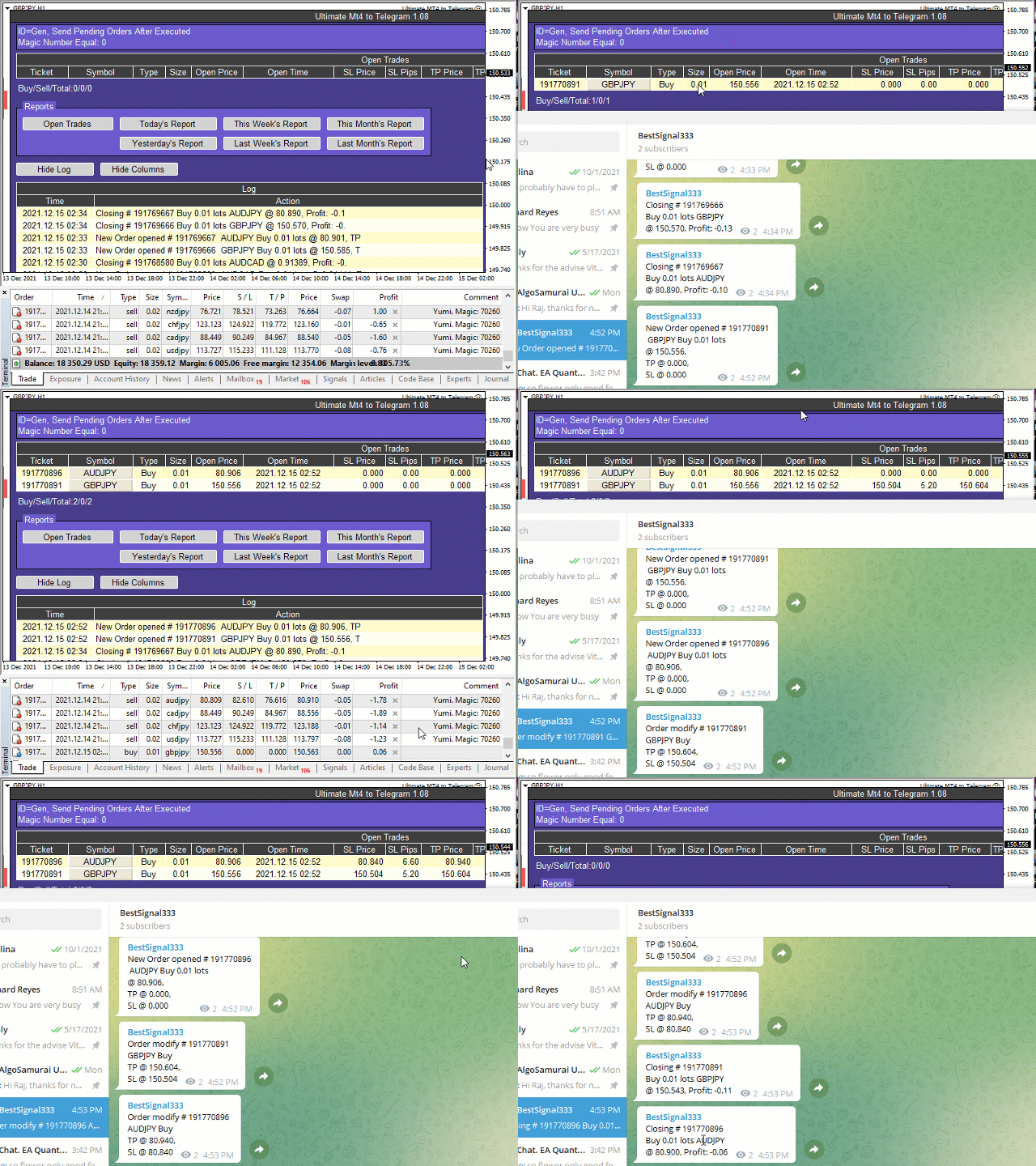
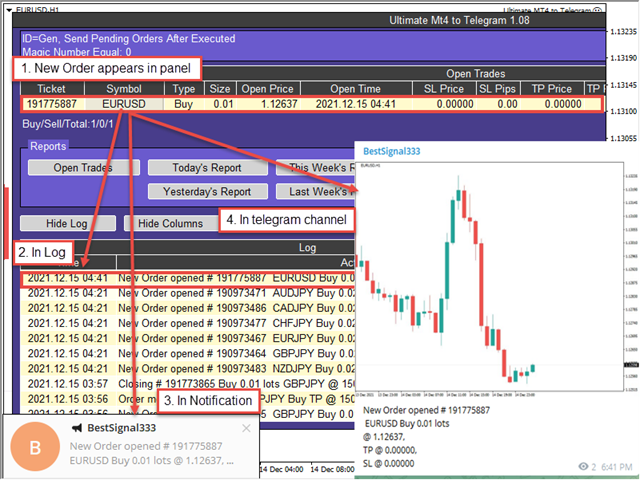
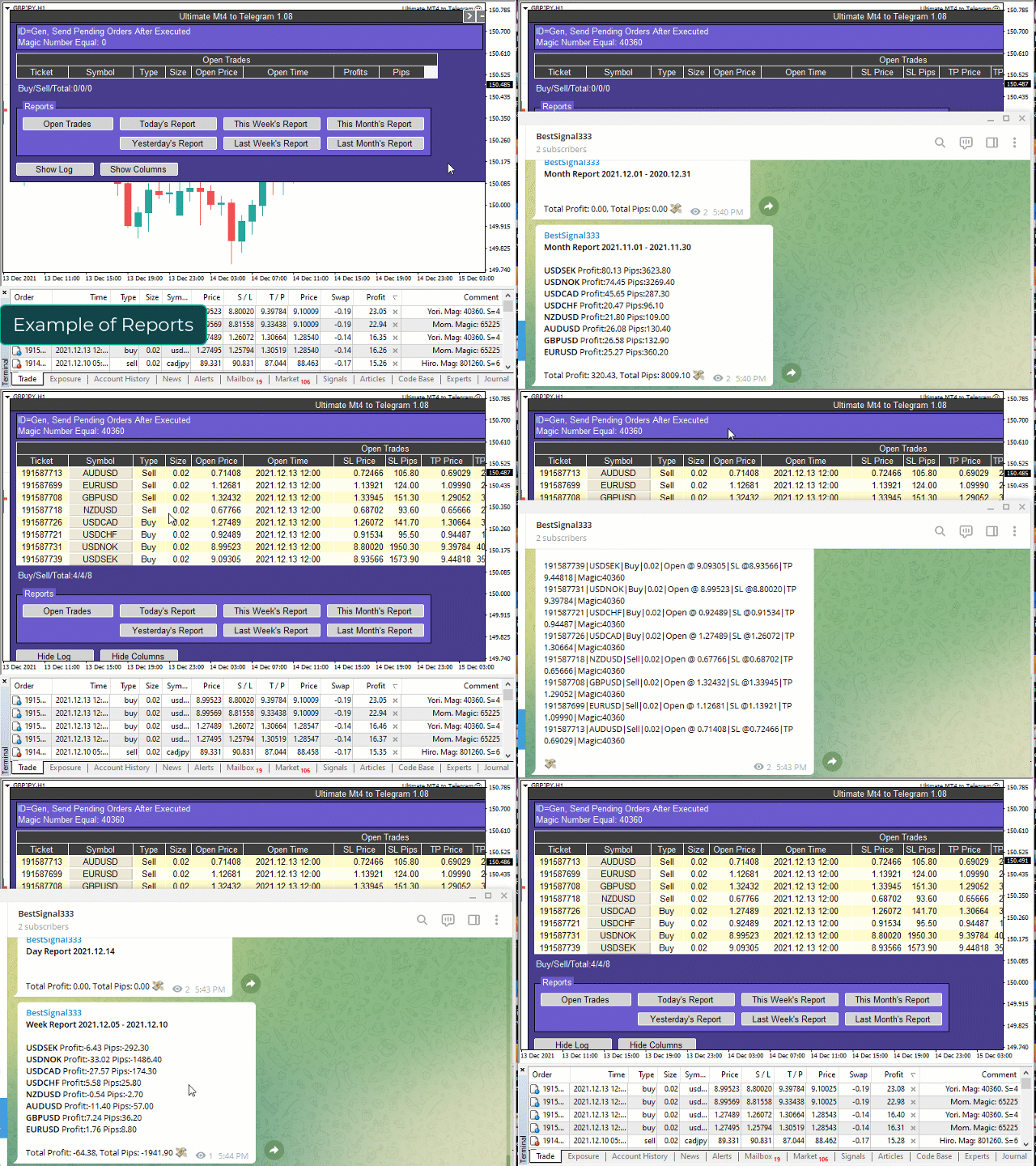
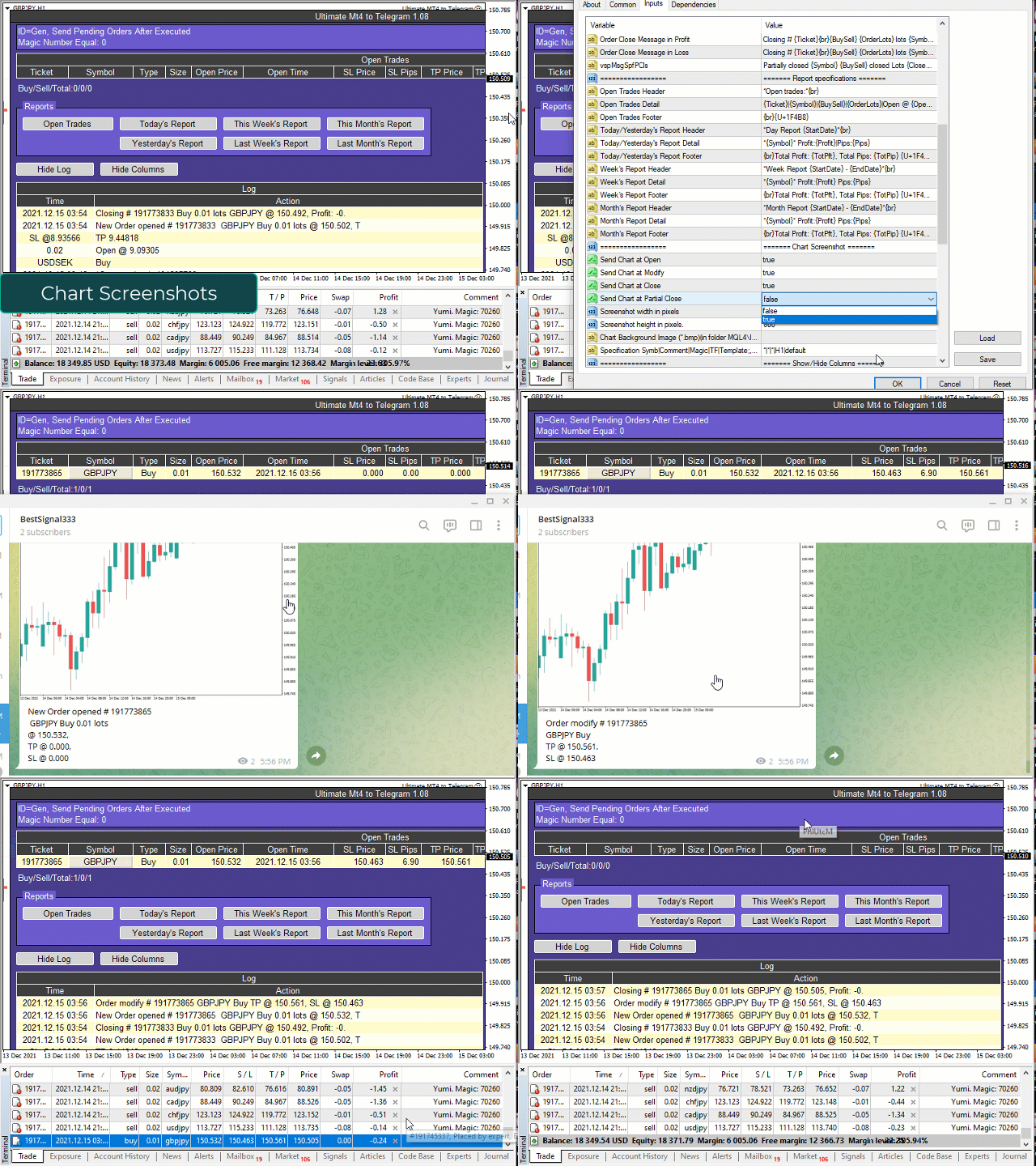
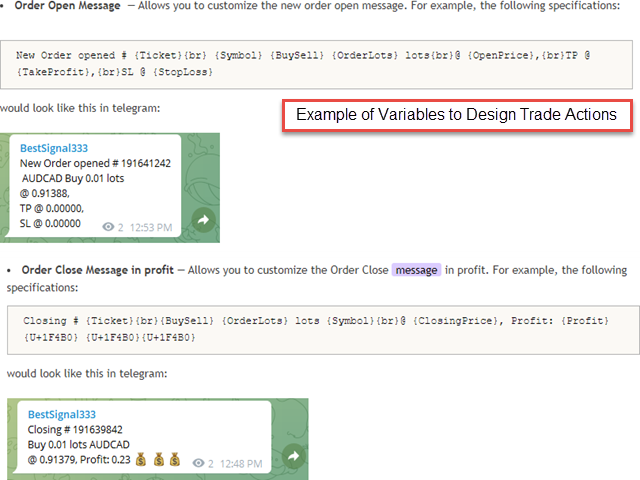
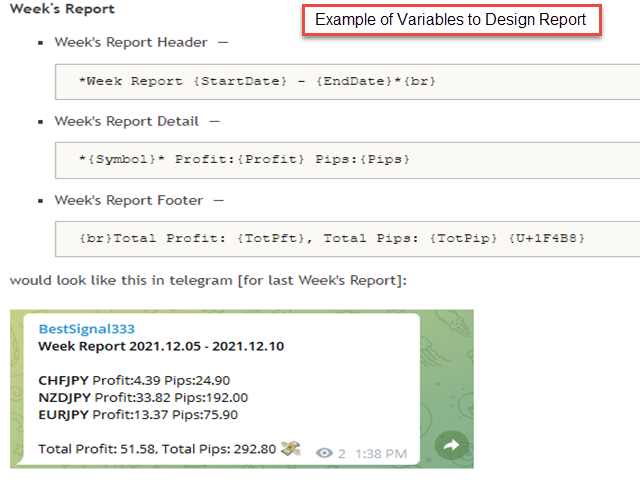
Ultimate MT4 to Telegram (UMT) sends controlled trades (via symbol, magic, comment) to your telegram channel. It sends open and closed trades, including pending orders and TP/SL modifications, along with chart screenshots, to any telegram channel. Additionally, you can send trade reports of open trades and summary profit/pip reports for day, week, or month. You can customize the design of the trade actions or reports with variables and emoticons. 

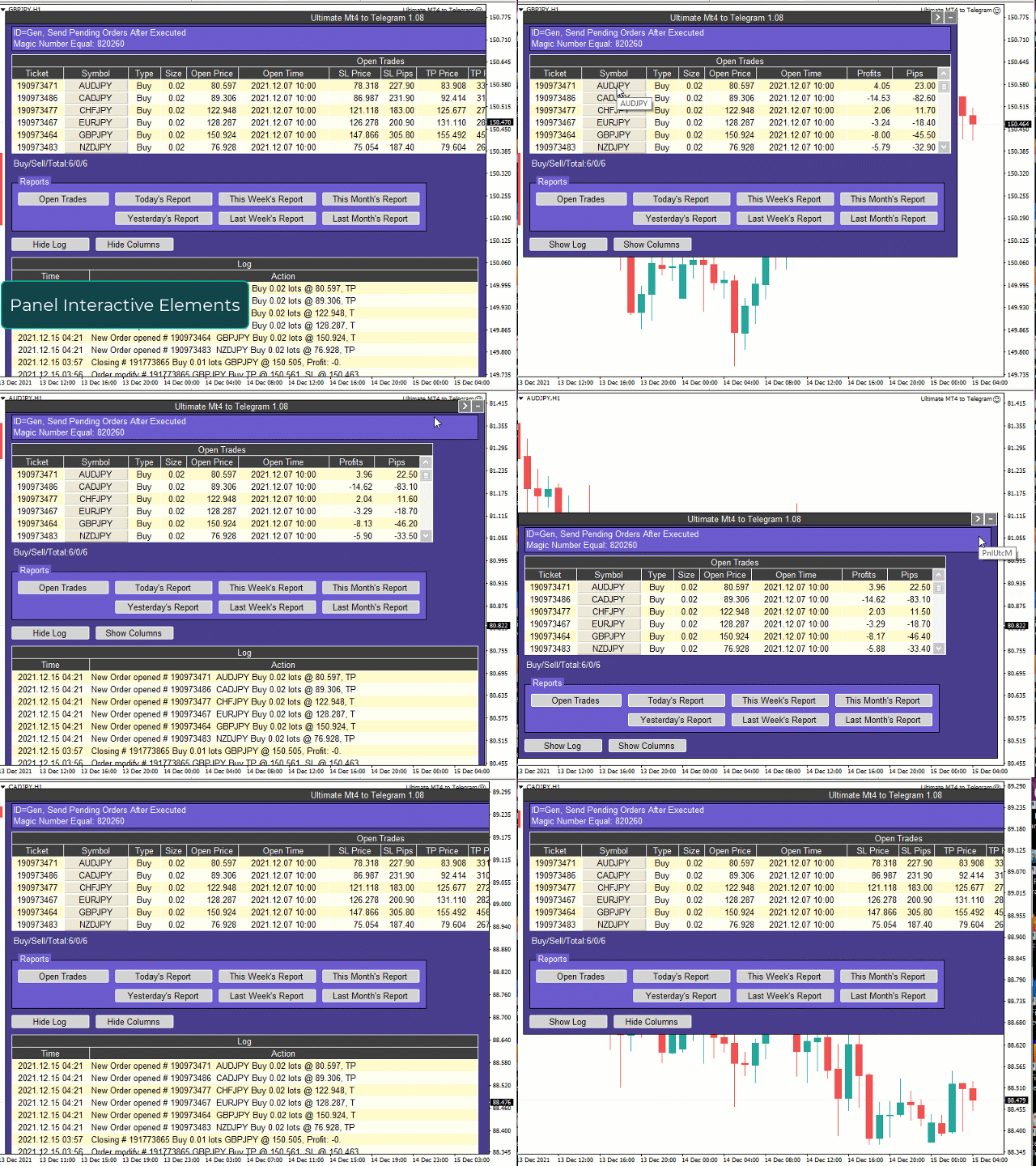
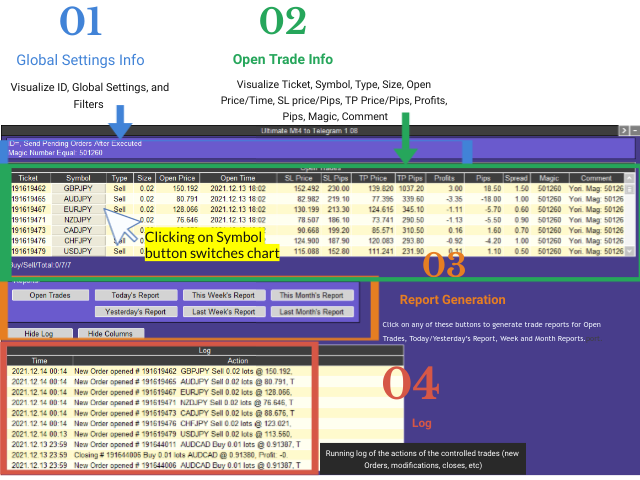
A beautiful panel allows you to visualize all the controlled open trades in useful trade information columns, along with a complete log, and ability to generate any type of report. 

MT5 version here. To test our public channel version, which doesn't need any telegram setup instructions so you can quickly see what the program can do, click here

For more detailed instructions, inputs and variables, click here

Setup Instructions: 

  1. Open your Telegram APP and search for "BotFather"
  2. Type /start and click/type /newbot to create a new bot
  3. Give your bot a nickname and username (e.g., nickname: Bestsignal and username: Bestsignalbot <-- username has to be ended by 'bot').
    Congratulations! You have created your Telegram bot
  4. Save your bot API token (e.g. 787517015:AAFnbcZYxx_iXAdRGrZD1W8bsSF5Xr_FmQ0) to your notepad. You will need it for step 8. 
  5. If you don't have it already, create the channel or group to where you will send your signals and reports
  6. Open the channel/group Info, then Manage, Add Administrators, type the bot username, and click Save
  7. In MT4, go to options/"Expert Advisors" and add the URL: https://api.telegram.org
  8. Add the EA to chart & At configuration paste the Telegram API Token, copied from step 4. After pasting number, make sure you press OK on the screen before continuing onto step 9. 
  9. Go to telegram channel and write "/ID" and send; if everything is ok, you should receive an answer with the Chat ID (a number). Copy that number.  
  10. In MT4, click on smiley face of EA, and paste the ID in the EA parameter, "List of Telegram Channel ID".  Press OK. 

Parameters: 

General Options:
  • Telegram API Token (bot) - for token ID (step 5 above)
  • List of Telegram Channel ID - for channel ID (step 14 above)
  • Telegram User (optional) - telegram username without @ (e.g., Bestsignal333bot).  If set, the EA answers only to commands by this user. 
  • Id - Allows multiple instances of UMT to run on different charts
  • Send Pending Order After Executed (true/false) - self-explanatory
Symbol Name Options:
  • Ability to remove prefix or suffix characters and match symbols
SL/TP Options:
  • Ability to indicate default SL or TP in pips, if needed
Lot Options:
  • Lot Calculation - (dropdown: Original, Fixed, Multiplier)
  • Lot Fixed - if Fixed, then put in custom lot size here (e.g., 0.01)
  • Lot Multiplier - if Multiplier, then put in multiplier here (e.g., 1 is the original lot size, 2 is double, etc)  
Message Specifications: 
  • Allows you to indicate all the custom message specifications & variables* for the Order Open, Modify, Close in profit (lose) and partial close.
Report Specifications: 
  • Allows you to indicate all the custom report specifications & variables* for Open Trades, Today/Yesterday’s Report, Week and Month Report.

Chart Screenshot: 

  • Allows you to indicate if screenshots will be sent at open, modify, or close; at what width and height in pixels; what chart background image will be included; and what symbols, comments, magic, timeframe, and template will be tagged with these screenshots.

Show/Hide Columns: 

  • Allows you to Show Always/Hide the various info columns of the controlled open trades panel. There are many useful columns, but this option allows you to hide any of them to narrow the panel. 
Filters:
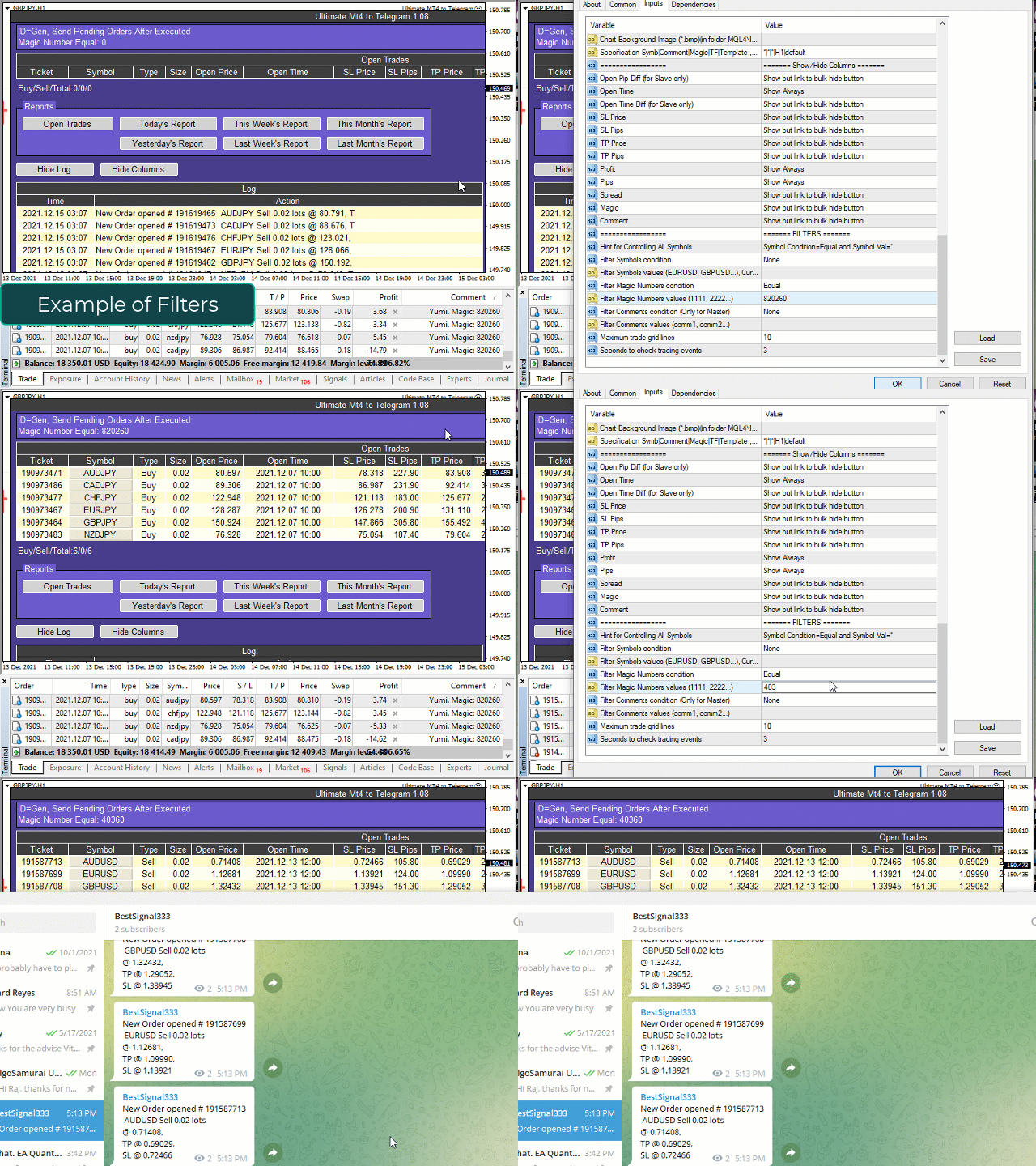
  • Filter (Symbol, Magic Number, Comment) — With dropdown menu: None, Equal, Not Equal, Contain, Not Contain. These filters allow you to include (exclude) specific symbols, magic numbers, comments, or parts of them. For example, if Symbol contains USD, you will control all USD based symbols. If Magic Number equals 80260, 40260, you will manage only these magic numbers.
For more detailed instructions, inputs and variables, click here


Produtos recomendados
This Expert provides a panel to manage all positions you have on different pairs or any instruments. not only you can close your positions just by clicking the amount of profit or loss shown on the related cell, but also you can customize whatever you see on the panel from font size  to lines and background colors. Remember ,  auto trading on MT4 panel must be active, but in our Expert we have provided a key on the panel to activate or deactivate the panel to avoid closing by accident. Any qu
MARKET MAKER EXPERT is an customizable advanced, fully automated Grid Trading Expert Advisor developed to trade on MULTIPAIR MODE ( EURUSD,USDJPY,USDCHF,USDCAD,EURCHF ), by spreading out risks. Expanding Grid is its speciality. It focuses on opening a large number of orders. The currency pairs have been chosen carefully to run this system. Once it analyze the market, it does a hedge order immediately, (so margin levels are not affected on the initial trade) Starts grid when the price move aga

One Click Trader is a tool designed for MetaTrader 4 platform, which enables you to take your trading to the next level. It enables you to open, manage and close your trades in simple an efficient way by just one click of your mouse button. Up arrow minimizes the OCT panel Down arrow maximizes the OCT panel Right arrow displays the next panel with additional features Left arrow hides the panel with additional features Red SELL button enables you to open short market orders Red SELL STOP button e
NEWS Telegram
Nguyen Nghiem Duy
NEWS Telegram is an Utility can get NEWS from Website "calendar fxstreet" and send to yours Telegram Chanel Only attach to Chart then do this step as bellow: In the terminal, open Tools ---> Options ---> Expert Advisors ---> add "calendar fxstreet" to the "Allow WebRequest for listed URL list" field. - SETTING UP THE UTILITY: Tools -> Settings -> Advisers -> Allow WebRequest for the following URLs Create your own bot in Telegram at @BotFather. Remember Token, it looks something like this - 1325
UTralVirtual
Viktor Shpakovskiy
Utility for managing open positions and pending orders. The built-in trailing stop has five modes and seven tools. There is a virtual stop loss and a virtual take profit, which can be freely moved around the chart. With the help of the built-in trading simulator, you can check how the EA works in the strategy tester. Um guia detalhado do UTralVirtual pode ser encontrado na seção "Discussão". Benefícios 5 modos de stop móvel: virtual, normal, total, percentual e stop loss móvel; 7 opções de trai



Send periodic (Health Check) notification from your MT4 terminal to your mobile phone to be sure that your MT4 terminal is still running. When you did not receive the notification, it means that your terminal is unavailable. Optional information like Account Equity and Trading Pairs are also available. Notification Period - 1 Hour, 2 Hours, 4 Hours, 8 Hours, 12 Hours, 24 Hours Attach EA to any H1 chart
MT4 has no bulk operations,such as :“Close All Positions”、“Close Profitable Positions”、“Close Losing Positions”。so, i wrote this EA.  Add steps: 1、you need to put it in the EA folder (Path Like this:C:\Users\admin\AppData\Roaming\MetaQuotes\Terminal\xxxxxxx\MQL4\Experts), 2、and then Refresh the Expert Advisors Menu on MT4,it will show “OneKeyClose” 3、select it and attach it to a Chart. then you have 3 bulk opeartions buttons on current Chart。
Overview The script displays information about the trade account and the current financial instrument. Information about the trade account: Account - account number and type (Real or Demo); Name - name of the account owner; Company - name of a company that provide the access to trading; Server - trade server name; Connection State - connection state; Trade Allowed - shows whether trading is allowed on the account at the moment; Balance - account balance; Equity - account equity; Credit - amount
Utilitário para fechamento automático de negócios por níveis de trailing stop. Permite que você aproveite ao máximo seu lucro. Criado por um trader profissional para traders. O utilitário funciona com quaisquer ordens de mercado abertas por um trader manualmente ou usando consultores. Pode filtrar negociações por número mágico. O utilitário pode trabalhar com qualquer número de pedidos ao mesmo tempo. Versão MT5 https://www.mql5.com/ru/market/product/56488 O QUE O UTILITÁRIO PODE FAZER: defi
Copiadora de transações via canal Telegram. Ele o ajudará a publicar instantaneamente sua negociação no canal Telegram ou a copiar transações do canal Telegram. O utilitário pode trabalhar em duas direções: recebendo sinais no MT4 e transmitindo sinais para o Telegram. Não há mais negócios perdidos Chega de pânico Gestão de Capital Fácil de usar DEMO https://www.mql5.com/ru/market/product/54082 Você pode usá-lo para: copiar suas próprias transações através do canal Telegram (via Internet); cop
AW Metatrader to Telegram
AW Trading Software Limited
Um sistema automatizado para enviar notificações para que nenhum de seus assinantes perca seus eventos de negociação do seu terminal de negociação. Um utilitário que envia notificações ao mensageiro do Telegram sobre quaisquer operações de negociação em sua conta. Instruções passo a passo para conectar o utilitário a um canal no Telegram ->   AQUI   / MT5 ->   AQUI Vantagens: Fácil configuração e instruções detalhadas, Possibilidade de enviar screenshots ajustáveis, Texto de notificação persona
Dark Trader
Volodymyr Hrybachov
O EA funciona em movimentos bruscos de preços, pode usar o bloqueio de posições abertas e a pirâmide. Os stops virtuais são usados ​​(take profit, trailing stop), o bloqueio da ordem e o stop loss em% do saldo são usados ​​para limitar as perdas. Várias dezenas de ordens podem ser abertas ao mesmo tempo e o consultor precisará de fundos grátis para sair das fechaduras e fechar todas as posições com base no lucro total, isso deve ser levado em consideração ao escolher o número de instrumentos pa
SFire Gold EA
Jacques Scholtz Fourie
This EA is a grid-based trading system. It incorporates several advanced features to manage trades dynamically and adapt to market conditions. Here's a summary of its functionality: I am happy to provide my settings file. Recomendation would be to run on a 20 000 cent account. Key Features: 1. Grid Trading Strategy:    - The EA uses a grid-based approach to open buy and sell trades at predefined price intervals.    - It dynamically adjusts the grid levels based on market conditions and risk se
Predetermination
Abraham Correa
5 (1)
Trail every trade position twice, automatically,  in Average True Range! All manual trades are given a predetermined Risk-Reward closing point, ruled by a calculated motive that'll adjusts to volatility! The ATR, or average true range, is a technical indicator that measures the volatility, also known as " Volume , " of a financial instrument by taking into account the price range over a specific period of time.    There is an inevitable change in the ATR value during price action. The Average
FREE
Grid Trading Manager EA
Ibrahim Mohamed Ibrahim Mohamed Elsahafy
Professional grid management EA with 3-tab GUI, progressive placement, 5 take profit levels (TP1-TP5), basket breakeven protection, and advanced trailing stop. Automatically manages manual trades with intelligent limit order distribution. --- ### KEY FEATURES **3-Tab Interactive GUI** - STATUS: Real-time monitoring, profit tracking, trailing targets - SETTINGS: Runtime configuration without EA restart - TAKE PROFIT: Configure 5 sequential TP levels **Progressive Order Placement** - Wave-
FREE
Trading utilite (expert advisor) Global Breakeven and Trailingstop developed for: Automatic set StopLoss and TakeProfit for orders opened manually or by other expert advisers Transfer stoploss to breakeven Trailing stop You can setup utilite at any existing chart and it will manage all opened orders for all pairs, or just selected pairs from the list. Also, you can setup utilite for each trading chart separately, and apply the unique setting for each chart. Settings: StopLoss  - stoploss size, p
This EA utility opens trade when price touches trend line on your chart. How to use in 2 steps? Attached this utility on your chart with your desired parameters  and risk management settings set. Draw a line using " Horizontal line tool " or  " Trend line tool " on your chart. Rules: You can draw a minimum of 1 line and a maximum of 2 lines  in the chart. It will only trade once on a symbol when it touches the line. You need to have a  fundamental knowledge about trend line trading. Parameters:
BreakEven ProSync EA – Trade Management & Risk Control Tool Overview BreakEven ProSync EA is an expert advisor for   MetaTrader 4  that helps traders manage open positions efficiently by   automating stop-loss adjustments   and ensuring position synchronization. This tool is designed for traders who want to standardize their stop-loss and take-profit levels across multiple trades while integrating a break-even function. The EA works by calculating the  average price   of all open positions and
本エキスパートアドバイザ(EA)は、以下の条件をすべて満たした注文が決済された場合に、自動的に同一内容の注文を再設定します。 対象となるのは指値注文または逆指値注文で、必ずテイクプロフィット(TP)とストップロス(SL)が設定されているものです。 そして、その注文がTPまたはSLによって決済された際、同じロット数・価格・TP・SL・有効期限などの条件を引き継いだ注文を自動で再発注します。 これにより、一度設定した戦略を継続的に適用でき、裁量判断なしに取引を繰り返すことが可能となります。 ただし、ブローカーによっては再注文時にスリッページが発生する場合がありますので、必ずご利用環境をご確認の上、自己責任でお使いください。
A   rocket   (from   Italian :   rocchetto ,   lit. 'bobbin/spool') [nb 1] [1]   is a   projectile   that   spacecraft ,   aircraft   or other   vehicles   use to obtain   thrust   from a   rocket engine . Rocket engine exhaust is formed entirely from   propellant   carried within the rocket. [2]   Rocket engines work by   action and reaction   and push rockets forward simply by expelling their exhaust in the opposite direction at high speed, and can therefore work in the   vacuum   of space. In
RedFox Copier Pro
Rui Manh Tien
4.7 (10)
Time saving and fast execution Whether you’re traveling or sleeping, always know that Telegram To Mt4 performs the trades for you. In other words, Our   Telegram MT4 Signal Trader  will analyze the trading signals you receive on your selected Telegram channels and execute them to your Telegram to MT4 account. Reduce The Risk Telegram To Mt4   defines the whole experience of copying signals from   Telegram signal copier to mt4 platforms. Users not only can follow all instructions from the signa
Apresentando: Quant Fleet MT4 2.0! O Quant Fleet opera no par USDJPY utilizando cinco estratégias independentes para uma ampla diversificação. A diferença para o Quant Fleet MT5 1.0 é que agora há seis subestratégias adicionais que reforçam o desempenho. Promoção de Lançamento: O preço aumentará após as primeiras 20 cópias serem vendidas. Grupo público:  Join Documentação e predefinidos:  click here Sinal:  click here Principais características: Instalação fácil: Pronto em poucos passos —
BuyLimit_SellLimit_Grid script opens BuyLimit and SellLimit pending orders. You just need to drop this script on the chart with a desired currency pair.  Before placing all pending orders, the input window is opened allowing you to modify all input parameters: LongPos - if TRUE, BuyLimit order is opened. ShortPos - if TRUE, SellLimit order is opened. InitLot - initial lot. LotCoeff - if 1, all pending orders will have the same lot size. InitStep - difference between two consecutive orders in poi
This utility sends notification to trader’s MT4 (for MT5 version, checkout this link ) mobile app, to remind traders about their open positions. Super useful for part time traders to keep track and not forget any positions. To turn on notification, please visit this link (https://www.metatrader4.com/en/trading-platform/help/setup/settings_notifications) Features Keep track on open orders (pending orders, running orders) Customize time to send notification Customize notification interval (send ev
HotKeys MT4
Alexey Valeev
3 (1)
This utility provides the ability to use hot keys in manual trading instantly responding to the current market situation. You can assign hot keys to open/close positions by their type, close all positions on the current chart and remove all orders on the current chart. You can also assign hot keys for five predefined trade volumes and switch between them if necessary with no need to change the volume manually from time to time. It is also possible to set the auto calculation of a trade volume in
Close Asistent
Catur Sulistiyanto A Md Tem
metatrader 4 close asisstent install ea in any pair and run it.. Congratulations on using the ea close assistant you can get free ea by registering FBS broker through my link https://fbs.partners?ibl=621087&ibp=24536958 Button Function : Close Open Order        = function to close all open orders Close Sell                    = function to close all open sell orders Close Buy                    = function to close all open buy orders Close Profit                 = function to close all profita
Averaging Helper
Sergey Batudayev
5 (2)
Auxiliar de Média - Este tipo de instrumento auxiliar de negociação ajudará você a calcular a média de suas posições anteriormente não lucrativas usando duas técnicas: média padrão hedge com posterior abertura de posições conforme a tendência O utilitário tem a capacidade   de classificar várias posições abertas em diferentes direções ao mesmo tempo, tanto para compra quanto para venda. Por exemplo, você abriu uma posição para venda e a segunda para compra, e ambas não são lucrativas, ou uma est
Virtual Collider Manual   is a trading assistant with a built-in panel for manual trading. It automatically moves a position opened by a trader in profit using innovative adaptive grid algorithm of averaging and adaptive pyramiding Know-how of the grid algorithm of averaging and pyramiding of the   Virtual Collider Manual   trading robot is based on fully automatic adaptation of all characteristics of dynamically build order grid and pyramid with actual price movement with no need for adjusting
Trade Manager EA for MT4
Odaine Ramon Mcmillan
3 (6)
50% Off Today Only! Price Goes Back Up at 11 PM (EST) Marketkeys Trade Manager EA for MT5: Your Pathway to Forex Trading Mastery What Traders Are Saying: " I just bought the product and I like it ..." – AntonioBorrero " Very good EA I would 100% recommend.. ." – Vijohn  Efficiency and precision are paramount in Forex trading. Marketkeys Trade Manager EA for MT5 offers just that - a seamless interface combined with robust risk management tools. It's designed to be your essential trading compan
Super Copier G&G  Super Copier G&G FREE Here Expert Advisor copies orders to several trading accounts (regardless of a broker) if their respective MetaTrader 4 terminals are opened on a single PC/VPS. The EA may copy from multiple (unlimited) initial accounts to a single target one or from a single initial account to multiple (unlimited) target ones. The work of other EAs and manual trading on initial and target accounts are not affected by the copier. Support for four methods of managing the c
Os compradores deste produto também adquirem
The product will copy all telegram signal to MT4   ( which you are member  ) , also it can work as remote copier.  Easy to set up, copy order instant, can work with almost signal formats, image signal, s upport to translate other language to English Work with all type of channel or group, even channel have "Restrict Saving Content", work with  multi channel, multi MT5 Work as remote copier: with signal have ticket number, it will copy exactly via ticket number. Support to backtest signal. How to
EasyInsight AIO MT4
Alain Verleyen
4 (2)
EASY Insight AIO – A solução tudo-em-um para trading inteligente e sem esforço Visão geral Imagine analisar todo o mercado — Forex, Ouro, Cripto, Índices e até Ações — em segundos, sem precisar examinar gráficos manualmente, instalar indicadores ou lidar com configurações complicadas. EASY Insight AIO é sua ferramenta definitiva de exportação para trading com IA, pronta para usar. Ela oferece um panorama completo do mercado em um único arquivo CSV limpo — pronto para análise imediata no ChatGP
--------------Welcome to use [MQL5 Signal Analyze Master]------------------  Function: Draw order tracks of MQL5 MT4 and MT5 signal on MT4 chart. [Using guide] 1.Use it as Experts. 2.Download history record from MQL5 signal(MT4 signal or MT5 signal).  3.Paste history record file below "MQL4/Files/" 4.Load [Signal Analyze Master] on the symbol chart what you want to analyze. 5.Paste the history record file name to parameter 'FileName' 6.Select  SignalType  match the history you download on MT4
ManHedger MT4
Peter Mueller
5 (1)
THIS EA IS A SEMI-AUTO EA, IT NEEDS USER INPUT. Manual & Test Version Please TEST this product before   BUYING  and watch my video about it. Contact me for user support or bug reports, or if you want the MT5 version! MT5 Version I do not guarantee any profits or financial success using this EA. With this Expert Advisor, you can: Implement your own   Zone Recovery   strategy to capitalize on trending markets. Create   Grid   trading strategies, to profit from ranging markets. Place orders easil
Custom Alerts AIO: Monitoramento inteligente de múltiplos mercados – pronto para uso, sem configuração Visão geral Custom Alerts AIO é uma ferramenta avançada de varredura de mercado que funciona imediatamente após a instalação — sem necessidade de configurar indicadores adicionais. Inclui internamente todos os principais indicadores da Stein Investments (FX Power, FX Volume, FX Dynamic, FX Levels e IX Power), permitindo que você monitore facilmente todas as principais classes de ativos: Forex
The product will copy all  Discord  signal   to MT4   ( which you are member  ) , also it can work as remote copier.  Easy to set up. Work with almost signal formats, support to translate other language to English Work with multi channel, multi MT4. Work with Image signal. Copy order instant, auto detect symbol. Work as remote copier: with signal have ticket number, it will copy exactly via ticket number. How to setup and guide: Let read all details about setup and download Discord To MetaTrader
Ultimate Extractor - Professional Trading Analytics for MT4 Ultimate Extractor transforms your MetaTrader 4 trading history into actionable insights with comprehensive analytics, interactive charts, and real-time performance tracking. Ability to combine multiple accounts and MT4 and MT5 into a single dashboard. What It Does Automatically analyzes your MT4 trading history across all Expert Advisors and generates detailed HTML reports with interactive visualizations. Tracks live performance metric
Remote Trade Copier   is an advanced tool designed for efficiently copying trades between accounts in both   local   and   remote   modes. It allows for lightning-fast order replication from a master account to a slave account. In local mode, trades are copied instantly, while in remote mode, the copying process takes a second.  In new version, in remote mode , the copy operation can be performed with a delay of milliseconds or zero . After purchase, ask how to activate it MT4 Version (Only Loc
With this Expert Advisor, you can seamlessly integrate various channel, arrow, and reversal indicators. It offers the flexibility to use all popular channel trading strategies, while also providing powerful tools to customize your trading conditions and risk management system.   The Expert Advisor opens orders when the price crosses the channel boundaries. Multiple crossing conditions are available for customization: Price touches boundary on re-entry into the channel Price touches boundary on
Telegram To MT4 Receiver
Levi Dane Benjamin
3.67 (6)
Copie sinais de qualquer canal do qual seja membro (incluindo privados e restritos) diretamente para o seu MT4.  Esta ferramenta foi projetada com o usuário em mente, oferecendo muitos recursos que você precisa para gerenciar e monitorar as negociações. Este produto é apresentado em uma interface gráfica fácil de usar e visualmente atraente. Personalize suas configurações e comece a usar o produto em minutos! Guia do Usuário + Demonstração  | Versão MT5 | Versão Discord Se você quiser experime
Unlimited Trade Copier Pro is a tool to copy trade remotely to multiple MT4, MT5 and cTrader accounts at different computers/locations over internet. This is an ideal solution for you if you are a signal provider and want to copy your trades to other receivers globally on your own rules. One provider can copy trades to multiple receivers and one receiver can get trade from multiple providers as well. The provider can even set the subscription expiry for each receiver, so that receiver will not b
Strategy Builder offers an incredible amount of functionality. It combines a trade panel with configurable automation (covert indicators into an EA), real-time statistics (profit & draw down) plus automatic optimization of SL, TP/exit, trading hours, indicator inputs. Multiple indicators can be combined into an single alert/trade signal and can include custom indicators, even if just have ex4 file or purchased from Market. The system is easily configured via a CONFIG button and associated pop-up
Trade Copier Pro
Vu Trung Kien
4.57 (14)
Trade Copier Pro é uma ferramenta poderosa para copiar remotamente comércio entre multi-contas em diferentes locais mais internet. Esta é uma solução ideal para provedor de sinais, que querem compartilhar seu comércio com os outros no mundo todo em suas próprias regras. Um provedor pode copiar comércios de multi-receptores e um receptor pode obter comércio de multi-fornecedores também. Provedor e receptor pode gerenciar sua lista de parceiros com potência sistema de gestão de banco de dados buil
FiboPlusMultiTF
Sergey Malysh
5 (1)
A ready-made multitimeframe trading system based on automatic plotting and tracking of Fibonacci levels for buying and selling any symbol. Advantages Determines the trend direction based on a complex of 14 indicators ( Cx ), extremums of ZigZag ( Z ), RSI ( R ), Impulse ( I ) Displaying the values of 14 indicators comprising the trend direction ( Cx ) Plotting horizontal levels, support and resistance lines, channels View the plotting option of Fibonacci levels on any timeframe, with the abilit
LIMITED OFFER - JUST FOR 2 DAYS | 50% BLACK FRIDAY DISCOUNT $640 -> $320 Your Smart Trading Assistant for the Forex Market Introducing a powerful MetaTrader tool designed to revolutionize the way you trade. This intelligent assistant goes beyond traditional indicators to provide a comprehensive, AI-driven market analysis — so you can trade with clarity and confidence. What It Does This advanced tool continuously monitors and analyzes a wide range of market data to deliver high-quality trading
Crystal Trade Manager PRO – Sistema Avançado de Gestão de Risco e Controle de Operações para MT4 Versão Gratuita: https://www.mql5.com/en/market/product/150632 Visão Geral Crystal Trade Manager PRO (CTM) é uma ferramenta profissional de execução de ordens e gestão de risco desenvolvida para MetaTrader 4. Foi projetada para traders que necessitam de disciplina, forte proteção de capital e automação inteligente dentro do MT4. O sistema controla o risco, protege o patrimônio da conta, aplica limite
This is an Expert Adviser use for manual trading as a background EA or combine with external EA to open orders. Loss Recovery Trading is one of your options to handle the lose positions instead of using stop loss by setting a zone recovery area and target to exit the turn rounds sequence. How It Work? If the market goes against your first positions direction at the specific of losing points, the EA will open an opposite direction position with calculated larger lot size and also keep the first
The advantage of using this EA This EA directly updates takeprofit and stop losses that are still empty in a manual order Parameters Multiplier: Multiplier value of the previous transaction Distance: Distance hedging from the previous order Takeprofit: take profit taken from the last price + the value of this column We recommend that you do not add more than one manual transaction in the same pair martingale hedging | manual hedging | hedging manual | hedging lot | best robot | best ea
This means now you can trade on multiple MetaTrader 4 accounts simultaneously, mirror the trades of any trading bot to your friends and family accounts (even if it is locked to your MT4 account number), create investment portfolios of many MT4 accounts, remove risk of unregulated Forex brokers, turn losing trading strategy into a winner and become an independent account manager immediately without the need to sign any contracts or opening expensive PAMM accounts with the broker. Reverse Trading
O painel FFx Hidden Manager vai ajudar facilitando o gerenciamento de suas ordens diretamente no gráfico. Abaixo a descrição de todos os recursos: TP, SL e Trailing Stop ficam ocultos Cada ordem tem a sua própria linha no gráfico Arrasta e solta (Drag & Drop) qualquer linha para alterar o TP/SL, conforme sua necessidade Opção para mover automaticamente a linha SL no empate (breakeven) quando TP # 1 for atingido Opção para escolher o tipo de TP/SL (por pips ou preço) Opção para escolher o tipo de
FFx Risk Calculator panel will help you to calculate very easily your trades size, SL or the risk directly on the chart. All features are described below: Option to select which parameter to calculate: Risk, Stop Loss or Lot Size The panel will show if the lot size is allowed according to the current account free margin Button to maximize/minimize the panel Drag and Drop the panel anywhere on the chart How to use it? Select the parameter you want to be calculated. It will be based on the 2 other
News Trader Pro
Vu Trung Kien
4.38 (16)
News Trader Pro é um robô único que permite a negociação com notícias pela sua estratégia pré-definida. Ele carrega pedaços de notícias de vários sites populares de Forex. Você pode escolher qualquer notícia e programar a estratégia para negociar, então o News Trader Pro vai operar com essa notícia através de uma estratégia selecionada automaticamente quando a notícia for publicada. As notícias dão a oportunidade de ter pips desde que o preço tenha um grande movimento com a publicação. Agora, co
FFx Watcher PRO
Eric Venturi-Bloxs
The FFx Watcher PRO is a dashboard displaying on a single chart the current direction of up to 15 standard indicators and up to 9 timeframes. It has 2 different modes: 1. Watcher mode: Multi Indicators User is able to select up to 15 indicators to be displayed User is able to select up to 9 timeframes to be displayed 2. Watcher mode: Multi Pairs User is able to select any number of pairs/symbols User is able to select up to 9 timeframes to be displayed This mode uses one of the standard indicat
Transaction Repeater Full
Alexandr Bryzgalov
5 (4)
Baixe uma copiadora de negócios fácil de usar e personalizar. Nada supérfluo, tudo é apenas o mais necessário. Pode fazer cópias para frente e para trás (reversa). Com a cópia direta, ele assume o controle de Stop Loss e Take Profit de cada pedido. Repete as modificações do mercado e limita os pedidos colocados na conta principal. É possível copiar nos modos "um para muitos" e "muitos para um". Atenção: O produto destina-se a copiar transações apenas dentro de um PC ou VPS com acesso ao desktop.
The product combines a manual trade panel with the ability to perform actions automatically in a highly configurable way. Actions include capturing indicator values and then based on those values raising alerts, open/close or partially close trades, scale-in, setting up pending orders, adjusting stop loss, take profit and more. On-chart controls can be configured, such as tick boxes and buttons, so can be fully interactive. The EA also handles money management, news events, hidden stop loss, tak
Binary Options Copier Remote is an EA that allows to copy binary options trades between MT4 accounts at different computers. This is an ideal solution for signal provider, who want to share his trade with the others globally on his own rules. Provider can give free bonus license to 10 receivers. That means those 10 receivers can copy from provider by using Binary Options Receiver Free (no cost). From 11th one, receiver have to buy Binary Options Receiver Pro (paid version) in order to copy from
The Price Action Dashboard is an innovative tool to help the trader to control a large number of financial instruments. This tool is designed to automatically suggest signals and price conditions. The Dashboard analyzes all major Time Frame suggesting price action conditions with graphic elements. The Dashboard can suggest you the strength of the trend identifying directional movement, it is an indispensable tool for those who want to open position themselves using market trends identifiers. The
Elliott Wave Counter é um painel para marcação manual rápida e fácil de usar das ondas Elliott. Pode-se selecionar uma cor e um nível de marcas. Também existem funções para remover a última marcação e toda a marcação feita pela ferramenta. A marcação é feita com um clique. Clique cinco vezes - tenha cinco ondas! O Elliott Wave Counter será um ótimo instrumento tanto para iniciantes quanto para analistas profissionais de ondas Elliott. Guia de instalação e entradas do Elliott Wave Counter se você
If you wish to draw Support and Resistance lines, view: daily market opening, classical pivot levels, Fibonacci pivot levels, trend lines, Fibonacci levels, the remaining time to candle closing, and current spread. If you seek to place your orders with the exact lot that meets your desired stop loss risk. If you wish to do all this and more with just one click, then this is the perfect tool to use. This tool will allow you to feel more relaxed when deciding to open orders, as well as predicting
O Partial Close Expert   é uma ferramenta que combina diversas funções em um sistema automatizado. Este EA pode ajudar os traders a gerenciar suas posições com mais eficiência, oferecendo diversas opções para gerenciar riscos e maximizar ganhos potenciais. Com o Partial Close Expert, os comerciantes podem definir um       fechamento parcial       nível para garantir lucros, um       parada móvel       nível para proteger lucros e limitar perdas, um       empatar       nível para garantir que a
Mais do autor
Ultimate Trailing Stop EA MT5
BLAKE STEVEN RODGER
4.13 (8)
This EA Utility allows you to manage (with advanced filtering) unlimited open orders (manual or EA) with 16 trailing stop methods: fixed, percent, ATR Exit, Chandelier Exit, Moving Average, Candle High Low Exit, Bollinger Bands, Parabolic, Envelope, Fractal, Ichimoku Kijun-Sen, Alligator, Exit After X Minutes or Bars, RSI and Stochastic. The trailing stop can be either real or virtual, and you can exit fully or with a partial close percent on touch or bar close.  Moreover, you can add (override
Ultimate Trade Copier MT5
BLAKE STEVEN RODGER
5 (2)
This trade copy utility allows you to instantly and seamlessly replicate and synchronize unlimited orders from multiple master accounts to multiple slave accounts on your local machine. You can create custom channels (or portfolios) with advanced filtering capabilities to copy from multiple master accounts to multiple slave accounts. Moreover, you can tailor these channels with a range of lot sizing and trade condition options to ensure that copied trades outperform the original source. You can
EA Schedule Launcher
BLAKE STEVEN RODGER
5 (1)
It may be true that “Time waits for no one [human],” but at least now you can control the marching time of all your robots. EA Schedule Launcher (ESL) can launch and close any number of your EAs and/or indicators at custom beginning and ending times. You save your EA and/or indicator to a template and input when to open and close them. The power to control your EAs trading time window can improve both strategy performance and terminal/computer performance. Note: EA cannot be run with the visual
Chandelier Exit MT5
BLAKE STEVEN RODGER
5 (1)
Developed by Chuck LeBeau, the Chandelier Exit indicator uses the highest high / lowest low -/+ a multiple of the ATR value to draw trailing stop lines (orange under buys, magenta over sells) that advance with the trend until the trend changes direction.The value of this trailing stop is that it rapidly moves upward in response to the market action. LeBeau chose the chandelier name because "just as a chandelier hangs down from the ceiling of a room, the chandelier exit hangs down from the high
FREE
ATR Exit MT5
BLAKE STEVEN RODGER
4.75 (4)
The ATR Exit indicator uses the candle close + ATR value to draw trailing stop lines (orange under buys, magenta over sells) that advance with the trend until the trend changes direction. It uses a multiple of the Average True Range (ATR), subtracting it’s value from the close on buy, adding its value to the close on sell. Moreover, the trailing stop lines are generated to support the order’s trend direction (long or short):  In an upward trend, the long trailing stop line (orange line under bu
FREE
Ultimate Trailing Stop EA
BLAKE STEVEN RODGER
4.33 (15)
This EA Utility allows you to manage (with advanced filtering) unlimited open orders (manual or EA) with 16 trailing stop methods: fixed, percent, ATR Exit, Chandelier Exit, Moving Average, Candle High Low Exit, Bollinger Bands, Parabolic, Envelope, Fractal, Ichimoku Kijun-Sen, Alligator, Exit After X Minutes or Bars, RSI and Stochastic. The trailing stop can be either real or virtual, and you can exit fully or with a partial close percent on touch or bar close.  Moreover, you can add (overrid
Ultimate MT5 to Telegram Public Channel sends controlled trades (via symbol, magic, comment) to a public telegram channel. It sends open and closed trades, including pending orders and TP/SL modifications, along with chart screenshots, to this public telegram channel. Additionally, you can send trade reports of open trades and summary profit/pip reports for day, week, or month. You can customize the design of the trade actions or reports with variables and emoticons.  A beautiful panel allows
FREE
Candle High Low Exit MT5
BLAKE STEVEN RODGER
5 (3)
The Candle High Low Exit indicator uses the highest high and the lowest low of a range to draw trailing stop lines (orange under buys, magenta over sells) that advance with the trend until the trend changes direction.  Moreover, the trailing stop lines are generated to support the order’s trend direction (long or short):  In an upward trend, the long trailing stop line (orange line under buy) appears and advances upward until the close crosses under the line.  In a downward trend, the short trai
FREE
Chandelier Exit
BLAKE STEVEN RODGER
4 (4)
Developed by Chuck LeBeau, the Chandelier Exit indicator uses the highest high / lowest low -/+ a multiple of the ATR value to draw trailing stop lines (orange under buys, magenta over sells) that advance with the trend until the trend changes direction.The value of this trailing stop is that it rapidly moves upward in response to the market action. LeBeau chose the chandelier name because "just as a chandelier hangs down from the ceiling of a room, the chandelier exit hangs down from the high
FREE
ATR Exit
BLAKE STEVEN RODGER
4.63 (8)
The ATR Exit indicator uses the candle close + ATR value to draw trailing stop lines (orange under buys, magenta over sells) that advance with the trend until the trend changes direction. It uses a multiple of the Average True Range (ATR), subtracting it’s value from the close on buy, adding its value to the close on sell. Moreover, the trailing stop lines are generated to support the order’s trend direction (long or short):  In an upward trend, the long trailing stop line (orange line under bu
FREE
Zone Guardian MT5
BLAKE STEVEN RODGER
Zone Guardian is an advanced Expert Advisor (EA) designed to automate trade management. This EA manages trades within specified risk parameters using automatic lot calculation and multi-layered trade activation. It supports up to 5 layers within the entry zone, each with customizable risk percentages. Visual aids on the chart display entry zones, stop loss (SL), and take profits (TP), ensuring easy level adjustments. The EA adapts to market conditions by closing trades at each TP and moving SLs
Ultimate MT4 to Telegram Public Channel sends controlled trades (via symbol, magic, comment) to a public telegram channel. It sends open and closed trades, including pending orders and TP/SL modifications, along with chart screenshots, to this public telegram channel. Additionally, you can send trade reports of open trades and summary profit/pip reports for day, week, or month. You can customize the design of the trade actions or reports with variables and emoticons.  A beautiful panel allows
FREE
Candle High Low Exit
BLAKE STEVEN RODGER
5 (2)
The Candle High Low Exit indicator uses the highest high and the lowest low of a range to draw trailing stop lines (orange under buys, magenta over sells) that advance with the trend until the trend changes direction.  Moreover, the trailing stop lines are generated to support the order’s trend direction (long or short):  In an upward trend, the long trailing stop line (orange line under buy) appears and advances upward until the close crosses under the line.  In a downward trend, the short trai
FREE
Ultimate Partial Profit EA
BLAKE STEVEN RODGER
4.67 (3)
This EA Utility delivers a robust solution for managing an unlimited array of open orders, both manual and automated. It enables customizable partial profit levels utilizing metrics such as pips, ratios, ATR (Average True Range), and profit amounts for precise trade management. The utility features an advanced on-screen display, offering clear visualization of all orders and their profit levels to enhance strategic decision-making and control. To evaluate its performance and interface, the EA s
Visual Order Tracking
BLAKE STEVEN RODGER
5 (1)
The Visual Order Tracking (VOT) indicator makes trade history and performance metrics visible on the chart in three ways: 1) Draw History of closed and open trades with arrows, lines and trade result numbers (pips, $ profit, % profit, % change); 2) Summary Trade Panel to show open and closed trade summaries by symbol, lots, pips, profit and advanced stats; and 3)  Open Trades Panel to show open trades by Symbol Ticket, Type, Lots, Profit, pips, SL pips, StopLoss, TakeProfit, Spread, Magic, Comme
Visual Order Tracking EA
BLAKE STEVEN RODGER
5 (1)
The Visual Order Tracking (VOT) EA makes trade history and performance metrics visible on the chart in four ways: 1) Draw History of closed and open trades with arrows, lines and trade result numbers (pips, $ profit, % profit, % change); 2) Trade Manager to show Open, SL and TP levels as vivid horizontal lines with dynamic specs and partial closing options; 3)  Summary Trade Panel to show sortable table of open and closed trade summaries by symbol, lots, pips, profit and advanced stats; and 4) 
Ultimate Trade Copier
BLAKE STEVEN RODGER
5 (2)
This trade copy utility allows you to instantly and seamlessly replicate and synchronize unlimited orders from multiple master accounts to multiple slave accounts on your local machine. You can create custom channels (or portfolios) with advanced filtering capabilities to copy from multiple master accounts to multiple slave accounts. Moreover, you can tailor these channels with a range of lot sizing and trade condition options to ensure that copied trades outperform the original source. You can
Cutting-edge solution for Trend Trading with statistically robust signals! Kana Trend’s smart algorithm detects the trend on any instrument, any timeframe, and gives powerful entry signals with exit levels.  Its advanced statistics gives you deep insight as to success and profitability of its signals -- while being fully transparent on any potential for loss.  Because this is an indicator, not an EA, you cannot see it in action in visual tester if you download the Free Demo. Instead, please down
Promo price: $199 for the first 5 buyers.  Kana Trend EA is a short term, always-in-market trend trading system that shows great results on multiple symbols.  You can place this EA on any instrument without worry about missing out on a trend, for if there is one, it is bound to get it. It is always-in-market, trending and reversing into new trends, on small timeframes like H1, a difficult to accomplish feat in a noisy environment. You can place this EA on your account without worry about cat
Zone Guardian
BLAKE STEVEN RODGER
Zone Guardian is an advanced Expert Advisor (EA) designed to automate trade management. This EA manages trades within specified risk parameters using automatic lot calculation and multi-layered trade activation. It supports up to 5 layers within the entry zone, each with customizable risk percentages. Visual aids on the chart display entry zones, stop loss (SL), and take profits (TP), ensuring easy level adjustments. The EA adapts to market conditions by closing trades at each TP and moving SLs
EA Schedule Launcher MT5
BLAKE STEVEN RODGER
1 (1)
It may be true that “Time waits for no one [human],” but at least now you can control the marching time of all your robots. EA Schedule Launcher (ESL) can launch and close any number of your EAs and/or indicators at custom beginning and ending times. You save your EA and/or indicator to a template and input when to open and close them. The power to control your EAs trading time window can improve both strategy performance and terminal/computer performance. Note: EA cannot be run with the visual
Ultimate MT5 to Telegram (UMT) sends controlled trades (via symbol, magic, comment) to your telegram channel. It sends open and closed trades, including pending orders and TP/SL modifications, along with chart screenshots, to any telegram channel. Additionally, you can send trade reports of open trades and summary profit/pip reports for day, week, or month. You can customize the design of the trade actions or reports with variables and emoticons.  A beautiful panel allows you to visualize all t
Filtro:
Sem comentários
Responder ao comentário