Brief report weekly trade 4

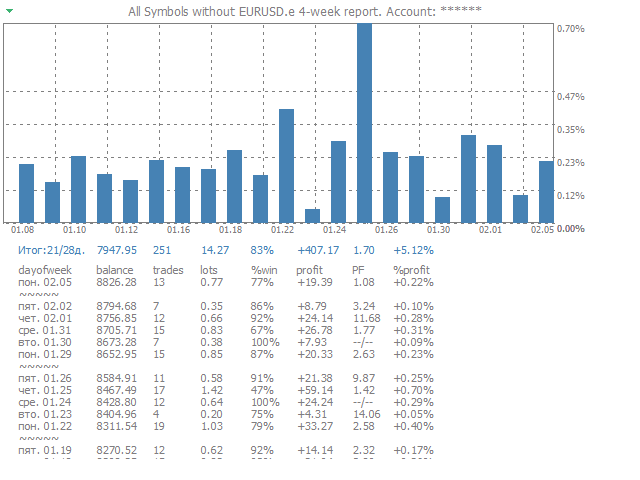
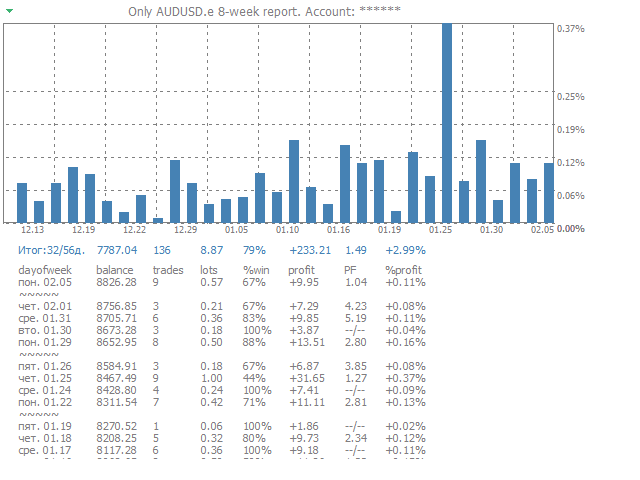
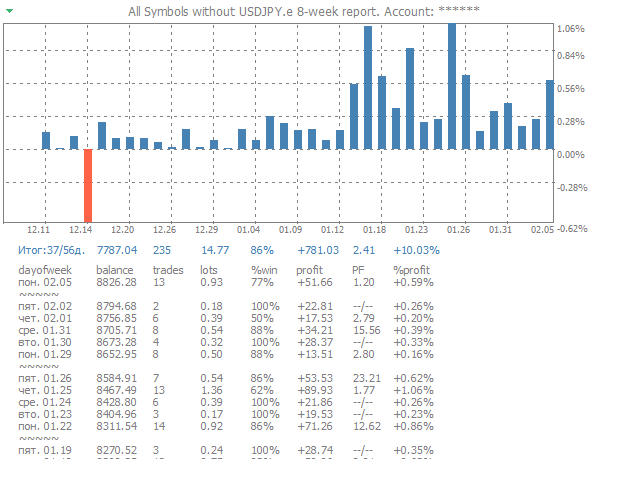
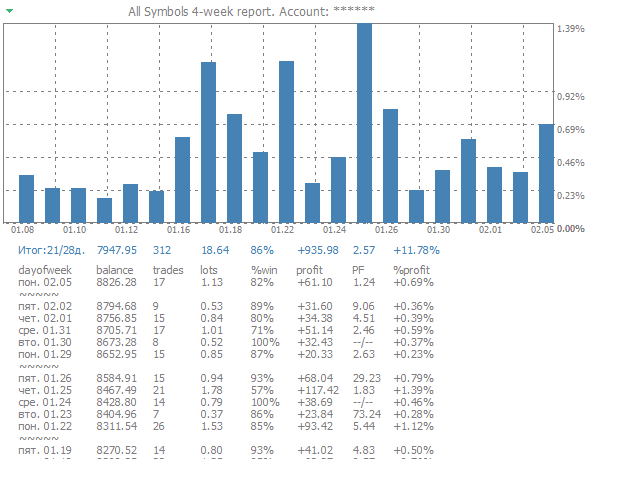
The script creates a brief daily summary report of the weekly trade in a separate window.


Input parameters of the script

  • number of weeks - set the time interval (the number of weeks) for the report.
  • switch for symbols selection - three modes for selecting the instruments to generate the report:
    • All_Symbols - report is generated for deals of all instruments.
    • Current_Symbols_Only - report is generated only for deals of the instrument in the current window.
    • Without_Current_Symbols - report is generated for all deals of all instruments, except the current one.
  • hide account number - show/hide the account number.
Produtos recomendados
CloseProfit
Vasiliy Kolesov
CloseProfit is a utility created to automate the process of setting a stop-loss and closing orders when a certain percentage of profit is reached. The utility also has two Buy and Sell buttons on the chart for opening orders. The utility can be used to close orders opened by other advisors, with a stop-loss or a percentage of the increase in the deposit. To do this, you need to set in the settings a magic number that matches the one that is installed in the advisor when opening a transaction.
FREE
The script clears the chart window from labels of order tracing. It removes labels of only closed orders. It clears charts in all windows opened in the terminal. Parameters: Symbol: clear charts of the specified symbol. If not said, clear charts in all windows. Last Data : orders with a date of closure which goes after the specified one will not be deleted. If not said, tracing of all closed orders will be deleted. Confirmation : True - confirmation of chart clearance for each window, False - n
Essa ferramenta automaticamente expõe parar a perda e тейкпрофиты ao abrir ordens. Иформация é exibido no canto inferior direito do terminal exibe o tamanho do lote, níveis de stop loss e takeprofit, bem como o lucro/prejuízo em pontos para cada aberto de limite. Há a possibilidade de fechar pedidos. para isso, é necessário destacar o duplo clique no canto inferior direito, o mandado e simplesmente transferi-lo para a esquerda. Também é apresentada uma recomendação de instrumento atual na fo
FREE
Open Risk Profit  shows your current risk or possible profit of all open positions. Total open risk   is your loss if all positions run into the stop loss. Total open profit   is your profit if all positions reach your take profit. Total float   is your current profit or loss of all positions. The program also breaks down the information into the individual symbols. For example, you can monitor how much is your current profit and your potential risk in EURUSD, no matter how many individual posi
Easy Trade Panel
Kritchavatchara Datchkanakorn
EasyTrade is a dashboard that make trading easier. EasyTrade can help you to calculate and send command. EasyTrade have 3 tabs. Tab 1 Display data about information and orders in the current symbol Show all order Profit/Loss. Show all buy order Profit/Loss. Show all sell order Profit/Loss. Show average price of all opened order(buy and sell). Show average price of all buy order. Show average price of all sell order. Show total lot buy order. Show total lot sell order. Show total order buy. Show
O ChartChanger é uma ótima ferramenta utilitária para reduzir o número de gráficos abertos em seu terminal. Há três seções: Símbolos, Prazos e Modelos. Você precisa apenas de um gráfico para ser aberto e ainda assim pode rolar até vários. Símbolos: Com o apertar de um botão você pode mudar de um símbolo para outro, e seus indicadores aplicados permanecerão no próximo gráfico. Para os símbolos existe um modo de detecção automática, ou você pode inserir manualmente os desejados. Você pode usar tod
My Account Brokers Details List This script displays the account data and broker terms regarding its operation. For example, broker name, account number, financial leverage, account currency, automatic trading approval, minimum lot, lot step, maximum number of lot, margin call, stop out and many other important data. It is easier to display such data on the chart in one moment with a click of the mouse, than to look for it in the contract or call the broker. Details are printed not on the scree
FREE
The List swap is an indicator for the MetaTrader 4 platform, which allows to display swaps for all symbols (available in the Market Watch). When using the free demo version, you need to remember that the Strategy Tester of the MetaTrader 4 does not provide the ability to obtain data on other symbols. In the Strategy Tester, the swap information will be displayed only for the symbol the indicator is attached to. The indicator can be useful for traders utilizing the "Carry trade" strategy, as well
Market Meeter
Hapu Arachchilage Tharindu Lakmal
Hello, traders! Welcome to the introduction of   Market Meeter  ( MT4 ) This is the   Meta Trader 4   version of the "Multi Timeframe Analyzer". Click here   to   Get MT5 version   <<---  What is this indicator? Simply put, this indicator analyzes the market across   eight different timeframes , from lower to higher, and predicts the next price direction along with an estimated continuation time. It does this by using   volume, volatility, and price patterns   in its calculations. Let's dive
MFF FTMO risk management helps to close all orders when the balance falls below the previously set level. Input Parameters: Management Type:   Percent % Daily drawdown (MFF). Close all orders if Percent % drawdown based on equity: Set  Percent  with this  Management Type. Management Type : Set Equity Close all (FTMO). Number of Equity to close all orders:  Set Number with this  Management Type.
The script opens a separate window and displays information about the current open positions in it. The informer will be useful to those who operate with a large number of positions open on different instruments in different directions. It allows you to quickly decompose the loading of the deposit by instruments, visually identify the most tense places in the aggregate position. For the exposed stop orders, it calculates the total risks and goals.
Pivot Timeframe
Mohamad Zulhairi Baba
5 (12)
Daily pivot are relatively important in trading. This indicator have options to select 5 commonly use pivot point calculations. User input Choose Pivot Point Calculation ( Method Classic, Method Camarilla, Method TomDeMark, Method Fibonacci or Method Woodies. ) Choose Applied Timeframe for the calculation (M5, M15, H1, H4, D1, W1 etc) Can be attached to any timeframe Choose color of Pivot point For MT5 version, please refer here:  https://www.mql5.com/en/market/product/38816
FREE
RSI Multi Timeframe Screener
Asanka Manikgama Arachchilage Don
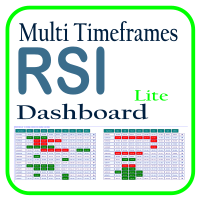
Optimize your trading analysis with the RSI Multitimeframe Dashboard, a powerful tool designed to streamline RSI monitoring across all timeframes and symbols listed in your Market Watch. This dashboard delivers real-time insights and alerts, making it essential for traders who rely on RSI to identify potential market entries and exits. Key features include: Comprehensive RSI Overview : Instantly view RSI values for every timeframe across all Market Watch symbols, making multi-timeframe analysis
FREE
The   Pivot Point indicator   automatically calculates and displays the pivot point line and support and resistance levels. Pivot can be calculated according to the Classic, Floor, Fibonacci, Woodie, Camarilla or DeMark formula. It is also possible to select the period for calculating the indicator. A trader can choose from daily, weekly, monthly, or user-defined periods. Types of pivots Classic Floor Fibonacci Woodie Camarilla DeMark Main features The indicator shows the current and historic
FREE
LMBF Executor
Graeme Dakers
5 (1)
**IMPORTANT** THIS TOOL REQUIRES YOU TO FIRST PURCHASE "Graphical Trade Planner" https://www.mql5.com/en/market/product/56702. Without it, this tool will do nothing of any use. -------------------------- Use "Graphical Trade Planner"  to plan your trades directly on your charts and get instant feedback on account risk, trade risk to reward and  required position size. Plus, purchase LMBF Executor separately to easily convert planned trades into orders and manage them from your charts. Features i
DollarAndEuroIndex
Sergio D. Rocha
4.5 (2)
This is an extension of the previous published DollarIndex with the addition of the function for calculating EURO Index under ICE Formula. Note that the broker should provide the following data: For Dollar Index formula, EURUSD, USDJPY, GBPUSD, USDCAD, USDSEK and USDCHF are needed. For Euro Index formula, EURUSD, EURGBP, EURSEK and EURCHF are needed. Now in this version if the SEK (the most uncommon) is not provided, the formula still works, since it adds 0.0001 to its value, but the index will
FREE
In the financial world, risk management is the process of identification, analysis and acceptance of uncertainty in investment decisions. Essentially, risk management occurs when an investor or fund manager analyzes and attempts to quantify the potential for losses in an investment, such as a moral hazard, and then takes the appropriate action given his investment objectives and risk tolerance. This tool should be the success key before you lost your capitals due to the unawareness of market beh
Multi Fair Value Gap
Kourosh Hossein Davallou
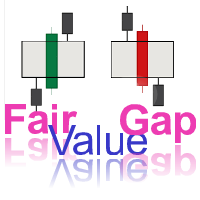
**Added to the Original Text:**   This indicator (Fair Value Gap - FVG) also **has the capability** to display **multiple timeframes** of your choice **simultaneously on a single chart**. This feature allows you to identify **stronger and more accurate signals**, as you can analyze price discrepancies (Gaps) across higher or lower timeframes, helping you make smarter trading decisions.   For example, if you spot a bullish FVG on the **1-hour timeframe** and it is also confirmed on the **4-hour
This script can generated a text file including Account information such as Account Number Account Name Account Leverage Account Balance MT4 Location Data Folder Location  Demo / Real Account  Stop Out Mode  Stop Out Level etc. Enjoy the script.  Please leave a comment or send me an email if you have any idea. The Script is developed by Steve Wan (Eamil: fxac01@gmail.com)
FREE
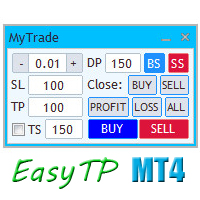
A full-featured trading panel that has minimal dimensions and makes one-click trading as informative, fast and convenient as possible. Supported features: opening of any types of orders; breakeven; trailing-stop; virtual take profit and stop loss (not visible to the broker); showing the general trading information panel; display of previously closed orders on the chart; installation on a chart of price signal lines; sending push-notifications when price crosses price signal lines; the ability
FREE
MetaOrders
Sergii Povzaniuk
This trading tool will help You to place your orders faster , specify its parameters easier and control your risks more clearly. It allows You to use lines on a chart to set the entry price, stop loss, take profit for any order, considering the specified percentage of risk from the deposit or a fixed lot, and place it in one click. It automatically detects a broker’s commission and takes it into account during calculations. It also calculates available for new order funds based on already opene
Optimal Entry
Peter Maggen
5 (2)
Hi Trader, ================================================================================ If you like my indicator, please do not hesitate to give a review and/or comment. Thank you! ================================================================================ This indicator draws trade entry zone and target levels based on the levels of the previous day. A blue zone (BUY) or red zone (SELL) is drawn and two targets. The optimal trade entry value is also indicated. A second gray zone is
FREE
MTF TrendLine
Dmitrii Leshchev
Expert Advisor for manual construction of trend lines and their accompanying stop loss and take profit. Após a construção, a EA se lembra dos níveis, direção e lot. Quando você toca o preço atual com o preço calculado, uma ordem com parâmetros pré-selecionados é aberta. Você pode construir e armazenar até 10 níveis multidirecionais a partir de diferentes prazos. Você pode usá-lo em qualquer instrumento de negociação. Funciona corretamente com preços de 4 e 5 dígitos. Você pode criar estratégias
Contact us for any custom order, CodeYourTrade.com . Timed Close EA is used to close all the trades automatically at your specific time. You can set the EA using any of the 3 options: 1.     OneTime: In this option EA will run only once. Execute at that date-time and stops. 2.     Weekly: In this option EA will run at specific day-time every week. For example if you wanted to close all the trades before market close at Friday, you can use this option. 3.     Daily: In this option EA will run da
Pirate
Anatoliy Lukanin
3.9 (20)
Deposit :   from 100 deposit units Trading pairs: I recommend currency pairs: EURAUD, CHFJPY, EURCHF, EURGBP, AUDCHF, CADCHF, USDCHF. Trading period :  Any Account: You should use ECN-ECN.Pro accounts with five-digit quotes with a moderate size (spread). Parameters: USING - Choice, trading risk or fixed lot RISK/LOT - Lot Risk Value RESTORING_THE_BALANCE - Restoring balance* HOW_THE_RESET_WINDOW - Reset the Global Variable TAKE_PROFIT - Set profit STOP_LOSS - Set loss COUNT_BUY - The number of s
Trend Ray
Andriy Sydoruk
The indicator shows the potential trend direction by cyclical-wave dependence. Thus, all the rays of the intersection will be optimal rays, in the direction of which the price is expected to move, taking into account the indicator period. Rays can be used as a direction for potential market movement. But we must not forget that the approach must be comprehensive, the indicator signals require additional information to enter the market.
BRiCK is a simple and versatile Utility.  By combining Experts, Indicators and utilities like the Lego block, various trading styles can be realized. "BetByTrade" is a utility to automatically add / close positions when trading. If you open the position in the trade pool, if the calculation result of the betting method exceeds the initial lot, the utility will order additional. If you close the position in the trade pool, if the position that was additionally ordered by the utility remains, it w
FREE
Rua TrailingStop BreakEven Little
PHAM KIM QUY RuaCoder
4.5 (2)
Rua TrailingStop BreakEven Little The EA not for Real Account. You can EA for Real Account with link:   https://www.mql5.com/en/market/product/47635 Uses of EA - Trailingstop: Move stoploss continuously. - Breakeven: Move the stoploss once. Custom parameters: All OrderOpenTime:     + true: acts on all order     + false: only affect the order opened since EA run All OrderType:     + true: acts on all order.     + false: only the order is running (Buy, Sell) TraillingStop: true (Use), false (do n
FREE
A Trading Assistant EA that can place order at user's desired open, stop loss, and take profit prices with automatically calculated lot size based on user's risk per trade $30 for the next 25 downloaders, next price: $45 Try it out on demo account for free:   Download Demo Features: Smart Place Order : Automatically determine the Type of Order (Market/Stop/Limit & Buy/Sell) to be placed based on Open, and Stop Loss Price input, then execute it immediately Risk Manager : Set your risk of loss o
Description A colored universal multicurrency/multi-symbol indicator  MACD Histo Smart  (MACD histogram) based on double or triple moving average .  Comparing to the standard MACD Histo this indicator is more sensitive to what allows generating advance signals. he indicator may be used with any broker, irrespective of the name of the financial instrument since it is necessary to manually enter the name as an input parameter. If you enter a non-existent or incorrect name of a financial instrument
Os compradores deste produto também adquirem
Bem-vindo ao Trade Manager EA—uma ferramenta de gestão de risco criada para tornar o trading mais intuitivo, preciso e eficiente. Não é apenas uma ferramenta para executar ordens, mas uma solução abrangente para planejamento de operações, gerenciamento de posições e controle de risco. Seja você um iniciante, trader avançado ou scalper que precisa de execução rápida, o Trade Manager EA adapta-se às suas necessidades, oferecendo flexibilidade em todos os mercados, desde forex e índices até commodi
Trade Assistant MT4
Evgeniy Kravchenko
4.43 (195)
Ajuda a calcular o risco por comércio, a fácil instalação de uma nova encomenda, gestão de encomendas com funções de fecho parcial, trailing stop de 7 tipos e outras funções úteis. Materiais e instruções adicionais Instruções de instalação - Instruções para a aplicação - Versão de teste da aplicação para uma conta de demonstração Função de linha Mostra no gráfico a linha de Abertura, Stop Loss, Take Profit. Com esta função é fácil definir uma nova ordem e ver as suas características adicionais
Local Trade Copier EA MT4
Juvenille Emperor Limited
4.96 (110)
Experimente uma cópia de negociação excepcionalmente rápida com o Local Trade Copier EA MT4 . Com sua fácil configuração de 1 minuto, este copiador de negociações permite que você copie negociações entre vários terminais MetaTrader no mesmo computador Windows ou em um Windows VPS com velocidades de cópia ultra rápidas de menos de 0.5 segundos. Seja você um trader iniciante ou profissional, o Local Trade Copier EA MT4 oferece uma ampla gama de opções para personalizá-lo de acordo com suas necess
VirtualTradePad PRO SE MT4 — painel de trading avançado e ambiente de gráfico para MetaTrader 4 VirtualTradePad PRO SE é um painel de trading profissional e um ambiente de gerenciamento de operações para MetaTrader 4 . Ele ajuda traders a abrir, gerenciar, proteger, fechar e analisar operações com mais rapidez a partir de uma única interface baseada no gráfico. O produto foi criado para traders manuais ativos que precisam de mais do que um simples conjunto de botões. O PRO SE combina execução em
Exp COPYLOT CLIENT for MT4
Vladislav Andruschenko
4.69 (65)
Copiador profissional de operações para MetaTrader 4 Copiador de operações rápido, profissional e confiável para MetaTrader 4 . COPYLOT permite copiar operações de Forex entre os terminais MetaTrader 4 e MetaTrader 5 , com sincronização flexível para diferentes tipos de conta e cenários de negociação. A versão COPYLOT MT4 oferece suporte para: MetaTrader 4 → MetaTrader 4 MetaTrader 5 Hedge → MetaTrader 4 MetaTrader 5 Netting → MetaTrader 4   Versão MT5 Descrição completa + DEMO + PDF Como compra
Custom Alerts AIO: Monitoramento inteligente de múltiplos mercados – pronto para uso, sem configuração Visão geral Custom Alerts AIO é uma ferramenta avançada de varredura de mercado que funciona imediatamente após a instalação — sem necessidade de configurar indicadores adicionais. Inclui internamente todos os principais indicadores da Stein Investments (FX Power, FX Volume, FX Dynamic, FX Levels e IX Power), permitindo que você monitore facilmente todas as principais classes de ativos: Forex
TradePanel MT4
Alfiya Fazylova
4.84 (95)
Trade Panel é um assistente de negociação multifuncional. O aplicativo contém mais de 50 funções de negociação para trading manual e permite automatizar a maioria das tarefas de negociação. Antes da compra, você pode testar a versão de demonstração em uma conta demo. Baixe a versão experimental do aplicativo para uma conta de demonstração: https://www.mql5.com/pt/blogs/post/762547 . Instruções completas aqui . Comércio. Permite realizar operações de negociação com um clique: Abrir ordens pendent
ManHedger MT4
Peter Mueller
5 (2)
THIS EA IS A SEMI-AUTO EA, IT NEEDS USER INPUT. Manual & Test Version Please TEST this product before   BUYING  and watch my video about it. Contact me for user support or bug reports, or if you want the MT5 version! MT5 Version I do not guarantee any profits or financial success using this EA. With this Expert Advisor, you can: Implement your own   Zone Recovery   strategy to capitalize on trending markets. Create   Grid   trading strategies, to profit from ranging markets. Place orders easil
Copy Cat More Trade Copier MT4 (Cópia Gato MT4) não é apenas um simples copiador local de operações; é uma estrutura completa de gestão de risco e execução, projetada para os desafios atuais do trading. Desde desafios de prop firms até a gestão de contas pessoais, adapta-se a cada situação com uma combinação de execução robusta, proteção de capital, configuração flexível e tratamento avançado das operações. O copiador funciona tanto no modo Master (emissor) quanto no modo Slave (receptor), sincr
Exp SafetyLock PRO
Vladislav Andruschenko
4.57 (28)
SAFETYLOCK for MetaTrader 4 é um utilitário premium de proteção de trades, criado para defender posições abertas contra reversões bruscas do mercado, colocando automaticamente uma ordem de segurança oposta. Assim que um trader ou um Expert Advisor (EA) abre uma posição, o SAFETYLOCK for MT4 cria uma ordem pendente correspondente (Buy Stop ou Sell Stop) na direção oposta. Se o mercado se mover contra a operação original, a ordem pendente é ativada e forma um lock de proteção, ajudando o trader a
The product will copy all telegram signal to MT4   ( which you are member  ) , also it can work as remote copier.  Easy to set up, copy order instant, can work with almost signal formats, image signal, s upport to translate other language to English Work with all type of channel or group, even channel have "Restrict Saving Content", work with  multi channel, multi MT5 Work as remote copier: with signal have ticket number, it will copy exactly via ticket number. Support to backtest signal. How to
News Filter EA: Advanced Algo Trading Assistant News Filter EA is an advanced algo trading assistant designed to enhance your trading experience. By using the   News Filter EA , you can integrate a Forex economic news filter into your existing expert advisor, even if you do not have access to its source code. In addition to the news filter, you can also specify   trading days   and   hours   for your expert. The News Filter EA also includes   risk management   and   equity protection   features
EasyTrade MT4
Alain Verleyen
5 (1)
Easy Trade – Gestão de Operações Inteligente, Simples e Poderosa Easy Trade é a solução completa de gestão de operações para usuários do MetaTrader que desejam manter o risco sob controle e uma execução ultra suave. Desenvolvido do zero com base no feedback de traders reais, o Easy Trade facilita a execução, o monitoramento e a gestão de operações em vários símbolos – sem complicar o seu fluxo de trabalho. Seja você um scalper manual ou esteja gerenciando uma pequena carteira de setups, o Easy
Partial Closure EA MT4
Juvenille Emperor Limited
5 (3)
O Partial Closure EA MT4 permite fechar parcialmente qualquer operação na sua conta, manualmente por uma porcentagem escolhida do tamanho do lote e/ou por número de ticket, ou automaticamente em porcentagens específicas dos níveis de TP/SL, fechando uma porcentagem do lote inicial em até 10 níveis de take profit e 10 de stop loss. Ele pode gerenciar todas ou algumas das operações na sua conta, especificando ou excluindo determinados números mágicos, comentários ou símbolos. Sugerencia: descarg
Unlimited Trade Copier Pro is a tool to copy trade remotely to multiple MT4, MT5 and cTrader accounts at different computers/locations over internet. This is an ideal solution for you if you are a signal provider and want to copy your trades to other receivers globally on your own rules. One provider can copy trades to multiple receivers and one receiver can get trade from multiple providers as well. The provider can even set the subscription expiry for each receiver, so that receiver will not b
O MT4 para Telegram Signal Provider é uma ferramenta fácil de usar e totalmente personalizável que permite o envio de sinais para o Telegram, transformando sua conta em um provedor de sinais. O formato das mensagens é totalmente personalizável! No entanto, para uso simples, você também pode optar por um modelo predefinido e habilitar ou desabilitar partes específicas da mensagem. [ Demonstração ]   [ Manual ] [ Versão MT5 ] [ Versão Discord ] [ Canal do Telegram ]  New: [ Telegram To MT5 ] Conf
The Expert Advisor will help you forward all pop-up alert with screenshot from  MetaTrader 4 to Telegram channel/ group, also forward all notifications to Telegram. Parameters  -  Telegram Bot Token - create bot on Telegram and get token.  -  Telegram Chat ID  - input your Telegram user ID,  group / channel ID  -  Forward Alert - default true, to forward alert.  -  Send message as caption of Screenshot - default false, set true to send message below Screenshot  How to setup and guide  - Telegram
Trade copier MT4
Alfiya Fazylova
4.58 (33)
Trade Copier é um utilitário profissional projetado para copiar e sincronizar negociações entre contas de negociação. A cópia ocorre da conta / terminal do fornecedor para a conta / terminal do destinatário, instalada no mesmo computador ou vps. PROMOÇÃO - Se você já adquiriu o "Trade copier MT5", pode receber o "Trade copier MT4" gratuitamente (para cópia MT4 > MT5 e MT4 < MT5). Para obter informações mais detalhadas sobre os termos, por favor, entre em contato conosco através de mensagens priv
AW Grids Maker
AW Trading Software Limited
4.33 (3)
O "AW_Grids_Maker" é usado para construir grades a partir de ordens pendentes. O utilitário é universal, possui configurações flexíveis e uma interface de painel intuitiva. O programa constrói redes a partir de ordens STOP e LIMIT com o passo necessário, utilizando o multiplicador de volume de posição. Versão MT5 -> AQUI / Solução de problemas -> AQUI Vantagens: Utiliza pedidos pendentes de todos os tipos. Configuração simples e flexível. Um painel de utilidades multifuncional e com design ele
CloseIfProfitorLoss with Trailing
Vladislav Andruschenko
4.87 (31)
Close If Profit or Loss with Trailing para MetaTrader 4 — fechamento automático por lucro ou perda total Uma utilidade prática para MetaTrader 4 que fecha posições automaticamente quando o lucro total ou a perda total atinge o nível definido por você. O Expert Advisor monitora as operações abertas, calcula o resultado flutuante, pode aplicar Trailing Profit e ajuda a fechar posições mais rápido do que uma reação manual. O MetaTrader 4 ainda é muito usado por traders manuais, scalpers, usuários
Telegram to MT4 Coppy
Sergey Batudayev
4 (10)
Telegram para MT4:   A solução definitiva para cópia de sinais Otimize suas negociações com   o Telegram para MT4   , o utilitário de última geração desenvolvido para copiar sinais de negociação diretamente de canais e chats do Telegram para sua plataforma MetaTrader 4 — sem a necessidade de DLLs. Esta solução robusta garante a execução perfeita de sinais com precisão incomparável e opções de personalização, economizando seu tempo e aumentando sua eficiência. [ Instructions and DEMO ] Principais
O MT4 to Discord Signal Provider é uma ferramenta fácil de usar e totalmente personalizável, projetada para enviar sinais de negociação diretamente para o Discord. Esta ferramenta transforma sua conta de negociação em um provedor de sinais eficiente. Personalize os formatos de mensagens para se adequar ao seu estilo! Para facilitar o uso, selecione entre modelos pré-desenhados e escolha quais elementos da mensagem incluir ou excluir. [ Demo ] [ Manual ] [ Versão MT5 ] [ Versão Telegram ]  New: [
Trade Dashboard MT4
Fatemeh Ameri
4.96 (53)
Trade Dashboard simplifies how you open, manage, and control your trades, with built-in lot size calculation. It allows you to execute trades, manage risk, and control positions directly on the chart, with tools such as partial close, breakeven, and trailing stop. Designed to reduce manual work and help you stay focused on your trading decisions. A demo version is available for testing. Detailed explanations of features are provided within the MQL5 platform. Installation instructions are include
The News Filter
Leolouiski Gan
5 (25)
Este produto filtra todos os consultores especializados e gráficos manuais durante o horário das notícias, para que você não precise se preocupar com picos de preços repentinos que possam destruir suas configurações de negociação manuais ou negociações realizadas por outros consultores especializados. Este produto também vem com um sistema de gerenciamento de pedidos completo que pode lidar com suas posições abertas e ordens pendentes antes do lançamento de qualquer notícia. Depois de comprar o
Smart Channel M4
Vahidreza Heidar Gholami
The trend in the market can be predicted using trend lines but the problem is you don’t know where exactly the price is going to touch the trend line where you can put your pending orders on. Smart Channel Expert Advisor makes it possible to put an advanced channel around the price data, which can be configured to handle placing orders, opening and closing positions, managing risk per trade, spread, slippage, and trailing stop-loss and take-profit automatically. Features Money Management (Calcul
Take a Break
Eric Emmrich
5 (31)
News filter, equity guard & session control for all your EAs — one tool, full protection Take a Break has evolved from a basic news filter into a comprehensive account protection solution . It pauses your other Expert Advisors during news events or based on custom filters. When trading resumes, it automatically restores your entire chart setup , including all EA settings. Why traders choose Take a Break One news filter for all your EAs — no more relying on individual built-in filters that may o
Ultimate Trailing Stop EA
BLAKE STEVEN RODGER
4.33 (15)
This EA Utility allows you to manage (with advanced filtering) unlimited open orders (manual or EA) with 16 trailing stop methods: fixed, percent, ATR Exit, Chandelier Exit, Moving Average, Candle High Low Exit, Bollinger Bands, Parabolic, Envelope, Fractal, Ichimoku Kijun-Sen, Alligator, Exit After X Minutes or Bars, RSI and Stochastic. The trailing stop can be either real or virtual, and you can exit fully or with a partial close percent on touch or bar close.  Moreover, you can add (overrid
Telegram to MT4 Multi-Channel Copier copia automaticamente os sinais de trading dos seus canais do Telegram diretamente para o MetaTrader 4. Sem bots, sem extensões de navegador, sem copiar nada manualmente. Você recebe um sinal no Telegram e o EA abre a operação no seu terminal em poucos segundos. O produto inclui dois componentes: um aplicativo Windows que escuta seus canais do Telegram, e este Expert Advisor que executa os sinais no seu terminal MT4. Também está disponível a versão para MT5.
Trading History MT4
Siarhei Vashchylka
5 (9)
Trading History - A program for trading and money management on the history of quotes in stratagy tester. It can work with pending and immediate orders, and is equipped with trailing stop, breakeven and take profit functions. Very good for training and testing different strategies. Manual (Be sure to read before purchasing) Advantages 1. Allows you to test any trading strategy in the shortest possible time 2. An excellent simulator for trading training. You can gain months of trading experience

Seconds Chart - uma ferramenta exclusiva para criar gráficos de segundos no MetaTrader 4 . Com o Seconds Chart , você pode criar gráficos com períodos definidos em segundos, proporcionando flexibilidade e precisão ideais para análise, indisponíveis em gráficos padrão de minutos ou horas. Por exemplo, o período S15 indica um gráfico com velas de 15 segundos. Você pode usar quaisquer indicadores, Expert Advisors e scripts com a mesma facilidade dos gráficos padrão. Diferente das ferramentas padrão
Mais do autor
TrailingStop 4
Andrej Nikitin
4.83 (6)
O Expert Advisor modifica o nível de Stop Loss da posição aberta (no instrumento corrente). Os indicadores Parabolic SAR , NRTR (Nick Rypock Trailing Reverse) , Moving Average ou o Linear Channel Regression são usados . Modos de Seleção: Trailing stop somente com lucro (only profit); Trailing stop somente no preço (only to price); Trabalha a cada tick ou em barras concluídas/formadas (every tick); Trailing para cada ordem ou posição acumulada (as position).
TrailingStop
Andrej Nikitin
5 (6)
This utility is used to visually choose an indicator for trailing stop and select its parameters. The Expert Advisor modifies the Stop Loss order position opened for the instrument of the current chart based on indicator values. Uses indicators Parabolic SAR , NRTR (Nick Rypock Trailing Reverse) , Moving Average or linear regression channel. The indicators are added to or removed from the chart using the 'show' checkbox. The following options are available: Parabolic - trailing stop based on th
Ticks
Andrej Nikitin
3 (1)
A simple tick indicator of Bid and Ask prices. The period separator (1 minute) is displayed as a histogram. Parameters Show Bid Line - show/hide the Bid line; Show Ask Line - show/hide the Ask line; Show Labels - show/hide the last price values.
FREE
Ticks Bars
Andrej Nikitin
4 (2)
This tick indicator draws synthetic bars/candlesticks that contain a definite number of ticks. Parameters: option prices - price option. It can be Bid, Ask or (Ask+Bid)/2. the number of ticks to identify Bar - number of ticks that form OHLC. price levels count - number of displayed price levels (no levels are displayed if set to 0 or a lower value). calculated bar  - number of bars on the chart. Buffer indexes: 0 - OPEN, 1 - HIGH, 2 - LOW, 3 - CLOSE.
FREE
TrailingStop MA
Andrej Nikitin
3.5 (2)
O indicador desenha duas médias móveis simples utilizando preços máximos e mínimos A linha de MA_High é exibido quando a média móvel é direcionada para baixo. Ele pode ser usado para definir uma ordem de stop para uma posição de venda. A linha de MA_Low é exibido quando a média móvel é dirigida para cima. Ela pode ser usado para definir uma ordem de stop para uma posição comprada. O indicador é usado no Expert Advisor TrailingStop . Parâmetros Period - Período de cálculo da média móvel. Deviatio
FREE
TrailingStop MA 4
Andrej Nikitin
4 (1)
O indicador desenha duas médias móveis simples utilizando preços máximos e mínimos A linha de MA_High é exibido quando a média móvel é direcionada para baixo. Ele pode ser usado para definir uma ordem de stop para uma posição de venda. A linha de MA_Low é exibido quando a média móvel é dirigida para cima. Ela pode ser usado para definir uma ordem de stop para uma posição comprada. O indicador é usado no Expert Advisor TrailingStop . Parâmetros Period - Período de cálculo da média móvel. Deviatio
FREE
Tick
Andrej Nikitin
4.5 (2)
Um indicador tick simples de preços de Bid e Ask. O separador do período (1 minuto) é apresentado como um histograma. Parâmetros Price_levels_count - número de níveis de preços a ser exibido. Bar_under_calculation - número de barras do indicador a ser exibido no gráfico.
FREE
Ticks RSI 4
Andrej Nikitin
The Relative Strength Index indicator drawn using a tick chart. After launching it, wait for enough ticks to come. Parameters: RSI Period - period of averaging. overbuying level - overbought level. overselling level - oversold level. calculated bar - number of bars on the chart for the indicator calculation. The following parameters are intended for adjusting the weight of RSI signals (from 0 to 100). You can find their description in the Signals of the Oscillator Relative Strength Index section
The Envelopes indicator drawn using a tick chart. After launching it, wait for enough ticks to come. Parameters: Averaging period - period of averaging. Smoothing type - type of smoothing. Can have any values of the enumeration ENUM_MA_METHOD . Option prices - price to be used. Can be Ask, Bid or (Ask+Bid)/2. Deviation of boundaries from the midline (in percents) - deviation from the main line in percentage terms. Price levels count - number of displayed price levels (no levels are displayed if
The Stochastic Oscillator indicator is drawn on the tick price chart. After launching it, wait for enough ticks to come. Parameters: K period - number of single periods used for calculation of the stochastic oscillator; D period - number of single periods used for calculation of the %K Moving Average line; Slowing - period of slowing %K; Calculated bar - number of bars in the chart for calculation of the indicator. The following parameters are intended for adjusting the weight of signals of the
The Moving Average Convergence/Divergence(MACD) indicator drawn using a tick chart. After launching it, wait for enough ticks to come. Parameters: Fast EMA period - indicator drawn using a tick chart. Slow EMA period - slow period of averaging. Signal SMA period - period of averaging of the signal line. calculated bar - number of bars on the chart for the indicator calculation. The following parameters are intended for adjusting the weight of MACD signals (from 0 to 100). You can find their desc
The Bollinger Bands indicator drawn using a tick chart. After launching it, wait for enough ticks to come. Parameters: Period - period of averaging. Deviation - deviation from the main line. Price levels count - number of displayed price levels (no levels are displayed if set to 0). Bar under calculation - number of bars on the chart for the indicator calculation. Buffer indexes: 0 - BASE_LINE, 1 - UPPER_BAND, 2 - LOWER_BAND, 3 - BID, 4 - ASK.
The Moving Average of Oscillator(OsMA) indicator drawn using a tick chart. After launching it, wait for enough ticks to come. Parameters: Fast EMA period - fast period of averaging. Slow EMA period - slow period of averaging. Signal SMA period - period of averaging of the signal line. calculated bar - number of bars for the indicator calculation.
Ticks CCI 4
Andrej Nikitin
The Commodity Channel Index(CCI) indicator drawn using a tick chart. After launching it, wait for enough ticks to come. Parameters: period - number of single periods used for the indicator calculation. calculated bar - number of bars for the indicator calculation. The following parameters are intended for adjusting the weight of CCI signals (from 0 to 100). You can find their description in the Signals of the Commodity Channel Index section of MQL5 Reference. The oscillator has required directio
Ticks ADX 4
Andrej Nikitin
The Average Directional Movement Index indicator drawn using a tick chart. After launching it, wait for enough ticks to come. Parameters: Period - period of averaging. Сalculated bar - number of bars on the chart for the indicator calculation. Buffer indexes: 0 - MAIN_LINE, 1 - PLUSDI_LINE, 2 - MINUSDI_LINE.
The Standard Deviation (StdDev) indicator drawn using a tick chart. After launching it, wait for enough ticks to come. Parameters: Period - period of averaging. Method - method of averaging. calculated bar - number of bars for the indicator calculation.
The Momentum indicator drawn using a tick chart. After launching it, wait for enough ticks to come. Parameters: period - period of the indicator calculation. levels count - number of displayed levels (no levels are displayed if set to 0) calculated bar - number of bars for the indicator calculation.
The Bulls Power indicator drawn using a tick chart. After launching it, wait for enough ticks to come. Parameters: Period - period of averaging. The number of ticks to identify high/low - number of single ticks for determining high/low. Calculated bar - number of bars for the indicator calculation. The following parameters are intended for adjusting the weight of Bulls Power signals (from 0 to 100). You can find their description in the Signals of the Bulls Power oscillator section of MQL5 Refer
The  Bears Power indicator drawn using a tick chart. After launching it, wait for enough ticks to come. Parameters: Period - period of averaging. The number of ticks to identify high/low - number of single ticks for determining high/low. Calculated bar - number of bars for the indicator calculation. The following parameters are intended for adjusting the weight of Bears Power signals (from 0 to 100). You can find their description in the Signals of the Bears Power oscillator section of MQL5 Refe
Tiks ATR 4
Andrej Nikitin
The  Average True Range (ATR)  indicator drawn using a tick chart. After launching it, wait for enough ticks to come. Parameters: ATR Period  - number of single periods used for the indicator calculation. The number of ticks to identify Bar  - number of single ticks that form OHLC. Price levels count  - number of displayed price levels (no levels are displayed if set to 0 or a lower value). price mode  - choice of prices under calculation (can be bid, ask or average). Сalculated bar  - number of
Tiks WPR 4
Andrej Nikitin
The  Williams' Percent Range (%R)  indicator drawn using a tick chart. After launching it, wait for enough ticks to come. Parameters: WPR Period  - period of the indicator. Overbuying level  - overbought level. Overselling level  - oversold level. price mode  - choice of prices under calculation (can be bid, ask or average). Сalculated bar  - number of bars for the indicator calculation. The following parameters are intended for adjusting the weight of WPR signals (from 0 to 100). You can find t
The  Price Channel  indicator drawn using a tick chart. After launching it, wait for enough ticks to come. Parameters: Period  - period for determining the channel boundaries. Price levels count  - number of displayed price levels (no levels are displayed if set to 0). price mode  - choice of prices under calculation (can be bid, ask or average). Bar under calculation  - number of bars on the chart for the indicator calculation. Buffer indexes: 0 - Channel upper, 1 - Channel lower, 2 - Channel m
Abigail 4
Andrej Nikitin
Descrição: Abigail é um sistema de negociação de formação de lucro a médio prazo durante o recuo do preço. O Expert Advisor foi otimizado para trabalhar em EURUSD. No entanto, ele pode trabalhar com sucesso com outros pares de moedas também. Você pode examinar as estatísticas de negociação do Expert Advisor para diferentes corretores e símbolos nas seções MetaTrader 4 e no Sinais de Negociação MetaTrader 5 seções. Parâmetros: Gestão de riscos: enter volume - volume de entrada no mercado. Se o va
TimeFilter indicator allows you to visually select bit masks (GoodHourOfDay, BadHoursOfDay, GoodDayOfWeek, BadDaysOfWeek) for the  Intraday Time Filter  module of trading signals of the Standard Library. The use of time filters allows you to take into account the particulars of each trading session in performing trading operations.
TimeFilter simple 4
Andrej Nikitin
1 (1)
The indicator is an inter-week hourly filter. When executing trading operations, the indicator allows considering time features of each trading session. Permissive and restrictive filter intervals are set in string form. The used format is [first day]-[last day]:[first hour]-[last hour]. See the screenshots for examples. Parameters: Good Time for trade - intervals when trading is allowed. Bad Time for trade - intervals when trading is forbidden. time filter shift (hours) - hourly shift. percenta
The script creates account summary report in a separate window. The report can be created for all deals and for deals on selected financial instruments. It is possible to specify a time interval of calculation and save report to an htm file. Script inputs report starting date - initial report generation date. symbols selection for report - select a method of choosing tools for a report generation. allSymbol - report is generated for deals performed on all symbols. onlyCurrentSymbol - report is
The EA performs trade operations of closing position groups. Positions are grouped by type. It is possible to select orders by the profit (loss) value. It is possible to form the closure groups manually. You can set a value for automatic closure of a positions group after reaching a certain profit/loss level or price level. The additional functions of the EA are called using the hot keys: SHIFT+A - show/hide Auto exit options. SHIFT+S - show/hide Settings panel. SHIFT+V - sound ON/OFF. SHIFT+I -
The Expert Advisor for increasing (or opening) market positions. Allows specifying the desired risk, target and searching for the best open price and trade volume. Configurable Parameters: lots - directly the volume of the position increase. % equity - the amount of growth as a percentage of the amount of funds. stop loss - directly the level of the stop loss order. loss - the level of the stop loss order depending on the allowable loss. take profit - directly the take profit level of the o
The Expert Advisor notifies that a price has crossed a line on the chart. It handles two types of lines - horizontal line and a trendline. The number of lines is unlimited. Parameters: prefix of signal line - prefix of object (line) names processed by the indicator. If the parameter is empty, it handles all object types: horizontal lines and trendlines. price Mode - price type (bid or ask). timeout - crossing alert timeout. number of repeats - the limit of crossing alert repeats. number of comme
Tick Advisor
Andrej Nikitin
Tick Advisor is an intraday trading system that tries to profit during the price rollback. Martingale can be enabled, but you should be extremely careful (take profit often and at a proper time!). You can examine the Expert Advisor's trading statistics for different brokers and symbols in the MetaTrader 4 Trading Signals sections. Parameters Risk management: enter volume - a volume for entry If the value is greater than 0 - number of lots, if less than 0 - percentage of available funds, if equa
Filtro:
Sem comentários
Responder ao comentário