Tick Coverage Map MT4

Check which M1 bars you can corroborate with quote updates that your MT4 terminal observed. Attach the indicator to the chart you want to monitor. Each colored hour opens a summary of its completed minutes. The CSV gives you the evidence for each minute.

Try an example

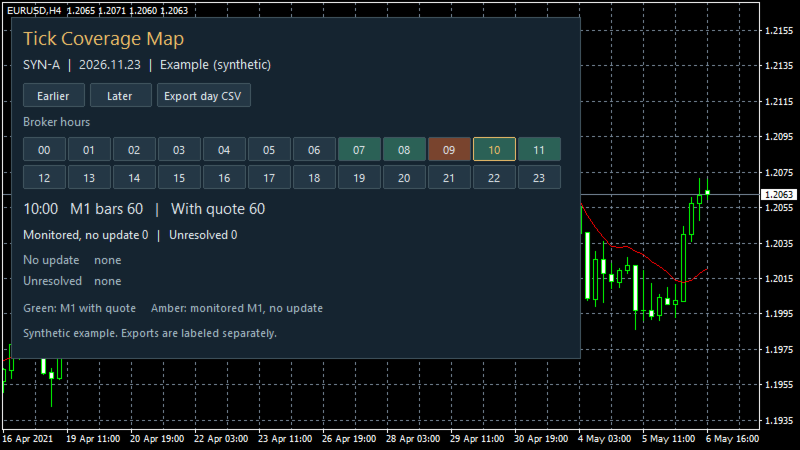
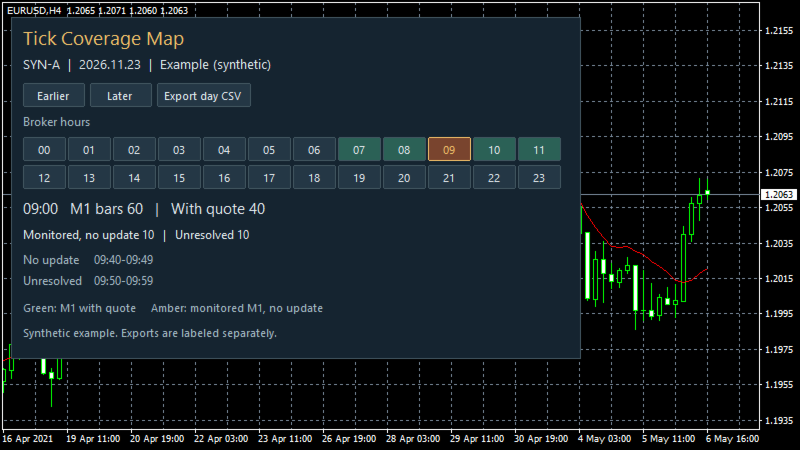
In desktop MT4, open View → Strategy Tester, choose Indicators and select Tick Coverage Map. Choose a symbol and timeframe with price history, leave the indicator inputs at their defaults and press Start. The visual chart opens on Example (synthetic). At 09:00, 40 of 60 M1 minutes have an observed quote, 10 were monitored with no update and 10 are unresolved. During playback, click 10 to inspect another hour or Export day CSV for all 720 completed minutes.

Reading the map

Green marks an hour with at least one M1 bar and a locally observed quote update. Amber marks an hour containing an M1 bar for which the recorder monitored the entire minute and saw no update. The selected hour shows how many M1 bars had a matching observation and how many minutes remain unresolved.

The first valid quote establishes a starting point. Older M1 bars can appear immediately. Evidence from earlier runs becomes available when you return to the same broker server and chart symbol. A failed quote read, an invalid timestamp, a clock stall or a connection gap interrupts full-minute monitoring. An update already observed in that minute stays in the map and CSV. Full monitoring resumes after a complete minute of valid samples. The report also identifies unavailable M1 history.

Version 1.00 saved quote changes and clock continuity. The map keeps those quote changes. Earlier minutes with only a clock record appear as unconfirmed. Re-export an old day to apply this distinction to its CSV.

MT4 provides the latest quote for a symbol. The indicator samples its update time, bid, ask, last price and volume. Multiple ticks can arrive between samples or carry the same values. The map measures observed minute coverage. It cannot reconstruct a broker's historical tick stream or measure the number of ticks delivered.

Controls

  • Earlier / Later moves between broker-server dates. DaysAvailable defaults to 30 and accepts 1 through 93. Today ends at the last completed minute.
  • 00–23 selects an hour. When a minute range extends beyond the detail line, export the day for the complete list.
  • Export day CSV saves the selected date under the terminal's MQL4/Files/Tenbira/TickCoverage4 directory. Each row contains the symbol, server minute, M1 evidence, observed quote, monitoring evidence, status and M1 error code. The Experts log gives the exact filename.
  • ShowExample opens a labeled synthetic day on a regular chart. Leave it off to observe the chart symbol. The Strategy Tester always uses a synthetic day. Its CSV goes under the tester's Files folder and identifies each example row.
  • PanelX / PanelY position the map on your chart.

One chart records each server/symbol pair. A second copy can view the same local journal. The indicator runs alongside an EA and only reads quote and bar data.

Produtos recomendados
MQLTA Candle Timer
MQL4 Trading Automation
5 (1)
MQLTA Candle Timer is an indicator that can show you the details about a symbol/pair and alert you before the close of a candle. Used in swing trading and not only, it can help your strategies knowing and be ready before the close of a candle. How does it work Simply add the indicator to the chart and set the notifications options. You can load a minimalistic interface or a full interface. The alert will be sent once per candle. Parameters All the parameters, that you can see in the picture, a
FREE
Arrogante EA
Mohd Hakim Johari
Introducing   Arrogante EA , an Expert Advisor designed for the MetaTrader 4 (MT4) platform. This EA utilizes a trend-following strategy combined with specific reentry signals derived from a blend of technical indicators. It also features a configurable Martingale system for position management and recovery. Arrogante EA is suitable for traders looking for Forex trading automation and who are comfortable with strategies involving Martingale as a recovery method. Key Features: Entry Strategy: Use
FREE
BrokerInfo
Nikolaos Pantzos
5 (2)
'BrokerInfo' is an indicator to show some information of account on the chart. You can to see on chart information about: GMT time. Broker time. Maximum simultaneously open orders. Leverage. Maximum lot size. Minimum lot size. Lot step. Stop level in pips. Symbol spread in pips. You can to get source code from here . Parameters SizeBackground – background size. PositionUpDn – position to show info on the chart.
FREE
Countdown Clock MT4
Alexandre Borela
4.83 (12)
Se você gosta deste projeto, deixe uma revisão de 5 estrelas. Este indicador desenha um relógio de contagem regressiva compacto do tempo remaning para o vela para fechar e: Ele pode ser posicionado em qualquer canto do gráfico; Múltiplos prazos; Você pode adicioná-lo a uma janela de indicador arrastando-o do navegador MT5. Cor diferente quando a vela tem 10 segundos para fechar. Cores personalizáveis para uma melhor integração com o gráfico.
FREE
Fortress Axis — Strategic Market Control System Fortress Axis is an Expert Advisor for MetaTrader 4 built around a structured trading framework that combines price behavior analysis, configurable entry logic, layered confirmation, and systematic position management. Its philosophy is centered on controlled execution and coordinated trade management. Instead of treating every market movement as an isolated opportunity, Fortress Axis uses a sequence of analytical conditions and configurable tradin
Automated Timeframe cycling with Symbols centered.  Force every timeframe onto one clock window, so the story you see on Daily is the same story you are slicing on H4, H1, and M1.  Traders usually flip timeframes and lose the span. A Daily chart shows a few weeks, then M15 shows a few hours, and the eye treats them as different markets. This indicator locks the window to N bars of the highest enabled timeframe — default 10 Daily — and maps every lower timeframe to that same stretch. You stay ins
FREE
streamlines trading by automatically aligning all open charts to the symbol of the chart where it’s applied, saving traders time and effort when analyzing a single asset across multiple timeframes or setups. With a customizable "Main Sync" label to identify the lead chart, it ensures a clear, clutter-free workspace, enhancing workflow efficiency and consistency for traders monitoring one currency pair or symbol.
FREE
Email Drawdown Alert
Roman Starostin
5 (12)
Free informative Indicator-helper. It'll be usefull for traders who trade many symbols or using grid systems (Averaging or Martingale). Indicator counts drawdown as percent and currency separate. It has a number of settings: Count deposite drawdown according equity value and send e-mail or notifications to user if DD more than set; Sending e-mail when max open orders reached; Shows price and remaining pips amount before MarginCall on current chart and Account generally; Display summary trade lot
FREE
Basket Recovery System : is useful for trading multiple pair on a single account, single chart. Functions Of this Ea with a simple click on a button in any Symbol row, this Utilities will, Open new Order, Set Lot, Close Order, Reverse Order, Add new Symbol, Delete Symbol, with a simple click on a Navigation Button, this Utilities will, Select all Symbol Available on Broker, ReSet Symbol Lots, Close all Order, Set Low Risk for all Symbol, Remove all Pair with spread above 2two.
FREE
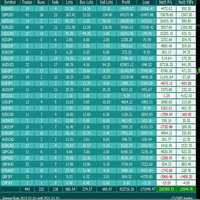
For more info,  questions   and problems join to discord.gg/reitakfx Very informative and detailed tool for your account.  - pairs, number of trades, lot size, profit, lose, nett p/l, net pips - profit growth chart Instalation : - open chart and delete every other indicator on it - put this report on chart Setting : - magic number - filters (comment, symbols, currencies) - date (today, week, month custom) - Start / End date (this is for custom date) - report type (open - only active trades wi
FREE
Skan
Niravkumar Maganbhai Patel
4.75 (4)
SKAN   This indicator helps you to scan all symbols which are in the Market Watch window and filter out a trend with alerts. It works on five most effective indicators which are used by most of traders for trading: Moving Average Super Trend (ST) Bolinger Band (BB) OPRC BFD It calculates two bars for scanning. When box colour changes to coral or royal blue colour, it indicates you for trend change for long and short entry. And also you will get alert on screen. When it changes to royal blue, it
FREE
Period Change Button
Rainer Albrecht
3 (1)
Fastest way to change the period. Suitable for traders who use many charts and timeframes. Size, shape and color can be customized. Inputs Parameters Corner — Choose corner placement Standart is "Right lower chart corner" Color — Background color of the button ColorText — Text color of the button ColorOn — Background color of the button for the current period ColorOnText — Text color of the button for the current period Font — Arial, Verdana... FontSize — Size of the font in pixels DistanceX —
FREE
Timezone Filter MT4
Martins Chukwudi Osodi -
Timezone Filter EA: Precision Trading with Session Control The   Timezone Filter EA   is an essential tool for traders looking to refine their trading strategy by restricting trade execution to specific trading sessions. Designed for precision and discipline, this EA allows traders to   filter   which trading sessions they want to engage in—such as   Asian, London, or New York sessions —while ensuring that no trades occur outside the defined time periods. Key Features:   Customizable Trading
FREE
Modify Order SL TP
Konstantin Kulikov
5 (1)
The utility places stop loss and take profit for opened orders. It is necessary to allow automated trading in the terminal settings. Discuss the complexities of Forex trading here:  chat "Age of Expert Advisors" . Parameters magic - magic number. If less than 0, orders with any magic number are processed. Select_Symbol  - selection of symbols. Positions with selected symbols will be accompanied by. Take_Profit - take profit (TP). If the value is less than 0, then TP does not change. If the value
FREE
Free automatic Fibonacci is an indicator that automatically plots a Fibonacci retracement based on the number of bars you select on the BarsToScan setting in the indicator. The Fibonacci is automatically updated in real time as new highest and lowest values appears amongst the selected bars. You can select which level values to be displayed in the indicator settings. You can also select the color of the levels thus enabling the trader to be able to attach the indicator several times with differe
FREE
Supertrend Pure MT5 - Indicador de Tendência de Alta Precisão As suas avaliações, comentários e notas são uma grande fonte de incentivo para mim enquanto trabalho no programa. Obrigado. [Descrição do Produto] O Supertrend Pure é o indicador de tendência mais limpo e poderoso, focado na essência do trading. Ao eliminar configurações complexas e utilizar cálculos de ATR (Average True Range) matematicamente otimizados, remove o ruído do mercado e apenas capta a verdadeira tendência. Principais
FREE
IntraScalpermt4
Mangesh Popat Ubale
IntraScalpermt4 Indicator   is an advanced, dynamic level-providing strategy/ Signals built in proven price action principles. At the start of every trading session, it automatically calculates the decisive   Levels —a key point that DECIDER guides high-probability trade opportunities. Indicators Including:- 1.  Day Trading Levels. 2.  IntraTrend Line for Scalping using M1 TF. 3.  Dynamic IntraScalper providing supply or demand zone on chart. 4.  EA Setting/Documentation in Indicator=> About T
FREE
Scalping Guru
Pran Gobinda Basak
Scalping Guru is a highly efficient expert advisor designed specifically for traders in the North American market on the MQL5 website. This EA is optimized for fast-paced, high-frequency trading strategies, making it an ideal tool for traders looking to capitalize on short-term market movements. With its advanced algorithms, Scalping Guru can quickly analyze market conditions and execute trades with lightning-fast speed and precision. This expert advisor is designed to work with a variety of t
FREE
MT5 to MT4 Trade Copier (Slave) SHORT DESCRIPTION Copies trades from MetaTrader 5 to MetaTrader 4 on the same PC/VPS. You also need the EA "MT5 to MT4 Trade Copier I Master" from the Market. If you have any questions, problems, or suggestions for improvement, feel free to send me a message or leave a comment. KEY FEATURES Market execution copying (fast, stable) Multi-symbol filter (copy only selected symbols) Symbol mapping (master symbol -> receiver symbol) Lot multiplier (scale lots on rece
FREE
TREND PILOT MT4 – SMART MONEY TREND-FOLLOWING SYSTEM Trend Pilot is a fully automated Expert Advisor based on Smart Money Concepts and structural market analysis. The system identifies trend reversals through Break of Structure (BOS) and Change of Character (CHOCH), utilizing precise entry mechanisms for optimal position openings. NEW: Includes a trading
Get your DuoFX indicator alerts on Telegram and Discord, with a chart screenshot, without staring at the terminal. Free, for DuoFX products only This relay forwards alerts from DuoFX indicators and tools that have the "Send to DuoFX Alert Relay" option. It does not forward alerts from other indicators or Expert Advisors. Supported today: DuoFX Divergence Scanner (version 1.3 and later and DuoFX Currency Strength Meter 1.1 and later). More DuoFX tools get the option in their next updates; the cur
FREE
NSA Prop Firm Robot
Tshivhidzo Moss Mbedzi
NSA Prop Firm Robot is an Expert Advisor for MetaTrader 4 that trades XAUUSD (gold) and US30 during the 00:00-12:00 GMT session. It is built for traders who run funded or challenge accounts and want a stop loss and a news filter on every trade. How it trades Trades only between 00:00 and 12:00 GMT. Every trade has a stop loss. A news filter skips high-impact news. Lot size scales with the account, from 5,000 to 500,000 USD. Before you buy Download the free demo and run it in the Strategy Tester
Good Monday
Konstantin Kulikov
5 (7)
The expert trades at the opening of the market after the weekend, focusing on the price gap (GAP). Various sets of settings are ready (trading against or towards the GAP). At the same time, various options are available in the expert settings, allowing you to create your own unique sets yourself.    >>> Chat <<< Currency pairs for which the sets have been developed: GBPUSD, AUDUSD, NZDUSD, USDCAD, EURGBP, EURCHF, GBPCAD, GBPAUD, AUDCHF, AUDJPY, AUDNZD, CHFJPY, CADJPY, NZDJPY, NZDCHF, EURUSD, G
Trade Assistant MT4 Introducing Tipster Trendlines 2: The Future of Manual Trading is Here! This is a  Trade Assistant for MT4.  Are you ready to elevate your trading game? Tipster Trendlines 2 isn’t just another tool; it’s your ultimate trading companion —designed to empower you, save time, and help you trade smarter. For 9 years, this tool has been a game-changer for traders who value control, precision, and results. Now it’s your turn to experience its magic. What Makes Tipster Trendlines 2 S
FREE
BidAskLine
Isaac Montesinos Valdes
5 (5)
Description:   -   BidAskLine Indicator is very simple and easy, but each utility can be important in the probability that we will win in our trade. This utility Indicator shows lines and prices of the Bid, Ask and Spread. Input Parameters:   -   Visual Aspect Options : Select between 2 options with Box or Simple Style.   -   Parameters Bid Price : Select between show or hide line or box objects, change color, style or width line.   -   Parameters Ask Price : Select between show or hide line or
FREE
Pin Bars
Yury Emeliyanov
4.83 (6)
Objectivo principal: "Pin Bars" destina-se a detectar automaticamente barras de pinos nos gráficos dos mercados financeiros. Uma barra de pinos é uma vela com um corpo característico e uma cauda longa, que pode sinalizar uma reversão ou correção de tendência. Como funciona: o indicador analisa cada vela no gráfico, determinando o tamanho do corpo, cauda e nariz da vela. Quando uma barra de pinos correspondente a parâmetros predefinidos é detectada, o indicador marca-a no gráfico com uma seta p
FREE
Indicador Williams %R com suporte multi-timeframe, sinais visuais personalizáveis e sistema de alertas configurável. Serviços de programação freelance, atualizações e outros produtos TrueTL estão disponíveis no meu perfil MQL5 . Feedbacks e avaliações são muito apreciados! O que é Williams %R? Williams %R é um oscilador de momentum desenvolvido por Larry Williams. Move-se na faixa de -100 a 0. Valores próximos de 0 indicam condições de sobrecompra, enquanto valores próximos de -100 indicam co
FREE
O ATC Candle Timer coloca o tempo restante do candle atual e as informações principais do símbolo em um pequeno painel. Esta ferramenta também faz parte do All In One Trade Management Panel MT4 , junto com a ferramenta de posição, o gerenciamento de operações e a analítica de desempenho. Temporizador de candle: Contagem regressiva até o fechamento do candle para o timeframe do gráfico ou qualquer timeframe que você escolher, incluindo semanal e mensal. Uma barra de progresso mostrando quanto
FREE
Indicador Moving Average (MA) com suporte a múltiplos timeframes, sinais visuais personalizáveis e sistema de alertas configurável. Serviços de programação freelance, atualizações e outros produtos TrueTL estão disponíveis no meu perfil MQL5 . Feedback e avaliações são muito bem-vindos! O que é MA? A Média Móvel (MA) é um dos indicadores técnicos mais utilizados no trading. Ela suaviza os dados de preço calculando uma média durante um número específico de períodos, ajudando os traders a ident
FREE
This is an entertainment game developed on MT4, and this program is provided for free. how the game is played Use the game handle to control the direction of the snake up and down, left and right, and look for something to eat. You can get a certain amount of points for each bite, and the snake's body will grow longer and longer, and the longer the body is, the more difficult it is to play. Snake's only goal is to grow into the longest snake! Slide the joystick to control the snake's position, e
FREE
Os compradores deste produto também adquirem
Bem-vindo ao Trade Manager EA—uma ferramenta de gestão de risco criada para tornar o trading mais intuitivo, preciso e eficiente. Não é apenas uma ferramenta para executar ordens, mas uma solução abrangente para planejamento de operações, gerenciamento de posições e controle de risco. Seja você um iniciante, trader avançado ou scalper que precisa de execução rápida, o Trade Manager EA adapta-se às suas necessidades, oferecendo flexibilidade em todos os mercados, desde forex e índices até commodi
Exp COPYLOT CLIENT for MT4
Vladislav Andruschenko
4.69 (65)
Copiador profissional de operações para MetaTrader 4 Copiador de operações rápido, profissional e confiável para MetaTrader 4 . COPYLOT permite copiar operações de Forex entre os terminais MetaTrader 4 e MetaTrader 5 , com sincronização flexível para diferentes tipos de conta e cenários de negociação. A versão COPYLOT MT4 oferece suporte para: MetaTrader 4 → MetaTrader 4 MetaTrader 5 Hedge → MetaTrader 4 MetaTrader 5 Netting → MetaTrader 4   Versão MT5 Descrição completa + DEMO + PDF Como compra
Local Trade Copier EA MT4
Juvenille Emperor Limited
4.96 (111)
Local Trade Copier EA MT4 é um copiador de operações rápido e flexível para copiar e gerenciar operações entre várias contas MetaTrader 4 no mesmo computador Windows ou Windows VPS. Ele combina a sincronização local de operações com controles no lado do Receiver para tamanho de lote, gerenciamento de risco, filtragem de operações, mapeamento de símbolos, gerenciamento de operações e proteção da conta. Configure seus terminais Transmitter e Receiver em aproximadamente 1 minuto e copie operações
Trade Assistant MT4
Evgeniy Kravchenko
4.43 (197)
Ajuda a calcular o risco por comércio, a fácil instalação de uma nova encomenda, gestão de encomendas com funções de fecho parcial, trailing stop de 7 tipos e outras funções úteis. Materiais e instruções adicionais Instruções de instalação - Instruções para a aplicação   Função de linha Mostra no gráfico a linha de Abertura, Stop Loss, Take Profit. Com esta função é fácil definir uma nova ordem e ver as suas características adicionais antes da abertura.   Gestão de risco A função de cálculo do

Trade Dashboard MT4
Fatemeh Ameri
4.96 (55)
Trade Dashboard simplifies how you open, manage, and control your trades, with built-in lot size calculation. It allows you to execute trades, manage risk, and control positions directly on the chart, with tools such as partial close, breakeven, and trailing stop. Designed to reduce manual work and help you stay focused on your trading decisions. A demo version is available for testing. Detailed explanations of features are provided within the MQL5 platform. Installation instructions are include

Ultimate No Nonsense FX Backtester - You can Run Forward Test Simulation with this tool! Do Not Download the Demo Here, Please Read Below! Step by Step Manual Guide PDF for this backtester PDF List of Commands(Shortcuts) for this backtester Ultimate NNFX Backtester is a powerful utility tool that significantly reduces the length of backtesting process for NNFX followers.  As well as for Forex traders that operates their entries and exits at the close of a candle and manage the risk using ATR.
The product will copy all telegram signal to MT4   ( which you are member  ) , also it can work as remote copier.  Easy to set up, copy order instant, can work with almost signal formats, image signal, s upport to translate other language to English Work with all type of channel or group, even channel have "Restrict Saving Content", work with  multi channel, multi MT5 Work as remote copier: with signal have ticket number, it will copy exactly via ticket number. Support to backtest signal. How to
Black Week: compra por 69.99 USD. A oferta termina na sexta-feira, 27 de novembro. O Telegram to MT4 Multi-Channel Copier copia automaticamente os sinais de trading dos seus canais de Telegram e Discord diretamente para o MetaTrader 4. Sem bots, sem extensões de navegador, sem copiar à mão. O sinal chega ao Telegram ou ao Discord e o EA abre a operação no seu terminal em poucos segundos. E antes de copiar um canal, o backtester integrado mostra o que esse canal teria feito na sua conta. O produt
DoIt Trade Manager - Risk Panel and EA Position Manager for MT4 Finding an entry is only half the job. Many execution mistakes happen in position sizing, partial exits, breakeven, trailing and account protection. DoIt Trade Manager puts the complete workflow on the chart. Plan the risk before entry, execute the order and apply consistent management rules to your manual trades and selected positions opened by other EAs. Full setup guide + how the free version works and where PRO starts :  https:/
Trade Indicator Assistant is a powerful MT4 utility designed to turn indicators into automated trading systems. Its main feature is the ability to automatically detect an indicator’s   BUY and SELL signal buffers , without requiring you to know the buffer numbers, search through indicator settings, or modify the indicator source code. Bonus Indicator: After purchasing Trade Indicator Assistant, contact me to receive Trade Signal Pro completely free as a bonus indicator. [Download Demo Version]
Practice Simulator é um simulador de trading completo para backtesting, prática de trading e trading ao vivo. Seja você um iniciante que precisa praticar ou um trader experiente que analisa dados, esta ferramenta atende a todos os níveis. Use-o para trading de Forex, análise de mercado ou otimização de estratégias. O Practice Simulator permite praticar trading a qualquer momento, mesmo nos feriados do mercado, com uma interface simples e completa para gerenciamento de risco e assistência nas ope
News Filter EA: Advanced Algo Trading Assistant News Filter EA is an advanced algo trading assistant designed to enhance your trading experience. By using the   News Filter EA , you can integrate a Forex economic news filter into your existing expert advisor, even if you do not have access to its source code. In addition to the news filter, you can also specify   trading days   and   hours   for your expert. The News Filter EA also includes   risk management   and   equity protection   features
Equity Protect Pro: Seu Especialista em Proteção de Contas Abrangente para Negociação Tranquila Se você está procurando recursos como proteção de conta, proteção de patrimônio, proteção de portfólio, proteção de múltiplas estratégias, proteção de lucro, coleta de lucro, segurança de negociação, programas de controle de risco, controle automático de risco, liquidação automática, liquidação condicional, liquidação programada, liquidação dinâmica, trailing stop loss, fechamento com um clique, liqu
Trailing Stop and Breakeven Manager - Trail Architect MT4 Auto Trailing Stop and Breakeven Manager for MT4. Protect profit with automatic break even, then trail your stop loss using Classic, Step, ATR or Candle trailing - all from one professional panel. Every trader knows the pain: a winning trade turns into a loss because the stop loss was never moved. Watching the chart all day just to move your stop to break even and trail the stop loss by hand is exhausting - and one missed move can wipe o
TradePanel MT4
Alfiya Fazylova
4.84 (95)
Trade Panel é um assistente de negociação multifuncional. O aplicativo contém mais de 50 funções de negociação para trading manual e permite automatizar a maioria das tarefas de negociação. Instruções para o aplicativo: https://www.mql5.com/pt/blogs/post/762435 Versão de teste do aplicativo para conta demo: https://www.mql5.com/pt/blogs/post/762547 Como instalar o aplicativo: https://www.mql5.com/pt/blogs/post/762548 Como testar o aplicativo no modo visual: https://www.mql5.com/pt/blogs/post/770
Grid Manual MT4
Alfiya Fazylova
4.71 (17)
"Grid Manual" é um painel comercial para trabalhar com uma grade de ordens. O utilitário é universal, possui configurações flexíveis e uma interface intuitiva. Ele trabalha com uma grade de ordens não apenas na direção da média das perdas, mas também na direção do aumento dos lucros. O trader não precisa criar e manter uma grade de ordens, tudo será feito pelo ""Grid Manual". Basta abrir um orden e o "Grid manual" criará automaticamente uma grade de ordens para ele e trabalhará com ele até que s
CloseIfProfitorLoss with Trailing
Vladislav Andruschenko
4.88 (32)
Close If Profit or Loss with Trailing para MetaTrader 4 — fechamento automático por lucro ou perda total Uma utilidade prática para MetaTrader 4 que fecha posições automaticamente quando o lucro total ou a perda total atinge o nível definido por você. O Expert Advisor monitora as operações abertas, calcula o resultado flutuante, pode aplicar Trailing Profit e ajuda a fechar posições mais rápido do que uma reação manual. O MetaTrader 4 ainda é muito usado por traders manuais, scalpers, usuários
Precisa de suporte? Como configurar? Tem dúvidas? Pergunte aqui no seu idioma, resposta rápida: https://www.mql5.com/en/market/product/139089/comments Baixar versão de teste funcional Copy Cat More (Gato Copião) — Copiador de Trades (Trade Copier) MT4 não é apenas um simples copiador local de trades; é um completo framework de gerenciamento de risco e execução (risk management and execution framework) projetado para os desafios de trading de hoje. De desafios de prop firm ao gerenciamento de
Trade copier MT4
Alfiya Fazylova
4.62 (37)
Trade Copier é um utilitário profissional projetado para copiar e sincronizar negociações entre contas de negociação. A cópia ocorre da conta / terminal do fornecedor para a conta / terminal do destinatário, instalada no mesmo computador ou vps. Antes de comprar, você pode testar a versão demo em uma conta demo. Versão de demonstração aqui . Instruções completas aqui . Principais funcionalidades e benefícios: Suporta a cópia de MT4> MT4, MT4> MT5, MT5> MT4, incluindo contas "MT5 netting". Os mod
RS Trade Copier - o local trade copier ultrarrápido com uma interface gráfica verdadeira . Pare de digitar números de conta manualmente. Chega daquela lista enorme de 200+ parâmetros de entrada incompreensíveis. Uma ferramenta confiável e flexível para cópia de operações comerciais entre múltiplos terminais MT4 e MT5. Atende tanto traders experientes e serviços de sinais quanto investidores individuais. Permite sincronizar negociações de um ou múltiplos Provedores para um ou múltiplos Clientes c
Telegram to MT4 Coppy
Sergey Batudayev
4.09 (11)
Telegram para MT4:   A solução definitiva para cópia de sinais Otimize suas negociações com   o Telegram para MT4   , o utilitário de última geração desenvolvido para copiar sinais de negociação diretamente de canais e chats do Telegram para sua plataforma MetaTrader 4 — sem a necessidade de DLLs. Esta solução robusta garante a execução perfeita de sinais com precisão incomparável e opções de personalização, economizando seu tempo e aumentando sua eficiência. [ Instructions and DEMO ] Principais
Trading History MT4
Siarhei Vashchylka
5 (9)
Trading History - A program for trading and money management on the history of quotes in stratagy tester. It can work with pending and immediate orders, and is equipped with trailing stop, breakeven and take profit functions. Very good for training and testing different strategies. Manual (Be sure to read before purchasing) Advantages 1. Allows you to test any trading strategy in the shortest possible time 2. An excellent simulator for trading training. You can gain months of trading experience
Exit Manager
Victor Christiaanse
5 (2)
Close every trade at the right moment, automatically. Most traders spend their energy on the entry and then close too early, too late, or on a feeling. Exit Manager takes the exit off your hands. Open a trade the way you always do, by hand or with any Expert Advisor, and Exit Manager watches it and closes it, fully or partly, when the indicator signal you chose appears. You can see it working on the chart. A clean panel on your chart shows, for every open trade, which rule will close it next, ho
Forex Sentiment Trader PRO EA
Salvador Martinez Ramos
5 (2)
I have created this  MT4 Tool EA to test if it is more profitable to trade in favor of the mass sentiment of traders or it is better to go against it. Remember to authorize Myfxbook url in WebRequest options in MT4 .  Features: Market Sentiment update every 30 minutes SL TP BreakEven Trail SL Daily Target Profit Max Daily DrawDown (Useful for prop firm) Max Spread Filter Time Filter Custom Trade Comments Protection in case a pair is not read correctly from the web (Prevents improper closing or o
Níveis de Gamma Exposure (GEX) em tempo real de dados CBOE. ES, NQ, RTY, Gold. Atualização a cada 2 minutos. Full description: GammaOrderBook — EA tudo-em-um que baixa e exibe dados GEX ao vivo diretamente no gráfico. Não precisa de indicador separado. O que aparece no gráfico • GEX Bars — Níveis gamma Call/Put como barras horizontais, separados por fonte ETF/Index • Zero Gamma Line — Nível crítico onde a direção do hedge muda • Panorama V4 — Posicionamento gamma multi-timeframe • Suporte/Re
Drawdown Minimizer for MetaTrader 4 - your EAs pay in, old losers get paid off. This utility runs next to your other Expert Advisors and never opens a trade. It keeps a savings book of the net realized profit of your whole account and uses it to close the oldest losing positions of the EAs you choose - slice by slice, oldest first. WHY IT EXISTS Made by traders, for traders. One of our grid EAs got stuck in drawdown for months. The old positions did not come back, and they paid swap every single
TradeMirror é uma ferramenta local de cópia de ordens desenvolvida para as plataformas MT4/MT5, com suporte à sincronização de negociações em tempo real. Samouczek Kliknij link Samouczek Trademirror , aby zobaczyć więcej samouczków. Vantagens do Produto Alinhado com os altos padrões de segurança, estabilidade e privacidade para softwares financeiros, otimizamos três aspectos fundamentais: Interface gráfica intuitiva para operação simplificada Proteção de privacidade reforçada para isolamento de
O Trade Autopilot gerencia as operações que você abre manualmente, no PC ou no celular. Ele coloca um stop loss se não houver, move-o para o breakeven, fecha parte da operação e faz trailing do restante. Tudo é medido em R, o seu risco inicial, e em ATR, então a mesma configuração funciona em ouro, índices e forex. Preço de lançamento: 30 USD, 50% de desconto sobre o preço normal de 60 USD. Você decide quando entrar. O Trade Autopilot cuida da operação a partir daí. Ele não abre operações nem dá
ATTENTION: The Indicator cannot be backtested, as it is generated exclusively from live intraday calculations based on options flow. GEX Level Converter – Gamma Exposure Mapping for CFD Charts NASDAQ-100 edition — for US100 · NDX · NAS100 · USTECH and every Nasdaq-100 CFD equivalent Instantly see professional options-market levels directly on your MetaTrader Nasdaq-100 CFD chart. The GEX Level Converter translates the daily Gamma Exposure (GEX) zones of the NDX options market into precise pri
RiskManager
Roman Zhitnik
5 (4)
Risk Manager MT4   is an account protection Expert Advisor for traders who want strict risk control inside MetaTrader 4. The utility monitors your account equity, daily and weekly results, drawdown, open positions, trade count, consecutive losses, and trading hours. When a configured limit is reached, it can automatically close positions, cancel pending orders, stop other EAs, send notifications, or close the terminal. Instead of relying on discipline during a stressful trading session, you defi
Mais do autor
Choose a stop and see how much volume fits your cash risk budget. Move the entry, stop and target lines on the price chart. A separate panel shows the lot size, estimated stop loss in the deposit currency, estimated target after costs and reward-to-risk. The planner places no trades. Start a plan Attach the indicator to the instrument you intend to trade. Choose equity, balance or a fixed cash amount as the budget basis. Choose Buy or Sell . The initial entry uses the current ask or bid. The in
FREE
How long did a breakout hold before price returned to the opening range? Review recent sessions on one chart. See the opening high and low, the first close outside the range and the first later candle that touched the broken boundary. Select Show bars to center the chart on the event and mark the original levels. Review a session Try the free demo in the MT4 or MT5 visual Strategy Tester. Keep the 08:00 start and 15-minute opening range, turn on Show example and let the test play. In the fictio
Which trades made up your EA's net result? Choose a broker-date range, find your EA by name or magic number and select Postings . Each posting shows the original ticket, broker time, symbol, allocation source, gross P/L, commission, swap, fees and net amount in the deposit currency. Try it on MT4 or MT5. Turn on Show example , then choose Week and All symbols . The fictional account shows 27 USD net. Magic 2101 contributed 43 USD. Select Postings to see ticket 900104 with 32 USD net, then use t
Track how pending orders on your account open relative to the requested levels you saw before activation. Attach the indicator to one chart and leave MT4 connected. The monitor observes pending orders across the account. The chart opens on its own symbol, and Next symbol cycles through symbols that have loaded tickets in the five-week window. Try the Market demo Download the demo in desktop MT4. Open View → Strategy Tester , select Indicators and choose Fill Drift Monitor . Select a symbol and t
Overview Follow selected market trades from one desktop terminal in another. Local Trade Relay can read an MT4 source account or serve as its destination. Each chart shows its role, the channel status and the positions it is publishing or would act on. Preview is the default receiver mode. Use this edition at an MT4 endpoint. For a pair containing MT5, install the MT5 edition at that endpoint and select a hedging account that allows individual ticket closes. Both terminals run on the same compu
NeuroQuant: Built for GOLD NeuroQuant is a next-generation trading solution specially designed for GOLD, leveraging advanced AI and neural networks to dominate this high-potential market. Symbol: XAUUSD (GOLD) Timeframe: 4H & 1H Capital: $1,000+ Broker: Any broker Account Type: Lower spread preferred Leverage: 1:25 ~ 1:500 VPS: Preferred to maximize your profit Lot Size: 0.01 ~ Why NeuroQuant Excels in GOLD: Exceptional Backtest Results: In 2024 backtests, short positions achieved over  62.5%
Tick Coverage Map shows where your MT5 terminal returned ticks for the M1 bars in a selected date range. Use it before a backtest to find dates that need a closer look. Each calendar cell compares observed M1 minutes with minutes containing at least one returned tick. Click a date to inspect consecutive zero-tick intervals. Switch the detail view to see unresolved minutes when history was unavailable or still synchronizing. Minutes without an M1 bar have their own count. Inputs and controls Sym
FREE
Fill Drift Monitor helps you find changes in execution quality across several EAs in one MT5 account. Start with the chart symbol or open All symbols to compare this week with a baseline pooled from the previous four completed broker-server weeks. Each week shows the signed median, the 90th percentile of adverse fills, and measured versus total deals. Positive values mean worse execution and negative values mean better execution. Values and ranking differences use each symbol's own points. Sele
Rangehound Gold gives you two ways to trail hourly gold breakouts in one MetaTrader 5 Expert Advisor. Gold Breakout and Gold Trend use the same entry rule on XAUUSD. In the free MT5 Strategy Tester demo, change just the Strategy input to compare their stops and exits on your broker's price history. Choose a strategy Gold Breakout (default) uses a trailing distance of twice the 14-bar hourly average true range (ATR). Gold Trend uses four ATRs while the trend filter is active and two otherwise. A
How long did a breakout hold before price returned to the opening range? Review recent sessions on one chart. See the opening high and low, the first close outside the range and the first later candle that touched the broken boundary. Select Show bars to center the chart on the event and mark the original levels. Review a session Try the free demo in the MT4 or MT5 visual Strategy Tester. Keep the 08:00 start and 15-minute opening range, turn on Show example and let the test play. In the fictio
Which trades made up your EA's net result? Choose a broker-date range, find your EA by name or magic number and select Postings . Each posting shows the original ticket, broker time, symbol, allocation source, gross P/L, commission, swap, fees and net amount in the deposit currency. Try it on MT4 or MT5. Turn on Show example , then choose Week and All symbols . The fictional account shows 27 USD net. Magic 2101 contributed 43 USD. Select Postings to see ticket 900104 with 32 USD net, then use t
Overview Use one desktop terminal to follow selected market positions in another. Attach Local Trade Relay to a chart in each terminal and give the pair a channel name. The sender reads its account. The receiver starts in Preview and shows the symbol, side and lot size it would request. Execution is a separate choice in the receiver inputs. This edition runs on MT5 hedging accounts that allow individual ticket closes. Install the corresponding MT4 edition for an MT4 endpoint. The two terminals
Find the first recorded Bid or Ask that touched a stop or target after a confirmed range breakout. The chart labels the direction and price of the breakout. For the selected signal, the panel gives the entry quote, spread, model levels, first-touch price and broker timestamps down to milliseconds. The first screenshot follows a gold M1 short from 24 November 2026 at 04:51 broker time. The first Bid was 3638.29 at 04:52:00.234. The stop level was 3640.72. At 04:54:12.834 the Ask was still 3640.68
Review where an entry landed relative to the prices that attracted activity earlier in its session. Attach Deal Entry Profile to an MT5 chart and select one of your account’s entry deals on that symbol. The panel reconstructs the price distribution using only the broker records that precede the deal. The chart marks the entry price and time. Read a profile The gold histogram row contains the point of control (POC), the busiest displayed price row. Teal rows form a contiguous value area containin
Filtro:
Sem comentários
Responder ao comentário