Trident Pressure

Trident Pressure

Three pressure layers. One exhaustion state machine. A signal you can wait for.

An oscillator that reaches an extreme tells you nothing about timing. Markets stay extreme for days. Trident Pressure is built around the opposite idea: the tradeable moment is not when pressure peaks, it is when pressure releases.

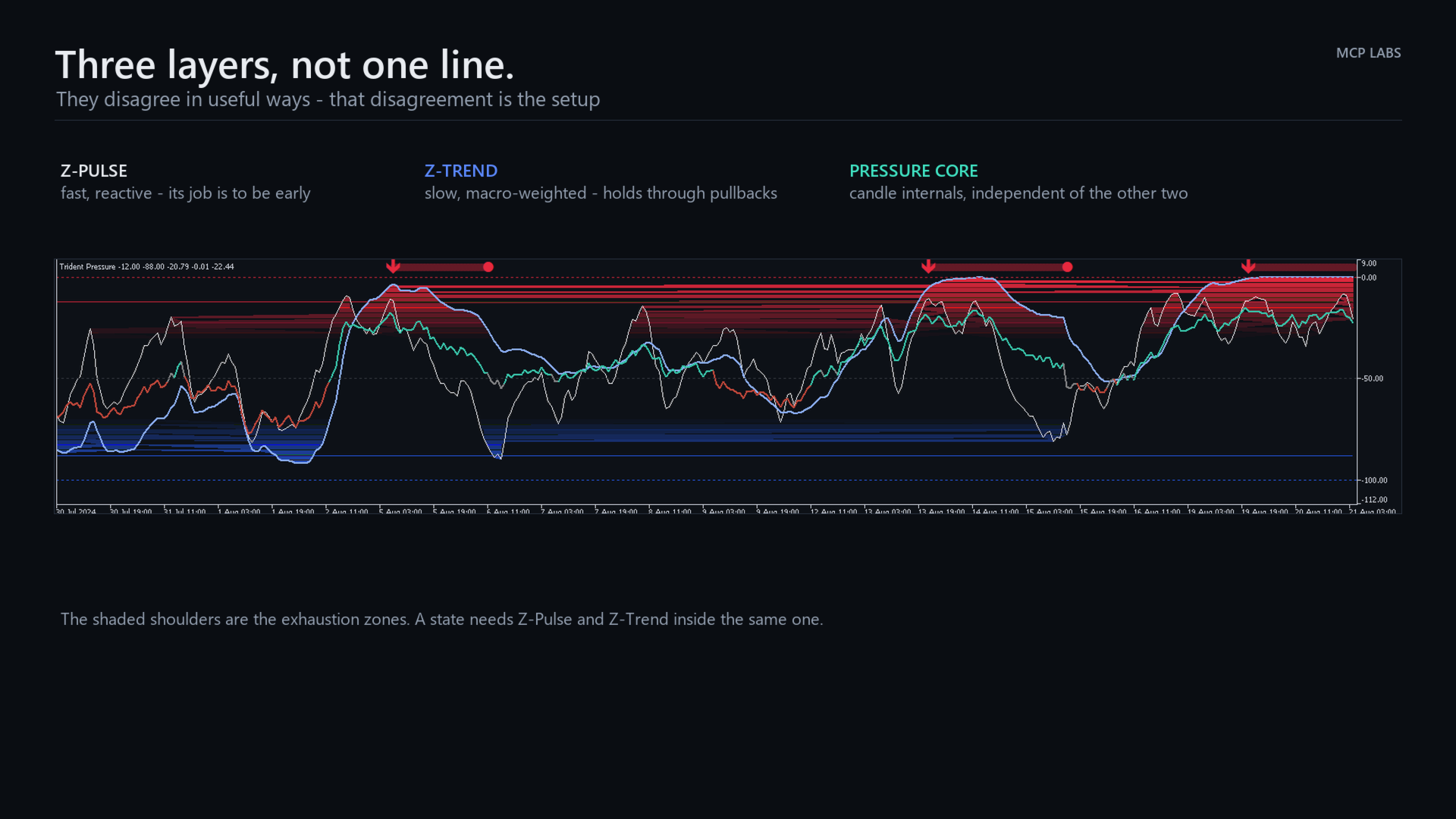
Three layers, read separately

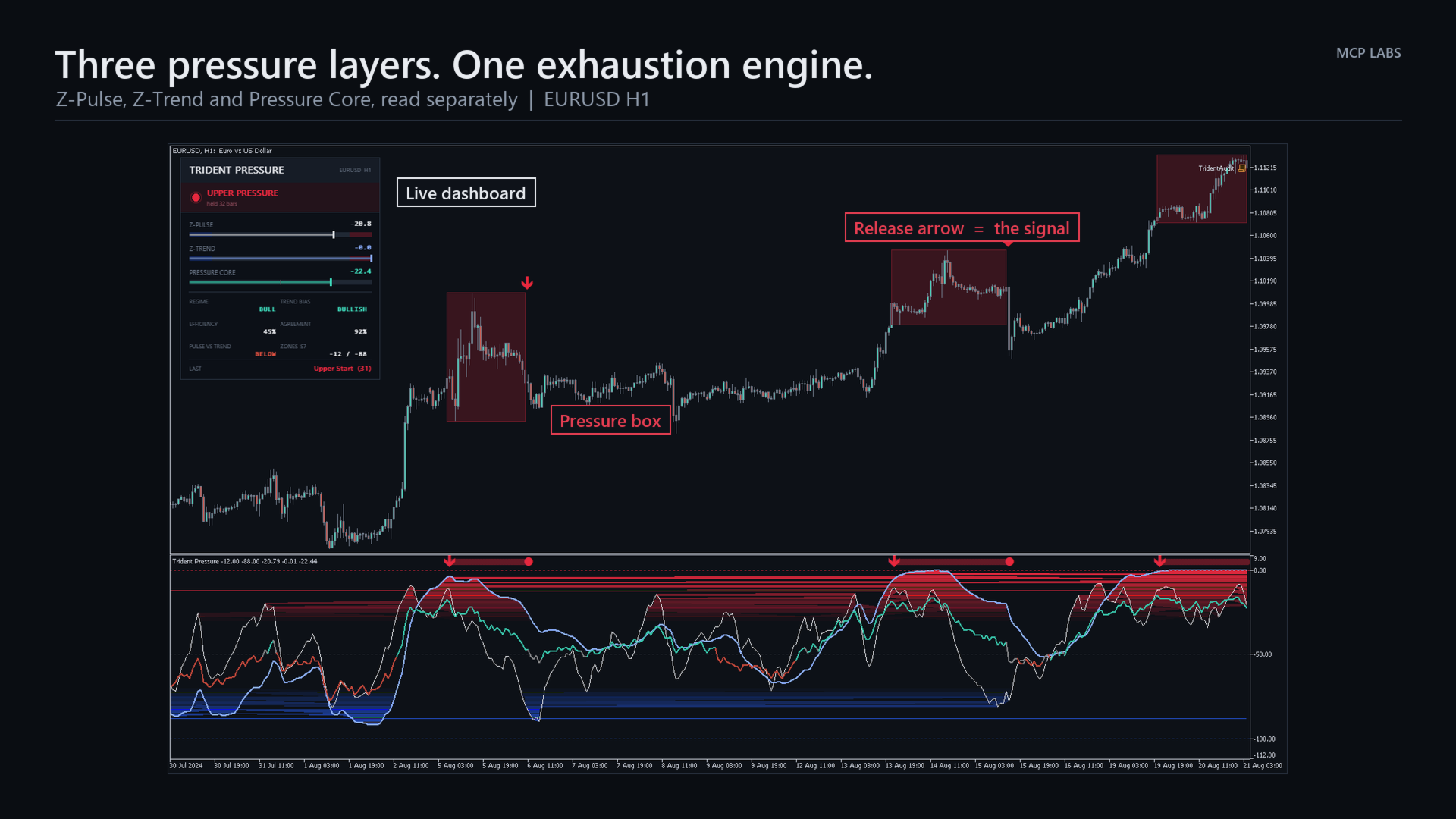
  • Z-Pulse — fast, reactive range position. Moves with the current swing. Its job is to be early.
  • Z-Trend — a macro-weighted blend of three range horizons. Slow on purpose. It resists counter-trend noise in proportion to how efficiently price is travelling and how closely the horizons agree, so it holds direction through pullbacks that throw Z-Pulse around.
  • Pressure Core — an independent read on candle internals: where price closed in its range, where it spent its time, which way the body points, which wick dominates, and the recent impulse. Coloured bull, bear or neutral.

The exhaustion state machine

A pressure state opens only when Z-Pulse and Z-Trend are both inside the same extreme zone, and stay there for a confirmation period. It closes only when both have travelled back past a separate release level that sits further out than the entry level.

Entry and release thresholds are deliberately different. That gap is hysteresis, and it is why the state does not flicker on and off while price chops around a line.

What you see

  • A box on your chart marking the price range carved out while pressure was on
  • An arrow at the moment of release — this is the signal
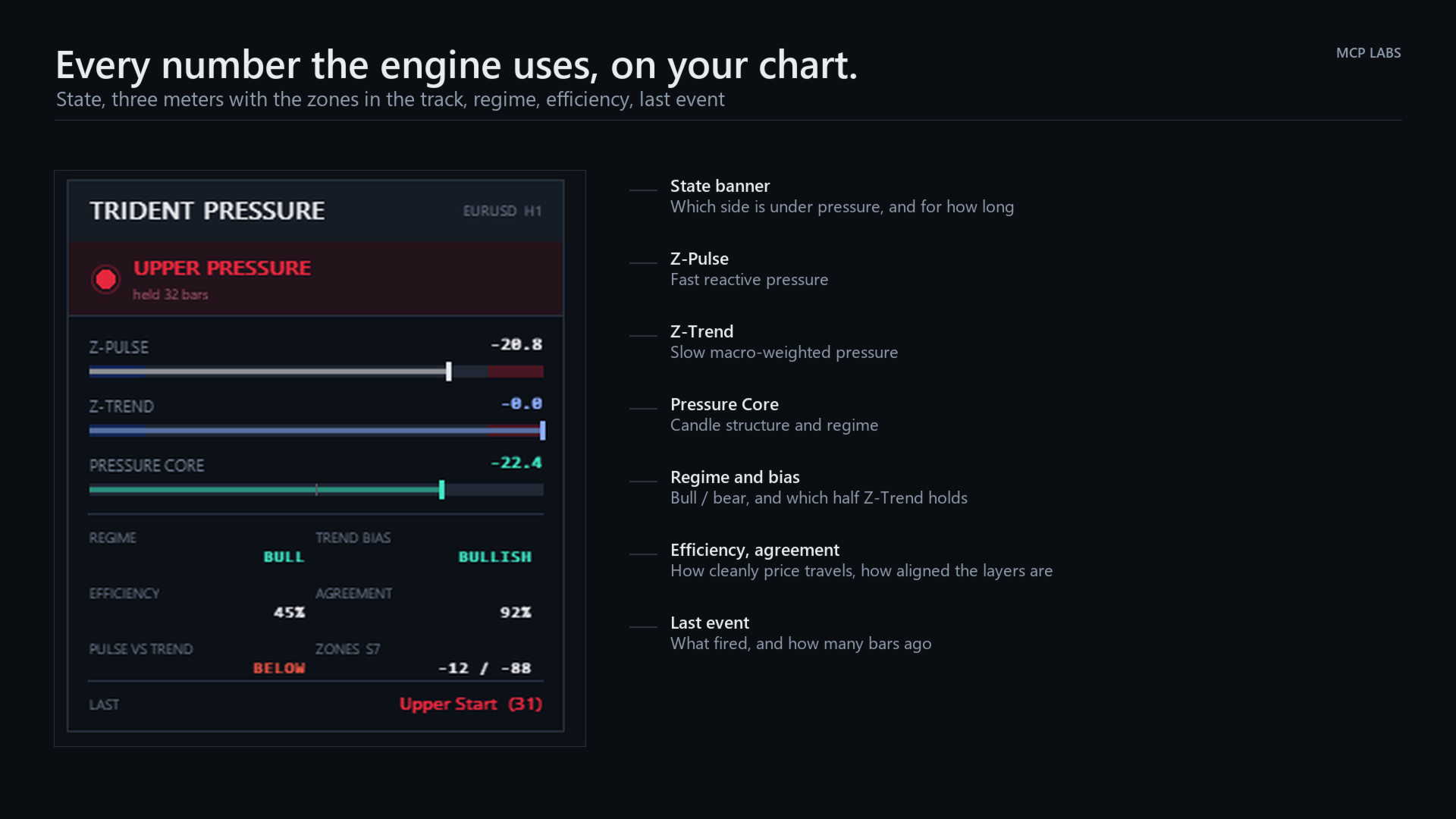
  • A live dashboard: state, three meters with the zones drawn into the track, regime, trend bias, efficiency, layer agreement, and the last event
  • A gradient-shaded oscillator pane showing all three layers at once

How to trade it

  • Trend — Z-Trend holding the upper half with a bull-coloured Core favours longs. The mirror favours shorts.
  • Continuation — in an established trend, Z-Pulse pulls back against it while Z-Trend and Core hold their direction, then turns back. The pullback is the entry, not the reversal.
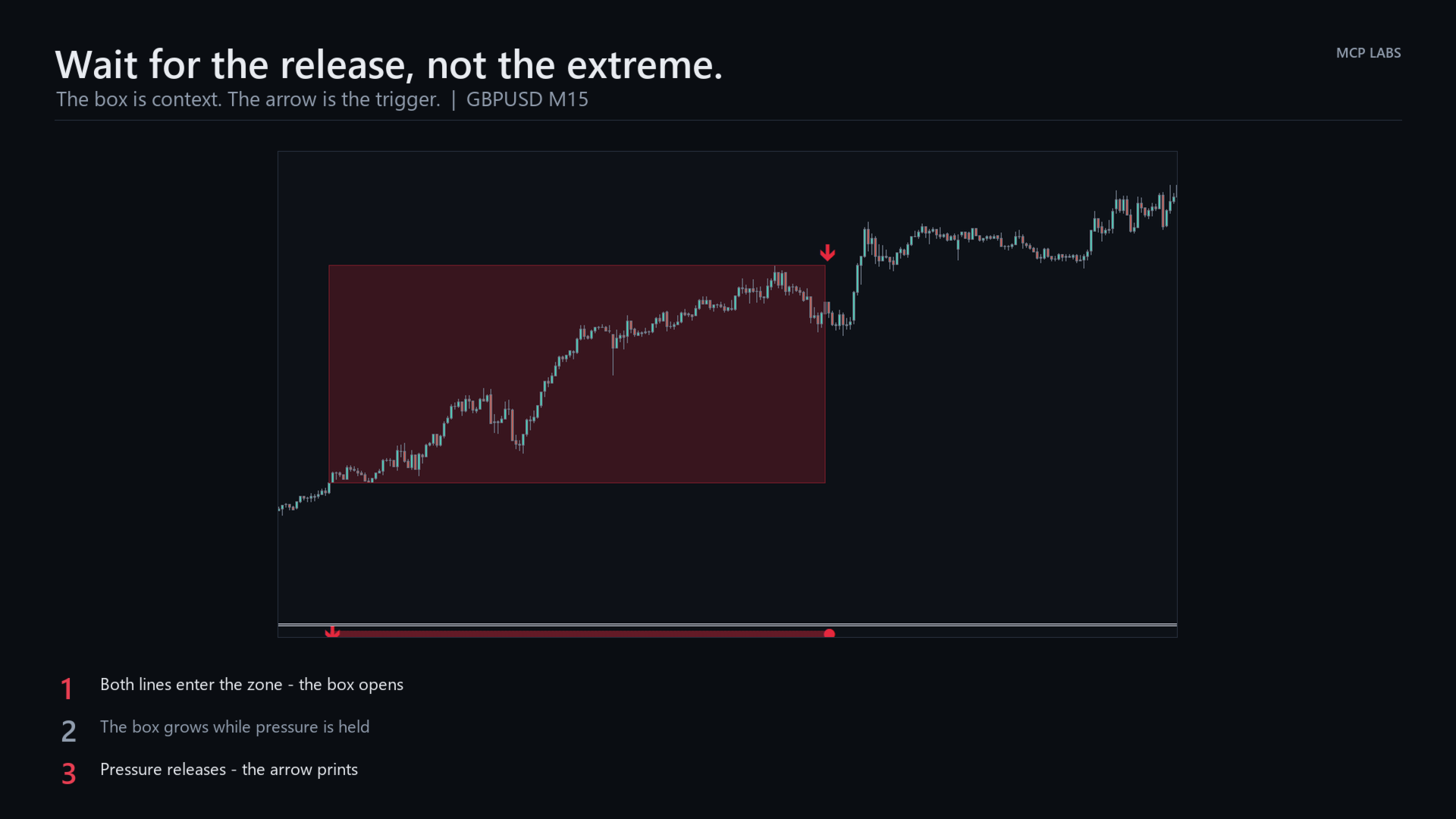
  • Reversal — a box forms and grows while pressure is on. Do not trade the box; while it is open, pressure is still being applied. Wait for the arrow.

The single most common way to misuse this tool is to sell a red box while it is still growing. A red box is not a sell signal. The red arrow is.

Settings

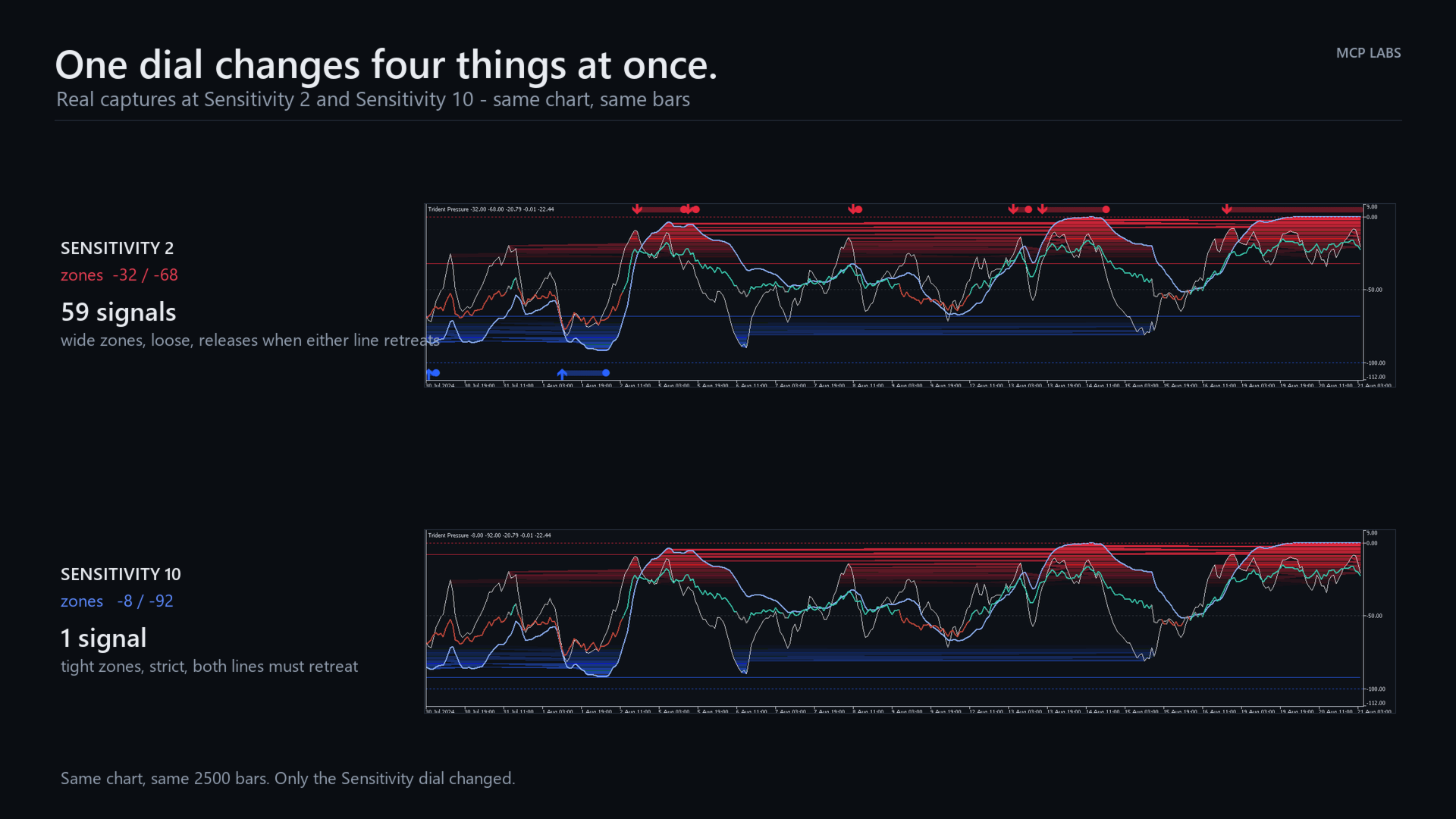
One dial does most of the work. Sensitivity is not a threshold — it moves four things together: where the zones sit, how far price must retreat to release, how many consecutive bars confirm an entry, and at its lowest settings whether release needs both lines to retreat or just one. 1 is loose and jumpy by design. 5 is balanced. 10 is strict and patient. Start at 7.

Everything else is exposed and documented across ten groups: three for the engine, plus colours, visibility, markers, dashboard, alerts and performance.

Alerts

Pressure release, pressure start, and Pulse/Trend crosses. Popup, push notification, email or sound, each independently switchable, with an option to signal only on closed bars.

Built properly

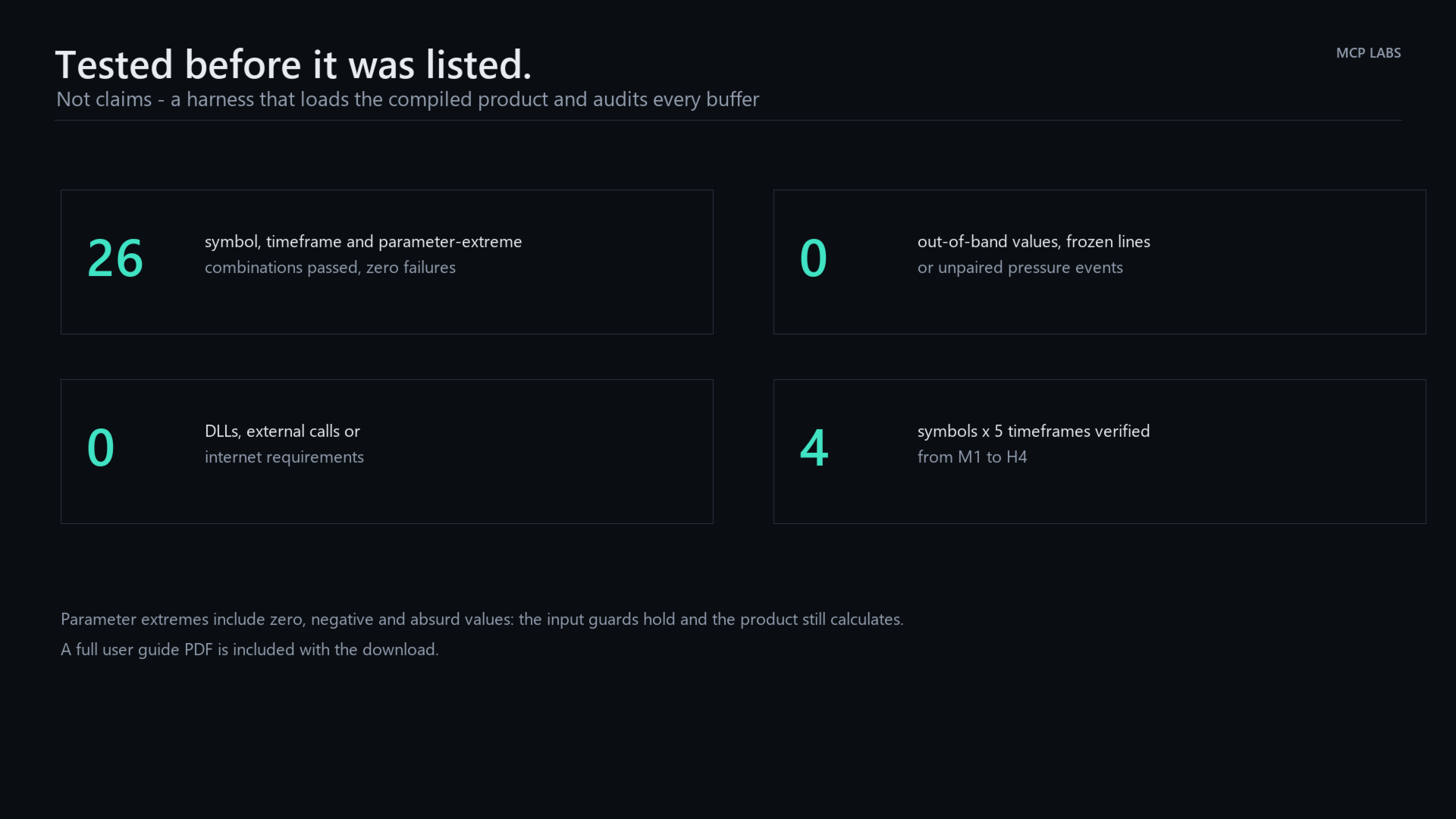
  • Verified across 27 symbol, timeframe and parameter-extreme combinations with zero failures
  • No DLLs, no external calls, no internet requirement
  • Recursive state is held per bar, so re-running the live bar cannot drift
  • Dashboard repaints on bar turn and state change, throttled otherwise
  • Removes every object it creates when you take it off the chart

A full user guide PDF is included with the download.

Input parameters

1. Z-Pulse

  • Pulse Range (21) — primary range window. Lower reacts faster to local range position.
  • Pulse Stochastic (9) — stochastic window applied to the fast range reading. Lower is more reactive.
  • Pulse Smoothing (7) — EMA smoothing of Z-Pulse. 1 leaves the pulse raw.

2. Z-Trend

  • Trend Range (55) — medium horizon used to measure structural range position.
  • Macro Trend (120) — long horizon. Carries the largest internal weight and gives Z-Trend its character.
  • Trend Smoothing (5) — final smoothing. Higher is steadier.
  • Trend Persistence (9.0) — how strongly repeated occupation of an outer zone pulls the line.

3. Pressure Exhaustion

  • Exhaustion Zone (20) — base width of the upper and lower pressure zones.
  • Sensitivity (7) — 1 to 10. Moves the zone, the release distance, the entry confirmation and, at 1 and 2 only, whether release needs both lines or just one. 1 is loose and jumpy by design; 10 is strict and patient.
  • Pulse / Trend Crosses (off) — mark crossovers between the two lines.

4. Pressure Core

  • Reactive Smoothing (16) — calms the reactive component.
  • Regime Weight (0.65) — balance between the slow regime read and reactive pressure.

5. Colours and Style

  • Cold / Hot — the two directional colours used throughout.
  • Upper Level, Lower Level, Level Transparency — the pressure level lines.
  • Z-Pulse, Z-Trend — line colours.
  • Core Bull, Core Bear, Core Neutral, Core Width — Pressure Core styling.
  • Gradient Fill (on) — fade the space between Z-Pulse and Z-Trend inside the pressure zones.
  • Price Boxes (on) and max kept (60) — draw the exhaustion boxes on the chart, and how many to retain.

6. Visibility

  • Show Z-Pulse, Show Z-Trend, Show Pressure Core, Show Pressure Levels, Show Pressure Markers — switch any layer off independently.
  • Lock Pane Scale (on) — hold the pane at a fixed -112 to 9 so the geometry does not shift.

7. Markers

  • Wingdings codes for the active/release dot (108), lower start (233) and upper start (234), plus Marker size. Change these to any glyph you prefer.

8. Dashboard

  • Show Dashboard, Corner, X offset, Y offset — placement.
  • Dashboard on main chart window — or put it in the indicator pane instead.
  • Dashboard font and numeric font.

9. Alerts

  • Terminal popup, Push notification, Email, Sound and Sound file — delivery.
  • Only signal closed bars (on) — recommended. With it off a state can open and close inside one bar.
  • Alert: pressure release (on), pressure start, Pulse / Trend cross — which events fire.

10. Engine

  • Max bars to calculate (5000, 0 = all) — bound the history pass on very long charts.

Note

Trident Pressure is a measurement tool. It reads pressure and tells you when a pressure state has released. It does not predict, and it is not a trading system on its own. Test on a demo account until you understand how it behaves on the instruments and timeframes you actually trade. Trading carries risk of loss.
Mais do autor
Apex Drawdown Zero
Tshivhidzo Moss Mbedzi
Apex Drawdown Zero V9 — Gold & Forex Trading Robot (XAUUSD, EURUSD, EURJPY) with Prop Firm Protection | MT5 Apex Drawdown Zero is a selective, fully automated trading robot for MetaTrader 5, designed for traders who prioritize controlled exposure and drawdown protection over constant market activity. It trades XAUUSD, EURUSD and EURJPY on the H1 timeframe, with a maximum of one qualified trade per day, percentage-based position sizing and a structural stop-loss attached from the moment of entry.
SMC Fibonacci OTE
Tshivhidzo Moss Mbedzi
SMC Fibonacci OTE: Professional Market Structure & Optimal Entry Tool SMC Fibonacci OTE is a high-precision technical indicator for MetaTrader 5 designed for traders following Smart Money Concepts (SMC) . It automates the detection of market structure shifts and identifies the high-probability Optimal Trade Entry (OTE) zone, providing you with clear entry, stop loss, and multiple take-profit levels. By eliminating manual Fibonacci drawing, this indicator ensures consistency and helps you stay fo
Super Signals Channel
Tshivhidzo Moss Mbedzi
Super Signals Channel Indicator Its channel is a non-repaint indicator that reacts more with recent price movements. For this reason, the Super Signals Channel Indicator is a better match for short-term or day trading strategy. The Super Signals Channel only plots swing trading opportunities. So most of its trade signals appear during consolidation or sidelined periods of the market. Super Signals Channel Indicator for MT4 Explanation The green band below the price shows the dynamic support le
FTMO Smart Trader EA
Tshivhidzo Moss Mbedzi
4 (3)
**FTMO Smart Trader EA: The Professional Algorithmic Solution for Prop Firm Success** Achieve a disciplined edge in the EURUSD market with the FTMO Smart Trader EA. Engineered specifically for traders navigating proprietary firm challenges—such as FTMO, Funded Next, and My Forex Funds—this MetaTrader 4 Expert Advisor prioritizes consistency, capital preservation, and strict adherence to professional risk management standards. ### **Strategic Trading Methodology** The FTMO Smart Trader EA uti
Atm Gbpusd Robot v1
Tshivhidzo Moss Mbedzi
Atm Gbpusd Robot v1 is an Expert Advisor for MetaTrader 4. It trades the GBP/USD currency pair on the M15 timeframe and requires no manual intervention after it is attached to the chart. [FILL IN - HOW THE ROBOT WORKS. Describe in two or three plain sentences what the Expert Advisor measures and when it opens a position: which indicators or price conditions are used, whether it trades with the trend or against it, and whether it trades at any time or only during certain hours. The description
Super Signals Channel Indicator A professional non-repainting channel indicator designed for swing trading and short-term trading strategies. The indicator identifies dynamic support and resistance levels and generates clear buy/sell signals with visual arrows on the chart. KEY FEATURES • Non-Repainting Signals - All signals remain fixed once generated • Dynamic Channel Bands - Automatically adjusts to market volatility • Clear Visual Arrows - Green arrows for buy signals, red arrows for sell si
Auzar
Tshivhidzo Moss Mbedzi
5 (1)
Auzar MT5 – AI Prop Firms Forex Robot for Gold (XAUUSD) Scalping The Auzar MT5 Expert Advisor is a next-generation AI-powered trading system developed for MetaTrader 5 (MT5) . It provides a scalping solution for Gold (XAUUSD) , specifically engineered to meet the requirements of prop firm trading environments such as FTMO , Funded Next , and My Forex Funds (MFF) . Built on neural network technology , Auzar adapts dynamically to evolving market conditions, delivering precision, consistency, and
F T M O Range Breakout Pro MT5
Tshivhidzo Moss Mbedzi
1 (1)
FTMO Range Breakout Pro is a professionally developed Expert Advisor designed for breakout trading in structured environments such as evaluation accounts. Built for MetaTrader 5, it adapts to varying broker conditions using a proprietary range detection algorithm and risk control system. This EA offers configurable settings tailored for traders who aim to follow strict drawdown and execution criteria often found in prop firm accounts. Key Features Smart Range Detection – Dynamically identifies a
Gold Maximizer
Tshivhidzo Moss Mbedzi
Gold Maximizer is an Expert Advisor for MetaTrader 5 that trades support and resistance breakouts on XAUUSD. It combines nine independent breakout strategies on one chart. Each strategy works on its own timeframe, watches its own price levels, and opens at most one position at a time. Trading strategy The EA identifies recent highs and lows over different lookback periods and places pending stop orders beyond those levels. When price breaks out of its recent range, the pending order is trigge
SessionsPro
Tshivhidzo Moss Mbedzi
Sessions Pro is a trading sessions indicator for MetaTrader 5 that draws the London, New York, Tokyo and Sydney sessions with their high/low ranges, session VWAP, an economic calendar news filter, a candle countdown timer and a live dashboard panel. One indicator instead of the five most traders stack on a chart. It works on any symbol - forex, indices, metals, crypto - on every timeframe from M1 to H12. All four sessions are fully configurable: rename them, change their hours, restrict them t
Regression Breakout Map
Tshivhidzo Moss Mbedzi
Regression Breakout Map is a breakout indicator for MetaTrader 5 built around an adaptive linear regression channel. It finds periods where volatility has contracted, marks the breakout when price leaves the channel, and then draws the complete trade map on your chart: entry, stop loss, and a TP1 / TP2 / TP3 target ladder with a stop that ratchets forward as each target is reached. It works on any symbol - forex, indices, metals, crypto - on every timeframe from M1 to H12, and it does not repa
SMC Reversal Map
Tshivhidzo Moss Mbedzi
SMC Reversal Map is a Smart Money Concepts (SMC) indicator for MetaTrader 5 that marks change of character reversals - the moment market structure breaks and the trend in control loses it. It does something most SMC tools do not: before it shows you a signal, it looks up how the most similar setups in your chart's own history actually turned out, and tells you the result as a confidence score you can act on. It works on any symbol - forex, indices, metals, crypto - on every timeframe, and it d
Cheetah Gold Scalper
Tshivhidzo Moss Mbedzi
Cheetah Gold Scalper - XAUUSD Expert Advisor for MetaTrader 5 Tick-based gold scalping robot for MT5. Intraday XAUUSD scalper with no martingale, no grid, and a stop loss on every position. Two trades per day. Cheetah Gold Scalper is an automated trading robot for XAUUSD on MetaTrader 5 (MT5). It trades one situation: the point where a fast move in gold loses momentum. When price travels a set distance within about a minute and is still accelerating, the EA opens against the move, adds at mos
Savanna Gold Trend
Tshivhidzo Moss Mbedzi
Savanna Gold Trend - XAUUSD Expert Advisor for MetaTrader 5 Trend-continuation trading robot for gold on MT5. Pyramids into a running move, never averages down, stop loss on every position. Savanna Gold Trend is an automated trading robot for XAUUSD on MetaTrader 5 (MT5). It waits for price to break out of its recent range in the direction of the higher timeframe trend, opens a position, and then adds further positions only while that move keeps running in profit. Each position is then manage
Apex Helios
Tshivhidzo Moss Mbedzi
APEX HELIOS - ONE QUALIFIED TRADE PER DAY ON GOLD Most gold robots trade constantly. Apex Helios does the opposite. It maps the opening range of each session, waits for one qualified break from that range, and then does nothing for the rest of the day. If no setup meets its quality thresholds, it does not trade at all. One position at a time. A stop loss attached from the moment it opens. Risk on any single trade capped by design. BUILT FROM A TRADE LOG, NOT FROM AN IDEA Version 11 is no
Filtro:
Sem comentários
Responder ao comentário