AvgPriceWithLines
- Indicadores
- Versão: 1.22

Average Position Price Monitor is a position information indicator designed for MetaTrader 5.
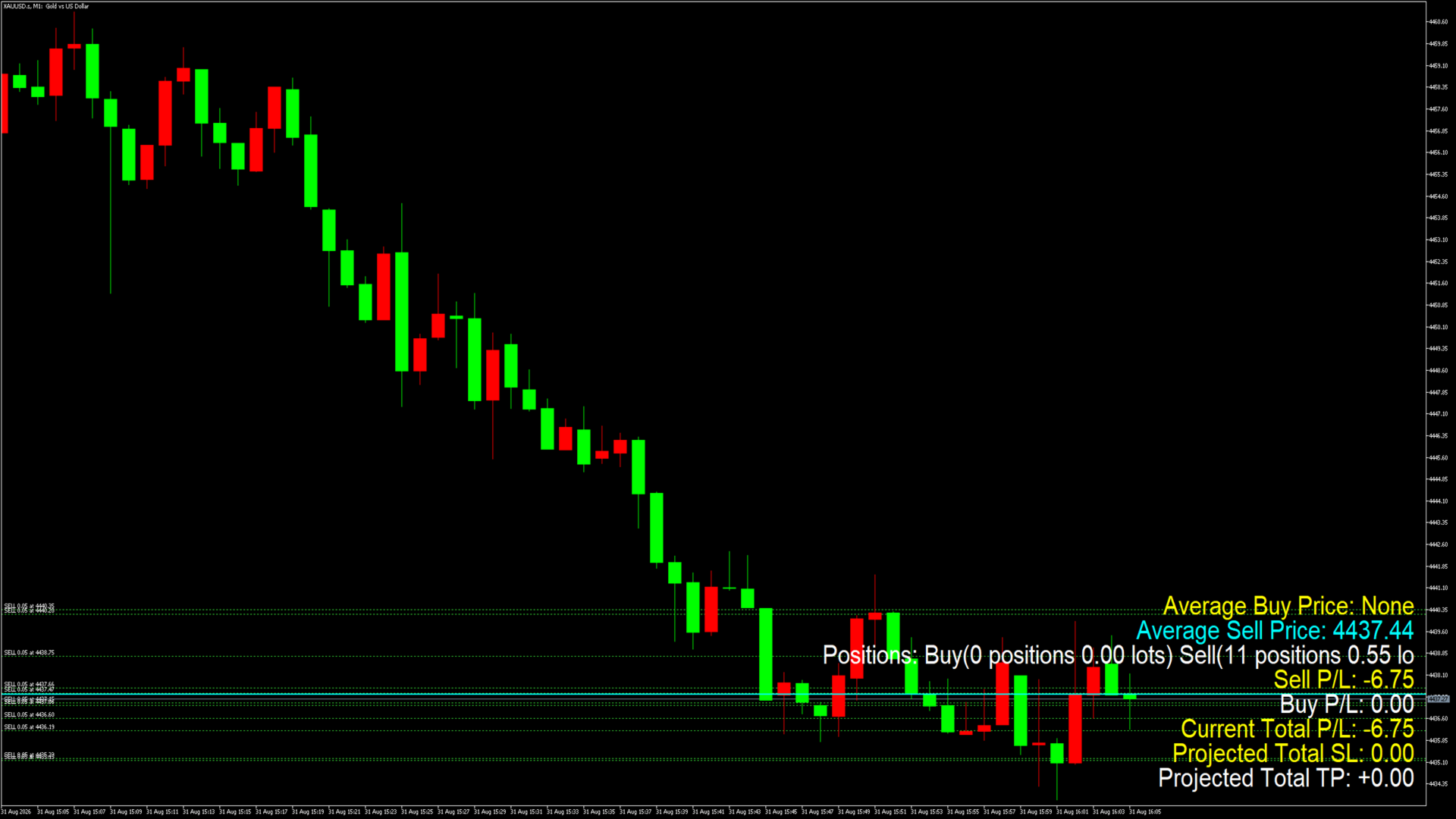
When multiple BUY or SELL positions are open on the same symbol, the indicator automatically calculates the volume-weighted average entry price for each direction and displays important position, profit/loss, Stop Loss and Take Profit information directly on the chart.
The indicator is designed to help traders manage multiple positions without checking every individual position manually.
Main Features
Volume-Weighted Average BUY Price
When multiple BUY positions are open on the current symbol, the indicator calculates their volume-weighted average entry price.
The calculated price can be:
-
Displayed in the information panel
-
Displayed as a horizontal line on the chart
-
Updated automatically when positions change
This provides a clear view of the overall average entry price of all BUY positions.
Volume-Weighted Average SELL Price
SELL positions are calculated independently using the same volume-weighted method.
BUY and SELL positions are not combined, allowing traders to monitor:
-
Average Buy Price
-
Average Sell Price
independently when both directions are open.
Current Position Profit/Loss
The indicator displays:
-
Current Total P/L
-
Buy P/L
-
Sell P/L
The current P/L calculation includes floating position profit/loss and Swap.
Trading commissions are not included in the current floating P/L calculation.
Estimated Stop Loss Amount
If Stop Loss levels are assigned to open positions, the indicator estimates the combined amount at those Stop Loss levels based on:
-
Position entry price
-
Stop Loss price
-
Position volume
-
Symbol Tick Size
-
Symbol Tick Value
This allows traders to quickly review the financial exposure represented by their currently configured Stop Loss levels.
Estimated Take Profit Amount
If Take Profit levels are assigned to open positions, the indicator estimates the combined amount at the configured Take Profit levels.
This can be useful when several positions are open and calculating every individual TP amount manually would be inconvenient.
Position Count and Volume
The information panel separately displays the number of positions and total trading volume for:
BUY positions:
-
Number of positions
-
Total lots
SELL positions:
-
Number of positions
-
Total lots
Bilingual Interface
The indicator supports two display languages:
-
Traditional Chinese
-
English
The display language can be selected directly from the indicator input parameters.
The information panel and average-price line descriptions are updated according to the selected language.
Chart Information
The indicator can display:
-
Average Buy Price line
-
Average Sell Price line
-
Average Buy Price
-
Average Sell Price
-
BUY position count
-
SELL position count
-
BUY total volume
-
SELL total volume
-
BUY P/L
-
SELL P/L
-
Current Total P/L
-
Estimated Total SL Amount
-
Estimated Total TP Amount
The displayed information is automatically updated according to the current positions.
Adjustable Parameters
Users can configure:
-
Display Language
-
Buy Color
-
Sell Color
-
Profit Color
-
Loss Color
-
Line Width
-
Font Size
-
Font Name
-
Horizontal Offset
-
Vertical Offset
-
Show Average Price Lines
-
Show Information Panel
These settings make it possible to adapt the indicator to different chart layouts and personal preferences.
Typical Uses
Average Position Price Monitor can be useful for:
-
Multiple-entry trading
-
Position scaling
-
Grid-style position management
-
Scaling in and scaling out
-
Manual trading
-
Semi-automatic trading
-
Simultaneous BUY and SELL positions
-
Monitoring average position cost
-
Reviewing combined SL and TP amounts
How to Use
-
Attach the indicator to the MT5 chart you want to monitor.
-
The indicator automatically reads open positions for the current chart symbol.
-
If BUY positions exist, BUY average price and related statistics are displayed.
-
If SELL positions exist, SELL average price and related statistics are displayed.
-
The displayed information updates automatically when positions change.
No manual entry of position prices or trading volumes is required.
Important Information
This product is a position information and visualization indicator.
It does not:
-
Open trades automatically
-
Close trades automatically
-
Modify positions
-
Modify Stop Loss levels
-
Modify Take Profit levels
-
Generate entry or exit signals
Estimated Stop Loss and Take Profit amounts are calculated using the available position data, configured SL/TP levels and the trading specifications of the current symbol.
Actual trading results may differ due to Spread, Slippage, Commission, Swap, broker execution conditions and other market factors.
Users should verify calculations according to their own broker and trading environment.