Obsidian Alpha
- Experts
- Versão: 1.2
- Atualizado: 13 outubro 2026
- Ativações: 5

Precision Trading System with Limit-Order Entries
Obsidian Alpha is an Expert Advisor built around confirmed trend signals, limit-order entries at predefined price levels, and a two-stage trailing mechanism.
1. Overview
Most Expert Advisors enter the market using instant market orders, accepting whatever price is available when a trading signal is triggered.
Obsidian Alpha takes a different approach.
The Expert Advisor:
-
Identifies a confirmed trend signal.
-
Does not enter the market immediately.
-
Places a pending Buy Limit / Sell Limit order.
-
Waits for the market to reach the predefined entry level.
-
Once the order is executed, manages the resulting position using a separate trailing mechanism.
This means the entry is executed at a predefined, controlled price level, rather than at whatever price happens to be available when the signal is generated.
The system combines:
-
ADX trend-strength filtering;
-
ATR volatility analysis;
-
an asymmetric entry channel;
-
a limit-order execution model;
-
dedicated trailing for pending orders;
-
independent trailing for open positions;
-
position sizing and position-chain management;
-
overall exposure and risk controls.
Core principle: entry discipline is just as important as exit discipline.
2.1. Volatility Foundation
SignalATRLength measures current market volatility using ATR and provides the basis for constructing the entry channel.
2.2. Trend-Strength Filter
SignalADXThreshold defines the minimum trend strength required for a setup to be considered valid.
This allows flat and directionless market conditions to be filtered out at an early stage of signal formation.
2.3. Separate Entry and Exit Confirmation
SignaADXOpenConfirmation and SignaADXExitConfirmation are evaluated independently.
This allows the system to use separate trend-strength requirements for entering and maintaining a position.
| Parameter | Purpose |
|---|---|
| SignaADXOpenConfirmation | Trend strength required for entry |
| SignaADXExitConfirmation | Trend strength required to maintain the position |
The system therefore does not rely on a single shared threshold for both functions.
2.4. Channel Construction
SignalUpperMultiplier and SignaLowerMultiplier asymmetrically scale the ATR channel around the current price.
This allows the system to:
-
configure the upper and lower boundaries independently;
-
account for differences in upward and downward price behavior;
-
avoid relying on a symmetrical channel.
2.5. Secondary Confirmation
SignalOverboughtLevel and SignalMeasure provide an additional layer of setup validation.
They help filter out situations that may appear valid according to the primary channel but fail the additional measurement criteria.
2.6. Adaptive Threshold
SignalThreshold controls the sensitivity of the overall signal block.
Instead of relying on a single rigid static threshold, it allows the signal conditions to be fine-tuned from bar to bar.
The Core Execution Architecture of Obsidian Alpha
Step 1. Signal Confirmation
Once the signal block confirms a valid setup, the Expert Advisor does not enter the market immediately.
Instead, it places a pending limit order:
-
Buy Limit — for long positions;
-
Sell Limit — for short positions.
The initial distance from the current market price is defined by:
LevelStart
This approach is designed to seek a more favorable entry price than immediate market execution.
Step 2. Pending-Order Trailing
While the limit order remains pending, the following mechanism can be enabled:
-
TrailPendingActive — activates pending-order trailing;
-
TrailPending — defines the trailing step.
As the market moves, the Expert Advisor can reposition the pending order in accordance with price movement, keeping the intended entry level relevant to current market conditions.
This helps prevent the original limit order from becoming obsolete and remaining far behind a market that has already moved away.
Step 3. Execution and Position Trailing
Once the pending limit order is filled, it becomes an active market position.
At this stage, the second, independent trailing mechanism is activated:
TrailingEngineActive
The trailing engine becomes active once floating profit reaches:
TrailEngagementDistance
The position is then managed using:
TrailStepPoints
Important
Pending-order trailing and open-position trailing represent two separate stages of trade management.
| Stage | Mechanism | Key Parameters |
| Before execution | Pending-order trailing | TrailPendingActive, TrailPending |
| After execution | Position trailing | TrailingEngineActive, TrailEngagementDistance, TrailStepPoints |
Step 4. Profit and Loss Boundaries
The resulting position is managed using:
-
ProfitCeilingPoints — working Take Profit;
-
LossFloorPoints — working Stop Loss.
This provides predefined boundaries for both potential profit and potential loss.
4.1. Position Sizing
The Expert Advisor supports two approaches to position sizing.
Fixed Position Size
Uses:
BaseContractSize
Automatic Position Sizing
When:
AutoCapitalRegulationOn
is enabled, position size is calculated based on:
CapitalExposureRatio
This allows trading exposure to be adjusted relative to account balance.
4.2. Position-Chain Management
If price continues moving through the signal zone, the Expert Advisor can add additional positions.
The maximum chain depth is defined by:
PositionChainDepth
The size of each subsequent position can be scaled using:
AllocationScalingExponent
The deeper the position chain, the greater the potential total exposure. Risk should therefore be evaluated across the entire possible position sequence, not only by the initial position size.
4.3. Correction During Extended Position Chains
CorrectionStrategy
controls the correction mechanism applied as the position chain becomes longer.
Value:
0 — disabled.
When enabled, stop distances can be progressively tightened as the chain grows, allowing the system to automatically reduce risk during unusually extended sequences.
4.4. Directional Exposure Control
Long and short exposure can be enabled or disabled independently.
| Parameter | Direction |
| LongExposureEnabled | Long positions |
| ShortExposureEnabled | Short positions |
This allows the Expert Advisor to operate in both directions or exclusively in one market direction.
Obsidian Alpha includes dedicated execution parameters to accommodate different broker and trading environments.
Strategy Identification
StrategyInstanceID
Unique identifier for the strategy instance.
ExecutionTag
Order comment used to identify and classify trades.
Together, these parameters allow Obsidian Alpha to maintain clean separation when multiple strategy instances or trading systems operate within the same portfolio or account.
Execution Policy
FillExecutionPolicy
An MT5-specific parameter that allows the appropriate order filling policy to be selected according to broker requirements.
ECN Mode
InstitutionalExecutionMode
Enables an ECN-style execution mode for brokers or trading environments where this execution model is required.
Before Deployment
Before using the Expert Advisor on a live account, it is recommended to:
-
test it on the intended trading instrument;
-
verify its behavior on the target timeframe;
-
use real-tick testing whenever available;
-
verify the execution of limit orders;
-
separately evaluate the behavior of both trailing mechanisms.
Signal-Block Calibration
The ATR / ADX parameters and channel multipliers should be calibrated according to the volatility and characteristics of the specific instrument being traded.
A parameter set optimized for one instrument should not automatically be transferred to another without additional testing.
Limit-Entry Calibration
LevelStart and the pending-order trailing parameters should be treated as a unified system.
Together, they determine how patiently the strategy waits for a favorable entry opportunity.
For this reason, these parameters should ideally be calibrated together rather than independently.
Position-Chain Risk Assessment
When using multiple sequential entries, particular attention should be paid to:
-
PositionChainDepth;
-
AllocationScalingExponent;
-
base position size;
-
potential total exposure;
-
distance to protective levels.
Risk is not determined solely by the first position — it can increase substantially as the position chain expands.
Transition to Live Trading
A recommended deployment sequence is:
Backtesting → Demo Account → Behavioral Analysis → Parameter Adjustment → Live Trading
On a demo account, particular attention should be given to:
-
limit-order behavior;
-
pending-order repositioning;
-
trailing activation timing;
-
position-chain behavior;
-
actual total exposure.
| Category | Parameter | Purpose |
| Signal | SignalATRLength | ATR period |
| Signal | SignalADXThreshold | Minimum trend strength |
| Signal | SignaADXOpenConfirmation | Trend-strength confirmation for entry |
| Signal | SignaADXExitConfirmation | Trend-strength confirmation for exit/position maintenance |
| Channel | SignalUpperMultiplier | Upper channel multiplier |
| Channel | SignaLowerMultiplier | Lower channel multiplier |
| Confirmation | SignalOverboughtLevel | Additional filtering level |
| Confirmation | SignalMeasure | Secondary signal measurement |
| Adaptive | SignalThreshold | Signal-block sensitivity |
| Entry | LevelStart | Initial limit-entry distance |
| Pending Trailing | TrailPendingActive | Enables pending-order trailing |
| Pending Trailing | TrailPending | Pending-order trailing step |
| Position Trailing | TrailingEngineActive | Enables position trailing |
| Position Trailing | TrailEngagementDistance | Profit threshold for trailing activation |
| Position Trailing | TrailStepPoints | Position trailing step |
| Exit | ProfitCeilingPoints | Take Profit |
| Exit | LossFloorPoints | Stop Loss |
| Position Sizing | BaseContractSize | Base fixed position size |
| Position Sizing | AutoCapitalRegulationOn | Enables automatic position sizing |
| Position Sizing | CapitalExposureRatio | Capital exposure ratio |
| Position Chain | PositionChainDepth | Maximum position-chain depth |
| Position Chain | AllocationScalingExponent | Position-size scaling factor |
| Risk | CorrectionStrategy | Risk correction during extended chains |
| Direction | LongExposureEnabled | Enables long exposure |
| Direction | ShortExposureEnabled | Enables short exposure |
| Identification | StrategyInstanceID | Strategy instance ID |
| Identification | ExecutionTag | Order identification/comment |
| Execution | FillExecutionPolicy | MT5 order filling policy |
| Execution | InstitutionalExecutionMode | ECN-style execution mode |
⚠️ Important Risk Information
Trading financial markets involves a significant risk of capital loss.
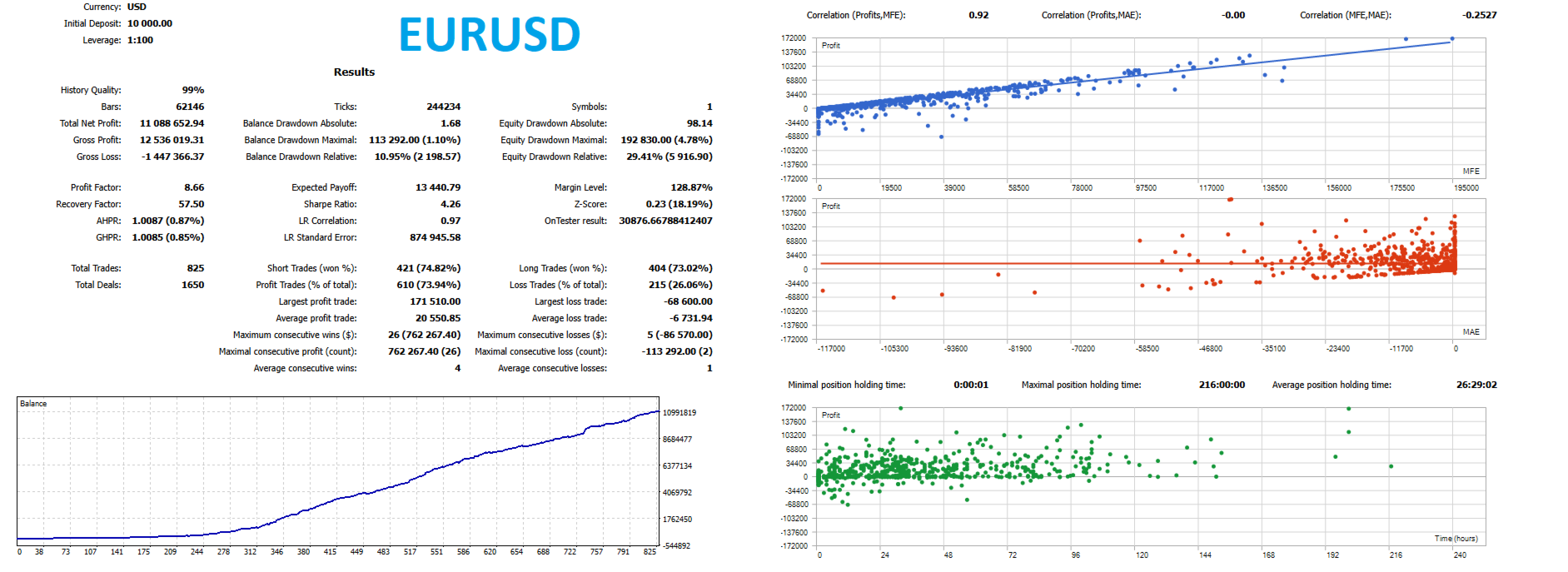
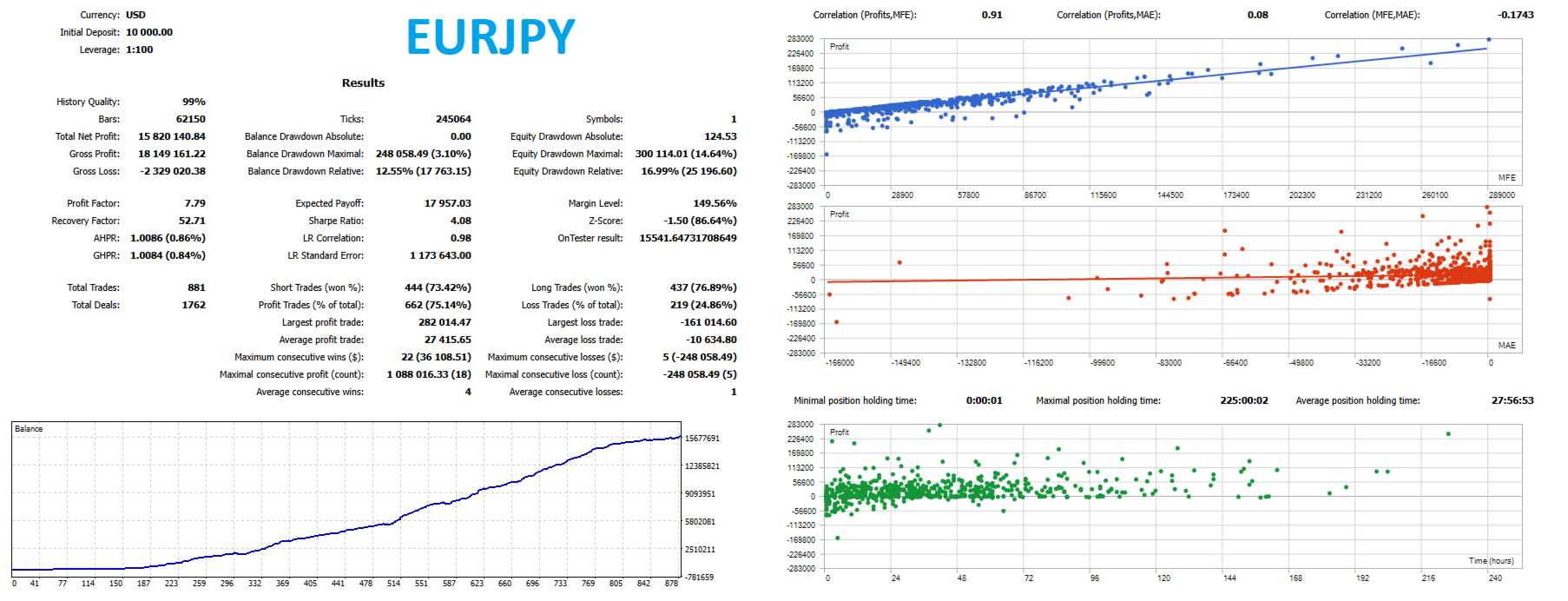
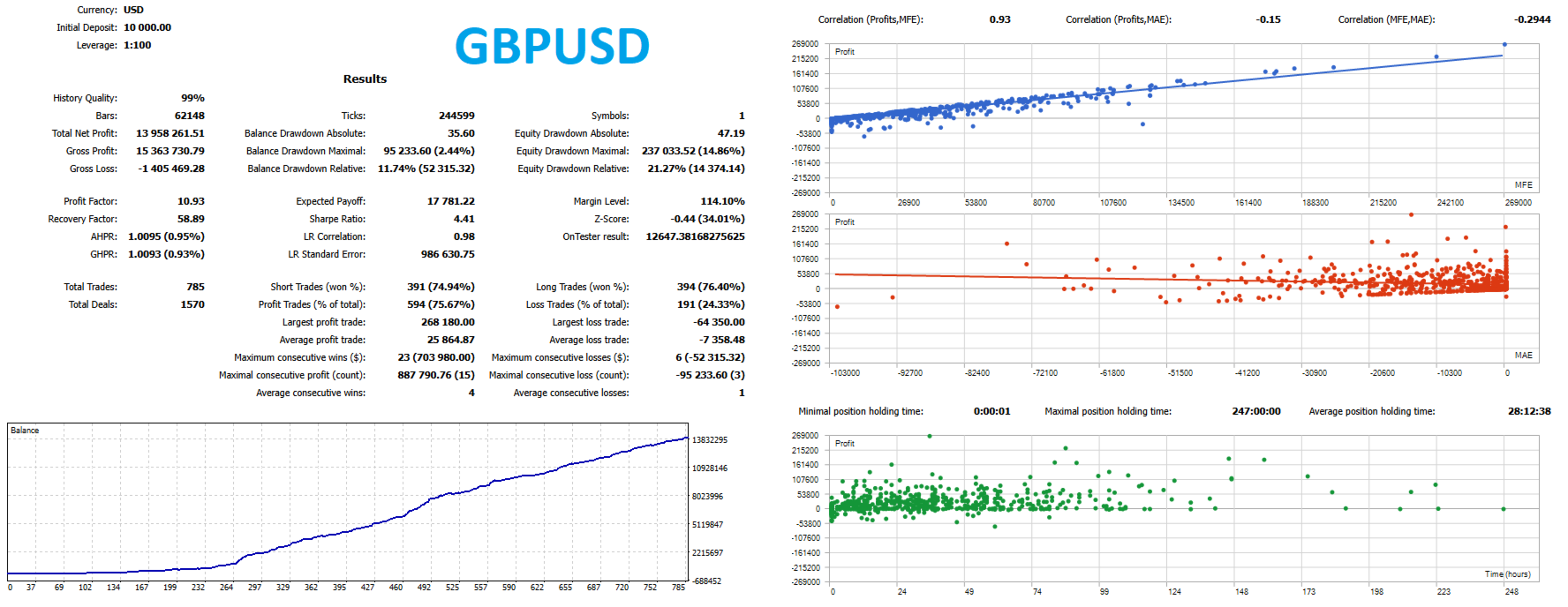
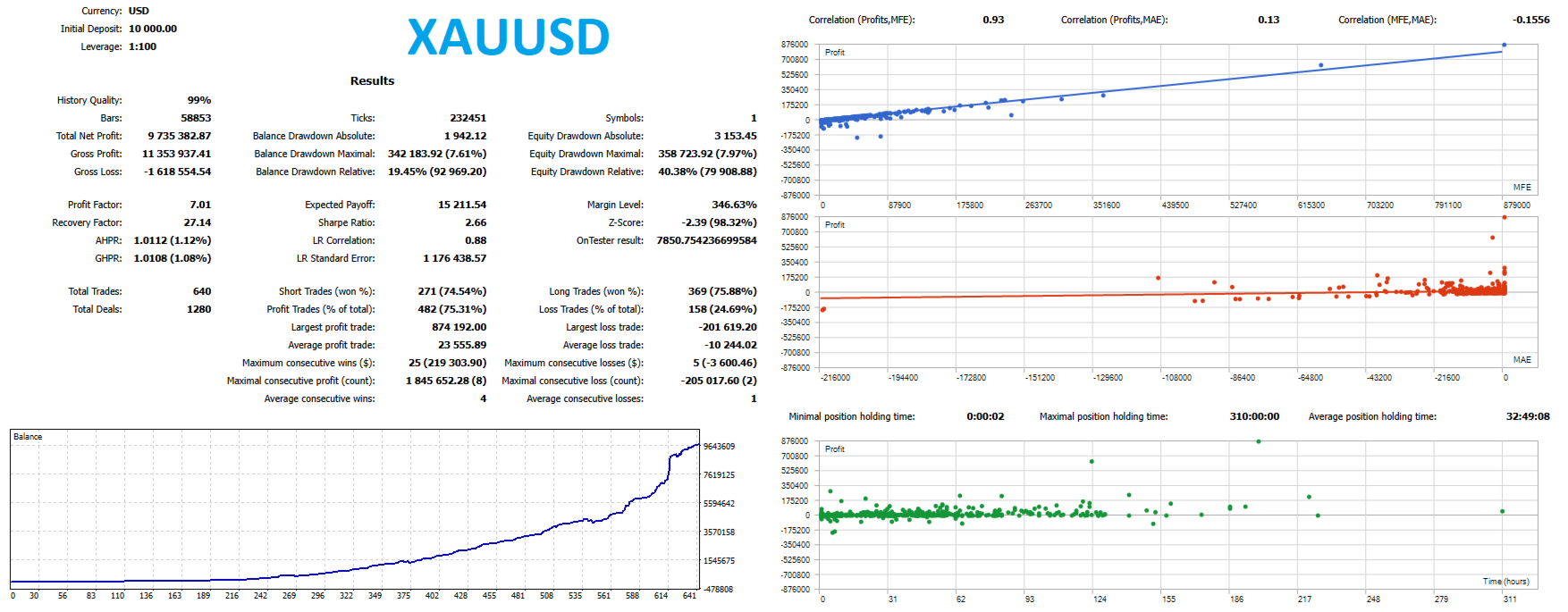
Results obtained from historical data in a strategy tester do not guarantee comparable results in live trading.
Before deploying Obsidian Alpha on a live account, thoroughly test the Expert Advisor on a demo account and ensure that:
you fully understand the strategy logic;
the position-sizing methodology is consistent with your risk profile;
PositionChainDepth and AllocationScalingExponent do not create unacceptable total exposure;
limit orders are executed correctly under your broker's trading conditions;
Stop Loss and Take Profit parameters are consistent with your overall risk-management framework.
Only use a level of risk that you are prepared and financially able to accept.
ATR + ADX Signal
↓
Setup Confirmation
↓
Buy Limit / Sell Limit
↓
Pending-Order Trailing
↓
Limit Order Execution
↓
Active Position
↓
Position Trailing
↓
Take Profit / Stop Loss / Strategy-Based Exit
Obsidian Alpha does not treat the entry price as a given. The system identifies a qualified setup, defines a controlled entry level, and waits for the market to come to that level.