MTCommander

MTCommander - MT4 Manual Trading Panel and Trade Management Assistant

============================================================
Short Market Description
============================================================

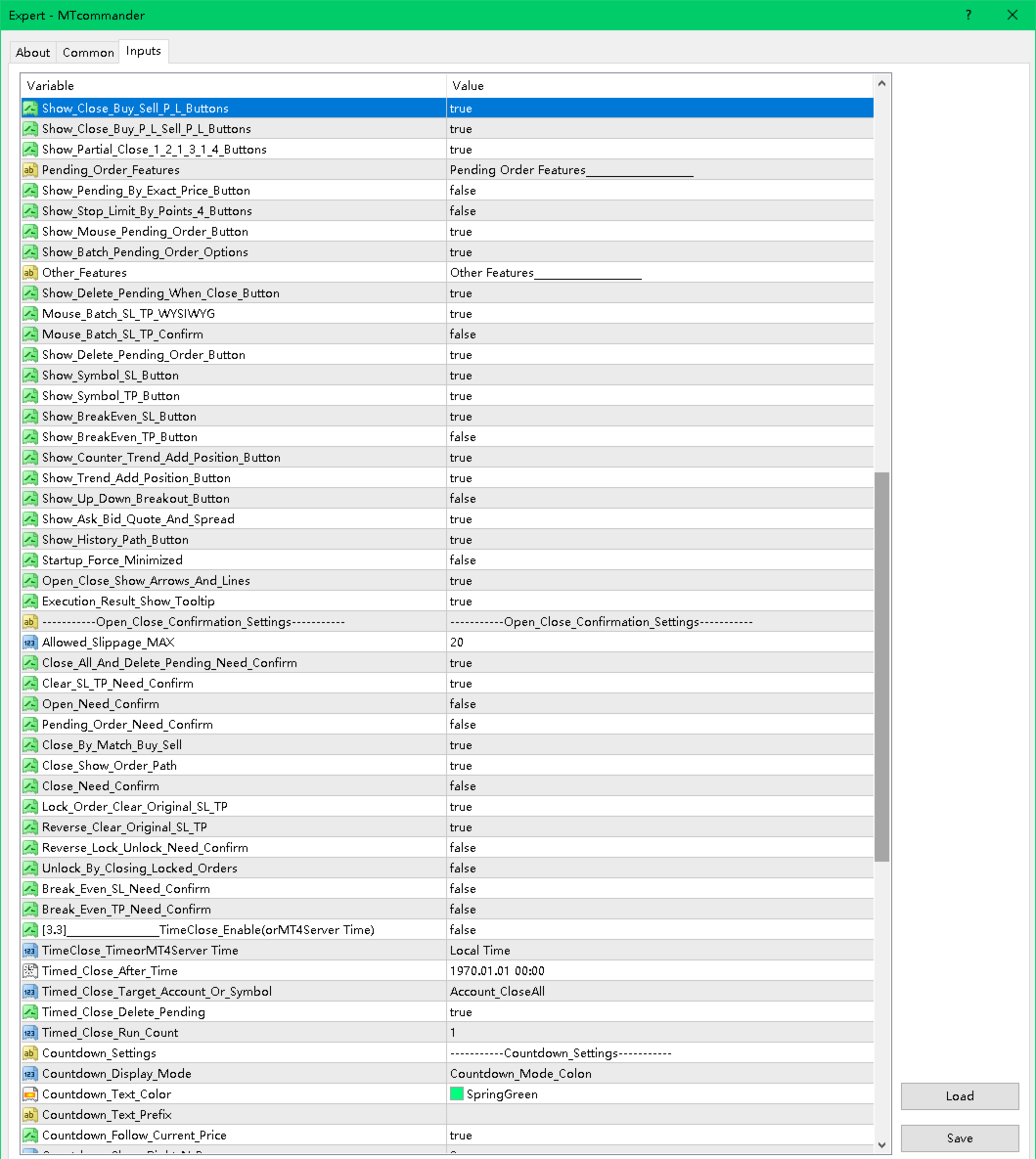
MTCommander is a professional manual trading panel for MetaTrader 4.

It helps traders open, close, protect and manage positions directly from the chart. The panel includes one-click market execution, pending order tools, partial close tools, break-even stop loss, trailing stop loss, batch SL/TP tools, account and symbol protection rules, and practical trade management shortcuts.

MTCommander is not a signal robot and does not predict market direction. It is a trading utility for faster manual execution and structured trade management. Please test all functions on a demo account before using it on a live account.


============================================================
Product Overview
============================================================

MTCommander is installed as an Expert Advisor because MT4 chart panels must run through an EA container. Its purpose is trade management, not market prediction.

The tool is designed for traders who want a compact control panel on the chart instead of switching between many MT4 windows and order dialogs. Most common trade operations can be executed from the panel:

- Open Buy or Sell positions.
- Close positions by symbol, account, direction, profit, loss, magic number or comment.
- Place pending orders by exact price, distance in points, mouse position or batch/grid rules.
- Apply or delete stop loss and take profit.
- Move positions to break-even.
- Run trailing stop loss tools.
- Partially close positions.
- Reverse, lock or unlock positions.
- Monitor account balance, equity, spread and selected position information.
- Use account-level and symbol-level protection tools.

The Market version is prepared for MQL5 Market requirements:

- No DLL import.
- No Windows API call.
- No external command execution.
- No PowerShell or Microsoft TTS dependency.
- Built-in MT4 sounds and alerts are used where applicable.


============================================================
Who It Is For
============================================================

MTCommander is suitable for:

- Manual traders who need faster order execution.
- Day traders and scalpers who frequently open, close or adjust positions.
- Traders who manage several positions on the same symbol.
- Traders who need fast partial close, close profit, close loss, reverse or hedge actions.
- Traders who use pending orders and want faster batch placement or deletion.
- Traders who want account-level and symbol-level protection tools on the chart.
- Traders who prefer visible controls instead of editing orders one by one in the MT4 terminal.

MTCommander is not intended to be used as a fully automatic profit-making strategy. It does not decide market direction for the user. The user is responsible for every trading decision and every enabled management rule.


============================================================
Main Features
============================================================

1. One-Click Market Trading

- Open Buy or Sell positions from the chart panel.
- Display Sell / Buy price areas with Short / Long action labels.
- Use fixed lot size or risk-based lot calculation.
- Use preset lot buttons for frequently used lot sizes.
- Support large lot split logic where enabled by settings.
- Show current spread and basic account information on the panel.

2. Position Closing Tools

- Close all positions on the current symbol.
- Close all account positions.
- Close Buy positions or Sell positions.
- Close profitable positions.
- Close losing positions.
- Close positions by magic number.
- Close positions by comment text.
- Close fixed total lot amount.
- Partial close tools such as close 1/2, close 1/3, close 1/4, close 2/3 and close 3/4.
- Directional profit/loss close buttons for Buy or Sell positions.

3. Reverse, Lock and Unlock

- Reverse current symbol exposure.
- Lock positions by opening opposite-side hedge positions.
- Unlock hedged positions where the user decides to release the hedge.
- These tools can change market exposure quickly, so they should be tested carefully before live use.

4. Pending Order Tools

- Place Sell Stop, Sell Limit, Buy Stop and Buy Limit pending orders by point distance.
- Place pending orders at an exact price.
- Place pending orders by mouse-selected price area.
- Create batch pending orders.
- Create grid-style pending order sets.
- Create breakout-style pending order sets.
- Delete all pending orders.
- Delete current symbol pending orders.
- Delete pending orders after symbol close or account close-all when the related option is enabled.

Terminology note:

In this manual, "position" means an already opened market trade. "Pending order" means an unfilled order such as Buy Stop, Sell Stop, Buy Limit or Sell Limit.

5. Stop Loss and Take Profit Tools

- Set stop loss or take profit by point distance.
- Set SL/TP for current symbol positions.
- Set SL/TP for all positions or selected direction.
- Choose average-price mode or each-position mode where supported.
- Choose EA-managed or server-side SL/TP where supported by the specific function.
- Delete pending-order SL or TP.
- Delete position SL or TP.
- Apply batch SL/TP by mouse-selected price.
- Apply batch SL/TP by exact price.

6. Break-Even and Trailing Tools

- Break-even SL tools for moving stop loss to a safer level after a trigger condition.
- Extra profit points can be kept beyond the entry price.
- Standard trailing stop loss.
- ATR-based trailing stop loss.
- MA-based trailing stop loss.
- Custom trailing stop loss options where enabled.
- Batch trailing stop loss management.
- Floating-loss take-profit exit tools.

7. Add-Position Tools

- Counter-trend add-position tools.
- Trend-following add-position tools.
- Batch add-position tools.
- Breakout add-position tools.
- Direction filters for All / Buy / Sell where supported.
- Distance, multiplier, extra lots and maximum count fields where supported.

These features can increase exposure. Use conservative settings and test them on a demo account first.

8. Account and Symbol Protection

- Account P/L percent trigger.
- Account P/L amount trigger.
- Account equity greater-than or less-than trigger.
- Account trailing amount protection.
- Symbol P/L amount trigger.
- Symbol P/L percent or money-based protection tools where enabled.
- Magic-number based P/L trigger.
- Daily or weekly timed close functions.
- Close-all and remove-EA style protection where supported.
- Blocking or force-close controls for selected risk situations.

Protection tools are not a substitute for a complete risk plan. They depend on terminal connection, broker execution, spread, slippage and account conditions.

9. Interface and Chart Tools

- Compact chart panel.
- Move panel by dragging.
- Minimize and restore panel.
- Hide unused UI elements.
- Show average price line.
- Show trade path or historical order path where enabled.
- Show Daily ATR information where enabled.
- Show server time and local information where supported.
- Built-in tooltips for many buttons and inputs.

10. Alerts and Sound

- MT4 alerts can be used for selected events.
- Built-in MT4 PlaySound-based sound behavior is used where applicable.
- The Market version does not use DLL-based TTS or external speech engines.


============================================================
Quick Start
============================================================

1. Install MTCommander from MQL5 Market.

2. Attach it to an MT4 chart.

3. Enable AutoTrading in MetaTrader 4.

4. Allow live trading for this Expert Advisor in the EA settings.

5. Check the panel position and display settings.

6. Check lot settings before placing any trade.

7. Start on a demo account.

8. Test the basic functions first:

- Open a small Buy or Sell position.
- Close the current symbol position.
- Place a small pending order.
- Delete the pending order.
- Apply and remove SL/TP.
- Test break-even and trailing tools with small size.

9. Move to a live account only after you understand how each enabled button and rule behaves.


============================================================
Typical Workflows
============================================================

Workflow 1: Open a Position With Fixed Lot

1. Select or type the lot size.
2. Confirm the current symbol and spread.
3. Click the Buy or Sell area.
4. Check the opened position in MT4 Terminal.

Workflow 2: Use Risk-Based Lot Calculation

1. Switch the lot mode to risk mode where enabled.
2. Enter the stop loss points or stop loss price.
3. Check the calculated lot value.
4. Open the position only after confirming the result.

Workflow 3: Close Positions Quickly

Use one of the closing tools depending on the target:

- Close current symbol positions.
- Close all account positions.
- Close Buy positions.
- Close Sell positions.
- Close profitable positions.
- Close losing positions.
- Close part of the position size.

Always confirm whether the action is for current symbol, account, direction, magic number or comment.

Workflow 4: Place Pending Orders

Choose one of the pending order methods:

- Distance in points: place pending orders by point distance from current price.
- Exact price: type the target price and choose Buy Pending or Sell Pending.
- Mouse pending: use chart price interaction where enabled.
- Grid or batch pending: create multiple pending orders by configured distance and count.

Check broker stop level, minimum distance and spread before using pending order tools.

Workflow 5: Apply Break-Even Stop Loss

1. Enable the break-even SL line or button.
2. Set trigger points.
3. Set extra profit points if needed.
4. Choose the direction or position scope where supported.
5. Monitor the result after price reaches the trigger.

Workflow 6: Use Trailing Stop Loss

1. Choose the trailing method.
2. Set trailing distance and step settings.
3. Confirm whether the tool applies to Buy, Sell or all positions.
4. Keep the terminal running while EA-managed trailing logic is active.


============================================================
Important Settings
============================================================

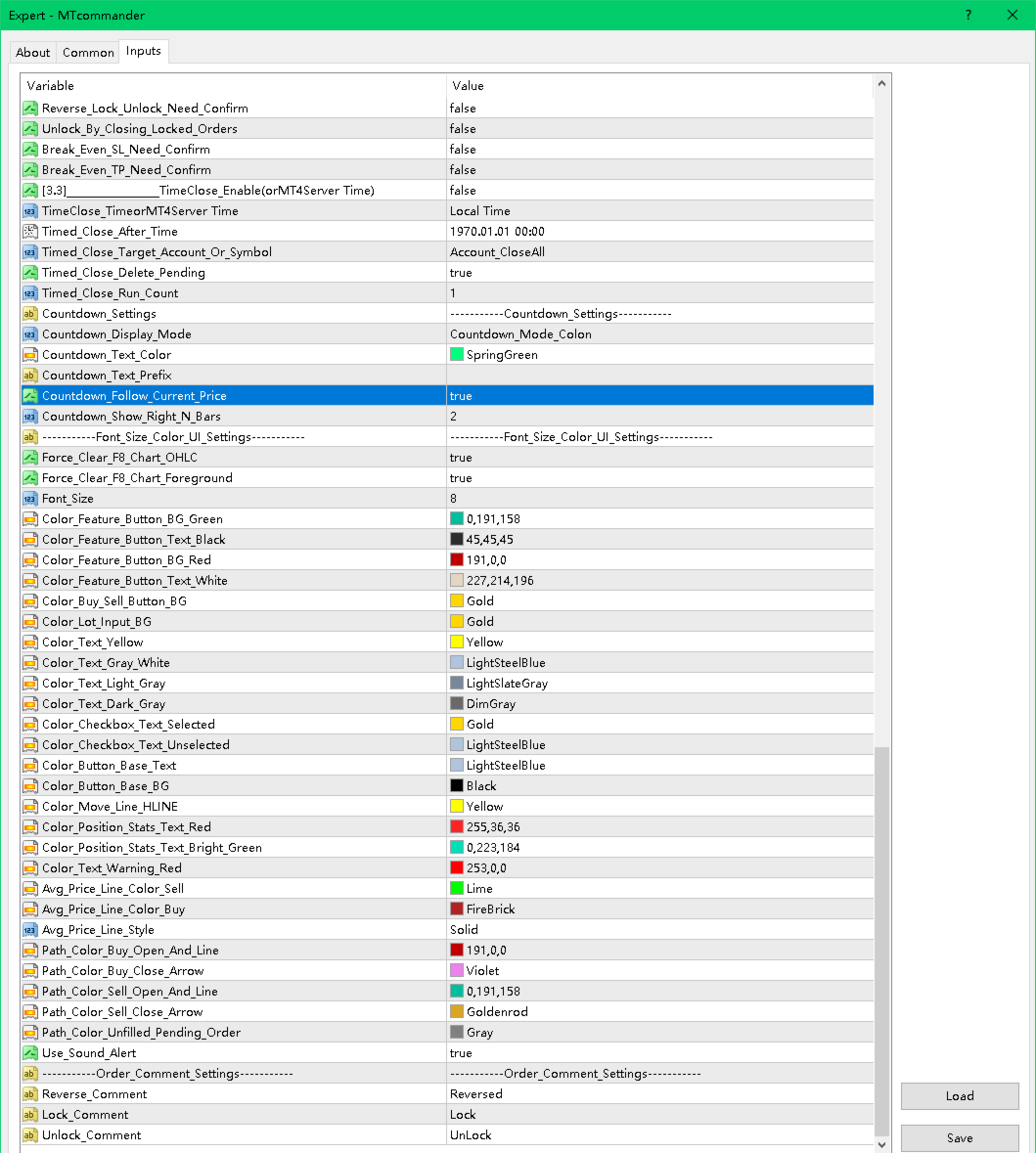
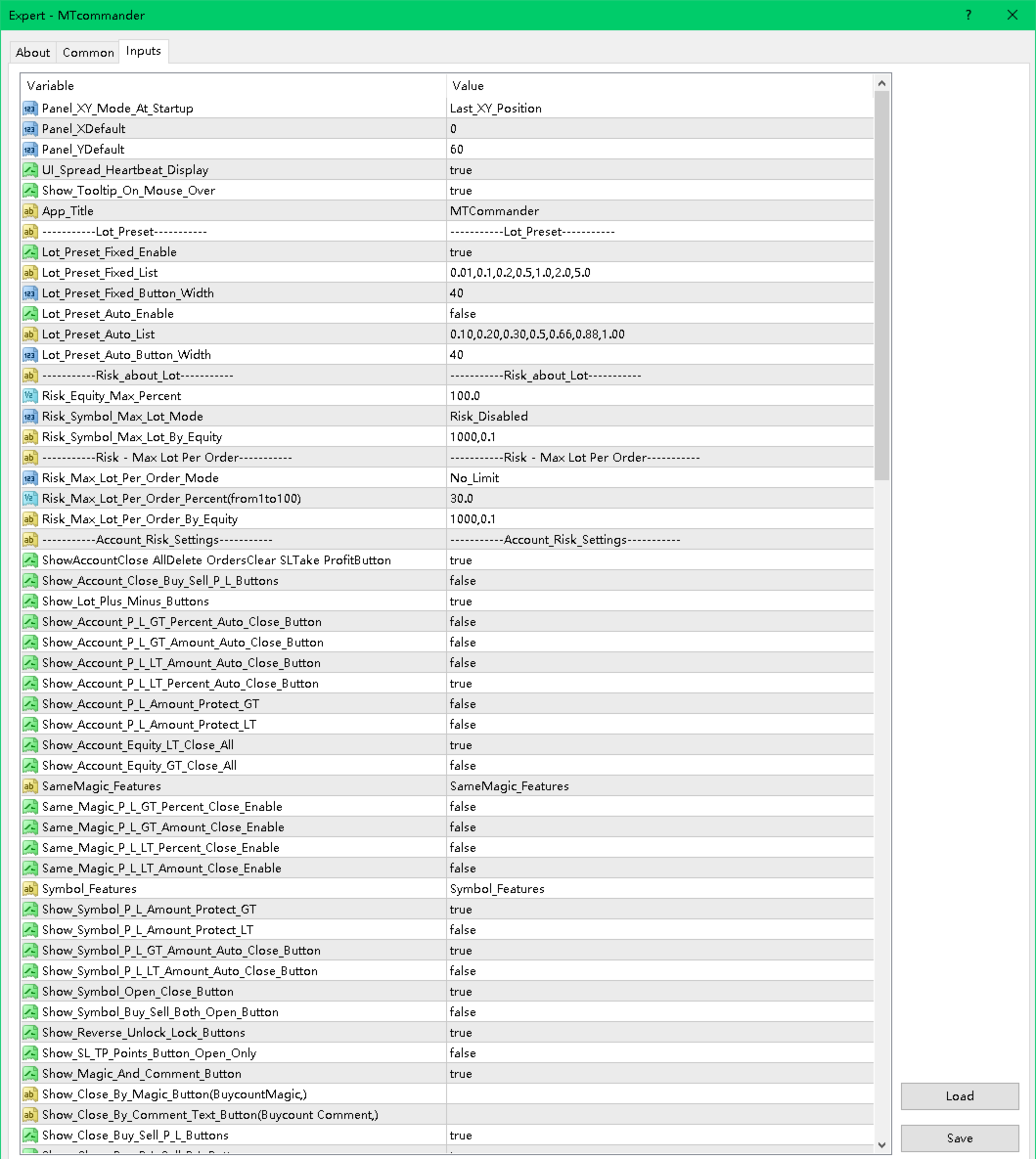
Panel and Display

- Panel startup position.
- Fixed X/Y panel coordinates.
- Tooltip display.
- Spread heartbeat display.
- Hide unused elements.
- Minimize and restore behavior.

Lot and Risk

- Fixed lot preset list.
- Auto lot preset list.
- Risk-based lot calculation.
- Maximum account risk percent.
- Symbol maximum lot controls.
- Maximum lot per order controls.
- Large lot split options.

Hotkeys

If hotkeys are enabled in the product settings, check the assigned keys carefully. A hotkey can send a trading command quickly. Disable hotkeys that you do not use.

Account Risk Settings

- Account close-all buttons.
- Account close Buy/Sell.
- Account close profit/loss.
- Account P/L percent or amount trigger.
- Account equity trigger.
- Account trailing amount protection.
- Daily or weekly timed close.
- Account floating loss controls.

Symbol Features

- Current symbol open/close buttons.
- Buy/Sell/Both open buttons.
- Reverse / Lock / Unlock.
- Magic and comment tools.
- Partial close buttons.
- Fixed-lot close tools.
- Average price display and calculations.

Pending Order Features

- Pending by exact price.
- Pending by distance in points.
- Four-button pending order layout.
- Mouse pending.
- Batch pending order options.
- Delete pending after close options.

SL/TP and Trailing

- Symbol stop loss and take profit tools.
- Batch SL/TP.
- Mouse SL/TP.
- Exact price SL/TP.
- Break-even SL.
- Trailing SL.
- ATR trailing.
- MA trailing.
- Floating-loss take-profit exit.

Add-Position Tools

- Counter-trend add.
- Trend-following add.
- Batch counter-trend add.
- Batch trend-following add.
- Breakout add.


============================================================
Safety Notes
============================================================

MTCommander can send trading requests immediately. A wrong click, wrong lot size, wrong symbol, wrong direction or wrong scope may cause real loss.

Please read and follow these safety notes:

- Test on a demo account first.
- Use the smallest lot size during testing.
- Check broker minimum lot, maximum lot and lot step.
- Check spread and stop level before placing pending orders or SL/TP.
- Check margin before opening or adding positions.
- Be careful with grid, batch pending and add-position functions because they can increase exposure quickly.
- Keep MT4 connected if you rely on EA-managed rules.
- Server-side SL/TP can remain with the broker, but EA-managed logic requires the terminal to run.
- Protection rules may fail to execute during disconnection, high volatility, rejected trade requests, trading disabled state, market close, broker restrictions or insufficient margin.
- No tool can remove trading risk.
- Market risk remains with every trade.


============================================================
FAQ and Troubleshooting
============================================================

1. The panel does not appear.

- Confirm that the EA is attached to the chart.
- Check that AutoTrading is enabled.
- Check the Experts and Journal tabs.
- Try changing the panel X/Y position.
- Make sure the chart is not too small.

2. Buttons do not open or close trades.

- Confirm that live trading is allowed for this EA.
- Confirm that AutoTrading is enabled.
- Check broker trading hours.
- Check spread, margin and symbol trade permission.
- Check the Experts tab for rejection messages.

3. Lot size is rejected.

- Check broker minimum lot.
- Check broker maximum lot.
- Check lot step.
- Check whether the calculated risk lot is below the minimum or above the maximum.

4. Pending order is rejected.

- The pending price may be too close to current price.
- The broker stop level may require a larger distance.
- The symbol may have special execution rules.
- The market may be closed.

5. SL or TP is rejected.

- SL/TP may be too close to market price.
- The broker stop level or freeze level may block modification.
- The direction may be wrong for the selected position.
- Some symbols require different point value handling.

6. What is the difference between position and pending order?

- A position is an already opened trade.
- A pending order is not opened yet. It waits for price to reach a trigger level.
- MTCommander uses "position" for opened trades and "pending order" for Buy Stop, Sell Stop, Buy Limit and Sell Limit orders.

7. Does MTCommander use DLL?

No. The Market version is prepared without DLL import and without external command execution. Sound and alert functions use allowed MT4 mechanisms.

8. Is MTCommander an automatic trading strategy?

No. It is mainly a manual trading panel and trade management assistant. Some management rules can be enabled, but it does not predict market direction.

9. Can I use it on any symbol?

It is designed for MT4 symbols supported by your broker. Always test each symbol first because contract size, tick value, spread, stop level and execution rules may differ.

10. Can I use it on a live account immediately?

It is strongly recommended to test on a demo account first. Use a live account only after you understand the behavior of the functions you enable.


============================================================
Suggested Market Page Text
============================================================

Title idea:
MTCommander - One Click Trade Manager for MT4

Subtitle idea:
A compact manual trading panel for fast order execution, position management, pending orders, SL/TP, break-even and risk control.

Feature bullets:

- One-click Buy/Sell and close tools.
- Fixed lot and risk-based lot workflow.
- Close all, close Buy/Sell, close profit/loss and partial close.
- Pending orders by exact price, points, mouse and batch/grid tools.
- SL/TP, break-even, trailing stop and batch modification tools.
- Account, symbol, magic and comment based management options.
- Compact draggable chart panel with tooltips.
- No DLL in the Market version.

Risk statement:
MTCommander is a trading utility, not a market prediction robot. It can send and close trades quickly. Test all functions on a demo account before live trading.


============================================================
Suggested Screenshot Captions
============================================================

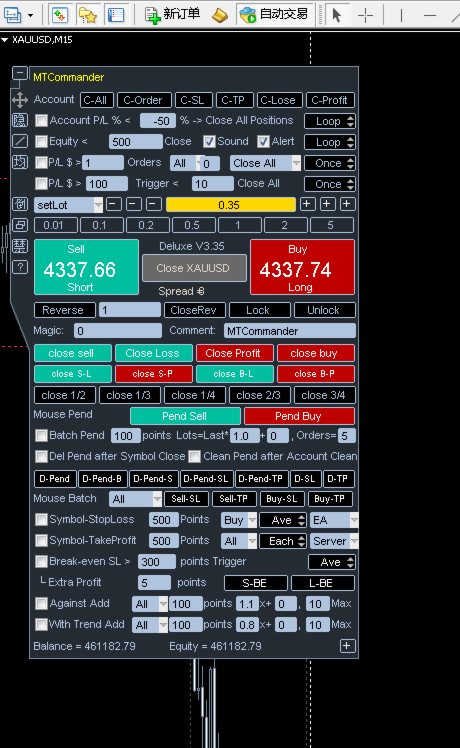
1. Main trading panel with Sell / Buy price area and Short / Long action labels.
2. Account-level close and protection tools.
3. Current symbol position management tools.
4. Pending order tools by points and exact price.
5. Batch pending and grid order functions.
6. Symbol SL/TP and batch SL/TP tools.
7. Break-even SL and trailing stop tools.
8. Add-position and breakout management tools.
9. Panel display, tooltip and chart helper functions.


============================================================
Keywords
============================================================

manual trading panel
trade manager
one click trading
MT4 trading panel
MetaTrader 4 utility
position management
pending orders
close all
partial close
break even
trailing stop
risk management
SL TP manager
order management
grid pending orders
trade assistant


============================================================
Support
============================================================

For questions, bug reports or suggestions, please use the MQL5 Market Comments or MQL5 Messages system.

When reporting an issue, include:

- Product version.
- MT4 build number.
- Broker name and symbol.
- Screenshot of the panel.
- Experts tab message.
- Exact steps to reproduce the issue.


============================================================
Final Reminder
============================================================

Trading involves risk. MTCommander can make trade management faster, but faster execution also means mistakes can happen faster. Start with demo testing, use small lot sizes, and enable only the functions you understand.
Produtos recomendados
The utility copies trades from the signal provider accounts (master accounts, one or multiple providers) to unlimited number of receiver accounts (slave accounts). The provider is defined by the 'provider' parameter (any combination of numbers and letters). For example, there are two providers. Run the utility in master mode on them, and set different values to the provider parameter. On the account designated for copying these signals, run two utilities in slave mode in different windows, setti
Trade Assistant Pro 36 in 1
Makarii Gubaydullin
4.76 (21)
Ferramenta Multifuncional: Calculadora de Lotes, Ordens Grid, Proporção R/R, Gerenciador de Trades, Zonas de Oferta e Demanda, Price Action e muito mais Versão Demo   |   Manual do usuário O Assistente de Trading não funciona no testador de estratégias: você pode baixar a Versão Demo AQUI para testar a utilidade . Entre em contato para qualquer dúvida / ideias de melhoria / em caso de encontrar um bug Se você precisa de uma versão MT5, está disponível aqui Simplifique, acelere e automatize seu
OTRX Fimathe Backtest é uma ferramenta para o Trader ou Entusiasta que utiliza a técnica Fimathe criada pelo Trader Marcelo Ferreira realizar seu treinamento e validar se consegue obter lucratividade. Nesta ferramenta você vai conseguir: 1. Definir se esta buscando uma entrada de compra ou de venda. (Tendência). 2. Definir clicando 2 vezes sobre as linhas horizontais onde ficará a sua Zona de Referência e sua Zona Neutra. 3. Acompanhar a entrada, subiciclo e saída da negociação. 4. Resumo de Tra
FREE
Um painel profissional para operação manual que reúne todo o ciclo do trade em uma única janela no gráfico, da entrada precisa à proteção da conta. Calcule o volume exato de cada posição para o risco definido, monte a operação traçando linhas no gráfico com o RR Tool e envie ordens a mercado e pendentes, grids e OCO. O painel assume o acompanhamento da posição: fechamento parcial em até cinco níveis, seis tipos de trailing stop, breakeven e Virtual SL/TP. Limites diários, semanais e mensais prot
Reverse copier is a tool that will open opposite buy/sell orders from your master account. It will help you with low profit EA's that lose consistenly and turn it to wins. Feel free to ask for new functions/features and I will add it. Now it's a simple MT5 to MT4 bridge with straightforward logic of one position open/close.  How to install: https://www.mql5.com/en/market/product/141604
FREE
Purpose: IF you are apart of a signal group or have a losing strategy this tool is perfect for you. This Expert Adviser is a Trade Copier which Copies Trades on the same account, It takes trades in the same direction or opposite direction. You can set 100% for same trade size or 200% to double up, while the same percentage rule also work for the stop-loss and take profit distances. input: Copy All or By Magic Take only new trades = False; Take same direction of existing trade or counter_direct
Trade Manager MT4 DaneTrades
Levi Dane Benjamin
4.09 (11)
Trade Manager para ajudá-lo a entrar e sair rapidamente de negociações enquanto calcula automaticamente seu risco. Incluindo recursos para ajudar a evitar negociações excessivas, negociações de vingança e negociações emocionais. As negociações podem ser gerenciadas automaticamente e as métricas de desempenho da conta podem ser visualizadas em um gráfico. Esses recursos tornam este painel ideal para todos os traders manuais e ajudam a aprimorar a plataforma MetaTrader 4. Suporte multilíngue. Vers
Trade Copier Professional — Solução de Cópia Local   Trade Copier Professional é um sistema confiável de cópia de operações local para MetaTrader 4/5. Ele permite que traders repliquem posições instantaneamente em várias contas no mesmo computador, com controles de segurança integrados e um painel profissional.   Visão geral   O EA funciona nos modos Master e Slave a partir de um único arquivo, com alternância fluida. As operações podem ser copiadas entre terminais MT4 e MT5 sem depender da int
Local Account Monitor MT4 is a read-only local monitoring utility for traders who run multiple MetaTrader terminals on the same PC or the same Windows VPS . It combines Agent mode and Dashboard mode so you can monitor local accounts from one place, spot stale terminals quickly, review account health states, and inspect risk details without switching between many terminals. Public channel:   CLICK HERE What it is for Monitoring multiple local MT4 terminals from one dashboard Quickly identifying
FREE
Expert Advisor for MT4 Useful utility MUST have for all traders.  With 1 click button, you're able to close all your open positions. Its come with a warning pop up notification when you click to close all your trades, to avoid an accident press the button. Just press 'Yes' to confirm or 'No' to cancel it. The expert will close all your open positions no matter what pairs you currently open or directions. Just attach the expert on 1 of your chart, and you're good to go.
Symbol Manager
Taras Slobodyanik
5 (4)
Symbol Manager or Grid Manager, designed to group orders into one position (by Symbol or by Magic Number). This utility will be useful to multi-currency traders (many EAs), who can have multiple orders on several pairs. You will be able to see the total number of lots, the total profit, and set virtual stop loss and virtual take profit. To set a real TP (or SL), you must first set the virtual value, and then enter the command in this cell: "set". If you want to set real TP/SL for all orders at
STRATEGY - We use risk and reward ratio of 1:5 to maximize the profit - We use trailing stop to lock profit and minimize loss ALERT User will get notified with alert with the following condition: - Max  Spread - Max  Orders UPDATE - Free Update and Support COMPATIBILITY - MT4 and MT5 - M1 Timeframe - All Currency Pair WHAT YOU GET 1) Free Online Forex Training (Normal Price: USD 299) 2) Free Expert Advisor (EA) (Normal Price: USD 288) 3) Free Copy Trading (CT) (Normal Service Fee: 20%) *Aft
It is so very disappointing when the price does not have enough points to achieve Take Profit and makes a reversal. This EA sets virtual levels near the TakeProfit levels. This EA sets virtual levels next to TakeProfit orders. If these levels are reached by price, breakeven or trailing stop is applied for an order. Features This EA does not set new orders. The aim of this EA is to manage stop losses of existing orders that are set by another EA or manually (magic number equals 0). For correct w
Trade copier MT4
Alfiya Fazylova
4.56 (32)
Trade Copier é um utilitário profissional projetado para copiar e sincronizar negociações entre contas de negociação. A cópia ocorre da conta / terminal do fornecedor para a conta / terminal do destinatário, instalada no mesmo computador ou vps. PROMOÇÃO - Se você já adquiriu o "Trade copier MT5", pode receber o "Trade copier MT4" gratuitamente (para cópia MT4 > MT5 e MT4 < MT5). Para obter informações mais detalhadas sobre os termos, por favor, entre em contato conosco através de mensagens priv
Grid Trading
Waseem Raza
5 (3)
Grid Trading EA is a semi-automated one-click trading EA for both Normal Trading and Grid/Martingale Trading . Normal Trading Simply click Buy or Sell directly from the chart. The EA will automatically manage trades by: Setting Stop Loss and Take Profit Managing Trailing Stop Grid / Martingale Trading When Grid Trading mode is enabled, the EA will automatically open additional grid orders at specified distances while increasing the lot size based on your settings. Inputs & Settings Lots — Initia
This tool will perform Trailing stop loss and Break even management for orders. Helps you limit or reduce the time spend watching orders on the screen, especially when you need to go to sleep. Just add this EA to 1 chart, you can manage all pairs. You can filter orders by comment, magic number, symbol, and order ticket number. When Breakeven it can add shift/offset pips (to cover the commission...). You can try in strategy tester before purchase. The EA will add Buy and Sell alternately, so yo
Fast copier for sending trades to multiple MT4 / MT5 accounts. Perfect for copying trades from MT4 to MT5 accounts. MT4 Trade Copier Master EA sends trades instantly from your master account to one or multiple slave accounts. Supports copying to: • MT5 accounts • MT4 accounts Perfect for: • Multi-account traders • Signal providers • Account managers • Personal account mirroring Main Features • Fast local trade copying • Low latency execution • Multiple slave accounts support • Copy open position
Exp Swing
Vladislav Andruschenko
4.43 (63)
Ele usa o modelo de uma estratégia famosa chamada Swinger (Pendulum, Cheburashka) - colocação alternada de pedidos pendentes com lote aumentado. A estratégia consiste em colocar duas ordens pendentes opostas. Quando o preço se move em uma determinada direção, uma ordem pendente é acionada, enquanto o tamanho do lote da outra ordem é aumentado. O EA oferece três tipos de abertura de pedidos pendentes (TypeofTrade) Abertura automática após a colocação (AutoTrade de abertura instantânea) Abertura
FREE
Auto Close Manager EA – Equity & Account Protection Utility Overview Auto Close Manager EA is a risk management utility for MetaTrader 4 designed to automatically close all open positions when a predefined floating profit or floating loss level is reached. This Expert Advisor does NOT open trades. It only monitors account equity and manages existing positions. The EA works with manual trades and can optionally include trades opened by other Expert Advisors. How It Works The EA continuously moni


Copier4Fee Advanced
Vladimir Tkach
4.75 (16)
The utility copies trades from the signal provider accounts (master accounts, one or multiple providers) to unlimited number of receiver accounts (slave accounts).  Attention! Y ou need to use identifiers (Provider number) of the same length if you use several master copiers. For example. 1, 2, 3 or 11, 13, 22. The copying can be set in the opposite direction. The comments with all the recently performed actions are displayed on the screen to monitor the utility actions in slave mode. To avoid p
TSim
Sergey Kruglov
Утилита  TSim   позволяет симулировать ручную торговлю в Тестере Стратегий MetaTrader 4. В панеле можно устанавливать размеры лота, тейпрофита и стоплосса. Панель имеет кнопки Sell   и Buy для выставления рыночных ордеров, а также кнопки CloseSell, CloseBuy и CloseAll для быстрого закрытия ордеров. Под панелью отображается список открытых ордеров. Внимание. Панель работает только в Визуальном режиме Тестера Стратегий MetaTrader 4.
FREE
The program is use to copy trading from MT4   to MT4 and MT5  on local PC or copy  over the Internet.   Now you can easy copy trades to any where or share to friends. Only run one Flash Server on VPS, also need allow the apps if you turn on Windows Firewall. Can not add more than 20 account copier to server, include both  MT4 and MT5 Get free Copier EA for MT4 and MT5 (only  receive signal),   download here Instants copy, speed smaller 0.1 seconds, easy to setup How to setup and guide Let read a
TradePulseMonitor for MetaTrader 4 & 5 Overview: TradePulseMonitor   is a comprehensive, real-time dashboard indicator designed for MetaTrader 4 and MetaTrader 5. It provides traders with an at-a-glance overview of their account's financial health, risk exposure, position metrics, and historical performance. By consolidating critical data into a single, customizable on-chart dashboard, it eliminates the need to constantly check the Terminal window, allowing for faster and more informed trading
FREE
Trading panel for manual trading. Has a fairly wide functionality. Allows you to automatically calculate the order size, open both market and pending orders. It has a wide range of options for closing orders, it is possible to partially close orders, close orders after reaching a certain profit or loss, separately close profitable and unprofitable, buy and sell, as well as pending orders. The panel also contains a simple implementation of a grid of pending orders, reverse and lock functions, tr
Hedge Trade
Mothusi Malau
1 (2)
️ Hedge Trade — Smart Fixed-Offset Hedging EA Turn adverse moves into controlled recovery cycles. Hedge Trade is a professional-grade MetaTrader 4 Expert Advisor that protects any open trade by automatically placing and managing one intelligent hedge order. It’s built for traders who prefer to open their own base position but want an automated, disciplined hedging system to manage drawdown and capture counter-moves — safely, transparently, and without martingale. Key Features Automatic Hedg
Trade panel manual is a multifunctional trading assistant. It allows you to open market and pending orders in one click. Value is set via button menu edit or deleted by specific buttons pending orders and the value of take profit and stop loss in one click. Through the edit menu of the button, a value is set that can be easily changed by simply moving level_tp lines for take profit or stop loss levels and for pending orders. It is possible to select orders and determine for them and set the leve
Risk Commander
Adisorn Soodkanueng
Product Name: Risk Commander: Trade Assistant & Strategy Simulator Risk Commander is more than just a trade panel—it is a complete Manual Trading Ecosystem . It serves two powerful purposes: Live Assistant: Helps you execute trades with speed, precision, and perfect risk management in real-time markets. Training Simulator: Fully compatible with the Strategy Tester (Visual Mode) , allowing you to practice manual trading on historical data without risking a cent. NEW! Built-in Simulator Mode Stop
Indicator for binary options arrow is easy to use and does not require configuration works on all currency pairs, cryptocurrencies buy signal blue up arrow sell signal red down arrow tips do not trade during news and 15-30 minutes before their release, as the market is too volatile and there is a lot of noise it is worth entering trades one or two candles from the current period (recommended for 1 candle) timeframe up to m 15 recommended money management fixed lot or fixed percentage of the depo
Virtual Collider Manual   is a trading assistant with a built-in panel for manual trading. It automatically moves a position opened by a trader in profit using innovative adaptive grid algorithm of averaging and adaptive pyramiding Know-how of the grid algorithm of averaging and pyramiding of the   Virtual Collider Manual   trading robot is based on fully automatic adaptation of all characteristics of dynamically build order grid and pyramid with actual price movement with no need for adjusting
Close All Selected Chart Overview: This is one of the smart choices to help you make your trading management a lot easier. Especially when you have to manage a large number of orders. This utility will work like a helping hand to close all the unrelated order windows in less than no time, plus without making any kind of unwanted effects. :: 3 simple steps to use :: 1. Select your chart window.  2. Click "Close All" 3. Click "OK" Note: For the better understanding on how this utility works, plea
Os compradores deste produto também adquirem
The product will copy all telegram signal to MT4   ( which you are member  ) , also it can work as remote copier.  Easy to set up, copy order instant, can work with almost signal formats, image signal, s upport to translate other language to English Work with all type of channel or group, even channel have "Restrict Saving Content", work with  multi channel, multi MT5 Work as remote copier: with signal have ticket number, it will copy exactly via ticket number. Support to backtest signal. How to
Strategy Builder offers an incredible amount of functionality. It combines a trade panel with configurable automation (covert indicators into an EA), real-time statistics (profit & draw down) plus automatic optimization of SL, TP/exit, trading hours, indicator inputs. Multiple indicators can be combined into an single alert/trade signal and can include custom indicators, even if just have ex4 file or purchased from Market. The system is easily configured via a CONFIG button and associated pop-up
Custom Alerts AIO: Monitoramento inteligente de múltiplos mercados – pronto para uso, sem configuração Visão geral Custom Alerts AIO é uma ferramenta avançada de varredura de mercado que funciona imediatamente após a instalação — sem necessidade de configurar indicadores adicionais. Inclui internamente todos os principais indicadores da Stein Investments (FX Power, FX Volume, FX Dynamic, FX Levels e IX Power), permitindo que você monitore facilmente todas as principais classes de ativos: Forex
EasyInsight AIO MT4
Alain Verleyen
4 (2)
EASY Insight AIO – A solução tudo-em-um para trading inteligente e sem esforço Visão geral Imagine analisar todo o mercado — Forex, Ouro, Cripto, Índices e até Ações — em segundos, sem precisar examinar gráficos manualmente, instalar indicadores ou lidar com configurações complicadas. EASY Insight AIO é sua ferramenta definitiva de exportação para trading com IA, pronta para usar. Ela oferece um panorama completo do mercado em um único arquivo CSV limpo — pronto para análise imediata no ChatGP
Unlimited Trade Copier Pro is a tool to copy trade remotely to multiple MT4, MT5 and cTrader accounts at different computers/locations over internet. This is an ideal solution for you if you are a signal provider and want to copy your trades to other receivers globally on your own rules. One provider can copy trades to multiple receivers and one receiver can get trade from multiple providers as well. The provider can even set the subscription expiry for each receiver, so that receiver will not b
ManHedger MT4
Peter Mueller
5 (2)
THIS EA IS A SEMI-AUTO EA, IT NEEDS USER INPUT. Manual & Test Version Please TEST this product before   BUYING  and watch my video about it. Contact me for user support or bug reports, or if you want the MT5 version! MT5 Version I do not guarantee any profits or financial success using this EA. With this Expert Advisor, you can: Implement your own   Zone Recovery   strategy to capitalize on trending markets. Create   Grid   trading strategies, to profit from ranging markets. Place orders easil
Smart Channel M4
Vahidreza Heidar Gholami
The trend in the market can be predicted using trend lines but the problem is you don’t know where exactly the price is going to touch the trend line where you can put your pending orders on. Smart Channel Expert Advisor makes it possible to put an advanced channel around the price data, which can be configured to handle placing orders, opening and closing positions, managing risk per trade, spread, slippage, and trailing stop-loss and take-profit automatically. Features Money Management (Calcul
Crystal Trade Manager PRO – Sistema Avançado de Gestão de Risco e Controle de Operações para MT4 Versão Gratuita: https://www.mql5.com/en/market/product/150632 Visão Geral Crystal Trade Manager PRO (CTM) é uma ferramenta profissional de execução de ordens e gestão de risco desenvolvida para MetaTrader 4. Foi projetada para traders que necessitam de disciplina, forte proteção de capital e automação inteligente dentro do MT4. O sistema controla o risco, protege o patrimônio da conta, aplica limite
RedFox Copier Pro
Rui Manh Tien
4.7 (10)
Time saving and fast execution Whether you’re traveling or sleeping, always know that Telegram To Mt4 performs the trades for you. In other words, Our   Telegram MT4 Signal Trader  will analyze the trading signals you receive on your selected Telegram channels and execute them to your Telegram to MT4 account. Reduce The Risk Telegram To Mt4   defines the whole experience of copying signals from   Telegram signal copier to mt4 platforms. Users not only can follow all instructions from the signa
The product will copy all  Discord  signal   to MT4   ( which you are member  ) , also it can work as remote copier.  Easy to set up. Work with almost signal formats, support to translate other language to English Work with multi channel, multi MT4. Work with Image signal. Copy order instant, auto detect symbol. Work as remote copier: with signal have ticket number, it will copy exactly via ticket number. How to setup and guide: Let read all details about setup and download Discord To MetaTrader
Dashboard.mq4 - Gerenciador de Trading Simples Projetado para aqueles que apreciam o trading manual e desejam uma ferramenta que torne a gestão das operações mais fácil, este robusto utilitário MQL4 melhora a eficiência do trading fornecendo um painel de controle em tempo real para gerenciar suas operações. Ele se integra perfeitamente ao MetaTrader, calcula o tamanho das posições e acompanha as métricas de risco sem esforço. Características principais: Exibição de Risco e Margem : Cálculo em te
O painel FFx Hidden Manager vai ajudar facilitando o gerenciamento de suas ordens diretamente no gráfico. Abaixo a descrição de todos os recursos: TP, SL e Trailing Stop ficam ocultos Cada ordem tem a sua própria linha no gráfico Arrasta e solta (Drag & Drop) qualquer linha para alterar o TP/SL, conforme sua necessidade Opção para mover automaticamente a linha SL no empate (breakeven) quando TP # 1 for atingido Opção para escolher o tipo de TP/SL (por pips ou preço) Opção para escolher o tipo de
FFx Risk Calculator panel will help you to calculate very easily your trades size, SL or the risk directly on the chart. All features are described below: Option to select which parameter to calculate: Risk, Stop Loss or Lot Size The panel will show if the lot size is allowed according to the current account free margin Button to maximize/minimize the panel Drag and Drop the panel anywhere on the chart How to use it? Select the parameter you want to be calculated. It will be based on the 2 other
Trade Copier Pro
Vu Trung Kien
4.29 (14)
Trade Copier Pro é uma ferramenta poderosa para copiar remotamente comércio entre multi-contas em diferentes locais mais internet. Esta é uma solução ideal para provedor de sinais, que querem compartilhar seu comércio com os outros no mundo todo em suas próprias regras. Um provedor pode copiar comércios de multi-receptores e um receptor pode obter comércio de multi-fornecedores também. Provedor e receptor pode gerenciar sua lista de parceiros com potência sistema de gestão de banco de dados buil
News Trader Pro
Vu Trung Kien
4.38 (16)
News Trader Pro é um robô único que permite a negociação com notícias pela sua estratégia pré-definida. Ele carrega pedaços de notícias de vários sites populares de Forex. Você pode escolher qualquer notícia e programar a estratégia para negociar, então o News Trader Pro vai operar com essa notícia através de uma estratégia selecionada automaticamente quando a notícia for publicada. As notícias dão a oportunidade de ter pips desde que o preço tenha um grande movimento com a publicação. Agora, co
FFx Watcher PRO
Eric Venturi-Bloxs
The FFx Watcher PRO is a dashboard displaying on a single chart the current direction of up to 15 standard indicators and up to 9 timeframes. It has 2 different modes: 1. Watcher mode: Multi Indicators User is able to select up to 15 indicators to be displayed User is able to select up to 9 timeframes to be displayed 2. Watcher mode: Multi Pairs User is able to select any number of pairs/symbols User is able to select up to 9 timeframes to be displayed This mode uses one of the standard indicat
The product combines a manual trade panel with the ability to perform actions automatically in a highly configurable way. Actions include capturing indicator values and then based on those values raising alerts, open/close or partially close trades, scale-in, setting up pending orders, adjusting stop loss, take profit and more. On-chart controls can be configured, such as tick boxes and buttons, so can be fully interactive. The EA also handles money management, news events, hidden stop loss, tak
Binary Options Copier Remote is an EA that allows to copy binary options trades between MT4 accounts at different computers. This is an ideal solution for signal provider, who want to share his trade with the others globally on his own rules. Provider can give free bonus license to 10 receivers. That means those 10 receivers can copy from provider by using Binary Options Receiver Free (no cost). From 11th one, receiver have to buy Binary Options Receiver Pro (paid version) in order to copy from
The Price Action Dashboard is an innovative tool to help the trader to control a large number of financial instruments. This tool is designed to automatically suggest signals and price conditions. The Dashboard analyzes all major Time Frame suggesting price action conditions with graphic elements. The Dashboard can suggest you the strength of the trend identifying directional movement, it is an indispensable tool for those who want to open position themselves using market trends identifiers. The
Elliott Wave Counter é um painel para marcação manual rápida e fácil de usar das ondas Elliott. Pode-se selecionar uma cor e um nível de marcas. Também existem funções para remover a última marcação e toda a marcação feita pela ferramenta. A marcação é feita com um clique. Clique cinco vezes - tenha cinco ondas! O Elliott Wave Counter será um ótimo instrumento tanto para iniciantes quanto para analistas profissionais de ondas Elliott. Guia de instalação e entradas do Elliott Wave Counter se você
If you wish to draw Support and Resistance lines, view: daily market opening, classical pivot levels, Fibonacci pivot levels, trend lines, Fibonacci levels, the remaining time to candle closing, and current spread. If you seek to place your orders with the exact lot that meets your desired stop loss risk. If you wish to do all this and more with just one click, then this is the perfect tool to use. This tool will allow you to feel more relaxed when deciding to open orders, as well as predicting
O Partial Close Expert   é uma ferramenta que combina diversas funções em um sistema automatizado. Este EA pode ajudar os traders a gerenciar suas posições com mais eficiência, oferecendo diversas opções para gerenciar riscos e maximizar ganhos potenciais. Com o Partial Close Expert, os comerciantes podem definir um       fechamento parcial       nível para garantir lucros, um       parada móvel       nível para proteger lucros e limitar perdas, um       empatar       nível para garantir que a
Master Trend Dashboard is a new generation indicator, compact, light and efficient. Each element of this Dashboard is designed to return specific signals as: Price Action, Breakout, Net Change (performance of the instrument), algorithmic studies, correlations and statistical calculations. This tool will change your way of trading allowing you to receive important information. See the Graphic Signals to understand every single signal below: Graphic Signals Symbol name and arrow color Green = Cur
Trade Copier Agent é projetado para copiar negociações entre várias contas/terminais MetaTrader(4/5). Com esta ferramenta, você pode atuar como provedor (origem) ou receptor (destino). Todas as ações de negociação serão copiadas do provedor para o destinatário sem demora. Esta ferramenta permite que você copie negociações entre vários terminais MetaTrader no mesmo computador com velocidades de cópia ultrarrápidas de menos de 0,5 segundos. Guia de instalação e entradas do Trade Copier Agent Apli
Unlimited Binary Options Copier Remote is a powerful tool to copy binary options trades remotely between multiple accounts at different locations over internet. This is an ideal solution for signal provider, who want to share his binary options trades with the others globally on his own rules. One provider can copy trades to unlimited receivers and one receiver can get trade from unlimited providers as well. The provider can set the subscription expiry for each receiver, so that receiver will no
This is an Expert Adviser use for manual trading as a background EA or combine with external EA to open orders. Loss Recovery Trading is one of your options to handle the lose positions instead of using stop loss by setting a zone recovery area and target to exit the turn rounds sequence. How It Work? If the market goes against your first positions direction at the specific of losing points, the EA will open an opposite direction position with calculated larger lot size and also keep the first
Great for scalper/intraday weapon for your ease daily trading. Scalper weapon will suit's you for any trading condition, whether it's intraday / scalper this tool is important for you which providing the missing function on the native MT4 platform. You have to check Allow Auto Trading by pressing Ctrl+O, going to Expert Advisors tab, and checking " Allow automated trading" . also to ensure the " auto trading " is green. Input Parameters _MINIMIZED_AT_START: to chose whether the panel is minimiz
Market Pressure Dashboard is a new generation utility. Its main function is to assist you and give you operational ideas optimizing your analytical work. Using this utility you could monitor a lots of financial instruments (max 28 symbols FOREX) in a very simple way. The Market Pressure indicator allows you to customize the internal list of the symbols to be monitored. The opening function and position management with this panel will be much more comfortable and navigation charts very powerful.
Contact/message me if you encounter any issue using the product or need extra feature to add on the base version. There is a demo version of this panel Dashboard Trading Made Simple Demo in my product list, please try it out to get familiar with all functionalities free, LINK . This system basically utilizes TDI as the main indicator to generate trading signal mainly on H1 and H4 timeframes. The signal will be further filtered and trimmed. Stochastic; Heiken Ashi candle direction and candle siz
O Telegram Publisher Agent   é um complemento que permite que os traders enviem sinais para seus canais e grupos do Telegram em tempo real. Com mensagens personalizáveis, capturas de tela de gráficos e outros recursos, a ferramenta ajuda os traders a compartilhar suas ideias e estratégias de negociação com seus seguidores. A ferramenta também apresenta um belo design com alternância de tema claro e escuro, proporcionando aos usuários uma experiência de negociação estética e funcional. O Telegram
Mais do autor
FSS Report
Bao Ying Huang
5 (2)
This is a professional report statistical indicator, which can be counted by day, week, month, quarter, year, magic and comment, and display the growth curve. install: select "File" in your MT4 client,and open the folder "MQL4\indicators",then copy file "FSS_Report.ex4",reload MT4 and enjoy. Para List: UI_XY_Setting=21 UI_X_default=0 UI_Y_default=21 custom_title=FSS Report UI_reload_time_interval=5 report_time_from=0 report_time_to=0 filter_demo=____________symool, magic and comment, all supp
Account Performance Radar - MT4 Account Analytics Indicator ============================================================ Short Market Description ============================================================ Account Performance Radar is a MetaTrader 4 indicator for reviewing historical account performance, risk quality and trading behavior in a visual radar dashboard. It converts closed trade history into two radar views and a central trading overview. The indicator focuses on profitability,
FSS_Report This is a professional report statistical indicator, which can be counted by day, week, month, quarter, year, magic and comment, and display the growth curve. How to install: select "File" in your MT5 client 'menu,and open the folder "MQL5\Indicators",then copy file "FSS_Report.ex5",reload MT5 and enjoy. last update at  2023-05-18 v1.3 update info  1.fix bug about magic filter 2.fix bug about Comment filter 3.add path line 4.add func about addon work Para List: UI_XY_Setting=21 UI
Filtro:
Sem comentários
Responder ao comentário