MTCommander

MTCommander - MT4 Manual Trading Panel and Trade Management Assistant

============================================================
Short Market Description
============================================================

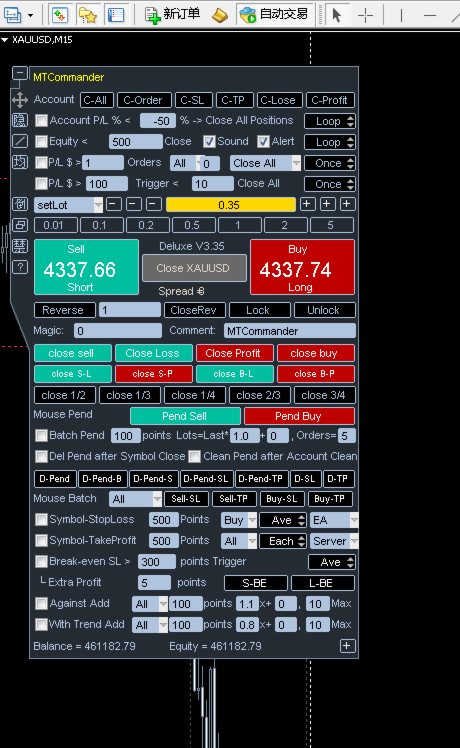
MTCommander is a professional manual trading panel for MetaTrader 4.

It helps traders open, close, protect and manage positions directly from the chart. The panel includes one-click market execution, pending order tools, partial close tools, break-even stop loss, trailing stop loss, batch SL/TP tools, account and symbol protection rules, and practical trade management shortcuts.

MTCommander is not a signal robot and does not predict market direction. It is a trading utility for faster manual execution and structured trade management. Please test all functions on a demo account before using it on a live account.


============================================================
Product Overview
============================================================

MTCommander is installed as an Expert Advisor because MT4 chart panels must run through an EA container. Its purpose is trade management, not market prediction.

The tool is designed for traders who want a compact control panel on the chart instead of switching between many MT4 windows and order dialogs. Most common trade operations can be executed from the panel:

- Open Buy or Sell positions.
- Close positions by symbol, account, direction, profit, loss, magic number or comment.
- Place pending orders by exact price, distance in points, mouse position or batch/grid rules.
- Apply or delete stop loss and take profit.
- Move positions to break-even.
- Run trailing stop loss tools.
- Partially close positions.
- Reverse, lock or unlock positions.
- Monitor account balance, equity, spread and selected position information.
- Use account-level and symbol-level protection tools.

The Market version is prepared for MQL5 Market requirements:

- No DLL import.
- No Windows API call.
- No external command execution.
- No PowerShell or Microsoft TTS dependency.
- Built-in MT4 sounds and alerts are used where applicable.


============================================================
Who It Is For
============================================================

MTCommander is suitable for:

- Manual traders who need faster order execution.
- Day traders and scalpers who frequently open, close or adjust positions.
- Traders who manage several positions on the same symbol.
- Traders who need fast partial close, close profit, close loss, reverse or hedge actions.
- Traders who use pending orders and want faster batch placement or deletion.
- Traders who want account-level and symbol-level protection tools on the chart.
- Traders who prefer visible controls instead of editing orders one by one in the MT4 terminal.

MTCommander is not intended to be used as a fully automatic profit-making strategy. It does not decide market direction for the user. The user is responsible for every trading decision and every enabled management rule.


============================================================
Main Features
============================================================

1. One-Click Market Trading

- Open Buy or Sell positions from the chart panel.
- Display Sell / Buy price areas with Short / Long action labels.
- Use fixed lot size or risk-based lot calculation.
- Use preset lot buttons for frequently used lot sizes.
- Support large lot split logic where enabled by settings.
- Show current spread and basic account information on the panel.

2. Position Closing Tools

- Close all positions on the current symbol.
- Close all account positions.
- Close Buy positions or Sell positions.
- Close profitable positions.
- Close losing positions.
- Close positions by magic number.
- Close positions by comment text.
- Close fixed total lot amount.
- Partial close tools such as close 1/2, close 1/3, close 1/4, close 2/3 and close 3/4.
- Directional profit/loss close buttons for Buy or Sell positions.

3. Reverse, Lock and Unlock

- Reverse current symbol exposure.
- Lock positions by opening opposite-side hedge positions.
- Unlock hedged positions where the user decides to release the hedge.
- These tools can change market exposure quickly, so they should be tested carefully before live use.

4. Pending Order Tools

- Place Sell Stop, Sell Limit, Buy Stop and Buy Limit pending orders by point distance.
- Place pending orders at an exact price.
- Place pending orders by mouse-selected price area.
- Create batch pending orders.
- Create grid-style pending order sets.
- Create breakout-style pending order sets.
- Delete all pending orders.
- Delete current symbol pending orders.
- Delete pending orders after symbol close or account close-all when the related option is enabled.

Terminology note:

In this manual, "position" means an already opened market trade. "Pending order" means an unfilled order such as Buy Stop, Sell Stop, Buy Limit or Sell Limit.

5. Stop Loss and Take Profit Tools

- Set stop loss or take profit by point distance.
- Set SL/TP for current symbol positions.
- Set SL/TP for all positions or selected direction.
- Choose average-price mode or each-position mode where supported.
- Choose EA-managed or server-side SL/TP where supported by the specific function.
- Delete pending-order SL or TP.
- Delete position SL or TP.
- Apply batch SL/TP by mouse-selected price.
- Apply batch SL/TP by exact price.

6. Break-Even and Trailing Tools

- Break-even SL tools for moving stop loss to a safer level after a trigger condition.
- Extra profit points can be kept beyond the entry price.
- Standard trailing stop loss.
- ATR-based trailing stop loss.
- MA-based trailing stop loss.
- Custom trailing stop loss options where enabled.
- Batch trailing stop loss management.
- Floating-loss take-profit exit tools.

7. Add-Position Tools

- Counter-trend add-position tools.
- Trend-following add-position tools.
- Batch add-position tools.
- Breakout add-position tools.
- Direction filters for All / Buy / Sell where supported.
- Distance, multiplier, extra lots and maximum count fields where supported.

These features can increase exposure. Use conservative settings and test them on a demo account first.

8. Account and Symbol Protection

- Account P/L percent trigger.
- Account P/L amount trigger.
- Account equity greater-than or less-than trigger.
- Account trailing amount protection.
- Symbol P/L amount trigger.
- Symbol P/L percent or money-based protection tools where enabled.
- Magic-number based P/L trigger.
- Daily or weekly timed close functions.
- Close-all and remove-EA style protection where supported.
- Blocking or force-close controls for selected risk situations.

Protection tools are not a substitute for a complete risk plan. They depend on terminal connection, broker execution, spread, slippage and account conditions.

9. Interface and Chart Tools

- Compact chart panel.
- Move panel by dragging.
- Minimize and restore panel.
- Hide unused UI elements.
- Show average price line.
- Show trade path or historical order path where enabled.
- Show Daily ATR information where enabled.
- Show server time and local information where supported.
- Built-in tooltips for many buttons and inputs.

10. Alerts and Sound

- MT4 alerts can be used for selected events.
- Built-in MT4 PlaySound-based sound behavior is used where applicable.
- The Market version does not use DLL-based TTS or external speech engines.


============================================================
Quick Start
============================================================

1. Install MTCommander from MQL5 Market.

2. Attach it to an MT4 chart.

3. Enable AutoTrading in MetaTrader 4.

4. Allow live trading for this Expert Advisor in the EA settings.

5. Check the panel position and display settings.

6. Check lot settings before placing any trade.

7. Start on a demo account.

8. Test the basic functions first:

- Open a small Buy or Sell position.
- Close the current symbol position.
- Place a small pending order.
- Delete the pending order.
- Apply and remove SL/TP.
- Test break-even and trailing tools with small size.

9. Move to a live account only after you understand how each enabled button and rule behaves.


============================================================
Typical Workflows
============================================================

Workflow 1: Open a Position With Fixed Lot

1. Select or type the lot size.
2. Confirm the current symbol and spread.
3. Click the Buy or Sell area.
4. Check the opened position in MT4 Terminal.

Workflow 2: Use Risk-Based Lot Calculation

1. Switch the lot mode to risk mode where enabled.
2. Enter the stop loss points or stop loss price.
3. Check the calculated lot value.
4. Open the position only after confirming the result.

Workflow 3: Close Positions Quickly

Use one of the closing tools depending on the target:

- Close current symbol positions.
- Close all account positions.
- Close Buy positions.
- Close Sell positions.
- Close profitable positions.
- Close losing positions.
- Close part of the position size.

Always confirm whether the action is for current symbol, account, direction, magic number or comment.

Workflow 4: Place Pending Orders

Choose one of the pending order methods:

- Distance in points: place pending orders by point distance from current price.
- Exact price: type the target price and choose Buy Pending or Sell Pending.
- Mouse pending: use chart price interaction where enabled.
- Grid or batch pending: create multiple pending orders by configured distance and count.

Check broker stop level, minimum distance and spread before using pending order tools.

Workflow 5: Apply Break-Even Stop Loss

1. Enable the break-even SL line or button.
2. Set trigger points.
3. Set extra profit points if needed.
4. Choose the direction or position scope where supported.
5. Monitor the result after price reaches the trigger.

Workflow 6: Use Trailing Stop Loss

1. Choose the trailing method.
2. Set trailing distance and step settings.
3. Confirm whether the tool applies to Buy, Sell or all positions.
4. Keep the terminal running while EA-managed trailing logic is active.


============================================================
Important Settings
============================================================

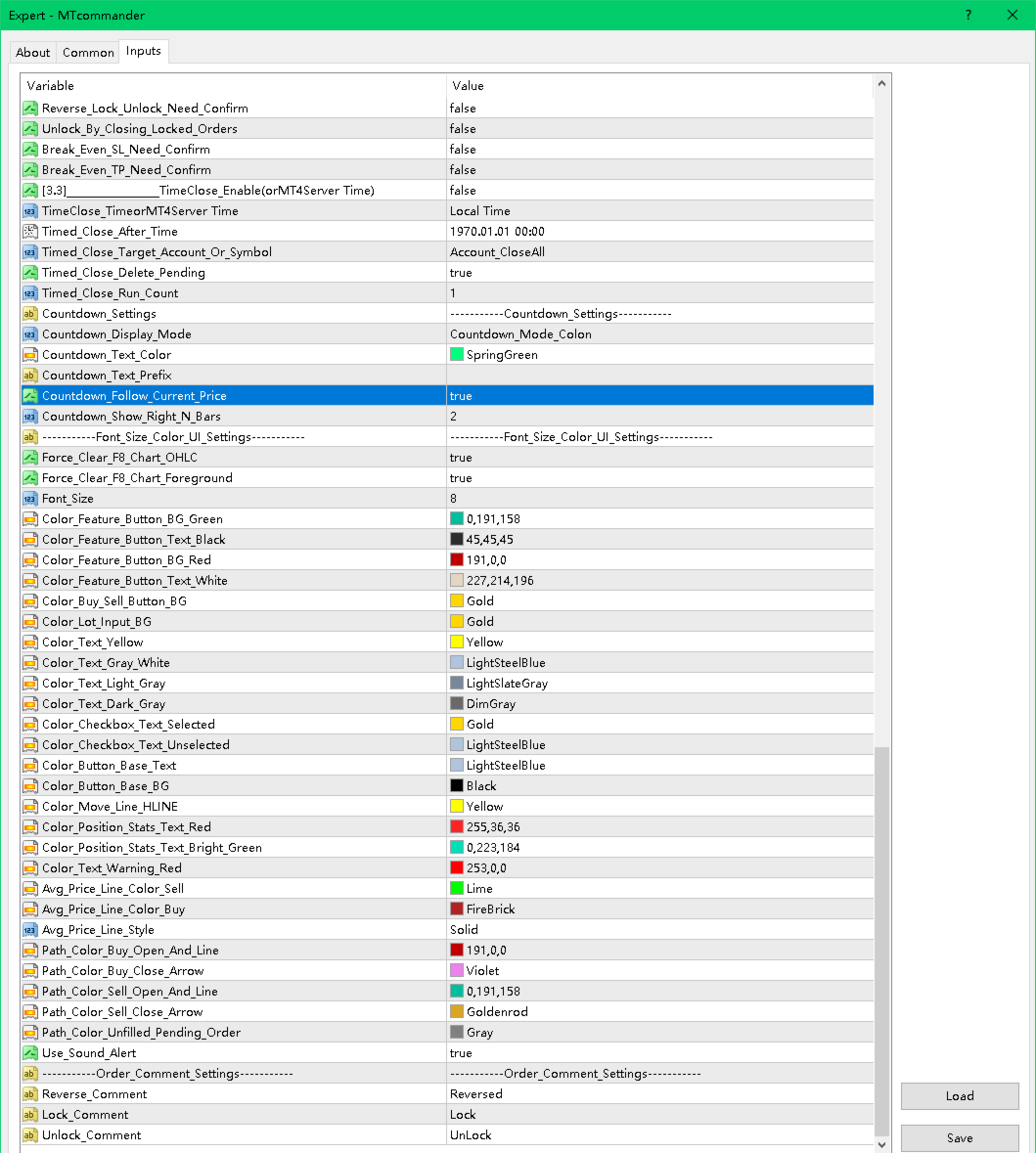
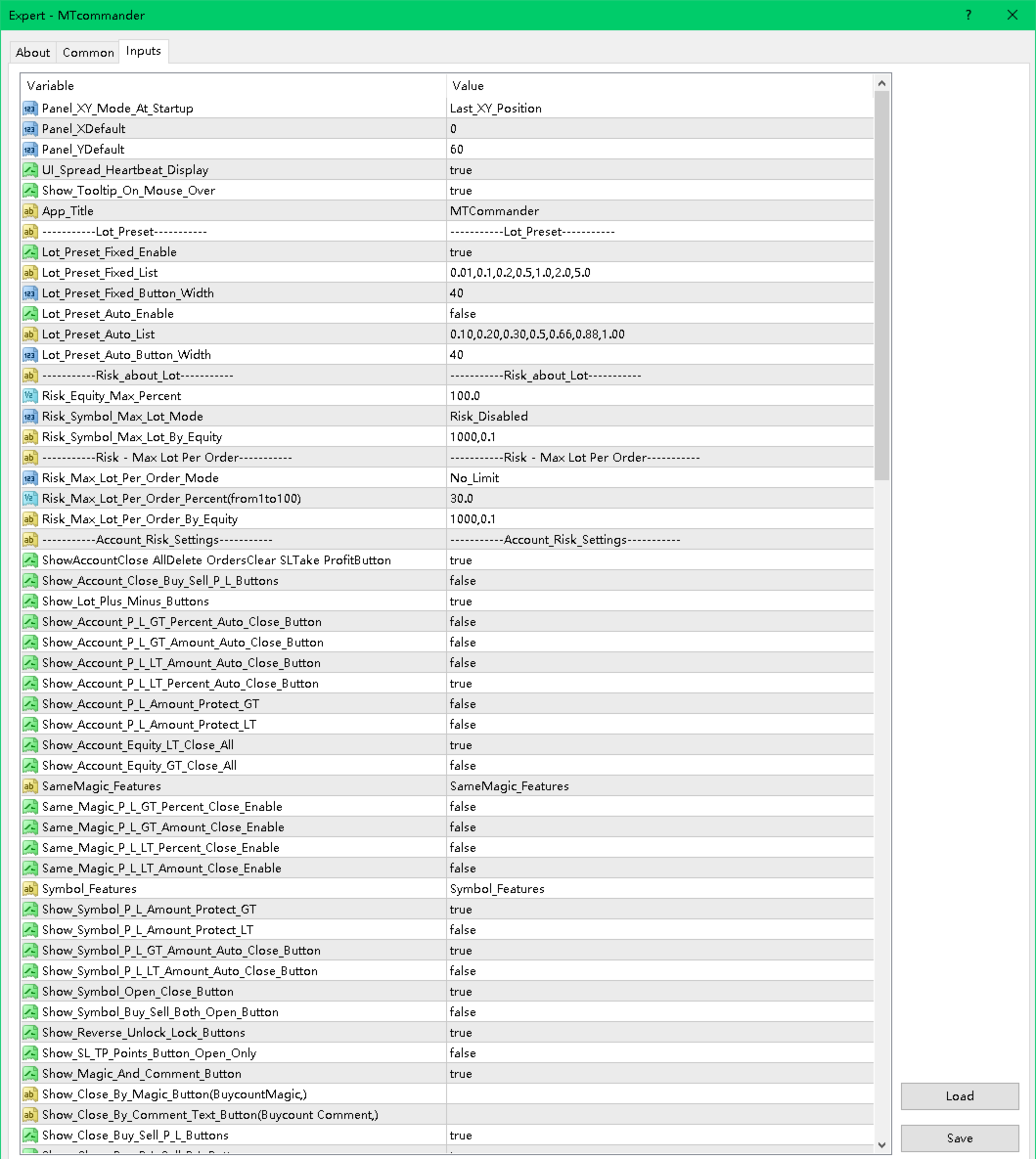
Panel and Display

- Panel startup position.
- Fixed X/Y panel coordinates.
- Tooltip display.
- Spread heartbeat display.
- Hide unused elements.
- Minimize and restore behavior.

Lot and Risk

- Fixed lot preset list.
- Auto lot preset list.
- Risk-based lot calculation.
- Maximum account risk percent.
- Symbol maximum lot controls.
- Maximum lot per order controls.
- Large lot split options.

Hotkeys

If hotkeys are enabled in the product settings, check the assigned keys carefully. A hotkey can send a trading command quickly. Disable hotkeys that you do not use.

Account Risk Settings

- Account close-all buttons.
- Account close Buy/Sell.
- Account close profit/loss.
- Account P/L percent or amount trigger.
- Account equity trigger.
- Account trailing amount protection.
- Daily or weekly timed close.
- Account floating loss controls.

Symbol Features

- Current symbol open/close buttons.
- Buy/Sell/Both open buttons.
- Reverse / Lock / Unlock.
- Magic and comment tools.
- Partial close buttons.
- Fixed-lot close tools.
- Average price display and calculations.

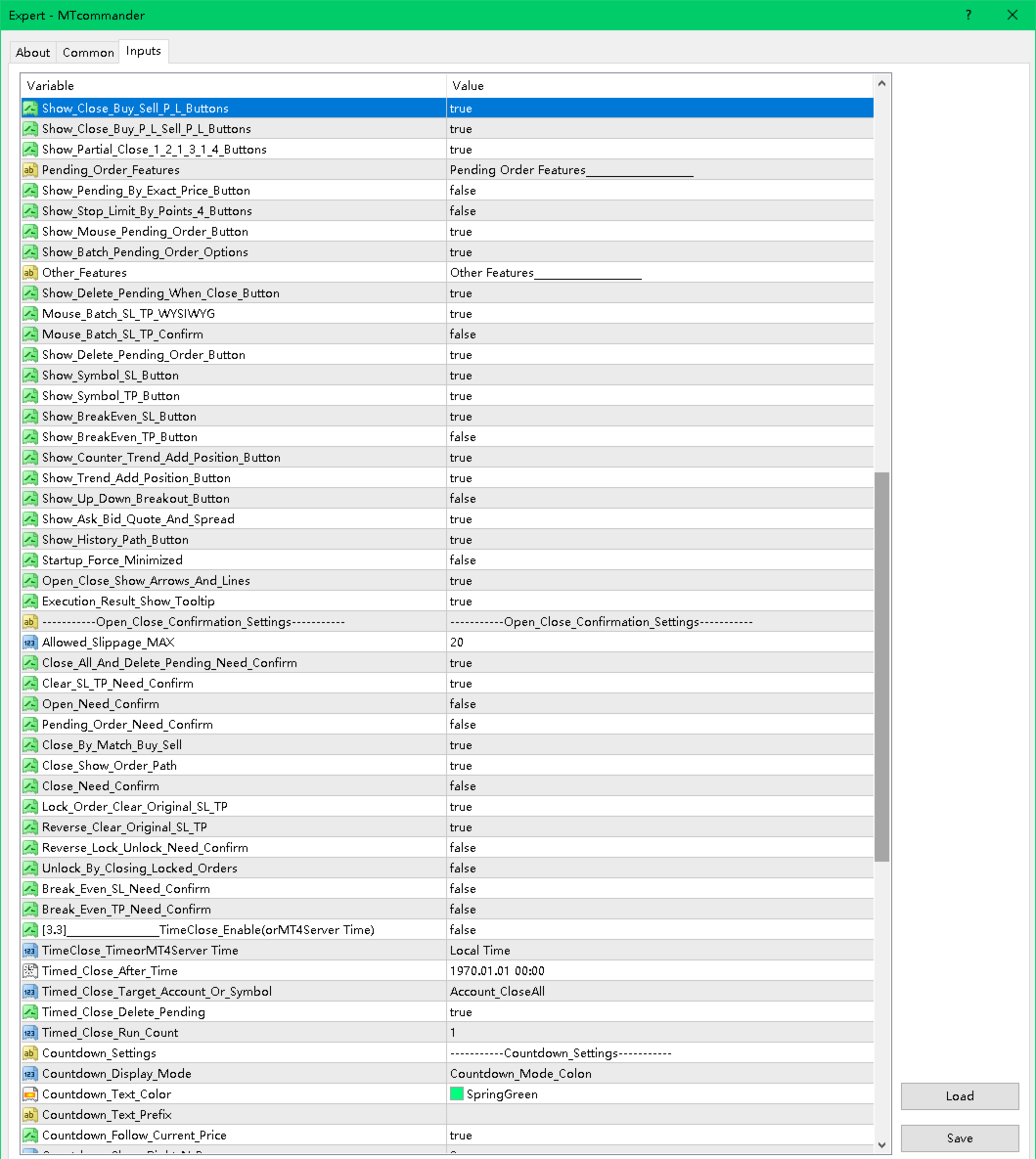
Pending Order Features

- Pending by exact price.
- Pending by distance in points.
- Four-button pending order layout.
- Mouse pending.
- Batch pending order options.
- Delete pending after close options.

SL/TP and Trailing

- Symbol stop loss and take profit tools.
- Batch SL/TP.
- Mouse SL/TP.
- Exact price SL/TP.
- Break-even SL.
- Trailing SL.
- ATR trailing.
- MA trailing.
- Floating-loss take-profit exit.

Add-Position Tools

- Counter-trend add.
- Trend-following add.
- Batch counter-trend add.
- Batch trend-following add.
- Breakout add.


============================================================
Safety Notes
============================================================

MTCommander can send trading requests immediately. A wrong click, wrong lot size, wrong symbol, wrong direction or wrong scope may cause real loss.

Please read and follow these safety notes:

- Test on a demo account first.
- Use the smallest lot size during testing.
- Check broker minimum lot, maximum lot and lot step.
- Check spread and stop level before placing pending orders or SL/TP.
- Check margin before opening or adding positions.
- Be careful with grid, batch pending and add-position functions because they can increase exposure quickly.
- Keep MT4 connected if you rely on EA-managed rules.
- Server-side SL/TP can remain with the broker, but EA-managed logic requires the terminal to run.
- Protection rules may fail to execute during disconnection, high volatility, rejected trade requests, trading disabled state, market close, broker restrictions or insufficient margin.
- No tool can remove trading risk.
- Market risk remains with every trade.


============================================================
FAQ and Troubleshooting
============================================================

1. The panel does not appear.

- Confirm that the EA is attached to the chart.
- Check that AutoTrading is enabled.
- Check the Experts and Journal tabs.
- Try changing the panel X/Y position.
- Make sure the chart is not too small.

2. Buttons do not open or close trades.

- Confirm that live trading is allowed for this EA.
- Confirm that AutoTrading is enabled.
- Check broker trading hours.
- Check spread, margin and symbol trade permission.
- Check the Experts tab for rejection messages.

3. Lot size is rejected.

- Check broker minimum lot.
- Check broker maximum lot.
- Check lot step.
- Check whether the calculated risk lot is below the minimum or above the maximum.

4. Pending order is rejected.

- The pending price may be too close to current price.
- The broker stop level may require a larger distance.
- The symbol may have special execution rules.
- The market may be closed.

5. SL or TP is rejected.

- SL/TP may be too close to market price.
- The broker stop level or freeze level may block modification.
- The direction may be wrong for the selected position.
- Some symbols require different point value handling.

6. What is the difference between position and pending order?

- A position is an already opened trade.
- A pending order is not opened yet. It waits for price to reach a trigger level.
- MTCommander uses "position" for opened trades and "pending order" for Buy Stop, Sell Stop, Buy Limit and Sell Limit orders.

7. Does MTCommander use DLL?

No. The Market version is prepared without DLL import and without external command execution. Sound and alert functions use allowed MT4 mechanisms.

8. Is MTCommander an automatic trading strategy?

No. It is mainly a manual trading panel and trade management assistant. Some management rules can be enabled, but it does not predict market direction.

9. Can I use it on any symbol?

It is designed for MT4 symbols supported by your broker. Always test each symbol first because contract size, tick value, spread, stop level and execution rules may differ.

10. Can I use it on a live account immediately?

It is strongly recommended to test on a demo account first. Use a live account only after you understand the behavior of the functions you enable.


============================================================
Suggested Market Page Text
============================================================

Title idea:
MTCommander - One Click Trade Manager for MT4

Subtitle idea:
A compact manual trading panel for fast order execution, position management, pending orders, SL/TP, break-even and risk control.

Feature bullets:

- One-click Buy/Sell and close tools.
- Fixed lot and risk-based lot workflow.
- Close all, close Buy/Sell, close profit/loss and partial close.
- Pending orders by exact price, points, mouse and batch/grid tools.
- SL/TP, break-even, trailing stop and batch modification tools.
- Account, symbol, magic and comment based management options.
- Compact draggable chart panel with tooltips.
- No DLL in the Market version.

Risk statement:
MTCommander is a trading utility, not a market prediction robot. It can send and close trades quickly. Test all functions on a demo account before live trading.


============================================================
Suggested Screenshot Captions
============================================================

1. Main trading panel with Sell / Buy price area and Short / Long action labels.
2. Account-level close and protection tools.
3. Current symbol position management tools.
4. Pending order tools by points and exact price.
5. Batch pending and grid order functions.
6. Symbol SL/TP and batch SL/TP tools.
7. Break-even SL and trailing stop tools.
8. Add-position and breakout management tools.
9. Panel display, tooltip and chart helper functions.


============================================================
Keywords
============================================================

manual trading panel
trade manager
one click trading
MT4 trading panel
MetaTrader 4 utility
position management
pending orders
close all
partial close
break even
trailing stop
risk management
SL TP manager
order management
grid pending orders
trade assistant


============================================================
Support
============================================================

For questions, bug reports or suggestions, please use the MQL5 Market Comments or MQL5 Messages system.

When reporting an issue, include:

- Product version.
- MT4 build number.
- Broker name and symbol.
- Screenshot of the panel.
- Experts tab message.
- Exact steps to reproduce the issue.


============================================================
Final Reminder
============================================================

Trading involves risk. MTCommander can make trade management faster, but faster execution also means mistakes can happen faster. Start with demo testing, use small lot sizes, and enable only the functions you understand.
Рекомендуем также
Утилита копирует сделки со счетов поставщиков сигналов (master-счета, один или несколько поставщиков) на неограниченное количество счетов-получателей (slave-счета). Задание поставщика осуществляется с помощью параметра provider (любая комбинация цифр и букв). Например, есть два поставщика. Запускаете на них утилиту в режиме master, задав разные значения параметру provider. На счете, предназначенном для копирования этих сигналов, запускаете две утилиты в режиме slave в разных окнах, задав одной p
Trade Assistant Pro 36 in 1
Makarii Gubaydullin
4.76 (21)
Многофункциональная утилита: калькулятор лота, сеточные ордера, индикатор Price Action, управление сделками, рассчёт R/R, и многое другое Демо веpсия  | Инструкция  | Версия для MT5 Утилита не работает в тестере стратегий: вы можете скачать   демо версию ЗДЕСЬ , чтобы протестировать продукт перед покупкой. Напишите мне  если есть вопросы / идеи по улучшению / в случае найденного бага Упроситите и сделайте вашу торговлю быстрее, при этом расширяя стандартные возможности терминала. 1. Открытие
OTRX Fimathe Backtest is a tool for the Trader or Enthusiast who uses the Fimathe technique created by Trader Marcelo Ferreira to carry out his training and validate if he can obtain profitability. In this tool you will be able to: 1. Define whether you are looking for a buy or sell entry. (Trend). 2. Define by clicking twice on the horizontal lines where your Reference Zone and your Neutral Zone will be. 3. Monitor the entry, subcycle and exit of the trade. 4. Trading Summary, Daily, Week
FREE
Профессиональная панель для ручной торговли: весь цикл сделки в одном окне на графике, от точного входа до защиты счёта. Рассчитывайте объём строго под заданный риск, стройте сделку линиями прямо на графике с помощью RR Tool, открывайте рыночные и отложенные ордера, сетки и OCO. Сопровождение позиции панель берёт на себя: частичное закрытие до пяти уровней, шесть типов трейлинг-стопа, безубыток и Virtual SL/TP. Дневные, недельные и месячные лимиты защищают депозит и срабатывают автоматически при
Reverse copier is a tool that will open opposite buy/sell orders from your master account. It will help you with low profit EA's that lose consistenly and turn it to wins. Feel free to ask for new functions/features and I will add it. Now it's a simple MT5 to MT4 bridge with straightforward logic of one position open/close.  How to install: https://www.mql5.com/en/market/product/141604
FREE
Purpose: IF you are apart of a signal group or have a losing strategy this tool is perfect for you. This Expert Adviser is a Trade Copier which Copies Trades on the same account, It takes trades in the same direction or opposite direction. You can set 100% for same trade size or 200% to double up, while the same percentage rule also work for the stop-loss and take profit distances. input: Copy All or By Magic Take only new trades = False; Take same direction of existing trade or counter_direct
Trade Manager MT4 DaneTrades
Levi Dane Benjamin
4.09 (11)
Trade Manager, который поможет вам быстро входить и выходить из сделок, автоматически рассчитывая риск. Включает функции, которые помогут предотвратить чрезмерную торговлю, торговлю из мести и эмоциональную торговлю. Сделками можно управлять автоматически, а показатели эффективности счета можно визуализировать в виде графика. Эти функции делают эту панель идеальной для всех трейдеров, занимающихся ручной торговлей, и помогают улучшить платформу MetaTrader 4. Многоязычная поддержка. Версия MT5  |
Trade Copier Professional — Локальное решение для копирования сделок   Trade Copier Professional — это надёжная локальная система копирования сделок для MetaTrader 4/5. Она позволяет трейдерам мгновенно дублировать позиции на нескольких счетах на одном компьютере, оснащена встроенными средствами безопасности и профессиональной панелью управления.   Обзор   Советник работает в режимах Master и Slave из одного файла, с лёгким переключением. Сделки могут копироваться между терминалами MT4 и MT5 бе
Local Account Monitor MT4 is a read-only local monitoring utility for traders who run multiple MetaTrader terminals on the same PC or the same Windows VPS . It combines Agent mode and Dashboard mode so you can monitor local accounts from one place, spot stale terminals quickly, review account health states, and inspect risk details without switching between many terminals. Public channel:   CLICK HERE What it is for Monitoring multiple local MT4 terminals from one dashboard Quickly identifying
FREE
Expert Advisor for MT4 Useful utility MUST have for all traders.  With 1 click button, you're able to close all your open positions. Its come with a warning pop up notification when you click to close all your trades, to avoid an accident press the button. Just press 'Yes' to confirm or 'No' to cancel it. The expert will close all your open positions no matter what pairs you currently open or directions. Just attach the expert on 1 of your chart, and you're good to go.
Symbol Manager
Taras Slobodyanik
5 (4)
Менеджер символов или Сеточный менеджер, разработан для группировки ордеров в одну позицию (по символу и по направлению). Эта утилита будет полезна сеточникам и мультивалютникам, тем у кого может быть открыто множество ордеров по нескольким парам. Вы сможете видеть общее количество лотов, общую прибыль, и устанавливать виртуальные стоплосс и тейкпрфит. Для установки реального ТП (или СЛ) необходимо сначала задать виртуальное значение, а затем ввести в этой ячейке команду: "set". Если вы хотите
STRATEGY - We use risk and reward ratio of 1:5 to maximize the profit - We use trailing stop to lock profit and minimize loss ALERT User will get notified with alert with the following condition: - Max  Spread - Max  Orders UPDATE - Free Update and Support COMPATIBILITY - MT4 and MT5 - M1 Timeframe - All Currency Pair WHAT YOU GET 1) Free Online Forex Training (Normal Price: USD 299) 2) Free Expert Advisor (EA) (Normal Price: USD 288) 3) Free Copy Trading (CT) (Normal Service Fee: 20%) *Aft
Очень разочаровывает, когда цена разворачивается, не достигнув нескольких пунктов до уровня Take Profit. Этот советник устанавливает виртуальные уровни рядом с уровнями TakeProfit. Если эти уровни достигнуты ценой, то ордер будет переведен в безубыток или к нему применяется трейлинг-стоп. Особенности Советник самостоятельно не устанавливает ордера. Его работа заключается в управлении уровнями стоп-лосс существующих ордеров, установленных другим советником или вручную (с магическим числом 0). Дл
Trade copier MT4
Alfiya Fazylova
4.56 (32)
Trade Copier — это профессиональная утилита, предназначенная для копирования и синхронизации сделок между торговыми счетами. Копирование происходит от счета/терминала поставщика к счету/терминалу получателя, которые установлены на одном компьютере или vps. АКЦИЯ - Если вы уже приобрели "Trade copier MT5", вы можете получить "Trade copier MT4" бесплатно (для копирования MT4 > MT5 и MT4 < MT5). Для получения более подробной информации об условиях, пожалуйста, свяжитесь с нами через личные сообщени
Grid Trading
Waseem Raza
5 (3)
Grid Trading - полуавтоматический советник для ручной торговли по сетке в один клик. Обычный режим Вы нажимаете на кнопку Sell или Buy на графике, затем эксперт добавит уровни стоп-лосс, тейк-профит для сделки, а функции трейлинг-стопа и безубытка позаботятся о сделке, если она не сможет достичь цели профита. Хеджирование При выборе торговли с использованием хеджирования, советник начнет торговлю по сетке, которая начинается с противоположного входа и продолжается, пока все сделки не будут зак
This tool will perform Trailing stop loss and Break even management for orders. Helps you limit or reduce the time spend watching orders on the screen, especially when you need to go to sleep. Just add this EA to 1 chart, you can manage all pairs. You can filter orders by comment, magic number, symbol, and order ticket number. When Breakeven it can add shift/offset pips (to cover the commission...). You can try in strategy tester before purchase. The EA will add Buy and Sell alternately, so yo
Fast copier for sending trades to multiple MT4 / MT5 accounts. Perfect for copying trades from MT4 to MT5 accounts. MT4 Trade Copier Master EA sends trades instantly from your master account to one or multiple slave accounts. Supports copying to: • MT5 accounts • MT4 accounts Perfect for: • Multi-account traders • Signal providers • Account managers • Personal account mirroring Main Features • Fast local trade copying • Low latency execution • Multiple slave accounts support • Copy open position
Exp Swing
Vladislav Andruschenko
4.43 (63)
Модель известной стратегии Качели (Маятник, Чебурашка) - поочередное открытие отложенных ордеров с увеличенным лотом. Принцип работы стратегии в установке двух противоположных отложенных ордеров, при движении цены в одну сторону срабатывает отложенный ордер, второй ордер увеличивается в размере лота. В нашем советнике есть три типа открытия отложенных ордеров (TypeofTrade) Автооткрытие после установки (Instant opening AutoTrade) Открытие и сопровождение после ручного открытия (Manual opening Ma
FREE
Auto Close Manager EA – Equity & Account Protection Utility Overview Auto Close Manager EA is a risk management utility for MetaTrader 4 designed to automatically close all open positions when a predefined floating profit or floating loss level is reached. This Expert Advisor does NOT open trades. It only monitors account equity and manages existing positions. The EA works with manual trades and can optionally include trades opened by other Expert Advisors. How It Works The EA continuously moni


Copier4Fee Advanced
Vladimir Tkach
4.75 (16)
Утилита копирует сделки со счетов поставщиков сигналов (master-счета, один или несколько поставщиков) на неограниченное количество счетов-получателей (slave-счета).  Важно! Н ужно использовать идентификаторы (Provider number) одинаковой длины если вы используете несколько мастер копировщиков. Например. 1, 2, 3 или 11, 13, 22.  Копирование можно задать в противоположном направлении. Утилита может копировать сделки по инструментам, имеющим различные префиксы/суффиксы.  Утилита не копирует инструме
TSim
Sergey Kruglov
Утилита  TSim   позволяет симулировать ручную торговлю в Тестере Стратегий MetaTrader 4. В панеле можно устанавливать размеры лота, тейпрофита и стоплосса. Панель имеет кнопки Sell   и Buy для выставления рыночных ордеров, а также кнопки CloseSell, CloseBuy и CloseAll для быстрого закрытия ордеров. Под панелью отображается список открытых ордеров. Внимание. Панель работает только в Визуальном режиме Тестера Стратегий MetaTrader 4.
FREE
The program is use to copy trading from MT4   to MT4 and MT5  on local PC or copy  over the Internet.   Now you can easy copy trades to any where or share to friends. Only run one Flash Server on VPS, also need allow the apps if you turn on Windows Firewall. Can not add more than 20 account copier to server, include both  MT4 and MT5 Get free Copier EA for MT4 and MT5 (only  receive signal),   download here Instants copy, speed smaller 0.1 seconds, easy to setup How to setup and guide Let read a
TradePulseMonitor for MetaTrader 4 & 5 Overview: TradePulseMonitor   is a comprehensive, real-time dashboard indicator designed for MetaTrader 4 and MetaTrader 5. It provides traders with an at-a-glance overview of their account's financial health, risk exposure, position metrics, and historical performance. By consolidating critical data into a single, customizable on-chart dashboard, it eliminates the need to constantly check the Terminal window, allowing for faster and more informed trading
FREE
Trading panel for manual trading. Has a fairly wide functionality. Allows you to automatically calculate the order size, open both market and pending orders. It has a wide range of options for closing orders, it is possible to partially close orders, close orders after reaching a certain profit or loss, separately close profitable and unprofitable, buy and sell, as well as pending orders. The panel also contains a simple implementation of a grid of pending orders, reverse and lock functions, tr
Hedge Trade
Mothusi Malau
1 (2)
️ Hedge Trade — Smart Fixed-Offset Hedging EA Turn adverse moves into controlled recovery cycles. Hedge Trade is a professional-grade MetaTrader 4 Expert Advisor that protects any open trade by automatically placing and managing one intelligent hedge order. It’s built for traders who prefer to open their own base position but want an automated, disciplined hedging system to manage drawdown and capture counter-moves — safely, transparently, and without martingale. Key Features Automatic Hedg
Trade panel manual это многофункциональный помощник  в торговле. Он позволяет в один клик отрывать рыночные и отложенные ордера. Устанавливается значение через эдит меню  кнопки или  удаляет  определенными  кнопками отложенные ордера и значение тейк профита и стоп лоса в один клик. Через эдит меню  кнопки устанавливается значение которое можно легко изменить простым  перемещением  линии  level_tp  для уровней тейк профитов или стоп лосов  и для отложенных ордеров. Предусмотрена возможность выбир
Risk Commander
Adisorn Soodkanueng
Product Name: Risk Commander: Trade Assistant & Strategy Simulator Risk Commander is more than just a trade panel—it is a complete Manual Trading Ecosystem . It serves two powerful purposes: Live Assistant: Helps you execute trades with speed, precision, and perfect risk management in real-time markets. Training Simulator: Fully compatible with the Strategy Tester (Visual Mode) , allowing you to practice manual trading on historical data without risking a cent. NEW! Built-in Simulator Mode Stop
Индикатор для бинарных опцыонов стрелочный прост в использовании и не требует настройки работает на всех валютных парах акцыях крипто валюте сигнал на покупку синяя стрелка вверх  сигнал на продажу красная стрелка в низ  советы не стоит торговать во время новостей и за 15-30 минут перед их выходом так как рынок слишком волотилен и очень много шума  входить в сделки стоит на одну или две свечи от текущего периода ( рекомендуется на 1 свечу ) таймфрейм до м 15 рекомендуемый мани менеджмент фиксир
Virtual Collider Manual   – торговый робот-помощник со встроенной панелью для ручной торговли, осуществляющий автоматический вывод открываемой трейдером позиции в профит, используя инновационный адаптивный сеточный алгоритм усреднения и адаптивный пирамидинг. Ноу-хау используемого сеточного алгоритма усреднения и пирамидинга торгового робота   Virtual Collider Manual   базируется на полной автоматической адаптации всех характеристик динамически выстраиваемой сетки и пирамиды ордеров под актуальн
Close All Selected Chart Overview: This is one of the smart choices to help you make your trading management a lot easier. Especially when you have to manage a large number of orders. This utility will work like a helping hand to close all the unrelated order windows in less than no time, plus without making any kind of unwanted effects. :: 3 simple steps to use :: 1. Select your chart window.  2. Click "Close All" 3. Click "OK" Note: For the better understanding on how this utility works, plea
С этим продуктом покупают
The product will copy all telegram signal to MT4   ( which you are member  ) , also it can work as remote copier.  Easy to set up, copy order instant, can work with almost signal formats, image signal, s upport to translate other language to English Work with all type of channel or group, even channel have "Restrict Saving Content", work with  multi channel, multi MT5 Work as remote copier: with signal have ticket number, it will copy exactly via ticket number. Support to backtest signal. How to
Strategy Builder offers an incredible amount of functionality. It combines a trade panel with configurable automation (covert indicators into an EA), real-time statistics (profit & draw down) plus automatic optimization of SL, TP/exit, trading hours, indicator inputs. Multiple indicators can be combined into an single alert/trade signal and can include custom indicators, even if just have ex4 file or purchased from Market. The system is easily configured via a CONFIG button and associated pop-up
Custom Alerts AIO: Универсальный сканер рынка — Без настройки Обзор Custom Alerts AIO — это самый быстрый и простой способ отслеживать рыночные сигналы в реальном времени на множестве инструментов без дополнительной настройки и без необходимости покупать другие продукты. В состав входят все необходимые индикаторы от Stein Investments, что делает этот инструмент идеальным решением «всё в одном» для трейдеров, ценящих простоту и эффективность. Просто установите на график и сразу получайте сигнал
EASY Insight AIO – Всё-в-одном для умного и простого трейдинга Обзор Представьте, что вы можете просканировать весь рынок — Форекс, золото, криптовалюты, индексы и даже акции — всего за несколько секунд, без ручного просмотра графиков, сложной установки или настройки индикаторов. EASY Insight AIO — это ваш идеальный инструмент экспорта для трейдинга с поддержкой искусственного интеллекта. Он предоставляет полный снимок рынка в одном аккуратном CSV-файле — готовом к мгновенному анализу в ChatGP
Unlimited Trade Copier Pro - это мощный инструмент для удаленного копирования сделок между несколькими счетами MetaTrader 4/MetaTrader 5, расположенными удаленно друг от друга, по сети интернет. Это идеальное решение для провайдеров сигналов, которые хотят поделиться своей торговлей с другими трейдерами по всему миру. Один поставщик может копировать сделки на неограниченное количество счетов-получателей, а один получатель также может копировать сделки неограниченного количества провайдеров. Пост
ManHedger MT4
Peter Mueller
5 (2)
THIS EA IS A SEMI-AUTO EA, IT NEEDS USER INPUT. Manual & Test Version Please TEST this product before   BUYING  and watch my video about it. Contact me for user support or bug reports, or if you want the MT5 version! MT5 Version I do not guarantee any profits or financial success using this EA. With this Expert Advisor, you can: Implement your own   Zone Recovery   strategy to capitalize on trending markets. Create   Grid   trading strategies, to profit from ranging markets. Place orders easil
Smart Channel M4
Vahidreza Heidar Gholami
The trend in the market can be predicted using trend lines but the problem is you don’t know where exactly the price is going to touch the trend line where you can put your pending orders on. Smart Channel Expert Advisor makes it possible to put an advanced channel around the price data, which can be configured to handle placing orders, opening and closing positions, managing risk per trade, spread, slippage, and trailing stop-loss and take-profit automatically. Features Money Management (Calcul
Crystal Trade Manager PRO – Продвинутая система контроля рисков и управления сделками для MT4 Бесплатная версия: https://www.mql5.com/en/market/product/150632 Обзор Crystal Trade Manager PRO (CTM) — это полнофункциональная утилита для MetaTrader 4, предназначенная для профессионального управления рисками, автоматизации сделок и обеспечения строгой торговой дисциплины. Система защищает капитал, контролирует дневную просадку, автоматически устанавливает SL/TP, обеспечивает быстрые команды управле
RedFox Copier Pro
Rui Manh Tien
4.7 (10)
Time saving and fast execution Whether you’re traveling or sleeping, always know that Telegram To Mt4 performs the trades for you. In other words, Our   Telegram MT4 Signal Trader  will analyze the trading signals you receive on your selected Telegram channels and execute them to your Telegram to MT4 account. Reduce The Risk Telegram To Mt4   defines the whole experience of copying signals from   Telegram signal copier to mt4 platforms. Users not only can follow all instructions from the signa
The product will copy all  Discord  signal   to MT4   ( which you are member  ) , also it can work as remote copier.  Easy to set up. Work with almost signal formats, support to translate other language to English Work with multi channel, multi MT4. Work with Image signal. Copy order instant, auto detect symbol. Work as remote copier: with signal have ticket number, it will copy exactly via ticket number. How to setup and guide: Let read all details about setup and download Discord To MetaTrader
Dashboard.mq4 - Простой Менеджер Торговли Разработан для тех, кто предпочитает ручную торговлю и хочет упростить управление сделками, этот мощный инструмент MQL4 повышает эффективность торговли, предоставляя в реальном времени панель управления для управления сделками. Он легко интегрируется в MetaTrader и позволяет рассчитывать размер лота и отслеживать рисковые метрики без усилий. Основные особенности: Отображение риска и маржи : Расчет размера лота, требований к марже и коэффициента побед в р
Панель FFx Hidden Manager предназначена для управления ордерами прямо на графике. Особенности: Уровни тейк-профит, стоп-лосс и трейлинг-стоп скрыты Для каждого ордера на графике есть отдельная линия Перетащите необходимую линию, чтобы изменить уровни тейк-профит/стоп-лосс Функция автоматического перетаскивания уровня стоп-лосс в безубыток, когда достигнут йровень тейк-профит 1 Возможность выбора типа тейк-профита/стоп-лосса (в пунктах или по цене) Возможность выбора типа трейлинг-стопа (в пунк
Панель FFx Risk Calculator поможет вам легко рассчитать размер ваших трейдов, стоп-лоссов или риска прямо на графике. Особенности продукта: Параметры для расчета: Risk (риск), Stop Loss (стоп-лосс) или Lot Size (размер лота) Панель показывает, допустимо ли использовать данный размер лота при текущем значении свободной маржи на счете Кнопка для свертывания/развертывания панели Возможность перетащить панель в любое место на графике Применение Выберите параметр для расчета. Расчет будет основан на
Trade Copier Pro
Vu Trung Kien
4.29 (14)
Trade Copier Pro - это мощный инструмент для удаленного копирования сделок между несколькими счетами MetaTrader 4/MetaTrader 5, расположенными в разных местах, по сети интернет. Это идеальное решение для провайдеров сигналов, которые хотят поделиться своей торговлей с другими трейдерами по всему миру. Один поставщик может копировать сделки на множество счетов-получателей, а один получатель может копировать торговлю множества провайдеров. Поставщик может указать срока завершения подписки для кажд
News Trader Pro
Vu Trung Kien
4.38 (16)
News Trader Pro - это уникальный робот, который позволяет торговать по новостям. Он загружает все новости с нескольких популярных сайтов Forex. Вы можете выбрать любую новость и заранее задать стратегию торговли. News Trader Pro начнет торговать в соответствии с выбранной стратегией автоматически, как только выйдет новость. Выход новости дает возможность заработать, поскольку изменения в цене в этот момент могут быть значительными. С появлением данного инструмента торговать по новостям стало про
FFx Watcher PRO - панель для отображения на одном графике текущего направления стандартных индикаторов (до 15 одновременно) на нескольких таймфреймах (до 9). Панель работает в двух режимах: 1. Режим Watcher: Мульти-индикаторный Пользователь может выбрать до 15 индикаторов для отображения Пользователь может выбрать до 9 таймфреймов для отображения 2. Watcher mode: Мультивалютный Пользователь может выбрать любое количество символов Пользователь может выбрать до 9 таймфреймов для отображения В это
Эта гибко настраиваемая панель для торговли вручную также позволяет автоматизировать некоторые торговые действия, такие как оповещения, открытие, закрытие и частичное закрытие сделок, доливки, установка отложенных ордеров, настройки стоп-лосса, тейк-профита и многое другое. Предусмотрены интерактивные элементы управления на графике, такие как поля для галочек и кнопки. Советник включает функции управления капиталом, новостных событий, скрытый стоп-лосс, тейк-профит и отложенные ордера, трейлинг-
Программа Binary Options Copier Remote позволяет копировать сделки по бинарным опционам между разными счетами MetaTrader 4, установленных на разных компьютерах. Это идеальное решение для провайдеров сигналов, которые хотят поделиться своей торговлей с другими трейдерами по всему миру. Провайдер может выдать до 10 бесплатных лицензий на получение сигналов. Это означает, что 10 пользователей могут копировать сигналы провайдера, используя бесплатный продукт Binary Options Receiver Free . Начиная с
Price Action Dashboard - это инновационная утилита для помощи трейдерам в контролировании большого числа финансовых инструментов. Эта утилита предназначена автоматически предлагать сигналы и ценовые условия. Dashboard анализирует все основные таймфреймы, предлагая условия ценовых действий с помощью графических элементов. Dashboard может подсказать вам силу тренда, определяющего направление движения, это незаменимый инструмент для тех, кто хочет самостоятельно открывать позиции, используя индикат
Elliott Wave Counter — это панель для быстрой и удобной ручной разметки волн Эллиотта. Можно выбрать цвет и уровень оценок. Также есть функции для удаления последней разметки и всей разметки, сделанной инструментом. Разметка производится в один клик. Нажмите пять раз - будет пять волн! Счетчик волн Эллиотта станет отличным инструментом как для начинающих, так и для профессиональных аналитиков волн Эллиотта. Руководство по установке и вводу волнового счетчика Эллиотта если ты хочешь получить    
Если вы хотите рисовать линии Поддержки и Сопротивления, просматривать: дневные уровни открытия рынка, классические уровни разворота, уровни разворота Фибоначчи, трендовые линии, уровни Фибоначчи, время до закрытия свечи, а также текущий спред. Если вы хотите выставлять ваши ордера с точным лотом, который отвечает вашему желаемому риску стоп-лосса. Если вы хотите делать все это и много другое всего одним кликом, тогда это идеальный инструмент для вас. Этот инструмент позволит вам чувствовать себ
Partial Close Expert   — это инструмент, объединяющий множество функций в одну автоматизированную систему. Этот советник поможет трейдерам эффективнее управлять позициями, предлагая различные варианты управления рисками и максимизации потенциальной прибыли. С помощью Partial Close Expert трейдеры могут установить       частичное закрытие       уровень для фиксации прибыли,       трейлинг-стоп       уровень для защиты прибыли и ограничения убытков,       точка безубыточности       уровень, гаран
Master Trend Dashboard - это индикатор нового поколения, компактный, легкий и эффективный. Каждый элемент данной панели предназначен для возврата определенного сигнала, например: ценовое действие, пробой, чистое изменение (производительность инструмента), алгоритмические исследования, корреляции и статистические вычисления. Этот инструмент изменит ваш способ торговли, позволяя вам получать важную информацию. Для полного понимания каждого из сигналов, смотрите раздел графические сигналы: Графиче
Агент Trade Copier предназначен для копирования сделок между несколькими счетами/терминалами MetaTrader (4/5). С помощью этого инструмента вы можете выступать в роли поставщика (источника) или получателя (назначения). Все торговые действия будут копироваться от провайдера к получателю без задержки. Этот инструмент позволяет копировать сделки между несколькими терминалами MetaTrader на одном компьютере с молниеносной скоростью копирования менее 0,5 секунды. Руководство по установке и вводу агент
Unlimited Binary Options Copier Remote это мощный инструмент для удаленного копирования сделок по бинарным опционам между несколькими счетами, расположенными удаленно, по сети интернет. Это идеальное решение для провайдеров сигналов, позволяющее поделиться своими сделками по бинарным опционам с другими трейдерами по всему миру. Один поставщик может копировать сделки на неограниченное количество счетов-получателей, а один получатель также может копировать сделки неограниченного количества провайд
Данный советник можно использовать для ручной торговли в качестве фонового советника, либо сочетать с другим советником для открытия сделок. Loss Recovery Trading - это вариант для управления убыточными позициями вместо использования стоп-лосса, устанавливая зону восстановления и целевые уровни для выхода из последовательности шагов. Как он работает? Если цена движется в противоположном направлении от первой позиции на определенное количество пунктов убытка, советник откроет противоположно напр
Отличный скальперский/внутридневной инструмент для удобства ежедневной торговли. Утилита Scalper Weapon подходит для использования в любых торговых условиях. Для скальпинга и внутридневной торговли утилита обеспечивает необходимые функции, которые не доступны в самой платформе MT4. Необходимо проверить разрешение на авто-торговлю : нажмите Ctrl+O, откройте вкладку Советники , включите опцию " Разрешить автоматическую торговлю" . Значок " автоматической торговли " должен быть зеленым. Описание в
Market Pressure Dashboard — это утилита нового поколения. Ее основная функция заключается в помощи и предоставлении оперативных идей для оптимизации аналитической работы. Утилита позволяет с легкостью отслеживать множество финансовых инструментов (до 28 форекс-пар). Индикатор Market Pressure позволяет настроить внутренний список инструментов, которые необходимо анализировать. Благодаря панели функции открытия и управления позициями станут гораздо более удобными, а навигация графиков станет мощне
提供专业的EA编程服务,推出特色仪表盘EA编程,将您的交易策略自动化,可视化,一个图表管理多个交易货币对,详情查看: http://www.ex4gzs.com   Providing quick Developments and Conversion of MT4/MT5 EAs, Indicators, Scripts, and Tools. If you are looking for an Dashboard EA to turn your trading strategy into auto trading algo and to manage multi trades in one chart with visualizing tool, come and visit http://www.ex4gzs.com/en for more details. 如果产品有任何问题或者您需要在此产品上添加功能,请联系我 Contact/message me if you encounter any issue using the product or need extra feat
Telegram Publisher Agent   — это надстройка, которая позволяет трейдерам отправлять сигналы в свои каналы и группы Telegram в режиме реального времени. С помощью настраиваемых сообщений, снимков экрана и других функций этот инструмент помогает трейдерам делиться своими торговыми идеями и стратегиями со своими подписчиками. Инструмент также имеет красивый дизайн с переключением светлой и темной темы, предоставляя пользователям эстетичный и функциональный торговый опыт. Telegram Publisher Agent б
Другие продукты этого автора
FSS Report
Bao Ying Huang
5 (2)
This is a professional report statistical indicator, which can be counted by day, week, month, quarter, year, magic and comment, and display the growth curve. install: select "File" in your MT4 client,and open the folder "MQL4\indicators",then copy file "FSS_Report.ex4",reload MT4 and enjoy. Para List: UI_XY_Setting=21 UI_X_default=0 UI_Y_default=21 custom_title=FSS Report UI_reload_time_interval=5 report_time_from=0 report_time_to=0 filter_demo=____________symool, magic and comment, all supp
Account Performance Radar - MT4 Account Analytics Indicator ============================================================ Short Market Description ============================================================ Account Performance Radar is a MetaTrader 4 indicator for reviewing historical account performance, risk quality and trading behavior in a visual radar dashboard. It converts closed trade history into two radar views and a central trading overview. The indicator focuses on profitability,
FSS_Report This is a professional report statistical indicator, which can be counted by day, week, month, quarter, year, magic and comment, and display the growth curve. How to install: select "File" in your MT5 client 'menu,and open the folder "MQL5\Indicators",then copy file "FSS_Report.ex5",reload MT5 and enjoy. last update at  2023-05-18 v1.3 update info  1.fix bug about magic filter 2.fix bug about Comment filter 3.add path line 4.add func about addon work Para List: UI_XY_Setting=21 UI
Фильтр:
Нет отзывов
Ответ на отзыв