AMD Desk
- 유틸리티
- 버전: 2.16
- 업데이트됨: 27 11월 2026
- 활성화: 10

AMD Desk EA for MetaTrader 5
AMD Desk is a manual trading Expert Advisor for traders who follow the New York session in US indices and gold. It brings session analysis, position sizing, and order execution onto one chart. You choose the entry, set your risk, and submit the order from the dashboard.
Plan and size a trade. Choose Risk % to size a position from your balance or equity, Risk $ to enter an amount in your account currency, or Lot Size to set the volume directly. For example, on a USD account, enter $200 risk and a 100-pip stop to see the calculated lot size, stop price, take-profit price, and estimated profit or loss. The calculation uses your broker’s contract specifications and volume step. Solid TP and SL lines show each level in price, pips, cash, and percentage terms.
- Trade from the chart. Submit market Buy and Sell orders or place Buy Limit and Sell Limit orders with a stop loss and take profit. Switch instruments directly from Market Watch. Close All, Close Profit, and Close Loss manage open positions on the selected symbol, including positions opened manually or by another EA.
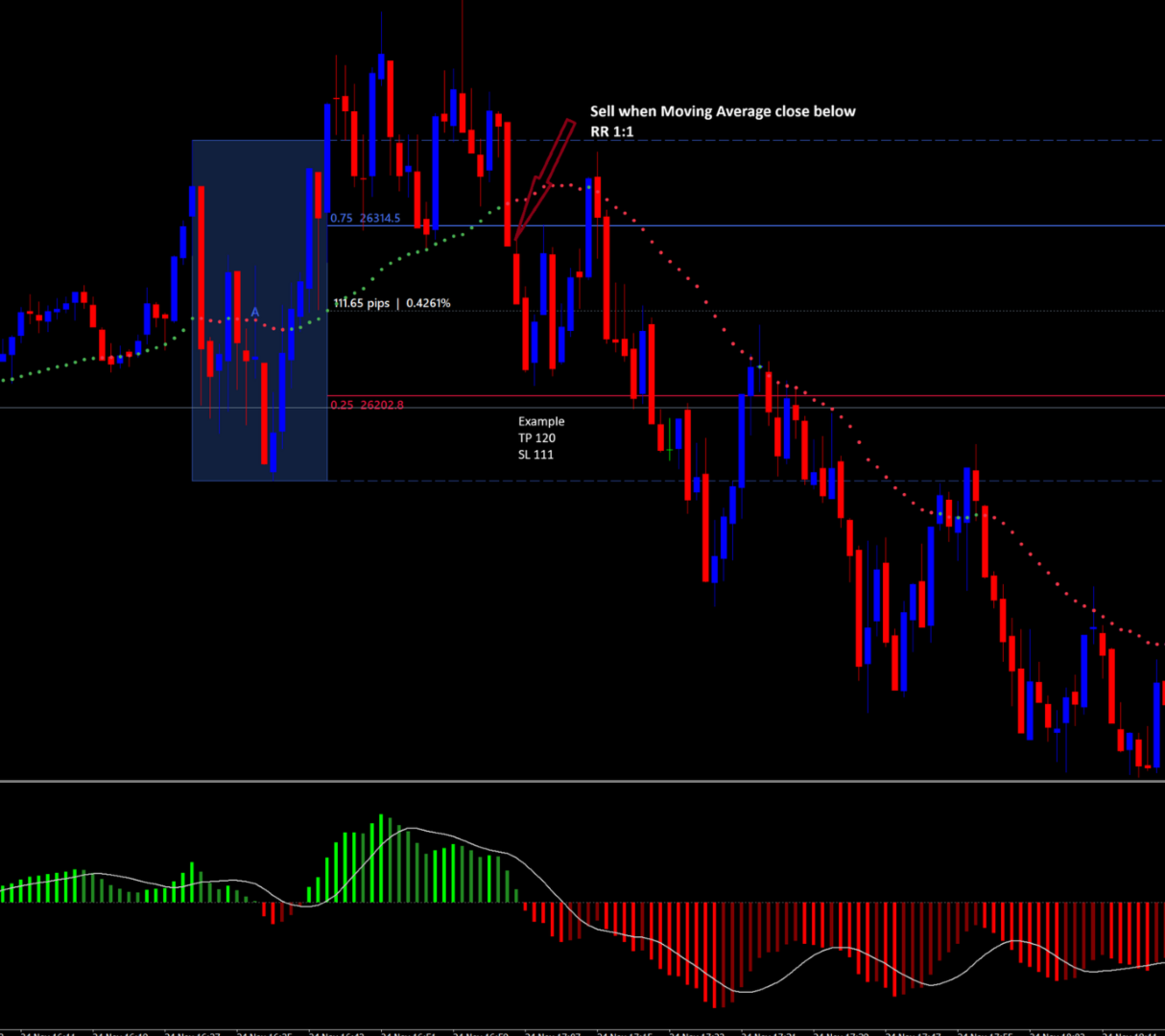
Follow the New York session. Track accumulation, manipulation, and distribution with presets for US indices and gold. The opening range defaults to 15 minutes and is adjustable. The chart displays the 0.25 and 0.75 Fibonacci levels, their separation in pips and percent, and an optional midpoint. Color-coded moving-average dots support SMA, EMA, WMA,
VWMA, and SMMA. A four-color MACD histogram shows whether momentum is building or fading on your chosen timeframe.
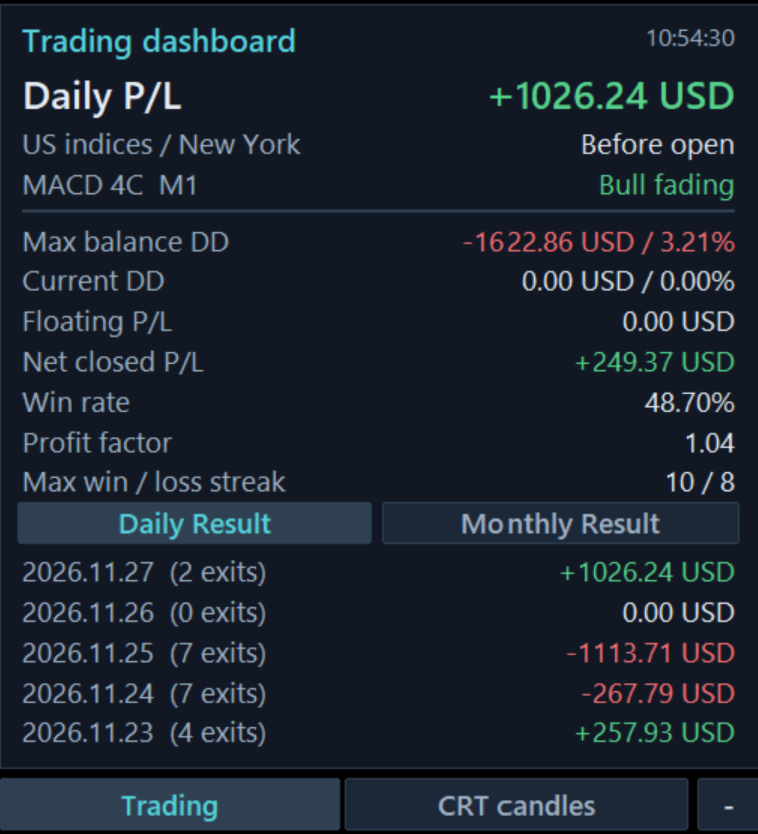
Monitor price and performance. Switch between the CRT Candles and Trading dashboards. The CRT view displays live H1 and H4 candles by default and measures price against the previous trading day’s high and low. The Trading view shows drawdown, floating and closed P/L, win rate, profit factor, and daily or monthly history. Monthly P/L percentages use the current account balance. The order panel can be placed in any chart corner.
- This is not Auto Trade or EA
- Trade by what you see. simple to understand with Opening US Market
This EA are suitable for US Indices such as NASDAQ, US30, US100, Stocks and Gold
Just take 1 - 2 Hour to trade 1 to 2 time
best fit for Prop firm
The logic of AMD + Fibonacci 0.75 & 0.25, Moving Average
Fibonacci act as STOP LOSS, example the gap between 0.75 & 0.25 is 90 pips away. which mean SL 90 TP 90 or more.
MACD how the strength of the volume buyer and seller, if signal line like below green volume its indicate weak and seller going to take over combine with MA as double confirmation
- Avoid low volume trade
- Avoid big new such as NFP, Fed Interest rate & CPI
Best work timeframe
- 1M
- 5M
Order Panel
| Dashboard control | What it does |
| Symbol / Market Watch | Opens the list of visible symbols in MT5 Market Watch. Select an instrument to switch the chart and order panel. The arrows let you browse the list. |
| Market order / Limit order | Selects the order type. Market mode uses the latest quote. Limit mode reveals a field where you enter your preferred entry price. |
| Preview: Buy / Sell | Switches the direction of the calculation so you can inspect a long or short setup. Clicking Preview does not submit an order. |
| Risk % / Risk $ / Lot Size | Click to cycle through three sizing modes. Risk % calculates lots from a percentage of balance or equity. Risk $ calculates lots from a cash amount in the account currency. Lot Size lets you enter the volume directly and see the resulting risk. |
| Risk value and basis | Enter the percentage, cash amount, or lot size and press Enter. In percentage mode, click % balance or % equity to switch the calculation base. |
| SL pips | Sets the distance from entry to stop loss. The default is 100 pips. You can adjust the price value of one pip in the EA inputs to match your instrument. |
| R:R | Sets the reward relative to the stop distance. With a 100-pip stop, 1.00 targets approximately 100 pips and 2.00 targets approximately 200 pips, rounded to the instrument’s tick size. |
| Limit price | Sets the requested entry for a pending order. A Buy Limit goes below the current ask. A Sell Limit goes above the current bid. |
| Entry / spread | Shows the proposed entry price and the current bid–ask spread. The spread is displayed in ticks. |
| Stop price / Take profit | Shows the calculated SL and TP prices for the selected direction. |
| Lot size | Shows the volume that will be requested. Percentage and cash modes round down to the broker’s permitted lot step. Fixed-lot mode checks the volume you entered against the broker’s limits. |
| Estimated loss at SL / Estimated P/L at TP | Shows the estimated cash result at each level, including any round-trip fee per lot configured in the EA. Actual results depend on execution price and costs. |
| BUY / SELL | Submits a market order for the side clicked, with the calculated SL and TP. The EA recalculates the plan using the latest quote when you click. |
| BUY LIMIT / SELL LIMIT | Submits a pending limit order at your entered price with its SL and TP attached. |
| Close all / Close Profit / Close Loss | Closes all open positions, only profitable positions, or only losing positions on the selected symbol. These buttons include manual positions and positions opened by other EAs. The profit filter includes swap. Pending orders are unaffected. |
| Trade preview / status | Displays the current preview status, an input or sizing issue, or the broker’s response after an order request. |
| Show / Hide preview levels | Toggles the proposed entry, SL, and TP on the chart. The solid SL and TP lines have labels showing pips, estimated cash P/L, percentage, and price. |