ChartTrader

ChartTrader turns the chart into your order ticket. Preview a full bracket before you send it, drag every level into place, and manage open positions - breakeven, trailing stop, partial exits and a kill time - without leaving the chart.

One window, four tabs: Main for orders and brackets, L&S for pairs, Telegram for notifications and Basket for a portfolio held at target percentages or a list of orders sent together. The interface is in English, Portuguese (Brazil) and Russian.

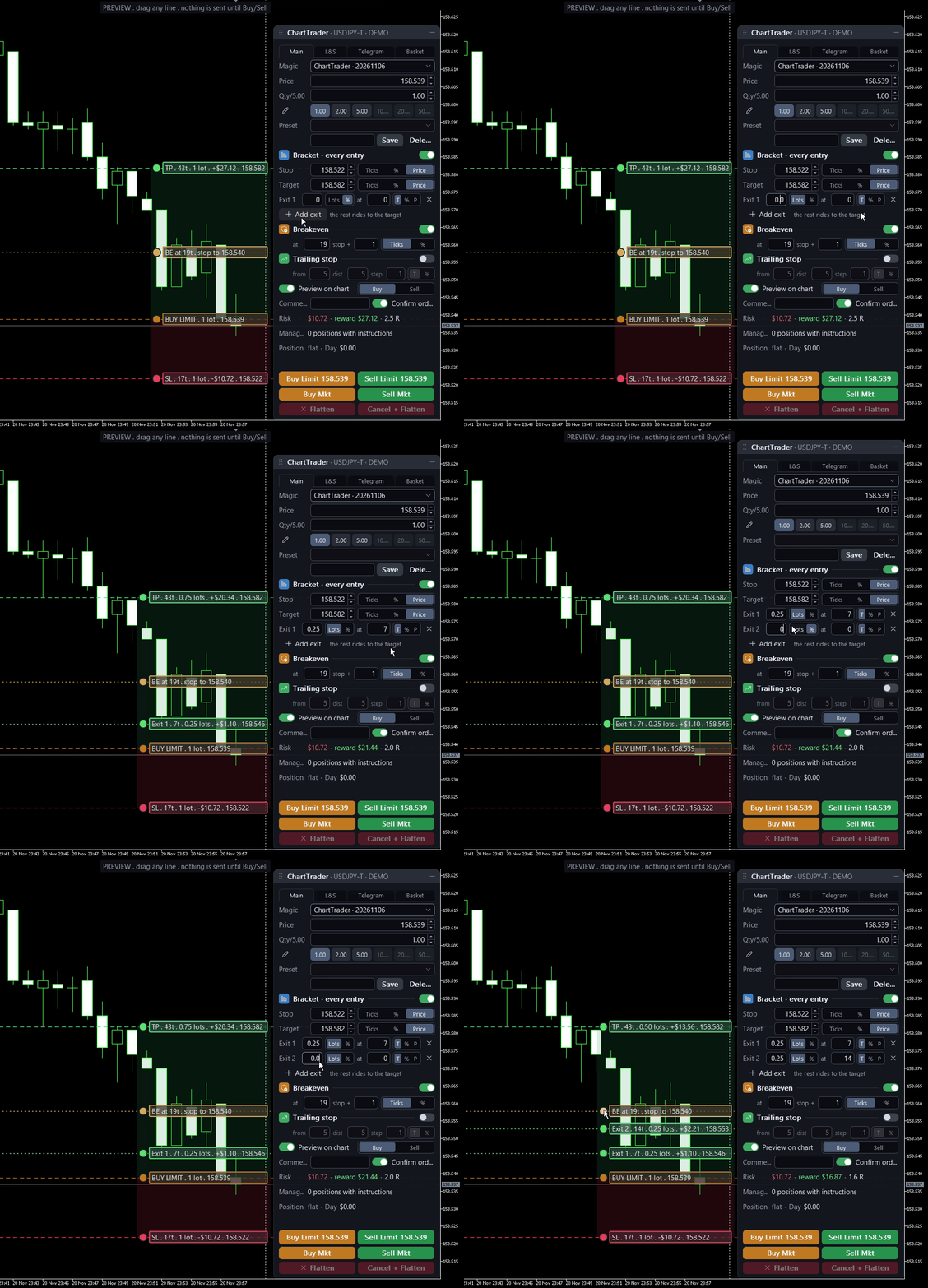
See it before you send it

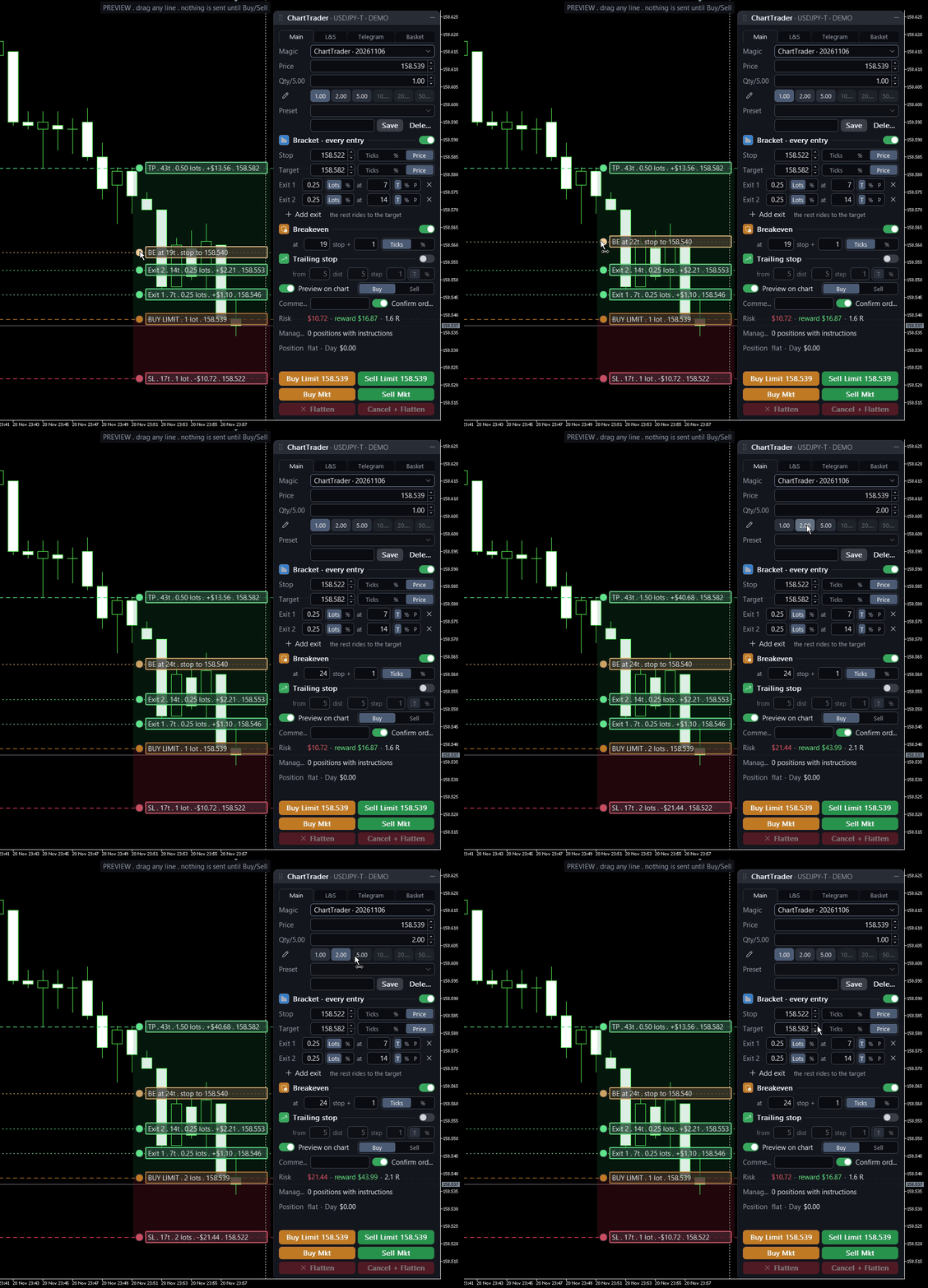
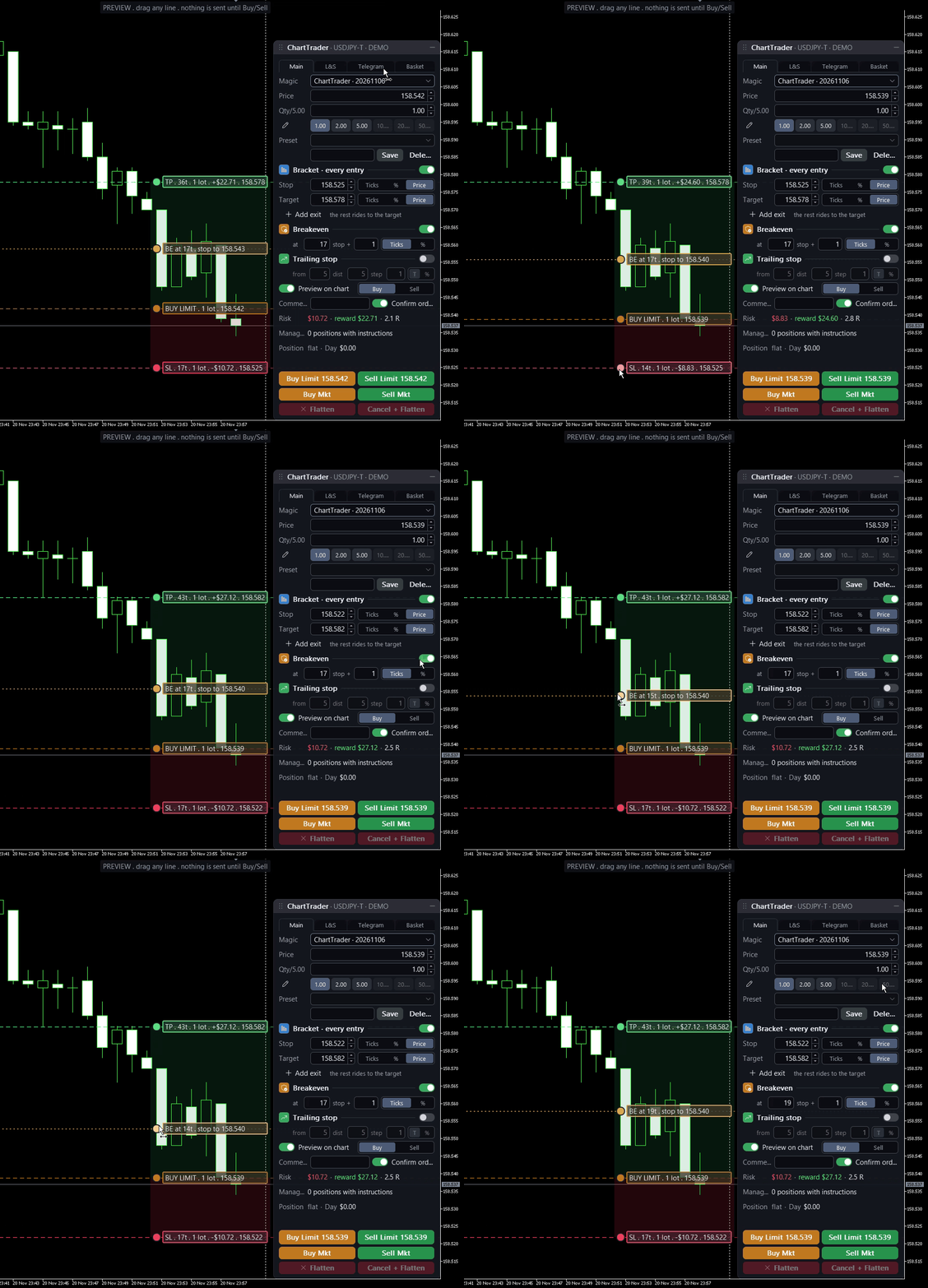
  • Risk and reward zones drawn on the chart, with the risk, the reward and the R multiple in the window.
  • Drag the entry, stop, target, exit and breakeven lines of the preview. Nothing is sent until you press Buy or Sell.
  • Stop and target in ticks, percent or price. A level on the wrong side of the entry is flagged and refused.
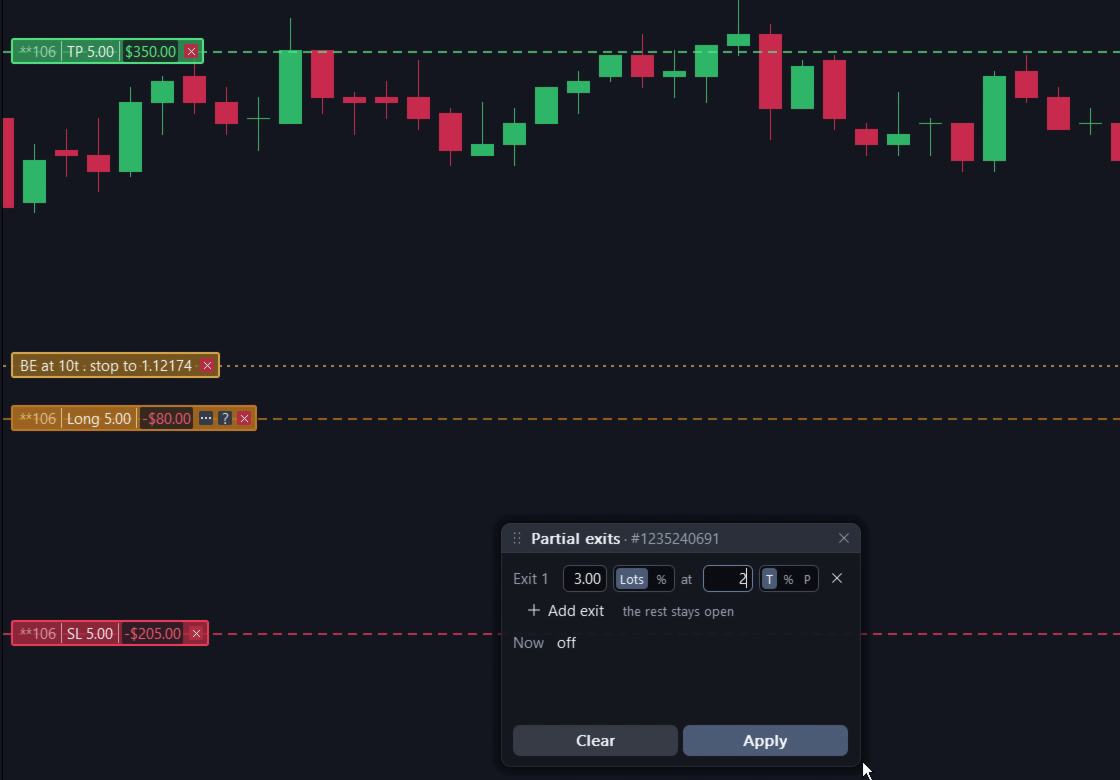
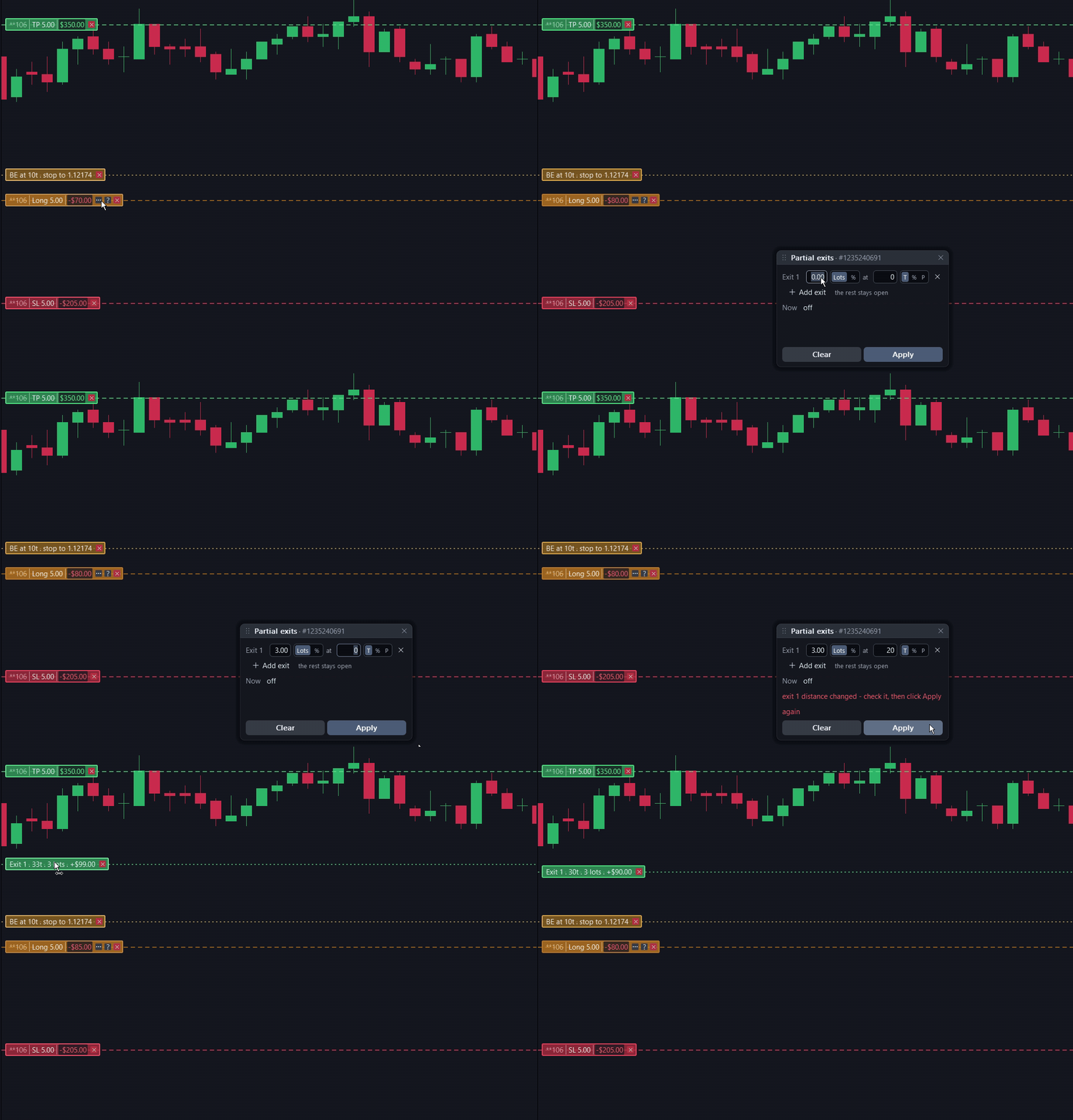
  • Market, limit and stop entries, one-click quantity chips, and up to 8 partial exits in lots or percent.
  • Save your brackets as named presets. They are still there after MetaTrader restarts.
  • Every new order, Flatten, position close and pair action you click opens a confirmation window first (lot, risk, margin and prices for orders; the position or pair and its result for closes). You can turn it off in the window, separately for orders and for pairs, and turn it back on from the tab. Cancelling a pending order and clearing a stop or target keep the two-click confirmation by default.

Manage from the chart

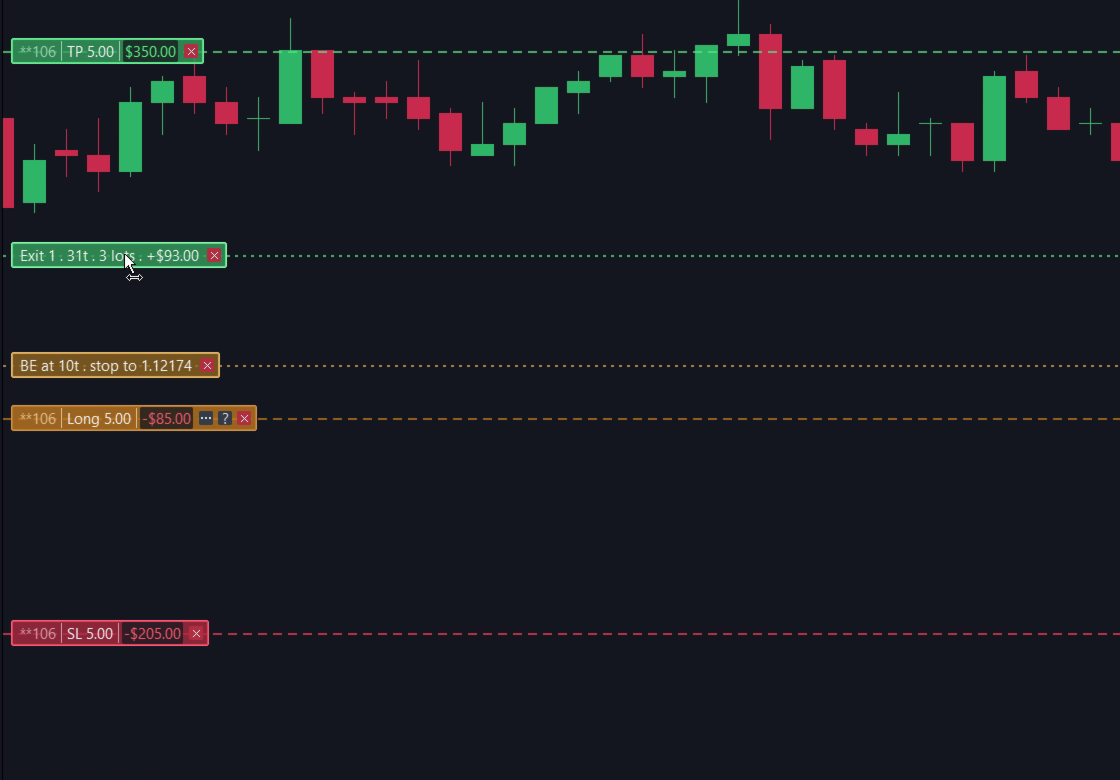
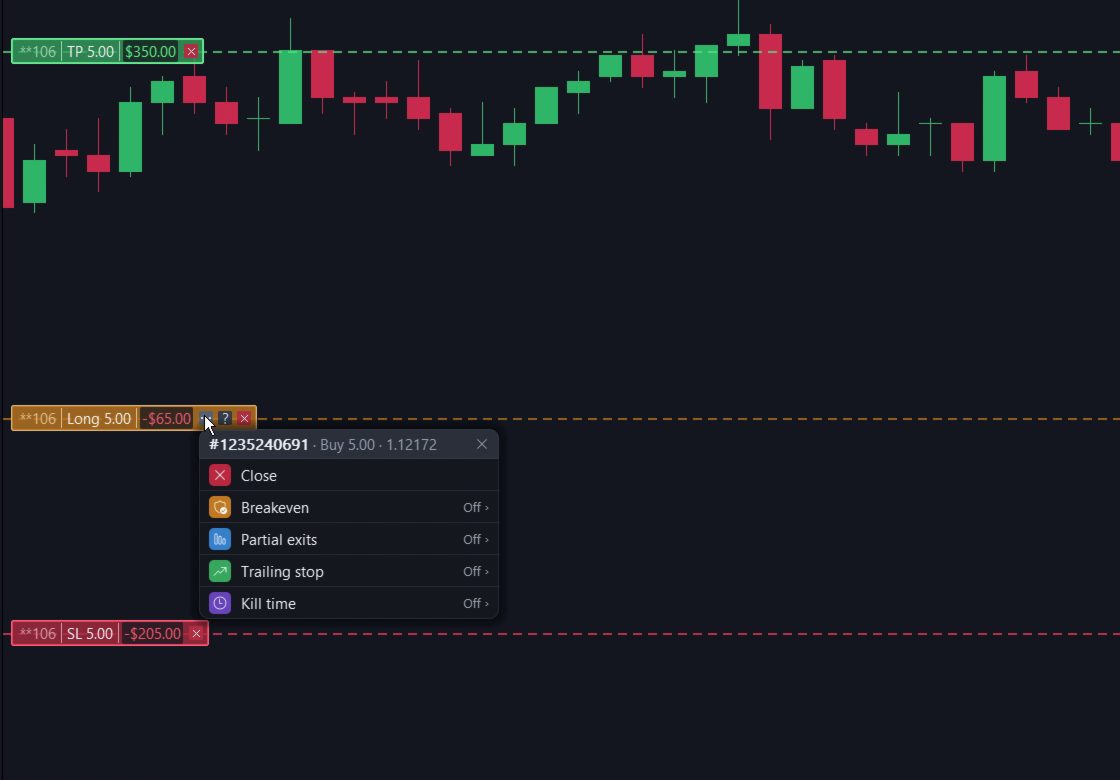
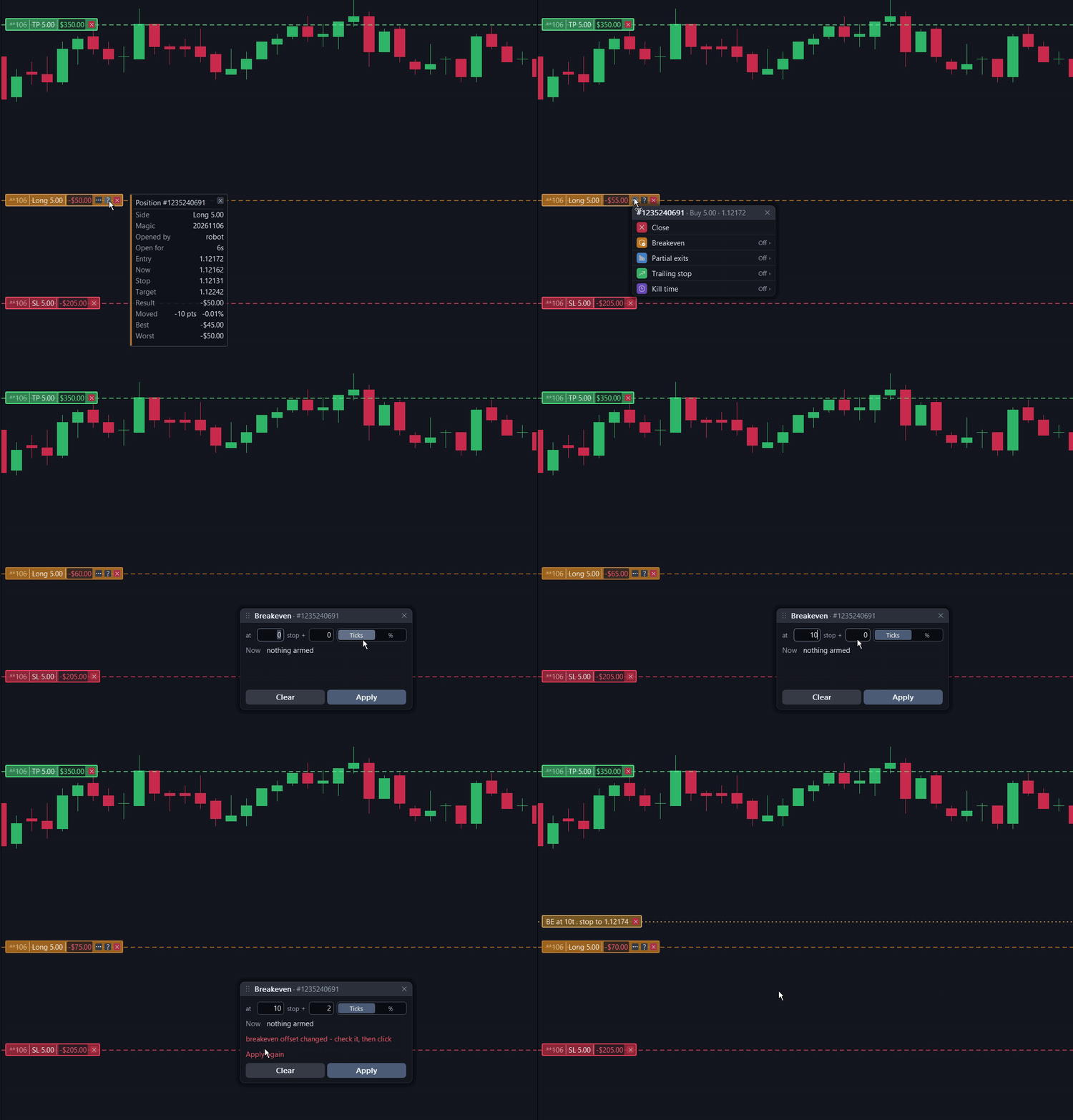
  • Every position and pending order on the chart's symbol is drawn, with its live P&L (positions), stop and target.
  • Drag a stop or a target to move it. Click the X to close a position, with a confirmation.
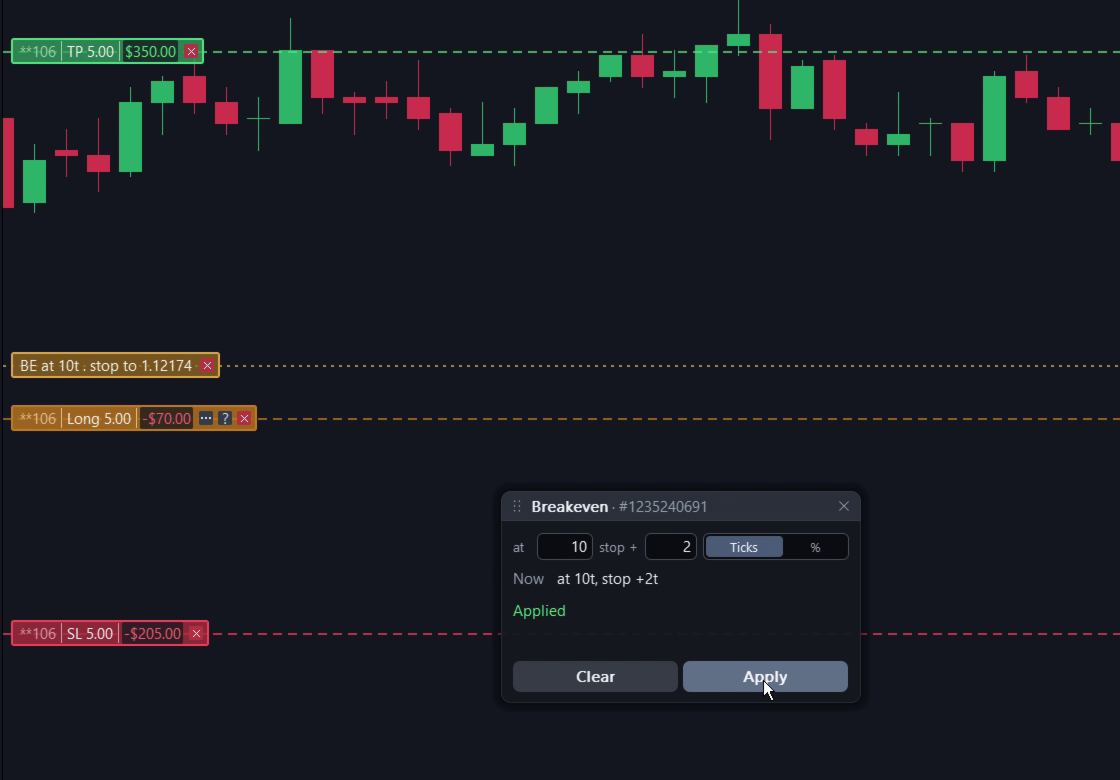
  • The "..." menu on a position: Close, Breakeven, Partial exits, Trailing stop, Kill time.
  • Breakeven, trailing stop (trigger, distance and step) and exit lines appear on the chart. Drag them to adjust, or click their X to clear one.
  • Trailing stop and breakeven are checked on every tick.
  • A kill time closes the position at or after the time you set, with a countdown on the broker's clock. If it ran out while MetaTrader was closed, ChartTrader asks you before closing.
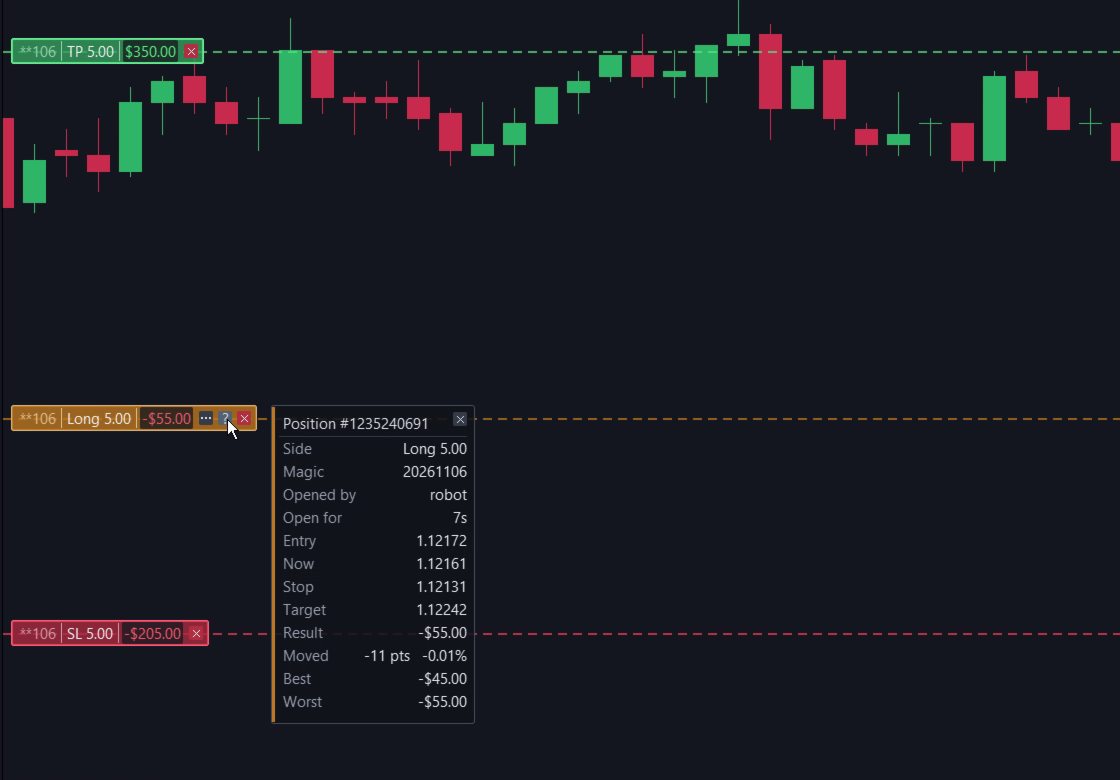
  • The "?" on a position opens its details: entry, stop, target, result, best and worst.
  • Flatten and Cancel + Flatten, each with a confirmation.

Long & short

  • The L&S tab monitors a pair: it takes two symbols you type (the first starts as the chart symbol), and shows a z-score chart with bands, the z-score, beta, a cointegration test (ADF) and the half-life in bars. You choose the timeframe, the number of bars and the bands.
  • Open and close a pair with one click, confirmed in a window (or by a second click when the window is off). You set the money per leg and the tab sizes both legs. It sends the first leg, then the second in proportion to what filled.
  • Live quotes for both symbols and the open P&L of each pair, before swap and commission.
  • Pairs survive a restart of MetaTrader: they are saved and picked up again by the chart that owns them, which must be running.
  • An optional stop on each leg, sent with the order and held at the broker.
  • For dated futures contracts, the statistics read the broker's continuous series when there is one, and the tab says so when it falls back to the contract itself. Orders always go to the contracts you typed.

Basket: a portfolio at target percentages, or a list of orders

  • The Basket tab has two modes, Portfolio and Orders. Each keeps its own list of up to 16 symbols, and the symbol field suggests names as you type.
  • Portfolio: type an amount of money and give each symbol a target percentage of it. The targets can total 100% at most; the rest is cash. For each symbol the tab shows its target, what it is worth now as a percentage of the amount, the lots held and the order a rebalance would send.
  • Rebalance buys and sells the difference, the sells first. It always opens a preview first: one row per order with its lots, price and value, and each symbol that will be skipped, with the reason. Nothing is sent until you press the send button, and if the size of an order changed while the preview was open, the preview opens again and nothing is sent.
  • To move a symbol from one percentage to another, change its target and rebalance. A target of 0% sells the symbol out at the next rebalance. Removing a symbol from the list leaves its position open.
  • The portfolio reads what the account holds in each symbol, so shares you already own are counted at once, and a trade made by hand shows as a difference to rebalance.
  • "Use current" sets the amount to what the holdings are worth now.
  • Orders: a plain list of symbols with lots - a positive number buys, a negative one sells. "Send basket" shows the same preview and sends the list as it stands. The list is kept afterwards, to be sent again.
  • The amount, the targets and the orders list are saved and come back after MetaTrader restarts. Each order sent is recorded in a CSV file in the terminal's data folder.

Telegram notifications

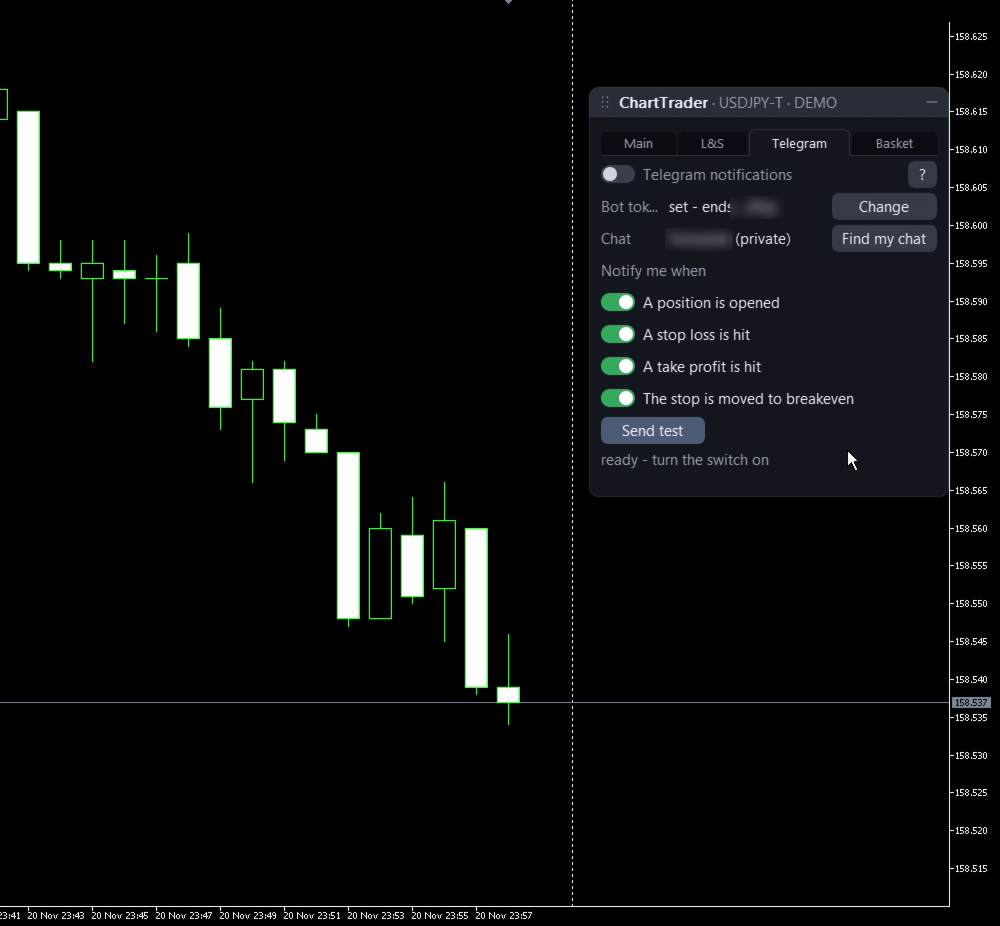
  • The Telegram tab sends a message to your Telegram chat when a position is opened, a stop loss is hit, a take profit is hit, or the stop is moved to breakeven. Each of the four has its own switch.
  • A message carries the symbol, the side, the volume and the price; for an open also the stop and the target; for a stop loss or a take profit also the net result and how long the position was held; for a breakeven the new stop. Times are the broker's.
  • No DLL: messages go out through MetaTrader's own WebRequest. You allow the address https://api.telegram.org once, in Tools > Options > Expert Advisors. The "?" button in the tab lists every step.
  • You use your own bot: create it with @BotFather, paste its token in the tab, write to the bot, press "Find my chat", then "Send test".
  • Once saved, the token is shown only by its last four characters. It is never written to the journal or shown in an alert.

How it works

  • Breakeven, trailing stop, exits and kill time are saved and reloaded when MetaTrader restarts.
  • In one MetaTrader, only one chart manages a position, so two charts do not act on it twice.
  • You can set instructions on trades you open by hand as well as on its own.
  • Works on hedging and on netting and exchange accounts, B3 futures included. On a netting account an order that only reduces the position is sent without stop or target, so that they do not end up on the wrong side of the position.
  • It does not send new orders on its own. It only closes or moves what you set up (a partial exit, breakeven, trailing stop, kill time) or what you confirmed. The one exception is a pair: once you confirm it and its first leg fills, the second leg is sent automatically.
  • The Basket tab sends orders only after you press the send button of its preview; it then sends that preview's orders one after the other. It never rebalances on its own.
  • It ships armed: clicking on the chart can close positions, cancel orders and remove stops, with a confirmation by default, and dragging the line of a stop, a target or a pending order, or clearing a breakeven, trailing or exit line, takes effect at once, with no confirmation. Switch off "ARM Click To Close And Drag" and clicks, drags and the Order window's buttons send nothing (instructions already set keep running, and a kill time that ran out while MetaTrader was closed still asks you).

Limitations

  • The L&S figures describe past prices only. They are not a recommendation and do not predict that a pair will revert to its mean.
  • The L&S tab never closes or re-sends a leg on its own. Its only automatic actions are sending the second leg after the first fills, and cancelling what has not filled of a leg's market order: the first leg's a few seconds after it is sent, the second leg's a few seconds after it is sent (the pair then has a loose leg), and, after a restart, any order still resting from a pair that was being opened. With the platform closed, only the optional leg stop at the broker acts (a VPS keeps the tab running).
  • The legs are market orders sent one after the other. Each can fill at a worse price than shown (slippage, gaps). The second can be refused or filled in part, which leaves the first open alone as a loose leg, with an Alert. The leg stop also fills at market, and a gap can fill it past its level.
  • A stop that fires leaves the other leg open until you act.
  • The confirmation window shows the values at the moment it opens. It does not check that an order is wise and does not protect against a loss. With the window turned off, the Main tab's Buy and Sell buttons send on one click; pair actions and the other closes and cancels use a second click by default.
  • On a short chart the confirmation window does not open and the order is not sent: enlarge the chart. The L&S tab's lower buttons can be cut off on a short chart.
  • The confirmation setting is shared by every chart in the terminal.
  • Magic numbers from base+1 to base+999 (the L&S Magic Base input; by default 20261201 to 20262199) are reserved for pairs on the whole account: other programs must not use magic numbers in that range on the same account, or their positions are taken for pairs. Set the same base on every chart.
  • On a netting account, a manual trade on a leg's symbol, including one made in the Main tab, merges with that leg, and any stop or management set on that trade then applies to the whole position, leg included.
  • If a pair ends up with a loose leg, you decide what to do: complete it or close it. Nothing is re-sent on its own.
  • Breakeven, trailing stop, partial exits and kill time run in your MetaTrader, not at the broker: they act only while the terminal is open, connected and the program is on the chart. The order's stop and target sit at the broker. To manage with your computer off, use a VPS.
  • Breakeven, trailing stop, partial exits and kill time send nothing while the quote is missing or looks like an auction, while Algo Trading is off in the terminal or in the program, while the account or the symbol cannot trade, or outside the symbol's trading sessions. What is due stays armed and is sent when sending is possible again, possibly at a worse price: a kill time can pass with the position still open.
  • Open positions are managed only while the chart shows their symbol: changing the chart's symbol stops the management of the old symbol's positions (the program alerts when positions with instructions are left behind). Their saved instructions resume when the program runs again on a chart of that symbol (with the same Magic Number for its own positions).
  • One terminal per account: do not run the program on the same account from two MetaTrader terminals at once (for example a VPS copy and a desktop). Each would manage the same positions, and partial exits or closes could be sent twice.
  • If you switch the account in the terminal, the program stops acting and shows an Alert; attach it again.
  • When attached, saved instructions take a few seconds to load. Until then nothing is armed or carried out.
  • Saved instructions live in a file in the terminal's data folder. If that file cannot be read or understood, it is set aside and the program starts without those instructions. If a change that moved money (a partial exit sent, a kill time under way, a breakeven done) cannot be written, the older copy is set aside so that an instruction already carried out is not repeated, and a restart before a later write succeeds starts without them. In both cases an Alert says so: check your open positions and set their instructions again. If the file cannot be set aside, the Alert says that too, and a restart may reload the older instructions, so check them.
  • If the broker does not confirm an order or a close (a timeout, a lost connection), the program reports it and never sends that request again while its outcome is unknown. For a full close it also stops acting on that position until the order or the position shows what happened, which can last as long as MetaTrader is offline or the close order is still pending. While a close is unconfirmed you cannot move its stop or close it again from the panel; act in MetaTrader. On a netting account the Order window also refuses every new order on that symbol while its close is unconfirmed, and any order that would reduce, close or reverse the position while a closing market order is working. An unconfirmed close you clicked is never re-sent by the program; a partial exit or a kill time is sent again only once the program has found that the first did not go, or went only in part. This waiting does not survive a restart of the program or of MetaTrader. Check the Trade tab: you can always act in MetaTrader itself.
  • After an update from an earlier version, on a hedging account, the instructions on positions opened by hand are carried over once. If more than one chart has managed the same symbol, any the program cannot be sure of are not carried over: it alerts and names those positions, and you set their instructions again. If the carry-over keeps failing, none are carried over and an alert says to set them again.
  • Exits are market orders: with slippage, a gap or a requote they can fill at a worse price than the line.
  • Netting accounts: a limit or stop order sent with a stop and target can leave them on the wrong side if the position changes before it fills. Send pending orders that reduce the position without a stop and target.
  • On a netting account, if a chart's management pauses briefly while another order reverses the position, a pending partial exit can still fill and open a position on the other side.
  • On exchange symbols, while the quote looks like an auction (bid equal to or above ask), market and stop orders and pair legs are refused; limit orders can still be placed. On other symbols this happens only when the bid is above the ask.
  • Flatten leaves your resting orders; one that fills later opens a position again. Use Cancel + Flatten to remove them.
  • Positions with magic 0 on the symbol are treated as manual trades: the instructions you set on them are carried out by one chart per account and symbol. Do not run another robot that trades without a magic number on the same symbol.
  • The Portfolio mode is long only. A symbol with a short position, or on a netting account with a position that belongs to a pair, is blocked: it counts as nothing held and is not rebalanced until that position is gone.
  • On a hedging account the Portfolio mode counts and sells the buy positions opened by the basket, by hand and by the Main tab; positions of other programs and pair legs are not seen. On a netting account it counts the symbol's one position, whoever opened it. A portfolio sell closes existing positions, whole or in part; for a position that carries instructions it is the same as closing part of it by hand in MetaTrader.
  • Sizes are whole volume steps. A buy is rounded down, so it never passes its target; a sell is rounded to the nearest step and is sent only when it brings the symbol closer to its target. A stock traded in lots of 100 can therefore stay well under its target; its fractional symbol is a different symbol, added as a row of its own. A symbol whose worth is within the tolerance of its target (the input "Basket Rebalance Tolerance Percent Of Amount", 0.5% of the amount by default) sends nothing.
  • Rebalance and Send basket send market orders with no stop and no target, one after the other. Each can fill at a worse price than the preview showed (slippage, gaps), be refused or fill in part; an order that has not filled after about 10 seconds has what is left of it cancelled, except one that closes a whole position, which is left working. Nothing is sent a second time: in the Portfolio mode what did not go shows as a difference, and you decide whether to rebalance again. A symbol with no quote, outside its trading session or with an order still working is skipped, and the preview says why.
  • If the answer to a basket order proves nothing (a timeout, a lost connection), the tab reports it, sends nothing more on that symbol until the terminal has been connected for a minute, and never repeats the order. Check the Trade tab.
  • A run that is under way stops if MetaTrader or the program restarts, or if the chart's timeframe or symbol changes: the orders not sent yet are not sent, and nothing resumes on its own. The Stop button does the same on your click; an order already sent is not recalled.
  • In the Orders mode a sell is a plain market sell: on a hedging account it opens a short position, on a netting account it reduces or reverses the symbol's position. The list does not look at what the account holds and tracks nothing after it is sent: sending it twice sends it twice.
  • A basket order that the free margin does not cover is not sent. At some brokers the money from the sells cannot be used for buys on the same day.
  • The worth of the holdings and the percentages use the last bid, also when the market is closed. The CSV file records the price planned in the preview, not the fill price.
  • One basket per account, owned by the first chart where the Basket tab is opened; other charts show it read-only. The basket's own magic number (the input "Basket Magic", 20262400 by default) must not be used by another program, must differ from the Magic Number and must stay outside the pairs' range.
  • If the basket's file cannot be understood, it is set aside and the basket starts empty, with an Alert: type the amount and the targets again. Positions are not touched.
  • Telegram messages are sent by your MetaTrader, only while it is open, connected and the program is on a chart. They can arrive late or not at all (no internet, Telegram unreachable, the address not allowed); a message that could not be sent is tried again later, and with more than 100 lines waiting the oldest are dropped. Do not rely on them as your only way of following a position.
  • Only the four events are reported, and only for the positions the chart manages: the program's own and those opened by hand on the chart's symbol (on a netting account, the symbol's position). A close by hand, by a kill time or by a partial exit sends no message, and neither do other robots' positions or pair legs. A position opened and closed within about half a second, or closed while MetaTrader was shut, is not reported.
  • The bot token is stored as plain text in a file in the terminal's data folder (MQL5\Files\GTR_OVERLAY\telegram.txt), shared by every chart of that terminal. Whoever has the token can send messages as your bot: keep that file private and use a bot made only for this.
  • "Find my chat" needs a bot whose updates no other program reads. While it sends a message the program waits for Telegram, 3 seconds at most each time; it holds a message back (10 seconds at most) while one of your orders is on its way or while you are using the panel.
  • A text that has no translation yet is shown in English. The Experts journal, the names of the inputs in MetaTrader's settings and the broker's own messages stay in English.
  • Dated futures contracts (e.g. WINZ26) are not rolled automatically. Before expiry, close or roll the positions and switch the chart to the next contract. Continuous series (WIN$) are rolled by the broker.

Good to know

  • ChartTrader is a manual trading tool. In the Strategy Tester it starts and stops cleanly and, by default, draws nothing. To try it, use the free ChartTrader DEMO on a demo account.
  • If you change the Magic Number, keep it above 0 (magic 0 is what trades opened by hand carry) and do not use 3111995, which the program refuses.
  • One ChartTrader per chart.
  • Languages: English, Portuguese (Brazil) and Russian. By default the interface follows MetaTrader's language; the "Language" input sets it. Alerts and Telegram messages use the same language.

Risk disclaimer

Trading futures, stocks, forex and CFDs carries a high risk of loss. ChartTrader is an execution and management tool: it gives no recommendations and guarantees no result. It is provided as is, with no warranty of uninterrupted or error-free operation. Test it with the free DEMO edition before using it on a real account. You are responsible for the orders you send and for monitoring your positions.
추천 제품
MT5용 암호화폐 외환 지표 "WPR with 2 Moving Averages" (리페인트 없음) - WPR 자체는 스캘핑에 가장 적합한 오실레이터 중 하나입니다. - "WPR and 2 Moving Averages" 지표는 WPR 오실레이터의 빠른 이동평균과 느린 이동평균을 함께 보여줍니다. - 이 지표는 가격 조정을 매우 빠르게 감지할 수 있도록 도와줍니다. - 매개변수를 통해 간편하게 설정할 수 있으며, 모든 시간대에 사용 가능합니다. - 매수 및 매도 진입 조건은 그림에서 확인할 수 있습니다. - WPR MA 교차 시 PC 및 모바일 알림 기능 제공. 매수 신호 조건 예시: (1) 빠른 이동평균이 느린 이동평균을 상향 돌파하고 WPR 값이 -50 미만이면 매수 진입. (2) WPR 값이 -20 이상으로 과매수 영역에 진입하면 매수 포지션 청산. 매도 신호 조건 예시: (1) 빠른 이동평균이 느린 이동평균을 하향 돌파하고 WPR 값이 -50 이상이면 매도 진입. (2) -
Heiken_Ashi_Bars - MT5용 고급 추세 시각화 도구 개요 Heiken_Ashi_Bars 는 시장의 노이즈를 필터링하고 진정한 기본 추세를 강조하도록 설계된 강력하고 시각적으로 직관적인 사용자 지정 지표입니다. 기존의 캔들스틱 차트는 불규칙하여 거짓 신호와 섣불린 청산을 유발할 수 있습니다. 이 지표는 가격 데이터를 평균화하여 가격 움직임을 부드럽게 만들어 추세 지속, 반전 및 수익성 있는 진입 구간을 훨씬 쉽게 파악할 수 있도록 해줍니다. 주요 기능 및 장점 강력한 노이즈 감소: 사소한 가격 급등 및 횡보 노이즈를 필터링합니다. 명확한 시각적 신호: 색상으로 구분된 막대를 통해 강세 및 약세 모멘텀을 한눈에 파악할 수 있습니다. 리페인트 없음 (No Repaint): 막대가 마감되면 신호가 고정됩니다. 과거 막대를 다시 계산하지 않습니다. 고도로 최적화됨: 터미널 지연이 없도록 깔끔하게 코딩되었습니다. 다양한 활용: 모든 금융 상품(외환, 지수, 금속, 암호화폐)에서
AURUM SMC Structure, XAUUSD [& other FX pairs] [Please leave a review if you find the indicator useful and how we can improve it further] A Smart Money Concepts structure indicator for studying gold charts. It marks BOS and CHoCH breaks, order blocks, fair value gaps and liquidity, and gives each setup marker a 1 to 5 star confluence rating. After a break it waits for a pullback before drawing its reference levels, so you can study how price behaved around structure rather than chasing the break
Advanced Price Action Suite
Mahoutondji Fredy Venance Assemou
Advanced Price Action Suite Advanced Price Action Suite plots market structure (BOS/CHoCH), support and resistance zones, Fair Value Gaps and the multi-moving-average trend on your chart — with an integrated position calculator that shows the recommended lot, possible loss and risk/reward ratio in real time, before every entry. What Advanced Price Action Suite does Advanced Price Action Suite is an analysis and calculation tool for the price action trader: it shows the market context at a glan
Introducing   Order Blocks Breaker , a brand-new way to identify and leverage order blocks in your trading strategy. After developing multiple order block tools with unique concepts, I’m proud to present this tool that takes things to the next level. Unlike previous tools,   Order Blocks Breaker   not only identifies order blocks but also highlights   Breaker Order Blocks —key areas where the price is likely to retest after a breakout. MT4 -  https://www.mql5.com/en/market/product/124101/ This t
평균 방향 지수(ADX) 다중 통화 스캐너 MT5는 여러 통화 쌍을 동시에 분석하도록 설계된 고급 거래 지표입니다. 이는 평균 방향 지수를 기반으로 한 실시간 신호를 제공하여 거래자들이 의사 결정 과정을 향상시키는 데 도움을 줍니다. 이를 통해 효율적인 시장 추세 분석이 가능합니다. 이 도구는 추세 강도와 방향 이동을 쉽게 식별할 수 있도록 하여 거래 경험을 간소화하며, ADX 기반 전략을 사용하는 거래자에게 필수 자산이 됩니다. 실시간 알림과 사용자 친화적인 대시보드를 통해 거래자들은 시장 상황을 신속하게 평가하고 정보에 기반한 거래 결정을 내릴 수 있습니다. MQL 제품 설치 가이드 | 구매한 MQL 제품 업데이트 MT4/MT5 | 일반 문제 해결 가이드 | 지표 설정 / 가이드 주요 기능 버퍼 통합: 지표 값을 접근 가능한 버퍼로 노출하여 Expert Advisor가 자동 거래를 위해 신호 데이터를 활용할 수 있도록 합니다. 시각적 화살표 신호: 신호 캔들에 직접 차트에 명확한
Price Alerts Advanced Suite for MetaTrader 5 Take control of your trading execution with the Price Alerts Advanced Suite , a professional-grade technical analysis tool built exclusively for MetaTrader 5. This suite goes far beyond simple horizontal lines; it is a complete analytical ecosystem designed to identify key market levels, monitor price action in real-time, and deliver instant notifications across multiple channels. Whether you are a day trader, swing trader, or algorithmic develope
CosmiCLab FIBO
Kirils Subins
CosmiCLab SMC FIBO CosmiCLab SMC FIBO is a professional trading indicator designed for traders who use Smart Money Concepts (SMC), market structure analysis and Fibonacci retracement levels. The indicator automatically detects market swings and builds Fibonacci levels based on the latest impulse movement. It also identifies market structure changes such as BOS (Break of Structure) and CHOCH (Change of Character), helping traders understand the current market direction. CosmiCLab SMC FIBO also pr
See how your account is really doing at a glance, right on the chart. The dashboard reads your account and trade history and never opens, modifies or closes a trade. How it works Every second the dashboard reads balance, equity, margin and open positions. Closed results come from the deal history: for each closing deal the profit, swap, commission and fee are added together. From these deals it calculates closed profit for today, this week and this month, plus statistics for the period you choos
FREE
Price Magnet — Price Density and Attraction Levels Indicator Price Magnet is a professional analytical tool designed to identify key support and resistance levels based on statistical Price Density. The indicator analyzes a specified historical period and detects price levels where the market spent the most time. These zones act as “magnets,” attracting price action or forming a structural base for potential reversals. Unlike traditional Volume Profile tools, Price Magnet focuses on price-time d
ZT Scalper Bundle 1
Damien Joseph Marie Juge
This Bundle offers an all-in-one tools for scalpers. Basic but effective. Powerfull together. Namely Breakout detector with pivot or ohlc and a colored MA to check the trend. --------------- It includes :  - Pivot levels with different parameters - Colored MA, to visualize trends and reversals - OHLC, to keep an eye on daily key levels. - BreakOut detector, to take advantage of breakouts on all UT and take the trend.
Liquidity Touch Zones PRO X
Viacheslav Bashkirtsev
Liquidity Touch Zones PRO X - is   a support and resistance indicator that identifies   price areas of confirmed strength   formed by repeated price interactions and displayed taking into account the instrument's characteristic volatility. The calculation is based on fractal points, which serve as initial benchmarks. These points form price zones reflecting repeated price interactions and are represented as areas of varying heights depending on the level's significance. It is designed for trader
It has never been so easy to manage the risk of your account until now, this tool will allow you to have full control of your capital and manage your entries in the synthetic index derivative markets, in an easy, practical and safe way. The available input and configuration parameters are as follows :  RISK MANAGEMENT 1. Value of your account: Here as its name says you will place the value corresponding to the size of your account, for example if your account is 150 dollars the corresponding val
Order Book, known also as Market Book, market depth, Level 2, - is a dynamically updated table with current volumes of orders to buy and to sell specific financial instument at price levels near Bid and Ask. MetaTrader 5 provides the means for receiving market book from your broker, but in real time only, without access to its history. The indicator OrderBook Cumulative Indicator accumulates market book data online and visualizes them on the chart. In addition, the indicator can show the market
이 EA는 주로 XAUUSD 스캘핑에 사용됩니다. 목적   거래 관리에서 감정을 제거 — 포지션을 자동으로 보호하고 이익을 실현함으로써 당신이 압박 속에서 어려운 결정을 내릴 필요가 없게 합니다. 기능   ️ 자동 손절 (Stop Loss)   최근 고점/저점 + 버퍼를 기반으로 SL 설정   수동 배치 스트레스 없음   자동 부분 이익 실현   두 가지 모드:   고정 이동: 가격이 X만큼 움직이면 50% 청산   R-비율: 1.2R 이익 목표 시 50% 청산   승자(이익나는 포지션)를 남기면서 수익을 확보합니다.    ️ 원클릭 버튼   모두 닫기 매도 / 매수 / 이익 / 전체   선택사항: 시간별 필터 (최근 60분)   일반적인 문제 해결   이익을 너무 빨리 취함   신경질적으로 스톱 이동   감정적 의사결정   일관성 없는 리스크 관리   ️ 핵심 설정   Lookback: 20분 (SL 배치용)   버퍼: 추가 안전용 0.2 핍  
This utility tool shows the intraday price variation as a percentage. It just works on any symbol and timeframe. Inputs: Font Size: You can change the font size of the price variation. Defaults to 15. Corner Location: You can choose between "Left upper chart corner", "Left lower chart corner", "Right upper chart corner", "Right lower chart corner" to show the information.
ChartColorMT5
Thomas Pierre Maurice Moine
Customize your charts with this simple utility. Choose in the 24 pre-built color sets, or use your own colors, save them to re-use them later. You can also add a text label on your chart. --- Chart Colors-- Color Set : 24 prebuilt color sets (select "Custom" to use colors below) Background color Foreground color Grid color Chart Up color Chart Down color Candle Bull color Candle Bear color  Line color Volumes color --- Label--- Text Label : Type the text you want to appear on the chart Label P
FREE
RiskGuard Pro enforces a daily loss limit, a profit lock and a maximum drawdown on your account - across your manual trades and any other EA you run. It does not open trades and it does not predict anything. What it does RiskGuard Pro watches your account equity and enforces three limits you set: Daily loss limit - measured against your start-of-day equity. Daily profit lock - stop trading once the day has gone well enough. Maximum drawdown - measured from your account's peak equity, not from to
ApexTradeManager is a professional manual trade-management Expert Advisor for MetaTrader 5, designed especially for XAUUSD (Gold) traders. Instead of replacing your trading strategy, ApexTradeManager works alongside your manual execution. You decide when and where to enter; the EA helps manage the position according to your predefined trade-management rules. Key Features Automatic Stop Loss & Take Profit — Automatically apply SL and TP levels to new positions. ATR-Based TP System — Dynamic TP1,
FREE
개요 Candle Timer Countdown Pro는 현재 캔들의 마감까지 남은 시간을 부드럽고 정확하게 카운트다운으로 표시하며, 원형 진행 아크를 통해 남은 시간을 직관적으로 보여줍니다. 서버 시간 보간(Server Time Interpolation) 기술을 사용하여 틱이 없는 구간에서도 멈춤 없이 부드럽게 작동합니다. M1부터 MN까지 모든 타임프레임을 지원합니다. 스캘핑(1분 차트)부터 스윙 트레이딩(H4 이상)까지, 캔들 마감 시간을 정확히 파악하면 진입 타이밍을 개선하고 성급한 결정을 방지할 수 있습니다. 주요 특징 틱 간 멈춤 없는 정확한 카운트다운 원형 진행 표시 (Ring 또는 Filled Pie) 6가지 표시 위치 선택 가능 3가지 색상 모드 (Manual / Candle Outline / Candle Body) 마감 직전 하이라이트 기능 연결 상태 감지 (Active / Inactive / Disconnected) 새 캔들 알림 (팝업, 이메일, 푸시) 모든 타임
Prime Zones
Felipe Ignacio Zavala Abarzua
WHAT IS PRIME ZONES? Prime Zones is a professional market structure indicator designed to automatically identify key Support and Resistance Zones , monitor how price interacts with them, and provide additional trend context through a Dual Regression Channel system . Instead of filling the chart with dozens of horizontal lines, Prime Zones displays clean and visually defined price areas where the market has previously shown meaningful reactions. The indicator combines four main concepts in a sing
Precision Trade Console — Bring visual order planning, pre-request checks and position-management controls into one MT5 console. Who it is for Designed for active discretionary traders who want a structured workflow from entry planning to managed exit. Main functions Market, limit and stop order modes Percentage, cash and fixed-lot position sizing Margin and spread safety gates Three staged take-profit levels and partial exits Breakeven management Fixed-distance or ATR-based trailing stops Persi
It mesures the lot size based on the points measured by clicking with the MIDDLE MOUSE BUTTON then CLICK and DRAG , previous that configure the indicator based on the risk you accept; The risk can be % based on fixed account, actual account size, and fix capital risk; If the INDICATOR DOESN'T WORK propperly try after configuring it CHANGE the TIMEFRAME and GET BACK to the PREVIOUS timeframe, SOMETIMES  this FIX IT
CCI Fixed Dual
Edoardo Centorame
CCI FIXED DUAL이란 무엇인가 CCI FIXED DUAL은 전문적인 Trend Direction Filter로서, 다음 요소를 정확하게 식별하도록 설계되었습니다. 시장의 지배적인 방향 움직임의 구조적 품질 주요 추세와 가속 구간 사이의 일관성 이것은 직접적인 진입 지표가 아닙니다. 이것은 전통적인 오실레이터가 아닙니다. 이것은 컨텍스트 도구로서, 트레이더가 언제 거래해야 하고 언제 거래하지 말아야 하는지를 결정하도록 돕기 위해 설계되었으며, 시장의 노이즈와 해석 오류를 크게 줄여줍니다. CCI FIXED DUAL의 기본 철학 CCI FIXED DUAL이 기반으로 하는 원칙은 단순하지만 강력합니다. 신호는 시장 구조와 일치할 때만 가치가 있습니다. 이러한 이유로 이 지표는 단일 값을 사용하지 않습니다 가격에 충동적으로 반응하지 않습니다 억지 반전 지점을 찾지 않습니다 대신 다음 요소를 기반으로 계층적인 추세 해석을 구축합니다. Typical Price 기반 CCI 서로 다른
When executing an order, whether through the Metatrader ticket on a computer or the Metatrader app on a mobile device, either manual or pending, Easy Trade will automatically set the take profit and stop loss levels, as well as a limit order with its respective take profit and stop loss levels. It follows the trading strategy for market open (US30, US100, US500), but it can be applied to any market asset.
소개 PropFirm Dashboard 는 Prop Firm 챌린지에 참여하는 트레이더를 위해 설계된 전문 관리 대시보드로, 펀딩 계좌의 모든 평가 단계를 실시간으로 모니터링하고 완벽하게 관리할 수 있도록 도와줍니다. MetaTrader 5 전용으로 개발된 이 시스템은 펀딩 계좌의 핵심 요소를 지속적으로 분석합니다. 수익 목표, 최대 일일 손실 제한, 최대 드로다운, 최소 거래 일수 및 챌린지 진행 상황을 자동으로 추적하며, 모든 정보를 현대적이고 직관적인 대시보드에서 실시간으로 제공합니다. PropFirm Dashboard 는 단순한 데이터 표시 도구가 아닙니다. 계좌 관리 실수를 방지하고 리스크를 보호하기 위해 설계되었습니다. 설정한 수익 목표와 안전 버퍼에 도달하면 시스템이 자동으로 열린 포지션을 청산하고 거래를 중지하며 알림을 전송하여 챌린지를 안전하게 완료할 수 있도록 지원합니다. 제품 특징 MetaTrader 5에서 Prop Firm 챌린지를 관리할 수 있는 전문 대시보
Price Action Trade Panel EA MT5
Juvenille Emperor Limited
5 (4)
Price Action Trade Panel MT5 는 지정된(기본적으로 8개) 과거 양초의 순수한 가격 조치 데이터를 기반으로 모든 기호/상품의 구매/판매력 수준 균형을 계산합니다. 이는 지표 패널에서 사용할 수 있는 32개 기호/상품의 가격 움직임을 모니터링하여 가장 가까운 시장 심리를 제공합니다. 60% 이상의 매수/매도 수준은 특정 기호(기본 설정 사용)를 매수/매도할 수 있는 매우 견고한 수준을 제공합니다.   Price Action Trade Panel MT5 에는 가격 행동에 대한 표준, 빠르거나 느린 근접에 대해 사용할 수 있는 3가지 계산 모드가 있으며 실시간 움직임에 더 날카롭거나 부드러운 적응을 위해 조정 가능한 가격 행동 캔들을 제공합니다. Price Action Trade Panel MT5 는 또한 MT5에서 찾을 수 있는 가장 간단하고 사용하기 쉬운 거래 패널입니다. 추가 창이나 패널을 열 필요 없이 한 표면에 모든 옵션과 기능이 있습니다. 그것은 인터페
Discipline and full protection for trades placed through Shield's panel on your own or prop firm account in MT5: a risk manager with daily loss limit, max drawdown (static or trailing), risk per trade and lot size, news filter and equity protection — it stops you before a bad moment becomes a lost account. Trades from a phone or outside the panel are your choice: Shield trims the breach at once, but the firm may already have recorded it. 23 programs of 17 prop firms included. Never opens trades
The indicator detects and displays М. Gartley's Butterfly pattern. The pattern is plotted by the extreme values of the ZigZag indicator (included in the resources, no need to install). After detecting the pattern, the indicator notifies of that by the pop-up window, a mobile notification and an email. The pattern and wave parameters are displayed on the screenshots. The default parameters are used for demonstration purposes only in order to increase the amount of detected patterns. Parameters z
BreakEven ProSync
Rosen Kanev Kanev
5 (1)
For DEMO - please contact me and I will send you demo version to test the product. BreakEven ProSync – Advanced Trade Management Tool for MetaTrader 5 Overview The  BreakEven ProSync  is a powerful utility designed to enhance trade management in   MetaTrader 5 . It provides   one-click break-even functionality ,   hotkey trading ,   position synchronization , and   visual SL/TP tracking —all in a single, user-friendly tool. Perfect for manual traders who want   faster execution   and   better r
이 제품의 구매자들이 또한 구매함
Trade Assistant MT5
Evgeniy Kravchenko
4.43 (216)
거래당 위험 계산, 라인을 사용한 손쉬운 신규 주문, 부분 청산 기능을 통한 주문 관리, 7가지 유형의 트레일링 스탑 및 기타 유용한 기능을 제공합니다. 추가 자료 및 지침 설치 지침   -   애플리케이션 지침   라인 기능       - 차트에 개시선, 손절매, 차익실현을 표시합니다. 이 기능을 사용하면 새로운 주문을 쉽게 하고 개봉 전에 추가 특성을 볼 수 있습니다. 위기 관리       -       위험 계산 기능은 설정된 위험과 손절매 주문의 크기를 고려하여 새 주문의 볼륨을 계산합니다. 이를 통해 손절매 크기를 설정하고 동시에 설정된 위험을 존중할 수 있습니다. 로트 계산 버튼 - 위험 계산을 활성화/비활성화합니다. 필요한 위험 값은 위험 필드에 0에서 100 사이의 백분율 또는 예금 통화로 설정됩니다. 설정 탭에서 위험 계산 옵션을 선택합니다. $ 통화, % 잔액, % 지분, % 자유 마진, % 사용자 정의, % AB 이전 일, % AB 이전 주, % AB 이전
Trade Manager EA에 오신 것을 환영합니다. 이 도구는 거래를 보다 직관적이고 정확하며 효율적으로 만들기 위해 설계된 궁극적인 리스크 관리 도구 입니다. 단순한 주문 실행 도구가 아닌, 원활한 거래 계획, 포지션 관리 및 리스크 제어를 위한 종합 솔루션입니다. 초보자부터 고급 트레이더, 빠른 실행이 필요한 스캘퍼에 이르기까지 Trade Manager EA는 외환, 지수, 상품, 암호화폐 등 다양한 시장에서 유연성을 제공합니다. Trade Manager EA를 사용하면 복잡한 계산은 이제 과거의 일이 됩니다. 시장을 분석하고 진입, 손절 및 익절 수준을 차트의 수평선으로 표시한 후 리스크를 설정하면, Trade Manager가 이상적인 포지션 크기를 즉시 계산하고 SL 및 TP 값을 실시간으로 표시합니다. 모든 거래가 간편하게 관리됩니다. 주요 기능: 포지션 크기 계산기 : 정의된 리스크에 따라 거래 크기를 즉시 결정합니다. 간단한 거래 계획 : 진입, 손절, 익절을 위한
Telegram to MT5 Multi-Channel Copier   는 Telegram 및 Discord 채널의 트레이딩 시그널을 MetaTrader 5로 자동 복사합니다. 봇도, 브라우저 확장도, 수동 복사도 필요 없습니다. Telegram이나 Discord에 시그널이 도착하면 EA가 몇 초 안에 터미널에서 주문을 실행합니다. 그리고 채널을 복사하기 전에, 내장 백테스터가 그 채널이 내 계좌에서 어떤 결과를 냈을지 보여줍니다. 제품은 두 가지 구성 요소로 이루어집니다: Telegram 채널을 수신하는 Windows 애플리케이션과, MT5 터미널에서 시그널을 실행하는 본 EA입니다. MT4 버전도 제공됩니다   여기 . 구매 전에 사용해 보세요:   애플리케이션은 무료로 다운로드할 수 있습니다. 본인의 채널을 연결하고 각 시그널이 어떻게 읽히는지 확인하세요. Backtest 탭과 실제 거래에는 구매하거나 임대한 EA가 필요합니다. 이 페이지의 무료 데모는 전략 테스터에서만 실행되며
REVDEN AI Desk: REVDEN의 시장 컨텍스트 위에서, 당신만의 AI와 나누는 하나의 대화로 트레이딩을 운영하세요 하나의 대화로 트레이딩을 운영한다고 상상해 보세요. REVDEN AI Desk 는 이를 MetaTrader 5로 가져옵니다. 당신만의 AI에게 시장을 어떻게 읽는지 물으면, AI는 당신이 거래하는 종목에 대한 REVDEN의 전체 컨텍스트, 즉 각 종목의 상태와 리스크 현황, 예정된 발표를 바탕으로 답합니다. AI의 제안에는 진입, 스톱, 타겟, 리스크가 담겨 있으며, 맞는 제안을 당신이 승인합니다. 규칙도 같은 방식으로 바뀝니다. 무엇을 바꿀지 적으면 AI가 새 룰북의 초안을 작성하고, 받아들일지 버릴지는 당신이 정합니다. 대화를 둘러싸고 시장 전체가 하나의 화면에 펼쳐집니다. 데스크와 설정 가이드를 확인하세요. 모든 화면, 모든 설정, 그리고 당신만의 AI와 함께하는 첫 단계: stein.investments/products/revden-ai-desk 당신의
EA Overfitter
Stephen J Martret
5 (5)
That backtest looks great. But will it still be making money tomorrow, next week, next month? EA Overfitter re-runs your EA on 100 price histories it has never seen. One score tells you if the edge is real. A backtest tells you what an EA did on one price history — the one that happened to occur. What you cannot tell from it is how much of that result was the strategy and how much was the particular path. EA Overfitter answers that. It builds up to 100 synthetic price histories your EA has n
Farmed Hedge Yield Farming | All Markets (Manual - Hybrid - Semi/Automated EA) VERIFIED TRADING RESULTS - Farmed Hedge Yield Axi Copy:  https://www.mql5.com/en/signals/2356376 - Farmed Hedge Yield Exn Copy:   https://www.mql5.com/en/signals/2356404 - Farmed Hedge Yield V Copy:  https://www.mql5.com/en/signals/2357156 IMPORTANT NOTICE: FarmedHedge is a MANUAL-FOCUSED TRADING UTILITY ,not a fully automated EA. Results shown on this Signal include manual trades and overall strategic management.
TradePanel MT5
Alfiya Fazylova
4.89 (176)
Trade Panel은 다기능 거래 도우미입니다. 이 애플리케이션에는 50개 이상의 수동 거래 기능이 포함되어 있으며 대부분의 거래 작업을 자동화할 수 있습니다. 앱 사용 설명서: https://www.mql5.com/en/blogs/post/756482 데모 계정용 앱 체험판: https://www.mql5.com/en/blogs/post/750865 앱 설치 방법: https://www.mql5.com/en/blogs/post/756239 시각 모드에서 앱 테스트 방법: https://www.mql5.com/en/blogs/post/770277 VPS MetaTrader에 앱 설치 방법: https://www.mql5.com/en/blogs/post/770190 거래. 한 번의 클릭으로 거래를 수행할 수 있습니다: 리스크 자동 계산과 함께 예약 주문 및 포지션 열기. 한 번의 클릭으로 여러 주문 및 포지션 열기. 주문 그리드 열기. 예약 주문 및 포지션을 그룹별로 닫기. 포지션
내 거래 규칙에 맞춰 Telegram 신호 복사 Telegram to MT5 Signal Trader 는 공개 및 비공개 Telegram 채널과 그룹의 텍스트 기반 거래 신호를 MetaTrader 5로 자동 복사합니다. 하나의 데스크톱 앱에서 여러 신호 제공자와 MT5 계좌를 관리하고, 제공자마다 위험 관리 및 거래 설정을 개별적으로 지정 할 수 있습니다. 신호 복사에는 Telegram 봇이나 API 설정이 필요하지 않습니다. 전화번호 또는 QR 코드로 본인의 Telegram 계정에 로그인한 후, 이미 가입한 채널이나 그룹을 선택하면 됩니다. 봇을 만들거나 Telegram API 토큰, API ID 또는 API 해시를 입력할 필요가 없습니다. 포지션 크기를 선택하고, 여러 익절 목표에 청산 물량을 배분하며, 손익분기점 이동과 트레일링 스톱을 자동화하세요. 제공자의 신호를 따르면서도 실제 거래 방식은 직접 설정할 수 있습니다. 이 제품은 MT5 Expert Advisor와 필수 Win
EA Auditor
Stephen J Martret
5 (7)
EA Auditor is an independent analysis tool for traders evaluating Expert Advisors and trading signals on MetaTrader 5. It audits backtest reports, reviews posted developer signals, and cross-verifies the two against each other to help traders assess strategies before committing capital. The MQL5 market offers a wide range of Expert Advisors from many developers, with varying approaches, quality, and transparency. EA Auditor provides a consistent, data-driven framework for reviewing them, answer
AI Agent Supervisor is NOT an Expert Advisor. AI Agent Supervisor   is a   multi-agent AI risk & portfolio supervisor   that watches every EA on your account and intervenes in real time.  WANT AN AI PORTFOLIO MANAGER WATCHING YOUR FLEET 24/7?   Run your fleet on the same brokers I do:   IC MARKETS , IC TRADING   .  Unlike the centralized stock market, Forex has no single, unified price feed.  Every broker sources liquidity from different providers, creating unique data streams. The Supervisor r
Power Candles Strategy Scanner: 스스로 최적화하는 멀티 심볼 셋업 파인더 작은 움직임마다 울리는 스캐너는 결국 무시하게 됩니다. 분주한 캔들 마감 한 번에 알림이 연달아 쏟아지고, 정작 실제로 거래하는 단 하나의 셋업은 소음에 묻혀 버립니다. Power Candles Strategy Scanner 는 스스로 최적화하는 Power Candles 엔진을 Market Watch의 모든 심볼에서 실행하고, 당신이 직접 정한 필터를 통과한 것만 알려줍니다. 기준은 마지막 확정 캔들의 강도, 셋업의 손익비, 실시간 스프레드, 그리고 당신이 거래하는 자산군입니다. 심볼이 리스트에 들어오면 스캐너가 당신을 부릅니다. 필터로 걸러낸 것은 모두 조용히 남아 있고, 같은 캔들 마감에서 나온 모든 신호는 하나의 메시지로 도착합니다. 구매 전에 패널과 모든 필터를 확인하세요. 스크린샷, 전체 기능 투어, Power Candles와 함께 쓰는 워크플로: stein.investment
================================================================================ POC BREAKOUT - V20.72. Full Professional Grade Toolkit ================================================================================ POC Breakout is a full MetaTrader 5 trading dashboard for discretionary traders who want breakout signals, Point of Control (POC) context, volume profiles, order flow, market structure, news, alerts, and advanced trade planning in one professional workspace. Attached directly to you
News Trade EA MT5
Konstantin Kulikov
4.55 (11)
제가 몇 년 동안 사용하고 있는 유용한 로봇을 소개드립니다. 반자동뿐만 아니라 자동 모드로도 사용할 수 있습니다. >>> Chat <<< 본 프로그램에는 경제 캘린더의 뉴스별로 유연한 거래 설정이 포함되어 있습니다. 전략 테스터에서 확인할 수 없습니다. 진짜 작업뿐입니다. 최신 설정 아카이브 다운로드: https://www.mql5.com/en/blogs/post/747929 신호 모니터링: https://www.mql5.com/en/signals/author/test-standart 이 전문가를 위해 고유 설정 세트를 만들 때 블로그의 모든 매개변수에 대한 설명을 참조하십시오: https://www.mql5.com/en/blogs/post/748545 . 기본 설정 설명 작업은 한 차트에서 GBP(GBPUSD, EURGBP, GBPJPY, GBPCAD, GBPAUD, GBPCHF)와 쌍으로 이루어집니다. GBP는 가장 변동성이 큰 통화로서 거래 수행 시 거래를 성공적으로
The product will copy all telegram signal to MT5 ( which you are member) , also it can work as remote copier.  Easy to set up, copy order instant, can work with almost signal formats, image signal,  s upport to translate other language to English Work with all type of channel or group, even channel have "Restrict Saving Content", work with  multi channel, multi MT5 Work as remote copier: with signal have ticket number, it will copy exactly via ticket number. Support to backtest signal. How to s
Astro Trade MT5
Indra Maulana
5 (8)
25% discount on the release of the tool: only for the next 3 buyers Send a message to receive a demo version. AstroTrade Trading Assistant AstroTrade is a comprehensive multi-functional trading utility developed for the MetaTrader 5 platform. It integrates essential tools for trade execution, risk management, and technical monitoring into a single unified interface. The application is designed to assist traders in managing their daily operations through a visual and structured environment. Vi
KT Equity Protector MT5
KEENBASE SOFTWARE SOLUTIONS
3.6 (5)
An equity protection EA for MetaTrader that enforces your loss limits and profit target for you: when your account reaches a rule you set, it closes your trades on every symbol, before one bad day turns into a lost account. It suits prop firm challenges and personal accounts alike. Attach it to one chart, answer a few questions in the on-chart setup wizard, and it watches your whole account in the background while you trade by hand or with other EAs. What it protects Daily loss limit: a percenta
Custom Alerts: 여러 시장을 동시에 모니터링하고 중요한 기회를 놓치지 마세요 개요 Custom Alerts 는 여러 종목에 걸쳐 잠재적 트레이딩 기회를 한눈에 파악하고자 하는 트레이더를 위한 동적인 솔루션입니다. FX Power, FX Volume, FX Dynamic, FX Levels, IX Power와 같은 Stein Investments의 주요 도구들과 통합되어, 여러 차트를 오가거나 기회를 놓치는 일 없이 중요한 시장 변화를 자동으로 알림으로 제공합니다. 이제 브로커가 제공하는 모든 자산군을 지원하며, 기호를 입력할 필요 없이 자산 유형만 선택하면 설정이 완료됩니다. 1. Custom Alerts가 트레이더에게 매우 유용한 이유 올인원 시장 모니터링 • Custom Alerts 는 외환, 금속, 암호화폐, 지수, 주식(브로커가 지원하는 경우)까지 다양한 자산군의 신호를 수집하고 통합합니다. • 여러 차트를 전환할 필요 없이 하나의 창에서 명확한 알림을 받아보
클릭하기 전에 리스크를 파악하고, 이후에는 거래를 관리하세요. 선을 드래그하고 BUY 또는 SELL을 클릭하면 랏 크기가 자동으로 계산됩니다. 그런 다음 손익분기, 부분 청산, 다중 목표 등으로 거래를 관리하세요. Mercurial Position Sizing PRO는 수동 트레이더를 위한 MT5 도구입니다. 잔고, 리스크 비율, 손절 거리를 기준으로 적절한 랏 크기를 계산하고, SL과 TP가 이미 설정된 상태로 주문을 실행합니다. 무료 버전의 모든 기능에 더해, 더 많은 통제를 원하는 트레이더를 위한 추가 도구가 포함되어 있습니다. 트레이더들이 가장 좋아하는 점 차트에는 선 두 개뿐. 클릭 한 번으로 거래. 복잡한 패널도, 핍 가치 수동 계산도 필요 없습니다. 사용 방법 1. EA를 차트에 적용하고 Algo Trading이 켜져 있는지 확인하세요. 2. 리스크 %를 설정하세요(예: 1%). 3. New Position을 클릭해 EA를 활성화하세요. 필요 없을 때는 대기 상태로
Telegram 채널의 시그널을 몇 초 만에 MetaTrader 4 와 MetaTrader 5 로 복사합니다. TradingMind Signal Bridge 는 여러분이 선택한 채널과 그룹을 읽고, 빠른 내장 규칙으로 각 시그널을 인식하며, 스크린샷으로 올라온 시그널을 포함해 형식이 정돈되지 않은 메시지는 AI 모델에 넘긴 뒤, 주문을 터미널의 전문가 어드바이저(EA)로 전달합니다. 뉴스 필터, 프롭 펌 계좌 보호, 원격 제어용 Telegram 봇 덕분에 무엇을 거래할지에 대한 결정은 언제나 여러분에게 있습니다. 이 제품이 하는 일 TradingView 의 알림과 모든 Telegram 채널·그룹의 시그널 Telegram 계정 수에도 시그널 소스 수에도 제한 없음 규칙이 해석하지 못한 메시지는 AI 가 읽으며, 스크린샷도 포함됩니다 Telegram 봇에 명령 하나로 휴대폰에서 모든 거래를 중지 처음이신가요? 스크린샷이 포함된 전체 설정 안내는 제 블로그에 있습니다: MT4 와 MT5
Prop Guardian Risk Manager MT5 – Drawdown, Risk & Hedge Protection for Prop Firm and Managed Accounts Prop Guardian Risk Manager is a professional risk-control utility for MetaTrader 5, designed for prop firm traders, money managers and anyone who wants strict account-level risk protection. It does not generate trading signals, strategy entries or trading decisions. Instead, it runs in the background, monitors your account risk and can automatically block new exposure, close managed positions or
EA Slipstream
Stephen J Martret
5 (1)
Your backtest filled every order at the price it asked for. Your account does not. EA Slipstream measures what execution costs your EA, using your own fills, slippages and spreads to show you the true performance of your EA. A backtest prices every trade at the level the EA named. In live trading a pending order fills at whatever price is available when it triggers, a stop closes wherever the market is when it is hit, and the spread at that moment is whatever the account was quoting. The differ
다음 업데이트 — 버전 2.52 곧 출시! [신규] 시장 분석 및 트레이딩 워크플로를 향상시키기 위해 설계된 4가지 주요 신규 기능을 기대해 주세요. 트레이딩 요구 사항을 충족하도록 설계된 4가지 새로운 기능으로 시장 분석을 한 단계 더 발전시킵니다. 다음 기능을 소개합니다: 1. TRADE OVERVIEW DASHBOARD 2. CONFLUENCE AT ZONE 3. STRONG & WEAK HIGH/LOW 4. OTE 1. TRADE OVERVIEW DASHBOARD 시장 전체 상황을 더 쉽게 파악할 수 있도록 도와주는 대시보드입니다. 트레이딩 의사결정을 지원하는 가이드를 제공하며, 하나의 화면에서 시장을 분석하고 체계적으로 트레이딩을 계획할 수 있도록 도와줍니다. 멀티 타임프레임 시장 개요 (Multi-Timeframe Market Overview) 시장 방향과 가격 구조를 더욱 명확하게 파악 시장 상황을 빠르게 확인 체계적인 시장 분석 및 진입 계획을 위한 가이드 2. CO
Signal TradingView to MT5 Pro Automator TradingView와 MetaTrader 5 간의 즉각적인 전문 실행 TradingView 알림과 MT5의 실제 실행을 연결하는 가장 강력한 커뮤니케이션 브리지로 거래 전략을 자동화하세요. 속도, 유연성 및 완벽한 위험 관리를 요구하는 트레이더를 위해 설계된 이 Expert Advisor는 모든 알림 메시지를 정확한 시장가 또는 지정가 주문으로 변환합니다. 강점 및 이점 범용 파싱 엔진(독점 기술): 모든 알림 형식에서 데이터를 자동으로 인식하고 추출할 수 있는 고급 기술입니다. 단일하고 엄격한 형식에 얽매일 필요가 없습니다. 시스템은 심볼, 액션, 가격, SL 및 TP를 자동으로 이해합니다. 실시간 실행: 지연 시간을 최소화하도록 최적화된 1초 미만의 초고속 폴링 기술. 신호 수신 후 몇 밀리초 내에 주문 실행이 이루어집니다. 기관 수준의 위험 관리: 다음 기준에 따른 자동적이고 정확한 로트(Lot) 크기 계
Zentriq Trade Manager
Mark Frederick Siebert
Experience trading without friction. Zentriq Trade Manager is a modern, high-performance trade management utility engineered with a high-DPI canvas interface, anticipatory workflow design, and an integrated Macroeconomic News Filter. Designed for discretionary traders, scalpers, and prop firm traders who demand speed, precision, zero-clutter ergonomics, and automated news event protection. User Manual Get the most out of Zentriq Trade Manager with the complete user manual: Complete User Manual:
News Filter EA
Rashed Samir
5 (2)
News Filter EA: Advanced Algo Trading Assistant News Filter EA is an advanced algo trading assistant designed to enhance your trading experience. By using the News Filter EA , you can integrate a Forex economic news filter into your existing expert advisor, even if you do not have access to its source code. In addition to the news filter, you can also specify trading days and hours for your expert. The News Filter EA also includes risk management  and equity protection features. MT4 Version Ma

MT5 to Telegram Signal Provider — Real-Time Trade Notifications for MetaTrader 5 The trades on your account as formatted messages in your Telegram chats and channels: openings, closings and pending orders the moment they happen, SL/TP changes after a short cooldown. OVERVIEW MT5 to Telegram Signal Provider is a utility Expert Advisor for MetaTrader 5 that automatically sends trade notifications to one or more Telegram chats or channels. Trade events on the account are captured and delivered
Binance Copier allows to seamlessly and easily copy trades between MT5 and Binance Futures! The tool's main feature is to replicate trades and all available orders between MetaTrader 5 and Binance that can be applied to both Expert Advisors and manually opened ones. Before purchase please familiarize with comparison between MT5 to Binance and Binance Copier Key Features: Bidirectional Copying - MT5 → Binance (Master Mode): Copy your MT5 trades to Binance - Binance → MT5 (Slave Mode): Mirror Bi
VirtualTradePad PRO SE MT5 — MetaTrader 5용 전문 트레이딩 컨트롤 센터 VirtualTradePad PRO SE 는 MetaTrader 5 용 프리미엄 차트 기반 트레이딩 패널이자 거래 관리 워크스페이스입니다. 더 빠른 주문 실행, 더 명확한 포지션 관리, 구조화된 거래 관리, 시각적인 레벨 계획, 그리고 차트에서 직접 작업하는 전문적인 워크플로를 원하는 트레이더를 위해 설계되었습니다. 이 제품은 단순한 BUY / SELL 패널이 아닙니다. PRO SE는 수동 트레이딩, 예약 주문, 포지션 관리, 부분 청산, 바스켓 손익 관리, 평균가 레벨, ATM 규칙, 신호 모니터링, 실시간 시장 정보, 전략 테스터 (Strategy Tester) 워크플로, VPS 중심 운용을 하나의 연결된 인터페이스로 통합합니다. MT4 버전 | 전체 설명 및 스크린샷 | 구입 방법 | 설치 방법 | 로그 파일을 얻는 방법 | 테스트 및 최적화 방법 | Expforex의 모든
Unlimited Trade Copier Pro MT5 is a tool to copy trade remotely to multiple MT4, MT5 and cTrader accounts at different computers/locations over internet. This is an ideal solution for you if you are a signal provider and want to copy your trades to other receivers globally on your own rules. One provider can copy trades to multiple receivers and one receiver can get trade from multiple providers as well. The provider can even set the subscription expiry for each receiver, so that receiver will n
Trade Manager DaneTrades
Levi Dane Benjamin
4.13 (31)
거래 관리자는 위험을 자동으로 계산하는 동시에 거래를 빠르게 시작하고 종료하는 데 도움을 줍니다. 과잉 거래, 복수 거래 및 감정 거래를 방지하는 데 도움이 되는 기능이 포함되어 있습니다. 거래를 자동으로 관리할 수 있으며 계정 성과 지표를 그래프로 시각화할 수 있습니다. 이러한 기능은 이 패널을 모든 수동 거래자에게 이상적으로 만들고 MetaTrader 5 플랫폼을 향상시키는 데 도움이 됩니다. 다중 언어 지원. MT4 버전  |  사용자 가이드 + 데모 트레이드 매니저는 전략 테스터에서 작동하지 않습니다. 데모를 보려면 사용자 가이드로 이동하세요. 위기 관리 % 또는 $를 기준으로 위험 자동 조정 고정 로트 크기 또는 거래량과 핍을 기반으로 한 자동 로트 크기 계산을 사용하는 옵션 RR, Pips 또는 Price를 사용한 손익분기점 손실 설정 추적 중지 손실 설정 목표 달성 시 모든 거래를 자동으로 마감하는 최대 일일 손실률(%)입니다. 과도한 손실로부터 계정을 보호하고 과도한
필터:
리뷰 없음
리뷰 답변