ChartTrader

ChartTrader turns the chart into your order ticket. Preview a full bracket before you send it, drag every level into place, and manage open positions - breakeven, trailing stop, partial exits and a kill time - without leaving the chart.

One window, four tabs: Main for orders and brackets, L&S for pairs, Telegram for notifications and Basket for a portfolio held at target percentages or a list of orders sent together. The interface is in English, Portuguese (Brazil) and Russian.

See it before you send it

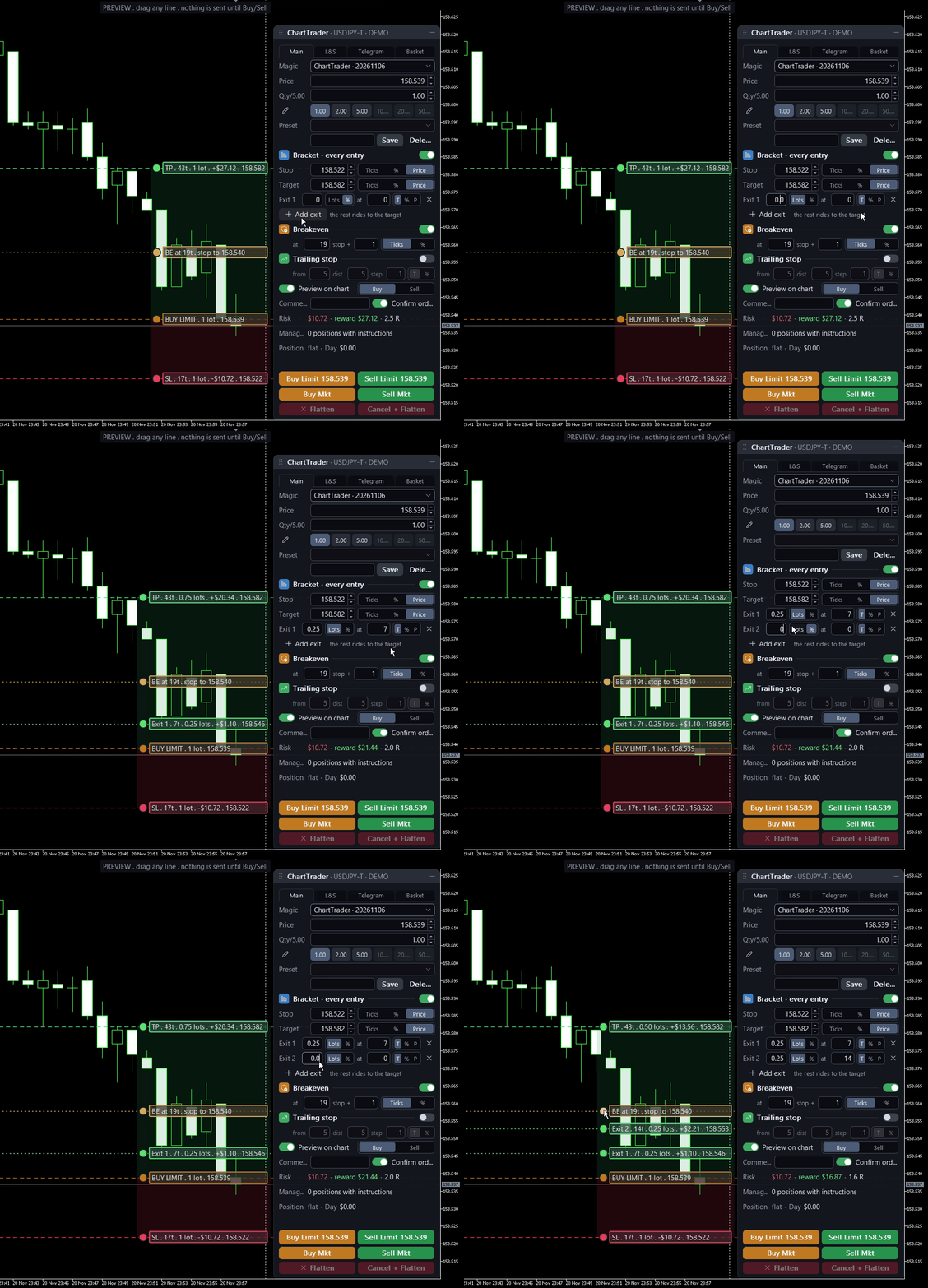
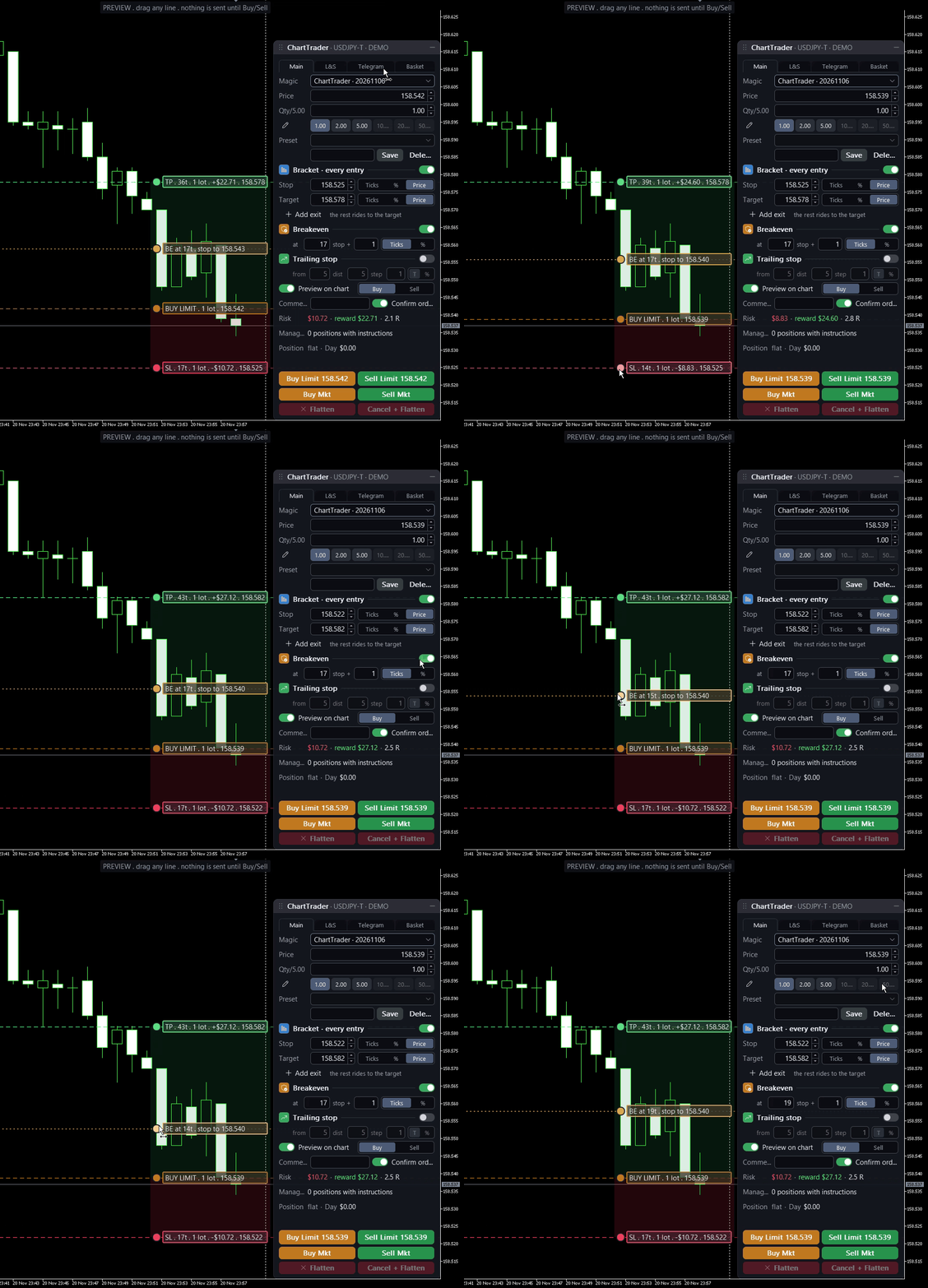
  • Risk and reward zones drawn on the chart, with the risk, the reward and the R multiple in the window.
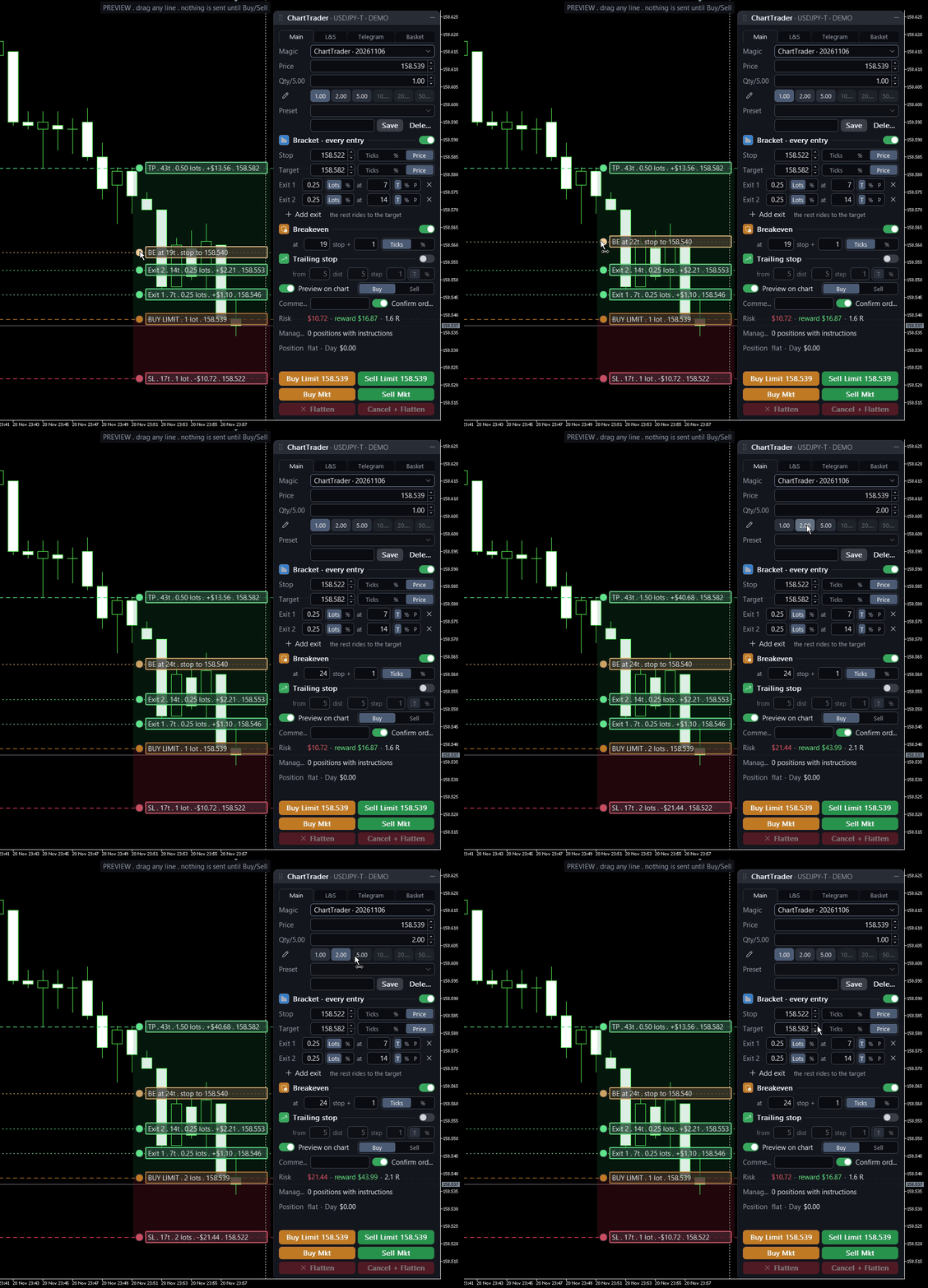
  • Drag the entry, stop, target, exit and breakeven lines of the preview. Nothing is sent until you press Buy or Sell.
  • Stop and target in ticks, percent or price. A level on the wrong side of the entry is flagged and refused.
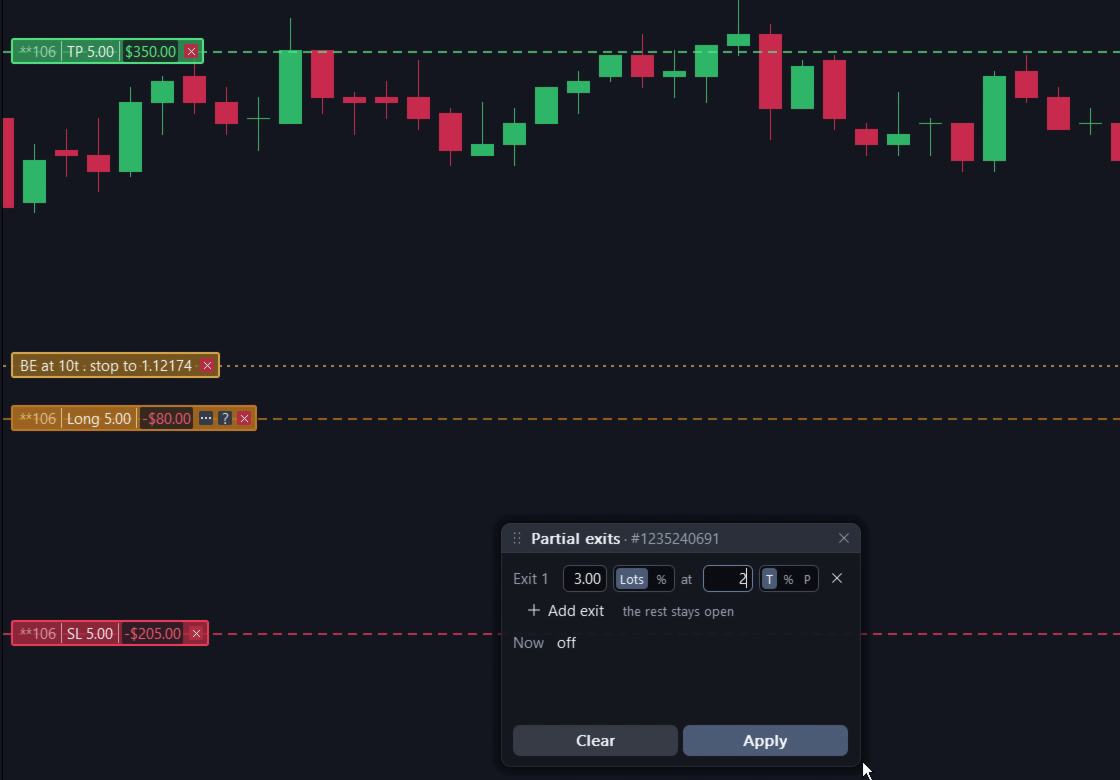
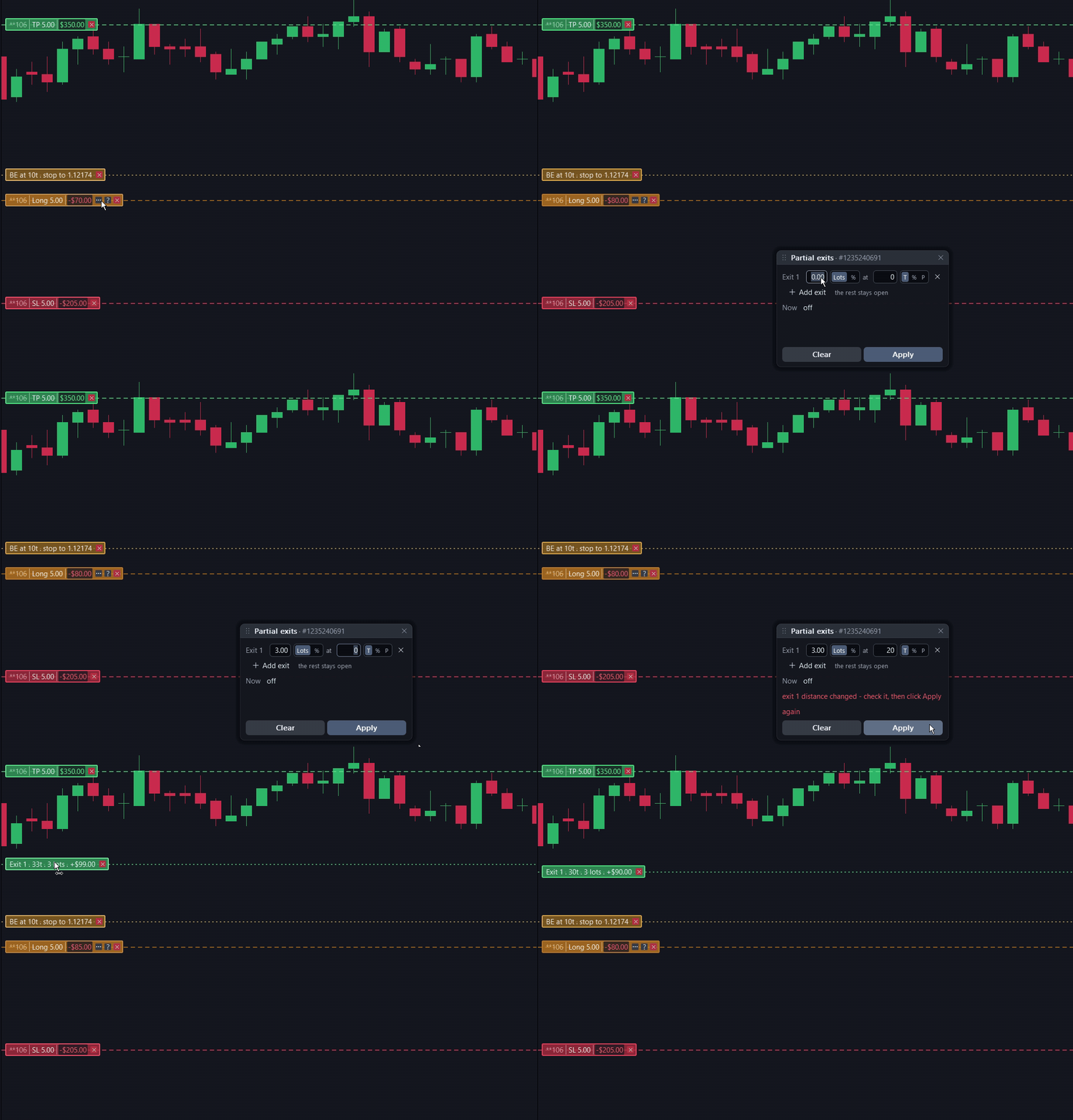
  • Market, limit and stop entries, one-click quantity chips, and up to 8 partial exits in lots or percent.
  • Save your brackets as named presets. They are still there after MetaTrader restarts.
  • Every new order, Flatten, position close and pair action you click opens a confirmation window first (lot, risk, margin and prices for orders; the position or pair and its result for closes). You can turn it off in the window, separately for orders and for pairs, and turn it back on from the tab. Cancelling a pending order and clearing a stop or target keep the two-click confirmation by default.

Manage from the chart

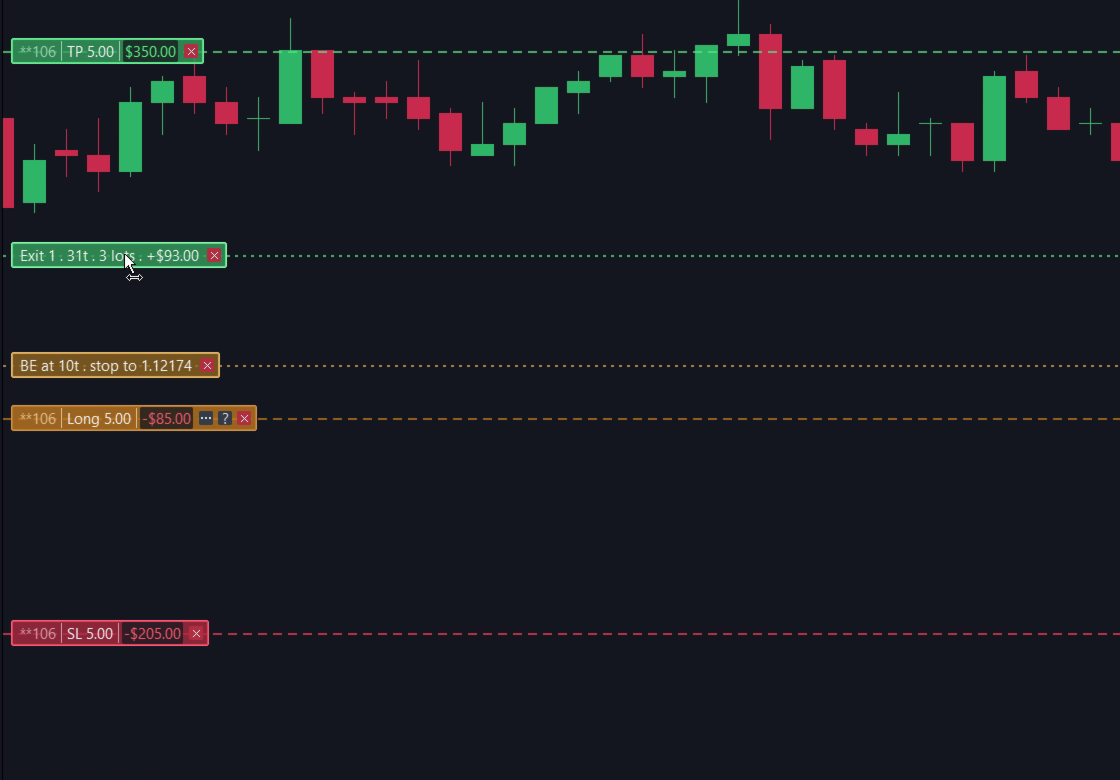
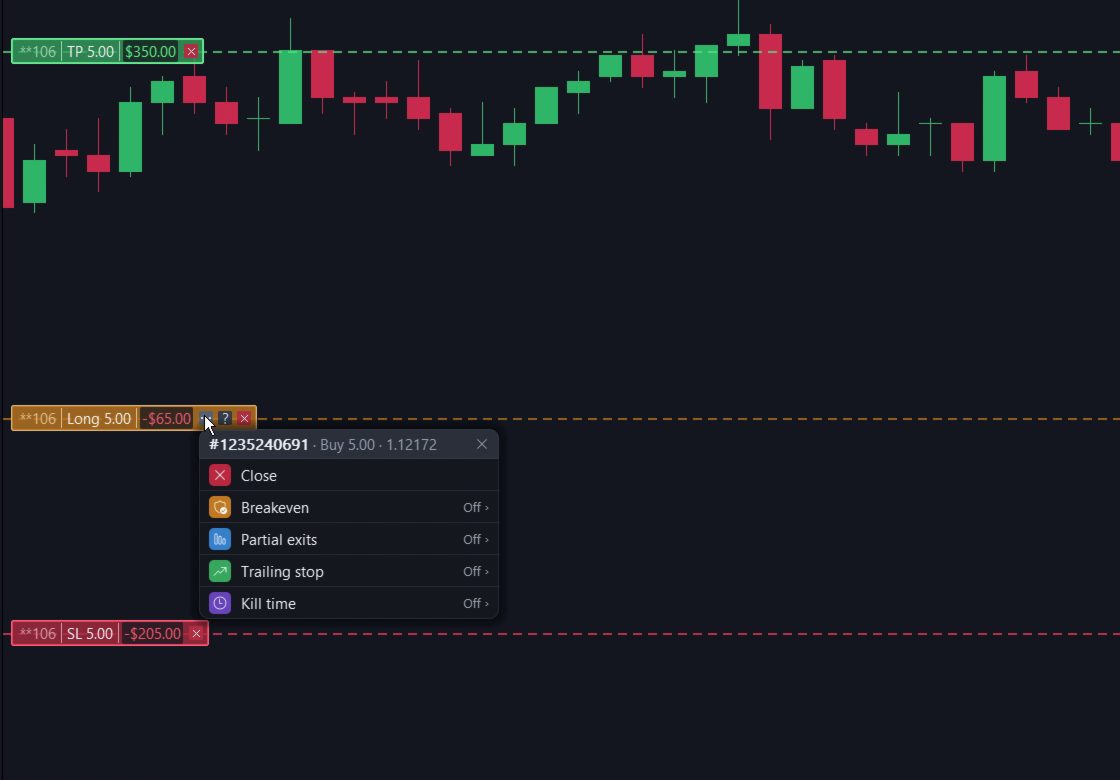
  • Every position and pending order on the chart's symbol is drawn, with its live P&L (positions), stop and target.
  • Drag a stop or a target to move it. Click the X to close a position, with a confirmation.
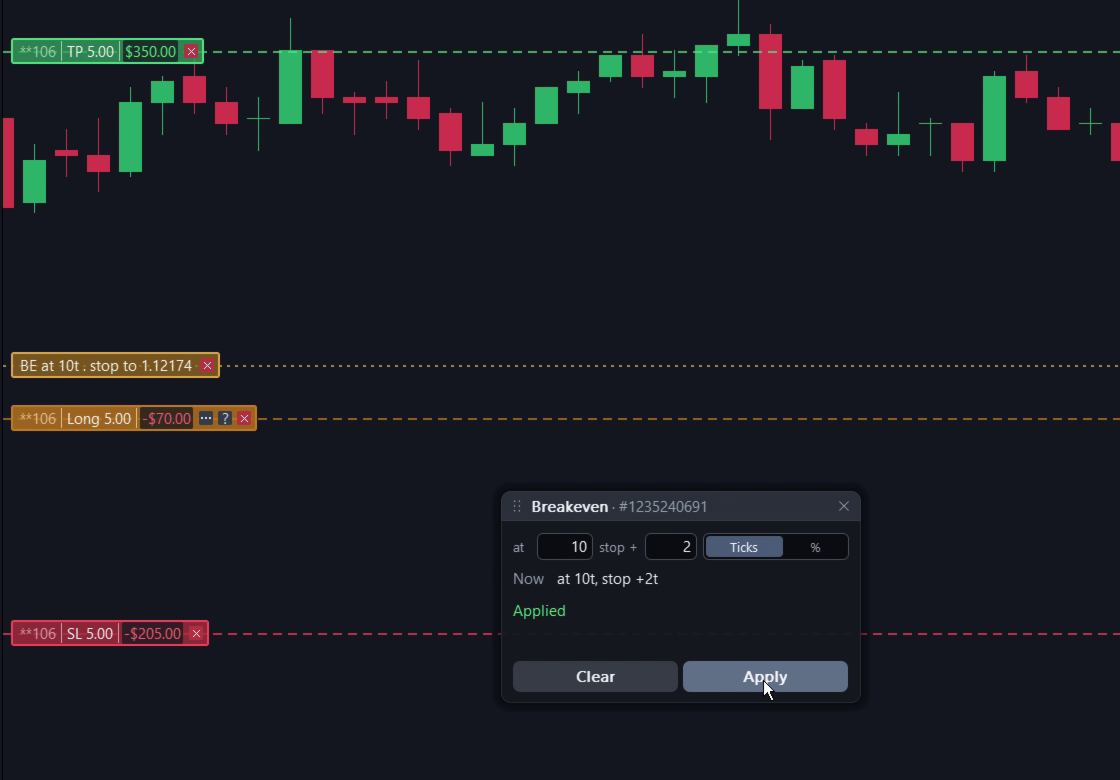
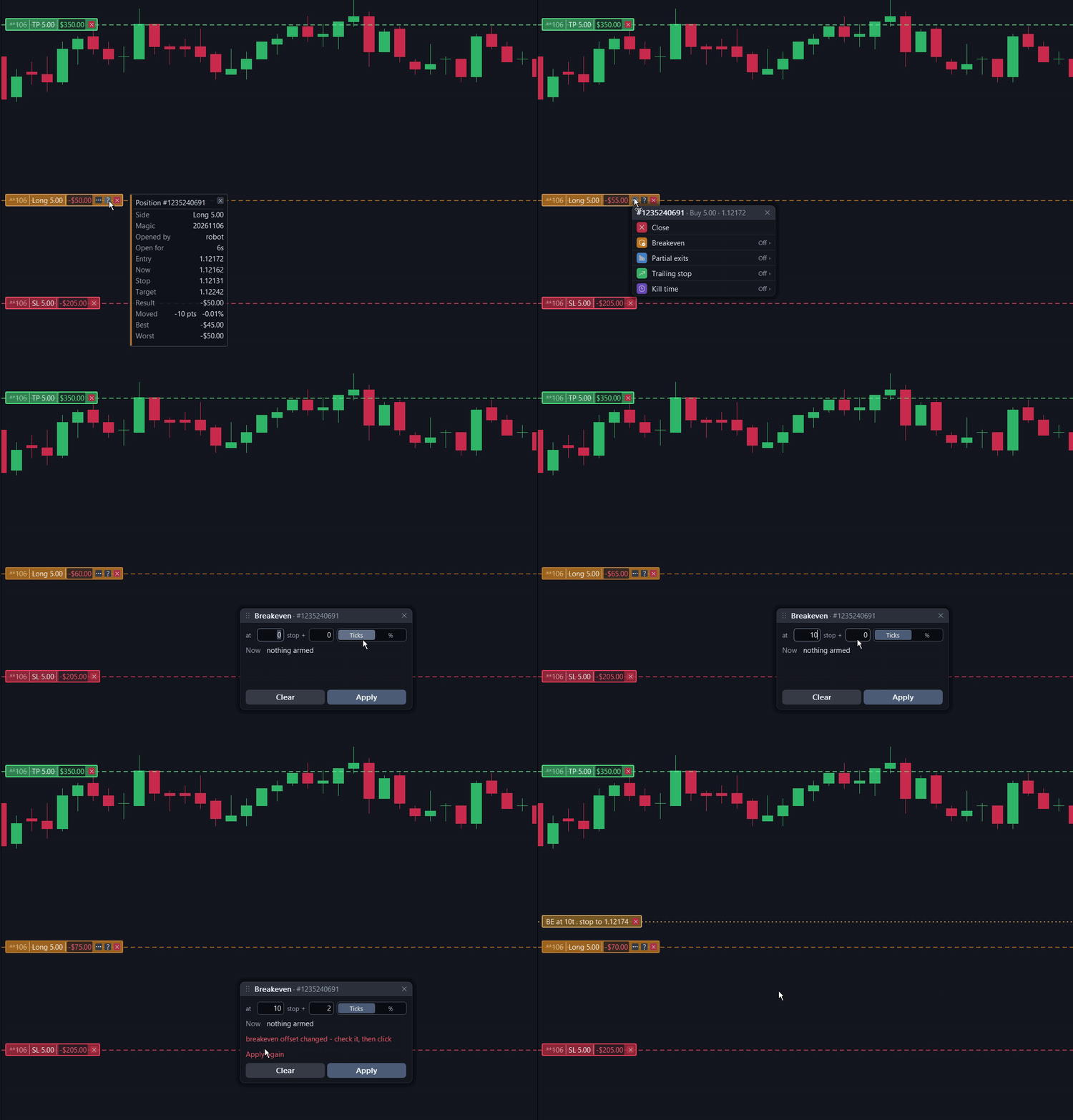
  • The "..." menu on a position: Close, Breakeven, Partial exits, Trailing stop, Kill time.
  • Breakeven, trailing stop (trigger, distance and step) and exit lines appear on the chart. Drag them to adjust, or click their X to clear one.
  • Trailing stop and breakeven are checked on every tick.
  • A kill time closes the position at or after the time you set, with a countdown on the broker's clock. If it ran out while MetaTrader was closed, ChartTrader asks you before closing.
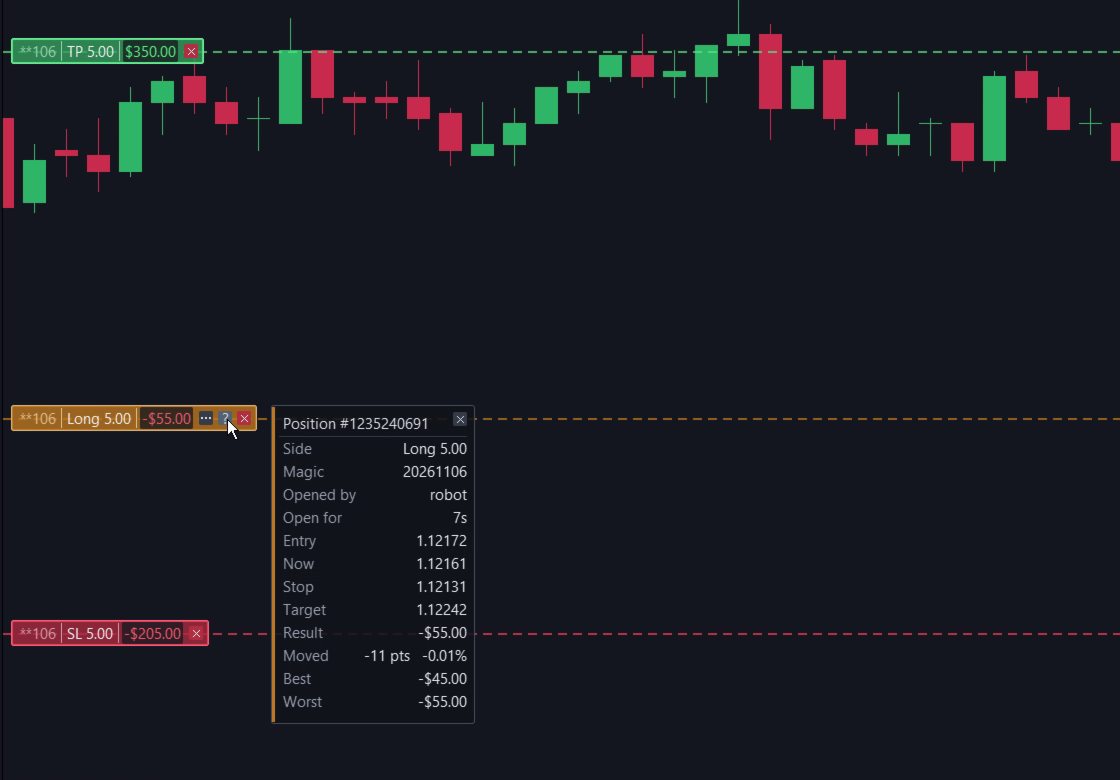
  • The "?" on a position opens its details: entry, stop, target, result, best and worst.
  • Flatten and Cancel + Flatten, each with a confirmation.

Long & short

  • The L&S tab monitors a pair: it takes two symbols you type (the first starts as the chart symbol), and shows a z-score chart with bands, the z-score, beta, a cointegration test (ADF) and the half-life in bars. You choose the timeframe, the number of bars and the bands.
  • Open and close a pair with one click, confirmed in a window (or by a second click when the window is off). You set the money per leg and the tab sizes both legs. It sends the first leg, then the second in proportion to what filled.
  • Live quotes for both symbols and the open P&L of each pair, before swap and commission.
  • Pairs survive a restart of MetaTrader: they are saved and picked up again by the chart that owns them, which must be running.
  • An optional stop on each leg, sent with the order and held at the broker.
  • For dated futures contracts, the statistics read the broker's continuous series when there is one, and the tab says so when it falls back to the contract itself. Orders always go to the contracts you typed.

Basket: a portfolio at target percentages, or a list of orders

  • The Basket tab has two modes, Portfolio and Orders. Each keeps its own list of up to 16 symbols, and the symbol field suggests names as you type.
  • Portfolio: type an amount of money and give each symbol a target percentage of it. The targets can total 100% at most; the rest is cash. For each symbol the tab shows its target, what it is worth now as a percentage of the amount, the lots held and the order a rebalance would send.
  • Rebalance buys and sells the difference, the sells first. It always opens a preview first: one row per order with its lots, price and value, and each symbol that will be skipped, with the reason. Nothing is sent until you press the send button, and if the size of an order changed while the preview was open, the preview opens again and nothing is sent.
  • To move a symbol from one percentage to another, change its target and rebalance. A target of 0% sells the symbol out at the next rebalance. Removing a symbol from the list leaves its position open.
  • The portfolio reads what the account holds in each symbol, so shares you already own are counted at once, and a trade made by hand shows as a difference to rebalance.
  • "Use current" sets the amount to what the holdings are worth now.
  • Orders: a plain list of symbols with lots - a positive number buys, a negative one sells. "Send basket" shows the same preview and sends the list as it stands. The list is kept afterwards, to be sent again.
  • The amount, the targets and the orders list are saved and come back after MetaTrader restarts. Each order sent is recorded in a CSV file in the terminal's data folder.

Telegram notifications

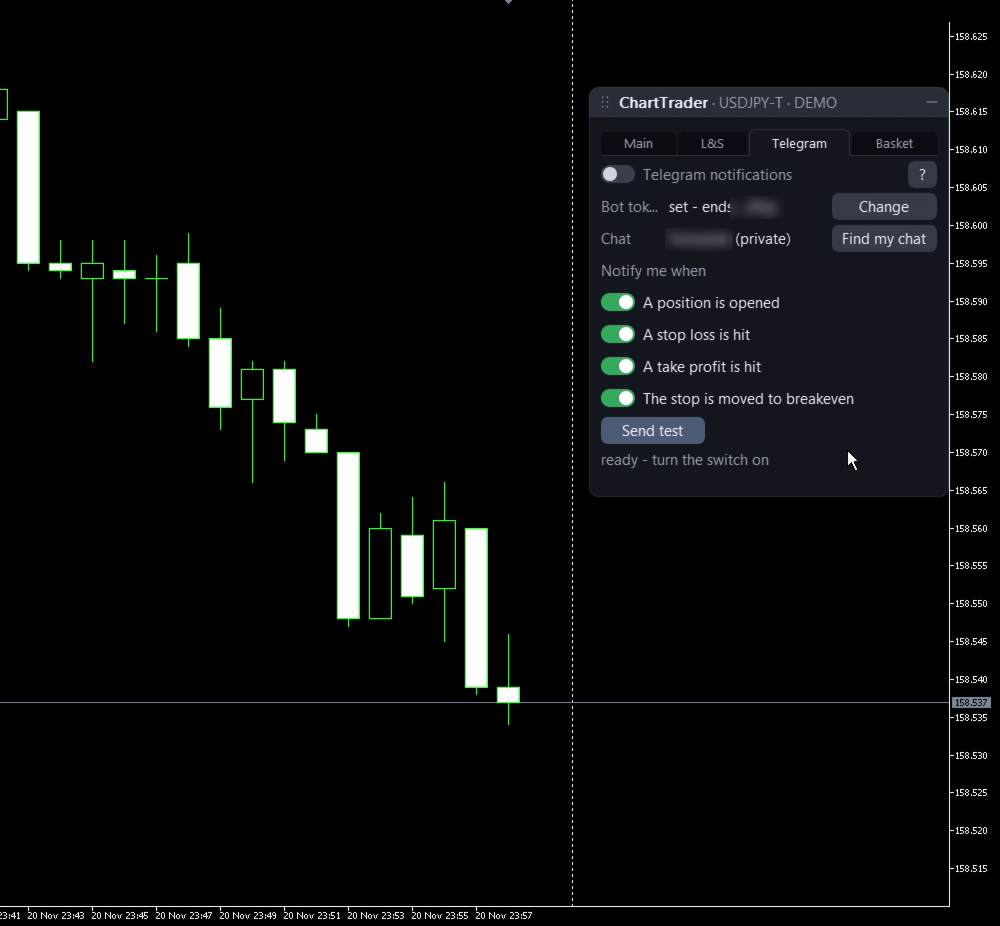
  • The Telegram tab sends a message to your Telegram chat when a position is opened, a stop loss is hit, a take profit is hit, or the stop is moved to breakeven. Each of the four has its own switch.
  • A message carries the symbol, the side, the volume and the price; for an open also the stop and the target; for a stop loss or a take profit also the net result and how long the position was held; for a breakeven the new stop. Times are the broker's.
  • No DLL: messages go out through MetaTrader's own WebRequest. You allow the address https://api.telegram.org once, in Tools > Options > Expert Advisors. The "?" button in the tab lists every step.
  • You use your own bot: create it with @BotFather, paste its token in the tab, write to the bot, press "Find my chat", then "Send test".
  • Once saved, the token is shown only by its last four characters. It is never written to the journal or shown in an alert.

How it works

  • Breakeven, trailing stop, exits and kill time are saved and reloaded when MetaTrader restarts.
  • In one MetaTrader, only one chart manages a position, so two charts do not act on it twice.
  • You can set instructions on trades you open by hand as well as on its own.
  • Works on hedging and on netting and exchange accounts, B3 futures included. On a netting account an order that only reduces the position is sent without stop or target, so that they do not end up on the wrong side of the position.
  • It does not send new orders on its own. It only closes or moves what you set up (a partial exit, breakeven, trailing stop, kill time) or what you confirmed. The one exception is a pair: once you confirm it and its first leg fills, the second leg is sent automatically.
  • The Basket tab sends orders only after you press the send button of its preview; it then sends that preview's orders one after the other. It never rebalances on its own.
  • It ships armed: clicking on the chart can close positions, cancel orders and remove stops, with a confirmation by default, and dragging the line of a stop, a target or a pending order, or clearing a breakeven, trailing or exit line, takes effect at once, with no confirmation. Switch off "ARM Click To Close And Drag" and clicks, drags and the Order window's buttons send nothing (instructions already set keep running, and a kill time that ran out while MetaTrader was closed still asks you).

Limitations

  • The L&S figures describe past prices only. They are not a recommendation and do not predict that a pair will revert to its mean.
  • The L&S tab never closes or re-sends a leg on its own. Its only automatic actions are sending the second leg after the first fills, and cancelling what has not filled of a leg's market order: the first leg's a few seconds after it is sent, the second leg's a few seconds after it is sent (the pair then has a loose leg), and, after a restart, any order still resting from a pair that was being opened. With the platform closed, only the optional leg stop at the broker acts (a VPS keeps the tab running).
  • The legs are market orders sent one after the other. Each can fill at a worse price than shown (slippage, gaps). The second can be refused or filled in part, which leaves the first open alone as a loose leg, with an Alert. The leg stop also fills at market, and a gap can fill it past its level.
  • A stop that fires leaves the other leg open until you act.
  • The confirmation window shows the values at the moment it opens. It does not check that an order is wise and does not protect against a loss. With the window turned off, the Main tab's Buy and Sell buttons send on one click; pair actions and the other closes and cancels use a second click by default.
  • On a short chart the confirmation window does not open and the order is not sent: enlarge the chart. The L&S tab's lower buttons can be cut off on a short chart.
  • The confirmation setting is shared by every chart in the terminal.
  • Magic numbers from base+1 to base+999 (the L&S Magic Base input; by default 20261201 to 20262199) are reserved for pairs on the whole account: other programs must not use magic numbers in that range on the same account, or their positions are taken for pairs. Set the same base on every chart.
  • On a netting account, a manual trade on a leg's symbol, including one made in the Main tab, merges with that leg, and any stop or management set on that trade then applies to the whole position, leg included.
  • If a pair ends up with a loose leg, you decide what to do: complete it or close it. Nothing is re-sent on its own.
  • Breakeven, trailing stop, partial exits and kill time run in your MetaTrader, not at the broker: they act only while the terminal is open, connected and the program is on the chart. The order's stop and target sit at the broker. To manage with your computer off, use a VPS.
  • Breakeven, trailing stop, partial exits and kill time send nothing while the quote is missing or looks like an auction, while Algo Trading is off in the terminal or in the program, while the account or the symbol cannot trade, or outside the symbol's trading sessions. What is due stays armed and is sent when sending is possible again, possibly at a worse price: a kill time can pass with the position still open.
  • Open positions are managed only while the chart shows their symbol: changing the chart's symbol stops the management of the old symbol's positions (the program alerts when positions with instructions are left behind). Their saved instructions resume when the program runs again on a chart of that symbol (with the same Magic Number for its own positions).
  • One terminal per account: do not run the program on the same account from two MetaTrader terminals at once (for example a VPS copy and a desktop). Each would manage the same positions, and partial exits or closes could be sent twice.
  • If you switch the account in the terminal, the program stops acting and shows an Alert; attach it again.
  • When attached, saved instructions take a few seconds to load. Until then nothing is armed or carried out.
  • Saved instructions live in a file in the terminal's data folder. If that file cannot be read or understood, it is set aside and the program starts without those instructions. If a change that moved money (a partial exit sent, a kill time under way, a breakeven done) cannot be written, the older copy is set aside so that an instruction already carried out is not repeated, and a restart before a later write succeeds starts without them. In both cases an Alert says so: check your open positions and set their instructions again. If the file cannot be set aside, the Alert says that too, and a restart may reload the older instructions, so check them.
  • If the broker does not confirm an order or a close (a timeout, a lost connection), the program reports it and never sends that request again while its outcome is unknown. For a full close it also stops acting on that position until the order or the position shows what happened, which can last as long as MetaTrader is offline or the close order is still pending. While a close is unconfirmed you cannot move its stop or close it again from the panel; act in MetaTrader. On a netting account the Order window also refuses every new order on that symbol while its close is unconfirmed, and any order that would reduce, close or reverse the position while a closing market order is working. An unconfirmed close you clicked is never re-sent by the program; a partial exit or a kill time is sent again only once the program has found that the first did not go, or went only in part. This waiting does not survive a restart of the program or of MetaTrader. Check the Trade tab: you can always act in MetaTrader itself.
  • After an update from an earlier version, on a hedging account, the instructions on positions opened by hand are carried over once. If more than one chart has managed the same symbol, any the program cannot be sure of are not carried over: it alerts and names those positions, and you set their instructions again. If the carry-over keeps failing, none are carried over and an alert says to set them again.
  • Exits are market orders: with slippage, a gap or a requote they can fill at a worse price than the line.
  • Netting accounts: a limit or stop order sent with a stop and target can leave them on the wrong side if the position changes before it fills. Send pending orders that reduce the position without a stop and target.
  • On a netting account, if a chart's management pauses briefly while another order reverses the position, a pending partial exit can still fill and open a position on the other side.
  • On exchange symbols, while the quote looks like an auction (bid equal to or above ask), market and stop orders and pair legs are refused; limit orders can still be placed. On other symbols this happens only when the bid is above the ask.
  • Flatten leaves your resting orders; one that fills later opens a position again. Use Cancel + Flatten to remove them.
  • Positions with magic 0 on the symbol are treated as manual trades: the instructions you set on them are carried out by one chart per account and symbol. Do not run another robot that trades without a magic number on the same symbol.
  • The Portfolio mode is long only. A symbol with a short position, or on a netting account with a position that belongs to a pair, is blocked: it counts as nothing held and is not rebalanced until that position is gone.
  • On a hedging account the Portfolio mode counts and sells the buy positions opened by the basket, by hand and by the Main tab; positions of other programs and pair legs are not seen. On a netting account it counts the symbol's one position, whoever opened it. A portfolio sell closes existing positions, whole or in part; for a position that carries instructions it is the same as closing part of it by hand in MetaTrader.
  • Sizes are whole volume steps. A buy is rounded down, so it never passes its target; a sell is rounded to the nearest step and is sent only when it brings the symbol closer to its target. A stock traded in lots of 100 can therefore stay well under its target; its fractional symbol is a different symbol, added as a row of its own. A symbol whose worth is within the tolerance of its target (the input "Basket Rebalance Tolerance Percent Of Amount", 0.5% of the amount by default) sends nothing.
  • Rebalance and Send basket send market orders with no stop and no target, one after the other. Each can fill at a worse price than the preview showed (slippage, gaps), be refused or fill in part; an order that has not filled after about 10 seconds has what is left of it cancelled, except one that closes a whole position, which is left working. Nothing is sent a second time: in the Portfolio mode what did not go shows as a difference, and you decide whether to rebalance again. A symbol with no quote, outside its trading session or with an order still working is skipped, and the preview says why.
  • If the answer to a basket order proves nothing (a timeout, a lost connection), the tab reports it, sends nothing more on that symbol until the terminal has been connected for a minute, and never repeats the order. Check the Trade tab.
  • A run that is under way stops if MetaTrader or the program restarts, or if the chart's timeframe or symbol changes: the orders not sent yet are not sent, and nothing resumes on its own. The Stop button does the same on your click; an order already sent is not recalled.
  • In the Orders mode a sell is a plain market sell: on a hedging account it opens a short position, on a netting account it reduces or reverses the symbol's position. The list does not look at what the account holds and tracks nothing after it is sent: sending it twice sends it twice.
  • A basket order that the free margin does not cover is not sent. At some brokers the money from the sells cannot be used for buys on the same day.
  • The worth of the holdings and the percentages use the last bid, also when the market is closed. The CSV file records the price planned in the preview, not the fill price.
  • One basket per account, owned by the first chart where the Basket tab is opened; other charts show it read-only. The basket's own magic number (the input "Basket Magic", 20262400 by default) must not be used by another program, must differ from the Magic Number and must stay outside the pairs' range.
  • If the basket's file cannot be understood, it is set aside and the basket starts empty, with an Alert: type the amount and the targets again. Positions are not touched.
  • Telegram messages are sent by your MetaTrader, only while it is open, connected and the program is on a chart. They can arrive late or not at all (no internet, Telegram unreachable, the address not allowed); a message that could not be sent is tried again later, and with more than 100 lines waiting the oldest are dropped. Do not rely on them as your only way of following a position.
  • Only the four events are reported, and only for the positions the chart manages: the program's own and those opened by hand on the chart's symbol (on a netting account, the symbol's position). A close by hand, by a kill time or by a partial exit sends no message, and neither do other robots' positions or pair legs. A position opened and closed within about half a second, or closed while MetaTrader was shut, is not reported.
  • The bot token is stored as plain text in a file in the terminal's data folder (MQL5\Files\GTR_OVERLAY\telegram.txt), shared by every chart of that terminal. Whoever has the token can send messages as your bot: keep that file private and use a bot made only for this.
  • "Find my chat" needs a bot whose updates no other program reads. While it sends a message the program waits for Telegram, 3 seconds at most each time; it holds a message back (10 seconds at most) while one of your orders is on its way or while you are using the panel.
  • A text that has no translation yet is shown in English. The Experts journal, the names of the inputs in MetaTrader's settings and the broker's own messages stay in English.
  • Dated futures contracts (e.g. WINZ26) are not rolled automatically. Before expiry, close or roll the positions and switch the chart to the next contract. Continuous series (WIN$) are rolled by the broker.

Good to know

  • ChartTrader is a manual trading tool. In the Strategy Tester it starts and stops cleanly and, by default, draws nothing. To try it, use the free ChartTrader DEMO on a demo account.
  • If you change the Magic Number, keep it above 0 (magic 0 is what trades opened by hand carry) and do not use 3111995, which the program refuses.
  • One ChartTrader per chart.
  • Languages: English, Portuguese (Brazil) and Russian. By default the interface follows MetaTrader's language; the "Language" input sets it. Alerts and Telegram messages use the same language.

Risk disclaimer

Trading futures, stocks, forex and CFDs carries a high risk of loss. ChartTrader is an execution and management tool: it gives no recommendations and guarantees no result. It is provided as is, with no warranty of uninterrupted or error-free operation. Test it with the free DEMO edition before using it on a real account. You are responsible for the orders you send and for monitoring your positions.
Önerilen ürünler
MT5 için "2 Hareketli Ortalamalı WPR" Kripto Forex Göstergesi, Yeniden Boyama Yok. - WPR, scalping için en iyi osilatörlerden biridir. - "WPR ve 2 Hareketli Ortalama" Göstergesi, WPR osilatörünün Hızlı ve Yavaş Hareketli Ortalamalarını görmenizi sağlar. - Gösterge, fiyat düzeltmelerini çok erken görme fırsatı sunar. - Bu göstergeyi parametreler aracılığıyla kurmak çok kolaydır, herhangi bir zaman diliminde kullanılabilir. - Resimlerde Alış ve Satış giriş koşullarını görebilirsiniz. - WPR MA'la
Heiken_Ashi_Bars - MT5 için Gelişmiş Trend Görselleştirici Genel Bakış Heiken_Ashi_Bars , piyasa gürültüsünü filtrelemek ve temel trendi vurgulamak için tasarlanmış güçlü, görsel olarak sezgisel bir özel göstergedir (indicator). Geleneksel mum grafikler genellikle düzensiz olabilir. Bu gösterge fiyat verilerinin ortalamasını alarak fiyat hareketini pürüzsüzleştirir, böylece trend devamlılıklarını, geri dönüşleri ve karlı giriş bölgelerini tespit etmeyi çok daha kolay hale getirir. Temel Özellikl
AURUM SMC Structure, XAUUSD [& other FX pairs] [Please leave a review if you find the indicator useful and how we can improve it further] A Smart Money Concepts structure indicator for studying gold charts. It marks BOS and CHoCH breaks, order blocks, fair value gaps and liquidity, and gives each setup marker a 1 to 5 star confluence rating. After a break it waits for a pullback before drawing its reference levels, so you can study how price behaved around structure rather than chasing the break
Advanced Price Action Suite
Mahoutondji Fredy Venance Assemou
Advanced Price Action Suite Advanced Price Action Suite plots market structure (BOS/CHoCH), support and resistance zones, Fair Value Gaps and the multi-moving-average trend on your chart — with an integrated position calculator that shows the recommended lot, possible loss and risk/reward ratio in real time, before every entry. What Advanced Price Action Suite does Advanced Price Action Suite is an analysis and calculation tool for the price action trader: it shows the market context at a glan
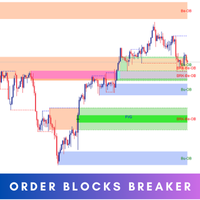
Introducing   Order Blocks Breaker , a brand-new way to identify and leverage order blocks in your trading strategy. After developing multiple order block tools with unique concepts, I’m proud to present this tool that takes things to the next level. Unlike previous tools,   Order Blocks Breaker   not only identifies order blocks but also highlights   Breaker Order Blocks —key areas where the price is likely to retest after a breakout. MT4 -  https://www.mql5.com/en/market/product/124101/ This t
Ortalama Yönsel İndeks(ADX) Çoklu Para Birimi Tarayıcı MT5 birden fazla döviz çiftini aynı anda analiz etmek için tasarlanmış gelişmiş bir ticaret göstergesidir. Bu, Ortalama Yönsel İndeks'e dayalı gerçek zamanlı sinyaller sağlayarak, karar verme sürecini geliştirmek isteyen tüccarlara fayda sağlar ve etkili piyasa trend analizi yapmalarına olanak tanır. Bu araç, trend gücünü ve yön hareketini tanımlamayı basitleştirerek ticaret deneyimini kolaylaştırır ve ADX tabanlı stratejileri kullanan tücca
Price Alerts Advanced Suite for MetaTrader 5 Take control of your trading execution with the Price Alerts Advanced Suite , a professional-grade technical analysis tool built exclusively for MetaTrader 5. This suite goes far beyond simple horizontal lines; it is a complete analytical ecosystem designed to identify key market levels, monitor price action in real-time, and deliver instant notifications across multiple channels. Whether you are a day trader, swing trader, or algorithmic develope
CosmiCLab SMC FIBO CosmiCLab SMC FIBO is a professional trading indicator designed for traders who use Smart Money Concepts (SMC), market structure analysis and Fibonacci retracement levels. The indicator automatically detects market swings and builds Fibonacci levels based on the latest impulse movement. It also identifies market structure changes such as BOS (Break of Structure) and CHOCH (Change of Character), helping traders understand the current market direction. CosmiCLab SMC FIBO also pr
See how your account is really doing at a glance, right on the chart. The dashboard reads your account and trade history and never opens, modifies or closes a trade. How it works Every second the dashboard reads balance, equity, margin and open positions. Closed results come from the deal history: for each closing deal the profit, swap, commission and fee are added together. From these deals it calculates closed profit for today, this week and this month, plus statistics for the period you choos
FREE
Price Magnet — Price Density and Attraction Levels Indicator Price Magnet is a professional analytical tool designed to identify key support and resistance levels based on statistical Price Density. The indicator analyzes a specified historical period and detects price levels where the market spent the most time. These zones act as “magnets,” attracting price action or forming a structural base for potential reversals. Unlike traditional Volume Profile tools, Price Magnet focuses on price-time d
ZT Scalper Bundle 1
Damien Joseph Marie Juge
This Bundle offers an all-in-one tools for scalpers. Basic but effective. Powerfull together. Namely Breakout detector with pivot or ohlc and a colored MA to check the trend. --------------- It includes :  - Pivot levels with different parameters - Colored MA, to visualize trends and reversals - OHLC, to keep an eye on daily key levels. - BreakOut detector, to take advantage of breakouts on all UT and take the trend.
Liquidity Touch Zones PRO X - is   a support and resistance indicator that identifies   price areas of confirmed strength   formed by repeated price interactions and displayed taking into account the instrument's characteristic volatility. The calculation is based on fractal points, which serve as initial benchmarks. These points form price zones reflecting repeated price interactions and are represented as areas of varying heights depending on the level's significance. It is designed for trader
It has never been so easy to manage the risk of your account until now, this tool will allow you to have full control of your capital and manage your entries in the synthetic index derivative markets, in an easy, practical and safe way. The available input and configuration parameters are as follows :  RISK MANAGEMENT 1. Value of your account: Here as its name says you will place the value corresponding to the size of your account, for example if your account is 150 dollars the corresponding val
Order Book, known also as Market Book, market depth, Level 2, - is a dynamically updated table with current volumes of orders to buy and to sell specific financial instument at price levels near Bid and Ask. MetaTrader 5 provides the means for receiving market book from your broker, but in real time only, without access to its history. The indicator OrderBook Cumulative Indicator accumulates market book data online and visualizes them on the chart. In addition, the indicator can show the market
This EA is primarily used for scalping XAUUSD. Purpose Removes emotion from trade management   - automatically protects positions and takes profits so you don't have to make difficult decisions under pressure. What It Does ️   Auto Stop Loss Sets SL based on recent highs/lows + buffer No more manual placement stress   Auto Partial Profits Two modes: Fixed Movement : Close 50% after X price movement R-Ratio : Close 50% at 1.2R profit target Locks in gains while letting winners run. ️   One
This utility tool shows the intraday price variation as a percentage. It just works on any symbol and timeframe. Inputs: Font Size: You can change the font size of the price variation. Defaults to 15. Corner Location: You can choose between "Left upper chart corner", "Left lower chart corner", "Right upper chart corner", "Right lower chart corner" to show the information.
ChartColorMT5
Thomas Pierre Maurice Moine
Customize your charts with this simple utility. Choose in the 24 pre-built color sets, or use your own colors, save them to re-use them later. You can also add a text label on your chart. --- Chart Colors-- Color Set : 24 prebuilt color sets (select "Custom" to use colors below) Background color Foreground color Grid color Chart Up color Chart Down color Candle Bull color Candle Bear color  Line color Volumes color --- Label--- Text Label : Type the text you want to appear on the chart Label P
FREE
RiskGuard Pro enforces a daily loss limit, a profit lock and a maximum drawdown on your account - across your manual trades and any other EA you run. It does not open trades and it does not predict anything. What it does RiskGuard Pro watches your account equity and enforces three limits you set: Daily loss limit - measured against your start-of-day equity. Daily profit lock - stop trading once the day has gone well enough. Maximum drawdown - measured from your account's peak equity, not from to
ApexTradeManager is a professional manual trade-management Expert Advisor for MetaTrader 5, designed especially for XAUUSD (Gold) traders. Instead of replacing your trading strategy, ApexTradeManager works alongside your manual execution. You decide when and where to enter; the EA helps manage the position according to your predefined trade-management rules. Key Features Automatic Stop Loss & Take Profit — Automatically apply SL and TP levels to new positions. ATR-Based TP System — Dynamic TP1,
FREE
Genel Bakış Candle Timer Countdown Pro, mevcut mumun kapanışına kadar olan süreyi pürüzsüz ve doğru bir şekilde geri sayım olarak gösterir ve dairesel ilerleme yayı ile görsel destek sağlar. Özellikler Kesintisiz geri sayım Dairesel ilerleme halkası 6 konum seçeneği 3 renk modu Son geri sayım vurgusu Bağlantı durumu algılama Yeni mum uyarıları Düşük CPU kullanımı Kurulum MQL5 Market’ten indirin Grafiğe ekleyin Ayarları yapılandırın Uyumluluk MetaTrader 5 Build 2500+ Tüm semboller Tüm zaman dilim
Prime Zones
Felipe Ignacio Zavala Abarzua
WHAT IS PRIME ZONES? Prime Zones is a professional market structure indicator designed to automatically identify key Support and Resistance Zones , monitor how price interacts with them, and provide additional trend context through a Dual Regression Channel system . Instead of filling the chart with dozens of horizontal lines, Prime Zones displays clean and visually defined price areas where the market has previously shown meaningful reactions. The indicator combines four main concepts in a sing
Precision Trade Console — Bring visual order planning, pre-request checks and position-management controls into one MT5 console. Who it is for Designed for active discretionary traders who want a structured workflow from entry planning to managed exit. Main functions Market, limit and stop order modes Percentage, cash and fixed-lot position sizing Margin and spread safety gates Three staged take-profit levels and partial exits Breakeven management Fixed-distance or ATR-based trailing stops Persi
It mesures the lot size based on the points measured by clicking with the MIDDLE MOUSE BUTTON then CLICK and DRAG , previous that configure the indicator based on the risk you accept; The risk can be % based on fixed account, actual account size, and fix capital risk; If the INDICATOR DOESN'T WORK propperly try after configuring it CHANGE the TIMEFRAME and GET BACK to the PREVIOUS timeframe, SOMETIMES  this FIX IT
CCI Fixed Dual
Edoardo Centorame
CCI FIXED DUAL nedir CCI FIXED DUAL, hassas bir şekilde şunları belirlemek için tasarlanmış profesyonel bir Trend Direction Filterdır: piyasanın baskın yönü hareketin yapısal kalitesi ana trend ile hızlanma aşamaları arasındaki tutarlılık Doğrudan bir giriş göstergesi değildir. Klasik bir osilatör değildir. Bu, traderın ne zaman işlem yapması ve ne zaman işlem YAPMAMASI gerektiğine karar vermesine yardımcı olmak için tasarlanmış bir bağlam aracıdır ve piyasa gürültüsünü ve yorumlama hatalarını ö
When executing an order, whether through the Metatrader ticket on a computer or the Metatrader app on a mobile device, either manual or pending, Easy Trade will automatically set the take profit and stop loss levels, as well as a limit order with its respective take profit and stop loss levels. It follows the trading strategy for market open (US30, US100, US500), but it can be applied to any market asset.
Giriş PropFirm Dashboard ile fonlanmış trading hesaplarınız üzerinde tam kontrol sağlayın. Bu profesyonel kontrol paneli, Prop Firm challenge süreçlerine katılan traderlar için özel olarak geliştirilmiştir ve değerlendirme sürecinin her aşamasını gerçek zamanlı olarak takip etmenize yardımcı olur. MetaTrader 5 için geliştirilen bu sistem, fonlanmış hesapların en önemli parametrelerini sürekli olarak izler: kâr hedefi, maksimum günlük zarar limiti, maksimum drawdown, minimum işlem günü ve challen
Fiyat Eylemi Ticaret Paneli MT5 , belirtilen (varsayılan olarak) geçmiş mumların saf fiyat eylemi verilerine dayalı olarak herhangi bir simgenin/enstrümanın alım/satım gücü seviyesi dengesini hesaplar. Bu, gösterge panelinde bulunan 32 sembol/aletin fiyat hareketini izleyerek size mümkün olan en yakın piyasa duyarlılığını verecektir. %60'ın üzerinde bir alım/satım gücü seviyesi, belirli bir sembolü satın almak/satmak için (varsayılan ayarları kullanarak) oldukça sağlam bir seviye sağlar.   Fiya
Discipline and full protection for trades placed through Shield's panel on your own or prop firm account in MT5: a risk manager with daily loss limit, max drawdown (static or trailing), risk per trade and lot size, news filter and equity protection — it stops you before a bad moment becomes a lost account. Trades from a phone or outside the panel are your choice: Shield trims the breach at once, but the firm may already have recorded it. 23 programs of 17 prop firms included. Never opens trades
The indicator detects and displays М. Gartley's Butterfly pattern. The pattern is plotted by the extreme values of the ZigZag indicator (included in the resources, no need to install). After detecting the pattern, the indicator notifies of that by the pop-up window, a mobile notification and an email. The pattern and wave parameters are displayed on the screenshots. The default parameters are used for demonstration purposes only in order to increase the amount of detected patterns. Parameters z
For DEMO - please contact me and I will send you demo version to test the product. BreakEven ProSync – Advanced Trade Management Tool for MetaTrader 5 Overview The  BreakEven ProSync  is a powerful utility designed to enhance trade management in   MetaTrader 5 . It provides   one-click break-even functionality ,   hotkey trading ,   position synchronization , and   visual SL/TP tracking —all in a single, user-friendly tool. Perfect for manual traders who want   faster execution   and   better r
Bu ürünün alıcıları ayrıca şunları da satın alıyor
Trade Assistant MT5
Evgeniy Kravchenko
4.43 (216)
It helps to calculate the risk per trade, the easy installation of a new order, order management with partial closing functions, trailing stop of 7 types and other useful functions. Additional materials and instructions Installation instructions - Application instructions Line function -   shows on the chart the Opening line, Stop Loss, Take Profit. With this function it is easy to set a new order and see its additional characteristics before opening.   Risk management  - The risk calculation
Trade Manager EA’ye hoş geldiniz! Ticaretin daha sezgisel, hassas ve verimli hale gelmesi için tasarlanmış nihai risk yönetim aracı ile tanışın. Bu sadece bir emir verme aracı değil; ticaret planlaması, pozisyon yönetimi ve risk kontrolü için kapsamlı bir çözüm. İster yeni başlayan bir yatırımcı olun, ister deneyimli bir trader ya da hızlı emir gerektiren bir scalper, Trade Manager EA ihtiyaçlarınıza uyum sağlar ve forex, endeksler, emtialar ve kripto paralar dahil tüm piyasalarda esneklik sunar
Telegram to MT5 Multi-Channel Copier   , Telegram ve Discord kanallarınızdaki alım-satım sinyallerini doğrudan MetaTrader 5'e otomatik kopyalar. Bot yok, tarayıcı uzantısı yok, elle kopyalama yok. Sinyal Telegram'a veya Discord'a düşer ve EA birkaç saniye içinde terminalinizde işlemi açar. Ve bir kanalı kopyalamadan önce, yerleşik backtester o kanalın hesabınızda ne yapmış olacağını gösterir. Ürün iki bileşenden oluşur: Telegram kanallarınızı dinleyen bir Windows uygulaması ve sinyalleri MT5 ter
REVDEN AI Desk: Trading'inizi REVDEN'in Piyasa Bağlamı Üzerinde, Kendi Yapay Zekanızla Tek Bir Sohbetten Yönetin Trading'inizi tek bir sohbetten yönettiğinizi düşünün. REVDEN AI Desk bunu MetaTrader 5'e getiriyor: kendi yapay zekanıza piyasayı nasıl okuduğunu sorarsınız, o da işlem yaptığınız semboller hakkında REVDEN'in tam bağlamından, yani durumlarından, risk görünümlerinden ve yaklaşan açıklamalardan yanıt verir. Önerileri giriş, stop, hedef ve riskle gelir; uygun olanları siz onaylarsınız.
EA Overfitter
Stephen J Martret
5 (5)
That backtest looks great. But will it still be making money tomorrow, next week, next month? EA Overfitter re-runs your EA on 100 price histories it has never seen. One score tells you if the edge is real. A backtest tells you what an EA did on one price history — the one that happened to occur. What you cannot tell from it is how much of that result was the strategy and how much was the particular path. EA Overfitter answers that. It builds up to 100 synthetic price histories your EA has n
Farmed Hedge Yield Farming | All Markets (Manual - Hybrid - Semi/Automated EA) VERIFIED TRADING RESULTS - Farmed Hedge Yield Axi Copy:  https://www.mql5.com/en/signals/2356376 - Farmed Hedge Yield Exn Copy:   https://www.mql5.com/en/signals/2356404 - Farmed Hedge Yield V Copy:  https://www.mql5.com/en/signals/2357156 IMPORTANT NOTICE: FarmedHedge is a MANUAL-FOCUSED TRADING UTILITY ,not a fully automated EA. Results shown on this Signal include manual trades and overall strategic management.
TradePanel MT5
Alfiya Fazylova
4.89 (176)
Trade Panel, çok işlevli bir ticaret asistanıdır. Uygulama, manuel ticaret için 50'den fazla ticaret fonksiyonu içerir ve çoğu ticaret görevini otomatikleştirmeyi mümkün kılar. Uygulama talimatları: https://www.mql5.com/en/blogs/post/756482 Demo hesabı için uygulamanın deneme sürümü: https://www.mql5.com/en/blogs/post/750865 Uygulamayı nasıl kurulur: https://www.mql5.com/en/blogs/post/756239 Uygulamayı görsel modda nasıl test edilir: https://www.mql5.com/en/blogs/post/770277 Uygulamayı VPS MetaT
Telegram sinyallerini kendi işlem kurallarınızla kopyalayın Telegram to MT5 Signal Trader , herkese açık ve özel Telegram kanallarındaki ve gruplarındaki metin tabanlı işlem sinyallerini otomatik olarak MetaTrader 5'e kopyalar. Tek bir masaüstü uygulamasından birden fazla sinyal sağlayıcısını ve MT5 hesabını yönetin; her sağlayıcı için ayrı risk ve işlem ayarları belirleyin. Sinyal kopyalamak için Telegram botu veya API kurulumu gerekmez. Kendi Telegram hesabınızla telefon numarası veya QR kod k
EA Auditor
Stephen J Martret
5 (7)
EA Auditor is an independent analysis tool for traders evaluating Expert Advisors and trading signals on MetaTrader 5. It audits backtest reports, reviews posted developer signals, and cross-verifies the two against each other to help traders assess strategies before committing capital. The MQL5 market offers a wide range of Expert Advisors from many developers, with varying approaches, quality, and transparency. EA Auditor provides a consistent, data-driven framework for reviewing them, answer
AI Agent Supervisor is NOT an Expert Advisor. AI Agent Supervisor   is a   multi-agent AI risk & portfolio supervisor   that watches every EA on your account and intervenes in real time.  WANT AN AI PORTFOLIO MANAGER WATCHING YOUR FLEET 24/7?   Run your fleet on the same brokers I do:   IC MARKETS , IC TRADING   .  Unlike the centralized stock market, Forex has no single, unified price feed.  Every broker sources liquidity from different providers, creating unique data streams. The Supervisor r
Power Candles Strategy Scanner: Kendini Optimize Eden Çoklu Sembol Kurulum Bulucu Her kıpırtıda öten bir tarayıcı, size onu görmezden gelmeyi öğretir. Hareketli tek bir mum kapanışı, peş peşe uyarılar ve gerçekten işlem yaptığınız o tek kurulum gürültünün içinde kaybolur. Power Candles Strategy Scanner , kendini optimize eden Power Candles motorunu Market Watch'unuzdaki her sembolde çalıştırır ve yalnızca kendi filtrelerinizden geçen durumlar için uyarır: son kapanan mumun gücü, kurulumun ödül/r
================================================================================ POC BREAKOUT - V20.72. Full Professional Grade Toolkit ================================================================================ POC Breakout is a full MetaTrader 5 trading dashboard for discretionary traders who want breakout signals, Point of Control (POC) context, volume profiles, order flow, market structure, news, alerts, and advanced trade planning in one professional workspace. Attached directly to you
News Trade EA MT5
Konstantin Kulikov
4.55 (11)
Birkaç yıldır kullandığım çok yararlı bir robotu tanıtıyorum. Hem yarı otomatik hem de tam otomatik modlarda kullanılabilir. >>> Chat <<< Program, ekonomik takvim haberlerinde esnek ticaret ayarlarını içeriyor. Stratejiler test cihazında kontrol edilemez. Sadece gerçek bir iş. Ayarların en son arşivini indirin: https://www.mql5.com/en/blogs/post/747929 Sinyal izleme: https://www.mql5.com/en/signals/author/test-standart Bu bilirkişi için kendi ayarlar setinizi oluştururken, blogdaki tüm paramet
The product will copy all telegram signal to MT5 ( which you are member) , also it can work as remote copier.  Easy to set up, copy order instant, can work with almost signal formats, image signal,  s upport to translate other language to English Work with all type of channel or group, even channel have "Restrict Saving Content", work with  multi channel, multi MT5 Work as remote copier: with signal have ticket number, it will copy exactly via ticket number. Support to backtest signal. How to s
25% discount on the release of the tool: only for the next 3 buyers Send a message to receive a demo version. AstroTrade Trading Assistant AstroTrade is a comprehensive multi-functional trading utility developed for the MetaTrader 5 platform. It integrates essential tools for trade execution, risk management, and technical monitoring into a single unified interface. The application is designed to assist traders in managing their daily operations through a visual and structured environment. Vi
KT Equity Protector MT5
KEENBASE SOFTWARE SOLUTIONS
3.6 (5)
An equity protection EA for MetaTrader that enforces your loss limits and profit target for you: when your account reaches a rule you set, it closes your trades on every symbol, before one bad day turns into a lost account. It suits prop firm challenges and personal accounts alike. Attach it to one chart, answer a few questions in the on-chart setup wizard, and it watches your whole account in the background while you trade by hand or with other EAs. What it protects Daily loss limit: a percenta
Custom Alerts: Birden Fazla Piyasayı Takip Edin ve Hiçbir Önemli Sinyali Kaçırmayın Genel Bakış Custom Alerts , birden fazla enstrümanı tek bir yerden takip etmek isteyen yatırımcılar için dinamik bir çözümdür. FX Power, FX Volume, FX Dynamic, FX Levels ve IX Power gibi önde gelen araçlarımızdan gelen verileri entegre ederek, Custom Alerts sizi grafikler arasında geçiş yapmak zorunda kalmadan önemli piyasa gelişmeleri hakkında otomatik olarak bilgilendirir. Artık broker’ınızın sunduğu tüm varl
Tıklamadan önce riskinizi bilin. İşlemi sonra yönetin. Çizgileri sürükleyin, BUY veya SELL'e tıklayın, lot büyüklüğü sizin için hesaplanır. Ardından işlemi break even, kısmi kapatma, çoklu hedefler ve daha fazlasıyla yönetin. Mercurial Position Sizing PRO, manuel işlem yapan trader'lar için bir MT5 aracıdır. Bakiyenize, risk yüzdenize ve stop loss mesafenize göre doğru lot büyüklüğünü hesaplar, ardından işlemi SL ve TP zaten eklenmiş şekilde açar. Ücretsiz sürümdeki her şeyi içerir ve ayrıca da
Telegram kanallarınızdaki sinyaller, birkaç saniye içinde MetaTrader 4 ve MetaTrader 5'e kopyalanır. TradingMind Signal Bridge seçtiğiniz kanal ve grupları okur, her sinyali hızlı yerleşik kurallarla tanır, ekran görüntüsü olarak paylaşılan sinyaller dahil karışık mesajları bir yapay zeka modeline devreder ve emri terminalinizdeki uzman danışmana iletir. Haber filtresi, prop firma hesap koruması ve uzaktan kontrol için bir Telegram botu, neyin işleme gireceği kararını sizde bırakır. Bu ürün ne i
Prop Guardian Risk Manager MT5 – Drawdown, Risk & Hedge Protection for Prop Firm and Managed Accounts Prop Guardian Risk Manager is a professional risk-control utility for MetaTrader 5, designed for prop firm traders, money managers and anyone who wants strict account-level risk protection. It does not generate trading signals, strategy entries or trading decisions. Instead, it runs in the background, monitors your account risk and can automatically block new exposure, close managed positions or

EA Slipstream
Stephen J Martret
5 (1)
Your backtest filled every order at the price it asked for. Your account does not. EA Slipstream measures what execution costs your EA, using your own fills, slippages and spreads to show you the true performance of your EA. A backtest prices every trade at the level the EA named. In live trading a pending order fills at whatever price is available when it triggers, a stop closes wherever the market is when it is hit, and the spread at that moment is whatever the account was quoting. The differ
Sonraki Güncelleme — Sürüm 2.52 Çok Yakında! [YENİ] Piyasa Analizinizi ve İşlem Sürecinizi Geliştirmek İçin Tasarlanmış 4 Büyük Yeni Özelliğe Hazır Olun İşlem ihtiyaçlarınızı karşılamak üzere tasarlanmış 4 yeni özellikle piyasa analizini bir üst seviyeye taşıyoruz. İşte yeni özellikler: TRADE OVERVIEW DASHBOARD CONFLUENCE AT ZONE STRONG & WEAK HIGH/LOW OTE 1. TRADE OVERVIEW DASHBOARD Piyasanın genel görünümünü daha kolay anlamanıza yardımcı olan, işlem kararlarınızı desteklemek için rehberlik s
Signal TradingView to MT5 Pro Automator TradingView ve MetaTrader 5 arasında anında profesyonel uygulama TradingView alarmları ile MT5'teki gerçek uygulama arasındaki en güçlü iletişim köprüsüyle ticaret stratejinizi otomatikleştirin. Hız, esneklik ve kusursuz risk yönetimi talep eden yatırımcılar için tasarlanan bu Uzman Danışman (Expert Advisor), herhangi bir alarm mesajını hassas bir piyasa (market) veya limit emrine dönüştürür. GÜÇLÜ YÖNLER VE AVANTAJLAR Evrensel Ayrıştırma Motoru (Tescilli)
Experience trading without friction. Zentriq Trade Manager is a modern, high-performance trade management utility engineered with a high-DPI canvas interface, anticipatory workflow design, and an integrated Macroeconomic News Filter. Designed for discretionary traders, scalpers, and prop firm traders who demand speed, precision, zero-clutter ergonomics, and automated news event protection. User Manual Get the most out of Zentriq Trade Manager with the complete user manual: Complete User Manual:
News Filter EA: Advanced Algo Trading Assistant News Filter EA is an advanced algo trading assistant designed to enhance your trading experience. By using the News Filter EA , you can integrate a Forex economic news filter into your existing expert advisor, even if you do not have access to its source code. In addition to the news filter, you can also specify trading days and hours for your expert. The News Filter EA also includes risk management  and equity protection features. MT4 Version Ma

MT5 to Telegram Signal Provider — Real-Time Trade Notifications for MetaTrader 5 The trades on your account as formatted messages in your Telegram chats and channels: openings, closings and pending orders the moment they happen, SL/TP changes after a short cooldown. OVERVIEW MT5 to Telegram Signal Provider is a utility Expert Advisor for MetaTrader 5 that automatically sends trade notifications to one or more Telegram chats or channels. Trade events on the account are captured and delivered
Binance Copier allows to seamlessly and easily copy trades between MT5 and Binance Futures! The tool's main feature is to replicate trades and all available orders between MetaTrader 5 and Binance that can be applied to both Expert Advisors and manually opened ones. Before purchase please familiarize with comparison between MT5 to Binance and Binance Copier Key Features: Bidirectional Copying - MT5 → Binance (Master Mode): Copy your MT5 trades to Binance - Binance → MT5 (Slave Mode): Mirror Bi
VirtualTradePad PRO SE MT5 — MetaTrader 5 için profesyonel işlem kontrol merkezi VirtualTradePad PRO SE , MetaTrader 5 için grafik tabanlı premium bir işlem paneli ve trade yönetim çalışma alanıdır. Daha hızlı emir yürütme, daha net pozisyon kontrolü, yapılandırılmış trade yönetimi, görsel seviye planlama ve doğrudan grafik üzerinden profesyonel bir çalışma akışı isteyen traderlar için tasarlanmıştır. Bu yalnızca basit bir BUY / SELL paneli değildir. PRO SE; manuel işlem, bekleyen emirler, pozis
Unlimited Trade Copier Pro MT5 is a tool to copy trade remotely to multiple MT4, MT5 and cTrader accounts at different computers/locations over internet. This is an ideal solution for you if you are a signal provider and want to copy your trades to other receivers globally on your own rules. One provider can copy trades to multiple receivers and one receiver can get trade from multiple providers as well. The provider can even set the subscription expiry for each receiver, so that receiver will n
Riskinizi otomatik olarak hesaplarken işlemlere hızlı bir şekilde girip çıkmanıza yardımcı olacak Ticaret Yöneticisi. Aşırı Ticaret, İntikam Ticareti ve Duygusal Ticaretten korunmanıza yardımcı olacak özellikler içerir. İşlemler otomatik olarak yönetilebilir ve hesap performans ölçümleri bir grafikte görselleştirilebilir. Bu özellikler, bu paneli tüm manuel yatırımcılar için ideal kılar ve MetaTrader 5 platformunun geliştirilmesine yardımcı olur. Çoklu Dil desteği. MT4 Sürümü  |  Kullanım Kılavu
Filtrele:
Değerlendirme yok
Değerlendirmeye yanıt