ChartTrader

ChartTrader turns the chart into your order ticket. Preview a full bracket before you send it, drag every level into place, and manage open positions - breakeven, trailing stop, partial exits and a kill time - without leaving the chart.

One window, four tabs: Main for orders and brackets, L&S for pairs, Telegram for notifications and Basket for a portfolio held at target percentages or a list of orders sent together. The interface is in English, Portuguese (Brazil) and Russian.

See it before you send it

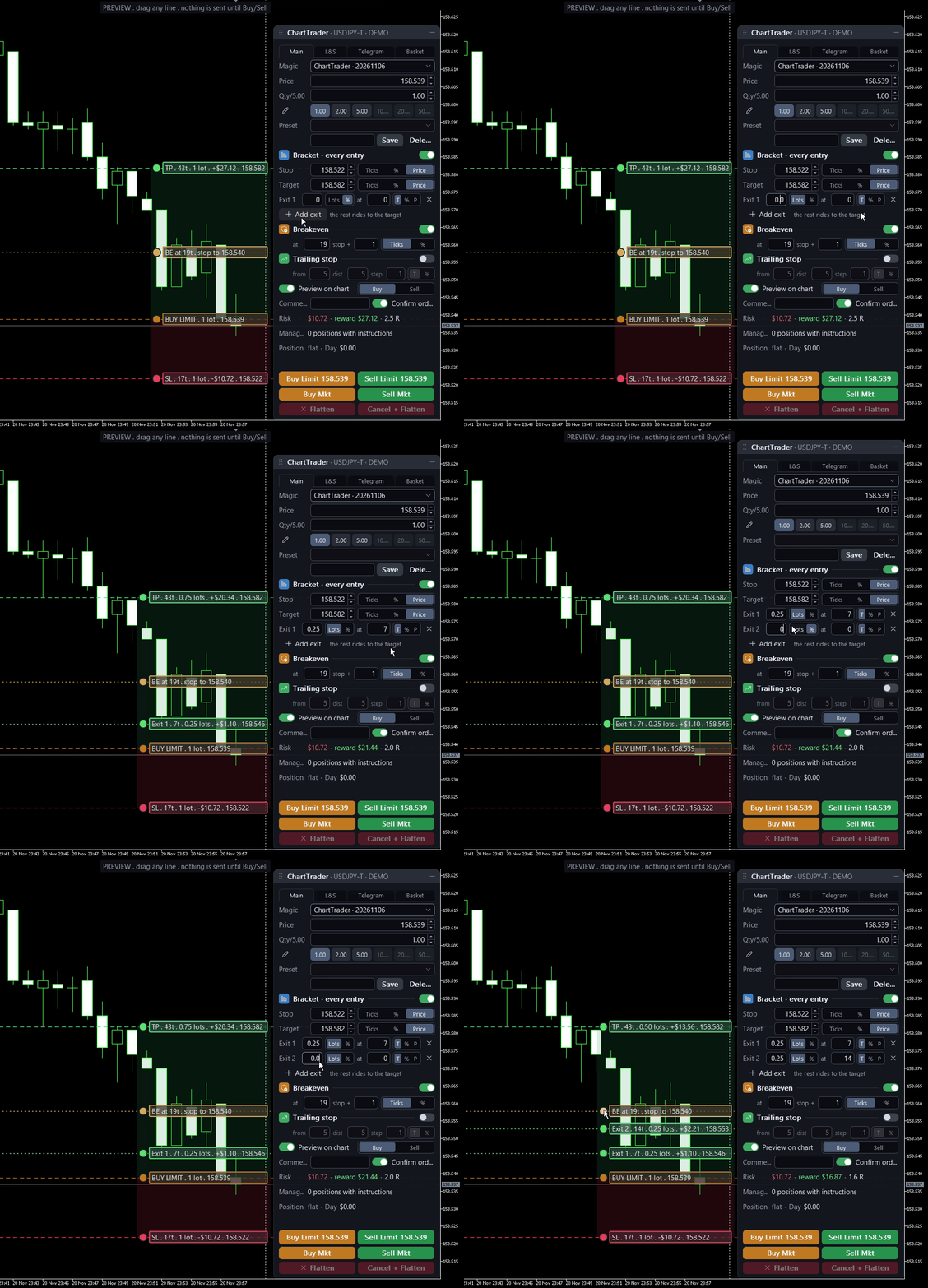
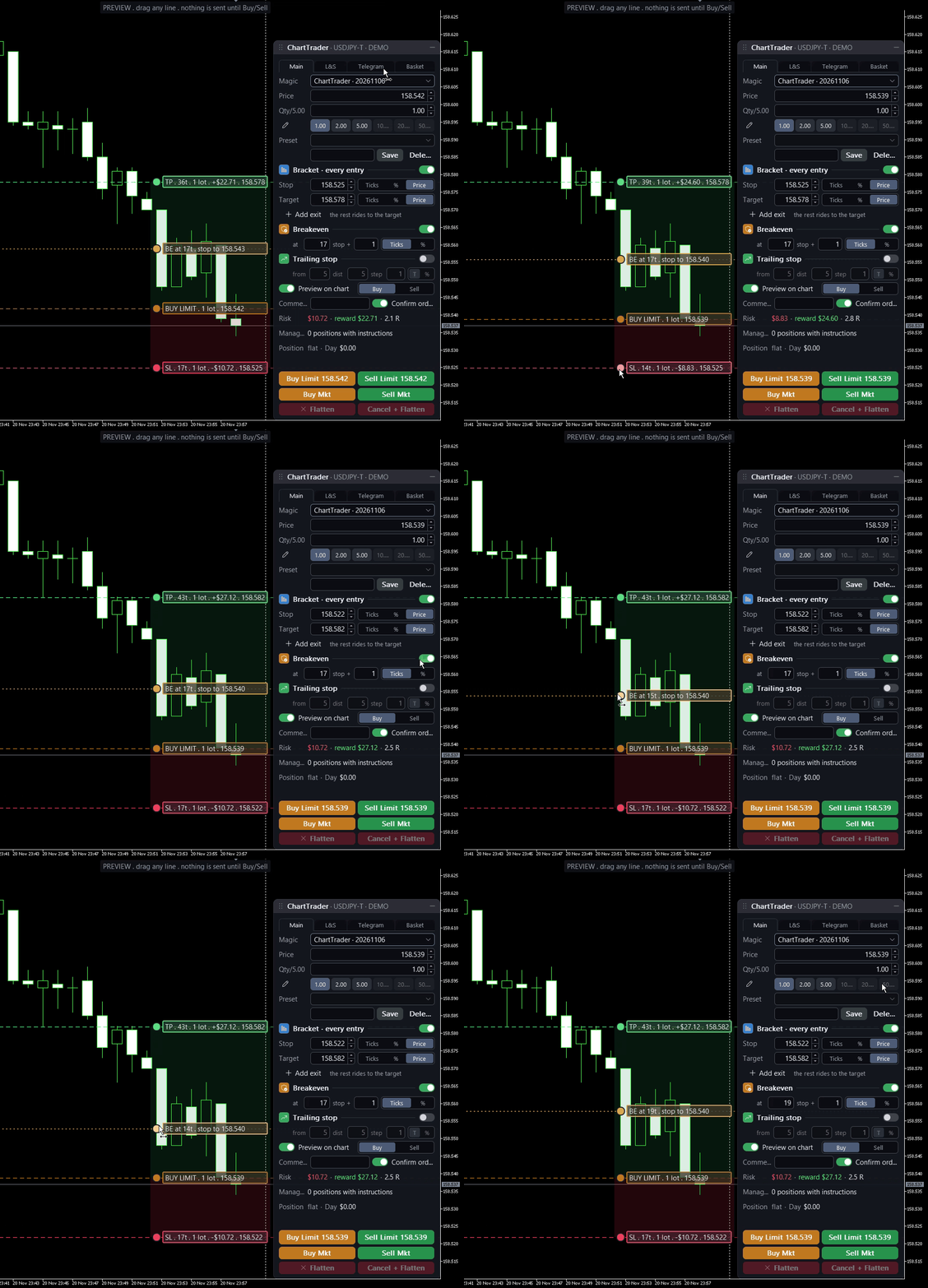
  • Risk and reward zones drawn on the chart, with the risk, the reward and the R multiple in the window.
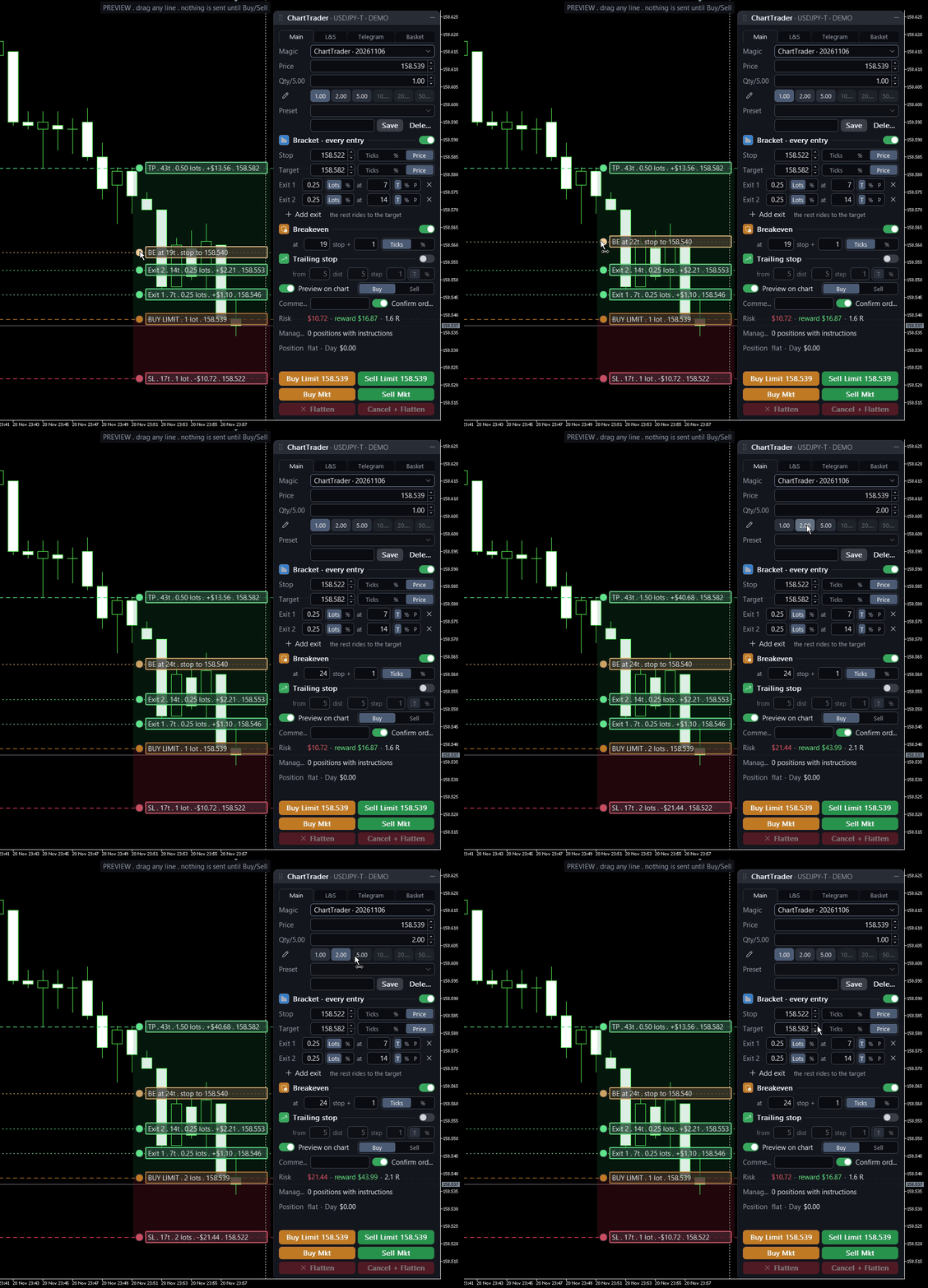
  • Drag the entry, stop, target, exit and breakeven lines of the preview. Nothing is sent until you press Buy or Sell.
  • Stop and target in ticks, percent or price. A level on the wrong side of the entry is flagged and refused.
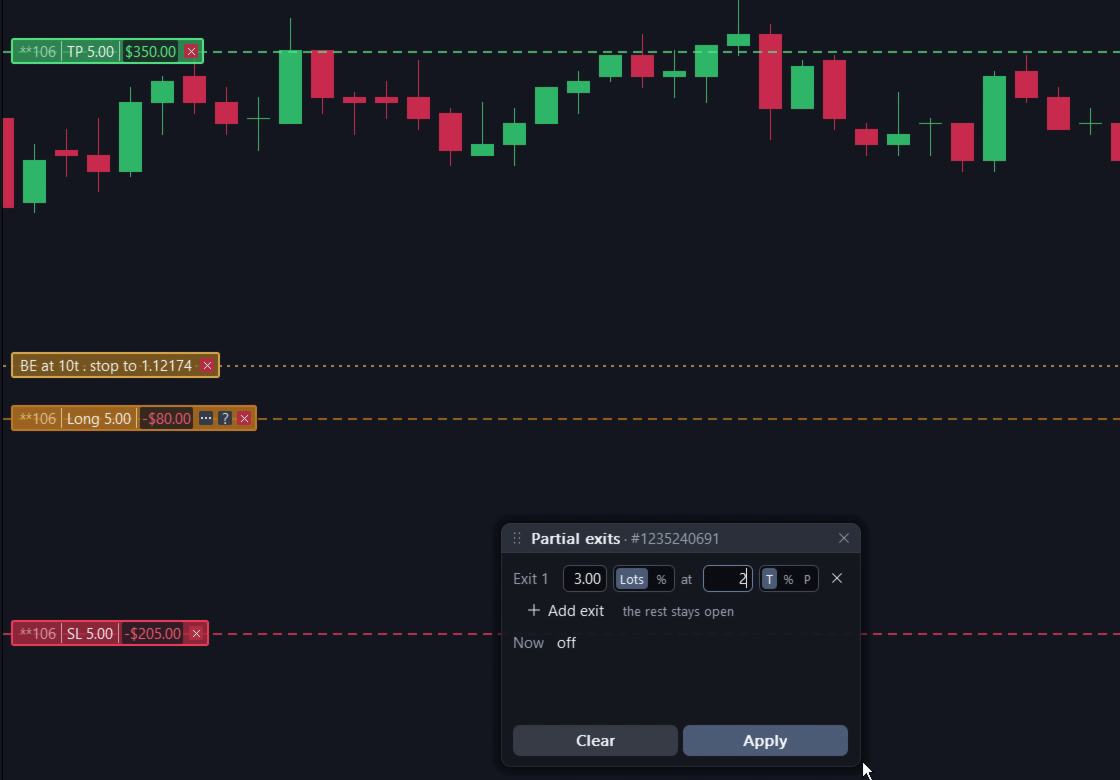
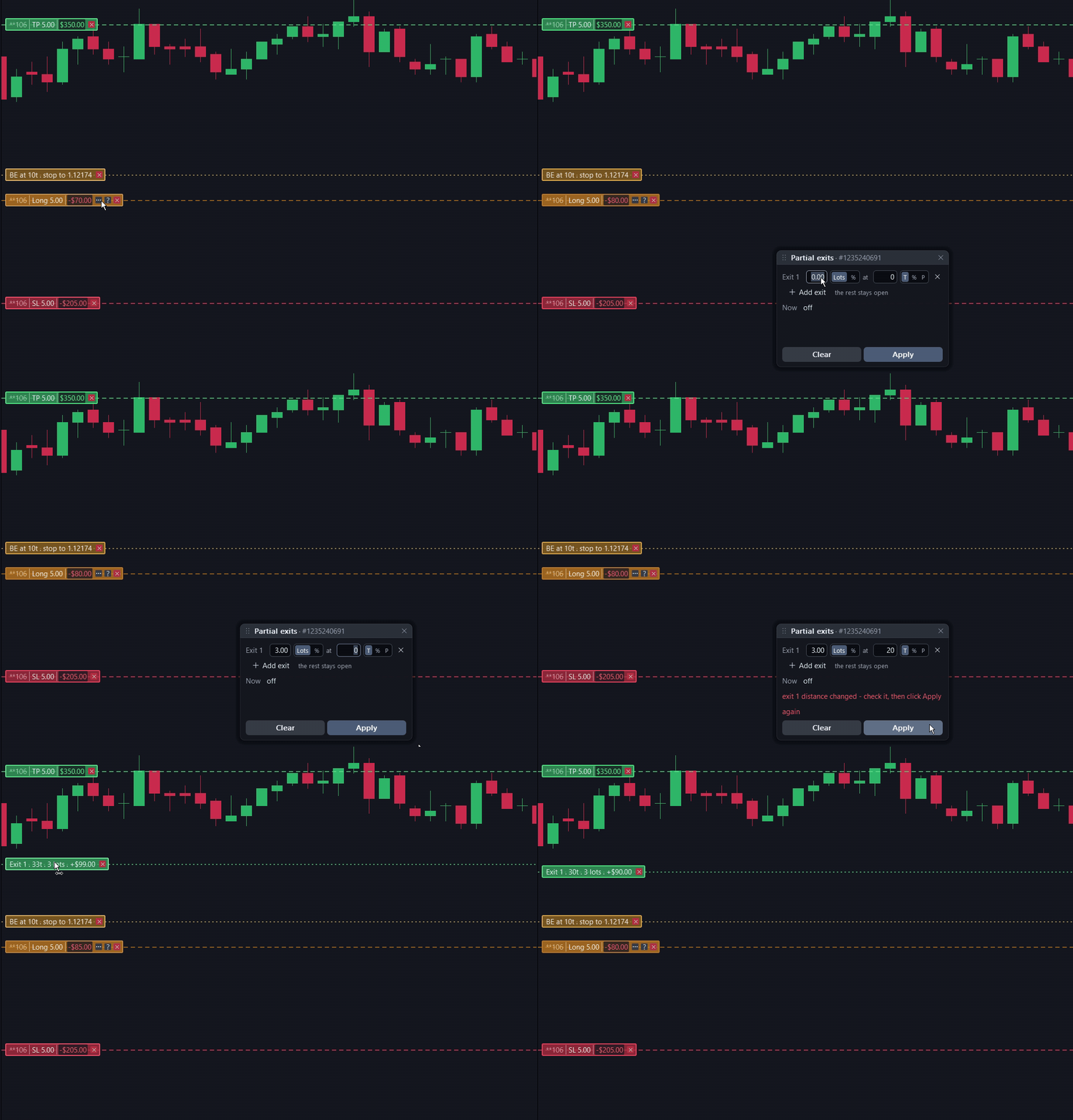
  • Market, limit and stop entries, one-click quantity chips, and up to 8 partial exits in lots or percent.
  • Save your brackets as named presets. They are still there after MetaTrader restarts.
  • Every new order, Flatten, position close and pair action you click opens a confirmation window first (lot, risk, margin and prices for orders; the position or pair and its result for closes). You can turn it off in the window, separately for orders and for pairs, and turn it back on from the tab. Cancelling a pending order and clearing a stop or target keep the two-click confirmation by default.

Manage from the chart

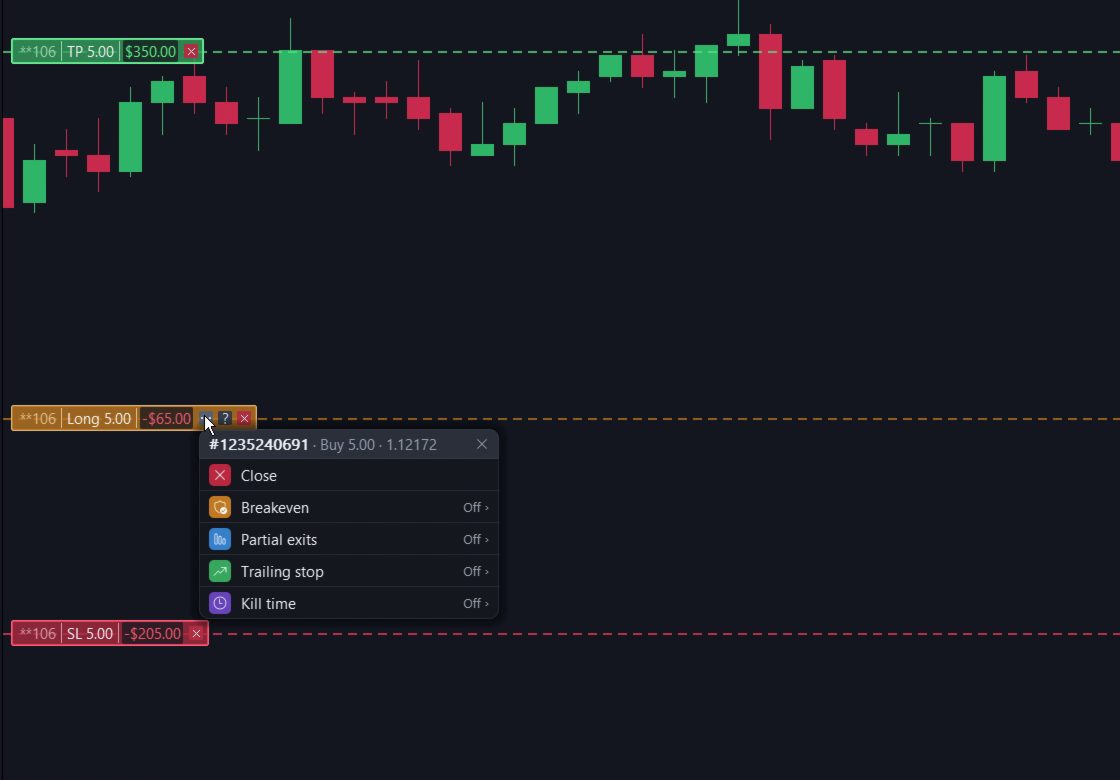
  • Every position and pending order on the chart's symbol is drawn, with its live P&L (positions), stop and target.
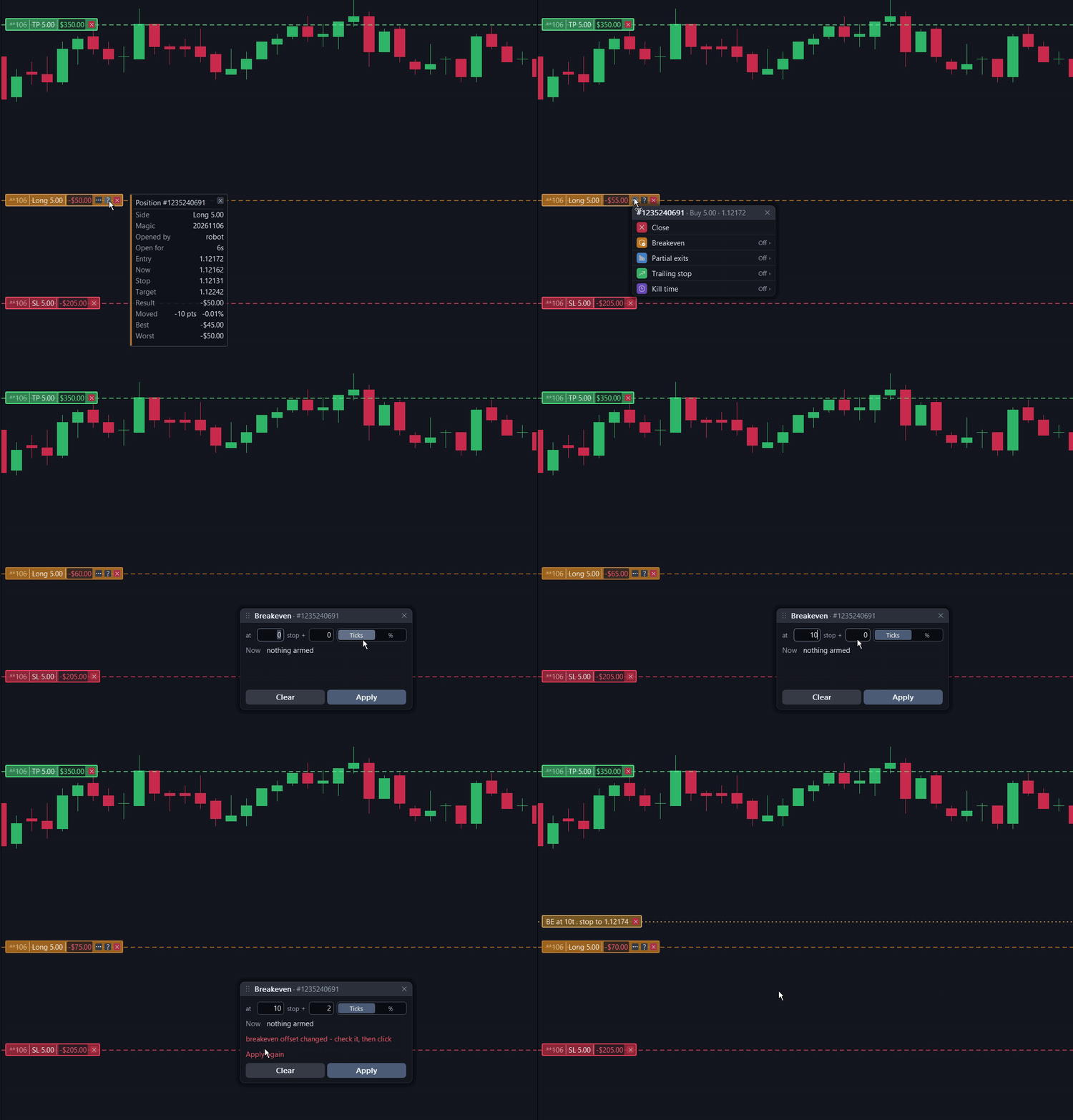
  • Drag a stop or a target to move it. Click the X to close a position, with a confirmation.
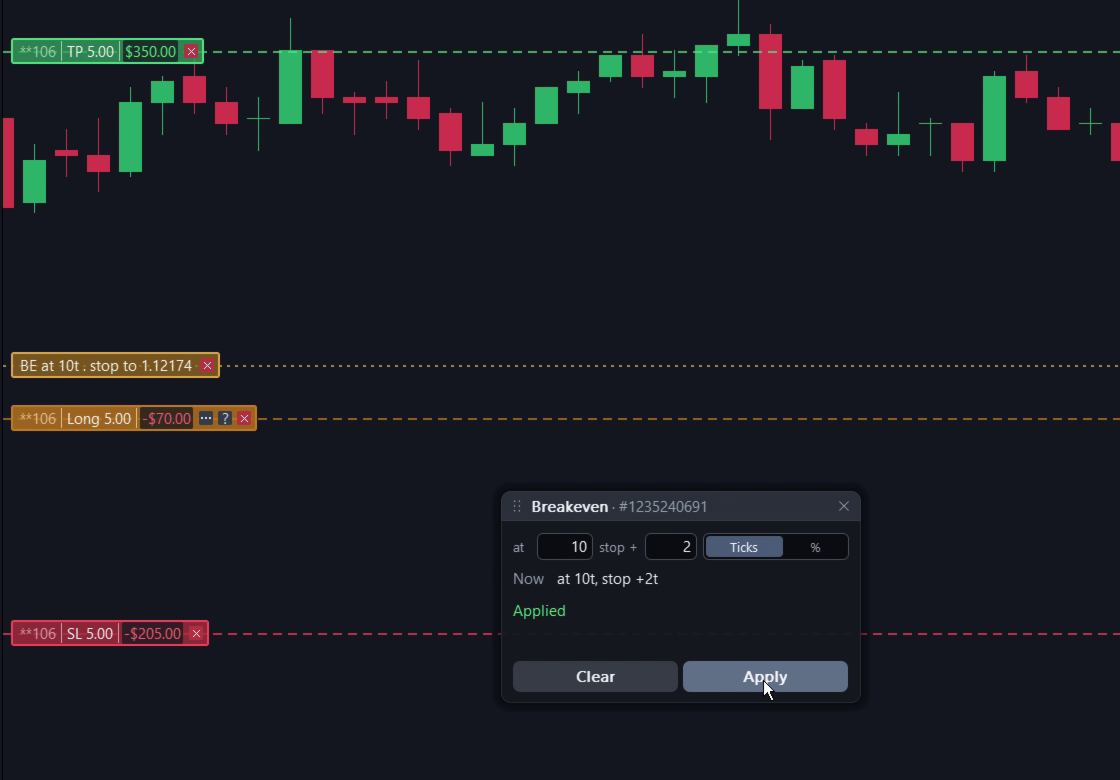
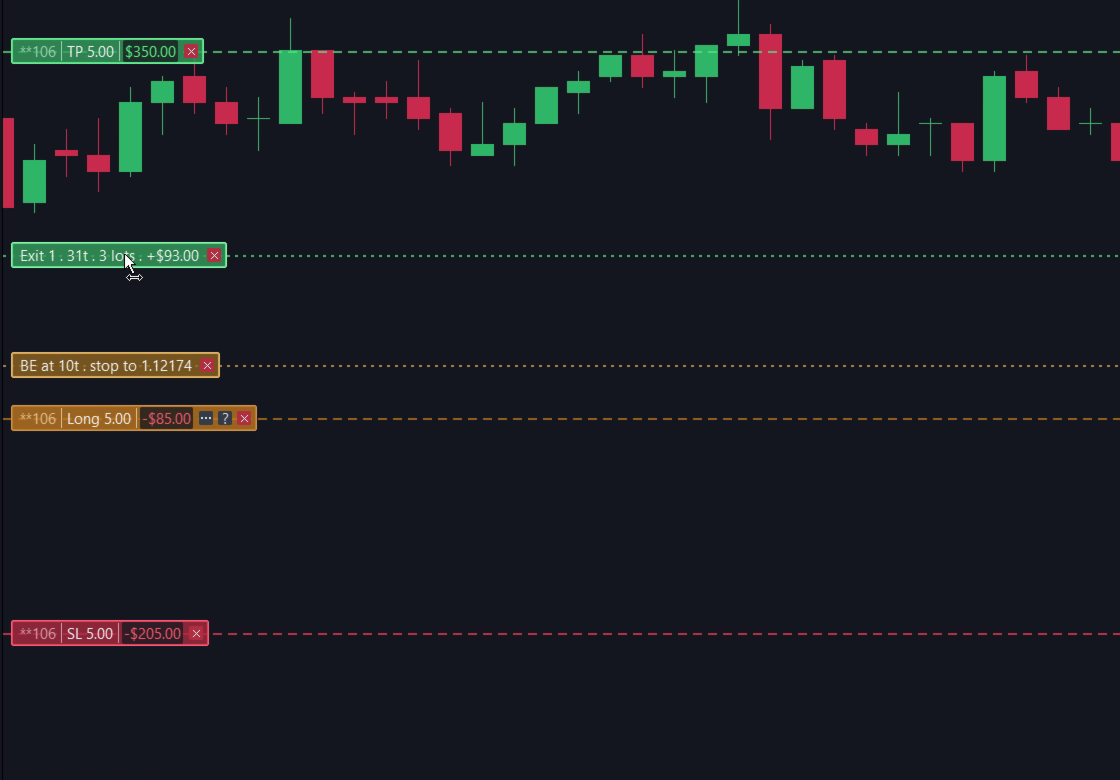
  • The "..." menu on a position: Close, Breakeven, Partial exits, Trailing stop, Kill time.
  • Breakeven, trailing stop (trigger, distance and step) and exit lines appear on the chart. Drag them to adjust, or click their X to clear one.
  • Trailing stop and breakeven are checked on every tick.
  • A kill time closes the position at or after the time you set, with a countdown on the broker's clock. If it ran out while MetaTrader was closed, ChartTrader asks you before closing.
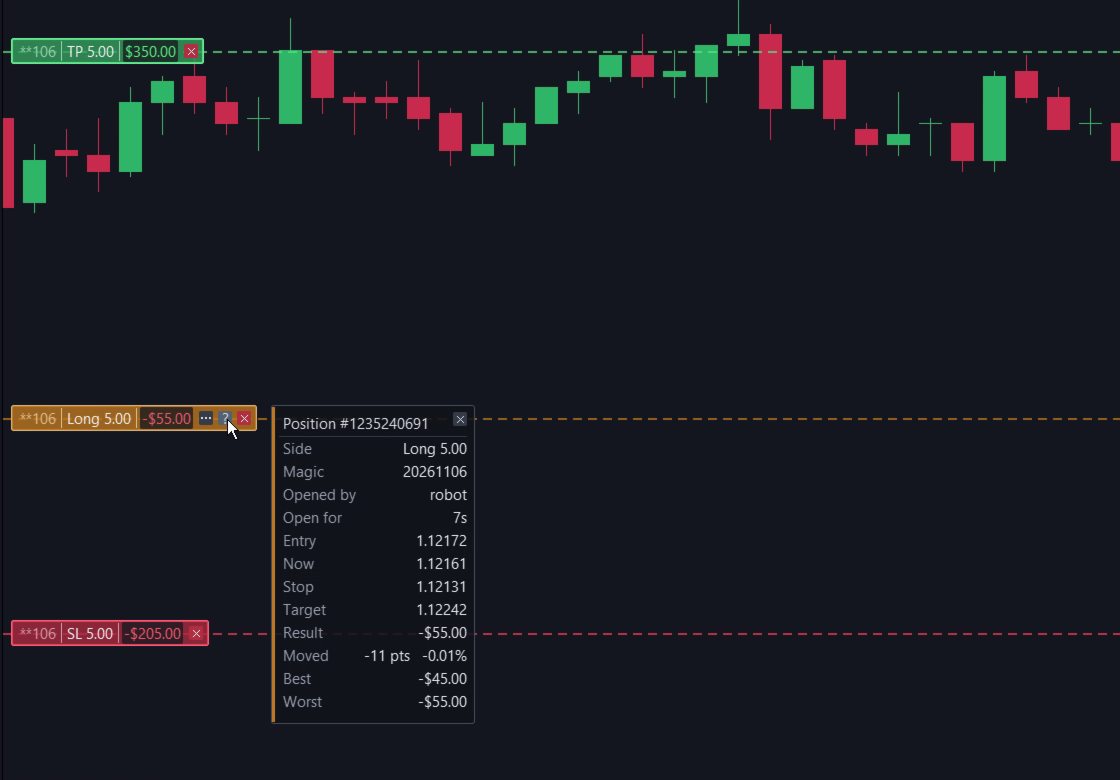
  • The "?" on a position opens its details: entry, stop, target, result, best and worst.
  • Flatten and Cancel + Flatten, each with a confirmation.

Long & short

  • The L&S tab monitors a pair: it takes two symbols you type (the first starts as the chart symbol), and shows a z-score chart with bands, the z-score, beta, a cointegration test (ADF) and the half-life in bars. You choose the timeframe, the number of bars and the bands.
  • Open and close a pair with one click, confirmed in a window (or by a second click when the window is off). You set the money per leg and the tab sizes both legs. It sends the first leg, then the second in proportion to what filled.
  • Live quotes for both symbols and the open P&L of each pair, before swap and commission.
  • Pairs survive a restart of MetaTrader: they are saved and picked up again by the chart that owns them, which must be running.
  • An optional stop on each leg, sent with the order and held at the broker.
  • For dated futures contracts, the statistics read the broker's continuous series when there is one, and the tab says so when it falls back to the contract itself. Orders always go to the contracts you typed.

Basket: a portfolio at target percentages, or a list of orders

  • The Basket tab has two modes, Portfolio and Orders. Each keeps its own list of up to 16 symbols, and the symbol field suggests names as you type.
  • Portfolio: type an amount of money and give each symbol a target percentage of it. The targets can total 100% at most; the rest is cash. For each symbol the tab shows its target, what it is worth now as a percentage of the amount, the lots held and the order a rebalance would send.
  • Rebalance buys and sells the difference, the sells first. It always opens a preview first: one row per order with its lots, price and value, and each symbol that will be skipped, with the reason. Nothing is sent until you press the send button, and if the size of an order changed while the preview was open, the preview opens again and nothing is sent.
  • To move a symbol from one percentage to another, change its target and rebalance. A target of 0% sells the symbol out at the next rebalance. Removing a symbol from the list leaves its position open.
  • The portfolio reads what the account holds in each symbol, so shares you already own are counted at once, and a trade made by hand shows as a difference to rebalance.
  • "Use current" sets the amount to what the holdings are worth now.
  • Orders: a plain list of symbols with lots - a positive number buys, a negative one sells. "Send basket" shows the same preview and sends the list as it stands. The list is kept afterwards, to be sent again.
  • The amount, the targets and the orders list are saved and come back after MetaTrader restarts. Each order sent is recorded in a CSV file in the terminal's data folder.

Telegram notifications

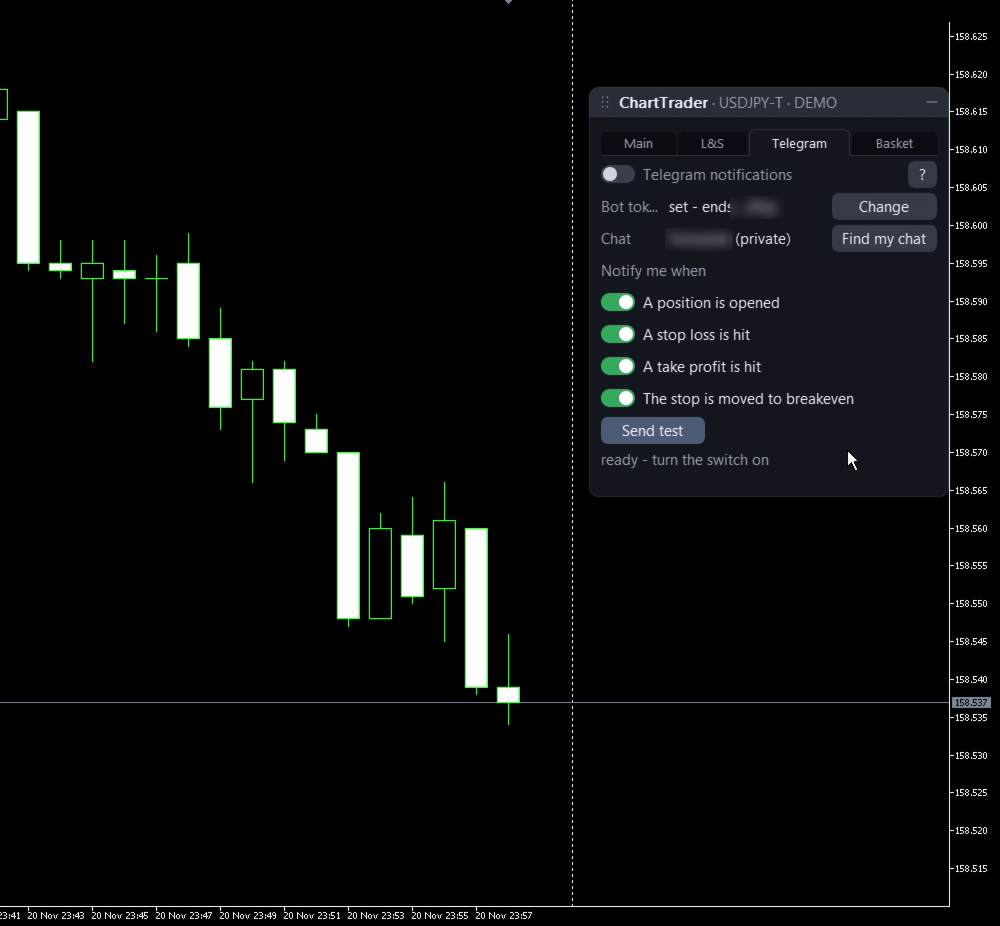
  • The Telegram tab sends a message to your Telegram chat when a position is opened, a stop loss is hit, a take profit is hit, or the stop is moved to breakeven. Each of the four has its own switch.
  • A message carries the symbol, the side, the volume and the price; for an open also the stop and the target; for a stop loss or a take profit also the net result and how long the position was held; for a breakeven the new stop. Times are the broker's.
  • No DLL: messages go out through MetaTrader's own WebRequest. You allow the address https://api.telegram.org once, in Tools > Options > Expert Advisors. The "?" button in the tab lists every step.
  • You use your own bot: create it with @BotFather, paste its token in the tab, write to the bot, press "Find my chat", then "Send test".
  • Once saved, the token is shown only by its last four characters. It is never written to the journal or shown in an alert.

How it works

  • Breakeven, trailing stop, exits and kill time are saved and reloaded when MetaTrader restarts.
  • In one MetaTrader, only one chart manages a position, so two charts do not act on it twice.
  • You can set instructions on trades you open by hand as well as on its own.
  • Works on hedging and on netting and exchange accounts, B3 futures included. On a netting account an order that only reduces the position is sent without stop or target, so that they do not end up on the wrong side of the position.
  • It does not send new orders on its own. It only closes or moves what you set up (a partial exit, breakeven, trailing stop, kill time) or what you confirmed. The one exception is a pair: once you confirm it and its first leg fills, the second leg is sent automatically.
  • The Basket tab sends orders only after you press the send button of its preview; it then sends that preview's orders one after the other. It never rebalances on its own.
  • It ships armed: clicking on the chart can close positions, cancel orders and remove stops, with a confirmation by default, and dragging the line of a stop, a target or a pending order, or clearing a breakeven, trailing or exit line, takes effect at once, with no confirmation. Switch off "ARM Click To Close And Drag" and clicks, drags and the Order window's buttons send nothing (instructions already set keep running, and a kill time that ran out while MetaTrader was closed still asks you).

Limitations

  • The L&S figures describe past prices only. They are not a recommendation and do not predict that a pair will revert to its mean.
  • The L&S tab never closes or re-sends a leg on its own. Its only automatic actions are sending the second leg after the first fills, and cancelling what has not filled of a leg's market order: the first leg's a few seconds after it is sent, the second leg's a few seconds after it is sent (the pair then has a loose leg), and, after a restart, any order still resting from a pair that was being opened. With the platform closed, only the optional leg stop at the broker acts (a VPS keeps the tab running).
  • The legs are market orders sent one after the other. Each can fill at a worse price than shown (slippage, gaps). The second can be refused or filled in part, which leaves the first open alone as a loose leg, with an Alert. The leg stop also fills at market, and a gap can fill it past its level.
  • A stop that fires leaves the other leg open until you act.
  • The confirmation window shows the values at the moment it opens. It does not check that an order is wise and does not protect against a loss. With the window turned off, the Main tab's Buy and Sell buttons send on one click; pair actions and the other closes and cancels use a second click by default.
  • On a short chart the confirmation window does not open and the order is not sent: enlarge the chart. The L&S tab's lower buttons can be cut off on a short chart.
  • The confirmation setting is shared by every chart in the terminal.
  • Magic numbers from base+1 to base+999 (the L&S Magic Base input; by default 20261201 to 20262199) are reserved for pairs on the whole account: other programs must not use magic numbers in that range on the same account, or their positions are taken for pairs. Set the same base on every chart.
  • On a netting account, a manual trade on a leg's symbol, including one made in the Main tab, merges with that leg, and any stop or management set on that trade then applies to the whole position, leg included.
  • If a pair ends up with a loose leg, you decide what to do: complete it or close it. Nothing is re-sent on its own.
  • Breakeven, trailing stop, partial exits and kill time run in your MetaTrader, not at the broker: they act only while the terminal is open, connected and the program is on the chart. The order's stop and target sit at the broker. To manage with your computer off, use a VPS.
  • Breakeven, trailing stop, partial exits and kill time send nothing while the quote is missing or looks like an auction, while Algo Trading is off in the terminal or in the program, while the account or the symbol cannot trade, or outside the symbol's trading sessions. What is due stays armed and is sent when sending is possible again, possibly at a worse price: a kill time can pass with the position still open.
  • Open positions are managed only while the chart shows their symbol: changing the chart's symbol stops the management of the old symbol's positions (the program alerts when positions with instructions are left behind). Their saved instructions resume when the program runs again on a chart of that symbol (with the same Magic Number for its own positions).
  • One terminal per account: do not run the program on the same account from two MetaTrader terminals at once (for example a VPS copy and a desktop). Each would manage the same positions, and partial exits or closes could be sent twice.
  • If you switch the account in the terminal, the program stops acting and shows an Alert; attach it again.
  • When attached, saved instructions take a few seconds to load. Until then nothing is armed or carried out.
  • Saved instructions live in a file in the terminal's data folder. If that file cannot be read or understood, it is set aside and the program starts without those instructions. If a change that moved money (a partial exit sent, a kill time under way, a breakeven done) cannot be written, the older copy is set aside so that an instruction already carried out is not repeated, and a restart before a later write succeeds starts without them. In both cases an Alert says so: check your open positions and set their instructions again. If the file cannot be set aside, the Alert says that too, and a restart may reload the older instructions, so check them.
  • If the broker does not confirm an order or a close (a timeout, a lost connection), the program reports it and never sends that request again while its outcome is unknown. For a full close it also stops acting on that position until the order or the position shows what happened, which can last as long as MetaTrader is offline or the close order is still pending. While a close is unconfirmed you cannot move its stop or close it again from the panel; act in MetaTrader. On a netting account the Order window also refuses every new order on that symbol while its close is unconfirmed, and any order that would reduce, close or reverse the position while a closing market order is working. An unconfirmed close you clicked is never re-sent by the program; a partial exit or a kill time is sent again only once the program has found that the first did not go, or went only in part. This waiting does not survive a restart of the program or of MetaTrader. Check the Trade tab: you can always act in MetaTrader itself.
  • After an update from an earlier version, on a hedging account, the instructions on positions opened by hand are carried over once. If more than one chart has managed the same symbol, any the program cannot be sure of are not carried over: it alerts and names those positions, and you set their instructions again. If the carry-over keeps failing, none are carried over and an alert says to set them again.
  • Exits are market orders: with slippage, a gap or a requote they can fill at a worse price than the line.
  • Netting accounts: a limit or stop order sent with a stop and target can leave them on the wrong side if the position changes before it fills. Send pending orders that reduce the position without a stop and target.
  • On a netting account, if a chart's management pauses briefly while another order reverses the position, a pending partial exit can still fill and open a position on the other side.
  • On exchange symbols, while the quote looks like an auction (bid equal to or above ask), market and stop orders and pair legs are refused; limit orders can still be placed. On other symbols this happens only when the bid is above the ask.
  • Flatten leaves your resting orders; one that fills later opens a position again. Use Cancel + Flatten to remove them.
  • Positions with magic 0 on the symbol are treated as manual trades: the instructions you set on them are carried out by one chart per account and symbol. Do not run another robot that trades without a magic number on the same symbol.
  • The Portfolio mode is long only. A symbol with a short position, or on a netting account with a position that belongs to a pair, is blocked: it counts as nothing held and is not rebalanced until that position is gone.
  • On a hedging account the Portfolio mode counts and sells the buy positions opened by the basket, by hand and by the Main tab; positions of other programs and pair legs are not seen. On a netting account it counts the symbol's one position, whoever opened it. A portfolio sell closes existing positions, whole or in part; for a position that carries instructions it is the same as closing part of it by hand in MetaTrader.
  • Sizes are whole volume steps. A buy is rounded down, so it never passes its target; a sell is rounded to the nearest step and is sent only when it brings the symbol closer to its target. A stock traded in lots of 100 can therefore stay well under its target; its fractional symbol is a different symbol, added as a row of its own. A symbol whose worth is within the tolerance of its target (the input "Basket Rebalance Tolerance Percent Of Amount", 0.5% of the amount by default) sends nothing.
  • Rebalance and Send basket send market orders with no stop and no target, one after the other. Each can fill at a worse price than the preview showed (slippage, gaps), be refused or fill in part; an order that has not filled after about 10 seconds has what is left of it cancelled, except one that closes a whole position, which is left working. Nothing is sent a second time: in the Portfolio mode what did not go shows as a difference, and you decide whether to rebalance again. A symbol with no quote, outside its trading session or with an order still working is skipped, and the preview says why.
  • If the answer to a basket order proves nothing (a timeout, a lost connection), the tab reports it, sends nothing more on that symbol until the terminal has been connected for a minute, and never repeats the order. Check the Trade tab.
  • A run that is under way stops if MetaTrader or the program restarts, or if the chart's timeframe or symbol changes: the orders not sent yet are not sent, and nothing resumes on its own. The Stop button does the same on your click; an order already sent is not recalled.
  • In the Orders mode a sell is a plain market sell: on a hedging account it opens a short position, on a netting account it reduces or reverses the symbol's position. The list does not look at what the account holds and tracks nothing after it is sent: sending it twice sends it twice.
  • A basket order that the free margin does not cover is not sent. At some brokers the money from the sells cannot be used for buys on the same day.
  • The worth of the holdings and the percentages use the last bid, also when the market is closed. The CSV file records the price planned in the preview, not the fill price.
  • One basket per account, owned by the first chart where the Basket tab is opened; other charts show it read-only. The basket's own magic number (the input "Basket Magic", 20262400 by default) must not be used by another program, must differ from the Magic Number and must stay outside the pairs' range.
  • If the basket's file cannot be understood, it is set aside and the basket starts empty, with an Alert: type the amount and the targets again. Positions are not touched.
  • Telegram messages are sent by your MetaTrader, only while it is open, connected and the program is on a chart. They can arrive late or not at all (no internet, Telegram unreachable, the address not allowed); a message that could not be sent is tried again later, and with more than 100 lines waiting the oldest are dropped. Do not rely on them as your only way of following a position.
  • Only the four events are reported, and only for the positions the chart manages: the program's own and those opened by hand on the chart's symbol (on a netting account, the symbol's position). A close by hand, by a kill time or by a partial exit sends no message, and neither do other robots' positions or pair legs. A position opened and closed within about half a second, or closed while MetaTrader was shut, is not reported.
  • The bot token is stored as plain text in a file in the terminal's data folder (MQL5\Files\GTR_OVERLAY\telegram.txt), shared by every chart of that terminal. Whoever has the token can send messages as your bot: keep that file private and use a bot made only for this.
  • "Find my chat" needs a bot whose updates no other program reads. While it sends a message the program waits for Telegram, 3 seconds at most each time; it holds a message back (10 seconds at most) while one of your orders is on its way or while you are using the panel.
  • A text that has no translation yet is shown in English. The Experts journal, the names of the inputs in MetaTrader's settings and the broker's own messages stay in English.
  • Dated futures contracts (e.g. WINZ26) are not rolled automatically. Before expiry, close or roll the positions and switch the chart to the next contract. Continuous series (WIN$) are rolled by the broker.

Good to know

  • ChartTrader is a manual trading tool. In the Strategy Tester it starts and stops cleanly and, by default, draws nothing. To try it, use the free ChartTrader DEMO on a demo account.
  • If you change the Magic Number, keep it above 0 (magic 0 is what trades opened by hand carry) and do not use 3111995, which the program refuses.
  • One ChartTrader per chart.
  • Languages: English, Portuguese (Brazil) and Russian. By default the interface follows MetaTrader's language; the "Language" input sets it. Alerts and Telegram messages use the same language.

Risk disclaimer

Trading futures, stocks, forex and CFDs carries a high risk of loss. ChartTrader is an execution and management tool: it gives no recommendations and guarantees no result. It is provided as is, with no warranty of uninterrupted or error-free operation. Test it with the free DEMO edition before using it on a real account. You are responsible for the orders you send and for monitoring your positions.
Prodotti consigliati
Indicatore Crypto_Forex "WPR con 2 Medie Mobili" per MT5, senza ridisegno. - WPR è uno dei migliori oscillatori per lo scalping. - L'indicatore "WPR e 2 Medie Mobili" consente di visualizzare le medie mobili veloci e lente dell'oscillatore WPR. - L'indicatore offre l'opportunità di visualizzare le correzioni di prezzo molto presto. - È molto facile impostare questo indicatore tramite parametri e può essere utilizzato su qualsiasi timeframe. - È possibile visualizzare le condizioni di ingresso
Heiken_Ashi_Bars - Visualizzatore di Tendenze Avanzato per MT5 Panoramica Heiken_Ashi_Bars è un indicatore personalizzato potente e visivamente intuitivo progettato per filtrare il rumore del mercato ed evidenziare la vera tendenza di fondo. I grafici a candele tradizionali possono spesso essere erratici. Calcolando la media dei dati sui prezzi, questo indicatore uniforma l'azione dei prezzi, rendendo molto più semplice individuare continuazioni di tendenze, inversioni e zone di ingresso redditi
AURUM SMC Structure, XAUUSD [& other FX pairs] [Please leave a review if you find the indicator useful and how we can improve it further] A Smart Money Concepts structure indicator for studying gold charts. It marks BOS and CHoCH breaks, order blocks, fair value gaps and liquidity, and gives each setup marker a 1 to 5 star confluence rating. After a break it waits for a pullback before drawing its reference levels, so you can study how price behaved around structure rather than chasing the break
Advanced Price Action Suite
Mahoutondji Fredy Venance Assemou
Advanced Price Action Suite Advanced Price Action Suite plots market structure (BOS/CHoCH), support and resistance zones, Fair Value Gaps and the multi-moving-average trend on your chart — with an integrated position calculator that shows the recommended lot, possible loss and risk/reward ratio in real time, before every entry. What Advanced Price Action Suite does Advanced Price Action Suite is an analysis and calculation tool for the price action trader: it shows the market context at a glan
Introducing   Order Blocks Breaker , a brand-new way to identify and leverage order blocks in your trading strategy. After developing multiple order block tools with unique concepts, I’m proud to present this tool that takes things to the next level. Unlike previous tools,   Order Blocks Breaker   not only identifies order blocks but also highlights   Breaker Order Blocks —key areas where the price is likely to retest after a breakout. MT4 -  https://www.mql5.com/en/market/product/124101/ This t
Lo Scanner Multivaluta dell'Indice Direzionale Medio (ADX) MT5 è un indicatore di trading avanzato progettato per analizzare più coppie di valute simultaneamente. Offre vantaggi ai trader che cercano di migliorare il loro processo decisionale fornendo segnali in tempo reale basati sull'Indice Direzionale Medio, consentendo un'analisi efficiente delle tendenze di mercato. Questo strumento semplifica l'esperienza di trading semplificando l'identificazione della forza della tendenza e del movimento
Price Alerts Advanced Suite for MetaTrader 5 Take control of your trading execution with the Price Alerts Advanced Suite , a professional-grade technical analysis tool built exclusively for MetaTrader 5. This suite goes far beyond simple horizontal lines; it is a complete analytical ecosystem designed to identify key market levels, monitor price action in real-time, and deliver instant notifications across multiple channels. Whether you are a day trader, swing trader, or algorithmic develope
CosmiCLab SMC FIBO CosmiCLab SMC FIBO is a professional trading indicator designed for traders who use Smart Money Concepts (SMC), market structure analysis and Fibonacci retracement levels. The indicator automatically detects market swings and builds Fibonacci levels based on the latest impulse movement. It also identifies market structure changes such as BOS (Break of Structure) and CHOCH (Change of Character), helping traders understand the current market direction. CosmiCLab SMC FIBO also pr
See how your account is really doing at a glance, right on the chart. The dashboard reads your account and trade history and never opens, modifies or closes a trade. How it works Every second the dashboard reads balance, equity, margin and open positions. Closed results come from the deal history: for each closing deal the profit, swap, commission and fee are added together. From these deals it calculates closed profit for today, this week and this month, plus statistics for the period you choos
FREE
Price Magnet — Price Density and Attraction Levels Indicator Price Magnet is a professional analytical tool designed to identify key support and resistance levels based on statistical Price Density. The indicator analyzes a specified historical period and detects price levels where the market spent the most time. These zones act as “magnets,” attracting price action or forming a structural base for potential reversals. Unlike traditional Volume Profile tools, Price Magnet focuses on price-time d
ZT Scalper Bundle 1
Damien Joseph Marie Juge
This Bundle offers an all-in-one tools for scalpers. Basic but effective. Powerfull together. Namely Breakout detector with pivot or ohlc and a colored MA to check the trend. --------------- It includes :  - Pivot levels with different parameters - Colored MA, to visualize trends and reversals - OHLC, to keep an eye on daily key levels. - BreakOut detector, to take advantage of breakouts on all UT and take the trend.
Liquidity Touch Zones PRO X - is   a support and resistance indicator that identifies   price areas of confirmed strength   formed by repeated price interactions and displayed taking into account the instrument's characteristic volatility. The calculation is based on fractal points, which serve as initial benchmarks. These points form price zones reflecting repeated price interactions and are represented as areas of varying heights depending on the level's significance. It is designed for trader
It has never been so easy to manage the risk of your account until now, this tool will allow you to have full control of your capital and manage your entries in the synthetic index derivative markets, in an easy, practical and safe way. The available input and configuration parameters are as follows :  RISK MANAGEMENT 1. Value of your account: Here as its name says you will place the value corresponding to the size of your account, for example if your account is 150 dollars the corresponding val
Order Book, known also as Market Book, market depth, Level 2, - is a dynamically updated table with current volumes of orders to buy and to sell specific financial instument at price levels near Bid and Ask. MetaTrader 5 provides the means for receiving market book from your broker, but in real time only, without access to its history. The indicator OrderBook Cumulative Indicator accumulates market book data online and visualizes them on the chart. In addition, the indicator can show the market
Questo EA è utilizzato principalmente per lo scalping su XAUUSD. Scopo   Rimuove l’emozione dalla gestione delle operazioni — protegge automaticamente le posizioni e prende profitto così non devi prendere decisioni difficili sotto pressione. Cosa fa   ️ Stop Loss automatico   Imposta SL basandosi su recenti massimi/minimi + buffer   Niente più stress per la collocazione manuale   Profitti parziali automatici   Due modalità:   Movimento fisso: chiude il 50% dopo uno spostamento di prezzo
This utility tool shows the intraday price variation as a percentage. It just works on any symbol and timeframe. Inputs: Font Size: You can change the font size of the price variation. Defaults to 15. Corner Location: You can choose between "Left upper chart corner", "Left lower chart corner", "Right upper chart corner", "Right lower chart corner" to show the information.
ChartColorMT5
Thomas Pierre Maurice Moine
Customize your charts with this simple utility. Choose in the 24 pre-built color sets, or use your own colors, save them to re-use them later. You can also add a text label on your chart. --- Chart Colors-- Color Set : 24 prebuilt color sets (select "Custom" to use colors below) Background color Foreground color Grid color Chart Up color Chart Down color Candle Bull color Candle Bear color  Line color Volumes color --- Label--- Text Label : Type the text you want to appear on the chart Label P
FREE
RiskGuard Pro Account Risk Manager
Aly Abdelnaser Madbouly Afifi
RiskGuard Pro enforces a daily loss limit, a profit lock and a maximum drawdown on your account - across your manual trades and any other EA you run. It does not open trades and it does not predict anything. What it does RiskGuard Pro watches your account equity and enforces three limits you set: Daily loss limit - measured against your start-of-day equity. Daily profit lock - stop trading once the day has gone well enough. Maximum drawdown - measured from your account's peak equity, not from to
ApexTradeManager is a professional manual trade-management Expert Advisor for MetaTrader 5, designed especially for XAUUSD (Gold) traders. Instead of replacing your trading strategy, ApexTradeManager works alongside your manual execution. You decide when and where to enter; the EA helps manage the position according to your predefined trade-management rules. Key Features Automatic Stop Loss & Take Profit — Automatically apply SL and TP levels to new positions. ATR-Based TP System — Dynamic TP1,
FREE
Panoramica Candle Timer Countdown Pro mostra un conto alla rovescia fluido e preciso fino alla chiusura della candela corrente con un arco circolare di progresso. Caratteristiche Conto alla rovescia preciso Arco circolare (Ring o Filled Pie) 6 posizioni disponibili 3 schemi colore Evidenziazione finale Avvisi nuova candela Basso consumo CPU Installazione Scaricare dal MQL5 Market Applicare al grafico Configurare le impostazioni Compatibilità MetaTrader 5 Build 2500+ Tutti i timeframe
Prime Zones
Felipe Ignacio Zavala Abarzua
WHAT IS PRIME ZONES? Prime Zones is a professional market structure indicator designed to automatically identify key Support and Resistance Zones , monitor how price interacts with them, and provide additional trend context through a Dual Regression Channel system . Instead of filling the chart with dozens of horizontal lines, Prime Zones displays clean and visually defined price areas where the market has previously shown meaningful reactions. The indicator combines four main concepts in a sing
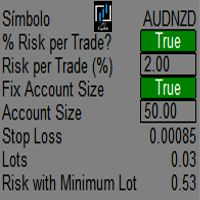
Precision Trade Console — Bring visual order planning, pre-request checks and position-management controls into one MT5 console. Who it is for Designed for active discretionary traders who want a structured workflow from entry planning to managed exit. Main functions Market, limit and stop order modes Percentage, cash and fixed-lot position sizing Margin and spread safety gates Three staged take-profit levels and partial exits Breakeven management Fixed-distance or ATR-based trailing stops Persi
Lot Size Calculator Panel
Italo Martins Coutinho
It mesures the lot size based on the points measured by clicking with the MIDDLE MOUSE BUTTON then CLICK and DRAG , previous that configure the indicator based on the risk you accept; The risk can be % based on fixed account, actual account size, and fix capital risk; If the INDICATOR DOESN'T WORK propperly try after configuring it CHANGE the TIMEFRAME and GET BACK to the PREVIOUS timeframe, SOMETIMES  this FIX IT
CCI Fixed Dual
Edoardo Centorame
Cos è il CCI FIXED DUAL Il CCI FIXED DUAL è un Trend Direction Filter professionale, progettato per identificare con precisione: la direzione dominante del mercato la qualità strutturale del movimento la coerenza tra trend principale e fasi di accelerazione Non è un indicatore di ingresso diretto. Non è un oscillatore classico. È uno strumento di contesto, pensato per aiutare il trader a decidere quando operare e quando NON operare, riducendo drasticamente il rumore e gli errori di interpretazio
When executing an order, whether through the Metatrader ticket on a computer or the Metatrader app on a mobile device, either manual or pending, Easy Trade will automatically set the take profit and stop loss levels, as well as a limit order with its respective take profit and stop loss levels. It follows the trading strategy for market open (US30, US100, US500), but it can be applied to any market asset.
Introduzione Ottieni il controllo completo dei tuoi conti di trading finanziati con PropFirm Dashboard , un pannello professionale progettato specificamente per i trader che partecipano alle challenge delle Prop Firm e desiderano monitorare ogni fase del processo di valutazione in tempo reale. Sviluppato per MetaTrader 5, questo sistema monitora continuamente i parametri più importanti di un conto finanziato: obiettivo di profitto, perdita massima giornaliera, drawdown massimo, giorni minimi di
Price Action Trade Panel EA MT5
Juvenille Emperor Limited
5 (4)
Price Action Trade Panel MT5   calcola il saldo del livello della forza di acquisto/vendita di qualsiasi simbolo/strumento, sulla base dei dati puri sull'azione del prezzo delle candele passate specificate (8 per impostazione predefinita). Questo ti darà il sentimento di mercato più vicino possibile monitorando l'azione del prezzo di 32 simboli/strumenti disponibili sul pannello dell'indicatore. Un livello di forza di acquisto/vendita superiore al 60% fornisce un livello abbastanza solido per l
Discipline and full protection for trades placed through Shield's panel on your own or prop firm account in MT5: a risk manager with daily loss limit, max drawdown (static or trailing), risk per trade and lot size, news filter and equity protection — it stops you before a bad moment becomes a lost account. Trades from a phone or outside the panel are your choice: Shield trims the breach at once, but the firm may already have recorded it. 23 programs of 17 prop firms included. Never opens trades
The indicator detects and displays М. Gartley's Butterfly pattern. The pattern is plotted by the extreme values of the ZigZag indicator (included in the resources, no need to install). After detecting the pattern, the indicator notifies of that by the pop-up window, a mobile notification and an email. The pattern and wave parameters are displayed on the screenshots. The default parameters are used for demonstration purposes only in order to increase the amount of detected patterns. Parameters z
BreakEven ProSync
Rosen Kanev Kanev
5 (1)
For DEMO - please contact me and I will send you demo version to test the product. BreakEven ProSync – Advanced Trade Management Tool for MetaTrader 5 Overview The  BreakEven ProSync  is a powerful utility designed to enhance trade management in   MetaTrader 5 . It provides   one-click break-even functionality ,   hotkey trading ,   position synchronization , and   visual SL/TP tracking —all in a single, user-friendly tool. Perfect for manual traders who want   faster execution   and   better r
Gli utenti di questo prodotto hanno anche acquistato
Trade Assistant MT5
Evgeniy Kravchenko
4.43 (216)
It helps to calculate the risk per trade, the easy installation of a new order, order management with partial closing functions, trailing stop of 7 types and other useful functions. Additional materials and instructions Installation instructions - Application instructions Line function -   shows on the chart the Opening line, Stop Loss, Take Profit. With this function it is easy to set a new order and see its additional characteristics before opening.   Risk management  - The risk calculation
Forex Trade Manager MT5
InvestSoft
4.98 (694)
Benvenuto a Trade Manager EA, lo strumento definitivo per la gestione del rischio , progettato per rendere il trading più intuitivo, preciso ed efficiente. Non è solo uno strumento per l'esecuzione degli ordini, ma una soluzione completa per la pianificazione delle operazioni, la gestione delle posizioni e il controllo del rischio. Che tu sia un principiante, un trader avanzato o uno scalper che necessita di esecuzioni rapide, Trade Manager EA si adatta alle tue esigenze, offrendo flessibilità s
Telegram to MT5 MultiChannel Copier
Sergio Marquez Uroz
4.73 (26)
Black Week: acquisto a 69.99 USD. L'offerta termina venerdì 27 novembre. Telegram to MT5 Multi-Channel Copier   copia automaticamente i segnali di trading dai tuoi canali Telegram e Discord direttamente su MetaTrader 5. Niente bot, niente estensioni del browser, niente copia manuale. Il segnale arriva su Telegram o Discord e l'EA apre l'operazione nel tuo terminale in pochi secondi. E prima di copiare un canale, il backtester integrato ti mostra cosa avrebbe fatto quel canale sul tuo conto. Il p
FarmedHedge Pair Trading Dashboard
Tanapisit Tepawarapruek
5 (7)
Farmed Hedge Yield Farming | All Markets (Manual - Hybrid - Semi/Automated EA) VERIFIED TRADING RESULTS - Farmed Hedge Yield Axi Copy:  https://www.mql5.com/en/signals/2356376 - Farmed Hedge Yield Exn Copy:   https://www.mql5.com/en/signals/2356404 - Farmed Hedge Yield V Copy:  https://www.mql5.com/en/signals/2357156 IMPORTANT NOTICE: FarmedHedge is a MANUAL-FOCUSED TRADING UTILITY ,not a fully automated EA. Results shown on this Signal include manual trades and overall strategic management.
EA Overfitter
Stephen J Martret
5 (5)
That backtest looks great. But will it still be making money tomorrow, next week, next month? EA Overfitter re-runs your EA on 100 price histories it has never seen. One score tells you if the edge is real. A backtest tells you what an EA did on one price history — the one that happened to occur. What you cannot tell from it is how much of that result was the strategy and how much was the particular path. EA Overfitter answers that. It builds up to 100 synthetic price histories your EA has n
TradePanel MT5
Alfiya Fazylova
4.89 (175)
Trade Panel è un assistente commerciale multifunzionale. L'applicazione contiene più di 50 funzioni di trading per il trading manuale e permette di automatizzare la maggior parte delle attività commerciali. Istruzioni per l'applicazione: https://www.mql5.com/it/blogs/post/762331 Versione di prova dell'applicazione per un conto demo: https://www.mql5.com/it/blogs/post/762419 Come installare l'applicazione: https://www.mql5.com/it/blogs/post/762362 Come testare l'applicazione in modalità visuale:
Copia i segnali Telegram con le tue regole di trading Telegram to MT5 Signal Trader copia automaticamente i segnali di trading testuali dai canali e gruppi Telegram pubblici e privati in MetaTrader 5. Gestisci più fornitori e conti MT5 da un'unica applicazione desktop, con impostazioni di rischio e di trading specifiche per ogni fornitore . Per copiare i segnali non servono bot Telegram né configurazioni API. Accedi semplicemente con il tuo account Telegram tramite numero di telefono o codice QR
AI Agents Supervisor
Ho Tuan Thang
5 (1)
AI Agent Supervisor is NOT an Expert Advisor. AI Agent Supervisor   is a   multi-agent AI risk & portfolio supervisor   that watches every EA on your account and intervenes in real time.  WANT AN AI PORTFOLIO MANAGER WATCHING YOUR FLEET 24/7?   Run your fleet on the same brokers I do:   IC MARKETS , IC TRADING   .  Unlike the centralized stock market, Forex has no single, unified price feed.  Every broker sources liquidity from different providers, creating unique data streams. The Supervisor r
The product will copy all telegram signal to MT5 ( which you are member) , also it can work as remote copier.  Easy to set up, copy order instant, can work with almost signal formats, image signal,  s upport to translate other language to English Work with all type of channel or group, even channel have "Restrict Saving Content", work with  multi channel, multi MT5 Work as remote copier: with signal have ticket number, it will copy exactly via ticket number. Support to backtest signal. How to s
================================================================================ POC BREAKOUT - V20.72. Full Professional Grade Toolkit ================================================================================ POC Breakout is a full MetaTrader 5 trading dashboard for discretionary traders who want breakout signals, Point of Control (POC) context, volume profiles, order flow, market structure, news, alerts, and advanced trade planning in one professional workspace. Attached directly to you
Unlimited Trade Copier Pro MT5 is a tool to copy trade remotely to multiple MT4, MT5 and cTrader accounts at different computers/locations over internet. This is an ideal solution for you if you are a signal provider and want to copy your trades to other receivers globally on your own rules. One provider can copy trades to multiple receivers and one receiver can get trade from multiple providers as well. The provider can even set the subscription expiry for each receiver, so that receiver will n
News Trade EA MT5
Konstantin Kulikov
4.55 (11)
Presento un utile robot che io stesso utilizzo da diversi anni. Questo robot può essere utilizzato sia in modalità semiautomatica che completamente automatica. >>> Chat <<< Il programma contiene le impostazioni flessibili per fare trading sulle notizie del calendario economico. Non può essere verificato nel tester delle strategie. Soltanto il vero lavoro. Scarica l'ultimo archivio di impostazioni: https://www.mql5.com/en/blogs/post/747929 Monitoraggio dei segnali: https://www.mql5.com/en/signa
News Filter EA
Rashed Samir
5 (2)
News Filter EA: Advanced Algo Trading Assistant News Filter EA is an advanced algo trading assistant designed to enhance your trading experience. By using the News Filter EA , you can integrate a Forex economic news filter into your existing expert advisor, even if you do not have access to its source code. In addition to the news filter, you can also specify trading days and hours for your expert. The News Filter EA also includes risk management  and equity protection features. MT4 Version Ma
Exp5 VirtualTradePad PRO SE for MT5
Vladislav Andruschenko
5 (1)
VirtualTradePad PRO SE MT5 — centro di controllo professionale per il trading su MetaTrader 5 VirtualTradePad PRO SE è un pannello di trading premium basato sul grafico e un ambiente di gestione delle operazioni per MetaTrader 5 . È progettato per i trader che desiderano esecuzione più rapida, controllo più chiaro delle posizioni, gestione strutturata delle operazioni, pianificazione visiva dei livelli e un workflow professionale direttamente dal grafico. Non è soltanto un semplice pannello BUY
Astro Trade MT5
Indra Maulana
5 (8)
25% discount on the release of the tool: only for the next 3 buyers Send a message to receive a demo version. AstroTrade Trading Assistant AstroTrade is a comprehensive multi-functional trading utility developed for the MetaTrader 5 platform. It integrates essential tools for trade execution, risk management, and technical monitoring into a single unified interface. The application is designed to assist traders in managing their daily operations through a visual and structured environment. Vi
Power Candles Strategy Scanner: ricerca di setup multi-simbolo che si ottimizza da sola Uno scanner che suona a ogni minimo movimento ti abitua a ignorarlo. Una chiusura di candela movimentata, un avviso dopo l'altro, e l'unico setup su cui operi davvero affoga nel rumore. Power Candles Strategy Scanner esegue il motore auto-ottimizzante di Power Candles su ogni simbolo del tuo Market Watch e ti avvisa solo di ciò che supera i tuoi filtri: la forza dell'ultima candela chiusa, il rapporto rendime
Hai trovato un ottimo segnale, ma il lotto di un fornitore è troppo piccolo? Hai bisogno di un volume di posizione maggiore, ma le impostazioni del terminale sono troppo scadenti? Signal Lot Manager aumenterà il volume della posizione del fornitore mediante un ordine duplicato del volume necessario. Basta impostare una dimensione del lotto e un nome di un segnale da cui copiare gli ordini. Signal Lot Manager è un'utilità moltiplicatrice di lotti per duplicare gli ordini sul tuo terminale. La fon
SMC Trade Pilot MT5
Prime Horizon
5 (1)
Expert advisor order block, BOS e ChoCH per MetaTrader 5, con avvisi su Telegram SMC Trade Pilot MT5 legge la struttura di mercato sul vostro grafico e invia il segnale su Telegram. Segnala le rotture di struttura (BOS) e i cambi di carattere (ChoCH), disegna order block con punteggio di forza , traccia i fair value gap (FVG) e i liquidity sweep, mostra un volume profile con point of control, value area high e value area low, e riassume tutto in un pannello compatto con modulo multi-timeframe, p
KT Equity Protector MT5
KEENBASE SOFTWARE SOLUTIONS
3.6 (5)
An equity protection EA for MetaTrader that enforces your loss limits and profit target for you: when your account reaches a rule you set, it closes your trades on every symbol, before one bad day turns into a lost account. It suits prop firm challenges and personal accounts alike. Attach it to one chart, answer a few questions in the on-chart setup wizard, and it watches your whole account in the background while you trade by hand or with other EAs. What it protects Daily loss limit: a percenta
Trade Manager DashPlus
Henry Lyubomir Wallace
4.85 (13)
DashPlus è uno strumento avanzato di gestione delle operazioni progettato per migliorare l'efficienza e l'efficacia del trading sulla piattaforma MetaTrader 5. Offre una suite completa di funzionalità, tra cui calcolo del rischio, gestione degli ordini, sistemi di griglia avanzati, strumenti basati su grafici e analisi delle prestazioni. Caratteristiche Principali 1. Griglia di Recupero Implementa un sistema di griglia flessibile e di media per gestire le operazioni in condizioni di mercato avve
TradingView-grade charts, native in MT5, with Pine Script v4 and up support A complete charting replacement built inside MetaTrader 5: a custom rendering engine, a Pine Script v4-v6 interpreter, 10+ built-in indicators, professional drawing tools, multi-chart layouts, a forex sessions overview, a bar replay simulator, and an integrated trade manager with risk-based position sizing. One license. Free updates for life. Why ChartZephyr MT5 gives you world-class execution. Its charting engine hasn't
Custom Alerts MT5
Daniel Stein
5 (8)
Custom Alerts: Monitora più mercati e non perdere mai un setup importante Panoramica Custom Alerts è una soluzione dinamica per i trader che desiderano monitorare più strumenti da un unico punto centrale. Integrando i dati dei nostri strumenti principali — come FX Power, FX Volume, FX Dynamic, FX Levels e IX Power — Custom Alerts ti avvisa automaticamente degli sviluppi cruciali del mercato, senza dover passare continuamente da un grafico all'altro o rischiare di perdere opportunità importanti
Assistente di trading sul grafico e pannello di gestione del rischio Strumento completo sul grafico con Stop Loss (SL) e Take Profit (TP) multi-mode (ATR, R:R, punti, valuta del conto), analisi in tempo reale e calendario economico Ergotick Trade Manager è un pannello di trading professionale tutto-en-uno, progettato per trader discrezionali, candidati ai challenge delle prop firm e scalper. Unisce il calcolo automatico e istantaneo della dimensione del lotto, impostazioni multi-mode per Stop Lo
Trade Assistant 38 in 1
Makarii Gubaydullin
4.91 (23)
Strumento multifunzionale: Calcolatore di Lotto, Ordini Grid, Rapporto R/R, Gestore di Trade, Zone di Domanda e Offerta, Price Action e molto altro Versione Demo   |   Manuale Utente L'Assistente di Trading   non funziona nel tester di strategie : puoi scaricare la   Versione Demo QUI  per testare l' utilità . Contattami   per qualsiasi domanda  / idee di miglioramento / in caso di bug riscontrato Se hai bisogno di una versione MT4, è disponibile qui Semplifica, accelera e automatizza il tuo  
Prop Guardian Risk Manager MT5 – Drawdown, Risk & Hedge Protection for Prop Firm and Managed Accounts Prop Guardian Risk Manager is a professional risk-control utility for MetaTrader 5, designed for prop firm traders, money managers and anyone who wants strict account-level risk protection. It does not generate trading signals, strategy entries or trading decisions. Instead, it runs in the background, monitors your account risk and can automatically block new exposure, close managed positions or

Prossimo aggiornamento — Versione 2.52 in arrivo! [NOVITÀ] Preparati a 4 nuove funzionalità principali progettate per migliorare la tua analisi di mercato e il tuo flusso di lavoro nel trading Portiamo l’analisi di mercato a un livello superiore con 4 nuove funzionalità progettate per soddisfare le tue esigenze di trading. Ecco le novità: 1. TRADE OVERVIEW DASHBOARD 2. CONFLUENCE AT ZONE 3. STRONG & WEAK HIGH/LOW 4. OTE 1. TRADE OVERVIEW DASHBOARD Una dashboard che ti aiuta a comprendere più fa
REVDEN AI Desk: gestisci il tuo trading da un'unica conversazione con la tua IA, sul contesto di mercato di REVDEN Immagina di gestire il tuo trading da un'unica conversazione. REVDEN AI Desk la porta in MetaTrader 5: chiedi alla tua IA come legge il mercato, e lei risponde dal contesto completo di REVDEN sui simboli che operi, con il loro stato, il loro quadro di rischio e le pubblicazioni in arrivo. Le sue proposte arrivano con ingresso, stop, target e rischio, e tu approvi quelle che ti convi
MT5 to Telegram MultiChannel Sender   invia automaticamente le tue operazioni di MetaTrader 5 su Telegram — a uno o più canali, gruppi o chat private. Ogni apertura, modifica di SL/TP, chiusura parziale, chiusura e ordine pendente viene pubblicata in pochi secondi, e un pannello sul grafico ti permette di gestire un canale completo e un canale limitato dallo stesso conto. Senza programmare e senza compilare parametri. Cerchi la direzione opposta, copiare le operazioni da Telegram su MT5? Vedi  
MT5 to Telegram Signal Provider è un'utilità facile da usare e completamente personalizzabile che consente l'invio di segnali specificati a una chat, canale o gruppo Telegram, rendendo il tuo account un fornitore di segnali. A differenza della maggior parte dei prodotti concorrenti, non utilizza importazioni DLL. [ Dimostrativo ] [ Manuale ] [ Versione MT4 ] [ Versione Discord ] [ Canale Telegram ]  New: [ Telegram To MT5 ] Configurazione Una guida utente passo-passo è disponibile. Nessuna cono
EA Auditor
Stephen J Martret
5 (7)
EA Auditor is an independent analysis tool for traders evaluating Expert Advisors and trading signals on MetaTrader 5. It audits backtest reports, reviews posted developer signals, and cross-verifies the two against each other to help traders assess strategies before committing capital. The MQL5 market offers a wide range of Expert Advisors from many developers, with varying approaches, quality, and transparency. EA Auditor provides a consistent, data-driven framework for reviewing them, answer
Filtro:
Nessuna recensione
Rispondi alla recensione