Trade Copier MT5 by TrendPax
- 유틸리티
-
ARUKADIA SOCIEDAD LIMITADA
 TrendPax builds MetaTrader 5 tools for EA traders and manual traders. Trade Manager: drag the setup box (entry, stop loss and targets) and the lot is calculated for your risk, with partial take profits, breakeven and trailing stop. DD Protector: daily and total loss limits that act before your
- 버전: 1.0
- 활성화: 10
LAUNCH PRICE: 30 USD until 19 February 2027 — then 49 USD. Buy before that date and save 19 USD.
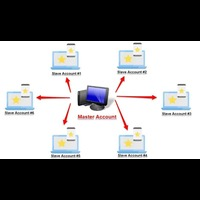
Trade on one account and every other account follows, each with its own lot size, its own rules and its own limits. No manual copying: as long as your terminals are running, the copies keep going, even when you're away from the screen.
Trade Copier copies the trades of one MetaTrader 5 account (the sender) to other MetaTrader 5 accounts on the same computer or VPS (the receivers): your accounts at different brokers, a live account and a demo, or any accounts you manage. Each receiver decides how much to risk, what to copy and when to stop. Outside the Strategy Tester (live or demo) it never opens trades on its own; it only copies the sender.
Attach the EA, choose sender or receiver, and it starts copying at 0.5% risk per trade, using the sender's stop loss. Everything else is optional and off by default.
How it copies
- One sender and as many receivers as you need, linked by a channel name. Use separate channels to run several senders on the same computer.
- Works through the terminals' shared Common folder: no DLLs, no internet connection, no external program.
- Copies new positions, closes, partial closes (proportionally) and SL/TP modifications. Pending orders are copied once they are filled on the sender.
- In our tests, about 0.4 s from the sender's fill to the receiver's fill, broker execution included. Actual speed depends on your computer and broker.
- A receiver only acts on fresh data: if the sender hasn't updated for over 10 seconds, the receiver changes nothing.
- Copies survive a restart: each receiver remembers which sender position each copy belongs to.
- No duplicates: a trade is copied once, even after a restart or a repeated click.
Positions panel with buttons
- The receiver's panel lists up to 8 of the sender's open positions, each marked as copied (with the copy's lot size) or not copied, with the reason shown (symbol, direction or comment filter, outside trading hours, price too far, lot size of 0, account limit hit…).
- Close copy: closes only your copy. The sender's position stays open and is not re-copied automatically.
- Copy now: copies a position that was skipped, bypassing filters, trading hours and the price-distance check. Your lot sizing, SL/TP and account limits still apply. Before you confirm, the button shows how many points your price is from the sender's entry.
- Close all copies.
- Every button needs a confirming second click within 10 seconds, so a stray click does nothing.
Lot sizing
- Risk % of the receiver's balance (default 0.5%) or risk in money, both calculated from the copy's stop loss.
- Fixed lot size, the sender's lot size times a multiplier, or proportional to the account balances.
- Minimum and maximum lot size per copy.
- The lot size is rounded down to the symbol's volume step. If the result is below the minimum lot size, the copy is skipped.
- Risk modes need a stop loss: either the sender's or your own (in points). Without one, the trade is not copied and the panel says why.
Your own stop loss and take profit
- Copy the sender's SL and TP and track every change (on by default).
- If the sender opens without a stop loss: a stop loss at a money amount you choose, or at a distance in points.
- If the sender opens without a take profit: a take profit at a distance in points.
- If the sender sets its own level later, that level takes over.
Execution
- Reverse copy: buys become sells and vice versa, and the sender's TP becomes the copy's SL (and its SL the copy's TP).
- Price distance: skip the trade if your price is more than X points worse than the sender's entry. A better price is always accepted.
- Maximum slippage, magic number and custom comment text on the copies.
- Optionally, copy the positions that were already open when the receiver starts.
Filters
- Copy only selected symbols, or never copy selected symbols.
- Buys and sells, buys only or sells only.
- Copy only trades whose comment contains specific text.
- Copy only within a server-time window (e.g. 22:00 to 06:00, across midnight) and only on selected days of the week.
- On the sender: send only selected magic numbers (0 = manual trades).
Symbols
- Remove the sender's prefix or suffix, add the receiver's, or map symbol names (e.g. XAUUSD=GOLD).
Account limits on every receiver
- Daily loss and daily profit, as a % of the account value at the start of the day (the higher of balance and equity, taken at the server hour you choose): once hit, the copies are closed and nothing is copied until the next day.
- Total loss and total profit, as a % of the initial balance: once hit, the copies are closed and copying stops until you clear the limit with the input "Remove the total stop now".
- Loss limits trigger slightly early (at 80% of the limit by default, adjustable). Profit limits trigger when the target is reached.
- All limits use equity, so floating P/L counts.
- The limits, the daily reference value and the initial balance are saved: restarting the EA or the terminal does not reset a limit that has been hit.
Panel and notifications
- Role, channel, open copies, copy and error counts, time since the sender's last update, lot mode, the trades list and the four account limits (a triggered limit shows in red).
- English and Spanish, selected automatically from the terminal language.
- Optional push notifications on errors and limits, and on every copy opened or closed.
Important
- All terminals must run on the same computer or VPS, with Algo Trading enabled.
- Use a different channel name for each sender and its receivers. With two receivers on the same account, give each one a different magic number.
- On each receiver, if the account already has trading history, enter its initial balance in the inputs (0 = use the balance when the EA first starts).
- The Strategy Tester has no other terminal to copy from, so in the tester the EA opens small sample trades for testing. Outside the Strategy Tester it never opens trades on its own.
Inputs
Names and groups match the MT5 inputs window.
- "TrendPax": panel and log language (default automatic: Spanish on a Spanish terminal, English on any other).
- "Role": sender or receiver (default receiver), the channel name (the same on the sender and its receivers) and the check interval (default 100 ms).
- "Sender": send only these magic numbers (empty = all, 0 = manual trades).
- "Receiver: lot": risk % (default 0.5%), risk in money, fixed lot size, multiplier or balance ratio; minimum and maximum lot size per copy.
- "Receiver: SL and TP": copy the sender's SL and TP (default on); if the sender has no stop loss, a stop loss in money or in points; if it has no take profit, a take profit in points.
- "Receiver: execution": reverse copy, maximum price distance from the sender's entry, maximum slippage (default 30 points), copy the positions already open at start, magic number of the copies and text added to their comment.
- "Receiver: filters": only these symbols, never these symbols, direction, text in the sender's comment, server hours and days of the week.
- "Receiver: symbols": a map such as XAUUSD=GOLD, and the prefixes and suffixes to remove or add.
- "Receiver: account stops": initial balance; daily loss, daily profit, total loss and total profit in % (0 = off); how early loss limits trigger (default 80%); the server hour the day starts; and "Remove the total stop now".
- "Notifications and panel": push notifications on errors and limits and on every copy, the panel, the trades list with buttons, and the panel's position.