MelloDesk Trade Panel

  • 유틸리티
  • Ritthanong Chimpa
    Ritthanong Chimpa
    Algorithmic trading focused on survival, not speed.
    AURORA PRIME is not designed for fast profit.
    It is designed for survival, stability, and long-term capital preservation.
    This system was built under the philosophy that:
    “Staying alive in the market is already a win.”
  • 버전: 1.0
  • 활성화: 10
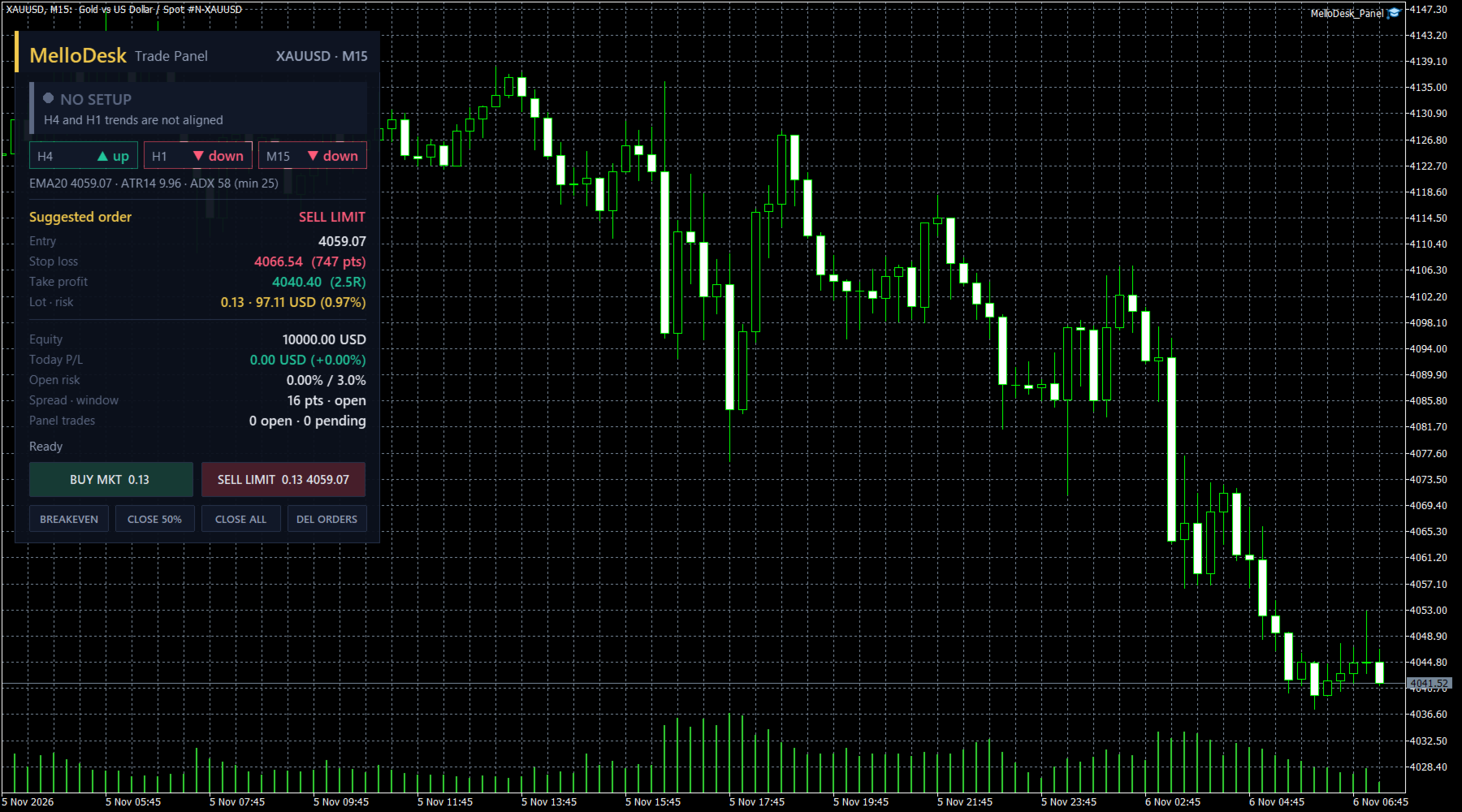
MelloDesk Trade Panel is a manual trading panel for MetaTrader 5 that puts risk control first. Every order is sized from your stop distance, every new order is checked against your daily loss and open-risk limits, and open positions are managed with a partial close and breakeven at a fixed R multiple.

How it works
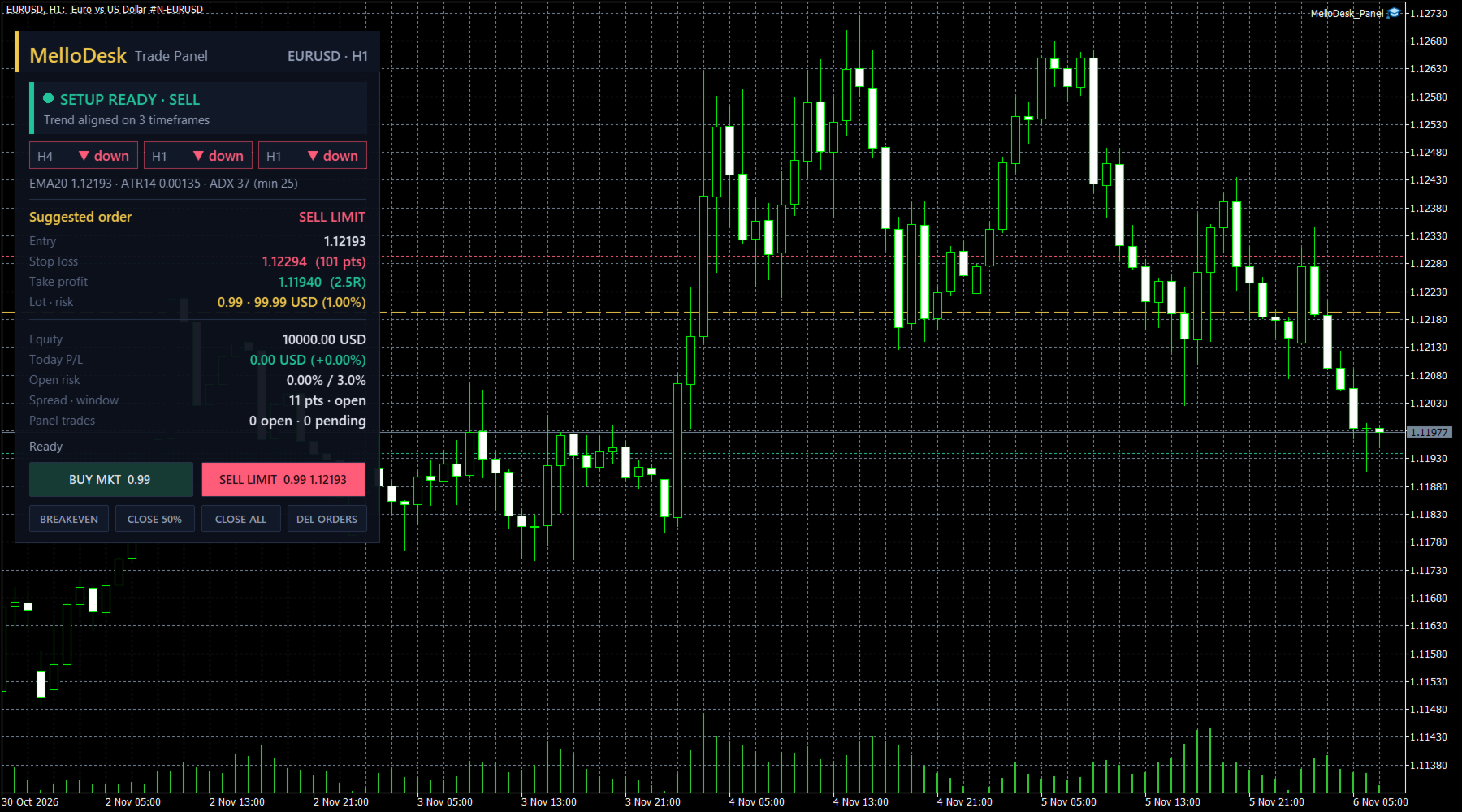
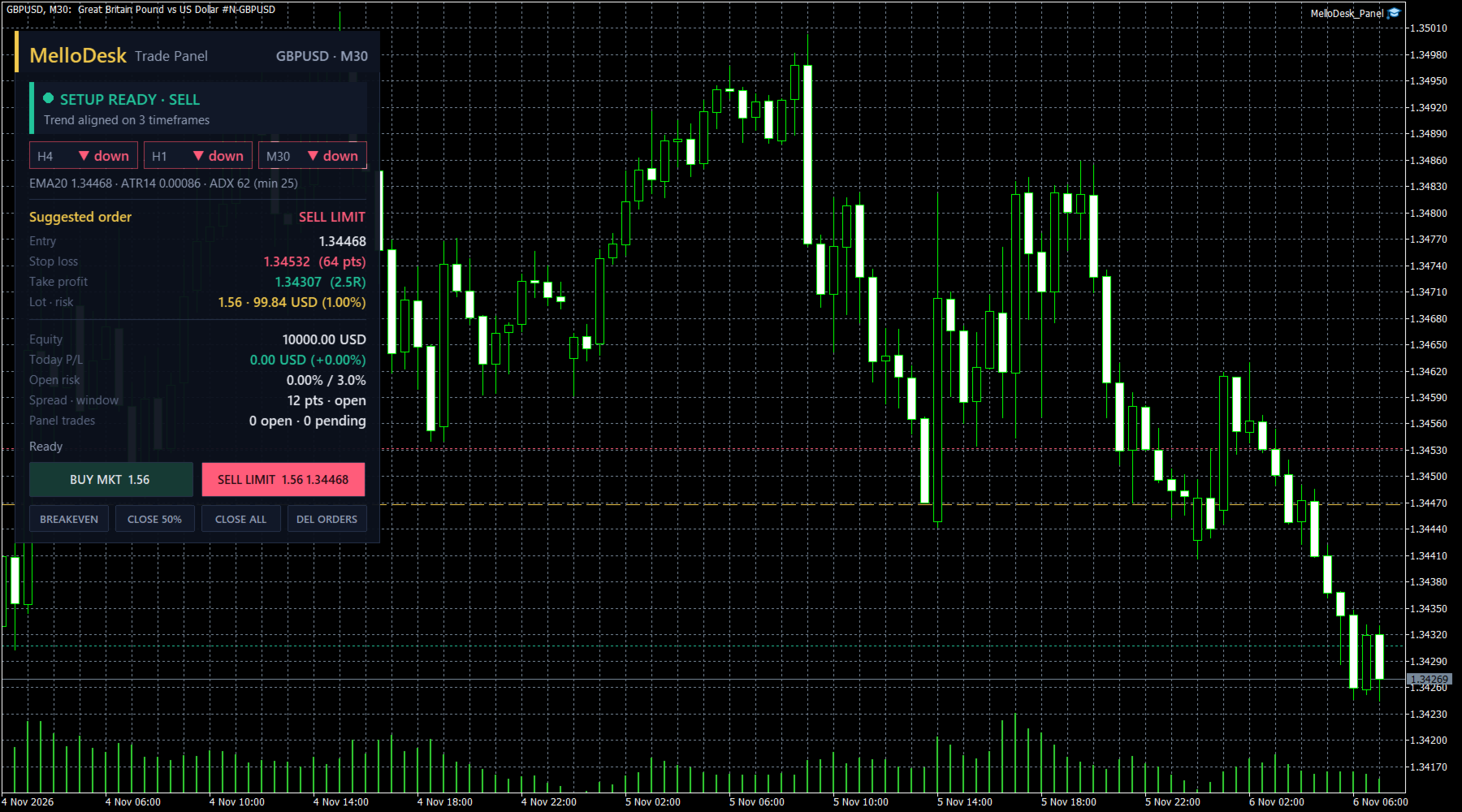
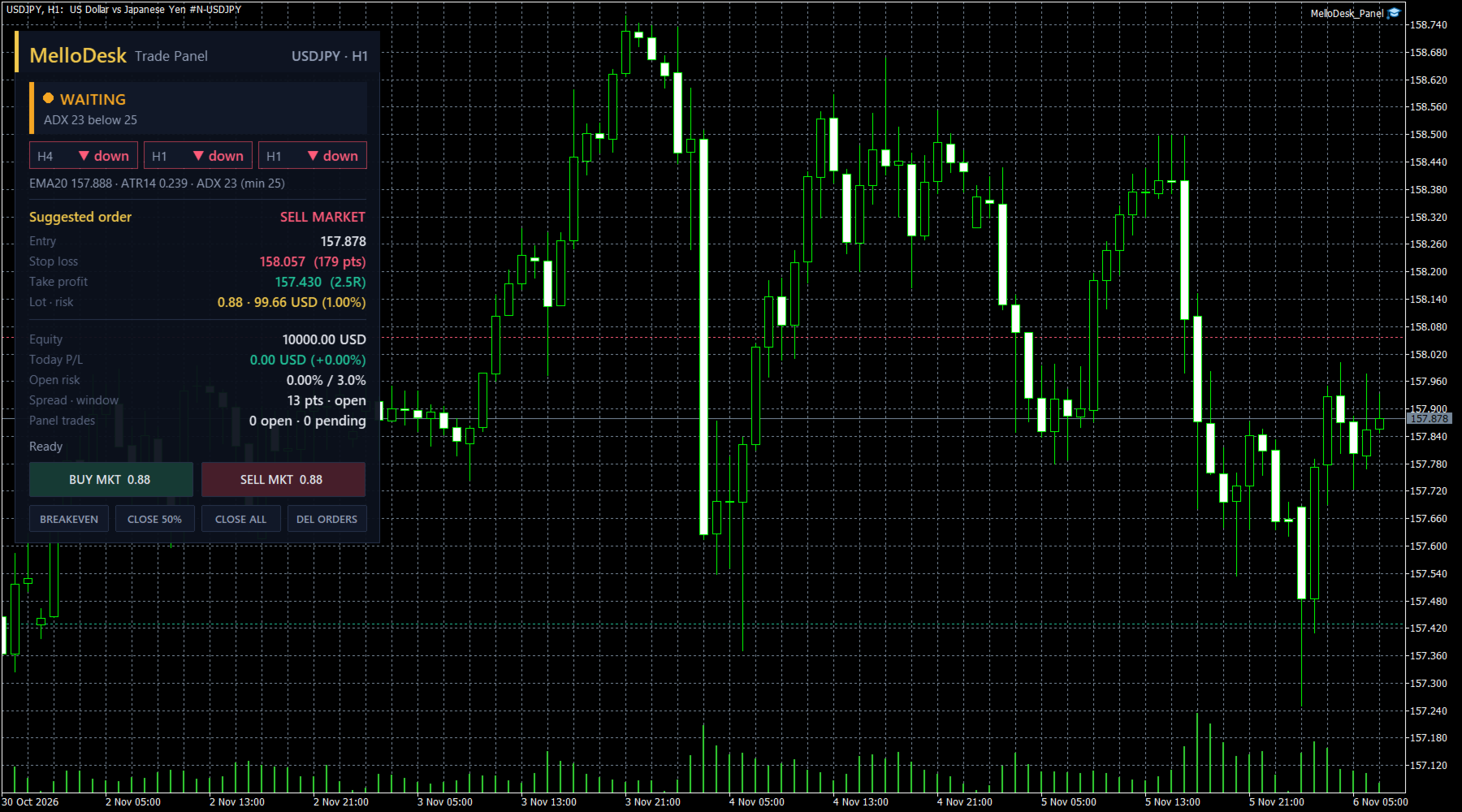
- Pick a chart (M15 or H1 is a good start). The panel reads the trend on two higher timeframes (H1 and H4 by default) and on the chart timeframe using a 20-period EMA and its slope.
- When all three agree and ADX(14) is above your minimum, the status turns green: SETUP READY.
- The suggested order is a limit at the EMA in the trend direction (or a market order if price is already there), with the stop at a multiple of ATR(14) and the target at a multiple of R.
- You decide. Press BUY or SELL and the panel places the order with the calculated lot, stop and target.

Position sizing
- Risk per trade as a percent of equity, a fixed money amount, or a fixed lot
- Lot is calculated from the real stop distance with the symbol's tick value, then checked against the minimum, maximum and step volume, the symbol volume limit and your free margin
- The panel shows the lot, the money at risk and the percent of equity before you click

Trade management
- Partial close at 1R (size and R level adjustable)
- Stop to breakeven at the same level, with an optional offset in points
- Pending order expiry (broker expiration when supported, otherwise the panel deletes the order)
- One-click BREAKEVEN, CLOSE 50%, CLOSE ALL and DEL ORDERS for the positions and orders of this panel

Guards (block new orders, never close your trades)
- Daily loss limit in percent of the day-start balance
- Maximum total open risk of the panel's orders
- Maximum spread in points
- Trading window in server hours (overnight windows supported)
- Market session check, so orders are not sent while the symbol is closed

Dashboard
Status with the reason, trend chips for the three timeframes, EMA, ATR and ADX, the suggested order with entry, stop, target, lot and risk, equity, today's P/L, open risk, spread and the result of the last action. The suggested entry, stop and target can be drawn on the chart.

Strategy Tester
Buttons cannot be clicked in the Strategy Tester, so in the tester the panel places the suggested order automatically on a green setup (input "Tester only: place the suggested order"). This lets you see the sizing and the management logic before you buy. It is a demonstration of the mechanics, not a performance claim.

Main inputs
- Risk: sizing mode, risk %, risk money, fixed lot, max open risk %, daily loss %, minimum-lot fallback
- Setup: EMA period, trend timeframes, min ADX, stop (x ATR), target (R), limit offset (x ATR)
- Management: partial close R and %, breakeven on/off and offset, pending expiry minutes
- Guards: max spread, trading window hours
- Orders: magic number, comment, deviation
- Panel: side, offset, scale, chart lines

Notes
- The panel only manages orders and positions with its own magic number on the chart symbol.
- Works with any symbol, hedging and netting accounts.
- Allow Algo Trading in the terminal and in the panel settings.
- The panel is a tool for placing and managing your own trades. It does not predict the market and does not guarantee any result.
추천 제품
Challenge Keeper watches your whole prop firm account and acts before a firm rule is broken. It does not open trades. It works with manual trading and with other Expert Advisors on the same account. How it works Choose your firm and your phase from a list, and enter your starting balance. Each preset already contains how that firm measures its limits: from balance or equity, from the start of the day or from the start of the challenge, and the time and time zone at which its trading day resets.
Aura Specialist V34: Sideways Market Precision Expert ※ 리뷰와 코멘트 점수를 주시면 프로그램을 작업하는데 큰 힘이 됩니다. 감사합니다. ※ 변동성이 큰 골드(XAUUSD)만을 위한 프로그램이며 급등락장에서도 안정적인 운용이 가능하지만 특별히 횡보장 관리에 어려움을 겪는 분들을 위해서 개발했습니다.  Aura Specialist V34는 횡보 시장(Sideways Market)의 미세한 파동을 포착하여 수익을 극대화하도록 설계된 고성능 알고리즘 트레이딩 시스템입니다. 최신 V34 버전은 강력한 자산 보호 알고리즘과 지능형 변동성 필터를 탑재하여 안정성을 한층 강화했습니다. 1. 핵심 거래 로직 (Core Trading Logic) 지능형 이평선 돌파 전략 (MA Break Logic): 단순한 가격 돌파가 아닌, 설정된 타임프레임(Entry_TF)에서의 연속적인 캔들 마감 상태를 분석하여 진입의 신뢰도를 높입니다. 다중 타임프레임 추
FREE
Description: Smart Recovery Manager is a technical utility developed for the MetaTrader 5 platform. Its primary function is to provide trade management solutions for existing positions through a combination of averaging techniques and an automated hedging mechanism. Operational Features: This utility is designed to manage trades that are already active in the terminal. It does not provide trade signals or execute initial market entries. Averaging Logic: The tool can be configured to open additi
Akihiko
Dragan Drenjanin
2.5 (2)
Akihiko is a sophisticated trading robot distinguished by its minimalist user interface, designed to deliver powerful functionality with simplicity at its core. To further enhance its capabilities, I’m excited to announce the release of version 19, a significant update that refines its performance and usability. This robot integrates a versatile strategy, blending multiple options to adapt to diverse market conditions. It employs carefully crafted rules for initiating both long and short positi
symbol XAUUSD timeframe H1 (Main) timeframe minimum deposit 1000 USD (or the equivalent amount in another currency) compatibel with all broker yes (Supports any account currency) easy configuration  yes Prop Firm Ready! The Hercules Pro EA is not an ordinary trading robot. It was developed for traders who value structure, control, and a professional understanding of the markets. Instead of blindly trading signals, Hercules Pro analyzes the market environment across multiple timeframes and det
================================================================================ POC BREAKOUT - V20.72. Full Professional Grade Toolkit ================================================================================ POC Breakout is a full MetaTrader 5 trading dashboard for discretionary traders who want breakout signals, Point of Control (POC) context, volume profiles, order flow, market structure, news, alerts, and advanced trade planning in one professional workspace. Attached directly to you
This indicator automatically detects harmonic price patterns on your chart, both bullish and bearish, and shows them as soon as they form, including potential patterns that are still developing. For every pattern it draws the Potential Reversal Zone (PRZ), and for completed patterns it also draws two take-profit and two stop-loss levels. Supported Patterns: Gartley, Bat, Butterfly, Crab, Deep Crab, Shark and Cypher. Each pattern can be switched on or off individually. Key Features: Completed
FREE
Hybrid Assisted Trading Engine Manual Trading. Machine Discipline. The Hybrid Assisted Trading Engine is an institutional-grade manual trade management system designed to protect traders from emotional mistakes — without taking control away from them. You decide when to enter . The engine decides how the trade is managed . What It Does This system continuously monitors your manual trades and enforces professional-level trade management rules in real time: Smart Breakeven logic R-based trai
Breakout scalp PRO
Cesar Napoleon Guio Martinez
Automated breakout scalper EA trading system with advanced execution filters and built-in risk management. Designed to operate during selected market conditions, combining session control, spread and slippage filtering, and dynamic trade management. Safety First Approach:  This EA does not use grid systems, martingale strategies or other high-risk unlimited recovery strategy. Every position is protected with predefined Stop Loss and Take Profit levels. The strategy is designed to maintain contro
EquityFence MT5 — Plan and manage trades with clear risk information EquityFence MT5 is a manual trade-planning and position-management utility for MetaTrader 5. It helps you review position size, estimated stop-loss and take-profit outcomes, and account-wide exposure before you confirm an order. It does not provide trading signals or open trades automatically. PLAN BEFORE YOU SEND Choose BUY or SELL, select a Market or broker-supported Pending order, set risk as a percentage or account-curren
SPS Trading
Md Iqbal Kaiser
SPS Lite – Limited Edition (XAUUSD & US30) SPS Lite is a simple, straightforward automated trading system built specifically for XAUUSD and US30 . This is a Limited Edition Free Version of my upcoming SPR Trading Pro EA , which will be released once our ongoing live market testing is complete. What Makes SPS Lite Different? I am not here to bluff or sell you hype. No "AI Integration" Gimmicks: Not a fake AI bot or a "get rich quick" system. No Common Indicator Clutter: Does not rely on
FREE
️ Trade Manager oneclick  ( Reverse Trade,  Partial Close,  Breakeven, Close All Running Trade )   control – Smart Manual Trade Control for MT5 Trade Manager oneclick control is a powerful yet lightweight trade management utility built for manual traders who want precise control over their open positions — directly from the MT5 chart. This EA does not open or close trades automatically based on any strategy. It simply provides one-click management tools to handle your running trades efficient
FREE
The automated trading system executes only buy orders on the synthetic index Boom 300.  Minimal account deposit is 2500$. The parameters are optimized for 1 HOUR time frame. The entire history test is in screenshots section. Inputs: Account leverage `Leverage (1:N)`, Stop loss in percentage (values greater then zero), Take profit in percentage  (values greater then zero),  Evaluation frame length, Activation level in percentage for evaluation frame,  Close the order after N candles, Close the
PatternSentry is a chart analysis Expert Advisor. It does not trade. It detects the structures a discretionary trader draws by hand, and draws them the same way on every chart and timeframe you attach it to, with a toolbar to switch each tool on and off. What it detects - Trend line of the current move with retest and break detection, parallel channel with midline and extensions, pitchfork from the last three pivots - Fibonacci retracement (38.2 / 50 / 61.8 / 78.6) and extension (0.618 to 2.6
QuickTrade Panel – Fast Execution & Smart Risk Management The QuickTrade Panel is a professional trading utility for MetaTrader 5 that makes order execution faster, safer, and easier. It allows traders to place market and pending orders directly from the chart while automatically managing position size based on their risk settings. Key Features Interactive On-Chart Panel: Easily adjust Lot Size, Risk %, Stop Loss (SL), Take Profit (TP), and Pending Order Distance without opening EA settings. Sma
SMT DIVERGENCE - GOLD vs SILVER (XAUUSD / XAGUSD) All Timeframe MQL5 Market Product Description ==================================================================== PRODUCT NAME: SMT Divergence Gold vs Silver | Smart Money Scalping Tool SHORT DESCRIPTION (max 63 chars): Catch Gold reversals before they happen using SMT Divergence ---------------------------------------------------------------------- FULL DESCRIPTION ---------------------------------------------------------------------- W
FREE
Tool for MarketStructure Trader, if you trade with TrendLine, this tool is very convenient. You see chart, place your trendline, wait and see.. Use FixLot only, RiskPercent sometime not working. Press BuyLine or SellLine Button, it will make 3 Line: Buy/SellLine. TPLine, SLLine. Buy/SellLine : - Choose Breakout if you want Expert take position after close candle above line for buy and under line for sell,  - Choose Limit : If price under your line for sell, or price above line for buy. - Choose
Kill Zone Hunter
Alex Amuyunzu Raymond
KILL ZONE HUNTER Institutional Kill Zone, Market Structure & Fair Value Gap Trading EA for MT5 Overview KILL ZONE HUNTER is a professional-grade MetaTrader 5 Expert Advisor engineered around Institutional Smart Money Concepts (ICT / SMC) , with a primary focus on Kill Zone trading , Market Structure , and Fair Value Gap (FVG) execution . This EA is designed to systematically hunt high-probability trades during institutional trading windows (Kill Zones) , where liquidity, volatility, and directio
This EA help traders close their open positions at a specific MT5 server time before news or before ending of H4 timeframe of the morning New York session to protect their profit or prevent from unexpected loss. The default setting is 19:30 (HH:MM) and you can adjust as require to fit trading strategies. It very user friendly where contain only single input parameter to specify a time that position will be closed.  
XBOOT BOLETA PRO Professional Manual Trading Panel for MetaTrader 5 XBOOT Boleta Pro is a complete trading panel designed for traders who execute manual trades and want greater speed, organization, and control during every trading session. More than a standard Buy and Sell panel, XBOOT Boleta Pro combines powerful trading tools into a single interface, helping traders analyze the market, manage risk, execute orders, and monitor trading performance without leaving the chart. Its purpose is to sim
EmaRsi robot
Deepak Saini
https://youtu.be/KHhg88fXWTk?si=ZoVtpc-wpfTVImSL 5-Minute Trading Strategy | Quick & Effective for Beginners Welcome to our trading channel- the deepak trading In this video, we'll be exploring a simple 5-minute trading strategy that can help you capture quick market movements and make profitable trades. Whether you're a beginner or an experienced trader, this strategy is designed to give you clear entry and exit points using technical indicators like EMA, RSI, and Stochastic Oscillator.
FREE
Grid Trading EA is a semi-automated one-click trading EA for both Normal Trading and Grid/Martingale Trading . Normal Trading Simply click Buy or Sell directly from the chart. The EA will automatically manage trades by: Setting Stop Loss and Take Profit Managing Trailing Stop Grid / Martingale Trading (For Hedging Account Type Only) When Grid Trading mode is enabled, the EA will automatically open additional grid orders at specified distances while increasing the lot size based on your settings.
Candle EA MT5
Mansour Babasafary
4.14 (22)
This expert is based on patterns The main patterns of this specialist are candlestick patterns Detects trends with candlestick patterns It has a profit limit and a loss limit, so it has a low risk The best time frame to use this expert is M30 time frame The best currency pairs to use with this expert is the EURUSD, GBPUSD, AUDUSD, USDCAD currency pairs Attributes: Can be used in the EURUSD, GBPUSD, AUDUSD, USDCAD  currency pairs Can be used in M30, H1, H4 time frames Has profit limit and loss
Smart Trade Assistant Pro MT5 Smart Trade Assistant Pro MT5 is a professional manual trading and position management utility designed to help traders manage risk, execute trades, and control open positions directly from the chart. The utility does not predict market direction and does not generate guaranteed trading signals. The trader remains in control of BUY and SELL decisions, while Smart Trade Assistant Pro helps with position sizing, risk management, execution, and trade management. Main F
Easy EA for closing positions with profit or loss. All positions of chart's symbol are counted separately. Settings: TPforSymbol — set profit amount to indicate when to close every positions for the symbol of the chart. Swap and commission are decreasing your profit. SLforSymbol — set SL amount to indicate SL for every positions for the symbol of the chart. Swap and commission are increasing your loss. SLforSyblol is always below/equal zero.
Robot Manual Order Manager is a tool that allows you to automatically include Stop Loss, Breakeven, Take Profit and partials in open trades. Be it a market order or a limit order. Besides, it automatically conducts your trade, moving your stop or ending trades, according to the parameters you choose. To make your operations more effective, the Manual Orders Manager Robot has several indicators that can be configured to work on your trade. Among the options you can count on the features: Conducti
LT Round Numbers MT5
Thiago Duarte
4.86 (21)
Round numbers (or key levels) is an amazing strategy. These numbers are strong support and resistance levels. So what this indicator does is draw horizontal lines on the chart to help you find these levels. Configurations: Key levels in pips - distance between the lines. Color -   lines color. Style -   lines style. Width -  lines width. Display at background -  draw lines in front or back of candles. Selectable -  turn on or off the option to select the lines. Lines identification -  identifica
FREE
You Trade. It Manages. Precision Risk Control for MT5. Order Manager with Auto Position Sizer and Partial is a manual-execution risk management tool — it doesn't pick your trades, but once you decide to enter, it handles everything that comes after with discipline a human hand can't always match. Built for traders who already know when to enter, but want a system that never skips a risk rule, never forgets a partial close, and never hesitates to move to breakeven. Perfect for: Manual trade
Object Synchronizer MT5 : Better focus/analysis of the price chart in many timeframes. Are you bored to save and load template many times for the same symbol for many chart timeframes? Here is the alternative. With this indicator, you enjoy creating objects across many charts, you can modify the same object in any chart, you can delete the same object in any chart. All objects you created/modified are always synchronized across all chart windows (with the same symbol). Save your time, you can fo
RRtoolBox
David Ruiz Moreno
RRtoolbox - Professional Tools: Risk:Reward Trading Tool (SL/TP Horizontals + Pending orders + Diagonals), Alerts set on trend lines (for alerts on diagonal levels), SelfManagement (BE, partials...), close/cancelling by time, Statistics, Info and trading on chart. One-Click Trading with Visual Risk:Reward Management RRtoolbox is a comprehensive trading panel that combines one-click order execution,  statistics and  powerful visual Risk:Reward tools, alerts set with trendlines, on chart butt
이 제품의 구매자들이 또한 구매함
Trade Assistant MT5
Evgeniy Kravchenko
4.43 (216)
거래당 위험 계산, 라인을 사용한 손쉬운 신규 주문, 부분 청산 기능을 통한 주문 관리, 7가지 유형의 트레일링 스탑 및 기타 유용한 기능을 제공합니다. 추가 자료 및 지침 설치 지침   -   애플리케이션 지침   라인 기능       - 차트에 개시선, 손절매, 차익실현을 표시합니다. 이 기능을 사용하면 새로운 주문을 쉽게 하고 개봉 전에 추가 특성을 볼 수 있습니다. 위기 관리       -       위험 계산 기능은 설정된 위험과 손절매 주문의 크기를 고려하여 새 주문의 볼륨을 계산합니다. 이를 통해 손절매 크기를 설정하고 동시에 설정된 위험을 존중할 수 있습니다. 로트 계산 버튼 - 위험 계산을 활성화/비활성화합니다. 필요한 위험 값은 위험 필드에 0에서 100 사이의 백분율 또는 예금 통화로 설정됩니다. 설정 탭에서 위험 계산 옵션을 선택합니다. $ 통화, % 잔액, % 지분, % 자유 마진, % 사용자 정의, % AB 이전 일, % AB 이전 주, % AB 이전
Trade Manager EA에 오신 것을 환영합니다. 이 도구는 거래를 보다 직관적이고 정확하며 효율적으로 만들기 위해 설계된 궁극적인 리스크 관리 도구 입니다. 단순한 주문 실행 도구가 아닌, 원활한 거래 계획, 포지션 관리 및 리스크 제어를 위한 종합 솔루션입니다. 초보자부터 고급 트레이더, 빠른 실행이 필요한 스캘퍼에 이르기까지 Trade Manager EA는 외환, 지수, 상품, 암호화폐 등 다양한 시장에서 유연성을 제공합니다. Trade Manager EA를 사용하면 복잡한 계산은 이제 과거의 일이 됩니다. 시장을 분석하고 진입, 손절 및 익절 수준을 차트의 수평선으로 표시한 후 리스크를 설정하면, Trade Manager가 이상적인 포지션 크기를 즉시 계산하고 SL 및 TP 값을 실시간으로 표시합니다. 모든 거래가 간편하게 관리됩니다. 주요 기능: 포지션 크기 계산기 : 정의된 리스크에 따라 거래 크기를 즉시 결정합니다. 간단한 거래 계획 : 진입, 손절, 익절을 위한
Farmed Hedge Yield Farming | All Markets (Manual - Hybrid - Semi/Automated EA) VERIFIED TRADING RESULTS - Farmed Hedge Yield Axi Copy:  https://www.mql5.com/en/signals/2356376 - Farmed Hedge Yield Exn Copy:   https://www.mql5.com/en/signals/2356404 - Farmed Hedge Yield V Copy:  https://www.mql5.com/en/signals/2357156 IMPORTANT NOTICE: FarmedHedge is a MANUAL-FOCUSED TRADING UTILITY ,not a fully automated EA. Results shown on this Signal include manual trades and overall strategic management.
Telegram to MT5 Multi-Channel Copier   는 Telegram 및 Discord 채널의 트레이딩 시그널을 MetaTrader 5로 자동 복사합니다. 봇도, 브라우저 확장도, 수동 복사도 필요 없습니다. Telegram이나 Discord에 시그널이 도착하면 EA가 몇 초 안에 터미널에서 주문을 실행합니다. 그리고 채널을 복사하기 전에, 내장 백테스터가 그 채널이 내 계좌에서 어떤 결과를 냈을지 보여줍니다. 제품은 두 가지 구성 요소로 이루어집니다: Telegram 채널을 수신하는 Windows 애플리케이션과, MT5 터미널에서 시그널을 실행하는 본 EA입니다. MT4 버전도 제공됩니다   여기 . 구매 전에 사용해 보세요:   애플리케이션은 무료로 다운로드할 수 있습니다. 본인의 채널을 연결하고 각 시그널이 어떻게 읽히는지 확인하세요. Backtest 탭과 실제 거래에는 구매하거나 임대한 EA가 필요합니다. 이 페이지의 무료 데모는 전략 테스터에서만 실행되며
TradePanel MT5
Alfiya Fazylova
4.88 (172)
Trade Panel은 다기능 거래 도우미입니다. 이 애플리케이션에는 50개 이상의 수동 거래 기능이 포함되어 있으며 대부분의 거래 작업을 자동화할 수 있습니다. 앱 사용 설명서: https://www.mql5.com/en/blogs/post/756482 데모 계정용 앱 체험판: https://www.mql5.com/en/blogs/post/750865 앱 설치 방법: https://www.mql5.com/en/blogs/post/756239 시각 모드에서 앱 테스트 방법: https://www.mql5.com/en/blogs/post/770277 VPS MetaTrader에 앱 설치 방법: https://www.mql5.com/en/blogs/post/770190 거래. 한 번의 클릭으로 거래를 수행할 수 있습니다: 리스크 자동 계산과 함께 예약 주문 및 포지션 열기. 한 번의 클릭으로 여러 주문 및 포지션 열기. 주문 그리드 열기. 예약 주문 및 포지션을 그룹별로 닫기. 포지션
News Trade EA MT5
Konstantin Kulikov
4.55 (11)
제가 몇 년 동안 사용하고 있는 유용한 로봇을 소개드립니다. 반자동뿐만 아니라 자동 모드로도 사용할 수 있습니다. >>> Chat <<< 본 프로그램에는 경제 캘린더의 뉴스별로 유연한 거래 설정이 포함되어 있습니다. 전략 테스터에서 확인할 수 없습니다. 진짜 작업뿐입니다. 최신 설정 아카이브 다운로드: https://www.mql5.com/en/blogs/post/747929 신호 모니터링: https://www.mql5.com/en/signals/author/test-standart 이 전문가를 위해 고유 설정 세트를 만들 때 블로그의 모든 매개변수에 대한 설명을 참조하십시오: https://www.mql5.com/en/blogs/post/748545 . 기본 설정 설명 작업은 한 차트에서 GBP(GBPUSD, EURGBP, GBPJPY, GBPCAD, GBPAUD, GBPCHF)와 쌍으로 이루어집니다. GBP는 가장 변동성이 큰 통화로서 거래 수행 시 거래를 성공적으로
내 거래 규칙에 맞춰 Telegram 신호 복사 Telegram to MT5 Signal Trader 는 공개 및 비공개 Telegram 채널과 그룹의 텍스트 기반 거래 신호를 MetaTrader 5로 자동 복사합니다. 하나의 데스크톱 앱에서 여러 신호 제공자와 MT5 계좌를 관리하고, 제공자마다 위험 관리 및 거래 설정을 개별적으로 지정 할 수 있습니다. 신호 복사에는 Telegram 봇이나 API 설정이 필요하지 않습니다. 전화번호 또는 QR 코드로 본인의 Telegram 계정에 로그인한 후, 이미 가입한 채널이나 그룹을 선택하면 됩니다. 봇을 만들거나 Telegram API 토큰, API ID 또는 API 해시를 입력할 필요가 없습니다. 포지션 크기를 선택하고, 여러 익절 목표에 청산 물량을 배분하며, 손익분기점 이동과 트레일링 스톱을 자동화하세요. 제공자의 신호를 따르면서도 실제 거래 방식은 직접 설정할 수 있습니다. 이 제품은 MT5 Expert Advisor와 필수 Win
The product will copy all telegram signal to MT5 ( which you are member) , also it can work as remote copier.  Easy to set up, copy order instant, can work with almost signal formats, image signal,  s upport to translate other language to English Work with all type of channel or group, even channel have "Restrict Saving Content", work with  multi channel, multi MT5 Work as remote copier: with signal have ticket number, it will copy exactly via ticket number. Support to backtest signal. How to s
REVDEN AI Desk: REVDEN의 시장 컨텍스트 위에서, 당신만의 AI와 나누는 하나의 대화로 트레이딩을 운영하세요 하나의 대화로 트레이딩을 운영한다고 상상해 보세요. REVDEN AI Desk 는 이를 MetaTrader 5로 가져옵니다. 당신만의 AI에게 시장을 어떻게 읽는지 물으면, AI는 당신이 거래하는 종목에 대한 REVDEN의 전체 컨텍스트, 즉 각 종목의 상태와 리스크 현황, 예정된 발표를 바탕으로 답합니다. AI의 제안은 진입, 스톱, 타겟, 리스크를 갖추고 도착하며, 맞는 제안을 당신이 승인합니다. 규칙도 같은 방식으로 바뀝니다. 무엇을 바꿀지 적으면 AI가 새 룰북의 초안을 작성하고, 받아들일지 버릴지는 당신이 정합니다. 대화를 둘러싸고 시장 전체가 하나의 화면에 펼쳐집니다. 데스크와 설정 가이드를 확인하세요. 모든 화면, 모든 설정, 그리고 당신만의 AI와 함께하는 첫 단계: stein.investments/products/revden-ai-desk 당신
EA Overfitter
Stephen J Martret
5 (3)
That backtest looks great. But will it still be making money tomorrow, next week, next month? EA Overfitter re-runs your EA on 100 price histories it has never seen. One score tells you if the edge is real. A backtest tells you what an EA did on one price history — the one that happened to occur. What you cannot tell from it is how much of that result was the strategy and how much was the particular path. EA Overfitter answers that. It builds up to 100 synthetic price histories your EA has n
파워 캔들 전략 스캐너 - 자체 최적화 다중 종목 설정 찾기 도구 파워 캔들 전략 스캐너는 마켓 워치에 등록된 모든 종목에 대해 파워 캔들 지표와 동일한 자체 최적화 엔진을 동시에 실행합니다. 하나의 패널에서 현재 통계적으로 거래 가능한 종목, 각 종목별 최적의 전략, 최적의 손절매/익절 조합을 알려주며, 새로운 신호가 발생하면 즉시 알림을 전송합니다. 이 도구는 Stein Investments 에코시스템의 일부입니다. 18개 이상의 도구와 함께 당신의 1대1 AI 트레이딩 멘토 Max.  항상 대기 중, 모든 인디케이터를 깊이 있게 이해, 무언가를 차근차근 생각해보고 싶은 순간에 도움을 줍니다.  https://stein.investments 에서 만나보세요 완벽한 시장 모니터링. 종목당 3,000건 이상의 자동 최적화. 2가지 알림 유형. 한 번의 클릭으로 차트를 전환하고 바로 거래하세요. 이 도구가 필요한 이유 대부분의 다중 종목 스캐너는 가격 변동만 보여줍니다. 티커별
RETAILBERG FOOTPRINT CHART PRO — Order-Flow Workspace for MetaTrader 5 Version 7.00  |  Professional System  |  31 tools  |  One chart A full 150-page illustrated User Manual is included. Please read the full manual to understand this feature packed footprint chart elements and ui. https://www.mql5.com/en/blogs/post/777982 DEMO / STRATEGY TESTER — PLEASE READ FIRST
Trade Indicator Assistant   is a powerful MT5 utility designed to turn indicators into automated trading systems. Its main feature is the ability to automatically detect an indicator’s   BUY and SELL signal buffers , without requiring you to know the buffer numbers, search through indicator settings, or modify the indicator source code. Bonus Indicator:   After purchasing Trade Indicator Assistant, contact me to receive   Trade Signal Pro   completely free as a bonus indicator. [Download Demo V
DrawDown Limiter
Haidar Lionel Haj Ali
5 (23)
DrawDown Limiter v5.0 — 고급 계좌 보호 컨트롤러 DrawDown Limiter v5.0은 거래 계좌를 모니터링하고 설정된 리스크, 수익, 뉴스, 일정, 롤오버 또는 포지션 수 제한에 도달했을 때 자동으로 대응하도록 설계된 클라이언트 측 계좌 보호 컨트롤러입니다. 하나의 전용 차트에서 수동 거래, 자동화 전략, 여러 Expert Advisor, 대기 주문 및 오픈 포지션 을 모니터링할 수 있습니다. 전체 계좌를 보호하거나 Magic Number를 사용하여 특정 EA 또는 여러 EA 그룹만 모니터링하도록 설정할 수도 있습니다. DrawDown Limiter의 목적은 단순히 드로다운을 표시하는 것이 아닙니다. 설정한 거래 규칙을 적극적으로 적용 하고 보호 조건이 활성화되어 있는 동안 해당 규칙을 계속 시행하는 것이 목적입니다. DrawDown Limiter v5.0은 단순히 얼마나 손실이 발생하고 있는지만 모니터링하는 것이 아니라, 전략이 언제 계속 거래할 수 있는지,
Master Your Trading Discipline   Stop losing your hard-earned gains to overtrading and emotional decisions. The Discipline Tool is your ultimate trading assistant, ensuring strict risk management in real-time. Key Protection Features: Advanced Drawdown Defense : Automatically halts trading if your daily drawdown exceeds a preset threshold (percentage or dollar amount). Real-Time Equity Lock : Safeguard profits by referencing peak equity, ensuring drawdown stays within control. Hard Profit Target
Dealer's Panel No signal decides anything here — a hand does. One click, and the panel calculates what's underneath: lot size from risk, target from a 30-step balance ladder that remembers exactly how far an account has climbed. Toggle between market and pending without touching an input field. Set a stop, and the take-profit can write itself — a fixed share of the balance, translated into price with no arithmetic left for the trader to get wrong. One trade live at a time; it won't let a seco
My Chart Generator
Trade The Volume Waves Single Member P.C.
5 (1)
What if your chart adapted to the market instead of the clock?   THE PROBLEM IT SOLVES   Instead of trying to find the best indicator that fits your timeframe chart, build a chart and find the most appropriate indicator.   My Chart Generator is a MetaTrader 5 background service that builds  live, fully historical three types of custom charts :1. Range/Volume Balanced chart, 2.  Range/Volume Absorption chart and 3. Constant Volume chart from any symbol — Forex pairs, crypto, indices, commodities,
Auto DCA EA
Truong Giang Hoang
5 (1)
All new interface and function Add telegram notify (you have to get Telegram bot API and chat ID). With this ea, you can earn 10-40% even more profit/month! 1. This EA is used to automatically take profit or DCA your orders on MT5 according to the parameters you set. You can enter first order on your phone or MT5 terminal on your computer and it automatically take profit or DCA your orders. 2. Enter buy/sell limit-stop price * Buy limit price/ Sell limit price/ Buy stop price/ Sell stop price:
AlgoRadar
Stephen J Martret
5 (4)
AlgoRadar is an on-chart analytics dashboard for MT5 that aggregates Expert Advisor performance across multiple accounts, brokers, and platforms, including both MT4 and MT5 data, into a single live view on your MT5 chart. All analysis runs from the chart interface, with no external applications or manual report processing required. EA Analysis and Ranking For traders running multiple Expert Advisors, AlgoRadar provides a consolidated view of each EA's performance across accounts. Active EAs a
Grid Manual MT5
Alfiya Fazylova
4.74 (23)
"Grid Manual"은 주문 그리드 작업을 위한 거래 패널입니다. 이 유틸리티는 보편적이며 유연한 설정과 직관적인 인터페이스를 제공합니다. 그것은 손실을 평균화하는 방향뿐만 아니라 이익을 증가시키는 방향으로 주문 그리드와 함께 작동합니다. 거래자는 주문 그리드를 만들고 유지할 필요가 없으며 유틸리티에서 수행합니다. 거래자가 주문을 시작하는 것으로 충분하며 "Grid Manual"는 자동으로 그를 위한 주문 그리드를 생성하고 거래가 마감될 때까지 그와 동행할 것입니다. 전체 설명 및 데모 버전 여기 . 유틸리티의 주요 기능: 모바일 터미널을 포함하여 어떤 방식으로든 열린 주문과 함께 작동합니다. "제한" 및 "중지"의 두 가지 유형의 그리드와 함께 작동합니다. 고정 및 동적(ATR 표시기 기반)의 두 가지 유형의 그리드 간격 계산과 함께 작동합니다. 오픈 오더 그리드의 설정을 변경할 수 있습니다. 차트에서 각 주문 그리드의 손익분기점 수준을 표시합니다. 각 주문 그리드에 대한 이익
Quant AI Agents
Ho Tuan Thang
5 (1)
Quant AI Agents are independent trading Expert Advisors. Instead of trading using a fixed strategy like other conventional EAs, Quant AI Agents   is a   multi-agent AI trading framework   that turns natural-language strategy prompts into live.  WANT THE SAME RESULTS AS MY LIVE SIGNAL?   Use the exact same brokers I do:   IC MARKETS , IC TRADING   .  Unlike the centralized stock market, Forex has no single, unified price feed.  Every broker sources liquidity from different providers, creating un
EasyInsight AIO MT5
Alain Verleyen
4.92 (12)
EASY Insight AIO – 스마트하고 손쉬운 트레이딩을 위한 올인원 솔루션 개요 외환, 금, 암호화폐, 지수, 심지어 주식까지 — 전 시장을 몇 초 만에, 수동 차트 확인이나 복잡한 설치, 인디케이터 설정 없이 스캔할 수 있다고 상상해 보세요. EASY Insight AIO 는 AI 기반 트레이딩을 위한 궁극의 플러그 앤 플레이(Plug & Play) 데이터 내보내기 도구입니다. 단 하나의 깔끔한 CSV 파일로 전체 시장 스냅샷을 제공하며, ChatGPT, Claude, Gemini, Perplexity 등 다양한 AI 플랫폼에서 즉시 분석할 수 있습니다. 창 전환, 복잡함, 차트 오버레이는 더 이상 필요 없습니다. 자동으로 내보내지는 순수하고 구조화된 데이터 인사이트만으로, 반복적인 차트 감시 대신 데이터 기반의 스마트한 의사결정에 집중할 수 있습니다. 왜 EASY Insight AIO인가요? 진정한 올인원 • 별도의 설정, 인디케이터 설치, 차트 오버레이가 필요 없습
YuClusters
Yury Kulikov
4.93 (43)
Attention: You can view the program operation in the free version  YuClusters DEMO .  YuClusters is a professional market analysis system. The trader has unique opportunities to analyze the flow of orders, trade volumes, price movements using various charts, profiles, indicators, and graphical objects. YuClusters operates on data based on Time&Sales or ticks information, depending on what is available in the quotes of a financial instrument. YuClusters allows you to build graphs by combining da
FUTURES ORDERFLOW FOOTPRINT CHART Professional OrderFlow EA for MetaTrader 5 Version 1.01| Professional tool for real traders | Institutional-Grade Visualization STRATEGY TESTER USERS - PLEASE SELECT EVERY REAL TICK WHEN TESTING AND YOU HAVE DOWNLOADED HISTORICAL DATA. IF YOU SEE A WAITING SCREEN AND IT IS NOT DOWNLOADING, IT MEANS YOU HAVE LOW HISTORICAL DATA. TRY 1 MIN AND 5 MIN FIRST ON 1 DAY DATA. ONE DAY DATA SHOULD BE THE NEWEST AND MOST CURRENT DATE. PLEASE WAIT UNTIL THE MARKET HAS ROL
EA Portfolio Control & Cloud Monitoring for MetaTrader 5 Your EAs manage trades. KONTROL_01 manages your EAs. A control system for traders running multiple Expert Advisors on the same account. Coordinate EA activity, manage trading risks and monitor your setup remotely. A detailed User Manual is available via DM after purchase. IN PRACTICE Multiple EAs. No coordination. Your EAs trade independently, unaware of each other's activity. KONTROL_01 coordinates them, limits simultaneous activity a
MT5 Trading Deck
Manuel Michiels
5 (2)
One button. One trade. MT5 Trading Deck is a hotkey trading panel for MetaTrader 5 that turns the platform into a keyboard-driven execution cockpit. Stop loss, take profit and lot size are pre-calculated for every key; the moment you press, a market order is live on the broker. A complete technical user manual is attached in the product Comments section. It documents every input parameter, the full hotkey map, the recommended Stream Deck XL layout, and the advanced workflows for Pre-Limit orders
Click and Go Trade Manager: The Ultimate MT5 Execution Suite Precision Execution. Professional Performance Tracking. Total Control. In the world of   Smart Money Concepts (SMC) , ICT, and high-frequency scalping,   precision is your only edge.   Most traders lose not because their analysis is wrong, but because their execution is slow and their psychology is undisciplined. The Hard Truth:   If you are still manually calculating lot sizes or dragging lines while the price moves against you,   you
Premium Trade Manager - 코치가 내장된 트레이딩 패널 Premium Trade Manager 는 차트 안에 트레이딩 코치를 심어놓은 도구입니다. 주문을 확정하기 전에, AI 트레이딩 코치 Max가 설정된 거래를 직접 읽고 명확한 판단을 내려줍니다. 스톱이 규율 있는 접근 방식에 맞는지, 리스크 크기가 합리적인지, 고영향 뉴스 이벤트가 몇 분 후에 있는지, 프롭 펌 한도에 근접했는지. 그 아래에는 완전한 실행 엔진이 있습니다. 원클릭 리스크 기반 진입, 차트에서 드래그로 세우고 거래가 진행되는 동안에도 계속 움직일 수 있는 플랜, 최대 4단계 분할 익절, 7가지 트레일링 방식, 실시간 프롭 펌 컴플라이언스, 뉴스 가드, 그리고 자체 비용을 평가하는 스프레드까지. 결정은 당신이 내립니다. Max가 두 번째 시선으로 확인합니다. 패널이 그 이후의 모든 것을 처리합니다. 구매 전에 직접 체험해 보세요. 브라우저에서 라이브 패널을 직접 클릭해볼 수 있습니다. 구매 전에 실제
Prop Guardian Risk Manager MT5 – Drawdown, Risk & Hedge Protection for Prop Firm and Managed Accounts Prop Guardian Risk Manager is a professional risk-control utility for MetaTrader 5, designed for prop firm traders, money managers and anyone who wants strict account-level risk protection. It does not generate trading signals, strategy entries or trading decisions. Instead, it runs in the background, monitors your account risk and can automatically block new exposure, close managed positions or
EA Auditor
Stephen J Martret
5 (7)
EA Auditor is an independent analysis tool for traders evaluating Expert Advisors and trading signals on MetaTrader 5. It audits backtest reports, reviews posted developer signals, and cross-verifies the two against each other to help traders assess strategies before committing capital. The MQL5 market offers a wide range of Expert Advisors from many developers, with varying approaches, quality, and transparency. EA Auditor provides a consistent, data-driven framework for reviewing them, answer
제작자의 제품 더 보기
MelloSessions draws the Asia, London and New York sessions with their high, low and range, the ICT killzones, today's Asian range, the previous day high and low and ADR levels, and keeps a compact panel with the session clock, a candle countdown, the spread and statistics of how the Asian range has behaved on your symbol. Sessions with automatic daylight saving - Session times are entered in each city's own local time (Tokyo, London, New York), so they stay correct when Europe and the United St
FREE
MelloVWAP draws VWAP and volume profile on the chart from one indicator. Values on closed bars never change, so what you see in history is what you would have seen live. It needs no DLL and no external service. VWAP - Session, weekly and monthly VWAP - Anchored VWAP: drag the vertical line to any bar and the line recalculates - Two deviation bands on the session VWAP - Session start can be shifted from server midnight - Session VWAP is hidden on D1 and above, where it has no meaning Volume pro
FREE
MelloNewsClock puts the time left in the current bar and the next economic events on your chart. The events come from the economic calendar built into MetaTrader 5, so it needs no DLL, no WebRequest and no website to allow. Clock Time left in the current bar, in the panel and next to the price When the market is closed it shows the time until the next trading session Server time and your local time Spread now, with the average and the maximum since the indicator started Economic events The next
FREE
MelloRiskCalculator tells you the lot size for the risk you choose, before you place a trade. Drag three lines on the chart, entry, stop loss and take profit, and the panel updates at once. It is a calculator only: it never places, changes or closes orders. How it works Risk as a percent of balance, a percent of equity, or a fixed amount of money The lot is rounded down to the broker's lot step, so the risk is never more than you asked If even the minimum lot risks more than you chose, the panel
FREE
Aurora Prime
Ritthanong Chimpa
AuRORA PRIME (AI Edition) Adaptive Intelligence for Gold Trading AuRORA PRIME (AI Edition) is a luxury-grade algorithmic trading system designed exclusively for Gold (XAUUSD) . It represents the evolution of adaptive trading intelligence — combining precision, protection, and performance into a single unified core. Inspired by the chemical symbol of gold ( Au ) and the Aurora philosophy, this system is built to flow with the market , while remaining anchored by an unbreakable risk-control core.
Olympus Legend EA for Gold Institutional-Grade Capital Preservation & Growth Engine Olympus Legend is not a typical retail trading robot. It is a capital management system engineered for traders who understand that survival precedes profit , and that time is the most powerful edge in the market . Designed exclusively for Gold (XAUUSD) , Olympus Legend focuses on drawdown control, adaptive exposure, and long-term equity stability , rather than short-term speculation. This product is offered as
Aurora Commander Pro is a multi-symbol board for MetaTrader 5. Attach it to one chart to monitor up to 15 symbols, read a rule-based score for each one, and trade manually or automatically from the same panel. It needs no DLL and no external service. How the score works Each symbol receives a score from 0 to 100 from five factors, recalculated once per minute: - Trend: price against the EMA 200 on H4 and D1 - Z-score: distance of price from its M15 average - Flow: tick volume over the last fou
AURORA APEX NATIVE QUANTUM (V3.1) - The Ultimate 5-D AI Trading Dashboard Welcome to the next generation of algorithmic trading. AURORA APEX NATIVE QUANTUM is not just an Expert Advisor; it is a professional-grade, fully interactive trading command center. Built purely on Native MQL5 (No DLL required) , it merges Institutional Order Flow analysis with a revolutionary 5-Dimensional AI Scoring System to deliver high-precision market entries. Whether you prefer fully automated AI execution or us
MelloVision
Ritthanong Chimpa
MelloVision is a chart analysis indicator for MetaTrader 5. It reads the last weeks of price action and draws the structure that matters, then scores every test of a level so you can see where price, momentum and volume agree. What it draws - Swings with HH / HL / LH / LL tags, BOS and CHoCH lines - Supply and demand zones from the candle that caused each structure break, extended until price closes through them - An automatic range box when the market moves sideways, extended to the right - Re
MelloGuard protects every trade and the whole account. It adds a stop loss and a take profit to any position that has none, moves stops to breakeven and trails them, and enforces a daily loss limit, a maximum drawdown and a daily profit target by closing positions and blocking new trades until the next day. Automatic stop loss and take profit - Works on manual trades, on trades from other Expert Advisors, or on one magic number - All symbols from one chart, or the chart symbol only - Stop loss
MelloDivergence finds regular and hidden divergence from up to five oscillators at the same time - RSI, MACD histogram, Stochastic, CCI and On Balance Volume - and shows only the swings where a minimum number of them agree. A multi-symbol, multi-timeframe dashboard shows the latest divergence on every market you follow. No repaint, no back-painting A swing can only be known after the bars on its right have closed. MelloDivergence waits for that confirmation and draws the arrow on the bar where
MelloStrength measures the strength of USD, EUR, GBP, JPY, CHF, CAD, AUD and NZD - plus gold and silver - from the 28 major and cross pairs, and shows it on one common scale: a Z-score. A reading of +2 means the currency has moved up twice as much as it typically does over the same number of bars, so a strong JPY and a strong GBP can be compared directly. How strength is measured - Each currency gets a basket index: the average of its 7 pairs, with the sign turned so that a rising index means a
MelloScanner watches many symbols and timeframes at once and tells you where price has just tested a meaningful level - a supply or demand zone, the edge of a range, or an old reversal level - and how much evidence lines up at that test, as a score from 0 to 9. The nine factors 1. Price tested a level: an order-block zone after a break of structure, a range edge, or an old reversal level 2. The level has reversed price three times or more 3. The test is inside the 50-78.6% retracement of the la
MelloTrend is a filter for your own trading decisions. On every closed bar it gives one verdict: BUY side only, SELL side only, or stand aside - based on the trend, the higher-timeframe trend and whether the market is worth trading right now. The trend line itself is coloured with the verdict: green, red or grey. What the verdict checks - Trend: an ATR trend line (default ATR 10 x 3.0) that flips only on a close beyond the line - Higher timeframe: the trend line of the next timeframe up (M15 ->
MelloLiquidity maps two things on the chart: fair value gaps that have not been filled, and liquidity levels that have not been taken. When a bar wicks through a level and closes back, it marks a sweep. Everything is decided on closed bars, so history shows what you would have seen live. It needs no DLL and no external service. Fair value gaps - A three-bar imbalance, with a minimum size in ATR so small gaps are ignored - Stays on the chart until filled. You choose what filled means: touched, m
MelloTrendlines draws trend lines and channels for you, through swing highs and lows that are already confirmed. It marks when a bar closes through a line and when price later comes back to test it. Every mark is decided on a closed bar, so marks never move or disappear afterwards. It needs no DLL and no external service. Lines Support lines through rising swing lows, resistance lines through falling swing highs (other slopes can be allowed) A line is drawn only if no wick crossed it between its
MetaTrader 5 has no timeframe below one minute. MelloSecondsChart builds 1, 2, 3, 4, 5, 6, 10, 12, 15, 20 or 30 second bars from the real ticks of your chart symbol and stores them in a custom symbol, such as XAUUSD_S10. Open its M1 chart and every bar is one seconds bar, so you can use any indicator, EA or drawing on it. It never trades. How it works Attach it to the chart of the symbol you want and choose the seconds per bar It builds history from recent ticks (up to 7 days) and keeps adding n
Aurora Prime MT5
Ritthanong Chimpa
Aurora Prime MT5 is the MetaTrader 5 version of Aurora Prime for MT4. It is a grid Expert Advisor with a lot multiplier, one hedge step and an equity hard stop. All rules are fixed and shown on the chart panel. It needs no DLL and no external service. How it trades First entry: the M5 MACD (12,26,9) main line crosses zero. Price must agree with the H4 EMA 50 and the H1 EMA 200, M15 RSI must not be above 65 for a buy or below 35 for a sell, and M5 RSI must be inside 25 to 75. Grid: if price moves
MelloEntryLight
Ritthanong Chimpa
MelloEntryLight puts the checks you make before an entry on one panel, separately for buy and sell, and shows a GREEN, YELLOW or RED light for each side. It never trades. How the light is scored Room to the swing (0-3): distance from price to the swing high for a buy, or to the swing low for a sell, measured in ATR(H1). Too close turns the light red at once. Votes (0-3): EMA slope and price side on M1, M5 and M15, plus the M1 MACD histogram and MACD line. Trend (0-3): EMA and MACD direction on f
필터:
리뷰 없음
리뷰 답변