Trade Manager v4

TRADE GESTOR v4.22: Panel de gestión visual y cálculo automático de riesgos

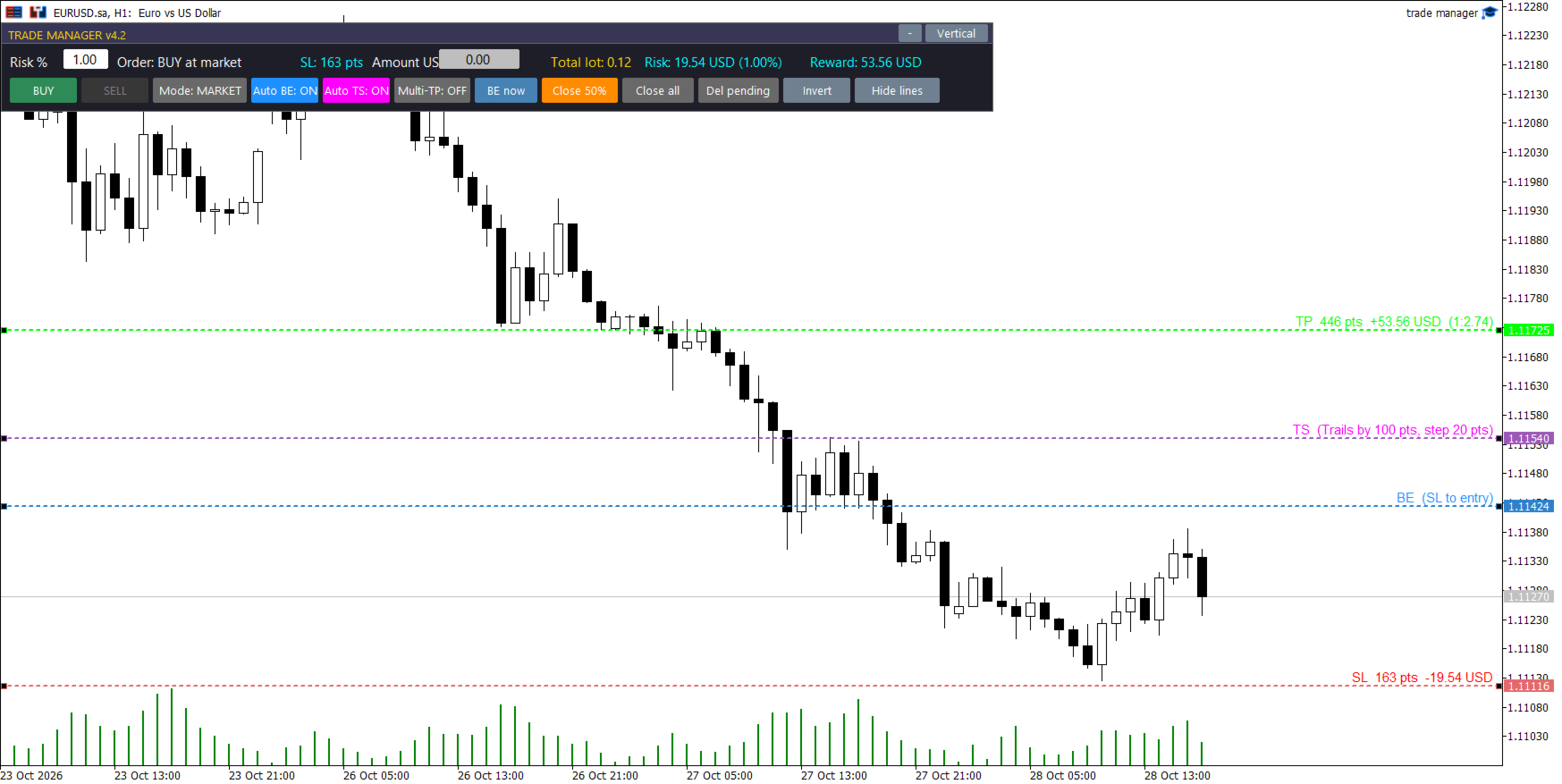
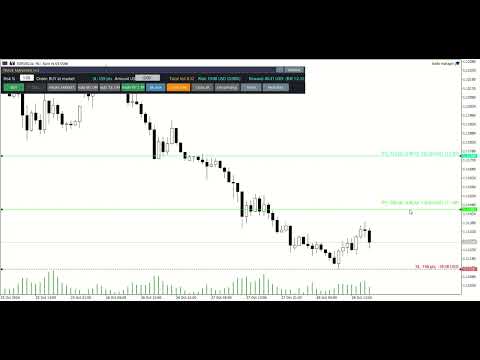
Olvídese de los cálculos manuales de lotes y los errores de ejecución durante periodos de alta volatilidad. Trade Manager v4.22 es un panel de negociación visual de nivel profesional diseñado para ejecutar y gestionar operaciones directamente desde el gráfico mediante un sistema intuitivo de arrastrar y soltar.

Esta herramienta automatiza por completo los cálculos de gestión de riesgos y asume el control técnico de sus posiciones, lo que le permite centrarse al 100% en su estrategia y análisis.

🔥 CARACTERÍSTICAS PRINCIPALES

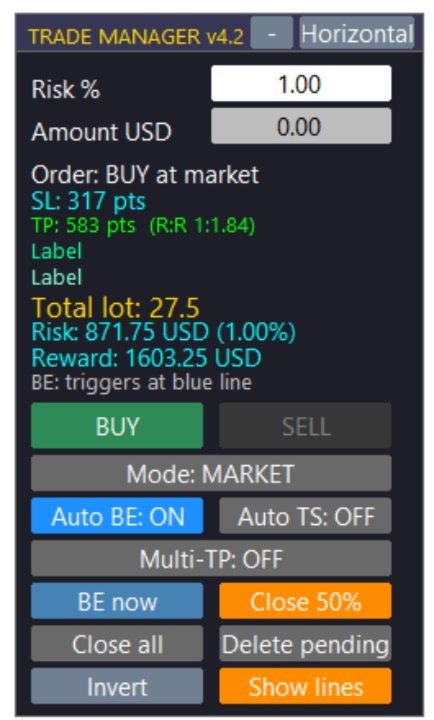
  • Cálculo dinámico del lote: Establezca su riesgo máximo como un porcentaje de su saldo/patrimonio o como una cantidad fija. Al arrastrar la línea de Stop Loss (SL) en el gráfico, el panel calcula instantáneamente el tamaño exacto del lote necesario para respetar su límite de pérdidas.

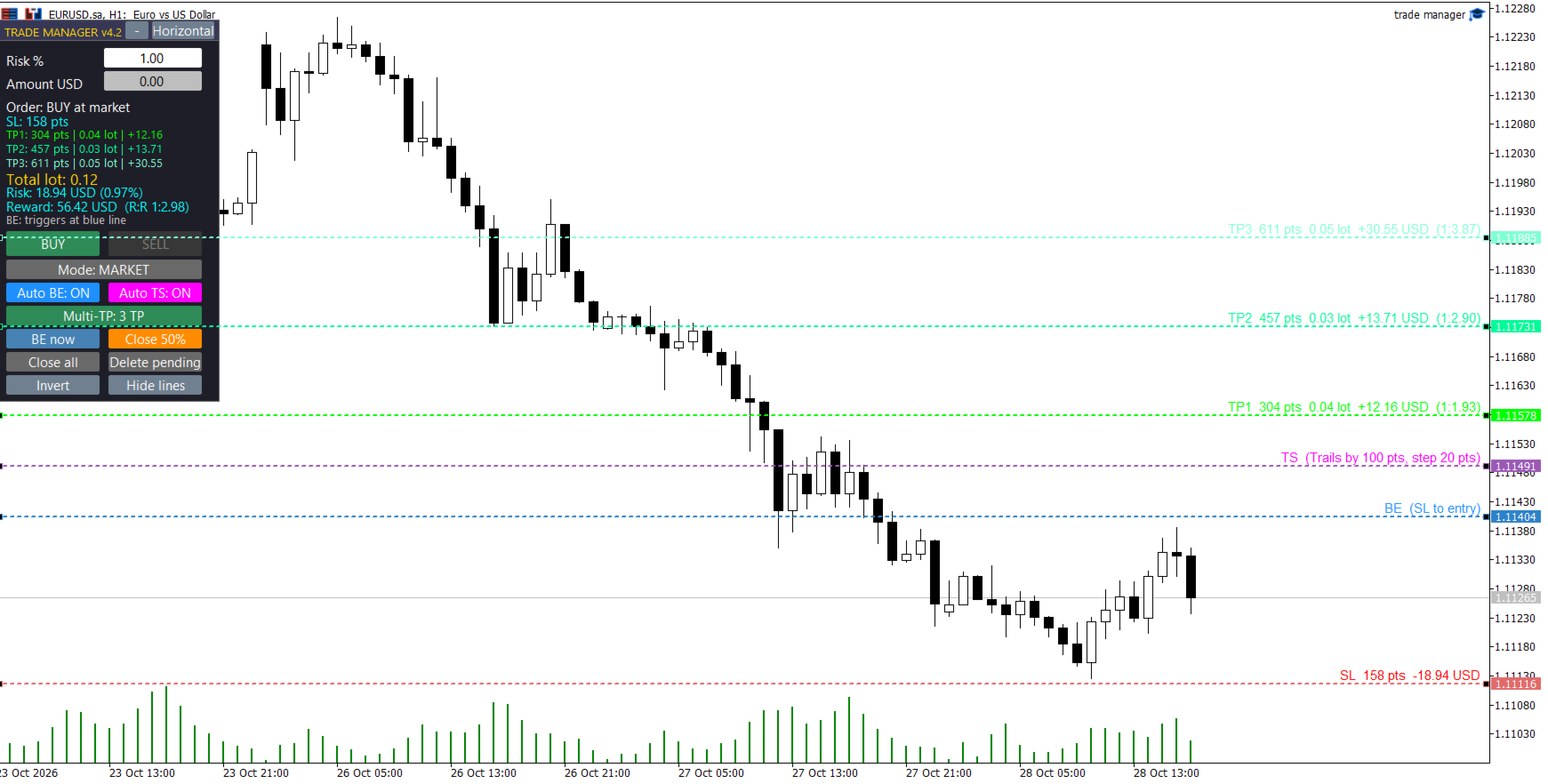
  • Interfaz visual de arrastrar y soltar: Visualice e interactúe con sus niveles clave antes de entrar al mercado. Arrastre fácilmente sus líneas de Stop Loss, Take Profit, Punto de Equilibrio, Trailing Stop y Entrada personalizada.

  • Sistema de toma de ganancias múltiple (Multi-TP): Configure hasta 3 niveles de toma de ganancias simultáneos. El asesor experto divide automáticamente su volumen total de operaciones, asegurando ganancias parciales de forma estructurada.

  • Órdenes pendientes visuales inteligentes: Cambie al modo "PENDIENTE" y arrastre la línea de entrada dorada. El sistema detecta automáticamente si el nivel corresponde a una orden límite o de stop según el precio actual.

  • Punto de equilibrio automático (gestión de riesgo cero): Arrastre la línea azul (BE) hasta su objetivo. En el momento en que el precio toque esta línea, el Asesor Experto (EA) modificará automáticamente su Stop Loss al precio de entrada original.

  • Stop Loss dinámico y visual (Auto TS): Coloca la línea fucsia (TS) en el gráfico para definir el punto de activación. Una vez alcanzado, el EA comenzará a seguir el precio para asegurar las ganancias paso a paso.

  • Gestión del pánico y cierres rápidos: Botones integrados de un solo clic para ejecutar un cierre parcial, mover instantáneamente el stop loss al punto de equilibrio o usar el botón de emergencia para cerrar todas las operaciones.

  • Diseño moderno y discreto: interfaz de usuario plana, tipografía de alta legibilidad, colores en modo oscuro adaptados para reducir la fatiga visual y opciones para diseños verticales, horizontales o minimizados.

⚙️ PARÁMETROS DE ENTRADA DETALLADOS

1. Configuración de la gestión de riesgos

  • Porcentaje de riesgo: Riesgo de impago como porcentaje de su cuenta (p. ej., 1,0 %).

  • Dinero de riesgo: Cantidad de riesgo fija en la moneda base de su cuenta (Anula el Porcentaje de riesgo si es mayor que 0).

  • Utilice el patrimonio neto: Elija true calcular el riesgo en función del patrimonio neto actual o false del saldo.

  • Bloqueo por exceso de riesgo: Bloquea la ejecución de operaciones si el tamaño mínimo de lote del bróker provocara una pérdida superior al riesgo definido.

  • Porcentaje de tolerancia al riesgo: Porcentaje permitido de deslizamiento/tolerancia para la función de bloqueo de riesgo (valor predeterminado: 10%).

2. Ajustes de líneas y proyecciones

  • Inicializar puntos SL: Distancia predeterminada en puntos para la línea SL al abrir el panel.

  • Inicializar RR 1 / 2 / 3: Riesgo de incumplimiento: Multiplicadores de recompensa para posicionar las líneas TP1, TP2 y TP3.

3. Multi-TP y división de volumen

  • TPs iniciales: Número de Take Profits predeterminados habilitados al cargar el EA (1, 2 o 3).

  • Split2 TP1 (%): Si se utilizan 2 TP, el porcentaje del tamaño total del lote que se cerrará en TP1.

  • Split3 TP1 / TP2 (%): Si se utilizan 3 TP, los porcentajes para cerrar en TP1 y TP2 (el resto va a TP3).

  • Porcentaje parcial: Porcentaje del volumen actual que se cerrará al hacer clic en el botón manual "Cierre parcial" del panel.

  • Comisión por lote: Introduzca aquí la comisión de ida y vuelta de su bróker. El EA calculará y ajustará ligeramente las líneas de Take Profit para garantizar que su beneficio neto coincida con el RR exacto que aparece en pantalla.

4. Punto de equilibrio automático y stop loss dinámico

  • Habilitado: Inicie el EA con la función de punto de equilibrio automático activada.

  • BE Trigger RR: Riesgo predeterminado: Distancia de recompensa para la línea de activación azul de punto de equilibrio.

  • Puntos de compensación BE: Puntos adicionales que se suman al precio de entrada cuando se activa BE (para cubrir swaps o pequeñas comisiones).

  • TS habilitado: Inicie el EA con la función Auto Trailing Stop activada.

  • TS Trigger RR: Riesgo predeterminado: Distancia de recompensa para la línea de activación Trailing Stop fucsia.

  • Puntos de distancia TS: Distancia (en puntos) que el Trailing Stop mantendrá detrás del precio actual.

  • Puntos de paso de TS: Movimiento mínimo de precio necesario para actualizar el nivel de Trailing Stop.

5. Configuración de pedidos pendientes

  • Inicio Pendiente: Si es así true , el panel se carga en modo Pedido Pendiente.

  • Puntos de entrada iniciales: Distancia predeterminada para la línea de entrada visual en relación con el precio actual.

  • Tiempo de expiración pendiente (minutos): Tiempo de expiración para las órdenes pendientes en minutos (0 = nunca expira).

6. Sistema e interfaz

  • Número mágico: Identificador único para evitar conflictos con otros asesores expertos.

  • Desviación: Deslizamiento máximo permitido en puntos.

  • Diseño horizontal: Configúrelo true para cargar el diseño de panel horizontal de forma predeterminada.

  • Panel X / Panel Y: Coordenadas de pantalla predeterminadas para la interfaz de usuario.

📌 RECOMENDACIONES Y NOTAS

  • Tipo de cuenta: Se recomienda encarecidamente una cuenta Raw Spread o ECN para una ejecución precisa.

  • Compatibilidad: Funciona con todos los pares de divisas, índices, materias primas y criptomonedas disponibles en su bróker.

  • Requisito: El trading automatizado debe estar habilitado en su terminal MetaTrader para que el EA pueda ejecutar operaciones y ajustar los stops.
추천 제품
Spread Control 은 MetaTrader 5 차트에서 현재 스프레드와 그 변화를 직접 확인할 수 있는 컴팩트한 인디케이터입니다. 기능 실시간 현재 스프레드 표시 최근 값의 기록을 보여주는 스프레드 변화 차트 표시 기간의 LOW / AVG / HIGH 계산 스프레드 상태에 따른 색상 표시: 정상 수준; 경고 수준; 위험 수준 현재 스프레드 값의 시각적 스케일 현재 Bid 및 Ask 표시 시장 활성 상태 표시: LIVE — 호가가 변경되고 있음; OFFLINE — 설정된 시간 동안 Bid와 Ask가 변경되지 않음 현재 심볼 및 타임프레임 표시 Full 및 Compact 모드 설정 Position X — 패널의 초기 가로 위치. Position Y — 패널의 초기 세로 위치. Refresh Interval — 인터페이스 새로고침 주기. Spread Sampling Interval — 스프레드 값을 기록에 저장하는 간격. Spread History Size — 저장되는 스프레드 기
MQL5 블로그: https://www.mql5.com/en/blogs/post/761446 MT4 버전: https://www.mql5.com/en/market/product/136790 MT5 버전: https://www.mql5.com/en/market/product/136791 Time Wizard는 속도, 타이밍, 실행 제어 기능을 하나의 깔끔한 대시보드에서 필요로 하는 트레이더를 위해 설계된 전문 트레이딩 어시스턴트입니다. 이 Expert Advisor는 이벤트 기반 트레이딩, 예약 실행, 빠른 반자동 주문 관리 기능을 제공합니다. 주문을 미리 준비하고, 정확한 실행 시간을 지정하고, 계층형 대기 주문을 설정하고, 손절매 및 이익 실현으로 위험을 관리하고, 차트의 간편한 인터페이스에서 모든 것을 모니터링할 수 있습니다. 경제 이벤트, 개장 시간, 돌파 시점 또는 사용자 지정 일정 등 어떤 시점을 기준으로 거래하든 Time Wizard는 체계적이고 규율 있는 실행을
Orion Telegram Notifier Bot  allows the trader to receive trade notifications in his Telegram whenever a position is opened or closed. The EA sends notifications showing the Symbol, Magic Number, Direction, Lot (Volume), Entry Price, Exit Price, Take Profit, Stop-Loss and Profit of the position. How to setup Orion Telegram Notifier? Open Telegram and Search for “BotFather” Click or Type “/newbot” Create a nickname and username (Example: nickname: MT5trades   - username: MT5TelegramBot) *The use
Protected profit это логическое продолжение проекта Equity monitor. Исправлены недочёты и внесены дополнительные моменты. В данном продукте разработан процентный  Traling stop, как на отдельную позицию, так и на дневную прибыль в целом. Есть возможность закрыть позицию по заданному проценту убытка, а так же можно закрыть все позиции по проценту дневной прибыли. Настройки просты и понятны.  Например: Риск на позицию 1% Позиция закроется если процент убытка превысит 1%. Traling 3% допустимое сниже
Quantum Terminal Pro — Institutional Crypto Order Flow & Heatmap Are you trading crypto in MetaTrader 5 blindly? Standard MT5 brokers provide synthetic CFD prices and localized "tick volume" that completely ignore the real cryptocurrency market. To make profitable decisions, you need to see the global picture: real traded volumes, order flow, cumulative volume delta (CVD), and liquidity walls from the major spot and futures exchanges. Quantum Terminal Pro (QTP) is a revolutionary SaaS-bridged ut

이 도구를 사용하면 한 번의 클릭으로 열려 있는 모든 주문을 닫을 수 있습니다. "모두 닫기"를 클릭하기만 하면 됩니다. 수익성 있는 주문만 청산하려면 "수익성 있는 청산" 버튼을 클릭하세요. 클릭한 후 모든 변동 주문이 청산됩니다. 변동 손실이 있는 주문만 종료하려면 "손실 가능 청산" 버튼을 클릭하세요. 클릭한 후 변동 손실이 있는 모든 주문이 종료됩니다. 이 도구는 1년 동안 테스트를 거쳤으며 원클릭 포지션 청산 기능이 매우 완벽합니다. 포지션 청산은 적시에 이루어지며 지연 범위는 작습니다. 물론 지연은 귀하가 속한 지역 및 네트워크 환경과도 관련이 있습니다. 이에 주의하시기 바랍니다. 과거 데이터의 백테스트 과정에서 도구는 더욱 완벽하게 작동했으며 100개의 주문을 모두 마감하는 데 최대 0.495초밖에 걸리지 않았습니다. 실제 거래 과정에서 나의 최대 포지션 주문 수는 26개에 불과했고, 모든 포지션이 청산되는 데 걸리는 시간은 1.28초였습니다.
# Risk Management EA - User Manual ## Table of Contents 1. [ Overview ]( #overview ) 2. [ Installation ]( #installation ) 3. [ Features ]( #features ) 4. [ Input Parameters ]( #input-parameters ) 5. [ User Interface ]( #user-interface ) 6. [ How to Use ]( #how-to-use ) 7. [ Advanced Features ]( #advanced-features ) 8. [ Troubleshooting ]( #troubleshooting ) --- ## Overview **Risk Management EA** is a professional trading tool designed to help traders manage risk, split orders, and aut
Super Trend Smart
SMART2TRADER SOLUCOES DE SOFTWARES INTELIGENTES LTDA
5 (1)
Desenvolvido por smart2trader.com Smart Super Trend é um indicador avançado de identificação de tendências, desenvolvido para detectar com alta precisão movimentos de alta e baixa do mercado . O indicador Super Trend da Smart utiliza algoritmos adaptativos combinados com filtros de volatilidade , proporcionando sinais mais limpos e alinhados à dinâmica real do preço. Conta ainda com um sistema inteligente de monitoramento que notifica, em tempo real, sempre que ocorre uma mudança de tendência ,
FREE
CoioteOscilator
Alexandre Moraes De Souza Lima
CoioteOscilator é um rastreador de tendência e padrões de estruturas gráficas. O Indicador é composto de 3 elementos. oscilador principal lento: histograma com nível de 0 até 50 e 4 cores, 2 compradoras, de 0 até 30 e acima de 30 e duas vendedoras, de 0 até 30 e acima de 30.   oscilador principal  rápido: linha magenta com nível de -50 até 50. gatilho:  linha amarela com nível de -50 até 50. O  oscilador principal lento  é um rastreador de tendência primaria. O  oscilador   principal  rápido é u
Manual Trade Panel EA MT5
Juvenille Emperor Limited
5 (2)
수동 무역 패널 EA MT5 는 MT5에서 찾을 수 있는 가장 간단하고 사용하기 쉬운 무역 패널입니다. 추가 창이나 패널을 열 필요 없이 한 표면에 모든 옵션과 기능이 있습니다. 그것은 인터페이스를 사용하기 매우 편리한 하나의 주문 관리, 위험 계산기, 부분 폐쇄 및 계정 보호 유틸리티 모두입니다! 수동 거래 패널 EA MT5 를 사용하면 기존 수동 거래 방법보다 몇 배 더 빠르고 정확하게 거래할 수 있으며 거래 결정에 더 많은 시간과 더 명확한 정신을 집중할 수 있습니다. 계정 보존은 우리의 최우선 순위이므로   Manual Trade Panel EA MT5 는 또한 계정 이익을 얻거나 중지한 후 모든 미결 주문을 닫고 보류 중인 모든 주문을 삭제하며 EA가 첨부된 모든 터미널 차트를 닫을 수 있는 훌륭한 계정 보호 유틸리티입니다. 손실 자산에 도달했습니다. 이것은 이익 조건에서 매우 편리할 수 있으며 자산이 원하는 손절매 수준 아래로 떨어질 때 추가 손실로부터 거래 계정을
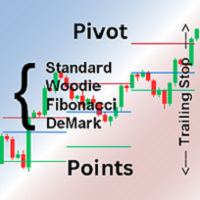
Pivot points are calculated based on the previous day's values ​​- according to the most common formulas on the web - and serve as an important tool for many traders, especially in day trading. They indicate possible resistance and support where increased buyer and seller interest can be expected. This Pivot-Points-Trailing-Stop-Helper includes my Pivot Points Collection indicator and, based on your settings, gradually moves the SL to the corresponding pivot levels as soon as the current price
Boleta de negociação, adiciona automáticamente as ordens Take Profit e Stop Loss quando excutada uma ordem de compra ou venda. Ao apertar as teclas de atalho (A, D, ou TAB), serão inseridas duas linhas de pre-visualização, representando as futuras ordens de take profit (azul) e stop loss (vermelho), as quais irão manter o distanciamento especificado pelo usuário. Ditas ordens só serão adicionadas ao ser executada a ordem inicial. Ao operar a mercado, as ordens pendentes de take profit, e stop lo
Overview : The Advanced News Trading Panel is a versatile tool designed for traders who rely on news-based trading strategies. This Expert Advisor (EA) provides an intuitive graphical interface that allows users to quickly set up pending orders and manage risk with ease. With the ability to automatically place Buy/Sell Stop orders based on your pre-set stop order distance from the bid/ask price, stop-loss and take-profit levels, the EA allows for precision trading during high-volatility news eve
T Manager for Price action Traders
Haidar Lionel Haj Ali
4.5 (10)
T Manager, the ultimate trade management solution designed by traders for traders. If you are searching for a simple and efficient trade panel, trade manager, or trade assistant, you are at the right place.   The market contains a diverse number of those tools , but this one is designed by traders for traders . I designed this tool, and I am using it daily. Take my advice and stop buying tools blended with un-useful features that you will never use,   T Manager provides you with the essential y
Real-Time Spread Display Tool A   real-time spread display tool   is a specialized software or application designed to provide traders and investors with instant, live data on the   spread —the difference between the bid price (the price at which buyers are willing to purchase an asset) and the ask price (the price at which sellers are willing to sell it)—for various financial instruments. This tool is critical in markets such as forex (FX), stocks, futures, and cryptocurrencies, where price f
Binance Copier allows to seamlessly and easily copy trades between MT5 and Binance Futures! The tool's main feature is to replicate trades and all available orders between MetaTrader 5 and Binance that can be applied to both Expert Advisors and manually opened ones. Before purchase please familiarize with comparison between MT5 to Binance and Binance Copier Key Features: Bidirectional Copying - MT5 → Binance (Master Mode): Copy your MT5 trades to Binance - Binance → MT5 (Slave Mode): Mirror Bi
Smart Order Block AI Pro for MetaTrader 5 Smart Order Block AI Pro is a professional MT5 custom indicator built for traders who want a clean, structured and visually advanced way to read institutional-style price action directly on the chart. It is designed to detect high-probability order block zones, market structure changes, liquidity sweep areas, mitigation zones, breaker block behavior and complete trade planning levels with Entry, Stop Loss and Take Profit targets. This indicator is not a
Auto Stop Loss and Target Enforcer watches every new position. If one opens without a stop loss or a take profit, it adds them a few seconds later. It covers trades opened by hand and trades opened by other Expert Advisors. How stops and targets are set - Stop loss: a multiple of the typical market move (Average True Range), a fixed number of pips, a set share of the account, or beyond the nearest support or resistance level. - Take profit: a multiple of the typical market move, a fixed number
MT5용 암호화폐 외환 지표 "WPR with 2 Moving Averages" (리페인트 없음) - WPR 자체는 스캘핑에 가장 적합한 오실레이터 중 하나입니다. - "WPR and 2 Moving Averages" 지표는 WPR 오실레이터의 빠른 이동평균과 느린 이동평균을 함께 보여줍니다. - 이 지표는 가격 조정을 매우 빠르게 감지할 수 있도록 도와줍니다. - 매개변수를 통해 간편하게 설정할 수 있으며, 모든 시간대에 사용 가능합니다. - 매수 및 매도 진입 조건은 그림에서 확인할 수 있습니다. - WPR MA 교차 시 PC 및 모바일 알림 기능 제공. 매수 신호 조건 예시: (1) 빠른 이동평균이 느린 이동평균을 상향 돌파하고 WPR 값이 -50 미만이면 매수 진입. (2) WPR 값이 -20 이상으로 과매수 영역에 진입하면 매수 포지션 청산. 매도 신호 조건 예시: (1) 빠른 이동평균이 느린 이동평균을 하향 돌파하고 WPR 값이 -50 이상이면 매도 진입. (2) -
BerelzBridge
Barend Willem Van Den Berg
BerelzBridge Pro 계정 정보를 포함한 모든 시간대를 위한 MT5-to-JSON 데이터 브리지입니다. 개요 BerelzBridge Pro는 실시간 시장 데이터를 디스크의 JSON 파일로 내보내는 MT5 인디케이터입니다. 매수/매도 호가, 스프레드, 틱 볼륨, 일간 통계, 계정 정보 및 9개 모든 시간대에 대한 OHLCV 봉을 기록합니다. 파일은 구성 가능한 간격(기본값 2초)으로 업데이트됩니다. 이 인디케이터는 동일 차트에서 Expert Advisors와 충돌 없이 함께 실행됩니다. DLL, WebRequest 또는 기타 외부 종속성을 사용하지 않습니다. 여러 인스턴스를 다른 차트에서 실행하여 동시에 여러 종목의 데이터를 내보낼 수 있습니다. 내보내는 데이터 전체 소수점 정밀도를 갖는 매수/매도 호가 포인트 단위의 스프레드 현재 봉의 틱 볼륨 일간 고가, 저가 및 시가 M1, M5, M15, M30, H1, H4, D1, W1 및 MN1에 대한 OHLCV 봉 시간대당 최
One Click Trader  is a tool designed for MetaTrader 4 platform, which enables you to take your trading to the next level. It enables you to open, manage and close your trades in simple an efficient way by just one click of your mouse button. "-"   ,  "+"  change OCT window size  Up arrow minimizes the OCT panel Down arrow maximizes the OCT panel Right arrow displays the next panel with additional features Left arrow hides the panel with additional features Red  SELL  button enables you to open s
Blade Position Manager Pro – MT5 Trade Management Utility Take Control of Your Trades with One Professional Dashboard Blade Position Manager Pro is a MetaTrader 5 trade management utility designed to help traders manage open positions, control risk, protect floating profits, and simplify everyday trading operations. Whether you trade Gold (XAUUSD), Forex, indices, or other supported instruments, Blade Position Manager Pro provides practical tools for managing your trades from a compact, easy-to-
RiskPanel은 MetaTrader 5용 위험 기반 랏 계산기이자 원클릭 거래 패널로, 하나의 규칙에 맞춰 만들어졌습니다. 선택한 것 이상으로 위험을 지지 않는다 . 위험(계좌의 비율 또는 고정 금액)과 스톱을 선택하면, RiskPanel은 스톱에 도달했을 때 손실이 선택한 금액 이하가 되도록 랏을 계산하고, 브로커의 거래량 단위에 맞춰 내림하여 클릭하기 전에 차트에 보여 줍니다. 이후 BUY 또는 SELL을 누르면 그 스톱(원하면 이익 실현 포함)으로 거래가 열립니다. 무엇을 거래할지 결정하지 않으며 신호도 주지 않습니다. 계좌를 보호하는 방법 스톱에서 계산한 랏. 위험과 스톱 거리를 설정합니다. 실제 진입 가격과 실제 스톱 가격 사이의 손실은 근사 공식이 아니라 터미널 자체의 손익 계산으로 산출되므로, 외환, 금속, 지수, 모든 계약 크기와 모든 계좌 통화에 맞습니다. 항상 내림. 랏은 브로커의 거래량 단위에 맞춰 내림되며 절대 올림되지 않습니다. 그 뒤 정확한 랏으로 다시
SystemLiveMxPips
Harold Alonso Hernandez
Automatice sus estrategias comerciales con nuestra sencilla herramienta de creación de estrategias "similar a un rompecabezas".   Cree fácilmente estrategias que operen por usted en modo de piloto automático.   También puede cargar estrategias creadas por otras personas, como la clásica   Estrategia Martingala,   para usarla como muestra para su propia estrategia. Características clave Cree su estrategia a través de funciones simples de arrastrar y soltar, sin necesidad de conocimientos de pro
Have you ever take a long time to watch a Symbol when the network link is not good ? Have you ever wait for a long time when you switch chart between different Symbols or different TimeFrames ? If you do long-term backtesting , Have you ever to be downloaded datas for a long time ? Yes, If there is no data in the system, those will happen.  1. What is this: Download all the Symbol data in Market Watch to the system. PS: This is not outputting data to Files. This Link go to Demo version: https:/
Premium Trade Panel Pro MT5 is a professional trading utility designed to assist traders in executing and managing trades efficiently within the MetaTrader 5 platform. The panel provides a convenient dashboard directly on the chart, allowing traders to open, manage, and control positions quickly while maintaining proper risk management. This tool is suitable for manual traders who require faster trade execution and efficient position management. One-Click Trading Open BUY or SELL positions inst
https://youtu.be/OKOJXSCGY-4Per2 Trade Manager — Manual Trading Panel for MetaTrader 5 Per2 Trade Manager is a trading utility designed for manual order execution, risk management, and position management directly on MetaTrader 5 charts. The tool helps traders manage their trades through an intuitive on-chart interface. Key Features Place market and pending orders directly from the chart. Set Stop Loss and Take Profit using interactive price lines. Calculate position size based on a predefined m
SIMBA Manual Assistant Pro You Already Know How to Enter. Now Manage the Trade With a Plan. You already have a trading strategy. Maybe you trade support and resistance. Maybe breakouts, price action, moving averages, market structure, supply and demand, or something completely different. You know how you want to enter. But what happens after you enter? Should you move your stop-loss to break-even? Should you take partial profit? Should you let the trade run? Is that pullback normal, or is the m
​Notification Spy Protector is a MetaTrader 5 Expert Advisor (Utility) that monitors your trading activity and sends real-time alerts to your mobile device (via MT5 Push) and/or Telegram. Equipped with a solid and reliable Account Protector, this utility is fully compatible and highly recommended for Prop Firm trading to safeguard your accounts from violating drawdown limits. It also provides advanced transaction filters and a clean on-chart dashboard. Never miss a trade. Protect your account f
ExecutionProof Auditor
Muhammad Naveed Hassan
모든 스프레드 급등, 슬리피지, 브로커 불일치를 포착하여 타임스탬프가 찍힌 내보내기 가능한 증거로 남깁니다. 개요 ExecutionProof Auditor는 MetaTrader 5용 패시브 모니터링 및 증거 기록 유틸리티입니다. 전체 심볼 관심목록에 걸쳐 실제 체결 품질—스프레드 동향, 주문 슬리피지, 브로커가 광고하는 스프레드와 실제 스프레드의 차이—를 지속적으로 추적하며, 의미 있는 모든 편차를 타임스탬프가 찍힌 내보내기 가능한 증거로 전환합니다. 이는 브로커 분쟁을 뒷받침하거나, 프랍펌(prop firm)의 체결 주장을 검증하거나, 혹은 단순히 자신의 실제 거래 비용을 파악하는 데 사용할 수 있습니다. ExecutionProof Auditor는 단 한 번도 주문을 체결, 수정, 청산하지 않습니다. 오직 관찰자일 뿐입니다. 관찰하고, 측정하고, 기록합니다—따라서 보고되는 모든 숫자는 추정이나 자동화 없이, 실제 계정에서 일어난 그대로입니다. 주요 기능 - 실시간 다중 심
이 제품의 구매자들이 또한 구매함
Trade Assistant MT5
Evgeniy Kravchenko
4.43 (216)
거래당 위험 계산, 라인을 사용한 손쉬운 신규 주문, 부분 청산 기능을 통한 주문 관리, 7가지 유형의 트레일링 스탑 및 기타 유용한 기능을 제공합니다. 추가 자료 및 지침 설치 지침   -   애플리케이션 지침   라인 기능       - 차트에 개시선, 손절매, 차익실현을 표시합니다. 이 기능을 사용하면 새로운 주문을 쉽게 하고 개봉 전에 추가 특성을 볼 수 있습니다. 위기 관리       -       위험 계산 기능은 설정된 위험과 손절매 주문의 크기를 고려하여 새 주문의 볼륨을 계산합니다. 이를 통해 손절매 크기를 설정하고 동시에 설정된 위험을 존중할 수 있습니다. 로트 계산 버튼 - 위험 계산을 활성화/비활성화합니다. 필요한 위험 값은 위험 필드에 0에서 100 사이의 백분율 또는 예금 통화로 설정됩니다. 설정 탭에서 위험 계산 옵션을 선택합니다. $ 통화, % 잔액, % 지분, % 자유 마진, % 사용자 정의, % AB 이전 일, % AB 이전 주, % AB 이전
Trade Manager EA에 오신 것을 환영합니다. 이 도구는 거래를 보다 직관적이고 정확하며 효율적으로 만들기 위해 설계된 궁극적인 리스크 관리 도구 입니다. 단순한 주문 실행 도구가 아닌, 원활한 거래 계획, 포지션 관리 및 리스크 제어를 위한 종합 솔루션입니다. 초보자부터 고급 트레이더, 빠른 실행이 필요한 스캘퍼에 이르기까지 Trade Manager EA는 외환, 지수, 상품, 암호화폐 등 다양한 시장에서 유연성을 제공합니다. Trade Manager EA를 사용하면 복잡한 계산은 이제 과거의 일이 됩니다. 시장을 분석하고 진입, 손절 및 익절 수준을 차트의 수평선으로 표시한 후 리스크를 설정하면, Trade Manager가 이상적인 포지션 크기를 즉시 계산하고 SL 및 TP 값을 실시간으로 표시합니다. 모든 거래가 간편하게 관리됩니다. 주요 기능: 포지션 크기 계산기 : 정의된 리스크에 따라 거래 크기를 즉시 결정합니다. 간단한 거래 계획 : 진입, 손절, 익절을 위한
Local Trade Copier EA MT5
Juvenille Emperor Limited
4.94 (149)
Local Trade Copier EA MT5는 동일한 Windows 컴퓨터 또는 Windows VPS에서 여러 MetaTrader 5 계정 간에 거래를 복사하고 관리할 수 있는 빠르고 유연한 거래 복사기입니다. 로컬 거래 동기화 기능과 함께 Receiver 측에서 로트 크기, 리스크 관리, 거래 필터링, 심볼 매핑, 거래 관리 및 계정 보호를 독립적으로 설정할 수 있습니다. Transmitter와 Receiver 터미널을 약 1분 안에 설정하고, 동일한 브로커 또는 서로 다른 브로커의 계정 간에 수동 거래 또는 EA 거래를 복사할 수 있습니다. 적절한 조건에서는 로컬 MetaTrader 터미널 간의 거래 정보가 0.5초 이내 에 동기화될 수 있습니다. 실제 체결 속도는 브로커 지연 시간, 네트워크 상태, 컴퓨터/VPS 성능 및 터미널 부하에 따라 달라집니다. 구매 전에 무료 데모를 사용해 보세요 MT5 데모 계정에서 Local Trade Copier EA MT5의 모든 기능을
Telegram to MT5 Multi-Channel Copier   는 Telegram 및 Discord 채널의 트레이딩 시그널을 MetaTrader 5로 자동 복사합니다. 봇도, 브라우저 확장도, 수동 복사도 필요 없습니다. Telegram이나 Discord에 시그널이 도착하면 EA가 몇 초 안에 터미널에서 주문을 실행합니다. 그리고 채널을 복사하기 전에, 내장 백테스터가 그 채널이 내 계좌에서 어떤 결과를 냈을지 보여줍니다. 제품은 두 가지 구성 요소로 이루어집니다: Telegram 채널을 수신하는 Windows 애플리케이션과, MT5 터미널에서 시그널을 실행하는 본 EA입니다. MT4 버전도 제공됩니다   여기 . 설정 가이드와 앱 다운로드:   https://www.mql5.com/en/blogs/post/768988 텔레그램 시그널 채널을 백테스트하는 방법 을 확인하세요. 현재 가격은 향후 인상될 예정입니다. 작동 방식 앱은 여러분 자신의 Telegram 계정으로 연결되므
Strategy Ledger Pro
Abdullah Uygar Tuna
5 (14)
이제 한국어로 이용할 수 있습니다. Strategy Ledger Pro 는 MetaTrader 5용 읽기 전용 계좌 분석 패널입니다. 계좌 성과를 전문가 어드바이저(EA), 전략, 심볼, 매직 넘버별로 나누어 각각이 실제로 얼마나 기여하는지 보여줍니다. 패널은 11개 언어를 지원합니다: English, Français, Deutsch, Español, Italiano, Português, Русский, Türkçe, 中文, 日本語, 한국어. 데모를 다운로드하기 전에. Market은 모든 유료 제품의 데모를 전략 테스터에서만 실행합니다. 이 패널은 사용자 자신의 계좌 거래를 분석하는데, 전략 테스터에는 읽을 계좌 기록이 없으므로 데모는 빈 패널로 열리고 그 사실을 표시합니다. 이는 데모 방식에 따른 것이며 제품의 제약이 아닙니다. 이 설명의 동영상에서 실계좌에서 작동하는 패널을 확인할 수 있습니다. 모든 기능을 설명한 자세한 매뉴얼 (영문)과 토론 및 공지를 위한 AureusAI
내 거래 규칙에 맞춰 Telegram 신호 복사 Telegram to MT5 Signal Trader 는 공개 및 비공개 Telegram 채널과 그룹의 텍스트 기반 거래 신호를 MetaTrader 5로 자동 복사합니다. 하나의 데스크톱 앱에서 여러 신호 제공자와 MT5 계좌를 관리하고, 제공자마다 위험 관리 및 거래 설정을 개별적으로 지정 할 수 있습니다. 신호 복사에는 Telegram 봇이나 API 설정이 필요하지 않습니다. 전화번호 또는 QR 코드로 본인의 Telegram 계정에 로그인한 후, 이미 가입한 채널이나 그룹을 선택하면 됩니다. 봇을 만들거나 Telegram API 토큰, API ID 또는 API 해시를 입력할 필요가 없습니다. 포지션 크기를 선택하고, 여러 익절 목표에 청산 물량을 배분하며, 손익분기점 이동과 트레일링 스톱을 자동화하세요. 제공자의 신호를 따르면서도 실제 거래 방식은 직접 설정할 수 있습니다. 이 제품은 MT5 Expert Advisor와 필수 Win
TradePanel MT5
Alfiya Fazylova
4.88 (170)
Trade Panel은 다기능 거래 도우미입니다. 이 애플리케이션에는 50개 이상의 수동 거래 기능이 포함되어 있으며 대부분의 거래 작업을 자동화할 수 있습니다. 앱 사용 설명서: https://www.mql5.com/en/blogs/post/756482 데모 계정용 앱 체험판: https://www.mql5.com/en/blogs/post/750865 앱 설치 방법: https://www.mql5.com/en/blogs/post/756239 시각 모드에서 앱 테스트 방법: https://www.mql5.com/en/blogs/post/770277 VPS MetaTrader에 앱 설치 방법: https://www.mql5.com/en/blogs/post/770190 거래. 한 번의 클릭으로 거래를 수행할 수 있습니다: 리스크 자동 계산과 함께 예약 주문 및 포지션 열기. 한 번의 클릭으로 여러 주문 및 포지션 열기. 주문 그리드 열기. 예약 주문 및 포지션을 그룹별로 닫기. 포지션
================================================================================ POC BREAKOUT - V20.72. Full Professional Grade Toolkit ================================================================================ POC Breakout is a full MetaTrader 5 trading dashboard for discretionary traders who want breakout signals, Point of Control (POC) context, volume profiles, order flow, market structure, news, alerts, and advanced trade planning in one professional workspace. Attached directly to you
Dealer's Panel No signal decides anything here — a hand does. One click, and the panel calculates what's underneath: lot size from risk, target from a 30-step balance ladder that remembers exactly how far an account has climbed. Toggle between market and pending without touching an input field. Set a stop, and the take-profit can write itself — a fixed share of the balance, translated into price with no arithmetic left for the trader to get wrong. One trade live at a time; it won't let a seco
Farmed Hedge Yield Farming | All Markets (Manual - Hybrid - Semi/Automated EA) VERIFIED TRADING RESULTS - Farmed Hedge Yield Axi Copy:  https://www.mql5.com/en/signals/2356376 - Farmed Hedge Yield Exn Copy:   https://www.mql5.com/en/signals/2356404 - Farmed Hedge Yield V Copy:  https://www.mql5.com/en/signals/2357156 IMPORTANT NOTICE: FarmedHedge is a MANUAL-FOCUSED TRADING UTILITY ,not a fully automated EA. Results shown on this Signal include manual trades and overall strategic management.
VirtualTradePad PRO SE MT5 — MetaTrader 5용 전문 트레이딩 컨트롤 센터 VirtualTradePad PRO SE 는 MetaTrader 5 용 프리미엄 차트 기반 트레이딩 패널이자 거래 관리 워크스페이스입니다. 더 빠른 주문 실행, 더 명확한 포지션 관리, 구조화된 거래 관리, 시각적인 레벨 계획, 그리고 차트에서 직접 작업하는 전문적인 워크플로를 원하는 트레이더를 위해 설계되었습니다. 이 제품은 단순한 BUY / SELL 패널이 아닙니다. PRO SE는 수동 트레이딩, 예약 주문, 포지션 관리, 부분 청산, 바스켓 손익 관리, 평균가 레벨, ATM 규칙, 신호 모니터링, 실시간 시장 정보, 전략 테스터 (Strategy Tester) 워크플로, VPS 중심 운용을 하나의 연결된 인터페이스로 통합합니다. MT4 버전 | 전체 설명 및 스크린샷 | 구입 방법 | 설치 방법 | 로그 파일을 얻는 방법 | 테스트 및 최적화 방법 | Expforex의 모든
Trade copier MT5
Alfiya Fazylova
4.61 (57)
Trade Copier는 거래 계정 간의 거래를 복사하고 동기화하도록 설계된 전문 유틸리티입니다. 복사는 공급자의 계정/단말기에서 동일한 컴퓨터 또는 vps에 설치된 수신자의 계정/단말기로 발생합니다. 구매하기 전에 데모 계정에서 데모 버전을 테스트할 수 있습니다. 데모 버전 여기 . 전체 지침 여기 . 주요 기능 및 이점: 복사기는 "МТ5> МТ5", "МТ4> МТ5", "МТ5> МТ4" 복사를 지원합니다. 복사기는 데모 계정 > 실 계정, 실 계정 > 데모 계정, 데모 계정 > 데모 계정 및 실제 계정 > 실 계정 복사를 지원합니다. 복사기는 읽기 전용 암호가 적용된 투자자 계정에서 복사를 지원합니다. 하나의 공급자 터미널은 여러 수신 터미널로 트랜잭션을 보낼 수 있고 하나의 수신 터미널은 여러 공급자 터미널에서 트랜잭션을 수신할 수 있습니다. 복사기는 귀하 또는 귀하의 고문이 거래하는 동일한 터미널에서 작동할 수 있습니다. 높은 복사 속도(0.5초 미만). 복사기에는 간편
MT5 to Telegram Signal Provider 는 사용하기 쉽고 완전히 커스터마이즈 가능한 유틸리티로, 특정 신호를 Telegram의 채팅, 채널 또는 그룹으로 전송하고, 귀하의 계정을 신호 제공자 로 만듭니다. 경쟁 제품과 달리 DLL 임포트를 사용하지 않습니다. [ 데모 ] [ 매뉴얼 ] [ MT4 버전 ] [ 디스코드 버전 ] [ 텔레그램 채널 ]  New: [ Telegram To MT5 ] 설정 단계별 사용자 가이드 가 제공됩니다. 텔레그램 API에 대한 지식은 필요하지 않습니다; 개발자가 제공하는 모든 것이 필요합니다. 주요 특징 구독자에게 보낸 주문 상세 정보를 커스터마이즈할 수 있습니다. 예를 들어, 브론즈, 실버, 골드와 같은 계층 구독 모델을 만들 수 있습니다. 골드 구독에서는 모든 신호를 받습니다. id, 심볼, 또는 코멘트로 주문을 필터링할 수 있습니다. 주문이 실행된 차트의 스크린샷이 포함됩니다 보낸 스크린샷에 닫힌 주문을 그려 추가 검증을 합니다
RETAILBERG FOOTPRINT CHART PRO — Order-Flow Workspace for MetaTrader 5 Version 7.00  |  Professional System  |  31 tools  |  One chart A full 150-page illustrated User Manual is included. Please read the full manual to understand this feature packed footprint chart elements and ui. https://www.mql5.com/en/blogs/post/777982 DEMO / STRATEGY TESTER — PLEASE READ FIRST
News Trade EA MT5
Konstantin Kulikov
4.55 (11)
제가 몇 년 동안 사용하고 있는 유용한 로봇을 소개드립니다. 반자동뿐만 아니라 자동 모드로도 사용할 수 있습니다. >>> Chat <<< 본 프로그램에는 경제 캘린더의 뉴스별로 유연한 거래 설정이 포함되어 있습니다. 전략 테스터에서 확인할 수 없습니다. 진짜 작업뿐입니다. 터미널 설정에서 허용된 URL 목록에 뉴스 사이트를 추가해야 합니다. 서비스>설정 > 조언자>를 클릭합니다. "다음 URL에 대해 WebRequest 허용:" 확인란을 선택합니다. 다음을 추가합니다 (공백 삭제): https://  nfs.faireconomy.media 최신 설정 아카이브 다운로드: https://www.mql5.com/en/blogs/post/747929 신호 모니터링: https://www.mql5.com/en/signals/author/test-standart 이 전문가를 위해 고유 설정 세트를 만들 때 블로그의 모든 매개변수에 대한 설명을 참조하십시오: https://www.mql5.
The Patch
Mian Rameez Ali
The Patch It never opens a trade. It walks behind the ones that did. Every open position, every pending order — checked twice a second for the one thing that's easy to forget: a stop, a target. Found bare, it doesn't ask. It writes the missing number in, measured in points from wherever the position began, and moves on to the next. No strategy, no opinion on direction. Just the quiet assumption that nothing should ever sit on the market unprotected — not because someone decided it shouldn't,
Telegram To MT5 Ultra
Mirel Daniel Gheonu
5 (5)
Telegram To MT5 — 시그널 카피어 텔레그램 채널의 트레이딩 콜을 실제 MT5 주문으로 바꿔 드립니다 — 자동으로, 원하는 만큼의 계좌에서, 리스크와 규칙을 완전히 당신의 통제 아래 둡니다. Telegram To MT5는 이미 텔레그램에서 팔로우하고 있는 VIP / 시그널 채널을 당신의 MetaTrader 5 터미널에 연결합니다. 무료 동반 데스크톱 앱이 메시지를 읽고(봇을 차단하는 채널에서도 가능), 이 EA가 당신의 계좌에서 이를 실행합니다 — 당신만의 리스크 설정, 심볼 매핑, 익절(TP) 처리, 세션 및 뉴스 필터를 적용합니다. 이것은 블랙박스 전략이 아니라 시그널 카피어입니다. 어떤 채널을 신뢰할지, 각 거래의 수량과 관리 방식을 당신이 결정합니다. 단계별 설정 및 동반 앱 설치 가이드 작동 방식 [당신의 텔레그램 채널] -> [동반 데스크톱 앱] -> [MT5 + 이 EA] -> 주문 동반 데스크톱 앱(무료, 포함)은 당신의 텔레그램 계정으로 로그인하여 선택한
RS Trade Copier - 진짜 그래픽 인터페이스를 갖춘 초고속 로컬 트레이드 카피어입니다. 계좌번호를 일일이 입력하지 마세요. 200개가 넘는 복잡한 입력 파라미터 목록은 이제 끝입니다. 여러 MT5와 MT4 터미널 간 거래 작업을 복사하기 위한 안정적이고 유연한 도구입니다. 이 도구는 경험 많은 트레이더, 신호 서비스, 개인 투자자 모두에게 적합합니다. 하나 또는 여러 시그널 소스(Provider)에서 하나 또는 여러 리시버(Client)로 트레이딩을 동기화 하여 높은 정밀도와 최소 지연 시간을 제공합니다. 간단한 자동 설정부터 고급 수동 구성까지 지원합니다. 수동 또는 다른 EA로 열린 주문에 간섭하지 않습니다. 모든 작업이 MT5 내부에서 로컬로 처리 되며 외부 서버 의존성 없이 실행됩니다. RS Trade Copier와 다른 솔루션 비교 RS Trade Copier 다른 솔루션 설정 시각적 단계별 마법사. 설정에 약 1분 소요. 200개 이상의 불분명한 입력 매개변수.
다음 업데이트 — 버전 2.52 곧 출시! [신규] 시장 분석 및 트레이딩 워크플로를 향상시키기 위해 설계된 4가지 주요 신규 기능을 기대해 주세요. 트레이딩 요구 사항을 충족하도록 설계된 4가지 새로운 기능으로 시장 분석을 한 단계 더 발전시킵니다. 다음 기능을 소개합니다: 1. TRADE OVERVIEW DASHBOARD 2. CONFLUENCE AT ZONE 3. STRONG & WEAK HIGH/LOW 4. OTE 1. TRADE OVERVIEW DASHBOARD 시장 전체 상황을 더 쉽게 파악할 수 있도록 도와주는 대시보드입니다. 트레이딩 의사결정을 지원하는 가이드를 제공하며, 하나의 화면에서 시장을 분석하고 체계적으로 트레이딩을 계획할 수 있도록 도와줍니다. 멀티 타임프레임 시장 개요 (Multi-Timeframe Market Overview) 시장 방향과 가격 구조를 더욱 명확하게 파악 시장 상황을 빠르게 확인 체계적인 시장 분석 및 진입 계획을 위한 가이드 2. CO
Exp COPYLOT CLIENT for MT5
Vladislav Andruschenko
3.97 (35)
MetaTrader 5용 전문 트레이드 복사기 MetaTrader 용 빠르고 전문적이며 신뢰할 수 있는 트레이드 복사기 입니다. COPYLOT 은 MT4와 MT5 터미널 간의 Forex 거래 복사를 지원하며, Hedge 및 Netting 계좌를 모두 지원합니다. COPYLOT MT5 버전 지원 구성: - MT5 Hedge → MT5 Hedge - MT5 Hedge → MT5 Netting - MT5 Netting → MT5 Hedge - MT5 Netting → MT5 Netting - MT4 → MT5 Hedge - MT4 → MT5 Netting MT4 버전 전체 설명 + DEMO + PDF 구매 방법 설치 방법 로그 파일 확인 방법 테스트 및 최적화 방법 Expforex의 모든 제품 MT4 터미널로도 거래를 복사할 수 있습니다(MT4 → MT4, MT5 → MT4): COPYLOT CLIENT for MT4 COPYLOT은 2개, 3개, 심지어 10개의 터미널과 동시에 작동할
Anchor Trade Manager
Kalinskie Gilliam
5 (8)
Your EAs cannot see each other, but Anchor can. Anchor gives you one place to coordinate your EAs, manage risk, and decide when trading is allowed. It works alongside the trading bots you already use without any changes to them. The Problem One EA opens a trade. Then another starts trading. The next thing you know, you wake up to multiple grids built across your account. Each EA may be doing exactly what it was designed to do, but together they can place far more risk on your account than you in
Trader Evolution
Siarhei Vashchylka
5 (7)
" Trader Evolution " - A utility designed for traders who use wave and technical analysis in their work. One tab of the utility is capable of money management and opening orders, and the other can help in making Elliott wave and technical analysis. Manual (Be sure to read before purchasing) | Version for MT4 Advantages 1. Trading in a few clicks. Immediate and pending orders are available in the panel 2. Money management. The program automatically selects the appropriate lot size 3. Simplifies
Grid Manual MT5
Alfiya Fazylova
4.73 (22)
"Grid Manual"은 주문 그리드 작업을 위한 거래 패널입니다. 이 유틸리티는 보편적이며 유연한 설정과 직관적인 인터페이스를 제공합니다. 그것은 손실을 평균화하는 방향뿐만 아니라 이익을 증가시키는 방향으로 주문 그리드와 함께 작동합니다. 거래자는 주문 그리드를 만들고 유지할 필요가 없으며 유틸리티에서 수행합니다. 거래자가 주문을 시작하는 것으로 충분하며 "Grid Manual"는 자동으로 그를 위한 주문 그리드를 생성하고 거래가 마감될 때까지 그와 동행할 것입니다. 전체 설명 및 데모 버전 여기 . 유틸리티의 주요 기능: 모바일 터미널을 포함하여 어떤 방식으로든 열린 주문과 함께 작동합니다. "제한" 및 "중지"의 두 가지 유형의 그리드와 함께 작동합니다. 고정 및 동적(ATR 표시기 기반)의 두 가지 유형의 그리드 간격 계산과 함께 작동합니다. 오픈 오더 그리드의 설정을 변경할 수 있습니다. 차트에서 각 주문 그리드의 손익분기점 수준을 표시합니다. 각 주문 그리드에 대한 이익
YuClusters
Yury Kulikov
4.93 (43)
Attention: You can view the program operation in the free version  YuClusters DEMO .  YuClusters is a professional market analysis system. The trader has unique opportunities to analyze the flow of orders, trade volumes, price movements using various charts, profiles, indicators, and graphical objects. YuClusters operates on data based on Time&Sales or ticks information, depending on what is available in the quotes of a financial instrument. YuClusters allows you to build graphs by combining da
The product will copy all telegram signal to MT5 ( which you are member) , also it can work as remote copier.  Easy to set up, copy order instant, can work with almost signal formats, image signal,  s upport to translate other language to English Work with all type of channel or group, even channel have "Restrict Saving Content", work with  multi channel, multi MT5 Work as remote copier: with signal have ticket number, it will copy exactly via ticket number. Support to backtest signal. How to s
Floor Watch
Syed Tauqeer Hussain Shah
Floor Watch One number, watched every thirty seconds: how far equity has fallen since the day began — or since its highest point, if it's told to trail the peak instead of the open. Cross the line and it doesn't argue. Every open position closes, every pending order vanishes, and anything that slips through afterward gets shut the moment it appears. Not asked. Removed. The floor holds until the clock turns 5 AM Pakistan time — then, and only then, does the day start over. One rule. No except
파워 캔들 전략 스캐너 - 자체 최적화 다중 종목 설정 찾기 도구 파워 캔들 전략 스캐너는 마켓 워치에 등록된 모든 종목에 대해 파워 캔들 지표와 동일한 자체 최적화 엔진을 동시에 실행합니다. 하나의 패널에서 현재 통계적으로 거래 가능한 종목, 각 종목별 최적의 전략, 최적의 손절매/익절 조합을 알려주며, 새로운 신호가 발생하면 즉시 알림을 전송합니다. 이 도구는 Stein Investments 에코시스템의 일부입니다. 18개 이상의 도구와 함께 당신의 1대1 AI 트레이딩 멘토 Max.  항상 대기 중, 모든 인디케이터를 깊이 있게 이해, 무언가를 차근차근 생각해보고 싶은 순간에 도움을 줍니다.  https://stein.investments 에서 만나보세요 완벽한 시장 모니터링. 종목당 3,000건 이상의 자동 최적화. 2가지 알림 유형. 한 번의 클릭으로 차트를 전환하고 바로 거래하세요. 이 도구가 필요한 이유 대부분의 다중 종목 스캐너는 가격 변동만 보여줍니다. 티커별
EA Auditor
Stephen J Martret
5 (6)
EA Auditor is an independent analysis tool for traders evaluating Expert Advisors and trading signals on MetaTrader 5. It audits backtest reports, reviews posted developer signals, and cross-verifies the two against each other to help traders assess strategies before committing capital. The MQL5 market offers a wide range of Expert Advisors from many developers, with varying approaches, quality, and transparency. EA Auditor provides a consistent, data-driven framework for reviewing them, answer
MT5 Professional Copy Trading System (MT5 버전) MT5 Professional Copy Trading System은 산업급 초고속 LOCAL 트레이드 코피어 로, 전문 트레이더, 시그널 제공자, 기관 수준의 멀티 계정 운용을 위해 설계되었습니다. 일반적인 클라우드 기반 또는 리테일용 복사 도구와 달리, 본 시스템은 동일한 Windows 환경에서 여러 터미널을 실행하는 것을 전제로 한 LOCAL 아키텍처를 기반으로 구축되었습니다. 산업급 LOCAL 아키텍처 LOCAL 설계를 통해 동일한 PC 또는 동일한 Windows VPS 인스턴스에서 실행되는 터미널 간 통신이 최소 지연과 높은 안정성으로 이루어집니다. 불필요한 네트워크 의존성을 줄임으로써 더 빠른 동기화, 정확한 실행, Master와 Receiver 계정 간 높은 일관성을 제공합니다. 이는 전문 거래 환경과 24/7 무인 운용에 적합합니다. Master / Slave / Self-Copier +
Trade Manager DashPlus
Henry Lyubomir Wallace
4.85 (13)
DashPlus 는 MetaTrader 5 플랫폼에서 거래 효율성과 효과를 향상시키기 위해 설계된 고급 거래 관리 도구입니다. 리스크 계산, 주문 관리, 고급 그리드 시스템, 차트 기반 도구 및 성과 분석 등 포괄적인 기능을 제공합니다. 주요 기능 1. 리커버리 그리드 불리한 시장 상황에서 거래를 관리하기 위한 평균화 및 유연한 그리드 시스템을 구현합니다. 거래 회복을 최적화할 수 있도록 전략적인 진입 및 종료 포인트를 제공합니다. 2. 스택 그리드 강한 시장 움직임 동안 포지션을 추가하여 유리한 거래에서 잠재적 수익을 극대화하도록 설계되었습니다. 유리한 시장 트렌드에서 승률을 높이며 거래를 확장할 수 있도록 합니다. 3. 손익(P&L) 라인 차트에서 잠재적인 수익 및 손실 시나리오를 시각적으로 표현합니다. 설정을 조정하고 P&L 라인을 드래그하여 실행 전에 다양한 거래 결과를 평가할 수 있습니다. 4. 바스켓 모드 동일한 심볼에 여러 포지션을 단일 집계 포지션으로 결합하여 관리합니
필터:
리뷰 없음
리뷰 답변