Ichimoku Instrument Dynamic IDD
- Experts
- 버전: 5.0
- 업데이트됨: 4 10월 2026
- 활성화: 5

Ichimoku Instrument Dynamic (IID)
자동 종목 감지 기능을 갖춘 독립형 일목균형표(Ichimoku) 자동매매 시스템(Expert Advisor). 외환(Forex), 골드(Gold), 가상자산(Crypto) 시장에 맞춰 기간, 버퍼, 리스크 파라미터를 동적으로 자동 조절합니다. 브로커 프로파일러 및 시각적 진입 간격 제한 존(Zone) 기능 내장.
주요 기능
Ichimoku Instrument Dynamic (IID) 는 거래 종목에 대한 자동 적응 기능을 갖춘 독립형 EA(Expert Advisor)로, 일목균형표(Ichimoku Kinko Hyo) 전략을 구현합니다. 고정된 세팅을 사용하는 기존 EA들과 달리, IID는 사용자가 거래 중인 종목을 스스로 감지하여 그에 맞게 기간(Period) 파라미터를 조정합니다.
이 EA는 프로그램 내에 완벽히 내장되어 있어 별도의 인디케이터 파일이 필요하지 않습니다. 실제 거래 환경에 맞춰 체결 파라미터를 최적화하는 브로커 프로파일러, 차트상에 표시되는 시각적 진입 간격 존, 그리고 멀티 세션 인식 기능을 포함하고 있습니다.
작동 원리
IID는 신호를 1봉당 1회만 처리하며(하나의 캔들 안에서 중복 진입하지 않음), 신호 생성에는 내장된 IchimokuAlert_v13 인디케이터를 사용합니다. 종목 유형을 자동으로 감지하여 다음과 같이 최적의 설정을 적용합니다.
-
외환 주요 통화쌍 (Forex Majors): 표준 일목균형표 기간(9/26/52)을 사용하며, 전환선/기준선 교차 진입 신호 채택
-
외환 마이너 통화쌍 (Forex Minors): 크로스 통화쌍에 맞춰 기간을 약간 늘림(10/28/56)
-
외환 이종 통화쌍 (Forex Exotics): 후행스팬/구름대 진입 신호와 빠른 전환선/기준선 청산(12/30/60) 채택
-
골드 (XAUUSD): 확장된 기간(15/40/80)을 적용하고 후행스팬 기반의 확정 신호 사용
-
가상자산 (Crypto): 더욱 확장된 기간(20/50/100)을 적용하고 추가적인 신호 중첩(컨플루언스) 조건 요구
핵심 특징
-
자동 종목 감지: 심볼별로 수동 설정을 바꿀 필요가 없음
-
독립형 구조 (Self-Contained): 단 하나의 .ex5 파일로 구동 (외부 인디케이터 파일 불필요)
-
동적 기간 조정: 변동성에 맞춰 일목균형표 기간이 자동으로 스케일링됨
-
버퍼 할당 전환: 종목 클래스에 따라 각기 다른 신호 유형 사용
-
브로커 프로파일러: 리쿼트(Requotes, 재요청) 및 슬리피지를 추적하여 주문 체결 허용치를 자동 조절
-
시각적 진입 간격 존: 동일 방향 추가 진입 시 필요한 최소 거리 구역을 차트에 시각화
-
멀티 세션 표시: 각 거래 세션(시드니, 도쿄, 런던, 뉴욕)을 색상별로 구분하여 표시
-
포괄적인 포지션 관리: 트레일링 스톱, 본전 청산(브레이크이ーブン), 분할 청산 기능
-
사용자 제어 설정: ModeZ , 청산 신호, SL/TP(손절/익절)는 사용자가 원하는 대로 상시 제어 가능
사용자 제어 설정
| 설정 항목 | 목적 | 사용 방법 |
| ModeZ | 수익 여부와 관계없이 반대 신호가 나오면 포지션을 즉시 청산 | 사용함 |
| UseExitSignals | 후행스팬(Chinkou) 기반의 청산 신호 활성화 | 사용함 |
| StopLossPoints | 사용자 정의 손절 폭 (포인트 단위) | 사용함 |
| TakeProfitPoints | 사용자 정의 익절 폭 (포인트 단위) | 사용함 |
| MinDistanceSameDir | 동일 방향 진입 간의 최소 허용 거리 | 사용함 |
| UseTrailingStop | 동적 트레일링 스톱(추적 손절매) 관리 | 사용함 |
| UseBreakeven | 사용자 정의 트리거에 따른 자동 본전 설정(Breakeven) | 사용함 |
| UsePartialClose | 단계별 이익 실현 (분할 청산) | 사용함 |
디스플레이 패널 정보
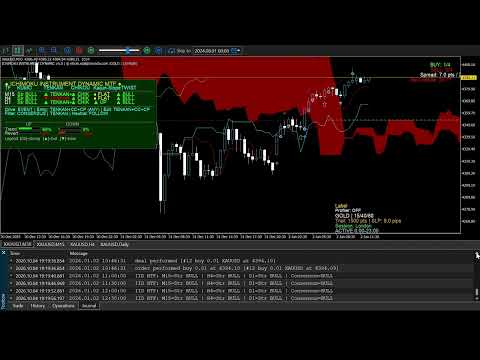
EA는 다음과 같은 정보를 차트 패널에 직관적으로 제공합니다.
-
매수/매도(Buy/Sell) 포지션 카운터 및 최대 진입 제한 수
-
현재 스프레드 (기준치 초과 시 색상별 경고 표시)
-
다음 캔들 생성까지의 남은 시간 타이머
-
현재 거래 세션 상태 (활성화/비활성화 여부 및 시간)
-
현재 시장 세션 (시드니/도쿄/런던/뉴욕) 및 세션 중첩(오버랩) 현황
-
트레일링 스톱 거리 및 현재 슬리피지 수치
-
진입 간격 필터 상태
-
현재 종목 모드 및 활성화된 일목균형표 기간
-
브로커 프로파일러 통계 (체결 품질 점수, 승수, 리쿼트 횟수)
트레이더 자주 묻는 질문 (FAQ)
| 질문 | IID의 답변 및 해결책 |
| "왜 제 일목균형표 EA는 골드와 EURUSD에서 다르게 작동하나요?" | IID는 종목별로 기간과 신호 유형을 자동 조절합니다. 주요 통화쌍은 9/26/52 기간과 전환선/기준선 진입을 사용하는 반면, 골드는 15/40/80 기간과 후행스팬/구름대 진입을 사용합니다. |
| "브로커의 체결 품질이 제 거래에 영향을 주는지 어떻게 알 수 있나요?" | 내장된 브로커 프로파일러가 리쿼트와 슬리피지를 추적하여 체결 품질 점수(0~100%)를 계산하고, 이에 따라 슬리피지 허용치를 동적으로 조절합니다. |
| "추세가 나올 때 포지션들이 너무 가까운 거리에서 여러 번 진입합니다." | MinDistanceSameDir 필터가 작동하여, 직전의 동일 방향 포지션으로부터 사용자가 설정한 포인트 거리 이내에서는 추가 진입을 막아줍니다. 차트상의 시각적 존을 통해 이 경계선을 볼 수 있습니다. |
| "일목균형표를 사용할 때 어떤 시간차트(Timeframe)를 써야 하나요?" | 사용자 가이드에서는 스윙 매매의 경우 H4/D1 차트를, 활발한 데이트레이딩에는 H1 차트를 권장합니다. M30 차트는 신호의 중첩(확실한 근거)이 유효할 때만 사용하십시오. |
| "EA가 상위 시간차트의 추세와 반대로 거래를 잡습니다." | IID는 일목균형표 신호가 가장 최적화된 H1(1시간) 차트를 기준으로 설계되었습니다. 자동 감지 기능이 해당 종목의 Volatility(변동성)에 맞게 기간을 알아서 조절합니다. |
| "데모 계좌와 라이브(실전) 계좌의 결과가 다른 이유는 무엇인가요?" | 브로커 프로파일러가 실제 환경의 체결 조건에 적응하기 때문입니다. 패널에는 실시간 슬리피지와 리쿼트 통계가 실시간으로 반영됩니다. |
| "신호가 전환선/기준선에서 나온 것인지 후행스팬에서 나온 것인지 어떻게 아나요?" | EA는 종목 클래스마다 다른 버퍼 할당을 사용합니다. 현재 어떤 모드가 활성화되어 있는지는 디스플레이 패널에 명시됩니다. |
| "외환 거래를 하다가 골드로 종목을 바꾸면 어떻게 되나요?" | EA가 초기화(Initialization)될 때 심볼 변경을 스스로 감지하여 모든 파라미터를 자동으로 재구성합니다. |
| "지표 발표 뉴스 시간대에 EA가 거래하지 않도록 하려면 어떻게 하나요?" | TradingStartHour (거래 시작 시간)와 TradingEndHour (거래 종료 시간) 입력 파라미터를 사용하여 거래 허용 세션 시간을 정의하십시오. |
| "EA가 진입을 차단하고 있는 구역을 직접 확인할 수 있나요?" | 차트상의 시각적 진입 간격 존이 매수(Buy)와 매도(Sell)로 색상 구분된 최소 거리 경계선을 직접 보여줍니다. |
| "스프레드가 너무 높은지 어떻게 확인하나요?" | 스프레드가 MaxSpreadPoints 를 초과하면 스프레드 표시 창이 빨간색으로 변합니다. 패널에는 현재 스프레드가 포인트 또는 핍 단위로 표시됩니다. |
| "디스플레이 패널에 나오는 값들은 각각 무엇을 의미하나요?" | 사용자 가이드에 세션별 색상, 트레일링 상태, 프로파일러 통계를 포함한 각 표시 요소의 의미가 상세히 설명되어 있습니다. |
기술 사양 (TECHNICAL SPECIFICATIONS)
-
의존성(외부 파일): 없음 (자체 내장 독립형)
-
권장 시간차트: H1 권장, 스윙 매매에는 H4/D1 추천
-
지원 종목: 외환 주요 통화쌍, 마이너 통화쌍, 이종 통화쌍, 골드, 가상자산
-
주문 유형: 재시도 로직(Retry logic)이 포함된 시장가 주문
-
리스크 관리: 고정 랏, 리스크 비율(Risk%), 계좌 잔고 연동(Auto-equity)
-
슬리피지 제어: 표준화, 적응형(낮음, 중간, 높음, 사용자 정의)
-
포지션 관리: 트레일링 스톱, 본전 청산, 분할 청산
-
알림 기능: 이메일 알림, 스마트폰 푸시 알림
-
브로커 프로파일러: 옵션 기능 (기본 설정은 Off)
입력 파라미터 요약 (INPUT PARAMETERS SUMMARY)
-
종목 감지 (Instrument Detection): AutoDetectInstrument , ManualInstrumentType
-
인디케이터 설정 (Indicator Settings): MagicNumber , UseDivExits , UseModeZ
-
진입 간격 (Entry Spacing): MinDistanceSameDir , ShowGapZones , 존 색상 ( Zone Colours )
-
스프레드 및 시간 (Spread & Time): UseSpreadCheck , MaxSpreadPoints , 거래 시간 ( Trading Hours )
-
포지션 관리 (Position Management): LotMethod , RiskPercent , MaxPositions
-
SL/TP: StopLossPoints , TakeProfitPoints
-
주문 체결 (Execution): SlippageControlMode , RetryAttempts
-
일목균형표 기간 (Ichimoku Periods): InputTenkan , InputKijun , InputSenkou , AutoAdjustPeriods
-
분할 청산 (Partial Close): UsePartialClose , MultiStage , 백분율 ( Percentages )
-
본전 청산 (Breakeven): UseBreakeven , 트리거 비율/포인트 ( Trigger Percent/Points )
-
트레일링 스톱 (Trailing Stop): UseTrailingStop , 거리 ( Distance ), 작동 조건 ( Activation )
-
브로커 프로파일러 (Broker Profiler): UseBrokerProfiler , 스무딩 ( Smoothing ), 최소 샘플 수 ( MinSamples )
-
알림 (Notifications): 이메일( Email ), 푸시, 팝업 경고 ( Popup alerts )
-
화면 표시 (Display): 폰트 크기 ( FontSize ), 패널 위치 오프셋 ( Panel Offset ), 세션 색상 ( Session Colours )
면책 조항 (DISCLAIMER)
마진 거래는 원금을 초과하는 자산 손실의 상당한 위험을 수반합니다.
과거의 성과나 백테스트 결과가 미래의 수익을 보장하지 않습니다.
본 EA는 매매를 돕는 도구일 뿐이며, 수익성을 확약하거나 보장하지 않습니다.
실전 거래에 투입하기 전, 데모 계좌에서 충분한 테스트를 거치시기 바랍니다.
감당할 수 있는 여유 자금의 범위 내에서만 리스크를 부담하십시오.
실제 거래 결과는 이용하는 브로커, 거래 종목 및 시장 상황에 따라 달라질 수 있습니다.