
Impulse MT5
- Experts
- 버전: 2.41
- 업데이트됨: 28 8월 2026
- 활성화: 10

Are you ready to power up your Gold trading?
Impulse by Starpoint Trading — A six-strategy gold EA that waits for the perfect shot.
Come chat with us in our public MQL5 channel! https://www.mql5.com/en/channels/starpoint
Read my analysis of Impulse compared to similar grid systems: https://www.mql5.com/en/blogs/post/773192
Impulse v2.00 is here!
The biggest update in Impulse's history has arrived. Version 2.00 takes everything that made Impulse a disciplined, patient Gold trading system and elevates it across the board:
- A brand-new sixth strategy — Conviction Momentum joins the squad, hunting decisive momentum moves the other five strategies don't cover.
- New Conservative entry mode — a one-click option that tightens every strategy's entry standards for traders who want fewer, higher-conviction trades.
- New Single Position trade mode — prefer traditional trading? Run any strategy with a classic stop loss and take profit instead of the grid.
- Completely redesigned dashboard — a sleek new dark "Graphite/Teal" panel with daily P&L, daily drawdown tracking, and at-a-glance status for all six strategies.
- Smarter entry protection — new multi-timeframe filters that keep Impulse out of hostile market conditions.
- Optional grid expansion — automatically widen grid spacing at depth for more defensive basket behaviour.
- Under-the-hood refinements — performance, reliability and accuracy improvements throughout.
Existing users: v2.00 is a free update and fully backward compatible — your current settings carry straight over.
Low Risk Signal Vantage AU: https://www.mql5.com/en/signals/2383163
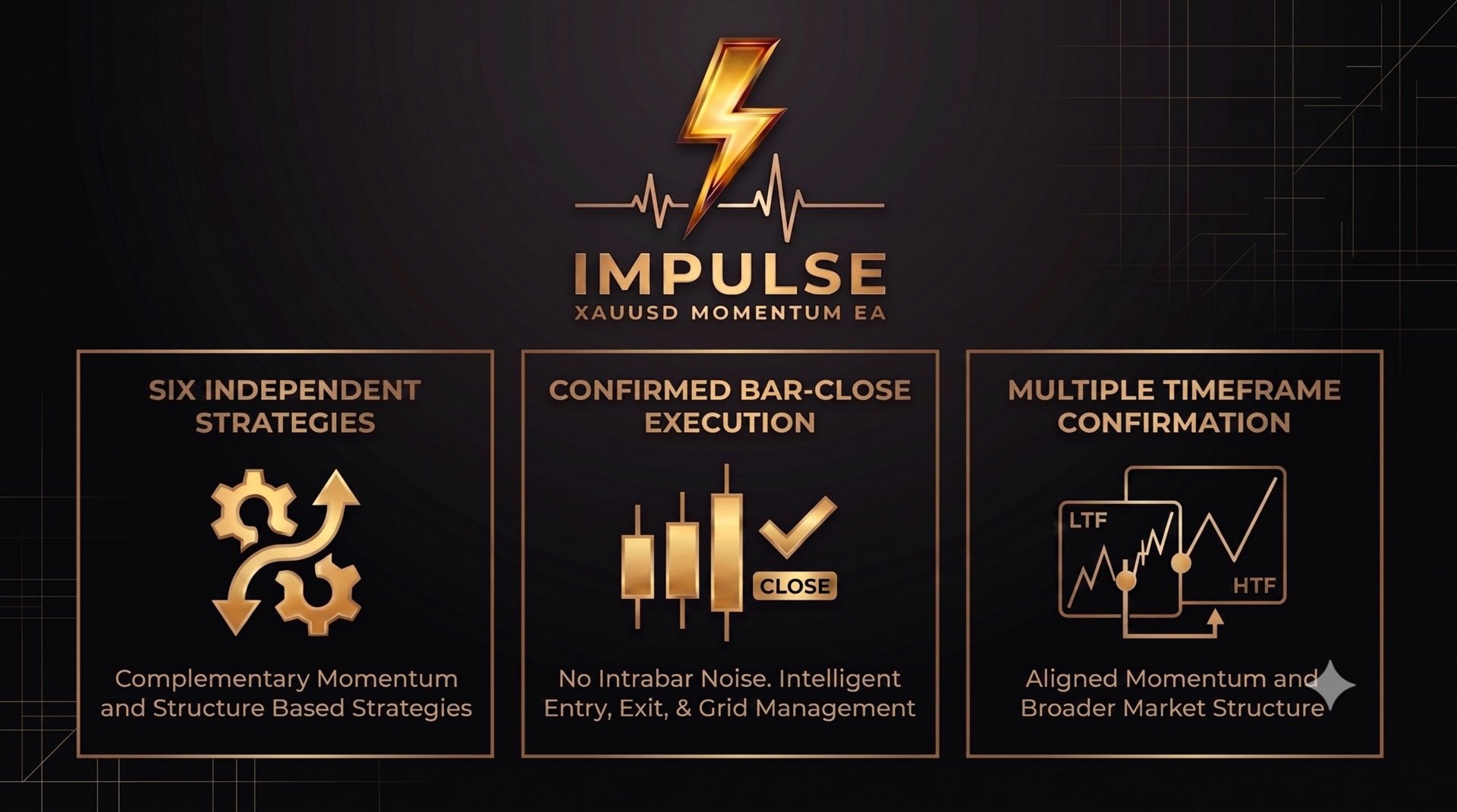
Impulse is a momentum grid EA built exclusively for XAUUSD. Six independently developed entry strategies hunt for setups; one unified grid framework manages every trade.
6 momentum-based strategies | Two-sided trend participation | Dual-timeframe confirmation | Bar-close execution | Smart virtual take profit | Choice of grid or classic SL/TP trading
Every entry, every grid addition, every exit is evaluated at a confirmed bar close. No tick reactions. No partial candles. Impulse stays patient until the market earns a trade.
S01 — Impulse Momentum-Pullback A multi-condition entry model built around solid robust momentum. S01 reads daily structure for directional bias, confirms a genuine impulse has occurred, then waits for a controlled retracement before acting.
S02 — Impulse Ranger A dual-timeframe strategy that waits for the higher timeframe to confirm a meaningful directional extension, then uses a secondary timeframe to time a pullback entry within that move.
S03 — Double-Impulse Pullback A momentum-continuation model that waits for a strong impulsive move followed by a small pullback.
S04 — Confluence Fade A trend-aligned dip strategy that fades short-term oversold extensions only when they line up with the higher-timeframe trend.
S05 — Confluence Trend A trend-continuation strategy that demands strict multi-timeframe confluence before joining an established trend.
S06 — Conviction Momentum A momentum-continuation strategy that waits for a decisive, high-conviction candle backed by multi-timeframe trend confirmation before joining the move — patient by design, striking only when the market shows real intent.
Different conditions, different logic — six strategies designed to complement rather than duplicate. When one strategy sees nothing worth trading, another may fire, giving Impulse broad intraday coverage without compromising on entry quality.
Getting Started - First Time
Impulse is designed to work out of the box. Attach it to a XAUUSD chart, keep all default settings, and set your lot size — 0.01 per $1,500 of balance is a sensible starting point. For full news coverage, add the News Filter URL to your WebRequest whitelist (see below — takes 30 seconds). That's it. Every strategy, filter, and protection is pre-configured; nothing else needs tuning. As always, run it on a demo account first so you can watch how it trades before going live. Choose Your Trading Style — New in v2.00
Entry Mode. Run Impulse in its proven Standard mode, or switch to the new Conservative mode with a single input. Conservative mode tightens the entry criteria across all six strategies, trading less often but demanding stronger conditions before committing — ideal for traders who prioritise selectivity over frequency. Grid management, take profit, and all protections work identically in both modes.
Trade Mode. Impulse's signature recovery grid remains the default, but v2.00 introduces a Single Position mode for traders who prefer classic risk management: every entry opens one position with a configurable broker-side stop loss and take profit. Same six strategies, same disciplined entries — your choice of trade management.
When any strategy fires its entry, a grid basket opens. All six strategies share the same grid and exit mechanics:
- Flat lot additions — every grid level adds the same lot size as the initial entry. No martingale. No compounding exposure.
- Volatility-adaptive spacing — grid levels and the take-profit target are spaced as a percentage of price, and that percentage scales automatically with current Gold volatility by default (ATR Dynamic mode), widening spacing in fast markets and tightening it in quiet ones. A Fixed % mode is also available for traders who prefer static, non-adaptive spacing. No fixed pip spacing either way.
- Optional grid expansion (new in v2.00) — progressively widen the spacing between deeper grid levels for a more defensive basket profile as a grid builds. On by default, fully configurable.
- Bar-close only — grid additions are evaluated at M1 bar close using confirmed close prices. No intrabar level triggers.
- One basket at a time (default) — if a grid is already active, no new strategy entries can fire. Complete separation between baskets. No position mixing between strategies.
- Optional parallel grid mode (advanced users) — an experimental mode allowing each strategy to run its own grid basket simultaneously, each with fully independent spacing, take-profit target, and cooldowns. Off by default. Requires a hedging account, and worst-case exposure scales with the number of enabled strategies — size conservatively and keep the margin protections enabled. Recommended only once you're comfortable with default single-basket operation.
- Grid recovery — if the EA restarts mid-basket, it automatically detects open positions, reconstructs grid state — including each basket's original lot size — and continues managing every active basket from where it left off. The originating strategy is also recovered.
Virtual Take Profit. The Whole Basket. All at Once.
Impulse does not use individual stop losses or take profits on each position. The entire basket closes together when the total floating P&L reaches the virtual TP target. Virtual take profits are used so the broker cannot see your TP price.
The target is calculated against the basket's weighted average price (WAP) — not the first entry price. As the grid builds and WAP shifts, the TP target recalculates, ensuring the exit always reflects the true cost basis of the entire basket. A visual horizontal line on the chart shows the current virtual TP price in real time, updating at every M1 bar close.
Optional fixed take-profit in points. Prefer a static exit? You can set a fixed take-profit distance in points from the basket's weighted average price instead of the default volatility-adaptive target. Leave it at zero to keep the adaptive behaviour, or set any value to switch the whole basket to a fixed points TP.
Protection
Margin protection — two levels. New grid additions are blocked when account margin level falls below 120% - a key safety measure - and all EA trades are force-closed if margin reaches a critical level. This protection is on by default and can be toggled off if you prefer to manage margin yourself, though leaving it enabled is strongly recommended. Please ensure you have adequate margin/leverage for your position sizing.
Drawdown protection — optional, with three response modes. An independent drawdown monitor checks the total floating loss of all open EA baskets combined at every M1 bar close against your configured threshold, set as a percentage of account balance or a fixed dollar amount. Choose how Impulse reacts on breach: Continue closes all baskets and resumes trading immediately, Remove closes all baskets and blocks new entries until the EA is restarted, or Alert simply sends a terminal notification so you can decide manually, without closing or blocking anything. Disable the feature entirely if you'd rather manage drawdown yourself.
Advanced entry filtering — expanded in v2.00. Every strategy is guarded by a suite of intelligent entry filters that assess market conditions across multiple timeframes before allowing a trade. Version 2.00 adds new multi-timeframe confluence protection that keeps Impulse on the sidelines when the broader market structure opposes a signal — quietly vetoing the hostile setups that grid systems most need to avoid.
News Filter — optional. Impulse can automatically pause new basket entries around scheduled high- and (optionally) medium-impact USD economic releases, helping you stay out of the spread spikes and volatility that often follow events like FOMC decisions, NFP, and CPI. The block window either side of each event is fully configurable in minutes. Baskets that are already open are unaffected and continue to be managed normally throughout.
A guide to the Impulse EA News FilterSetup required for full News Filter coverage: add https://nfs.faireconomy.media/ to MetaTrader 5's WebRequest URL whitelist — Tools → Options → Expert Advisors, tick "Allow WebRequest for listed URL", click Add, paste the URL above, then OK and restart the EA. Skipping this step isn't fatal — Impulse automatically falls back to MetaTrader's own built-in economic calendar — but the primary feed gives more complete event coverage.
Grid depth cap — optional. Set a maximum number of positions the EA is permitted to open within a single basket. Once the cap is reached, no further additions are made — the basket continues to be managed and exits normally via the virtual TP. Set to 0 to disable the cap entirely.
Custom hour block — optional. Define a specific time window during which Impulse will not open any new baskets, regardless of signal conditions. Active baskets already in progress are unaffected. The window supports overnight wrapping, making it straightforward to exclude any session or rollover period you choose.
Spread filter. Every entry and grid addition checks that the current spread is within the configured maximum. Wide-spread environments from news events or low liquidity are skipped automatically.
Friday filter. New grid baskets can be blocked on Fridays entirely with a single toggle. Active baskets already in progress are unaffected — only new initial entries are restricted.
Directional trading filter. You have the option to enable buy only trades, sell only trades, or leave as the default which is both directions enabled.
All-New Dashboard. Redesigned for v2.00.
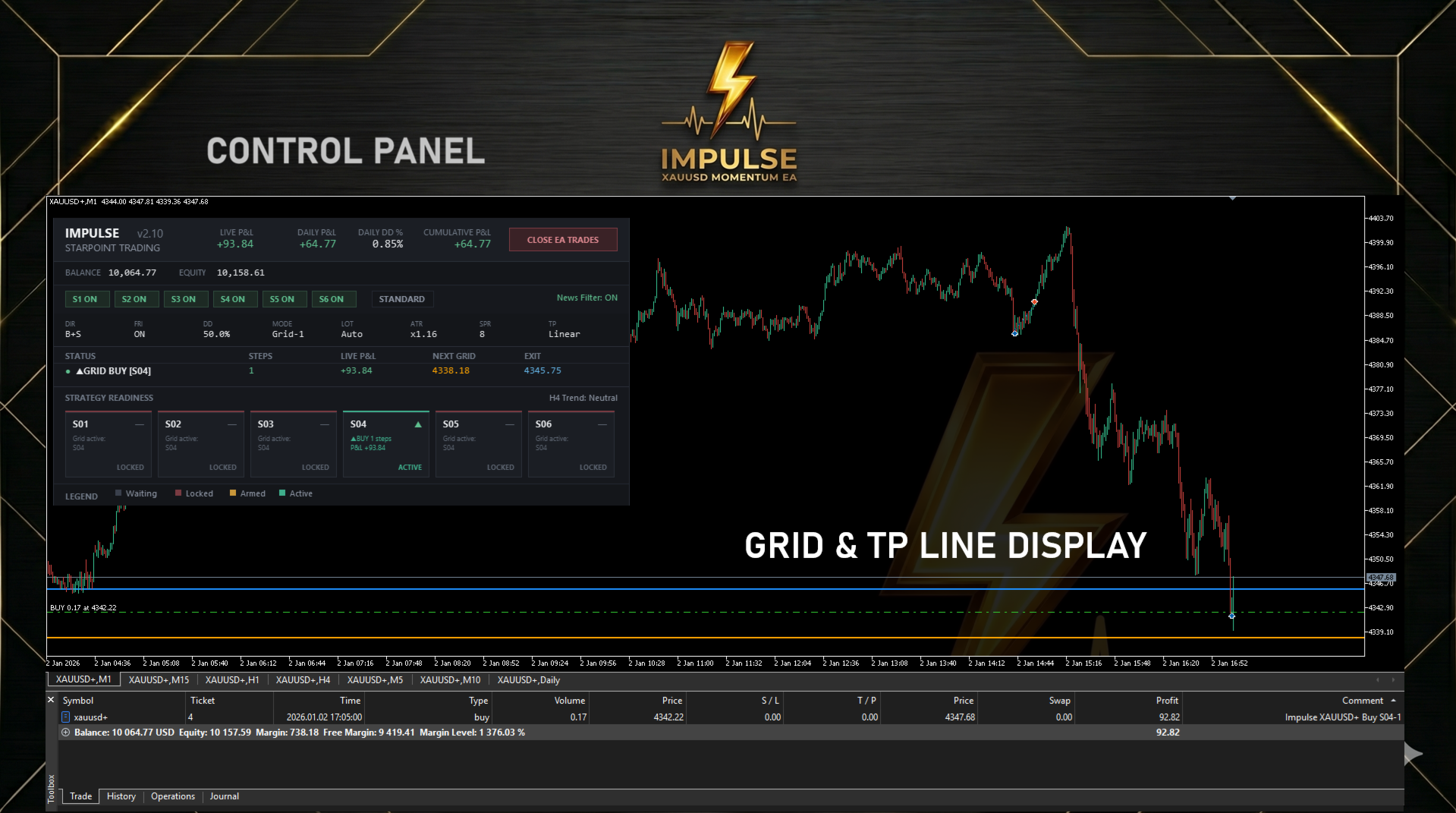
The optional on-chart panel has been rebuilt from the ground up with a sleek dark "Graphite/Teal" design. Everything you need is visible in one place: Live P&L, Daily P&L, Daily Drawdown %, Cumulative P&L, account balance and equity, strategy and risk configuration, grid mode, entry mode, and News Filter status. A one-click Close button on the panel lets you exit all active baskets instantly without removing the EA from the chart. When the panel is enabled, the chart itself is automatically themed to match — and restored perfectly when the EA is removed.
Live Strategy Readiness display. The panel shows a status card for each of the six strategies so you can see exactly what the EA is doing and why: Waiting (monitoring), Armed (aligned and watching for its trigger, with the biased direction shown), Active (running a basket, with step count and live P&L), or Locked (held back while another strategy's basket is open). An H4 trend indicator is shown alongside for quick market context. The panel scales automatically to your screen's display resolution, with optional manual scale and font controls.
Detailed News Filter status. The panel's news display names the event currently blocking entries and the exact time trading resumes, or — when clear — the next upcoming event and when its block window begins. No more guessing why the EA is sitting idle before FOMC.
Trading Recommendations
| Symbol | XAUUSD (Gold) |
| Timeframe | Any (strategies use hardcoded timeframes internally) |
| Minimum Deposit | $1000 at 0.01 lot. Any lower is extremely risky. |
| Recommended Deposit | $2,000 for comfortable grid operation |
| Account Type | Hedge |
| Leverage | 1:100 minimum — 1:500 recommended |
| Brokers | ECN/RAW spread recommended (IC Markets, FP Markets, Fusion Markets, VT Markets) |
| VPS | Recommended for 24/5 uptime |
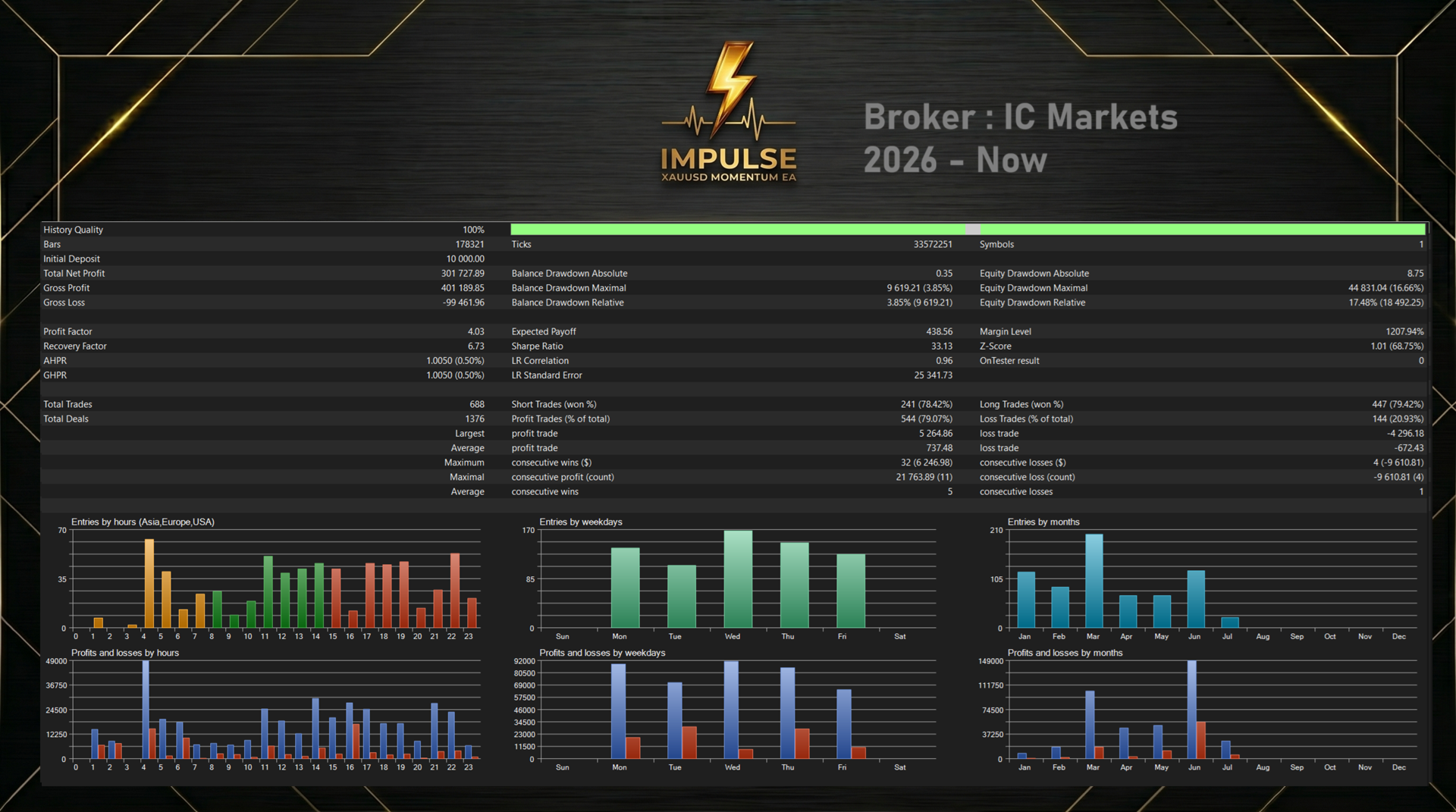
| Strategy Tester Mode | 1 Minute OHLC or Every Tick |
What You Get
- Six independently developed entry strategies, each with their own unique entries — including the all-new S06 Conviction Momentum.
- Two entry modes: Standard (proven defaults) or Conservative (tighter, more selective entries) — new in v2.00
- Two trade modes: Recovery Grid (default) or Single Position with classic SL/TP — new in v2.00
- Fixed lot, automatic risk-scaled, or balance-proportional lot sizing
- Enable any combination of the six strategies independently from the inputs
- Optional parallel grid mode allowing each strategy to run its own basket simultaneously, with fully independent per-basket state (advanced users; off by default, hedging account required)
- Directional filter; buy only, sell only, or both enabled
- Optional grid depth cap to limit maximum basket size
- Optional grid spacing expansion at depth for a more defensive basket profile — new in v2.00
- Custom hour block window to exclude any time period from new basket opens
- Flat-lot grid with bar-close-only addition triggers, with a choice of ATR-adaptive (default) or fixed percentage spacing
- Virtual basket take profit anchored to weighted average position price, with an optional fixed points-from-WAP exit
- Emergency margin protection option
- Independent drawdown protection — configurable as % of balance or fixed dollar amount, measured across all open baskets combined, with a choice of Continue, Remove, or Alert-only response on breach
- Expanded multi-timeframe entry protection filters across all strategies — new in v2.00
- News Filter that automatically pauses new entries around high- and medium-impact USD economic releases, using a ForexFactory feed with automatic fallback to MetaTrader's built-in calendar, with full event transparency on the panel
- Friday trading filter to avoid end-of-week exposure, along with a filter for preventing trades from opening after a specified hour on Fridays (weekend gap protection)
- Strategy origin tracked per basket and displayed on the panel
- All-new "Graphite/Teal" live dashboard with per-strategy readiness cards, daily P&L and drawdown metrics, detailed news status, and automatic display scaling — redesigned for v2.00
- Customisable trade comment prefix for easy identification in your trade history
Please send me a message on MQL5 for a link to the user manual upon purchase.
Two other high-quality EA's are available from Starpoint Trading:
- Antipode (Live Signal 12 Months)
- Ducat
- Solitaire (XAUUSD Single Position)
DISCLAIMER: Trading foreign exchange and CFDs carries a high level of risk. Past performance is not indicative of future results. Always test on a demo account before deploying on a live account. Grid trading requires sufficient margin — use the margin protection features and start with conservative lot sizes. Impulse is a systematic tool designed for patient, disciplined traders who understand risk management.




























They have a keen sense of market direction and inspire confidence; even when gold trading hits a rough patch, they bounce back quickly.