CandleCloseTimer MT4

CandleCloseTimer — full control over candle closing time

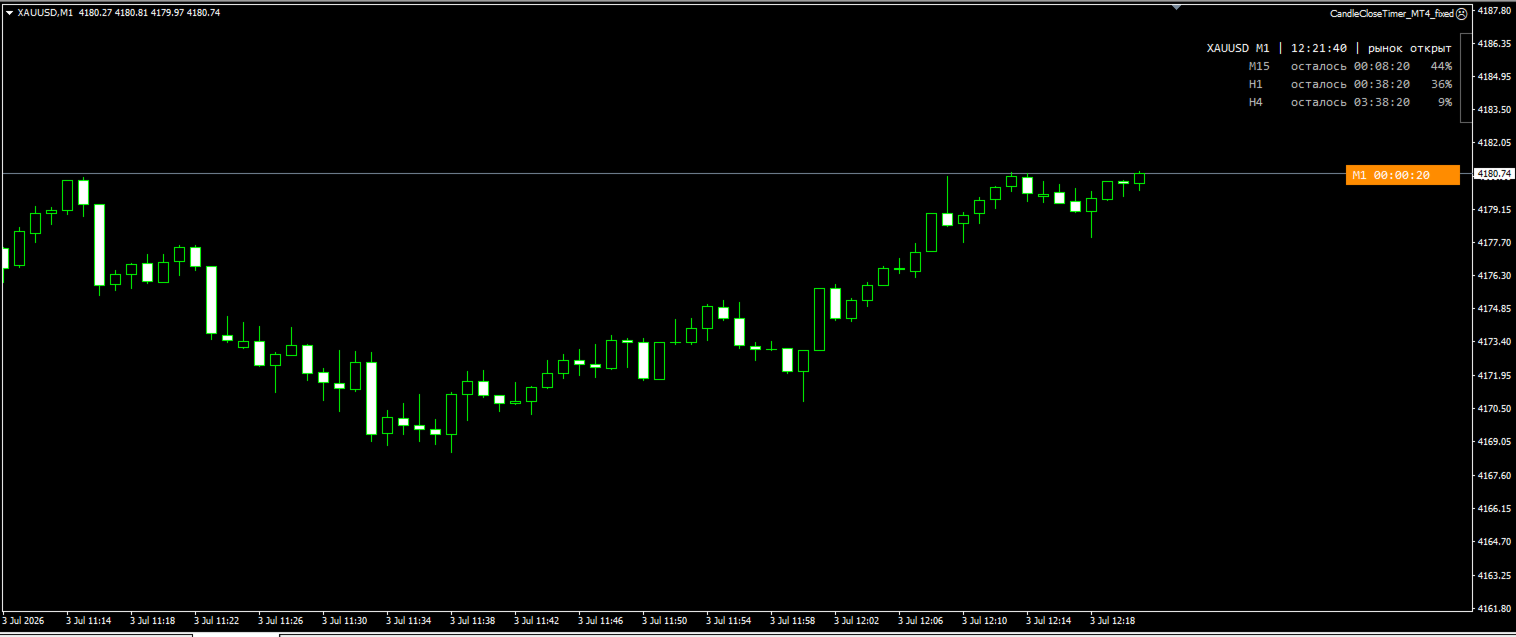
CandleCloseTimer is a compact utility for MetaTrader 4 that shows a countdown to the close of the current candle directly on the chart. The timer is placed near the current price, so the key information stays exactly where traders look most often — next to the price scale.

The utility does not open trades, does not provide trading signals, and does not interfere with terminal operation. Its only purpose is to help you clearly see how much time remains before the current candle closes on the selected timeframe.

Main CandleCloseTimer features

1. Countdown to the current candle close
Shows the remaining time until the current bar closes in 00:00:00 format.

2. Display near the current price
The timer can be placed next to the price scale, below the current price, so it does not interfere with chart analysis.

3. Automatic timeframe adaptation
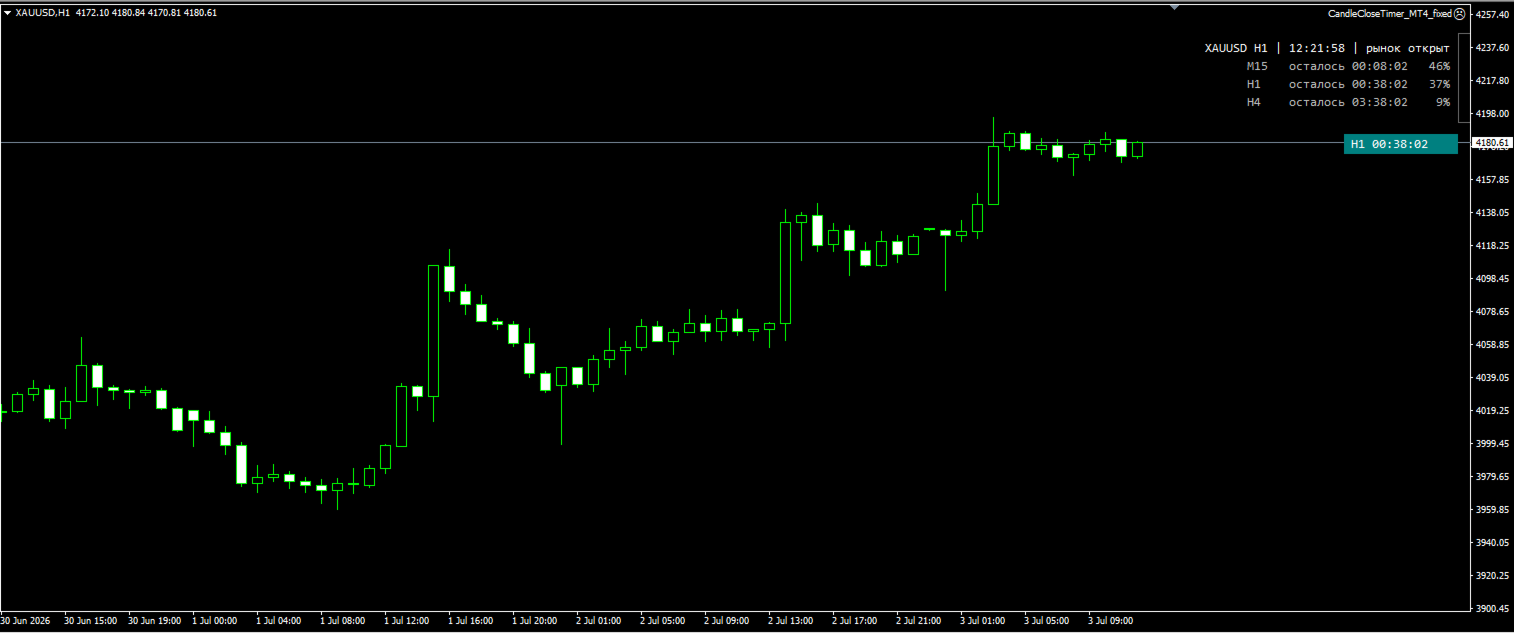
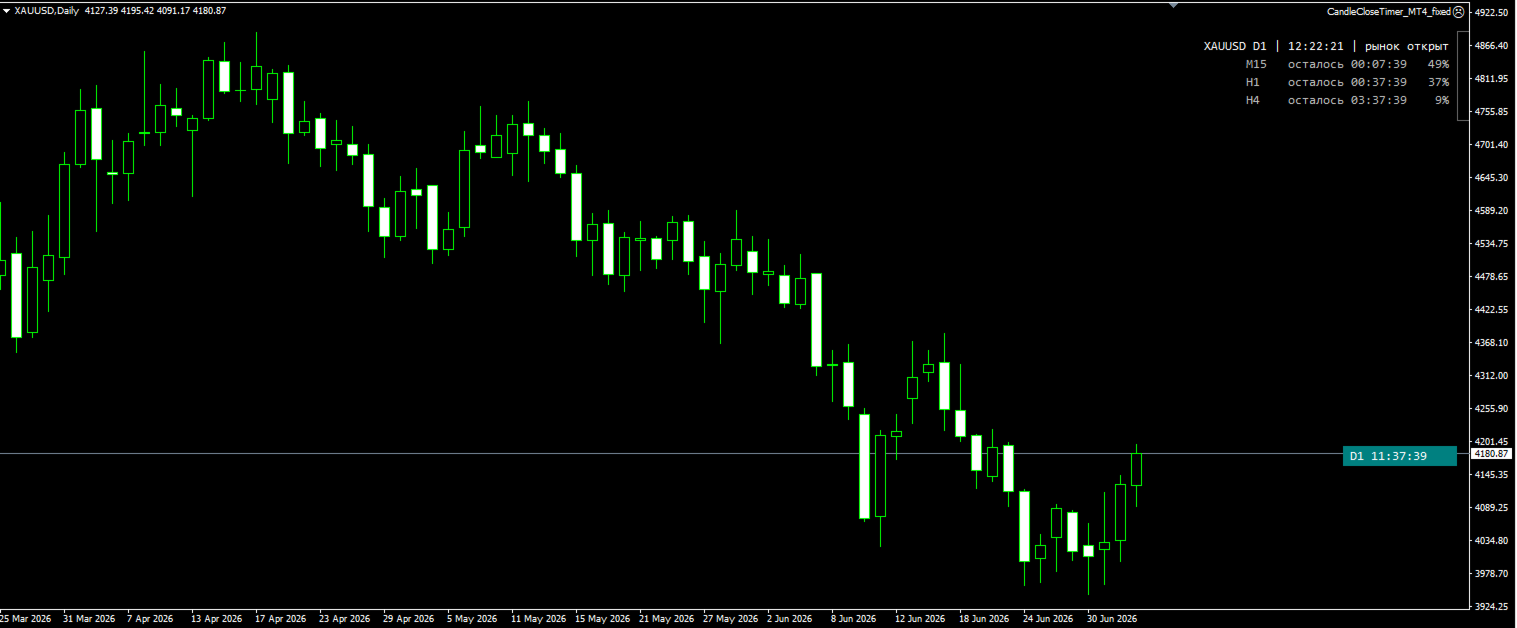
When switching between M1, M5, M15, H1, H4, and other timeframes, the timer automatically recalculates the remaining time.

4. Works as an MT4 utility
CandleCloseTimer is installed as an Expert Advisor utility, not as a regular indicator. It does not perform any trading operations.

5. Updates every second
The timer updates via OnTimer , so it does not depend only on incoming ticks.

6. Compact display mode
You can leave only a minimal countdown timer without unnecessary text, keeping the chart clean.

7. Additional timeframe panel
If needed, you can enable a panel with several timeframes and the remaining time until candle close for each of them.

8. Timeframe selection
Available presets:

Scalping — M1, M5, M15
Intraday — M15, H1, H4
Swing — H4, D1, W1
All — main timeframes
Custom — user-defined timeframe list

9. Custom timeframe list
You can manually set the required periods, for example: M5,M15,H1,H4,D1 .

10. Time-based color zones
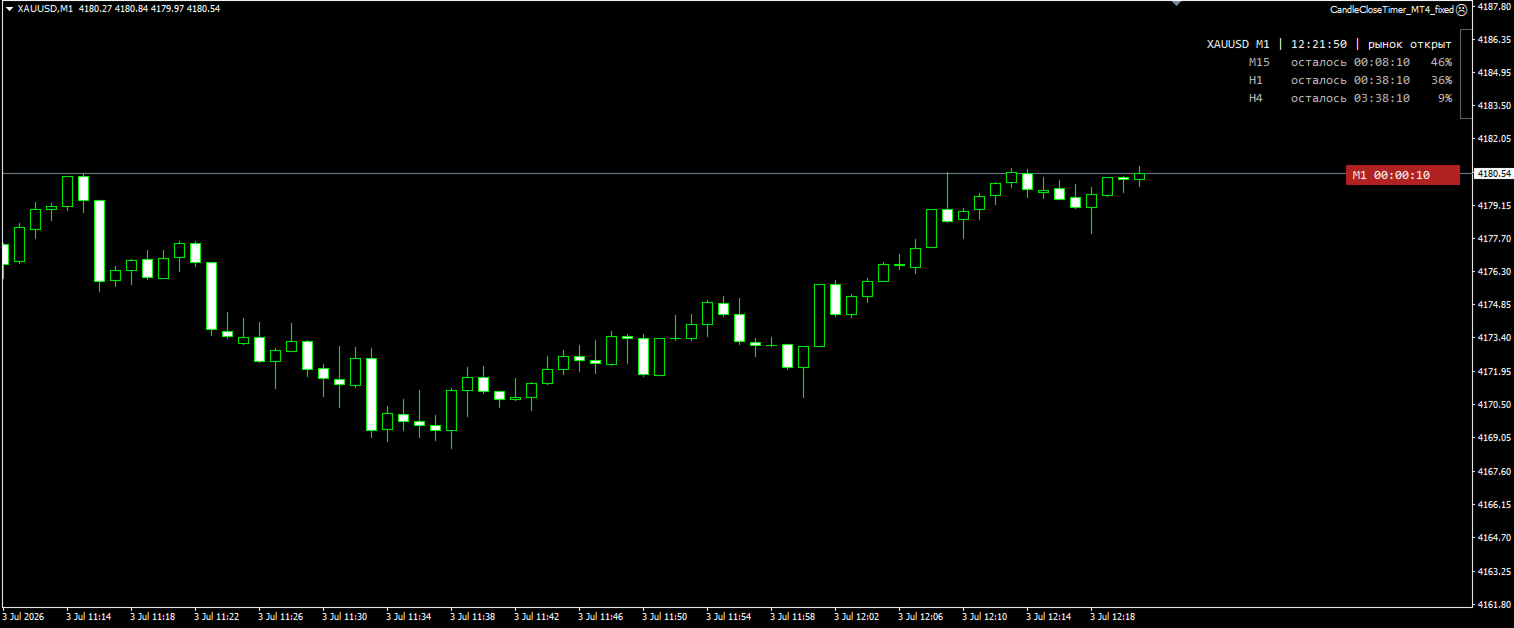
The timer color can change depending on how much time remains:

normal color — the candle is still far from closing;
warning color — little time remains before closing;
critical color — the final seconds before candle close.

11. Adjustable warning thresholds
You can set how many seconds before candle close the warning and critical zones should activate.

12. Alerts before candle close
The utility can notify the trader before the current bar closes.

13. Alert types
Available alert types:

popup alert in the terminal;
sound alert;
push notification to mobile MetaTrader;
email notification.

14. Alert timing settings
You can set how many seconds before candle close the alert should be triggered.

15. Market state handling
If the market is closed or the trading session is unavailable, the utility can show the corresponding status instead of the regular timer.

16. Trading session support
CandleCloseTimer uses the instrument’s trading session data to display the market state more accurately.

17. Appearance customization
You can change the size, color, background, font, offsets, and timer position.

18. Chart position settings
The timer can be moved right/left and up/down relative to the current price.

19. Multiple chart support
Using Instance ID, you can run several copies of the utility on different charts without object conflicts.

20. Automatic object cleanup
When the utility is removed from the chart, all created graphical objects are automatically deleted.

Who CandleCloseTimer is for

The utility is useful for scalpers, intraday traders, and anyone who makes decisions based on candle close. It helps wait for signal confirmation, avoid premature entries, and control the exact moment of bar closing more precisely.

CandleCloseTimer is not a trading system and not a robot with forecasts. It is a practical time-control tool for cleaner and more accurate chart work.


추천 제품
Session High Low
Jerome Asiusin
This indicator help to mark the high and low of the session Asian,London,Newyork , with custom hour setting This indicator is set to count from minute candle so it will move with the current market and stop at the designated hour and create a accurate line for the day. below is the customization that you can adjust : Input Descriptions EnableAsian Enables or disables the display of Asian session high and low levels. EnableLondon Enables or disables the display of London session high and
FREE
Zig Zag 123
Stephen Reynolds
Zig Zag 123 tells us when a reversal or continuation is more likely by looking at the shift in supply and demand. When this happens a signature pattern appears known as 123 (also known ABC) will often break out in direction of higher low or lower high. Stop loss and take profit levels have been added. There is a panel that shows the overall performance of your trades for if you was to use these stop loss and take profit levels.  We get alerted if a pattern 123 appears and also if the price re
FREE
Position Selective Close MT4
Francisco Manuel Vicente Berardo
The Position Selective Close is a multi-symbol multi-timeframe script used to close simultaneously various positions.  General Description   The Position Selective Close   possesses   three operation modes (Intersection,   Union   and All) that control the way   as   four position features (symbol, magic number,   type   and profit) are used. The modes, available through the Selection Mode input parameter, relate to the features, available through the “Select by Feature” and “Feature” input pa
FREE
Safety
Sergey Ermolov
5 (2)
나는 모두가"안전"과 같은 돈 관리 규칙을 알고 있다고 생각합니다. 인식하지 못하는 사람들을 위해,금고는 거래에 대한 이익이 정지의 크기를 같게 한 후 위치의 절반을 마감한다고 가정합니다. 따라서,가격이 반전하고 정지를 잡는다 할지라도,이전에 위치의 일부를 닫을 때 정확히 같은 양의 이익을 받았기 때문에 돈을 잃지 않을 것입니다. 안전 전문가 고문은 단 하나의 설정,즉 폐쇄 로트 만 있습니다. 위치 0 에 남겨두면 고문은 거래의 정확히 절반을 닫을 것입니다. 전문가 어드바이저를 설치 한 후,이익의 일부가 전문가 어드바이저에 의해 고정 될 위치에 빨간색 점선이 차트에 나타납니다. 당신이 고문이 다른 수준에서 트랜잭션의 일부를 닫으려면 안전하게 다른 장소로이 라인을 이동할 수 있습니다. 동일한 통화 쌍에 여러 개의 거래가 열려 있는 경우 마우스 커서로 시장을 차트로 끌어다 놓고 안전한 거래로 마감하려는 주문 시작 수준 근처에 시장을 놓아야 합니다. 전문가 고문은 주문 티켓을 고려
FREE
This indicator will mirror the assets in use in another metatrader, being able to choose the timeframe and a template. This is the Metatrader 4 Client, it needs the Metatrader 4 or 5 Server versions: Metatrader 4 Mirror Chart Server: https://www.mql5.com/en/market/product/88644 Metatrader 5 Mirror Chart Server:   https://www.mql5.com/en/market/product/88652 Details of how it works in the video.
FREE
Core Positioning Advanced analytical tool designed specifically for MT4, providing in-depth analysis of trading history, uncovering data insights, optimizing strategies, and enhancing profitability. Core Usage Strategy Performance Evaluation: Analyzes profitability, stability, and risk to provide an objective rating from A+ to D. Trading Pattern Discovery: Identifies high-quality assets, time periods, and profit-making habits suited to different market conditions. Risk Management Optimization: C
FREE
Wise Men Indicator demo
Bohdan Kasyanenko
3 (2)
The indicator displays signals according to the strategy of Bill Williams on the chart. Demo version of the indicator has the same features as the paid, except that it can work only on a demo account . Signal "First Wise Man" is formed when there is a divergent bar with angulation.  Bullish divergent bar - with lower minimum and closing price in the upper half. Bearish divergent bar - higher maximum and the closing price at the bottom half. Angulation is formed when all three lines of Alligator
FREE
Cumulative Delta MT4
Evgeny Shevtsov
4.86 (29)
The indicator analyzes the volume scale and splits it into two components - seller volumes and buyer volumes, and also calculates the delta and cumulative delta. The indicator does not flicker or redraw, its calculation and plotting are performed fairly quickly, while using the data from the smaller (relative to the current) periods. The indicator operation modes can be switched using the Mode input variable: Buy - display only the buyer volumes. Sell - display only the seller volumes. BuySell -
FREE
Smart Trade Monitor — Real-Time Position Tracking, P&L Analysis & Alert System   Real-Time Monitoring : Auto-tracks open/closed positions, displays yesterday’s & previous day’s P&L—no manual calculations!   Smart Alerts (Premium Only) : Instant push notifications + sound alerts for position changes—never miss a trading opportunity!   User-Friendly : One-click setup, key data displayed directly on charts for faster decisions.   Cross-Platform : Supports both MT4 & MT5, compatible with
FREE
Toby Strategy Indicator
Ahmd Sbhy Mhmd Ahmd ʿYshh
The indicator rely on The Toby strategy >> The mother candle which is bigger in range than the previous six candles. A vertical line shows the last Toby Candle with the targets shown up and down. The strategy is about the closing price out of the range of the toby candle to reach the 3 targets..The most probable to be hit is target1 so ensure reserving your profits and managing your stop lose.
FREE
Forex Market Profile and Vwap
Lorentzos Roussos
4.86 (7)
외환 시장 프로필(줄여서 FMP) 이것이 아닌 것 : FMP는 일반적인 문자 코드 TPO 표시가 아니며 전체 차트 데이터 프로필 계산을 표시하지 않으며 차트를 기간으로 분할하여 계산하지도 않습니다. 그것이 하는 일: 가장 중요한 것은 FMP 표시기가 사용자 정의 스펙트럼의 왼쪽 가장자리와 사용자 정의 스펙트럼의 오른쪽 가장자리 사이에 있는 데이터를 처리한다는 것입니다. 사용자는 마우스로 표시기의 양쪽 끝을 당기기만 하면 스펙트럼을 정의할 수 있습니다. 표시기 오른쪽 가장자리가 라이브 막대로 당겨지고 더 멀리(미래로) 표시되면 표시기가 "라이브"로 간주됩니다(새 막대로 업데이트됨). 표시기는 첨부된 차트에 "앵커" 개체를 놓은 다음 해당 앵커를 하드 드라이브의 파일과 연결합니다. 이렇게 하면 차트 또는 지표가 닫힐 때까지 다시 시작해도 설정이 유지되어 차트에서 계속 FMP를 실행할 수 있습니다. FMP 지표는 하나의 차트에서 여러 인스턴스를 실행할 수 있으며 이름을 지정할 수
FREE
Multi TF MA Levels
Luke Anthony Caras
Multi-TF MA Levels plots a single moving average across multiple timeframes directly on your chart, giving you instant context at every level of the market. No switching charts. No mental maths. Just clean, flat lines showing exactly where the MA sits on M15, M30, H1, H4 and D1 — all updated on confirmed bar close so there is no repainting. Features Plots the local timeframe MA plus up to 5 higher timeframe MAs simultaneously HTF lines only update on confirmed bar close — no repainting Higher ti
FREE
Show Pips
Roman Podpora
4.27 (59)
이 정보 표시기는 계정의 현재 상황을 항상 알고 싶어하는 사람들에게 유용합니다. 표시기는 포인트, 백분율, 통화 단위의 이익뿐만 아니라 현재 쌍의 스프레드와 현재 기간에서 막대가 마감될 때까지의 시간과 같은 데이터를 표시합니다. 버전 MT5 -   더욱 유용한 지표 차트에 정보선을 배치하는 데는 여러 가지 옵션이 있습니다. 가격 오른쪽(가격보다 뒤에 있음) 코멘트로(차트의 왼쪽 상단에 있음) 화면의 선택된 모서리에 있습니다. 정보 구분 기호를 선택할 수도 있습니다. | / . \ # 표시기에는 다음과 같은 단축키가 내장되어 있습니다. 키 1 - 정보 표시 유형으로 뒤로 이동(가격, 설명 또는 코너 오른쪽) 키 2 - 정보 표시 유형에서 앞으로 나아갑니다. 키 3 - 정보 라인 표시 위치 변경 단축키는 설정에서 다시 할당할 수 있습니다. 이 표시기는 사용하기 쉽고 매우 유익합니다. 설정에서 불필요한 정보 항목을 비활성화할 수 있습니다. 설정 표시된 정보를 교체하기 위한 단축키(뒤로
FREE
Constructor
Aleksey Semenov
Constructor is a convenient tool for creating, (building strategies) testing and applying trading strategies and ideas, as well as testing and using separate indicators and their groups. Constructor includes opening, closing, deal tracking, averaging and recovery modules, as well as various trading options with and without averaging and martingale. You are able to connect up to 10 different external indicators. Find the detailed instructions in the attached pdf file. Trading settings averaging
FREE
PZ Penta O MT4
PZ TRADING SLU
2.33 (3)
The Penta-O is a 6-point retracement harmonacci pattern which usually precedes big market movements. Penta-O patterns can expand and repaint quite a bit. To make things easier this indicator implements a twist: it waits for a donchian breakout in the right direction before signaling the trade. The end result is an otherwise repainting indicator with a very reliable trading signal. The donchian breakout period is entered as an input. [ Installation Guide | Update Guide | Troubleshooting | FAQ | A
FREE
After purchasing the Tpx Dash Supply Demand indicator, you must download this indicator which will link and feed market data to the Tpx Dash Supply Demand indicator and will provide all Supply Demand price signals, ATR Stop, VAH and VAL, trend values ​​with the ADX, and POC prices and locations in the market. Just download it and Dash will locate the indicator to retrieve the information!
FREE
FFx Fractals
Eric Venturi-Bloxs
4.5 (2)
The purpose of this new version of the MT4 standard indicator provided in your platform is to display in a sub-window multiple timeframes of the same indicator. See the example shown in the picture below. But the display isn’t like a simple MTF indicator. This is the real display of the indicator on its timeframe. Here's the options available in the FFx indicator: Select the timeframes to be displayed (M1 to Monthly) Define the width (number of bars) for each timeframe box Alert pop up/sound/ema
FREE
Candle Countdown — MT4용 정확한 캔들 종료 시간 카운트다운 Candle Countdown은 차트 위에 현재 캔들이 종료될 때까지 남은 시간 을 표시하는 간단하고 정확한 도구입니다. 진입 시점이 캔들 마감에 의존하는 경우, 몇 초의 차이도 중요합니다. 이 인디케이터는 정확한 시간을 보여주어 서두르거나 추측하지 않고 결정을 내릴 수 있도록 도와줍니다. 캔들 종료 시간을 정확하게 제어하기 위한 인디케이터입니다. 표시 내용: 캔들 종료까지 남은 시간 현재 서버 시간 스프레드 Stop Level 타이머는 틱에 의존하지 않고 플랫폼의 내부 타이머를 통해 업데이트되므로, 시장 움직임이 적은 상황에서도 안정적으로 동작합니다. 이로 인해 낮은 변동성 구간에서도 부드럽고 안정적인 카운트다운을 제공합니다. 모든 정보는 배경 블록에 표시되어 어떤 차트 색상에서도 잘 보이며, 차트 분석을 방해하지 않습니다. 캔들 종료 시점이 가까워질수록 타이머 색상이 변경되어 빠르게 상황을 파악할 수
FREE
SC MTF Rsi MT4
Krisztian Kenedi
5 (1)
다중 타임프레임 지원, 사용자 정의 시각 신호 및 구성 가능한 알림 시스템을 갖춘 상대강도지수(RSI) 지표. 프리랜서 프로그래밍 서비스, 업데이트 및 기타 TrueTL 제품은 제 MQL5 프로필 에서 확인하실 수 있습니다. 피드백과 리뷰를 진심으로 환영합니다! RSI란 무엇인가요? 상대강도지수(RSI)는 가격 변화의 속도와 크기를 측정하는 모멘텀 오실레이터입니다. 이 지표는 0에서 100 사이에서 진동하며, 지정된 기간 동안 최근 상승폭과 최근 하락폭의 크기를 비교합니다. RSI는 주로 과매수 및 과매도 상태를 식별하는 데 사용됩니다. 높은 수치는 과매수 상태를 나타내고, 낮은 수치는 과매도 상태를 나타냅니다. 트레이더들은 또한 RSI와 가격 움직임 사이의 다이버전스를 주시하며, 이는 잠재적인 추세 전환을 신호할 수 있습니다. 기능: 화살표와 수직선을 사용한 시각적 신호 마커 구성 가능한 트리거(방향 변경, 레벨 교차, 고점/저점, 극단 구역)가 있는 세 개의 독립적인 신호
FREE
QualifiedEngulfing
Ashkan Hazegh Nikrou
QualifiedEngulfing - ProEngulfing 지표의 무료 버전입니다. ProEngulfing - Advance Engulf 지표의 유료 버전으로, 여기에서 다운로드할 수 있습니다. ProEngulfing 의 무료 버전과 유료 버전의 차이점은 무엇인가요? 무료 버전은 하루에 하나의 신호로 제한되어 있습니다. QualifiedEngulfing을 소개합니다 - MT4용 전문 Engulf 패턴 지표 QualifiedEngulfing을 사용하여 외환 시장에서 자격을 갖춘 Engulf 패턴을 식별하고 강조하는 혁신적인 지표로 정밀력의 힘을 발휘하세요. MetaTrader 4용으로 개발된 QualifiedEngulfing은 Engulf 패턴을 정확하게 인식하고 강조하기 위한 첨단 접근법을 제공하여 거래 결정에 대해 가장 신뢰할 수 있는 신호만을 제공합니다. QualifiedEngulfing 작동 방식: QualifiedEngulfing은 Engulf 패턴을 분석하기 위한 정교한
FREE
Real-time spread tracking and monitoring software Displays spread values in form of histograms on current timeframe of chart Convenient for analyzing spread changes, as well as for comparing trading conditions of different brokers By placing on desired chart, the spread changes at different trading times are displayed Additionally Fully customizable Works on any instrument Works with any broker
FREE
Here   our more valuable tools SMC Trend Trading   ,  Easy SMC Trading  ,  Institutional SMC Architect Volume Analysis Tools  ,  Volume flow Profile  ,  Market volume profile  , FVG with Volume  , Liquidity Heatmap Profile  ,  Volume Spread Analysis       MT5 VERSION   TRADE COPIER Select Role: On the account sending trades, choose Sender (Master Account) . On the account receiving trades, choose Copier (Receiver Account) . Lot Size Mode: Same Lot Size as Master: Ignores multipliers, copies ex
FREE
DF Fib Trader Pro DF Fib Trader Pro는 MetaTrader 5용으로 설계된 자동 거래 시스템입니다. 피보나치 기반 가격 수준과 추세 및 구조 분석을 결합하여 진입 및 청산 시점을 정의합니다. EA는 롱 포지션과 숏 포지션을 모두 지원하며, 내장된 위험 관리 매개변수를 포함합니다. 핵심 기능: • 피보나치 되돌림 및 확장 로직을 사용하여 진입, 손절매, 이익실현 시점을 표시합니다. • 랏 크기 및 손절매/이익실현 수준 설정 가능 • 진입 시점 1개 또는 2개 선택 가능 • 시장 상황에 따라 고정 또는 동적 손절매 및 이익실현 지원 • 다양한 시간대 및 통화쌍 지원 • 최대 스프레드, 슬리피지, 거래 빈도 제어 옵션 포함 • 자동 거래 관리: 손익분기점, 트레일링 손절매, 부분 청산 옵션 • 원하는 경우 시장가 주문 지원 입력 개요: • 위험 관리: 랏 크기, 거래당 위험, 최대 거래 수 • 진입 조건: 피보나치 레벨 선택, 추세 필터 옵션 • 청산 관리:
FREE
Please note: This demo will work only on EURUSD live chart. It will not run in the strategy tester. ChartTrader is a professional trading tool that every trader needs in their toolbox. It has been developed to work with the MetaTrader 4 platform. ChartTrader offers a number of options to make placing orders in the Forex market quick and easy. The GUI sits on the chart window, so there is no need to navigate to separate windows when placing orders. The program allows you to set pending and insta
FREE
This panel is a part of the SupDem-Pro trading system and is used to search for the best opportunities for any available instruments. Which can be selected manually in the Market Watch (open it with CTRL + M). Using this trading panel in combination with ShvedSupDem-Pro_Zone allows to analyze multiple currency pairs with a single click. The panel allows to load any instruments from the Market Watch, from 6 major currency pairs up to all instruments (480). The indicator parameters Button Width -
FREE
Universal TradingView to MT4 Webhook Connector Automatically execute your TradingView alerts inside MetaTrader 4 — fast, reliable, and hands-free. This connector bridges TradingView and MT4, allowing BUY, SELL, and CLOSE alerts from any TradingView indicator or strategy to be converted into real MT4 trades with advanced risk management . Stop fighting with complex python scripts or unreliable copiers. This tool pulls signals directly from any webhook server you choose and executes them with lig
FREE
Shadow Flare MT4
Kestutis Balciunas
Shadow Flare 인디케이터는 MetaTrader 4용 비리페인트형 추세 & 유동성 도구 입니다. 설정 가능한 이동평균 베이스라인(HMA, EMA, SMA 또는 RMA)을 계산하고, 그 주변에 평균진폭범위(ATR) 기반 밴드를 씌워 가격이 상단 또는 하단 밴드를 종가 기준으로 돌파할 때에만 방향이 전환되는 “점착형(Sticky)” 추세 상태를 생성합니다. 동일한 추세 엔진은 피벗 고점·저점을 감지하여 그 주위에 색상 박스를 그린 뒤, 가격이 종가 기준으로 해당 박스를 돌파하는 순간 자동으로 존을 소거(미티게이션)하는 공급/수요 존 모듈도 구동합니다. 매수·매도 신호는 추세 상태가 전환되는 시점에 발생하며, 선택적인 거래량 및 RSI 필터를 통해 약한 신호나 모멘텀에 역행하는 진입을 차단할 수 있습니다. 내장 대시보드는 실시간으로 Trend Bias(추세 바이어스), Momentum(RSI 기반), Volume(거래량)을 보여 줍니다. 팝업, 사운드, 모바일 푸시, 이메일로 구성
FREE
it's a combination of my rectangle and a line at half the distance of the between the upper part of a rectangle and the lower of the next rectangle /zone you can now select manual anchor where you put your own desired starting price example , 145 , for usdjpy or 3000 for gold 1.15000 for eurusd and any other  It’s a pure charting indicator that builds a fixed-price zone grid: Anchor: Uses StartUpperPrice as the top of index 0 (fixed, not auto-shifting). Zones: Draws rectangles every StepPips , e
FREE
This Expert Advisor works as a slave in a trade copier system. It reads trading instructions from a CSV file and replicates the orders in the MetaTrader 4 terminal. It is designed to work with a master EA that writes trades to the same file. The EA continuously monitors the file for updates and synchronizes the local terminal by opening, modifying, or closing trades accordingly. What it does: Reads trade data from a CSV file located in the Common Files directory Parses order ID, symbol, order ty
FREE
Информирование пользователя о величине текущего спрэда цветом, в зависимости от тренда. Простой и удобный информатор. Расположить можно в любом месте графика (настраивается во входных параметрах). При активном индикаторе наносим на график горизонтальную линию цветом, указанным во входных параметрах. Эта линия будет (по Вашему мнению) точкой разворота тренда. Если цена будет ниже линии - цвет величины спрэда будет окрашен в цвет "медвежьего" тренда, если цена буде выше линии - цвет величины спрэ
FREE
이 제품의 구매자들이 또한 구매함
Trade Manager EA에 오신 것을 환영합니다. 이 도구는 거래를 보다 직관적이고 정확하며 효율적으로 만들기 위해 설계된 궁극적인 리스크 관리 도구 입니다. 단순한 주문 실행 도구가 아닌, 원활한 거래 계획, 포지션 관리 및 리스크 제어를 위한 종합 솔루션입니다. 초보자부터 고급 트레이더, 빠른 실행이 필요한 스캘퍼에 이르기까지 Trade Manager EA는 외환, 지수, 상품, 암호화폐 등 다양한 시장에서 유연성을 제공합니다. Trade Manager EA를 사용하면 복잡한 계산은 이제 과거의 일이 됩니다. 시장을 분석하고 진입, 손절 및 익절 수준을 차트의 수평선으로 표시한 후 리스크를 설정하면, Trade Manager가 이상적인 포지션 크기를 즉시 계산하고 SL 및 TP 값을 실시간으로 표시합니다. 모든 거래가 간편하게 관리됩니다. 주요 기능: 포지션 크기 계산기 : 정의된 리스크에 따라 거래 크기를 즉시 결정합니다. 간단한 거래 계획 : 진입, 손절, 익절을 위한
Local Trade Copier EA MT4
Juvenille Emperor Limited
4.96 (110)
Local Trade Copier EA MT4 를 사용하여 매우 빠른 거래 복사 경험을 해보세요. 1분 안에 간편하게 설정할 수 있으며, 이 거래 복사기를 사용하면 Windows 컴퓨터 또는 Windows VPS에서 여러 개의 MetaTrader 터미널 간에 거래를 0.5초 미만의 초고속 복사 속도로 복사할 수 있습니다. 초보자든 전문가든 Local Trade Copier EA MT4 는 다양한 옵션을 제공하여 사용자의 특정 요구에 맞게 맞춤 설정할 수 있습니다. 이는 수익 잠재력을 높이려는 모든 사람을 위한 최고의 솔루션입니다. 지금 사용해보시고 이것이 왜 시장에서 가장 빠르고 쉬운 무역용 복사기인지 알아보세요! 팁: 여기 에서 데모 계정에서 Local Trade Copier EA MT4 데모 버전을 다운로드하여 사용해 볼 수 있습니다. 다운로드한 무료 데모 파일을 MT4 >> File >> Open Data Folder >> MQL4 >> Experts 폴더에 붙여넣고 터미널
Trade Assistant MT4
Evgeniy Kravchenko
4.43 (197)
거래당 위험 계산, 라인을 사용한 손쉬운 신규 주문, 부분 청산 기능을 통한 주문 관리, 7가지 유형의 트레일링 스탑 및 기타 유용한 기능을 제공합니다. 추가 자료 및 지침 설치 지침 - 애플리케이션 지침 - 데모 계정용 애플리케이션 평가판 라인 기능       - 차트에 개시선, 손절매, 차익실현을 표시합니다. 이 기능을 사용하면 새로운 주문을 쉽게 하고 개봉 전에 추가 특성을 볼 수 있습니다. 위기 관리       -       위험 계산 기능은 설정된 위험과 손절매 주문의 크기를 고려하여 새 주문의 볼륨을 계산합니다. 이를 통해 손절매 크기를 설정하고 동시에 설정된 위험을 존중할 수 있습니다. 로트 계산 버튼 - 위험 계산을 활성화/비활성화합니다. 필요한 위험 값은 위험 필드에 0에서 100 사이의 백분율 또는 예금 통화로 설정됩니다. 설정 탭에서 위험 계산 옵션을 선택합니다. $ 통화, % 잔액, % 지분, % 자유 마진, % 사용자 정의, % AB 이전 일, % AB
Exp COPYLOT CLIENT for MT4
Vladislav Andruschenko
4.69 (65)
MetaTrader 4용 전문 트레이드 복사기 MetaTrader 4 용 빠르고 안정적이며 전문적인 트레이드 복사기입니다. COPYLOT 은 MetaTrader 4 와 MetaTrader 5 터미널 간에 Forex 거래를 복사할 수 있으며, 다양한 계좌 유형과 운용 방식에 맞춰 유연한 동기화 환경을 제공합니다. COPYLOT MT4 버전 지원 방식: MetaTrader 4 → MetaTrader 4 MetaTrader 5 Hedge → MetaTrader 4 MetaTrader 5 Netting → MetaTrader 4   MT5 버전 상세 설명 + DEMO + PDF 구매 방법 설치 방법 로그 파일 확인 방법 테스트 및 최적화 방법 Expforex의 모든 제품 MetaTrader 5 버전 을 사용하면 MetaTrader 5 → MetaTrader 5 및 MetaTrader 4 → MetaTrader 5 복사도 지원됩니다: COPYLOT CLIENT for MT5 COPYLOT 은
TradePanel MT4
Alfiya Fazylova
4.84 (95)
Trade Panel은 다기능 거래 도우미입니다. 이 애플리케이션에는 50개 이상의 수동 거래 기능이 포함되어 있으며 대부분의 거래 작업을 자동화할 수 있습니다. 구매하기 전에 데모 계정에서 데모 버전을 테스트할 수 있습니다. 데모 계정용 애플리케이션 체험판 다운로드: https://www.mql5.com/en/blogs/post/750865 . 전체 지침 여기 . 거래. 한 번의 클릭으로 거래를 수행할 수 있습니다: 리스크 자동 계산과 함께 예약 주문 및 포지션 열기. 한 번의 클릭으로 여러 주문 및 포지션 열기. 주문 그리드 열기. 예약 주문 및 포지션을 그룹별로 닫기. 포지션 방향 전환 (Buy 닫기 > Sell 열기, Sell 닫기 > Buy 열기). 포지션 잠금 (부족한 포지션을 열어 Buy와 Sell 포지션의 수량을 동일하게 만들기). 모든 포지션 한 번의 클릭으로 부분적으로 닫기. 모든 포지션의 테이크 프로핏과 스톱로스를 같은 가격 수준에 설정. 모든 포지션의 스톱로스를
TradeMirror 은 MT4/MT5 플랫폼을 위해 특별히 설계된 현지화된 주문 복사 도구로, 실시간 거래 작업을 동기화합니다. 튜토리얼 더 많은 튜토리얼을 보려면 Trademirror 튜토리얼 링크를 클릭하세요. 제품 장점 금융 소프트웨어의 보안성, 안정성 및 개인정보 보호에 대한 높은 표준 요구사항을 기반으로, 우리는 세 가지 핵심 차원에서 심층 최적화를 수행했습니다: 직관적이고 간결한 그래픽 인터페이스로 누구나 쉽게 조작 가능 강화된 개인정보 보호 메커니즘으로 금융 환경의 민감한 데이터 격리 요구 충족 밀리초 단위의 주문 동기화로 신호 분배의 정확성과 지연 없음 보장 MT4/MT5 양 플랫폼과 완전히 호환되어 다양한 거래 환경에 원활하게 적용 지능형 시스템 모니터링과 이메일 알림을 결합하여 거래 안정성을 실시간으로 보장 핵심 기능 특성 제품은 다음과 같은 전문적인 복사 기능을 탑재하고 있습니다: 다중 계정 병렬 연결 이메일 실시간 푸시 맞춤형 로트 크기 조정 신호 필터링 메커
RS Trade Copier - 진짜 그래픽 인터페이스를 갖춘 초고속 로컬 트레이드 카피어입니다. 계좌번호를 일일이 입력하지 마세요. 200개가 넘는 복잡한 입력 파라미터 목록은 이제 끝입니다. 여러 MT4와 MT5 터미널 간 거래 작업을 복사하기 위한 안정적이고 유연한 도구입니다. 이 도구는 경험 많은 트레이더, 신호 서비스, 개인 투자자 모두에게 적합합니다. 하나 또는 여러 시그널 소스(Provider)에서 하나 또는 여러 리시버(Client)로 트레이딩을 동기화 하여 높은 정밀도와 최소 지연 시간을 제공합니다. 간단한 자동 설정부터 고급 수동 구성까지 지원합니다. 수동 또는 다른 EA로 열린 주문에 간섭하지 않습니다. 모든 작업이 MT4 내부에서 로컬로 처리 되며 외부 서버 의존성 없이 실행됩니다. RS Trade Copier와 다른 솔루션 비교 RS Trade Copier 다른 솔루션 설정 시각적 단계별 마법사. 설정에 약 1분 소요. 200개 이상의 불분명한 입력 매개변수.
Простая в управлении Торговая панель обеспечит безопасную торговлю. Вычислит объём сделки от заданного уровня Stop Loss и величины убытка. Поможет рассчитать сейф, и в ноль закрыть неверную сделку. Интуитивно понятный интерфейс делает панель удобной в управлении, освобождая внимание трейдера для принятия решения о входе в сделку. Программа сделает все расчёты за вас. Поэтому работа с помощью панели Снайпер - оптимальное решение для торговли с соблюдением Мани-менеджмента. А это главный ключ к по
Trader Evolution MT4
Siarhei Vashchylka
5 (2)
" Trader Evolution " - A utility designed for traders who use wave and technical analysis in their work. One tab of the utility is capable of money management and opening orders, and the other can help in making Elliott wave and technical analysis. Manual (Be sure to read before purchasing) | Version for MT5 Advantages 1. Trading in a few clicks. Immediate and pending orders are available in the panel 2. Money management. The program automatically selects the appropriate lot size 3. Simplifies
Grid Manual MT4
Alfiya Fazylova
4.71 (17)
"Grid Manual"은 주문 그리드 작업을 위한 거래 패널입니다. 이 유틸리티는 보편적이며 유연한 설정과 직관적인 인터페이스를 제공합니다. 그것은 손실을 평균화하는 방향뿐만 아니라 이익을 증가시키는 방향으로 주문 그리드와 함께 작동합니다. 거래자는 주문 그리드를 만들고 유지할 필요가 없으며 유틸리티에서 수행합니다. 거래자가 주문을 시작하는 것으로 충분하며 "Grid Manual"는 자동으로 그를 위한 주문 그리드를 생성하고 거래가 마감될 때까지 그와 동행할 것입니다. 전체 설명 및 데모 버전 여기 . 유틸리티의 주요 기능: 모바일 터미널을 포함하여 어떤 방식으로든 열린 주문과 함께 작동합니다. "제한" 및 "중지"의 두 가지 유형의 그리드와 함께 작동합니다. 고정 및 동적(ATR 표시기 기반)의 두 가지 유형의 그리드 간격 계산과 함께 작동합니다. 오픈 오더 그리드의 설정을 변경할 수 있습니다. 차트에서 각 주문 그리드의 손익분기점 수준을 표시합니다. 각 주문 그리드에 대한 이익
Close by percentage MT4
Konstantin Kulikov
5 (1)
Hello friends. I wrote this utility specifically for use in my profile with a large number of Expert Advisors and sets ("Joint_profiles_from_grid_sets" https://www.mql5.com/en/blogs/post/747929 ). Now, in order to limit losses on the account, there is no need to change the "Close_positions_at_percentage_of_loss" parameter on each chart. Just open one additional chart, attach this utility and set the desired percentage for closing all trades on the account. The utility has the following function
작동 체험판 다운로드 Copy Cat More (카피캣) MT4 트레이드 카피어 (Trade Copier) 는 단순한 로컬 트레이드 카피어가 아닙니다. 오늘날의 트레이딩 과제를 위해 설계된 완전한 리스크 관리 및 실행 프레임워크 (risk management and execution framework) 입니다. 프롭 펌 (prop firm) 챌린지부터 개인 포트폴리오 관리까지, 견고한 실행, 자본 보호, 유연한 설정, 고급 트레이드 처리의 조합으로 모든 상황에 적응합니다. 이 카피어는   마스터 (Master, 송신측) 와 슬레이브 (Slave, 수신측)   두 모드 모두에서 작동하며, 시장가 주문과 대기 주문, 트레이드 수정, 부분 청산, 상호 청산 (Close By) 작업을 실시간으로 동기화합니다. 데모 및 실거래 계좌, 트레이딩 또는 인베스터 로그인 모두와 호환되며, EA·터미널·VPS가 재시작되더라도 영구 트레이드 메모리 (Persistent Trade Memory) 시
Drawdown Protector MT4
Konstantinos Kalaitzidis
5 (2)
하락 보호 장치는 원하는 최대 일일 하락폭을 관리하는 데 사용됩니다. 이는 거래자, 특히 소품 회사 거래자에게 매우 귀중한 도구이므로 하락 한도에 주의해야 합니다.    이는 자산 손실 관리 목적으로 사용하기 쉬운 효과적인 EA입니다. 이는 새로운 거래를 차단하고 기존 거래를 종료하는 방식으로 작동하며, 유동 자산(잔액 아님)이 귀하가 설정한 일일 손실 한도를 초과하는 경우. 또한 단일 거래에 대해 최대 손실 한도를 설정할 수 있습니다. 이 한도를 초과하면 다음 날까지 거래가 차단됩니다. 사용자는 3개의 매개변수 값을 삽입합니다. $ 단위의 일일 손실 한도:   명목 통화 단위의 최대 손실률(예제 목적으로 "$"를 사용함)   계정 잔액   에 대해 명목 가치로 허용되는 최대 감소액입니다   . 초과하는 경우 EA는 다음 날까지 거래를 차단합니다. $로 표시된 거래당 손실 한도:    명목 통화로 표시된 최대 손실(단지 예시 목적으로 "$"를 사용했습니다). 이는   단일 거래
CloseIfProfitorLoss with Trailing
Vladislav Andruschenko
4.87 (31)
이익 추적 기능으로 총 이익/손실에 도달하면 MetaTrader 4에서 포지션을 청산합니다. 가상 정지 (별도 주문) 을 활성화할 수 있습니다. BUY 및 SELL 포지션을 별도로 계산하고 마감합니다 (BUY SELL 별도). 모든 심볼 또는 현재 심볼 만 닫고 계산합니다 (모든 심볼). 이익을 위해 후행 추적 을 활성화합니다 (후행 이익). 예금 통화, 포인트, 잔액의 %에 대한 총 손익을 마감합니다. 이 애플리케이션은 다른 EA와 함께 또는 수동 거래와 함께 모든 계정에서 사용하도록 설계되었습니다. MT5 버전 전체 설명 + DEMO + PDF 구입 방법 설치하는 방법 로그 파일을 얻는 방법 테스트 및 최적화 방법 Expforex의 모든 제품 일부 쌍 또는 모든 쌍의 총 거래 잔액이 설정에서 지정된 값보다 크거나 같으면 모든 포지션이 닫히고 주문이 삭제됩니다. 이 버전은 지정된 이익 수준에서 포지션을 마감할 수 있을 뿐만 아니라 더 나은 결과를 위해 이익을 추적할 수도 있습니다
X2 Copy MT4
Liubov' Shkandrii
빠르게. 정확하게. 혁신적으로. 기술 기반. 혁신적인 X2 Copy MT4로 즉각적인 거래 복사를 경험해 보세요. 단 10초의 간단한 설정만으로 단일 컴퓨터 또는 Windows VPS에서 MetaTrader 터미널 간의 거래를 전례 없는 속도로 동기화하는 강력한 도구를 얻을 수 있습니다. 여러 계정을 관리하든, 신호를 따라 거래하든, 전략을 확장하든, X2 Copy MT4는 비교할 수 없는 정밀도와 제어력으로 작업 흐름에 적응합니다. 가장 기술 중심적인 거래 복사 솔루션으로 더 빠르고 안정적으로 작업하세요. 무료 평가판을 사용해 보고 시스템에서 속도를 확인해 보십시오. *중요: MT5 터미널 작업에는 별도의 X2 Copy MT5 버전이 필요합니다 X2 Copy MT4/5 설정 및 기능 설명 | X2 Copy 체험판 설치 방법 주요 기능 고속 복사 — 0.1초 이내 거래 전송 모든 복사 유형에 대한 범용 지원: MT4>MT4, MT4>MT5, MT5>MT4, MT5>MT5 직관적인 인
VirtualTradePad mt4 Extra
Vladislav Andruschenko
4.85 (61)
한 번의 클릭으로 거래할 수 있는 거래 패널.   위치 및 주문 작업!   차트 또는 키보드에서 거래. 거래 패널을 사용하면 차트에서 클릭 한 번으로 거래하고 표준 MetaTrader 컨트롤보다 30배 빠르게 거래 작업을 수행할 수 있습니다. 거래자의 삶을 더 쉽게 만들고 거래자가 훨씬 빠르고 편리하게 거래 활동을 수행할 수 있도록 도와주는 매개변수 및 기능의 자동 계산. 차트의 무역 거래에 대한 그래픽 팁 및 전체 정보. 새로운 프리미엄 버전 출시:   VirtualTradePad PRO SE 로 트레이딩 워크플로를 업그레이드하세요.   MetaTrader 5   및   MetaTrader 4 를 위한 차세대 전문 트레이딩 패널입니다. MT5 버전 전체 설명   +DEMO +PDF 구입 방법 설치하는 방법     로그 파일을 얻는 방법     테스트 및 최적화 방법     Expforex의 모든 제품 열기 및 닫기, 반전 및 잠금, 부분 닫기/오토로트. 가상/실제 손절매/이익
MT4 to Telegram Signal Provider 는 사용하기 쉽고 완전히 사용자 정의가 가능한 도구로, 텔레그램으로 신호를 보내어 계정을 신호 제공자로 변환할 수 있습니다. 메시지 형식은 완전히 사용자 정의가 가능합니다! 그러나 간단한 사용을 위해 미리 정의된 템플릿을 선택하고 메시지의 특정 부분을 활성화하거나 비활성화할 수도 있습니다. [ 데모 ]  [ 매뉴얼 ] [ MT5 버전 ] [ 디스코드 버전 ] [ 텔레그램 채널 ]  New: [ Telegram To MT5 ] 설정 단계별 사용자 가이드 가 제공됩니다. 텔레그램 API에 대한 지식이 필요 없으며, 개발자가 필요한 모든 것을 제공합니다. 주요 기능 구독자에게 보낸 주문 세부 정보를 사용자 정의할 수 있는 기능 예를 들어 브론즈, 실버, 골드와 같은 계층 구독 모델을 만들 수 있습니다. 골드 구독은 모든 신호 등을 받게 됩니다. ID, 심볼 또는 코멘트별 주문 필터링 주문이 실행된 차트의 스크린샷을 포함 보낸
Trendline PRO MT4 Trendline PRO MT4는 사용자가 만든 추세선과 차트 레벨을 기반으로 거래를 실행하고 주문을 관리하거나 알림을 보내는 MetaTrader 4용 반자동 Expert Advisor입니다. 이 Expert Advisor는 거래 신호를 생성하지 않으며 내장 거래 전략을 포함하지 않습니다. 모든 진입, 청산, 리스크 설정, 관리 규칙은 사용자가 차트에서 정의합니다. 이 제품은 자체 분석에서 추세선, 돌파 레벨, 지지와 저항, 채널 또는 계획된 가격 구역을 이미 사용하는 트레이더를 위해 설계되었습니다. 기존 Trendline EA MT4와 비교해 PRO 버전은 시각적 차트 패널, 인터랙티브 TP 및 SL 구역, OCO 진입 쌍, 라인별 로트 크기, 자동 breakeven, trailing stop, 차트 저장 유지, 개선된 MT4 주문 기반 거래 관리를 추가합니다. 추가 자료 사용자 가이드 및 문서 기능 개요 시각적 거래 계획 차트 패널에서 진입, 돌파
Candlestick Pattern Scanner is a multi-timeframe and multi-symbol dashboard and alert system that checks all timeframes and currency pairs for different candlestick patterns that are formed in them. Scanner is integrated with support and resistance zones so you can check the candlestick patterns in the most important areas of the chart to find breakout and reversal patterns in the price chart. Download demo version   (works on M30,D1,W1 timeframes and 20 symbols of Market Watch window) Read the
Trend Line Optimizer
Evgenii Aksenov
4.11 (19)
이 추세선 프로 표시기에 대한 자동 매개 변수 최적화 프로그램입니다 쉽고 빠르게 당신은 당신의 마음에 드는 추세선 프로 표시기에 대한 최적의 매개 변수를 선택합니다. 최적화에는 몇 초 밖에 걸리지 않습니다. 최적화할 수 있는 최고의 매개변수에 대한 각 쌍고기간:진폭,TP1-TP3,stoploss 에뿐만 아니라,값은 시간을 필터 및 카테고에 필터가 역사를 선택 섹션(일) 다른 시간대를 최적화하려면 다른 범위의 히스토리가 필요합니다: M5-M15 계산 범위 매개 변수 설정(일)=60(3 개월) M30-H1 계산 범위 매개 변수 설정(일)=120(6 개월) H4 매개 변수 계산 범위 설정(일)=240(1 년) D1-W1 매개 변수 계산 범위 설정(일)=720(3 년) Mn1 매개 변수 계산 범위 설정(일)=1200(5 년) 최적화 후 매개 변수는 폴더의 기성품 세트 파일에 자동으로 저장됩니다.MQL4>Files>trendlineoptimizedsettings 최적화 유틸리티 사용
The product will copy all telegram signal to MT4   ( which you are member  ) , also it can work as remote copier.  Easy to set up, copy order instant, can work with almost signal formats, image signal, s upport to translate other language to English Work with all type of channel or group, even channel have "Restrict Saving Content", work with  multi channel, multi MT5 Work as remote copier: with signal have ticket number, it will copy exactly via ticket number. Support to backtest signal. How to
Drawdown Manager MT4는 MetaTrader 4를 사용하는 트레이더에게 필수적인 유틸리티로, 거래 자본을 보호하고 손실을 관리하여 투자 안전을 보장하도록 설계되었습니다. 개인 트레이더와 프로프라이어터리 트레이딩 회사 모두에게 이상적인 이 도구는 거래 전략의 무결성과 자본 보안을 유지하기 위한 강력한 솔루션을 제공합니다. 실시간 알림 및 사용자 정의 가능한 위험 매개변수와 같은 고급 기능을 갖춘 Drawdown Manager MT4는 거래 활동을 효과적으로 모니터링하고 제어할 수 있도록 보장합니다. 손실 거래를 종료하거나 즉각적인 알림을 받기를 원하든, 이 유틸리티는 거래 성과를 향상하고 잠재적 손실을 최소화하도록 맞춤화되었습니다. MQL 제품 설치 가이드 | MT4/MT5에서 구매한 MQL 제품 업데이트 | 일반 문제 해결 가이드 | 지표 설정 / 가이드 주요 기능 팝업 알림: 신호 이벤트에서 MetaTrader 알림 팝업을 발생시켜 거래 설정을 놓치지 않도록 합니다.
EasyInsight AIO MT4
Alain Verleyen
4 (2)
EASY Insight AIO – 스마트하고 손쉬운 트레이딩을 위한 올인원 솔루션 개요 외환, 금, 암호화폐, 지수, 심지어 주식까지 — 전 시장을 몇 초 만에, 수동 차트 확인이나 복잡한 설치, 인디케이터 설정 없이 스캔할 수 있다고 상상해 보세요. EASY Insight AIO 는 AI 기반 트레이딩을 위한 궁극의 플러그 앤 플레이(Plug & Play) 데이터 내보내기 도구입니다. 단 하나의 깔끔한 CSV 파일로 전체 시장 스냅샷을 제공하며, ChatGPT, Claude, Gemini, Perplexity 등 다양한 AI 플랫폼에서 즉시 분석할 수 있습니다. 창 전환, 복잡함, 차트 오버레이는 더 이상 필요 없습니다. 자동으로 내보내지는 순수하고 구조화된 데이터 인사이트만으로, 반복적인 차트 감시 대신 데이터 기반의 스마트한 의사결정에 집중할 수 있습니다. 왜 EASY Insight AIO인가요? 진정한 올인원 • 별도의 설정, 인디케이터 설치, 차트 오버레이가 필요 없습

Telegram to MT4 Coppy
Sergey Batudayev
4 (10)
Telegram에서 MT4로:   최고의 신호 복사 솔루션 최첨단 유틸리티인   Telegram to MT4를   사용하여 거래를 간소화하세요. DLL 없이도 Telegram 채널과 채팅에서 MetaTrader 4 플랫폼으로 거래 신호를 직접 복사할 수 있습니다. 이 강력한 솔루션은 탁월한 정밀도와 맞춤 설정 옵션을 통해 원활한 신호 실행을 보장하여 시간을 절약하고 효율성을 높여줍니다. [ Instructions and DEMO ] 주요 특징 직접 Telegram API 통합 전화번호와 보안 코드를 통해 인증하세요. 사용자 친화적인 EXE 브리지를 사용하여 채팅 ID를 손쉽게 가져오고 관리하세요. 여러 채널/채팅을 추가, 삭제, 새로 고침하여 동시에 신호를 복사합니다. 고급 필터를 사용한 신호 파싱 사용자 정의 예외 단어(예: "보고서", "요약")가 포함된 원치 않는 신호를 건너뜁니다. 유연한 SL 및 TP 형식을 지원합니다: 가격, 핍 또는 포인트. 신호가 가격 대신 지점을 지정
Shepherd Safety EA
AW Trading Software Limited
4.92 (13)
The work of the utility is directed at opening new market orders, maintaining them, transferring the unprofitable orders into profit using an internal loss handling algorithm, trend filtering and various types of trailing stop and take profit. Suitable for any instruments and timeframes. The algorithm works separately for buys and sells, which allows simultaneously working in both directions as well. For the event when the additional orders opened by the utility do not become profitable, a StopO
Trade copier MT4
Alfiya Fazylova
4.58 (33)
Trade Copier는 거래 계정 간의 거래를 복사하고 동기화하도록 설계된 전문 유틸리티입니다. 복사는 공급자의 계정/단말기에서 동일한 컴퓨터 또는 vps에 설치된 수신자의 계정/단말기로 발생합니다. 프로모션 - 이미 "Trade copier MT5"를 구매하셨다면, "Trade copier MT4"를 무료로 받으실 수 있습니다 (MT4 → MT5 및 MT4 ← MT5 복사용). 조건에 대한 자세한 정보를 원하시면, 개인 메시지를 통해 저희에게 문의해 주시기 바랍니다! 구매하기 전에 데모 계정에서 데모 버전을 테스트할 수 있습니다. 데모 버전 여기 . 전체 지침 여기 . 주요 기능 및 이점: 복사기는 "МТ4> МТ4", "МТ4> МТ5", "МТ5> МТ4" 복사를 지원합니다. 복사기는 데모 계정 > 실 계정, 실 계정 > 데모 계정, 데모 계정 > 데모 계정 및 실제 계정 > 실 계정 복사를 지원합니다. 복사기는 읽기 전용 암호가 적용된 투자자 계정에서 복사를 지원합니다. 하

PZ Trade Pad Pro MT4
PZ TRADING SLU
3.67 (3)
Effortlessly calculate lot sizes and manage trades to save time and avoid costly errors The Trade Pad Pro EA is a tool for the Metatrader Platform that aims to help traders manage their trades more efficiently and effectively. It has a user-friendly visual interface that allows users to easily place and manage an unlimited number of trades, helping to avoid human errors and enhance their trading activity. [ Installation Guide | Update Guide | Troubleshooting | FAQ | All Products ] One of the k
News Filter EA: Advanced Algo Trading Assistant News Filter EA is an advanced algo trading assistant designed to enhance your trading experience. By using the   News Filter EA , you can integrate a Forex economic news filter into your existing expert advisor, even if you do not have access to its source code. In addition to the news filter, you can also specify   trading days   and   hours   for your expert. The News Filter EA also includes   risk management   and   equity protection   features
TrailingStop 4
Andrej Nikitin
4.83 (6)
The Expert Advisor modifies the Stop Loss order position opened for the instrument of the current chart based on indicator values. Uses indicators Parabolic SAR ,  NRTR (Nick Rypock Trailing Reverse) ,  Moving Average  or linear regression channel. Switchable modes: Trailing stop only when in profit; Trailing stop only following the price; On every teak or on formed bars; Trailing for each order separately or for a total position. Has an option of "hidden stop", also you can exclude individual
In the current version this filter will only work with my   night scalpers and the EA Profitection Filter  or with other EAs that utilize the global variables set by this EA.  An MT5 version is availalble   here .  Many scalpers these days have a "normal" news filter, which filters calendar news such as interest rate decisions or CPI releases.  However, this breaking news filter is able to filter non-standard breaking news. It will check every minute for news and if it finds a news event, it w
제작자의 제품 더 보기
Universal Trade Copier MT5 is a professional local trade copying utility designed to copy trades between MetaTrader 4 and MetaTrader 5 terminals on the same computer or VPS. The product supports multiple copying directions: MT4 → MT4 MT5 → MT5 MT4 → MT5 MT5 → MT4 To copy trades in MT4, you need to purchase  Universal Trade Copier MT4   The copier is suitable for traders who manage multiple accounts, use different MetaTrader terminals, work with different brokers, or need to copy trades betwee
사용 설명: Trade Assistant MT4/MT5 PRO 사용 설명 열기 Trade Assistant MT4/MT5 PRO 사용 설명 Trade Assistant MT4/MT5 PRO는 MetaTrader 4/5용 전문 트레이딩 패널입니다. 빠르고 편리하며 시각적으로 명확하게 거래를 제어하고 싶은 트레이더를 위해 제작되었습니다. 이 제품은 반복적인 수동 작업을 줄이고, 주문 실행과 관리 속도를 높이며, 리스크 관리를 표준화하고, 수동 트레이딩을 더 규율 있게 만들어 줍니다. 이 도구는 트레이더 대신 매매 신호를 찾지 않으며, 마법 같은 결과를 약속하지도 않습니다. 역할은 훨씬 더 실용적입니다. 차트 위에서 바로 사용할 수 있는 편리한 트레이딩 인프라를 제공하는 것입니다. 진입 지점, 거래 아이디어, 시장 논리는 트레이더가 직접 선택합니다. Trade Assistant MT4/MT5 PRO는 그 아이디어를 명확한 리스크, 포지션 크기, Stop Loss, Take Profit,
Turtle Path MT5
Andrei Strashko
Turtle Path MT5 — an indicator for traders who want to see the market clearly Turtle Path MT5 is designed for traders who do not want to guess, but want to see the market structure directly on the chart. The indicator is based on the classic logic of the Turtle Trading system and helps quickly identify key breakout levels, signal direction, Take Profit zones, and Stop Loss zones. Every signal is displayed visually: channel lines, entry level, target, stop loss, and arrows on the chart. You do no
FREE
MA EMA Cross Risk EA is a trading Expert Advisor for MetaTrader 5, created for traders who want to trade using a clear, logical, and visually transparent moving average crossover strategy. The EA is based on one of the most well-known concepts in technical analysis: the crossover of fast and slow MA/EMA lines. When the market changes direction, moving averages can help identify this moment without unnecessary noise, emotions, or manual signal searching. The Expert Advisor automatically tracks Mo
FREE
MA EMA Cross Risk EA is a trading Expert Advisor for MetaTrader 4, created for traders who want to trade using a clear, logical, and visually transparent moving average crossover strategy. The EA is based on one of the most well-known concepts in technical analysis: the crossover of fast and slow MA/EMA lines. When the market changes direction, moving averages can help identify this moment without unnecessary noise, emotions, or manual signal searching. The Expert Advisor automatically tracks Mo
FREE
Turtle Path MT4
Andrei Strashko
Turtle Path MT4 — an indicator for traders who want to see the market clearly Turtle Path MT4 is designed for traders who do not want to guess, but want to see the market structure directly on the chart. The indicator is based on the classic logic of the Turtle Trading system and helps quickly identify key breakout levels, signal direction, Take Profit zones, and Stop Loss zones. Every signal is displayed visually: channel lines, entry level, target, stop loss, and arrows on the chart. You do no
FREE
CandleCloseTimer — full control over candle closing time CandleCloseTimer is a compact utility for MetaTrader 5 that shows a countdown to the close of the current candle directly on the chart. The timer is placed near the current price, so the key information stays exactly where traders look most often — next to the price scale. The utility does not open trades, does not provide trading signals, and does not interfere with terminal operation. Its only purpose is to help you clearly see how much
FREE
Universal Trade Copier MT4  is a professional local trade copying utility designed to copy trades between MetaTrader 4 and MetaTrader 5 terminals on the same computer or VPS. The product supports multiple copying directions: MT4 → MT4 MT5 → MT5 MT4 → MT5 MT5 → MT4 To copy trades in MT5, you need to purchase  Universal Trade Copier MT5   The copier is suitable for traders who manage multiple accounts, use different MetaTrader terminals, work with different brokers, or need to copy trades betwe
My products   User Guide   Multi-Currency Candlestick Pattern Scanner for MT4 Multi-Currency Candlestick Pattern Scanner for MT4 is a professional multi-currency and multi-timeframe Japanese candlestick pattern scanner for MetaTrader 4. The indicator analyzes multiple trading instruments and timeframes simultaneously, displays detected bullish and bearish candlestick patterns in a dashboard panel, and can also show arrows, text labels, and a Moving Average directly on the active chart. This tool
사용 설명:   Trade Assistant MT4/MT5 PRO 사용 설명 열기 Trade Assistant MT4/MT5 PRO 사용 설명 Trade Assistant MT4/MT5 PRO는 MetaTrader 4/5용 전문 트레이딩 패널입니다. 빠르고 편리하며 시각적으로 명확하게 거래를 제어하고 싶은 트레이더를 위해 제작되었습니다. 이 제품은 반복적인 수동 작업을 줄이고, 주문 실행과 관리 속도를 높이며, 리스크 관리를 표준화하고, 수동 트레이딩을 더 규율 있게 만들어 줍니다. 이 도구는 트레이더 대신 매매 신호를 찾지 않으며, 마법 같은 결과를 약속하지도 않습니다. 역할은 훨씬 더 실용적입니다. 차트 위에서 바로 사용할 수 있는 편리한 트레이딩 인프라를 제공하는 것입니다. 진입 지점, 거래 아이디어, 시장 논리는 트레이더가 직접 선택합니다. Trade Assistant MT4/MT5 PRO는 그 아이디어를 명확한 리스크, 포지션 크기, Stop Loss, Take Profit
My products   Quantum SuperTrend AI is an indicator with AI-powered intelligent signal filtering: the indicator analyzes market conditions, filters out part of weak impulses, and helps traders see a cleaner market picture without unnecessary noise. Quantum SuperTrend AI is a professional trading indicator for MetaTrader 4, created for traders who need a clear visual tool for trend analysis, trading signals, and control of possible exit zones. The name Quantum SuperTrend AI reflects the core ide
PatternGuard VWAP Trader — a Smart Expert Advisor for Market Structure-Based Trading PatternGuard VWAP Trader is an advanced trading Expert Advisor designed to identify high-quality entry points after price exits a zone of market uncertainty. The strategy is based on a combination of VWAP logic, a NO TRADE zone, candlestick pattern confirmation, trend filtering, and flexible trade management. The EA does not open trades randomly. It analyzes market structure, waits for price to leave a consolida
Gold Wolf EA MT4
Andrei Strashko
Gold Wolf EA — Automated Gold Trading Expert Advisor for MT4 / MT5 Gold Wolf EA is an automated trading Expert Advisor for MetaTrader 4 and MetaTrader 5, developed for trading XAUUSD based on trend-following logic, market condition filtering, and controlled risk management. The EA is not designed for aggressive high-frequency trading. Its main objective is to identify suitable market conditions, avoid unnecessary entries, and trade only when the internal strategy conditions are met. Gold Wolf EA
Dream of the Golden Wolf EA The gold market moves fast, but not every movement is suitable for trading. Dream of the Golden Wolf EA is an automated trading Expert Advisor designed for XAUUSD and optimized for the M5 timeframe . The EA analyzes market structure, trend direction, momentum, price activity, and additional confirmation signals before opening a trade. The main goal of the EA is not to open as many trades as possible, but to identify higher-quality trading conditions where several fact
Golden Wolf Grid PRO is an Expert Advisor for MetaTrader 4 , designed for automated trading on Gold / XAUUSD using the M15 timeframe . The EA is based on a grid trading strategy and is created to work with market fluctuations, opening and managing trades automatically according to the selected parameters. Golden Wolf Grid PRO comes with optimized settings for XAUUSD M15 , so you can use the prepared configuration or perform your own optimization and forward testing according to your broker, acco
MPA Trend Dashboard — Multi-Symbol Market Scanner for MetaTrader 4 MPA Trend Dashboard is a multi-symbol technical analysis indicator for MetaTrader 4. It is designed to help traders monitor several trading instruments from one chart and quickly evaluate market direction using a combination of popular technical indicators. The indicator displays a compact signal dashboard directly on the chart. For each selected symbol, it shows BUY, SELL or WAIT signals based on multiple market analysis tools.
Golden Wolf SMC Trendline Alerts is a professional indicator for MetaTrader 4, designed for traders who want to analyze the market through price structure, liquidity, trendlines, and key areas of interest. The indicator is based on the Smart Money Concepts approach, widely known among traders as SMC. This analytical method helps traders look at the market not only through standard signals, but also through the logic of price movement: where structure is formed, where the character of movement c
보너스: Golden Wolf GameChanger 구매 시 Trade Assistant MT5 PRO 를 선물로 드립니다. 구매 후 MQL을 통해 저에게 메시지를 보내 주세요. 본 혜택은 한정 기간 동안 제공됩니다. Golden Wolf GameChanger는 MetaTrader 5용 강력한 트레이딩 EA로, Game Changer 인디케이터의 신호를 유연한 주문 관리, 리스크 관리, 거래 시리즈 관리 및 보호 알고리즘을 갖춘 자동매매 시스템으로 전환하고자 하는 사용자를 위해 제작되었습니다. 이 EA는 XAUUSD / GOLD 골드 거래를 위해 제작 및 최적화되었으며, 권장 타임프레임은 M15입니다. 골드는 높은 변동성, 강한 움직임, 빠른 반전으로 잘 알려져 있습니다. 따라서 Golden Wolf GameChanger EA는 빠른 반응 속도, 규율, 정확한 트레이딩 알고리즘 실행이 중요한 액티브 트레이딩에 맞춰 설계되었습니다. EA의 개념 Golden Wolf GameChang
Second and Custom Timeframe Charts See the market between standard timeframes. Second and Custom Timeframe Charts is a professional chart utility for MetaTrader 4 that creates synthetic candles for non-standard timeframes directly from market data. It is designed for traders who need more flexibility than the default MT4 timeframe set can provide. Standard charts show only fixed periods. But the market does not always move in standard blocks. Sometimes the most important structure is visible on
My products   User Guide   Multi-Currency Candlestick Pattern Scanner for MT5 is a professional dashboard indicator that automatically scans multiple symbols and timeframes for Japanese candlestick patterns in real time. Instead of opening dozens of charts manually, you can monitor the entire market from one clean scanner panel. The indicator helps you quickly find bullish and bearish candlestick setups, check the active timeframe, and switch directly to the chart where the pattern appeared. Thi
My products   Quantum SuperTrend AI Alerts MT5- user guid   Quantum SuperTrend AI is an indicator with AI-powered intelligent signal filtering: the indicator analyzes market conditions, filters out part of weak impulses, and helps traders see a cleaner market picture without unnecessary noise. Quantum SuperTrend AI is a professional trading indicator for MetaTrader 5, created for traders who need a clear visual tool for trend analysis, trading signals, and control of possible exit zones. The na
PatternGuard VWAP Trader — A uthor's  Smart Trading Advisor for VWAP Breakout and Pattern-Based Entries PatternGuard VWAP Trader is a professional Expert Advisor for MetaTrader 5 designed to identify trading opportunities after price exits a dynamic NO TRADE zone based on VWAP and volatility bands. The main idea of the system is simple and effective: avoid trading inside uncertain, low-quality market zones and look for entries only when price breaks out of consolidation, confirms direction with
Gold Wolf EA
Andrei Strashko
Gold Wolf EA — Automated Gold Trading Expert Advisor for MT4 / MT5 Gold Wolf EA is an automated trading Expert Advisor for MetaTrader 4 and MetaTrader 5, developed for trading XAUUSD based on trend-following logic, market condition filtering, and controlled risk management. The EA is not designed for aggressive high-frequency trading. Its main objective is to identify suitable market conditions, avoid unnecessary entries, and trade only when the internal strategy conditions are met. Gold Wolf EA
Dream of the Golden Wolf EA The gold market moves fast, but not every movement is suitable for trading. Dream of the Golden Wolf EA is an automated trading Expert Advisor designed for XAUUSD and optimized for the M5 timeframe . The EA analyzes market structure, trend direction, momentum, price activity, and additional confirmation signals before opening a trade. The main goal of the EA is not to open as many trades as possible, but to identify higher-quality trading conditions where several fact
Golden Wolf Grid PRO is an Expert Advisor for MetaTrader 5 , designed for automated trading on Gold / XAUUSD using the M15 timeframe . The EA is based on a grid trading strategy and is created to work with market fluctuations, opening and managing trades automatically according to the selected parameters. Golden Wolf Grid PRO comes with optimized settings for XAUUSD M15 , so you can use the prepared configuration or perform your own optimization and forward testing according to your broker, acco
MPA Trend Dashboard — Multi-Symbol Signal Indicator for MetaTrader 5 MPA Trend Dashboard is a multi-symbol analytical indicator for MetaTrader 5 designed to provide a fast overview of market direction across several trading instruments at once. The indicator displays BUY, SELL, or WAIT signals in a compact dashboard directly on the chart and uses a set of popular technical indicators to evaluate the current market condition. It is suitable for traders who need to monitor several currency pairs,
Golden Wolf SMC Trendline Alerts is a professional indicator for MetaTrader 5, designed for traders who want to analyze the market through price structure, liquidity, trendlines, and key areas of interest. The indicator is based on the Smart Money Concepts approach, widely known among traders as SMC. This analytical method helps traders look at the market not only through standard signals, but also through the logic of price movement: where structure is formed, where the character of movement c
보너스: Golden Wolf GameChanger 구매 시 Trade Assistant MT5 PRO 를 선물로 드립니다. 구매 후 MQL을 통해 저에게 메시지를 보내 주세요. 본 혜택은 한정 기간 동안 제공됩니다. Golden Wolf GameChanger는 MetaTrader 5용 강력한 트레이딩 EA로, Game Changer 인디케이터의 신호를 유연한 주문 관리, 리스크 관리, 거래 시리즈 관리 및 보호 알고리즘을 갖춘 자동매매 시스템으로 전환하고자 하는 사용자를 위해 제작되었습니다. 이 EA는 XAUUSD / GOLD 골드 거래를 위해 제작 및 최적화되었으며, 권장 타임프레임은 M15입니다. 골드는 높은 변동성, 강한 움직임, 빠른 반전으로 잘 알려져 있습니다. 따라서 Golden Wolf GameChanger EA는 빠른 반응 속도, 규율, 정확한 트레이딩 알고리즘 실행이 중요한 액티브 트레이딩에 맞춰 설계되었습니다. EA의 개념 Golden Wolf GameChang
Second and Custom Timeframe Charts See the market between standard timeframes. Second and Custom Timeframe Charts is a professional chart utility for MetaTrader 5 that creates synthetic candles for non-standard timeframes directly from market data. It is designed for traders who need more flexibility than the default MT5 timeframe set can provide. Standard charts show only fixed periods. But the market does not always move in standard blocks. Sometimes the most important structure is visible on
필터:
리뷰 없음
리뷰 답변