FastPanel Trader

FastPanel Trader EA — Professional Trade Panel, Risk Control, Sessions & Candle Timer for MT5

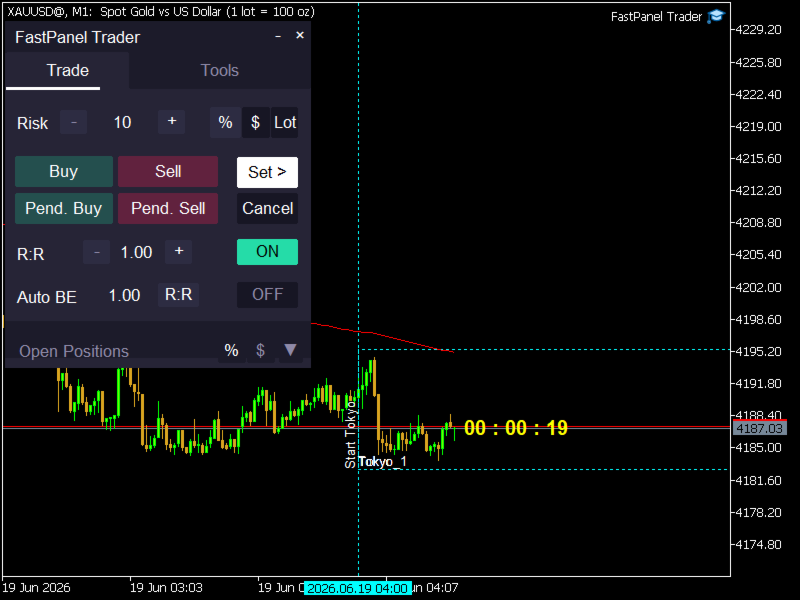
FastPanel Trader EA is a clean and powerful MetaTrader 5 trade management panel designed for traders who want faster execution, better risk control, and a more organized trading chart.

This Expert Advisor does not try to predict the market or promise profits. Instead, it gives you a professional control panel directly on your MT5 chart so you can manage entries, stop loss, take profit, risk, open positions, session timing, and candle time with speed and precision.

FastPanel Trader EA is built for manual and semi-manual traders who want a cleaner workflow, faster trade preparation, and better discipline before entering the market.

Main Features

Professional Trading Panel
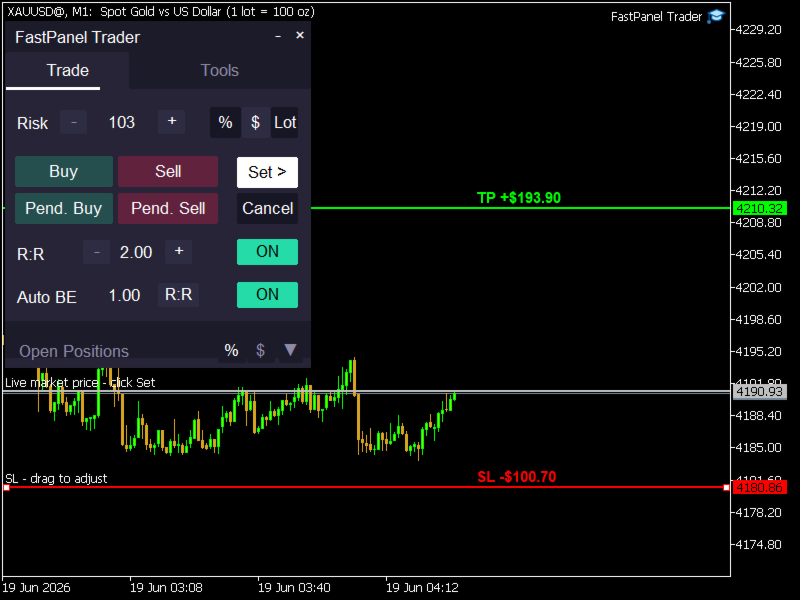
FastPanel Trader EA adds a modern trading panel directly to your chart. You can prepare buy trades, sell trades, pending buy orders, and pending sell orders from one simple interface.

Flexible Risk Management
Choose how you want to calculate your position size:

  • Risk by percentage

  • Risk by fixed money amount

  • Risk by fixed lot size

This makes the panel useful for different trading styles, account sizes, and risk preferences.

Adjustable Entry, Stop Loss and Take Profit Lines
Before opening a trade, the EA creates clear setup lines on the chart. You can adjust your entry, SL, and TP visually before confirming the order. This helps you plan the trade before execution instead of rushing into the market.

Market and Pending Order Support
FastPanel Trader EA supports both instant market trade preparation and pending order preparation, giving you more flexibility depending on your strategy.

TP Based on SL Distance
Use the built-in R:R feature to automatically calculate take profit based on your stop loss distance. You can set your preferred reward-to-risk ratio directly from the panel.

Auto Break Even
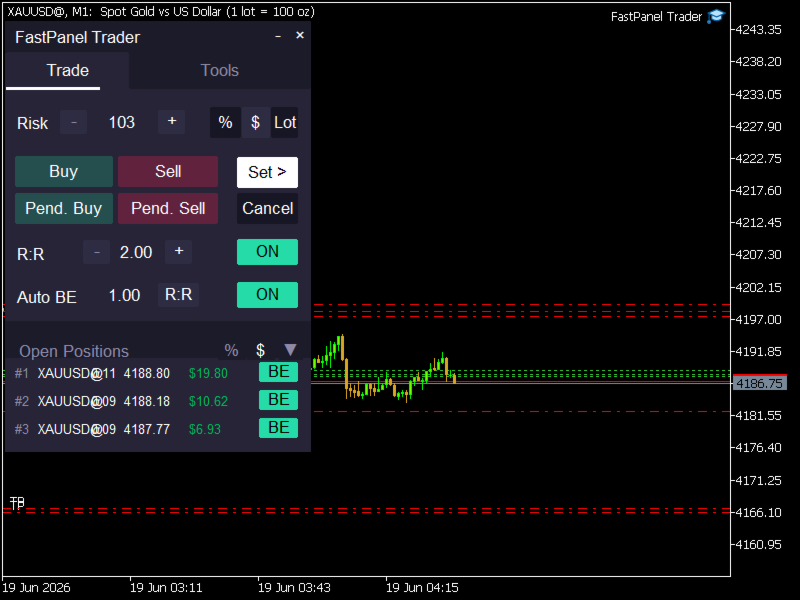
The EA includes Auto BE controls to help move trades to break even after price reaches your selected trigger. The trigger can be based on points or R:R, depending on your preferred management style.

Open Positions Monitor
See your active positions directly inside the panel. The EA can display open trade information, lot size, open price, and profit. You can switch profit display between money and percentage and sort positions for easier monitoring.

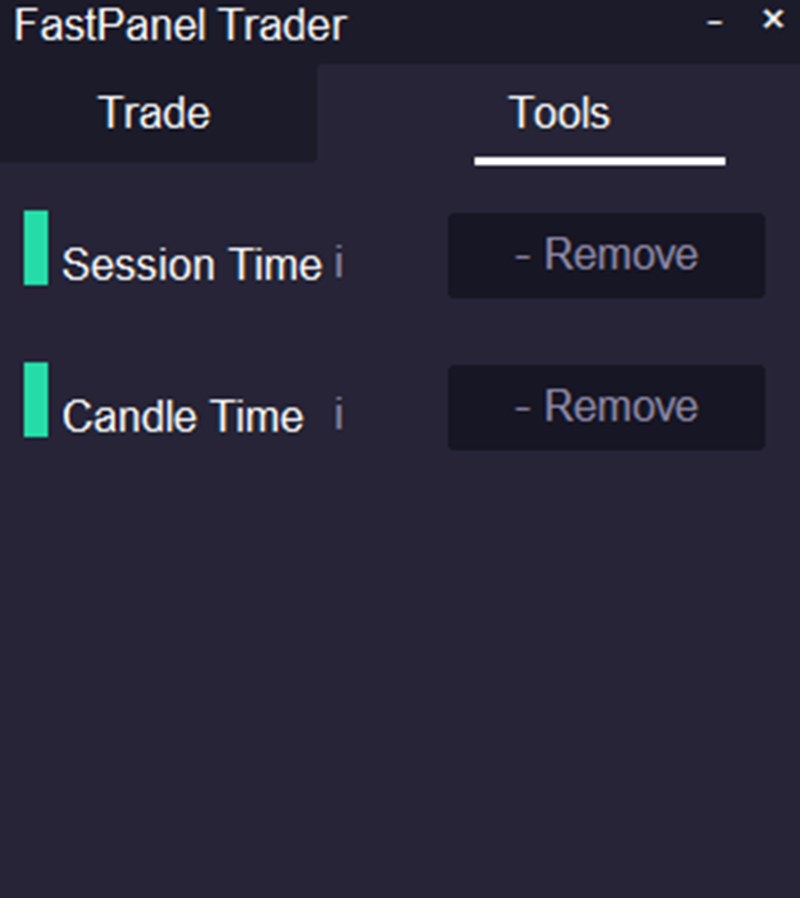
Session Time Tool
Display trading sessions directly on the chart. Tokyo, London, and New York sessions can be shown using clean session boxes/lines, helping you quickly understand the active market period.

Candle Timer
A built-in candle countdown timer shows the remaining time for the current candle, helping traders who rely on candle closes, session timing, or lower-timeframe execution.

Black and White Themes
Choose between a professional black theme and a clean white theme. The panel can be adjusted to match your chart layout and trading style.

Draggable and Minimizable Panel
Move the panel around the chart, minimize it when needed, or close it when you want a cleaner view.

Why Traders Use FastPanel Trader EA

FastPanel Trader EA is made for traders who want:

  • Faster trade preparation

  • Better visual control

  • Cleaner risk management

  • Manual trading with more structure

  • A professional MT5 dashboard experience

  • Session visibility and candle timing in one tool

  • Less chart clutter and better execution workflow

This tool is especially useful for scalpers, intraday traders, session traders, price action traders, and traders who want to manage risk before entering a position.

Important Note

FastPanel Trader EA is a trade management and execution panel. It does not provide trading signals and it does not guarantee profit. Trading involves risk, and every trader should use proper risk management.

Input Settings

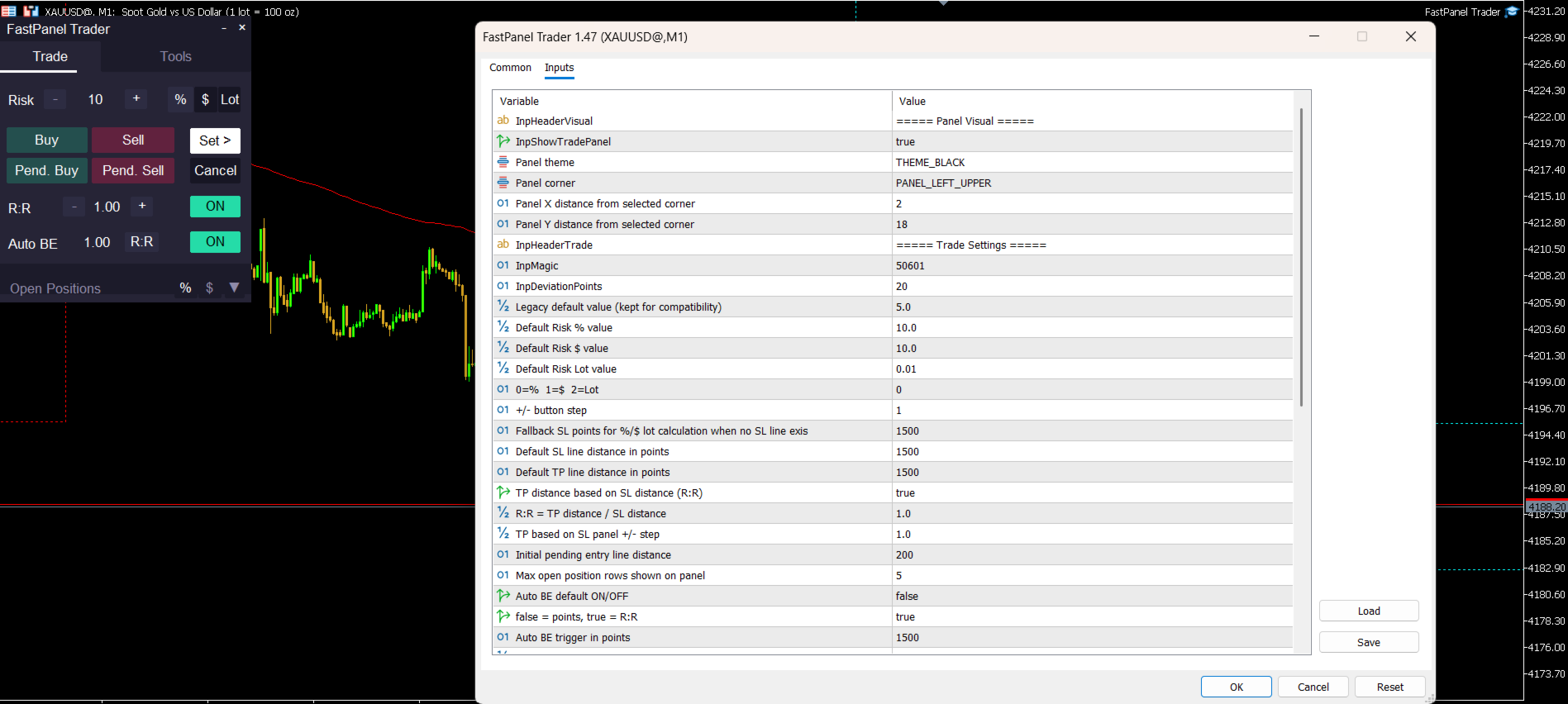
Panel Visual

  • Show Trade Panel: Enable or disable the panel.

  • Panel Theme: Choose black or white panel style.

  • Panel Corner: Select where the panel appears on the chart.

  • Panel X Distance: Adjust horizontal panel position.

  • Panel Y Distance: Adjust vertical panel position.

Trade Settings

  • Magic Number: Unique identifier for trades opened by the EA.

  • Deviation Points: Maximum allowed price deviation for order execution.

  • Default Risk Percent: Default risk value when using percentage mode.

  • Default Risk Money: Default risk value when using money mode.

  • Default Risk Lot: Default lot size when using fixed lot mode.

  • Default Risk Mode: Choose between percent, money, or lot risk mode.

  • Risk Step: Step size for increasing or decreasing risk from the panel.

  • Risk SL Points: Fallback SL distance used for lot calculation when no SL line exists.

  • Default SL Points: Default stop loss distance.

  • Default TP Points: Default take profit distance.

  • TP Based on SL: Enable or disable automatic TP calculation based on SL distance.

  • TP Based on SL Ratio: Reward-to-risk ratio used for TP calculation.

  • Pending Offset Points: Default distance for pending order entry line.

  • Max Open Positions Panel Rows: Number of open positions displayed in the panel.

  • Auto BE On: Enable or disable Auto Break Even by default.

  • Auto BE Use R:R: Choose Auto BE trigger by points or reward-to-risk.

  • Auto BE Points: Point-based trigger for Auto BE.

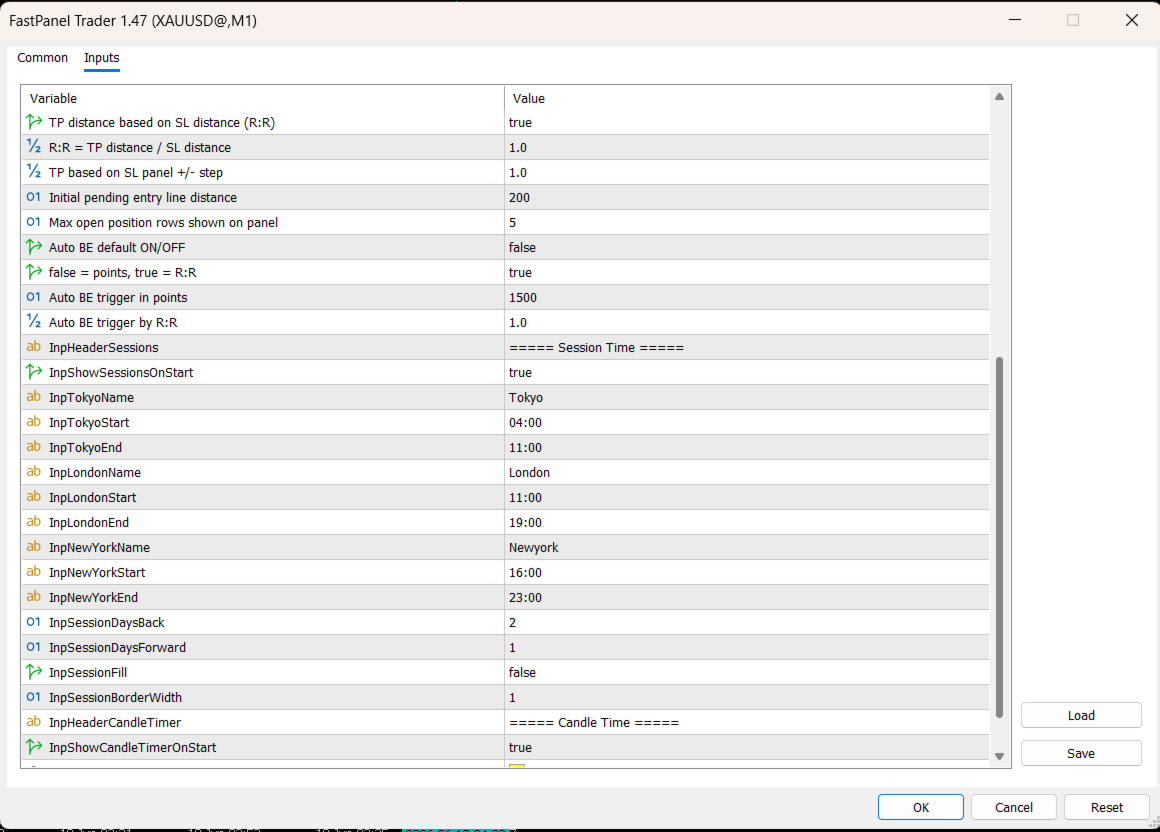
  • Auto BE R:R: R:R-based trigger for Auto BE.

Session Time

  • Show Sessions On Start: Automatically show sessions when the EA starts.

  • Tokyo Session Name, Start and End Time: Customize Tokyo session.

  • London Session Name, Start and End Time: Customize London session.

  • New York Session Name, Start and End Time: Customize New York session.

  • Session Days Back: Number of previous days to display sessions.

  • Session Days Forward: Number of future days to display sessions.

  • Session Fill: Enable or disable filled session boxes.

  • Session Border Width: Adjust session box border thickness.

Candle Time

  • Show Candle Timer On Start: Automatically show candle timer when the EA starts.

  • Timer Text Color: Choose candle timer text color.

  • Timer Text Bars Forward: Control where the candle timer appears on the chart.

FastPanel Trader EA is built to make MT5 manual trading cleaner, faster, and more controlled.

추천 제품
Эксперт собирает данные из биржевого стакана, суммируя отложенные ордера на покупку или продажу. Далее, по сумме ордеров определяется общее направление, куда смотрят участники рынка. Если суммарные покупки/продажи превышают определенный коэффициент, то производится сигнал. Настройки: Timer=5 // указывается как часто обновлять данные по рынку в секундах. Чаще чем раз в 10 секунд ставить не рекомендуется. X-size =700 // размер окна по оси Х. Y-size=650// размер окна по оси Y. Only "Market Watch"?=
Ritz Prime TradeCopier – Institutional Cross-Broker Sync Engine Say goodbye to lagging copy trades, mismatched broker symbols, and missed Stop Losses. Ritz Prime TradeCopier is an ultra-fast, high-frequency copy trading engine designed for professional portfolio managers and retail traders. Powered by a custom Bit-Banger JSON architecture and an advanced Global Variable (GV) mapping system, it seamlessly bridges multiple MetaTrader terminals on a single VPS/SERVER with true zero-lag performance.
Telegram to mt5 pro
Janet Abu Khalil
4 (4)
Telegram to MT5 Pro — Advanced Telegram Signal Copier with Auto-Fix, Multi-TP, Risk Control and Full Trade Management Telegram to MT5 Pro — 전문 텔레그램 신호 복사기 Telegram to MT5 Pro는 텔레그램 신호를 MetaTrader 5 계정으로 자동으로 직접 실행하는 고성능 트레이드 복사기로, 리스크, 실행, 트레이드 관리에 대한 완전한 제어를 제공합니다. 이 시스템은 두 가지 구성 요소로 이루어져 있습니다: • MetaTrader 5 내부에서 실행되는 Expert Advisor (EA) • 텔레그램에 연결되어 신호를 로컬로 EA에 전송하는 데스크톱 브리지 애플리케이션 두 구성 요소는 동일한 컴퓨터에서 실행되어야 합니다. MQL5 플랫폼 제한으로 인해 EA는 텔레그램에 직접 연결할 수 없습니다. 브리지는 텔레그램을 처리하고 EA는 거래를 실행합니다. 지원 및 설치
Advanced Indicators Manager Tired of manually removing and re-adding indicators every time you want to switch between setups or get a clean chart? With this tool you turn them on and off with a single click, no digging through menus, no lost time. Advanced Indicators Manager automatically scans your chart and detects every indicator currently applied (main window and sub-windows), creating a small button panel with one button per indicator. You can add as many indicators as you want to your cha
Atlas Trade Desk
Bernhard Wurzlbauer
Atlas Trade Desk MT5 Atlas Trade Desk MT5 is a visual trade panel, risk manager and lot calculator for manual MetaTrader 5 traders. Plan market and pending orders directly on the chart, calculate position size from your selected risk, adjust Entry, Stop Loss and Take Profit visually, and manage open positions from one clean dashboard. The tool is built for discretionary traders who want faster order preparation, clearer risk control and safer position management without switching between multipl
CV Guardian Service – Professional MT5 Monitoring & Maintenance System CV Guardian Service is a professional background service for MetaTrader 5 designed for continuous monitoring, diagnostics, and technical maintenance of your MT5 environment. The service runs without a chart in the background and monitors key operational conditions including terminal health, broker connectivity, system resources, execution quality, charts, Strategy Tester resources, and potential technical risks. Features Con
Martingale panel MT5
Mohammadbagher Ramezan Akbari
In this article, we would like to introduce the trade panel product with the Martingale panel. This panel is made in such a way that it can meet the needs of traders to a great extent. This trade panel actually consists of two trade panels at the same time, with the first one you can take positions with certain profit and loss limits, and with the second one, you can have positions with profit limits but without loss limits. When positions lose, a new position will be added based on the settings
Most traders don't lose because of bad analysis. They lose because they couldn't close fast enough. Because they fat-fingered  the wrong lot size. Because a single news spike wiped out three winning trades  before they could react. That's exactly what Apex Trade Manager Pro was built to fix. This is a visual trading panel for MetaTrader 4 and MetaTrader 5. It sits on  your chart and puts every critical trade action — closing, scaling, setting  stops, opening orders — one click away. No menus
The News Filter MT5
Leolouiski Gan
4.78 (23)
이 제품은 뉴스 시간 동안 모든 전문가 어드바이저 및 수동 차트를 필터링하여 수동 거래 설정이나 다른 전문가 어드바이저가 입력한 거래가 파괴될 수 있는 급격한 가격 상승으로부터 걱정하지 않아도 됩니다. 이 제품은 또한 뉴스 발표 전에 열린 포지션과 대기 주문을 처리할 수 있는 완전한 주문 관리 시스템이 함께 제공됩니다.   The News Filter  를 구매하면 더 이상 내장 뉴스 필터에 의존할 필요가 없으며 이제부터 모든 전문가 어드바이저를 여기서 필터링할 수 있습니다. 뉴스 선택 뉴스 소스는 Forex Factory의 경제 캘린더에서 얻어집니다. USD, EUR, GBP, JPY, AUD, CAD, CHF, NZD 및 CNY와 같은 어떤 통화 기준으로 선택할 수 있습니다. Non-Farm (NFP), FOMC, CPI 등과 같은 키워드 식별을 기준으로 선택할 수도 있습니다. 저, 중, 고 영향을 가지는 뉴스를 필터링할 수 있도록 선택할 수 있습니다. 차트와 관련된 뉴스만 선
Guardian Yield Keeper is a utility Expert Advisor for traders who want real-time exit management and profit protection for open positions on the current symbol. This EA does not open new trades and does not generate entry signals. Its job is simple: monitor existing positions and close them when your profit or risk conditions are met . It is especially suitable for traders using DCA, Grid, Martingale, or basket trading systems and looking for a dedicated management layer that is more flexible th
RSI Cortex Ai
Michael Prescott Burney
RSI Cortex AI for MT5 RSI Cortex AI is a MetaTrader 5 indicator designed to help traders analyze momentum using a multi-factor ranking model instead of relying only on a fixed RSI threshold approach. It combines momentum features, directional ranking, confidence scoring, and adaptive filtering into a clean TradingView-style workspace for chart-based analysis. What the indicator does RSI Cortex AI evaluates momentum using a broader feature set than a standard RSI line. It is designed to help trad
Supply and Demand Zones MT5
Peter Mueller
4.86 (21)
The Supply and Demand Zone Indicator is a powerful and easy-to-use tool designed to help traders identify critical supply and demand zones on the chart. These zones can provide valuable insight into potential market reversals, breakouts, and important price levels where buyers or sellers are likely to take control. The best   FREE Trade Manager . If you want to create your own Hedging or Grid strategies without any coding make sure to check out the   ManHedger Key Features: Automatic Zone Detect
FREE
Pattern Recognition EA
Claudiu-georgian Zavera
Pattern Recognition EA - From Learn to Earn. The market repeats itself. This EA finds every past repeat of the current candle sequence - and lets history vote the direction. ONE SHAPE. EVERY REPEAT IN HISTORY VOTES. The last N candles on your signal timeframe form a shape. The EA scans the history you choose - a fixed number of bars or everything your broker provides - for the SAME shape, and checks what happened next, every single time. Only when enough repeats exist AND a clear majority of t
Com este Expert Advisor tenha a possibilidade de fechar todas as posições de forma automatizada. Tenha em mãos o recurso de fechar as posições e ordens pendentes por ações, Dólar, Índice ou TODOS estes juntos, algo inovador no mercado. Ideal para quem quer uma segunda camada de segurança para suas operações automatizadas ou ainda que o próprio robô feche suas operações manuais em um horário programado. Promoção de 30 dólares para a três primeiras assinatura, posteriormente será cobrado 50 dól
HA Metals Flow Chart is a visual MetaTrader 5 indicator designed to make the flow of gold and silver easier to read. It replaces the standard chart display with synthetic Heikin Ashi candles and combines flow classification, normalized momentum, confirmed market structure events and a compact dashboard in a single interface. The indicator is intended for discretionary chart analysis. It does not open, modify or close trades. MAIN FEATURES - Synthetic Heikin Ashi chart for a cleaner view of direc
FREE
CHILLIUS NAVIGATOR MetaTrader 5용 올인원 차트 도우미 "Code with cool vibes" 끝없이 메뉴를 클릭하는 것에 지치셨나요? Chillius Navigator는 심볼 전환, 동기화된 십자선, 피보나치 도구를 하나의 세련된 패널에 통합합니다. 프로처럼 차트를 탐색하세요. 주요 기능 세 가지 심볼 소스   • 시장 감시 - 감시 중인 모든 심볼에 즉시 접근   • 활성 거래 - 포지션이 있는 심볼만 표시 (자동 업데이트!)   • 사용자 목록 - 나만의 관심 목록 생성 스마트 통화 필터   클릭 한 번으로 통화쌍 필터링. EUR, USD 쌍 또는   XAU/XAG 같은 귀금속에 집중하세요. 거래 스타일에
End Flow Momentum
Nestor Jose Mendez Boza
END FLOW MOMENTUM  Capital Flow Analysis with a Geometric Approach Overview End Flow Momentum   is a technical indicator that blends volume, price, and volatility analysis into a visual tool. Designed for traders seeking an alternative capital flow analysis tool. Key Features 1. Mathematical Foundation Proprietary Calculation Model:   Uses a mathematical core that serves as a dynamic central reference point. Volatility-Adaptive Scaling:   Utilizes the asset's inherent volatility as the primary
EAs Manager
Abdeljalil El Kedmiri
5 (2)
Are you running multiple EAs on the same MT5 account? Let one powerful Manager control them all. EAs Manager Pro V2 is a professional EA management, risk-control, and trade-assistance tool that acts as a central command center for your entire MT5 account. It automatically detects your EAs using their Magic Numbers , monitors EA and manual trades , and gives you complete visibility and control from one simple dashboard. What makes V2 powerful? EA & Manual Trade Support – Manage automated and manu
BTC Master Pro
Farzad Saadatinia
4.58 (12)
BTC Master Pro — 규율 있는 비트코인 트레이딩을 위한 신뢰할 수 있는 파트너. 최신 버전은 OpenAI 인공지능 기술 이 통합되어, 높은 변동성을 가진 암호화폐 시장 환경에서 더욱 정교한 실행과 향상된 거래 필터링을 제공합니다. 이 전문 Expert Advisor는 MetaTrader 5 플랫폼에서 Bitcoin (BTCUSD) 거래를 위해 특별히 설계되었으며, 구조화된 실행, 노출 관리, 그리고 지능적인 리스크 관리에 중점을 두고 있습니다. 가격: $499  →  다음 단계: $699  →  최종 가격: $999 LIVE SIGNAL HERE OpenAI 기반 실행 필터 최신 버전은 OpenAI 기술을 활용하여 실시간 시장 상황을 분석하고, 품질이 낮거나 신뢰도가 부족한 거래 설정을 필터링합니다. AI 안전 레이어: 인공지능 모듈은 거래 실행 전에 작동하는 2단계 승인 시스템으로 설계되었습니다. 이는 예측 도구가 아닌 실행 필터로만 사용됩니다. 모든 거래는 구조화
PZ Mean Reversion MT5
PZ TRADING SLU
1 (1)
평균 회귀 거래에 대한 전문적이고 정량적인 접근 방식을 구현하는 고유한 지표입니다. 이는 가격이 예측 가능하고 측정 가능한 방식으로 평균으로 전환되고 반환된다는 사실을 이용하여 비정량적 거래 전략을 훨씬 능가하는 명확한 진입 및 퇴장 규칙을 허용합니다. [ Installation Guide | Update Guide | Troubleshooting | FAQ | All Products ] 명확한 거래 신호 놀랍도록 쉬운 거래 사용자 정의 가능한 색상 및 크기 성능 통계 구현 대부분의 거래 전략을 능가합니다. 적절한 SL 및 TP 레벨을 표시합니다. 이메일/음향/시각 알림을 구현합니다. 작동 원리 이 지표는 더 높은 기간에서 완전히 사용자 정의 가능한 이동 평균 주변의 표준 편차를 측정하고 추세 추종 접근 방식을 사용하여 정확하게 거래를 찾습니다. 거래는 현재 차트의 가격 동작을 살펴보고 선택한 더 높은 기간에서 계산된 평균 가격대로 가격이 돌아오면 닫힙니다. 코딩 방식 때문에 지
Expert was built on the basis of Trap . EA can trade in automatic and semi-automatic mode. In automatic mode, it will place pending orders. However, in semi-automatic mode, it will wait for the first manually opened order. It will then go into automatic mode. Before starting work, the expert will download 28 currency pairs:         "AUDCAD","AUDCHF","AUDJPY","AUDNZD","AUDUSD","CADCHF","CADJPY",         "CHFJPY","EURAUD","EURCAD","EURCHF","EURGBP","EURJPY","EURNZD",         "EURUSD","GBPAUD","GBP
METATRADER5 This program is designed to monitor and evaluate the market performance of 21 minor currency pairs by tracking key metrics such as maximum spread and the time of occurrence. For each selected currency pair, the program calculates the current spread and compares it against the highest recorded spread. If a new maximum spread is detected, it updates the maximum value and logs the time. The spread information is  dynamically displayed, providing insights into market conditions. Additio
Crypto Investor EA MT5
Lachezar Krastev
4.67 (6)
BUY 1 and GET 1 FREE - Promotion! Buy Crypto Investor EA with a huge –60% discount and GET 1 FREE EA by your choice! Promo Price: $217 (Regular Price: $547 — You Save $330!) After purchase contact me to get your GIFT EA! You can also contact me to get the list of available GIFT EAs! Whether you're just starting out or already a pro, Crypto Investor EA is your edge in navigating Bitcoin’s high-volatility moves. Driven by cutting-edge algorithms, powered by advanced high-performance trading alg
MarketBookInfo
Evgenii Akselrod
Индикатор собирает данные из биржевого стакана, суммируя отложенные ордера на покупку или продажу. Далее, по сумме ордеров определяется общее направление, куда смотрят участники рынка. Если суммарные покупки/продажи превышают определенный коэффициент, то производится сигнал. Настройки: Timer=5 // указывается как часто обновлять данные по рынку в секундах. Чаще чем раз в 10 секунд ставить не рекомендуется. X-size =700 // размер окна по оси Х. Y-size=650// размер окна по оси Y. Only "Market Watch"
가격으로 TP 및 SL 설정 – MT5 자동 주문 수정기 모든 거래에 대해 정확한 TP 및 SL 가격 수준 자동 설정 ️ 모든 통화쌍 및 EA와 호환, 심볼 또는 매직넘버로 필터링 가능 이 EA는 직접 가격 값(예: EURUSD의 1.12345)을 사용하여 거래의 정확한 테이크프로핏(TP)과 스톱로스(SL) 수준을 정의하고 적용합니다. 포인트나 핍 없음. 모든 주문 또는 선택된 심볼/매직넘버에 대해 깔끔하고 정확한 거래 관리가 가능합니다. 주요 기능: 정확한 가격으로 TP 및 SL 즉시 수정 모든 주문, 현재 심볼 또는 특정 매직넘버에 적용 ️ 0을 입력하여 거래의 TP 또는 SL 제거 차트에 연결되면 완전 자동 작동 모든 거래 자산과 호환 적합 대상: 빠른 TP/SL 제어를 원하는 수동 트레이더 기본 종료 로직을 재정의해야 하는 EA 사용자 복잡한 포지션을 관리하는 다중 주문 트레이더 질문이나 제안이 있으신가요?
Trade Manager DashPlus
Henry Lyubomir Wallace
4.85 (13)
DashPlus 는 MetaTrader 5 플랫폼에서 거래 효율성과 효과를 향상시키기 위해 설계된 고급 거래 관리 도구입니다. 리스크 계산, 주문 관리, 고급 그리드 시스템, 차트 기반 도구 및 성과 분석 등 포괄적인 기능을 제공합니다. 주요 기능 1. 리커버리 그리드 불리한 시장 상황에서 거래를 관리하기 위한 평균화 및 유연한 그리드 시스템을 구현합니다. 거래 회복을 최적화할 수 있도록 전략적인 진입 및 종료 포인트를 제공합니다. 2. 스택 그리드 강한 시장 움직임 동안 포지션을 추가하여 유리한 거래에서 잠재적 수익을 극대화하도록 설계되었습니다. 유리한 시장 트렌드에서 승률을 높이며 거래를 확장할 수 있도록 합니다. 3. 손익(P&L) 라인 차트에서 잠재적인 수익 및 손실 시나리오를 시각적으로 표현합니다. 설정을 조정하고 P&L 라인을 드래그하여 실행 전에 다양한 거래 결과를 평가할 수 있습니다. 4. 바스켓 모드 동일한 심볼에 여러 포지션을 단일 집계 포지션으로 결합하여 관리합니
KS PropFirm 및 Broker Dashboard Pro: 프로프 트레이딩 회사(Prop Firm)의 까다로운 규정 준수를 위한 최고의 도구 정밀한 모니터링으로 프로프 트레이딩 여정을 한 단계 업그레이드하세요. 고위험 프로프 트레이딩 회사 규정 준수를 위해 스프레드시트, 계산기, 수동 확인 작업을 반복하는 데 지치셨나요? KS PropFirm 및 Broker Dashboard Pro는 FTMO, MyForexFunds, The5%ers 등과 같은 회사 규정을 준수해야 하는 전문 트레이더를 위해 설계된 올인원 MT5 유틸리티입니다. 이 가벼운 대시보드는 계정 상태에 대한 실시간 인사이트를 제공하고, 비용이 많이 드는 규정 위반을 방지하기 위해 자동으로 규칙을 적용합니다. EA나 터미널 속도를 저하시키지 않고도 규정 준수 요건을 충족합니다. 규정 준수 요건을 더 빠르게 충족하고, 더 스마트하게 거래하며, 자신 있게 자금 지원 계정을 활용하세요. KS PropFirm 대시보드를
The Stop Loss Manger - SL Mange With the Stop Loss Manager you can finally sleep peacefully while it effectively manages your risk in stock market trading. Simply set your individual stop loss limits and let the manager trade for you. Never worry about losses again - the Stop Loss Manager takes care of it for you! Get the ultimate support for your trading now and maximize your profits with ease. Join the community of successful traders who swear by Stop Loss Manager today. Function overview: 1.
ATTENTION: The Indicator cannot be backtested, as it is generated exclusively from live intraday calculations based on options flow. GEX Level Converter – Gamma Exposure Mapping for CFD Charts NASDAQ-100 edition — for US100 · NDX · NAS100 · USTECH and every Nasdaq-100 CFD equivalent Instantly see professional options-market levels directly on your MetaTrader Nasdaq-100 CFD chart. The GEX Level Converter translates the daily Gamma Exposure (GEX) zones of the NDX options market into precise pri
이 제품의 구매자들이 또한 구매함
Trade Assistant MT5
Evgeniy Kravchenko
4.41 (216)
거래당 위험 계산, 라인을 사용한 손쉬운 신규 주문, 부분 청산 기능을 통한 주문 관리, 7가지 유형의 트레일링 스탑 및 기타 유용한 기능을 제공합니다. 추가 자료 및 지침 설치 지침   -   애플리케이션 지침   -   데모 계정용 애플리케이션 평가판 라인 기능       - 차트에 개시선, 손절매, 차익실현을 표시합니다. 이 기능을 사용하면 새로운 주문을 쉽게 하고 개봉 전에 추가 특성을 볼 수 있습니다. 위기 관리       -       위험 계산 기능은 설정된 위험과 손절매 주문의 크기를 고려하여 새 주문의 볼륨을 계산합니다. 이를 통해 손절매 크기를 설정하고 동시에 설정된 위험을 존중할 수 있습니다. 로트 계산 버튼 - 위험 계산을 활성화/비활성화합니다. 필요한 위험 값은 위험 필드에 0에서 100 사이의 백분율 또는 예금 통화로 설정됩니다. 설정 탭에서 위험 계산 옵션을 선택합니다. $ 통화, % 잔액, % 지분, % 자유 마진, % 사용자 정의, % AB 이전
TradePanel MT5
Alfiya Fazylova
4.88 (167)
Trade Panel은 다기능 거래 도우미입니다. 이 애플리케이션에는 50개 이상의 수동 거래 기능이 포함되어 있으며 대부분의 거래 작업을 자동화할 수 있습니다. 구매하기 전에 데모 계정에서 데모 버전을 테스트할 수 있습니다. 데모 계정용 애플리케이션 체험판 다운로드: https://www.mql5.com/en/blogs/post/750865 . 전체 지침 여기 . 거래. 한 번의 클릭으로 거래를 수행할 수 있습니다: 리스크 자동 계산과 함께 예약 주문 및 포지션 열기. 한 번의 클릭으로 여러 주문 및 포지션 열기. 주문 그리드 열기. 예약 주문 및 포지션을 그룹별로 닫기. 포지션 방향 전환 (Buy 닫기 > Sell 열기, Sell 닫기 > Buy 열기). 포지션 잠금 (부족한 포지션을 열어 Buy와 Sell 포지션의 수량을 동일하게 만들기). 모든 포지션 한 번의 클릭으로 부분적으로 닫기. 모든 포지션의 테이크 프로핏과 스톱로스를 같은 가격 수준에 설정. 모든 포지션의 스톱로스를
================================================================================ POC BREAKOUT - V20.72. Full Professional Grade Toolkit ================================================================================ POC Breakout is a full MetaTrader 5 trading dashboard for discretionary traders who want breakout signals, Point of Control (POC) context, volume profiles, order flow, market structure, news, alerts, and advanced trade planning in one professional workspace. Attached directly to you
파워 캔들 전략 스캐너 - 자체 최적화 다중 종목 설정 찾기 도구 파워 캔들 전략 스캐너는 마켓 워치에 등록된 모든 종목에 대해 파워 캔들 지표와 동일한 자체 최적화 엔진을 동시에 실행합니다. 하나의 패널에서 현재 통계적으로 거래 가능한 종목, 각 종목별 최적의 전략, 최적의 손절매/익절 조합을 알려주며, 새로운 신호가 발생하면 즉시 알림을 전송합니다. 이 도구는 Stein Investments 에코시스템의 일부입니다. 18개 이상의 도구와 함께 당신의 1대1 AI 트레이딩 멘토 Max.  항상 대기 중, 모든 인디케이터를 깊이 있게 이해, 무언가를 차근차근 생각해보고 싶은 순간에 도움을 줍니다.  https://stein.investments 에서 만나보세요 완벽한 시장 모니터링. 종목당 3,000건 이상의 자동 최적화. 2가지 알림 유형. 한 번의 클릭으로 차트를 전환하고 바로 거래하세요. 이 도구가 필요한 이유 대부분의 다중 종목 스캐너는 가격 변동만 보여줍니다. 티커별
Premium Trade Manager - 코치가 내장된 트레이딩 패널 Premium Trade Manager 는 차트 안에 트레이딩 코치를 심어놓은 도구입니다. 주문을 확정하기 전에, AI 트레이딩 코치 Max가 설정된 거래를 직접 읽고 명확한 판단을 내려줍니다. 스톱이 규율 있는 접근 방식에 맞는지, 리스크 크기가 합리적인지, 고영향 뉴스 이벤트가 몇 분 후에 있는지, 프롭 펌 한도에 근접했는지. 그 아래에는 완전한 실행 엔진이 있습니다. 원클릭 리스크 기반 진입, 차트에서 드래그로 세우고 거래가 진행되는 동안에도 계속 움직일 수 있는 플랜, 최대 4단계 분할 익절, 7가지 트레일링 방식, 실시간 프롭 펌 컴플라이언스, 뉴스 가드, 그리고 자체 비용을 평가하는 스프레드까지. 결정은 당신이 내립니다. Max가 두 번째 시선으로 확인합니다. 패널이 그 이후의 모든 것을 처리합니다. 구매 전에 직접 체험해 보세요. 브라우저에서 라이브 패널을 직접 클릭해볼 수 있습니다. 구매 전에 실제
Footprint Chart Pro — Professional OrderFlow EA for MetaTrader 5 Version 6.34 | Professional tool for real traders | Institutional-Grade Visualization DEMO USERS - PLEASE SELECT EVERY TICK / REAL TICK WHEN TESTING AND YOU HAVE DOWNLOADED HISTORICAL DATA. IF YOU SEE A WAITING SCREEN AND IT IS NOT DOWNLOADING, IT MEANS YOU HAVE LOW HISTORICAL DATA. TRY 1 MIN AND 5 MIN FIRST ON 1 DAY DATA. ONE DAY DATA SHOULD BE THE NEWEST AND MOST CURRENT DATE. PLEASE WAIT UNTIL THE MARKET HAS ROLLED OVER PERIOD.
Farmed Hedge Yield Farming | All Markets (Manual - Hybrid - Semi/Automated EA) MULTI-ASSET SUPPORT Trade any asset available on your broker - Forex: Major, Minor, Exotic pairs - Crypto: BTC, ETH, XRP, SOL, BNB - Stocks: Apple, Tesla, Amazon, Google, etc. - Commodities: Gold, Silver, Oil, Gas - Indices: US30, NAS100, SPX500, DAX40 - Any CFD your broker offers VERIFIED TRADING RESULTS - Farmed Hedge Yield Axi Copy:  https://www.mql5.com/en/signals/2356376 - Farmed Hedge Yield Exn Copy:   https:/
Trading Chaos Expert
Gennadiy Stanilevych
5 (11)
This software has no equals in the world and represents a universal trade "console" covering trading signals, automated market entry, setting of Stop Loss and Take Profit, as well as Trailing Profit for multiple trades at the same time in a single open window. Intuitive control of the Expert Advisor in "three clicks" ensures a comprehensive use of all its functions on different computers, including tablets PCs. Interacting with additional signal indicators that mark the chart to give a real mark
YuClusters
Yury Kulikov
4.93 (43)
Attention: You can view the program operation in the free version  YuClusters DEMO .  YuClusters is a professional market analysis system. The trader has unique opportunities to analyze the flow of orders, trade volumes, price movements using various charts, profiles, indicators, and graphical objects. YuClusters operates on data based on Time&Sales or ticks information, depending on what is available in the quotes of a financial instrument. YuClusters allows you to build graphs by combining da
Custom Alerts AIO: 다중 시장을 동시에 모니터링 – 설정 없이 즉시 사용 가능 개요 Custom Alerts AIO 는 복잡한 설정 없이 즉시 사용할 수 있는 통합 시장 모니터링 도구입니다. FX Power, FX Volume, FX Dynamic, FX Levels, IX Power 등 필요한 모든 지표가 내장되어 있어 별도의 설치나 구성 없이 알림 기능을 바로 사용할 수 있습니다. 차트 그래픽 없이 작동하며, Forex, 금속, 지수, 암호화폐 등 주요 자산군을 모두 지원합니다. 주식(Symbols)은 별도로 입력하여 추가할 수 있으나, MetaTrader에서는 일반적으로 제한적으로만 사용됩니다. 1. 왜 Custom Alerts AIO를 선택해야 하나요? 추가 라이선스가 필요 없습니다 • 모든 Stein Investments 지표가 내장되어 있어 별도 구매가 필요 없습니다. • 즉시 알림 기능을 시작할 수 있어 빠르고 간편합니다. 모든 시장을 하나의 도구로
Welcome to ENTRY IN THE ZONE WITH SMC MULTI TIMEFRAME Entry In The Zone and SMC Multi Timeframe is a real-time market analysis tool based on Smart Money Concepts (SMC), designed to analyze market structure, price direction, and key trading zones. It supports both Single-Timeframe Analysis and Multi-Timeframe Analysis, providing a clearer view of the overall market structure across multiple timeframes, with real-time BUY / SELL signals that do not repaint. It is designed to help filter trading op
VirtualTradePad PRO SE MT5 — MetaTrader 5용 전문 트레이딩 컨트롤 센터 VirtualTradePad PRO SE 는 MetaTrader 5 용 프리미엄 차트 기반 트레이딩 패널이자 거래 관리 워크스페이스입니다. 더 빠른 주문 실행, 더 명확한 포지션 관리, 구조화된 거래 관리, 시각적인 레벨 계획, 그리고 차트에서 직접 작업하는 전문적인 워크플로를 원하는 트레이더를 위해 설계되었습니다. 이 제품은 단순한 BUY / SELL 패널이 아닙니다. PRO SE는 수동 트레이딩, 예약 주문, 포지션 관리, 부분 청산, 바스켓 손익 관리, 평균가 레벨, ATM 규칙, 신호 모니터링, 실시간 시장 정보, 전략 테스터 (Strategy Tester) 워크플로, VPS 중심 운용을 하나의 연결된 인터페이스로 통합합니다. MT4 버전 | 전체 설명 및 스크린샷 | 구입 방법 | 설치 방법 | 로그 파일을 얻는 방법 | 테스트 및 최적화 방법 | Expforex의 모든
Quant AI Agents
Ho Tuan Thang
5 (1)
Quant AI Agents are independent trading Expert Advisors. Instead of trading using a fixed strategy like other conventional EAs, Quant AI Agents   is a   multi-agent AI trading framework   that turns natural-language strategy prompts into live.  WANT THE SAME RESULTS AS MY LIVE SIGNAL?   Use the exact same brokers I do:   IC MARKETS , IC TRADING   .  Unlike the centralized stock market, Forex has no single, unified price feed.  Every broker sources liquidity from different providers, creating un

The product will copy all telegram signal to MT5 ( which you are member) , also it can work as remote copier.  Easy to set up, copy order instant, can work with almost signal formats, image signal,  s upport to translate other language to English Work with all type of channel or group, even channel have "Restrict Saving Content", work with  multi channel, multi MT5 Work as remote copier: with signal have ticket number, it will copy exactly via ticket number. Support to backtest signal. How to s
EasyInsight AIO MT5
Alain Verleyen
4.92 (12)
EASY Insight AIO – 스마트하고 손쉬운 트레이딩을 위한 올인원 솔루션 개요 외환, 금, 암호화폐, 지수, 심지어 주식까지 — 전 시장을 몇 초 만에, 수동 차트 확인이나 복잡한 설치, 인디케이터 설정 없이 스캔할 수 있다고 상상해 보세요. EASY Insight AIO 는 AI 기반 트레이딩을 위한 궁극의 플러그 앤 플레이(Plug & Play) 데이터 내보내기 도구입니다. 단 하나의 깔끔한 CSV 파일로 전체 시장 스냅샷을 제공하며, ChatGPT, Claude, Gemini, Perplexity 등 다양한 AI 플랫폼에서 즉시 분석할 수 있습니다. 창 전환, 복잡함, 차트 오버레이는 더 이상 필요 없습니다. 자동으로 내보내지는 순수하고 구조화된 데이터 인사이트만으로, 반복적인 차트 감시 대신 데이터 기반의 스마트한 의사결정에 집중할 수 있습니다. 왜 EASY Insight AIO인가요? 진정한 올인원 • 별도의 설정, 인디케이터 설치, 차트 오버레이가 필요 없습
AI Agent Supervisor is NOT an Expert Advisor. AI Agent Supervisor   is a   multi-agent AI risk & portfolio supervisor   that watches every EA on your account and intervenes in real time.  WANT AN AI PORTFOLIO MANAGER WATCHING YOUR FLEET 24/7?   Run your fleet on the same brokers I do:   IC MARKETS , IC TRADING   .  Unlike the centralized stock market, Forex has no single, unified price feed.  Every broker sources liquidity from different providers, creating unique data streams. The Supervisor r


Trade Copier Pro MT5
Vu Trung Kien
3.67 (3)
Trade Copier Pro MT5 is a tool to copy trade remotely to multiple MT4, MT5 and cTradfer accounts at different computers/locations over internet. This is an ideal solution for you if you are a signal provider and want to copy your trades to other receivers globally on your own rules. One provider can copy trades to multiple receivers and one receiver can get trade from multiple providers as well. The provider can even set the subscription expiry for each receiver, so that receiver will not be abl
FUTURES ORDERFLOW FOOTPRINT CHART Professional OrderFlow EA for MetaTrader 5 Version 1.01| Professional tool for real traders | Institutional-Grade Visualization STRATEGY TESTER USERS - PLEASE SELECT EVERY REAL TICK WHEN TESTING AND YOU HAVE DOWNLOADED HISTORICAL DATA. IF YOU SEE A WAITING SCREEN AND IT IS NOT DOWNLOADING, IT MEANS YOU HAVE LOW HISTORICAL DATA. TRY 1 MIN AND 5 MIN FIRST ON 1 DAY DATA. ONE DAY DATA SHOULD BE THE NEWEST AND MOST CURRENT DATE. PLEASE WAIT UNTIL THE MARKET HAS ROL
Custom Timeframe Manager Pro: MetaTrader 5의 무제한 타임프레임 터미널의 표준 설정은 종종 가격 움직임의 중요한 세부 사항을 숨깁니다. 분석을 클래식한 주기로만 제한하면 트레이더는 추세의 시작점과 진정한 변동성 수준을 놓칠 위험이 있습니다. Custom Timeframe Manager Pro 는 MetaTrader 5의 한계를 확장하는 전문가용 유틸리티입니다. 분수 및 이국적인 주기를 포함하여 모든 커스텀 주기를 생성하고 터미널의 기본 차트처럼 작업할 수 있습니다. 사용 가능한 주기 유형: 초 단위 : 모든 값 (예: S1, S5, S15, S30). 분수 단위 : 정밀 분석을 위한 비표준 간격 (예: M1.5, H1.5, D1.2). 커스텀 : 전략적 분석을 위한 다일 및 다주 단위의 확장 주기. 주요 장점: 완전한 차트 기능 : 생성된 주기는 MT5 기본 차트처럼 작동합니다. 모든 지표, 오실레이터, 템플릿 및 EA를 적용할 수 있습니다. 이는
The product will copy all  Discord  signal   to MT5   ( which you are member  ) , also it can work as remote copier.  Easy to set up. Work with almost signal formats, support to translate other language to English Work with multi channel, multi MT5. Work with Image signal. Copy order instant, auto detect symbol. Work as remote copier: with signal have ticket number, it will copy exactly via ticket number. How to setup and guide: Let read all details about setup and download Discord To MetaTrader
Unlimited Trade Copier Pro MT5 is a tool to copy trade remotely to multiple MT4, MT5 and cTrader accounts at different computers/locations over internet. This is an ideal solution for you if you are a signal provider and want to copy your trades to other receivers globally on your own rules. One provider can copy trades to multiple receivers and one receiver can get trade from multiple providers as well. The provider can even set the subscription expiry for each receiver, so that receiver will n
Adam FTMO MT5
Vyacheslav Izvarin
5 (2)
ADAM EA Special Version for FTMO Please use ShowInfo= false for backtesting ! Our 1st EA created using ChatGPT technology Trade only GOOD and checked PROP FIRMS  Default parameters for Challenge $100,000 Tested on EURUSD and GBPUSD only  Use 15MIN Time Frame Close all deals and Auto-trading  before Weekend at 12:00 GMT+3  Friday For Prop Firms MUST use special Protector  https://www.mql5.com/en/market/product/94362 --------------------------------------------------------------------------------
ManHedger MT5
Peter Mueller
4.83 (6)
THIS EA IS A SEMI-AUTO EA, IT NEEDS USER INPUT. Manual & Test Version Please TEST this product before BUYING  and watch my video about it. The price of the ManHedger will increase to 250$ after 20 copies sold. Contact me for user support or bug reports or if you want the MT4 version! MT4 Version  I do not guarantee any profits or financial success using this EA. With this Expert Advisor, you can: Implement your own Zone Recovery strategy to capitalize on trending markets. Create Grid trading s
Latency Arbitrage
Heri Yusufu Kaniugu
Latency Arbitrage – Ultra Fast Execution & Price Inefficiency Capture Latency Arbitrage  utility tool is designed to exploit short-term price inefficiencies between fast and slow price feeds. Instead of predicting market direction, the EA focuses on execution speed and price deviation opportunities, allowing traders to capture micro-movements before the market fully adjusts. With built-in risk controls and smart filtering, it ensures precise and disciplined trading performance. Price increases b
Check EA performance  https://www.mql5.com/en/signals/2376164?source=Site +Profile+Seller Spot vs Future Arbitrage EA for MT5 Spot vs Future Arbitrage EA is an automated Expert Advisor designed for MetaTrader 5 that operates using price differences between Gold spot and Gold futures instruments. The strategy opens positions on both instruments simultaneously to take advantage of temporary differences between spot and futures prices. Requirements The trading account must provide both Gold spot
Crystal Trade Manager – Advanced MT5 Risk and Trade Control Utility Overview Crystal Trade Manager (CTM) is a professional MetaTrader 5 utility designed for risk management, trade automation, and instant execution control. It provides traders with an integrated system for protecting equity, managing daily drawdowns, controlling lot sizes, and applying automation features such as automatic SL/TP, break-even, and trailing stop. The tool is suitable for manual traders, prop-firm challenge particip
Mt5 To InterativeBrokers Copier allows you to copy deals from MT5 account to Interactive Brokers. With this, you can run your EA strategy on a MT5 Demo/Real Account, then copy all the deals to Interactive Brokers account real time. Features: 1. Copy or Invert-Copy deals Realtime from MT5 to IB Account. 2. Synchronizing positions of both accounts periodicaly, in case any missing copying. 3. You can choose only Buy position or Sell position. Symbols Setup: General Format:  {MT Symbol} -> {IB S
Indicator Automator EA: The Ultimate Indicator Automation Tool Tired of being chained to your desk, waiting for signals from your favorite indicator? Do you want to eliminate emotional trading and unlock the true potential of your manual strategy? Indicator Automator EA is a powerful and highly versatile Expert Advisor for MetaTrader 5 designed to automate any trading indicator that provides clear Buy and Sell signals through its indicator buffers. You don't need to be a programmer. If you have
Features   With MT5 to Interactive Brokers(IB) Trader, you can: 1. Load chart data from IB to MT5, and Analyze with all standard or customer Indicators. 2. Place Orders to IB Account Directly in MT5. 3. Make your Own EAs upon IB Securities by only making minus changes of the trading function. Usage 1) Installation Copy the "Mt5ToIBTraderEn.ex4" and sample files to [MT5 Data Folder]->MQL5->Experts.  2)  MT5 Settings Add the IP Address to the MT5 Allowed URLs in 'Tools->Options->Expert Adviso
HINN Lazy Trader
ALGOFLOW OÜ
5 (1)
LIMITED SUMMER SALE -40% ! ONLY $470 insead of $790!  Maximum real discount! ONLY UNTIL 08/22 The core idea: using the user interface, you configure the parameters the chart must meet before entering a position (or positions), choose which entry models to use, and set the rules for when trading and planning should end. Lazy Trader  handles the rest: it  takes over all the routine chart watching and execution! full description  :: 3 key videos [1] ->  [2]   ->  [3] What can it do? - Understand
필터:
리뷰 없음
리뷰 답변