
SuperScalp Pro Auto Trader
- Experts
-
Van Minh Nguyen
 Hello! I'm an independent EA developer with a passion for algorithmic trading and automated systems. I specialize in building Expert Advisors and indicators for the MetaTrader platform, with a focus on reliability, performance, and user-friendly design. I’m here to share quality trading tools and
 - 버전: 6.2
- 업데이트됨: 2 10월 2026
SuperScalp Pro Auto Trader is an Expert Advisor that automates trade execution using either its internal trading strategy (Mode 1) or signals from the SuperScalp Pro indicator (Mode 2).
IMPORTANT! Mode 2 is designed to work together with the SuperScalp Pro indicator. Users can contact me for additional guidance on setup and how to automate SuperScalp Pro trading signals.
User Guide
View the setup guide, recommended set files, and detailed usage examples here: [User Guide]
Trading Modes
The EA includes two operating modes:
Mode 1 - Internal Logic Mode
This mode uses standalone built-in trading logic, including Supertrend, EMA filters, RSI filters, and ATR-based Stop Loss / Take Profit management. It does not require the SuperScalp Pro indicator.
Recommended configuration for Mode 1:
- Symbol: XAUUSD
- Timeframe: M30
- Minimum recommended balance: 500 USD
Mode 2 - SuperScalp Pro Sync Mode
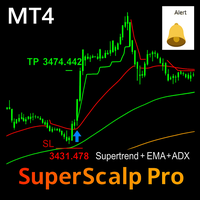
This mode is designed to work together with the SuperScalp Pro indicator attached to the same chart. The EA reads trading signals and levels directly from the indicator buffers, including Buy/Sell signals, Stop Loss, Take Profit, Fibonacci Take Profit levels, and opposite-signal close logic.
Mode 2 is recommended for users who are already familiar with the SuperScalp Pro indicator settings and workflow. The EA executes trades based entirely on signals generated by the SuperScalp Pro indicator and does not generate any signals itself; it functions solely as an automated trade execution tool.
Recommended settings (Mode 2):
- Trading symbols: XAUUSD, BTCUSD, major forex pairs (EURUSD, GBPUSD, USDJPY), and selected indices (e.g., NAS100, US30)
- Timeframes: M1, M5, M15, M30, H1
- Minimum capital: USD 200. A balance above USD 500 is recommended to provide an additional risk buffer when trading Gold.
- Account type: ECN, Raw, or Standard with low spreads
- Leverage: 1:100 to 1:500 (depending on risk tolerance)
- VPS: recommended for stable 24/7 operation
Performance depends on broker conditions, market volatility, and the quality of indicator signals. The EA is designed to automate trade execution based on SuperScalp Pro indicator signals.
Main Features
- Automatic Buy and Sell trade execution
- Automatic Stop Loss and Take Profit management
- Fibonacci Take Profit synchronization support
- Opposite signal close logic
- Daily loss limit protection
- Maximum order and total lot protection
- Fixed lot and dynamic lot sizing
- Trading dashboard panel
- Multi-symbol and multi-timeframe support
Mode 2 Setup Guide
To use Mode 2, follow these steps:
- Attach the SuperScalp Pro indicator to your chart first.
- Attach the SuperScalp Pro Auto Trader EA to the same chart.
- In the EA input settings, set:
signalmode = signal_mode_superscalp_pro_sync - Enable AutoTrading in MetaTrader 5 (MT5).
Make sure both the indicator and EA are running on the same chart for proper signal synchronization.
Default settings are configured with relatively conservative risk management. Users are encouraged to test the EA on a demo account before using it on a live account.
Disclaimer
Trading involves risk, and past performance does not guarantee future results. Market conditions, broker execution, spreads, and volatility may affect performance. SuperScalp Pro Auto Trader has multiple modes and configurations, so results may vary between users and trading environments. Please use proper risk management and test on a demo account before trading on a live account.
SuperScalp Pro Auto Trader, in Mode 2, acts only as an execution tool that automatically places trades based on signals from the indicator. It does not guarantee any trading performance or results.
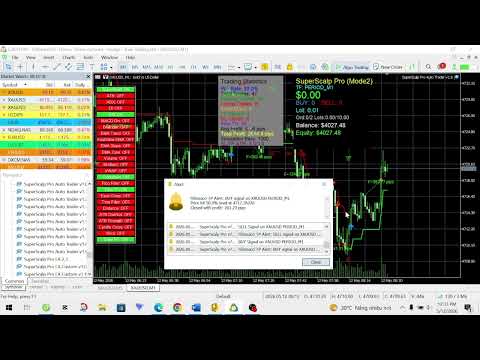



















































EA Superscalp Pro is fully compatible with many settings; with the appropriate setup file, it enables and disables processes at the right time.