GridZone Alpha

GridZone Alpha: The Ultimate Semi-Automated Grid & Zone Manager

GridZone Alpha is an advanced, interactive trading panel designed for the modern manual trader. Stop staring at the charts waiting for the perfect entry, and stop relying on rigid, fully automated bots that cannot read market context.

With GridZone Alpha, you provide the human analysis by identifying your support, resistance, or supply/demand zones. Once confirmed, the Limit Order Engine takes over, instantly deploying a precision, self-healing grid to farm the zone while protecting your capital with built-in margin safeguards and dynamic tripwires.

Now in Version 2.0: We have transformed the EA into a complete trading command center, adding Bi-Directional Duo Mode, visual session tracking, and a real-time data dashboard.

🔥 How It Works (The 3-Step Workflow)

  1. Analyze: Select your strategy on the interactive dashboard. Choose Single Mode for directional trading (Buy or Sell) or Duo Mode to bracket the market for breakouts.

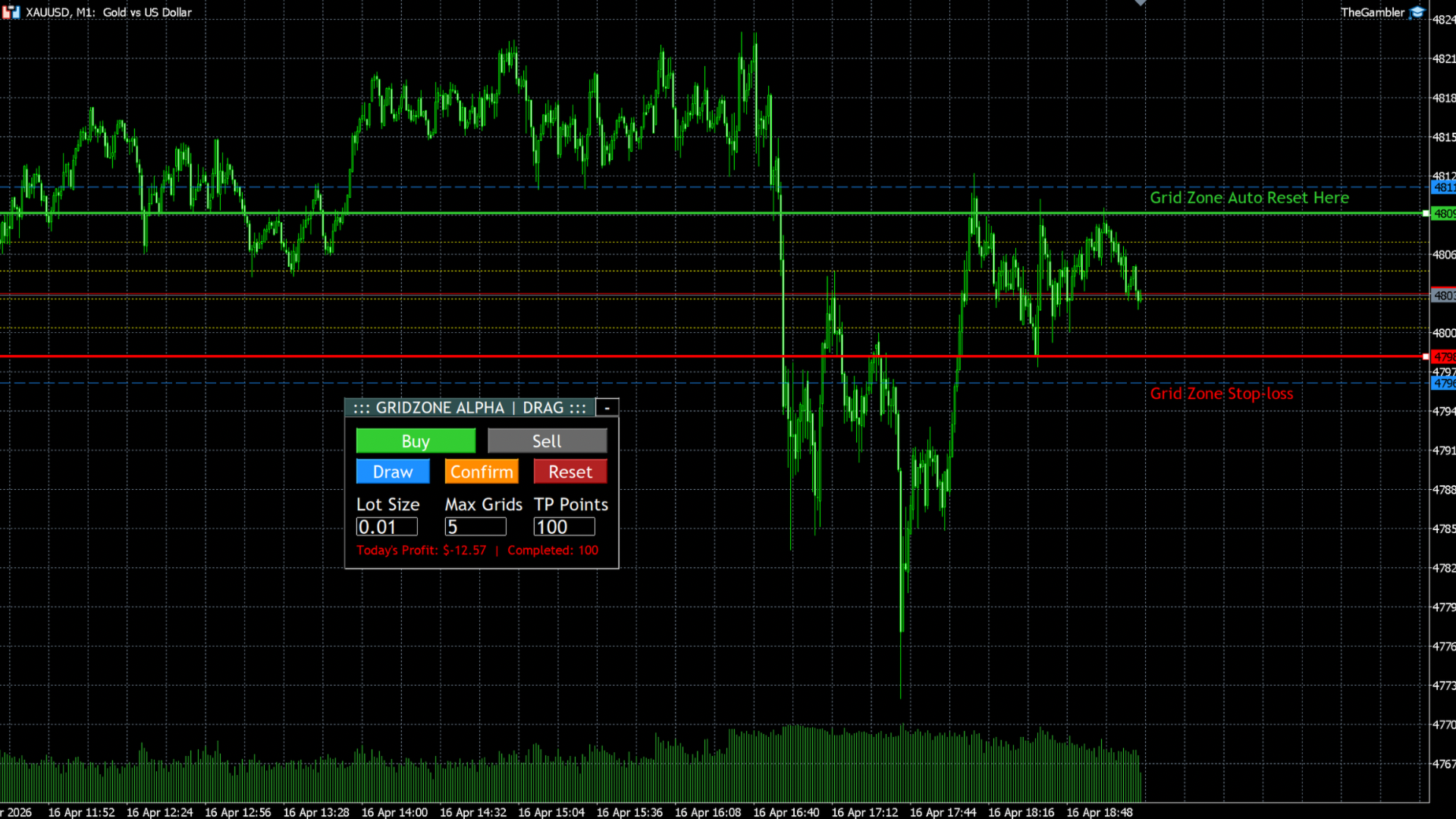
  2. Draw & Define: Click "Draw" to project your zones directly onto the chart. You can easily drag the lines to frame your setup, or manually type the exact High/Low prices into the dashboard for pixel-perfect precision.

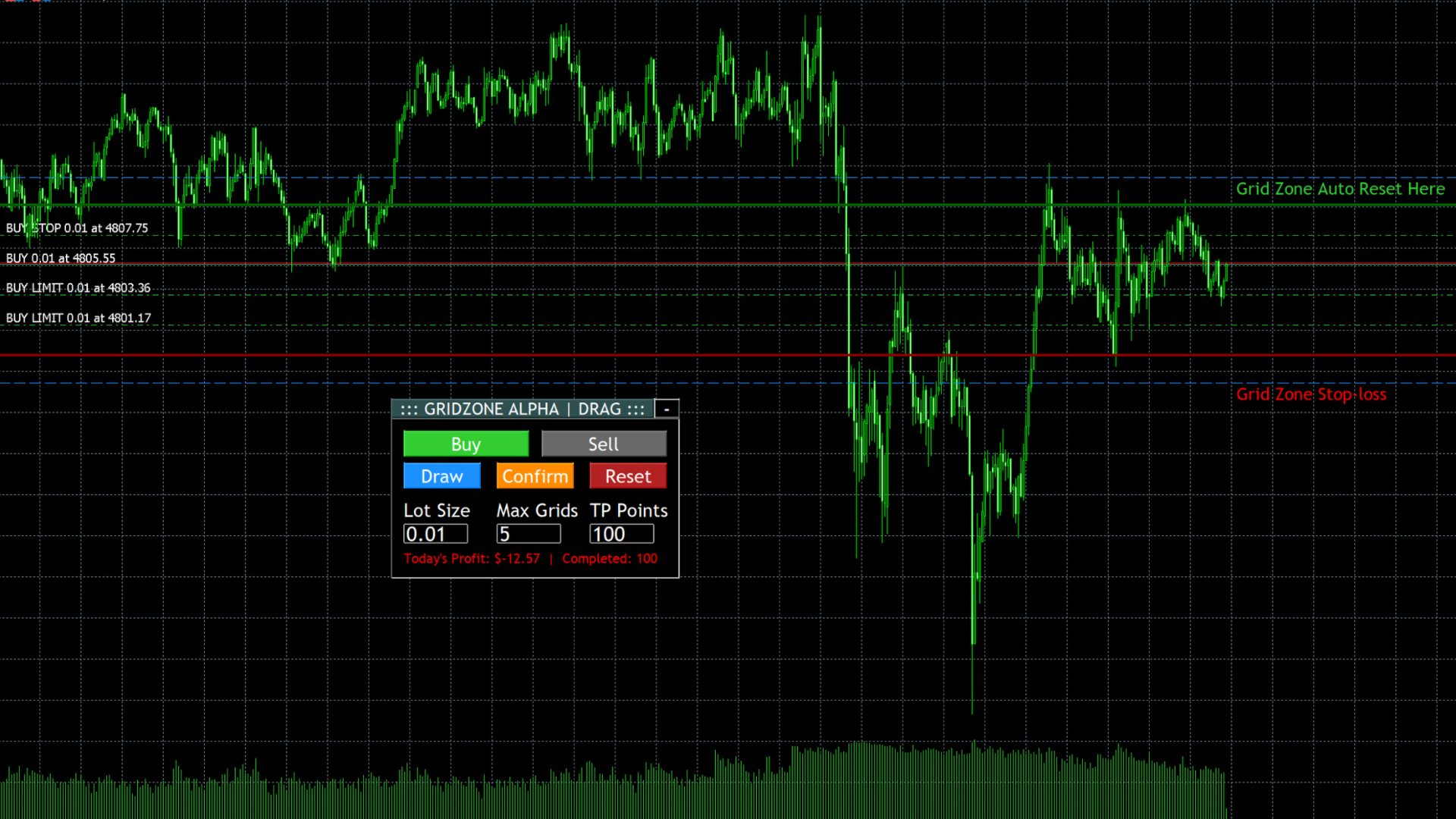
  3. Confirm: Click "Confirm" and walk away. The EA instantly blankets the zone with Stealth Limit/Stop Orders and manages the entire trade cycle for you.

🌟 Key Features & Advanced Mechanics

  • Duo Mode (Bi-Directional Trapping): Don't want to guess the market direction? Switch to Duo Mode to lay down a Buy Zone below the price and a Sell Zone above the price simultaneously. Perfect for trading high-impact news straddles or farming sideways consolidation.

  • Visual Market Sessions (Auto-Timezone): The EA dynamically calculates your broker's timezone offset to draw sleek, semi-transparent background boxes representing the Tokyo, London, and New York sessions. Visually track daily volatility windows and overlaps without cluttering your candles.

  • The Stealth Limit Order Engine: The moment you confirm your zone, the EA deploys physical Limit and Stop orders to eliminate slippage. Take Profits are managed "virtually" (hidden from the broker) to keep your chart clean and protect your exit strategy.

  • The Self-Healing Grid: When a grid layer hits its Take Profit and closes, the EA instantly replaces that exact pending order. It will continuously "farm" the zone until the market moves on.

  • Customizable Auto-Reset Tripwires: The EA waits patiently for the price to touch your zone. If the market aggressively pumps or dumps away from your setup, the EA instantly deletes all pending orders, closes open positions, and resets the chart automatically. The exact Point distance for this Stop-Loss/Reset trigger is now fully customizable in the EA settings.

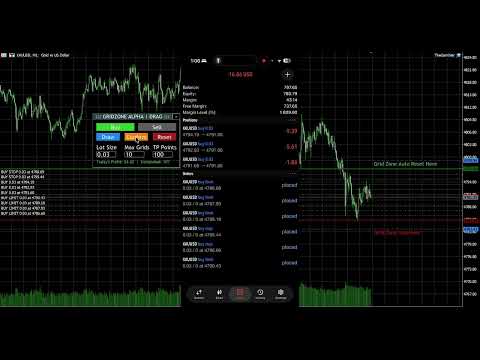
  • Live Market Dashboard: A sleek, fully draggable on-chart panel gives you instant control over Lot Size, Max Grids, and TP Points. The V2 update introduces a real-time data row displaying your current Market Session, live Spread, and a Candle Countdown Timer.

  • Bulletproof Margin Guard: GridZone Alpha actively protects your broker connection. Before drawing a zone, it calculates the exact margin required for your pending grids. If funds are insufficient, it pauses execution and alerts you with a clear on-chart warning, preventing terminal spam and account freezes.

⚠️ Important Note for Buyers

This is a Semi-Automated Trading Utility, NOT a fully automated "set and forget" robot. GridZone Alpha requires the trader to manually initiate the "Draw" and "Confirm" sequence based on their own market analysis.

⚙️ External Input Parameters

  • Magic Number: 88888 (Customizable to run multiple instances on different charts).

  • Auto-Reset & SL Distance (Points): Define exactly how far the price must move outside your zone to trigger a safety wipe.

  • Session Visualizer Toggles: Turn the background session boxes on/off and fully customize the colors for Tokyo, London, and New York to match your chart's aesthetic.

(All other critical execution settings—Lot Size, Max Grids, Zone Prices, and Take Profit—are dynamically controlled directly from the on-chart panel!)
추천 제품
Click Trading
Jawad Tauheed
5 (2)
One Click Trading – Auto TP SL Developer TraderLinkz Version 1.00 Category Utility What it does Adds missing TP and SL to your manual trades and pending orders Sets them once per ticket Lets you move TP and SL afterward Works on hedging and netting accounts Scans on every tick and reacts on trade events Why you want it You place faster entries You get consistent risk and exit targets You reduce fat finger errors You keep full manual control Quick start Attach the EA to any chart Keep TP and SL e
FREE
================================================================ MATRIX CONDITION MONITOR Live Trade Condition Panel for MetaTrader 5 Fully Automatic -- Works with ALL Matrix EAs ================================================================ NEVER MISS A TRADE SETUP AGAIN Matrix Condition Monitor is a free utility that attaches to any chart and automatically checks all 10 trade conditions in real time -- showing you exactly why a trade will or will not open, and alerting you the moment ever
FREE
DDKiller Pro
Njaratahiry Michael Randrianiaina
Stop Blowing Your Account. Once and For All. DDKiller Pro is the MT5 risk guardian that runs silently on your chart and shuts down trading the moment you hit a limit — whether you're grinding a prop firm challenge or managing your own CFD account. The problem every trader knows: You set your rules. You break them anyway. One revenge trade. One overleveraged position. One session that erases a month of gains. DDKiller Pro removes that decision from your hands entirely. What it does: The second yo
Trade Analyzer Panel is a real-time dashboard utility for MetaTrader 5. It brings position monitoring, risk analysis, profit/loss simulation, target planning, break-even visualization and quick-close controls into a single scrollable on-chart panel. Features Position scanner: lists every open position with symbol, direction, lot size, open price and live profit/loss. Account summary: balance, equity, used and free margin, and margin level updated in real time. Break-even visualization: draws a l
TP SL Bot MT5
Ruslan Brezovskiy
5 (1)
TP SL Bot is a utility that automatically sets Stop Loss and Take Profit for newly opened orders in several ways. There is also a function for calculating the volume that you need to open the trade to get the desired amount with the specified Stop Loss / Take Profit size. There are several options for calculating the size and setting parameters: 1. Setting based on the amount specified by the user as a percentage of the current deposit balance. 2. Setting as the amount entered by the user. 3. Se
Quick deals EA
Aleksandr Slavskii
Горячие клавиши плюс клик левой кнопки мыши на графике. Советник открывает сделки, выставляет лимитные и стоповые ордера, удаляет ордера и закрывает позиции, также  делает реверс  открытых позиций, выставляет прописанные в настройках стоп лосс и тейк профит. (реверс только на неттинговых счетах) При запуске советника можно посмотреть подсказку как действует советник при нажатии клавиши + клик на графике. Правее последнего бара, ниже цены Ctrl+ЛКМ  - OpenSell Правее последнего бара, выше цены C
Trade assistant pro v8
Ahmed Mohammed Bakr Bakr
FREE FREE FREE Trade Assistant MT5 – Professional Trading & Risk Management Panel Trade Assistant MT5 is an advanced trading panel designed to help traders execute orders faster, safer, and more professionally . It simplifies manual trading by combining smart order management , precise risk control , and one-click execution , making it ideal for both beginners and advanced traders. This tool does not trade automatically . Instead, it empowers you with full control while applying professional-gra
FREE
TradeControl Pro – MetaTrader용 고급 트레이드 매니저 TradeControl Pro 는 MetaTrader 환경에서 차트 상에서 직접 거래 포지션을 구조적이고 효율적으로 관리할 수 있도록 설계된 트레이드 관리 도구입니다. 이 프로그램은 명확한 사용자 인터페이스와 자동 계산 기능, 그리고 다양한 트레이딩 방식에 대응하는 유연한 제어 옵션을 결합합니다. 내장된 온차트 패널은 표 형식으로 구성되어 있으며, Execution , Close , Info 의 세 가지 주요 탭으로 나뉩니다. 인터페이스는 가독성과 직관적인 조작에 중점을 두고 설계되었습니다. 논리적으로 구성된 명확한 구조 모든 주요 거래 지표의 실시간 업데이트 추가 창 없이 차트에서 직접 제어 가능 탭: Execution (거래 실행 및 계획) Execution 영역은 새로운 거래의 계획과 실행을 담당합니다. Open Calc (대기 주문 설정) Open Calc 를 사용하면 차트에 다음과 같은 세 개의 라
Trading Utility for Forex Currency Pairs Only not for Gold  Functions Auto Lot Calculation based on Risk Auto stoploss  Auto TakeProfit Breakeven Auto Close Half % Close in percentage with respect to the PIPs Pending Orders BuyLimit Sell Limit with distances BuyStop Sell Stop    with distances Trading Informations Risk in percentage For Multiple trades Combine Takeprofit and Combine Stoplosses
Tick Volume Chart - MetaTrader 5 에서 틱 거래량 기반 차트를 생성하는 독보적인 도구입니다. Tick Volume Chart 를 사용하면 시간이 아닌 지정된 틱 수에 따라 각 캔들이 형성되는 차트를 구축할 수 있습니다. 이를 통해 표준 시간 차트에서는 얻을 수 없는 완벽한 시장 활동 분석 정밀도를 확보할 수 있습니다. 사용자 지정 심볼을 지원하는 모든 지표와 Expert Advisor를 사용할 수 있습니다. 생성된 차트는 표준 차트와 마찬가지로 편리하게 작업할 수 있습니다. 기존 도구와 달리 Tick Volume Chart 는 시간 간격이 아닌 실제 거래 강도에 기반하여 시장을 분석할 수 있게 해줍니다. Tick Volume Chart의 장점 각 바에 고정된 틱 거래량 을 가진 차트를 지원합니다. 내장된 틱 데이터베이스 덕분에 과거 데이터를 즉시 로드 합니다. 데이터가 실시간으로 업데이트되며, 일반 차트와 지연 없이 동기화 됩니다. 한 번에 여러 개의 틱 거
Easy Trade Executor는 MT5용 빠른 포지션 크기 계산, 주문 실행 및 거래 관리 도구입니다. Open Price, Stop Loss 및 Take Profit 레벨을 차트에 직접 배치하고, 포지션 크기를 자동으로 계산한 후 몇 번의 클릭만으로 리스크를 관리하면서 거래를 실행할 수 있습니다. 왜 Easy Trade Executor를 선택해야 할까요? Easy Trade Executor는 단순히 리스크를 계산하는 것을 넘어, 차트에서 직접 빠르고 효율적으로 거래를 관리하고자 하는 트레이더를 위해 설계되었습니다. 이 도구는 포지션 크기 계산, 주문 실행 및 거래 관리를 하나의 워크플로우로 통합하여 수동 계산이나 여러 터미널 창 사이를 오가는 대신 거래 자체에 집중할 수 있도록 도와줍니다. Easy Trade Executor의 주요 기능: 리스크 기반 자동 포지션 크기 계산; 차트에서 직접 Market Order 및 Pending Order 실행; 자동 거래 관리를 위한 T
Imagine flying a real aircraft without ever stepping into a flight simulator. That's what trading is like. You have to simulate your strategy before you can take it to a live market. It is good if you can simulate things speedily before even stepping into any live market, or before coming up with an automated system.  People don't have all day to stare at a higher timeframe chart until the entry signal finally arrives. That's why I built this so that you can simulate your strategy with speed. Th
FREE
Equity Master Stop v2 MT5
Frank William Jr Colbert
Trading tool combining a sophisticated equity stop-loss, dynamic take-profit management (Breakeven & Trailing), and symbol-group-based closing logic. It is a complete risk management and trade supervision tool. Features: All features of `Equity Master Stop v1` (floating profit/loss limits, exit protection, skip hours). Take-Profit Override: Can force a TP on any order to lock in a `MAX_FLOATING_PROFIT`. Step Breakeven: Locks in increasing amounts of profit as a trade moves favorably (e.g., aft
Lock Bot
Artem Alekseev
This utility is designed to automatically maintain a "locking" position and reopen it when necessary, which is suitable for position maintenance and protection strategies. A simple utility (hereinafter referred to as the bot) that implements a locking strategy with an infinitely reloadable locking trade. How the bot works: - When launched, select a buy or sell order with a specified TP - Set the SL parameter for the locking trade - The bot monitors the distance between the opening price of the f
Risk Ruler
AL MOOSAWI ABDULLAH JAFFER BAQER
Risk Ruler Plan every trade with precision before you enter the market. Risk Ruler is a professional on-chart position sizing and risk management tool for MetaTrader that helps traders calculate the optimal trade size based on their predefined risk. By simply dragging the Entry, Stop Loss, and Take Profit lines directly on the chart, all essential trading calculations update instantly, allowing you to make informed decisions before placing a trade. Designed for both manual and professional trade
SwiftEdge Scalper 완전한 수동 제어 기능을 갖춘 전문 틱 스캘핑 EA 스캘핑은 순간적인 결정, 정밀한 리스크 관리, 원활한 주문 실행을 요구합니다. 가격 움직임을 관찰하면서 손익분기점 계산, 트레일링 스탑, 여러 포지션을 관리하는 것은 적절한 도구 없이는 압도적입니다. SwiftEdge Scalper는 활발한 스캘퍼와 데이 트레이더를 위해 설계된 전문 트레이딩 어시스턴트입니다. 원클릭 또는 키보드 단축키로 거래를 실행하고 EA가 자동으로 손익분기점, 트레일링 스탑, 포지션 관리를 처리합니다. 이것은 자동 거래 로봇이 아닙니다 — 당신이 결정할 때만 거래합니다. 자세히 알아보기: 완전한 설정 가이드 및 문서 (English) 한정 제공: 처음 50회 다운로드는 무료입니다! 그 후에는 이 제품이 유료로 전환됩니다. 지금 다운로드하여 무료 사본을 확보하세요. 주요 기능 원클릭 거래: 패널 버튼 또는 사용자 정의 키보드 단축키(B/S/A/C/E/M)를 통해 즉시 BUY/SEL
목적: 마켓 워치 의 모든 심볼을 현재 시간 간격(TF)에 맞춰 default.tpl 템플릿으로 자동으로 열고, 현재 활성 차트를 제외한 모든 차트를 닫습니다. 수동 작업 없이 여러 종목을 빠르게 분석하기에 이상적입니다! 주요 기능: 자동화: 클릭 한 번으로 수십 개 차트를 열 수 있습니다. 안전성: 불필요한 차트를 닫고 현재 차트를 유지합니다. 유연성: 사용자 정의 default.tpl 템플릿 사용(사전 설정 필요!). 현재 시간 간격: 스크립트 실행 시 활성 차트의 TF와 동일하게 차트가 열립니다. 설치 방법: OpenAllSymbolsSafe.mq5 파일을 MetaTrader 5 터미널의 MQL5/Scripts 폴더에 복사합니다. 터미널을 재시작하거나 스크립트 목록을 새로 고칩니다(마우스 오른쪽 버튼 → 새로 고침 ). ️ 주의사항: default.tpl 이 MQL5/Profiles/Template/ 폴더에 있는지 확인하세요. 현재 차트를 제외
FREE
Trade Manager DaneTrades
Levi Dane Benjamin
4.28 (29)
거래 관리자는 위험을 자동으로 계산하는 동시에 거래를 빠르게 시작하고 종료하는 데 도움을 줍니다. 과잉 거래, 복수 거래 및 감정 거래를 방지하는 데 도움이 되는 기능이 포함되어 있습니다. 거래를 자동으로 관리할 수 있으며 계정 성과 지표를 그래프로 시각화할 수 있습니다. 이러한 기능은 이 패널을 모든 수동 거래자에게 이상적으로 만들고 MetaTrader 5 플랫폼을 향상시키는 데 도움이 됩니다. 다중 언어 지원. MT4 버전  |  사용자 가이드 + 데모 트레이드 매니저는 전략 테스터에서 작동하지 않습니다. 데모를 보려면 사용자 가이드로 이동하세요. 위기 관리 % 또는 $를 기준으로 위험 자동 조정 고정 로트 크기 또는 거래량과 핍을 기반으로 한 자동 로트 크기 계산을 사용하는 옵션 RR, Pips 또는 Price를 사용한 손익분기점 손실 설정 추적 중지 손실 설정 목표 달성 시 모든 거래를 자동으로 마감하는 최대 일일 손실률(%)입니다. 과도한 손실로부터 계정을 보호하고 과도한
Expert TP SL v04 - Professional Trading Assistant with AI Motivation System Advanced manual trading tool with automatic risk management, overtrading protection, and intelligent psychological support for disciplined trading. PRODUCT OVERVIEW Expert TP SL v04 is a comprehensive trading assistant designed for manual traders who want to maintain emotional discipline while automating risk calculations. This isn't just another order placement tool - it's a complete trading psychology system that pr
Spread Candle Clock is a clock that displays the remaining time of the current candle along with the spread in real time directly on the chart. Features: Real-time candle countdown. Live spread (SP) display. Adjustable size. Customizable colors. Configurable position in all four corners. Compatible with all symbols and timeframes. Includes a button to minimize to a small panel.
FREE
Risk Manager – Account Protection Tool Risk Manager is an Expert Advisor for MetaTrader 5 designed to protect your trading account by applying automatic risk management rules. This tool does not open trades . It continuously monitors your account and enforces predefined limits to help prevent excessive losses and maintain disciplined trading. Risk Manager works in the background and can manage positions opened by manual trading or other Expert Advisors. It is particularly useful for: • Manual tr
FREE
Forex 계산기는 모든 거래자에게 꼭 필요한 프로그램입니다. 이 스크립트를 사용하면 핍으로 설정된 손절매에 따라 예금의 백분율 % 위험을 계산할 수 있습니다. Forex 계산기를 사용하면 거래를 열기 전에 위험을 쉽게 계산할 수 있으며 거래를 열기 위해 필요한 로트를 나타내는 팝업 창으로 정보가 표시됩니다. 이를 통해 계산 시간을 절약할 수 있으며 최종 거래를 열 때 거래 결과를 확인할 수 있습니다. 키보드의 버튼을 눌러 스크립트를 빠르게 실행하는 데 도움이 되는 단축키를 스크립트에 첨부할 수 있습니다. Robot Scalper -   https://www.mql5.com/en/market/product/77108 스크립트의 장점: 당신은 항상 모든 거래에서 당신이 위험을 감수하는 것을 정확히 알고 있습니다. 계산기는 계약 사양을 고려합니다. 데이터 입력 위험 및 손절매 크기(핍)에 대한 2개의 열만 옵션 Risk_in_% - 거래에 사용하려는 위험의 비율입니다. St
SmartLot MT5
Nikita Chernyshov
데모 계정 무료 버전 | MT4 버전 SmartLot   MT5  는 차트에서 직접 로트를 빠르게 계산하고, 보류 중 주문 및 시장가 주문을 설정할 수 있는 대화형 및 간단한 패널입니다. 전략 테스터에서는 작동하지 않습니다 . 유틸리티를 테스트하려면 데모 계정용 무료 버전을 다운로드하십시오. 지침과 파일은 설명 상단에 있습니다. 기능: 그래픽 인터페이스:   수익 및 손실 구역을 색상으로 표시한 대화형 진입, SL, TP 라인. 실시간 계산:   SL/TP 수준을 변경할 때 패널이 위험/이익 값(통화 / 핍 / %)을 자동으로 재계산합니다. 실행:   그래픽 라인의 버튼을 클릭하여 주문을 엽니다. 주요 주문 유형 지원. 위험 관리:   동적 로트(예금 비율) 또는 고정 볼륨 작업을 위한 내장 모듈. 개별 매직:   각 주문에 대해 개별적으로 매직 넘버를 지정할 수 있는 기능.
Breakevan Utility
Jose Luis Thenier Villa
BreakEvan Utility  Is a simple tool in a panel with this utilities: This utility will draw a Golden Line in the chart applied showing the breakeven price, considering all the positions opened for that specific symbol. Also the information panel shows: Balance Breakeven Price for that chart Force Breakeven (for that symbol) as ON/OFF Force Breakeven Global (takes into account all trades opened) as ON/OFF Total Lots opened for Symbol Total Lots opened Global And two buttons: Force Breakeven: Whe
King ElChart Manual Trade Panel
Mohammed Maher Al-sayed Mohammed Ahmed Saleh
King Chart – Manual Trading Panel for MetaTrader 5 Overview King Chart is a simple yet powerful manual trading panel built for traders who want speed, precision, and clarity. It enables quick order execution, clear lot control, and real-time account monitoring  all directly on your MT5 chart. Main Features Multi-Lot Trade Execution 3 Buy and 3 Sell buttons for instant execution Each button is tied to a custom lot size field Designed for flexible scaling in or out of trades Position Management D
MT5용 NAS100 Auto SL 및 TP 메이커를 소개합니다: 메타트레이더 5에서 나스닥 100 시장을 탐색하는 트레이더에게 없어서는 안될 보조 도구인 NAS100 Auto SL 및 TP 메이커로 손절 및 테이크프로핏 설정을 다시는 놓치지 마세요. 이 도구는 손절 및 테이크프로핏 레벨을 자동으로 관리할 수 있는 원활한 솔루션을 찾는 분들을 위해 설계되었습니다. 주요 특징: 손쉬운 자동화: 스톱로스 및/또는 테이크프로핏 없이 나스닥 100 거래를 자동으로 모니터링합니다. 사용자가 구성한 설정에 따라 레벨을 동적으로 조정합니다. 다양한 주문 유형: 나스닥 100의 시장가 및 지정가 주문 모두와 호환됩니다. 메타트레이더 5에서 사용할 수 있는 다양한 주문 유형을 지원합니다. 맞춤형 구성: 사용자 친화적인 매개변수 설정으로 추적 기본 설정 및 손절/익절 수준을 사용자 지정할 수 있습니다. 유연한 범위: 실행되는 특정 NAS100 상품 또는 거래되는 모든 상품에 대해 손절 및 테이크프
FREE
This tool will perform Trailing stop loss and Break even management for orders. Helps you limit or reduce the time spend watching orders on the screen, especially when you need to go to sleep. Just add this EA to 1 chart, you can manage all pairs. You can filter orders by comment, magic number, symbol and order ticket number. When Breakeven it can add shift/offset pips (to cover the commission...). You can try in strategy tester before purchase. The EA will add Buy and Sell alternately, so you
CYGNIX RISK GLADIATOR — Professional Trade Manager & Risk Guardian for MT5 Guard every position. Manage every trade. Sleep at night. Cygnix Risk Gladiator is a professional-grade position management Expert Advisor that watches every open trade on your account and automatically applies institutional-level risk controls in real time. It does not generate signals — it protects, manages, and exits trades opened by you, your strategies, or any other EA. Built for IC Markets and fully compatible w
FiT Panel Pro
Thonglak Janyakorn
Overview FiT Panel Pro is a professional-grade trade management panel designed for MetaTrader 5 traders who demand speed, precision, and full control over their trades. Built with a modern dark-theme UI, it combines one-click execution with advanced risk management, visual SL/TP drag lines, automatic Fibonacci-based levels, and comprehensive order management — all in a single, compact panel. Whether you are a scalper, day trader, or swing trader, FiT Panel Pro gives you the edge you need to exec
FREE
Grid Trading EA is a semi-automated one-click trading EA for both Normal Trading and Grid/Martingale Trading . Normal Trading Simply click Buy or Sell directly from the chart. The EA will automatically manage trades by: Setting Stop Loss and Take Profit Managing Trailing Stop Grid / Martingale Trading (For Hedging Account Type Only) When Grid Trading mode is enabled, the EA will automatically open additional grid orders at specified distances while increasing the lot size based on your settings.
이 제품의 구매자들이 또한 구매함
Trade Assistant MT5
Evgeniy Kravchenko
4.43 (214)
거래당 위험 계산, 라인을 사용한 손쉬운 신규 주문, 부분 청산 기능을 통한 주문 관리, 7가지 유형의 트레일링 스탑 및 기타 유용한 기능을 제공합니다. 추가 자료 및 지침 설치 지침   -   애플리케이션 지침   -   데모 계정용 애플리케이션 평가판 라인 기능       - 차트에 개시선, 손절매, 차익실현을 표시합니다. 이 기능을 사용하면 새로운 주문을 쉽게 하고 개봉 전에 추가 특성을 볼 수 있습니다. 위기 관리       -       위험 계산 기능은 설정된 위험과 손절매 주문의 크기를 고려하여 새 주문의 볼륨을 계산합니다. 이를 통해 손절매 크기를 설정하고 동시에 설정된 위험을 존중할 수 있습니다. 로트 계산 버튼 - 위험 계산을 활성화/비활성화합니다. 필요한 위험 값은 위험 필드에 0에서 100 사이의 백분율 또는 예금 통화로 설정됩니다. 설정 탭에서 위험 계산 옵션을 선택합니다. $ 통화, % 잔액, % 지분, % 자유 마진, % 사용자 정의, % AB 이전
Trade Manager EA에 오신 것을 환영합니다. 이 도구는 거래를 보다 직관적이고 정확하며 효율적으로 만들기 위해 설계된 궁극적인 리스크 관리 도구 입니다. 단순한 주문 실행 도구가 아닌, 원활한 거래 계획, 포지션 관리 및 리스크 제어를 위한 종합 솔루션입니다. 초보자부터 고급 트레이더, 빠른 실행이 필요한 스캘퍼에 이르기까지 Trade Manager EA는 외환, 지수, 상품, 암호화폐 등 다양한 시장에서 유연성을 제공합니다. Trade Manager EA를 사용하면 복잡한 계산은 이제 과거의 일이 됩니다. 시장을 분석하고 진입, 손절 및 익절 수준을 차트의 수평선으로 표시한 후 리스크를 설정하면, Trade Manager가 이상적인 포지션 크기를 즉시 계산하고 SL 및 TP 값을 실시간으로 표시합니다. 모든 거래가 간편하게 관리됩니다. 주요 기능: 포지션 크기 계산기 : 정의된 리스크에 따라 거래 크기를 즉시 결정합니다. 간단한 거래 계획 : 진입, 손절, 익절을 위한
TradePanel MT5
Alfiya Fazylova
4.88 (161)
Trade Panel은 다기능 거래 도우미입니다. 이 애플리케이션에는 50개 이상의 수동 거래 기능이 포함되어 있으며 대부분의 거래 작업을 자동화할 수 있습니다. 구매하기 전에 데모 계정에서 데모 버전을 테스트할 수 있습니다. 데모 계정용 애플리케이션 체험판 다운로드: https://www.mql5.com/en/blogs/post/750865 . 전체 지침 여기 . 거래. 한 번의 클릭으로 거래를 수행할 수 있습니다: 리스크 자동 계산과 함께 예약 주문 및 포지션 열기. 한 번의 클릭으로 여러 주문 및 포지션 열기. 주문 그리드 열기. 예약 주문 및 포지션을 그룹별로 닫기. 포지션 방향 전환 (Buy 닫기 > Sell 열기, Sell 닫기 > Buy 열기). 포지션 잠금 (부족한 포지션을 열어 Buy와 Sell 포지션의 수량을 동일하게 만들기). 모든 포지션 한 번의 클릭으로 부분적으로 닫기. 모든 포지션의 테이크 프로핏과 스톱로스를 같은 가격 수준에 설정. 모든 포지션의 스톱로스를
베타 출시 Telegram to MT5 Signal Trader 는 곧 공식 알파 버전을 출시할 예정입니다. 일부 기능은 아직 개발 중이며, 작은 버그가 발생할 수 있습니다. 문제가 있으면 꼭 보고해 주세요. 여러분의 피드백은 소프트웨어 개선에 도움이 됩니다. Telegram to MT5 Signal Trader 는 Telegram 채널 또는 그룹의 거래 신호를 자동으로 MetaTrader 5 계정으로 복사하는 강력한 도구입니다. 공개 및 비공개 채널을 모두 지원하며, 여러 신호 제공자를 여러 MT5 계정에 연결할 수 있습니다. 소프트웨어는 빠르고 안정적으로 동작하며, 복사된 거래를 완벽히 제어할 수 있습니다. 인터페이스는 깔끔하며 대시보드와 차트가 시각적으로 구성되어 있고, 직관적인 네비게이션이 가능합니다. 여러 Signal Account를 관리하고, 공급자별 설정을 세밀하게 조정하며, 모든 동작을 실시간으로 모니터링할 수 있습니다. 필수 조건 MQL의 제한으로 인해 EA는 Te
파워 캔들 전략 스캐너 - 자체 최적화 다중 종목 설정 찾기 도구 파워 캔들 전략 스캐너는 마켓 워치에 등록된 모든 종목에 대해 파워 캔들 지표와 동일한 자체 최적화 엔진을 동시에 실행합니다. 하나의 패널에서 현재 통계적으로 거래 가능한 종목, 각 종목별 최적의 전략, 최적의 손절매/익절 조합을 알려주며, 새로운 신호가 발생하면 즉시 알림을 전송합니다. 이 도구는 Stein Investments 에코시스템의 일부입니다. 18개 이상의 도구와 함께 당신의 1대1 AI 트레이딩 멘토 Max.  항상 대기 중, 모든 인디케이터를 깊이 있게 이해, 무언가를 차근차근 생각해보고 싶은 순간에 도움을 줍니다.  https://stein.investments 에서 만나보세요 완벽한 시장 모니터링. 종목당 3,000건 이상의 자동 최적화. 2가지 알림 유형. 한 번의 클릭으로 차트를 전환하고 바로 거래하세요. 이 도구가 필요한 이유 대부분의 다중 종목 스캐너는 가격 변동만 보여줍니다. 티커별
Farmed Hedge Yield Farming | All Markets (Manual - Hybrid - Semi/Automated EA) MULTI-ASSET SUPPORT Trade any asset available on your broker - Forex: Major, Minor, Exotic pairs - Crypto: BTC, ETH, XRP, SOL, BNB - Stocks: Apple, Tesla, Amazon, Google, etc. - Commodities: Gold, Silver, Oil, Gas - Indices: US30, NAS100, SPX500, DAX40 - Any CFD your broker offers VERIFIED TRADING RESULTS - Farmed Hedge Yield Axi Copy:  https://www.mql5.com/en/signals/2356376 - Farmed Hedge Yield Exn Copy:   https:/
Quant AI Agents
Ho Tuan Thang
5 (1)
Quant AI Agents are independent trading Expert Advisors. Instead of trading using a fixed strategy like other conventional EAs, Quant AI Agents   is a   multi-agent AI trading framework   that turns natural-language strategy prompts into live.  WANT THE SAME RESULTS AS MY LIVE SIGNAL?   Use the exact same brokers I do:   IC MARKETS , IC TRADING   .  Unlike the centralized stock market, Forex has no single, unified price feed.  Every broker sources liquidity from different providers, creating un
Premium Trade Manager - 코치가 내장된 트레이딩 패널 Premium Trade Manager 는 차트 안에 트레이딩 코치를 심어놓은 도구입니다. 주문을 확정하기 전에, AI 트레이딩 코치 Max가 설정된 거래를 직접 읽고 명확한 판단을 내려줍니다. 스톱이 규율 있는 접근 방식에 맞는지, 리스크 크기가 합리적인지, 고영향 뉴스 이벤트가 몇 분 후에 있는지, 프롭 펌 한도에 근접했는지. 그 아래에는 완전한 실행 엔진이 있습니다. 원클릭 리스크 기반 진입, 차트에서 드래그로 세우고 거래가 진행되는 동안에도 계속 움직일 수 있는 플랜, 최대 4단계 분할 익절, 7가지 트레일링 방식, 실시간 프롭 펌 컴플라이언스, 뉴스 가드, 그리고 자체 비용을 평가하는 스프레드까지. 결정은 당신이 내립니다. Max가 두 번째 시선으로 확인합니다. 패널이 그 이후의 모든 것을 처리합니다. 구매 전에 직접 체험해 보세요. 브라우저에서 라이브 패널을 직접 클릭해볼 수 있습니다. 구매 전에 실제
The product will copy all telegram signal to MT5 ( which you are member) , also it can work as remote copier.  Easy to set up, copy order instant, can work with almost signal formats, image signal,  s upport to translate other language to English Work with all type of channel or group, even channel have "Restrict Saving Content", work with  multi channel, multi MT5 Work as remote copier: with signal have ticket number, it will copy exactly via ticket number. Support to backtest signal. How to s
EasyInsight AIO MT5
Alain Verleyen
4.92 (12)
EASY Insight AIO – 스마트하고 손쉬운 트레이딩을 위한 올인원 솔루션 개요 외환, 금, 암호화폐, 지수, 심지어 주식까지 — 전 시장을 몇 초 만에, 수동 차트 확인이나 복잡한 설치, 인디케이터 설정 없이 스캔할 수 있다고 상상해 보세요. EASY Insight AIO 는 AI 기반 트레이딩을 위한 궁극의 플러그 앤 플레이(Plug & Play) 데이터 내보내기 도구입니다. 단 하나의 깔끔한 CSV 파일로 전체 시장 스냅샷을 제공하며, ChatGPT, Claude, Gemini, Perplexity 등 다양한 AI 플랫폼에서 즉시 분석할 수 있습니다. 창 전환, 복잡함, 차트 오버레이는 더 이상 필요 없습니다. 자동으로 내보내지는 순수하고 구조화된 데이터 인사이트만으로, 반복적인 차트 감시 대신 데이터 기반의 스마트한 의사결정에 집중할 수 있습니다. 왜 EASY Insight AIO인가요? 진정한 올인원 • 별도의 설정, 인디케이터 설치, 차트 오버레이가 필요 없습
EA Auditor
Stephen J Martret
5 (4)
EA Auditor is an independent analysis tool for traders evaluating Expert Advisors and trading signals on MetaTrader 5. It audits backtest reports, reviews posted developer signals, and cross-verifies the two against each other to help traders assess strategies before committing capital. The MQL5 market offers a wide range of Expert Advisors from many developers, with varying approaches, quality, and transparency. EA Auditor provides a consistent, data-driven framework for reviewing them, answer
HINN Lazy Trader
ALGOFLOW OÜ
5 (1)
LIMITED SUMMER SALE -40% ! ONLY $470 insead of $790!  Maximum real discount! The core idea: using the user interface, you configure the parameters the chart must meet before entering a position (or positions), choose which entry models to use, and set the rules for when trading and planning should end. Lazy Trader  handles the rest: it  takes over all the routine chart watching and execution! full description  :: 3 key videos [1] ->  [2]   ->  [3] What can it do? - Understands Larry Williams
================================================================================ POC BREAKOUT - V20.72. Full Professional Grade Toolkit ================================================================================ POC Breakout is a full MetaTrader 5 trading dashboard for discretionary traders who want breakout signals, Point of Control (POC) context, volume profiles, order flow, market structure, news, alerts, and advanced trade planning in one professional workspace. Attached directly to you
YuClusters
Yury Kulikov
4.93 (43)
Attention: You can view the program operation in the free version  YuClusters DEMO .  YuClusters is a professional market analysis system. The trader has unique opportunities to analyze the flow of orders, trade volumes, price movements using various charts, profiles, indicators, and graphical objects. YuClusters operates on data based on Time&Sales or ticks information, depending on what is available in the quotes of a financial instrument. YuClusters allows you to build graphs by combining da
Chart Copilot
George Angelo Boutselis
Chart Copilot 은 트레이더가 차트에서 직접 더 빠르게 거래를 체결하고, 미결 포지션을 관리하고, 다양한 알림을 설정할 수 있도록 설계된 트레이딩 어시스턴트입니다. 이러한 모든 기능은 그래픽 패널과 대화형 챗봇을 통해 이용할 수 있습니다. 추가 자료 및 설정 방법: 체험판  - 설정 방법 챗봇 Chart Copilot은 대규모 언어 모델이 실행되는 전용 서버를 제공합니다. 따라서 API 키를 생성할 필요 없이 설치 즉시 챗봇과 상호 작용할 수 있습니다. Chart Copilot은 트레이딩과 관련된 작업을 직접 수행할 수 있다는 점에서 기존의 챗봇과 차별화됩니다. 다음과 같은 작업을 요청할 수 있습니다. 현재 차트의 변동성에 영향을 미치는 뉴스 발표 30분 전에 알림을 보내주세요. 과거 거래 내역을 분석하여 개선 방안을 알려주세요. 차트에서 지지선과 저항선을 찾아 가격이 돌파할 때 알림을 보내주세요. 어제 가격 변동폭의 고가에 Buy Stop 주문을 설정하고 저가에 손절매를
Local Trade Copier EA 는 외부 소스에서 거래 신호를 실행해야 하거나 MAM 또는 PAMM 계정 없이 동시에 여러 계정을 관리해야 하는 개인 거래자 또는 계정 관리자를 위한 솔루션입니다. 최대 8개의 마스터 계정에서 무제한 슬레이브 계정으로 복사합니다. [ 설치 가이드 | 업데이트 가이드 | 문제 해결 | 자주하는 질문 | 모든 제품 ] 100% 자체 호스팅 설치 및 사용이 간편함 설치 프로그램, 구성 파일, 서버, 메모리 파이프 또는 DLL이 사용되지 않음 EA를 영원히 사용하기 위한 1000번의 활성화 로컬 실행, 네트워크 대기 시간 없음 필요한 모든 기능을 구현합니다. 최대 8개의 마스터 계정 및 무제한 슬레이브 계정 모든 브로커 및 DD/NDD/ECN/STP 실행과 함께 작동 다른 계정 통화를 사용하는 계정에서 작동 라이브 계정과 데모 계정 간에 구분 없이 작동 마스터 및 슬레이브 계정에서 기호 이름의 접미사 지원 매직 넘버 및 주문 댓글로 필터링 다른 거래
FUTURES ORDERFLOW FOOTPRINT CHART Professional OrderFlow EA for MetaTrader 5 Version 1.01| Professional tool for real traders | Institutional-Grade Visualization STRATEGY TESTER USERS - PLEASE SELECT EVERY REAL TICK WHEN TESTING AND YOU HAVE DOWNLOADED HISTORICAL DATA. IF YOU SEE A WAITING SCREEN AND IT IS NOT DOWNLOADING, IT MEANS YOU HAVE LOW HISTORICAL DATA. TRY 1 MIN AND 5 MIN FIRST ON 1 DAY DATA. ONE DAY DATA SHOULD BE THE NEWEST AND MOST CURRENT DATE. PLEASE WAIT UNTIL THE MARKET HAS ROL
Footprint Chart Pro — Professional OrderFlow EA for MetaTrader 5 Version 6.34 | Professional tool for real traders | Institutional-Grade Visualization DEMO USERS - PLEASE SELECT EVERY TICK / REAL TICK WHEN TESTING AND YOU HAVE DOWNLOADED HISTORICAL DATA. IF YOU SEE A WAITING SCREEN AND IT IS NOT DOWNLOADING, IT MEANS YOU HAVE LOW HISTORICAL DATA. TRY 1 MIN AND 5 MIN FIRST ON 1 DAY DATA. ONE DAY DATA SHOULD BE THE NEWEST AND MOST CURRENT DATE. PLEASE WAIT UNTIL THE MARKET HAS ROLLED OVER PERIOD.
Telegram To MT5 Receiver
Levi Dane Benjamin
4.53 (15)
가입한 모든 채널에서 (개인 및 제한된 채널 포함) 시그널을 바로 MT5로 복사합니다.   이 도구는 사용자를 고려하여 설계되었으며 거래를 관리하고 모니터하는 데 필요한 많은 기능을 제공합니다. 이 제품은 사용하기 쉽고 시각적으로 매력적인 그래픽 인터페이스로 제공됩니다. 설정을 사용자 정의하고 제품을 몇 분 안에 사용할 수 있습니다! 사용자 가이드 + 데모  | MT4 버전 | 디스코드 버전 데모를 시도하려면 사용자 가이드로 이동하십시오. Telegram To MT5 수신기는 전략 테스터에서 작동하지 않습니다! Telegram To MT5 특징 여러 채널에서 동시에 신호를 복사합니다. 개인 및 제한된 채널에서 신호를 복사합니다. Bot 토큰이나 채팅 ID가 필요하지 않습니다.   (원하는 경우에는 사용할 수 있습니다) 위험 % 또는 고정된 로트로 거래합니다. 특정 심볼을 제외합니다. 모든 신호를 복사할지 또는 복사할 신호를 사용자 정의할지 선택할 수 있습니다. 모든 신호를 인
AlgoRadar
Stephen J Martret
5 (4)
AlgoRadar is an on-chart analytics dashboard for MT5 that aggregates Expert Advisor performance across multiple accounts, brokers, and platforms, including both MT4 and MT5 data, into a single live view on your MT5 chart. All analysis runs from the chart interface, with no external applications or manual report processing required. EA Analysis and Ranking For traders running multiple Expert Advisors, AlgoRadar provides a consolidated view of each EA's performance across accounts. Active EAs a
Patrex pro
Chioma Obunadike
5 (2)
Patrex Pro: Maximize Your Trading Potential Patrex Pro is an advanced trading bot designed to help traders optimize their trading strategies and maximize their potential returns. With its cutting-edge technology and user-friendly interface, Patrex Pro is the ultimate tool for traders seeking to elevate their trading game. Get MT4 Version Key Features: 1. Position Hedging: Patrex Pro allows users to hedge their positions based on their individual risk tolerance and market analysis. 2. Advanced R
AI Agent Supervisor is NOT an Expert Advisor. AI Agent Supervisor   is a   multi-agent AI risk & portfolio supervisor   that watches every EA on your account and intervenes in real time.  WANT AN AI PORTFOLIO MANAGER WATCHING YOUR FLEET 24/7?   Run your fleet on the same brokers I do:   IC MARKETS , IC TRADING   .  Unlike the centralized stock market, Forex has no single, unified price feed.  Every broker sources liquidity from different providers, creating unique data streams. The Supervisor r
Telegram to mt5 pro
Janet Abu Khalil
4 (4)
Telegram to MT5 Pro — Advanced Telegram Signal Copier with Auto-Fix, Multi-TP, Risk Control and Full Trade Management Telegram to MT5 Pro — 전문 텔레그램 신호 복사기 Telegram to MT5 Pro는 텔레그램 신호를 MetaTrader 5 계정으로 자동으로 직접 실행하는 고성능 트레이드 복사기로, 리스크, 실행, 트레이드 관리에 대한 완전한 제어를 제공합니다. 이 시스템은 두 가지 구성 요소로 이루어져 있습니다: • MetaTrader 5 내부에서 실행되는 Expert Advisor (EA) • 텔레그램에 연결되어 신호를 로컬로 EA에 전송하는 데스크톱 브리지 애플리케이션 두 구성 요소는 동일한 컴퓨터에서 실행되어야 합니다. MQL5 플랫폼 제한으로 인해 EA는 텔레그램에 직접 연결할 수 없습니다. 브리지는 텔레그램을 처리하고 EA는 거래를 실행합니다. 지원 및 설치
# If you have any other requirements or are interested in collaboration, please contact  dev.quantech.london@gmail.com . Flash Trade (FT) Most friendly manual trading tool. Easy operation to secure your funds. Features of FT Click the chart to trade fast FT supports market orders and pending orders Click twice to complete the order and set SL and TP Click trice to complete the pending order and set SL and TP Automatically set the stop-loss amount of each order to a fixed percentage of the bala
QCML Assistant
Maxime Turcotte-lafreniere
QCML Assistant MT5 Your Trading. Our Assistant. Your Edge. Looking for a tool that completely transforms your experience on MetaTrader 5? QCML Assistant is the all-in-one solution built by traders, for traders. Just one tool installed on your chart, and you get access to an ultra-complete, ultra-fast, and ultra-simple trading platform. No more hours wasted setting up your workspace. No more complicated trade entries. With QCML Assistant, everything becomes simple, smooth, and efficient right fro
Ultimate Extractor
Clifton Creath
5 (8)
Ultimate Extractor - Professional Trading Analytics for MT5 *****this is the local HTML version of Ultimate Extractor. !!!!!it is not compatible with Cloud!!!! For the online version please reach out to me directly****** Ultimate EA manager also now available when you use cloud pro and above for free!! Ultimate Extractor transforms your MetaTrader 5 trading history into actionable insights with comprehensive analytics, interactive charts, and real-time performance tracking. What It Does Automa
Double X Trade
Gayathiri Gopalakrishnan
5 (2)
DOUBLE X TRADE  SIGNAL MULTIPLIER DOUBLE X TRADE is a MetaTrader 5 Expert Advisor designed to operate alongside existing Expert Advisors and provide additional trade-management functionality. The EA can monitor trading activity on the account and perform actions according to user-defined settings, risk parameters, and operating mode configuration. DOUBLE X TRADE is intended for traders who want an additional management layer while continuing to use their existing Expert Advisors. The product doe
*** available for free for cloud pro users and above****  Ultimate EA Manager is a utility for traders running multiple Expert Advisors on a single MT5 terminal. It does not place trades itself — it coordinates the EAs you already use.     Features:   - Auto-detect every EA attached to charts in your terminal, grouped by EA name   - Slot management: cap how many EAs may hold open positions concurrently (waiting EAs pause until a slot frees up)   - Account-level drawdown circuit breake
Comprehensive on chart trade panel with the unique ability to be controllable from mobile as well. Plus has a library of downloadable configuration, e.g. exit rules, extra panel buttons, pending order setup and more. Please see our product video. Works with all symbols not just currency pairs. Features On chart panel plus controllable from free app for Windows, iPhone and Android Built-in script engine with library of downloadable configuration, e.g. add 'Close All Trades in Profit' button, exit
Royal Copier
Janet Abu Khalil
5 (1)
Royal Copier — 전문 MT5 트레이드 복사기 Royal Copier는 MetaTrader 5용 전문 로컬 실시간 트레이드 복사기입니다. 이제 두 기능이 하나의 MT5 Expert Advisor 안에 통합되었습니다. 입력값에서 EA를 Master 모드 로 실행할지 Client 모드 로 실행할지 선택하면 됩니다. 즉, 동일한 EA를 원본 계정과 수신 계정 모두에서 사용할 수 있으며, 기존 복사기의 동작 방식은 그대로 유지됩니다. Royal Copier는 다음과 같은 일반적인 계정 간 복사를 지원합니다. MT5에서 MT5 MT5에서 MT4 MT4에서 MT4 MT4에서 MT5 MT4와 복사하려면 MT4_Copier 를 사용하십시오. 작동 방식 Royal Copier는 동일한 Windows PC의 공유 파일을 통해 작동하는 로컬 복사기입니다. EA가 Master 모드 로 설정되면 원본 계정을 모니터링하고 모든 거래 활동을 공유 파일에 기록합니다. EA가 Client 모드 로 설정되
제작자의 제품 더 보기
SmartTrade EA Gold xauusd
Gooi Meng Liang
5 (1)
SmartWay EA MT5 – Built for Gold. Built for Trends. SmartWay EA (formerly SmartTrade EA) is a professional Expert Advisor created specifically for trading XAUUSD (Gold) on MT5. With the release of V2.0 , SmartWay introduces a powerful new feature: Smart Step Size Boost with Spike Detection . This upgrade makes the EA more adaptive in volatile markets and especially effective in one-way markets (bullish or bearish trends). It combines cycle-based money management , drawdown protection , and prof
SmartSMC EA – Liquidity Sweeps For over 10 years in the Gold market I’ve watched how price hunts liquidity before the real move. SmartSMC EA is my distilled version of that edge: a simple, disciplined SMC liquidity-sweep engine that trades XAUUSD with clean risk and professional execution. Why choose SmartSMC? Because it blends Smart Money Concepts with rock-solid automation. You don’t need to second-guess the chart—attach the EA, choose your risk, and let it handle entries, exits, sizing and
SmartWay
Gooi Meng Liang
SmartWay EA   (formerly SmartTrade EA) is a professional Expert Advisor created specifically for trading   XAUUSD (Gold)   on MT5. With the release of   V2.0 , SmartWay introduces a powerful new feature:   Smart Step Size Boost with Spike Detection . This upgrade makes the EA more adaptive in volatile markets and especially effective in   one-way markets   (bullish or bearish trends). It combines   cycle-based money management ,   drawdown protection , and   profit control   to deliver stable an
필터:
리뷰 없음
리뷰 답변