
Trade CoPilot
- 유틸리티
- 버전: 7.0
- 업데이트됨: 16 4월 2026

RiskCalculator — Professional Risk Management Panel for MT5
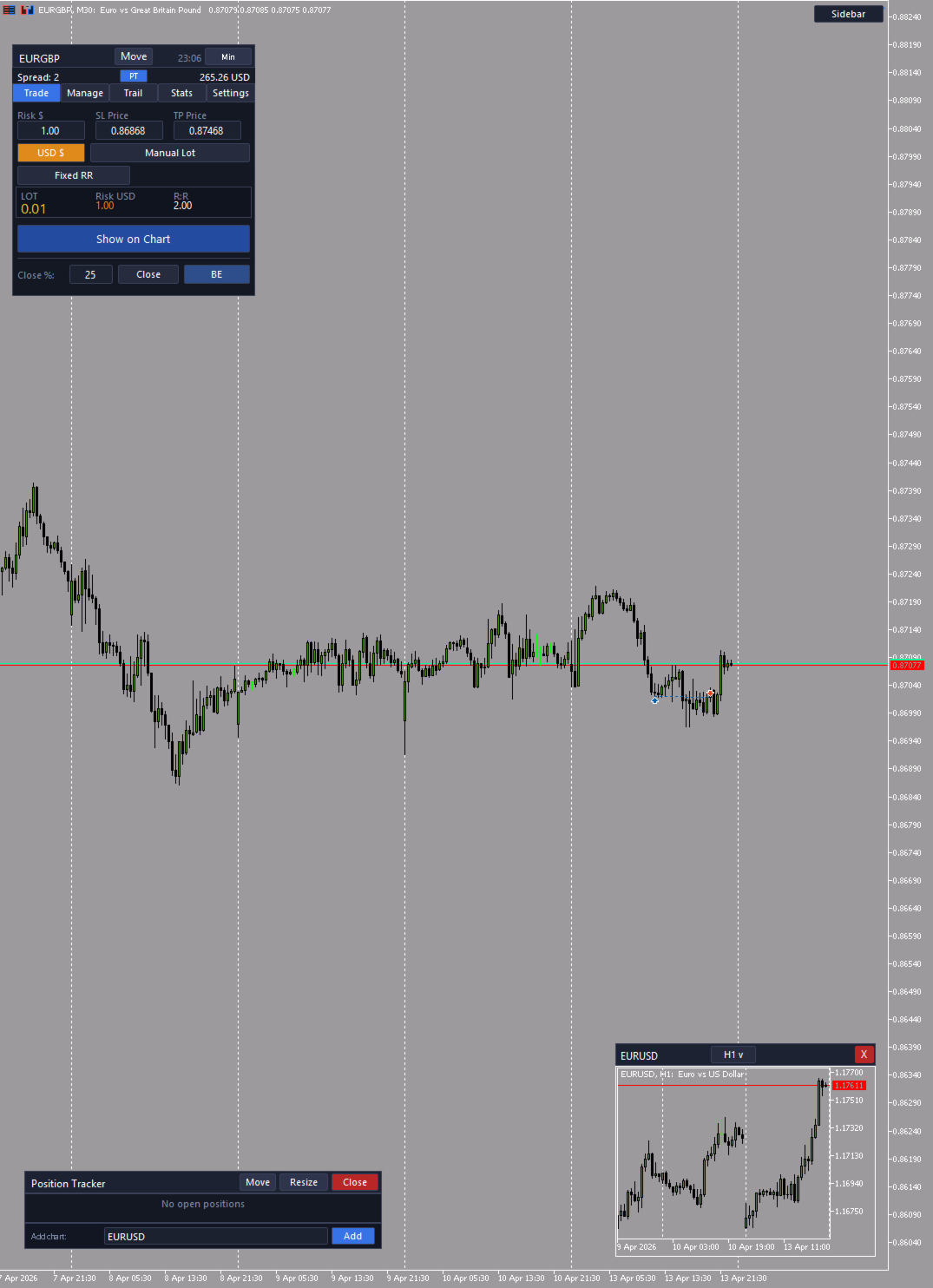
RiskCalculator is a fully-featured, floating panel EA for MetaTrader 5 that automates risk management, position sizing, and trade monitoring — all from a single draggable interface directly on your chart.
Designed for active traders who need fast, accurate lot sizing and real-time position oversight without switching between windows or doing manual math.
Core Features
⚖️ Risk Calculator (Calculate Tab)
- Enter your desired risk percentage — lot size is calculated automatically based on your account balance
- Drag the SL line on the chart to your stop loss level — risk recalculates in real time
- Drag the TP line to your target — Risk:Reward ratio is displayed instantly
- See exact dollar risk amount, lot size, SL/TP distances in pips
- Place BUY or SELL market orders with one button press
- Supports Market and Limit order types
📊 Position Tracker Panel
- Floating, draggable and resizable panel showing all open positions in real time
- Each position card displays:
- Symbol, direction badge (BUY/SELL), lot size
- P&L in dollars and percentage of balance
- TP (top-left) and SL (bottom-left) in dollar terms
- PnL High (top-right) — maximum profit since open
- PnL Low (bottom-right) — maximum drawdown since open
- Duration — time elapsed since position opened
- Open a mini chart window for any position with one click
- Add charts for any symbol manually via the footer input
- Panel updates every second with zero flicker
📈 Mini Chart Windows (up to 5)
- Up to 5 independent, draggable chart windows on the same chart
- Each window shows a real embedded MT5 chart (OBJ_CHART)
- Timeframe dropdown with 8 options: M1, M5, M15, H1, H4, H8, D1, W1
- If an open position exists for that symbol, Entry, SL and TP horizontal lines are drawn automatically
- Drag any chart window by its header to reposition it anywhere on screen
- Close individual windows with the X button
⚡ Position Management (Manage Tab)
- Close All Positions — closes every open trade instantly
- Close Buy / Close Sell — direction-specific mass close
- Partial Close — close a percentage of current lots
📡 Trailing Stop (Trail Tab)
- Automatic trailing stop that moves SL as price advances in your favor
- Configurable trail step (pips) and activation distance
- Break Even button — moves SL to entry price with configurable offset
📉 Daily Statistics (Stats Tab)
- Today's P&L, trade count, win rate, and maximum drawdown
- Historical session overview updated in real time
⚙️ Settings Tab
- Language selector: English, Türkçe, Русский
- Rollover protection — auto-close positions at 11:58 server time
- Break Even offset, Magic Number, default order type
How It Works
- Attach the EA to any chart — the panel appears immediately
- Enter your risk % in the Calculate tab
- Drag the red SL line to your stop loss level on the chart
- Drag the green TP line to your target
- Review the calculated lot size and R:R ratio
- Click BUY or SELL to place the trade
- Enable the PT button to open the Position Tracker panel and monitor all trades live
Key Benefits
- ✅ No manual calculation — lot size is always correct for your risk setting
- ✅ Visual SL/TP workflow — drag lines instead of typing prices
- ✅ Real-time PnL High / PnL Low — know your best and worst excursion per trade
- ✅ SL and TP shown in dollars, not just pips — immediate risk clarity
- ✅ Up to 5 mini charts for multi-symbol monitoring on one screen
- ✅ Fully draggable UI — position every panel element where you want it
- ✅ Three languages — English, Turkish, Russian
- ✅ Works on any symbol and timeframe
Parameters
- Magic Number — unique identifier for EA orders (default: 20240101)
- Default Risk % — pre-filled risk percentage when panel opens
- Order Type — Market or Limit
- BE Offset (pips) — extra pips added when moving SL to break even
- Trailing Step (pips) — trail increment for automatic trailing stop
- Trail Activation (pips) — minimum profit before trailing stop activates
- Rollover Protection — enable/disable auto-close before rollover
- Language — EN / TR / RU
Requirements
- MetaTrader 5 (Build 2755+)
- Any broker, any symbol
- AutoTrading must be enabled to place orders
- Recommended: use on a dedicated chart (any timeframe)











































사용자가 평가에 대한 코멘트를 남기지 않았습니다