Interactive Risk Manager
- 지표
- 버전: 1.0
- 활성화: 5

Interactive Risk Manager is a professional risk management and position calculation tool for MetaTrader 4. It is designed to automate and simplify the complex calculations traders must make before opening a position. Insert into the Indicators folder.
MAIN FEATURES
1. AUTOMATIC LOT CALCULATION
Automatically calculates the position size (lots) based on:
Account balance
Desired risk percentage
Stop loss distance
2. FLEXIBLE STOP LOSS MANAGEMENT
Supports three different stop loss types:
Points (Pips): Specify the SL in points
Absolute price: Specify an exact price for the SL
ATR (Average True Range): Uses market volatility (ATR multiplier)
3. INTERACTIVE INTERFACE
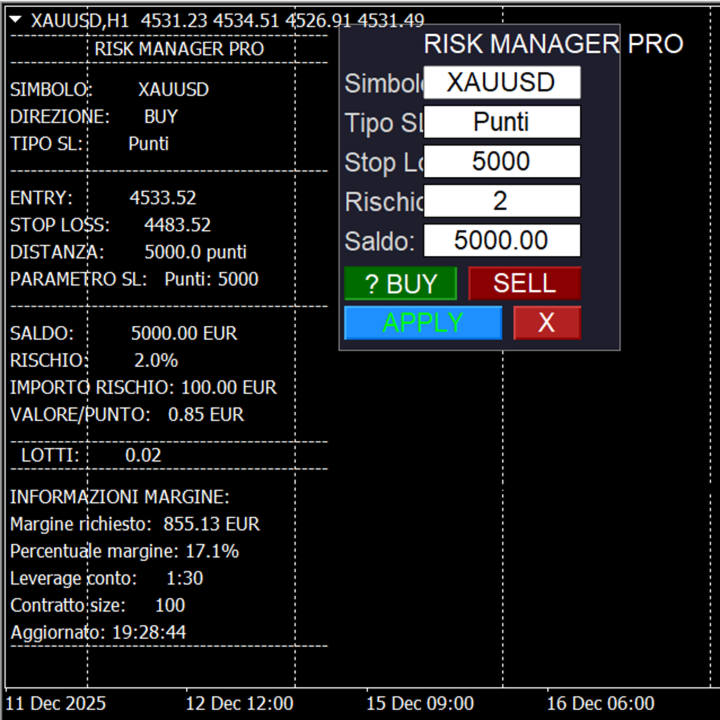
Control panel with real-time editable fields
BUY/SELL buttons for quick direction changes
Editable fields for symbol, risk, balance, SL
APPLY button to apply changes
🛠️ HOW IT WORKS
WORKFLOW:
Initial setup: Set default parameters
Edit Real-time: Change symbol, direction, risk
Automatic calculation: The indicator calculates:
Currency risk amount
Optimal position size
Required margin
Stop loss distance
Display: Show all in the chart commentary
PRACTICAL EXAMPLE:
If you have a $10,000 account and want to risk 2% on a EUR/USD trade with a SL of 50 points:
Risk in dollars: $200 (2% of $10,000)
Value per point: Automatically calculated
Required lots: Automatically calculated to risk exactly $200
🎨 ON-SCREEN DISPLAY:
Control panel (optional):
Fields for symbol, SL type, SL value, risk, balance
BUY/SELL buttons
APPLY/CLEAR buttons
Lines on the chart (optional):
Entry line (green for BUY, (red for SELL)
Stop Loss Line (orange dotted)
Information Label
Chart Comment:
All calculated data in readable format
Improved spacing for ease of reading
⚙️ MAIN PARAMETERS
INPUTS (editable from the Properties menu):
Default Symbol: Symbol to analyze (e.g., EURUSD)
Default SL Type: Points, Price, or ATR
SL Value: Stop Loss Value
Order Type: BUY or SELL
Percent Risk: % of balance to risk (e.g., 2.0%)
Show Panel: Toggles the control panel
Auto-select symbol: Automatically loads the symbol data
RUNTIME VARIABLES (editable during execution):
All parameters can be changed in real time
Changes are applied by clicking "APPLY"
🔧 TRADER BENEFITS
🎯 PRECISION
Eliminates manual calculation errors
Consider spreads, lot sizes, and margin requirements
⏱️ EFFICIENCY
Save time on calculations
All information in one place
Automatic price updates
📈 RISK MANAGEMENT
Prevents over-risking
Calculates risk based on actual balance
Adaptable to different trading strategies
🔄 FLEXIBILITY
Works with any symbol (Forex, metals, indices)
Supports different account types (standard, mini, micro)
Adaptable to different risk philosophies
💼 WHO NEEDS IT?
👶 BEGINNER TRADERS
Learn to manage risk properly
Avoid common position sizing mistakes
Develop risk discipline
🏆 EXPERT TRADERS
Automate repetitive calculations
Maintain consistency in risk management
Professional tool for quick analysis
📊 PORTFOLIO MANAGERS
Manage risk across multiple positions
Calculate overall exposure
Money management tool
🚀 WHY USE IT?
SAFETY: You don't accidentally risk more than you planned
CONSISTENCY: Always apply the same risk rules
PROFESSIONALISM: Institutional-level tools
PEACE OF MIND: You know exactly what you're risking
📝 EXAMPLE OF USE
Scenario: You want to buy EURUSD at 1.0850 with SL at 1.0800
Enter EURUSD in the symbol field
Select "BUY"
Set risk to 2%
Enter SL of 50 points (or price 1.0800)
Click "APPLY"
Result: The indicator immediately tells you:
How many lots you can open
How many dollars you're risking
How much margin you need
Where are the entry and SL levels on the chart?
🎯 IN SUMMARY
It's like having a personal risk manager assisting you with every trade, calculating everything automatically so you can focus solely on your decisions. of trading, leaving the complex calculations to the tool.