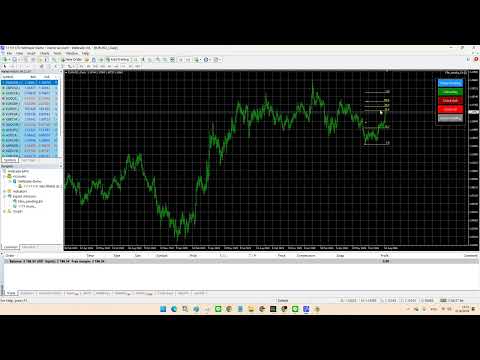
Fibo pending EA

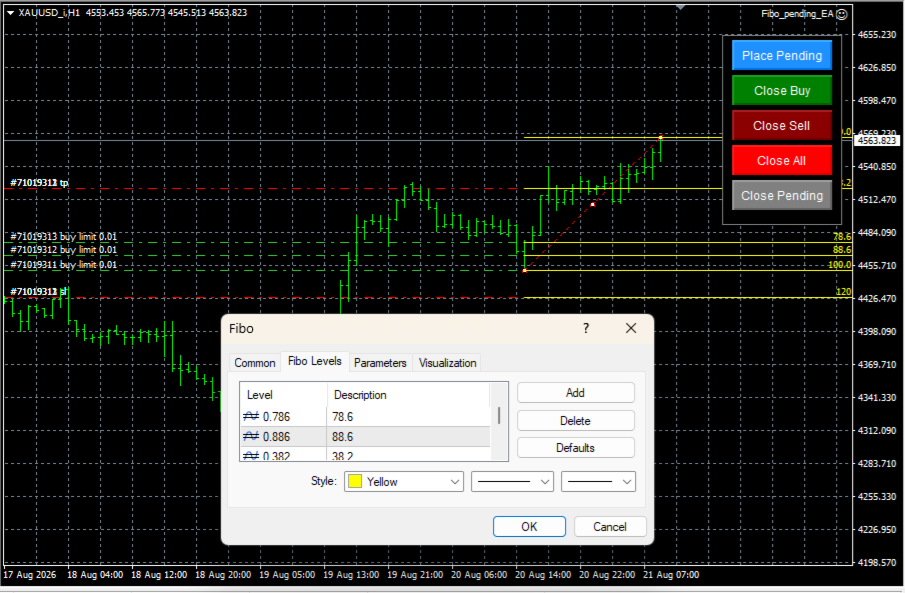
"Fibo Pending EA is an Expert Advisor that places pending limit orders based on Fibonacci levels.

You can configure it to enter orders according to specific Fibonacci levels. For any level that you don't want to use, simply set its value to zero (0).

Once the EA has placed all pending orders, please remove the Fibonacci object from the chart.

The various 'Close' buttons on the chart will trigger a pop-up confirmation before closing orders.

If you don't want these confirmation alerts, you can disable them in the EA settings."


The functionality of the Auto Delete Pending Order feature includes the following settings:

  • UseAutoDeletePending = true → Enable (true) / Disable (false)

  • TotalEntryOrder = 3 → The total number of pending orders based on Fibo levels. For example, set to 3 orders.

When all pending orders are placed and the Fibo is removed, if TotalEntryOrder = 3 and a Buy Limit is active, and the price hits 2 pending orders (resulting in 2 buy orders being opened) and they reach TP, the EA will automatically delete the remaining 1 pending Buy Limit order.

Therefore, it is important to set the TotalEntryOrder value correctly in the EA's input settings.


추천 제품
Protect your account from Margin Call when the market is going opposite with your trades. Manage your risk when you're using Martingale, Grid, Average . They are not dangerous anymore, but manageable  Use this EA utilities to accompany your every MT4 installation This EA is a utility to protect your capital when your trading are unfavorable : Maximum loss in money, Maximum Draw-down/ equity loss in percentage, Your minimum equity reached Those are whichever reached first It's simple, straightfor
FREE
Fibo Eagle EA
Almaquio Ferreira De Souza Junior
Fibo Eagle EA for MT4 - Fibonacci-Based Grid Trading Expert Advisor Overview FiboEagleEA is a sophisticated Expert Advisor (EA) designed for traders who want an automated trading system powered by the Fibonacci sequence. This EA integrates grid trading principles with advanced money management tools, delivering a blend of precision, adaptability, and profitability potential. Whether you're new to trading or a seasoned professional, FiboEagleEA adjusts to various market conditions, making it a ve
AutoFib EA는 자동 거래를 위해 피보나치 수정과 확장 레벨의 힘을 활용하도록 설계된 최첨단 전문가 자문 서비스입니다. 초보자든 경험 많은 트레이더든 AutoFib EA는 정확하고 효율적인 트레이딩 전략을 구축할 수 있도록 도와줍니다. Test     The EA Before Risking Real Money.  테스트 결과에 따라 설정을 조정하세요       결과. 질문이 있으신가요? 부담없이 문의하세요       묻다. 주요 특징: 자동화된 거래:       피보나치 수준을 기반으로 매수 및 매도 주문을 원활하게 진행하여 수동 개입을 최소화합니다. 사용자 정의 가능한 매개변수:       귀하의 고유한 거래 스타일에 맞춰 피보나치 수준, 로트 크기, 손절매, 이익실현 등을 조정하세요. 역동적인 시장 적응:       실시간으로 시장 동향을 분석하고 적응하여 가능성이 높은 거래를 파악합니다. 위험 관리:       통합된 손절매 기능과 위험 관리 기능으로 규율 있는 거래와 자
FREE
Fibonacci Retracement object is an object that has been provided by metatrader 4 platform. But  Fibonacci Retracement  object doesn't automated adjust the chart. You have to put and manage it manually to the chart. Because of that, this indicator was created. If you like using filbonacci retracement indicator, highly recommended to use Automated Fibonacci Retracement Indicator if you want to get better result in here: https://www.mql5.com/en/market/product/95515 LT Automated Fibonacci Retraceme
FREE
UTrailingMin
Viktor Shpakovskiy
The EA for manual trading to manage open positions.The built-in trailing stop has five modes and seven instruments. There is a virtual stop loss and a virtual take profit, which can be freely moved around the chart. With the help of the built-in trading simulator, you can check how the EA works in the strategy tester. Guide to UTrailingMin can be found in the "Comments" section. Benefits 5 trailing stop modes: virtual, normal, total, percentage and mobile stop loss; 7 options: by points, by bar
ReitakFX ProTrend EA
Boris Sedlar
5 (1)
This is automated version of my ProTrend Indicator (20x5* reviews) - so please look on indicator first how it works ----  https://www.mql5.com/en/market/product/47367  ---- It works based on the result of multiple EMAs, with some specific averaging and algorithm . Output of an EMA is the input for another EMA. Works on Forex, Commodities, Indicies, Stocks, Crypto, ... on all timeframes (but recommend 1H or 4H) and on every brooker. If you want this and all my other products for FREE , creat
BBMA Grid Combination
Kahfi Pangariduwan
5 (1)
BBMAGC   BBMAGC  is an automatic trading system with a work strategy obtained from famous BBMA indicator combine with advance grid system . This EA use dangerous trading systems like martingale and grid so please understand the risk before using this EA Time Frame: H1 Symbol: best result on EUR/USD, GBPUSD, GBPCAD VPS recommended 4/5 digit broker Min Deposit 1000$ Low spread always better Since you using Grid system, always trade using money that you are willing to lose. When you use an expert a
Gyroscopes
Nadiya Mirosh
Gyroscope        professional forex expert   (for EURUSD, GBPUSD, USDJPY, AUDUSD, USDCHF, EURGBP, EURJPY, NZDUSD, USDCAD, EURCHF, AUDJPY, CADJPY pairs)   alyzing the market using the Elliot Wave Index. Elliott wave theory is the interpretation of processes in financial markets through a system of visual models (waves) on price charts. The author of the theory, Ralph Elliott, identified eight variants of alternating waves (of which five are in the trend and three are against the trend). The mov
G2 Signal Manual Entry MT4
Ida Bagus Putu Mahardika
G2 Signal Manual Entry MT4 by Ida Bagus Putu Mahardika Master the Market with Precision Signals and Smart Risk Management G2 Signal Manual Entry   is a cutting-edge trading solution designed to provide a competitive edge for Forex traders. Combining the power of Moving Average crossover signals with extensive automated risk management, this tool acts as a reliable trading assistant that helps you make timely decisions and optimize every profit opportunity. What Makes This Strategy Superior? Accu
FREE
Gold Crazy EA MT4
Nguyen Nghiem Duy
Gold Crazy EA   is an Expert Advisor designed specifically for trading Gold H1/ EU M15. It use some indicators to find the good Entry. And you can set SL or you can DCA if you want. It can be an Scalping or an Grid/ Martingale depend yours setting. This EA can Auto lot by Balance, set risk per trade. You also can set TP/ SL for earch trade or for basket of trade. - RSI_PERIOD - if = -1, then the default strategy works, if >0, then the RSI strategy works - MAX_ORDERS - to trade with only 1 order,
See what your broker statement never shows. Test it before you buy. An on-chart analytics panel that reads your account history and your open positions, and turns them into a compact table right on the chart. No external file, no third-party service, no upload of your trading data anywhere. Around that, four things you will not find in your terminal report. Try it for real, before you buy Download the free demo and run it in the Strategy Tester in visual mode. This is not a stripped-down previe
Bfxenterprise RSI
Ricky Romadona Tri Saputra
Bfxenterprise RSI Inspired and optimized RSI indicator is the focus of this Expert Advisor (EA). Designed with the use of RSI to perform optimal transactions. Reading trends and price reversals is done by the RSI whose functions have been sorted. Version of Bfxenterprise The version with the name “Bfxenterprise” focuses on special and thorough sorting of transactions. So this version does not always make transactions, unlike the Expert Advisor version in general. This version relies on accuracy
This trading system requires the user to manually add Fibonacci, trend lines, horizontal lines, channel to perform semi-automatic or manual trading. The trading system can also be used in the tester. Trading panel provides: spread information margin information free marging Information The swap information to order for lots (requires your dealer support)
Complete Guide: How It Works & Core Capabilities The CRITICAL MT4 Deficiency (Major Platform Flaw)   Position Closing Challenges in MT4:   Final Verdict This Tool Solves: MT4's lack of batch closing Tedious manual clicking Risk of slippage during manual closure Distracting chart grid Stress during high volatility Human error in position management This Tool Provides: One-click mass closure 99% time reduction Zero human error Clean professional charts Peace of mind
Fibonacci SR Indicator
Martin Eshleman
5 (1)
Fibonacci SR Indicator This indicator creates support and resistance lines. This indicator is based on Fibonacci Retracement and Extension levels. It will consider many combinations of the Fibonacci levels and draw support/resistance lines based on these. This indicator uses tops and bottoms drawn by the ZigZag indicator in its calculations. The ZigZag can also be drawn on the chart, if necessary. The indicator considers many combinations of past reversal points and Fibonacci ratio levels, and w
FREE
Auto BE break even EA
Calvin Andile Mahlangu
5 (2)
AUTO BE Utility – Breakeven Manager for MetaTrader 4 The AUTO BE Utility by KALIFX is a compact and efficient trade-management tool for MetaTrader 4. It automatically adjusts the stop-loss level to the breakeven point once the market price reaches a defined profit distance. This ensures that active trades are protected from reversals once they move into profit, without requiring manual intervention. Main Features Automatic Breakeven Control – Moves the stop-loss to breakeven when the price reac
FREE
MT4 버전 : https://www.mql5.com/en/market/product/90395 MT5 버전 : https://www.mql5.com/en/market/product/99545 공격적인 트레이딩 전략의 전형인 "No Marti No Party" 전문 자문(EA)을 소개합니다. 이 EA는 상당한 이익 또는 상당한 손실로 이어질 수 있는 고위험, 고보상 원칙에 따라 운영되므로 소심한 사람을 위한 것이 아닙니다. 이름에서 알 수 있듯이 Martingale 전략은 이 EA의 핵심입니다. 이는 손실을 복구하고 그 과정에서 이익을 창출하는 것을 목표로 손실된 거래를 공격적으로 두 배로 늘리도록 설계되었습니다. 그러나 이 접근 방식에는 잠재적 손실을 견딜 수 있는 강인한 신경과 막대한 계정 잔고가 필요합니다. 이 EA 사용을 고려하기 전에 최소한의 자본 요구 사항이 있는 계정 유형인 Cent 계정에서 광범위하게 테스트하는 것이 중요합니다. 이를 통해 거래자는 성과를 측정하
Best Martingale Strategy
Zafar Iqbal Sheraslam
EA Martingale is a popular betting strategy that has been applied to various forms of gambling, including trading and investing. However, it's important to note that Martingale strategies can be extremely risky and are not recommended for serious financial endeavors, as they can lead to substantial losses. This strategy relies on the idea of doubling your bet after each losing trade in the hope of eventually making a profit. Here's how you might apply a Martingale strategy in the context of Elec
Universal EA Builder is unique EA designer and has a large set of tools. which allows you to create your own Expert Advisors based on your own desires using the following types of indicators: 1 - draws arrows, opening by arrows 2 - has a main and signal line, opening at the intersection of lines 3 - one line and its intersection with levels are used 4 - extremum 5 - color change         This EA-Builder has a convenient author's panel integrated, displaying important information for the trader a
Buy Sell Simultaneously
Danny Setyawijayanto
This EA will open Buy and Sell simultaneously after attached to chart. It has customized grouping grid step and lot multiplier group. Please contact me if you have any question. Please Like, Share & Subscribe to my Youtube Channel. I will give this EA for FREE for everyone if there is 2k Subscriber on my Youtube channel , please ask your friend, because subscribe is FREE :). Need at least 10k balance (10k cent or 10k$), or you can adjust with various setting inside the EA to get the minimum dra
Quantum King MT4
Bogdan Ion Puscasu
5 (6)
Quantum King EA - 모든 트레이더를 위해 개선된 지능형 파워 IMPORTANT! After the purchase please send me a private message to receive the installation manual and the setup instructions. 특별 출시 가격 라이브 신호:       여기를 클릭하세요 MT5 버전 :   여기를 클릭하세요 퀀텀 킹 채널:       여기를 클릭하세요 ***Quantum King MT4를 구매하시면 Quantum StarMan을 무료로 받으실 수 있습니다!*** 자세한 내용은 비공개로 문의하세요! 규칙       정확하고 규율 있게 거래하세요. 퀀텀 킹 EA       구조화된 그리드의 강점과 적응형 마팅게일의 지능을 하나의 완벽한 시스템으로 통합했습니다. M5에서 AUDCAD를 위해 설계되었으며, 꾸준하고 통제된 성장을 원하는 초보자와 전문가 모두를 위해 구축되었습니다. 퀀
Simple RSI Forex Trading Strategy
Victor Manuel Valderrama Zamora
2.5 (2)
Diversify the risk in your trading account by combining our Expert Advisors. Build your own custom trading system here:   Simple Forex Trading Strategies The expert advisor opens trades when RSI indicator enter in oversold or overbought areas. The Stop Loss, Take Profit, and Trailing Stop are calculated based on the ATR indicator. The recommended currency pair is EURGBP and the recommended timeframe to operate and to do backtests is H4. This Expert Advisor can be profitable in any TimeFrame an
FREE
BB Classic
Stefan Stoyanov
4 (1)
Automated medium-term Expert Advisor. It is based on Bollinger Bands . The EA is optimized for EURUSD H1 . The robot should be optimized for use on other instruments. The Expert Advisor does not use hedging, martingale, grid, arbitrage etc. The results obtained in the strategy tester are identical to the results of real trading. Since the results for Control points are close to results of optimization in every tick mode, the EA allows for quick optimization using Control points . Parameters Mod
FREE
Vizzion
Joel Protusada
Vizzion is a fully automated scalping Expert Advisor that can be run successfully using GBPJPY currency pair at H1 timeframe. Very Important This Expert Advisor can not run with any EAs in the same account. As part of the money management plan, it calculates and monitors the Margin Level % and assumes that all open trades are created by it. If you want an Expert Advisor that trades in a daily basis, this EA is not for you because using this requires a patience to wait for a few days or weeks on
Meta Extender - 더 많이 보고, 더 잘 거래하세요. 20개 이상의 전문 트레이딩 위젯 추가 자료 및 지침 전체 매뉴얼   -   MT4 버전   -   MT5 버전 더 많이 보고, 더 잘 거래하세요. MetaTrader 전체를 업그레이드하는 하나의 툴킷. 무료로 체험해보세요: 14일 평가판이   웹사이트 에서 제공됩니다. Meta Extender는 MetaTrader 차트에 직접 20개 이상의 전문 트레이딩 위젯을 추가하는 올인원 차트 내 애플리케이션입니다. 스마트한 포지션 사이징, 원클릭 리스크 관리, 자동 패턴 인식, 멀티 타임프레임 분석, 고급 거래 자동화를 모두 하나의 사용하기 쉬운 도구에서 제공하며, 표준 MetaTrader가 할 수 없는 것을 실현합니다. 제공 내용:   차트에 직접 내장된 완전한 트레이딩 툴킷. Meta Extender는 분석, 주문 배치, 리스크 관리, 성과 추적, 거래 자동화를 표준 MetaTrader에서는 사용할 수 없는 강력한 기능
Virtual Collider Manual   is a trading assistant with a built-in panel for manual trading. It automatically moves a position opened by a trader in profit using innovative adaptive grid algorithm of averaging and adaptive pyramiding Know-how of the grid algorithm of averaging and pyramiding of the   Virtual Collider Manual   trading robot is based on fully automatic adaptation of all characteristics of dynamically build order grid and pyramid with actual price movement with no need for adjusting
WOW Dash Lucky Bunny
Nirundorn Promphao
I will support only my client. สำหรับลูกค้า M5 timeframe with zigzag upward and downward Strategies Parameters General Trade Settings Money Management  Lot : Fixed (can change) Strategies  - M5 Strategies it is fixed with MA, Bollinger band, Candlestick Levels Close Functions  - M5 Strategies MagicNumber  - individual magic number. The EA will only manage position of the chart symbol with this magic number. NextOpenTradeAfterSeconds  - 60 seconds is default, can change it MaxSpread  - upto cur
TradePilot
Hossein Khalil Alishir
TradePilot Expert Advisor (EA) for MetaTrader 4 TradePilot is a professional and user-friendly Expert Advisor (EA) for MetaTrader 4 (MT4) . It simplifies automated trading , risk management , and trade execution using a smart trading panel . Perfect for beginners and experienced traders looking for a reliable trade manager EA with automated lot size calculation . Key Advantages User-Friendly Trading Panel: Customizable panel with buttons and hotkeys. Smart Risk Management: Supports percen
Expert Advisor for MT4 Useful utility MUST have for all traders.  With 1 click button, you're able to close all your open positions. Its come with a warning pop up notification when you click to close all your trades, to avoid an accident press the button. Just press 'Yes' to confirm or 'No' to cancel it. The expert will close all your open positions no matter what pairs you currently open or directions. Just attach the expert on 1 of your chart, and you're good to go.
Super grid nineth (ninth) generation is another grid type EA on this huge forex system population, this EA not using any indicator to avoid any fake signaling to open or closing position orders. This EA will open pending order stop and limit in the first time EA run, then maintain all opened order with unique way to balancing account free margin and make equity growth. This EA have unique system not like anyother grid EA, with correct setup and run on max 3 pairs in one account, this EA capable
이 제품의 구매자들이 또한 구매함
Trade Manager EA에 오신 것을 환영합니다. 이 도구는 거래를 보다 직관적이고 정확하며 효율적으로 만들기 위해 설계된 궁극적인 리스크 관리 도구 입니다. 단순한 주문 실행 도구가 아닌, 원활한 거래 계획, 포지션 관리 및 리스크 제어를 위한 종합 솔루션입니다. 초보자부터 고급 트레이더, 빠른 실행이 필요한 스캘퍼에 이르기까지 Trade Manager EA는 외환, 지수, 상품, 암호화폐 등 다양한 시장에서 유연성을 제공합니다. Trade Manager EA를 사용하면 복잡한 계산은 이제 과거의 일이 됩니다. 시장을 분석하고 진입, 손절 및 익절 수준을 차트의 수평선으로 표시한 후 리스크를 설정하면, Trade Manager가 이상적인 포지션 크기를 즉시 계산하고 SL 및 TP 값을 실시간으로 표시합니다. 모든 거래가 간편하게 관리됩니다. 주요 기능: 포지션 크기 계산기 : 정의된 리스크에 따라 거래 크기를 즉시 결정합니다. 간단한 거래 계획 : 진입, 손절, 익절을 위한
Local Trade Copier EA MT4
Juvenille Emperor Limited
4.96 (110)
Local Trade Copier EA MT4 를 사용하여 매우 빠른 거래 복사 경험을 해보세요. 1분 안에 간편하게 설정할 수 있으며, 이 거래 복사기를 사용하면 Windows 컴퓨터 또는 Windows VPS에서 여러 개의 MetaTrader 터미널 간에 거래를 0.5초 미만의 초고속 복사 속도로 복사할 수 있습니다. 초보자든 전문가든 Local Trade Copier EA MT4 는 다양한 옵션을 제공하여 사용자의 특정 요구에 맞게 맞춤 설정할 수 있습니다. 이는 수익 잠재력을 높이려는 모든 사람을 위한 최고의 솔루션입니다. 지금 사용해보시고 이것이 왜 시장에서 가장 빠르고 쉬운 무역용 복사기인지 알아보세요! 팁: 여기 에서 데모 계정에서 Local Trade Copier EA MT4 데모 버전을 다운로드하여 사용해 볼 수 있습니다. 다운로드한 무료 데모 파일을 MT4 >> File >> Open Data Folder >> MQL4 >> Experts 폴더에 붙여넣고 터미널
Trade Assistant MT4
Evgeniy Kravchenko
4.43 (197)
거래당 위험 계산, 라인을 사용한 손쉬운 신규 주문, 부분 청산 기능을 통한 주문 관리, 7가지 유형의 트레일링 스탑 및 기타 유용한 기능을 제공합니다. 추가 자료 및 지침 설치 지침 - 애플리케이션 지침 - 데모 계정용 애플리케이션 평가판 라인 기능       - 차트에 개시선, 손절매, 차익실현을 표시합니다. 이 기능을 사용하면 새로운 주문을 쉽게 하고 개봉 전에 추가 특성을 볼 수 있습니다. 위기 관리       -       위험 계산 기능은 설정된 위험과 손절매 주문의 크기를 고려하여 새 주문의 볼륨을 계산합니다. 이를 통해 손절매 크기를 설정하고 동시에 설정된 위험을 존중할 수 있습니다. 로트 계산 버튼 - 위험 계산을 활성화/비활성화합니다. 필요한 위험 값은 위험 필드에 0에서 100 사이의 백분율 또는 예금 통화로 설정됩니다. 설정 탭에서 위험 계산 옵션을 선택합니다. $ 통화, % 잔액, % 지분, % 자유 마진, % 사용자 정의, % AB 이전 일, % AB
Exp COPYLOT CLIENT for MT4
Vladislav Andruschenko
4.69 (65)
MetaTrader 4용 전문 트레이드 복사기 MetaTrader 4 용 빠르고 안정적이며 전문적인 트레이드 복사기입니다. COPYLOT 은 MetaTrader 4 와 MetaTrader 5 터미널 간에 Forex 거래를 복사할 수 있으며, 다양한 계좌 유형과 운용 방식에 맞춰 유연한 동기화 환경을 제공합니다. COPYLOT MT4 버전 지원 방식: MetaTrader 4 → MetaTrader 4 MetaTrader 5 Hedge → MetaTrader 4 MetaTrader 5 Netting → MetaTrader 4   MT5 버전 상세 설명 + DEMO + PDF 구매 방법 설치 방법 로그 파일 확인 방법 테스트 및 최적화 방법 Expforex의 모든 제품 MetaTrader 5 버전 을 사용하면 MetaTrader 5 → MetaTrader 5 및 MetaTrader 4 → MetaTrader 5 복사도 지원됩니다: COPYLOT CLIENT for MT5 COPYLOT 은
TradePanel MT4
Alfiya Fazylova
4.84 (95)
Trade Panel은 다기능 거래 도우미입니다. 이 애플리케이션에는 50개 이상의 수동 거래 기능이 포함되어 있으며 대부분의 거래 작업을 자동화할 수 있습니다. 구매하기 전에 데모 계정에서 데모 버전을 테스트할 수 있습니다. 데모 계정용 애플리케이션 체험판 다운로드: https://www.mql5.com/en/blogs/post/750865 . 전체 지침 여기 . 거래. 한 번의 클릭으로 거래를 수행할 수 있습니다: 리스크 자동 계산과 함께 예약 주문 및 포지션 열기. 한 번의 클릭으로 여러 주문 및 포지션 열기. 주문 그리드 열기. 예약 주문 및 포지션을 그룹별로 닫기. 포지션 방향 전환 (Buy 닫기 > Sell 열기, Sell 닫기 > Buy 열기). 포지션 잠금 (부족한 포지션을 열어 Buy와 Sell 포지션의 수량을 동일하게 만들기). 모든 포지션 한 번의 클릭으로 부분적으로 닫기. 모든 포지션의 테이크 프로핏과 스톱로스를 같은 가격 수준에 설정. 모든 포지션의 스톱로스를
Riskless Pyramid
Snapdragon Systems Ltd
5 (1)
Introduction This powerful MT4 trade mangement EA offers a way potentially to aggressively multiply trade profits in a riskfree manner. Once a trade has been entered with a defined stoploss and take profit target then the EA will add three pyramid add-on trades in order to increase the overall level of profit. The user sets the total combined profit target to be gained if everything works out. This can be specified either as a multiple of the original trade profit or as a total dollar amount. Fo
The News Filter
Leolouiski Gan
5 (25)
이 제품은 뉴스 시간 동안 모든 전문가 어드바이저 및 수동 차트를 필터링하여 수동 거래 설정이나 다른 전문가 어드바이저가 입력한 거래가 파괴될 수 있는 급격한 가격 상승으로부터 걱정하지 않아도 됩니다. 이 제품은 또한 뉴스 발표 전에 열린 포지션과 대기 주문을 처리할 수 있는 완전한 주문 관리 시스템이 함께 제공됩니다. The News Filter  를 구매하면 더 이상 내장 뉴스 필터에 의존할 필요가 없으며 이제부터 모든 전문가 어드바이저를 여기서 필터링할 수 있습니다. 뉴스 선택 뉴스 소스는 Forex Factory의 경제 캘린더에서 얻어집니다. USD, EUR, GBP, JPY, AUD, CAD, CHF, NZD 및 CNY와 같은 어떤 통화 기준으로 선택할 수 있습니다. Non-Farm (NFP), FOMC, CPI 등과 같은 키워드 식별을 기준으로 선택할 수도 있습니다. 저, 중, 고 영향을 가지는 뉴스를 필터링할 수 있도록 선택할 수 있습니다. 차트와 관련된 뉴스만 선택하
Grid Manual MT4
Alfiya Fazylova
4.71 (17)
"Grid Manual"은 주문 그리드 작업을 위한 거래 패널입니다. 이 유틸리티는 보편적이며 유연한 설정과 직관적인 인터페이스를 제공합니다. 그것은 손실을 평균화하는 방향뿐만 아니라 이익을 증가시키는 방향으로 주문 그리드와 함께 작동합니다. 거래자는 주문 그리드를 만들고 유지할 필요가 없으며 유틸리티에서 수행합니다. 거래자가 주문을 시작하는 것으로 충분하며 "Grid Manual"는 자동으로 그를 위한 주문 그리드를 생성하고 거래가 마감될 때까지 그와 동행할 것입니다. 전체 설명 및 데모 버전 여기 . 유틸리티의 주요 기능: 모바일 터미널을 포함하여 어떤 방식으로든 열린 주문과 함께 작동합니다. "제한" 및 "중지"의 두 가지 유형의 그리드와 함께 작동합니다. 고정 및 동적(ATR 표시기 기반)의 두 가지 유형의 그리드 간격 계산과 함께 작동합니다. 오픈 오더 그리드의 설정을 변경할 수 있습니다. 차트에서 각 주문 그리드의 손익분기점 수준을 표시합니다. 각 주문 그리드에 대한 이익
Unlimited Trade Copier Pro is a tool to copy trade remotely to multiple MT4, MT5 and cTrader accounts at different computers/locations over internet. This is an ideal solution for you if you are a signal provider and want to copy your trades to other receivers globally on your own rules. One provider can copy trades to multiple receivers and one receiver can get trade from multiple providers as well. The provider can even set the subscription expiry for each receiver, so that receiver will not b
Trading History MT4
Siarhei Vashchylka
5 (9)
Trading History - A program for trading and money management on the history of quotes in stratagy tester. It can work with pending and immediate orders, and is equipped with trailing stop, breakeven and take profit functions. Very good for training and testing different strategies. Manual (Be sure to read before purchasing) Advantages 1. Allows you to test any trading strategy in the shortest possible time 2. An excellent simulator for trading training. You can gain months of trading experience
Trend Line Optimizer
Evgenii Aksenov
4.11 (19)
이 추세선 프로 표시기에 대한 자동 매개 변수 최적화 프로그램입니다 쉽고 빠르게 당신은 당신의 마음에 드는 추세선 프로 표시기에 대한 최적의 매개 변수를 선택합니다. 최적화에는 몇 초 밖에 걸리지 않습니다. 최적화할 수 있는 최고의 매개변수에 대한 각 쌍고기간:진폭,TP1-TP3,stoploss 에뿐만 아니라,값은 시간을 필터 및 카테고에 필터가 역사를 선택 섹션(일) 다른 시간대를 최적화하려면 다른 범위의 히스토리가 필요합니다: M5-M15 계산 범위 매개 변수 설정(일)=60(3 개월) M30-H1 계산 범위 매개 변수 설정(일)=120(6 개월) H4 매개 변수 계산 범위 설정(일)=240(1 년) D1-W1 매개 변수 계산 범위 설정(일)=720(3 년) Mn1 매개 변수 계산 범위 설정(일)=1200(5 년) 최적화 후 매개 변수는 폴더의 기성품 세트 파일에 자동으로 저장됩니다.MQL4>Files>trendlineoptimizedsettings 최적화 유틸리티 사용
ATTENTION: The Indicator cannot be backtested, as it is generated exclusively from live intraday calculations based on options flow. GEX Level Converter – Gamma Exposure Mapping for CFD Charts NASDAQ-100 edition — for US100 · NDX · NAS100 · USTECH and every Nasdaq-100 CFD equivalent Instantly see professional options-market levels directly on your MetaTrader Nasdaq-100 CFD chart. The GEX Level Converter translates the daily Gamma Exposure (GEX) zones of the NDX options market into precise pri
Trade copier MT4
Alfiya Fazylova
4.59 (34)
Trade Copier는 거래 계정 간의 거래를 복사하고 동기화하도록 설계된 전문 유틸리티입니다. 복사는 공급자의 계정/단말기에서 동일한 컴퓨터 또는 vps에 설치된 수신자의 계정/단말기로 발생합니다. 프로모션 - 이미 "Trade copier MT4"를 구매하셨다면, "Trade copier MT5"를 무료로 받으실 수 있습니다 (MT4 → MT5 및 MT4 ← MT5 복사용). 조건에 대한 자세한 정보를 원하시면, 개인 메시지를 통해 저희에게 문의해 주시기 바랍니다! 구매하기 전에 데모 계정에서 데모 버전을 테스트할 수 있습니다. 데모 버전 여기 . 전체 지침 여기 . 주요 기능 및 이점: 복사기는 "МТ4> МТ4", "МТ4> МТ5", "МТ5> МТ4" 복사를 지원합니다. 복사기는 데모 계정 > 실 계정, 실 계정 > 데모 계정, 데모 계정 > 데모 계정 및 실제 계정 > 실 계정 복사를 지원합니다. 복사기는 읽기 전용 암호가 적용된 투자자 계정에서 복사를 지원합니다. 하
News Filter EA: Advanced Algo Trading Assistant News Filter EA is an advanced algo trading assistant designed to enhance your trading experience. By using the   News Filter EA , you can integrate a Forex economic news filter into your existing expert advisor, even if you do not have access to its source code. In addition to the news filter, you can also specify   trading days   and   hours   for your expert. The News Filter EA also includes   risk management   and   equity protection   features
Trade Dashboard MT4
Fatemeh Ameri
4.96 (54)
Trade Dashboard simplifies how you open, manage, and control your trades, with built-in lot size calculation. It allows you to execute trades, manage risk, and control positions directly on the chart, with tools such as partial close, breakeven, and trailing stop. Designed to reduce manual work and help you stay focused on your trading decisions. A demo version is available for testing. Detailed explanations of features are provided within the MQL5 platform. Installation instructions are include
Trade Manager MT4 DaneTrades
Levi Dane Benjamin
4.09 (11)
거래 관리자는 위험을 자동으로 계산하는 동시에 거래를 빠르게 시작하고 종료하는 데 도움을 줍니다. 과잉 거래, 복수 거래 및 감정 거래를 방지하는 데 도움이 되는 기능이 포함되어 있습니다. 거래를 자동으로 관리할 수 있으며 계정 성과 지표를 그래프로 시각화할 수 있습니다. 이러한 기능은 이 패널을 모든 수동 거래자에게 이상적으로 만들고 MetaTrader 4 플랫폼을 향상시키는 데 도움이 됩니다. 다중 언어 지원. MT5 버전  |  사용자 가이드 + 데모 트레이드 매니저는 전략 테스터에서 작동하지 않습니다. 데모를 보려면 사용자 가이드로 이동하세요. 위기 관리 % 또는 $를 기준으로 위험 자동 조정 고정 로트 크기 또는 거래량과 핍을 기반으로 한 자동 로트 크기 계산을 사용하는 옵션 RR, Pips 또는 Price를 사용한 손익분기점 손실 설정 추적 중지 손실 설정 목표 달성 시 모든 거래를 자동으로 마감하는 최대 일일 손실률(%)입니다. 과도한 손실로부터 계정을 보호하고 과도한
Ultimate Partial Profit EA
BLAKE STEVEN RODGER
4.67 (3)
This EA Utility delivers a robust solution for managing an unlimited array of open orders, both manual and automated. It enables customizable partial profit levels utilizing metrics such as pips, ratios, ATR (Average True Range), and profit amounts for precise trade management. The utility features an advanced on-screen display, offering clear visualization of all orders and their profit levels to enhance strategic decision-making and control. To evaluate its performance and interface, the EA s
수동 매매를 위한 전문가용 트레이딩 패널로, 정밀한 진입부터 계좌 보호까지 매매의 전 과정을 차트 위 하나의 창에 담았습니다. 정해진 리스크에 정확히 맞춰 모든 포지션의 거래량을 산정하고, RR Tool로 차트에 직접 라인을 그려 거래를 설계하며, Market 주문과 예약 주문은 물론 Grid와 OCO까지 사용할 수 있습니다. 포지션 관리는 패널이 대신 처리합니다. 최대 다섯 단계 부분 청산, 여섯 가지 트레일링 스탑, 브레이크이븐, Virtual SL/TP를 지원합니다. 일간·주간·월간 한도가 예치금을 지키며, 기준을 넘기는 즉시 자동으로 발동됩니다. 가이드와 무료 Live 데모 무료 Live 데모 버전은 여기에서 이용할 수 있습니다 ( Free Live Demo ). 제품 사용 가이드는 여기에서 확인할 수 있습니다 ( User Manual ). NT Trade Manager는 트레이더의 모든 작업 흐름을 차트 위 작고 간결한 패널 하나에 모아, 터미널 창을 오갈 필요도, 진입할
거래하고자 하는 주요 영역을 파악한 후 자동으로 거래 지원 및 저항 또는 공급 및 수요 구역을 설정합니다. 이 EA를 사용하면 한 번의 클릭으로 매수 및 매도 구역을 그린 다음 가격이 바뀔 것으로 예상되는 정확한 위치에 배치할 수 있습니다. 그런 다음 EA는 해당 구역을 모니터링하고 구역에 대해 지정한 가격 액션에 따라 자동으로 거래를 수행합니다. 초기 거래가 수행되면 EA는 대상 구역이 되는 반대 구역에서 이익을 얻습니다. 그런 다음 거래를 종료하고 진입할 새 구역을 그리거나 이익을 얻고 즉시 반대 방향으로 거래를 역전하여 "항상 시장" 스타일 전략을 만드는 두 가지 선택이 있습니다. 입력 및 전략이 포함된 전체 매뉴얼은 여기에 있습니다: https://www.mql5.com/en/blogs/post/760256 이 EA는 시장에서 고정 또는 하드 스톱 로스를 사용하지 않는 포지션 트레이더 또는 달러 비용 평균 거래 전략을 위해 설계되었습니다. 대신, 다음에 가능한 지지 또는
작동 체험판 다운로드 Copy Cat More (카피캣) MT4 트레이드 카피어 (Trade Copier) 는 단순한 로컬 트레이드 카피어가 아닙니다. 오늘날의 트레이딩 과제를 위해 설계된 완전한 리스크 관리 및 실행 프레임워크 (risk management and execution framework) 입니다. 프롭 펌 (prop firm) 챌린지부터 개인 포트폴리오 관리까지, 견고한 실행, 자본 보호, 유연한 설정, 고급 트레이드 처리의 조합으로 모든 상황에 적응합니다. 이 카피어는   마스터 (Master, 송신측) 와 슬레이브 (Slave, 수신측)   두 모드 모두에서 작동하며, 시장가 주문과 대기 주문, 트레이드 수정, 부분 청산, 상호 청산 (Close By) 작업을 실시간으로 동기화합니다. 데모 및 실거래 계좌, 트레이딩 또는 인베스터 로그인 모두와 호환되며, EA·터미널·VPS가 재시작되더라도 영구 트레이드 메모리 (Persistent Trade Memory) 시
목표 수익 도달 시 자동 수익 실현 EquityTargetCloser   — 는 MetaTrader 5용 유틸리티 전문가 어드바이저(EA)로,   순자산(Equity)이 현재 잔고를 지정된 수익 금액만큼 초과하면 모든 시장 포지션을 청산하고 예약 주문을 삭제합니다. 모든 포지션을 청산한 후 목표는 자동으로 상향 조정됩니다. 새 임계값 = 새 잔고 + 지정된 수익. EA는 거래를 시작하지 않고 기존 포지션만 관리하여 수익을 확실하게 고정하고 축적된 자금을 보호합니다. MT5-version:  https://www.mql5.com/en/market/product/169839 작동 방식 전문가 어드바이저는   순자산(Equity)   을 동적 목표와 지속적으로 비교합니다. 목표 =   현재 잔고(Balance) + plusMoney   (미국 달러). 순자산이 이 금액 이상이 되면 보호 기능이 작동합니다.   모든 시장 포지션   (모든 심볼)을 청산합니다. 매개변수   Delete p
The product will copy all telegram signal to MT4   ( which you are member  ) , also it can work as remote copier.  Easy to set up, copy order instant, can work with almost signal formats, image signal, s upport to translate other language to English Work with all type of channel or group, even channel have "Restrict Saving Content", work with  multi channel, multi MT5 Work as remote copier: with signal have ticket number, it will copy exactly via ticket number. Support to backtest signal. How to
CloseIfProfitorLoss with Trailing
Vladislav Andruschenko
4.87 (31)
이익 추적 기능으로 총 이익/손실에 도달하면 MetaTrader 4에서 포지션을 청산합니다. 가상 정지 (별도 주문) 을 활성화할 수 있습니다. BUY 및 SELL 포지션을 별도로 계산하고 마감합니다 (BUY SELL 별도). 모든 심볼 또는 현재 심볼 만 닫고 계산합니다 (모든 심볼). 이익을 위해 후행 추적 을 활성화합니다 (후행 이익). 예금 통화, 포인트, 잔액의 %에 대한 총 손익을 마감합니다. 이 애플리케이션은 다른 EA와 함께 또는 수동 거래와 함께 모든 계정에서 사용하도록 설계되었습니다. MT5 버전 전체 설명 + DEMO + PDF 구입 방법 설치하는 방법 로그 파일을 얻는 방법 테스트 및 최적화 방법 Expforex의 모든 제품 일부 쌍 또는 모든 쌍의 총 거래 잔액이 설정에서 지정된 값보다 크거나 같으면 모든 포지션이 닫히고 주문이 삭제됩니다. 이 버전은 지정된 이익 수준에서 포지션을 마감할 수 있을 뿐만 아니라 더 나은 결과를 위해 이익을 추적할 수도 있습니다
DrawDown Limiter MT4
Haidar Lionel Haj Ali
5 (8)
Drawdown Limiter EA You are in the right place if you were searching for Drawdown control, Drawdown limiter, Balance protection, Equity Protection or Daily Drawdown Limit related to Prop Firm, FTMO, or Funded account trading, or if you want to protect your trading account. Have you suffered from controlling your drawdown when trading funded accounts? This EA is meant for you. Prop firms usually set a rule called “Trader Daily Drawdown”, and if it is not respected, you are disqualified.  I am an
Exp Averager
Vladislav Andruschenko
4.82 (22)
MetaTrader 4용 Averager — 전문적인 평균 단가 조정 및 포지션 시리즈 관리 시스템 드로우다운에 들어간 포지션을 더 체계적으로 복구하고, 평균 진입가를 개선하며, 전체 포지션 바스켓을 하나의 전략적 구조로 관리하기 위해 설계된 Expert Advisor입니다. 이것은 단순한 물타기 도구가 아니라, 손실 구간의 포지션을 더 효율적으로 재구성하고, 공통 청산 지점까지 더 현실적으로 접근하도록 돕는 실전형 관리 시스템입니다. Averager는 독립적인 자동매매 시스템이 아닙니다. 스스로 진입 신호를 찾는 전략이 아니라, 이미 열려 있는 거래를 추적하면서 평균화, 추가 진입, 공통 트레일링 스톱을 통해 포지션 시리즈 전체를 더 정교하게 관리하는 데 목적이 있습니다. 수동 매매를 하는 트레이더, 자신만의 진입 신호를 사용하는 트레이더, 또는 다른 거래 시스템과 함께 운용하려는 사용자에게 적합합니다. 단일 포지션이 아니라 여러 포지션을 하나의 바스켓으로 운영하고 싶은 경우 특
Trade Copier Professional — 로컬 복사 솔루션   Trade Copier Professional 은 MetaTrader 4/5 용 신뢰성 높은 로컬 거래 복사 시스템입니다. 동일한 컴퓨터 내 여러 계좌에서 포지션을 즉시 복제할 수 있으며, 내장된 안전 제어 기능과 전문적인 대시보드를 제공합니다.   개요   이 EA는 단일 파일에서 Master 모드와 Slave 모드 모두로 작동하며, 매끄럽게 전환할 수 있습니다. MT4 와 MT5 터미널 간 거래를 인터넷에 의존하지 않고 복사할 수 있으며, 로컬 파일 기반 통신을 통해 최대 속도와 안정성을 보장합니다. 실시간 대시보드는 연결 상태, 복사 통계, 일일 성과를 표시합니다.   로트 및 리스크 관리   네 가지 로트 계산 모드가 제공됩니다: 고정 로트, 배수, 리스크 비율, 잔액 비율. 손절매와 익절은 조정 또는 스케일링이 가능하며, 필요 시 신호를 반대로 복사할 수 있습니다. 안전 기능에는 일일 손실 및 거래
VirtualTradePad PRO SE MT4 — MetaTrader 4용 고급 트레이딩 패널 및 차트 워크스페이스 VirtualTradePad PRO SE 는 MetaTrader 4 용 전문 트레이딩 패널이자 거래 관리 워크스페이스입니다. 하나의 차트 기반 인터페이스에서 거래를 더 빠르게 열고, 관리하고, 보호하고, 닫고, 분석할 수 있도록 도와줍니다. 이 제품은 단순한 버튼 모음 이상의 기능이 필요한 적극적인 수동 트레이더를 위해 만들어졌습니다. PRO SE는 원클릭 실행, 예약 주문, 포지션 제어, 부분 청산, 바스켓 손익 로직, 평균가 레벨, ATM 규칙, 신호 모니터링, 시장 정보, 전략 테스터 워크플로, VPS 중심 준비를 하나의 구조화된 워크스페이스로 통합합니다. MT5 버전 | 전체 설명 및 스크린샷 | 구입 방법 | 설치 방법 | 로그 파일을 얻는 방법 | 테스트 및 최적화 방법 | Expforex의 모든 제품 일반 수동 트레이딩 대비 장점 여러 창 대신 하나의 워
VirtualTradePad mt4 Extra
Vladislav Andruschenko
4.85 (61)
한 번의 클릭으로 거래할 수 있는 거래 패널.   위치 및 주문 작업!   차트 또는 키보드에서 거래. 거래 패널을 사용하면 차트에서 클릭 한 번으로 거래하고 표준 MetaTrader 컨트롤보다 30배 빠르게 거래 작업을 수행할 수 있습니다. 거래자의 삶을 더 쉽게 만들고 거래자가 훨씬 빠르고 편리하게 거래 활동을 수행할 수 있도록 도와주는 매개변수 및 기능의 자동 계산. 차트의 무역 거래에 대한 그래픽 팁 및 전체 정보. 새로운 프리미엄 버전 출시:   VirtualTradePad PRO SE 로 트레이딩 워크플로를 업그레이드하세요.   MetaTrader 5   및   MetaTrader 4 를 위한 차세대 전문 트레이딩 패널입니다. MT5 버전 전체 설명   +DEMO +PDF 구입 방법 설치하는 방법     로그 파일을 얻는 방법     테스트 및 최적화 방법     Expforex의 모든 제품 열기 및 닫기, 반전 및 잠금, 부분 닫기/오토로트. 가상/실제 손절매/이익
Custom Alerts AIO: 다중 시장을 동시에 모니터링 – 설정 없이 즉시 사용 가능 개요 Custom Alerts AIO 는 복잡한 설정 없이 즉시 사용할 수 있는 통합 시장 모니터링 도구입니다. FX Power, FX Volume, FX Dynamic, FX Levels, IX Power 등 필요한 모든 지표가 내장되어 있어 별도의 설치나 구성 없이 알림 기능을 바로 사용할 수 있습니다. 차트 그래픽 없이 작동하며, Forex, 금속, 지수, 암호화폐 등 주요 자산군을 모두 지원합니다. 주식(Symbols)은 별도로 입력하여 추가할 수 있으나, MetaTrader에서는 일반적으로 제한적으로만 사용됩니다. 1. 왜 Custom Alerts AIO를 선택해야 하나요? 추가 라이선스가 필요 없습니다 • 모든 Stein Investments 지표가 내장되어 있어 별도 구매가 필요 없습니다. • 즉시 알림 기능을 시작할 수 있어 빠르고 간편합니다. 모든 시장을 하나의 도구로
MT4 to Telegram Signal Provider 는 사용하기 쉽고 완전히 사용자 정의가 가능한 도구로, 텔레그램으로 신호를 보내어 계정을 신호 제공자로 변환할 수 있습니다. 메시지 형식은 완전히 사용자 정의가 가능합니다! 그러나 간단한 사용을 위해 미리 정의된 템플릿을 선택하고 메시지의 특정 부분을 활성화하거나 비활성화할 수도 있습니다. [ 데모 ]  [ 매뉴얼 ] [ MT5 버전 ] [ 디스코드 버전 ] [ 텔레그램 채널 ]  New: [ Telegram To MT5 ] 설정 단계별 사용자 가이드 가 제공됩니다. 텔레그램 API에 대한 지식이 필요 없으며, 개발자가 필요한 모든 것을 제공합니다. 주요 기능 구독자에게 보낸 주문 세부 정보를 사용자 정의할 수 있는 기능 예를 들어 브론즈, 실버, 골드와 같은 계층 구독 모델을 만들 수 있습니다. 골드 구독은 모든 신호 등을 받게 됩니다. ID, 심볼 또는 코멘트별 주문 필터링 주문이 실행된 차트의 스크린샷을 포함 보낸
제작자의 제품 더 보기
Confluence Arrow Pro
Thanat Thitithammaphong
Confluence Arrow Pro Trade only when Trend, Momentum, Volume and Volatility all agree. Confluence Arrow Pro is a non-repainting Buy/Sell arrow indicator that filters out weak, low-probability setups. Instead of relying on a single indicator, it waits until four independent market forces line up before printing a signal – helping you avoid false signals from choppy, low-quality price action. How It Works A signal only appears when all of the following conditions are true at the same time: Trend –
Smart Reversal Arrows
Thanat Thitithammaphong
Smart Reversal Arrows Non-repainting Buy/Sell reversal signals with built-in alerts. Smart Reversal Arrows is a clean, lightweight MT5 indicator that plots simple Buy/Sell arrows directly on your chart, warning you when price shows real signs of a reversal or a trend pullback. No clutter, no extra lines on the chart - just clear arrows and instant alerts when it matters. Timeframe This indicator works on all timeframes, but signal frequency depends on the timeframe you choose. Lower timeframes (
Smart Entry MT5
Thanat Thitithammaphong
Smart Entry — Precision Entry Signal Indicator Stop guessing your entries. Get clear, filtered Buy/Sell arrows only when it matters. What It Does Smart Entry is a MetaTrader 5 indicator that spots high-probability trend reversal points and marks them with simple green (Buy) and red (Sell) arrows directly on your chart. Every signal passes through a 3-layer filter before it appears: Reversal Detection — identifies the moment short-term price direction shifts Trend Confirmation — only signals that
Hi Trader
Thanat Thitithammaphong
Hi Trade EA is an EA facilitating hand trading. Hi Trader EA is a trading assistant EA, not an automatic order placing EA. Features of EAs Fix Lot will open positions based on the lot size specified by the user. Risk will calculate the lot size based on the percentage of the account balance, considering the distance from the open price to the Stop Loss. Therefore, a Stop Loss value greater than zero is required. TS = Trailing stop with separate stop loss, individual orders. AVR TS = Trailing sto
Smart Entry MT4
Thanat Thitithammaphong
Smart Entry MT4 Clean & High-Probability Trading Signal Tool Overview Smart Entry is a professional trading signal tool designed to help traders identify high-quality market entries with clarity and confidence. It removes guesswork from trading by providing clear buy and sell signals directly on the chart, allowing traders to focus on execution rather than analysis confusion. Built for traders who prefer a simple, clean, and rule-based approach to the market. Trading Signals The tool p
HiTrader MT5
Thanat Thitithammaphong
Hi Trade EA is an EA facilitating hand trading. Hi Trader EA is a trading assistant EA, not an automatic order placing EA. If you want to Backtest the functionality, please download the MT4 version for testing. Features of EAs Fix Lot will open positions based on the lot size specified by the user. Risk will calculate the lot size based on the percentage of the account balance, considering the distance from the open price to the Stop Loss. Therefore, a Stop Loss value greater than zero is requir
Smart Grid Multi-Symbol EA Fully Automated Trading with Dynamic Lot Scaling & Risk Control Overview Smart Grid Multi-Symbol EA is a powerful automated trading system designed to trade multiple currency pairs and gold simultaneously using a dynamic grid strategy with intelligent lot scaling . Built for traders who want: Consistent execution Hands-free trading Flexible risk control Portfolio diversification ️ Core Strategy This EA uses a Grid + Position Scaling system : Opens positions base
VBC Indicator
Thanat Thitithammaphong
VBC Indicator — Volatile Breakout Confirmation for Gold (XAU/USD) Version: 1.8 Stop guessing reversals. Let strong-candle exhaustion tell you where Gold is likely to turn. VBC Indicator is a price-action tool for MetaTrader 5 , built around Gold's sharp, fast, exhaustion-then-reversal price behavior. It automatically detects exhausted directional moves — runs of strong, same-color candles that have pushed far enough, fast enough — and marks the point where a reversal setup is forming. Alongside

Reversal Wick Zones
Thanat Thitithammaphong
Reversal Wick Zones Non-repainting reversal zones built from confirmed Engulfing candles. Reversal Wick Zones is a clean, lightweight MT5 indicator that highlights potential reaction areas on your chart, based on Engulfing candlestick patterns that occur at market swing (turning) points. How it works The indicator scans price for swing highs and swing lows — the turning points in price. Around each swing point, it looks for an Engulfing candle pair — a candle whose body fully engulfs the previou
필터:
리뷰 없음
리뷰 답변