 MetaTrader 5
 Experts
 지표
지표
 라이브러리
라이브러리
 유틸리티
유틸리티
 위젯
위젯
 규칙
규칙
MetaTrader 5용 새 트레이딩 유틸리티 - 6
 다음은 MetaTrader 5의 거래를 단순화하는 거래 프로그램입니다. 유틸리티의 설명과 목적을 읽으려면 유틸리티 위에 마우스를 놓으십시오.
Breakeven Trailing SL Manager;
This utility Manager is a simple utility that protects your manual trades automatically. Attach it to any chart and it watches all manual positions on your account, on every symbol. It does not open trades and it ignores trades opened by other Expert Advisors. How it works When a trade moves in profit by the Breakeven Price, the Stop Loss is moved to the exact entry price. When the price moves the same distance again, the Stop Loss is moved to entry plus that dist
FREE

# StopOut Auto Calculator — Pre-Trade Margin & Stop-Out Risk Simulator for MT5
**Never get liquidated before your Stop-Loss again.**
Are you tired of setting a strict Stop-Loss (SL) on your trades, only to have your broker forcefully liquidate (Stop-Out) your entire account before price even touches your SL line?
Most traders believe having a Stop-Loss guarantees risk control. **In reality, it doesn't.** Brokers enforce a **Stop-Out threshold (typically 50% or 20% Margin Level)**. When you h
FREE

Custom Trade Panel is a trading panel for all traders that you customise to suit your own style. Choose anywhere from 1 to 12 buttons, assign each one to any of fourteen functions, and arrange them in whichever layout fits how you trade.
Every trade is sized from the risk you choose. Set a percent of your equity, a fixed amount, or a fixed lot size, add your stop loss, and the panel works out the lot size for you.
All fourteen functions:
Open trades:
- Buy Market
- Sell Market
- Buy Stop
-

*Guardian PRO v11.0 DARK - Il gestore di trading definitivo per MT5*
Guardian PRO è un pannello di controllo professionale progettato per proteggere e gestire le tue operazioni direttamente sul grafico, con un design scuro e moderno. Dimentica i terminali MT5 standard: Guardian nasconde i tuoi livelli di Stop Loss e Take Profit al broker.
*CARATTERISTICHE PRINCIPALI:*
*1. I BROKER SMETTONO DI NASCONDERE LA TECNOLOGIA:* Guardian memorizza internamente i tuoi livelli SL/TP (Variabili Globali).

ExpertActions: manage all Expert Advisors of your terminal from one chart Running many EAs on many charts? ExpertActions lets you list, restart and remove them, load and save their inputs and close charts, all from one small panel, without opening each chart and each input dialog. You can also do it from your phone with your own Telegram bot. User guide and free demo: Guideline
The demo (demo accounts only) can be downloaded from the guide or directly here: download Free add-on for buyers: afte

• Please test the product in the Strategy Tester before purchasing to understand how it works.
• If you face any issues, contact me via private message—I’m always available to help.
• After purchase, send me a screenshot of your order to receive a FREE EA as a gift. Risk Percent Lot Sizer
WHAT IT IS Lot size from account risk percent and the stop distance you drag on the chart.
HOW IT WORKS A draggable stop line; the panel shows lots, money at risk, and the resulting margin, recalculated

• Please test the product in the Strategy Tester before purchasing to understand how it works.
• If you face any issues, contact me via private message—I’m always available to help.
• After purchase, send me a screenshot of your order to receive a FREE EA as a gift. Session Boxes Pro
WHAT IT IS Asia, London and New York drawn as boxes with their high, low and range.
HOW IT WORKS Zones defined in GMT and converted to the broker's clock, so the boxes sit where the session really was whateve

Garner Trade Pad EA is an MT5 Expert Advisor that brings trade planning and position sizing directly onto your chart. Position your Stop Loss and Take Profit, choose the amount you want to risk, and view the calculated lot size before placing an order.TP1 buy
The dark navy panel with blue accents provides a clear view of your proposed trade. It is a manually operated calculator and order-entry tool: you choose the direction, levels and timing of every trade.
## Movable chart panel
- Drag t

Overseer EA Guard pauses your Expert Advisors before important news and puts them back afterwards. It works with any EA - bought, free or your own - without changing a single line of its code. Most news filters can only "ask" an EA to stop trading (the EA must be programmed to listen), or they close the trades the EA opens during the news, which costs you the spread every time. Overseer EA Guard does neither. Before the news it takes the EA off its chart, exactly as you would by hand, and after

Smart News Shield MT5 is an advanced news filter designed to help traders manage risk during high-impact news events. It blocks trading before and after scheduled news, provides real-time alerts, and offers customizable impact filters and trading time settings. An optional auto-close feature helps manage open trades before major news releases. Compatible with MetaTrader 5 (MT5).

Pass the challenge by following the rules every day, even on the bad ones. EdgeProof Account Guardian watches your whole account in real time and enforces prop firm rules for you: daily loss, maximum drawdown, profit target, and your own trading rules.
ACCOUNT LIMITS - Daily loss limit as a percent of the day-start value (balance, or the higher of balance and equity at reset). - Maximum drawdown: static from the initial balance, or trailing from the highest equity, with an option to stop traili

A good backtest is not proof. It can come from luck, from a few outsized trades, from costs that are too optimistic, or from parameters fitted to the past. EdgeProof Lab takes the closed trades of any strategy and puts them through eight stress tests, then gives one clear robustness score from 0 to 100 with a grade from A to F.
THE TESTS - Monte Carlo drawdown: 2,000 resampled trade sequences. Shows the 95th percentile drawdown compared with the backtest, and the share of paths that end in pro

Every strategy stops working one day. The expensive part is finding out three months and many losses too late. EdgeProof Monitor compares the live trades of your strategy with its baseline (the backtest or the trades you trust) and tells you early, with statistics, when the live results are no longer consistent with the edge you tested.
HOW IT WORKS - The baseline trades are resampled 1,000 times (Monte Carlo) to build the range of results the strategy can normally produce after 10, 50 or 200

Trade your own plan in one click. TITAN T-Trade PRO calculates the stop-loss, three take-profit levels and the lot size for you, opens the trade, manages it – and sends it to your Telegram group with a chart screenshot.
Works on any symbol: gold, forex, indices, crypto. Hedging and netting accounts.
ONE-CLICK ENTRIES - MARKET, LIMIT or STOP – switch with one tab - ATR-based stop-loss, TP1 / TP2 / TP3 as multiples of the risk - Lot size from your risk % (or fixed lot), split into 1–3 legs - Ri

Push Trading EA Panel is an analysis and trading suggestion dashboard for MT5, displaying "Push" BUY/SELL signals alongside multi-timeframe trend data. PUSH TRADING v4.0 – Integrated One-Click Trading The latest update to Push Trading combines signal analysis with trade execution directly on your MT5 chart, making market monitoring and order management more convenient.
Usage Notes Push signals and the Entry/SL/TP lines serve as reference suggestions only; they do not automatically open trades

DeFoeji BTC OrderBook Gamma is an on-chart analysis dashboard for Bitcoin. It combines options gamma exposure (GEX) with a live perpetual order book from several exchanges, so you can see where liquidity and dealer positioning sit relative to price. "Trade what you see, not trade what you hope." IMPORTANT: this is an information tool. It never opens, modifies or closes orders. Attach it to a BTCUSD chart. What you get GEX levels drawn on the chart: Call Wall, Put Wall, +OI Wall, -OI Wall and Zer

Account Performance Report turns the history of your account into one HTML report that you open in any browser: balance and drawdown, the result of each Expert Advisor and each symbol, a daily P&L calendar, monthly returns and the usual statistics. The main figures are also shown on the chart, and the report is kept up to date while the terminal runs. How To Use Attach Account Performance Report to any chart of the account. It does not trade, so any symbol and timeframe will do. The report is wr
FREE

SemiAutoTrader 9.04 SemiAutoTrader is a manual trade execution and risk-management utility for MetaTrader 5. You remain in control of the trade decision, direction, and stop-loss placement. SemiAutoTrader calculates position size from your selected risk, helps validate broker trading restrictions, and provides hotkey-based order execution and trade management. It does not generate trading signals, predict market direction, or open trades autonomously. How It Works Choose a market or pending orde

LAUNCH OFFER $59 Lifetime — first 10 buyers or 14 days after release, whichever comes first. Regular price: $99 Lifetime
Annual rental: $49
EA Portfolio Control & Cloud Monitoring for MetaTrader 5 Your EAs manage trades. KONTROL_01 manages your EAs. A control system for traders running multiple Expert Advisors on the same account. Coordinate EA activity, manage trading risks and monitor your setup remotely. IN PRACTICE Multiple EAs. No coordination. Your EAs trade independently, unaware of ea

Coasyn Value Displacement is a manual decision-support utility for MetaTrader 5 , built to help traders understand how far price has moved away from its rolling value. The system creates a dynamic VWAP-based value field and measures price displacement through configurable extension tiers, high zones, extreme zones, and danger zones. It helps you monitor: • Rolling VWAP and dynamic value
• Price extension from value
• Configurable displacement thresholds
• High, extreme, and danger zones
• Re

Prop Rules Guard watches the whole trading account and keeps it inside the limits you set: daily loss, maximum drawdown, profit targets, economic news and trading hours. When a rule is reached it closes positions, deletes pending orders and keeps the account flat until the rule allows trading again. It is a utility, not a trading robot. It does not open trades and does not try to predict the market. One copy on any chart protects the entire account, including manual trades and trades of other Ex

ZeroLogics : Essential tool for trade execution, risk management, and planning—featuring visual levels, TPs, RR, lot sizing, and profit/loss calculation.
User Guide ZeroLogics — MetaTrader 5 (MQL5) • Official Manual 1. Real-Time Account Metrics TOTAL : Live consolidated floating P/L across all open positions on the active instrument. BALANCE : Consolidated account balance and account base currency. DAILY PROFIT : Closed net profit since 00:00 broker server time (includes intraday commissions
FREE

Drag the stop loss line to your level and the panel works out the lot size for the risk you set, from your broker's own contract size. FEATURES Entry, stop loss and take profit lines you drag. Lot size normalised to the broker's minimum, maximum and step. Risk as a percentage of balance or equity, fixed cash, or fixed lot. Live risk to reward ratio. HOW TO USE IT 1. Attach it to a chart and drag the three lines. 2. Set the risk basis and value in the inputs. 3. Read the lot size from the panel.
FREE

Shows the live spread, today's range against the daily ATR, the server time, GMT offset, the countdown and the open sessions. FEATURES Live spread in points and pips, colour coded tight, moderate or wide. Optional push alert. Today's range in pips, the daily ATR share, the server time, GMT offset, the countdown and the sessions. HOW TO USE IT 1. Attach it to any chart. 2. Set the spread limits for the symbol. 3. Choose the ATR period and corner. PARAMETERS InpCorner, InpOffsetX, InpOffsetY, InpS
FREE

PG Signal Sender sends every trade you take in MetaTrader 5 to your Telegram channel or group, automatically. You trade, your members get the signal in seconds. No copy and paste, no screenshots, no forgotten updates. WHAT IS SENT New trade: symbol, BUY or SELL, entry, Stop Loss, Take Profit and Risk:Reward. SL / TP update: sent as a reply to the original signal. Breakeven: "SL moved to breakeven" message as soon as you move the Stop Loss to entry. Closed trade: result in pips (or poin
FREE

Closes your positions and deletes your pending orders when the day's equity drawdown reaches your limit, and closes anything you open for the rest of that day. FEATURES On breach: closes every open position, deletes pending orders, locks the day. Panel: drawdown percentage, equity, state. HOW TO USE IT 1. Enable Allow Algo Trading. 2. Attach it to a chart and set the loss and warning levels. 3. Choose the breach actions. PARAMETERS InpDailyMaxLossPercent, InpDailyWarningPercent, InpAutoCloseOnBr
FREE

Coasyn Value Acceptance is a manual decision-support utility for MetaTrader 5 designed to help traders understand how price is participating relative to value. The system uses weekly and rolling VWAP-based value references to show whether price is holding around value, failing at value, accepting above or below value, or extending away from the field. Use it to monitor: • Weekly VWAP context
• Rolling session value
• Participation around value
• Repeated tests and holds
• Deviation and dista

полноценный советник для MetaTrader 5 на MQL5, который управляет защитными уровнями уже открытых позиций. Логика работы: Проверяет все открытые позиции на счёте, включая позиции, открытые вручную и другими советниками. Устанавливает Stop Loss на расстоянии 300 пунктов MT5 и Take Profit на расстоянии 600 пунктов MT5 от цены открытия. Заменяет существующие SL и TP заданными значениями. Учитывает минимальное расстояние до стопов ( SYMBOL_TRADE_STOPS_LEVEL ) и шаг цены инструмента. Повторяет проверк

PG Signal Sender Pro turns your MetaTrader 5 account into a Telegram signals channel. You trade, the tool posts every signal, update and result automatically, with designed image cards, reports and a FREE + VIP channel system. Launch price: the price will increase after the launch period. WHAT IS SENT New trade: symbol, BUY or SELL, entry, Stop Loss, Take Profit and Risk:Reward. Entry zone: show an entry range instead of one price (for example 4130 - 4134.5). Multiple targets: split one signal i

A risk-based trade panel with a built-in account guard. Set the risk, place the stop, click once: the lot size is worked out for you, the trade is managed in R, and daily and maximum loss limits are enforced on every position on the account.
It places no trade on its own. Every order starts with your click.
ORDER ENTRY
- Size by percent of balance or equity, by a fixed amount of money, or by fixed lots. - Stop loss in pips or points; take profit as a multiple of the stop (R) or as a distanc

Account-wide protection for MetaTrader 5: The Drawdown Limiter monitors the loss, margin level and equity of your account and, when a limit you have set is reached, closes positions and pending orders. Scope of function The Drawdown Limiter does not open positions itself. It runs alongside your other Expert Advisors or your manual trading and evaluates account data only. When the account reaches a configured limit, it sends a message to the MT5 app and, if you have set it up that way, closes th

Trade Manager Yasska — Discretionary Trading Assistant for MT5 Trade Manager Yasska is an on-chart control panel for manual and semi-automated trading. It doesn’t generate signals or trade on its own — it speeds up and standardizes the things a discretionary trader does by hand dozens of times a day, and removes the hesitation and mistakes that come with doing them manually under pressure. Why traders use it Speed at entry. One click sends a market Buy or Sell with your SL and TP already attache

Horus Auto SL TP Scalping manages existing MT5 positions with independent Auto SL, Auto TP and Profit Lock switches. It does not open trades.
By default it manages manual positions on the chart symbol. Initial SL uses closed M1 ATR(14), a 1.2 multiplier, spread clearance and broker distance constraints. Existing stops are never widened.
Profit Lock activates when executable price gain strictly exceeds the current spread. It trails a configurable share of price gain (default 70%), subject to

Boleta Pro is a one-click trade panel and risk manager for MetaTrader 5. Open market and pending orders, size every position automatically by risk, and manage the trade with break even, trailing stop and partial close — all from a clean panel on the chart. POSITION SIZE CALCULATOR (LOT CALCULATOR) Three lot modes: fixed lot, fixed money risk, or % of balance In risk mode the lot is calculated automatically from your stop loss distance Lot is rounded down to the symbol volume step, so the risk ne

The Strategy Tester runs one Expert Advisor at a time. If you run several EAs on one account, their separate reports do not tell you the combined drawdown, the margin they need together, or whether the account can carry them at all. Portfolio Backtest Combiner answers that from the reports you already have. How It Works Backtest each Expert Advisor as usual and save the report as HTML (Strategy Tester > Backtest tab > right click > Report > save as HTML) into the MQL5\Files folder of the termina

Trade Panel .
Pending Order - Lot size, Price, Stop Lost, Take Profit Partial Close - Lot size editing, 25% close, 50% close, 75% close Close All button
This panel make you easy to make trade and close position. Looks more interesting and the panel can be moved
*This expert not heavy for the chart. *There are many more parts of the next indicator. Also other indicators that help you in trading. You can get it in our store.

Holdout Prop Guardian watches your account on every tick and enforces the rules that funded and challenge accounts are judged by. When a limit is reached it closes all positions, deletes pending orders and keeps the account flat until the next reset, so a single bad session is far less likely to break your account's rules.
Why traders choose it
- Building this yourself means months of writing and debugging the code, handling every symbol and fill mode, and testing every limit. This is finished

This Dashboard will show at the chart and make you easy to predict price go.
Dashboard : Current Price Key Levels Scalping BUY & SELL Signal Swing BUY & SELL Signal Trend Overview News TO Watch Today - this signal is even more interesting because it show market prediction
*There are many more parts of the next indicator. Also other indicators that help you in trading. You can get it in our store.

Backtest Report Compare puts several Strategy Tester reports side by side on one HTML page: growth and drawdown curves on one chart, the main statistics in one table, the correlation of their daily results, monthly returns and results by weekday and hour. Use it to choose between Expert Advisors, between settings of one Expert Advisor, or to see which strategies lose on the same days. How To Use In the Strategy Tester, after each test: right click on the Backtest tab > Report > save it as HTML i
FREE

Know your lot size before you click Buy or Sell.
The Chart Mechanics Risk and Position Size is a free panel for MetaTrader 5. Set how much you want to risk and where your stop goes, and it shows the lot size to use and the money actually at risk in your account currency. It is an indicator, so it never opens, changes or closes trades.
WHAT IT SHOWS - Lot size, rounded DOWN to your broker's lot step, so you never risk more than you set - Money at risk after rounding, in your account currency -
FREE
Background Tool for MetaTrader 5 https://elitefx.store/ Personalise your MetaTrader 5 workspace with your own chart background images. Background Tool provides an on-chart control panel for switching images and adjusting their brightness.
Features Display your own background images on your chart. Browse images using Previous and Next. Adjust brightness with Lighter and Darker. Turn the background display on or off. Reload images and save your preferences. Manage backgrounds from a compact on-c

SecondsTicksChart displays seconds and tick candlestick charts in MetaTrader 5. Use fixed time intervals or a fixed number of ticks to examine price movement in more detail than a standard one-minute chart. SecondsTicksChart builds candles from your broker's tick data and displays them on the same chart through a custom symbol. No separate feeder chart is required. This is a charting utility implemented as an Expert Advisor. It is designed for display and analysis and does not place or manage or

Dealer's Panel
No signal decides anything here — a hand does. One click, and the panel calculates what's underneath: lot size from risk, target from a 30-step balance ladder that remembers exactly how far an account has climbed.
Toggle between market and pending without touching an input field. Set a stop, and the take-profit can write itself — a fixed share of the balance, translated into price with no arithmetic left for the trader to get wrong. One trade live at a time; it won't let a seco

The Patch
It never opens a trade. It walks behind the ones that did.
Every open position, every pending order — checked twice a second for the one thing that's easy to forget: a stop, a target. Found bare, it doesn't ask. It writes the missing number in, measured in points from wherever the position began, and moves on to the next.
No strategy, no opinion on direction. Just the quiet assumption that nothing should ever sit on the market unprotected — not because someone decided it shouldn't,

Floor Watch
One number, watched every thirty seconds: how far equity has fallen since the day began — or since its highest point, if it's told to trail the peak instead of the open.
Cross the line and it doesn't argue. Every open position closes, every pending order vanishes, and anything that slips through afterward gets shut the moment it appears. Not asked. Removed. The floor holds until the clock turns 5 AM Pakistan time — then, and only then, does the day start over.
One rule. No except

구매 후 먼저 저에게 연락해 주세요 MQL5에서 비공개 메시지를 보내 주시면 PDF 사용 설명서, 온라인 강의, MQL5 채널 이용 권한, 개별 설정 지원을 받으실 수 있습니다. Smart Universal Expert Advisor도 무료 선물로 제공됩니다. 전체 패키지를 받으려면 MQL5에서 Issam에게 연락해 주세요. 선물 수령은 선택 사항이며 리뷰 작성은 필요하지 않습니다. Cynex Discord MT5 구매 후 MQL5에서 저에게 메시지를 보내시면 Smart Universal Expert Advisor를 무료로 받으실 수 있으며, 온라인 강좌, PDF 매뉴얼 및 비공개 그룹 이용 권한도 함께 제공됩니다. MetaTrader 5와 자신의 Discord 봇을 양방향으로 연결합니다. 지원되는 BUY/SELL 신호를 수신하고, 지표 신호와 확인된 거래 이벤트를 게시하며, 비공개 제어 채널에서 적격 거래를 관리합니다. 개요, 지표, Discord, 실행, 활동 및 도움말을 차트에

Indicator Signal Trader Kb 는 프로그래밍 없이 지표를 자동매매 로봇으로 바꿔 줍니다. MetaTrader 5 내장 지표용 바로 쓰는 설정으로 시작하거나 이미 사용 중인 지표를 연결하세요. 어떤 버퍼가 매수, 어떤 버퍼가 매도를 뜻하는지 지정하면 프로그램이 포지션을 열고 관리합니다. 사용자 설명서 전체 설명서(영어): 설정, 바로 쓰는 예제, 필터, 문제 해결 바로 쓰는 설정으로 시작하기 매개변수의 첫 줄은 Ready setup입니다. 아래 목록에서 설정을 고르고 OK를 누르면 지표, 규칙, 필터, 청산 조건이 지정되며, 랏 또는 위험은 직접 선택한 그대로 유지됩니다. 구매 전에 프로그램이 작동하는 모습을 보려면 이 페이지에서 Free Demo를 누르고, 전략 테스터의 매개변수에서 바로 쓰는 설정을 고른 뒤 Start를 누르세요. 모든 설정은 전략 테스터에서 2022-2024년 데이터로 조정한 뒤, 조정에 쓰지 않은 2025-2026년 데이터로 검증했습니다. 이는

SAYON Orders Manager is a complete trade panel for MetaTrader 5.
Open, manage and close your trades from one clean panel, with every level drawn directly on the chart.
It works on any symbol: forex, metals, indices, crypto and stocks. Nothing runs on your account until you decide: all automatic rules start OFF. OPEN TRADES WITH CONTROL Risk in % of balance or equity, in money, or in fixed lots The lot size is calculated for you from the stop loss distance Drag SL, TP and entry lines on the chart

Plan it. Size it. Send it. Protect it.
Signal Forge Trader Hub is a trading panel for traders who decide their own entries. It does the boring and risky part for you: lot size, targets, break-even and account rules.
What it does • Risk your way — lots, cash or % of the account. The panel converts the other two for you. • Plan on the chart — BUY or SELL draws entry, stop loss and targets with clear tags (price, R, money). Drag a tag and everything updates live. • Up to 5 take profits — one cli

All In One Trade Management Panel은 MetaTrader 5를 완전한 트레이딩 워크스페이스로 바꿉니다. 드래그 앤 드롭 포지션 도구로 거래를 계획하고, 패널이 리스크에서 모든 로트를 계산하도록 하며, 오픈 거래를 관리 및 자동화하고, 일일 한도로 계정을 보호하며, 구조, 오더 플로우 및 뉴스로 시장을 읽습니다. 모두 차트의 하나의 패널에서.
재량 트레이더, 프롭 펌 챌린지 트레이더, 모든 거래에서 일관된 리스크를 원하는 사람을 위해 만들어졌습니다.
데모 계정용 무료 체험판 – 라이브 차트에서 사용해 보세요, 시간 제한 없음.
차트에서 거래 계획 - New Long 또는 New Short를 클릭하고 진입을 배치한 다음, 손절 및 이익실현 라인을 원하는 레벨로 드래그합니다 - 로트 크기는 잔액의 백분율 또는 고정 로트에서 계산되며 브로커의 로트 스텝으로 반올림됩니다 - 최대 10개의 이익실현 레벨, 각각 포지션의 고유한 몫을 가집니다 - 드래그하는 동안

Prop Firm Drawdown Lock은 프롭펌 계좌를 위한 MetaTrader 5 리스크 매니저입니다. 일일 손실 한도와 최대 드로다운을 실시간으로 감시하고, 모든 차트에 아직 얼마를 더 잃어도 되는지 보여 주며, 한도를 넘기기 전에 모든 포지션을 청산하고 계좌를 잠급니다. 하루의 실수로 챌린지나 펀디드 계좌를 잃는 일은 더 이상 없습니다. FTMO 방식의 규칙(일일 최대 손실, 최대 드로다운, 수익 목표)이 있는 프롭펌 챌린지, 검증 단계, 펀디드 계좌에서 거래하는 트레이더를 위해 만들었습니다. 주문을 내지 않으며 시그널도 주지 않습니다. 수동 매매, 트레이드 카피어, 같은 터미널의 다른 EA 위에 얹는 안전 장치입니다. 회사보다 먼저 끊는다 프롭펌은 틱 단위로 에쿼티 기준 위반을 판정하고, 포지션을 닫는 주문 자체가 스프레드와 슬리피지를 치릅니다. 한도에서 정확히 닫는 것은 이미 늦은 것입니다. 여기서는 공식 한도의 몇 %에서 EA가 움직일지 여러분이 정하며(예: 일일 손실

모든 보유 포지션에 숨어 있는 상관 리스크를 확인하세요 — 차트에서 실시간으로, 익스포저 한도와 명확한 알림과 함께.
개요
많은 트레이더가 각 거래의 크기를 신중하게 정하지만, 여러 포지션이 같은 통화에 의존하거나 함께 움직이기 때문에 의도보다 더 큰 리스크를 지게 됩니다. EURUSD와 GBPUSD를 함께 매수하는 것은 사실상 하나의 USD 거래에 가깝습니다. 음의 상관관계를 가진 통화쌍에서의 "헤지"는 서로 상쇄되어 스프레드만 늘릴 수 있습니다.
Correlation and Overexposure Checker는 계좌의 모든 보유 포지션을 점검하고, 거래 중인 심볼들이 어떻게 함께 움직이는지 측정하여 전체 상황을 차트 위 하나의 패널에 보여줍니다. 분석 도구이며, 절대 거래를 열지 않습니다.
작동 방식
1. 도구가 어떤 차트에 연결되어 있든 계좌의 모든 보유 포지션을 읽습니다.
2. 완성된 봉을 기준으로 조정 가능한 기간(기본 30일) 동안 추적 심볼 간의 상관관계를 계

출시 기념 가격: 처음 10개 판매분은 39 USD입니다. 이후 59 USD, 최종 가격은 79 USD입니다. 조기 구매자는 앞으로의 모든 업데이트를 계속 받습니다. MetaTrader 5용 Trade Panel Sextant – 모든 거래의 크기를 리스크에 맞춰 정합니다. 감수할 리스크를 정하고 차트가 가리키는 곳에 스톱을 두면, Sextant가 랏 크기를 계산하고 주문을 보내며 거래를 관리합니다. 일일 손실 한도, 일일 목표, 거래 횟수 제한을 갖춘 계좌 가드가 나쁜 하루가 나쁜 한 달이 되는 것을 막아 줍니다. 모든 기능은 TRADE, MANAGE, GUARD, INFO 탭으로 구성된 차분한 패널 하나에 모여 있습니다. 세 가지 테마, 모든 컨트롤의 툴팁, 단축키를 제공하며, 모든 값은 심볼별로 기억됩니다. TRADE 탭 거래당 리스크 : 잔고의 %, 에퀴티의 %, 금액 또는 고정 랏으로 지정합니다. 랏 크기는 내림 처리되므로 스톱에서의 손실이 리스크를 넘지 않습니다. 랏당 수

Mentaris Trade Manager — MT5 차트에서 거래를 관리하세요
하나의 작업 공간에서 개별 포지션과 분할 진입 바스켓을 관리하고, TP/SL 수준을 조정하고, 부분 청산을 미리 확인하고, 자주 사용하는 설정을 저장하세요. 사용자는 자신의 전략에 따라 거래를 결정하고, Mentaris를 통해 MetaTrader 5 차트에서 직접 거래를 관리할 수 있습니다.
여러 진입을 하나의 바스켓으로 관리
총 거래량과 거래량 가중 평균 진입 가격을 확인하고, 해당 Scale In 포지션의 공통 TP/SL 수준을 관리하세요. 패널에서 바스켓, 진입 그룹 및 개별 포지션을 살펴볼 수 있습니다. 평균 진입 가격과 바스켓 손익분기점 계산에는 수수료와 스왑이 포함되지 않습니다. 손익분기 가격이라고 해서 비용 차감 후 손실이 없다는 보장은 없습니다.
차트에서 직접 수준 조정
FOCUS로 거래를 선택하고 관리 수준을 확인한 뒤, 지원되는 수준을 원하는 위치로 드래그하세요. 제안된 차트

MAKO Helix — 멀티 타임프레임 시장 구조 대시보드
이런 어려움이 있으셨나요? 시장 구조에 맞춰 거래하면 판단이 더 명확해진다는 것은 모든 트레이더가 알고 있습니다. 하지만 그 구조를 확인하는 일은 번거롭습니다. M1, M5, M15, H1, 일봉, 주봉, 월봉 차트를 하나씩 열고, 고점과 저점을 직접 표시하고, 머릿속에서 비교해야 합니다. 시간이 오래 걸리고 잘못 읽기도 쉽습니다. 움직임이 빠를 때는 전체 그림을 놓쳐, 모르는 사이에 상위 추세에 역행해 거래하게 될 수도 있습니다.
해결책 MAKO Helix는 이 작업을 하나의 차트에서 대신 해주는 분석 대시보드입니다. 주문을 열거나 청산하지 않습니다. 시장을 읽기 위한 도구이며, 자동매매 로봇이 아닙니다.
갱신될 때마다 최대 7개 타임프레임(M1, M5, M15, H1, D1, W1, MN)에서 스윙(고점과 저점)을 찾아 깔끔한 표로 보여줍니다. • 각 타임프레임의 구조: Bullish(상승), Bearish(하락)

VEXOR — MetaTrader 5용 고급 거래 패널 및 위험 관리 도구 VEXOR로 모든 거래를 제어하세요. 정밀함, 속도, 더 나은 거래 경험을 중요하게 생각하는 트레이더를 위해 설계된 MetaTrader 5(MT5)용 최신 거래 패널입니다. MT4 Version 직관적인 그래픽 인터페이스를 통해 시장 주문과 대기 주문을 발주하고, 포지션 크기를 계산하며, 위험을 관리하고, 손절매와 이익 실현 수준을 설정할 수 있습니다. 기존의 거래 패널이 가진 경직된 레이아웃과 오래된 인터페이스와 달리, VEXOR는 세련된 다크 디자인, 대화형 컨트롤, 실시간 가격 정보, 동적 위험 계산, 차트와의 직접적인 상호작용을 하나의 간결한 작업 공간에 통합했습니다. MetaTrader 5용 VEXOR란 무엇인가? VEXOR는 수동 거래를 단순화하고 주문 구성을 더 직관적으로 만들기 위해 설계된 고급 MT5 거래 패널입니다. 차트 위의 단일 인터페이스에서 로트 크기, 주문 유형, 위험 설정, 진입
FREE

Broker Basket Preflight 다중 심볼 전략을 테스트하기 전에 브로커의 정확한 심볼을 확인하는 읽기 전용 MetaTrader 5 진단 스크립트입니다. 계약 및 거래량 규칙, 가격 증분, 호가 경과 시간과 스프레드를 Experts 로그에 출력합니다. 2026년 10월 업데이트 키트: 설정, 기본값 및 시뮬레이션 비교 요약 . MT5 Setup Hub . 데스크톱 버전 MetaTrader 5의 Market에서 바로 실행할 수 있는 버전을 무료로 설치한 다음, 탐색기 → 스크립트 → Market에서 Broker Basket Preflight를 찾아 별도의 차트에서 실행하세요. 도구상자(Ctrl+T)를 열고 Experts 탭을 선택해 보고서를 확인하세요. 버전 1.10 요청한 각 심볼을 기록하는 선택적 로컬 CSV 감사: 중복, 사용 불가, 오래된 데이터, 제한 및 거래 단위 불일치도 포함합니다. OrderCalcProfit으로 BUY/SELL의 불리한 가격 이동 예시를 계산
FREE

ChartX 는 트레이드 셋업을 그리고, 차트 간 동기화하고, 오더 매니저로 전달하는 MetaTrader 5 유틸리티입니다. TradingView 스타일의 드로잉 경험을 MT5에서 기본 제공합니다. 웹사이트: https://chartx.quoc.app Youtube: https://youtu.be/olJ5i2ES6uI 문의: https://contact.quoc.app/ 주요 기능 Long/Short 트레이드 셋업을 전용 포지션 존과 함께 차트에 직접 그립니다. 자동 리스크 레이블: 그리는 동안 Entry, Stop Loss, Take Profit, R:R 비율이 자동 계산되어 차트에 표시됩니다. 차트 간 동기화: 같은 심볼의 모든 차트에 그림이 동기화되어 M15부터 D1까지 유지됩니다. 다섯 가지 드로잉 도구: 추세선, 선, 사각형, 수평선, Long/Short 존 — MT5 드로잉 메뉴를 뒤질 필요가 없습니다. 완전한 키보드 워크플로: 1-5 도구 선택, 6 심볼 그림 지우기,

수동 트레이딩 리플레이 도구 수동 트레이딩 리플레이 도구 는 MT5 Strategy Tester의 시각화 모드에서 수동 백테스트를 수행하기 위해 설계된 거래 보조 도구입니다. 이 도구는 자동으로 거래 신호를 생성하지 않습니다. 대신 과거 시장 데이터를 재생하면서 실제 거래와 비슷하게 시장을 직접 판단하고, 수동으로 진입하며, Stop Loss와 Take Profit을 설정하고 포지션을 관리할 수 있습니다. 리플레이가 끝난 후에는 MT5 Strategy Tester의 공식 통계 보고서를 이용하여 자신의 거래 전략이 장기적으로 실제 양의 기대값을 가지고 있는지 확인할 수 있습니다. Price Action, 지지와 저항, 차트 패턴, 추세 매매, 스윙 트레이딩, ICT/SMC, 이동평균 전략 등 수동 판단이 필요한 다양한 거래 전략을 테스트할 수 있습니다. 주요 기능 수동 BUY / SELL 주문 거래 랏 크기 설정 여러 주문 동시 진입 여러 포지션의 SL / TP 일괄 관리 평균 진입
FREE

Watchlist Symbol Changer – 한 번의 클릭으로 차트 종목 전환, 보유 포지션을 손익에 따라 색상 표시
시장 감시의 모든 종목마다 버튼이 있는 무료 차트 패널입니다. 클릭하면 차트 종목이 바뀌고 시간 프레임은 유지됩니다. 이 Expert Advisor는 거래하지 않습니다.
기능 - 시장 감시 종목마다 버튼 하나, 현재 종목은 하늘색 테두리로 표시됩니다. - 페이지 넘김(Prev / Next)과 시장 감시가 바뀐 후 사용하는 새로고침 버튼. - 보유 포지션: 이익이면 녹색, 손실이면 빨간색. 같은 종목의 여러 포지션은 합산되며 스왑 포함 여부를 선택할 수 있습니다. - 접두어로 종목을 거르는 선택적 필터. - 터미널 부담이 적음: 타이머는 포지션 색상에만 사용되고 변경이 있을 때만 다시 그립니다.
설정 모서리, 여백, 버튼 크기, 줄당 버튼 수(0 = 차트 너비에 따라 자동), 글꼴 크기, 모든 색상, 포지션 색상 켜기/끄기, 스왑 켜기/끄기, 새로고침 간격,
FREE

Pulsar Panel MT5는 MetaTrader 5용 차트 기반 트레이드 매니저입니다. 드래그할 수 있는 진입, Stop Loss(SL), Take Profit(TP) 라인으로 주문을 계획하고, 최대 4개의 TP 레벨과 브레이크이븐, 트레일링 스톱을 포함해 주문을 전송하며, 포지션을 관리하고, 일일 손실을 통제하고, 통계를 검토할 수 있습니다. Pulsar Panel은 차트 위에 직접 패널을 그리는 Expert Advisor(EA)입니다. 설치할 외부 애플리케이션이 없으며 동적 링크 라이브러리(DLL)도 없습니다. 중요 - 실행 조건. Pulsar Panel은 실계좌 및 데모 계좌 차트에서 작동합니다. 전략 테스터에서는 아무 동작도 하지 않으므로 마켓 데모로는 확인할 수 없습니다. 스크린샷을 참고해 주십시오. 터미널과 EA 설정의 "Common"(공통) 탭 양쪽에서 Algo Trading이 활성화되어 있어야 하며, 계좌가 자동 매매를 허용해야 합니다. 중간 TP, 브레이크이븐,

이 어시스턴트 사용의 이점 1 - 목표 수익 금액(달러) 도달 시 모든 포지션 청산. 2 - 원하는 가격으로 포지션의 익절(Take-Profit) 수준을 즉시 설정. 3 - 트레일링 손익분기점(Trailing Break-Even) 기능. 4 - 클릭 한 번으로 모든 익절 설정 제거. 5 - 클릭 한 번으로 모든 손절(Stop-Loss) 주문 제거. 6 - 클릭 한 번으로 모든 포지션을 손익분기점(Break-Even) 수준으로 설정. 7 - 클릭 한 번으로 모든 포지션 청산. 8 - 모니터에서 차지하는 공간이 매우 작음. 9 – 차트에 손익분기점 가격 자동 계산 및 표시. 10 – 어시스턴트 박스에 중요하고 유용한 정보 표시. 어시스턴트 박스에 계좌 수익 표시 어시스턴트 박스에 매도(Sell) 포지션의 총 랏(Lot) 수 표시 어시스턴트 박스에 매수(Buy) 포지션의 총 랏(Lot) 수 표시
각 항목에 대한 상세 설명
1 - 목표 수익 금액(달러) 도달 시 모든 포지션 청산.
FREE

MetaTrader 5용 깔끔한 실시간 정보 패널입니다. 매매 로직이 없어 포지션을 열거나 수정하거나 청산하지 않으며, 사용 중인 EA에 영향을 주지 않습니다.
시간 및 세션 • 서버 시간, 현지 시간, GMT • 시드니, 도쿄, 런던, 뉴욕 세션 실시간 표시 • 세션 중첩 감지 및 다음 세션까지 카운트다운
시장 데이터 • 종목 및 타임프레임 • 현재, 평균, 최대 스프레드
계좌 • 잔고, 자산, 여유 증거금, 미실현 손익
활동 • 보유 포지션, 대기 주문, 시장 내 총 랏
거래 내역 • 종목 및 매직 넘버별 그룹화 • 기간: Today / This week / This month / All time • Trades, Win%, P&L, MaxDD(단일 거래 최대 손실)로 정렬 가능 • 행이 부족하면 자동으로 종목별로만 그룹화 • 최대 2개의 매직 넘버로 필터링, 수동 거래 포함 여부 선택
뉴스 필터 • MQL5 경제 캘린더 내장 — 외부 소스나 DLL 불필요 • 기간:
FREE

트레이딩을 게임처럼. Confetti Trade Celebration은 테이크프로핏이 실현될 때마다 작은 축하 이벤트를 열어 줍니다. 차트 위로 색종이가 터지고, 결과를 보여 주는 배너가 나타나며, 파티 폭죽 소리가 울립니다. 목표 달성이 마치 점수를 얻은 것처럼 느껴집니다. 실용적인 알림 도구이기도 합니다. "거래" 탭을 숨겨 두었거나 다른 차트를 보고 있어도 목표에 도달했다는 것을 바로 눈으로 확인할 수 있습니다. 작동 방식 원하는 차트에 인디케이터를 적용하세요. 계좌의 청산된 거래만 읽으며, 주문을 열거나 수정하거나 청산하지 않습니다. 포지션이 테이크프로핏에서 청산되면(또는 원하는 경우 플러스로 청산된 모든 포지션) 축하가 시작됩니다. 수동 거래와 Expert Advisor(EA)를 모두 지원하며, 헤징 계좌와 네팅 계좌에서 작동합니다. 차트에서 C 키를 누르면 언제든지 테스트 폭죽을 터뜨릴 수 있습니다. 기능 DirectX 11 렌더링으로 수천 개의 색종이를 표시하며, 사용할

계좌를 EA별로 나누어 보여 주는 자동 트레이딩 저널입니다. 인디케이터이므로 EA가 실행 중인 차트를 포함해 어떤 차트에도 올릴 수 있습니다. 계좌 내역을 읽고, 청산된 거래가 있는 EA마다 한 줄씩 보여 줍니다. 거래 수, 수수료와 스왑을 뺀 순손익, 청산된 결과의 곡선이 표시되며, 수동 거래도 한 줄로 따로 나옵니다. 프랍 펌의 규칙을 설정하면 각 한도까지 남은 여유를 보여 줍니다. 거래는 절대 하지 않습니다. 입력할 것이 없습니다. MetaTrader가 이미 저장하고 있는 체결 기록으로 작동하므로 메모, 태그, 스크린샷을 추가할 필요가 없고, 개별 거래 목록도 없습니다. 그 목록은 MetaTrader의 내역 탭 그 자체입니다. 이 도구는 MetaTrader가 하지 않는 구분을 더합니다. 모든 결과를 EA별로 나누고, 선택한 기간의 EA별 종목, 비용, 시간대, 곡선, 그리고 프랍 펌 한도가 지금 어디에 있는지 보여 줍니다. EA마다 한 줄 매직 넘버 하나가 전략 하나입니다. P

Isobar Event Shield는 MetaTrader 5에서 경제 뉴스로부터 거래를 보호합니다. 터미널에 내장된 경제 캘린더를 읽어 심볼에 영향을 주는 각 발표까지 카운트다운하고, 발표 직전에 사용자나 다른 EA가 이미 보유한 포지션과 대기 주문에 선택한 보호 조치를 적용합니다. 스스로 거래를 열지는 않습니다. 빠른 시작 유틸리티를 차트 하나에 적용하고(터미널당 하나) 도구 모음에서 Algo Trading을 켭니다. 차트 심볼의 기준 통화와 호가 통화는 자동으로 감시됩니다. 다른 통화는 Extra Currencies to Watch에 추가하고(예: USD,EUR,JPY), Protection Scope를 Linked로 두면 해당 통화를 쓰는 모든 심볼이 보호됩니다. Open Position Action과 윈도우 길이(Window Opens, Window Closes, 기본 15분과 10분)를 선택합니다. 패널을 차트에 둡니다. 윈도우가 열리면 보호가 자동으로 실행되고, 닫히면

Daytime Auto Close MT5 Daytime Auto Close는 시간 기반 포지션 관리 EA로, 사용자가 지정한 마감 시각에 도달하면 미청산 포지션을 청산하기 위한 요청을 자동으로 전송합니다. 매일 청산 또는 금요일에만 청산하는 모드를 선택하여 하루 또는 한 주의 거래를 마무리하는 일정에 맞출 수 있습니다. 일반적인 거래 로봇과 달리 이 도구는 새로운 거래를 개설하지 않습니다. 수동 거래와 다른 EA가 개설한 포지션을 포함하여 계좌 전체의 기존 BUY 및 SELL 포지션을 관리합니다. 일정은 브로커의 서버 시간을 기준으로 합니다. 주요 기능 매일 청산 모드: 매일 설정된 시각 이후에 모든 미청산 포지션의 청산을 자동으로 시도합니다. 금요일 청산 모드: 금요일에만 청산 일정을 적용합니다. 사용자 지정 청산 시각: 원하는 시와 분을 설정할 수 있습니다. 기본 마감 시각은 23:55입니다. 브로커 서버 시간: 컴퓨터의 현지 시간이 아닌 거래 서버의 시간을 사용합니다. 계좌 전
FREE

Chart Line Trade Manager – 드래그 가능한 SL·TP·트레일 라인과 리스크 기반 랏 계산을 갖춘 트레이드 패널
Chart Line Trade Manager는 자동 전략이 아니라 수동 거래용 도구입니다. 차트 위의 간결한 패널에서 주문을 내고, 수평선을 드래그하여 스톱을 관리합니다. 랏 크기는 스톱 라인까지의 거리와 선택한 리스크로 비용을 포함해 계산됩니다.
기능 - BUY / SELL: 시장가 주문. 랏은 가격 → 스톱 라인 거리와 리스크(잔고의 %, 순자산의 % 또는 고정 금액)로 계산하며 항상 내림합니다. 옵션: 리스크가 너무 작으면 최소 랏으로 거래. 스톱 라인을 드래그하지 않으면 주문이 전송되지 않습니다. - BUY / SELL PENDING: 진입 라인에서 대기 주문. 리밋인지 스톱인지는 라인의 위치로 결정됩니다. - 스톱로스 및 테이크프로핏 라인: 라인을 드래그하면 해당 방향의 모든 포지션과 대기 주문의 SL / TP가 그 라인으로 이동합니다. 해

Indicator Signal Alerts Kb 는 지표를 지켜보다가 매수 또는 매도 신호가 나오면 팝업 창, 휴대폰 푸시 알림, 이메일로 알려 줍니다. MetaTrader 5 내장 지표용 바로 쓰는 설정으로 시작하거나 이미 사용 중인 지표를 연결하세요. 최대 네 개의 추가 지표가 필터로서 각 신호를 확인할 수 있습니다. 프로그래밍이 필요 없습니다. 사용자 설명서 전체 설명서(영어): 설정, 바로 쓰는 예제, 필터, 문제 해결 바로 쓰는 설정으로 시작하기 매개변수의 첫 줄은 Ready setup입니다. 아래 목록에서 설정을 고르고 OK를 누르면 지표, 규칙, 필터가 지정되고 다음 신호에서 알림을 받게 됩니다. 1. Alligator + EMA 200 trend, H4 (EURUSD, GBPUSD, USDJPY, XAUUSD) 2. Awesome Oscillator + EMA 200 trend, H4 (EURUSD, GBPUSD, USDJPY, XAUUSD) 3. Stochastic
FREE
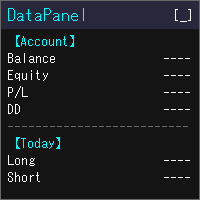
DataPanel은 계좌의 상태를 차트 위의 패널 하나에 모아서 보여 줍니다. 주문은 전혀 내지 않으며 DLL도 사용하지 않습니다. 원래는 다른 EA를 돌리고 있는 계좌의 상황을 한눈에 보고 싶어서 Claude Code로 만들었습니다. 기능을 이것저것 추가하다 보니 정보가 많아졌지만, 필요한 정보만 표시할 수 있으니 설정에서 필요에 맞게 바꿔 주세요. 볼 수 있는 것 잔고, 유효 증거금(순자산), 평가 손익, 증거금 유지율 잔고와 순자산의 드로다운(최대값과 발생 시각). 입금·출금·크레딧은 드로다운에 포함하지 않습니다 오늘·이번 주·이번 달·올해·전체 기간의 손익(롱/숏 별도)과 성장률 승률, 프로핏 팩터, 기대값, 연승·연패, 평균 보유 시간, 스왑·수수료 같은 비용 매직 넘버별·종목별 손익과, 거래한 종목의 비율 포지션 목록, 손익분기 가격, 스톱아웃까지의 여유 경제지표(국가와 중요도를 선택 가능), 오늘의 공휴일, 시세 목록, 통화 강도, 시장 세션 같은 PC에서 실행 중인 모
FREE
MetaTrader 플랫폼 어플리케이션 스토어에서 MetaTrader 마켓에서 트레이딩 로봇을 구매하는 방법에 대해 알아 보십시오.
MQL5.community 결제 시스템은 페이팔, 은행 카드 및 인기 결제 시스템을 통한 거래를 지원합니다. 더 나은 고객 경험을 위해 구입하시기 전에 거래 로봇을 테스트하시는 것을 권장합니다.
