
JRFX Trade Manager

JRFX Trade Manager


This product is a must have tool for every trader even if you trade manually or follow any signal providers via Telegram.

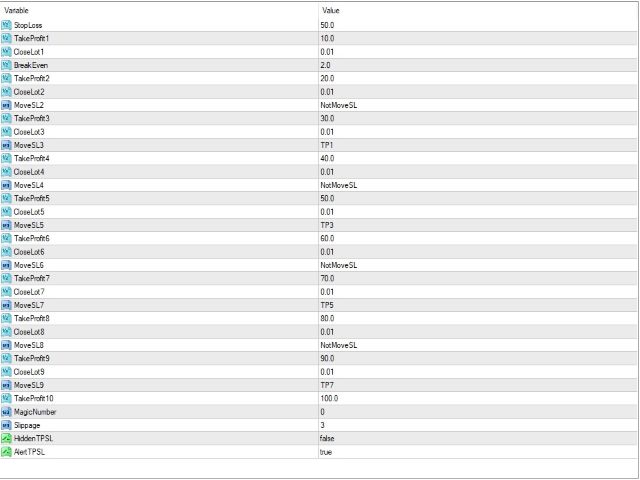
You can set maximum 10 Take Profit levels and also you can choose the lot size what you wish to close as partial close at any Take Profit levels.

At Take Profit 1 the EA will move SL to BE + X pips which is specified by you.

At the next Take Profit levels you can set where you want the EA to move your Stoploss.


Settings

  • Stoploss (Pips)

  • TakeProfit1 - TakeProfit10 --> Your Take Profit levels,

  • CloseLot1 - CloseLot9 --> The lot size to close at Take Profit levels,
    For example: If you open a trade with 0.10 lot size and you set CloseLot1 to 0.05 then the EA will close 0.05 lot when the price hits TakeProfit1

  • BreakEven --> The profit to lock when price hits TakeProfit1
    For example: If you set it to 5 then the EA will move your SL to BreakEven plus 5 pips if the price hits TakeProfit1
  • MoveSL2 -MoveSL9 --> StopLoss moving
    For example: If you set MoveSL2 to TP1 then the EA will move your StopLoss to TP1 if the price hits TP2 level

  • Magic number: Enter your magic number here.

  • HiddenTPSL:
    false: broker can see your TP and SL levels,
    true: TP and SL levels are hidden from the broker.

  • AlertTPSL: push notification if any TP or SL level is reached.


Enjoy!

JRFX


おすすめのプロダクト
Virtual Exchange Reserve Equity Monitor In an environment where exchanges offer increasingly high leverage ratios, it is all the more important for traders to tightly regulate their level of equity .  This software is designed to be run in the background on any virtual private server that can run Meta Trader 4/5.  It implements basic equity control functions ahead of the broker---allowing users to set their own equity trailing stop, an equity limit to lock-in a certain profit margin, and a unive
FREE
Fast Manager (MT4 Manager)   is a high-speed utility designed for traders who need rapid execution and automated trade management. Built to streamline manual trading, this EA provides on-chart buttons for instant Buy/Sell execution and "Close All" functions, while automatically handling risk management behind the scenes. MT5 Version: https://www.mql5.com/en/market/product/132502?source=Site+Profile+Seller Key Features: One-Click Trading Panel:   execute trades instantly using the on-chart Buy,
Waddah Attar Easy Positions Risk Management This EA gives you a full ability to close one position or close all positions . Close buy or sell trades in any position . Close profit or loss position . by clicking on a command button on the chart with confirmation message . Show you  a full information about your positions like : count - lots - average price - points - profit -  profit % - used margin for this position and the risk percent . and also the scrolled table of trades that position has
V-Trailing è uno strumento avanzato progettato per supportare il nostro trading manuale, con funzionalità dedicate alla gestione di take profit, stop loss e trailing stop. Questa utility, oltre a semplificare l’inserimento dei dati su MT4, consente di configurare parametri di trailing stop non disponibili di default sulla piattaforma. La caratteristica principale di V-Trailing è la possibilità di impostare un punto di partenza personalizzato per il trailing stop, diverso dalla linea di prezzo co
FREE
BreakEven Grid Utility for MT4 BreakEven Grid is a powerful utility for manual trade management on the MetaTrader 4 platform. It provides a convenient on-screen panel with buttons to help you manage your open positions with a single click.  Features: Set BE+Profit: Automatically sets Take Profit to breakeven + desired profit in pips or money. Close BUY/SELL: Instantly close all Buy or Sell orders for the current symbol. Close +$/-$/Old/New: Close only profitable, losing, oldest or newest tra
Expert Advisor for MT4 Useful utility MUST have for all traders.  With 1 click button, you're able to close all your open positions. Its come with a warning pop up notification when you click to close all your trades, to avoid an accident press the button. Just press 'Yes' to confirm or 'No' to cancel it. The expert will close all your open positions no matter what pairs you currently open or directions. Just attach the expert on 1 of your chart, and you're good to go.
Simply clock. Local time as default. There are possible to Select: Local Time /Server Time /GMT Time as input. Please take into account that the local time is the most accurate. However ,this clock always uses local time seconds, even If GMT / Server Time Is selected.  I solved it this way to get more accuracy. Delays can occur when changing minutes or hours, if local time is not selected.
FREE
The   Trade Manager Interface   is a free utility designed to simplify manual trading in MetaTrader. Please leave a review, if you like the trade manager. It allows traders to visualize trades directly on the chart, calculate position size automatically, and manage orders with advanced features such as partial take profits, automatic breakeven, and trailing stops. This tool focuses on risk control and execution precision, making trade management faster and more efficient. For the advanced trade
FREE
Pips Calculator
Ezinne Judith Orji
5 (1)
A simple Utility Trading Tool for calculating your profits automatically. once your  orders are active, it calculates your profit or loss in pips value and displays it at the bottom right corner of the screen. ADVANTAGES - shows order movement graphically - Helps you calculate profit and loss percentages per trade in each asset. - Shows progress of each trade - Easy trading  - Helps you meet daily profit targets - Professional trading
FREE
ASTA Trade Manager is a semi-automated trading tool designed to assist professional traders in Exit Strategy Management . This EA will not open trading positions automatically. This version is made to manage manual transactions on 1 chart (pair) only. For the Multipair version, you can check the product at:  ASTA Multipair Trade Manager . FEATURES: 1. Entry and Exit Panel Order Panel: Buy, Sell and Pending Orders Exit Button: Close All Order, Close All Buy, Close All Sell Can be used on strategy
「Binary Lab Simulator」は、トレーディング戦略の練習と検証のために設計されたツールです。 このツールは24時間365日動作し、30秒、1分、3分などの様々な有効期間をサポートし、実際の取引に近い環境を提供します。 外部ツールとの互換性があり、エントリー結果を分析できます。 複数のテンプレートを簡単に保存でき、オンライン環境からシミュレータへのシームレスなテストが可能です。 単独でも使用できますが、「SpeedManager」、「Practice Simulator Sync」、「ArwByIdx」と組み合わせることで機能が向上します。 「SpeedManager」は指定されたエントリーで自動停止を行います。 「Practice Simulator Sync」は他の時間枠や通貨ペアとのチャート同期を可能にします。 「ArwByIdx」は外部インジケーターやシグナルツールと連携し、自動でエントリーをリンクします。 シグナルツールと連携すると、指定された取引回数後のエントリー、クローズ、または自動停止をサポートします。 連勝/連敗数を追跡したり、取引結果の画像を保存した
PZ Trade Pad EA
PZ TRADING SLU
4.27 (30)
This simple visual expert advisor allows you to trade easily from the chart. It handles risk management for you and can perform several useful tasks with your existing trades, saving time and making risk-management for each individual trade easier.  [ Installation Guide | Update Guide | Troubleshooting | FAQ | All Products ] Trade easily from the chart Trade with precise risk management, hassle free Trade pending order with drag and drop price selection Set SL and TP levels with drag and drop pr
FREE
The purpose   of this utility is to manage one or more subwindow in the same chart by opening and closing them through a button or the keyboard keys How it works: If you want to handle more than one subwindow you need to reinstall the indicator . In this case some setups has to be customized onlu in the last subwindow installed and others setups in the installed subwindow during the first time installation. They are denoted in the input rispectively as ' LW ' and ' IW '. First of all install
This EA (TRIAL VERSION) is designed for automatic placing of pending orders (sell limit, buy limit, sell stop, buy stop) including Stop Loss & Take Profit levels (editable) with only one button click. This EA can make order multi pending level / pending orders grid. So, with this EA placing pending orders will be faster, more accurate and more efficient. Main Purposes Automation Pending orders grid style trading. Automation of the process of placing the Pending Orders: fast accurate efficient A
FREE
このユーティリティを使用すると、戦略テスターで戦略を手動でテストできます。視覚化チャート上でワンクリック取引。 このユーティリティの最新バージョンは、トレーダーが取引戦略を手動でテストするための高度な機能を提供します。ストラテジー テスターを使用すると、シミュレートされた環境で取引戦略の有効性を評価できるようになります。この機能を使用すると、取引テクニックのパフォーマンスを分析し、それらを改良して取引スキルを向上させることができます。 さらに、ストラテジー テスターは、視覚化チャート上でワンクリック取引で取引を実行する便利で効率的な方法を提供します。この機能により、異なる画面を切り替えることなく、希望の価格レベルで取引を迅速に開始および終了することができます。 ストラテジー テスターで利用できる完全な機能を使用すると、取引戦略をシミュレーションして洗練し、結果を分析して、取引スキルを効果的かつ効率的に最適化できます。 MT5 のバージョン 完全な説明 +DEMO +PDF 購入する方法 インストールする方法     ログファイルの取得方法     テストと最適化の方法     E
FREE
The   Close script   is a simple tool that allows traders to close their trades by three methods. Just run the script and choose the close method. Closing methods Symbol  - Allows closing all open trades for a specific symbol. All_Trades  - Allows closing all open trades. Magic_Number  - Allows closing all open trades according to their magic number. Recommendation AutoTrading functions must be activated.  If the AutoTrading function is disabled, the script will not work. EA should be stopped.
FREE
It's very easy, you only need to enter the amount of profit you want to get, then when your account has grown this EA will close the order, even though you are not monitoring the chart. Now you don't need to worry if the profit you have achieved turns into a loss because you don't use this EA, because this EA will help you whenever, wherever you are. Good luck trying it, hopefully you will become a very profitable trader
The Super Manager (MT4 Manager) is a trading tool that enhances buy and sell orders, including pending ones, by adding Stop Loss and Take Profit With a calculated risk. It also offers a break-even for easy setup. With its user-friendly interface, Fast Manager simplifies your trading activities. Keep it simple! MT5 Version: https://www.mql5.com/en/market/product/132503?source=Site+Profile+Seller Key Features: Clear buy and sell buttons   Button to move stop loss to breakeven with one click.   B
IceFX’s TradeInfo is an utility indicator which displays the most important information of the current account and position. Displayed information: Information about the current account (Balance, Equity, Free Margin). Current spread, current drawdown (DD), planned profit, expected losses, etc. Number of open position(s), volume (LOT), profit. Today’s and yesterday’s range. Remaining time to the next candle. Last day profit information (with integrated IceFX ProfitInfo indicator). Risk-based LOT
FREE
アシスタント取引保留中の注文MT4   貿易アシスタントは、手動取引のために設計された取引パネルです。 パネルでは、リスクの計算、制限注文を使用したポジションの管理、 その他の便利な機能。 パネルの主な機能 通貨ペア、CFD、株式、インデックス、先物、暗号通貨 - それは、任意の取引手段で動作します。 2. ストップロスを設定し、ポイント単位で距離として利益を取ります. 3. 潜在的損失対利益率を設定し、表示します。 4. パネルは、保留中の注文をサポートしています。 5. 開く前に、計算されたポジションのボリュームと利益をチャートに表示します。 6. 機能制限命令。 Trade Assistant is a trading panel designed for manual trading. The panel allows you to calculate risk, manage positions using Limit orders, And other useful features. Key features of the panel It works with
A "simple design" trading panel, which is characterized by small byte size, low CPU usage, simple steps, and quick operation, 1 to 2 clicks to complete a functional operation, saving time and increasing efficiency . The panel is easy to use, and it is not complicated to set parameters, which is in line with traders' habits. At the same time, its compact- design, clear at a glance, and comprehensive functions are a powerful tool for manual trading! Key features of the panel:   Click "Bid Price"
FREE
Risk Manager Pro MT4
Jhojan Alberto Tobon Monsalve
Risk Manager Pro is a simple utility that calculates the necessary lots with the risk percentage and the pips of stop loss, before opening positions. The web calculators can be useful in some cases but they are not efficient to open operations in real time. In the trading days, there are few opportunities to open positions and when the opportunity arises, the seconds make the difference. This is not possible with conventional web calculators, since to calculate the size of an operation regarding
Boom Coded News MT4
Muhammad Faiz Fathi Bin Mohd Marzuki
This EA does not make entry,you must setup first. After setup this EA will execute order based on input parameter. For MT5 version : CLICK HERE TO BUY MT5 VERSION EA BOOM CODED NEWS Time-Locked Entry System Executes one precise market order exactly at your predefined MT4 server time (HH:MM:SS). Single Trade Per News Designed to avoid overtrading — ideal for news. Recommended on high impact news like NFP,CPI,FOMC and other red high impact news Auto-Off After Entry EA can automatic
This Utility is a tool to manage level of profits or losses for each order without using stop loss or take profit. The Utility applies virtual levels to close orders in profit or loss. You can use the robot to manage manually opened orders or manage orders opened by another EA. You can to get the source code from here . Parameters OrdersManage - orders to manage (all orders of all symbols or orders on the current chart). Stop Loss Pips - virtual stop loss level. Take Profit Pips - virtual take
FREE
这是中文简体版本 为了让新手交易者更容易理解,我做了一个交易平台账户信息面板,不收取任何费用。 首先,您必须在交易前了解平台。 各平台报价及商品规格与账户交易规则不同。 您可以调整面板的颜色和大小,如果您尝试按下,面板可能会移动。 面板不会下单,放心加载EXPERTS 如果我升级了免费产品,您需要先将我的旧产品从市场上移除,然后重新启动 MT4,然后再次下载以使用我升级的免费产品。 In order to make it easier for novice traders to understand, I made a trading platform account information panel, which does not charge any fees. First of all, you must understand the platform before trading. The quotations and commodity specifications of each platform  are not the same as the account tra
FREE
Lot by Risk
Sergey Vasilev
4.83 (23)
Lot by Risk tradingパネルは、手動取引用に設計されています。 これは、注文を送信するための代替手段です。 パネルの最初の特徴は、管理線を使用した注文の便利な配置です。 第二の特徴は、ストップロスラインの存在下で与えられたリスクのための取引量の計算です。 制御線はホットキーを使用して設定されます: 利益を取る-デフォルトではTキー; 価格-デフォルトではPキー; ストップロス-デフォルトでは、Sキー; 取引パネルの設定で自分でキーを設定できます。 操作のアルゴリズム: 1)-レベルを希望の場所に配置します(すべてのレベルを配置する必要はありません); 2)-リスクを指定します(オプション); 3)-緑の送信注文ボタンをクリックします; 4)-注文が行われるのを待っているか、エラーメッセージ付きのアラートが表示されます; 5)-マジックでExpert Advisorにリンクされている現在のシンボルのすべての注文を閉じる場合は、注文を閉じるボタンをクリックします。 注文を送信ボタンを何度も押すべきではありません。 一度で十分です。 注文後、ボタンは「
FREE
Neonplox Trade Manager
Mr Roberto Carlos Ferreira Silva
n3oNpLoX Trade Manager Market Order. Stop Order. Limit Order. To help you Place trades based on the amount of Money in Dollars you want to risk. As it will show in the screenshots you can calculate the right Lot size for the money you want to risk. Calculates Lot Size based on the distance between Stop Loss and Entry Point. 5 Options for TP - (1RR,2RR,3RR,4RR,5RR) It will help you manage your risk and Place trades with the correct Lot Size. So you will not over expose yourself and your money

FREE
TradePilot
Hossein Khalil Alishir
TradePilot Expert Advisor (EA) for MetaTrader 4 TradePilot is a professional and user-friendly Expert Advisor (EA) for MetaTrader 4 (MT4) . It simplifies automated trading , risk management , and trade execution using a smart trading panel . Perfect for beginners and experienced traders looking for a reliable trade manager EA with automated lot size calculation . Key Advantages User-Friendly Trading Panel: Customizable panel with buttons and hotkeys. Smart Risk Management: Supports percen
このインジケーターは世界の取引所の営業時間を表示します。現在どの市場が最も活発かを確認するのに役立ちます 私の  #1 Pro  Utility : 66+ 機能、このツールを含む  |   お問い合わせ  ご質問があれば 現在最もボラティリティの高い銘柄を選択するのに役立ちます; デイトレーダーに特に有用です; 1) 1H以下の時間足 で使用する場合:線はチャート上のバーの実際の位置に対応し、チャートを移動すると、取引セッションの線 はチャートと一緒に移動します 。 2) 4H以上の時間足 で使用する場合:取引セッションの 静的なチャート が表示され、垂直線 は一日中移動し 、現在どの市場が活発かを示します。(スケールのため)。 インジケーターをインストールした後、グリッドを無効にし(CTRL+G)、オブジェクトの説明を無効にする(F8>共通>オブジェクトの説明を表示)ことをお勧めします。 入力設定: 重要:   インジケーターを正しく動作させるには、初期設定で   ブローカー時間とグリニッジ標準時との時差を設定する必要があります: ブローカー時間は「MarketWatch」セ
The Position Control is an intuitive yet powerful trading tool that facilitates risk management from entry to exit.  It includes automatic lot sizing, fixed stop loss and take profit features, or determines them using the ATR indicator. After opening a position, you can set automatic break-even points, trailing stops, and choose from three types of partial closures. Moreover, if you open a 0.01 lot position from your phone, the expert will automatically close it and open a risk-managed position
このプロダクトを購入した人は以下も購入しています
Local Trade Copier EA MT4
Juvenille Emperor Limited
4.96 (104)
Local Trade Copier EA MT4 による、驚くほど高速な取引コピーを体験してください。1分で簡単にセットアップできるこの取引コピー機は、同じWindowsコンピュータまたはWindows VPS上の複数のMetaTrader端末間で取引をコピーすることができ、0.5秒未満の高速コピースピードを実現します。 初心者であろうとプロのトレーダーであろうと、 Local Trade Copier EA MT4 には、あなたの特定のニーズに合わせてカスタマイズするための幅広いオプションが用意されています。これは、利益の可能性を高めたい人にとって究極のソリューションです。 今すぐ試してみて、これが市場で最も速くて簡単なトレードコピー機である理由を理解してください。 ヒント: デモアカウントで Local Trade Copier EA MT4 デモバージョンをダウンロードして試すことができます: ここ ダウンロードした無料のデモ ファイルを MT4 >> ファイル >> データ フォルダを開く >> MQL4 >> Experts フォルダに貼り付けて、ターミナルを再起動しま
Trade Assistant MT4
Evgeniy Kravchenko
4.42 (192)
取引 ごとのリスクの 計算、新規注文 の 簡単 な 設置、部分的 な 決済機能 を 持 つ 注文管理、 7 種類 のトレーリングストップなど 、便利 な 機能 を 備 えています 。 追加の資料と説明書 インストール手順 - アプリケーションの手順 - デモアカウント用アプリケーションの試用版 ライン機能 チャート上にオープニングライン、ストップロス、テイクプロフィットを表示します。この機能により、新規注文を簡単に設定することができ、注文を出す前にその特徴を確認することができます。   リスク計算 リスク計算機能は、設定されたリスクとストップロス注文のサイズを考慮して、新規注文のボリュームを計算します。ストップロスの大きさを自由に設定できると同時に、設定したリスクを守ることができます。 Lot calc ボタン - リスク 計算 を 有効 / 無効 にします 。 Risk フィールドでは 、必要 なリスクの 値 を 0 から 100 までのパーセンテージまたは 預金通貨 で 設定 します 。 設定」 タブで 、 リスク 計算 の 種類 を 選択 します :「 $ 通貨」、「 % 残
Trade Manager EAへようこそ。これは、取引をより直感的、正確、そして効率的にするために設計された究極の リスク管理ツール です。これは単なるオーダー実行ツールではなく、包括的な取引計画、ポジション管理、リスク管理のためのソリューションです。初心者から上級者、迅速な実行を必要とするスキャルパーまで、Trade Manager EAはあらゆるニーズに対応し、為替、指数、商品、暗号通貨などさまざまな市場で柔軟に対応します。 Trade Manager EAを使用すると、複雑な計算が過去のものになります。市場を分析し、エントリーポイント、ストップロス、テイクプロフィットのレベルをチャート上のラインでマークし、リスクを設定するだけで、Trade Managerが最適なポジションサイズを即座に計算し、SLとTPをピップ、ポイント、口座通貨でリアルタイムに表示します。すべての取引が簡単かつ効果的に管理されます。 主な機能: ポジションサイズ計算機 :定義されたリスクに基づいて取引サイズを瞬時に決定します。 簡単な取引計画 :エントリー、ストップロス、テイクプロフィットを設定するためのド
平均化ヘルパー - この種の取引ヘルパー ツールは、次の 2 つのテクニックを使用して、以前は利益がなかったポジションを平均化するのに役立ちます。 標準平均 トレンドに応じてポジションを開くヘッジ このユーティリティは、買いと売りの両方の異なる方向の複数のオープンポジションを一度に整理する機能を備えています 。例えば、売りポジションを1つ、買いポジションを1つオープンしたが、どちらも利益が出ていない場合、あるいは1つは利益が出ているものの利益が十分でない場合、この2つのポジションを平均化してプラスで取引を終了したい場合などです。これは、私の平均化支援ユーティリティが役立ちます。 平均化ヘルパー ユーティリティ - 次のポジションのサイズ、注文価格、ポジションを平均化する方向、指定した利益確定サイズでプラスでポジションをクローズする方向を自動的に計算できます。 このユーティリティでは、「買い」と「売り」ボタンを使ってポジションを開くこともできます。希望する利益確定額と開始ロットを指定するだけです。ユーティリティ自体は、最初に指定した利益確定額でポジションをクローズするか、ポジションを平均
Copy Cat More Trade Copier MT4 (コピー猫MT4) は単なるローカル取引コピーツールではなく、現代の取引課題に対応するために設計された完全なリスク管理と実行フレームワークです。Propファームのチャレンジから個人の資産管理まで、強力な実行力、資金保護、柔軟な設定、高度な取引処理を組み合わせ、あらゆる状況に適応します。 このコピーツールは Master(送信側) と Slave(受信側) の両モードで動作し、成行注文や指値注文のリアルタイム同期、取引修正、部分決済、Close By 操作をサポートします。デモ口座・リアル口座の両方に対応し、取引用パスワードまたは投資家パスワードでも利用可能です。Persistent Trade Memory 技術により、EA・ターミナル・VPS が再起動しても復元可能です。複数の Master と Slave を同時に管理でき、ブローカー間の違いはプレフィックス/サフィックスの自動調整やシンボルマッピングで処理されます。 マニュアル/設定: Copy Cat Trading Copier マニュアル Copy Cat Mo
The product will copy all telegram signal to MT4   ( which you are member  ) , also it can work as remote copier.  Easy to set up, copy order instant, can work with almost signal formats, image signal, s upport to translate other language to English Work with all type of channel or group, even channel have "Restrict Saving Content", work with  multi channel, multi MT5 Work as remote copier: with signal have ticket number, it will copy exactly via ticket number. Support to backtest signal. How to
TradePanel MT4
Alfiya Fazylova
4.84 (89)
Trade Panel は、多機能の取引アシスタントです。このアプリケーションには手動取引用の 50 を超える取引機能が含まれており、ほとんどの取引操作を自動化できます。 注意、アプリケーションはストラテジー テスターでは動作しません。購入する前に、デモアカウントでデモ版をテストできます。デモ版 ここ 。 完全な手順 こちら 。 取引。 ワンクリックで取引操作を実行できます: 自動リスク計算を使用して未決の注文とポジションをオープンします。 ワンクリックで複数の注文とポジションをオープンします。 注文グリッドを開きます。 未決の注文とポジションをグループごとにクローズします。 ポジション反転 (買いを閉じて売りを開く、または売りを閉じて買いを開く)。 ポジションをロックします(買いポジションと売りポジションの量を均等にする追加のポジションをオープンします)。 ワンクリックですべてのポジションを部分的にクローズします。 すべてのポジションのテイクプロフィットとストップロスを同じ価格レベルに設定します。 すべてのポジションのストップロスをポジションの損益分岐点レベルに設定します。 注文とポ
MT4 to Telegram Signal Provider は使いやすく、完全にカスタマイズ可能なツールで、Telegramに信号を送信し、あなたのアカウントを信号提供者に変えることができます。 メッセージのフォーマットは 完全にカスタマイズ可能です! しかし、簡単な使用のために、あらかじめ定義されたテンプレートを選択し、メッセージの特定の部分を有効または無効にすることもできます。 [ デモ ]   [ マニュアル ] [ MT5バージョン ] [ Discordバージョン ] [ Telegramチャンネル ]  New: [ Telegram To MT5 ] セットアップ ステップバイステップの ユーザーガイド が利用可能です。 Telegram APIの知識は必要ありません。開発者が必要なものをすべて提供します。 主要機能 購読者に送信される注文の詳細をカスタマイズする機能 例えばブロンズ、シルバー、ゴールドなど、階層型のサブスクリプションモデルを作成できます。ゴールドサブスクリプションでは、すべての信号が得られますなど。 ID、シンボル、またはコメントによる注文のフ
日ごとおよび週ごとのクローズ取引履歴、現在のオープン取引、および外国為替エクスポージャーを 1 つのチャートで即座に確認できます。ヒートマップを使用して、収益性の高い取引と、取引ポートフォリオ内の現在のドローダウンの位置を特定します。 クイック クローズ ボタン クイック クローズ ボタンを使用すると、1 つのシンボルのすべての取引をクローズしたり、個々の取引を完全にクローズしたり、ボタンをクリックするだけで部分的な利益または損失を取得したりできます。リストで取引を探したり、取引の一部をクローズする方法を考えたりする必要はもうありません。ダッシュボードには、外国為替ペアの取引中に各通貨シンボルの現在のエクスポージャーも表示されるため、主要なニュース イベントの前にエクスポージャーが過剰になっている可能性のある領域を特定するのに役立ちます。ボタンを使用して、ニュースの前にエクスポージャーを即座にすばやく減らすことができます。または、ニュースがすでに発生して利益が出ている場合は、1 回のクリックでその利益をすばやく銀行に預けることができます。 オープン取引ヒートマップ 取引ヒートマッ
Risk/Reward Toolは、MetaTrader 4でのトレード計画、可視化、執行の方法を革新するために設計されたプロフェッショナルグレードのエキスパートアドバイザーです。精密なリスク管理を重視する裁量トレーダーでも、トレード設定を視覚的にテストする必要のある戦略開発者でも、このツールはエレガントで直感的なインターフェースで必要なすべてを提供します。 基本的なポジション計算機とは異なり、Risk/Reward Toolは視覚的なトレード計画を即時執行機能、リアルタイムの損益モニタリング、包括的なトレード管理機能と組み合わせています。このツールはMT4ストラテジーテスターと完全に互換性があり、実際の資金をリスクにさらすことなくトレード戦略を練習し、アプローチを改善することができます。 ツールの完全なマニュアルはこちら: https://www.mql5.com/en/blogs/post/766244 MT5 version:  https://www.mql5.com/en/market/product/158601 主な機能 視覚的なトレード計画 ドラッグ&ドロップ操作可能
Exp COPYLOT CLIENT for MT4
Vladislav Andruschenko
4.69 (65)
MetaTrader4のコピー機を取引します。     それは任意の口座からの外国為替取引、ポジション、注文をコピーします。 それは最高の貿易コピー機の1つです     MT4 - MT4、MT5 - MT4     のために     COPYLOT MT4     バージョン(または     MT4 - MT5  MT5 - MT5     のために     COPYLOT MT5     バージョン)。 MT5のバージョン 完全な説明   +DEMO +PDF 購入する方法 インストールする方法     ログファイルの取得方法     テストと最適化の方法     Expforex のすべての製品 のコピー機 バージョン       MetaTrader 5 ターミナル(   МТ5 - МТ5、МТ4 - МТ5   )-   コピーロットクライアントMT5 独自のコピーアルゴリズムにより、すべての取引がマスターアカウントからクライアントアカウントに正確にコピーされます。 また、動作速度が速いことでも知られています。タフなエラー処理。 強力な機能セット。 プログラムは、複数
Trade Copier Pro is a tool to copy trade remotely to MT4, MT5 and cTrader accounts at different computers/locations over internet. This is an ideal solution for you if you are a signal provider and want to copy your trades to other receivers globally on your own rules. One provider can copy trades to multiple receivers and one receiver can get trade from multiple providers as well. The provider can even set the subscription expiry for each receiver, so that receiver will not be able to receive t
News Filter EA: Advanced Algo Trading Assistant News Filter EA is an advanced algo trading assistant designed to enhance your trading experience. By using the   News Filter EA , you can integrate a Forex economic news filter into your existing expert advisor, even if you do not have access to its source code. In addition to the news filter, you can also specify   trading days   and   hours   for your expert. The News Filter EA also includes   risk management   and   equity protection   features
VirtualTradePad mt4 Extra
Vladislav Andruschenko
4.86 (58)
ワンクリックで取引できるトレーディングパネル。ポジションと注文の操作!チャートまたはキーボードから取引。 手動取引用の取引パネル。チャート(チャートウィンドウ)またはキーボードから取引できます。開閉、リバース、ロックポジションと注文を処理する МetaТrader4のメインオーダーのトレーディングコントロールパネル:売買、売却、売却、売却、売却、閉じる、削除、修正、トレーリングストップ、ストップロス、takeproft MT5のバージョン 完全な説明   +DEMO +PDF 購入する方法 インストールする方法     ログファイルの取得方法     テストと最適化の方法     Expforex のすべての製品 シンボルウィンドウからの取引とキーボードからの取引! あなたはMetaTrader 4ターミナル - バーチャルコントロールパネルVirtualTradePadのためのユニークなプラグインを持っています。 Description on English 注意!  ストラテジーテスターの 取引方法を学びたい場合は、無料の TesterPad ユーティリティをチェックしてくだ
Tired of complex order placement and manual calculations? Trade Dashboard is your solution. With its user-friendly interface, placing orders becomes effortless, by a single click, you can open trades, set stop loss and take profit levels, manage trade lot size, and calculate risk to reward ratios, allowing you to only focus on your strategy. Say goodbye to manual calculations and streamline your trading experience with Trade Dashboard. Download  Demo Version  right now. You can find  Details of
Exp4 Duplicator
Vladislav Andruschenko
4.5 (22)
Expert Advisor は 、アカウントMetaTrader 4で 取引を繰り返し、ポジションを設定するか、事前に設定された回数だけシグナルを送信します。 手動または別のエキスパートアドバイザーによって開かれたすべての取引をコピーします。 シグナルをコピーし、シグナルからロットを増やします ! 他のEAの多くを増やします。 次の機能がサポートされています:コピーされた取引のカスタムロット、ストップロスのコピー、テイクプロフィット、トレーリングストップの使用。 MT5のバージョン 完全な説明 +DEMO +PDF 購入する方法 インストールする方法     ログファイルの取得方法     テストと最適化の方法     Expforex のすべての製品 リンク MetaTraderのトレードコピー機はこちらから入手できます:   COPYLOT 注意 注:これは、端末間の取引用のコピー機ではありません。 ストラテジーテスターでエキスパートアドバイザーをテストし、ビジュアルモードでEAPADPROツールバーと取引することができます! EAを1つの通貨ペアにインストールするだけで
Auto Grid:  既存のトレードに基づいたグリッド注文の自動作成。 複雑なトレード戦略の自動化   新しいポジションを検出し、最適化された注文配列を自動的に作成する高度なグリッドシステム。 多機能ユーティリティ :66+ 機能、Auto Gridツールを含む  |   ご質問はこちらまで   |   MT5版 A. インテリジェントなトレード検出と監視: 特定シンボルまたは包括的なポートフォリオスキャン 正確な分類による高度な注文タイプ検出 戦略的監視開始:即時、遅延、または条件ベース アルゴリズム戦略互換性のためのマジックナンバー統合 B. 高度なグリッド設定: 戦略的注文配置:   複数の配置方法論 インテリジェントな方向ロジック:   同一、反対、または市場ベースの注文作成 精密な注文数量:   カスタマイズ可能なグリッド密度と構造 高度なオフセットシステム:   固定間隔または動的百分比進行 包括的なレベル管理:   サイズまたは価格一貫性のあるSL/TP継承 高度なロットサイジング:   固定、累進的增加、または戦略的削減 有効期限制御:   カスタム時間枠または原注
With this Expert Advisor, you can seamlessly integrate various channel, arrow, and reversal indicators. It offers the flexibility to use all popular channel trading strategies, while also providing powerful tools to customize your trading conditions and risk management system.   The Expert Advisor opens orders when the price crosses the channel boundaries. Multiple crossing conditions are available for customization: Price touches boundary on re-entry into the channel Price touches boundary on
革新的な X2 Copy MT4 で瞬時のトレードコピーを発見しましょう。わずか10秒のセットアップで、単一のWindowsコンピューターまたはVPS上のMetaTrader端末間でのトレード同期を、前例のない速度(0.1秒未満)で行う強力なツールを手に入れられます。 複数の口座を管理していても、シグナルをフォローしていても、戦略を拡大していても、X2 Copy MT4 は比類のない精度とコントロールであなたのワークフローに適応します。待つのはやめてください — 市場をリードする速度と信頼性でコピーを開始しましょう。今すぐ トライアル版 をダウンロードしてください。 *重要:MT5端末での作業には、別途 X2 Copy MT5 バージョンが必要です X2 Copy MT4/5 の設定と機能の説明 | X2 Copy トライアル版のインストール方法 特徴 高速コピー — 0.1秒未満でのトレード転送 すべてのコピータイプのユニバーサルサポート:MT4>MT4, MT4>MT5, MT5>MT4, MT5>MT5 直感的なインターフェースで10秒で即時セットアップ 24時間年中無休の安定動
コピー機->便利で高速なインターフェースインタラクション、ユーザーはすぐに使用できます     ->>>> WindowsコンピュータまたはVPS Windowsでの使用を推奨 特徴: 多様でパーソナライズされたコピー取引設定:1. 異なるシグナルソースに異なるロットモードを設定できます。2. フォワードコピー取引とリバースコピー取引に異なるシグナルソースを設定できます。3. シグナルはコメントで設定できます。4. 契約ロットに応じてロットを調整するかどうか 多様でパーソナライズされたコピー注文設定2:1.品種ごとに異なるロットモードを設定できます2.順方向コピー注文と逆方向コピー注文に異なる品種を設定できます3.コメントでシグナルを設定できます4.契約ロットに応じてロットを調整するかどうか コメントフィルタリング、MAGICフィルタリング、シグナルロットフィルタリング、ローカル製品フィルタリング 勤務時間設定 逆同期SLAVE終了 注文バインド機能: 任意の注文を設定されたシグナルソース注文にバインドできます (テーブルをダブルクリックして編集します) アカウントリスク管理 基本
Advanced trading tool: One click smart orders that execute under your conditions Developed by trader for trading community:  position size calculator (lot size), open position after price action, strategy builder, set and forget trading, mobile notifications Risk Management -  Risk percentage position size calculator, gain percentage, target risk reward ratio, spread and commissions are included in calculations 7 Advanced order types   - Set and forget trading with price action automation (OCO,
このスクリーナーを使用すると、選択した期間(時間枠)内に通常よりも買われ過ぎ(成長率)または売られ過ぎ(減少率)の資産を特定できます。 市場は法律によって支配されており、より安く購入し、より高価に販売しますが、自動スキャナーがないと、たとえば今週内に、通常よりも買われ過ぎまたは売られ過ぎの通貨/株を特定することは非常に困難です。現在の時間、または月。 数十または数百の機器が存在する可能性があり、すべてを手動で分析する時間がないことが物理的に可能な場合もあります。これらの問題は、Screenerを使用して簡単に解決できます。 スクリーナーができること スキャナーはどのTFでも使用できます スキャナーは、通貨、株式、暗号通貨、商品、インデックス、およびその他の機器で動作します 資産を特定するロジックは、市場の基本法則に基づいているため、普遍的です。 スクリーナーの助けを借りて、あなたはさまざまな戦略に従って作業することができます、最も一般的なものの1つはポンプとダンプです 各商品の平均値を明らかにする-SoftimoTradeScreenerは、選択したTFの資産の買われ過ぎと売られ過ぎ
Bermaui Manual EA
Muhammad Elbermawi
5 (10)
これは、グリッドシステムを取引する半自動のエキスパートアドバイザーです。アイデアは、市場で徐々にさまざまなポジションを取り、次にそれらの損益分岐点を計算することです。価格がこの損益分岐点を所定の距離だけ通過すると、すべての未決済注文がクローズされます。 重要な情報 ユーザーガイドは次のとおりです。   https://www.mql5.com/en/blogs/post/730567 このEAは、他のどの製品でも試すことができ ます。https://www.mql5.com/en/users/bermaui314/seller 重要な機能 EAには、予期しない結果から取引資本を保護するためのストップロスメカニズムがあります。 EURUSD-XAUUSD-Oil-BitcoinのようなMT4シンボルを取引することができます。 MT4の時間枠をトレードすることができます。 VPSからEAを実行することをお勧めします。 パラメータとデフォルト設定 1)お金の管理設定 ロットを開始します。 レバレッジが1:400以上の場合、デフォルト設定で500ドルごとに0.01にすることをお勧めし
EchoTrade Telegram Signal Backtester VALIDATE TELEGRAM SIGNALS IN MINUTES - STOP GUESSING, START BACKTESTING Stop blowing accounts on "VIP" signals that don't deliver. The EchoTrade Telegram Signal Backtester is the professional solution to audit, verify, and optimize any Telegram signal provider's performance on historical data. Most signal providers show you their wins but hide their losses. This tool reveals the naked truth. By combining a powerful Data Manager (included) with an advanced MT4
Seconds Chart — MetaTrader 4で秒足チャートを作成するユニークなツールです。 Seconds Chart を使用すると、秒単位のタイムフレームでチャートを構築でき、標準的な分足や時間足チャートでは得られない柔軟性と分析精度を実現します。例えば、 S15 は15秒足を表します。あらゆるインジケーター、エキスパートアドバイザー、スクリプトを利用可能で、標準的なチャートと同様に便利に操作できます。 標準的なツールとは異なり、 Seconds Chart は超短期のタイムフレームでも高い精度と遅延なく作業できるように設計されています。 Seconds Chartの利点 1秒から900秒 までのタイムフレームをサポート。 瞬時の読み込み MT5ターミナルからのティックデータベースのインポートにより、過去データを即時利用可能。 MT5ターミナルで「 Tick Database 」ユーティリティを最初に起動する必要があります。 リアルタイムでデータが更新され、 遅延やラグなし 。 複数の秒足チャートを同時に作成可能。 Seconds Chartが最適な用途 スキャルピング
Remote Trade Copier   is an advanced tool designed for efficiently copying trades between accounts in both   local   and   remote   modes. It allows for lightning-fast order replication from a master account to a slave account. In local mode, trades are copied instantly, while in remote mode, the copying process takes a second.  In new version, in remote mode , the copy operation can be performed with a delay of milliseconds or zero . After purchase, ask how to activate it MT4 Version (Only Loc
TelegramからMT4へ: 究極のシグナルコピーソリューション Telegram to MT4 は、DLLを必要とせず、TelegramのチャンネルやチャットからMetaTrader 4プラットフォームに取引シグナルを直接コピーできる最先端のユーティリティです。この堅牢なソリューションは、比類のない精度とカスタマイズオプションにより、シグナルのシームレスな実行を保証し、時間を節約し、効率性を向上させます。 [ Instructions and DEMO ] 主な特徴 直接的なTelegram API統合 電話番号とセキュアコードで認証します。 ユーザーフレンドリーな EXE ブリッジを使用して、チャット ID を簡単に取得および管理します。 複数のチャネル/チャットを追加、削除、更新して、同時に信号をコピーします。 高度なフィルターによる信号解析 カスタム例外語 (例: 「レポート」、「概要」) を含む不要な信号をスキップします。 柔軟な SL および TP 形式 (価格、ピップ、ポイント) をサポートします。 シグナルが価格ではなくポイントを指定する場合、エントリ ポイントを自動
The most advanced news filter on MQL market - free demo available Take a Break has transformed from a basic news filter into a comprehensive account protection solution. It seamlessly pauses any other Expert Advisors during news events or based on your custom filters, all while safeguarding your EA settings - restoring them automatically when trading resumes for complete peace of mind. Typical use cases: A single news filter for all your EAs. Stop trading during news/high volatility (+ close all
Fibo Alert Ultimate
ISO Financial Services
3.71 (7)
This tool adds alerts to your Fibo Retracement and Fibo Expansion objects on the chart. It also features a handy menu to change Fibo settings easily and quickly! Features Alert for Fibo Retracement and Fibo Expansion levels. Sound, Mobile and Email alert. Up to 20 Fibo Levels. Continuous sound alert every few seconds till a user clicks on the chart to turn it OFF. Single sound alert with pop-up window. Keeping all user settings even after changing timeframes. New handy menu to change Fibo setti
Trade Manager は、リスクを自動的に計算しながら、取引を迅速に開始および終了するのに役立ちます。 過剰取引、復讐取引、感情的な取引を防止する機能が含まれています。 取引は自動的に管理され、アカウントのパフォーマンス指標はグラフで視覚化できます。 これらの機能により、このパネルはすべてのマニュアル トレーダーにとって理想的なものとなり、MetaTrader 4 プラットフォームの強化に役立ちます。多言語サポート。 MT5バージョン  |  ユーザーガイド + デモ Trade Manager はストラテジー テスターでは機能しません。 デモについてはユーザーガイドをご覧ください。 危機管理 % または $ に基づくリスクの自動調整 固定ロットサイズを使用するか、ボリュームとピップに基づいた自動ロットサイズ計算を使用するオプション RR、Pips、または価格を使用した損益分岐点ストップロス設定 トレーリングストップロス設定 目標に達したときにすべての取引を自動的に終了するための 1 日あたりの最大損失 (%)。 過度のドローダウンからアカウントを保護し、オーバートレードを防ぎま
フィルタ:
レビューなし
レビューに返信
































