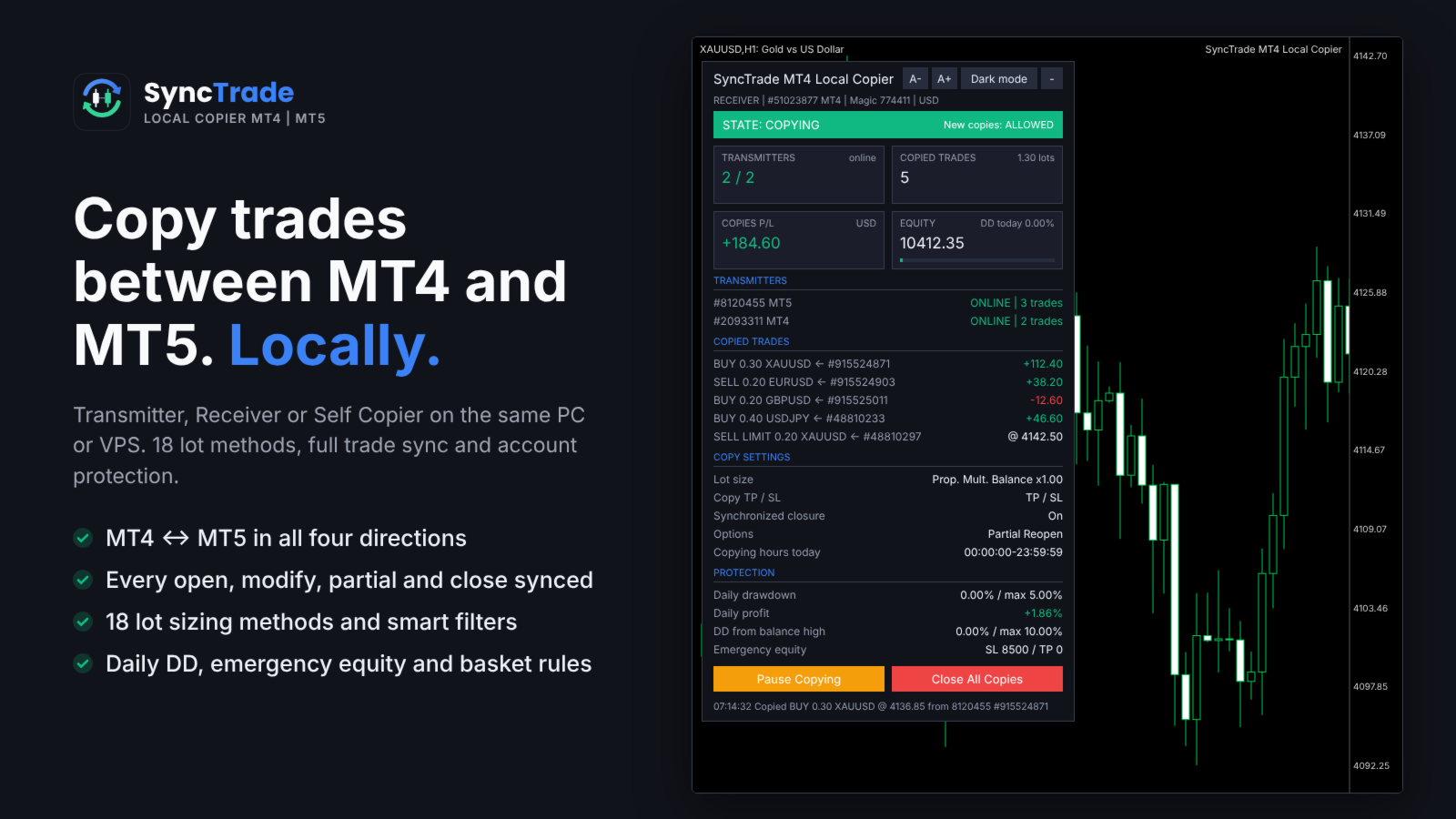
SyncTrade MT4 Local Copier

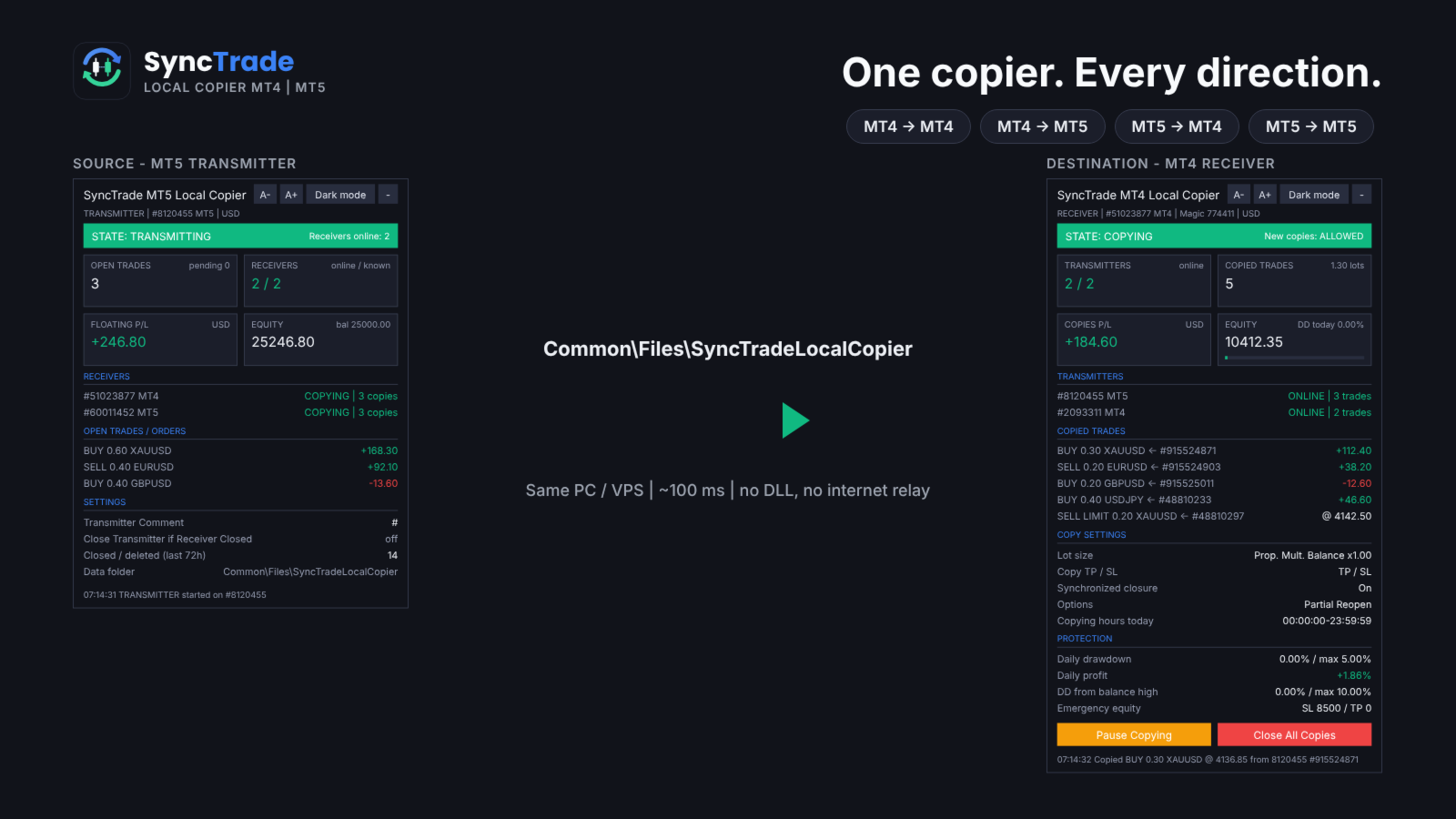
SyncTrade Local Copier copies trades between MetaTrader terminals on the same Windows PC or VPS, in milliseconds, with no internet relay, no DLL and no WebRequest.

It works across platforms. Use SyncTrade MT4 Local Copier on MT4 and SyncTrade MT5 Local Copier on MT5. Both share the same local data folder, so all four directions work: MT4 → MT4, MT4 → MT5, MT5 → MT4, MT5 → MT5.

One EA, three roles:

  • Transmitter: the source account.
  • Receiver: the destination account that opens the copies.
  • Self Copier: copies or multiplies trades inside the same account.

One Transmitter can feed any number of Receivers. One Receiver can follow several Transmitters, mixed MT4 and MT5.

Main features

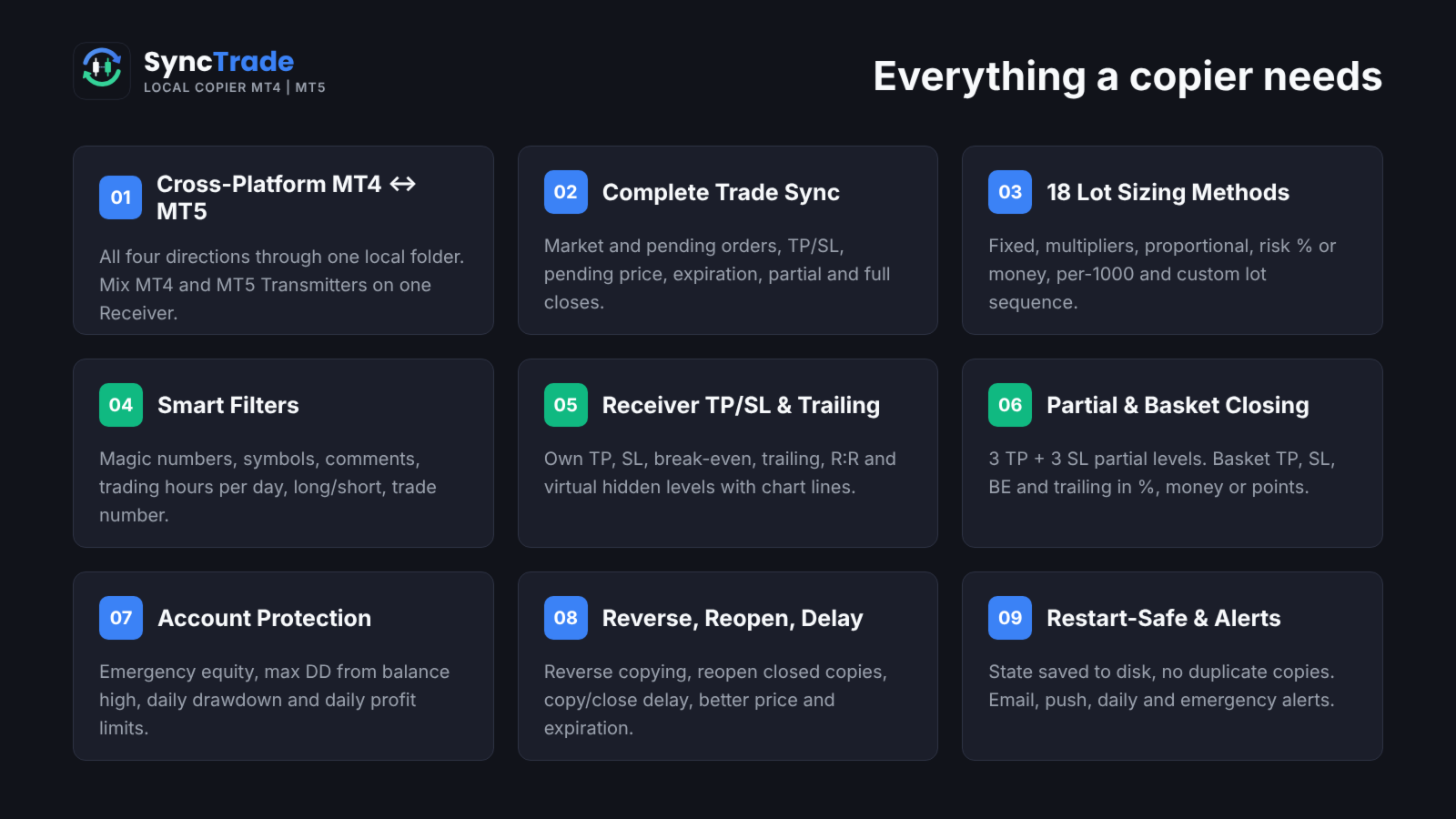
  • MT4 ↔ MT5 copying in all directions, every ~100 ms.
  • Market trades and pending orders, with TP/SL, pending price, expiration, partial and full closes kept in sync.
  • 18 lot sizing methods, custom lots and multipliers per symbol, automatic split of large trades.
  • Filters by magic number, symbol, comment, trading hours per day, direction and trade number.
  • Reverse copying, reopen of closed copies, copy and close delay, better-price entry and exit.
  • Receiver TP/SL, break-even, trailing stop, R:R target and hidden (virtual) levels.
  • Partial closing at 3 TP and 3 SL levels; basket TP, SL, break-even and trailing.
  • Emergency equity stop, max drawdown from balance high, daily drawdown and daily profit limits.
  • Email, push, daily and emergency notifications.
  • Symbol mapping with prefix, suffix and 30 special symbol pairs.
  • State saved to disk: no duplicate copies after a restart.
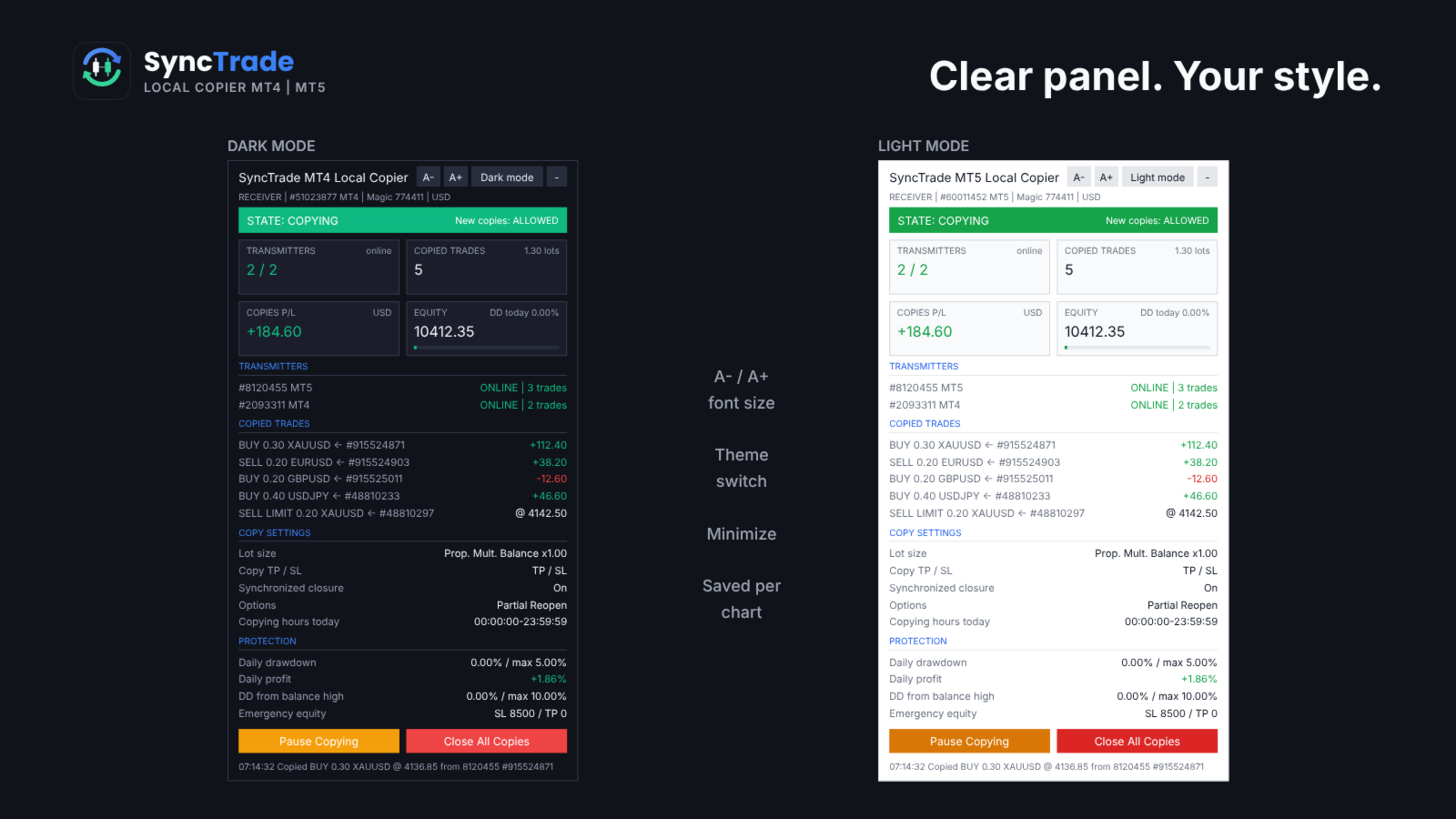
  • On-chart panel with dark/light theme, font size and minimize.

Quick setup

  1. On the source terminal, attach SyncTrade and set Account Mode = Transmitter.
  2. On the destination terminal, attach SyncTrade and set Account Mode = Receiver.
  3. Enter the source account number in Transmitter Account Number (or leave it empty to follow all Transmitters on the PC).
  4. Choose the Lot Size Type and other options.
  5. Enable Algo Trading in both terminals.
  6. The Receiver panel should show the Transmitter as ONLINE and the state COPYING.

The panel shows the copier state, Transmitters (or Receivers) with platform and status, every copied trade with its source ticket and live P/L, copy settings and protection status. Buttons on the Receiver: Pause/Resume Copying, Close All Copies, and Reset Stop.

Requirements

  • All terminals on the same Windows PC or VPS, same Windows user.
  • Algo Trading enabled on every Receiver.
  • MT5 Receivers: hedging account recommended (netting merges copies on one symbol).
  • Copying needs two live terminals, so it cannot be tested in the Strategy Tester. Use demo accounts.

INPUT PARAMETERS

0 or an empty field = option off. Per-symbol format: first number for all symbols, then symbol + value, e.g. 30,XAUUSD60,BTCUSD2000 .

Account Setup

  • Account Mode: Transmitter, Receiver or Self Copier.
  • Transmitter Account Number: account(s) to follow, comma-separated, MT4 and MT5 mixed. Empty = all Transmitters on this PC.
  • Transmitter Comment: comment sent with each trade. # = original comment, @ = original ticket, % = magic, & = Transmitter account.
  • Receiver Comment: comment for copies; replaces the Transmitter Comment (max 31 characters).

General Settings & Trade Filters

  • Magic Number: magic of copied trades. Not 0; use a different value per Receiver on one account.
  • Magic Numbers to Copy: copy only these. Exact 3245 , partial (14) , range 100-200 ; 0 = manual trades.
  • Maximum Number of Copied Magic Numbers: max different Transmitter magics copied at once.
  • Maximum Receiver Account Magic Numbers: max different magics on the whole Receiver account.
  • Magic Numbers Not to Copy: never copy these (same format).
  • Symbols to Copy / Symbols Not to Copy: include or exclude Receiver symbols, e.g. EURUSD,XAUUSD .
  • Maximum Number of Copied Symbols: max different symbols copied at once.
  • Maximum Receiver Account Symbols: max different symbols on the whole Receiver account.
  • Comments to Copy / Comments Not to Copy: exact comment or partial match in brackets, e.g. (Grid) .

Copying / Multiplying Options

  • Copy on Monday … Sunday: copying hours per day (Receiver server time), e.g. 00:00:00-12:00:00,14:00:00-23:59:59 . Empty = no copying that day.
  • Transmitter Server Offset Hours: hours added to Transmitter time to match Receiver time.
  • Copy Long Trades / Copy Short Trades: copy BUY or SELL trades and orders.
  • Copy Current Trades: copy trades already open when the Receiver starts.
  • Copy New Trades: copy trades opened after the Receiver starts.
  • Copy Take Profit / Copy Stop Loss: copy the Transmitter TP / SL.
  • Take Profit Multiplier / Stop Loss Multiplier: multiply the TP / SL distance.
  • Add/Subtract Points in TP Level / SL Level: add or subtract points (when the multiplier is 1).
  • Do Not Copy Trades/Orders Without SL: skip trades with no SL.
  • Allow TP/SL Manual Change: true = your manual TP/SL change on a copy is kept; false = the EA restores the synced levels.
  • Copy Market Trades / Copy Pending Orders: copy open trades / pending orders. Pending off = the trade is copied when it triggers.
  • Maximum Spread in Points: wait while the spread is higher. Per symbol.
  • Maximum Slippage in Points: slippage for opening and closing.
  • Maximum Copying Difference in Points: wait while the price is further than this from the Transmitter open price.
  • Use Copying Expiration in Seconds / Copying Expiration in Seconds: stop trying to copy a trade after this time.
  • Copying Delay in Seconds: delay before copying, fixed 5 or random 5,20 .
  • Retry Attempts in Seconds: wait before retrying a failed order.
  • Better Price / Better Price Difference in Points: copy only at a better price than the Transmitter by this many points (negative allows worse). Per symbol.
  • Reverse Copying: BUY ↔ SELL, BUY LIMIT ↔ SELL STOP, BUY STOP ↔ SELL LIMIT, TP ↔ SL.
  • Keep Original TP/SL Distances: measure TP/SL from the Receiver open price instead of using the Transmitter levels.
  • Min Distance in Points for Same Symbol/Direction Trades/Orders: no new copy near an existing copy on the same symbol and direction.

Lot Size Management

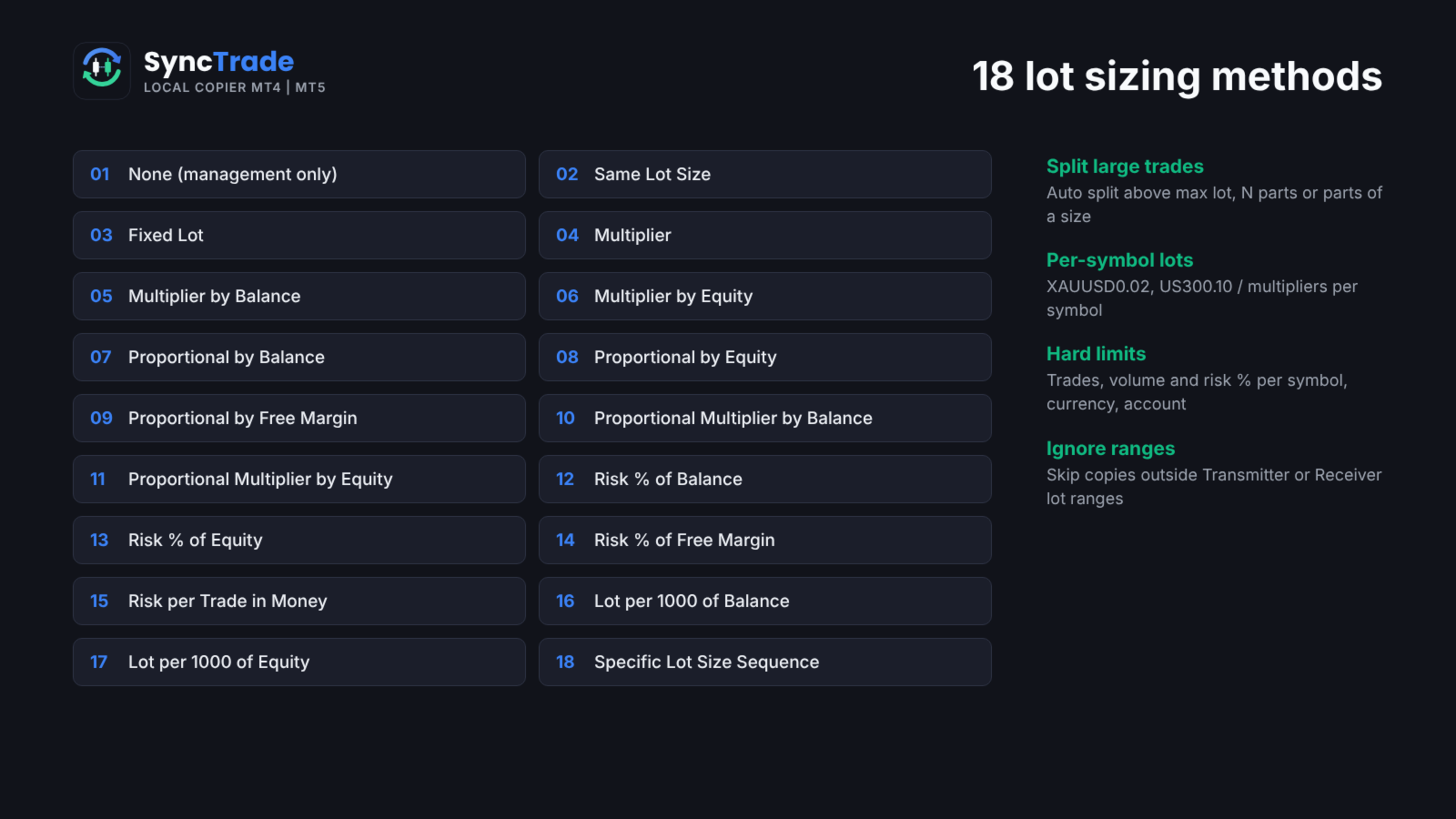
  • Lot Size Type: None (no new copies), Same Lot Size, Fixed Lot, Multiplier, Multiplier by Balance, Multiplier by Equity, Proportional by Balance / Equity / Free Margin, Proportional Multiplier by Balance / Equity, Risk per Trade in % of Balance / Equity / Free Margin, Risk per Trade in Money, Lot Size per 1000 of Balance / Equity, Specific Lot Size Sequence.
  • Add/Subtract to Same Lot Size: added to the Transmitter lot.
  • Fixed Lot Size: lot for every copy.
  • Multiplier: Transmitter lot × value.
  • Multiplier by Balance / Equity: Transmitter lot × Receiver balance (equity) ÷ value.
  • Proportional Multiplier by Balance / Equity: Transmitter lot × Receiver/Transmitter balance (equity) ratio × value.
  • Risk per Trade in % of Balance / Equity / Free Margin: lot so that the SL loses this %. No SL = not copied.
  • Risk per Trade in Money: lot so that the SL loses this amount.
  • Lot Size per 1000 of Balance / Equity: value × balance (equity) ÷ 1000.
  • Specific Lot Size Sequence: lots for the 1st, 2nd, 3rd… copy on a symbol, e.g. 0.01,0.02,0.04 . End with 0 to stop after the list.
  • Automatic Split of Copied Trades: split lots above the broker maximum.
  • Split Copied Trades in Parts: split each copy into N trades.
  • Split Copied Trades in Parts of: split each copy into trades of this size.
  • Custom Symbol Fixed Lot Sizes / Custom Symbol Multipliers: per-symbol values, e.g. 0.05,XAUUSD0.02 .
  • Copying from / Up to Symbol Trade/Order Number: copy only the N-th to M-th Transmitter trade on a symbol (e.g. grid levels). Per symbol.
  • Total Symbol / Account Copied Trades: max open copies per symbol / account.
  • Maximum Risk % per Symbol / per Currency / Account Risk %: max total SL risk of copies, in % of balance.
  • Total Symbol / Account Copied Volume: max total lots of copies.
  • Minimum / Maximum Receiver Lot Size: raise to the minimum; cap each copy at the maximum.
  • Ignore Receiver Lot Size Below / Above: skip if the calculated lot is outside the range.
  • Ignore Transmitter Lot Size Below / Above: skip Transmitter trades outside the range.
  • Minimum Volume Step: rounding step for copy lots.

Limits on count, volume and risk make a copy wait; ignore rules skip it.

Trade Management

  • Synchronized Trade Closure: False, True, True for Market Trades Only, True for Pending Orders Only, True for Same Trade/Order Type.
  • Closure Delay in Seconds: delay before closing, fixed or random range.
  • Closure Better Price / Difference in Points: close only at the Transmitter close price or better. Per symbol.
  • Reopen Closed Copied Trades: when a copy closes on the Receiver while the Transmitter trade is open: False, Instantly, At Open Price or Better, At a Specific Time.
  • Reopen Closed Copied Trades Time: time (HH:MM) for the time-based reopen.
  • Apply Partial Closure: reduce copies proportionally when the Transmitter closes part of a trade.
  • Close Transmitter if Receiver is Closed (Transmitter): close the original trade when a copy is closed on a Receiver.

Receiver TP/SL & Trailing Management

  • Virtual/Hidden TP/SL Levels: TP/SL kept by the EA, not sent to the broker.
  • Show Virtual Levels on Chart: draw virtual TP/SL lines.
  • Use TP/SL Levels in: Points or Money.
  • Take Profit / Stop Loss in Points (Money): fixed TP / SL for each copy.
  • Break Even Profit in Points (Money): move SL to the open price at this profit.
  • Trailing Start / Stop / Step in Points (Money): start profit, distance and step of the trailing SL.
  • TP Based on Risk/Reward Ratio 1/: TP = SL distance × value.

Partial Closure Management

  • Partial Closure Take Profit % 1-3 / TP Lot Size % 1-3: at X% of the way to TP, close Y% of the initial lot.
  • Partial Closure Stop Loss % 1-3 / SL Lot Size % 1-3: at X% of the way to SL, close Y% of the initial lot.

Scheduled Trade Closure

  • Close All Copied Market Trades on / Time: day (or Every Day) and time to close all copies.
  • Delete All Copied Pending Orders on / Time: day and time to delete copied pending orders.
  • Close Copied Trades in Minutes: close each copy after N minutes.

Basket Trade Management (in % of Balance, Money and Average Points)

  • Use Basket Take Profit / Stop Loss: close all copies at this basket profit / loss.
  • Use Basket Break Even: after this profit, close all if the basket returns to 0.
  • Use Basket Trailing Stop Loss, Start / Stop / Step: trail a locked basket profit; close all when it is hit.

Emergency Account Protection

  • Use Emergency Account Protection: enable the equity levels below.
  • Receiver Account Stop Loss Equity / Take Profit Equity: close all copies and stop copying at this equity.
  • Max Drawdown % from Balance High: close all and stop copying at this drawdown.
  • Maximum Daily Drawdown from / in % / in Money: close all and pause until the next day (reference: Balance or Equity).
  • Maximum Daily Profit from / in % / in Money: same, for daily profit.
  • No Copying if Transmitter / Receiver Drawdown %>: no new copies above this drawdown.
  • Copy Only if Transmitter Drawdown %> / per Symbol>: copy only above this drawdown.

After an emergency stop, copying resumes after re-attaching the EA or pressing Reset Stop on the panel.

Notification Settings

  • Send Email / Push Notification: on each copy and protection event.
  • Send Daily Notification / Time: daily account report at these times, e.g. 08:00,20:00 .
  • Send Emergency Notification / Emergency Notification Equity: alert when equity falls below levels, e.g. 9000,8000 .

Symbol Mapping Settings

  • Prefix / Suffix of the Transmitter Account: removed from source symbols.
  • Prefix / Suffix of the Receiver Account: added to Receiver symbols.
  • Special Symbol 1-30: direct pairs TRANSMITTER,RECEIVER , e.g. GOLD,XAUUSD .

Panel

  • Show Panel, Panel theme (Dark/Light), Font size 7-16, Panel X / Y.

FAQ

Does it work between two computers? No. SyncTrade is a local copier; all terminals must run on the same PC or VPS.

Different brokers? Yes. Use prefix, suffix and Special Symbol inputs when names differ.

What if a terminal goes offline? The Receiver waits; nothing is opened or closed until the Transmitter is back. No trade is copied twice after a restart.

Several Receivers on one account? Yes, with a different Magic Number on each.

Trading involves risk. Test all settings on demo accounts first.

おすすめのプロダクト
Binary Options Copier Remote is an EA that allows to copy binary options trades between MT4 accounts at different computers. This is an ideal solution for signal provider, who want to share his trade with the others globally on his own rules. Provider can give free bonus license to 10 receivers. That means those 10 receivers can copy from provider by using Binary Options Receiver Free (no cost). From 11th one, receiver have to buy Binary Options Receiver Pro (paid version) in order to copy from
DrawDown Limiter MT4
Haidar Lionel Haj Ali
5 (8)
DrawDown Limiter v5.0 — Advanced Account Protection Controller DrawDown Limiter v5.0 is a client-side account protection controller designed to supervise your trading account and automatically react when configured risk, profit, news, schedule, rollover, or position limits are reached. It can monitor manual trades, automated strategies, multiple Expert Advisors, pending orders and floating positions from one dedicated chart. It can protect the complete account or be configured to supervise a spe
Exp COPYLOT CLIENT for MT4
Vladislav Andruschenko
4.69 (65)
MetaTrader 4向け 高機能トレードコピーソフト MetaTrader 4 用の、高速・安定・高機能なトレードコピーソフトです。 COPYLOT は、 MetaTrader 4 と MetaTrader 5 間でFX取引をコピーでき、さまざまな口座タイプや運用スタイルに合わせて柔軟に同期できます。 COPYLOT MT4版の対応コピー方式: MetaTrader 4 → MetaTrader 4 MetaTrader 5 Hedge → MetaTrader 4 MetaTrader 5 Netting → MetaTrader 4   MT5版 詳細説明 + DEMO + PDF 購入方法 インストール方法 ログファイルの取得方法 テストと最適化の方法 Expforexの全製品 MetaTrader 5版 を使えば、 MetaTrader 5 → MetaTrader 5 および MetaTrader 4 → MetaTrader 5 のコピーにも対応します: COPYLOT CLIENT for MT5 COPYLOT は、2台、3台、さらには10台規模のターミナル環境でも
️ KiPollator Gemini Tank 7.2 GOLD (MT4 Edition) — Neural Network Trading System of Higher Logic KiPollator Gemini Tank is not just an Expert Advisor. It is a comprehensive trading operating system that combines trend-based grid logic, an independent sniper module, and an AI pattern analytics system. The EA was built with a focus on maximum deposit survivability: it does not use blind martingale, but applies dynamic step calibration, probability analysis from a neural network, and a three-leve
Requirements Hedging account! EA work with any brokerage conditions EA should run on a VPS continuously Information Working symbol EUR, USD, GBP, GOLD, any pair Working Timeframe: M15/M30/H1 Min deposit: $500 (1 Pair) Min leverage 1:500      MM = TRUE (Automatic lot calculation according to your risk) MM = FALSE (No Automatic lot calculation)  Risk = Risk % will work if your Auto Lot is True  Lot Size= If MM is False then your manual lot will work        Multiplier  = Multiplier lot siz
RisklyCopy copies trades from a master account to one or more receiving accounts running on the same computer or VPS. It works between MT5 terminals, between MT4 terminals, and between MT4 and MT5, also with different brokers. How it works - Attach RisklyCopy in SEND mode on the master account and in RECEIVE mode on each receiving account, using the same channel name. - New trades, stop loss and take profit changes, partial closes and closes are copied. Lot calculation on the receiving accoun
Rua TrailingStop BreakEven Little The EA not for Real Account. You can EA for Real Account with link:   https://www.mql5.com/en/market/product/47635 Uses of EA - Trailingstop: Move stoploss continuously. - Breakeven: Move the stoploss once. Custom parameters: All OrderOpenTime:     + true: acts on all order     + false: only affect the order opened since EA run All OrderType:     + true: acts on all order.     + false: only the order is running (Buy, Sell) TraillingStop: true (Use), false (do n
FREE
Victor Scalper EA Manager
Victor Alejandro Garcia Rodriguez
VICTOR SCALPER 1.0 MANAGER Funciones del Robot: Gestionar ordenes realizadas Manualmente desde el metatrader del celular o del ordenador por medio de ordenes pendientes para hacer cobertura incrementando el lotaje y la cantidad de ordenes y a la distancia de separación que se desee.  Cerrar las ordenes apenas se tiene el valor en dinero ganado positivamente. O Cerrar las ordenes apenas llegue a un valor negativo indicado por seguridad.  Ventajas:  La ventaja principal es que el robot no es cont
Jet Punch
Didit Haryadi Saputra
Jet Punch is another best expert advisor for MT4,  can help you make money while you sleep by automatically entering and exiting trades. It trades by opening trades every day and closing them at the right time to ensure you always earn a profit. The software is very simple and can be used by both beginner and experienced traders.  Jet Punch was tested and has successfully passed the stress test with slippage and commission approximate to the real market condition. Recommendations: Currency pair:
This expert advisor optimized especially for XAU USD or GOLD. You can also use it other currencies and insturments. Optimized parameters for M5 time frame in XAU USD, ecn broker, low spread and low commission. Other successful results can be found M15 , H1 and H4 timframes with different settings.  I will add other timeframe settings later.  * Before the strategy test, ensure that the data in your platform's history is reliable.
Auric Flow
Sam Kenneth Masterman
Auric Flow EA Version 1.05 – Optimized Gold Trading System Auric Flow EA is a fully automated trading system designed and optimized for XAUUSD (Gold) on the M5 timeframe . It uses a combination of a 300-period Moving Average, CCI(28), and Stochastic(3,3,3) to identify high-probability entries — managed through a bucket-based profit system with optional martingale scaling for enhanced recovery. Key Features Plug-and-play configuration — no setup needed Optimized set file included for XAUUSD (
Financial Radar GFX
Yasir Mohammed Sachit Sachit
Gold Trend Rider – Automated Expert Advisor for XAUUSD Trading Disclaimer : Trading Gold (XAUUSD) involves significant risk. Past performance does not guarantee future results. Test on a demo account and apply proper risk management before live trading. Overview Gold Trend Rider is a fully automated Expert Advisor specifically designed for Gold trading. It leverages the Parabolic SAR indicator to detect trend direction and open trades accordingly. Its trailing stop mechanism manages positions d
Customized Copy MT4
Kyra Nickaline Watson-gordon
Customized Copy is a Multi-Terminal visual trade copying utility that supports Metatrader4 and Metatrader5 for Trade Copying.  You can activate EA on 10 different PCs/VPS. On each PC/VPS can install on Unlimited Terminals. Specifications :     Real Time, Multi Terminal - Multi Account - MT4/MT5 trade copying (support over 50 accounts at same time)     All settings are input visually.     Visual display and modify of copy map and network     Each copy path can be used with different settings
This is the ONLY Trade Copy EA that can copy TO and FROM many slave account. Trader can choose EA to work in ONE WAY (server => slaves) or TWO WAY (server <=> slaves) mode. The copy process is done without leaving magic number or any infomation in the comment field of the orders. Very clean. Order can be partialy closed on both server and slave account. EA only work with 28 currency pairs because CFD and metals sometime have different names on some brokers. EA has ability to protect account by s
Grid Aroon EA
AL MOOSAWI ABDULLAH JAFFER BAQER
Grid-Aroon Expert Advisor Not Optimized – Built for Your Optimization! This Expert Advisor is designed for traders who want complete control over their trading parameters. It is not pre-optimized, giving you the flexibility to adjust settings and fine-tune performance according to your strategy and market conditions. Strategy Overview The Grid-Aroon EA combines a grid trading approach with the Aroon indicator to identify trends and execute systematic trades. The EA follows a structured logic: G
The Gold market with a lot of volatility always brings many trading opportunities. We continuously research and develop unique trading strategies for Gold and synthesize them into EA Auto Gold Strategy. This is an automatic trading robot exclusively for the Gold market, it is programmed to integrate 3 trading strategies, each strategy is a different set of signal logic rules. You can experiment with strategies and choose your favorite in the settings panel. The EA has a simple and easy to use se
Adaptive Trade Master No need to say anything. It will prove itself. Here is the Login Information. Account No : 1420442547 Investor Password : ATM1002 Server : IronFX-Demo1 Images are not from the backtest. It is taken from order history (Forward Test).  Newer trust to backtest results. And you can use it on any pair, even on BTCUSD too. Please watch it and give me your review. The " Adaptive Trade Master " is an advanced MetaTrader Expert Advisor designed to automate trading decisions based
>>> BLACK FRIDAY SALE: -60% OFF!  - Promo price: $68 / Regular price $169 <<< - The promotion will end soon! Forex Trend Hinter Live Results: https://www.mql5.com/en/signals/2302404 Forex Trend Hunter is an entirely automated trading system for the MetaTrader 4 trading terminal, developed especially for the needs of ordinary forex traders, yet also used successfully by many professional traders. Forex Trend Hunter is perhaps the best trend-following and long-term profitable Forex robot on the
M5 タイムフレームのロボット スカルパー。 GBPUSD 通貨ペアでの取引。このロボットは、英ポンドの取引のためにプロのトレーダーの会社によって特別に開発されました。ロボットは、毎日約 5 ~ 15 の取引を開始します。 GBPUSD のスプレッドが最大 10 ピップスまでの低いブローカーと取引するのが最善です。開始するための推奨最低入金額は $500 以上です。 利点: マーチンゲールは使いません。 ネットではありません。 すべての取引にはストップロスがあります。 GBPUSDペア専用のプロボット。 ロボットスキャルパー、M5 期間の日中取引。 このロボットはどのように取引しますか? 市場を分析するために、ロボットは 2 つの指標の価格モデルと戦略的な市場パターンを使用します: パラボリック ストップとリバース システムとボリンジャー バンド。ロボットは最初に、価格エントラポレーション統計を使用して価格の動きについて市場を分析します。次に、ロボットはこれらの指標を読み取り、現在と過去の動きの傾向を比較します。市場の反転またはロールバックを示すパターンが一致した場合、ロボットは取
The Expert Advisor strategy is based on the intersection of moving averages. Buy - the fast МА (Moving Average) crosses the slow MA upwards, sell - fast МА crosses the slow MA downwards. It uses an adaptive grid and averaging with a time delay. Adapted for 4 and 5-digit quotes. Working timeframe is H1. Recommended initial deposit is at least 1000 units of the base currency. Parameters MaFast_period , MaSlow_period – periods of the fast and slow moving averages; MaFast_method , MaSlow_method – a
MENEMANI Smart TRaders | Semi-Automated Supply/Demand, FVG & Order Block Trading Assistant. Available for MetaTrader 5 and MetaTrader 4 (two separate Market products — install the build that matches your terminal).   MENEMANI Smart TRaders is a professional trading assistant (utility EA) that scans, scores, and visualizes institutional price zones — then lets you execute a complete pending-order plan from a single dashboard. You stay in control: the EA never opens a trade on its own. You pick t
King Grid
Luis Mariano Vazquez Marcos
King Gold Grid Presentamos con orgullo el revolucionario Asesor Experto de Sistema Grid, una obra maestra creada por  Mr Beast. Este excepcional producto se distingue como uno de los mejores en su categoría, destacando por su magnífica gestión de riesgos y especialización en el trabajo con el oro. Diseñado meticulosamente para optimizar la eficiencia y maximizar los beneficios, este asesor experto se erige como un líder indiscutible en el mundo de los sistemas de rejilla. Su capacidad para adapt
>>> BLACK FRIDAY SALE: -60% OFF!  - Promo price: $56 / Regular price $139 <<< - The promotion will end soon! Smart Impulse Trader is an automated forex trading robot. The main idea behind this strategy is to detect the impulse and to open two trades at the same time and in the same direction. There are separate take profits for both trades: First_Trade_TP and Second_Trade_TP. When the first trade is closed with profit, then the robot sets take profit value to the second trade. The distance is
Cometex
Aleksandr Shurgin
The Expert Advisor is designed for trading major currency pairs. It features failure protection—when the connection is restored, the Expert Advisor will continue processing its orders. Advanced trailing and trading time interval settings allow the Expert Advisor to operate correctly on both desktop and VPS devices. The robot monitors trading position volumes, slippage, and spread changes. It automatically adjusts trailing based on commissions and current volatility, selects volatility channels f
Manual Copy your trades to every account, MT4 and MT5, each sized to its own risk TrueRisk Trade Copier copies trades between MetaTrader 4 terminals, and between MetaTrader 4 and MetaTrader 5 (with the MT5 version), on the same computer or VPS: from the account you trade to your other accounts, to a prop-firm challenge, or from a personal account to a funded one. Each receiving account sizes every copy to its own risk % from the sender's stop loss, and never lets a copy's stop break that account
スキャルピングトレーディングロボット。 EAはトレンドの安定した方向を監視し、その方向に働きます。 アドバイザの最大限に最適化されたコードにより、最小限の遅延と最小限の端末負荷で作業できます。 Expert Advisorは、2015年以降、基本設定で正常にテストされています。 EURUSDおよびGBPUSD取引商品(プレフィックスとポストフィックスを含む)の基本設定、時間枠5分を使用することをお勧めします。 スプレッドが低く、手数料が低いと、取引結果は良くなります。 設定: リスク= falseの場合のロット-リスク= falseの場合の取引ロット; リスクのオン/オフ-自動ロットを有効にします。 リスクパーセント-取引ごとのリスクのパーセンテージ。 利益を得る-利益を得る; ストップロス-ストップロス; トレーリングストップ-トレーリングストップ。 注文へのコメント-注文へのコメント; ブルズ期間-ブルズインジケーターの期間。 ベアーズ期間-ベアーズインジケーターの期間。 マジックナンバー-注文を区別するためのマジックナンバー。 スリッページ-スリッページ。
This tool helps your trades to open trades manually, and will mean it automatically, so it will not be difficult to profit from calculating pipsteps or lots when you open the next trade, so if you have a strategy to open then this tool will help you to do that, on the tool. which can mean is a lot or a pipstep, so that it can help make your trading easier. You will get more profit, because the time required is shorter.
Fully automatic expert adviser developed for the forex market. - The number of characters in quotes is determined automatically. - Works with standard accounts and ECN accounts. - The timeframe of the chart does not matter. This parameter is defined in the settings. - You can use a dynamic lot or a fixed lot. - The spread filter does not allow the Expert Advisor to open orders at a large value. - Expert advisor always set TakeProfit on all of its open orders. - Drawdown control allows you to spe
Speedy EA
AL MOOSAWI ABDULLAH JAFFER BAQER
Trading using Experts are the best ways to win in Forex! Here are our second Expert Advisor, where you can Set and forget! Time frame: M1 All currency Pairs will work perfectly on the EA Account type: All (If hedging is not allowed, please disable either Sell or Buy) Please please do not take unnecessary risks. (Trading is risky, and there are no guarantees for winning)   We wish you successful trading. (Trading is risky, and there are no guarantees for winning)   Check our other pro
このプロダクトを購入した人は以下も購入しています
Trade Manager EAへようこそ。これは、取引をより直感的、正確、そして効率的にするために設計された究極の リスク管理ツール です。これは単なるオーダー実行ツールではなく、包括的な取引計画、ポジション管理、リスク管理のためのソリューションです。初心者から上級者、迅速な実行を必要とするスキャルパーまで、Trade Manager EAはあらゆるニーズに対応し、為替、指数、商品、暗号通貨などさまざまな市場で柔軟に対応します。 Trade Manager EAを使用すると、複雑な計算が過去のものになります。市場を分析し、エントリーポイント、ストップロス、テイクプロフィットのレベルをチャート上のラインでマークし、リスクを設定するだけで、Trade Managerが最適なポジションサイズを即座に計算し、SLとTPをピップ、ポイント、口座通貨でリアルタイムに表示します。すべての取引が簡単かつ効果的に管理されます。 主な機能: ポジションサイズ計算機 :定義されたリスクに基づいて取引サイズを瞬時に決定します。 簡単な取引計画 :エントリー、ストップロス、テイクプロフィットを設定するためのド
Grid Manual MT4
Alfiya Fazylova
4.71 (17)
「Grid Manual」は、注文のグリッドを操作するための取引パネルです。 ユーティリティはユニバーサルで、柔軟な設定と直感的なインターフェイスを備えています。 それは、損失を平均化する方向だけでなく、利益を増やす方向でも注文のグリッドで機能します。 トレーダーは注文のグリッドを作成して維持する必要はありません。 すべてが「Grid Manual」によって行われます。 注文を開くだけで十分であり、「Grid Manual」は注文のグリッドを自動的に作成し、非常に閉じるまでそれに付随します。 完全な説明とデモバージョン ここ。 ユーティリティの主な機能と機能 ユーティリティは、モバイル端末から開かれた注文を含め、あらゆる方法で開かれた注文を処理します。 「制限」と「停止」の2種類のグリッドで機能します。 グリッド間隔の計算には、固定と動的(ATRインジケーターに基づく)の2つの方法で機能します。 オープンオーダーグリッドの設定を変更できます。 チャート上の各注文グリッドの損益分岐点を表示します。 各注文グリッドの利益率を表示します。 ワンクリックでグリッドから収益性の高い注文を閉じるこ
TradePanel MT4
Alfiya Fazylova
4.84 (95)
Trade Panelは多機能なトレーディングアシスタントです。アプリには手動取引用の50以上のトレーディング機能が搭載されており、ほとんどの取引作業を自動化することができます。 アプリの説明書: https://www.mql5.com/en/blogs/post/756482 デモ口座用アプリの試用版: https://www.mql5.com/en/blogs/post/750865 アプリのインストール方法: https://www.mql5.com/en/blogs/post/756239 アプリをビジュアルモードでテストする方法: https://www.mql5.com/en/blogs/post/770277 VPSのMetaTraderにアプリをインストールする方法: https://www.mql5.com/en/blogs/post/770190 取引。 ワンクリックで取引操作を行うことができます: リスクを自動計算して指値注文やポジションを開く。 複数の注文やポジションをワンクリックで開く。 注文のグリッドを開く。 保留中の注文やポジションをグループごとに閉じる
Trade Indicator Assistant is a powerful MT4 utility designed to turn indicators into automated trading systems. Its main feature is the ability to automatically detect an indicator’s   BUY and SELL signal buffers , without requiring you to know the buffer numbers, search through indicator settings, or modify the indicator source code. Bonus Indicator: After purchasing Trade Indicator Assistant, contact me to receive Trade Signal Pro completely free as a bonus indicator. [Download Demo Version]
News Filter EA: Advanced Algo Trading Assistant News Filter EA is an advanced algo trading assistant designed to enhance your trading experience. By using the   News Filter EA , you can integrate a Forex economic news filter into your existing expert advisor, even if you do not have access to its source code. In addition to the news filter, you can also specify   trading days   and   hours   for your expert. The News Filter EA also includes   risk management   and   equity protection   features
Drawdown Minimizer for MetaTrader 4 - your EAs pay in, old losers get paid off. This utility runs next to your other Expert Advisors and never opens a trade. It keeps a savings book of the net realized profit of your whole account and uses it to close the oldest losing positions of the EAs you choose - slice by slice, oldest first. WHY IT EXISTS Made by traders, for traders. One of our grid EAs got stuck in drawdown for months. The old positions did not come back, and they paid swap every single
The product will copy all telegram signal to MT4   ( which you are member  ) , also it can work as remote copier.  Easy to set up, copy order instant, can work with almost signal formats, image signal, s upport to translate other language to English Work with all type of channel or group, even channel have "Restrict Saving Content", work with  multi channel, multi MT5 Work as remote copier: with signal have ticket number, it will copy exactly via ticket number. Support to backtest signal. How to
Risk Manager MT4   is an account protection Expert Advisor for traders who want strict risk control inside MetaTrader 4. The utility monitors your account equity, daily and weekly results, drawdown, open positions, trade count, consecutive losses, and trading hours. When a configured limit is reached, it can automatically close positions, cancel pending orders, stop other EAs, send notifications, or close the terminal. Instead of relying on discipline during a stressful trading session, you defi
注文管理やリスク管理など、手間のかかる作業をワンクリックまたは数クリックで行えるようにし、取引を楽にするためのユーティリティです。 特徴 リスク管理  リスク欄に%またはドルで指定されたリスクに基づいて自動的にロットを計算し、SL TPなどのラインを置くだけで入力でき、リスクリワードをリアルタイムで表示します。 TrueRiskは、FXペアのロットサイズ計算時に手数料を含むので、例えば1%を指定した場合、全ての取引手数料で1%のリスクを負うか、負わないかは、あなたの選択です。 シンボルごとの最大取引数量の10倍以上の取引をワンクリックで行えるビッグロッツハンドラーを搭載。 指数や他の資産で、自動計算されたロットサイズがロット単位に合わない場合でも、四捨五入して入力することができます。(1、0.1、0.01のロット単位に対応しています。) トレード管理  ワンクリックで可能です。 手数料とスプレッドを含む、または含まないブレイクイーブンのオープンポジションを設定することができます。 テキストフィールドにSLまたはTPの新しい価格を指定し、入力された新しいSLおよび
The Price Action Dashboard is an innovative tool to help the trader to control a large number of financial instruments. This tool is designed to automatically suggest signals and price conditions. The Dashboard analyzes all major Time Frame suggesting price action conditions with graphic elements. The Dashboard can suggest you the strength of the trend identifying directional movement, it is an indispensable tool for those who want to open position themselves using market trends identifiers. The
Shepherd Safety EA
AW Trading Software Limited
4.92 (13)
AW Shepherd Safety EA は、保有中のポジションを管理するエキスパートアドバイザーです。最初の注文はトレーダーがパネルから発注し、その後は EA がバスケットを自動で管理します。トレンドフィルターを通してリカバリー注文を追加し、TakeProfit、トレーリング、またはストップでサイドを決済し、決済の水準をチャートに表示します。 買いと売りは別々に管理され、両方のサイドを同時に保有できます。リカバリー注文は、価格が一定の間隔だけ動いたというだけでは発注されず、Parabolic SAR、2本の MA、またはローソク足の色でポジション方向への反転が確認されてから発注されます。Orders Magic number が一致していれば、手動や他の EA で発注したポジションも管理の対象になります。 EA によるポジション管理の流れ: 1 トレーダーが Open Buy または Open Sell ボタンで、Order Size 欄のロットで最初の注文を発注します。 2 価格がポジションに不利な方向へ Minimal step between recovery orders
Telegram to MT4 Multi-Channel Copier   は、 Telegram と Discord チャンネルのトレードシグナルを MetaTrader 4 へ自動コピーします。ボット不要、ブラウザ拡張不要、手動コピー不要。Telegram や Discord にシグナルが届くと、EA が数秒であなたのターミナルに注文を出します。 さらに、チャンネルをコピーする前に、内蔵バックテスターでそのチャンネルがあなたの口座でどう動いたかを確認できます。 製品は 2 つのコンポーネントで構成されます:Telegram チャンネルを監視する Windows アプリと、MT4 ターミナルでシグナルを執行する本 EA です。MT5 版もあります   こちら . 購入前にお試しください:   アプリは無料でダウンロードできます。ご自身のチャンネルを接続し、各シグナルがどのように読み取られるかをご確認ください。Backtest タブと実際の取引には、購入またはレンタルした EA が必要です。このページの無料デモはストラテジーテスターでのみ動作し、テスターでは Telegram と D
MT4 to Telegram Signal Provider は使いやすく、完全にカスタマイズ可能なツールで、Telegramに信号を送信し、あなたのアカウントを信号提供者に変えることができます。 メッセージのフォーマットは 完全にカスタマイズ可能です! しかし、簡単な使用のために、あらかじめ定義されたテンプレートを選択し、メッセージの特定の部分を有効または無効にすることもできます。 [ デモ ]   [ マニュアル ] [ MT5バージョン ] [ Discordバージョン ] [ Telegramチャンネル ]  New: [ Telegram To MT5 ] セットアップ ステップバイステップの ユーザーガイド が利用可能です。 Telegram APIの知識は必要ありません。開発者が必要なものをすべて提供します。 主要機能 購読者に送信される注文の詳細をカスタマイズする機能 例えばブロンズ、シルバー、ゴールドなど、階層型のサブスクリプションモデルを作成できます。ゴールドサブスクリプションでは、すべての信号が得られますなど。 ID、シンボル、またはコメントによる注文のフ
TradeMirror は、MT4/MT5プラットフォーム向けに開発されたローカル注文同期ツールで、リアルタイム取引をサポートします。 チュートリアル Trademirror チュートリアル のリンクをクリックして、さらにチュートリアルをご覧ください。 製品の特長 金融ソフトウェアにおけるセキュリティ・安定性・プライバシー保護の高基準に準拠し、以下の3つの核心領域を最適化しました: 直感的なグラフィカルインターフェースで操作が容易 金融シナリオにおける機密データ分離のための強化されたプライバシー保護 ミリ秒単位の注文同期で信号遅延ゼロを実現 MT4/MT5完全互換、多様な取引環境にシームレス対応 システム監視機能とメール通知による取引安定性管理 主要機能 本製品には以下のプロフェッショナルコピー機能を搭載: 複数アカウント並列接続 リアルタイムメール通知 ロットサイズカスタマイズ 信号フィルタリング機構 逆方向コピーモード テイクプロフィット/ストップロス再設定 無料デモ手順 購入前に以下の手順で全機能を体験可能: ページ内の「無料デモ」ボタンをクリック 「MetaTrader 4/5
Unlimited Trade Copier Pro is a tool to copy trade remotely to multiple MT4, MT5 and cTrader accounts at different computers/locations over internet. This is an ideal solution for you if you are a signal provider and want to copy your trades to other receivers globally on your own rules. One provider can copy trades to multiple receivers and one receiver can get trade from multiple providers as well. The provider can even set the subscription expiry for each receiver, so that receiver will not b
Take a Break pauses your Expert Advisors when trading is a bad idea: before news, after a daily loss, outside your trading hours, or when a rule you wrote yourself says so. When the pause is over, your EAs simply continue. Account protection for all your EAs in one tool: news filter, drawdown and equity protection, time filter and custom rules. One EA on one chart protects the whole account, the free indicator gives every chart its own rules on top. Free demo | What is new in 26.09 | Support Ass
コピー機->便利で高速なインターフェースインタラクション、ユーザーはすぐに使用できます     ->>>> WindowsコンピュータまたはVPS Windowsでの使用を推奨 特徴: 多様でパーソナライズされたコピー取引設定:1. 異なるシグナルソースに異なるロットモードを設定できます。2. フォワードコピー取引とリバースコピー取引に異なるシグナルソースを設定できます。3. シグナルはコメントで設定できます。4. 契約ロットに応じてロットを調整するかどうか 多様でパーソナライズされたコピー注文設定2:1.品種ごとに異なるロットモードを設定できます2.順方向コピー注文と逆方向コピー注文に異なる品種を設定できます3.コメントでシグナルを設定できます4.契約ロットに応じてロットを調整するかどうか コメントフィルタリング、MAGICフィルタリング、シグナルロットフィルタリング、ローカル製品フィルタリング 勤務時間設定 逆同期SLAVE終了 注文バインド機能: 任意の注文を設定されたシグナルソース注文にバインドできます (テーブルをダブルクリックして編集します) アカウントリスク管理 基本
Trade Manager は、リスクを自動的に計算しながら、取引を迅速に開始および終了するのに役立ちます。 過剰取引、復讐取引、感情的な取引を防止する機能が含まれています。 取引は自動的に管理され、アカウントのパフォーマンス指標はグラフで視覚化できます。 これらの機能により、このパネルはすべてのマニュアル トレーダーにとって理想的なものとなり、MetaTrader 4 プラットフォームの強化に役立ちます。多言語サポート。 MT5バージョン  |  ユーザーガイド + デモ Trade Manager はストラテジー テスターでは機能しません。 デモについてはユーザーガイドをご覧ください。 危機管理 % または $ に基づくリスクの自動調整 固定ロットサイズを使用するか、ボリュームとピップに基づいた自動ロットサイズ計算を使用するオプション RR、Pips、または価格を使用した損益分岐点ストップロス設定 トレーリングストップロス設定 目標に達したときにすべての取引を自動的に終了するための 1 日あたりの最大損失 (%)。 過度のドローダウンからアカウントを保護し、オーバートレードを防ぎま
取引したい主要エリアを特定したら、サポートとレジスタンス、または供給と需要のゾーンを自動的に取引します。この EA を使用すると、1 回のクリックで買いゾーンと売りゾーンを描画し、価格が反転すると予想される場所に正確に配置できます。EA はそれらのゾーンを監視し、ゾーンに指定した価格アクションに基づいて自動的に取引を行います。最初の取引が行われると、EA は、ターゲット エリアとなる、配置した反対のゾーンで利益を出して終了します。その後、2 つの選択肢があります。取引を終了して新しいゾーンを描画してエントリーするか、利益を出して終了し、すぐに反対方向に取引を反転して、「常に市場に参加する」スタイルの戦略を作成します。 入力と戦略を含む完全なマニュアルはこちら: https://www.mql5.com/en/blogs/post/760256 この EA は、市場で固定またはハード ストップ ロスを使用しないポジション トレーダーまたはドル コスト平均法の取引戦略向けに設計されています。代わりに、次の利用可能なサポートまたはレジスタンス ゾーンで同じ方向に新しい取引を行うことで、
これは視覚的な取引パネルであり、取引を簡単に配置および管理し、人為的エラーを回避し、取引活動を強化するのに役立ちます。使いやすい視覚的なインターフェースと、健全なリスクおよび位置管理アプローチを組み合わせています。 [ インストールガイド | 更新ガイド | トラブルシューティング | よくある質問 | すべての製品 ] 驚くほど使いやすい チャートから簡単に取引 正確なリスク管理との取引、手間のかからない 資本の保存が最優先事項です 気をつけずに利益を上げましょう できるだけ早くリスクのない取引をお楽しみください 開かれているすべての取引の自動トレーリングストップ 最初のストップロスは、取引が行われるとすぐに配置されます EAは、取引を行った後に次のタスクを実行します。 最初のストップロス/テイクプロフィットは自動的に配置されます できるだけ早くフリーライドにロックします(オプション) ストップロスを初めて損益分岐点に移動します(オプション) 停止するまで、希望の方法を使用してストップロスを追跡します その他のクールな機能は次のとおりです。 優れたターミナルアクティビティレポート
KT Equity Protector MT4
KEENBASE SOFTWARE SOLUTIONS
3.75 (4)
An equity protection EA for MetaTrader that enforces your loss limits and profit target for you: when your account reaches a rule you set, it closes your trades on every symbol, before one bad day turns into a lost account. It suits prop firm challenges and personal accounts alike. Attach it to one chart, answer a few questions in the on-chart setup wizard, and it watches your whole account in the background while you trade by hand or with other EAs. What it protects Daily loss limit: a percenta
Riskless Pyramid
Snapdragon Systems Ltd
5 (1)
Introduction This powerful MT4 trade mangement EA offers a way potentially to aggressively multiply trade profits in a riskfree manner. Once a trade has been entered with a defined stoploss and take profit target then the EA will add three pyramid add-on trades in order to increase the overall level of profit. The user sets the total combined profit target to be gained if everything works out. This can be specified either as a multiple of the original trade profit or as a total dollar amount. Fo
この製品は、ニュースタイム中にすべてのエキスパートアドバイザーと手動チャートをフィルタリングするため、急激な価格変動によるマニュアルトレードのセットアップの破壊や他のエキスパートアドバイザーによって入力された取引について心配する必要はありません。この製品には、ニュースのリリース前にオープンポジションとペンディングオーダーを処理できる完全な注文管理システムも付属しています。 The News Filter  を購入すると、将来のエキスパートアドバイザーのためにビルトインのニュースフィルターに頼る必要はなく、今後はすべてのエキスパートアドバイザーをここからフィルタリングできます。 ニュース選択 ニュースソースは、Forex Factoryの経済カレンダーから取得されます。 USD、EUR、GBP、JPY、AUD、CAD、CHF、NZD、CNYなど、任意の通貨数に基づいて選択できます。 Non-Farm(NFP)、FOMC、CPIなどのキーワード識別に基づいて選択することもできます。 影響レベルによってフィルタリングするニュースを選択することができ、低、中、高の影響範囲から選択できます。
Prop Guardian Risk Manager MT4 – Drawdown, Risk & Hedge Protection for Prop Firm and Managed Accounts Prop Guardian Risk Manager is a professional risk-control utility for MetaTrader 4, designed for prop firm traders, money managers and anyone who wants strict account-level risk protection. It does not generate trading signals, strategy entries or trading decisions. Instead, it runs in the background, monitors your account risk and can automatically block new exposure, close managed trades or ac
FCK CurrencyStrength Pro
Patel Hitendrakumar Mahendrabhai
Hi Friends, " FCK Currency Strength Pro " is a auto & semi auto trading expert with direction of pair. Buy-Sell separate or multi currency in one click. The strategy of  FCK Currency Strength Pro  is a combination of custom indicator, Trendlines, Support & Resistance levels ( Price Action ) and most important secretive trading algorithm mentioned above. Download News Ex4 and csv file You need the following SDSnews.ex4 in MQL4/Libraries and the daylightsavings.csv in MQL4/Files. Only 4 of 5 copi
多機能取引ツール:ロット計算機、グリッド注文、R/R比率、トレードマネージャー、需給ゾーン、プライスアクションなど デモ版   |   ユーザーマニュアル トレードアシスタント はストラテジーテスターでは動作しません:この ユーティリティ をテストするには デモ版をこちら からダウンロードしてください。 ご質問 /改善のアイデア/バグ発見 の場合は 私に連絡 してください MT5版が必要な場合は、 こちら から入手できます 取引 プロセス を簡素化、高速化、自動化します。この ダッシュボード で標準ターミナルの機能を拡張します。 取引パネル はあらゆる取引銘柄で動作します:FX、株式、指数、暗号通貨など。 1. 新規取引の開始 :ロット/リスク/RR計算:手動取引のリスク管理 ロット計算機(リスクサイズに基づく取引量計算) リスク計算機(ロットサイズに基づくリスク額) リスクリワード比率 グリッド注文: + 動的間隔オプション、分割ロットオプション 注文アクショントリガー、+ 買いストップリミット/売りストップリミット:Mt4でも可能 仮想SL、仮想TP(非表示SL、非表示TP:ブロ
Risk manager Risk manager - it will simplify the tracking of drawdown and will notify you (alert) when the specified risk is reached, and close/lock orders when the critical DD risk level is reached. If the specified drawdown is exceeded, you can choose two options for actions: All orders will be closed that mean loss will be fixed on depo. The terminal also closes. Instead of fixing the loss on depo, the opposite order will be opened - orders locking will occure. Not a single order will be c
Lot Architect — Trade Panel and Position Size Calculator for MT4 Lot Architect is a trade panel and risk-based position size calculator for MetaTrader 4. It helps calculate lot size from the selected risk, displays trade parameters before entry, and supports Market, Limit and Stop orders from the chart. The utility is designed for traders who want a structured workflow for position sizing, stop-loss placement, take-profit planning and order execution. Purpose Before opening a trade, a trader nee
Support and Resistance Dashboard for MT4 is a multi-timeframe and multi-symbol scanner and alert system that finds S/R zones and pivot points for all timeframes and symbols and alerts when price has interaction with them. If you are using support and resistance (or supply and demand) zones in your trading strategy, this dashboard and its alert and filtering system is a big time saver for you. Download demo version   (works on M 1,M5,M30,W1   timeframes) Full description of scanner parameters ->
VirtualTradePad PRO SE MT4 — MetaTrader 4向け高度な取引パネルとチャートワークスペース VirtualTradePad PRO SE は、 MetaTrader 4 向けのプロフェッショナルな取引パネルであり、トレード管理ワークスペースです。1つのチャートベースのインターフェースから、取引の開始、管理、保護、決済、分析をより速く行えるようにします。 この製品は、単なるボタンセット以上の機能を必要とするアクティブな手動トレーダー向けに作られています。PRO SE は、ワンクリック執行、予約注文、ポジション管理、部分決済、バスケット損益ロジック、平均化レベル、ATMルール、シグナル監視、市場情報、ストラテジーテスターのワークフロー、VPS向け準備を、1つの構造化されたワークスペースに統合します。 MT5版 | 完全な説明とスクリーンショット | 購入方法 | インストール方法 | ログファイルの取得方法 | テストと最適化の方法 | Expforex のすべての製品 通常の手動取引に対する利点 多くのウィンドウではなく1つのワークスペース — 取引執
作者のその他のプロダクト
Onic Scalper
Ida Bagus Githa Dyatmika
Onic Scalper EA use Breakout Strategy and Trend Following Strategy for Scalping Trading Methods This EA trades the breakouts from daily relative highs and lows. For the entry, stop orders are used for the fastest possible execution. Profits can be secured by the adjustable trailing stop. The backtests shown in the screenshots were done with the default settings. There might be better or worse settings.  Please download the free demo to do your own testing.This EA does not use any martingale and/
My Trade Panel MT4 A manual trading panel for MetaTrader 4. It calculates your lot size from the risk you choose, places market and pending orders in one click, and manages open positions with breakeven, partial close, and seven types of trailing stop. It does not open trades on its own. You make the decisions and the panel handles the math and the routine work. Line function Show Entry, Stop Loss, and Take Profit lines on the chart. Drag them to plan a trade and see the lot, risk, and reward b
Onic Scalper MT5
Ida Bagus Githa Dyatmika
Onic Scalper EA use Breakout Strategy and Trend Following Strategy for Scalping Trading Methods  This EA trades the breakouts from daily relative highs and lows. For the entry, stop orders are used for the fastest possible execution. Profits can be secured by the adjustable trailing stop. The backtests shown in the screenshots were done with the default settings. There might be better or worse settings.  Please download the free demo to do your own testing.This EA does not use any martingale and
My Trade Panel MT5 A manual trading panel for MetaTrader 5. It calculates your lot size from the risk you choose, places market and pending orders in one click, and manages open positions with breakeven, partial close, and seven types of trailing stop. It does not open trades on its own. You make the decisions and the panel handles the math and the routine work. Line function Show Entry, Stop Loss, and Take Profit lines on the chart. Drag them to plan a trade and see the lot, risk, and reward b
Short description (Market field): Account-level risk guardian for prop firm challenges: daily/overall loss locks, SL risk limits, news filter, daily profit cap and consistency tracking. PropShield Risk Manager protects a prop firm challenge or funded account from the mistakes that end it: a daily drawdown breach, an overall drawdown breach, an oversized trade, a trade opened into high-impact news, or one oversized winning day that ruins the consistency rule. It is a utility, not a trading robot.
SyncTrade Local Copier copies trades between MetaTrader terminals on the same Windows PC or VPS, in milliseconds, with no internet relay, no DLL and no WebRequest. It works across platforms. Use SyncTrade MT4 Local Copier on MT4 and SyncTrade MT5 Local Copier on MT5. Both share the same local data folder, so all four directions work: MT4 → MT4, MT4 → MT5, MT5 → MT4, MT5 → MT5 . One EA, three roles: Transmitter : the source account. Receiver : the destination account that opens the copies. Self C

フィルタ:
レビューなし
レビューに返信