SyncTrade MT4 Local Copier

  • 유틸리티
  • Ida Bagus Githa Dyatmika
    Ida Bagus Githa Dyatmika
    ✅ My signal is only to use Live account, Not using Demo account because there will be Big differences in trading result due to Slippage, Spread, and Commission
    ❎ My products are ONLY SOLD via MQL5 website. If you see it somewhere else, be aware of scam.
    ⚠ HIGH RISK WARNING: ⚠
  • 버전: 1.0
  • 활성화: 5

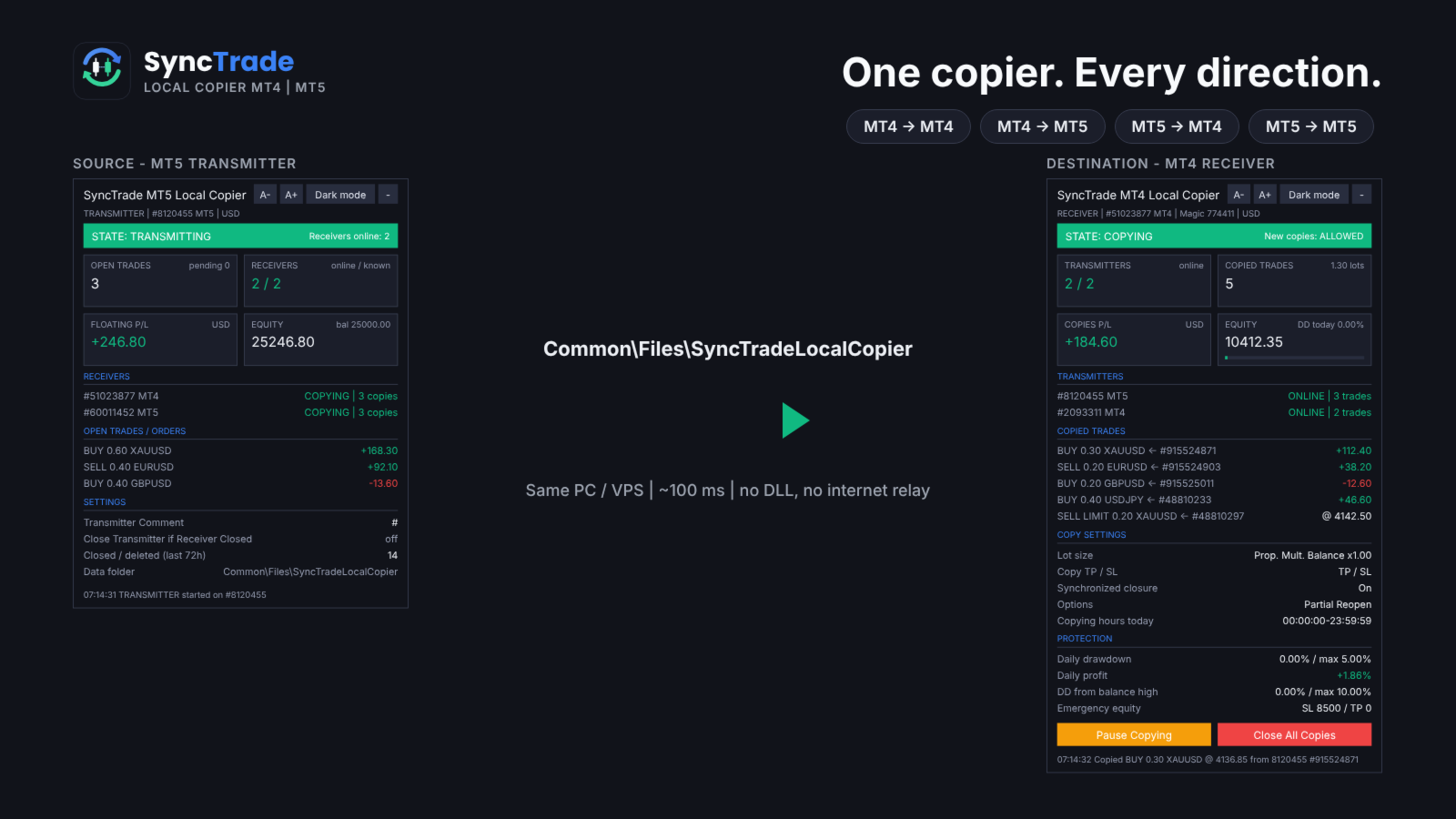
SyncTrade Local Copier copies trades between MetaTrader terminals on the same Windows PC or VPS, in milliseconds, with no internet relay, no DLL and no WebRequest.

It works across platforms. Use SyncTrade MT4 Local Copier on MT4 and SyncTrade MT5 Local Copier on MT5. Both share the same local data folder, so all four directions work: MT4 → MT4, MT4 → MT5, MT5 → MT4, MT5 → MT5.

One EA, three roles:

  • Transmitter: the source account.
  • Receiver: the destination account that opens the copies.
  • Self Copier: copies or multiplies trades inside the same account.

One Transmitter can feed any number of Receivers. One Receiver can follow several Transmitters, mixed MT4 and MT5.

Main features

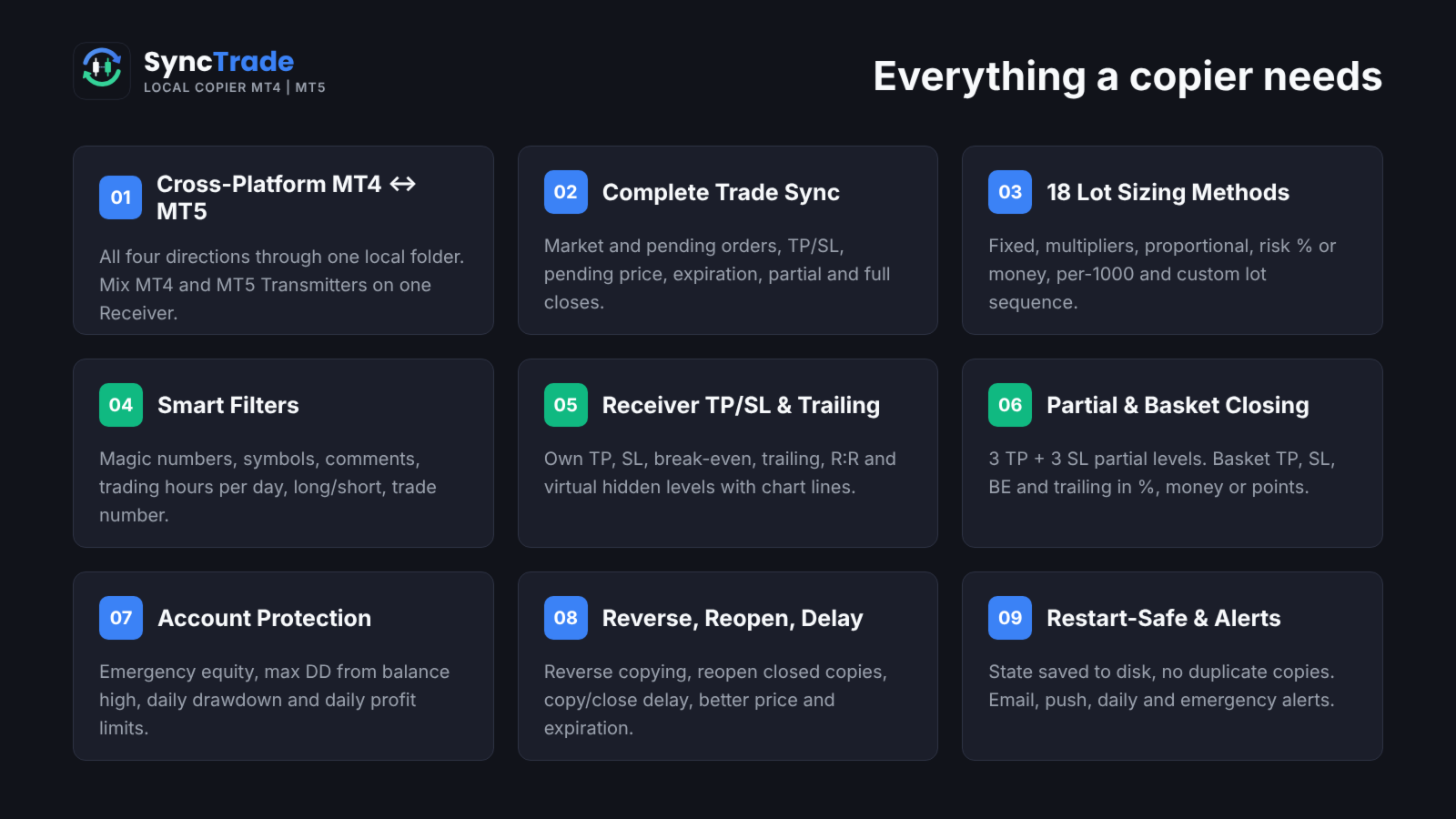
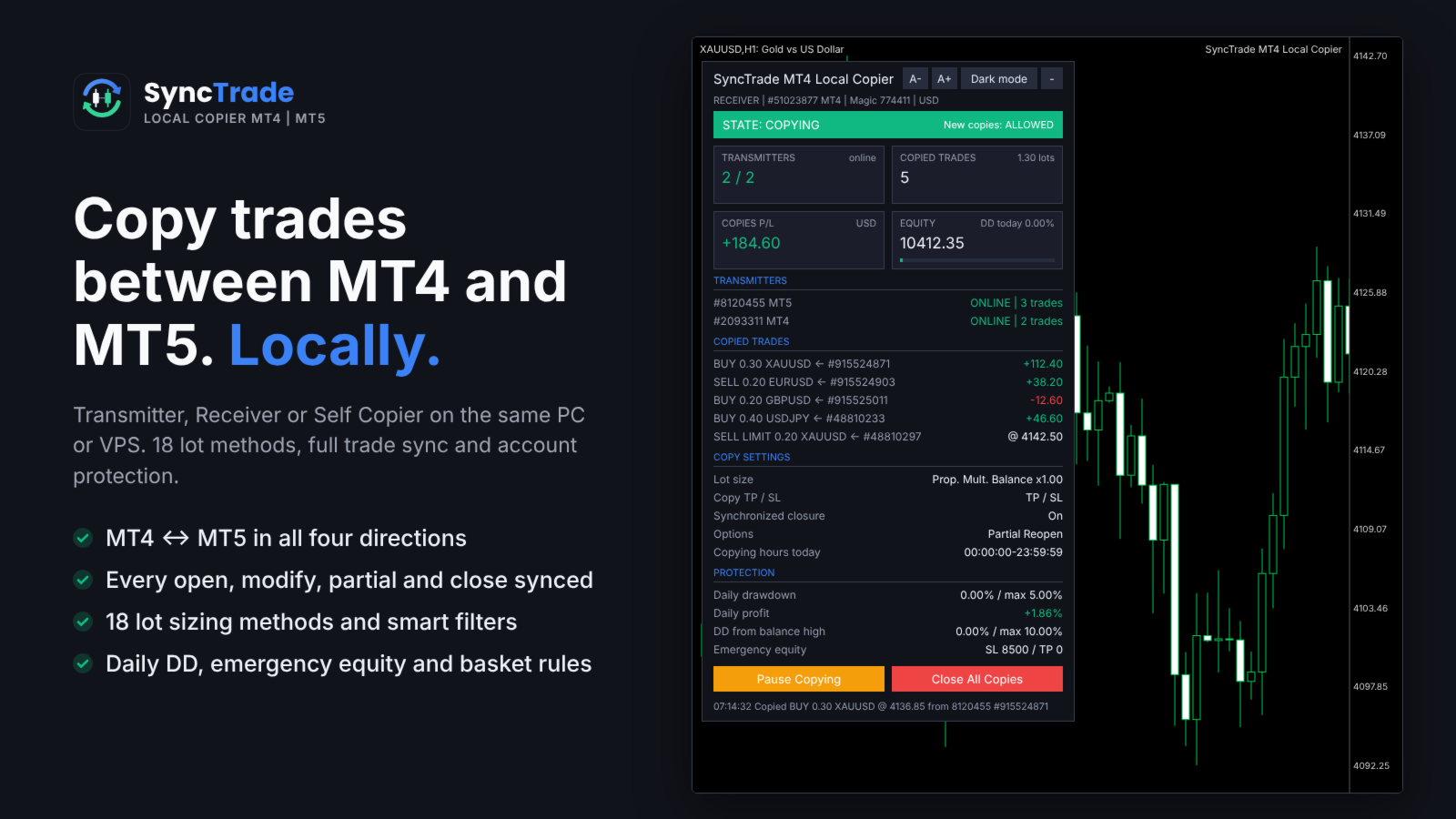
  • MT4 ↔ MT5 copying in all directions, every ~100 ms.
  • Market trades and pending orders, with TP/SL, pending price, expiration, partial and full closes kept in sync.
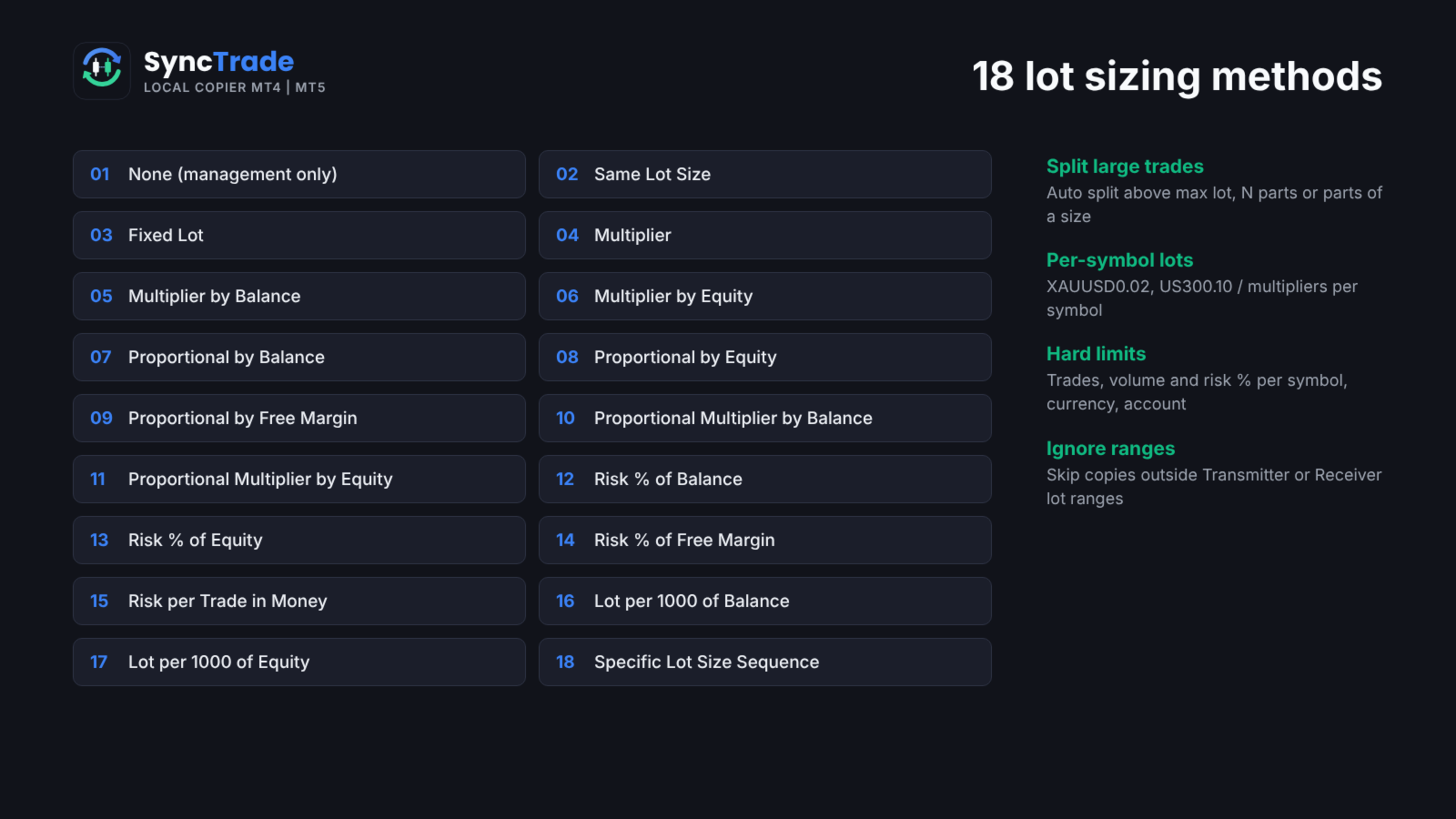
  • 18 lot sizing methods, custom lots and multipliers per symbol, automatic split of large trades.
  • Filters by magic number, symbol, comment, trading hours per day, direction and trade number.
  • Reverse copying, reopen of closed copies, copy and close delay, better-price entry and exit.
  • Receiver TP/SL, break-even, trailing stop, R:R target and hidden (virtual) levels.
  • Partial closing at 3 TP and 3 SL levels; basket TP, SL, break-even and trailing.
  • Emergency equity stop, max drawdown from balance high, daily drawdown and daily profit limits.
  • Email, push, daily and emergency notifications.
  • Symbol mapping with prefix, suffix and 30 special symbol pairs.
  • State saved to disk: no duplicate copies after a restart.
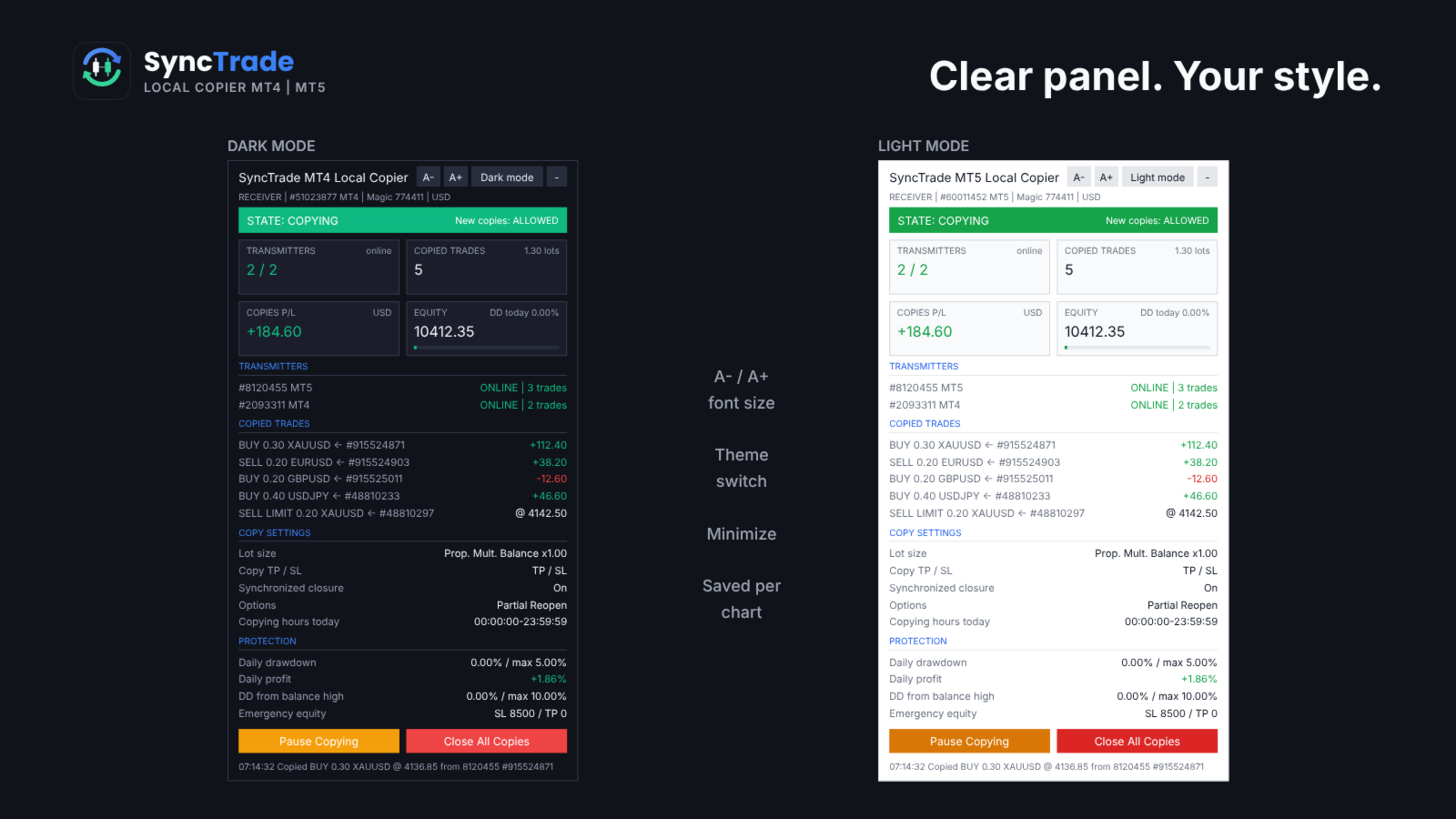
  • On-chart panel with dark/light theme, font size and minimize.

Quick setup

  1. On the source terminal, attach SyncTrade and set Account Mode = Transmitter.
  2. On the destination terminal, attach SyncTrade and set Account Mode = Receiver.
  3. Enter the source account number in Transmitter Account Number (or leave it empty to follow all Transmitters on the PC).
  4. Choose the Lot Size Type and other options.
  5. Enable Algo Trading in both terminals.
  6. The Receiver panel should show the Transmitter as ONLINE and the state COPYING.

The panel shows the copier state, Transmitters (or Receivers) with platform and status, every copied trade with its source ticket and live P/L, copy settings and protection status. Buttons on the Receiver: Pause/Resume Copying, Close All Copies, and Reset Stop.

Requirements

  • All terminals on the same Windows PC or VPS, same Windows user.
  • Algo Trading enabled on every Receiver.
  • MT5 Receivers: hedging account recommended (netting merges copies on one symbol).
  • Copying needs two live terminals, so it cannot be tested in the Strategy Tester. Use demo accounts.

INPUT PARAMETERS

0 or an empty field = option off. Per-symbol format: first number for all symbols, then symbol + value, e.g. 30,XAUUSD60,BTCUSD2000 .

Account Setup

  • Account Mode: Transmitter, Receiver or Self Copier.
  • Transmitter Account Number: account(s) to follow, comma-separated, MT4 and MT5 mixed. Empty = all Transmitters on this PC.
  • Transmitter Comment: comment sent with each trade. # = original comment, @ = original ticket, % = magic, & = Transmitter account.
  • Receiver Comment: comment for copies; replaces the Transmitter Comment (max 31 characters).

General Settings & Trade Filters

  • Magic Number: magic of copied trades. Not 0; use a different value per Receiver on one account.
  • Magic Numbers to Copy: copy only these. Exact 3245 , partial (14) , range 100-200 ; 0 = manual trades.
  • Maximum Number of Copied Magic Numbers: max different Transmitter magics copied at once.
  • Maximum Receiver Account Magic Numbers: max different magics on the whole Receiver account.
  • Magic Numbers Not to Copy: never copy these (same format).
  • Symbols to Copy / Symbols Not to Copy: include or exclude Receiver symbols, e.g. EURUSD,XAUUSD .
  • Maximum Number of Copied Symbols: max different symbols copied at once.
  • Maximum Receiver Account Symbols: max different symbols on the whole Receiver account.
  • Comments to Copy / Comments Not to Copy: exact comment or partial match in brackets, e.g. (Grid) .

Copying / Multiplying Options

  • Copy on Monday … Sunday: copying hours per day (Receiver server time), e.g. 00:00:00-12:00:00,14:00:00-23:59:59 . Empty = no copying that day.
  • Transmitter Server Offset Hours: hours added to Transmitter time to match Receiver time.
  • Copy Long Trades / Copy Short Trades: copy BUY or SELL trades and orders.
  • Copy Current Trades: copy trades already open when the Receiver starts.
  • Copy New Trades: copy trades opened after the Receiver starts.
  • Copy Take Profit / Copy Stop Loss: copy the Transmitter TP / SL.
  • Take Profit Multiplier / Stop Loss Multiplier: multiply the TP / SL distance.
  • Add/Subtract Points in TP Level / SL Level: add or subtract points (when the multiplier is 1).
  • Do Not Copy Trades/Orders Without SL: skip trades with no SL.
  • Allow TP/SL Manual Change: true = your manual TP/SL change on a copy is kept; false = the EA restores the synced levels.
  • Copy Market Trades / Copy Pending Orders: copy open trades / pending orders. Pending off = the trade is copied when it triggers.
  • Maximum Spread in Points: wait while the spread is higher. Per symbol.
  • Maximum Slippage in Points: slippage for opening and closing.
  • Maximum Copying Difference in Points: wait while the price is further than this from the Transmitter open price.
  • Use Copying Expiration in Seconds / Copying Expiration in Seconds: stop trying to copy a trade after this time.
  • Copying Delay in Seconds: delay before copying, fixed 5 or random 5,20 .
  • Retry Attempts in Seconds: wait before retrying a failed order.
  • Better Price / Better Price Difference in Points: copy only at a better price than the Transmitter by this many points (negative allows worse). Per symbol.
  • Reverse Copying: BUY ↔ SELL, BUY LIMIT ↔ SELL STOP, BUY STOP ↔ SELL LIMIT, TP ↔ SL.
  • Keep Original TP/SL Distances: measure TP/SL from the Receiver open price instead of using the Transmitter levels.
  • Min Distance in Points for Same Symbol/Direction Trades/Orders: no new copy near an existing copy on the same symbol and direction.

Lot Size Management

  • Lot Size Type: None (no new copies), Same Lot Size, Fixed Lot, Multiplier, Multiplier by Balance, Multiplier by Equity, Proportional by Balance / Equity / Free Margin, Proportional Multiplier by Balance / Equity, Risk per Trade in % of Balance / Equity / Free Margin, Risk per Trade in Money, Lot Size per 1000 of Balance / Equity, Specific Lot Size Sequence.
  • Add/Subtract to Same Lot Size: added to the Transmitter lot.
  • Fixed Lot Size: lot for every copy.
  • Multiplier: Transmitter lot × value.
  • Multiplier by Balance / Equity: Transmitter lot × Receiver balance (equity) ÷ value.
  • Proportional Multiplier by Balance / Equity: Transmitter lot × Receiver/Transmitter balance (equity) ratio × value.
  • Risk per Trade in % of Balance / Equity / Free Margin: lot so that the SL loses this %. No SL = not copied.
  • Risk per Trade in Money: lot so that the SL loses this amount.
  • Lot Size per 1000 of Balance / Equity: value × balance (equity) ÷ 1000.
  • Specific Lot Size Sequence: lots for the 1st, 2nd, 3rd… copy on a symbol, e.g. 0.01,0.02,0.04 . End with 0 to stop after the list.
  • Automatic Split of Copied Trades: split lots above the broker maximum.
  • Split Copied Trades in Parts: split each copy into N trades.
  • Split Copied Trades in Parts of: split each copy into trades of this size.
  • Custom Symbol Fixed Lot Sizes / Custom Symbol Multipliers: per-symbol values, e.g. 0.05,XAUUSD0.02 .
  • Copying from / Up to Symbol Trade/Order Number: copy only the N-th to M-th Transmitter trade on a symbol (e.g. grid levels). Per symbol.
  • Total Symbol / Account Copied Trades: max open copies per symbol / account.
  • Maximum Risk % per Symbol / per Currency / Account Risk %: max total SL risk of copies, in % of balance.
  • Total Symbol / Account Copied Volume: max total lots of copies.
  • Minimum / Maximum Receiver Lot Size: raise to the minimum; cap each copy at the maximum.
  • Ignore Receiver Lot Size Below / Above: skip if the calculated lot is outside the range.
  • Ignore Transmitter Lot Size Below / Above: skip Transmitter trades outside the range.
  • Minimum Volume Step: rounding step for copy lots.

Limits on count, volume and risk make a copy wait; ignore rules skip it.

Trade Management

  • Synchronized Trade Closure: False, True, True for Market Trades Only, True for Pending Orders Only, True for Same Trade/Order Type.
  • Closure Delay in Seconds: delay before closing, fixed or random range.
  • Closure Better Price / Difference in Points: close only at the Transmitter close price or better. Per symbol.
  • Reopen Closed Copied Trades: when a copy closes on the Receiver while the Transmitter trade is open: False, Instantly, At Open Price or Better, At a Specific Time.
  • Reopen Closed Copied Trades Time: time (HH:MM) for the time-based reopen.
  • Apply Partial Closure: reduce copies proportionally when the Transmitter closes part of a trade.
  • Close Transmitter if Receiver is Closed (Transmitter): close the original trade when a copy is closed on a Receiver.

Receiver TP/SL & Trailing Management

  • Virtual/Hidden TP/SL Levels: TP/SL kept by the EA, not sent to the broker.
  • Show Virtual Levels on Chart: draw virtual TP/SL lines.
  • Use TP/SL Levels in: Points or Money.
  • Take Profit / Stop Loss in Points (Money): fixed TP / SL for each copy.
  • Break Even Profit in Points (Money): move SL to the open price at this profit.
  • Trailing Start / Stop / Step in Points (Money): start profit, distance and step of the trailing SL.
  • TP Based on Risk/Reward Ratio 1/: TP = SL distance × value.

Partial Closure Management

  • Partial Closure Take Profit % 1-3 / TP Lot Size % 1-3: at X% of the way to TP, close Y% of the initial lot.
  • Partial Closure Stop Loss % 1-3 / SL Lot Size % 1-3: at X% of the way to SL, close Y% of the initial lot.

Scheduled Trade Closure

  • Close All Copied Market Trades on / Time: day (or Every Day) and time to close all copies.
  • Delete All Copied Pending Orders on / Time: day and time to delete copied pending orders.
  • Close Copied Trades in Minutes: close each copy after N minutes.

Basket Trade Management (in % of Balance, Money and Average Points)

  • Use Basket Take Profit / Stop Loss: close all copies at this basket profit / loss.
  • Use Basket Break Even: after this profit, close all if the basket returns to 0.
  • Use Basket Trailing Stop Loss, Start / Stop / Step: trail a locked basket profit; close all when it is hit.

Emergency Account Protection

  • Use Emergency Account Protection: enable the equity levels below.
  • Receiver Account Stop Loss Equity / Take Profit Equity: close all copies and stop copying at this equity.
  • Max Drawdown % from Balance High: close all and stop copying at this drawdown.
  • Maximum Daily Drawdown from / in % / in Money: close all and pause until the next day (reference: Balance or Equity).
  • Maximum Daily Profit from / in % / in Money: same, for daily profit.
  • No Copying if Transmitter / Receiver Drawdown %>: no new copies above this drawdown.
  • Copy Only if Transmitter Drawdown %> / per Symbol>: copy only above this drawdown.

After an emergency stop, copying resumes after re-attaching the EA or pressing Reset Stop on the panel.

Notification Settings

  • Send Email / Push Notification: on each copy and protection event.
  • Send Daily Notification / Time: daily account report at these times, e.g. 08:00,20:00 .
  • Send Emergency Notification / Emergency Notification Equity: alert when equity falls below levels, e.g. 9000,8000 .

Symbol Mapping Settings

  • Prefix / Suffix of the Transmitter Account: removed from source symbols.
  • Prefix / Suffix of the Receiver Account: added to Receiver symbols.
  • Special Symbol 1-30: direct pairs TRANSMITTER,RECEIVER , e.g. GOLD,XAUUSD .

Panel

  • Show Panel, Panel theme (Dark/Light), Font size 7-16, Panel X / Y.

FAQ

Does it work between two computers? No. SyncTrade is a local copier; all terminals must run on the same PC or VPS.

Different brokers? Yes. Use prefix, suffix and Special Symbol inputs when names differ.

What if a terminal goes offline? The Receiver waits; nothing is opened or closed until the Transmitter is back. No trade is copied twice after a restart.

Several Receivers on one account? Yes, with a different Magic Number on each.

Trading involves risk. Test all settings on demo accounts first.

추천 제품
Binary Options Copier Remote is an EA that allows to copy binary options trades between MT4 accounts at different computers. This is an ideal solution for signal provider, who want to share his trade with the others globally on his own rules. Provider can give free bonus license to 10 receivers. That means those 10 receivers can copy from provider by using Binary Options Receiver Free (no cost). From 11th one, receiver have to buy Binary Options Receiver Pro (paid version) in order to copy from
DrawDown Limiter MT4
Haidar Lionel Haj Ali
5 (8)
DrawDown Limiter v5.0 — Advanced Account Protection Controller DrawDown Limiter v5.0 is a client-side account protection controller designed to supervise your trading account and automatically react when configured risk, profit, news, schedule, rollover, or position limits are reached. It can monitor manual trades, automated strategies, multiple Expert Advisors, pending orders and floating positions from one dedicated chart. It can protect the complete account or be configured to supervise a spe
Exp COPYLOT CLIENT for MT4
Vladislav Andruschenko
4.69 (65)
MetaTrader 4용 전문 트레이드 복사기 MetaTrader 4 용 빠르고 안정적이며 전문적인 트레이드 복사기입니다. COPYLOT 은 MetaTrader 4 와 MetaTrader 5 터미널 간에 Forex 거래를 복사할 수 있으며, 다양한 계좌 유형과 운용 방식에 맞춰 유연한 동기화 환경을 제공합니다. COPYLOT MT4 버전 지원 방식: MetaTrader 4 → MetaTrader 4 MetaTrader 5 Hedge → MetaTrader 4 MetaTrader 5 Netting → MetaTrader 4   MT5 버전 상세 설명 + DEMO + PDF 구매 방법 설치 방법 로그 파일 확인 방법 테스트 및 최적화 방법 Expforex의 모든 제품 MetaTrader 5 버전 을 사용하면 MetaTrader 5 → MetaTrader 5 및 MetaTrader 4 → MetaTrader 5 복사도 지원됩니다: COPYLOT CLIENT for MT5 COPYLOT 은
️ KiPollator Gemini Tank 7.2 GOLD (MT4 Edition) — Neural Network Trading System of Higher Logic KiPollator Gemini Tank is not just an Expert Advisor. It is a comprehensive trading operating system that combines trend-based grid logic, an independent sniper module, and an AI pattern analytics system. The EA was built with a focus on maximum deposit survivability: it does not use blind martingale, but applies dynamic step calibration, probability analysis from a neural network, and a three-leve
Requirements Hedging account! EA work with any brokerage conditions EA should run on a VPS continuously Information Working symbol EUR, USD, GBP, GOLD, any pair Working Timeframe: M15/M30/H1 Min deposit: $500 (1 Pair) Min leverage 1:500      MM = TRUE (Automatic lot calculation according to your risk) MM = FALSE (No Automatic lot calculation)  Risk = Risk % will work if your Auto Lot is True  Lot Size= If MM is False then your manual lot will work        Multiplier  = Multiplier lot siz
RisklyCopy copies trades from a master account to one or more receiving accounts running on the same computer or VPS. It works between MT5 terminals, between MT4 terminals, and between MT4 and MT5, also with different brokers. How it works - Attach RisklyCopy in SEND mode on the master account and in RECEIVE mode on each receiving account, using the same channel name. - New trades, stop loss and take profit changes, partial closes and closes are copied. Lot calculation on the receiving accoun
Rua TrailingStop BreakEven Little
PHAM KIM QUY RuaCoder
4.5 (2)
Rua TrailingStop BreakEven Little The EA not for Real Account. You can EA for Real Account with link:   https://www.mql5.com/en/market/product/47635 Uses of EA - Trailingstop: Move stoploss continuously. - Breakeven: Move the stoploss once. Custom parameters: All OrderOpenTime:     + true: acts on all order     + false: only affect the order opened since EA run All OrderType:     + true: acts on all order.     + false: only the order is running (Buy, Sell) TraillingStop: true (Use), false (do n
FREE
Victor Scalper EA Manager
Victor Alejandro Garcia Rodriguez
VICTOR SCALPER 1.0 MANAGER Funciones del Robot: Gestionar ordenes realizadas Manualmente desde el metatrader del celular o del ordenador por medio de ordenes pendientes para hacer cobertura incrementando el lotaje y la cantidad de ordenes y a la distancia de separación que se desee.  Cerrar las ordenes apenas se tiene el valor en dinero ganado positivamente. O Cerrar las ordenes apenas llegue a un valor negativo indicado por seguridad.  Ventajas:  La ventaja principal es que el robot no es cont
Jet Punch
Didit Haryadi Saputra
Jet Punch is another best expert advisor for MT4,  can help you make money while you sleep by automatically entering and exiting trades. It trades by opening trades every day and closing them at the right time to ensure you always earn a profit. The software is very simple and can be used by both beginner and experienced traders.  Jet Punch was tested and has successfully passed the stress test with slippage and commission approximate to the real market condition. Recommendations: Currency pair:
Tripple Scalper EA
Matas Milevicius
3.25 (4)
Tripple Scalper EA is unique trend/scalping robot in the market for very low price! EA can show good results with any broker, but most recommended is ECN broker with minimal spread (e.t.c 0.1,0.2,0.3,0.4 ) Suitable for most major pairs e.t.c EUR/USD. GBP/USD. USD/JPY. EUR/JPY. Time frame uses M1/M5/M15. The EA can trade with default settings! Some best set files are attached  on "comments" section. Thank You!
ForexEA GOLD
Ahmet Metin Yilmaz
This expert advisor optimized especially for XAU USD or GOLD. You can also use it other currencies and insturments. Optimized parameters for M5 time frame in XAU USD, ecn broker, low spread and low commission. Other successful results can be found M15 , H1 and H4 timframes with different settings.  I will add other timeframe settings later.  * Before the strategy test, ensure that the data in your platform's history is reliable.
Auric Flow
Sam Kenneth Masterman
Auric Flow EA Version 1.05 – Optimized Gold Trading System Auric Flow EA is a fully automated trading system designed and optimized for XAUUSD (Gold) on the M5 timeframe . It uses a combination of a 300-period Moving Average, CCI(28), and Stochastic(3,3,3) to identify high-probability entries — managed through a bucket-based profit system with optional martingale scaling for enhanced recovery. Key Features Plug-and-play configuration — no setup needed Optimized set file included for XAUUSD (
Financial Radar GFX
Yasir Mohammed Sachit Sachit
Gold Trend Rider – Automated Expert Advisor for XAUUSD Trading Disclaimer : Trading Gold (XAUUSD) involves significant risk. Past performance does not guarantee future results. Test on a demo account and apply proper risk management before live trading. Overview Gold Trend Rider is a fully automated Expert Advisor specifically designed for Gold trading. It leverages the Parabolic SAR indicator to detect trend direction and open trades accordingly. Its trailing stop mechanism manages positions d
Customized Copy MT4
Kyra Nickaline Watson-gordon
Customized Copy is a Multi-Terminal visual trade copying utility that supports Metatrader4 and Metatrader5 for Trade Copying.  You can activate EA on 10 different PCs/VPS. On each PC/VPS can install on Unlimited Terminals. Specifications :     Real Time, Multi Terminal - Multi Account - MT4/MT5 trade copying (support over 50 accounts at same time)     All settings are input visually.     Visual display and modify of copy map and network     Each copy path can be used with different settings
This is the ONLY Trade Copy EA that can copy TO and FROM many slave account. Trader can choose EA to work in ONE WAY (server => slaves) or TWO WAY (server <=> slaves) mode. The copy process is done without leaving magic number or any infomation in the comment field of the orders. Very clean. Order can be partialy closed on both server and slave account. EA only work with 28 currency pairs because CFD and metals sometime have different names on some brokers. EA has ability to protect account by s
Grid Aroon EA
AL MOOSAWI ABDULLAH JAFFER BAQER
Grid-Aroon Expert Advisor Not Optimized – Built for Your Optimization! This Expert Advisor is designed for traders who want complete control over their trading parameters. It is not pre-optimized, giving you the flexibility to adjust settings and fine-tune performance according to your strategy and market conditions. Strategy Overview The Grid-Aroon EA combines a grid trading approach with the Aroon indicator to identify trends and execute systematic trades. The EA follows a structured logic: G
Auto Gold Strategy
Thi Tra Mi Duong
The Gold market with a lot of volatility always brings many trading opportunities. We continuously research and develop unique trading strategies for Gold and synthesize them into EA Auto Gold Strategy. This is an automatic trading robot exclusively for the Gold market, it is programmed to integrate 3 trading strategies, each strategy is a different set of signal logic rules. You can experiment with strategies and choose your favorite in the settings panel. The EA has a simple and easy to use se
Adaptive Trade Master No need to say anything. It will prove itself. Here is the Login Information. Account No : 1420442547 Investor Password : ATM1002 Server : IronFX-Demo1 Images are not from the backtest. It is taken from order history (Forward Test).  Newer trust to backtest results. And you can use it on any pair, even on BTCUSD too. Please watch it and give me your review. The " Adaptive Trade Master " is an advanced MetaTrader Expert Advisor designed to automate trading decisions based
>>> BLACK FRIDAY SALE: -60% OFF!  - Promo price: $68 / Regular price $169 <<< - The promotion will end soon! Forex Trend Hinter Live Results: https://www.mql5.com/en/signals/2302404 Forex Trend Hunter is an entirely automated trading system for the MetaTrader 4 trading terminal, developed especially for the needs of ordinary forex traders, yet also used successfully by many professional traders. Forex Trend Hunter is perhaps the best trend-following and long-term profitable Forex robot on the
Robot scalper for M5 timeframe. Trades on the GBPUSD currency pair. This robot has been specially developed by a company of professional traders for trading in the pound sterling. The robot approximately opens 5 to 15 trades every day. It is best to trade with brokers that have a low spread on GBPUSD up to 10 pips. The recommended minimum deposit to start is $500 or more. Advantages: does not use martingale. not a net. every trade has a stop loss. professional bot specifically for the GBPUSD p
Elbrus FX
Vitalii Manolaki
The Expert Advisor strategy is based on the intersection of moving averages. Buy - the fast МА (Moving Average) crosses the slow MA upwards, sell - fast МА crosses the slow MA downwards. It uses an adaptive grid and averaging with a time delay. Adapted for 4 and 5-digit quotes. Working timeframe is H1. Recommended initial deposit is at least 1000 units of the base currency. Parameters MaFast_period , MaSlow_period – periods of the fast and slow moving averages; MaFast_method , MaSlow_method – a
MENEMANI Smart TRaders | Semi-Automated Supply/Demand, FVG & Order Block Trading Assistant. Available for MetaTrader 5 and MetaTrader 4 (two separate Market products — install the build that matches your terminal).   MENEMANI Smart TRaders is a professional trading assistant (utility EA) that scans, scores, and visualizes institutional price zones — then lets you execute a complete pending-order plan from a single dashboard. You stay in control: the EA never opens a trade on its own. You pick t
King Grid
Luis Mariano Vazquez Marcos
King Gold Grid Presentamos con orgullo el revolucionario Asesor Experto de Sistema Grid, una obra maestra creada por  Mr Beast. Este excepcional producto se distingue como uno de los mejores en su categoría, destacando por su magnífica gestión de riesgos y especialización en el trabajo con el oro. Diseñado meticulosamente para optimizar la eficiencia y maximizar los beneficios, este asesor experto se erige como un líder indiscutible en el mundo de los sistemas de rejilla. Su capacidad para adapt
>>> BLACK FRIDAY SALE: -60% OFF!  - Promo price: $56 / Regular price $139 <<< - The promotion will end soon! Smart Impulse Trader is an automated forex trading robot. The main idea behind this strategy is to detect the impulse and to open two trades at the same time and in the same direction. There are separate take profits for both trades: First_Trade_TP and Second_Trade_TP. When the first trade is closed with profit, then the robot sets take profit value to the second trade. The distance is
Cometex
Aleksandr Shurgin
The Expert Advisor is designed for trading major currency pairs. It features failure protection—when the connection is restored, the Expert Advisor will continue processing its orders. Advanced trailing and trading time interval settings allow the Expert Advisor to operate correctly on both desktop and VPS devices. The robot monitors trading position volumes, slippage, and spread changes. It automatically adjusts trailing based on commissions and current volatility, selects volatility channels f
Manual Copy your trades to every account, MT4 and MT5, each sized to its own risk TrueRisk Trade Copier copies trades between MetaTrader 4 terminals, and between MetaTrader 4 and MetaTrader 5 (with the MT5 version), on the same computer or VPS: from the account you trade to your other accounts, to a prop-firm challenge, or from a personal account to a funded one. Each receiving account sizes every copy to its own risk % from the sender's stop loss, and never lets a copy's stop break that account
Stream Z50
Evgeniy Zhdan
스캘핑 거래 로봇. EA는 추세의 안정적인 방향을 모니터링하고 그 방향으로 작동합니다. 어드바이저의 최대로 최적화된 코드를 사용하면 지연을 최소화하고 터미널 로드를 최소화하면서 작업할 수 있습니다. Expert Advisor는 2015년부터 기본 설정으로 성공적으로 테스트되었습니다. EURUSD 및 GBPUSD 거래 상품(접두사 및 접미사 포함)에 대한 기본 설정을 사용하는 것이 좋습니다. 기간은 5분입니다. 낮은 스프레드와 낮은 수수료로 거래 결과가 더 좋아질 것입니다. 설정: 위험 = false인 경우 로트 - 위험 = false인 경우 거래 로트; 위험 켜기/끄기 - 자동 할당을 활성화합니다. 위험 비율 - 거래당 위험 비율; 이익을 얻으십시오 - 이익을 얻으십시오. 손절매 - 손절매; 후행 정지 - 후행 정지; 주문에 대한 코멘트 - 주문에 대한 코멘트; Bulls Period - Bulls 지표의 기간. 곰 기간 - 곰 지표의 기간; 매직 넘버 - 주문을 구별하는
This tool helps your trades to open trades manually, and will mean it automatically, so it will not be difficult to profit from calculating pipsteps or lots when you open the next trade, so if you have a strategy to open then this tool will help you to do that, on the tool. which can mean is a lot or a pipstep, so that it can help make your trading easier. You will get more profit, because the time required is shorter.
Silver Plus EA
Sergey Belov
5 (1)
Fully automatic expert adviser developed for the forex market. - The number of characters in quotes is determined automatically. - Works with standard accounts and ECN accounts. - The timeframe of the chart does not matter. This parameter is defined in the settings. - You can use a dynamic lot or a fixed lot. - The spread filter does not allow the Expert Advisor to open orders at a large value. - Expert advisor always set TakeProfit on all of its open orders. - Drawdown control allows you to spe
Speedy EA
AL MOOSAWI ABDULLAH JAFFER BAQER
Trading using Experts are the best ways to win in Forex! Here are our second Expert Advisor, where you can Set and forget! Time frame: M1 All currency Pairs will work perfectly on the EA Account type: All (If hedging is not allowed, please disable either Sell or Buy) Please please do not take unnecessary risks. (Trading is risky, and there are no guarantees for winning)   We wish you successful trading. (Trading is risky, and there are no guarantees for winning)   Check our other pro
이 제품의 구매자들이 또한 구매함
Trade Manager EA에 오신 것을 환영합니다. 이 도구는 거래를 보다 직관적이고 정확하며 효율적으로 만들기 위해 설계된 궁극적인 리스크 관리 도구 입니다. 단순한 주문 실행 도구가 아닌, 원활한 거래 계획, 포지션 관리 및 리스크 제어를 위한 종합 솔루션입니다. 초보자부터 고급 트레이더, 빠른 실행이 필요한 스캘퍼에 이르기까지 Trade Manager EA는 외환, 지수, 상품, 암호화폐 등 다양한 시장에서 유연성을 제공합니다. Trade Manager EA를 사용하면 복잡한 계산은 이제 과거의 일이 됩니다. 시장을 분석하고 진입, 손절 및 익절 수준을 차트의 수평선으로 표시한 후 리스크를 설정하면, Trade Manager가 이상적인 포지션 크기를 즉시 계산하고 SL 및 TP 값을 실시간으로 표시합니다. 모든 거래가 간편하게 관리됩니다. 주요 기능: 포지션 크기 계산기 : 정의된 리스크에 따라 거래 크기를 즉시 결정합니다. 간단한 거래 계획 : 진입, 손절, 익절을 위한
Grid Manual MT4
Alfiya Fazylova
4.71 (17)
"Grid Manual"은 주문 그리드 작업을 위한 거래 패널입니다. 이 유틸리티는 보편적이며 유연한 설정과 직관적인 인터페이스를 제공합니다. 그것은 손실을 평균화하는 방향뿐만 아니라 이익을 증가시키는 방향으로 주문 그리드와 함께 작동합니다. 거래자는 주문 그리드를 만들고 유지할 필요가 없으며 유틸리티에서 수행합니다. 거래자가 주문을 시작하는 것으로 충분하며 "Grid Manual"는 자동으로 그를 위한 주문 그리드를 생성하고 거래가 마감될 때까지 그와 동행할 것입니다. 전체 설명 및 데모 버전 여기 . 유틸리티의 주요 기능: 모바일 터미널을 포함하여 어떤 방식으로든 열린 주문과 함께 작동합니다. "제한" 및 "중지"의 두 가지 유형의 그리드와 함께 작동합니다. 고정 및 동적(ATR 표시기 기반)의 두 가지 유형의 그리드 간격 계산과 함께 작동합니다. 오픈 오더 그리드의 설정을 변경할 수 있습니다. 차트에서 각 주문 그리드의 손익분기점 수준을 표시합니다. 각 주문 그리드에 대한 이익
TradePanel MT4
Alfiya Fazylova
4.84 (95)
Trade Panel은 다기능 거래 도우미입니다. 이 애플리케이션에는 50개 이상의 수동 거래 기능이 포함되어 있으며 대부분의 거래 작업을 자동화할 수 있습니다. 앱 사용 설명서 : https://www.mql5.com/en/blogs/post/756482 데모 계정용 앱 체험판: https://www.mql5.com/en/blogs/post/750865 앱 설치 방법: https://www.mql5.com/en/blogs/post/756239 시각 모드에서 앱 테스트 방법: https://www.mql5.com/en/blogs/post/770277 VPS MetaTrader에 앱 설치 방법: https://www.mql5.com/en/blogs/post/770190 거래. 한 번의 클릭으로 거래를 수행할 수 있습니다: 리스크 자동 계산과 함께 예약 주문 및 포지션 열기. 한 번의 클릭으로 여러 주문 및 포지션 열기. 주문 그리드 열기. 예약 주문 및 포지션을 그룹별로 닫기. 포지션
Trade Indicator Assistant is a powerful MT4 utility designed to turn indicators into automated trading systems. Its main feature is the ability to automatically detect an indicator’s   BUY and SELL signal buffers , without requiring you to know the buffer numbers, search through indicator settings, or modify the indicator source code. Bonus Indicator: After purchasing Trade Indicator Assistant, contact me to receive Trade Signal Pro completely free as a bonus indicator. [Download Demo Version]
News Filter EA: Advanced Algo Trading Assistant News Filter EA is an advanced algo trading assistant designed to enhance your trading experience. By using the   News Filter EA , you can integrate a Forex economic news filter into your existing expert advisor, even if you do not have access to its source code. In addition to the news filter, you can also specify   trading days   and   hours   for your expert. The News Filter EA also includes   risk management   and   equity protection   features
Drawdown Minimizer for MetaTrader 4 - your EAs pay in, old losers get paid off. This utility runs next to your other Expert Advisors and never opens a trade. It keeps a savings book of the net realized profit of your whole account and uses it to close the oldest losing positions of the EAs you choose - slice by slice, oldest first. WHY IT EXISTS Made by traders, for traders. One of our grid EAs got stuck in drawdown for months. The old positions did not come back, and they paid swap every single
The product will copy all telegram signal to MT4   ( which you are member  ) , also it can work as remote copier.  Easy to set up, copy order instant, can work with almost signal formats, image signal, s upport to translate other language to English Work with all type of channel or group, even channel have "Restrict Saving Content", work with  multi channel, multi MT5 Work as remote copier: with signal have ticket number, it will copy exactly via ticket number. Support to backtest signal. How to
RiskManager
Roman Zhitnik
5 (4)
Risk Manager MT4   is an account protection Expert Advisor for traders who want strict risk control inside MetaTrader 4. The utility monitors your account equity, daily and weekly results, drawdown, open positions, trade count, consecutive losses, and trading hours. When a configured limit is reached, it can automatically close positions, cancel pending orders, stop other EAs, send notifications, or close the terminal. Instead of relying on discipline during a stressful trading session, you defi
Trade Manager Pro MT4
Bryan Djoufack Nguessong
This is an Utility to make your trading easier by putting at   one click or a few clicks   time-consuming tasks as order management and risk management. Contact for a free trial. Features Risk Management   Calculates automatically lots based on risk specified in either   % or $  in the risk field and let you enter just   by placing lines for SL TP   etc and display   real-time Risk Reward . TrueRisk   so   it includes commissions when calculating lot size on FX pairs only so you risk 1% with
The Price Action Dashboard is an innovative tool to help the trader to control a large number of financial instruments. This tool is designed to automatically suggest signals and price conditions. The Dashboard analyzes all major Time Frame suggesting price action conditions with graphic elements. The Dashboard can suggest you the strength of the trend identifying directional movement, it is an indispensable tool for those who want to open position themselves using market trends identifiers. The
Shepherd Safety EA
AW Trading Software Limited
4.92 (13)
AW Shepherd Safety EA는 열린 포지션을 관리하는 EA입니다. 첫 주문은 트레이더가 패널에서 열고, 이후에는 EA가 바스켓을 직접 관리합니다: 추세 필터를 거쳐 복구 주문을 추가하고, TakeProfit, 트레일링 또는 손절로 해당 측을 청산하며, 청산 수준을 차트에 표시합니다. 매수와 매도는 따로 관리되며 양 측을 동시에 열어 둘 수 있습니다. 복구 주문은 가격 간격만으로 열리지 않고, Parabolic SAR, 두 개의 MA 또는 캔들 색상 기준으로 포지션 방향으로의 반전이 확인된 뒤에 열립니다. Orders Magic number가 일치하면 수동으로 또는 다른 EA가 연 포지션도 EA가 넘겨받아 관리합니다. EA가 포지션을 관리하는 방식: 1 트레이더가 Open Buy 또는 Open Sell 버튼으로 Order Size 필드의 거래량만큼 첫 주문을 엽니다. 2 가격이 포지션에 불리한 방향으로 Minimal step between recovery orders만큼 움
Telegram to MT4 Multi-Channel Copier   는 Telegram 및 Discord 채널의 트레이딩 시그널을 MetaTrader 4로 자동 복사합니다. 봇도, 브라우저 확장도, 수동 복사도 필요 없습니다. Telegram이나 Discord에 시그널이 도착하면 EA가 몇 초 안에 터미널에서 주문을 실행합니다. 그리고 채널을 복사하기 전에, 내장 백테스터가 그 채널이 내 계좌에서 어떤 결과를 냈을지 보여줍니다. 제품은 두 가지 구성 요소로 이루어집니다: Telegram 채널을 수신하는 Windows 애플리케이션과, MT4 터미널에서 시그널을 실행하는 본 EA입니다. MT5 버전도 제공됩니다   여기 . 구매 전에 사용해 보세요:   애플리케이션은 무료로 다운로드할 수 있습니다. 본인의 채널을 연결하고 각 시그널이 어떻게 읽히는지 확인하세요. Backtest 탭과 실제 거래에는 구매하거나 임대한 EA가 필요합니다. 이 페이지의 무료 데모는 전략 테스터에서만 실행되며
MT4 to Telegram Signal Provider 는 사용하기 쉽고 완전히 사용자 정의가 가능한 도구로, 텔레그램으로 신호를 보내어 계정을 신호 제공자로 변환할 수 있습니다. 메시지 형식은 완전히 사용자 정의가 가능합니다! 그러나 간단한 사용을 위해 미리 정의된 템플릿을 선택하고 메시지의 특정 부분을 활성화하거나 비활성화할 수도 있습니다. [ 데모 ]  [ 매뉴얼 ] [ MT5 버전 ] [ 디스코드 버전 ] [ 텔레그램 채널 ]  New: [ Telegram To MT5 ] 설정 단계별 사용자 가이드 가 제공됩니다. 텔레그램 API에 대한 지식이 필요 없으며, 개발자가 필요한 모든 것을 제공합니다. 주요 기능 구독자에게 보낸 주문 세부 정보를 사용자 정의할 수 있는 기능 예를 들어 브론즈, 실버, 골드와 같은 계층 구독 모델을 만들 수 있습니다. 골드 구독은 모든 신호 등을 받게 됩니다. ID, 심볼 또는 코멘트별 주문 필터링 주문이 실행된 차트의 스크린샷을 포함 보낸
TradeMirror 은 MT4/MT5 플랫폼을 위해 특별히 설계된 현지화된 주문 복사 도구로, 실시간 거래 작업을 동기화합니다. 튜토리얼 더 많은 튜토리얼을 보려면 Trademirror 튜토리얼 링크를 클릭하세요. 제품 장점 금융 소프트웨어의 보안성, 안정성 및 개인정보 보호에 대한 높은 표준 요구사항을 기반으로, 우리는 세 가지 핵심 차원에서 심층 최적화를 수행했습니다: 직관적이고 간결한 그래픽 인터페이스로 누구나 쉽게 조작 가능 강화된 개인정보 보호 메커니즘으로 금융 환경의 민감한 데이터 격리 요구 충족 밀리초 단위의 주문 동기화로 신호 분배의 정확성과 지연 없음 보장 MT4/MT5 양 플랫폼과 완전히 호환되어 다양한 거래 환경에 원활하게 적용 지능형 시스템 모니터링과 이메일 알림을 결합하여 거래 안정성을 실시간으로 보장 핵심 기능 특성 제품은 다음과 같은 전문적인 복사 기능을 탑재하고 있습니다: 다중 계정 병렬 연결 이메일 실시간 푸시 맞춤형 로트 크기 조정 신호 필터링 메커
Unlimited Trade Copier Pro is a tool to copy trade remotely to multiple MT4, MT5 and cTrader accounts at different computers/locations over internet. This is an ideal solution for you if you are a signal provider and want to copy your trades to other receivers globally on your own rules. One provider can copy trades to multiple receivers and one receiver can get trade from multiple providers as well. The provider can even set the subscription expiry for each receiver, so that receiver will not b
Take a Break
Eric Emmrich
5 (31)
Take a Break pauses your Expert Advisors when trading is a bad idea: before news, after a daily loss, outside your trading hours, or when a rule you wrote yourself says so. When the pause is over, your EAs simply continue. Account protection for all your EAs in one tool: news filter, drawdown and equity protection, time filter and custom rules. One EA on one chart protects the whole account, the free indicator gives every chart its own rules on top. Free demo | What is new in 26.09 | Support Ass
복사기->편리하고 빠른 인터페이스 상호작용으로 사용자가 바로 사용 가능       ->>>> Windows 컴퓨터 또는 VPS Windows에서 사용하는 것이 좋습니다. 특징: 다양하고 개인화된 복사 거래 설정: 1. 다양한 신호 소스에 대해 다양한 로트 모드를 설정할 수 있습니다. 2. 다양한 신호 소스를 포워드 및 리버스 복사 거래에 대해 설정할 수 있습니다. 3. 신호는 주석으로 설정할 수 있습니다. 4. 계약 로트에 따라 로트를 교정할지 여부 다양하고 개인화된 복사 주문 설정 2: 1. 다양한 품종에 대해 다양한 로트 모드를 설정할 수 있습니다. 2. 정방향 및 역방향 복사 주문에 대해 다양한 품종을 설정할 수 있습니다. 3. 주석으로 신호를 설정할 수 있습니다. 4. 계약 로트에 따라 로트를 교정할지 여부 댓글 필터링, MAGIC 필터링, 시그널 로트 필터링, 로컬 제품 필터링 근무시간 설정 역동기화 SLAVE 닫힘 주문 바인딩 기능: 모든 주문은 설정된 신호 소스 주문
Trade Manager MT4 DaneTrades
Levi Dane Benjamin
4.09 (11)
거래 관리자는 위험을 자동으로 계산하는 동시에 거래를 빠르게 시작하고 종료하는 데 도움을 줍니다. 과잉 거래, 복수 거래 및 감정 거래를 방지하는 데 도움이 되는 기능이 포함되어 있습니다. 거래를 자동으로 관리할 수 있으며 계정 성과 지표를 그래프로 시각화할 수 있습니다. 이러한 기능은 이 패널을 모든 수동 거래자에게 이상적으로 만들고 MetaTrader 4 플랫폼을 향상시키는 데 도움이 됩니다. 다중 언어 지원. MT5 버전  |  사용자 가이드 + 데모 트레이드 매니저는 전략 테스터에서 작동하지 않습니다. 데모를 보려면 사용자 가이드로 이동하세요. 위기 관리 % 또는 $를 기준으로 위험 자동 조정 고정 로트 크기 또는 거래량과 핍을 기반으로 한 자동 로트 크기 계산을 사용하는 옵션 RR, Pips 또는 Price를 사용한 손익분기점 손실 설정 추적 중지 손실 설정 목표 달성 시 모든 거래를 자동으로 마감하는 최대 일일 손실률(%)입니다. 과도한 손실로부터 계정을 보호하고 과도한
거래하고자 하는 주요 영역을 파악한 후 자동으로 거래 지원 및 저항 또는 공급 및 수요 구역을 설정합니다. 이 EA를 사용하면 한 번의 클릭으로 매수 및 매도 구역을 그린 다음 가격이 바뀔 것으로 예상되는 정확한 위치에 배치할 수 있습니다. 그런 다음 EA는 해당 구역을 모니터링하고 구역에 대해 지정한 가격 액션에 따라 자동으로 거래를 수행합니다. 초기 거래가 수행되면 EA는 대상 구역이 되는 반대 구역에서 이익을 얻습니다. 그런 다음 거래를 종료하고 진입할 새 구역을 그리거나 이익을 얻고 즉시 반대 방향으로 거래를 역전하여 "항상 시장" 스타일 전략을 만드는 두 가지 선택이 있습니다. 입력 및 전략이 포함된 전체 매뉴얼은 여기에 있습니다: https://www.mql5.com/en/blogs/post/760256 이 EA는 시장에서 고정 또는 하드 스톱 로스를 사용하지 않는 포지션 트레이더 또는 달러 비용 평균 거래 전략을 위해 설계되었습니다. 대신, 다음에 가능한 지지 또는
PZ Trade Pad Pro MT4
PZ TRADING SLU
3.67 (3)
Effortlessly calculate lot sizes and manage trades to save time and avoid costly errors The Trade Pad Pro EA is a tool for the Metatrader Platform that aims to help traders manage their trades more efficiently and effectively. It has a user-friendly visual interface that allows users to easily place and manage an unlimited number of trades, helping to avoid human errors and enhance their trading activity. [ Installation Guide | Update Guide | Troubleshooting | FAQ | All Products ] One of the k
KT Equity Protector MT4
KEENBASE SOFTWARE SOLUTIONS
3.75 (4)
An equity protection EA for MetaTrader that enforces your loss limits and profit target for you: when your account reaches a rule you set, it closes your trades on every symbol, before one bad day turns into a lost account. It suits prop firm challenges and personal accounts alike. Attach it to one chart, answer a few questions in the on-chart setup wizard, and it watches your whole account in the background while you trade by hand or with other EAs. What it protects Daily loss limit: a percenta
Riskless Pyramid
Snapdragon Systems Ltd
5 (1)
Introduction This powerful MT4 trade mangement EA offers a way potentially to aggressively multiply trade profits in a riskfree manner. Once a trade has been entered with a defined stoploss and take profit target then the EA will add three pyramid add-on trades in order to increase the overall level of profit. The user sets the total combined profit target to be gained if everything works out. This can be specified either as a multiple of the original trade profit or as a total dollar amount. Fo
The News Filter
Leolouiski Gan
5 (25)
이 제품은 뉴스 시간 동안 모든 전문가 어드바이저 및 수동 차트를 필터링하여 수동 거래 설정이나 다른 전문가 어드바이저가 입력한 거래가 파괴될 수 있는 급격한 가격 상승으로부터 걱정하지 않아도 됩니다. 이 제품은 또한 뉴스 발표 전에 열린 포지션과 대기 주문을 처리할 수 있는 완전한 주문 관리 시스템이 함께 제공됩니다. The News Filter  를 구매하면 더 이상 내장 뉴스 필터에 의존할 필요가 없으며 이제부터 모든 전문가 어드바이저를 여기서 필터링할 수 있습니다. 뉴스 선택 뉴스 소스는 Forex Factory의 경제 캘린더에서 얻어집니다. USD, EUR, GBP, JPY, AUD, CAD, CHF, NZD 및 CNY와 같은 어떤 통화 기준으로 선택할 수 있습니다. Non-Farm (NFP), FOMC, CPI 등과 같은 키워드 식별을 기준으로 선택할 수도 있습니다. 저, 중, 고 영향을 가지는 뉴스를 필터링할 수 있도록 선택할 수 있습니다. 차트와 관련된 뉴스만 선택하
Prop Guardian Risk Manager MT4 – Drawdown, Risk & Hedge Protection for Prop Firm and Managed Accounts Prop Guardian Risk Manager is a professional risk-control utility for MetaTrader 4, designed for prop firm traders, money managers and anyone who wants strict account-level risk protection. It does not generate trading signals, strategy entries or trading decisions. Instead, it runs in the background, monitors your account risk and can automatically block new exposure, close managed trades or ac
FCK CurrencyStrength Pro
Patel Hitendrakumar Mahendrabhai
Hi Friends, " FCK Currency Strength Pro " is a auto & semi auto trading expert with direction of pair. Buy-Sell separate or multi currency in one click. The strategy of  FCK Currency Strength Pro  is a combination of custom indicator, Trendlines, Support & Resistance levels ( Price Action ) and most important secretive trading algorithm mentioned above. Download News Ex4 and csv file You need the following SDSnews.ex4 in MQL4/Libraries and the daylightsavings.csv in MQL4/Files. Only 4 of 5 copi
Trade Assistant Pro 36 in 1
Makarii Gubaydullin
4.76 (21)
다기능 거래 도구: 로트 계산기, 그리드 주문, 위험/보상 비율, 거래 관리자, 수급 구역, 가격 행동 분석 등 데모 버전   |   사용자 설명서 트레이딩 어시스턴트 는 전략 테스터에서 작동하지 않습니다: 이 유틸리티 를 테스트하려면 데모 버전을 여기서 다운로드하세요. 질문 /개선 아이디어/버그 발견 시 저에게 연락 하세요 MT5 버전이 필요하시면, 여기서 사용 가능합니다 거래 프로세스 를 단순화, 가속화, 자동화하세요. 이 대시보드 로 표준 터미널 기능을 확장합니다. 트레이딩 패널 은 모든 거래 상품에서 작동합니다: 외환, 주식, 지수, 암호화폐 등. 1. 새로운 거래 열기 : 로트/위험/위험보상비 계산: 수동 거래의 위험 관리 로트 계산기 (위험 크기 기반 거래량 계산) 위험 계산기 (로트 크기 기반 위험 금액) 위험 보상 비율 그리드 주문: + 동적 거리 옵션 및 분할 로트 옵션 주문 활성화 트리거, + Buy StopLimit/Sell StopLimit: Mt4에서도 가능
Risk manager Risk manager - it will simplify the tracking of drawdown and will notify you (alert) when the specified risk is reached, and close/lock orders when the critical DD risk level is reached. If the specified drawdown is exceeded, you can choose two options for actions: All orders will be closed that mean loss will be fixed on depo. The terminal also closes. Instead of fixing the loss on depo, the opposite order will be opened - orders locking will occure. Not a single order will be c
Lot Architect — Trade Panel and Position Size Calculator for MT4 Lot Architect is a trade panel and risk-based position size calculator for MetaTrader 4. It helps calculate lot size from the selected risk, displays trade parameters before entry, and supports Market, Limit and Stop orders from the chart. The utility is designed for traders who want a structured workflow for position sizing, stop-loss placement, take-profit planning and order execution. Purpose Before opening a trade, a trader nee
Support and Resistance Dashboard for MT4 is a multi-timeframe and multi-symbol scanner and alert system that finds S/R zones and pivot points for all timeframes and symbols and alerts when price has interaction with them. If you are using support and resistance (or supply and demand) zones in your trading strategy, this dashboard and its alert and filtering system is a big time saver for you. Download demo version   (works on M 1,M5,M30,W1   timeframes) Full description of scanner parameters ->
VirtualTradePad PRO SE MT4 — MetaTrader 4용 고급 트레이딩 패널 및 차트 워크스페이스 VirtualTradePad PRO SE 는 MetaTrader 4 용 전문 트레이딩 패널이자 거래 관리 워크스페이스입니다. 하나의 차트 기반 인터페이스에서 거래를 더 빠르게 열고, 관리하고, 보호하고, 닫고, 분석할 수 있도록 도와줍니다. 이 제품은 단순한 버튼 모음 이상의 기능이 필요한 적극적인 수동 트레이더를 위해 만들어졌습니다. PRO SE는 원클릭 실행, 예약 주문, 포지션 제어, 부분 청산, 바스켓 손익 로직, 평균가 레벨, ATM 규칙, 신호 모니터링, 시장 정보, 전략 테스터 워크플로, VPS 중심 준비를 하나의 구조화된 워크스페이스로 통합합니다. MT5 버전 | 전체 설명 및 스크린샷 | 구입 방법 | 설치 방법 | 로그 파일을 얻는 방법 | 테스트 및 최적화 방법 | Expforex의 모든 제품 일반 수동 트레이딩 대비 장점 여러 창 대신 하나의 워
제작자의 제품 더 보기
Onic Scalper
Ida Bagus Githa Dyatmika
Onic Scalper EA use Breakout Strategy and Trend Following Strategy for Scalping Trading Methods This EA trades the breakouts from daily relative highs and lows. For the entry, stop orders are used for the fastest possible execution. Profits can be secured by the adjustable trailing stop. The backtests shown in the screenshots were done with the default settings. There might be better or worse settings.  Please download the free demo to do your own testing.This EA does not use any martingale and/
My Trade Panel MT4
Ida Bagus Githa Dyatmika
My Trade Panel MT4 A manual trading panel for MetaTrader 4. It calculates your lot size from the risk you choose, places market and pending orders in one click, and manages open positions with breakeven, partial close, and seven types of trailing stop. It does not open trades on its own. You make the decisions and the panel handles the math and the routine work. Line function Show Entry, Stop Loss, and Take Profit lines on the chart. Drag them to plan a trade and see the lot, risk, and reward b
Onic Scalper MT5
Ida Bagus Githa Dyatmika
Onic Scalper EA use Breakout Strategy and Trend Following Strategy for Scalping Trading Methods  This EA trades the breakouts from daily relative highs and lows. For the entry, stop orders are used for the fastest possible execution. Profits can be secured by the adjustable trailing stop. The backtests shown in the screenshots were done with the default settings. There might be better or worse settings.  Please download the free demo to do your own testing.This EA does not use any martingale and
My Trade Panel MT5
Ida Bagus Githa Dyatmika
My Trade Panel MT5 A manual trading panel for MetaTrader 5. It calculates your lot size from the risk you choose, places market and pending orders in one click, and manages open positions with breakeven, partial close, and seven types of trailing stop. It does not open trades on its own. You make the decisions and the panel handles the math and the routine work. Line function Show Entry, Stop Loss, and Take Profit lines on the chart. Drag them to plan a trade and see the lot, risk, and reward b
PropShield Risk Manager
Ida Bagus Githa Dyatmika
Short description (Market field): Account-level risk guardian for prop firm challenges: daily/overall loss locks, SL risk limits, news filter, daily profit cap and consistency tracking. PropShield Risk Manager protects a prop firm challenge or funded account from the mistakes that end it: a daily drawdown breach, an overall drawdown breach, an oversized trade, a trade opened into high-impact news, or one oversized winning day that ruins the consistency rule. It is a utility, not a trading robot.
SyncTrade Local Copier copies trades between MetaTrader terminals on the same Windows PC or VPS, in milliseconds, with no internet relay, no DLL and no WebRequest. It works across platforms. Use SyncTrade MT4 Local Copier on MT4 and SyncTrade MT5 Local Copier on MT5. Both share the same local data folder, so all four directions work: MT4 → MT4, MT4 → MT5, MT5 → MT4, MT5 → MT5 . One EA, three roles: Transmitter : the source account. Receiver : the destination account that opens the copies. Self C

필터:
리뷰 없음
리뷰 답변