SameSLTPManager

==================================================================
製品名
==================================================================
Same SL TP Manager MT5

==================================================================
短い説明
==================================================================
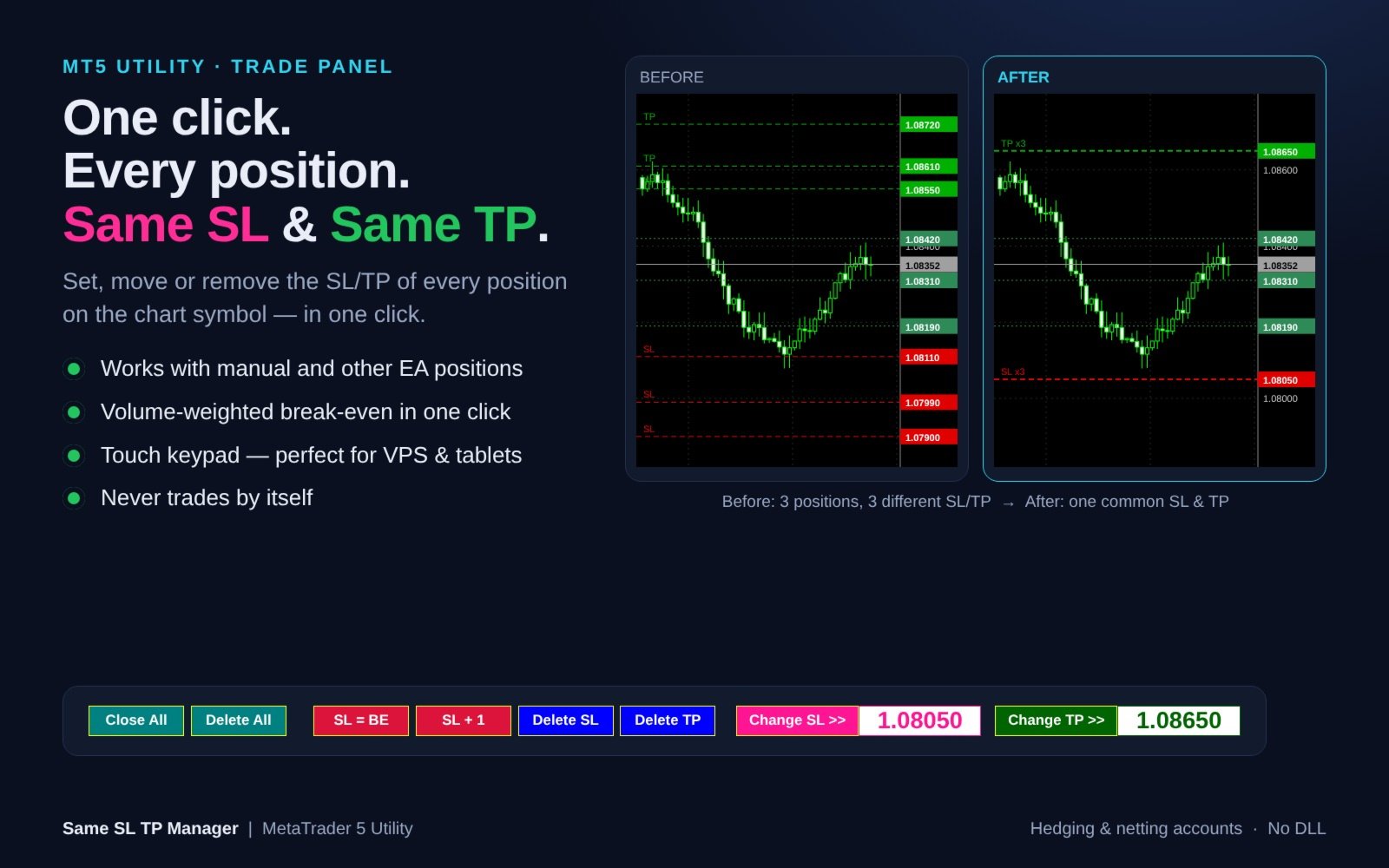
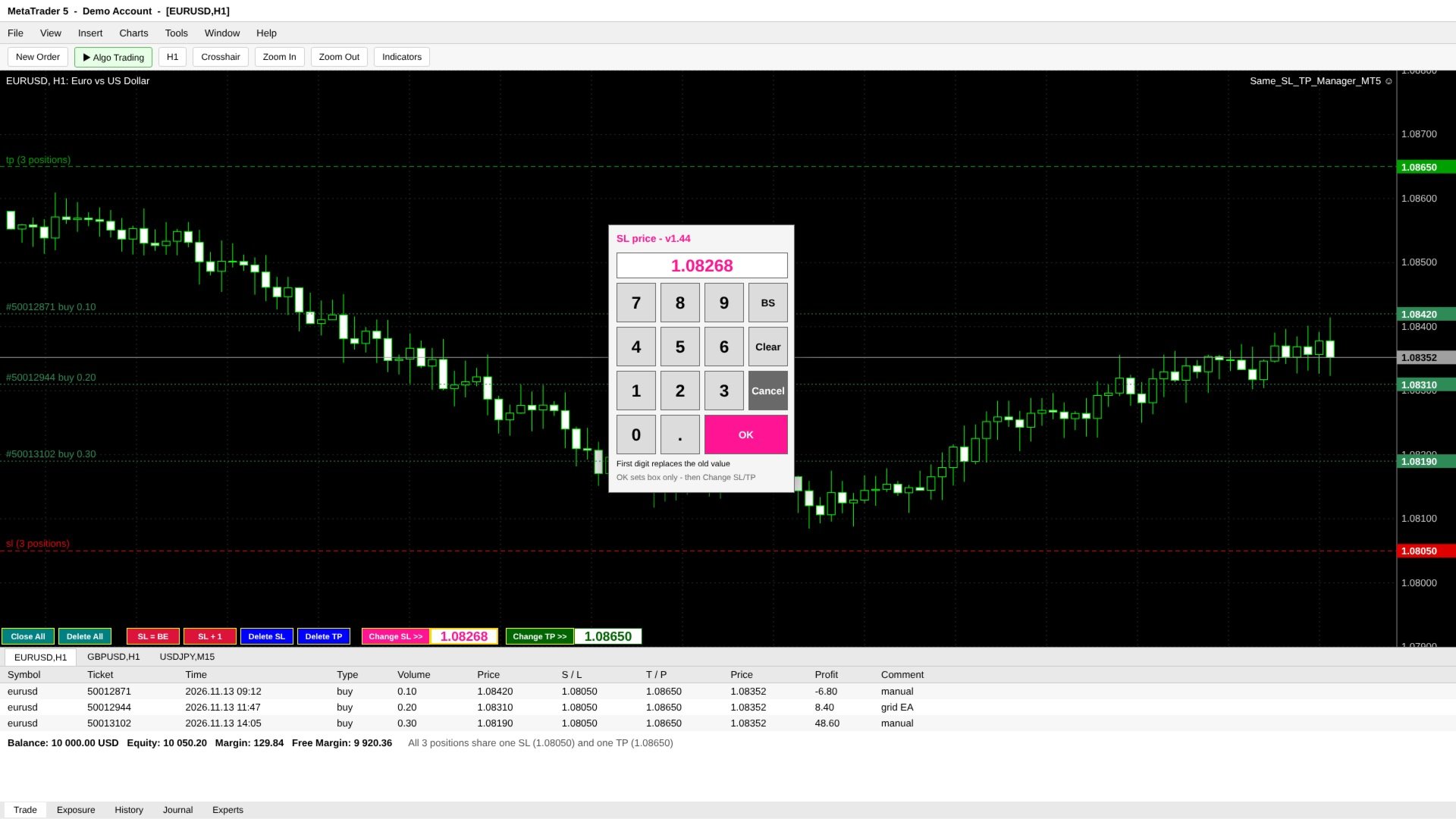
チャート銘柄の全ポジションに、共通の損切り(SL)・利確(TP)をワンクリックで設定・移動・削除できるトレードパネル。建値ストップ、SL+1pips、全決済、待機注文一括削除、チャート上のタッチ用テンキーを搭載。EAが勝手に売買することはありません。

==================================================================
詳細説明
==================================================================
Same SL TP Manager は、チャート上のすべてのポジションに「共通のSL」と「共通のTP」をワンクリックで設定するユーティリティです。

ナンピン・買い増し・グリッド・複数のスキャルピングなどでポジションが増えると、SLとTPがポジションごとにバラバラになります。取引タブで1つずつ変更するのは時間がかかり、相場が速い時ほどミスも起きがちです。本ツールはチャート上に1列のコンパクトなパネルを表示し、現在の銘柄の全ポジションを「ひとつ」としてまとめて管理できます。

手動で建てたポジションにも、他のEAが建てたポジションにも対応。パネルが自分から新規注文を出したり、勝手に動作したりすることは一切ありません。注文が送信されるのは、あなたがボタンを押した時だけです。


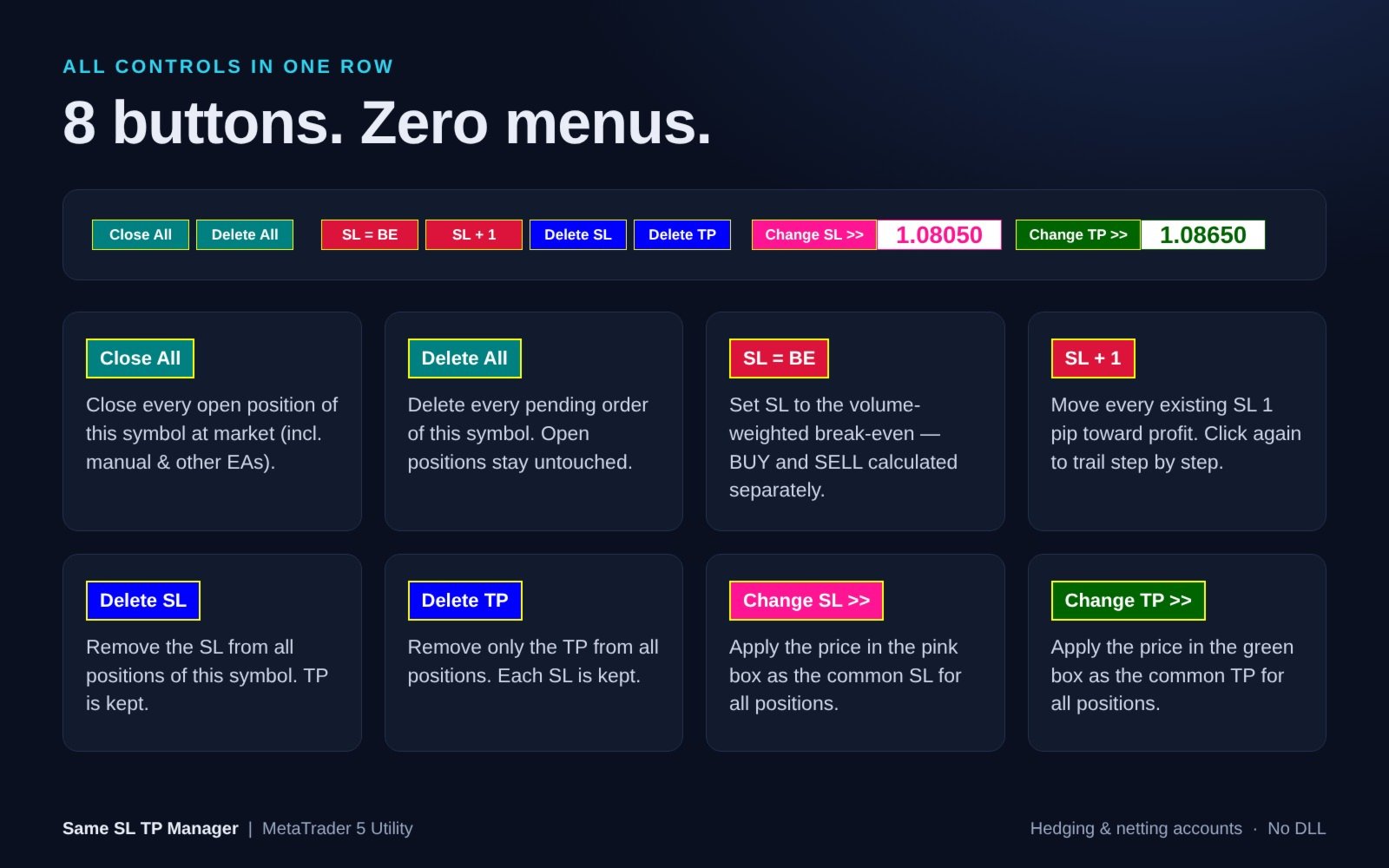
各ボタンの機能

- Close All - チャート銘柄の全ポジションを成行で決済(手動・他EAのポジションも対象)。待機注文はそのまま残ります。
- Delete All - チャート銘柄の全待機注文(Limit / Stop / Stop Limit)を削除。保有ポジションとそのSL/TPには触れません。
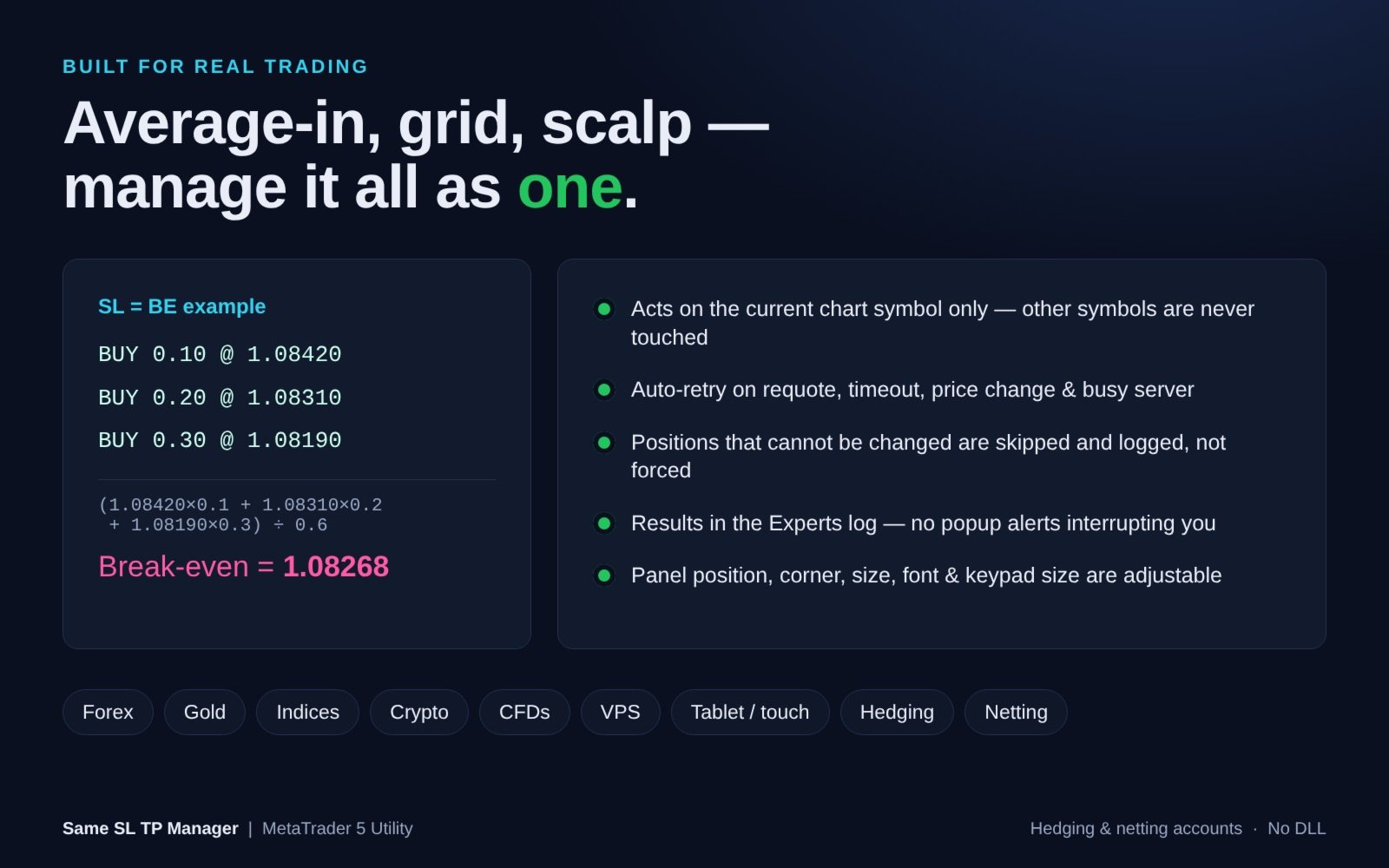
- SL = BE - ロット加重平均の建値にSLを設定。BUYとSELLは別々に計算するため、両建て(ヘッジ口座)でも使えます。
- SL + 1 - 既存の全SLを利益方向へ1pips移動。押すたびに段階的にトレールできます。
- Delete SL - 全ポジションのSLを削除(TPは維持)。
- Delete TP - 全ポジションのTPのみ削除(各SLは維持)。
- Change SL >> - ピンクの枠の価格を、全ポジション共通のSLとして適用。
- Change TP >> - 緑の枠の価格を、全ポジション共通のTPとして適用。


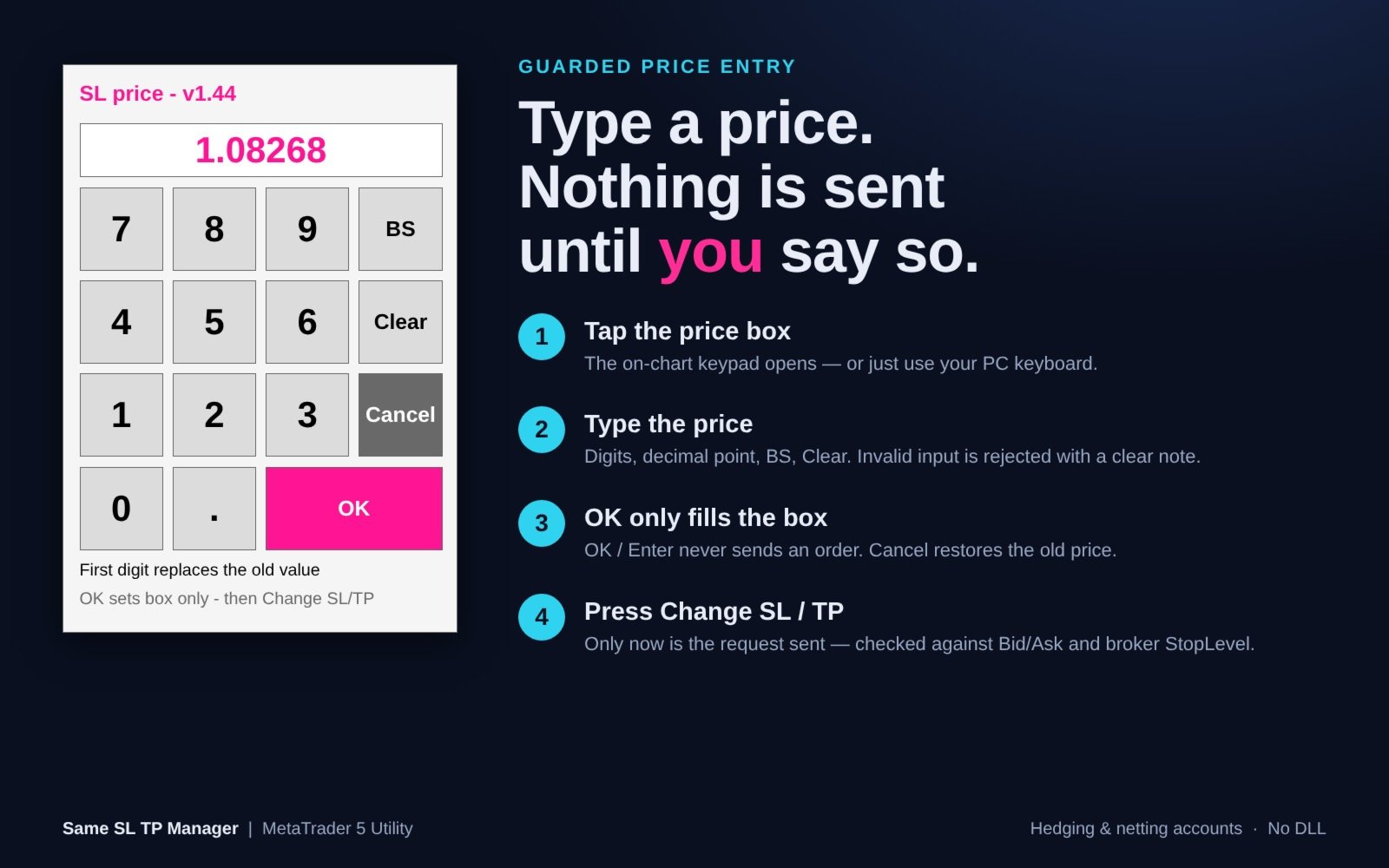
誤発注を防ぐ価格入力+タッチ用テンキー

1. ピンク(SL)または緑(TP)の価格枠をタップすると、チャート上にテンキーが開きます。PCのキーボード入力も可能です。
2. 数字・小数点・BS・Clearで価格を入力。
3. OK / Enter は「枠に価格を入れるだけ」。この時点では何も送信されません。Cancelで元の価格に戻ります。
4. Change SL >> / Change TP >> を押した時に、初めて注文が送信されます。

チャートオブジェクトへの文字入力が不安定になりがちなVPS・リモートデスクトップ・タブレット環境に最適です。テンキーはチャートのサイズに合わせて自動調整されます。


安全性と信頼性

- 対象はチャートの銘柄のみ。他の銘柄には一切触れません。
- 新しいSL/TPは、送信前に現在のBid/Askとブローカーのストップレベルでチェックします。
- 変更できないポジションは無理に変更せず、スキップしてログに記録します。
- リクオート・タイムアウト・価格変動・オフクオート・リクエスト過多・接続エラー時は自動リトライ。
- 不正な入力(文字、小数点2つ、0、桁数過多など)は画面上のメッセージで通知し、受け付けません。
- 0を入力してもSL/TPは削除されません(削除は Delete SL / Delete TP で行います)。
- 結果(対象数/変更/スキップ/失敗)はエキスパートログに出力。ポップアップでトレードを邪魔しません。
- オブジェクトが削除された場合や時間足を変更した場合も、パネルは自動で復元されます。


入力パラメーター

=== Panel Position(パネル位置)===
- Chart window index (SubWindow) - 表示するウィンドウ番号。0 = メインチャート。
- Panel corner (Corner) - 0 = 左上、1 = 右上、2 = 左下(初期値)、3 = 右下。
- Horizontal offset (Move_X) - 横方向の位置調整(ピクセル)。
- Vertical offset (Move_Y) - 縦方向の位置調整(ピクセル)。

=== Panel Appearance(パネル外観)===
- Button width (Button_Width) - ボタン幅。初期値70px、最小40。
- Font name (Font_Type) - フォント名。初期値 "Arial Bold"。
- Font color (Font_Color) - 文字色。初期値 白。
- Font size (Font_Size) - 文字サイズ。初期値8、最小6。

=== Price Input(価格入力)===
- Show touch keypad (Show_Touch_Keypad) - タッチ用テンキーを表示。初期値 true。
- Touch key size (Touch_Key_Size) - テンキーのボタンサイズ。初期値52px(チャートに自動フィット)。
- Input debug log (Input_Debug_Log) - 入力イベントの診断ログ。初期値 false。


対応環境

- MetaTrader 5(ヘッジ口座・ネッティング口座)
- FX、ゴールド、株価指数、仮想通貨、CFDなど、ブローカーが提供するすべての銘柄
- 1pips = 5桁・3桁表示の銘柄では10ポイント、それ以外は1ポイント
- DLL不要


使い方

1. 管理したい銘柄のチャートに Same SL TP Manager をセットします。
2. ターミナルの「アルゴ取引」を有効にし、EA設定の「全般」タブで「アルゴ取引を許可」にチェックを入れます。
3. ボタンを押すだけ。各ボタンにマウスを乗せると説明(ツールチップ)が表示されます。

ご注意:ストラテジーテスターではチャート上のボタンをクリックできません(MetaTrader 5の仕様)。そのためデモ版ではパネルの表示のみとなります。すべての機能はデモ口座・リアル口座で動作します。

ご注意:Close All と Delete All は確認なしで即時実行されます。手動・他EAで建てたものを含め、チャート銘柄のすべてのポジション/待機注文が対象です。

ご質問・ご要望はプライベートメッセージでお気軽にどうぞ。
おすすめのプロダクト
## Operating Principle **Manual Order Manager PRO BTC** is an Expert Advisor for MetaTrader 5 designed to **automatically manage trades opened manually by the trader**. The EA does not decide when to buy or sell. The user analyzes the market, chooses the direction, sets the lot size, and opens the position manually. From that point on, the system monitors the trade and applies the configured protection and management rules. The goal is to help the trader maintain a more disciplined approach
More stable MetaTrader 4 version is available here:  Lot Calculator Tool . This tool helps you to automatically calculate and manage risk, conveniently place orders visually, schedule orders, trail stops, move them to break-even and more. Features Place market or pending orders using draggable lines Schedule orders Calculate and limit risk using various methods See current spread See time till next candle Set custom order comments Trail stops Move stops to break-even See order profit/loss in p
Short Description Swing Timing Breakout EA is a smart Expert Advisor for MetaTrader 5 that combines trend filtering, momentum timing, and dynamic risk management to capture high-probability swing and breakout opportunities. Full Description Swing Timing Breakout EA is a professional trading robot designed for MetaTrader 5, suitable for traders who want a balance between automation, control, and disciplined risk management. This EA uses a trend-following and momentum confirmation approach ,
Veron Link Slave – Synchronized Grid, Martingale & Breakout Management Short Description Advanced synchronization tool designed to manage Grid, Martingale, and Breakout EAs. Automatically sends close-basket signals to the Master account upon profit target completion, minimizing slippage across different brokers. Full Description Veron Link Slave is a specialized utility developed to enhance the execution efficiency and risk management of multi-account or multi-broker trading setups. It is desig
「KS Auto Trade Close Manager Time Base」は、ユーザーが指定したローカルPC時刻に基づいて保有中の取引を自動決済するMetaTrader 5用エキスパートアドバイザー(EA)です。チャート上に表示されるシンプルなコントロールパネルを備えています。 主な機能 スケジュールによる自動決済(オプション):特定のローカル時刻(HH:MM、例:23:55)に取引を決済します。サーバー時刻ではなく、ターミナル/PCのローカル時刻(TimeLocal())を使用します。 3つの決済モード(入力設定またはパネルから選択可能) ALL(すべて) – 条件に一致するすべてのポジションを決済 PROFIT ONLY(利益のみ) – 現在利益が出ているポジションのみを決済 LOSS ONLY(損失のみ) – 現在損失が出ているポジションのみを決済 フィルター機能 全シンボル、または現在のチャートのシンボルのみを対象とする設定 マジックナンバーによるフィルター(0 = 無視/全対象) チャート上のダッシュボード 表示/非表示の切り替え リアルタイムの残

Exclusive Imperium MT5 — 自動売買システム Exclusive Imperium MT5 は MetaTrader 5 用のエキスパートアドバイザー(EA)で、市場分析アルゴリズムとリスク管理に基づいています。EAは完全自動で稼働し、トレーダーの介入は最小限で済みます。 注意!購入後すぐにご連絡ください 。設定手順をお渡しします! 重要: すべての例、スクリーンショット、テストはデモ目的のみです。あるブローカーで特定の通貨ペアが良好な結果を示しても、他のブローカーでも同様になるとは限りません。各ブローカーには独自のレート、スプレッド、取引条件があります。したがって、 各通貨ペアはユーザー自身が個別に最適化する必要があります 。実際の口座では 単一通貨モードのみ で稼働させてください。マルチ通貨モードのスクリーンショットは参考例にすぎません。市場環境は変化するため、最適化は少なくとも 年に1回 繰り返すことを推奨します。 重要情報: EAのデモ版は評価目的のみです。最適化なしのテスト結果はアルゴリズムの実際の動作を反映しません。完全な利用には、ブローカー、資金、選
Tarnix Evenlock
AL MOOSAWI ABDULLAH JAFFER BAQER
A BREAKEVEN STOP THAT STILL LOSES THE COMMISSION IS NOT BREAKEVEN. TARNIX EVENLOCK LOCKS THE REAL ONE. Tarnix Evenlock is a breakeven lock for MetaTrader 5 that counts what the trade really costs. When a position in scope, opened by hand or by another Expert Advisor, has moved in its favour by the trigger you choose (N x ATR, stored the moment the trade is first seen, or a fixed number of points), its stop loss is moved to the entry plus a buffer that pays the spread cushion, the round-turn comm
Introducing Neural Bitcoin Impulse - an innovative trading bot created using neural network training technology on voluminous market data sets. The built-in mathematical model of artificial intelligence searches for the potential impulse of each next market bar and uses the resulting patterns of divergence and convergence between the predictive indicators and the price to form high-precision reversal points for opening trading positions. The trading robot is based on the Neural Bar Impulse ind
Smart Trade Assistant Manager - Multi-Tab Trade Panel for MetaTrader 5 Smart Trade Assistant Manager is a professional on-chart trading panel that lets you open, manage and close trades in one click. The panel has 7 menus (Trade, Manage, Close, Auto, Shield, Info, Settings), SL/TP in pips or price, click-on-chart level picking, automatic lot calculation and smart partial closing. Works on every symbol: Gold (XAUUSD), Forex pairs, Silver, Indices and Crypto. Pip size is detected automatically
Orphira Gold
Mohammad Reza Rezaei
Orphira Gold is an automated trading system developed specifically for gold trading in MetaTrader 5. It combines adaptive trade management, equity-based position sizing and several layers of portfolio protection in one straightforward Expert Advisor. The system continuously evaluates market conditions and opens trades only when its internal requirements are met. When a position moves against the expected direction, Orphira Gold may use carefully spaced recovery positions. Every additional order
Pattern Recognition EA - From Learn to Earn. The market repeats itself. This EA finds every past repeat of the current candle sequence - and lets history vote the direction. ONE SHAPE. EVERY REPEAT IN HISTORY VOTES. The last N candles on your signal timeframe form a shape. The EA scans the history you choose - a fixed number of bars or everything your broker provides - for the SAME shape, and checks what happened next, every single time. Only when enough repeats exist AND a clear majority of t
HedgeSafe Trade Assistant リスク管理を重視した MetaTrader 5 用の裁量取引パネルです。 HedgeSafe は、BUY または SELL を押す前に、チャート上で取引の準備、検証、管理を行うためのツールです。 HedgeSafe はシグナル配信、相場予測、AI ボット、自動売買戦略ではありません。取引方向を決定せず、利益を保証しません。すべての取引判断はトレーダー自身が行います。 主な機能 口座残高の割合、または口座通貨の固定金額からロットを計算。 Stop Loss をポイントまたは価格で、Take Profit をポイント、価格、R 倍率で設定。 金額リスク、想定リターン、ロット、リスクリワード比を事前表示。 Entry、Stop Loss、Take Profit のチャートラインをパネルと同期。 BUY と SELL を個別に判定し、執行直前に方向別の最終検証を実行。 最小/最大数量、数量ステップ、tick size、tick value、stops level、freeze level を確認。 市場の利用可否、銘柄の取引モード、スプレッド
Executor Trader Panel (Sta) - Standard Version   is a multi-functional trading tool designed for traders. The trading panel integrates over 30 individual functions and more than 10 combined functions, providing traders with a highly flexible operational approach. Adapted for DPI: 96, 192. Main Features of the Executor: Instant Connection Status:   Immediately know if the connection with the broker is lost. Time Synchronization:   Instantly know the current local time and the time of the trad
Capital Management EA – Smart Risk Management & Profit Optimization for MT5 Take control of your trading capital with smart, automated strategies — fully optimized for MetaTrader 5 (MT5). Looking to protect your capital and maximize profits through automated money management strategies ? Capital Management EA is the all-in-one Expert Advisor for MetaTrader 5 (MT5) that helps you trade smarter, not harder. Core Features: 5-in-1 Capital Management Strategies – Built-in versatility Gr
You just blew your second funded account — not because your EA is broken, but because it traded the wrong way in the wrong market conditions. Market Regime Cockpit plugs directly into any existing EA with zero code changes, giving it the market awareness it was never built with. Stop losing challenges to drawdown and bad timing. What MRC Does For You Knows when to trade aggressively and when to back off — detects 5 distinct market regimes so your EA isn't firing trend entries into a choppy rang
Protects your MT5 account from trades that are not yours: positions and pending orders with an unknown magic number, and manual trades from places you do not trade from. In Act mode it closes them. Your own EAs are never touched. It never opens a trade. What it protects you from Someone else trading on your account: a person who has your password and trades from the phone app or the web terminal, when you tell it that you do not trade from there (InpManualTrades). An EA you did not mean to run:
Easy Trade Executor は、MT5向けの高速なポジションサイズ計算、注文執行、およびトレード管理ツールです。 Open Price、Stop Loss、Take Profit レベルをチャート上に直接配置し、自動的にポジションサイズを計算して、数回のクリックだけでリスクを管理しながら取引を開始できます。 なぜ Easy Trade Executor を選ぶのか? Easy Trade Executor は、単にリスク計算を行うだけでなく、チャート上で迅速かつ効率的に取引を管理したいトレーダーのために開発されました。 このツールは、ポジションサイズ計算、注文執行、トレード管理を1つのワークフローに統合し、手動計算やターミナルの複数ウィンドウを頻繁に切り替えることなく、トレードそのものに集中できるようにします。 Easy Trade Executor の主な機能: リスクに基づく自動ポジションサイズ計算; チャート上から直接 Market Order と Pending Order を発注; 自動的なポジション管理のための Trailing Stop; ワンクリックでの決
Trade Assistant MT5 Pro – One Click Trading Panel | Auto Lot Size | Risk Management Tool Short Description Trade Assistant MT5 Pro is a professional trading utility for MetaTrader 5 that allows traders to execute trades with one click, manage risk automatically, and improve trading accuracy using advanced tools like ATR stop loss, risk reward ratios, breakeven, and trailing stop. Full Description Trade Assistant MT5 Pro is a powerful manual trading panel designed for traders who want speed, prec
This is a multi-symbol, multi-timeframe, table-based indicator for MetaTrader 5 that identifies 46 types of candlestick formations. Each formation has its own image for easier recognition. The indicator includes popular patterns such as Engulfing, Hammer, Three Line Strike, Piercing, and Doji-like candles. You can check the full list of patterns in the screenshots below. Also you can not only switch all bearish or bullish patterns from input, but also select formation for a specified symbols and
SMC Drawing Tool - Advanced Charting and Analysis Assistant SMC Drawing Tool is a professional technical analysis indicator for MetaTrader 5, designed to enhance the Smart Money Concepts (SMC) trading methodology. It deeply integrates a comprehensive suite of drawing tools with an intelligent labeling system, and includes advanced features such as a floating toolbar, color panel, text templates, multi-timeframe display and chart synchronization. This tool is dedicated to streamlining a trader's
Margin Call Shield – Defend Your Margin on Your Terms Margin Call Shield is a tool for MetaTrader 5 traders who want to decide for themselves which open positions are closed during margin call situations before the platform does so automatically based on its internal rules. By default, the broker or platform decides which positions to close, often using undisclosed algorithms. Margin Call Shield lets you set this order according to your own strategy. Why Was Margin Call Shield Created? In a mar
Aurum Apex Gold trades one instrument -- XAUUSD -- with one idea: institutions fill large orders where retail stops sit, and the reversal that follows is tradable when, and only when, price confirms it. How a trade is built 1. Liquidity sweep. A tracked pool of resting orders (previous day/week    high or low, session extreme, equal highs/lows, untapped swing) is    penetrated and then reclaimed. Penetration and reclaim are both measured in    ATR, never in fixed points, so the logic scales w
Gold Liquidity Master Pro is a high-precision algorithmic trading system designed exclusively for Gold (XAUUSD). Unlike conventional bots that use lagging indicators, this Expert Advisor (EA) operates based on Price Action and Institutional Liquidity Taking, identifying false breakouts on 4-hour (H4) candles where large banks typically "clean up" weak hands before a major move. Recommendations Symbol: XAUUSD (Gold) Timeframe: H4 Minimum Deposit: $500  Account Type: ECN / Raw Spread with low
Trade Manager Bastion は、リスク防御機能を内蔵した裁量トレーダー向けのトレードパネルです。チャート上で各トレードを計画してリスクからロットを計算し、エントリー後は自動で管理し、調子の悪い日のオーバートレードを止める1日の上限を設定できます。 Trade:チャート上で注文を計画 エントリー、ストップロス、テイクプロフィットをチャート上のラインで表示:ドラッグまたは価格入力、 矢印で SL と TP を数ポイントずつ移動 ストップロスでのリスク % から、またはテイクプロフィットで狙う利益 % からロットを計算 R:R は1つの欄で設定、エントリーを動かすときに TP または SL を固定するロック付き Market、Limit、Stop 注文、Buy と Sell;REVERSE で買いプランを同じ距離の売りプランに切り替え アンカーボタン:ドラッグしたエントリーを市場価格に戻す 送信前の証拠金チェック:注文を出せない場合に表示 最小ロットの壁:ロットがブローカーの最小値を下回る位置で SL と TP が止まる パネル内で気配値表示から銘柄を選択 Manage:
Cascade Exit Conductor は MetaTrader 5 用のポジション管理ユーティリティです。手動または任意の EA が開いた既存のトレードを監視し、出口を代行します。ストップを建値にロックし、段階的な部分決済カスケードで利益を確保し、残りを ATR または固定距離でトレールし、最大保有時間の経過後にポジションを決済することもできます。チャート上のコンパクトなコックピットからワンクリックで操作します。 自分でトレードを開くことはなく、方向を予測もしません。ポジションが無ければ待機するだけです。 行うこと・行わないこと 行う: ストップを建値へ移動、最大 3 段階の部分利確、残りのトレール、任意で時間による決済。 行わない: 新規注文を出さない、待機注文を置かない、ナンピンしない、マーチンゲール・グリッド・両建てをしない。既存ポジションのリスク低減と出口管理のみを行います。 クイックスタート 自動売買を許可: ツール > オプション > エキスパートアドバイザー で "Allow Algo Trading" にチェック(ツールバーの Algo Trading ボタンも
SMART TRADING SIGNALS MT5 Precision. Clarity. Confidence. Elevate Your Trading Experience with Smart Trading Signals Smart Trading Signals MT5 is a professional trading indicator designed to provide traders with a clearer, more organized view of market movements. Through an elegant visual interface, it presents trading opportunities and essential price levels in a comprehensive design that combines precision, clarity, and ease of use. Developed to be a practical trading companion, Smart Trad
XAU Symmetry Protocol MT5 固定されたルールベースの執行と状態管理による保護を備えた、規律ある XAUUSD システム。 本 EA の目的は一つです。裁量やリスクの拡大を伴わず、毎セッション同じ再現性のあるロジックをゴールドに適用します。1 つのチャートで動作し、インジケーターの導入は不要です。ローソク足の確定ではなくティックに反応するため、どの時間足でも同じ挙動になります。 対象範囲は意図的に絞っています。マーチンゲールによる数量倍増、グリッドの積み上げ、含み損の平均化は行いません。ポジションサイズは入力値で指定し、保護は有利な方向にのみ動く Stop Loss ロジックが担います。 設定できる項目: ロット、エントリー価格距離、初期 Stop Loss、トレーリング距離と刻み、許容最大スプレッド、本 EA の注文を識別するマジックナンバー。 設計方針 単一銘柄への集中。 XAUUSD 用に作成されています。ブローカーの正確なシンボル名(接尾辞を含む)を使用してください。 リスクを拡大しない。 マーチンゲール、グリッド加算、ナンピンはありません。 固定構成。
Только сейчас вы можете приобрести  TradeOps Command Center с 10% скидкой всего за 630$. Акция действует до 01.04.2026 Для получение инструкции об использование утилиты обратитесь в личные сообщения! TradeOps Command Center — Профессиональный инструмент контроля риска и дисциплины в трейдинге TradeOps Command Center — это многофункциональная утилита для MetaTrader 5, разработанная для трейдеров, которые стремятся к системному и дисциплинированному подходу к торговле. Продукт объединяет в себе у
【商品名】 Magic Closer Panel MT5(マジックナンバー指定 一括決済パネル) 【短い説明】 マジックナンバーと銘柄を指定して、ワンクリックで一括決済。特定のEAだけ、手動ポジションだけ、すべて――を買い決済/売り決済/全決済で。 【説明文】 Magic Closer は、チャート上に表示するコンパクトな一括決済パネルです。ワンクリックで決済できるだけでなく、「決済したいポジションだけ」を正確に選べるのが特長です。 1つの口座で複数のEAを動かしている、EAのポジションと手動ポジションが混在している――そんなとき、通常の「全決済」ボタンではすべてが決済されてしまいます。Magic Closer は「マジックナンバー」と「銘柄」の2つのフィルターを組み合わせて、決済対象をピンポイントで指定できます。 主な機能 マジックナンバーで絞り込み  ・All:マジック番号に関係なく、すべてのポジション  ・Manual (0):手動で建てたポジションのみ  ・任意の番号:特定のEAのポジションのみ  ・ / で保有中のマジック番号を順番に切替。入力欄に番号を
ICONIC BTC AI+ | SYNAPSE.PHENOTYPE S6 ENGINE(バージョン 15.00) 発売価格 現在価格:599 USD。 残りライセンス数:10。 次の価格帯:699 USD。 最終価格:1699 USD。 早期アクセス価格は製品リリースの現在のフェーズを反映したものです。現在のライセンス枠が終了し、次の価格帯が開放されるにつれて価格は段階的に引き上げられます。現在の価格が終了する明確な予定日は設定されていません。 ビットコインは為替通貨ペアではありません。ゴールドのような値動きをせず、株価指数のようにセッションの境界を尊重するわけでもなく、ボラティリティの特性は一時間の取引の中でさえ変化することがあります。落ち着いた値動きの通貨向けに作られた汎用の自動売買システムは、BTCUSDが安定して示さない市場の挙動を前提としているため、ここではしばしば機能しません。 ICONIC BTC AI+ はBTCUSD専用に設計されています。エントリー条件の検証からAIによる意思決定のルーティング、リアルタイムのリスク調整に至るまで、アーキテクチャのあらゆる層がこの市
このプロダクトを購入した人は以下も購入しています
Farmed Hedge Yield Farming | All Markets (Manual - Hybrid - Semi/Automated EA) VERIFIED TRADING RESULTS - Farmed Hedge Yield Axi Copy:  https://www.mql5.com/en/signals/2356376 - Farmed Hedge Yield Exn Copy:   https://www.mql5.com/en/signals/2356404 - Farmed Hedge Yield V Copy:  https://www.mql5.com/en/signals/2357156 IMPORTANT NOTICE: FarmedHedge is a MANUAL-FOCUSED TRADING UTILITY ,not a fully automated EA. Results shown on this Signal include manual trades and overall strategic management.
Dealer's Panel No signal decides anything here — a hand does. One click, and the panel calculates what's underneath: lot size from risk, target from a 30-step balance ladder that remembers exactly how far an account has climbed. Toggle between market and pending without touching an input field. Set a stop, and the take-profit can write itself — a fixed share of the balance, translated into price with no arithmetic left for the trader to get wrong. One trade live at a time; it won't let a seco
REVDEN AI Desk:あなた自身の AI との一つの会話で、REVDEN のマーケットコンテキストをもとにトレードを運営する トレードのすべてを一つの会話で運営する姿を想像してみてください。 REVDEN AI Desk はそれを MetaTrader 5 にもたらします。あなた自身の AI に相場をどう読んでいるかを尋ねると、AI はあなたが取引する銘柄について REVDEN の完全なコンテキストをもとに答えます。銘柄の状態、リスク像、今後の指標発表まで含めてです。AI の提案はエントリー、ストップ、ターゲット、リスクとともに届き、合うものをあなたが承認します。ルールの変更も同じ方法です。変えたい点を書けば、AI が新しいルールブックの草案を作り、採用するかどうかはあなたが決めます。会話の周りには、マーケット全体が一つの画面にまとまっています。 デスクとセットアップガイドをご覧ください。 すべての画面、すべての設定、そしてあなた自身の AI との最初のステップ: stein.investments/products/revden-ai-desk AI との一つの会話、マーケッ
YuClusters
Yury Kulikov
4.93 (43)
Attention: You can view the program operation in the free version  YuClusters DEMO .  YuClusters is a professional market analysis system. The trader has unique opportunities to analyze the flow of orders, trade volumes, price movements using various charts, profiles, indicators, and graphical objects. YuClusters operates on data based on Time&Sales or ticks information, depending on what is available in the quotes of a financial instrument. YuClusters allows you to build graphs by combining da
The Patch It never opens a trade. It walks behind the ones that did. Every open position, every pending order — checked twice a second for the one thing that's easy to forget: a stop, a target. Found bare, it doesn't ask. It writes the missing number in, measured in points from wherever the position began, and moves on to the next. No strategy, no opinion on direction. Just the quiet assumption that nothing should ever sit on the market unprotected — not because someone decided it shouldn't,
Floor Watch
Syed Tauqeer Hussain Shah
Floor Watch One number, watched every thirty seconds: how far equity has fallen since the day began — or since its highest point, if it's told to trail the peak instead of the open. Cross the line and it doesn't argue. Every open position closes, every pending order vanishes, and anything that slips through afterward gets shut the moment it appears. Not asked. Removed. The floor holds until the clock turns 5 AM Pakistan time — then, and only then, does the day start over. One rule. No except
One button. One trade. MT5 Trading Deck is a hotkey trading panel for MetaTrader 5 that turns the platform into a keyboard-driven execution cockpit. Stop loss, take profit and lot size are pre-calculated for every key; the moment you press, a market order is live on the broker. A complete technical user manual is attached in the product Comments section. It documents every input parameter, the full hotkey map, the recommended Stream Deck XL layout, and the advanced workflows for Pre-Limit orders
一度の購入で、現在提供中および今後リリースする私のすべての MT4・MT5 インジケーターを追加料金なしで受け取れます。 購入後、受け取り方法について私にお問い合わせください。 10 件の購入ごとに 50$ ずつ、最大 999$ まで値上げする予定です。購入手続き時に Market に表示される価格が適用されます。 信頼するインジケーターをそのままに。周辺の取引作業を自動化。 あなたのシグナル。あなたのルール。あなたの取引執行。 信頼する MT5 インジケーターはあるのに、チャートの監視、シグナル待ち、ロット計算、発注、各ポジションの管理を手作業で行っていませんか? Stratiora Signal Engine MT5 は、これらの作業をつなぎます。対応する買い・売りバッファのシグナルを、エントリー、取引量計算、Stop Loss、Take Profit、フィルター、ポジション管理、口座保護までの自動処理に変換できます。 インジケーターや取引アイデアを変えるたびに別の EA を依頼する代わりに、柔軟な一つのエンジンで各シグナルの取引方法を決められます。 あなたのシグナル。あなたのル
Master Your Trading Discipline   Stop losing your hard-earned gains to overtrading and emotional decisions. The Discipline Tool is your ultimate trading assistant, ensuring strict risk management in real-time. Key Protection Features: Advanced Drawdown Defense : Automatically halts trading if your daily drawdown exceeds a preset threshold (percentage or dollar amount). Real-Time Equity Lock : Safeguard profits by referencing peak equity, ensuring drawdown stays within control. Hard Profit Target
Trading Chaos Expert
Hennadii Stanilevych
5 (11)
This software has no equals in the world and represents a universal trade "console" covering trading signals, automated market entry, setting of Stop Loss and Take Profit, as well as Trailing Profit for multiple trades at the same time in a single open window. Intuitive control of the Expert Advisor in "three clicks" ensures a comprehensive use of all its functions on different computers, including tablets PCs. Interacting with additional signal indicators that mark the chart to give a real mark
Copy your MT5 trades to Interactive Brokers You keep using MT5. Every order you open or close is sent to your IB account. In real time. No coding. No changes to your strategy or EA. Try it first Rent 1 month: $30. Test on a live or paper account. What it does Real-time copying: same direction, reverse, or one side only. Map any MT5 symbol to any IB symbol. Set a lot ratio for each. Forex, Futures, Stocks, CFDs, Metals and Crypto. Position sync: both accounts checked, any difference fixed. Optio
Quant AI Agents are independent trading Expert Advisors. Instead of trading using a fixed strategy like other conventional EAs, Quant AI Agents   is a   multi-agent AI trading framework   that turns natural-language strategy prompts into live.  WANT THE SAME RESULTS AS MY LIVE SIGNAL?   Use the exact same brokers I do:   IC MARKETS , IC TRADING   .  Unlike the centralized stock market, Forex has no single, unified price feed.  Every broker sources liquidity from different providers, creating un
The  Easy Strategy Builder (ESB)  is a " Do It Yourself " solution that allows you to create a wide range of the automated trading strategies without any line of codes. This is the world’s easiest method to automate your strategies that can be used in STP, ECN and FIFO brokers. No drag and drop is needed. Just by set conditions of your trading strategy and change settings on desired values and let it work in your account. ESB has hundreds of modules to define unlimited possibilities of strategi
Unlimited Trade Copier Pro MT5 is a tool to copy trade remotely to multiple MT4, MT5 and cTrader accounts at different computers/locations over internet. This is an ideal solution for you if you are a signal provider and want to copy your trades to other receivers globally on your own rules. One provider can copy trades to multiple receivers and one receiver can get trade from multiple providers as well. The provider can even set the subscription expiry for each receiver, so that receiver will n
Adam FTMO MT5
Vyacheslav Izvarin
5 (2)
ADAM EA Special Version for FTMO Please use ShowInfo= false for backtesting ! Our 1st EA created using ChatGPT technology Trade only GOOD and checked PROP FIRMS  Default parameters for Challenge $100,000 Tested on EURUSD and GBPUSD only  Use 15MIN Time Frame Close all deals and Auto-trading  before Weekend at 12:00 GMT+3  Friday For Prop Firms MUST use special Protector  https://www.mql5.com/en/market/product/94362 --------------------------------------------------------------------------------
Features   With MT5 to Interactive Brokers(IB) Trader, you can: 1. Load chart data from IB to MT5, and Analyze with all standard or customer Indicators. 2. Place Orders to IB Account Directly in MT5. 3. Make your Own EAs upon IB Securities by only making minus changes of the trading function. Usage 1) Installation Copy the "Mt5ToIBTraderEn.ex4" and sample files to [MT5 Data Folder]->MQL5->Experts.  2)  MT5 Settings Add the IP Address to the MT5 Allowed URLs in 'Tools->Options->Expert Adviso
AI Arbitron — an MT5 Spot vs Future Gold Arbitrage Bot designed to capture price discrepancies between correlated Spot and Future instruments through hedged, non-directional trading. Platform: MT5 Use Swap Free Accounts, many of the regulated broker gives swap free accounts for 7 days, make use of it by only buying lower price asset and selling higher price asset, hold your position for 2-3 days. Asset: Mainly Gold (XAUUSD) using Spot + Future/CFD price feeds. Core strategy: It monitors the p
Mentfx Mmanage mt5
Anton Jere Calmes
4.25 (8)
The added video will showcase all functionality, effectiveness, and uses of the trade manager. Drag and Drop Trade Manager. Draw your entry and have the tool calculate the rest. Advanced targeting and close portions of a trade directly available in tool (manage trades while you sleep). Market order or limit order on either side with factored spread. Just draw the entry, the tool does the rest. Hotkey setup to make it simple. Draw where you want to enter, and the stop loss, the tool calculates al
TradePad
Ruslan Khasanov
5 (1)
TradePad は、手動取引とアルゴリズム取引の両方に使用できるツールです。複数の取引商品での迅速な取引操作とポジション管理のためのシンプルなソリューションを提供します。 注意: アプリケーションは戦略テスターでは動作しません。 デモアカウント用のアプリケーションの試用版とすべてのツールの説明 アプリケーション インターフェイスは高解像度のモニターに適応しており、シンプルで直感的です。快適な作業のために、トレーダーには次のツール セットが提供されます: 取引操作の管理、メイン チャートの期間の切り替え、TradePad 商品の切り替えを行うホット キー マネージャー。 ポジションを開くときや保留中の注文を設定するときに、ドローダウンのリスクを評価し、潜在的な利益を計算するために取引レベルをマークするツール。 複数の取引シンボルを視覚的に監視し、アルゴリズム取引の取引シグナルを受信するための MultiCharts ツール。利便性のために、取引ペアのセットを整理できます。これにより、複数の時間枠で価格を監視し、複数の通貨取引を行うことができます。 履歴の任意の期間の取引統計を表示するた
Hedge Trimmer & Roll-Over EA Managing a hedged position means carrying two opposing trades simultaneously. Over time, the losing side grows while the profitable side offsets it. The standard problem is that closing the loser costs money you may not have sitting in cash — it has to come from somewhere. Hedge Trimmer EA solves this by using the floating profit on your winning trades as the funding source to progressively close down the losing side. It identifies which trades are in profit, uses a
News Trader Pro is a unique robot that allows you to trade the news by your predefined strategy. It loads every piece of news from several popular Forex websites. You can choose any news and preset the strategy to trade it, and then News Trader Pro will trade that news by selected strategy automatically when the news comes. News release gives opportunity to have pips since the price usually has big move at that time. Now, with this tool, trading news becomes easier, more flexible and more exciti
If you wish to draw Support and Resistance lines, view: daily market opening, classical pivot levels, Fibonacci pivot levels, trend lines, Fibonacci levels, the remaining time to candle closing, and current spread. If you seek to place your orders with the exact lot that meets your desired stop loss risk. If you wish to do all this and more with just one click, then this is the perfect tool to use. This tool will allow you to feel more relaxed when deciding to open orders, as well as predicting
The new version of  MirrorSoftware 2021  has been completely rewriten and optimized.  This version requires to be loaded only on a single chart because  it can detect all actions on every symbol and not only the actions of symbol where it is loaded. Even the  graphics and the configuration mode  have been completely redesigned. The MirrorSoftware is composed of two components (all components are required to work):  MirrorController  (free indicator): This component must be loaded into the MASTER
ClusterSecond
Rafil Nurmukhametov
4.78 (32)
The utility allows you to build different types of graphs: Seconds chart from 1 second to 86400 seconds Tick chart from 1 tick and above The volume chart Delta chart Renko chart Range chart Demo version of the utility https://www.mql5.com/ru/channels/clustersecond Built-in indicators for volumetric analysis: daily market profile and market profile of the selected timeframe, Cluster Search Imbalance VWAP Dynamic POC, VAH, VAL the profile depth of the market vertical volume with various display op
The script displays info about the share's corporate reports and dividends. The data is downloaded from   investing.com : Report date Profit per share (EPS) Revenue Market capitalization Amount of dividends Date of payment of dividends Dividend income The product cannot be tested in the tester (since it is not possible to receive data from the Internet). Before launching:  Add 2   URL   https://ru.investing.com/earnings-calendar/Service/getCalendarFilteredData  and   https://ru.investing.com/di
Telegram Notify MT5 Telegram Notify MT5 is an utility tool to bridge your MetaTrader 5 activities to your Telegram chat/channel. It is useful for monitoring your MetaTrader 5 account by sending a notification to your particular Telegram chat/channel when someone/EA is placing trades, modifying order's TP/SL, closing trades and etc. This EA does not place any trade for your account. This EA also could be a convenient tool for monitoring other's EA trading activities or a tool for publishing your
Telegram ChartSnap MT5 is an utility tool to bridge your MetaTrader 5 activities to your Telegram chat/group/channel. It will screen shot your MetaTrader 5 chart and send it to your dedicated Telegram chat/group/channel through a Telegram bot. The whole process will keep repeating based on a time cycle that predetermined by the user. It is a convenient tool for those who like to get access to their favorite system/dashboard that only available at MetaTrader Desktop. Beside that, trader can easi
Quick operation, quick purchase, sale, empty operation. Provide three buttons: Buy, Sell, empty. Buy: Quickly place more orders after clicking, default 1 hand, profit point and stop-loss point are 110 points, after successful order can be manually modified. Sell: Quickly place an empty order after clicking, default 1 hand, profit point and stop-loss point are 110 points, can be manually modified after the order is successful. Empty: Quickly clear all orders, including purchase and s
1. Record the price data for each Tick transaction. Data file contents: "Tick time", "ASK price", "BID price", "SPREAD SPREAD", "Tick quoted quantity". 2. Meanwhile, generate a quotation data file with a 1-minute period. Content of 1min data file: "ASK time", "ASK OPEN price", "ASK HIGH price", "ASK LOW price", "ASK CLOSE price", "BID time", "BID OPEN price", "BID HIGH price", "BID LOW price", "BID CLOSE price", "Tick quoted quantity". 3. Save all quotation data in one file every day, which is c
私は連星の利用に対するその商用戦略をMT5で自動化しました、そして、我々のMt5BridgeBinaryで、私はそのBinary口座に命令を送りました、そして、私は以下をリストします:簡単なもののこの方法を操作し始めてください! 専門家のアドバイザーは、頑健さテストを最適化して、認識するために、作るのが簡単です;また、テストでは、その長期の収益性(我々がその最高の戦略をBinaryに接続するためにMt5BridgeBinaryをつくった理由です)を、我々は推定することができます。 特徴: - それは、私が望んだくらい多くの戦略を使用することができます。(専門家のアドバイザー)。 - 彼は、更なるプログラムを必要としません。 - 時間枠を輸入することなく、我々のEAを囲んでください。 - それは、すべての開いた活動を視覚化することができます。 - 彼だけは、すべての命令を受けるために1つのグラフだけの中で我々のEAを実行する必要があります。 - 我々のEAが働くように、それは複雑な構成を必要としません。 入場パラメータ: - メール:電子メールは、Binaryのその報告に関するも
作者のその他のプロダクト
================================================================== 製品名 ================================================================== Same SL TP Manager MT4 ================================================================== 短い説明 ================================================================== チャート銘柄の全ポジションに、共通の損切り(SL)・利確(TP)をワンクリックで設定・移動・削除できるトレードパネル。建値ストップ、SL+1pips、全決済、待機注文一括削除、チャート上のタッチ用テンキーを搭載。EAが勝手に売買することはありません。 ================================================================== 詳細説明
================================================================== 商品名 ================================================================== Total PL Close Manager MT4 (日本語の副題を付ける場合の例:合計損益で一括決済・共通TP/SL・利益保護) ================================================================== 説明文 ================================================================== Total PL Close Manager は、MetaTrader 4 用のポジション管理ユーティリティです。対象ポジションの合計損益を監視し、合計の利確目標または損切目標に達したら対象ポジションをまとめて決済します。また、銘柄ごと・BUY/SELL ごとに共通の TP/SL 価格を計算して各ポジシ
【商品名】 Magic Closer Panel MT4(マジックナンバー指定 一括決済パネル) 【短い説明】 マジックナンバーと銘柄を指定して、ワンクリックで一括決済。特定のEAだけ、手動ポジションだけ、すべて――を買い決済/売り決済/全決済で。MetaTrader 4版です。 【説明文】 Magic Closer は、チャート上に表示するコンパクトな一括決済パネルです。ワンクリックで決済できるだけでなく、「決済したいポジションだけ」を正確に選べるのが特長です。 1つの口座で複数のEAを動かしている、EAのポジションと手動ポジションが混在している――そんなとき、通常の「全決済」ボタンではすべてが決済されてしまいます。Magic Closer は「マジックナンバー」と「銘柄」の2つのフィルターを組み合わせて、決済対象をピンポイントで指定できます。 主な機能 マジックナンバーで絞り込み  ・All:マジック番号に関係なく、すべてのポジション  ・Manual (0):手動で建てたポジションのみ  ・任意の番号:特定のEAのポジションのみ  ・ / で保有中のマジック
============================================================== 商品名 ============================================================== Daily Max Floating Loss Tracker MT4(デイリー最大含み損トラッカー) ============================================================== 短い説明 ============================================================== 1日ごとの最大含み損と日利(確定損益)を並べてチャートに表示。チャートを閉じても、MT4を再起動しても記録が消えないインジケーターです。 ============================================================== 説明文(全文) ============================================
================================================================== 商品名 ================================================================== Total PL Close Manager MT5 (合計損益で一括決済・共通TP/SL・利益保護) ================================================================== 説明文 ================================================================== Total PL Close Manager は、MetaTrader 5 用のポジション管理ユーティリティです。対象ポジションの合計損益を監視し、合計の利確目標または損切目標に達したら対象ポジションをまとめて決済します。また、銘柄ごと・BUY/SELL ごとに共通の TP/SL 価格を計算して各ポジションにサーバー側の注文として設
【商品名】 Magic Closer Panel MT5(マジックナンバー指定 一括決済パネル) 【短い説明】 マジックナンバーと銘柄を指定して、ワンクリックで一括決済。特定のEAだけ、手動ポジションだけ、すべて――を買い決済/売り決済/全決済で。 【説明文】 Magic Closer は、チャート上に表示するコンパクトな一括決済パネルです。ワンクリックで決済できるだけでなく、「決済したいポジションだけ」を正確に選べるのが特長です。 1つの口座で複数のEAを動かしている、EAのポジションと手動ポジションが混在している――そんなとき、通常の「全決済」ボタンではすべてが決済されてしまいます。Magic Closer は「マジックナンバー」と「銘柄」の2つのフィルターを組み合わせて、決済対象をピンポイントで指定できます。 主な機能 マジックナンバーで絞り込み  ・All:マジック番号に関係なく、すべてのポジション  ・Manual (0):手動で建てたポジションのみ  ・任意の番号:特定のEAのポジションのみ  ・ / で保有中のマジック番号を順番に切替。入力欄に番号を
============================================================== 商品名 ============================================================== Daily Max Floating Loss Tracker MT5(デイリー最大含み損トラッカー) ============================================================== 短い説明(商品カード・検索結果用) ============================================================== 1日ごとの最大含み損と日利(確定損益)を並べてチャートに表示。チャートを閉じても、MT5を再起動しても記録が消えないインジケーターです。 ============================================================== 説明文(全文) ===============================
フィルタ:
レビューなし
レビューに返信