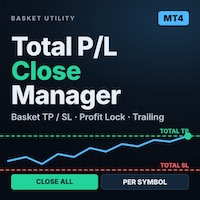
TotalPLForceCloseMT4

==================================================================
商品名
==================================================================
Total PL Close Manager MT4

(日本語の副題を付ける場合の例:合計損益で一括決済・共通TP/SL・利益保護)


==================================================================
説明文
==================================================================

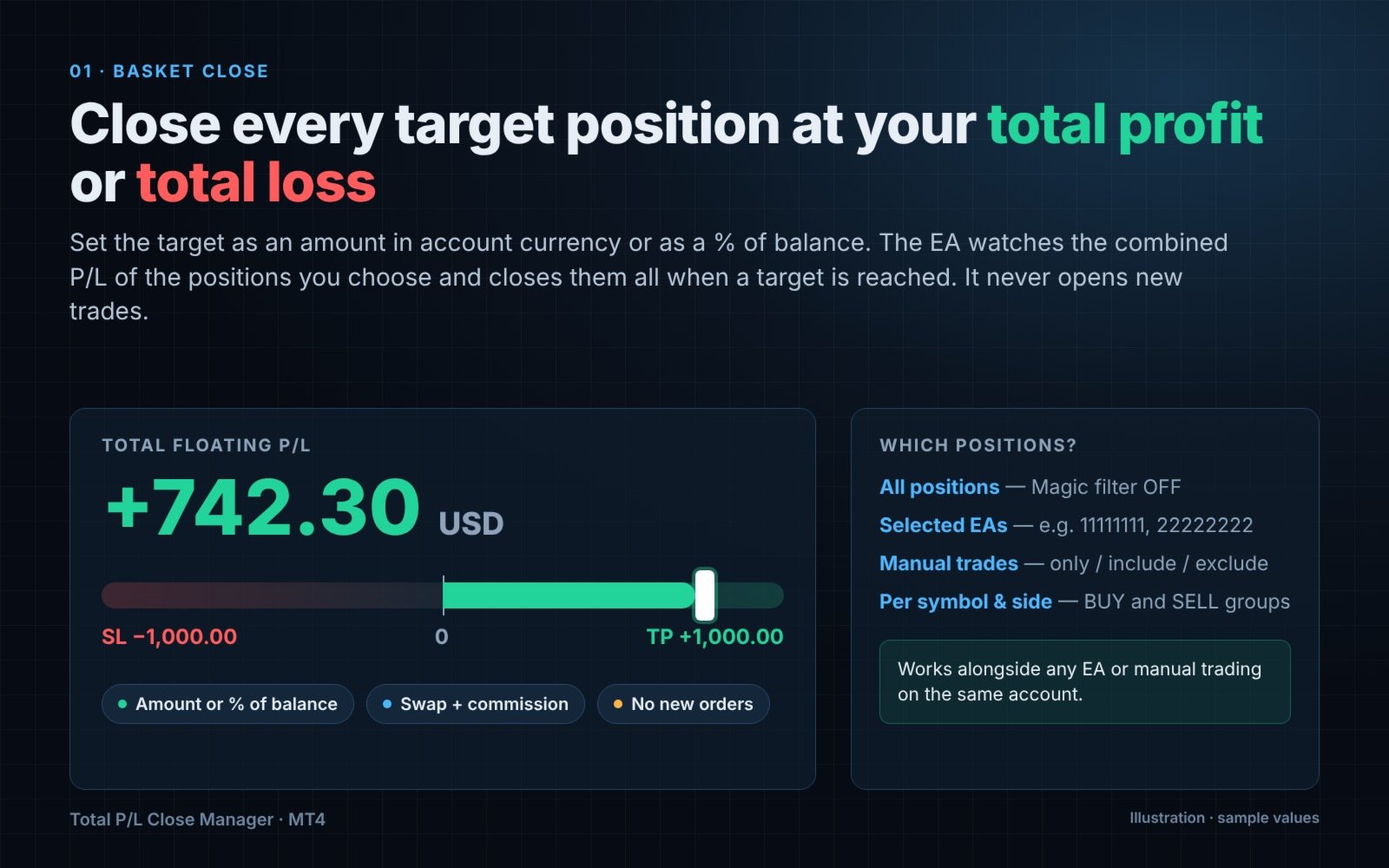
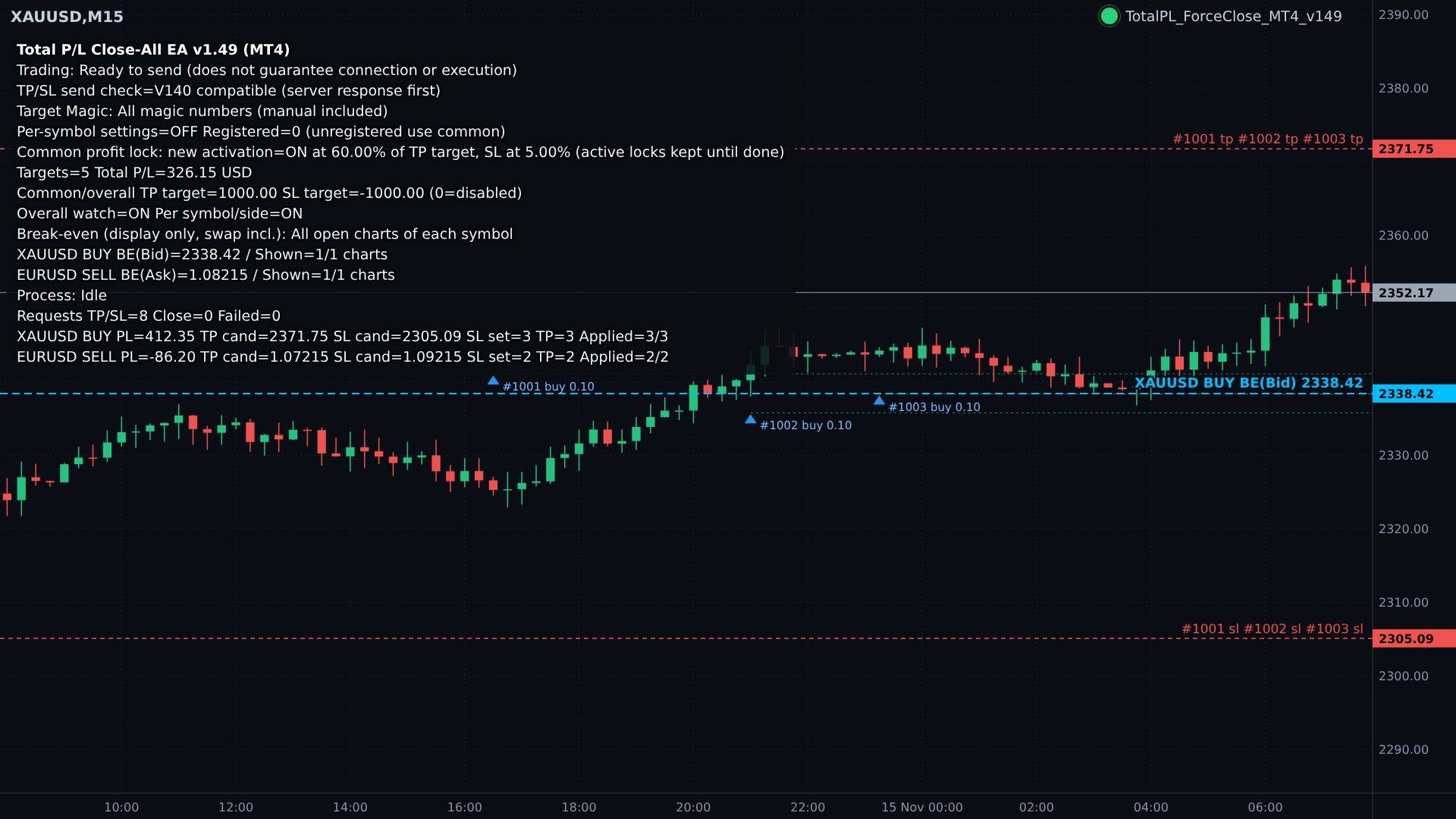
Total PL Close Manager は、MetaTrader 4 用のポジション管理ユーティリティです。対象ポジションの合計損益を監視し、合計の利確目標または損切目標に達したら対象ポジションをまとめて決済します。また、銘柄ごと・BUY/SELL ごとに共通の TP/SL 価格を計算して各ポジションにサーバー側の注文として設定し、含み益が伸びたグループの利益保護や、その SL のトレーリングも行えます。

本ユーティリティは新規注文を一切出しません。手動で建てたポジションや、他の EA が建てたポジションの管理だけを行います。


■ 主な機能

1. 合計損益による一括決済
 ・対象ポジションの合計損益が利確目標または損切目標に達したら、すべて決済します。
 ・目標は「口座通貨の金額」または「口座残高に対する%」で指定できます。
 ・利確と損切は個別にオン/オフできます。
 ・損益の基準は評価損益+スワップ+手数料です。

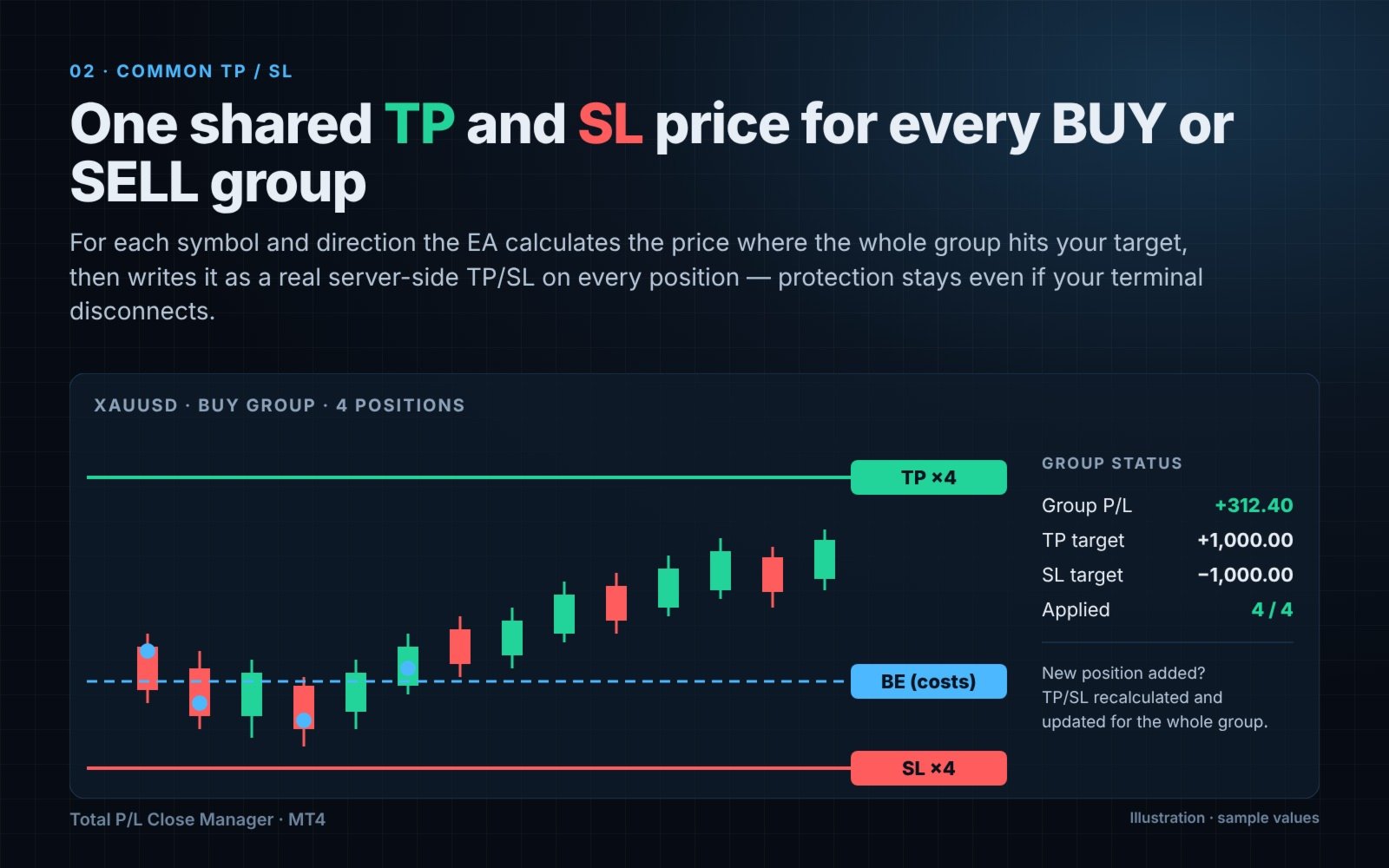
2. 銘柄・方向別の共通 TP/SL
 ・ポジションを銘柄ごと、BUY/SELL ごとのグループに分けて管理します。
 ・グループ全体が目標損益に達する価格を計算し、その価格をグループ内の全ポジションに TP/SL として設定します。
 ・TP/SL はサーバー側の注文なので、端末や VPS の接続が切れても有効なまま残ります。
 ・ポジションが追加・決済されると、グループ全体の共通 TP/SL を計算し直して更新します。

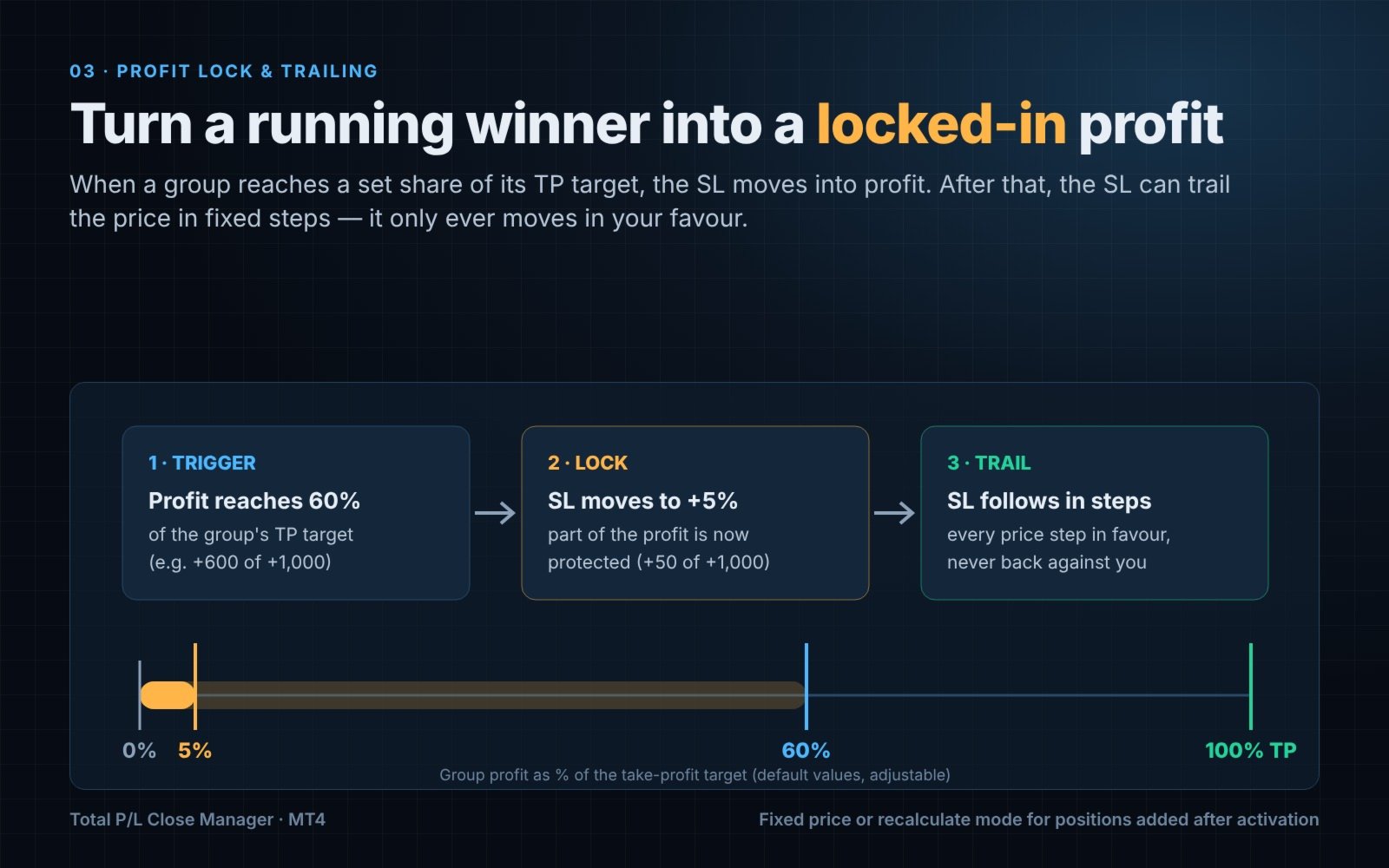
3. 利益保護
 ・グループの利益が TP 目標の一定割合(初期値 60%)に達すると、SL を利益側の小さな割合(初期値 5%)の位置へ移動します。
 ・発動後に追加されたポジションの扱いは 2 通りから選べます。発動時の SL 価格を固定して引き継ぐか、保護する利益を計算し直すかです(どちらの場合も SL を不利な方向へ戻すことはありません)。

4. 利益保護後のトレーリング
 ・利益保護の SL が設定された後、指定した価格幅(例:ゴールドなら 0.50)ごとに SL を価格に追従させます。
 ・SL は有利な方向にしか動きません。

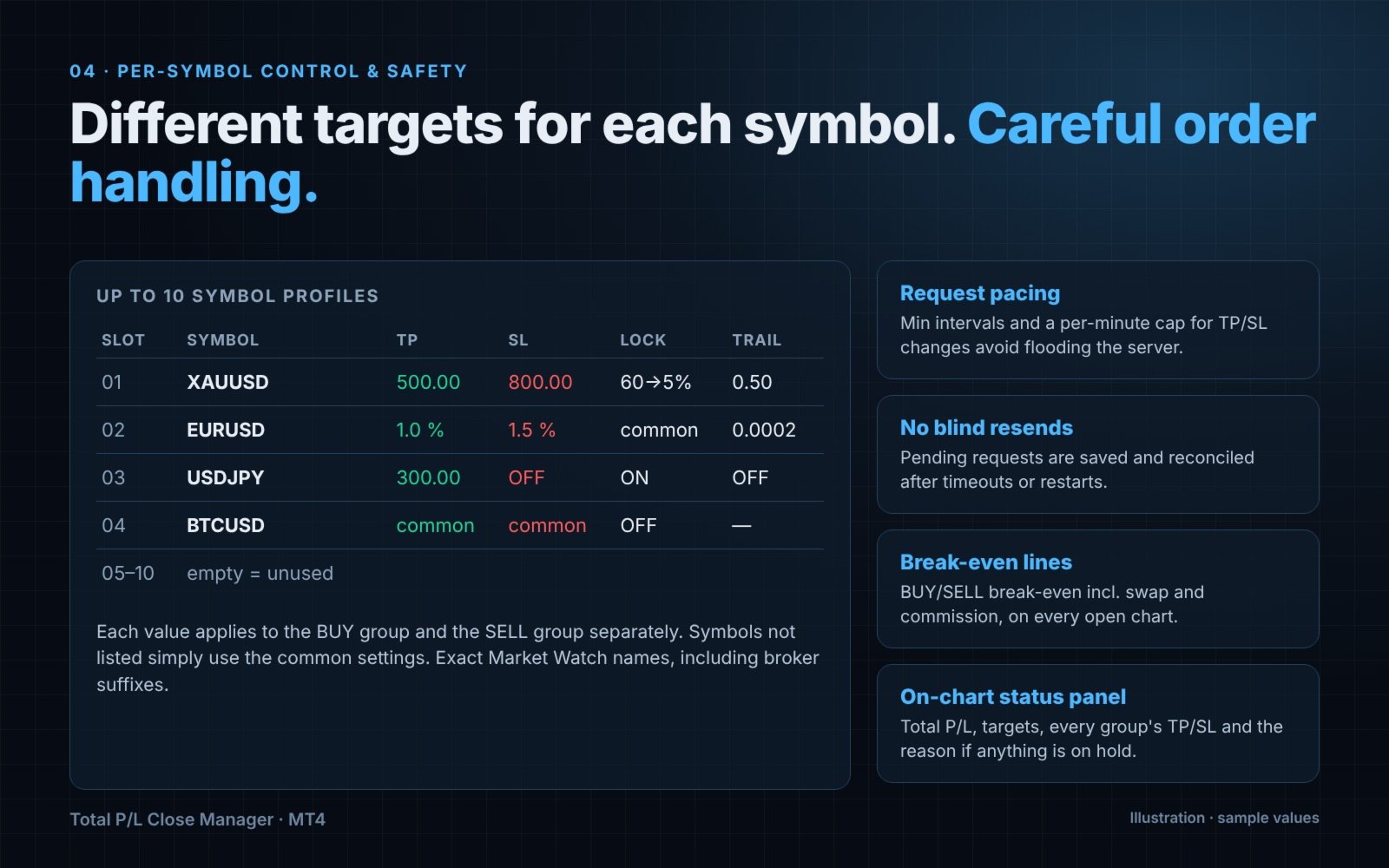
5. 銘柄別設定(10 枠)
 ・銘柄ごとに、TP/SL の判定方法と値、利益保護の割合、トレーリング幅と間隔を個別に設定できます。
 ・0 または「共通設定を使用」にした項目は共通設定が使われます。登録していない銘柄も共通設定で動きます。
 ・設定値は、その銘柄の BUY グループと SELL グループにそれぞれ適用されます。

6. 対象ポジションの絞り込み
 ・すべてのポジション、または指定したマジックナンバーのポジションだけを対象にできます(複数指定はカンマ区切り)。
 ・手動取引(Magic = 0)は「マジック設定に従う」「手動のみ」「手動も含める」「手動を除外」から選べます。

7. 損益分岐ライン
 ・スワップと手数料を含めた BUY/SELL 別の損益分岐ラインを、その銘柄の開いているすべてのチャート(または EA を設置したチャートのみ)に表示します。
 ・表示専用です。ラインに達しても決済は行いません。

8. チャート上の状態表示
 ・合計損益、目標値、各グループの損益、TP/SL の候補価格、設定済みのポジション数、処理が保留されている場合はその理由を表示します。


■ 注文処理の安全対策

 ・TP/SL 変更には最短送信間隔と 1 分あたりの上限があり、取引サーバーへ要求を送りすぎないようにしています。
 ・成行決済にも別の送信間隔を設けています。許容スリッページも設定できます。
 ・ブローカーのストップレベル・フリーズレベルを考慮し、さらに指定した余裕幅(ティック数)を確保します。
 ・応答が確定していない要求は状態ファイルに保存し、タイムアウトや端末の再起動後に照合します。結果を確認しないまま同じ注文を送り直すことはありません。
 ・サーバーから拒否が続いた場合は送信を停止し、理由を表示します。原因を確認したあと、入力項目「再開確認番号」の値を増やすと再開できます。
 ・TP/SL を設定できない理由を出力する診断ログ機能があります(任意)。


■ 使い方

 1. 任意のチャート 1 つに EA を設置し、自動売買(AutoTrading)を有効にします。
 2. 管理するポジションを選びます(マジックナンバー指定・手動取引の扱い)。
 3. 合計の利確目標と損切目標を設定します(金額または口座残高の%)。
 4. 必要に応じて、利益保護・トレーリング・銘柄別設定を有効にします。
 5. EA は 1 つの口座につき 1 つだけ稼働させてください。

設定内容は、まずデモ口座でご確認ください。


■ 主な入力項目

 対象ポジション
  ・InpUseMagicFilter:true=指定したマジックナンバーのみ、false=すべて
  ・InpTargetMagicNumbers:マジックナンバー(カンマ区切り)
  ・InpManualTradeMode:手動取引(Magic = 0)の扱い

 合計利確・合計損切
  ・InpEnableTakeProfitAll / InpEnableStopLossAll:利確・損切の有効/無効
  ・InpTakeProfitMode / InpStopLossMode:口座残高の% または 金額
  ・InpTakeProfitPercent / InpTakeProfitAmount:利確の%・金額
  ・InpStopLossPercent / InpStopLossAmount:損切の%・金額
  ・InpEnableAutoCommonSLTP:銘柄・BUY/SELL 別の共通 TP/SL を自動設定
  ・InpEnableAggregateClose:全体の合計損益でも一括決済する

 送信制御
  ・InpModifyIntervalMs、InpMaxModifyPerMinute、InpPerTicketModifySeconds:TP/SL 変更の送信間隔と上限
  ・InpCloseIntervalMs、InpSlippagePoints、InpStopSafetyTicks:決済の送信間隔、スリッページ、ストップレベルへの余裕
  ・InpMinCommonChangeTicks、InpMaxTargetDriftPercent、InpMinTPRepriceTicks:わずかな価格変更を送らないための設定
  ・InpServerResumeToken:再開確認番号

 損益分岐ライン
  ・InpShowBreakEvenLine ほか:表示の有無、色、線の種類・太さ、ラベル、文字サイズ、更新間隔、全チャート表示

 利益保護・トレーリング
  ・InpEnableProfitLock、InpProfitLockTriggerPercent(初期値 60)、InpProfitLockKeepPercent(初期値 5)
  ・InpProfitLockEntryMode:発動後の追加ポジションの扱い(価格固定 / 再計算)
  ・InpEnableProfitTrailing、InpProfitTrailingStepPrice、InpTrailingModifyIntervalMs

 銘柄別設定
  ・InpUseSymbolSettings、InpAllowAggregateWithSymbolSettings
  ・01〜10 枠:銘柄名、利確の方法と値、損切の方法と値、利益保護、発動率、保護率、追加ポジションの扱い、トレーリング、追従幅、間隔

 診断
  ・InpEnableDiagnosticLog、InpDiagnosticIntervalSeconds、InpUseV140ModifyCompatibility

※ EA の入力画面の表示名は英語です。


■ ご注意

 ・MT4 には損益計算用の関数(OrderCalcProfit)がないため、共通 TP/SL の価格は銘柄のティック価値から計算します。決済通貨が口座通貨と異なる銘柄では近似値になります。合計損益による一括決済は、端末が表示する実際の損益で判定します。
 ・MT4 の注文処理は同期式です。TP/SL の変更や決済のたびにサーバーの応答を待ちます。
 ・決済価格は保証されません。成行決済ではスリッページが発生することがあり、窓開けなどで TP/SL の価格を飛び越えて約定することがあります。
 ・ブローカーや口座で設定された取引制限は、この EA では解除できません。
 ・利益保護の割合は TP 目標に対する割合です。口座残高に対する割合ではありません。
 ・本商品はポジション管理ツールです。売買シグナルを出すものではなく、利益を保証するものでもありません。
おすすめのプロダクト
Displays broker-provided LONG and SHORT swap values for selected instruments in a full-chart, dynamically sized table. The Swaps Monitor Table provides a simple way to view the swap rates supplied by your broker for multiple trading instruments at once. The table can display instruments from Market Watch, all available instruments, or a manually selected list , allowing traders to monitor swap costs without opening each symbol individually. The indicator automatically adjusts the table cells an
FREE
L   H E D G E R   S C A L P E R    A fully automated Expert Advisor that uses counter-trend scalping, managed semi-martingale strategy and lock hedging to execute a complete trading scheme from entry analysis to risk-calculated money management to exit analysis plan execution.         V E R Y  I M P O R T A N T    You can use only ECN type of account. Otherwise, it's a disaster. You can use only the GBPJPY currency pair. Open and attach with 1 chart only. Use a minimum of $5
Enter all limit orders with your own logic to set with TP and SL and if you want something extra activate trailing to protect your position. A trading aid to speed up the entry and management of your orders.  General protection with closing orders at a time to be set, visible on the chart, or closing everything via the monitor button. Speed up order entry with your preferred strategy.
Trade Reverse Copie4
Chukwuemeka Kingsley Anyanwu
5 (1)
Feel free to contact me for any extra features :) [SEE MT5 VERSION  https://www.mql5.com/en/market/product/128846 The Local Reverse Copier is an Expert Advisor designed to synchronize positions between a Master account and a Slave account with a twist: it reverses the trades. When a buy position is opened on the Master account, the EA opens a sell position on the Slave account, and vice versa. This allows for a unique form of trade copying where positions are mirrored in opposite directions bet
What is it? Think about it, you can send all the orders/positions info to your telegram channel or group to create your community or VIP signals on telegram. Position info means this EA forward all of your new positions open details (Open price, Open time, Position Type, position Symbol and volume), positions changes ( SL or TP modifying or pending price changes) and position close (Close price, profit or loss, position duration time) and also EA Send NEWS alert (Economic calendar event) on you
Данная утилита (эксперт который сам не открывает ордера) ищет на графике паттерны Price Action : DBLHC и DBHLC Рельсы CPR Пин-бар HR PPR TBH и TBL OB где каждый паттерн имеет гибкие настройки того, как он должен выглядеть по Вашему мнению. К примеру, возьмём пин-бар, который имеет так называемый нос а также левый и правый глаз. Так вот в настройках Вы можете указать минимальную длину этого самого носа, максимальный размер самого тела и хвоста, и минимальный размер левого глаза, по отношению
Band Trading Automation
Emmanuel Lovski Ijeawele Maduagwuna
Band Trading Win Consistently Irrespective of the Direction of the Market Price of any Instrument A Dual Position Entry Algorithmic Trader for Volatile Markets    Look at  Strategy Summary Here - BandTrading FEATURES Intelligent hedging mechanism aims to protect capital by locking in profits when price moves beyond the Band Trading Gap. Dynamic Band calculation adapts to real-time market conditions – identifies key support/resistance zones. Specifically designed for CFD trading: handles swa
Auto Trendline Channel MTF(自動トレンドライン・チャネル MTF)は、確定した高値・安値(スイング)から、トレンドライン・チャネル・水平線を自動で引き、線ごとにタッチ回数、終値での抜け、ヒゲ抜け、リテストを記録する MT4 用インジケーターです。チャートの時間足と上位2つの時間足について、上下で一番近い線、そこまでの距離、ダウ理論の向きを表で表示します。 トレンドラインや水平線を手で引いている方が、決まった条件(説明に書いてある条件)で引かれた線を見るための道具です。表示専用で、売買シグナルは出さず、注文もしません。タッチ回数や抜けの記録は過去のチャートで起きたことを数えたもので、今後その線で止まる・抜けるといったことは示しません。 機能 ・トレンドライン:上下それぞれ2本まで(タッチ回数の多い順)。チャネル:上下それぞれ1位の線に平行な線を1本 ・水平線:直近300本のスイングをまとめた水準を、価格の上下それぞれ3本まで ・抜けの記録:終値で抜けた足に×印、リテストの足に印。上下それぞれ最新の抜けた線は、抜けた足から50本のあいだ破線で残します ・マル
Exp Swing
Vladislav Andruschenko
4.44 (64)
これは、Swinger(Pendulum、Cheburashka)と呼ばれる有名な戦略のモデルを使用しています。 戦略は、2つの反対の保留中の注文を出すことにあります。価格が特定の方向に移動すると、一方の保留中の注文がトリガーされ、もう一方の注文のロットサイズが増加します。 EAは3種類のオープン保留中の注文を提供します(TypeofTrade) 配置後の自動オープン(インスタントオープンAutoTrade) 手動開封後の開封と管理(手動開封ManualTrade) 高/低レベルで開く(過去のバーTFTradeの高低) OCO(One-Cancels-the-Other)注文は、2つの注文で構成される条件付き注文の一種です。2つ目の注文が約定すると、1つ目の注文は自動的にキャンセルされます。 スイング-完全な説明 MT5 version 購入する方法 インストールする方法     ログファイルの取得方法     テストと最適化の方法     Expforex のすべての製品 使い方? 開始時に、エキスパートアドバイザーは2つの注文を出します-現在の価格から StopOrderDe
FREE
ALPINE MIRROR — 上限を決めた、落ち着いた EURCHF のナンピンEA。 ALPINE MIRROR は EURCHF の M5 チャートで動きます。EURCHF は狭い値幅で動くことが多く、トレール決済のナンピンと相性が良い通貨ペアです。エントリー条件がそろうと小さなロットで1つ目を建て、逆行した時だけ、段ごとに広がる間隔で追加します。バスケット全体は平均建値からのトレーリングストップで決済します。 リスクの上限(すべて初期値) 片側最大10段。最大ロットは事前に分かります。 バスケット損切り:片側の含み損が残高の10%に達したら、その側を決済します。 時間決済:45日たってもマイナスの売りバスケットを決済します。 毎回の発注前に証拠金をチェック。余力が足りない時は発注しません。 最大スプレッド、サーバー0時直後の停止、エントリー禁止時間・禁止日。 売買の流れ 買いと売りのバスケットは別々に動きます。 新規は、直近のサポート・レジスタンスの範囲内で、エントリー条件がそろった時だけです。 次のポジションまでの間隔は、保有数に応じて広がります。 決済:平均建値からの利益が
(8th Feb 2019 Launch Promo: $97/lifetime just for 1 day! Price goes to $180/lifetime in 24 hours!) The TFA Trade Manager helps you easily manage your trades with an intelligent vertical "bars" system. You easily now easily click + drag your entry, stop loss, take profit, breakeven, partial profit and trailing stop with a few simple mouse clicks. You can also easily calculate the risk you wish to allocate to each trade by telling the trade manager your desired risk %, lot size or $dollars to risk
Trade with Confidence Using the Trendline Trading ATM (Advanced Trade Management)! Master entries, exits, and risk management with the powerful tools of the MetaTrader Trendline Trading ATM. This expert advisor equips you with a comprehensive suite of tools to trade consistently smarter, not harder.  Take control of your trading risk and drawdown, capture profitable entries, and let your winners run. This innovative Trade Entry/Exit and Risk Management utility empowers you to:   Precision Entry
Send periodic (Health Check) notification from your MT4 terminal to your mobile phone to be sure that your MT4 terminal is still running. When you did not receive the notification, it means that your terminal is unavailable. Optional information like Account Equity and Trading Pairs are also available. Notification Period - 1 Hour, 2 Hours, 4 Hours, 8 Hours, 12 Hours, 24 Hours Attach EA to any H1 chart
OrderManager をご紹介:MT4用の革新的なユーティリティ 新しく設計されたOrder Managerユーティリティを使用して、MetaTrader 4での取引をプロフェッショナルなものにしましょう。シンプルさと使いやすさに焦点を当てたこのユーティリティは、各取引に関連するリスクを簡単に定義し、視覚化できます。これにより、情報に基づいた意思決定が可能になり、取引戦略を最適化できます。OrderManagerに関する詳細は、マニュアルをご参照ください。 [ マニュアル ] [ MT5 バージョン ] [ Telegram チャンネル ]  New: [ Telegram To MT5 ] 主な特長: リスク管理:取引のリスクを素早く簡単に定義し、より良い意思決定を行い、取引パフォーマンスを向上させます。 視覚表現:オープンなポジションとそれに関連するリスクをグラフィカルに表示し、明瞭かつ簡潔な理解が可能です。 注文変更:数回のクリックで注文を簡単に変更またはクローズし、取引プロセスを効率化し、貴重な時間を節約します。 手のひらの上の最新ニュース:ボタン一つで最新の市場ニュース
如果产品有任何问题或者您需要在此产品上添加功能,请联系我 Contact/message me if you encounter any issue using the product or need extra feature to add on the base version. Dashboard Super Currency Strength is an intuitive, and handy graphic tool to help you to: Have 28 pairs under control with one dashboard. Monitor price movement, identify possible trend based on currency strength gap of two currency on 3 timeframe. Provide trading signals based on the CSM (currency Strength Meter) selected. Manage order automatically onc
チャート上に超簡単に線を引いたり、移動したりできるツールです。 クリックしてから、ドラッグするとトレンドラインが引けます。 横に引くと価格線、縦に引くと日付線になります。 そこにある線やオブジェクトで、クリック&ドラッグすると移動できます。 クリックしたところから、ドラッグしたところに交差線が引かれ、間の時間と価格の差が表示されます。 クリック&ドラッグしたら、左右に振ると色が変わります。 クリック&ドラッグしたら、上下に振ると削除します。 クリック&ドラッグとは? 1.マウスの左ボタンを押す(カ) 2.マウスの左ボタンを放す(チ) 3.マウスの左ボタンを押す(カ) 4.左ボタンを押したまま、マウスを移動する(ツー) この動きをすることでトレンドラインを引いたり、オブジェクトを移動したり、色を変えたり、消したりできます。 トレンドライン、価格ライン、日付ラインだけでなく、矢印や価格表示、フィボナッチ、ギャンライン、サイクルライン、図形なども移動させることができます。 他にも便利なところ ・うっかり線を引いてしまったら、チャート外でマウスボタンを離せば、線が消えます
FREE
Zenith Aquarius Booster A Refined Strategy Engine for BTCUSD Most Expert Advisors on the market fall into one of two traps: they are either over-optimised to historical data and fail in live conditions, or they rely on grid and martingale recovery logic that averages deeper into losing positions. Zenith Aquarius Booster takes a different approach. Instead of offering dozens of loosely tested combinations across many symbols, Aquarius Booster is specifically engineered for BTCUSD — a market known
All In One Trade Manager is a trade manager and one-click trading panel for manual traders on MetaTrader 4. It works as a trading assistant, risk manager and position size calculator in one dashboard. It brings together everything below in one panel: order entry with risk sizing automatic trade management advanced order types account protection statistics Its entry checks run in the background and tell you, before you click BUY or SELL, when something speaks against the trade. Also available
Trendline Trading
Victor Christiaanse
3 (1)
If you use Resistance and Support Trendlines in your trading, this tool will be very useful for you!  The Trendline Trading EA is a smart and easy tool to helps you in your trading using trendlines on your chart. Just create a trendline for the Resistance and Support, and the EA will create pending orders when the price touch the trendline. The following orders will be created when the price touch the trendline: Pending order in case the price breaks the trendline Pending order in case the price
Indicator works like script and shows crosshair on all charts of any symbol. It can be used for comparison price levels and time periods on all charts of the same currency pair or for comparison candles according to time periods on charts of any symbols. You can also compare different types of charts, for instance standard chart with tick or range bar charts. Indicator can be easily attached to chart from navigator menu or using hotkey Ctrl + F, which you need to set manually. Moreover you can a
This Expert Advisor alerts users when the price crosses the chart lines. Horizontal and trend lines can be processed. Number of lines is not limited. Parameters prefix of signal line – prefix for the names of the objects (lines) processed by the indicator. If left empty, all horizontal and trend lines are processed. price Mode – bid or ask. timeout – crossing alert timeout. number of repeats – number of crossing alert repeats. number of comment lines – self-explanatory.
FREE
M5 タイムフレームのロボット スカルパー。 GBPUSD 通貨ペアでの取引。このロボットは、英ポンドの取引のためにプロのトレーダーの会社によって特別に開発されました。ロボットは、毎日約 5 ~ 15 の取引を開始します。 GBPUSD のスプレッドが最大 10 ピップスまでの低いブローカーと取引するのが最善です。開始するための推奨最低入金額は $500 以上です。 利点: マーチンゲールは使いません。 ネットではありません。 すべての取引にはストップロスがあります。 GBPUSDペア専用のプロボット。 ロボットスキャルパー、M5 期間の日中取引。 このロボットはどのように取引しますか? 市場を分析するために、ロボットは 2 つの指標の価格モデルと戦略的な市場パターンを使用します: パラボリック ストップとリバース システムとボリンジャー バンド。ロボットは最初に、価格エントラポレーション統計を使用して価格の動きについて市場を分析します。次に、ロボットはこれらの指標を読み取り、現在と過去の動きの傾向を比較します。市場の反転またはロールバックを示すパターンが一致した場合、ロボットは取

Top Gun Oscillators
Safwan Rushdi Khalil Arekat
5 (2)
Note : New in 1.6: the indicator now exports the trade signal (but not displayed). Go long with light blue. Go short with red. Exit otherwise. Signal to be imported to your EA using iCustom. This indicator provides Best of the Best linear filter momentum oscillators that I am aware of (Low Pass Differentiators, LPD's) . All of them are  recent developments by this developer, or other researchers. The oscillator line is the first buffer of the indicator, and can be called  in other indicators or
FREE
Control Trading Support And Resistance Es un indicador independiente del TimeFrame que permite proyectar niveles más relevantes del mercado en función del plazo de tiempo de la operativa. Los colores del indicador están escogidos para diferenciar entre los diferentes tipos de niveles y destacar a los más relevantes. Este indicador permite visualizar en un mismo gráfico los posibles objetivos relevantes que los diferentes traders pueden emplear siguiendo diferentes tipos de operativas en funció
MetaTrader 4 (MT4)用のUZFX - Set Stop Loss to Breakeven Instantlyスクリプトは、トレーダーがすべてのオープンポジションのストップロスをエントリー価格に素早く移動させ、リスクのない取引を確保できる強力なツールです。このスクリプトは、アクティブな取引を効率的に管理するために特に有用で、ポジションが有利に動くと、トレーダーは潜在的な損失から保護されます。 (Visit Profile & Checkout All Other MT4/MT5 Products) (Please Don't Forget to Give Review) Features: すべてのオープンポジションのストップロスを自動的にブレイクイーブン(エントリー価格)に設定します。 利益を確保し、潜在的な損失を最小限に抑えることで、リスク管理を強化します。 使用方法 スクリプトをチャートに貼り付けると、全てのオープンポジションが自動的に調整されます。 ポジションのストップロスがすでにブレイクイーブンにある場合、そのポジションはスキップされます。 注: このス
FREE
オープンポジションと指値注文を管理するためのユーティリティ。 組み込みのトレーリング ストップには、5 つのモードと 7 つのツールがあります。 バーチャル ストップ ロスとバーチャル テイク プロフィットがあり、チャート上を自由に移動できます。 組み込みの取引シミュレーターを使用して、EA がストラテジー テスターでどのように機能するかを確認できます。 UTralVirtual の詳細なガイドは、「コメント」セクションにあります。 利点 5 つのトレーリング ストップ モード: 仮想、通常、合計、パーセンテージ、およびモバイル ストップ ロス。 7 つのオプション: ポイント、バーの極値、フラクタル、ボリューム、MA、パラボリック SAR、ATR。 仮想 TP および SL - グラフに従って手動で自由に移動します。 すべてのオープンポジションにストップロスとテイクプロフィットを追加する; ストップロスの設定: ポイント、フラクタル、ATR インジケーター、毎日の高値/安値; チャートで開かれたすべての注文のトレーリング ストップ; トレーリングストップを開始するためのミニ利益.
GAP HUNTER (Sr) Capture market opportunities during Gap openings and High Impact News with precise timer-based execution. GAP HUNTER is an Expert Advisor specifically designed to capitalize on price movement opportunities created by market gaps at specific times and high impact News like NFP (Non Farm Payrolls) and Core CPI (Consumer Price Index). Unlike trading robots that open multiple positions throughout the day, GAP HUNTER uses a simple yet effective approach no overtrading, focused on pri
Advanced Basket EA MT4 — Portfolio Management System Advanced Basket EA MT4 is a professional account-level basket manager for MetaTrader 4. It treats all open positions as one portfolio, applying intelligent profit-taking, risk limits, and automated protection. The EA does not open trades itself — it manages existing manual or EA-driven positions. Overview - Account-level basket management   - Daily profit and loss limits   - Equity, drawdown, and margin protection   - Break-even, trailing st
Hello, boys and girls! Script allows you either to quickly save opened charts and then close all charts opened by visual tester mode or just faster close all charts. Feel free to take a look at video manual about how to use this script on my YouTube channel. Also, feel free to join my telegram channel , where time to time I publish some exclusive stuffs. Feel free to leave feedback and thoughts how to improve this script - I'd highly appreciate that. All the best.
ProfRoboTrading Dashboard MultiSymbol   is   Expert Advisor  a lightweight on-chart control panel that provides a clear overview of your trading account and open positions across multiple symbols. The dashboard displays key account metrics, summarizes open BUY/SELL orders and lots per symbol, calculates profit for Day/Week/Month, and offers quick manual close actions directly from the table. Key features Multi-symbol table   (symbols list configurable). Account metrics panel:   Balance, Equity,
このプロダクトを購入した人は以下も購入しています
Unlimited Trade Copier Pro is a tool to copy trade remotely to multiple MT4, MT5 and cTrader accounts at different computers/locations over internet. This is an ideal solution for you if you are a signal provider and want to copy your trades to other receivers globally on your own rules. One provider can copy trades to multiple receivers and one receiver can get trade from multiple providers as well. The provider can even set the subscription expiry for each receiver, so that receiver will not b
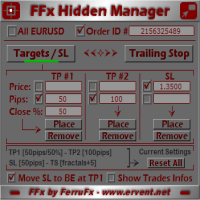
The FFx Hidden Manager panel will help you to manage easily your orders directly on the chart. Below all features described: TP, SL and TrailingStop are hidden Each order has its own lines on chart Drag & Drop any line to change the TP/SL as per your need Option to move automatically the SL line at breakeven when TP #1 is reached Option to choose the TP/SL type (by pips or price) Option to choose the TrailingStop type (by pips, MA, Fractals, PSAR or ATR) Define which order(s) you want to manage
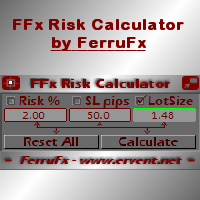
FFx Risk Calculator panel will help you to calculate very easily your trades size, SL or the risk directly on the chart. All features are described below: Option to select which parameter to calculate: Risk, Stop Loss or Lot Size The panel will show if the lot size is allowed according to the current account free margin Button to maximize/minimize the panel Drag and Drop the panel anywhere on the chart How to use it? Select the parameter you want to be calculated. It will be based on the 2 other
News Trader Pro is a unique robot that allows you to trade the news by your predefined strategy. It loads every piece of news from several popular Forex websites. You can choose any news and preset the strategy to trade it, and then News Trader Pro will trade that news by selected strategy automatically when the news comes. News release gives opportunity to have pips since the price usually has big move at that time. Now, with this tool, trading news becomes easier, more flexible and more exciti
The FFx Watcher PRO is a dashboard displaying on a single chart the current direction of up to 15 standard indicators and up to 9 timeframes. It has 2 different modes: 1. Watcher mode: Multi Indicators User is able to select up to 15 indicators to be displayed User is able to select up to 9 timeframes to be displayed 2. Watcher mode: Multi Pairs User is able to select any number of pairs/symbols User is able to select up to 9 timeframes to be displayed This mode uses one of the standard indicat
If you wish to draw Support and Resistance lines, view: daily market opening, classical pivot levels, Fibonacci pivot levels, trend lines, Fibonacci levels, the remaining time to candle closing, and current spread. If you seek to place your orders with the exact lot that meets your desired stop loss risk. If you wish to do all this and more with just one click, then this is the perfect tool to use. This tool will allow you to feel more relaxed when deciding to open orders, as well as predicting
Unlimited Binary Options Copier Remote is a powerful tool to copy binary options trades remotely between multiple accounts at different locations over internet. This is an ideal solution for signal provider, who want to share his binary options trades with the others globally on his own rules. One provider can copy trades to unlimited receivers and one receiver can get trade from unlimited providers as well. The provider can set the subscription expiry for each receiver, so that receiver will no
The Pairs Trade indicator is a utility for semi-automatic pair trading. It allows combining the charts of two arbitrary instruments, even if the schedules of their trading sessions are different. It displays a spread chart in the form of a histogram with an overlaying moving average. It calculates the swap that will be charged for the synthetic position (in the deposit currency). It is possible to set a level for automatic opening of a synthetic position on the spread chart (analogous to the 'se
The script displays info about the share's corporate reports and dividends. The data is downloaded from   investing.com : Report date Profit per share (EPS) Revenue Market capitalization Amount of dividends Date of payment of dividends Dividend income The product cannot be tested in the tester (since it is not possible to receive data from the Internet). Before launching:  Add 2   URL   https://ru.investing.com/earnings-calendar/Service/getCalendarFilteredData  and   https://ru.investing.com/di
This Stacker EA will: Automatically set Stop loss on a new order Automatically set Take profit on a new order Stack (or open up to 4 additional orders at the same time) when a new order is placed, the SL/TP can be preset individually for each order. Provides a transparent replacement for the standard 1-click trading buttons in MetaTrader 4 (1 click still works and SL/TP will automatically be set as well as Stacking). Automatically calculate lot order size according to preset risk management perc
FXFledgling Exit Tool is a complete risk management tool that analyzes both the open trades and the direction of the pair of open trades. As long as the suggested entry and lotsizing management presented here is followed strictly, you will have a high chance (but no guarantee) of surviving the trade. What It Does It is used as an exit tool. It helps the trader to manage any manual trade that he transacted. It does the following: Trail Stop Dynamic Stop Loss - a calculated stop-loss that changes
New opportunities for analyzing cryptocurrency in the usual MetaTrader 4. For example : We select the symbol of the cryptocurrency and attach any indicators, Expert Advisors or scripts. Startup Mode View cryptocurrency; Data collection. Capabilities Work as with a standard currency chart; Automatic update of open charts; Selection of individual cryptocurrency for updating; Selection of individual timeframes for updating; Work on the desired timeframes; Open charts do not affect the work of Cry
Notify Telegram is a utility that bridge your MetaTrader4 trading activities to your Telegram chat/channel. It will help you to monitor your MetaTrader4 actions such as placing trade, modifying order's TP/SL, closing trades etc and send a notification message to your dedicated Telegram chat/channel. It does not execute any trade on your MetaTrader4 account. It can be useful for monitoring EA performance or providing signal to your Telegram channel/group subscribed. Parameters Token ="" - enter
The  Easy Strategy Builder (ESB)  is a " Do It Yourself " solution that allows you to create a wide range of the automated trading strategies without any line of codes. This is the world’s easiest method to automate your strategies that can be used in STP, ECN and FIFO brokers. No drag and drop is needed. Just by set conditions of your trading strategy and change settings on desired values and let it work in your account. ESB has hundreds of modules to define unlimited possibilities of strategi
Telegram ChartSnap is an utility tool to bridge your MetaTrader 4 activities to your Telegram chat/group/channel. It will screen shot your MetaTrader 4 chart and send it to your dedicated Telegram chat/group/channel through a Telegram bot. The whole process will keep repeating based on a time cycle that predetermined by the user. It is a convenient tool for those who like to get access to their favorite system/dashboard that only available at MetaTrader Desktop. Beside that, trader can easily s
フィボナッチリトレースと拡張ラインツール DiNapoliポイント取引方法とゴールデンセクション取引を使用するトレーダーにとって理想的なMT4プラットフォームのフィボナッチリトレースと拡張ラインツール 主な特長: あなたはフィボナッチリトレースメントの複数のセットを直接描くことができ、重要なリターンポイント間の関係は一目瞭然です。 2.フィボナッチ拡張を描画することができます。 3.フィボナッチフォールドバックとラインの延長は、簡単な観察と数値表示のために左右に動かすことができます。 4.チャートは非常に爽やかな 5.数字キーでサイクルを切り替えることができます。 ファンクションキー: 1。 [戻るを押す、要求に応じて描画する、最大8つのグループにする 2。拡張]を描くには[押す] 3。 \を押すと、現在のサイクルの下にあるすべての拡張機能と折り畳みが削除されます 4。フォールドバックを移動して削除して展開する (1)最初のフォールドバックセットのF5行をクリックします。 一度クリックすると(黄色に変わります)、キーボードのDeleteキーを押すと、フォーカ
Советник риск-менеджер с огромным арсеналом возможностей защиты вашего депозита. Для инвесторов, которые решили передать капитал в доверительное управление. Когда у трейдера нет доступа к настройкам - нивелирует торговые риски. А также для трейдеров, которые осознали необходимость стороннего контроля за их торговлей для улучшения торговых результатов.  Для максимальных результатов - должен стоять на отдельном VPS сервере и у трейдера не должно быть возможности менять настройки в торговый период.
Grid Hero War Pad is a  GRAPHICAL MANUAL TRADER version of the original Grid Hero EA, designed and created for ADVANCED TRADERS who are experienced in plotting their own market entries. It is coded using ADVANCED GRAPHICAL INTERFACE programming, that combines the power of discretionary trading with Grid Hero algorithm in the form of a graphical console with button-click easy execution. It allows you to execute trades manually using Market Orders and Pending Orders, and then automatically uses th
The advantage of using this EA This EA directly updates takeprofit and stop losses that are still empty in a manual order Parameters Multiplier: Multiplier value of the previous transaction Distance: Distance hedging from the previous order Takeprofit: take profit taken from the last price + the value of this column We recommend that you do not add more than one manual transaction in the same pair martingale hedging | manual hedging | hedging manual | hedging lot | best robot | best ea
The new version of  MirrorSoftware 2021  has been completely rewriten and optimized.  This version requires to be loaded only on a single chart because  it can detect all actions on every symbol and not only the actions of symbol where it is loaded. Even the  graphics and the configuration mode  have been completely redesigned. The MirrorSoftware is composed of two components (all components are required to work):  MirrorController  (free indicator): This component must be loaded into the MASTER
Скрипт открывает графики по всем инструментам находящимся в окне "Обзор рынка" и по желанию может задать для всех графиков один шаблон. Так-же можно удалить все графике открытые в терминале Мт4. В скрипте имеются следующие настройки: "Таймфрейм" по умолчанию M30;             (Можно поставить свой: M1, M5, M15, M30, H1, H4, D1, W1, MN.) "Задержка" по умолчанию "0";                  (Задержка перед открытием следующего графика в миллисекундах.) "Шаблон" по умолчанию "True";                (True=пр
This utility automatically draws the trend channel on the price chart. For the time interval from the specified date to the current bar, the drawn channel is almost optimal. Placing the beginning of the channel at a more distant historical price extremum, you get a visualization of a longer-term trend. Channel slope is not a continuous value, but takes one of discrete values (in AxB format, where A is the number of price points (points), and B is the number of timeframes). This program works ONL
--------------Welcome to use [MQL5 Signal Analyze Master]------------------  Function: Draw order tracks of MQL5 MT4 and MT5 signal on MT4 chart. [Using guide] 1.Use it as Experts. 2.Download history record from MQL5 signal(MT4 signal or MT5 signal).  3.Paste history record file below "MQL4/Files/" 4.Load [Signal Analyze Master] on the symbol chart what you want to analyze. 5.Paste the history record file name to parameter 'FileName' 6.Select  SignalType  match the history you download on MT4
Forex copier
Alexandr Bryzgalov
4.5 (2)
We offer simple and reliable software that can  copy trades  between any MT4 accounts. Easy to use MetaTrader copier which saves valuable time Reliable, so you are protected from technical issues Powerful, with a lot of features available Who can use this MT4 copier? Forex Copier is a solution for individual traders or account managers who need to execute trade signals from external sources or who need to  manage several MetaTrader 4 accounts  at the same time. We do not offer you “yet another
Forex Market View Dashboard and CSM
Opengates Success International
5 (1)
FFXMV Dashboard + CSM is a custom indicator combined with Currency Strength Meter . It is created to give the Traders a full view of what is going on in the market. It uses a real time data to access the market and display every bit of information needed to make a successful trading. Before attaching this Indicator to your window chart, go to your MT4's Market Watch panel and HIDE all the Currency pairs you don't need or trade and leave the rest there. The reason is that FFMV Dashboard will DISP
Trading  Robot which automates your scalping and take your profitability  and forex trading experience to the next level ,Computer cannot analyse market as humans do, at same time we cannot compete with them in terms of speed of execution, hft  & emotionlessness  .  ​In this scalp-trading robot we have integrated human analysis with quick algorithmic execution  to enter and exit trades at fraction of seconds Get More details at :  https://www.noemotionfx.com/tl-scalper-ea To test , use it in dem
NewsReady is a semi-automated Expert Advisor that uses a smart straddle methods It needs to be set in charts 2 to 10 minutes before Economic Data release with a red-flag impact on currencies related to the news. Then it run pending orders in specified number of minutes indicated in the time-period parameter. After the specified time, it will stop trading and will remove all pending orders. Important You can not backtest this tool because it is semi-automated and can only be set and run a few min
Panel designed for ichimoku traders. Intelligent algorithm that reveals signals over multiple time frames and multiple currency crosses.   The benefits you get :   Significantly lightens the signal search analysis. Never redesigns, does not retreat, never recalculates. Works on forex, CFD, Crypto and stocks, time frames from M5 to W1. Integrated pop-up, push notification and sound alerts. Easy to use. Parameters : Number_Instrument = 10; Number of instruments displayed Tenkan = 9; Kijun = 26;
Advanced Smart Renko and Heiken Ashi Candle Trader is ONE STOP SOLUTION based semi/fully - automated multi-currency EA carefully engineered for traders to enter the trade based on their Analysis or in fully automated mode for scalping, trend trading, candle breakout trades and also automated news trading with inbuilt trade management solution.    Advantages    No grid / Martingale Works on Classic Renko, Renko Heiken Ashi charts and classic Heiken Ashi charts    Features Multi-Currency Ma
Expert for a binary options on mt4, he have  two built-in a indicators and many different settings. The expert has one a level of martingale, but it is recommended to use it on  the instruments with a yield of 85 percent. it can be used simultaneously on a variety of currency instruments. All settings have already been made, but you can also configure them yourself . Currency for do trading is a Russian ruble. Good trading to everyone.
作者のその他のプロダクト
================================================================== 製品名 ================================================================== Same SL TP Manager MT4 ================================================================== 短い説明 ================================================================== チャート銘柄の全ポジションに、共通の損切り(SL)・利確(TP)をワンクリックで設定・移動・削除できるトレードパネル。建値ストップ、SL+1pips、全決済、待機注文一括削除、チャート上のタッチ用テンキーを搭載。EAが勝手に売買することはありません。 ================================================================== 詳細説明
【商品名】 Magic Closer Panel MT4(マジックナンバー指定 一括決済パネル) 【短い説明】 マジックナンバーと銘柄を指定して、ワンクリックで一括決済。特定のEAだけ、手動ポジションだけ、すべて――を買い決済/売り決済/全決済で。MetaTrader 4版です。 【説明文】 Magic Closer は、チャート上に表示するコンパクトな一括決済パネルです。ワンクリックで決済できるだけでなく、「決済したいポジションだけ」を正確に選べるのが特長です。 1つの口座で複数のEAを動かしている、EAのポジションと手動ポジションが混在している――そんなとき、通常の「全決済」ボタンではすべてが決済されてしまいます。Magic Closer は「マジックナンバー」と「銘柄」の2つのフィルターを組み合わせて、決済対象をピンポイントで指定できます。 主な機能 マジックナンバーで絞り込み  ・All:マジック番号に関係なく、すべてのポジション  ・Manual (0):手動で建てたポジションのみ  ・任意の番号:特定のEAのポジションのみ  ・ / で保有中のマジック
============================================================== 商品名 ============================================================== Daily Max Floating Loss Tracker MT4(デイリー最大含み損トラッカー) ============================================================== 短い説明 ============================================================== 1日ごとの最大含み損と日利(確定損益)を並べてチャートに表示。チャートを閉じても、MT4を再起動しても記録が消えないインジケーターです。 ============================================================== 説明文(全文) ============================================
================================================================== 商品名 ================================================================== Total PL Close Manager MT5 (合計損益で一括決済・共通TP/SL・利益保護) ================================================================== 説明文 ================================================================== Total PL Close Manager は、MetaTrader 5 用のポジション管理ユーティリティです。対象ポジションの合計損益を監視し、合計の利確目標または損切目標に達したら対象ポジションをまとめて決済します。また、銘柄ごと・BUY/SELL ごとに共通の TP/SL 価格を計算して各ポジションにサーバー側の注文として設
【商品名】 Magic Closer Panel MT5(マジックナンバー指定 一括決済パネル) 【短い説明】 マジックナンバーと銘柄を指定して、ワンクリックで一括決済。特定のEAだけ、手動ポジションだけ、すべて――を買い決済/売り決済/全決済で。 【説明文】 Magic Closer は、チャート上に表示するコンパクトな一括決済パネルです。ワンクリックで決済できるだけでなく、「決済したいポジションだけ」を正確に選べるのが特長です。 1つの口座で複数のEAを動かしている、EAのポジションと手動ポジションが混在している――そんなとき、通常の「全決済」ボタンではすべてが決済されてしまいます。Magic Closer は「マジックナンバー」と「銘柄」の2つのフィルターを組み合わせて、決済対象をピンポイントで指定できます。 主な機能 マジックナンバーで絞り込み  ・All:マジック番号に関係なく、すべてのポジション  ・Manual (0):手動で建てたポジションのみ  ・任意の番号:特定のEAのポジションのみ  ・ / で保有中のマジック番号を順番に切替。入力欄に番号を
============================================================== 商品名 ============================================================== Daily Max Floating Loss Tracker MT5(デイリー最大含み損トラッカー) ============================================================== 短い説明(商品カード・検索結果用) ============================================================== 1日ごとの最大含み損と日利(確定損益)を並べてチャートに表示。チャートを閉じても、MT5を再起動しても記録が消えないインジケーターです。 ============================================================== 説明文(全文) ===============================
================================================================== 製品名 ================================================================== Same SL TP Manager MT5 ================================================================== 短い説明 ================================================================== チャート銘柄の全ポジションに、共通の損切り(SL)・利確(TP)をワンクリックで設定・移動・削除できるトレードパネル。建値ストップ、SL+1pips、全決済、待機注文一括削除、チャート上のタッチ用テンキーを搭載。EAが勝手に売買することはありません。 ================================================================== 詳細説明

フィルタ:
レビューなし
レビューに返信