SameSLTPManager

==================================================================
PRODUCT NAME
==================================================================
Same SL TP Manager MT5

==================================================================
SHORT DESCRIPTION
==================================================================
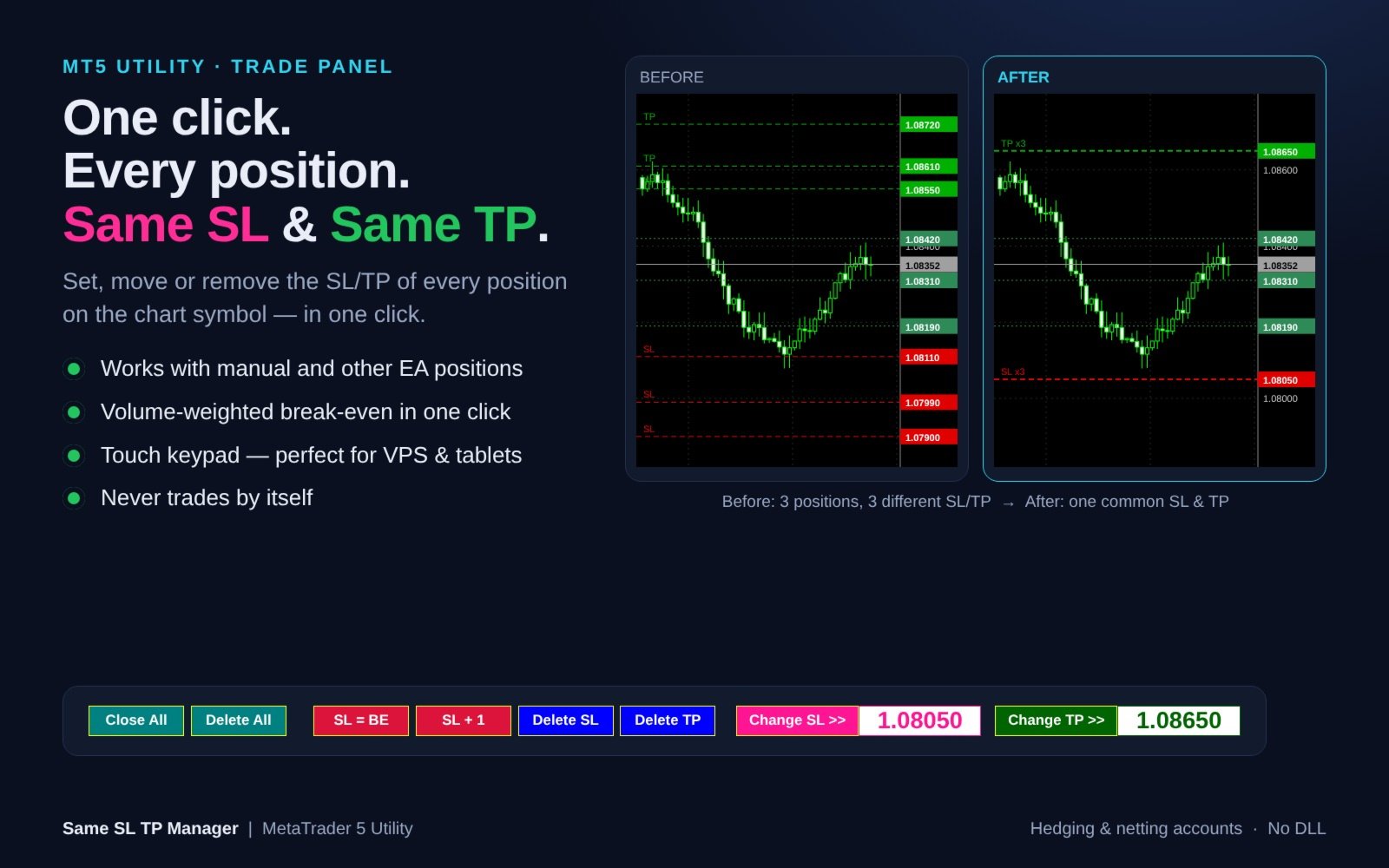
One-click trade panel: set, move or remove a common Stop Loss and Take Profit for ALL positions on the chart symbol. Break-even, SL +1 pip, Close All, Delete All and an on-chart touch keypad. Never trades by itself.

==================================================================
FULL DESCRIPTION
==================================================================
Same SL TP Manager gives every position on your chart ONE common Stop Loss and ONE common Take Profit - in a single click.

When you average in, scale in, run a grid or open several scalps, each position ends up with its own SL and TP. Changing them one by one in the Trade tab is slow and error-prone, especially in a fast market. This utility puts a compact one-row panel on the chart and lets you manage all positions of the current symbol as one.

It works with manual trades and with positions opened by other Expert Advisors. The panel never opens trades and never acts on its own - an order is sent only when you press a button.


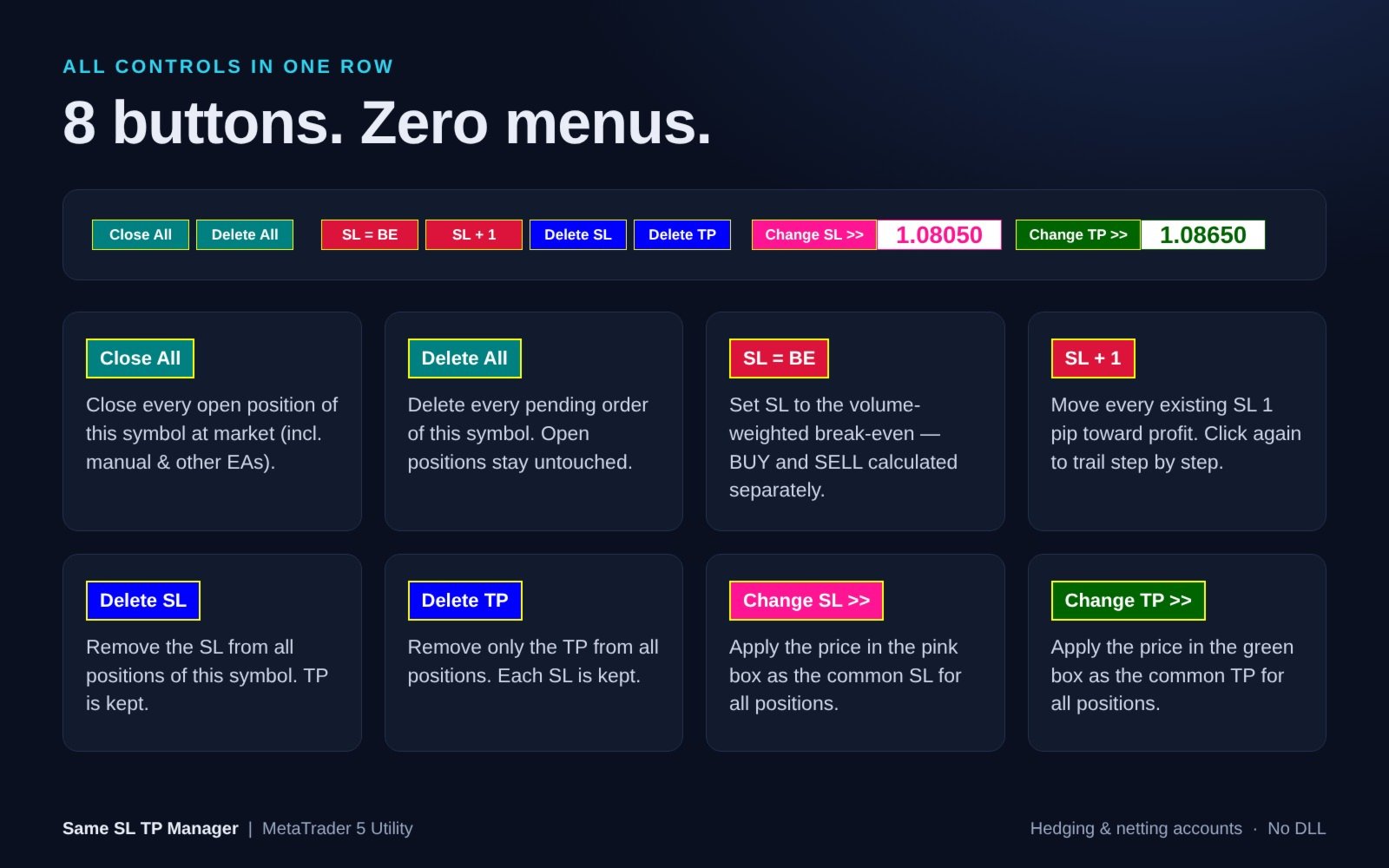
WHAT EACH BUTTON DOES

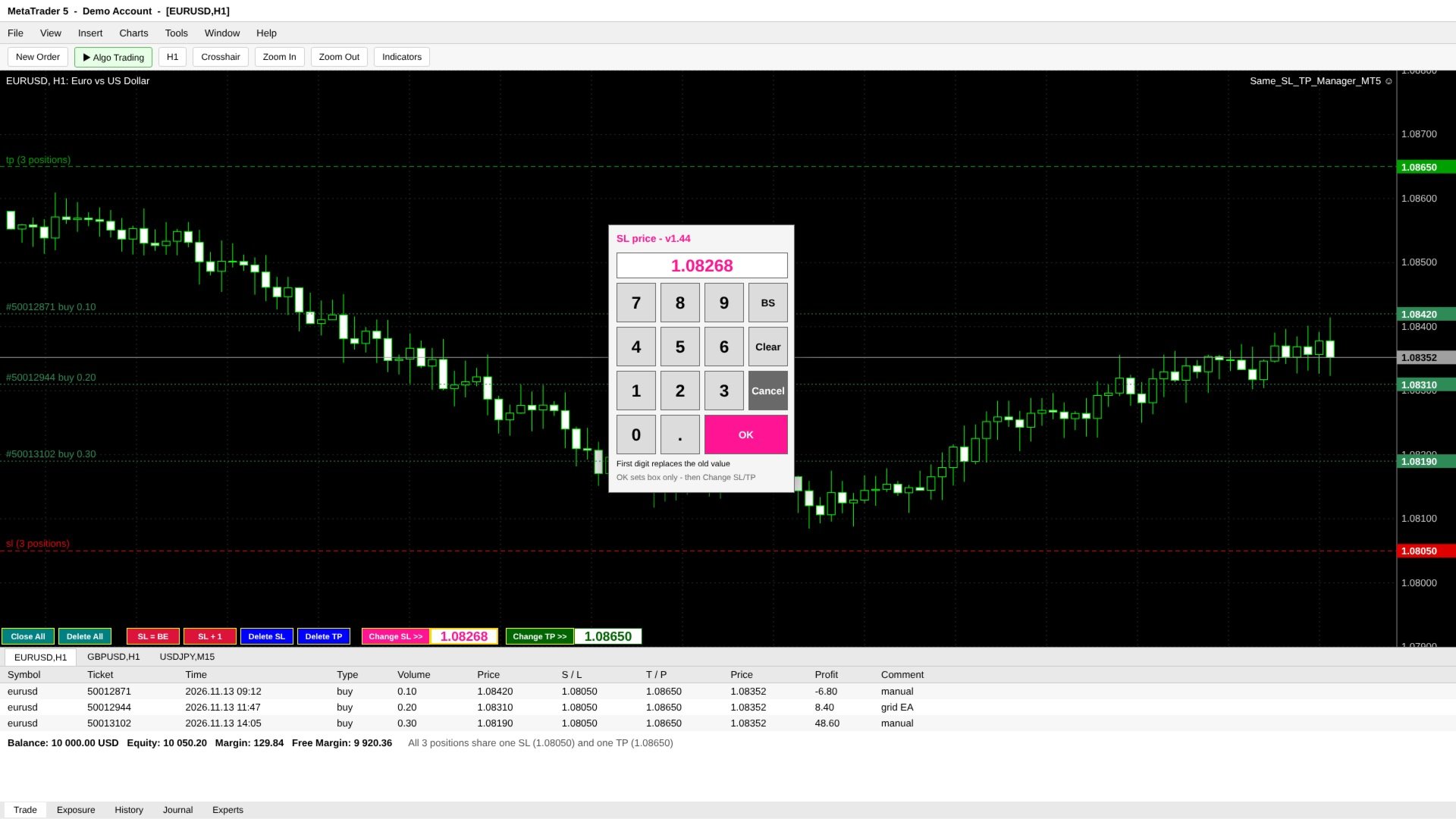
- Close All - close every open position of the chart symbol at market (manual and other-EA positions included). Pending orders are left in place.
- Delete All - delete every pending order (Limit / Stop / Stop Limit) of the chart symbol. Open positions and their SL/TP stay untouched.
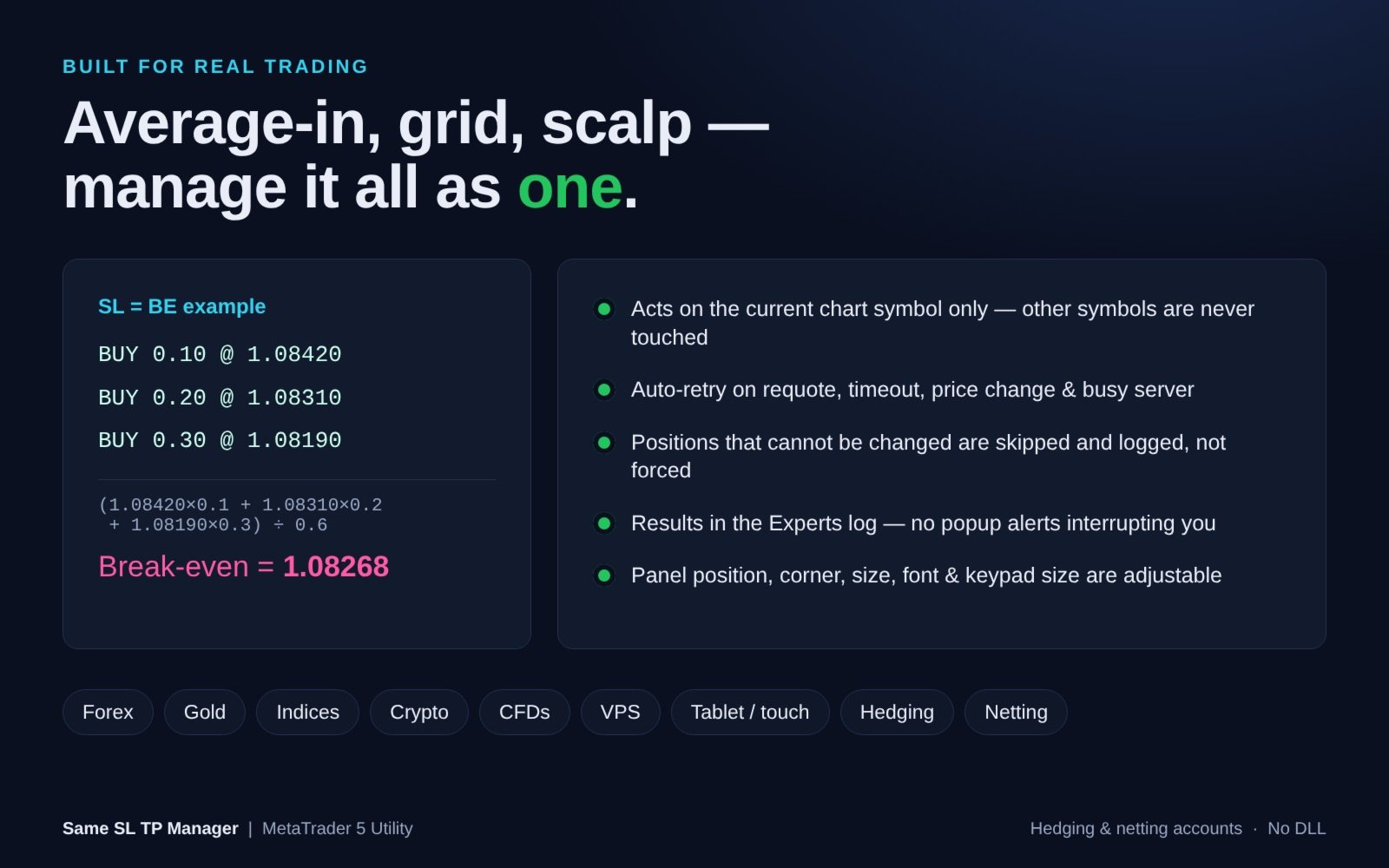
- SL = BE - set the Stop Loss to the volume-weighted break-even price. BUY and SELL positions are calculated separately, so it also works on hedging accounts.
- SL + 1 - move every existing Stop Loss 1 pip toward profit. Press repeatedly to trail step by step.
- Delete SL - remove the Stop Loss from all positions of the symbol. TP is kept.
- Delete TP - remove only the Take Profit from all positions. Each SL is kept.
- Change SL >> - apply the price in the pink box as the common SL for all positions.
- Change TP >> - apply the price in the green box as the common TP for all positions.


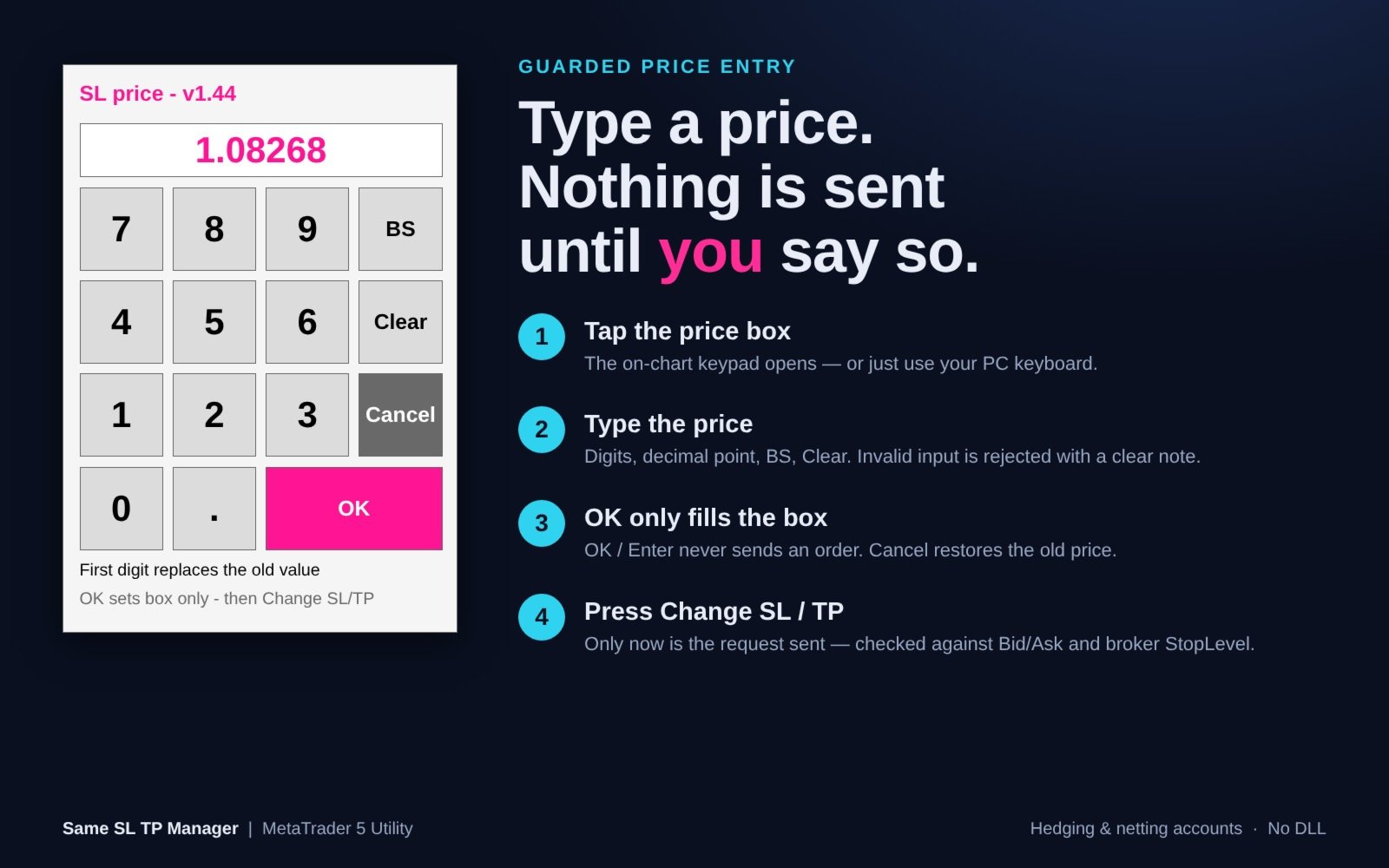
GUARDED PRICE ENTRY WITH TOUCH KEYPAD

1. Tap the pink (SL) or green (TP) price box - an on-chart numeric keypad opens. A PC keyboard works too.
2. Type the price using digits, decimal point, BS and Clear.
3. OK / Enter only fills the box. Nothing is sent. Cancel restores the previous price.
4. Press Change SL >> or Change TP >> - only now is the request sent.

The keypad is ideal for VPS sessions, remote desktop apps and tablets, where typing into chart objects is unreliable. The keypad automatically resizes to fit the chart.


SAFETY AND RELIABILITY

- Acts on the current chart symbol only. Other symbols are never touched.
- Every new SL/TP is checked against the current Bid/Ask and the broker's StopLevel before it is sent.
- Positions that cannot be changed are skipped and logged - they are not forced.
- Automatic retry on requote, timeout, price change, off quotes, too many requests and connection issues.
- Invalid input (letters, two decimal points, 0, too many digits) is rejected with a clear on-screen note.
- Entering 0 never removes a SL/TP - use Delete SL / Delete TP for that.
- Results (targets / changed / skipped / failed) are written to the Experts log. No popup alerts interrupt your trading.
- The panel rebuilds itself automatically if objects are deleted or the timeframe changes.


INPUT PARAMETERS

=== Panel Position ===
- Chart window index (SubWindow) - 0 = main chart window.
- Panel corner (Corner) - 0 = Upper-Left, 1 = Upper-Right, 2 = Lower-Left (default), 3 = Lower-Right.
- Horizontal offset (Move_X) - in pixels.
- Vertical offset (Move_Y) - in pixels.

=== Panel Appearance ===
- Button width (Button_Width) - default 70 px, minimum 40.
- Font name (Font_Type) - default "Arial Bold".
- Font color (Font_Color) - default White.
- Font size (Font_Size) - default 8, minimum 6.

=== Price Input ===
- Show touch keypad (Show_Touch_Keypad) - default true.
- Touch key size (Touch_Key_Size) - default 52 px, auto-fits the chart.
- Input debug log (Input_Debug_Log) - default false.


COMPATIBILITY

- MetaTrader 5, hedging and netting accounts.
- Forex, Gold, Indices, Crypto, CFDs - any symbol your broker offers.
- 1 pip = 10 points on 5- and 3-digit symbols, 1 point otherwise.
- No DLL required.


HOW TO USE

1. Attach Same SL TP Manager to the chart of the symbol you want to manage.
2. Enable "Algo Trading" in the terminal and "Allow Algo Trading" on the Common tab of the EA.
3. Use the buttons. Hover any button to see a tooltip.

Note: In the Strategy Tester, chart buttons cannot be clicked (MetaTrader 5 limitation), so the demo version only displays the panel. All functions work on demo and live accounts.

Note: Close All and Delete All act immediately, without confirmation. They affect ALL positions/orders of the chart symbol, including those opened manually or by other EAs.

If you have questions or suggestions, please send me a private message. Thank you!
추천 제품
## Operating Principle **Manual Order Manager PRO BTC** is an Expert Advisor for MetaTrader 5 designed to **automatically manage trades opened manually by the trader**. The EA does not decide when to buy or sell. The user analyzes the market, chooses the direction, sets the lot size, and opens the position manually. From that point on, the system monitors the trade and applies the configured protection and management rules. The goal is to help the trader maintain a more disciplined approach
Lot calculator tool MT5
Ernestas Kvedaras
3.67 (3)
More stable MetaTrader 4 version is available here:  Lot Calculator Tool . This tool helps you to automatically calculate and manage risk, conveniently place orders visually, schedule orders, trail stops, move them to break-even and more. Features Place market or pending orders using draggable lines Schedule orders Calculate and limit risk using various methods See current spread See time till next candle Set custom order comments Trail stops Move stops to break-even See order profit/loss in p
Short Description Swing Timing Breakout EA is a smart Expert Advisor for MetaTrader 5 that combines trend filtering, momentum timing, and dynamic risk management to capture high-probability swing and breakout opportunities. Full Description Swing Timing Breakout EA is a professional trading robot designed for MetaTrader 5, suitable for traders who want a balance between automation, control, and disciplined risk management. This EA uses a trend-following and momentum confirmation approach ,
Veron Link Slave – Synchronized Grid, Martingale & Breakout Management Short Description Advanced synchronization tool designed to manage Grid, Martingale, and Breakout EAs. Automatically sends close-basket signals to the Master account upon profit target completion, minimizing slippage across different brokers. Full Description Veron Link Slave is a specialized utility developed to enhance the execution efficiency and risk management of multi-account or multi-broker trading setups. It is desig
KS Auto Trade Close Manager Time Base는 사용자가 설정한 로컬 컴퓨터 시간에 맞춰 열려 있는 거래를 자동으로 종료하는 MetaTrader 5용 Expert Advisor(EA)로, 차트 내 간편한 제어 패널을 제공합니다. 주요 기능 예약 자동 종료(선택 사항): 특정 로컬 시간(HH:MM, 예: 23:55)에 거래를 종료합니다. 서버 시간이 아닌 터미널/컴퓨터의 로컬 시간(TimeLocal())을 사용합니다. 세 가지 종료 모드(입력 설정 또는 패널에서 선택 가능) ALL(전체) – 조건에 맞는 모든 포지션 종료 PROFIT ONLY(수익 포지션만) – 현재 수익 중인 포지션만 종료 LOSS ONLY(손실 포지션만) – 현재 손실 중인 포지션만 종료 필터 모든 심볼 또는 현재 차트의 심볼만 적용 선택적 매직 넘버(Magic Number) 필터 (0 = 무시) 차트 내 대시보드 표시/숨기기 전환 실시간 잔고(Balance), 자산(Eq
Exclusive Imperium MT5 — 자동화 거래 시스템 Exclusive Imperium MT5 는 MetaTrader 5용 전문가 어드바이저(EA)로, 시장 분석 알고리즘과 리스크 관리에 기반합니다. EA는 완전히 자동으로 작동하며 트레이더의 개입은 최소화됩니다. 주의! 구매 후 즉시 저에게 연락하세요 — 설정 지침을 받으실 수 있습니다! 중요: 모든 예시, 스크린샷 및 테스트는 데모 목적일 뿐입니다. 특정 통화쌍이 한 브로커에서 좋은 결과를 보여도 다른 브로커에서도 동일하다는 의미는 아닙니다. 각 브로커는 고유한 시세, 스프레드 및 거래 조건을 가지고 있습니다. 따라서 각 통화쌍은 사용자가 개별적으로 최적화해야 합니다 그리고 실제 계좌에서는 단일 통화 모드 로만 실행해야 합니다 — 각 쌍을 별도로 실행하세요. 다중 통화 모드 스크린샷은 단순히 예시입니다. 시장 상황은 변하기 때문에 최적화는 최소 연 1회 반복하는 것이 좋습니다. 중요 정보: EA의 데모 버전은 평가용으로

Tarnix Evenlock
AL MOOSAWI ABDULLAH JAFFER BAQER
A BREAKEVEN STOP THAT STILL LOSES THE COMMISSION IS NOT BREAKEVEN. TARNIX EVENLOCK LOCKS THE REAL ONE. Tarnix Evenlock is a breakeven lock for MetaTrader 5 that counts what the trade really costs. When a position in scope, opened by hand or by another Expert Advisor, has moved in its favour by the trigger you choose (N x ATR, stored the moment the trade is first seen, or a fixed number of points), its stop loss is moved to the entry plus a buffer that pays the spread cushion, the round-turn comm
Introducing Neural Bitcoin Impulse - an innovative trading bot created using neural network training technology on voluminous market data sets. The built-in mathematical model of artificial intelligence searches for the potential impulse of each next market bar and uses the resulting patterns of divergence and convergence between the predictive indicators and the price to form high-precision reversal points for opening trading positions. The trading robot is based on the Neural Bar Impulse ind
Smart Trade Assistant Manager - Multi-Tab Trade Panel for MetaTrader 5 Smart Trade Assistant Manager is a professional on-chart trading panel that lets you open, manage and close trades in one click. The panel has 7 menus (Trade, Manage, Close, Auto, Shield, Info, Settings), SL/TP in pips or price, click-on-chart level picking, automatic lot calculation and smart partial closing. Works on every symbol: Gold (XAUUSD), Forex pairs, Silver, Indices and Crypto. Pip size is detected automatically
Orphira Gold
Mohammad Reza Rezaei
Orphira Gold is an automated trading system developed specifically for gold trading in MetaTrader 5. It combines adaptive trade management, equity-based position sizing and several layers of portfolio protection in one straightforward Expert Advisor. The system continuously evaluates market conditions and opens trades only when its internal requirements are met. When a position moves against the expected direction, Orphira Gold may use carefully spaced recovery positions. Every additional order
Pattern Recognition EA
Claudiu-georgian Zavera
Pattern Recognition EA - From Learn to Earn. The market repeats itself. This EA finds every past repeat of the current candle sequence - and lets history vote the direction. ONE SHAPE. EVERY REPEAT IN HISTORY VOTES. The last N candles on your signal timeframe form a shape. The EA scans the history you choose - a fixed number of bars or everything your broker provides - for the SAME shape, and checks what happened next, every single time. Only when enough repeats exist AND a clear majority of t
HedgeSafe Trade Assistant 위험 관리를 우선하는 MetaTrader 5용 수동 매매 패널입니다. HedgeSafe는 BUY 또는 SELL을 누르기 전에 차트에서 거래를 준비하고 검증하며 관리할 수 있도록 돕습니다. HedgeSafe는 신호 서비스, 시장 예측 도구, AI 봇 또는 자동매매 전략이 아닙니다. 거래 방향을 선택하거나 수익을 보장하지 않습니다. 모든 거래 결정은 트레이더의 책임입니다. 주요 기능 계좌 잔액 비율 또는 계좌 통화의 고정 금액으로 랏 계산. Stop Loss를 포인트 또는 가격으로, Take Profit을 포인트, 가격 또는 R 배수로 설정. 금액 위험, 예상 보상, 거래량 및 위험/보상 비율 미리 보기. Entry, Stop Loss, Take Profit 차트 라인을 패널 값과 동기화. BUY와 SELL 준비 상태를 별도로 표시하고 실행 직전에 방향별 검증 수행. 최소/최대 거래량, 거래량 단계, tick size, tick value,
Executor Trader Panel (Sta) - Standard Version   is a multi-functional trading tool designed for traders. The trading panel integrates over 30 individual functions and more than 10 combined functions, providing traders with a highly flexible operational approach. Adapted for DPI: 96, 192. Main Features of the Executor: Instant Connection Status:   Immediately know if the connection with the broker is lost. Time Synchronization:   Instantly know the current local time and the time of the trad
Capital Management EA – Smart Risk Management & Profit Optimization for MT5 Take control of your trading capital with smart, automated strategies — fully optimized for MetaTrader 5 (MT5). Looking to protect your capital and maximize profits through automated money management strategies ? Capital Management EA is the all-in-one Expert Advisor for MetaTrader 5 (MT5) that helps you trade smarter, not harder. Core Features: 5-in-1 Capital Management Strategies – Built-in versatility Gr
You just blew your second funded account — not because your EA is broken, but because it traded the wrong way in the wrong market conditions. Market Regime Cockpit plugs directly into any existing EA with zero code changes, giving it the market awareness it was never built with. Stop losing challenges to drawdown and bad timing. What MRC Does For You Knows when to trade aggressively and when to back off — detects 5 distinct market regimes so your EA isn't firing trend entries into a choppy rang
Protects your MT5 account from trades that are not yours: positions and pending orders with an unknown magic number, and manual trades from places you do not trade from. In Act mode it closes them. Your own EAs are never touched. It never opens a trade. What it protects you from Someone else trading on your account: a person who has your password and trades from the phone app or the web terminal, when you tell it that you do not trade from there (InpManualTrades). An EA you did not mean to run:
Easy Trade Executor는 MT5용 빠른 포지션 크기 계산, 주문 실행 및 거래 관리 도구입니다. Open Price, Stop Loss 및 Take Profit 레벨을 차트에 직접 배치하고, 포지션 크기를 자동으로 계산한 후 몇 번의 클릭만으로 리스크를 관리하면서 거래를 실행할 수 있습니다. 왜 Easy Trade Executor를 선택해야 할까요? Easy Trade Executor는 단순히 리스크를 계산하는 것을 넘어, 차트에서 직접 빠르고 효율적으로 거래를 관리하고자 하는 트레이더를 위해 설계되었습니다. 이 도구는 포지션 크기 계산, 주문 실행 및 거래 관리를 하나의 워크플로우로 통합하여 수동 계산이나 여러 터미널 창 사이를 오가는 대신 거래 자체에 집중할 수 있도록 도와줍니다. Easy Trade Executor의 주요 기능: 리스크 기반 자동 포지션 크기 계산; 차트에서 직접 Market Order 및 Pending Order 실행; 자동 거래 관리를 위한 T
Trade Assistant MT5 Pro – One Click Trading Panel | Auto Lot Size | Risk Management Tool Short Description Trade Assistant MT5 Pro is a professional trading utility for MetaTrader 5 that allows traders to execute trades with one click, manage risk automatically, and improve trading accuracy using advanced tools like ATR stop loss, risk reward ratios, breakeven, and trailing stop. Full Description Trade Assistant MT5 Pro is a powerful manual trading panel designed for traders who want speed, prec
Ultimate Candle Patterns
Wojciech Daniel Knoff
This is a multi-symbol, multi-timeframe, table-based indicator for MetaTrader 5 that identifies 46 types of candlestick formations. Each formation has its own image for easier recognition. The indicator includes popular patterns such as Engulfing, Hammer, Three Line Strike, Piercing, and Doji-like candles. You can check the full list of patterns in the screenshots below. Also you can not only switch all bearish or bullish patterns from input, but also select formation for a specified symbols and
SMC Drawing Tool - Advanced Charting and Analysis Assistant SMC Drawing Tool is a professional technical analysis indicator for MetaTrader 5, designed to enhance the Smart Money Concepts (SMC) trading methodology. It deeply integrates a comprehensive suite of drawing tools with an intelligent labeling system, and includes advanced features such as a floating toolbar, color panel, text templates, multi-timeframe display and chart synchronization. This tool is dedicated to streamlining a trader's
Margin Call Shield – Defend Your Margin on Your Terms Margin Call Shield is a tool for MetaTrader 5 traders who want to decide for themselves which open positions are closed during margin call situations before the platform does so automatically based on its internal rules. By default, the broker or platform decides which positions to close, often using undisclosed algorithms. Margin Call Shield lets you set this order according to your own strategy. Why Was Margin Call Shield Created? In a mar
Aurum Apex Gold
Shashvat Singham
Aurum Apex Gold trades one instrument -- XAUUSD -- with one idea: institutions fill large orders where retail stops sit, and the reversal that follows is tradable when, and only when, price confirms it. How a trade is built 1. Liquidity sweep. A tracked pool of resting orders (previous day/week    high or low, session extreme, equal highs/lows, untapped swing) is    penetrated and then reclaimed. Penetration and reclaim are both measured in    ATR, never in fixed points, so the logic scales w
Gold Liquidity Master Pro H4
Oscar Dario Murillo Delgado
Gold Liquidity Master Pro is a high-precision algorithmic trading system designed exclusively for Gold (XAUUSD). Unlike conventional bots that use lagging indicators, this Expert Advisor (EA) operates based on Price Action and Institutional Liquidity Taking, identifying false breakouts on 4-hour (H4) candles where large banks typically "clean up" weak hands before a major move. Recommendations Symbol: XAUUSD (Gold) Timeframe: H4 Minimum Deposit: $500  Account Type: ECN / Raw Spread with low
Trade Manager Bastion은 리스크 방어 기능이 내장된 수동 트레이더용 트레이딩 패널입니다. 차트에서 각 거래를 계획하고 리스크에 맞춰 랏을 계산하며, 진입 후에는 자동으로 관리하고, 컨디션이 나쁜 날 과도한 매매를 막아 주는 일일 한도를 설정할 수 있습니다. Trade: 차트에서 주문 계획 진입가, 손절, 익절을 차트 위의 라인으로 표시: 드래그하거나 가격을 입력하고, 화살표로 SL과 TP를 몇 포인트씩 이동 손절 지점의 리스크 % 또는 익절 지점에서 원하는 수익 %로 랏 계산 하나의 입력란으로 R:R 설정, 진입가를 움직일 때 TP 또는 SL을 고정하는 잠금 기능 Market, Limit, Stop 주문, Buy와 Sell; REVERSE로 매수 계획을 같은 거리의 매도 계획으로 전환 앵커 버튼: 드래그한 진입가를 시장 가격으로 되돌림 전송 전 증거금 확인: 주문을 열 수 없을 때 표시 최소 랏 경계: 랏이 브로커 최소값보다 작아지는 위치에서 SL과 TP가 멈춤
Cascade Exit Conductor
Syarief Azman Bin Rosli
Cascade Exit Conductor 는 MetaTrader 5 용 포지션 관리 유틸리티입니다. 수동 또는 임의의 EA 가 연 기존 거래를 감시하고 출구를 대신 처리합니다. 스톱을 본전으로 잠그고, 단계적 부분청산 캐스케이드로 수익을 확보하며, 나머지를 ATR 또는 고정 거리로 트레일링하고, 최대 보유 시간 후 포지션을 청산할 수도 있습니다. 차트 위 콤팩트한 콕핏에서 원클릭으로 조작합니다. 스스로 거래를 열지 않으며 방향을 예측하지도 않습니다. 열린 포지션이 없으면 대기만 합니다. 하는 것과 하지 않는 것 함: 스톱을 본전으로 이동, 최대 3 단계 부분 익절, 나머지 트레일링, 선택적으로 시간 청산. 안 함: 신규 주문을 열지 않음, 대기 주문 미사용, 물타기 없음, 마팅게일/그리드/양방향 없음. 기존 포지션의 위험 축소와 출구 관리만 합니다. 빠른 시작 자동매매 허용: 도구 > 옵션 > Expert Advisors 에서 "Allow Algo Trading" 체크(툴바의 Alg
SMART TRADING SIGNALS MT5 Precision. Clarity. Confidence. Elevate Your Trading Experience with Smart Trading Signals Smart Trading Signals MT5 is a professional trading indicator designed to provide traders with a clearer, more organized view of market movements. Through an elegant visual interface, it presents trading opportunities and essential price levels in a comprehensive design that combines precision, clarity, and ease of use. Developed to be a practical trading companion, Smart Trad
XAU Symmetry Protocol MT5 A disciplined XAUUSD system with a fixed, rule-based execution routine and state-driven protective management. XAU Symmetry Protocol MT5 is built for one purpose: to apply the same repeatable decision routine to gold on every session, without discretion and without escalation. It works from a single chart, needs no indicator to be installed, and behaves identically on any timeframe because it reacts to ticks rather than to candle closes. The system is deliberately narro
Только сейчас вы можете приобрести  TradeOps Command Center с 10% скидкой всего за 630$. Акция действует до 01.04.2026 Для получение инструкции об использование утилиты обратитесь в личные сообщения! TradeOps Command Center — Профессиональный инструмент контроля риска и дисциплины в трейдинге TradeOps Command Center — это многофункциональная утилита для MetaTrader 5, разработанная для трейдеров, которые стремятся к системному и дисциплинированному подходу к торговле. Продукт объединяет в себе у
[Product name] Magic Closer Panel MT5 [Short description] Close positions in one click, filtered by Magic Number and Symbol. Close Buy / Close Sell / Close All for one EA, your manual trades, or everything. [Description] Magic Closer is a compact on-chart panel that closes positions in one click — but only the positions you actually mean. Running several Expert Advisors on the same account? Mixing EA trades with manual trades? A normal "close all" button closes everything. Magic Closer lets
Iconic BTC AI
Maurice Prang
5 (1)
ICONIC BTC AI+ | SYNAPSE.PHENOTYPE S6 ENGINE (버전 15.00) 출시 가격 현재 가격: 599 USD. 남은 라이선스 수: 10개. 다음 가격 단계: 699 USD. 최종 가격: 1699 USD. 얼리 액세스 가격은 제품 출시의 현재 단계를 반영합니다. 현재 라이선스 물량이 소진되고 다음 가격 단계가 개방됨에 따라 가격은 단계적으로 인상됩니다. 현재 가격이 종료되는 확정된 일정은 없습니다. 비트코인은 외환 통화 쌍이 아닙니다. 금과 같은 방식으로 움직이지 않으며, 주가지수처럼 세션 경계를 존중하지도 않고, 변동성 특성은 단 한 시간의 거래 시간 안에서도 바뀔 수 있습니다. 잔잔한 상품을 위해 만들어진 범용 자동매매 시스템은 BTCUSD가 일관되게 보여주지 않는 시장 행동을 전제로 하기 때문에 이 시장에서는 자주 실패합니다. ICONIC BTC AI+는 BTCUSD 전용으로 설계되었습니다. 진입 조건 검증부터 AI 의사결정 라우팅, 실시간 리스크 조
이 제품의 구매자들이 또한 구매함
Farmed Hedge Yield Farming | All Markets (Manual - Hybrid - Semi/Automated EA) VERIFIED TRADING RESULTS - Farmed Hedge Yield Axi Copy:  https://www.mql5.com/en/signals/2356376 - Farmed Hedge Yield Exn Copy:   https://www.mql5.com/en/signals/2356404 - Farmed Hedge Yield V Copy:  https://www.mql5.com/en/signals/2357156 IMPORTANT NOTICE: FarmedHedge is a MANUAL-FOCUSED TRADING UTILITY ,not a fully automated EA. Results shown on this Signal include manual trades and overall strategic management.
Dealer's Panel No signal decides anything here — a hand does. One click, and the panel calculates what's underneath: lot size from risk, target from a 30-step balance ladder that remembers exactly how far an account has climbed. Toggle between market and pending without touching an input field. Set a stop, and the take-profit can write itself — a fixed share of the balance, translated into price with no arithmetic left for the trader to get wrong. One trade live at a time; it won't let a seco
REVDEN AI Desk: REVDEN의 시장 컨텍스트 위에서, 당신만의 AI와 나누는 하나의 대화로 트레이딩을 운영하세요 하나의 대화로 트레이딩을 운영한다고 상상해 보세요. REVDEN AI Desk 는 이를 MetaTrader 5로 가져옵니다. 당신만의 AI에게 시장을 어떻게 읽는지 물으면, AI는 당신이 거래하는 종목에 대한 REVDEN의 전체 컨텍스트, 즉 각 종목의 상태와 리스크 현황, 예정된 발표를 바탕으로 답합니다. AI의 제안은 진입, 스톱, 타겟, 리스크를 갖추고 도착하며, 맞는 제안을 당신이 승인합니다. 규칙도 같은 방식으로 바뀝니다. 무엇을 바꿀지 적으면 AI가 새 룰북의 초안을 작성하고, 받아들일지 버릴지는 당신이 정합니다. 대화를 둘러싸고 시장 전체가 하나의 화면에 펼쳐집니다. 데스크와 설정 가이드를 확인하세요. 모든 화면, 모든 설정, 그리고 당신만의 AI와 함께하는 첫 단계: stein.investments/products/revden-ai-desk 당신
YuClusters
Yury Kulikov
4.93 (43)
Attention: You can view the program operation in the free version  YuClusters DEMO .  YuClusters is a professional market analysis system. The trader has unique opportunities to analyze the flow of orders, trade volumes, price movements using various charts, profiles, indicators, and graphical objects. YuClusters operates on data based on Time&Sales or ticks information, depending on what is available in the quotes of a financial instrument. YuClusters allows you to build graphs by combining da
The Patch
Mian Rameez Ali
The Patch It never opens a trade. It walks behind the ones that did. Every open position, every pending order — checked twice a second for the one thing that's easy to forget: a stop, a target. Found bare, it doesn't ask. It writes the missing number in, measured in points from wherever the position began, and moves on to the next. No strategy, no opinion on direction. Just the quiet assumption that nothing should ever sit on the market unprotected — not because someone decided it shouldn't,
Floor Watch
Syed Tauqeer Hussain Shah
Floor Watch One number, watched every thirty seconds: how far equity has fallen since the day began — or since its highest point, if it's told to trail the peak instead of the open. Cross the line and it doesn't argue. Every open position closes, every pending order vanishes, and anything that slips through afterward gets shut the moment it appears. Not asked. Removed. The floor holds until the clock turns 5 AM Pakistan time — then, and only then, does the day start over. One rule. No except
MT5 Trading Deck
Manuel Michiels
5 (2)
One button. One trade. MT5 Trading Deck is a hotkey trading panel for MetaTrader 5 that turns the platform into a keyboard-driven execution cockpit. Stop loss, take profit and lot size are pre-calculated for every key; the moment you press, a market order is live on the broker. A complete technical user manual is attached in the product Comments section. It documents every input parameter, the full hotkey map, the recommended Stream Deck XL layout, and the advanced workflows for Pre-Limit orders
한 번 구매하면 현재 제공 중이거나 앞으로 출시할 제 모든 MT4 및 MT5 지표를 추가 비용 없이 받을 수 있습니다. 구매 후 수령 방법을 안내받으려면 저에게 연락해 주세요. 10회 구매마다 가격을 50$씩 인상하여 최대 999$ 까지 올릴 예정입니다. 결제 시점의 Market 가격이 적용됩니다. 신뢰하는 지표는 그대로 사용하고, 관련 작업을 자동화하세요. 당신의 신호. 당신의 규칙. 당신의 거래 실행. 신뢰하는 MT5 지표가 있지만 여전히 차트를 지켜보고, 신호를 기다리고, 랏을 계산하고, 주문을 넣고, 각 포지션을 직접 관리하고 계신가요? Stratiora Signal Engine MT5는 이러한 단계를 연결합니다. 호환되는 매수·매도 버퍼 신호를 진입, 거래량 계산, Stop Loss, Take Profit, 필터, 포지션 관리 및 계좌 보호까지 이어지는 자동화 과정으로 전환할 수 있습니다. 지표나 거래 아이디어를 바꿀 때마다 별도의 EA를 의뢰하는 대신, 하나의 유연한 엔
Master Your Trading Discipline   Stop losing your hard-earned gains to overtrading and emotional decisions. The Discipline Tool is your ultimate trading assistant, ensuring strict risk management in real-time. Key Protection Features: Advanced Drawdown Defense : Automatically halts trading if your daily drawdown exceeds a preset threshold (percentage or dollar amount). Real-Time Equity Lock : Safeguard profits by referencing peak equity, ensuring drawdown stays within control. Hard Profit Target
Trading Chaos Expert
Hennadii Stanilevych
5 (11)
This software has no equals in the world and represents a universal trade "console" covering trading signals, automated market entry, setting of Stop Loss and Take Profit, as well as Trailing Profit for multiple trades at the same time in a single open window. Intuitive control of the Expert Advisor in "three clicks" ensures a comprehensive use of all its functions on different computers, including tablets PCs. Interacting with additional signal indicators that mark the chart to give a real mark
Copy your MT5 trades to Interactive Brokers You keep using MT5. Every order you open or close is sent to your IB account. In real time. No coding. No changes to your strategy or EA. Try it first Rent 1 month: $30. Test on a live or paper account. What it does Real-time copying: same direction, reverse, or one side only. Map any MT5 symbol to any IB symbol. Set a lot ratio for each. Forex, Futures, Stocks, CFDs, Metals and Crypto. Position sync: both accounts checked, any difference fixed. Optio
Quant AI Agents
Ho Tuan Thang
5 (1)
Quant AI Agents are independent trading Expert Advisors. Instead of trading using a fixed strategy like other conventional EAs, Quant AI Agents   is a   multi-agent AI trading framework   that turns natural-language strategy prompts into live.  WANT THE SAME RESULTS AS MY LIVE SIGNAL?   Use the exact same brokers I do:   IC MARKETS , IC TRADING   .  Unlike the centralized stock market, Forex has no single, unified price feed.  Every broker sources liquidity from different providers, creating un
The  Easy Strategy Builder (ESB)  is a " Do It Yourself " solution that allows you to create a wide range of the automated trading strategies without any line of codes. This is the world’s easiest method to automate your strategies that can be used in STP, ECN and FIFO brokers. No drag and drop is needed. Just by set conditions of your trading strategy and change settings on desired values and let it work in your account. ESB has hundreds of modules to define unlimited possibilities of strategi
Unlimited Trade Copier Pro MT5 is a tool to copy trade remotely to multiple MT4, MT5 and cTrader accounts at different computers/locations over internet. This is an ideal solution for you if you are a signal provider and want to copy your trades to other receivers globally on your own rules. One provider can copy trades to multiple receivers and one receiver can get trade from multiple providers as well. The provider can even set the subscription expiry for each receiver, so that receiver will n
Adam FTMO MT5
Vyacheslav Izvarin
5 (2)
ADAM EA Special Version for FTMO Please use ShowInfo= false for backtesting ! Our 1st EA created using ChatGPT technology Trade only GOOD and checked PROP FIRMS  Default parameters for Challenge $100,000 Tested on EURUSD and GBPUSD only  Use 15MIN Time Frame Close all deals and Auto-trading  before Weekend at 12:00 GMT+3  Friday For Prop Firms MUST use special Protector  https://www.mql5.com/en/market/product/94362 --------------------------------------------------------------------------------
Features   With MT5 to Interactive Brokers(IB) Trader, you can: 1. Load chart data from IB to MT5, and Analyze with all standard or customer Indicators. 2. Place Orders to IB Account Directly in MT5. 3. Make your Own EAs upon IB Securities by only making minus changes of the trading function. Usage 1) Installation Copy the "Mt5ToIBTraderEn.ex4" and sample files to [MT5 Data Folder]->MQL5->Experts.  2)  MT5 Settings Add the IP Address to the MT5 Allowed URLs in 'Tools->Options->Expert Adviso
AI Arbitron — an MT5 Spot vs Future Gold Arbitrage Bot designed to capture price discrepancies between correlated Spot and Future instruments through hedged, non-directional trading. Platform: MT5 Use Swap Free Accounts, many of the regulated broker gives swap free accounts for 7 days, make use of it by only buying lower price asset and selling higher price asset, hold your position for 2-3 days. Asset: Mainly Gold (XAUUSD) using Spot + Future/CFD price feeds. Core strategy: It monitors the p
Mentfx Mmanage mt5
Anton Jere Calmes
4.25 (8)
The added video will showcase all functionality, effectiveness, and uses of the trade manager. Drag and Drop Trade Manager. Draw your entry and have the tool calculate the rest. Advanced targeting and close portions of a trade directly available in tool (manage trades while you sleep). Market order or limit order on either side with factored spread. Just draw the entry, the tool does the rest. Hotkey setup to make it simple. Draw where you want to enter, and the stop loss, the tool calculates al
TradePad
Ruslan Khasanov
5 (1)
TradePad는 수동 및 알고리즘 트레이딩을 위한 도구입니다. 여러 거래 상품에 대한 빠른 거래 작업과 포지션 제어를 위한 간단한 솔루션을 제공합니다. 주의, 이 애플리케이션은 전략 테스터에서 작동하지 않습니다! 데모 계정을 위한 애플리케이션의 평가판과 모든 도구에 대한 설명 애플리케이션 인터페이스는 고해상도 모니터에 맞게 조정되었으며 간단하고 직관적입니다. 편안한 작업을 위해 트레이더에게 다음과 같은 도구 세트가 제공됩니다. 거래 작업 관리, 메인 차트 기간 간 전환, TradePad 상품 간 전환을 위한 핫키 관리자; 포지션을 개설하거나 보류 주문을 설정할 때 하락 위험을 평가하고 잠재적 이익을 계산하기 위한 거래 수준 표시 도구; 여러 거래 심볼을 시각적으로 모니터링하고 알고리즘 트레이딩을 위한 거래 신호를 수신하기 위한 MultiCharts 도구. 편의를 위해 거래 쌍 세트를 구성하여 여러 시간대의 가격을 모니터링하고 다중 통화 거래를 수행할 수 있습니다. 확장된 HTML
Hedge Trimmer EA
Michael Sipho Bhiya
Hedge Trimmer & Roll-Over EA Managing a hedged position means carrying two opposing trades simultaneously. Over time, the losing side grows while the profitable side offsets it. The standard problem is that closing the loser costs money you may not have sitting in cash — it has to come from somewhere. Hedge Trimmer EA solves this by using the floating profit on your winning trades as the funding source to progressively close down the losing side. It identifies which trades are in profit, uses a
News Trader Pro is a unique robot that allows you to trade the news by your predefined strategy. It loads every piece of news from several popular Forex websites. You can choose any news and preset the strategy to trade it, and then News Trader Pro will trade that news by selected strategy automatically when the news comes. News release gives opportunity to have pips since the price usually has big move at that time. Now, with this tool, trading news becomes easier, more flexible and more exciti
If you wish to draw Support and Resistance lines, view: daily market opening, classical pivot levels, Fibonacci pivot levels, trend lines, Fibonacci levels, the remaining time to candle closing, and current spread. If you seek to place your orders with the exact lot that meets your desired stop loss risk. If you wish to do all this and more with just one click, then this is the perfect tool to use. This tool will allow you to feel more relaxed when deciding to open orders, as well as predicting
The new version of  MirrorSoftware 2021  has been completely rewriten and optimized.  This version requires to be loaded only on a single chart because  it can detect all actions on every symbol and not only the actions of symbol where it is loaded. Even the  graphics and the configuration mode  have been completely redesigned. The MirrorSoftware is composed of two components (all components are required to work):  MirrorController  (free indicator): This component must be loaded into the MASTER
ClusterSecond
Rafil Nurmukhametov
4.78 (32)
The utility allows you to build different types of graphs: Seconds chart from 1 second to 86400 seconds Tick chart from 1 tick and above The volume chart Delta chart Renko chart Range chart Demo version of the utility https://www.mql5.com/ru/channels/clustersecond Built-in indicators for volumetric analysis: daily market profile and market profile of the selected timeframe, Cluster Search Imbalance VWAP Dynamic POC, VAH, VAL the profile depth of the market vertical volume with various display op
The script displays info about the share's corporate reports and dividends. The data is downloaded from   investing.com : Report date Profit per share (EPS) Revenue Market capitalization Amount of dividends Date of payment of dividends Dividend income The product cannot be tested in the tester (since it is not possible to receive data from the Internet). Before launching:  Add 2   URL   https://ru.investing.com/earnings-calendar/Service/getCalendarFilteredData  and   https://ru.investing.com/di
Telegram Notify MT5 Telegram Notify MT5 is an utility tool to bridge your MetaTrader 5 activities to your Telegram chat/channel. It is useful for monitoring your MetaTrader 5 account by sending a notification to your particular Telegram chat/channel when someone/EA is placing trades, modifying order's TP/SL, closing trades and etc. This EA does not place any trade for your account. This EA also could be a convenient tool for monitoring other's EA trading activities or a tool for publishing your
Telegram ChartSnap MT5 is an utility tool to bridge your MetaTrader 5 activities to your Telegram chat/group/channel. It will screen shot your MetaTrader 5 chart and send it to your dedicated Telegram chat/group/channel through a Telegram bot. The whole process will keep repeating based on a time cycle that predetermined by the user. It is a convenient tool for those who like to get access to their favorite system/dashboard that only available at MetaTrader Desktop. Beside that, trader can easi
Quick operation, quick purchase, sale, empty operation. Provide three buttons: Buy, Sell, empty. Buy: Quickly place more orders after clicking, default 1 hand, profit point and stop-loss point are 110 points, after successful order can be manually modified. Sell: Quickly place an empty order after clicking, default 1 hand, profit point and stop-loss point are 110 points, can be manually modified after the order is successful. Empty: Quickly clear all orders, including purchase and s
1. Record the price data for each Tick transaction. Data file contents: "Tick time", "ASK price", "BID price", "SPREAD SPREAD", "Tick quoted quantity". 2. Meanwhile, generate a quotation data file with a 1-minute period. Content of 1min data file: "ASK time", "ASK OPEN price", "ASK HIGH price", "ASK LOW price", "ASK CLOSE price", "BID time", "BID OPEN price", "BID HIGH price", "BID LOW price", "BID CLOSE price", "Tick quoted quantity". 3. Save all quotation data in one file every day, which is c
Mt5BridgeBinary
Leandro Sanchez Marino
I automated its commercial strategies for use of binary in MT5 and with our Mt5BridgeBinary I sent the orders to its Binary account and I list: begin to operate this way of easy! The expert advisers are easy to form, to optimize and to realize hardiness tests; also in the test we can project its long-term profitability, that's why we have created Mt5BridgeBinary to connect its best strategies to Binary. Characteristics: - It can use so many strategies as I wished. (Expert Advisor). - He does
제작자의 제품 더 보기
================================================================== PRODUCT NAME ================================================================== Same SL TP Manager MT4 ================================================================== SHORT DESCRIPTION ================================================================== One-click trade panel: set, move or remove a common Stop Loss and Take Profit for ALL positions on the chart symbol. Break-even, SL +1 pip, Close All, Delete All and an on-char
================================================================== PRODUCT NAME ================================================================== Total PL Close Manager MT4 (Alternatives: "Basket TP SL Manager MT4" / "TotalPL Force Close MT4") ================================================================== DESCRIPTION ================================================================== Total PL Close Manager is a trade-management utility for MetaTrader 4. It watches the combined profit an
[Product name] Magic Closer Panel MT4 [Short description] Close orders in one click, filtered by Magic Number and Symbol. Close Buy / Close Sell / Close All for one EA, your manual trades, or everything. MetaTrader 4 version. [Description] Magic Closer is a compact on-chart panel that closes positions in one click — but only the positions you actually mean. Running several Expert Advisors on the same account? Mixing EA trades with manual trades? A normal "close all" button closes everything.
============================================================== PRODUCT NAME ============================================================== Daily Max Floating Loss Tracker MT4 ============================================================== SHORT DESCRIPTION ============================================================== Records the deepest floating loss of every day next to your daily closed P/L, and keeps the record after you close the chart or restart MetaTrader 4. ============================
================================================================== PRODUCT NAME ================================================================== Total PL Close Manager MT5 ( "Basket TP SL Manager MT5" / "TotalPL Force Close MT5") ================================================================== DESCRIPTION ================================================================== Total PL Close Manager is a trade-management utility for MetaTrader 5. It watches the combined profit and loss of the
[Product name] Magic Closer Panel MT5 [Short description] Close positions in one click, filtered by Magic Number and Symbol. Close Buy / Close Sell / Close All for one EA, your manual trades, or everything. [Description] Magic Closer is a compact on-chart panel that closes positions in one click — but only the positions you actually mean. Running several Expert Advisors on the same account? Mixing EA trades with manual trades? A normal "close all" button closes everything. Magic Closer lets
============================================================== PRODUCT NAME ============================================================== Daily Max Floating Loss Tracker MT5 ============================================================== SHORT DESCRIPTION (for the product card / search results) ============================================================== Records the deepest floating loss of every day next to your daily closed P/L, and keeps the record after you close the chart or restart Met
필터:
리뷰 없음
리뷰 답변