SameSLTPManagerMT4

==================================================================
製品名
==================================================================
Same SL TP Manager MT4

==================================================================
短い説明
==================================================================
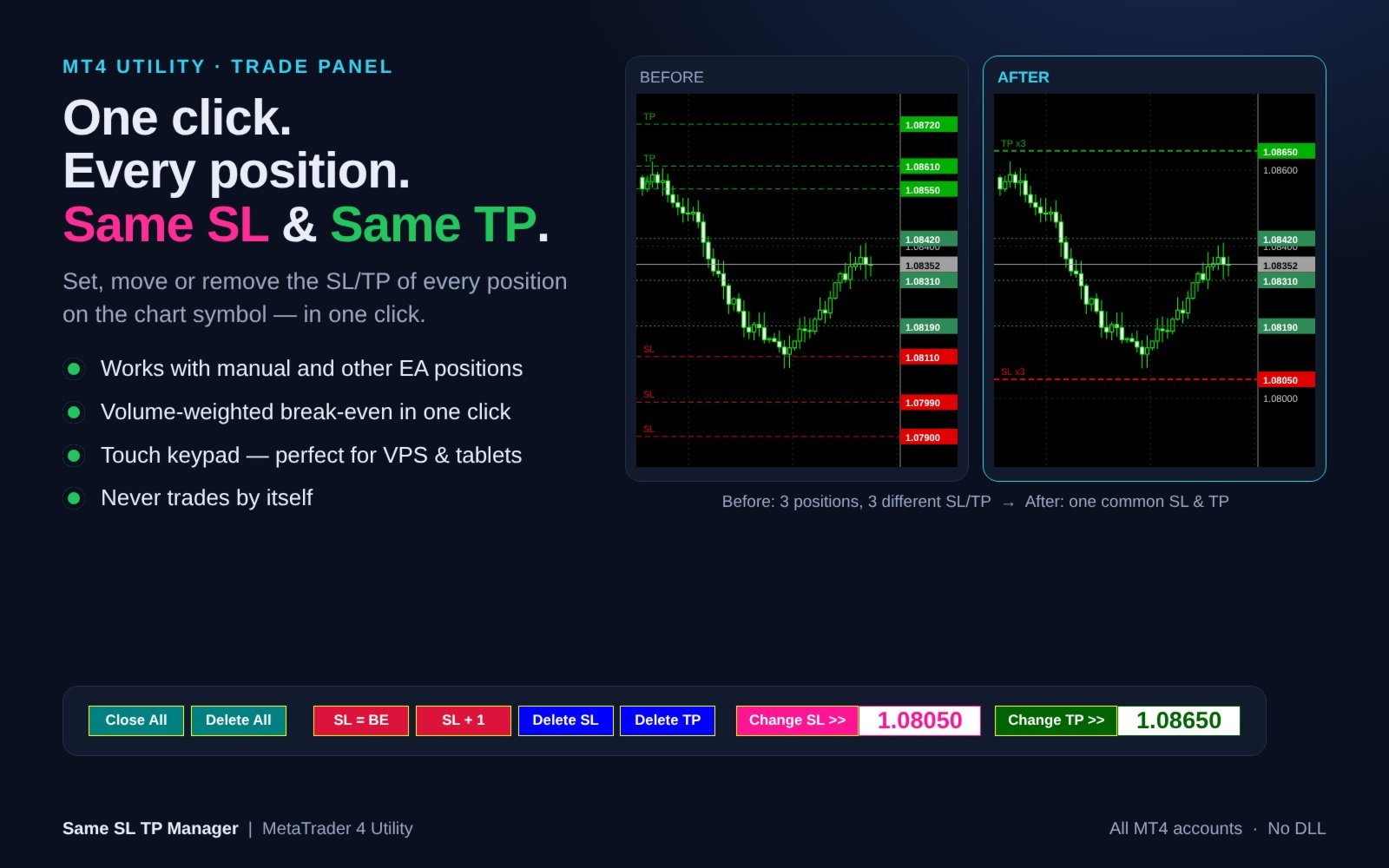
チャート銘柄の全ポジションに、共通の損切り(SL)・利確(TP)をワンクリックで設定・移動・削除できるトレードパネル。建値ストップ、SL+1pips、全決済、待機注文一括削除、チャート上のタッチ用テンキーを搭載。EAが勝手に売買することはありません。

==================================================================
詳細説明
==================================================================
Same SL TP Manager は、チャート上のすべてのポジションに「共通のSL」と「共通のTP」をワンクリックで設定するユーティリティです。

ナンピン・買い増し・グリッド・複数のスキャルピングなどでポジションが増えると、SLとTPがポジションごとにバラバラになります。取引タブで1つずつ変更するのは時間がかかり、相場が速い時ほどミスも起きがちです。本ツールはチャート上に1列のコンパクトなパネルを表示し、現在の銘柄の全ポジションを「ひとつ」としてまとめて管理できます。

手動で建てたポジションにも、他のEAが建てたポジションにも対応。パネルが自分から新規注文を出したり、勝手に動作したりすることは一切ありません。注文が送信されるのは、あなたがボタンを押した時だけです。


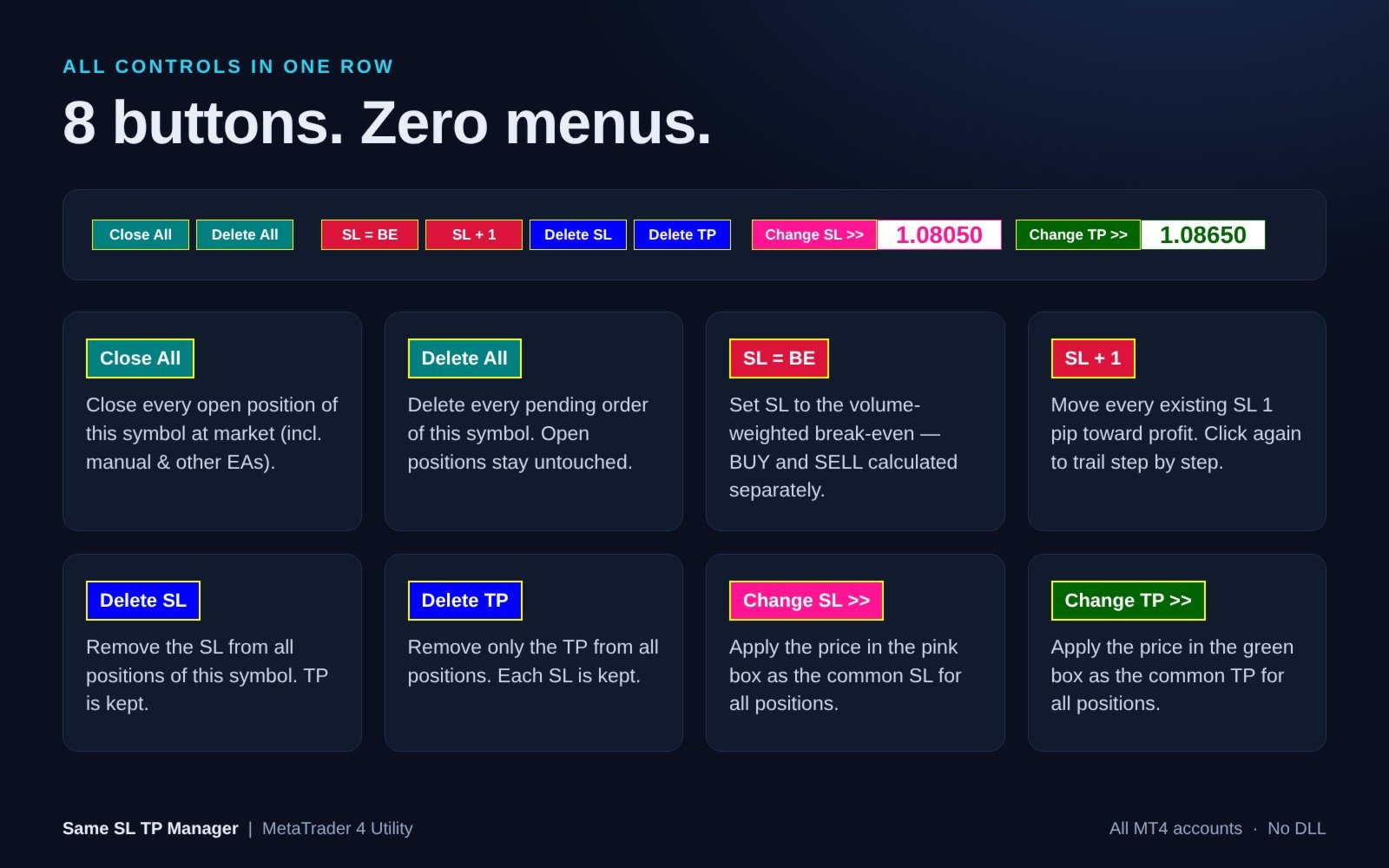
各ボタンの機能

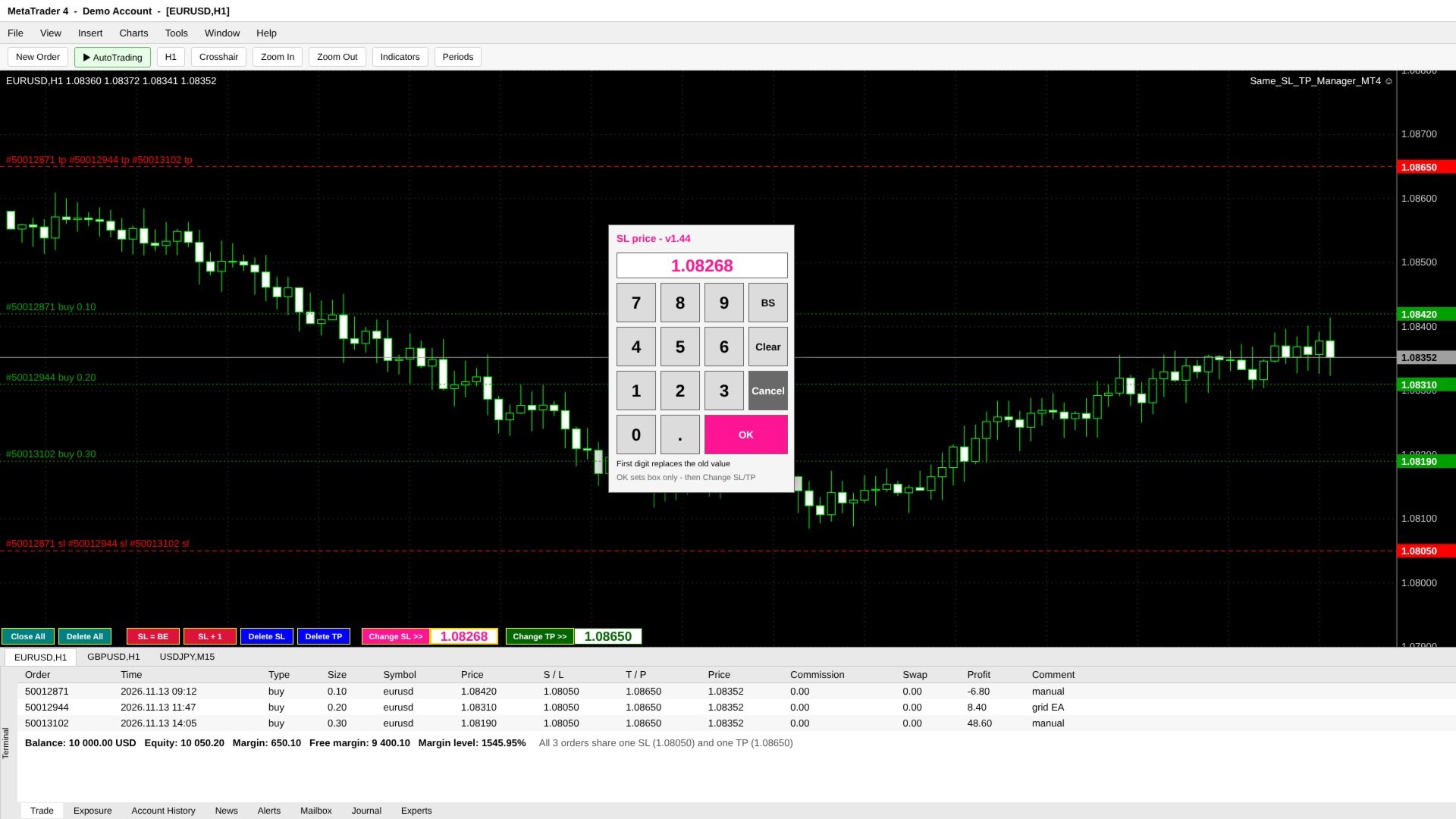
- Close All - チャート銘柄の全ポジションを成行で決済(手動・他EAのポジションも対象)。待機注文はそのまま残ります。
- Delete All - チャート銘柄の全待機注文(Buy/Sell Limit、Buy/Sell Stop)を削除。保有ポジションとそのSL/TPには触れません。
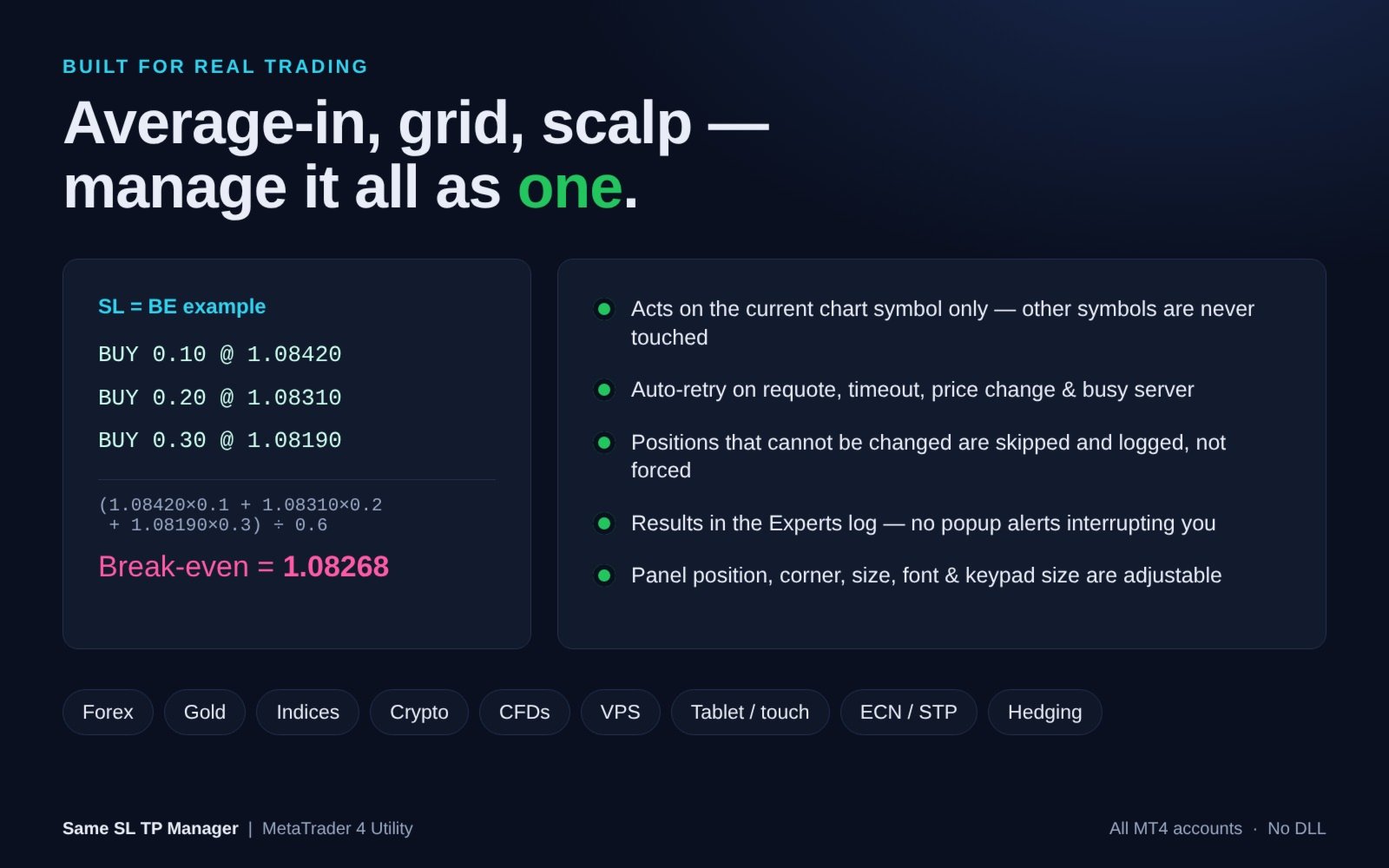
- SL = BE - ロット加重平均の建値にSLを設定。BUYとSELLは別々に計算するため、両建てでも使えます。
- SL + 1 - 既存の全SLを利益方向へ1pips移動。押すたびに段階的にトレールできます。
- Delete SL - 全ポジションのSLを削除(TPは維持)。
- Delete TP - 全ポジションのTPのみ削除(各SLは維持)。
- Change SL >> - ピンクの枠の価格を、全ポジション共通のSLとして適用。
- Change TP >> - 緑の枠の価格を、全ポジション共通のTPとして適用。


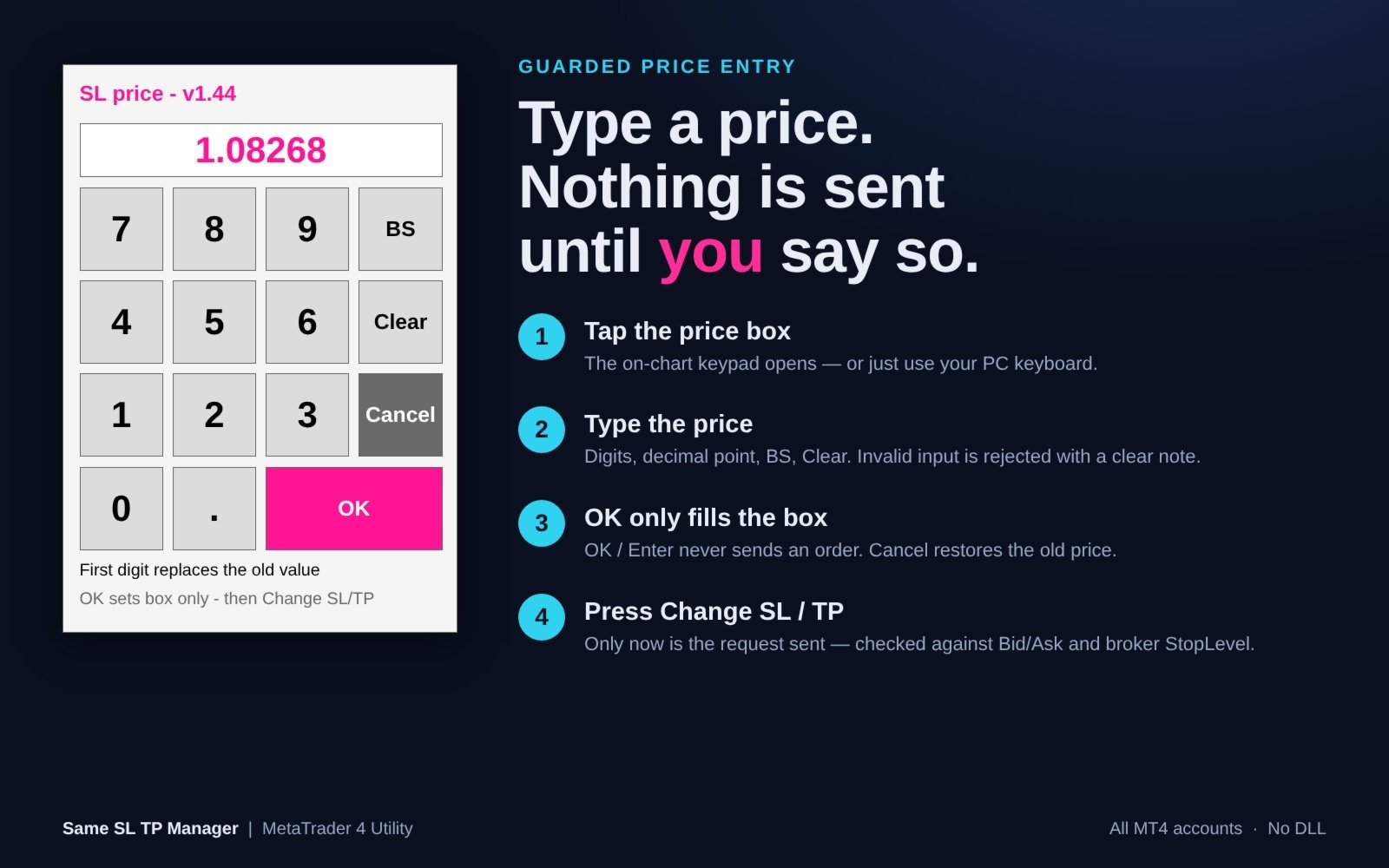
誤発注を防ぐ価格入力+タッチ用テンキー

1. ピンク(SL)または緑(TP)の価格枠をタップすると、チャート上にテンキーが開きます。PCのキーボード入力も可能です。
2. 数字・小数点・BS・Clearで価格を入力。
3. OK / Enter は「枠に価格を入れるだけ」。この時点では何も送信されません。Cancelで元の価格に戻ります。
4. Change SL >> / Change TP >> を押した時に、初めて注文が送信されます。

チャートオブジェクトへの文字入力が不安定になりがちなVPS・リモートデスクトップ・タブレット環境に最適です。テンキーはチャートのサイズに合わせて自動調整されます。


安全性と信頼性

- 対象はチャートの銘柄のみ。他の銘柄には一切触れません。
- 新しいSL/TPは、送信前に現在のBid/Askとブローカーのストップレベルでチェックします。
- 変更できないポジションは無理に変更せず、スキップしてログに記録します。
- リクオート・タイムアウト・価格変動・オフクオート・サーバー/ブローカービジー・リクエスト過多・接続エラー時は自動リトライ。
- MT4のトレードコンテキストが使用中の場合は、すぐに失敗せず空くまで待機します。
- 不正な入力(文字、小数点2つ、0、桁数過多など)は画面上のメッセージで通知し、受け付けません。
- 0を入力してもSL/TPは削除されません(削除は Delete SL / Delete TP で行います)。
- 結果(対象数/変更/スキップ/失敗)はエキスパートログに出力。ポップアップでトレードを邪魔しません。
- オブジェクトが削除された場合や時間足を変更した場合も、パネルは自動で復元されます。


入力パラメーター

=== Panel Position(パネル位置)=== ※入力一覧の区切り行は見出し用です
- Chart window index (SubWindow) - 表示するウィンドウ番号。0 = メインチャート。
- Panel corner (Corner) - 0 = 左上、1 = 右上、2 = 左下(初期値)、3 = 右下。
- Horizontal offset (Move_X) - 横方向の位置調整(ピクセル)。
- Vertical offset (Move_Y) - 縦方向の位置調整(ピクセル)。

=== Panel Appearance(パネル外観)===
- Button width (Button_Width) - ボタン幅。初期値70px、最小40。
- Font name (Font_Type) - フォント名。初期値 "Arial Bold"。
- Font color (Font_Color) - 文字色。初期値 白。
- Font size (Font_Size) - 文字サイズ。初期値8、最小6。

=== Price Input(価格入力)===
- Show touch keypad (Show_Touch_Keypad) - タッチ用テンキーを表示。初期値 true。
- Touch key size (Touch_Key_Size) - テンキーのボタンサイズ。初期値52px(チャートに自動フィット)。
- Input debug log (Input_Debug_Log) - 入力イベントの診断ログ。初期値 false。


対応環境

- MetaTrader 4(最新ビルドのターミナルを推奨)、全口座タイプ
- FX、ゴールド、株価指数、仮想通貨、CFDなど、ブローカーが提供するすべての銘柄
- 1pips = 5桁・3桁表示の銘柄では10ポイント、それ以外は1ポイント
- DLL不要


使い方

1. 管理したい銘柄のチャートに Same SL TP Manager をセットします。
2. ツールバーの「自動売買」を有効にし、EA設定の「全般」タブで「自動売買を許可する」にチェックを入れます。
3. ボタンを押すだけ。各ボタンにマウスを乗せると説明(ツールチップ)が表示されます。

ご注意:ストラテジーテスターではチャート上のボタンをクリックできません(MetaTrader 4の仕様)。そのためデモ版ではパネルの表示のみとなります。すべての機能はデモ口座・リアル口座で動作します。

ご注意:Close All と Delete All は確認なしで即時実行されます。手動・他EAで建てたものを含め、チャート銘柄のすべてのポジション/待機注文が対象です。

ご質問・ご要望はプライベートメッセージでお気軽にどうぞ。
おすすめのプロダクト
Expert Advisor for MT4 Useful utility MUST have for all traders.  With 1 click button, you're able to close all your open positions. Its come with a warning pop up notification when you click to close all your trades, to avoid an accident press the button. Just press 'Yes' to confirm or 'No' to cancel it. The expert will close all your open positions no matter what pairs you currently open or directions. Just attach the expert on 1 of your chart, and you're good to go.
Do you over trade???  Do you lose your account by adjusting the stop loss or not putting stop loss?? Do you cross your daily loss limit and closed your account??? Do you breach your funded account??? Do you fail frequently because of emotion??   So you have to control your emotion in trading. And this EA will do the job for you. You can not repeat those mistake even if you try hard. Just set the EA and relax. This will do major role in funded account. This EA will not open orders/positions. It j
Note: After installation, please go to Tools>Options>Expert Advisors and add https://porsaj.com to 'Allow WebRequest for listed URL'. Still Problem?! Please check Internet connection! An economic calendar in the context of forex refers to a tool or resource that provides information about upcoming economic events, indicators, and data releases that can potentially impact the financial markets, particularly the foreign exchange market. It helps traders stay informed about key economic announce
Robi Auto Expert Advisor works using sharp tick movements. It goes through the entire history and all currency pairs with one single setting. The more latency your broker has in the amount of the Internet channel, the higher you need to set stop loss, take profit and trailing stop so that the server can process them at the desired price and the lower the trading frequency will be. The uniqueness of the Expert Advisor is that it can be run on any hourly period, on any currency pair and on the se
【商品名】 Magic Closer Panel MT4(マジックナンバー指定 一括決済パネル) 【短い説明】 マジックナンバーと銘柄を指定して、ワンクリックで一括決済。特定のEAだけ、手動ポジションだけ、すべて――を買い決済/売り決済/全決済で。MetaTrader 4版です。 【説明文】 Magic Closer は、チャート上に表示するコンパクトな一括決済パネルです。ワンクリックで決済できるだけでなく、「決済したいポジションだけ」を正確に選べるのが特長です。 1つの口座で複数のEAを動かしている、EAのポジションと手動ポジションが混在している――そんなとき、通常の「全決済」ボタンではすべてが決済されてしまいます。Magic Closer は「マジックナンバー」と「銘柄」の2つのフィルターを組み合わせて、決済対象をピンポイントで指定できます。 主な機能 マジックナンバーで絞り込み  ・All:マジック番号に関係なく、すべてのポジション  ・Manual (0):手動で建てたポジションのみ  ・任意の番号:特定のEAのポジションのみ  ・ / で保有中のマジック

Break Even Trailing EA|ブレークイーブン&トレーリングストップ自動化ツール Break Even Trailing EAは、MetaTrader 4/5上で手動トレードの利益確保を自動化するために開発されたユーティリティEAです。 裁量エントリー後のリスク管理や利確作業を自動でサポート し、忙しいトレーダーの利益確定・損失限定を強力にアシストします。 本EAは、次の 2種類の利益確保ロジック を組み合わせて使えるのが大きな特徴です。 1. ブレークイーブン(建値ストップ)機能 あらかじめ指定した含み益(pips単位)に到達すると、ストップロスを自動で建値(エントリー価格)または建値+指定pipsの位置まで移動します。 損益がプラスになった瞬間にロスカットをゼロ/プラスに固定したい時や、逆行時の損失リスクを早期に排除したい場合に最適です。 「建値+α」も設定できるため、手数料やスプレッド分を確実にカバーしたい場合にも柔軟に対応します。 2. トレーリングストップ機能 指定した利益幅に達した後、相場の上昇/下落に合わせてストップロスを自動的に追従させます。 利益の伸び
FREE
Easy Trade Executor は、MT4 における迅速なポジションサイズ計算、注文執行、およびトレード管理のためのツールです。 エントリー価格、Stop Loss、Take Profit レベルをチャート上に直接配置し、ポジションサイズを自動計算して、リスクを管理しながら数回のクリックでトレードを開始できます。 なぜ Easy Trade Executor を選ぶのか? Easy Trade Executor は、単なるリスク計算以上の機能を求めるトレーダーのために設計されています。トレーダーはチャート上から迅速かつ効率的にトレードを管理したいと考えています。 このツールは、ポジションサイズ計算、注文執行、トレード管理を1つのワークフローに統合し、手動計算やターミナルウィンドウの切り替えではなく、トレードそのものに集中できる環境を提供します。 Easy Trade Executor の主な機能: リスクベースの自動ポジションサイズ計算; チャートから直接行う成行注文および指値・逆指値注文の発注; 自動トレード管理のための Trailing Stop; ワンクリックでのポジシ
MRPHN Overdosed is a trend-following Expert Advisor built for XAUUSD , powered by a custom Supertrend indicator : iMRPHN (included for free). It combines simplicity and flexibility, offering optional Martingale logic, configurable risk settings, and time-based trading filters — ideal for traders who prefer a set-and-forget approach. Tested on :  XAUUSD Strategy : Trend-following using iMRPHN indicator Trade Timing Control : User-defined trade start & end time Take Profit / Stop Loss : Fully con
Margin Call Shield – Defend Your Margin on Your Terms Margin Call Shield   is a tool for MetaTrader 4 traders who want to decide for themselves which open positions are closed during margin call situations before the platform does so automatically based on its internal rules. By default, the broker or platform decides which positions to close, often using undisclosed algorithms. Margin Call Shield lets you set this order according to your own strategy. Why Was Margin Call Shield Created? In a  
Utility, which draws buy or sell trendlines, which can also become support or resistances able to close any position on the screen Algorithm that calculates the gain of the position, at the touch closure of the line.   The benefits you get: Works on forex and CFD, timeframe from M1 to Weekly. Easy to use screen control panel. Audible warning messages at the touch of the line. Easy to use.
The Universal Hedge EA uses unique trading system that is adjustable to the users liking. Universal Hedge has three lot size approaches by adding lots, multiply lots or manual lot size selection. The Universal HedgeEA opens positions according to time management and the SMA Moving Averages filter that are set by users. Closing positions is set according to take profit and trailing stops. The EA has a unique feature that minimizes the gap feature used by standard hedging strategies. This feature
BreakEven Grid Utility for MT4 BreakEven Grid is a powerful utility for manual trade management on the MetaTrader 4 platform. It provides a convenient on-screen panel with buttons to help you manage your open positions with a single click.  Features: Set BE+Profit: Automatically sets Take Profit to breakeven + desired profit in pips or money. Close BUY/SELL: Instantly close all Buy or Sell orders for the current symbol. Close +$/-$/Old/New: Close only profitable, losing, oldest or newest tra
A Gold Mine is an automated trading EA for MT4 (MT5 compatible), purpose-built and optimized for XAUUSD (Gold). It combines dual core logic of grid trading and trend recognition: capturing swing profits in ranging markets, and mitigating unilateral drawdowns in strong trending conditions. With built-in risk control for extreme volatility and fully customizable parameters, it caters to traders with different risk appetites. Supported Instruments : Primarily optimized for XAUUSD (Gold); compat
An  MT4 Expert advisor for finding Break-Even point of open position, especially grid or hedge orders. also, you can close all open orders, or delete all pending orders , and set your desire Take Profit how far from Break Even point. All traders that using Grid strategy, or Hedge strategy should use this ea. it shows you break-even point by drawing a line and also automatically set your Take profit and stop loss.
TRADE MANAGER G2 – PRODUCT DESCRIPTION By Ida Bagus Putu Mahardika Trade Manager G2 – All-in-One Trading Panel for Professional Execution & Risk Management Trade Manager G2 is a next-generation trading panel designed to give you full control over order execution, position management, and profit optimization in real time on MetaTrader 5. With a modern card-based user interface and individual TP actions per level, this panel elevates your trading experience to the next level. KEY ADVANTAGES OF
Short Description: FTMO Protector PRO MT4 is an EA designed to protect your funded account by managing risk and ensuring compliance with the Prop Firm's trading rules. This EA automatically monitors equity levels, closes trades when profit targets or drawdown limits are reached, and provides a visual display of key account metrics. EA w orks with all different Prop Firm service providers. Overview: FTMO Protector PRO MT4 is an Drawdown Safeguard Expert Advisor meticulously crafted for traders
Gyroscope        professional forex expert   (for EURUSD, GBPUSD, USDJPY, AUDUSD, USDCHF, EURGBP, EURJPY, NZDUSD, USDCAD, EURCHF, AUDJPY, CADJPY pairs)   alyzing the market using the Elliot Wave Index. Elliott wave theory is the interpretation of processes in financial markets through a system of visual models (waves) on price charts. The author of the theory, Ralph Elliott, identified eight variants of alternating waves (of which five are in the trend and three are against the trend). The mov
Riskly Pro is a risk and trade management utility for manual traders. It combines account protection, position management and scale-in entries in one Expert Advisor. Trading panel - On-chart BUY and SELL buttons. The lot is calculated from the risk you set (percent of the account) and the stop loss distance. - Automatic stop loss and take profit on every position, including positions you open manually. Account protection - Maximum daily loss, maximum number of trades per day and maximum conse
Trading tool combining a sophisticated equity stop-loss, dynamic take-profit management (Breakeven & Trailing), and symbol-group-based closing logic. It is a complete risk management and trade supervision tool. Features: All features of `Equity Master Stop v1` (floating profit/loss limits, exit protection, skip hours). Take-Profit Override: Can force a TP on any order to lock in a `MAX_FLOATING_PROFIT`. Step Breakeven: Locks in increasing amounts of profit as a trade moves favorably (e.g., aft
The Pips Multiplier MT4 EA is a a trend-following EA, 3 filters are used to open trades. Every position has virtual Stop Loss and a Take profit based on your settings and only visible to you and invisible to the broker to prevent dishonest brokers to manipulate the market price in order for you to hit your stop loss and lose your trade. The EA was created with minimal settings for simplicity of use and hardcoding the more complex settings. The EA works on all Forex pairs and all timeframe. The E
The purpose   of this utility is to manage one or more subwindow in the same chart by opening and closing them through a button or the keyboard keys How it works: If you want to handle more than one subwindow you need to reinstall the indicator . In this case some setups has to be customized onlu in the last subwindow installed and others setups in the installed subwindow during the first time installation. They are denoted in the input rispectively as ' LW ' and ' IW '. First of all install
Pomo Panel is a simple panel to help trader using grid strategy. It is designed with grid strategy in mind.  Its features: Open standard transactions Set up pending transactions Delete all pending transactions Modify multiple Stop-Loss and Target-Profit Calculate Lots of all opened transactions Calculate average Open-Close, High-Low Close All Opened Orders
THIS EA WILL PROTECT YOUR ACCOUNT IN MANY WAYS  KEY FEATURES ARE :  1. CLOSE ALL TRADES IN ONE CLICK. 2. CLOSE ALL TRADES WHEN INPUT MENTIONED LOSS LIMIT REACH. 3. CLOSE ALL TRADES WHEN INPUT MENTIONED PROFIT LIMIT REACH. 4. IF REVERSE MODE IS ON THIS EA WILL TAKE OPPOSITE TRADES IF YOUR OTHERS EA MAKES LOSS OR MANUAL TRADING ALSO IF YOU ARE GETTING ALWAYS LOSS THEN YOU CAN SWITCH ON REVERSE MODE SO IT WILL TAKE OPPOSITE TRADES WHENEVER ANY TRADES PLACED IN YOUR ACCOUNTS. 5. FIX LOT SIZE 6. STOP
Rhino Backtest Manager - ライブ取引とストラテジーテスターのためのトレード管理パネル Rhino Backtest Manager は、ライブ取引と MetaTrader 4 のストラテジーテスターの両方で動作するトレード管理パネルです。ライブ口座と同じインターフェースのままテスター内で手動の発注と管理ができるため、ヒストリカルデータで手法を確認したあと、ツールを変えずにそのまま取引できます。 パネルは設定したリスク条件からロット数を計算し、発注前にストップロスとテイクプロフィットの金額を表示します。また、日次、週次、月次、および口座の全期間の成績を記録します。 ユーザーマニュアル: 製品の使い方 無料デモ版: デモ版をダウンロード MetaTrader 5 版: Rhino Backtest Manager MT5 版 初回起動の前に、マニュアルページで配布しているフォントをインストールしてください。フォントが無い場合、パネルは正しく表示されません。 機能 2つのモード。 同じパネルがライブ取引とストラテジーテスターモードで動作します。 注文の種類。 成行、
Only 1 copies left at a price of $99. Next price $199! actual .set files (click me) interactive panel manual (click me) Version for MT5:   Smart Start Smart Start  is a smart trading system, the indicators of which allow it to be used both for trading with small deposits (fast acceleration) and for conservative trading.  is a modernized trading indicator system that uses the MACD indicator to analyze the market. To analyze entry points,   smart start   takes into account the historical indica
VR Cub
Vladimir Pastushak
VR Cub は、質の高いエントリーポイントを獲得するためのインジケーターです。このインジケーターは、数学的計算を容易にし、ポジションへのエントリーポイントの検索を簡素化するために開発されました。このインジケーターが作成されたトレーディング戦略は、長年にわたってその有効性が証明されてきました。取引戦略のシンプルさはその大きな利点であり、初心者のトレーダーでもうまく取引することができます。 VR Cub はポジション開始ポイントとテイクプロフィットとストップロスのターゲットレベルを計算し、効率と使いやすさを大幅に向上させます。取引の簡単なルールを理解するには、以下の戦略を使用した取引のスクリーンショットを見てください。 設定、設定ファイル、デモ版、説明書、問題解決方法は、以下から入手できます。 [ブログ] レビューを読んだり書いたりすることができます。 [リンク] のバージョン [MetaTrader 5] エントリーポイントの計算ルール ポジションをオープンする エントリーポイントを計算するには、VR Cub ツールを最後の高値から最後の安値までストレッチする必要があります。 最初
Order Panel 28
Pablo Sebastian Nequecaur
Order Panel 28 — Professional Manual Execution Panel for MT4 Trade 28 forex pairs from a single on-chart panel — with automatic lot sizing, split entries, auto break-even, and stealth SL management. Order Panel 28 is a precision execution tool built for manual traders who want full control over their entries while eliminating the repetitive calculations that slow you down and cause mistakes. No indicators, no black-box signals — just a clean, fast panel that does the math so you can focus on you
很多交易者亏钱,不是因为判断方向错了。 是因为行情动的时候手慢了。是因为手滑点错了手数。是因为新闻数据一出来, 三笔盈利的单子还没来得及平,全部回吐了。 Apex Trade Manager Pro 就是为了解决这些问题而做的。 这是一款适用于 MetaTrader 4 和 MetaTrader 5 的可视化交易面板。它挂在 图表上,把所有常用操作——平仓、减仓、设止损、开单——都变成一个按键的 事情。不用翻菜单,不用等弹窗,不会手忙脚乱。 --- 功能说明 一键全平 一个按钮关掉当前品种所有持仓。按钮上实时显示总浮动盈亏,让你在按下去 之前就知道自己在什么位置。 分批减仓 直接从面板关掉每笔持仓的50%或80%仓位。想落袋一部分利润但不想完全出场 的时候,这个比去终端一笔一笔操作快得多。 按类型分开平仓 只平多单、只平空单、只平盈利的、只平亏损的,各有独立按键。不用在终端 里翻找,不用逐笔选择。 一键移至保本 行情往你方向走了,按一下保本键,所有盈利持仓的止损立刻移到各自的开仓 价。亏损的单子不受影响。 批量修改止损止盈 输入点数,按键,所有持仓同时更新。也可以
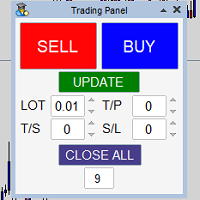
Panel that allows easy opening of orders with the option to establish Lots, Take Profit, Stop Loss and Trailing Stop at the time of opening the order, has the UPDATE button which updates parameters such as Take Profit, Stop Loss and Trailing Stop in the open orders with the panel, it only manages the orders in the chart in which it is used, to use in several charts it must be installed in each one of them.
Gold Standart - a trading expert for the XAUUSD (Gold) trading instrument. The Expert Advisor is tested on real ticks on any part of history. No hazardous trading methods are used. Each trade has a stop loss and a take profit. Support: https://www.mql5.com/en/channels/TrendHunter Recommended trading instrument (TF 1M): XAUUSD (Gold). We recommend using a remote server (VPS). Settings: This LOT: - This lot For each of this amount (if> 0) - For each of this amount of balance; MaxLot - You can
このプロダクトを購入した人は以下も購入しています
Unlimited Trade Copier Pro is a tool to copy trade remotely to multiple MT4, MT5 and cTrader accounts at different computers/locations over internet. This is an ideal solution for you if you are a signal provider and want to copy your trades to other receivers globally on your own rules. One provider can copy trades to multiple receivers and one receiver can get trade from multiple providers as well. The provider can even set the subscription expiry for each receiver, so that receiver will not b
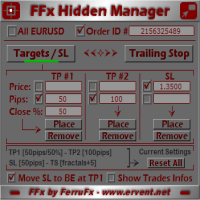
The FFx Hidden Manager panel will help you to manage easily your orders directly on the chart. Below all features described: TP, SL and TrailingStop are hidden Each order has its own lines on chart Drag & Drop any line to change the TP/SL as per your need Option to move automatically the SL line at breakeven when TP #1 is reached Option to choose the TP/SL type (by pips or price) Option to choose the TrailingStop type (by pips, MA, Fractals, PSAR or ATR) Define which order(s) you want to manage
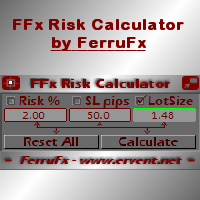
FFx Risk Calculator panel will help you to calculate very easily your trades size, SL or the risk directly on the chart. All features are described below: Option to select which parameter to calculate: Risk, Stop Loss or Lot Size The panel will show if the lot size is allowed according to the current account free margin Button to maximize/minimize the panel Drag and Drop the panel anywhere on the chart How to use it? Select the parameter you want to be calculated. It will be based on the 2 other
News Trader Pro is a unique robot that allows you to trade the news by your predefined strategy. It loads every piece of news from several popular Forex websites. You can choose any news and preset the strategy to trade it, and then News Trader Pro will trade that news by selected strategy automatically when the news comes. News release gives opportunity to have pips since the price usually has big move at that time. Now, with this tool, trading news becomes easier, more flexible and more exciti
The FFx Watcher PRO is a dashboard displaying on a single chart the current direction of up to 15 standard indicators and up to 9 timeframes. It has 2 different modes: 1. Watcher mode: Multi Indicators User is able to select up to 15 indicators to be displayed User is able to select up to 9 timeframes to be displayed 2. Watcher mode: Multi Pairs User is able to select any number of pairs/symbols User is able to select up to 9 timeframes to be displayed This mode uses one of the standard indicat
If you wish to draw Support and Resistance lines, view: daily market opening, classical pivot levels, Fibonacci pivot levels, trend lines, Fibonacci levels, the remaining time to candle closing, and current spread. If you seek to place your orders with the exact lot that meets your desired stop loss risk. If you wish to do all this and more with just one click, then this is the perfect tool to use. This tool will allow you to feel more relaxed when deciding to open orders, as well as predicting
Unlimited Binary Options Copier Remote is a powerful tool to copy binary options trades remotely between multiple accounts at different locations over internet. This is an ideal solution for signal provider, who want to share his binary options trades with the others globally on his own rules. One provider can copy trades to unlimited receivers and one receiver can get trade from unlimited providers as well. The provider can set the subscription expiry for each receiver, so that receiver will no
The Pairs Trade indicator is a utility for semi-automatic pair trading. It allows combining the charts of two arbitrary instruments, even if the schedules of their trading sessions are different. It displays a spread chart in the form of a histogram with an overlaying moving average. It calculates the swap that will be charged for the synthetic position (in the deposit currency). It is possible to set a level for automatic opening of a synthetic position on the spread chart (analogous to the 'se
The script displays info about the share's corporate reports and dividends. The data is downloaded from   investing.com : Report date Profit per share (EPS) Revenue Market capitalization Amount of dividends Date of payment of dividends Dividend income The product cannot be tested in the tester (since it is not possible to receive data from the Internet). Before launching:  Add 2   URL   https://ru.investing.com/earnings-calendar/Service/getCalendarFilteredData  and   https://ru.investing.com/di
This Stacker EA will: Automatically set Stop loss on a new order Automatically set Take profit on a new order Stack (or open up to 4 additional orders at the same time) when a new order is placed, the SL/TP can be preset individually for each order. Provides a transparent replacement for the standard 1-click trading buttons in MetaTrader 4 (1 click still works and SL/TP will automatically be set as well as Stacking). Automatically calculate lot order size according to preset risk management perc
FXFledgling Exit Tool is a complete risk management tool that analyzes both the open trades and the direction of the pair of open trades. As long as the suggested entry and lotsizing management presented here is followed strictly, you will have a high chance (but no guarantee) of surviving the trade. What It Does It is used as an exit tool. It helps the trader to manage any manual trade that he transacted. It does the following: Trail Stop Dynamic Stop Loss - a calculated stop-loss that changes
New opportunities for analyzing cryptocurrency in the usual MetaTrader 4. For example : We select the symbol of the cryptocurrency and attach any indicators, Expert Advisors or scripts. Startup Mode View cryptocurrency; Data collection. Capabilities Work as with a standard currency chart; Automatic update of open charts; Selection of individual cryptocurrency for updating; Selection of individual timeframes for updating; Work on the desired timeframes; Open charts do not affect the work of Cry
Notify Telegram is a utility that bridge your MetaTrader4 trading activities to your Telegram chat/channel. It will help you to monitor your MetaTrader4 actions such as placing trade, modifying order's TP/SL, closing trades etc and send a notification message to your dedicated Telegram chat/channel. It does not execute any trade on your MetaTrader4 account. It can be useful for monitoring EA performance or providing signal to your Telegram channel/group subscribed. Parameters Token ="" - enter
The  Easy Strategy Builder (ESB)  is a " Do It Yourself " solution that allows you to create a wide range of the automated trading strategies without any line of codes. This is the world’s easiest method to automate your strategies that can be used in STP, ECN and FIFO brokers. No drag and drop is needed. Just by set conditions of your trading strategy and change settings on desired values and let it work in your account. ESB has hundreds of modules to define unlimited possibilities of strategi
Telegram ChartSnap is an utility tool to bridge your MetaTrader 4 activities to your Telegram chat/group/channel. It will screen shot your MetaTrader 4 chart and send it to your dedicated Telegram chat/group/channel through a Telegram bot. The whole process will keep repeating based on a time cycle that predetermined by the user. It is a convenient tool for those who like to get access to their favorite system/dashboard that only available at MetaTrader Desktop. Beside that, trader can easily s
フィボナッチリトレースと拡張ラインツール DiNapoliポイント取引方法とゴールデンセクション取引を使用するトレーダーにとって理想的なMT4プラットフォームのフィボナッチリトレースと拡張ラインツール 主な特長: あなたはフィボナッチリトレースメントの複数のセットを直接描くことができ、重要なリターンポイント間の関係は一目瞭然です。 2.フィボナッチ拡張を描画することができます。 3.フィボナッチフォールドバックとラインの延長は、簡単な観察と数値表示のために左右に動かすことができます。 4.チャートは非常に爽やかな 5.数字キーでサイクルを切り替えることができます。 ファンクションキー: 1。 [戻るを押す、要求に応じて描画する、最大8つのグループにする 2。拡張]を描くには[押す] 3。 \を押すと、現在のサイクルの下にあるすべての拡張機能と折り畳みが削除されます 4。フォールドバックを移動して削除して展開する (1)最初のフォールドバックセットのF5行をクリックします。 一度クリックすると(黄色に変わります)、キーボードのDeleteキーを押すと、フォーカ
Советник риск-менеджер с огромным арсеналом возможностей защиты вашего депозита. Для инвесторов, которые решили передать капитал в доверительное управление. Когда у трейдера нет доступа к настройкам - нивелирует торговые риски. А также для трейдеров, которые осознали необходимость стороннего контроля за их торговлей для улучшения торговых результатов.  Для максимальных результатов - должен стоять на отдельном VPS сервере и у трейдера не должно быть возможности менять настройки в торговый период.
Grid Hero War Pad is a  GRAPHICAL MANUAL TRADER version of the original Grid Hero EA, designed and created for ADVANCED TRADERS who are experienced in plotting their own market entries. It is coded using ADVANCED GRAPHICAL INTERFACE programming, that combines the power of discretionary trading with Grid Hero algorithm in the form of a graphical console with button-click easy execution. It allows you to execute trades manually using Market Orders and Pending Orders, and then automatically uses th
The advantage of using this EA This EA directly updates takeprofit and stop losses that are still empty in a manual order Parameters Multiplier: Multiplier value of the previous transaction Distance: Distance hedging from the previous order Takeprofit: take profit taken from the last price + the value of this column We recommend that you do not add more than one manual transaction in the same pair martingale hedging | manual hedging | hedging manual | hedging lot | best robot | best ea
The new version of  MirrorSoftware 2021  has been completely rewriten and optimized.  This version requires to be loaded only on a single chart because  it can detect all actions on every symbol and not only the actions of symbol where it is loaded. Even the  graphics and the configuration mode  have been completely redesigned. The MirrorSoftware is composed of two components (all components are required to work):  MirrorController  (free indicator): This component must be loaded into the MASTER
Скрипт открывает графики по всем инструментам находящимся в окне "Обзор рынка" и по желанию может задать для всех графиков один шаблон. Так-же можно удалить все графике открытые в терминале Мт4. В скрипте имеются следующие настройки: "Таймфрейм" по умолчанию M30;             (Можно поставить свой: M1, M5, M15, M30, H1, H4, D1, W1, MN.) "Задержка" по умолчанию "0";                  (Задержка перед открытием следующего графика в миллисекундах.) "Шаблон" по умолчанию "True";                (True=пр
(8th Feb 2019 Launch Promo: $97/lifetime just for 1 day! Price goes to $180/lifetime in 24 hours!) The TFA Trade Manager helps you easily manage your trades with an intelligent vertical "bars" system. You easily now easily click + drag your entry, stop loss, take profit, breakeven, partial profit and trailing stop with a few simple mouse clicks. You can also easily calculate the risk you wish to allocate to each trade by telling the trade manager your desired risk %, lot size or $dollars to risk
This utility automatically draws the trend channel on the price chart. For the time interval from the specified date to the current bar, the drawn channel is almost optimal. Placing the beginning of the channel at a more distant historical price extremum, you get a visualization of a longer-term trend. Channel slope is not a continuous value, but takes one of discrete values (in AxB format, where A is the number of price points (points), and B is the number of timeframes). This program works ONL
--------------Welcome to use [MQL5 Signal Analyze Master]------------------  Function: Draw order tracks of MQL5 MT4 and MT5 signal on MT4 chart. [Using guide] 1.Use it as Experts. 2.Download history record from MQL5 signal(MT4 signal or MT5 signal).  3.Paste history record file below "MQL4/Files/" 4.Load [Signal Analyze Master] on the symbol chart what you want to analyze. 5.Paste the history record file name to parameter 'FileName' 6.Select  SignalType  match the history you download on MT4
Forex copier
Alexandr Bryzgalov
4.5 (2)
We offer simple and reliable software that can  copy trades  between any MT4 accounts. Easy to use MetaTrader copier which saves valuable time Reliable, so you are protected from technical issues Powerful, with a lot of features available Who can use this MT4 copier? Forex Copier is a solution for individual traders or account managers who need to execute trade signals from external sources or who need to  manage several MetaTrader 4 accounts  at the same time. We do not offer you “yet another
Forex Market View Dashboard and CSM
Opengates Success International
5 (1)
FFXMV Dashboard + CSM is a custom indicator combined with Currency Strength Meter . It is created to give the Traders a full view of what is going on in the market. It uses a real time data to access the market and display every bit of information needed to make a successful trading. Before attaching this Indicator to your window chart, go to your MT4's Market Watch panel and HIDE all the Currency pairs you don't need or trade and leave the rest there. The reason is that FFMV Dashboard will DISP
Trading  Robot which automates your scalping and take your profitability  and forex trading experience to the next level ,Computer cannot analyse market as humans do, at same time we cannot compete with them in terms of speed of execution, hft  & emotionlessness  .  ​In this scalp-trading robot we have integrated human analysis with quick algorithmic execution  to enter and exit trades at fraction of seconds Get More details at :  https://www.noemotionfx.com/tl-scalper-ea To test , use it in dem
NewsReady is a semi-automated Expert Advisor that uses a smart straddle methods It needs to be set in charts 2 to 10 minutes before Economic Data release with a red-flag impact on currencies related to the news. Then it run pending orders in specified number of minutes indicated in the time-period parameter. After the specified time, it will stop trading and will remove all pending orders. Important You can not backtest this tool because it is semi-automated and can only be set and run a few min
Panel designed for ichimoku traders. Intelligent algorithm that reveals signals over multiple time frames and multiple currency crosses.   The benefits you get :   Significantly lightens the signal search analysis. Never redesigns, does not retreat, never recalculates. Works on forex, CFD, Crypto and stocks, time frames from M5 to W1. Integrated pop-up, push notification and sound alerts. Easy to use. Parameters : Number_Instrument = 10; Number of instruments displayed Tenkan = 9; Kijun = 26;
Advanced Smart Renko and Heiken Ashi Candle Trader is ONE STOP SOLUTION based semi/fully - automated multi-currency EA carefully engineered for traders to enter the trade based on their Analysis or in fully automated mode for scalping, trend trading, candle breakout trades and also automated news trading with inbuilt trade management solution.    Advantages    No grid / Martingale Works on Classic Renko, Renko Heiken Ashi charts and classic Heiken Ashi charts    Features Multi-Currency Ma
作者のその他のプロダクト
================================================================== 商品名 ================================================================== Total PL Close Manager MT4 (日本語の副題を付ける場合の例:合計損益で一括決済・共通TP/SL・利益保護) ================================================================== 説明文 ================================================================== Total PL Close Manager は、MetaTrader 4 用のポジション管理ユーティリティです。対象ポジションの合計損益を監視し、合計の利確目標または損切目標に達したら対象ポジションをまとめて決済します。また、銘柄ごと・BUY/SELL ごとに共通の TP/SL 価格を計算して各ポジシ
【商品名】 Magic Closer Panel MT4(マジックナンバー指定 一括決済パネル) 【短い説明】 マジックナンバーと銘柄を指定して、ワンクリックで一括決済。特定のEAだけ、手動ポジションだけ、すべて――を買い決済/売り決済/全決済で。MetaTrader 4版です。 【説明文】 Magic Closer は、チャート上に表示するコンパクトな一括決済パネルです。ワンクリックで決済できるだけでなく、「決済したいポジションだけ」を正確に選べるのが特長です。 1つの口座で複数のEAを動かしている、EAのポジションと手動ポジションが混在している――そんなとき、通常の「全決済」ボタンではすべてが決済されてしまいます。Magic Closer は「マジックナンバー」と「銘柄」の2つのフィルターを組み合わせて、決済対象をピンポイントで指定できます。 主な機能 マジックナンバーで絞り込み  ・All:マジック番号に関係なく、すべてのポジション  ・Manual (0):手動で建てたポジションのみ  ・任意の番号:特定のEAのポジションのみ  ・ / で保有中のマジック
============================================================== 商品名 ============================================================== Daily Max Floating Loss Tracker MT4(デイリー最大含み損トラッカー) ============================================================== 短い説明 ============================================================== 1日ごとの最大含み損と日利(確定損益)を並べてチャートに表示。チャートを閉じても、MT4を再起動しても記録が消えないインジケーターです。 ============================================================== 説明文(全文) ============================================
================================================================== 商品名 ================================================================== Total PL Close Manager MT5 (合計損益で一括決済・共通TP/SL・利益保護) ================================================================== 説明文 ================================================================== Total PL Close Manager は、MetaTrader 5 用のポジション管理ユーティリティです。対象ポジションの合計損益を監視し、合計の利確目標または損切目標に達したら対象ポジションをまとめて決済します。また、銘柄ごと・BUY/SELL ごとに共通の TP/SL 価格を計算して各ポジションにサーバー側の注文として設
【商品名】 Magic Closer Panel MT5(マジックナンバー指定 一括決済パネル) 【短い説明】 マジックナンバーと銘柄を指定して、ワンクリックで一括決済。特定のEAだけ、手動ポジションだけ、すべて――を買い決済/売り決済/全決済で。 【説明文】 Magic Closer は、チャート上に表示するコンパクトな一括決済パネルです。ワンクリックで決済できるだけでなく、「決済したいポジションだけ」を正確に選べるのが特長です。 1つの口座で複数のEAを動かしている、EAのポジションと手動ポジションが混在している――そんなとき、通常の「全決済」ボタンではすべてが決済されてしまいます。Magic Closer は「マジックナンバー」と「銘柄」の2つのフィルターを組み合わせて、決済対象をピンポイントで指定できます。 主な機能 マジックナンバーで絞り込み  ・All:マジック番号に関係なく、すべてのポジション  ・Manual (0):手動で建てたポジションのみ  ・任意の番号:特定のEAのポジションのみ  ・ / で保有中のマジック番号を順番に切替。入力欄に番号を
============================================================== 商品名 ============================================================== Daily Max Floating Loss Tracker MT5(デイリー最大含み損トラッカー) ============================================================== 短い説明(商品カード・検索結果用) ============================================================== 1日ごとの最大含み損と日利(確定損益)を並べてチャートに表示。チャートを閉じても、MT5を再起動しても記録が消えないインジケーターです。 ============================================================== 説明文(全文) ===============================
================================================================== 製品名 ================================================================== Same SL TP Manager MT5 ================================================================== 短い説明 ================================================================== チャート銘柄の全ポジションに、共通の損切り(SL)・利確(TP)をワンクリックで設定・移動・削除できるトレードパネル。建値ストップ、SL+1pips、全決済、待機注文一括削除、チャート上のタッチ用テンキーを搭載。EAが勝手に売買することはありません。 ================================================================== 詳細説明
フィルタ:
レビューなし
レビューに返信