ThemeManager

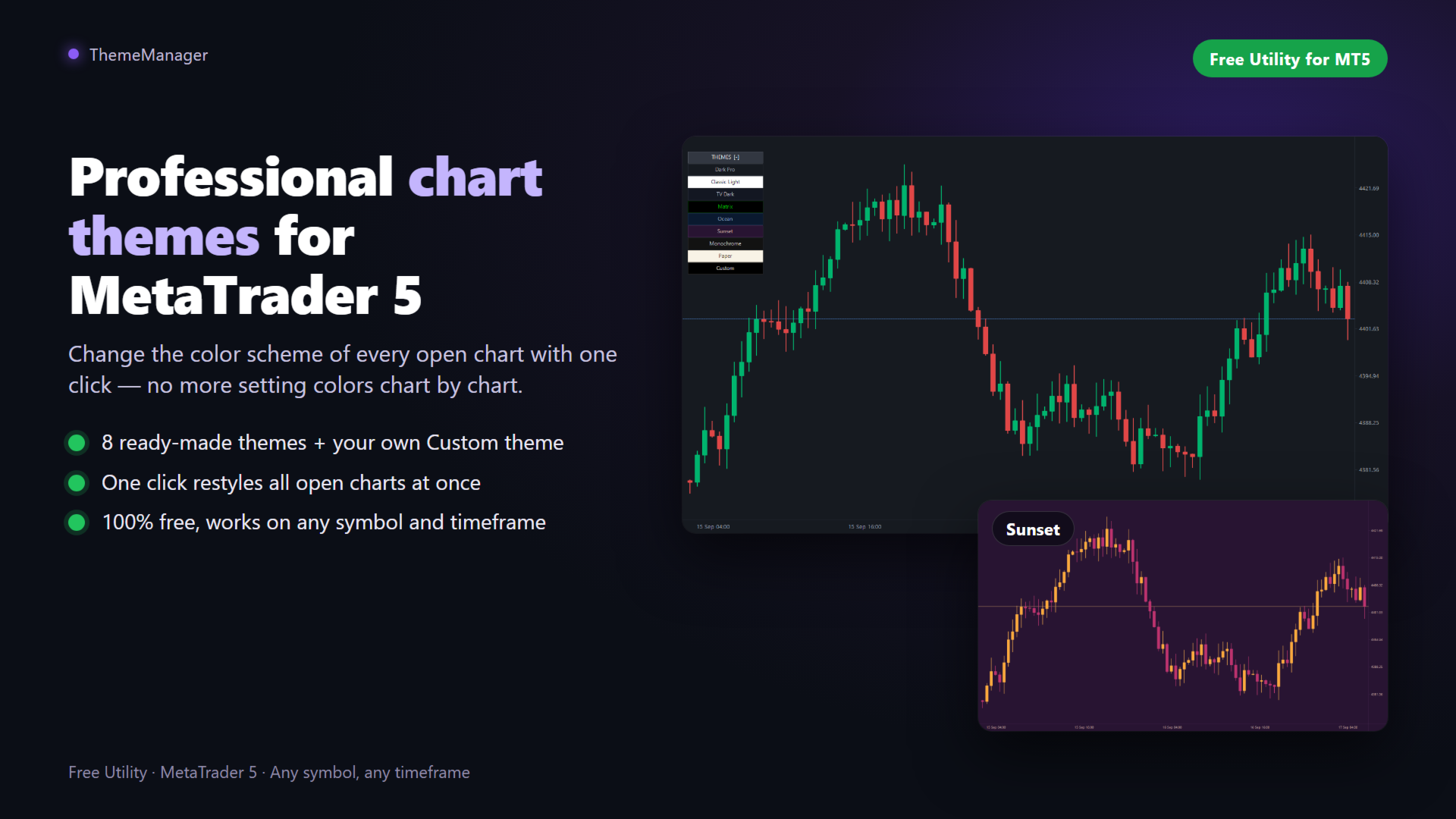
ThemeManager is a free chart theme utility for MetaTrader 5 that changes the color scheme and appearance of ALL your open charts with one click. Choose between 8 professionally designed themes — including dark mode, light mode, webtrader-style and more — or build your own custom color scheme. No more configuring chart colors one by one: apply a complete MT5 chart theme instantly, on every chart at once.
WHY THEMEMANAGER

Tired of the default MT5 chart colors? Setting up background, candle colors, grid and price lines chart by chart takes forever — and you have to repeat it on every new chart. ThemeManager solves it with a clean on-chart panel: one click, and every open chart gets a consistent, professional look. Your eyes will thank you during those long trading sessions.

9 THEMES INCLUDED

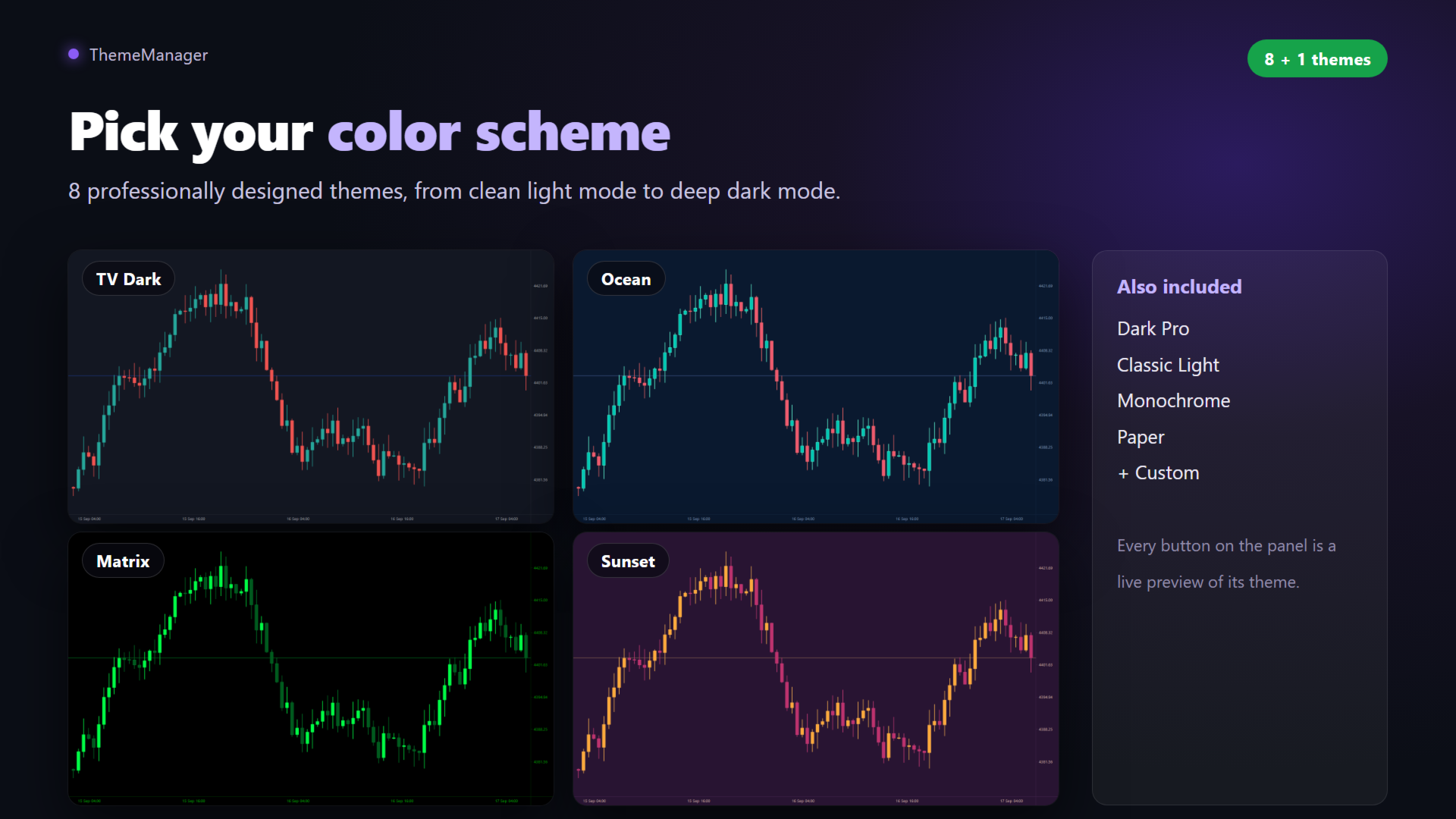
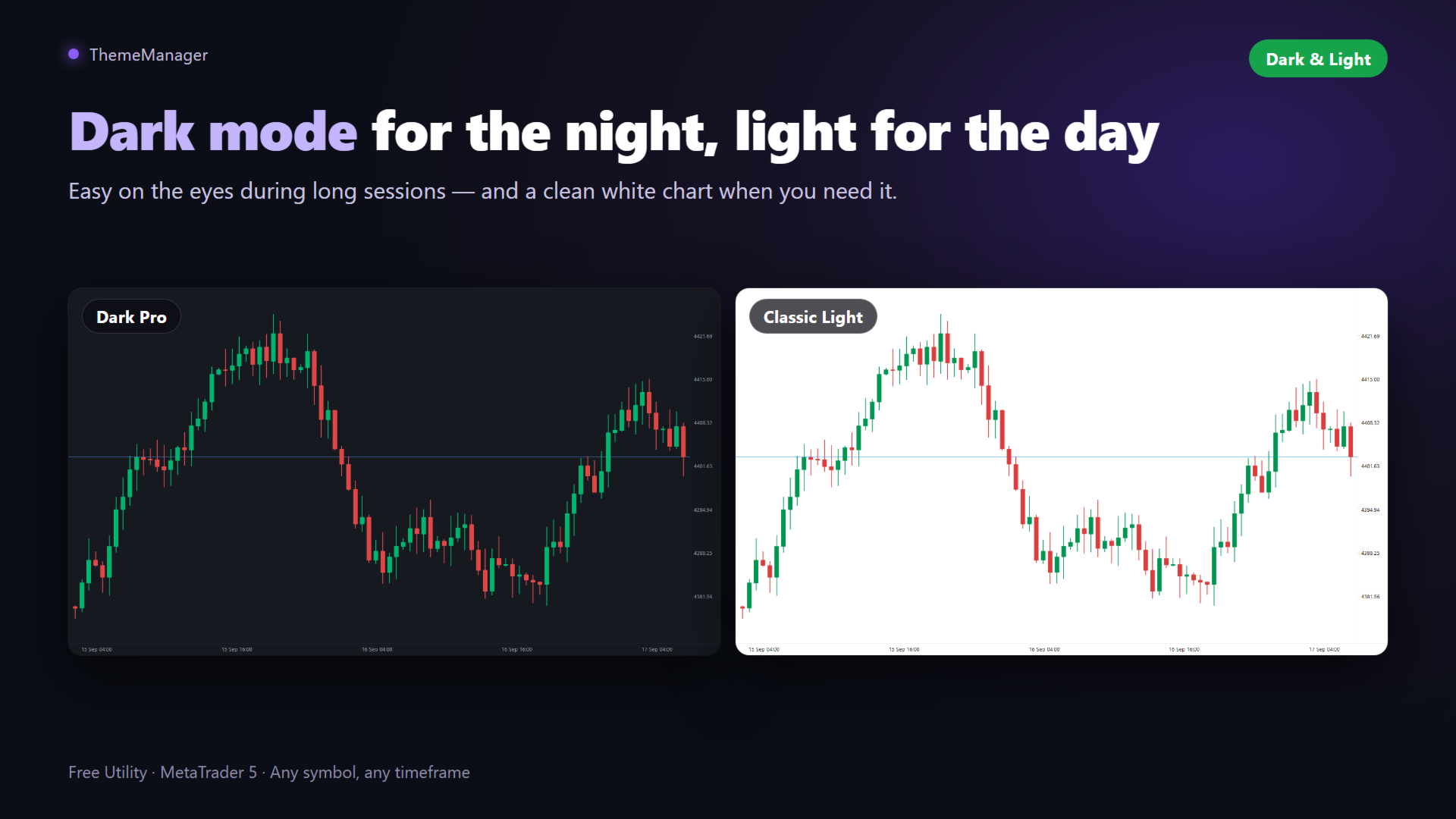
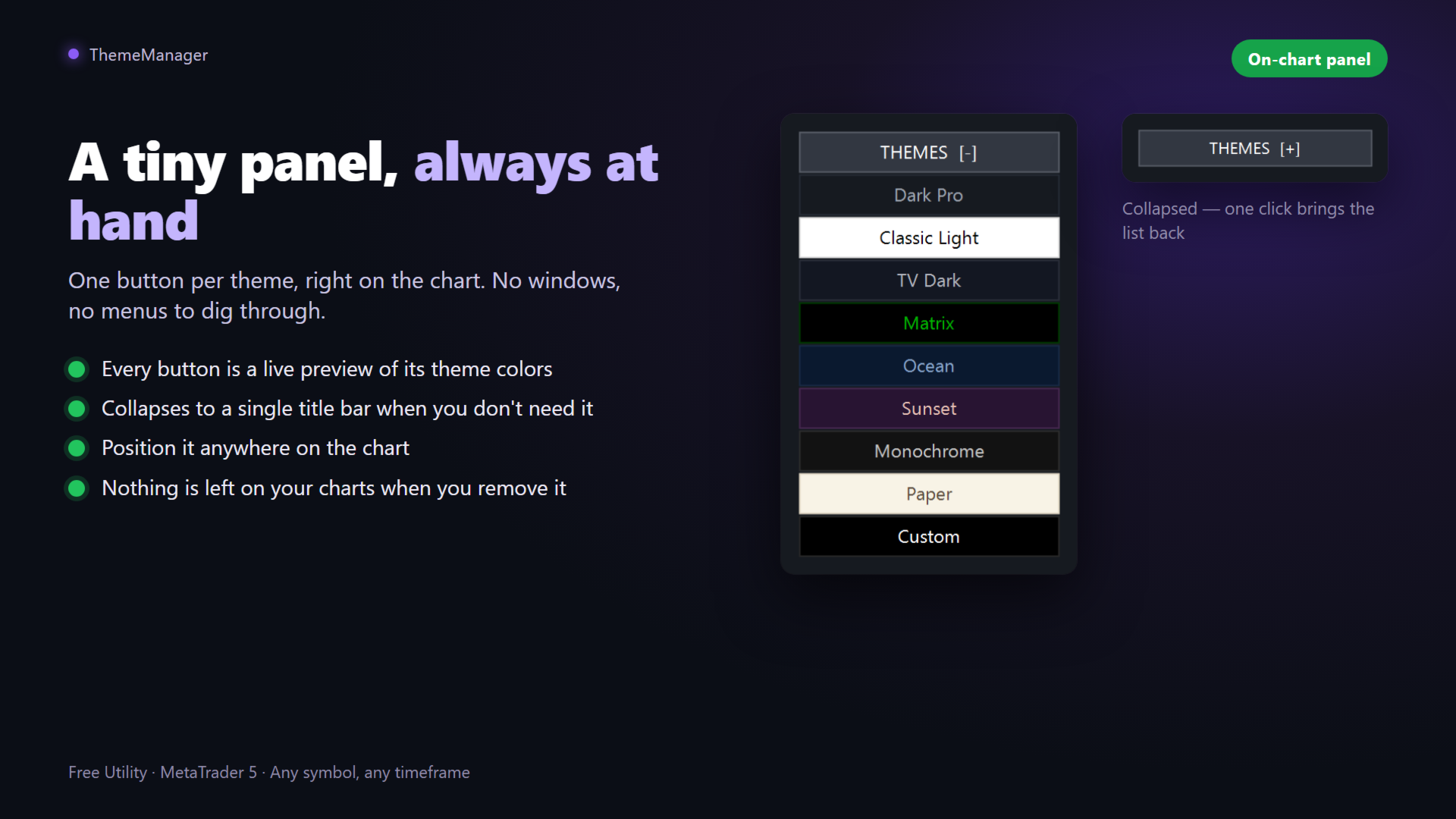
- Dark Pro — modern charcoal dark theme with green/red candles, easy on the eyes
- Classic Light — clean white background, traditional look
- TV Dark — deep slate blue with teal/red candles, popular webtrader style
- Matrix — black with neon green candles
- Ocean — deep navy blue with teal/coral candles
- Sunset — purple background with orange/magenta candles
- Monochrome — elegant grayscale, bar chart style
- Paper — light sepia, newspaper style
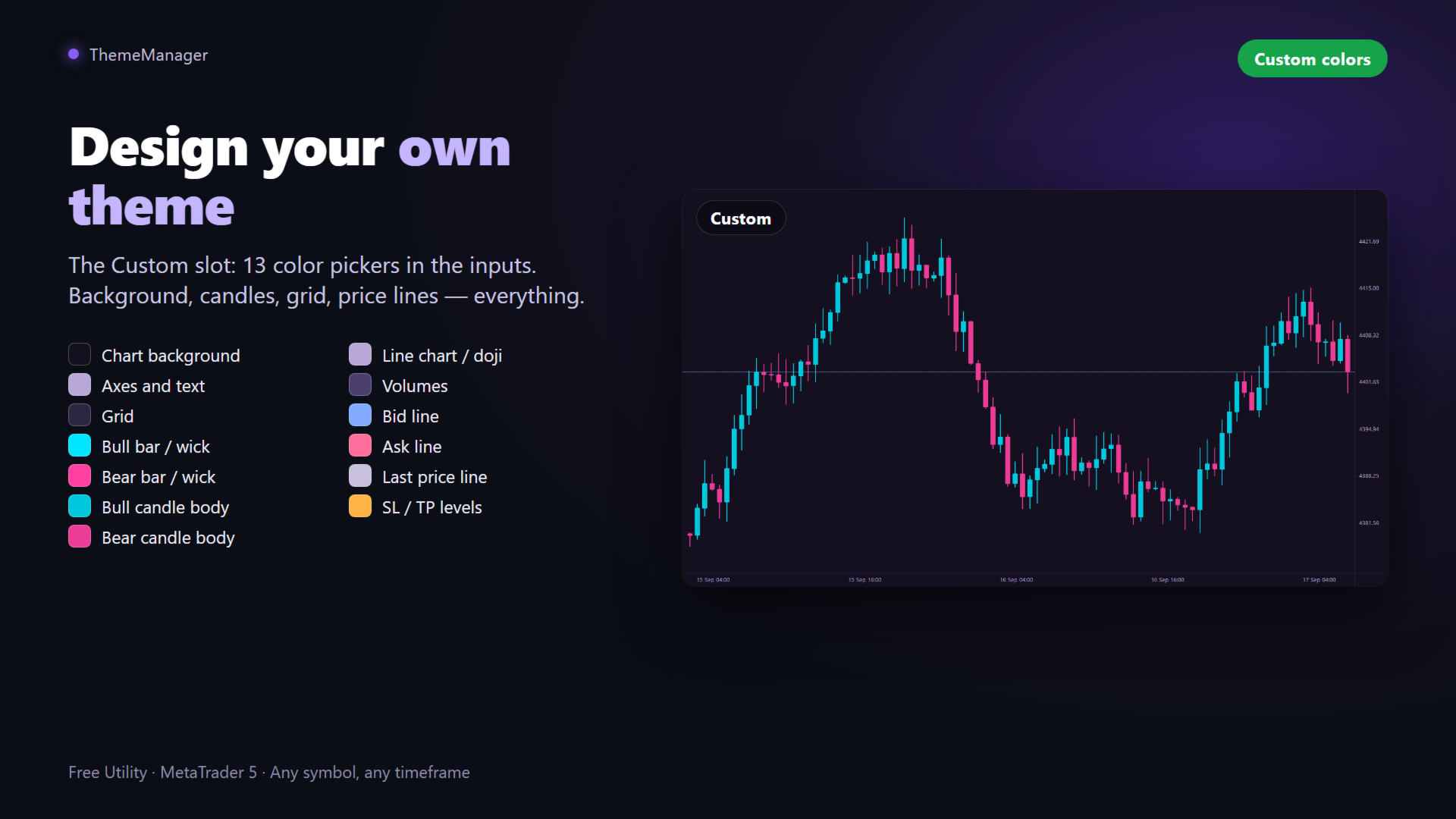
- Custom — YOUR theme: define all 13 colors in the inputs and apply it like any other

FEATURES

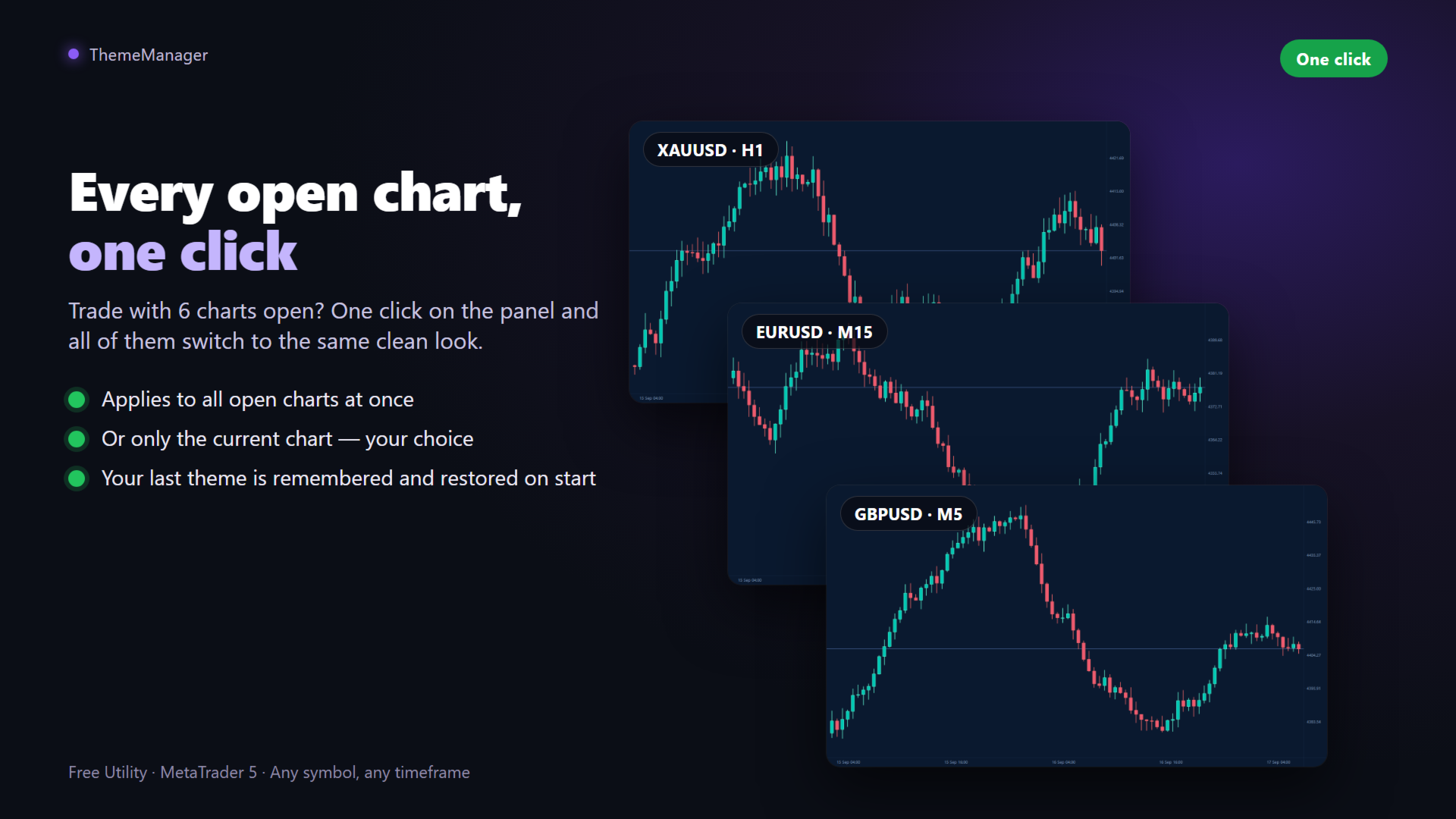
- One click applies the theme to ALL open charts (or only the current one, configurable)
- Every button is a live preview of its theme colors

- Collapsible panel — out of the way when you don't need it
- Remembers your last theme and re-applies it automatically on start
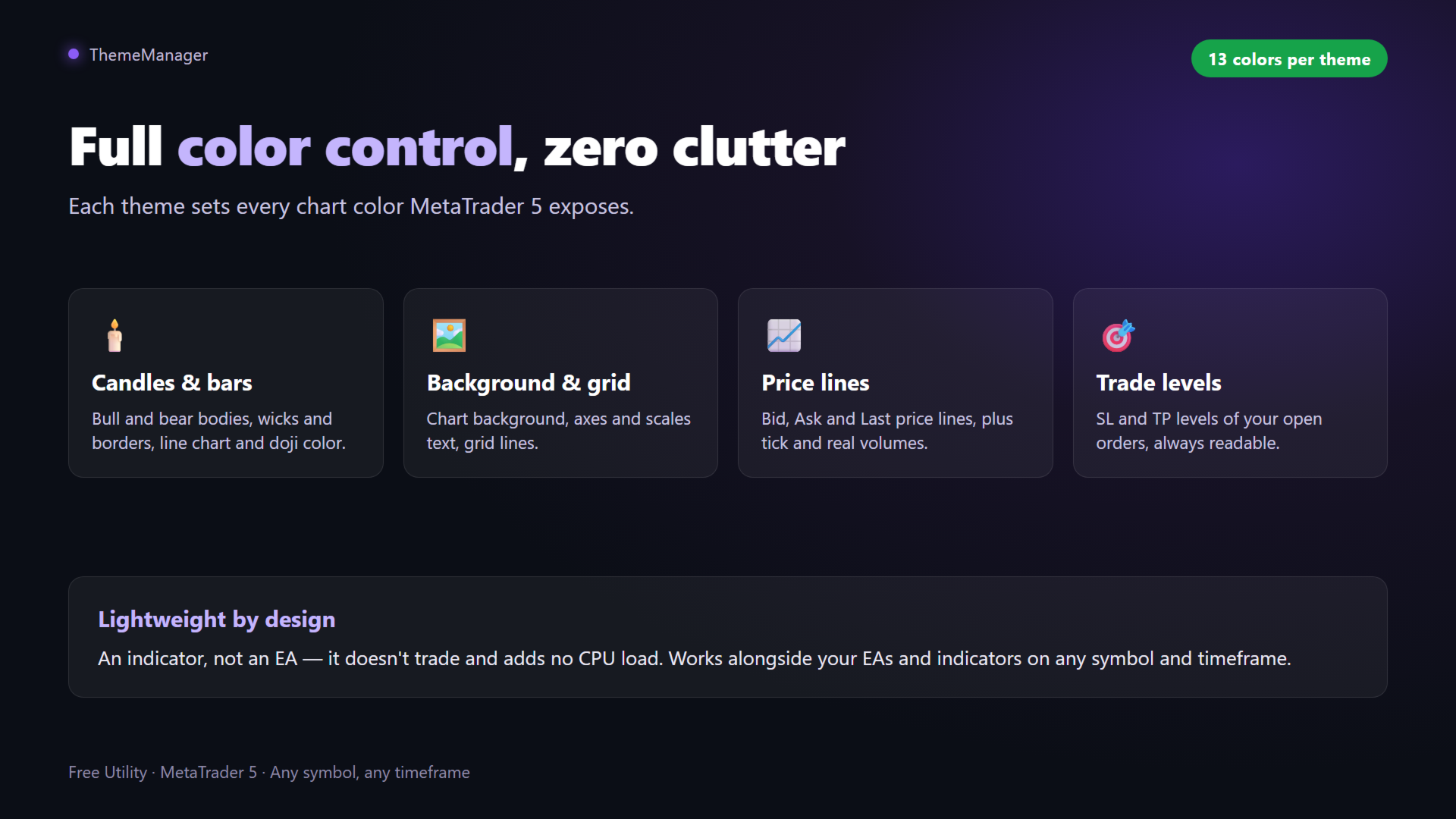
- Full color control: background, axes and text, grid, bull/bear bars, candle bodies, line chart, volumes, Bid/Ask/Last lines and SL/TP levels
- Lightweight utility: no CPU load, no objects left behind, no DLLs, works on any symbol and timeframe

HOW TO USE

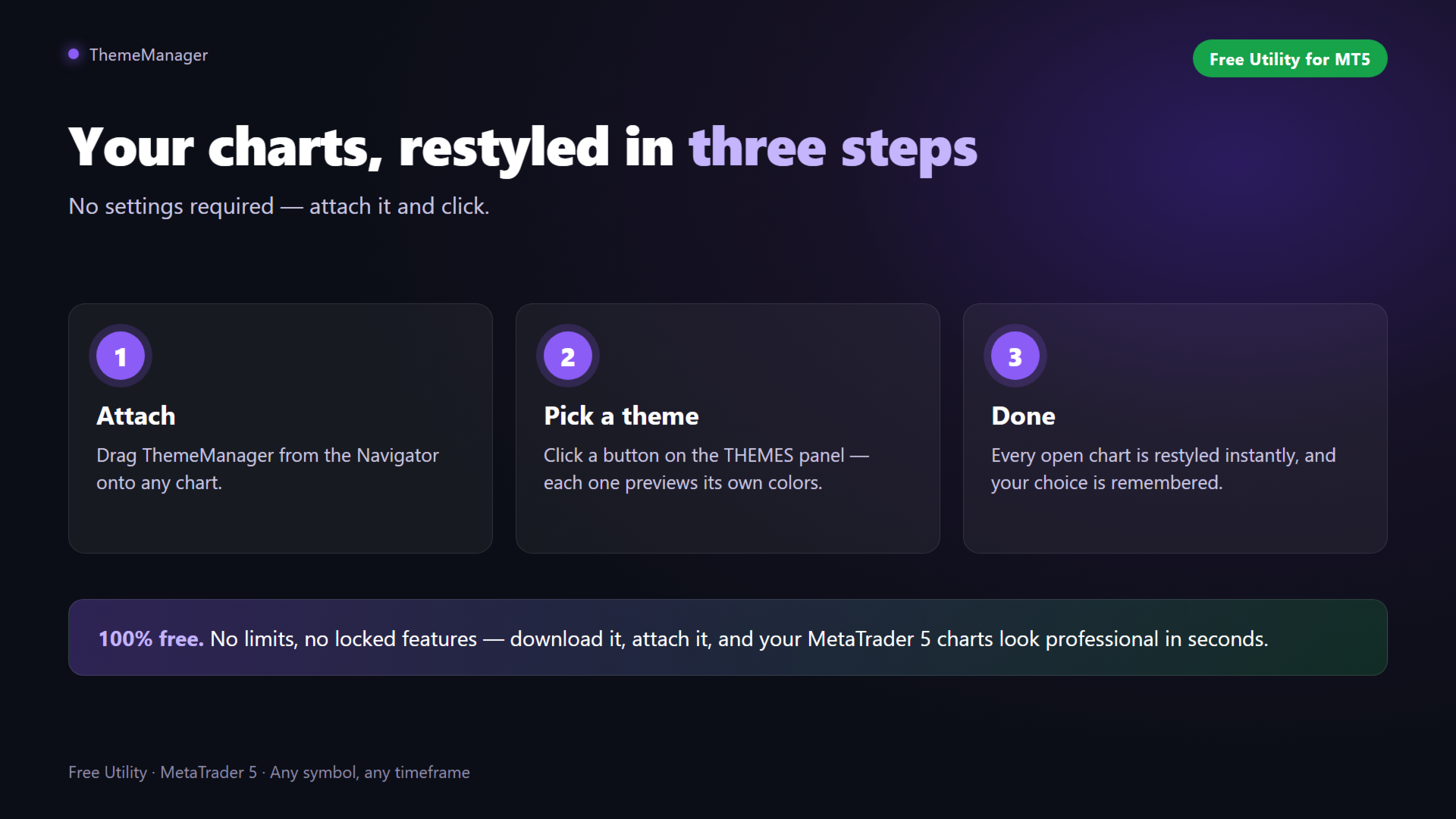
1. Attach ThemeManager to any chart
2. Click a theme on the THEMES panel
3. Done — every open chart is restyled

CUSTOM THEME

Open the indicator inputs, go to the "Custom theme" group and pick your 13 colors: chart background, axes, grid, candle borders and bodies, volumes, price lines and SL/TP levels. Press the Custom button on the panel to apply your personal color scheme everywhere. Your settings are saved with the chart and templates.

GOOD TO KNOW

MetaTrader 5 only allows programs to change the appearance of charts. Terminal windows such as Market Watch, Navigator and Toolbox cannot be recolored by any MQL5 product.

If you find ThemeManager useful, please leave a review — it helps a lot and motivates further free updates. Suggestions for new themes are welcome in the Comments tab!

おすすめのプロダクト
Script for deleting pending orders If you need to delete all pending orders you placed, this script will do it for you! It doesn't have any input parameters. Allow AutoTrading before running the script. Usage: Run the script on a chart. If you need a possibility to adjust parameters of the script, use the version with input parameters https://www.mql5.com/en/market/product/627 You can download MetaTrader 4 version here: https://www.mql5.com/en/market/product/2782
FREE
HB Trading Bot – Professional Risk & Trade Management for MT5 HB Trading Bot is a professional risk management and trade management Expert Advisor designed for MetaTrader 5 . It does not open trades . Instead, it manages already opened positions with strict, rule-based logic to help traders protect their capital and remove emotional decision-making from trading. Most trading losses are caused by psychology, not poor analysis. HB Trading Bot was built to solve this problem by enforcing discipline
FREE
Economic Calendar Defender – Smart News Protection for MT5 Economic Calendar Defender は、重要な経済ニュースによって引き起こされる高いボラティリティイベント中に、チャートの前にいる必要なく、また使用している標準的な取引操作やEAを変更することなく、あなたの取引を保護するために設計されたユーティリティです。 任意のチャートにインストールするだけで、EAがリアルタイムで経済カレンダーを監視し、関連する各イベントの前、最中、後にあなたの取引を管理します。 prop firm で取引する場合、この種の保護は不可欠です。それらの会社は、通常、高インパクトなニュース、激しいスプレッド、または急激な市場の動きの中での取引にペナルティを課します。 このEAは、予期せぬニュースがあなたの口座を傷つけたり、評価を無効にしたりするのを防ぐことで、これらのルールを遵守するのに役立ちます。 主な特徴 • 経済ニュースに対する自動保護: EAはForexFactoryから経済カレンダーを自動的にダウンロードし、通貨とインパクトに
FREE
TradingTimeControl is a utility implemented as an Expert Advisor for MetaTrader 5. It automatically closes all open positions and deletes pending orders at a specified time each day. This tool is designed for traders who need to automate position management with flexible settings. Key Features Closes positions and orders at the specified time ( CloseHour , CloseMinute ) daily. Allows you to change the closing time at any moment, applying new settings immediately. Supports MagicNumber : 0 for al
FREE
` Account Limit Guard MT5 ` is a free account-level daily limit protection utility for MetaTrader 5. It is not a trading strategy, does not open trades, does not generate signals, and does not rely on any specific indicator. Its purpose is simple: monitor your account-level daily loss and automatically apply protection once your configured limit is reached. For prop / funded-challenge traders   Need more than a daily-loss cap?   Prop Firm Risk Guardian (MT5)   is the full prop-challenge p
FREE
SymbolMonitor 1.3 – あなたのトレードを完全管理! 複数の銘柄を取引していて、 リアルタイムで利益を確認 したいですか? SymbolMonitor 1.3 は、 各銘柄の収益性を自動分析 し、 柔軟な設定とアラート を提供する強力なエキスパートアドバイザー(EA)です! バージョン 1.3 の新機能 カスタマイズ可能な表示設定 – フォント、サイズ、テキストカラー を自由に調整 自動通知機能 – 利益が目標に達するとアラートを受信 正確な利益計算 – 総取引量、利益、スワップ、手数料 を表示 リアルタイム更新 – すべてのデータが自動で更新 2か国語対応 – Русский / English (設定で変更可能) 重要! 1ロットあたりの手数料は 手動で入力する必要があります 。ブローカーや銘柄によって異なるため、パラメータで設定し、正確な純利益を計算してください。 SymbolMonitor はこんな方におすすめ! 複数銘柄を取引するトレーダー – 各銘柄の利益を個別に監視 スキャルパー・デイト
The utility for setting a common stop loss for multiple orders. Beta version. After the test,  common take profit function will be added, orders close function will be added , and other necessary features will be added. Please do not give bad ratings to this free beta version. If you like it, give it a good rating and write to the author about any errors you find and what you would like to see in the utility. I made this utility for myself and use it daily. I am sharing it with you. A commercial
FREE
Simple program i created, to help close all your orders instantly when you are busy scalping the market or if you want to avoid news days but still have a lot of orders and pending orders open and can't close them in time.. with this script all you're problems will be solved. Simple drag and drop and the script automatically does it's thing, quick and easy  also a very good tool to use when scalping


FREE
エントリー、テイクプロフィット、ストップロスのレベルをチャートに簡単に描画し、トレードシグナルを分析・追跡できます。 主な機能 エントリー、TP1、TP2、TP3、SL の値を簡単に入力 シグナルの発生時刻を示す垂直線(オプション) 各ラインのラベルや色を自由にカスタマイズ可能 シグナルの精度やリスクリワード比を視覚的に確認 すべての銘柄・時間足に対応 再描画なし、遅延なし、常に安定した表示 使用例 Telegram、WhatsApp などのチャンネルからのシグナルを可視化 過去のシグナルを分析し、市場の反応を学ぶ クライアントやコミュニティに対し、分かりやすいシグナル構成を提示 手動または自動戦略と組み合わせて使用 キーワード シグナル, ライン描画, エントリー, テイクプロフィット, ストップロス, 外国為替, テレグラム, ビジュアルシグナル, マニュアルトレード, シグナル分析, TP, SL, チャート, レベル, 評価, 教育, インジケーター, ツール
FREE
这款专为MetaTrader 5设计的EA(Expert Advisor),能够在加载后自动关闭所有图表,并立即从当前图表中自行移除。它适合那些希望快速清理所有图表,并避免手动关闭每个图表的用户。 功能特点: 一次性清理: 加载后立即关闭所有打开的图表。 自动移除: 执行完毕后,EA自动从当前图表中移除,无需手动操作。 快速高效: 适用于快速清理交易环境,特别适合在需要快速重置或结束交易日的情境。 使用说明: 只需将此EA添加到任何一个图表上,它将自动执行关闭所有图表的操作并自行移除。使用前,请确保已保存所有重要的图表数据和设置。 风险提示: 请谨慎使用此EA,以防不小心关闭重要图表。 适用于MetaTrader 5平台。 技术支持: 如有任何技术问题或需求,请联系我以获得帮助。
FREE
Symbol Cost Monitor は、複数の取引銘柄における取引コストを同時かつ迅速に監視するために開発された、MetaTrader 5向けの高機能分析ユーティリティです。 スプレッドとスワップは、取引の最終的な結果に直接影響します。特にスキャルピング、活発なデイトレード、数日間にわたるポジション保有、複数銘柄の同時取引では、これらのコストを正確に把握することが重要です。MetaTrader 5の標準インターフェースでは、すべての情報を1つの画面で簡単に比較できないため、通常は各銘柄の仕様を個別に開いて確認する必要があります。 Symbol Cost Monitorは、選択された銘柄の主要データを収集し、チャート上のコンパクトなパネルに表示します。スプレッドが拡大している銘柄の確認、スワップの比較、取引条件の変化の監視、ポジションを開く前の潜在的なコストの評価を簡単に行えます。 パネルのデータはリアルタイムで更新され、気配値表示に登録されているすべての銘柄、またはユーザーが指定した銘柄リストを監視できます。色分け表示により取引条件の悪化を素早く確認でき、設定した水準をスプレッドが
FREE
English Description aNa Magic ATR EA – Dashboard and Signals (MT5) ATR-based SL/TP (TP1–TP3), EMA200 trend filter, RSI gate, clean on-chart dashboard and segmented guide lines. MagicNumber support for multi-EA setups. What it does This Expert Advisor automates entries and risk targets using ATR. It filters the market with EMA(200) and an RSI range to avoid low-quality trades. A compact dashboard shows entry, TP1-TP3 and SL for both long and short. Lines are drawn as short segments (not full-wid
FREE
AlgoWay Telegram Reporter is a free MetaTrader 5 utility that sends clear and detailed trading notifications directly to Telegram. The utility does not open, modify, or close trades. It only monitors trading activity on the account. It works with: • Manual trades • Trades opened from mobile or web terminals • Trades opened by Expert Advisors • Trades opened through AlgoWay • Netting and hedging accounts Main features • Position opening notifications • Entry price, volume, Stop Loss and Take Prof
FREE
The CloseByPercentLossOrProfit Expert Advisor closes all positions as the total profit of loss for the entire account reaches a specified value. The profit or loss is specified as percentage of the account balance. In addition, the Expert Advisor can delete pending orders. Allow AutoTrading before running the Expert Advisor. Instructions: Run the Expert Advisor on the chart. Input parameters: Language of messages displayed (EN, RU, DE, FR, ES) - the language of output messages (English, Russian,
FREE
Free TrendLine EA opens trades whenever the price on the chart interacts with or crosses your trend line. You simply draw the trend line manually then let the EA do the trading automatically according to the rules you give it. The settings available in the EA are explained below: Lots : The lot size for trading. RiskPercentage : Set a value other than zero to activate lot sizing by use of percentage of margin. TrendLineName:   The name of the line to track. You can either   * rename the trend li
FREE
The Panel
Ahmed Alaaeldin Abdulrahman Ahmed Elherzawi
Investment Castle Panel — Your Trades, At a Glance The Panel puts the numbers that matter right on your chart: floating profit and loss, drawdown and more — for manual trades and for any Expert Advisor. A clean, movable dashboard so you always know exactly where you stand. What it does for you Live P/L on the chart: floating profit/loss for the current symbol, for both buy and sell orders, in your base currency and in pips. Max drawdown at a glance: keep an eye on risk without digging through
FREE
Stop Loss with Profit Free Version*. Complete Version here. This utility / expert for MetaTrader 5 modifies the stop loss of all your operations dynamically and automatically to ensure the minimum benefits you want, and be able to operate with or without Take Profit. Maximize your benefits, by being able to trade with Unlimited Take Profit. You will ensure the number of minimum points you want to earn in each operation and the stop loss will be adjusted as long as the benefit of the operatio
FREE
Fingerprint Capture Script (CSV) This script creates a   pattern “fingerprint” CSV   from chart window by exporting the OHLC values of candles between   two vertical lines . What it does Reads   exactly two   vertical line objects (VLINE) on the current chart Uses them as   start/end markers   of the candle range Exports the selected candles to a   semicolon-separated CSV   file in: Terminal → Common → Files How to use Open any chart and timeframe with the pattern visible in history. Place   tw
FREE
The script illustrates the usage of the OBJPROP_XOFFSET and OBJPROP_YOFFSET properties. It displays the specified fragment of the .BMP image.
FREE
Scalping Pro Tool
Ewa Kornelia Harmida
5 (1)
This plugin is designed to enhance trading efficiency and risk management in scalping strategies. Key features include: -One-Click Trade Execution: With a single click, the plugin opens two trades simultaneously, each with its own Take Profit (TP1 and TP2) targets. -Automatic Stop Loss Adjustment: The plugin automatically adjusts the Stop Loss (SL) to Break Even (BE) once the price reaches halfway towards TP1, securing partial profits. -Account Protection Features: It includes built-in protecti
FREE
This tool for the MetaTrader 5 trading platform allows setting the stop loss of open positions to breakeven (entry price) plus an adjustable distance in points. The stop loss is only adjusted if the position is already in profit. Main functions: Button: A button is displayed on the chart with the text "StopLoss to BreakEven". The color of the button can be customized, by default it is red. User interaction: When you click the button, for all open positions that are in profit, the stop loss i
FREE
Recommendations: Currency pair: EURUSD Timeframe: H1 Minimum deposit : $1000 Account type: ECN or Raw  with very low spreads. Brokers : IC Markets with ECN or Raw accounts for lowest spreads IMPORTANT: It is very important to use LOW SPREAD accounts for best results ! Account type: Hedge Specifications: Trade EURUSD Every trade is protected with 30 pips SL Exit strategy incorporates a trailing stop using a H1 Chart Orders  can be closed using profit harnessed by the winning orders. Autolot fun
FREE
Prop News Filter is a free Expert Advisor that helps traders on prop firm and funded accounts avoid violating the 2-minute news rule that most major prop firms enforce. It uses a precise two-stage protection model: pre-block new trades 15 minutes before the restricted window, then close everything 2 minutes before the news. Most news filter tools either block trading too aggressively and kill your edge, or rely on the MQL5 native calendar which is often disabled on prop firm terminals. This EA u
FREE
Simple Order
Mikhail Nazarenko
5 (2)
Simple order is designed to make placing pending orders as easy and fast as possible. Setting a pending order takes just two steps. 1. Double-click on the price of placing an order, after that a panel with buttons for order names appears. 2. Click on the button of the required order That's it, the pending order is set. If necessary, we adjust the order by dragging, as well as change the sizes of stop loss and take profit. Don't forget to pre-set the size of the stop loss and take profit in the S
FREE
Bneu Trade Manager
Marvinson Salavia Caballero
Bneu Trade Manager is a professional trading utility Expert Advisor for MetaTrader 5 designed to help manual traders plan, execute, protect and manage trades directly from a visual chart dashboard. It combines drag-and-drop trade planning, risk-based position sizing, one-click execution, pending orders, automated trade management for both EA and manual trades, protection tools, templates, reporting and performance analytics in one organized panel. The latest version includes a reorganized dash
FREE
The script ObjChartSample.mql5 illustrates control of chart properties using the classes from the Standard Library .
FREE
Kiwi Prop Firm Risk Manager Kiwi Prop Firm Risk Manager is an account monitoring and risk-control tool for MetaTrader 5. It is designed for traders who want to monitor account drawdown and automatically perform protective actions when predefined risk levels are reached. The tool can be used with manual trading, other Expert Advisors, and third-party trading systems . It does not provide trading signals and does not open trades as part of a trading strategy. Main Features Daily drawdown monitorin
FREE
Free automatic Fibonacci is an indicator that automatically plots a Fibonacci retracement based on the number of bars you select on the BarsToScan setting in the indicator. The Fibonacci is automatically updated in real time as new highest and lowest values appears amongst the selected bars. You can select which level values to be displayed in the indicator settings. You can also select the color of the levels thus enabling the trader to be able to attach the indicator several times with differe
FREE
CLose5
Evgenii Martseniuk
Key Features Smart Profit/Loss Management Set your target profit in your deposit currency (USD, EUR, etc.) Define maximum acceptable loss to protect your capital Automatic calculation includes floating profit, swap, and commission Flexible Position Filtering Symbol Filter: Close only trades on the current chart symbol or all symbols Magic Number Filter: 0 = Close only manual trades (no magic number) -1 = Close all trades regardless of magic number Custom number = Close only trades with speci
FREE
This indicator allows to hide Parabolic SAR (on all MT5 timeframes) from a date define by the user, with a vertical line (Alone) or a panel (with "Hidden Candles"). Indicator Inputs: Step Maximum  Color Width Information on "Parabolic SAR" indicator is available here:   https://www.metatrader4.com/en/trading-platform/help/analytics/tech_indicators/parabolic ************************************************************* Hey traders!!  Give me your feeds!  We are a community here and we have the sa
FREE
このプロダクトを購入した人は以下も購入しています
Trade Assistant MT5
Evgeniy Kravchenko
4.41 (215)
取引 ごとのリスクの 計算、新規注文 の 簡単 な 設置、部分的 な 決済機能 を 持 つ 注文管理、 7 種類 のトレーリングストップなど 、便利 な 機能 を 備 えています 。 追加の資料と説明書 インストール手順   -   アプリケーションの手順   -   デモアカウント用アプリケーションの試用版 ライン機能 チャート上にオープニングライン、ストップロス、テイクプロフィットを表示します。この機能により、新規注文を簡単に設定することができ、注文を出す前にその特徴を確認することができます。   リスク計算 リスク計算機能は、設定されたリスクとストップロス注文のサイズを考慮して、新規注文のボリュームを計算します。ストップロスの大きさを自由に設定できると同時に、設定したリスクを守ることができます。 Lot calc ボタン - リスク 計算 を 有効 / 無効 にします 。 Risk フィールドでは 、必要 なリスクの 値 を 0 から 100 までのパーセンテージまたは 預金通貨 で 設定 します 。 設定」 タブで 、 リスク 計算 の 種類 を 選択 します :「 $ 通
Trade Manager EAへようこそ。これは、取引をより直感的、正確、そして効率的にするために設計された究極の リスク管理ツール です。これは単なるオーダー実行ツールではなく、包括的な取引計画、ポジション管理、リスク管理のためのソリューションです。初心者から上級者、迅速な実行を必要とするスキャルパーまで、Trade Manager EAはあらゆるニーズに対応し、為替、指数、商品、暗号通貨などさまざまな市場で柔軟に対応します。 Trade Manager EAを使用すると、複雑な計算が過去のものになります。市場を分析し、エントリーポイント、ストップロス、テイクプロフィットのレベルをチャート上のラインでマークし、リスクを設定するだけで、Trade Managerが最適なポジションサイズを即座に計算し、SLとTPをピップ、ポイント、口座通貨でリアルタイムに表示します。すべての取引が簡単かつ効果的に管理されます。 主な機能: ポジションサイズ計算機 :定義されたリスクに基づいて取引サイズを瞬時に決定します。 簡単な取引計画 :エントリー、ストップロス、テイクプロフィットを設定するためのド
TradePanel MT5
Alfiya Fazylova
4.88 (167)
Trade Panelは多機能なトレーディングアシスタントです。アプリには手動取引用の50以上のトレーディング機能が搭載されており、ほとんどの取引作業を自動化することができます。 購入前に、デモアカウントでアプリのデモ版をテストすることができます。デモアカウント用のアプリの試用版をダウンロードするには、次のリンクをご利用ください: https://www.mql5.com/en/blogs/post/750865 。 完全な手順 こちら 。 取引。 ワンクリックで取引操作を行うことができます: リスクを自動計算して指値注文やポジションを開く。 複数の注文やポジションをワンクリックで開く。 注文のグリッドを開く。 保留中の注文やポジションをグループごとに閉じる。 ポジションの方向を反転(Buyを閉じてSellを開く、またはSellを閉じてBuyを開く)。 ポジションをブロックする(不足している量のポジションを開くことでBuyとSellのポジション量を等しくする)。 すべてのポジションを部分的にワンクリックで閉じる。 すべてのポジションの利食い(Take Profit)および損切り(Sto
AstroTrade Trading Assistant AstroTrade is a comprehensive multi-functional trading utility developed for the MetaTrader 5 platform. It integrates essential tools for trade execution, risk management, and technical monitoring into a single unified interface. The application is designed to assist traders in managing their daily operations through a visual and structured environment. Visual Trade Execution and Risk Management The application includes a specialized trading panel that assists in c
================================================================================ POC BREAKOUT - V20.72. Full Professional Grade Toolkit ================================================================================ POC Breakout is a full MetaTrader 5 trading dashboard for discretionary traders who want breakout signals, Point of Control (POC) context, volume profiles, order flow, market structure, news, alerts, and advanced trade planning in one professional workspace. Attached directly to you
Local Trade Copier EA MT5
Juvenille Emperor Limited
4.97 (146)
Local Trade Copier EA MT5 による、驚くほど高速な取引コピーを体験してください。1分で簡単にセットアップできるこの取引コピー機は、同じWindowsコンピュータまたはWindows VPS上の複数のMetaTrader端末間で取引をコピーすることができ、0.5秒未満の高速コピースピードを実現します。 初心者であろうとプロのトレーダーであろうと、 Local Trade Copier EA MT5 には、あなたの特定のニーズに合わせてカスタマイズするための幅広いオプションが用意されています。これは、利益の可能性を高めたい人にとって究極のソリューションです。 今すぐ試してみて、これが市場で最も速くて簡単なトレードコピー機である理由を理解してください。 ヒント: デモアカウントで Local Trade Copier EA MT5 デモバージョンをダウンロードして試すことができます: ここ ダウンロードした無料のデモ ファイルを MT5 >> ファイル >> データ フォルダを開く >> MQL5 >> Experts フォルダに貼り付けて、ターミナルを再起動しま
ベータリリース Telegram to MT5 Signal Trader はまもなく正式なアルファ版をリリースします。いくつかの機能はまだ開発中で、小さな不具合に遭遇する可能性があります。問題が発生した場合はぜひご報告ください。皆さまのフィードバックがソフトウェア改善に役立ちます。 Telegram to MT5 Signal Trader は、 Telegram のチャンネルやグループからの取引シグナルを自動的に MetaTrader 5 にコピーする強力なツールです。 パブリックおよびプライベートの両方のチャネルに対応し、複数のシグナル提供元を複数のMT5口座に接続可能です。ソフトウェアは高速で安定し、すべての取引を細かく制御できます。 インターフェースは直感的で、ダッシュボードとチャートは見やすく設計されており、リアルタイムで動作状況をモニターできます。 必要環境 MQL の制限により、EA は Telegram と通信するためのデスクトップアプリが必要です。 インストーラーは公式の インストールガイド にあります。 主な機能 マルチプロバイダー: 複数の Telegram
Telegram to MT5 Multi-Channel Copier は、Telegram チャンネルのトレードシグナルを MetaTrader 5 に自動的に直接コピーします。ボットも、ブラウザ拡張機能も、手動コピーも不要。Telegram でシグナルを受信すると、EA が数秒でターミナル上でトレードをオープンします。 本製品は 2 つのコンポーネントで構成されています:Telegram チャンネルを監視する Windows アプリケーションと、MT5 ターミナルでシグナルを実行するこの Expert Advisor です。MT4 版も利用可能です。 セットアップガイドとアプリケーションのダウンロード: https://www.mql5.com/en/blogs/post/768988 動作原理 Windows アプリケーションは、ボットではなくあなた自身の API 認証情報を使用して Telegram に接続します。つまり、プライベートおよび VIP チャンネルを含む、購読しているあらゆるチャンネル、グループ、トピックを読み取ることができます。シグナルを検出すると、それを解析し
Trade copier MT5
Alfiya Fazylova
4.58 (52)
Trade Copierは、取引口座間の取引をコピーして同期するように設計された専門的なユーティリティです。 コピーは、同じコンピューターまたはvps にインストールされている、サプライヤーのアカウント/端末から受信者のアカウント/端末に行われます。 キャンペーン - すでに「Trade copier MT5」をご購入の方は、「Trade copier MT4」を無料で入手できます(MT4 → MT5 および MT4 ← MT5 のコピー用)。詳細な条件については、どうぞ個別メッセージでお問い合わせください。 購入する前に、デモ アカウントでデモ バージョンをテストできます。 デモ版 こちら 。 詳細な説明は こちら 。 主な機能と利点: MT5ネッティングアカウントを含む、MT5> MT5、MT4> MT5、MT5> MT4のコピーをサポートします。 高いコピー速度(0.5秒未満)。 ベンダーモードと受信者モードは同じ製品内に実装されています。 チャートから直接リアルタイムでコピーを制御できる、簡単で直感的なインターフェイス。 接続が切断されたり、端末が再起動されたりしても、設定と位
Grid Manual MT5
Alfiya Fazylova
4.73 (22)
「Grid Manual」は、注文のグリッドを操作するための取引パネルです。 ユーティリティはユニバーサルで、柔軟な設定と直感的なインターフェイスを備えています。 それは、損失を平均化する方向だけでなく、利益を増やす方向でも注文のグリッドで機能します。 トレーダーは注文のグリッドを作成して維持する必要はありません。 すべてが「Grid Manual」によって行われます。 注文を開くだけで十分であり、「Grid Manual」は注文のグリッドを自動的に作成し、非常に閉じるまでそれに付随します。 完全な説明とデモバージョン ここ。 ユーティリティの主な機能と機能 ユーティリティは、モバイル端末から開かれた注文を含め、あらゆる方法で開かれた注文を処理します。 「制限」と「停止」の2種類のグリッドで機能します。 グリッド間隔の計算には、固定と動的(ATRインジケーターに基づく)の2つの方法で機能します。 オープンオーダーグリッドの設定を変更できます。 チャート上の各注文グリッドの損益分岐点を表示します。 各注文グリッドの利益率を表示します。 ワンクリックでグリッドから収益性の高い注文を閉じるこ
LIMITED SUMMER SALE -40% !   ONLY $30 insead of $50!  Maximum real discount!  ONLY UNTIL 08/22 HINN MAGIC ENTRY – the ultimate tool for entry and position management! Place orders by selecting a level directly on the chart! full description   ::  demo-version  :: 60-sec-video-description Key features: - Market, limit, and pending orders - Automatic lot size calculation - Automatic spread and commission accounting - Unlimited partitial take-profits  - Breakeven and trailing stop-loss and take-p
Exp COPYLOT CLIENT for MT5
Vladislav Andruschenko
3.97 (35)
MetaTrader 5 用のプロフェッショナル取引コピー機 MetaTrader 向けの高速・高性能・信頼性の高い 取引コピー機 です。 COPYLOT は、MT4 と MT5 のターミナル間で Forex 取引をコピーでき、 Hedge 口座と Netting 口座の両方に対応しています。 COPYLOT MT5 版の対応構成: - MT5 Hedge → MT5 Hedge - MT5 Hedge → MT5 Netting - MT5 Netting → MT5 Hedge - MT5 Netting → MT5 Netting - MT4 → MT5 Hedge - MT4 → MT5 Netting MT4 版 完全な説明 + DEMO + PDF 購入方法 インストール方法 ログファイルの取得方法 テストと最適化の方法 Expforex のすべての製品 MT4 ターミナルへのコピーも可能です(MT4 → MT4、MT5 → MT4): COPYLOT CLIENT for MT4 COPYLOT は、2台、3台、さらには10台のターミナル間で同時に動作できる、プロフェッ
Power Candles Strategy Scanner - 自動最適化型マルチシンボル設定ファインダー パワーキャンドル・ストラテジー・スキャナーは 、パワーキャンドル・インジケーターを駆動するのと全く同じ自己最適化エンジンを、マーケットウォッチに登録されているすべての銘柄に対して並行して実行します。1つのパネルで、現在統計的に取引可能な銘柄、各銘柄で勝率の高い戦略、最適なストップロス/テイクプロフィットの組み合わせが表示され、新たなシグナルが発生した瞬間に通知が届きます。 このツールは、Stein Investmentsのエコシステムの一部です。  18種類以上のツールをすべて閲覧し、AIを活用したセットアップの推奨を受け取り、  https://stein.investments でコミュニティに参加しましょう 市場動向を網羅。銘柄ごとに3,000件以上の自動最適化。2種類のアラート。ワンクリックでチャートを切り替えて即座にアクション。 なぜこれが必要なのか 多くのマルチ銘柄スキャナーは、 価格の動き (ボラティリティ、変動率、銘柄ごとのRSI)を表示するだけです。それ
Premium Trade Manager - コーチ内蔵型トレードパネル Premium Trade Manager は、AIトレーディングコーチをあなたのチャートの中に置き、その下に完全な執行エンジンを備えたツールです。いつも通りにトレードをセットアップし、あなた専任のAIトレーディングコーチ Max にそのセットアップをそのまま読み取らせて、発注前に率直な見解を伝えてもらいましょう。ストップの幅が規律あるアプローチに合っているか、リスクサイズは適切か、高影響のニュースイベントが数分後に迫っていないか、プロップファームの制限に近づいていないか。その下には、クリックの後をすべて処理するエンジンが備わっています。ワンクリックのリスクサイズ計算による発注、チャート上でドラッグして組み立て、発注後も動かせるプラン、最大4段階の分割利確、7種類のトレール方式、リアルタイムのプロップファームコンプライアンス、ニュースガード、そしてコストを自ら採点するスプレッド機能。判断はあなたが下す。Max がもう一度確認する。後のことはすべてパネルが担う。 購入前に実際に触れて試せます。 ブラウザ上でライブ
Telegram To MT5 — シグナルコピア Telegram チャンネルのトレードコールを、実際の MT5 注文に変換します — 自動で、好きなだけの口座に対応し、リスクとルールは完全にあなたの管理下に置けます。 Telegram To MT5 は、あなたが Telegram で既にフォローしている VIP / シグナルチャンネルを MetaTrader 5 端末に接続します。無料の付属デスクトップアプリがメッセージを読み取り(ボットを禁止しているチャンネルでも可能)、この EA があなたの口座でそれらを執行します — あなた自身のリスク設定、シンボルマッピング、テイクプロフィット処理、セッションおよびニュースフィルターを適用します。 これはシグナルコピアであり、ブラックボックス戦略ではありません。どのチャンネルを信頼するか、各トレードのロットと管理方法をあなたが決めます。 ステップバイステップの設定と付属アプリのインストールガイド 仕組み [あなたの Telegram チャンネル] -> [付属デスクトップアプリ] -> [MT5 + この EA] -> 注文 付属デスクトッ
Timeless Charts
Samuel Manoel De Souza
5 (8)
Timeless Charts is an all-in-one trading utility for professional traders. It combines custom chart types such as Seconds Charts and Renko with advanced order flow analysis using Footprints , Clusters , Volume Profiles , VWAP studies, and anchored analysis tools for deeper market insight. Trading and position management are handled directly from the chart through an integrated trade management panel , while Market Replay and Virtual Accounts provide environments for practicing trading skills and
Farmed Hedge Yield Farming | All Markets (Manual - Hybrid - Semi/Automated EA) MULTI-ASSET SUPPORT Trade any asset available on your broker - Forex: Major, Minor, Exotic pairs - Crypto: BTC, ETH, XRP, SOL, BNB - Stocks: Apple, Tesla, Amazon, Google, etc. - Commodities: Gold, Silver, Oil, Gas - Indices: US30, NAS100, SPX500, DAX40 - Any CFD your broker offers VERIFIED TRADING RESULTS - Farmed Hedge Yield Axi Copy:  https://www.mql5.com/en/signals/2356376 - Farmed Hedge Yield Exn Copy:   https:/
Trade Manager は、リスクを自動的に計算しながら、取引を迅速に開始および終了するのに役立ちます。 過剰取引、復讐取引、感情的な取引を防止する機能が含まれています。 取引は自動的に管理され、アカウントのパフォーマンス指標はグラフで視覚化できます。 これらの機能により、このパネルはすべてのマニュアル トレーダーにとって理想的なものとなり、MetaTrader 5 プラットフォームの強化に役立ちます。多言語サポート。 MT4バージョン  |  ユーザーガイド + デモ Trade Manager はストラテジー テスターでは機能しません。 デモについてはユーザーガイドをご覧ください。 危機管理 % または $ に基づくリスクの自動調整 固定ロットサイズを使用するか、ボリュームとピップに基づいた自動ロットサイズ計算を使用するオプション RR、Pips、または価格を使用した損益分岐点ストップロス設定トレーリングストップロス設定 目標に達したときにすべての取引を自動的に終了するための 1 日あたりの最大損失 (%)。 過度のドローダウンからアカウントを保護し、オーバートレードを防ぎます
Trade Dashboard simplifies how you open, manage, and control your trades, with built-in lot size calculation. It allows you to execute trades, manage risk, and control positions directly on the chart, with tools such as partial close, breakeven, and trailing stop. Designed to reduce manual work and help you stay focused on your trading decisions. A demo version is available for testing. Detailed explanations of features are provided within the MQL5 platform. Installation instructions are include
YuClusters
Yury Kulikov
4.93 (43)
Attention: You can view the program operation in the free version  YuClusters DEMO .  YuClusters is a professional market analysis system. The trader has unique opportunities to analyze the flow of orders, trade volumes, price movements using various charts, profiles, indicators, and graphical objects. YuClusters operates on data based on Time&Sales or ticks information, depending on what is available in the quotes of a financial instrument. YuClusters allows you to build graphs by combining da
Custom Alerts AIO:マルチマーケット監視を一括で実現 — 設定不要ですぐに使えるインテリジェントツール 概要 Custom Alerts AIO は、追加のインジケーター設定が不要で、インストール後すぐに利用できる高機能マーケットスキャナーです。FX Power、FX Volume、FX Dynamic、FX Levels、IX Power を内部にすべて統合し、主要なすべての資産クラス(為替、金属、指数、暗号資産)を一括監視できます。MetaTrader の仕様により、株式は個別のシンボルとして追加可能ですが、一般的には利用頻度は低めです。 1. なぜ Custom Alerts AIO を選ぶべきか 追加ライセンス不要 • 必要なすべての Stein Investments インジケーターが内蔵されており、すぐに使用可能です。 • チャートに表示されるグラフィックは省略されており、アラート生成に特化した構成です。 市場を広範囲にカバー • 為替、金属、暗号資産、株価指数に対応(株式は手動追加可能)。 • シンボル名を入力する必要はなく、プロパティで資産クラス
Seconds Chart - MetaTrader 5で秒足チャートを作成するユニークなツールです。 Seconds Chart を使用すると、秒単位のタイムフレームでチャートを構築でき、標準的な分足や時間足チャートでは得られない柔軟性と分析精度を実現します。例えば、 S15 は15秒足を表します。カスタムシンボルをサポートしているインジケーターやEAをすべて使用できます。標準的なチャートと同様に便利に操作できます。 標準的なツールとは異なり、 Seconds Chart は超短期のタイムフレームでも高い精度と遅延なく作業できるように設計されています。 Free Demo: Seconds Chart v2.29 Demo.ex5 無料デモをダウンロードしてご自身でお確かめください: 完全機能版 - すべての機能が利用可能 24時間テスト - 精度と利便性を評価するのに十分な時間 デモ口座のみ - ほとんどのブローカーで簡単に開設可能 GBPCADチャートのみ - ほとんどの端末で利用可能 これらの制限はデモ版のみに適用されます。製品版は、あらゆる口座タイプ(リアル、デモ、コンテス
Anchor: The EA Manager Your EAs manage their own trades. Anchor manages the account around them. Anchor gives you one place to control your EAs, manage risk and decide when trading is allowed. Any EA, any vendor, any broker or symbol. No source-code changes required. The Problem Most EAs only know what they are doing. They cannot see when another EA is already trading, when several EAs open and are stacking risk or when the account has reached your loss limit. Even using just one EA, it may not
VirtualTradePad PRO SE MT5 — MetaTrader 5向けプロフェッショナル取引コントロールセンター VirtualTradePad PRO SE は、 MetaTrader 5 向けのプレミアムなチャートベースの取引パネルであり、トレード管理ワークスペースです。より速い執行、明確なポジション管理、構造化されたトレード管理、視覚的なレベル計画、そしてチャート上で完結するプロフェッショナルなワークフローを求めるトレーダー向けに設計されています。 これは単なる BUY / SELL パネルではありません。PRO SE は、手動取引、予約注文、ポジション管理、部分決済、バスケット損益管理、平均化レベル、ATMルール、シグナル監視、リアルタイム市場情報、ストラテジーテスター (Strategy Tester) ワークフロー、VPS向け運用を、1つの連携されたインターフェースに統合します。 MT4版 | 完全な説明とスクリーンショット | 購入方法 | インストール方法 | ログファイルの取得方法 | テストと最適化の方法 | Expforex のすべての製品 PRO
Footprint Chart Pro — Professional OrderFlow EA for MetaTrader 5 Version 6.34 | Professional tool for real traders | Institutional-Grade Visualization DEMO USERS - PLEASE SELECT EVERY TICK / REAL TICK WHEN TESTING AND YOU HAVE DOWNLOADED HISTORICAL DATA. IF YOU SEE A WAITING SCREEN AND IT IS NOT DOWNLOADING, IT MEANS YOU HAVE LOW HISTORICAL DATA. TRY 1 MIN AND 5 MIN FIRST ON 1 DAY DATA. ONE DAY DATA SHOULD BE THE NEWEST AND MOST CURRENT DATE. PLEASE WAIT UNTIL THE MARKET HAS ROLLED OVER PERIOD.
Quant AI Agents are independent trading Expert Advisors. Instead of trading using a fixed strategy like other conventional EAs, Quant AI Agents   is a   multi-agent AI trading framework   that turns natural-language strategy prompts into live.  WANT THE SAME RESULTS AS MY LIVE SIGNAL?   Use the exact same brokers I do:   IC MARKETS , IC TRADING   .  Unlike the centralized stock market, Forex has no single, unified price feed.  Every broker sources liquidity from different providers, creating un
Exp5 Duplicator
Vladislav Andruschenko
4.78 (9)
Duplicator for MetaTrader 5 — 1つの端末内で動作するプロフェッショナルなポジション複製システム MetaTrader 5 ですでに開かれているポジションを自動で複製し、総ボリュームを拡張し、独自のロット設定を適用しながら、複製ポジションを明確なルールで管理したいトレーダーのための信頼性の高い Expert Advisor です。 手動売買、アルゴリズム売買、そして既存ポジションをより柔軟に管理したい場面に適した実用的なツールです。 Duplicator for MT5 は独自の売買戦略で新規ポジションを開くものではありません。役割は、MetaTrader 5 口座内にすでに存在しているポジションを監視し、指定した条件に従ってその複製を作成することです。複製回数、ロットサイズ、Stop Loss、Take Profit、コメント、追加の管理条件まで細かく設定できます。 異なるプラットフォーム間のコピーではなく、 同じ MetaTrader 5 端末内で ポジションを正確に複製したい場合、この MT5 版 Duplicator はその目的のために作られていま
The product will copy all telegram signal to MT5 ( which you are member) , also it can work as remote copier.  Easy to set up, copy order instant, can work with almost signal formats, image signal,  s upport to translate other language to English Work with all type of channel or group, even channel have "Restrict Saving Content", work with  multi channel, multi MT5 Work as remote copier: with signal have ticket number, it will copy exactly via ticket number. Support to backtest signal. How to s
Trade Copier Ultimate
Janitha Sandaruwan Amaradasa Wickramasingha Arachchilage
5 (4)
Trade Copier Ultimate - Telegram to MT5 Signal Copier Trade Copier Ultimate automatically copies Telegram trading signals into MetaTrader 5. The EA can read signal messages, detect the symbol, order type, entry price, Stop Loss, Take Profit levels and selected update commands, then execute or manage the trade in MT5 using your lot and risk settings. It is more than a basic Telegram to MT5 copier. TCU also supports Bot API and user-account Bridge workflows, Discord signal routing, local MT5 to MT
作者のその他のプロダクト
Telegram to MT5 Multi-Channel Copier は、Telegram チャンネルのトレードシグナルを MetaTrader 5 に自動的に直接コピーします。ボットも、ブラウザ拡張機能も、手動コピーも不要。Telegram でシグナルを受信すると、EA が数秒でターミナル上でトレードをオープンします。 本製品は 2 つのコンポーネントで構成されています:Telegram チャンネルを監視する Windows アプリケーションと、MT5 ターミナルでシグナルを実行するこの Expert Advisor です。MT4 版も利用可能です。 セットアップガイドとアプリケーションのダウンロード: https://www.mql5.com/en/blogs/post/768988 動作原理 Windows アプリケーションは、ボットではなくあなた自身の API 認証情報を使用して Telegram に接続します。つまり、プライベートおよび VIP チャンネルを含む、購読しているあらゆるチャンネル、グループ、トピックを読み取ることができます。シグナルを検出すると、それを解析し
Telegram to MT4 Multi-Channel Copier は、Telegram チャンネルのトレードシグナルを MetaTrader 4 に自動的に直接コピーします。ボットも、ブラウザ拡張機能も、手動コピーも不要。Telegram でシグナルを受信すると、EA が数秒でターミナル上でトレードをオープンします。 本製品は 2 つのコンポーネントで構成されています:Telegram チャンネルを監視する Windows アプリケーションと、MT4 ターミナルでシグナルを実行するこの Expert Advisor です。MT5 版も利用可能です。 セットアップガイドとアプリケーションのダウンロード: https://www.mql5.com/en/blogs/post/768988 動作原理 Windows アプリケーションは、ボットではなくあなた自身の API 認証情報を使用して Telegram に接続します。つまり、プライベートおよび VIP チャンネルを含む、購読しているあらゆるチャンネル、グループ、トピックを読み取ることができます。シグナルを検出すると、それを解析し
1行のトレーディングツールバー:リスクに基づくロット計算、ドラッグ可能なSL/TPライン、ワンクリック発注 — チャートを覆いません。 QuickBar Proは、スピード、正確さ、そしてすっきりしたチャートを求めるトレーダーのためのリスク管理・注文執行パネルです。画面を占有する従来型のパネルとは異なり、チャート上部にコンパクトな1行のツールバーとして組み込まれ、チャート全体を常に表示したまま使えます。フローティングウィンドウはありません。邪魔なパネルもありません。自信を持って取引するために必要な機能をまとめた、控えめなバーだけです — 素早い判断が求められ、気を散らす余裕のないスキャルパーやデイトレーダーのために設計されています。 リスク管理 QuickBar Proは、指定したリスク割合または固定金額から、ロットサイズを自動的に計算します。ストップロスとテイクプロフィットのラインはチャート上で直接ドラッグでき、pips、金額、口座残高に対する割合、リスクリワード比をリアルタイムで表示しながら更新されます。リスク設定はセッション間で保存されるため、ターミナルを開くたびにツールがあな
あなたの取引ジャーナルを自動で作成。決済されたすべての取引が自動的に記録されます — チャートのスクリーンショット、詳細な統計、カレンダー形式のダッシュボード付き。100%ローカル動作、サブスクリプション不要。 AutoJournalは、バックグラウンドで静かに動作し、取引履歴をプロフェッショナルなHTMLジャーナルに変換するユーティリティです。手動でのデータ入力も、スプレッドシートも、外部サービスも不要です。すべてがあなたのコンピューター上で生成・保存され、裁量取引でもEAによる取引でも同じように機能します。 ボーナス情報:   Aureon NASDAQ の購入者は、1取引口座分のAutoJournalを無料で受け取れます。 自動的に記録される内容 決済された各取引は、次の情報を含むカードとしてジャーナルに追加されます: エントリー価格と決済価格、ストップロスとテイクプロフィット、ロットサイズ、保有時間、売買方向、 手数料とスワップを含む 純損益、口座に対する割合、リスクリワード比率、チケット番号。勝ちトレード、負けトレード、ブレークイーブンは色分けされ、フィルタリングできます。
1行のトレーディングツールバー:リスクに基づくロット計算、ドラッグ可能なSL/TPライン、ワンクリック発注 — チャートを覆いません。 QuickBar Proは、スピード、正確さ、そしてすっきりしたチャートを求めるトレーダーのためのリスク管理・注文執行パネルです。画面を占有する従来型のパネルとは異なり、チャート上部にコンパクトな1行のツールバーとして組み込まれ、チャート全体を常に表示したまま使えます。フローティングウィンドウはありません。邪魔なパネルもありません。自信を持って取引するために必要な機能をまとめた、控えめなバーだけです — 素早い判断が求められ、気を散らす余裕のないスキャルパーやデイトレーダーのために設計されています。 リスク管理 QuickBar Proは、指定したリスク割合または固定金額から、ロットサイズを自動的に計算します。ストップロスとテイクプロフィットのラインはチャート上で直接ドラッグでき、pips、金額、口座残高に対する割合、リスクリワード比をリアルタイムで表示しながら更新されます。リスク設定はセッション間で保存されるため、ターミナルを開くたびにツールがあな
あなたの取引ジャーナルを自動で作成。決済されたすべての取引が自動的に記録されます — チャートのスクリーンショット、詳細な統計、カレンダー形式のダッシュボード付き。100%ローカル動作、サブスクリプション不要。 AutoJournalは、バックグラウンドで静かに動作し、取引履歴をプロフェッショナルなHTMLジャーナルに変換するユーティリティです。手動でのデータ入力も、スプレッドシートも、外部サービスも不要です。すべてがあなたのコンピューター上で生成・保存され、裁量取引でもEAによる取引でも同じように機能します。 ボーナス情報:   Aureon NASDAQ の購入者は、1取引口座分のAutoJournalを無料で受け取れます。 自動的に記録される内容 決済された各取引は、次の情報を含むカードとしてジャーナルに追加されます: エントリー価格と決済価格、ストップロスとテイクプロフィット、ロットサイズ、保有時間、売買方向、 オープンディールとクローズディール両方の手数料とスワップを含む 純損益、口座に対する割合、リスクリワード比率、チケットID。勝ちトレード、負けトレード、ブレークイーブ
NASDAQ 100を対象とした、忍耐強くルールベースのトレンドフォロー・システム。同時保有は1ポジションのみ、全トレードに本物のストップロスを設定、マーチンゲールなし。 Aureon NASDAQは、NASDAQ 100指数(NAS100 / US100 / USTEC)向けの完全自動売買エキスパートアドバイザー(EA)です。H1チャート上でロングのみを取引し、上位時間足H4のフィルターで確認を行い、同時に保有するポジションは常に1つだけです。すべてのトレードは、サーバーサイドの本物のストップロスとテイクプロフィットで保護されます。カーブフィッティングを抑え、汎化性のあるロジックを優先するため、 ウォークフォワード(アウトオブサンプル)検証 を用いて開発されました。 ローンチ価格:$299 — 10本販売されるごとに$100値上げします。最終価格:$999。 レンタルも可能:$79 / 3か月 · $149 / 1年 ローンチ特典: ご購入後、率直なレビューを投稿して私にご連絡ください。 AutoJournal MT5 ($45相当)を1取引口座分、無料でお渡しします。 この戦略
1つのEA。相関の低い4つの戦略。1つのリスク設定。 Aureon Multi-Strategy Portfolio I は、4つの独立したAureon戦略を1つのエキスパートアドバイザー(EA)に統合したものです。各戦略はそれぞれ独自の市場を、独自のロジックと独自のマジックナンバーで取引します。単一の銘柄が月間成績を左右することはありません。目的は 分散投資 です。相関の弱い通貨と株価指数にリスクを分散することで、資産曲線は単一戦略よりも滑らかになる傾向があります。 ローンチ価格:$459 — 10本販売されるごとに価格は$100ずつ上昇します。最終価格:$1,999。 レンタルオプションあり:$120 / 3ヶ月 · $249 / 1年 ローンチ特典: ご購入後、率直なレビューを投稿のうえご連絡ください。 AutoJournal MT5 ($45相当)を1取引口座分、無料で差し上げます。 ポートフォリオの規律はシンプルです。マーチンゲールなし、グリッドなし、ナンピンなし。すべての取引はブローカーのサーバーに設定された本物のストップロスとテイクプロフィットで保護され(隠されること
Aureon DAX
Sergio Marquez Uroz
DAX 40向けの忍耐強いルールベースのトレンドシステム — 資本保全を重視した設計:4年間のバックテストで最大ドローダウン2.34%。 Aureon DAXは、DAX 40指数(DAX40 / GER40 / DE40)向けの完全自動売買EAです。H1で買いのみを取引し、同時に保有するポジションは1つのみ。すべての取引をサーバー側の実際のストップロスとテイクプロフィットで保護し、さらに自動でブレークイーブンに移動します。カーブフィッティングを抑え、汎化する規則を優先するために、 ウォークフォワード(アウトオブサンプル)検証 を用いて開発されました。 ローンチ価格:$199 — 10本販売されるごとに価格が$100上がります。最終価格:$799。 レンタルも利用可能:$59 / 3か月 · $119 / 1年 ローンチ特典: ご購入後、率直なレビューを残して私にご連絡ください。 AutoJournal MT5 ($45相当)を取引口座1つ分、無料で差し上げます。 このストラテジーは、相関の低い他の3つの市場とともに Aureon Multi Strategy Portfolio I
GBPJPY向けの忍耐強いルールベースのトレンドシステム — Aureonシリーズのグロース型プロファイル:7年間のバックテストで+113%、最大ドローダウンは8.35%。 Aureon GBPJPYは、GBP/JPY向けの完全自動売買エキスパートアドバイザー(EA)です。M15でロングのみを取引し、常に1ポジションのみを保有し、すべてのトレードをブローカーサーバー側の実際のストップロスとテイクプロフィット、さらに利益の伸びに応じて利益を確保するトレーリングストップで保護します。カーブフィッティングを抑え、汎化するロジックを優先するために、 ウォークフォワード(アウトオブサンプル)検証 を用いて開発されました。 ローンチ価格: $199 — 10本販売されるごとに価格は$100ずつ上昇します。最終価格: $799。 レンタルオプションあり: $59 / 3ヶ月 · $119 / 1年 ローンチ特典:   ご購入後、率直なレビューを残して私に連絡してください —   AutoJournal MT5 ($45相当)を1取引口座分、無料で受け取れます。 この戦略は、相関のない他の3つの市場
USDJPYのための忍耐強いルールベースのトレンドシステム — Aureonシリーズの主力機:7年間のバックテストで+120%、シリーズ最大の取引サンプルに基づいて構築。 Aureon USDJPYは、USD/JPY向けの完全自動型エキスパートアドバイザー(EA)です。H1で買いのみを取引し、同時に保有するポジションは1つだけで、すべての取引をサーバーサイドの実際のストップロスとテイクプロフィット、さらにブレークイーブンへの自動移動で保護します。カーブフィッティングを抑え、汎化するロジックを優先するために、 ウォークフォワード(アウトオブサンプル)検証 を用いて開発されました。 ローンチ価格:$199 — 10本販売されるごとに価格が$100上がります。最終価格:$799。 レンタルも利用可能:$59 / 3か月 · $119 / 1年 ローンチ特典: ご購入後、正直なレビューを残して私にご連絡ください —   AutoJournal MT5 ($45相当)を1取引口座分、無料でお渡しします。 この戦略は、相関の低い他の3つの市場とともに Aureon Multi Strategy
フィルタ:
レビューなし
レビューに返信